Category Focus/categories/productivity
Productivity AI Tools
Discover and compare the best productivity AI tools and software. Browse 874+ curated tools with reviews and rankings.
Projects tracked
874
Sort mode
RECENT
Page
3
Discover and compare the best productivity AI tools and software. Browse 874+ curated tools with reviews and rankings.
Projects tracked
874
Sort mode
RECENT
Page
3
Udon is a control deck for a home server built on an Apple Silicon Mac. It turns a Mac mini, Mac Studio, MacBook, or iMac into a home for your files, photos, media, and apps, and lets you manage all of it from your browser. Udon installs with a single terminal command, and the Mac keeps working as a normal Mac. Any Apple Silicon Mac (M1 or newer) running macOS 26 or later is supported; Intel Macs are not. A Mac mini is the usual pick for an always-on home server because it is small, quiet, and draws a few watts at idle. An optional AI sysadmin can help you install apps, check the server, and investigate problems. The product is built for people who want to own their digital life and keep their data on hardware they own. macOS has no dashboard for running self-hosted apps, and Udon exists to add one. Without a control panel, running services on a Mac means working manually over SSH with a container tool such as Portainer, which puts everyday management out of reach for many people. The established alternatives are Unraid, TrueNAS, or Proxmox on dedicated x86 hardware, a Synology NAS, or Umbrel, CasaOS, or OpenMediaVault on a Raspberry Pi or spare PC. Each of those routes asks for extra hardware, extra power draw, or extra maintenance. Meanwhile a Mac mini idles at a few watts, runs near silent, and still has power to spare for media, photos, and a dozen containers, so the hardware is often already sitting on the desk. Udon provides the missing software layer that makes that machine manageable as a server. The AI sysadmin is Udon's most distinctive component. It is optional and stays off until you turn it on. When enabled, you can ask it to install apps, check your server, or investigate a problem, rather than working through each screen of the dashboard yourself. You choose the AI provider: connect an Anthropic or OpenAI API key, a coding CLI such as Claude Code or Codex, or a local model running on the same Mac. By default the assistant asks before every change, and it records its actions in an audit log, so you keep control over what happens to your machine. If you connect a cloud model, it sees what you ask the assistant to work on, which the website states plainly. Containers and packages are managed in one place. Udon runs standard images from Docker Hub, GitHub Container Registry, or any other registry, on Apple Container, Apple's native runtime, or on OrbStack, which is Docker-compatible. On OrbStack you can also build compose stacks in the visual Composer. Alongside containers, Udon manages Homebrew packages, so the software your Mac runs is chosen and tracked from a single interface instead of a mix of command-line tools. This matters because container and package management is usually the part of self-hosting that people find hardest to keep organised. The built-in App Store makes the first steps easier. You can install self-hosted apps with settings pre-filled, so building a photo library, streaming your media, or organising documents at home does not require configuring every service by hand. If the catalogue does not cover what you need, Udon points you to more apps on Docker Hub and Homebrew, and the documentation includes a guide on how to deploy a container. Terminal and remote desktop access are built into the dashboard. You can work on your Mac from any browser, with its terminal and its desktop within reach, and terminal sessions stay open between visits, so a long-running task is still there when you come back. Storage and sharing are handled in the same place. Your files stay on your own drives, and Udon lets you browse and preview them, check drive health, and share folders across your home network as SMB shares. Remote access is handled through Tailscale. Your files and apps live on your Mac, and you stay in control of them; Udon connects over your own Tailscale network with trusted HTTPS for the dashboard, so you can manage the server from your phone's browser at home or away without exposing it publicly. The Activity view shows how your Mac is doing at a glance: CPU, memory, network, and power use live, plus which processes are running. Together these two areas cover both reaching the server and understanding what it is doing. Udon's overall approach is to take a machine you already own and give it a browser-based control deck. Installation is a single terminal command, and after that the dashboard is reached at an address such as mac-mini.local:4443. Everything the product manages — containers and compose stacks, apps from the App Store, files and SMB shares, drive health, live system stats, Homebrew packages, a terminal, and the Mac's screen through remote desktop — is available from any browser. The Mac keeps working as a normal Mac throughout. A companion app for iPhone and Android is coming soon, and until then the dashboard works from a phone's browser. The benefits follow directly from that design. Your files, photos, and media stay on your Mac rather than in a cloud service, and the dashboard is served over HTTPS with remote access over your own Tailscale network. Udon is a one-time purchase rather than a subscription, so there is nothing to renew. Trying it does not require a card, and if you do not buy a licence after the free days, nothing is charged: the dashboard locks, but containers keep running and your files and settings stay exactly as they are. In practice, people use Udon to run the self-hosted services that would otherwise need a NAS or a separate server. Streaming media with Jellyfin or Plex, backing up photos with Immich, syncing files with Nextcloud, keeping passwords in Vaultwarden, blocking ads for the whole network, archiving documents with Paperless, and automating workflows with n8n are all named as things you can self-host on a Mac. Udon can also host your dev environments and coding agents, which you reach from a laptop or an iPad anywhere. Udon is available for Apple Silicon Macs running macOS 26 or later, with the dashboard managed from a web browser. It runs Docker images on Apple Container or OrbStack, manages Homebrew packages, and uses Tailscale for remote access. Pricing is a free 5-day trial with no card required, followed by a one-time payment: early supporters pay $29, reduced from $49, for a lifetime licence that includes every feature and updates and is tied to the Mac's serial number with no accounts. Every purchase comes with a 14-day money-back guarantee. Udon's core proposition is simple: own your digital life, start with your Mac. It takes an Apple Silicon Mac you already have, adds the dashboard macOS is missing, and brings self-hosted apps, containers, storage, monitoring, and an optional AI sysadmin together in one browser-based control deck.
BotBus is an app for keeping tabs on the AI coding agents running on your computer from your phone and Apple Watch. On the computer it lives in the menu bar and automatically discovers local agents such as Codex and Claude Code; on your phone and watch you can follow task progress, approve, follow up, interrupt, and start new tasks. Tasks from all of your computers are gathered in one place, sorted by agent and project, so developers who run agents locally can stay in control without sitting at their desk. What you can do depends on the connector, the task's state and whether the computer is online. Coding agents do not only write code; they pause. An agent may want to run a command such as a test suite, edit files, or ask a question before continuing, and it waits until someone answers. When that someone is away from the keyboard, the work stops, and a task that could have been finished in an hour sits idle until the developer returns. BotBus is built around that gap. Its promise is that you can step away from your computer and the work keeps moving: approvals, follow-ups and new instructions arrive on the device that is already in your pocket or on your wrist. The desktop app quietly discovers the agents already installed on the machine rather than asking you to configure them, and the phone app turns those agents into something you can supervise from anywhere. Every computer at a glance. BotBus collects tasks from all of your paired computers and sorts them by agent and project, including the tasks you started at your desk. A device list shows online status and pending counts for each machine, and opening a single computer reveals its pending and running tasks alongside recent projects, so you can tell at a glance where attention is needed. New tasks, on the go. From your phone you pick a computer, a project and an agent, say one sentence, and the task starts. You can choose the model, or run the task in its own git worktree so parallel work stays isolated from your main checkout. Approvals and questions in one tap. When an agent wants to run a command, edit files or ask you something, BotBus nudges you, and you answer with a tap on your phone or your watch. Auto-approve can be turned on for a project when you would rather not be asked. Beyond approvals, BotBus also supports following up and interrupting a running task, voice input for instructions or replies, sending photos from your phone, reviewing uncommitted changes, and switching the model and reasoning effort for a task. Watch sync means that once your watch has synced pairing from your phone it connects on its own, so common actions do not require pulling out your phone at all; the watch can show all devices, recent projects, approval requests and a task awaiting your reply with voice reply. Control your computer's screen. On supported setups you can see your computer's screen live on your phone and tap, swipe or type on it. Input starts locked, and both the picture and your input are end-to-end encrypted. Screen control currently supports Mac. Results, straight to your phone. Screenshots, files and videos come back together with the task, and images and PDFs mentioned in the chat open with a tap, so you can inspect what an agent produced without transferring anything by hand. Preview web pages on your phone. When an agent starts a dev server, BotBus lets you preview the page it built on your phone, without going back to your computer. BotBus works through a small desktop app plus a pairing flow. You install BotBus on your computer, where it lives in the menu bar, runs in the background and automatically discovers local agents. Choosing 'Pair a Phone' shows a QR code; scanning it pairs the phone, and the key never goes through the server, staying in each device's keychain instead. Content is encrypted with AES-256 on your device before it is sent, so the server only relays and briefly holds ciphertext and cannot decrypt your chats, commands or images. Pairings that idle for 30 days are cleared, and removing any single computer or phone disconnects it at once. The server still sees the little it needs to relay data: device IDs, online status, update times and data sizes. Developer previews, which share a web page from your computer to your phone, are proxied through the server and are not end-to-end encrypted. Viewing already-synced tasks does not require the computer to be online, but approving, following up, starting new tasks and interrupting do require the target computer to be online and supported by the connector. The benefit is continuity. Instead of returning to the desk to unblock an agent, you answer the approval from your phone in a tap, or reply by voice from your watch. Instead of wondering whether a long job finished, you glance at a device list that shows pending counts across all your machines. Instead of waiting to see what an agent produced, the screenshots, files, videos, PDFs and dev-server previews arrive with the task. BotBus does not change how your agents work; it changes where you have to be while they work, so a commute, a meeting or an evening away does not mean downtime for your machine. Typical scenarios follow the way developers actually work. A test suite fails and the agent asks to run a command; you are away from your desk, so you approve it from your phone and the run continues. You think of a small fix while commuting, so you pick the project and agent, say one sentence, and the task starts on the computer at home. You run several machines and want a single view of pending and running work, sorted by agent and project. You want to see the landing page an agent built before you get back, so you preview the dev server on your phone. You are traveling and need to take control of your Mac's screen directly. Or you are in a meeting, an approval arrives, and one tap on your watch, or a spoken reply, keeps the agent moving. BotBus runs a desktop app on macOS, Linux and Windows and a mobile app for iOS and Android. The Mac app requires macOS 26 or later and is universal for Apple Silicon (arm64) and Intel (x86_64); the current download is BotBus for Mac 1.0.6 (build 33), 24.3 MB, released 2026-10-08, with a published SHA-256 for verification. Linux is a command-line version for servers and dev machines, covering mainstream x86_64 and aarch64 distros with or without systemd and installing without sudo; you scan a QR code in the terminal to pair. Windows 10 and 11 is ready to install, runs in the background after you sign in with a tray icon, needs no administrator rights, and requires Windows 11 on ARM PCs. On mobile, the iPhone and Apple Watch app requires iOS 26 / watchOS 26 or later and comes bundled with the watch app; Android 8.0 or later is available on Google Play or as a direct APK download. Built-in agent support covers Codex, Claude Code, Hermes, Pi, OpenClaw and DeepSeek Harness, and other agents that implement ACP (Agent Client Protocol), such as OpenCode, can connect as well. BotBus turns the computer that runs your coding agents into something you can supervise from your pocket. By discovering local agents automatically, delivering approvals and questions to your phone or watch, and encrypting content end to end, it keeps the work moving while you are away from your desk.
Hark Pro is a personal AI built to take things off your plate rather than add another chatbot to your day. The company describes it as a new kind of system for getting things done: whatever you need, let Hark handle it. Hark remembers what matters, thinks ahead about what you might need, and uses its own cloud computer to get things done across the web, covering everything from managing calendars and email to shopping, travel, bills, and everyday errands. Hark Pro is available as an app on browser, iOS, and Android. The product is positioned against the usual pattern of AI tools, which the company frames as adding another chatbot to your day rather than removing work from it. The tasks Hark takes on are the ones that quietly pile up: remembering that you put off getting home insurance quotes, comparing equivalent coverage, ordering from your usual pizza place, sorting email, submitting expenses from receipts, or finding a spot for an annual physical. Each of these normally means opening a browser, logging in somewhere, comparing options, filling in forms, and often making a payment. Hark's premise is that you should be able to state the outcome you want and let the AI carry out the steps. The core of the everyday experience is a single chat thread. Chat with Hark in a single thread for whatever you need, whether that is booking a table for a birthday dinner, submitting expenses from email receipts, or doing quick research. Hark has persistent memory, so it tailors responses to actually be useful to you rather than treating every request as a fresh start. That memory is what allows it to act on personal specifics, such as your usual order or the coverage you already have. For larger efforts, Projects keep bigger undertakings organized; the company names job searches and trip planning as examples of the kind of work that benefits from being grouped rather than scattered across messages. Hark's computer use agent is called Handoff. It can use the internet just like you would, and it can build websites, do research, place orders, and make slides, among other things. Crucially, it does this from its own secure computer with a full browser that is individual to you, rather than simply returning text suggestions. That means tasks which require navigating real websites, clicking through flows, and completing transactions can be carried out from start to finish instead of being described back to you. Because Hark asks you to connect accounts, save logins, and make payments, the company treats security as a first-class part of the product under the name Secured by Hark. It uses end-to-end encryption so your data stays safe, and describes the arrangement as a vault that absolutely no person has access to. Hark also checks in with you before doing something that requires your approval. The company states that your sensitive credentials stay encrypted, that Hark never sells your data or shares it with advertisers, and that you can watch it work. Action Buttons are Hark's answer to the to-do list. Hark suggests and prioritizes these actions based on what it knows you have on your plate, so the list is generated for you rather than written by you. All you have to do is click on one, and Hark will perform that action from start to finish. This turns the assistant into something closer to a queue of delegated work than a conversation you have to keep driving. Panels are customizable views you create to stay on top of whatever you like. You describe what you want and Hark builds mini-apps completely tailored to you. You can also ask your Panels questions to dig deeper into their data, unlocking even more from services you already use; Strava, Spotify, and Venmo are the examples named on the site. Where Action Buttons handle discrete tasks, Panels are about ongoing visibility into the things you care about, built on the fly from your own description. Taken together, Hark's approach is to combine a conversational front end, persistent memory, a proactive task layer, and an agent that can actually operate the web. Rather than a chat window that only produces answers, Hark pairs the conversation with Handoff's own secure browser, with end-to-end encryption protecting the accounts and payment details you connect, and with approval checkpoints before sensitive actions. Meanwhile Action Buttons and Panels let the assistant surface what it thinks you should do and give you customized views of your own data. The result is a single system that spans talking to an assistant, delegating to it, and monitoring what it has done. The stated benefits are practical. Hark is designed to take things off your plate, remember what matters, and think ahead about what you might need. It can handle calendars and email, shopping, travel, bills, and everyday errands on your behalf, and you can watch it work. With persistent memory, responses are tailored rather than generic; with Handoff, work that would otherwise require your own browsing can be completed end to end; with Action Buttons, you get a prioritized to-do list you can clear with a click; and with Panels, you can dig deeper into data from services you already use. The site illustrates the scope with example requests. Hark can be asked to book a trip to Mexico City next weekend, find the cheapest flights, and locate a nice hotel in Polanco, or to find the cheapest flight from SFO to JFK this weekend and book it. It can order a Margherita from your usual pizza place, or find a nice dinner for two in your neighborhood this Friday. It can find competitive home insurance quotes with equivalent coverage, show a comparison, and make the switch, or audit what you are spending the most on and help you save money. It can find a dentist who takes your insurance and book a checkup, or find a spot for an annual physical. It can help manage and sort your email, submit expenses from email receipts, and do quick research. And through Handoff it can build websites, do research, place orders, and make slides. Hark Pro is aimed at people who want their everyday logistics handled without adopting another tool to manage. The examples span travel, dining, insurance, spending, health appointments, and email, the kind of personal admin that any busy individual faces. It is offered through the Hark Pro app on browser, iOS, and Android, and sign-up is through Google or Apple, or by continuing directly; by continuing you agree to the Terms of Service and acknowledge that your data will be processed in accordance with the Privacy Policy. The company frames the product around building the most personal, human-like intelligence in the world, and points to enterprise-level security as part of that promise. In short, Hark Pro sets out to be the personal AI that handles life before you have to. It combines a persistent-memory chat, Projects for bigger goals, Handoff's secure browser-based agent, approval-gated encryption, Action Buttons, and custom Panels into one system, built to take things off your plate rather than add another chatbot to your day.
Markdoc is a shared Markdown editor that places the raw source and an editable rendered preview side by side in the same document, live for everyone who has it open. You can type in either surface — the Markdown source or the rich preview — and the other follows instantly, cursors included. The Product Hunt listing describes it as "a shared Markdown editor for people and their agents," which captures its two audiences: people who write and review Markdown, and the AI agents they bring into the document. Its stated purpose is straightforward: write Markdown together in real time, review with comments and suggestions, keep every version, and publish straight to a gist or a repository file. Access is free while the product is in preview, and a GitHub account is required to get started. Markdown has become a common format for documentation, notes, READMEs and repository files, but the act of writing it has largely stayed a solitary, file-based job. Files typically live in gists and repositories, and review tends to happen after the writing is done, through commits and whatever commentary travels alongside them. Markdoc's framing — "Markdown, together" — positions the editor as the place where those activities converge instead of being scattered. Rather than writing in one tool, previewing in another, discussing changes in a third and publishing from a fourth, the product brings authoring, review, versioning and publishing into a single shared document on the web. The tagline "A shared Markdown editor for people and their agents" also signals a newer kind of collaborator: software agents can take part in the same document through MCP, so human and machine editing can happen against the same live text. The first capability Markdoc highlights is its dual-surface editing model: "Two surfaces, one document." A code editor and a rich preview sit side by side, and you can type into either one. Type in the source and the rendered page updates; type in the rendered page and the source follows. The update is described as instant and includes cursors, so both surfaces stay visually in step. Because both views are driven by the same document, there is no need to switch tools to check how your Markdown will render — you see it as you write it. Real-time collaboration is layered on top: presence, live carets and selections, and conflict-free merging on both surfaces. That means multiple people can be in the same document at once, each seeing where the others are working, with concurrent edits merged rather than clobbering each other. The editor also works offline and catches up when you reconnect, so a dropped connection or a flight does not stop the writing. Review in Markdoc happens inside the document. Comments are designed to stick: threads are anchored to text, and they follow the words as the document changes, so a comment stays attached to its subject even after paragraphs move or are rewritten. Threads can be replied to, resolved, and reopened, which supports a back-and-forth review that continues over time rather than a one-off note. Alongside comments, Suggesting mode lets a collaborator propose edits as tracked changes instead of editing the text directly. Owners — the people responsible for the document — can accept or reject each proposed change individually, or accept or reject all of them at once. Together these two features cover the familiar review loop: leave a note where something needs discussion, or make a concrete proposal that someone else decides on, without either side overwriting the other's work. Version history gives the document a memory. Markdoc takes automatic snapshots while you work, so recent states are captured without anyone having to remember to save a copy. When a particular state matters, you can create a named version. Comparing versions is done with word-level diffs, and restoring is a one-click action. For storage, Markdoc is GitHub-native: you can open any Markdown file from a gist or a repository, and publishing creates a real commit on the branch you choose. In other words, the document's home remains the place the file already lives — a gist or a repo — and publishing is not a copy-paste export but a commit. The Product Hunt description adds one more route in and out of the document: you can bring your own agent over MCP, letting an assistant work with the same Markdown file alongside the people in it. The distinctive approach is that everything happens in one place, on one document, in real time. Editing, previewing, discussing and versioning are not separate stages handed off between tools; they are concurrent activities on the same live text. The two-surface design makes the source and its rendered output equal, editable views of that text, and the collaboration layer — presence, carets, conflict-free merging and offline catch-up — keeps every participant, including ones who were disconnected, on the same state. Comments anchored to text and tracked suggestions keep feedback attached to the exact words it concerns. Version snapshots and named versions record how the document evolved, while GitHub-native storage and publishing tie the working copy back to a gist or a repository through real commits. Agents participate through MCP, so they are not a separate chat window but another participant in the document. The benefits follow from that consolidation. Because the preview is always beside the source and updates as you write, you can see how your Markdown renders without leaving the editor or opening a separate preview window. Because collaboration is real time with presence and conflict-free merging, several people can work on one file at once instead of taking turns or merging changes later by hand. Because comments anchor to text and suggestions are tracked, review feedback stays attached to what it refers to and nothing is silently overwritten. Because snapshots are automatic and restore is one click, experiments are less costly and earlier states are recoverable. And because publishing is a real commit to a gist or repository, the file you wrote stays in the place your team already looks for it. Concrete workflows the content describes include writing Markdown alongside other people in the same document, with everyone's cursors and selections visible as they work. A reviewer can comment on a specific passage and hold a discussion in the thread, resolving and reopening it as needed, or switch to suggesting mode and propose edits as tracked changes that the document owner accepts or rejects. Teams can start from an existing Markdown file by opening it from a gist or a repository, work on it together in Markdoc, then publish back — creating a real commit on a chosen branch — when the document is ready. Someone can draft offline and let the editor catch up on reconnection. And a team that uses an agent can bring it into the document over MCP so it works on the same Markdown file as the people. Markdoc is aimed at anyone who writes Markdown collaboratively — the Product Hunt topics list Productivity, Writing and Developer Tools, which matches a product that appeals both to writers who care about the rendered result and to developers who treat Markdown files as part of their repositories. The stated integrations are GitHub-specific: opening files from gists and repositories, publishing as commits to a branch, and the requirement of a GitHub account to get started. Agents integrate over MCP. Pricing is free while the product is in preview. No other technology stack details are stated in the provided content. Markdoc's core promise is simple to state: Markdown, together. It puts source and preview side by side in one live document, lets people edit either surface at the same time, anchors comments and tracked suggestions to the text they concern, keeps automatic and named versions with word-level diffs and one-click restore, and publishes to a gist or repository as a real commit on the branch you choose. Agents can join over MCP. Free while in preview and requiring only a GitHub account, it offers a single shared place for writing, reviewing, versioning and shipping Markdown.
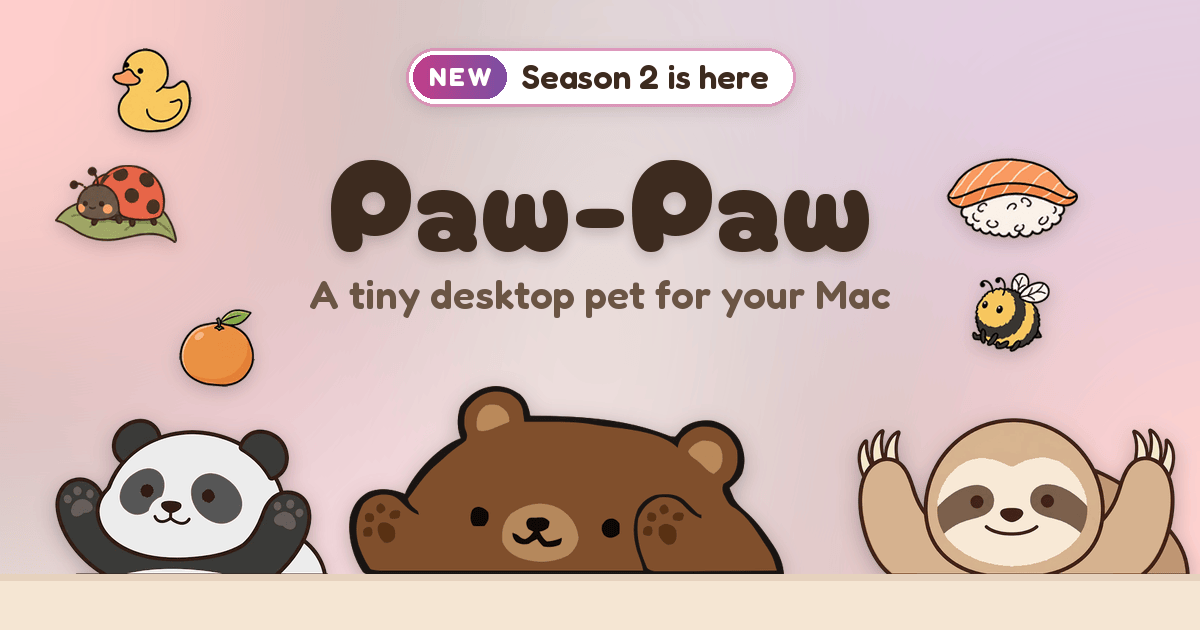
Paw-Paw is a free desktop pet for macOS. A small illustrated animal sits on your screen — in the bottom-right corner next to the Dock, or the bottom-left in Mirror Mode — and reacts as you type and click anywhere on your Mac. It is made for anyone who wants a little companion while they code, write or study, and it deliberately stays out of the way. There are no ads, no subscription and no account needed. Paw-Paw runs on any MacBook, iMac or Mac mini with macOS 13 or later, and you download it directly rather than through the App Store. Click your Paw-Paw to hear a short cheering line, or type fast to set it On Fire. Most of the day on a Mac is quiet and solitary: typing, clicking, switching windows. Paw-Paw turns that ordinary activity into something a bit cozier. Instead of adding another dashboard or task list, it makes the typing and clicking you already do count for something — key presses and clicks build XP, and XP levels your Paw-Paw up. The pet is designed to stay out of the way, so it never becomes another thing to manage. Paw-Paw needs macOS Accessibility access to notice when you type and click, but it counts key presses and clicks only, never what you type, and it never logs or transmits typed text. It checks its CDN for updates, and it sends usage analytics or crash diagnostics only if you opt in. The core loop is reactions and XP. You start with Shiba or Sheep, and as you type and click each season grows on its own track. Get into a rhythm and your Paw-Paw catches fire, setting it On Fire and earning 2× XP while it burns. You can choose which season or collection earns XP, so your progress goes where you want it. Leveling up unlocks more Paw-Paws, and both seasons — Season 1, the original Paw-Paws, and Season 2, which starts with Sheep — are free to discover. Clicking your Paw-Paw also makes it talk, offering little cheers for the next small step in speech bubbles. Paw-Paw is also a collection game. Type, click and work to earn random item drops: more than 100 free items, from common sprouts to legendary frog princes, and every one of them fits every Paw-Paw. You try an item on by clicking it or dragging it onto your Paw-Paw in the corner; click or tap it again to take it off. Gifts arrive as one of three gift balls — pick one and you can wear what is inside straight from the reveal — and Open All lets you open a pile of gifts at once. The Library window brings every Paw-Paw, item and achievement together in one place, with a page for each season, a category filter, a search field, and badges showing which season each item came from. Season 2 added achievements to earn, along with secret Paw-Paw and item pairings to find in the app. Achievements appear as pop-ups, such as First Spark and New Look. You can also make the pet yours: choose a Small, Medium or Large size and turn on Mirror Mode in Settings, then right-click your Paw-Paw, or its Dock icon, to switch Paw-Paws and items or set its opacity. Your Paw-Paw sits next to the Dock but can be dragged anywhere, and Reset Position puts it back. Paw-Paw also has its own Dock icon, with a right-click menu that includes Open Library, Change Paw-Paw and Click-Through, among other options. Paw-Paw's approach is deliberately lightweight. It is a native macOS app rather than a browser toy, shipped as a universal binary that runs on Apple silicon and Intel Macs. You download it directly, with no App Store and no sign-up, and the download is signed with Apple Developer ID and notarized by Apple. Accounts are optional: sign in only if you want to buy a collection or keep your progress in sync, and signing in on a new Mac brings your progress along in one step. Updates download in the background, the Library now opens on Home, and a short tour shows you around after setup. Compared with most desktop extras, there is very little to configure and nothing to maintain. The outcome is small but real: a desk that feels less empty during long sessions. Because Paw-Paw reacts to what you are already doing, using it costs no extra effort — you do not open it, configure it or check it, and XP, item drops and achievements simply accumulate while you type. The pet naps when you pause and returns when you start again, so it stays out of the way until you want to interact with it. Clicking it gives a quick moment of encouragement; leveling up gives you new Paw-Paws and items to look forward to. Everything is free with no ads and no subscription, so the fun does not come with an ongoing cost or a recurring bill to track. Day to day, Paw-Paw fits the way people already work on a Mac. During a long coding session it keeps you company and quietly turns keystrokes into XP; while drafting or writing it levels up on the same typing you would do anyway. Students and solo workers get a tiny companion in the corner that cheers them on when they click it. Collectors work through two seasons of Paw-Paws and 100+ items, hunt achievements and secret pairings, and try endless item combinations on their pet. Anyone who uses more than one Mac can sign in and carry their progress along. And because the pet can be resized, mirrored, made more or less opaque and dragged anywhere, it also serves as a small piece of desktop decoration you can arrange around your own setup. Paw-Paw is aimed at macOS users who want a cute, low-effort companion on their desktop, and at collectors who enjoy unlocking things over time. It requires macOS 13 Ventura or later, including macOS 14 Sonoma, macOS 15 Sequoia, macOS 26 Tahoe and macOS 27, and runs on Apple silicon and Intel Macs, from a MacBook Air to an iMac or Mac Studio. It is macOS only for now; a Windows version is planned for later in 2026, alongside multiplayer, Season 3, a winter holiday special and Japanese, Korean and Chinese translations. Pricing is simple: Paw-Paw is free, with both seasons, all of their Paw-Paws and items, and no ads or subscription. The one optional extra is the Illustrain Collection — 5 Paw-Paws and 57 items on a level track of their own, illustrated by Illustrain, bought inside the app for a one-time USD 2.99. In short, Paw-Paw turns the ordinary typing and clicking you already do on a Mac into a small, free, ongoing source of companionship and collection. It asks nothing of you — no account, no subscription, no ads, no keystroke recording — and gives back reactions, cheers, XP, level-ups, items and achievements, all from a tiny friend sitting quietly in the corner of your screen.
OpenSwarm is a free AI desktop for Mac where many agents work at once. Rather than giving you one assistant in one chat window, it puts a desktop in front of you on which a swarm of agents runs in parallel, each agent with its own browser, apps and tools. The stated goal is straightforward: anything you do on your computer, a swarm can do for you. You tell OpenSwarm what you want, the agents work with you at the helm, and you can watch the whole swarm on one canvas, step in when you want, and pick up the finished work. Most AI tools still give you one agent in one chat. It works on a single task while you wait, and anything bigger than that ends up back on your plate. That limitation is the problem OpenSwarm sets out to remove. When a job involves dozens of small steps - searching many pages, checking several sources, drafting a message for every name on a list - a single conversational agent cannot keep up, so the human becomes the bottleneck and the coordination work lands back on them. OpenSwarm reframes the work as orchestration instead of execution: you describe the outcome, and a swarm of agents carries out the parallel steps while you stay in control of the direction. One of the clearest demonstrations of the swarm model is parallel browsing. A single ask - the site's own example is "Best food in Berkeley" - opens six browsers at once, and each agent reads its own set of pages. Instead of one agent walking through search results one after another while you wait, six lines of research run simultaneously and their findings come back together. Agents also use your browser, your apps and connected tools, which means they can carry a task through to the end rather than stopping at advice. The site frames this as unlimited capability: whatever you would normally do on your computer, the swarm can do it for you, and it finishes the whole task instead of telling you how to do it. OpenSwarm also builds software on request. In the example shown on the site, you type "Make me an app for my daily brief" and an agent builds the tool for you; it then sits in your launcher next to the rest of your apps. That behaviour matters because it removes the gap between having an idea for a small utility and actually having it. You do not need to know how the app is put together or where it lives - you describe the tool you want in plain language, and it appears as a finished app in the same place as everything else you use. This is the sense in which the product describes apps creating themselves: the desktop grows to fit the work you ask for. On top of the desktop itself, OpenSwarm offers an agent marketplace - a set of apps that your agents use inside OpenSwarm to find leads, validate problems and more. Lead Finder is described as an app for finding your next customers with five agents. Problem Validator takes a description of a problem and sends agents to search Reddit, X, Hacker News and review sites for real people who have it, using six agents. Post Harvester asks you to paste a profile, after which three agents harvest the posts and turn them into a knowledge base you can talk to. Social Footprint Finder takes a name or a handle, and six agents find public profiles across the web. More apps are listed as coming soon: Text Agents, Call Agents and Verbal Hotkeys. The pattern behind all of these apps is the same: a big job is split so that every source or every unit of work gets its own agent. Problem Validator is the clearest illustration - it gives every source its own agent so that Reddit, X and Hacker News are searched at the same time rather than one after another. You then supervise the swarm on a single canvas, watch what each agent is doing, intervene where your judgement is needed, and collect the results when the work is finished. OpenSwarm describes itself as an AI-first operating system where agents run the whole machine - apps create themselves, browsers control themselves, and swarms of agents work together - turning your operating system into an infinite canvas and your work from doing one task at a time into orchestrating dozens in parallel. The benefits follow directly from that structure. Work that used to be serial becomes parallel, so waiting time shrinks and more of a task can be handed over instead of just the easy part. Because the agents use your browser, apps and connected tools, they can finish the whole job rather than leaving you to complete it. At the same time, you are never out of the loop: the swarm is visible on one canvas, you can step in when you want, and you pick up the finished work when it is ready. OpenSwarm summarises the outcome as being at the helm - you are no longer the person doing one task at a time, but the person orchestrating dozens. The site positions OpenSwarm as one desktop for every team and lists sales and outreach, operations, recruiting and research as the areas it is built for. The sales example is spelled out in detail: a user can ask OpenSwarm to find 50 Series A fintech startups in New York and draft a first email to each founder. The swarm finds the right people, learns what they care about, and has a first email ready for each one, with progress shown against a running total of leads. Research workflows appear in the same way - the Berkeley food question, or validating a problem across many sources at once - while recruiting and operations teams are named as the other functions that can hand repetitive, multi-step work to a swarm. OpenSwarm is a free AI desktop for Mac. The site describes it as a 100% free AI desktop, and access is being handled through a waitlist: at the time of writing the page showed 10,672 people on the waitlist, and joining requires only an email address, with early-access updates sent by email and unsubscribe available at any time. The workflows shown reference LinkedIn, Crunchbase, HubSpot and Gmail as the tools involved in the outreach example, alongside the apps agents use inside OpenSwarm. The page carries a "Backed by" link to joinef.com. Beyond the Mac desktop itself, the marketplace apps - Lead Finder, Problem Validator, Post Harvester and Social Footprint Finder - each come with a stated number of agents, and Text Agents, Call Agents and Verbal Hotkeys are marked as coming soon. OpenSwarm's proposition is easy to state and hard to do: instead of an assistant that answers in a chat while the real work stays with you, it offers a desktop where a swarm of agents works at once, each with its own browser and tools, all visible on one canvas. You keep the helm; the swarm keeps the pace. Whether you are researching a market, validating an idea, harvesting posts, finding leads or drafting outreach, the product turns a queue of small tasks into parallel work that can be finished and handed back to you - and it is free for Mac users who join the waitlist.
Mega Jell-EEZ Peelable Mango is a fun and flavorful jelly candy made for mango lovers. Its peelable design adds an enjoyable way to eat the soft, chewy candy while delivering a sweet and fruity mango flavor in every bite. The playful texture and easy-to-peel format make it a fun choice for candy lovers, parties, sharing, and everyday snacking. Perfect for retailers and wholesale buyers looking to add an eye-catching mango treat to their candy selection. Visit us for more information!
Ana by Vertice is an autonomous negotiation agent built specifically for software purchases. Ana runs software negotiations on your behalf: it reads your requirements, builds the strategy, drafts every email and tracks every round, updating the plan the moment a vendor responds. It is built for procurement buyers and sourcing teams who want negotiation expertise applied to every purchase rather than only to the largest or most strategic deals. Ana is trained on what Vertice describes as the world's largest procurement intelligence dataset and has negotiated $500 million in spend over more than 4,000 negotiations. Ana is built by Vertice. Most teams overpay on SaaS renewals because they go into the negotiation without knowing what a competitive price actually looks like. The negotiation itself is also a chore: rounds of back-and-forth email, spreadsheets and vendor pressure that consume hours of skilled procurement time and rarely leave a clear record of why a deal was struck. As one customer quoted on the page puts it, Ana "replaces chore, not core - it's scalable, takes away the non-value-add back and forth, and frees up time to tap into commercial value you wouldn't otherwise have had time for." The product is built to deliver negotiations at scale and specializes in long tail spend, giving hours back on every renewal. Ana's core advantage is data. It is trained on the world's largest software pricing dataset, built from thousands of comparable live negotiations, with 32,000+ vendors benchmarked across every category, 2M+ vendor price points powering every negotiation, and $75bn+ of real vendor spend analysed and applied. Because it has been trained on thousands of comparable live negotiations, Ana knows how vendors price, when they concede, and what it takes to secure the best terms. Every insight Ana produces is backed by data rather than instinct. That intelligence is what allows a buyer without deep negotiating experience to benchmark a deal accurately and to know which requests are realistic. Working from that intelligence, Ana starts by analysing your deal and benchmarking it against thousands of comparable contracts across 32,000+ vendors and 2M+ price points. It then builds a negotiation strategy specific to your vendor and your requirements, drafts the outbound emails with the reasoning explained, and adapts its approach as your vendor responds. In practice this means you always know what to ask for and how to ask for it, rather than guessing. Users comment on the quality of the writing: one Global IT Sourcing Manager at a global security services company said the AI wording is very natural, and that it looks professional but also like a human wrote it. Control sits with the buyer. Ana is explicitly designed as a co-pilot, not an autopilot: it drafts every email, includes the reasoning behind it, and waits for your approval before anything is sent, and tone settings and constraints are configured upfront so Ana operates within boundaries you define. You can review, edit or ignore any recommendation before it goes anywhere, and tone, timing and escalation decisions always remain yours. Ana also tracks every round and updates the plan the moment a vendor responds. Its deal overview and analysis lets you go back and see the evidence for why a purchase was approved, which one customer described as important from an audit trail perspective. Ana's overall approach combines an aggregate procurement dataset with a human-in-the-loop workflow. It handles the data-heavy parts of negotiation - analysing the deal, benchmarking it, building the strategy and drafting the emails - while leaving judgement calls to the procurement team. Vertice states that Ana is trained on its aggregate dataset, built from years of vendor negotiations across thousands of contracts, and that your individual contract data is not shared with other customers or used to train against your interests. One customer highlighted that everything lives on the same page, rather than a tab for Gmail, another for an AI assistant and another for an Excel comparison. The reported outcomes are concrete. Procurement buyers using Ana achieve 18% savings on average, and 15 days cut from renewal cycles. Beyond headline savings, the product gives procurement teams hours back on every renewal by removing repetitive vendor back-and-forth and replacing it with a structured, evidence-backed process. Because every recommendation arrives with its reasoning attached and every step is approved by your team, those savings are achieved without giving up control of vendor relationships or the audit trail that procurement functions are expected to maintain. Ana is used wherever software is bought or renewed. Typical scenarios include negotiating a SaaS renewal where the team does not know what a competitive price looks like; benchmarking a contract against comparable deals across 32,000+ vendors and 2M+ price points before going back to a vendor; handling long tail spend, the many smaller agreements that would otherwise receive little or no negotiation attention; running multi-round negotiations in which the vendor responds and the strategy must adapt; and keeping a record of the analysis and evidence behind an approved purchase for audit purposes. Ana is aimed at procurement buyers, sourcing teams and procurement experts responsible for vendor negotiations. Named users quoted on the site include a Procurement Lead at Baringa, the APAC & EMEA Head of Strategic Sourcing at Bloomberg, a Procurement Expert at Lenqi and a Global IT Sourcing Manager at a global security services company; customer logos displayed on the page include Santander, BlackBerry, ARM, ClearScore and Factorial. The page does not publish pricing or plan details - the primary calls to action are to book a demo or get started with Ana. Ana is accessed through Vertice's website at vertice.one, where the product is described as the #1 AI agent for vendor negotiations. Ana by Vertice brings negotiation expertise to every software purchase by combining the world's largest procurement intelligence dataset with a co-pilot workflow that keeps procurement teams firmly in control. It analyses and benchmarks your deal, builds and adapts the strategy, drafts and tracks every email, and leaves approval and escalation decisions with you - delivering 18% average savings, 15 days cut from renewal cycles and hours back on every renewal.
Wabi describes itself as a new kind of messenger that gets things done. According to its website, it is a messenger that makes apps and gets things done for you and your friends, so that a conversation becomes the place where plans actually happen. The company frames the product as "the OS for the agentic era — software that adapts to your life, gets things done, and makes more room for the people and things that matter." Its messaging is aimed at groups: friends organizing a trip, people who share bills and subscriptions, students, book clubs, pet owners, dinner planners and concert-goers. The promise on the site is simple and repeated in its call to action, "Let Wabi handle your next group trip," followed by "More of what you want to do. Less of what you have to." The problem Wabi addresses is visible in the way group chats usually end up: a lot of talking, and then a lot of loose ends. The website's use-case list reads like a catalog of exactly those loose ends — group trips that still need to be organized, bills and subscriptions that quietly grow, school items, group pets, games, book clubs, dinner plans and live music. One of the example conversations on the site makes the problem concrete: Wabi tells a user that their Comcast bill went up $41 a month and asks, "Want me to try to renegotiate it?" The point is not that people need another place to type messages; it is that the things discussed in a chat typically require separate apps, separate reminders and separate effort to finish. Wabi positions itself as the layer that closes that gap between talking about something and actually doing it. The most distinctive claim in the content is that Wabi not only carries a conversation but also builds the small apps that the conversation needs. The Product Hunt description states that Wabi is "a new kind of messenger that makes apps and gets things done for you and your friends." The website illustrates this with a set of use-case tiles that recur throughout the page: Group trip, Bills & subs, School, Group pet, Games, Book club, Dinner plan and Live music. Each of these is presented together with its own icon and the label of the app or scenario it represents, suggesting that these are the kinds of lightweight, purpose-built spaces Wabi can create around a group's activity. In other words, instead of asking users to leave the chat for a dedicated planning tool, Wabi brings the tool into the conversation, where the context — who is involved, what was decided, when it happens — already exists. A second, equally prominent theme in the content is proactivity. In the "Wabi conversation" example screens shown on the site, Wabi is not waiting to be asked questions; it is reporting things it has noticed. In one thread, Wabi says: "Your flight confirmation email just landed. San Francisco (SFO) → Mexico City (MEX). Sep 30 – Oct 5." The same thread displays a flight card with departure 09:55 and arrival 14:20, a destination label reading "CDMX," a trip countdown reading "DEPARTURE ✈ 14 DAYS 08 HRS 32 MIN," and a widget labelled "Mexico City · Local recs." In another conversation, Wabi says "I've put all your upcoming live shows into one app," above a list of concerts (Turnstile Sep 25, sombr Oct 4, Disclosure Nov 12). A third example shows a Subscriptions app with a monthly total of $327.60 and Wabi's offer to renegotiate a bill. Each example follows the same pattern: an inbound piece of information is detected, organized and surfaced inside the chat with a suggested action attached to it. Wabi's shared, group-oriented side is expressed through its use-case categories. The page names Group trip, Bills & subs, School, Group pet, Games, Book club, Dinner plan and Live music, and the site's headline call to action is "Let Wabi handle your next group trip." Those labels cover both logistics — a trip with flights, a countdown and local recommendations — and recurring group life, such as dividing bills and subscriptions, coordinating school matters, tracking a shared pet, running games, choosing a book, planning a dinner, or keeping track of live music everyone wants to attend. Because these appear as reusable tiles rather than one-off screens, the implication of the content is that a group can spin up a working space for whatever activity it currently cares about, inside the same messenger the group already uses for conversation. The overall approach, as described, is to treat the messenger as an operating layer rather than a chat window. Wabi calls this "building the OS for the agentic era," and defines that software as something that "adapts to your life, gets things done, and makes more room for the people and things that matter." The examples support that framing: information arrives from the outside world — an emailed flight confirmation, a set of upcoming shows, an increase in a monthly bill — Wabi turns it into an organized in-chat object such as a trip card with a countdown, a consolidated shows app, or a subscriptions view with a monthly total, and then offers the next step, such as trying to renegotiate that bill. The "+Message" control visible in each mock conversation indicates that Wabi sits inside the normal flow of messaging, so users keep responding with plain messages rather than switching tools or learning a new interface. The benefits stated or directly shown in the content follow from that structure. The site's closing line, "More of what you want to do. Less of what you have to," summarizes the value proposition: less administrative overhead and more time for the actual point of the group, whether that is a trip, a book, a show or a dinner. Practical benefits visible in the examples include being told about a flight confirmation without hunting for it, seeing a countdown to departure, having upcoming live shows gathered in a single app, seeing subscription spending in one monthly figure, and being offered help when a bill increases. The underlying promise is that nothing important said in the chat gets lost, and that the follow-through happens alongside the conversation rather than somewhere else entirely. The content describes a wide spread of concrete situations. A group trip is the flagship example: the site explicitly invites users to "Let Wabi handle your next group trip," and the conversation mock-up walks through a San Francisco to Mexico City itinerary with flight times, a countdown to departure and local recommendations for CDMX. Bills & subs is another: a Subscriptions app showing a $327.60 monthly total, plus the example of Wabi flagging a Comcast increase of $41 a month and offering to try to renegotiate it. Live music is shown as a consolidation task, with several upcoming concerts collected into one app. The remaining named scenarios — School, Group pet, Games, Book club and Dinner plan — appear as use-case tiles describing other kinds of everyday group activities that Wabi is presented as supporting. The audience implied by the content is people who organize life in groups: friends and travel companions, households and bill-splitters, students, club and hobby organizers, pet owners and concert-goers. The meta keywords on the site list "Wabi, messenger, group chats, trip planning, everyday tasks," which matches that framing. On availability, the site provides a "Get Wabi" call to action, and its page metadata includes an apple-itunes-app identifier (app-id 6747768928), indicating a mobile app presence, alongside the web page at wabi.ai. No pricing, plan tiers, technology stack or integration details are stated in the provided content, so those specifics cannot be confirmed here. In summary, Wabi is a messenger that aims to get things done rather than just carry messages. It positions itself as an operating system for the agentic era, making apps and handling everyday tasks for you and your friends, and illustrates that idea with group trips, bills and subscriptions, live music, school, book clubs, dinner plans, group pets and games. Its stated value is straightforward: more of what you want to do, and less of what you have to.
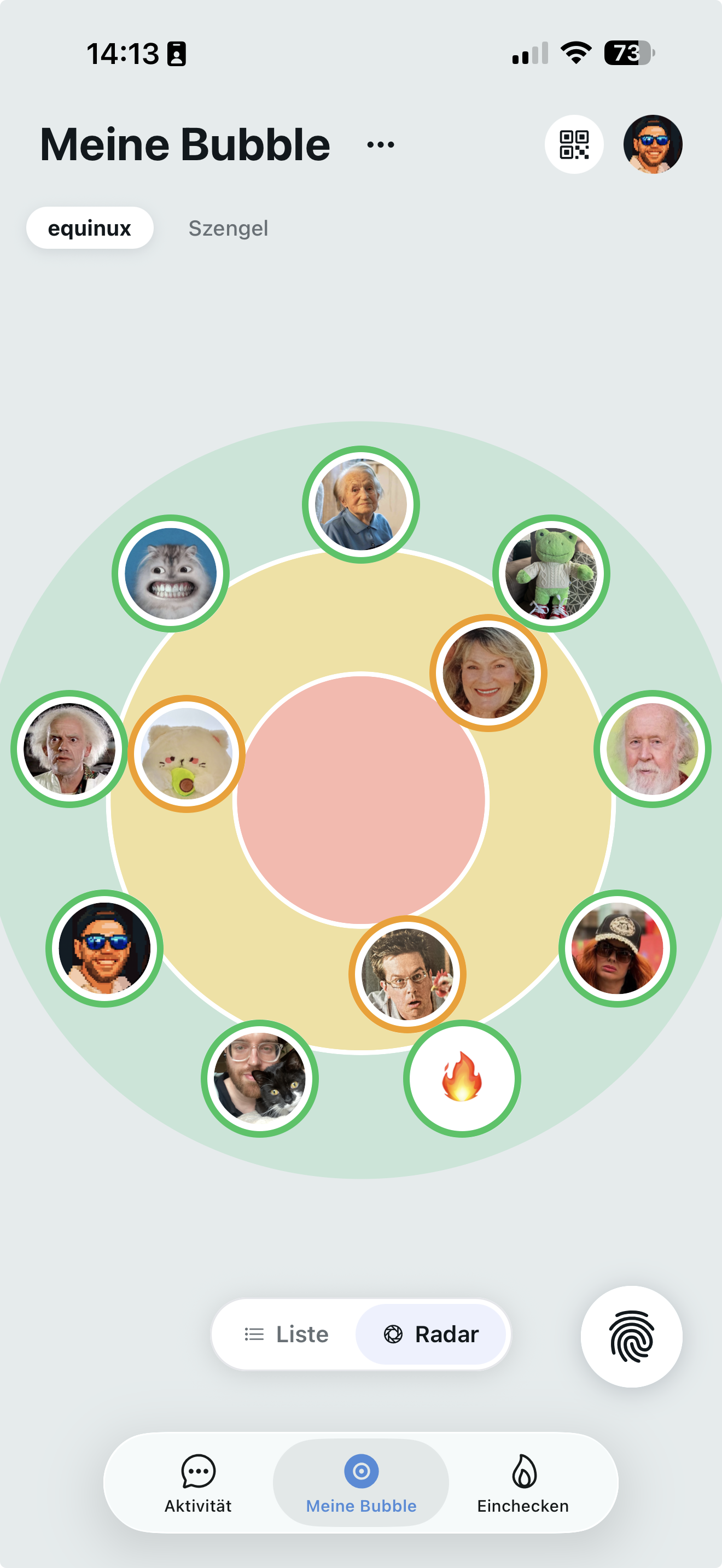
Knuff is a family check-in app that makes it easy to see how the people around you are doing, even when life gets busy. It is made for families and friend groups of all ages — grandparents, parents, children, partners, neighbours, colleagues, football teams, roommates and school friends. With Knuff you create a bubble with your most important people and share quick check-ins so that everyone stays connected, wherever life takes you. The app is available for iPhone and iPad with iOS 16 or later, as well as Android smartphones. Knuff was developed to bring people closer together and give them a good feeling in everyday life, whether between grandparents, children, parents, partners or friends. Ordinarily, staying in touch means sending messages, making calls or starting a conversation, which is not always practical when schedules differ or when someone simply wants to signal that everything is fine without saying much. Knuff complements existing messengers rather than replacing them: it is not necessarily a substitute for WhatsApp or iMessage. The focus is on knowing how the people in your bubble are doing and informing you if someone has been inactive for a long time. That way, everyone stays up to date and can react if someone does not check in as usual. The heart of the app is the check-in itself, which the site describes as effortless — just tap. Inside your Bubble or in the Knuff Chat you tap the hand button, select a Knuffling, indicate how you feel and check in. No more messages and no more calls are required; once you check in, your Bubble knows you are okay. Check-ins can optionally be expanded with a range of personal touches: you can indicate whether you feel good or bad, add a personal message, upload a photo or video, take a picture directly via the camera, record a voice message, create a poll for your group, or share your current location. This keeps checking in flexible and personal, depending on how much you want to share. Knuff organises people into Bubbles, which are separate groups for family, close friends, neighbours or colleagues. Everyone in a bubble can see each other's check-in status — private, simple and reassuring. The Bubble map shows at a glance how current the check-ins of your friends are: whoever has just checked in remains outside in the green area, while a friend whose last check-in was a long time ago moves further towards the centre, towards the red area. Because each Bubble is its own separate group, your Knuff Check-Ins are shared only with the members of the Bubble where they are created, and are never shared across Bubbles. Other Bubbles do not have access to your Check-Ins, so you control who receives which check-ins by choosing the Bubble you post them in. Beyond check-ins, Knuff also includes lighter communication and customisation features. You can discuss, share pictures and upload videos, and simply stay in good contact with your loved ones, with reactions available on check-ins and member details you can open. Bubbles can be personalised with different Bubble themes, such as the "Sardegna" theme shown on the website. Knufflings are the little figures that make the check-in process more personal: you select one to accompany your check-in and make it more individual, and Knufflings can be purchased individually or given as gifts. In the Bubble Store you can specifically expand your Bubble with surveys, appointment scheduling, sharing locations or longer video clips; these functions apply to each Bubble in which they are activated and are activated for the entire Bubble, so all members can use them. Knuff takes an unusual approach to privacy and ownership, which the site presents as a key part of the product. It is built in Munich, Germany, by a small, independent team rather than a big corporation, and data stays entirely in Germany — the company does not use AWS, Google, Microsoft or other US cloud providers, storing data in its own German data centre. Knuff describes itself as a European product and, with great attention to detail, as a very good complement to US mainstream apps rather than a replacement for them. The app is also international: users can choose their favourite language from a long list that includes English, Arabic, Catalan, Czech, Danish, German, Greek, Spanish, Finnish, French, Swiss German, Hebrew, Hindi, Croatian, Hungarian, Indonesian, Italian, Japanese, Korean, Malay, Dutch, Polish, Portuguese, Romanian, Russian, Slovak, Slovenian, Swedish, Thai, Turkish, Ukrainian, Vietnamese, Simplified Chinese and Traditional Chinese. Inviting people into a Bubble is deliberately simple. Inside your Bubble you tap the plus symbol; people who are with you can simply scan the avocado to join, or you can invite other people by email, WhatsApp and similar channels. Bubbles manage themselves in a lightweight way too: a bubble is automatically deleted when the last member leaves it, and you can delete your own account by tapping the head icon in the top right of the app and then your name at the very top of the list. When a check-in is missed, the other members of the bubble are notified, which is what turns a simple tap into genuine reassurance. The benefits Knuff promises are straightforward. Busy people no longer need to send a message to let someone know they are fine, and the people who worry about them get a clear, current signal instead of silence. Family members living far away can feel closer, parents can feel reassured when a child arrives somewhere on their own, and partners who are apart can share a small glimpse of their day without needing to start a conversation. Everybody in a bubble sees the same status, so nobody is left guessing. The website illustrates concrete scenarios through a cast of example users. Margaret, 68, lives alone and is recovering from hip surgery; she values her independence and loves being able to stay connected to family life through small updates from her family. Thomas, 72, and Janet, 69, live abroad and love staying in touch with their grandchildren from afar through photos and video clips. Sophie, 45, is a busy mum of three who works from home; Knuff helps her know her children are okay and stay connected with colleagues throughout the day. Daniel, 48, is a pilot and often far from home; a quick check-in on Knuff shows his partner where he is and gives her a little glimpse into his day, without needing to send a message or start a conversation, and he can also use a dedicated bubble to let his football friends know when he is ready for a match. Olivia, 19, has just moved to a new city for university and keeps in touch with her family and roommates. Noah, 15, checks in quickly and easily when he is out with friends in the evening, with or without sharing his location. Grace, 11, has recently started going to her new school on her own, and her parents feel reassured when she quickly checks in after she arrives. Knuff is free to use: all core features are available free of charge. If you like, you can purchase additional Knufflings, Bubble designs or features in the Knuff Shop. Knuff does not offer subscriptions; instead, features are available through Passes with a fixed validity period, so there are no automatic renewals and no recurring charges. A Pass expires automatically, and you are only charged for another Pass when you explicitly confirm the purchase. You can extend a Pass at any time, even before it expires, and the additional time is added in full to your current Pass. Purchases in the Bubble Store are also one-time purchases for a certain period rather than subscriptions; they add up, so you can purchase a period multiple times and the end date adjusts accordingly. A Bubble Store Pack is activated for the entire Bubble, so once a pack is unlocked all members can use the included features, and each Bubble member can unlock a feature that benefits everyone. Packs apply only to the Bubble in which they were purchased or unlocked, although it is possible to sponsor Bubble packs in all bubbles via a separate purchase. Knuff is built for people who care. Whether the goal is letting a grandparent know you are thinking of them, reassuring a parent that a child arrived safely, or simply keeping a group of friends in light, low-effort contact, the product reduces staying in touch to a single tap. Its combination of a Bubble map, personalised check-ins, private group bubbles and a European, subscription-free pricing model makes it a reassuring companion rather than another noisy messenger.