Category Focus/categories/sales
Sales AI Tools
Discover and compare the best sales AI tools and software. Browse 69+ curated tools with reviews and rankings.
Projects tracked
69
Sort mode
RECENT
Page
1
Discover and compare the best sales AI tools and software. Browse 69+ curated tools with reviews and rankings.
Projects tracked
69
Sort mode
RECENT
Page
1
Ana by Vertice is an autonomous negotiation agent built specifically for software purchases. Ana runs software negotiations on your behalf: it reads your requirements, builds the strategy, drafts every email and tracks every round, updating the plan the moment a vendor responds. It is built for procurement buyers and sourcing teams who want negotiation expertise applied to every purchase rather than only to the largest or most strategic deals. Ana is trained on what Vertice describes as the world's largest procurement intelligence dataset and has negotiated $500 million in spend over more than 4,000 negotiations. Ana is built by Vertice. Most teams overpay on SaaS renewals because they go into the negotiation without knowing what a competitive price actually looks like. The negotiation itself is also a chore: rounds of back-and-forth email, spreadsheets and vendor pressure that consume hours of skilled procurement time and rarely leave a clear record of why a deal was struck. As one customer quoted on the page puts it, Ana "replaces chore, not core - it's scalable, takes away the non-value-add back and forth, and frees up time to tap into commercial value you wouldn't otherwise have had time for." The product is built to deliver negotiations at scale and specializes in long tail spend, giving hours back on every renewal. Ana's core advantage is data. It is trained on the world's largest software pricing dataset, built from thousands of comparable live negotiations, with 32,000+ vendors benchmarked across every category, 2M+ vendor price points powering every negotiation, and $75bn+ of real vendor spend analysed and applied. Because it has been trained on thousands of comparable live negotiations, Ana knows how vendors price, when they concede, and what it takes to secure the best terms. Every insight Ana produces is backed by data rather than instinct. That intelligence is what allows a buyer without deep negotiating experience to benchmark a deal accurately and to know which requests are realistic. Working from that intelligence, Ana starts by analysing your deal and benchmarking it against thousands of comparable contracts across 32,000+ vendors and 2M+ price points. It then builds a negotiation strategy specific to your vendor and your requirements, drafts the outbound emails with the reasoning explained, and adapts its approach as your vendor responds. In practice this means you always know what to ask for and how to ask for it, rather than guessing. Users comment on the quality of the writing: one Global IT Sourcing Manager at a global security services company said the AI wording is very natural, and that it looks professional but also like a human wrote it. Control sits with the buyer. Ana is explicitly designed as a co-pilot, not an autopilot: it drafts every email, includes the reasoning behind it, and waits for your approval before anything is sent, and tone settings and constraints are configured upfront so Ana operates within boundaries you define. You can review, edit or ignore any recommendation before it goes anywhere, and tone, timing and escalation decisions always remain yours. Ana also tracks every round and updates the plan the moment a vendor responds. Its deal overview and analysis lets you go back and see the evidence for why a purchase was approved, which one customer described as important from an audit trail perspective. Ana's overall approach combines an aggregate procurement dataset with a human-in-the-loop workflow. It handles the data-heavy parts of negotiation - analysing the deal, benchmarking it, building the strategy and drafting the emails - while leaving judgement calls to the procurement team. Vertice states that Ana is trained on its aggregate dataset, built from years of vendor negotiations across thousands of contracts, and that your individual contract data is not shared with other customers or used to train against your interests. One customer highlighted that everything lives on the same page, rather than a tab for Gmail, another for an AI assistant and another for an Excel comparison. The reported outcomes are concrete. Procurement buyers using Ana achieve 18% savings on average, and 15 days cut from renewal cycles. Beyond headline savings, the product gives procurement teams hours back on every renewal by removing repetitive vendor back-and-forth and replacing it with a structured, evidence-backed process. Because every recommendation arrives with its reasoning attached and every step is approved by your team, those savings are achieved without giving up control of vendor relationships or the audit trail that procurement functions are expected to maintain. Ana is used wherever software is bought or renewed. Typical scenarios include negotiating a SaaS renewal where the team does not know what a competitive price looks like; benchmarking a contract against comparable deals across 32,000+ vendors and 2M+ price points before going back to a vendor; handling long tail spend, the many smaller agreements that would otherwise receive little or no negotiation attention; running multi-round negotiations in which the vendor responds and the strategy must adapt; and keeping a record of the analysis and evidence behind an approved purchase for audit purposes. Ana is aimed at procurement buyers, sourcing teams and procurement experts responsible for vendor negotiations. Named users quoted on the site include a Procurement Lead at Baringa, the APAC & EMEA Head of Strategic Sourcing at Bloomberg, a Procurement Expert at Lenqi and a Global IT Sourcing Manager at a global security services company; customer logos displayed on the page include Santander, BlackBerry, ARM, ClearScore and Factorial. The page does not publish pricing or plan details - the primary calls to action are to book a demo or get started with Ana. Ana is accessed through Vertice's website at vertice.one, where the product is described as the #1 AI agent for vendor negotiations. Ana by Vertice brings negotiation expertise to every software purchase by combining the world's largest procurement intelligence dataset with a co-pilot workflow that keeps procurement teams firmly in control. It analyses and benchmarks your deal, builds and adapts the strategy, drafts and tracks every email, and leaves approval and escalation decisions with you - delivering 18% average savings, 15 days cut from renewal cycles and hours back on every renewal.
Ownfeed is a tool that builds a daily social feed of posts from people who appear to need your product. You paste your product's URL, and Ownfeed reads that page to learn what the product does and who it is for. From there, it searches public posts across Reddit, X, Bluesky and Hacker News and uses AI to keep only the posts where your product helps. The result is a personal timeline of relevant posts, refreshed every day, that you scroll for about five minutes and reply to yourself. It is built for indie makers. The problem Ownfeed addresses is stated plainly on its own site: you built it, you shipped it, nobody came. Launch posts get removed by moderators. Searching for people to talk to eats your whole day. A good product exists, but no one who needs it can see it. The site shows real examples of the frustration: a maker asking how to find the first 10 users without spamming, another spending three hours on Reddit looking for people who might need their app, and another wishing for a tool that tells them when someone asks for something like their product because they keep finding those threads a week too late. Ownfeed's core observation is that the people who need your product are writing about their problem today, you just cannot see them. The product exists to close that visibility gap without keyword setup, alert inboxes or automation. Setup is deliberately minimal. You paste your product's URL, and that is the whole setup. Ownfeed reads your page to learn what the product does and who it is for, then writes about 30 search terms to find your people. Your first feed is ready in a few minutes, with posts from the last 24 hours. The site's own working view shows the process for a sample product: reading the product page and generating 30 search terms, then searching four sources at once. Discovery across sources is the second core capability. Ownfeed searches Reddit, X, Bluesky and Hacker News, and the sample feed shows example result counts per source — 9 posts from Hacker News, 11 from Bluesky, 42 from Reddit and 18 from X in that illustration. AI then picks the posts that matter, keeping only the ones where your product helps. The feed can be filtered between 'Today' and 'All relevant.' The example posts shown include freelancers asking how to chase unpaid invoices, a solo designer looking for a dead-simple invoicing app, a Bluesky post about third reminder emails, an Ask HN thread about late payments, a mention of a specific invoicing tool, and a Reddit request for an invoicing app that sends polite reminders automatically. These illustrate the kinds of posts Ownfeed surfaces and are labeled as pain points, tool requests and mentions. Reading and replying is the third step, and it is intentionally manual. You spend five minutes in your feed each morning and reply to the people you want to talk to. Ownfeed states there is no alert inbox and no keywords to set up, and that you write the replies, not an AI — which is why they land. The FAQ reinforces this: Ownfeed never posts or replies automatically, and it never touches your social accounts. You reply in your own words, as usual. Ownfeed's approach differs from keyword alerts and monitoring inboxes in a few ways the site makes explicit. Instead of you defining keywords, Ownfeed derives roughly 30 search terms automatically from your product page. Instead of delivering an inbox of alerts to triage, it delivers a daily timeline you scroll. Instead of automating outreach, it deliberately leaves the writing to you, on the stated reasoning that human-written replies are the ones that land. The whole workflow is framed as three steps — add your product, AI finds your people, scroll and reply — and as a five-minute-a-day habit. For users, the stated outcome is time saved and better-targeted conversations. Instead of spending hours hunting Reddit for people who might need your app, you get a ready feed of posts where your product helps, drawn from the last 24 hours. Instead of finding relevant threads a week too late, you see people writing about their problem the day they write it. And because you write the replies yourself, there is no automated spam risk to your account and the replies are more likely to land. The concrete use cases shown on the site are indie makers shipping a product and looking for the first users, freelancers and solo operators searching for tools, and makers replying to pain-point threads, tool recommendation requests and mentions of their product. In the sample feed, the product being monitored is an invoicing tool, and the relevant posts are freelancers with late invoices, solo designers wanting a simple invoicing app, an Etsy seller needing automatic polite reminders, and a Bluesky user mentioning they switched invoicing to that tool for automatic reminders. In general terms, Ownfeed suits anyone who wants to find and reply to public conversations where their product is the answer. Pricing starts with a $1 one-day trial that shows a day of your feed before you decide; $1 today, then $39/month starting the next day unless you cancel before then. The monthly plan is $39/month, renewing monthly and cancellable anytime from Billing in Settings. The 3-month plan is $89 every 3 months. Every plan includes one product and a daily timeline, and the 3-month plan additionally includes beta sources: LinkedIn, Threads, TikTok, Instagram, YouTube and Product Hunt, delivered in small daily amounts with no guarantees while in beta. Every option renews automatically until cancelled; prices are in USD and tax may be added at checkout. The trial, monthly and 3-month options all include Reddit, X, Bluesky and Hacker News. Ownfeed is a web product accessed through the browser. In short, Ownfeed's value proposition is visibility without automation: paste your product URL, get a daily feed of posts from people who need what you built, and spend five minutes replying in your own words.
Supademo's AI Demo Agent is an always-on agent that runs product demos for prospective buyers. According to Supademo, you deploy self-improving AI agents that run discovery, answer questions, handle objections, and showcase interactive content to drive warmer leads from day one. Rather than filling out a demo form and waiting for a sales representative, a buyer meets the agent, is asked about their role, goals, pain points, and what brought them there, and then receives a tailored experience assembled from the vendor's own interactive demos, videos, decks, pricing, case studies, and documentation. The agent is aimed at revenue teams — sales and SDR teams, solutions engineers and presales, and PLG and growth teams — that need to qualify and educate buyers at scale. It runs 24/7 across time zones and supports voice and text in more than fifty languages, so buyers can interact however they prefer, whenever they arrive. Supademo frames the problem bluntly: your demo process is losing you deals. Buyers want to see the product before they talk to sales, but today they have to fill out a form, wait for a rep, and hope the timing works — and most don't bother. A prospect who lands at 11pm sees a "Book a demo" button, and by morning has shortlisted a competitor that let them explore instantly. Meanwhile, reps repeat the same pricing, integration, and security questions every week instead of spending that time closing. Static assets such as decks, one-pagers, and case studies get skimmed and, without guided context, even great content fails to prove value. And demos are limited by capacity: the team has limited hours, but buyers have questions 24/7 across every time zone, meaning prospects slip through the cracks. Supademo positions the AI Demo Agent as the replacement for dead-end demo forms — an always-on experience that answers questions, shows the product, and guides each buyer to the next step based on what matters most to them. The experience begins with smart discovery. Supademo states that every demo starts by understanding who is on the other side: the agent asks about the buyer's role, goals, pain points, and what brought them there, then uses that context to shape the entire experience. From there, personalization happens in real time. Based on what each buyer shares, agents surface the most relevant demos, videos, decks, content, and use cases for that specific person. Supademo explicitly contrasts this with generic walkthroughs, noting that no two demo sessions are exactly the same. Crucially, the buyer is not passively watching a screen: they click through real interactive demos hands-on, take any path, jump back, skip ahead, or have the agent guide them step by step. The agent listens, answers the actual question asked, and surfaces the right proof — by voice or by text — rather than continuing a scripted monologue. Agents then score, summarize, and route buyers to the right next step. Supademo says agents identify high-intent visitors, recommend next steps, and give the sales team a full session summary with key takeaways and action items. The example summary shown on the site includes the topics discussed (team size and structure, SOC 2 and GDPR compliance needs, integration with an existing CRM, pricing for a 50-seat team, and implementation timeline), key takeaways (the buyer is evaluating two other vendors, security and compliance is the top concern, and CRM integration is needed before trial), the assets viewed (a security demo, an SOC 2 case study, a pricing page, and a CRM integration guide), and the outcome, such as a meeting booked and sent to a rep. Instead of a rep starting cold with a name and email from a form, the handoff carries a conversation summary, topics discussed, a fit score, and the assets the buyer actually viewed. Control and grounding are central to how the agent behaves. Guardrails govern how the agent handles pricing, competitors, escalation, and sensitive topics. In the configuration example on the site, Supademo shows three guardrail types: off-limits topics as a hard rule (for example, competitor pricing and internal roadmap), escalation triggers as a hard rule (enterprise security and custom contracts), and approved responses as a soft rule (pricing tiers, integrations, and compliance). The agent is trained on approved sources you choose — interactive demos, decks, pricing, case studies, and docs — and stays grounded in that content with no hallucination and no off-brand answers, evolving automatically as you add or update sources. Interaction happens through both voice and text: voice mode handles natural back-and-forth including clarifying questions, follow-ups, and objections while still surfacing interactive demos and visual proof in real time, and both modes use the same approved sources and guardrails so the experience stays consistent. The agent can also generate tailored proof experiences and lightweight visuals based on buyer context, and it can route a buyer who says they would rather talk to a human to a team member. Getting live is deliberately lightweight. Supademo describes a four-step setup: add interactive demos, decks, pricing, and case studies; guide buyers with conversation, interactive demos, and approved assets; qualify and route buyers to the right actions around the clock; and learn from every conversation automatically. The site states most teams go live in days, not weeks, and that the agent improves from real conversations rather than manual retraining. Every buyer interaction generates signal — which demos resonate, what questions come up most, where buyers drop off, and what content drives conversion — and the agent uses these patterns to surface better answers and assets over time. Supademo calls this self-improving expertise and compounding value: every interaction sharpens qualification, surfaces better proof, and improves conversion without adding headcount. A sample agent performance dashboard tracks conversations, demos surfaced, CTA conversion, and top topics such as pricing and plans, security and compliance, and integration support. The outcomes Supademo claims for buyers and sellers follow directly from that workflow. Buyers get answers and see the product instantly instead of waiting for a callback. Interactive demos are surfaced based on what the buyer actually asks, rather than being gated behind a scheduled call or a generic recording. Availability is no longer limited to rep working hours: the agent runs 24/7 across every timezone in 50+ languages. Qualification happens in real time, before the call, instead of being done manually on a 30-minute call. Content delivery is personalized — the agent surfaces the most relevant asset for that buyer's use case rather than a generic PDF or a follow-up email. On the rep side, handoff stops being a cold start: sellers receive a conversation summary, topics discussed, fit score, and assets viewed, plus a concise summary instead of a blank form fill. And intelligence is no longer trapped in individual rep notes: every conversation generates structured data covering top questions, feature interest, and conversion patterns. Supademo presents the ROI for teams that need to qualify and educate at scale in terms of fewer unqualified sales calls, a short average setup time to go live, and more buyers arriving at the "aha" moment. Concrete use cases map to three stated audiences. Sales and SDR teams use the agent to qualify inbound buyers faster and move the right accounts to a meeting or next step without waiting on rep availability. Solutions engineers and presales use it to offload repetitive technical walkthroughs while keeping the live demo focused on high-value discussion. PLG and growth teams use it to give high-intent prospects a self-serve path to understand fit and experience the product before they talk to sales. In session, the agent can run structured discovery around role, use case, and urgency; pull up the most relevant Supademos, docs, pricing, or case studies in real time; let buyers explore multiple demos in a learn-by-doing way or guide them step by step; answer pricing, integration, and security questions; and hand qualified buyers to a rep with full context attached. Supademo is explicit that the agent does not replace the sales team — it replaces the dead space before and after the sales conversation. AI SDRs chase and schedule meetings, while the AI Demo Agent qualifies and educates buyers through real product experiences, so reps spend less time on basics like pricing and integrations and more time on deal strategy and relationships. On target users and commercial details, Supademo says the product is trusted by 200,000+ top operators and 3,000+ paying organizations across companies such as Beehiiv, Lightspeed, Khan Academy, Jotform, Bullhorn, Typeform, NetApp, Turo, Siemens, and others, with quoted users in sales enablement, presales, product enablement, customer education, and instructional design roles. AI Demo Agents are a usage-based add-on available on all paid plans (Scale and up); Enterprise customers enable it through their account team. Every workspace starts with 1,500 free credits (roughly 75 demo calls) and credits never expire. On security, agents run within Supademo's SOC 2 Type II framework with AES-256 encryption at rest and TLS in transit; customer data is never used to train AI models, and third-party AI providers the agent calls don't retain or train on your data either. The Enterprise plan adds workspace governance, role-based access control, audit logs of every conversation, and approved-source grounding. The takeaway Supademo reinforces is simple: stop losing deals to slow follow-ups and gated demos. The AI Demo Agent lets buyers experience your product and self-qualify on their own terms, 24/7 and in 50+ languages, with guardrails your team controls and every conversation feeding back into a demo experience that compounds in value the longer it runs.
lurk is a free, open-source monitoring tool that watches Reddit and X for people asking for a product like yours, scores each post and comment with a one-line reason, and delivers new leads to wherever you work. It is built for founders, marketers and sales teams who want to find customers in public conversations, get cited by AI assistants such as ChatGPT, Claude, Perplexity, Gemini and Google AI Overviews, and rank on Google. The product combines lead monitoring, Reddit SEO, competitor tracking and pain-point analysis in a single dashboard, and it never posts or sends DMs on your behalf. Most social monitoring tools stop at keyword matching. A keyword alert fires every time a phrase appears, which means you get a flood of matches you have to read yourself, no sense of whether the person is actually shopping, and no idea whether the community you would reply in even allows promotion. lurk states the difference directly: unlike a keyword alert, lurk reads the whole post and the community rules before it calls something a lead. That matters because the valuable moments on Reddit and X are specific - someone asking for an alternative to a tool you sell, someone whose licence just ran out, or someone who built their own version because nothing on the market fit. Those are the conversations where a careful, useful reply can win a customer. The core of lurk is lead monitoring. Every post and comment it finds is scored, and each one carries a written reason plus the exact phrase that matched. For each lead you can see who asked, why it matched and what the community allows, so you decide whether to join the conversation. Leads are grouped by intent: asking for what you sell, meaning someone wants a tool like yours and says what it has to do; leaving a competitor, where a licence ran out or the price went up and they are asking what to use instead; and building their own, where they built or vibe coded their own solution and big posts are ranked by reach, so a reply gets seen. lurk also keeps conversations together. One thread can contain more than one person asking, and lurk saves that conversation, marking each participant as a post, comment, comparing or solution-seeking, so you can see the whole opportunity at once. Reddit SEO is the second major surface. lurk finds the threads Google already ranks for your keywords and filters them down to the Reddit discussions that get search traffic, so a single reply keeps working long after it is posted. Each ranked thread shows its Google position, when it was posted, and how many comments it has, saved at the time it was observed so you can see which threads are still alive. lurk also flags when a competitor is named in a thread, because a thread that already compares tools is where a careful answer is welcome. In the example shown in the product, keywords such as "free form builder" and "typeform alternatives" surface r/Entrepreneur and r/marketing threads sitting at positions #1, #2, #4 and #5. Competitor tracking shows who gets recommended in the threads your leads sit in, over the last 30 days, and how each mention was meant. In the sample data, Jotform, Typeform and Google Forms each appear seven times, giving 21 mentions read with one negative. Because lurk reads the surrounding text, it can label a mention as positive, negative or simply named in a comparison. Alongside mention counts, lurk surfaces pain themes that keep coming up across your saved leads, such as "Simpler Alternative To Jotform" or "Repetitive Training Feedback Forms", so you can see which complaints are recurring rather than treating every lead as an isolated event. A distinguishing part of the workflow is that lurk puts the community's promotion policy next to the lead. Each community's rules are read from its sidebar and shown with the post, so before you reply you can see what that subreddit expects. In the example, r/nocode states "No blatant self-promotion without giving value back" and "No blatant self-promotion; contribute value". lurk's own promise is that it never posts or DMs: it is a listening and reading tool, and the decision to join a conversation stays with you. Leads arrive as a digest. New leads are sent to Slack, Discord, email or a webhook, each with the score, the reason and a link. Under the hosted free plan, scans run daily at the hour you pick, SEO data refreshes every seven days, and you get daily alerts to Slack and Discord plus one custom webhook. Saved examples are kept for 30 days and can be filtered by community. Each project supports up to 25 keywords and 10 communities, and there is an allowance of 1,000 API reads per day. You can start on a house wallet within the hosted free limits. lurk is open source under the MIT licence, and it is designed to run on your own key with your own model. Self-hosting takes one command: Docker starts the app and Postgres together, and the scoring instructions are a file in src/lib/prompts.ts rather than a hidden secret, so you can read and change exactly how leads are judged. There is a read-only API and an MCP server so your own tools and agents can read projects, leads and SEO rows; there is deliberately no tool for posting or sending a DM. An API schema is published at /openapi.json and an agent guide at /agent-guide.md. The data layer is powered by AnyAPI, which provides one key for every platform - Reddit, TikTok, Instagram and YouTube among them - with no scraper to run, no proxies to rent and no developer account on each site. Pricing is simple: lurk itself is free. The comparison table in the product shows F5Bot as another free option that only emails keyword matches, with no dashboard, no AI scoring, no competitor tracking and no SEO, while ReplyGuy starts at $10 per month, LeadsRover at $13.99 per month and GummySearch at $29 per month on their entry plans with monthly billing. Self-hosting is free as well, and the hosted plan asks for no card. AnyAPI, the data provider behind lurk, is pay per request with no subscription and failed calls costing nothing; example prices run from $0.38 per 1,000 requests for reddit.search, $0.70 for tiktok.video_comments, $1.00 for amazon.product, $1.20 for instagram.profile, $3.50 for maps.reviews and $4.00 for linkedin.profile. New users get about 150 requests on the house, no card required. Concrete scenarios from the product: a founder selling a scheduling tool watches X for people asking for a Calendly alternative with round-robin scheduling and finds both buyers and the moment a competitor's customer starts building their own. A no-code form tool watches r/nocode for people looking for a simpler Jotform alternative, and sees two people in the same thread asking for the same thing. A marketer searches "typeform alternatives" and finds the exact Reddit threads ranking on Google, writes one reply and keeps collecting traffic. Someone working on AI visibility watches the terms that appear in ChatGPT, Claude, Perplexity, Gemini and Google AI Overviews. A self-hoster runs lurk on their own infrastructure with their own model. lurk is aimed at founders and small go-to-market teams who sell software and need to find buyers in public conversations: sales and marketing people doing outbound by hand, growth marketers pursuing Reddit SEO, and developers who want an open-source alternative they can audit and self-host. Because the API and MCP are read-only, it also fits teams who want their own agents and tools to query lead and SEO data without any risk of the tool posting or messaging on their behalf. lurk turns the noise of Reddit and X into a short, reasoned list of people who are actually asking for what you sell, shows you who else is getting recommended in those threads, and points at the Reddit discussions that already rank on Google so one good reply keeps paying off. It is free, MIT-licensed, self-hostable in one command, and it never posts or DMs - it just helps you find the ask and bring something useful.
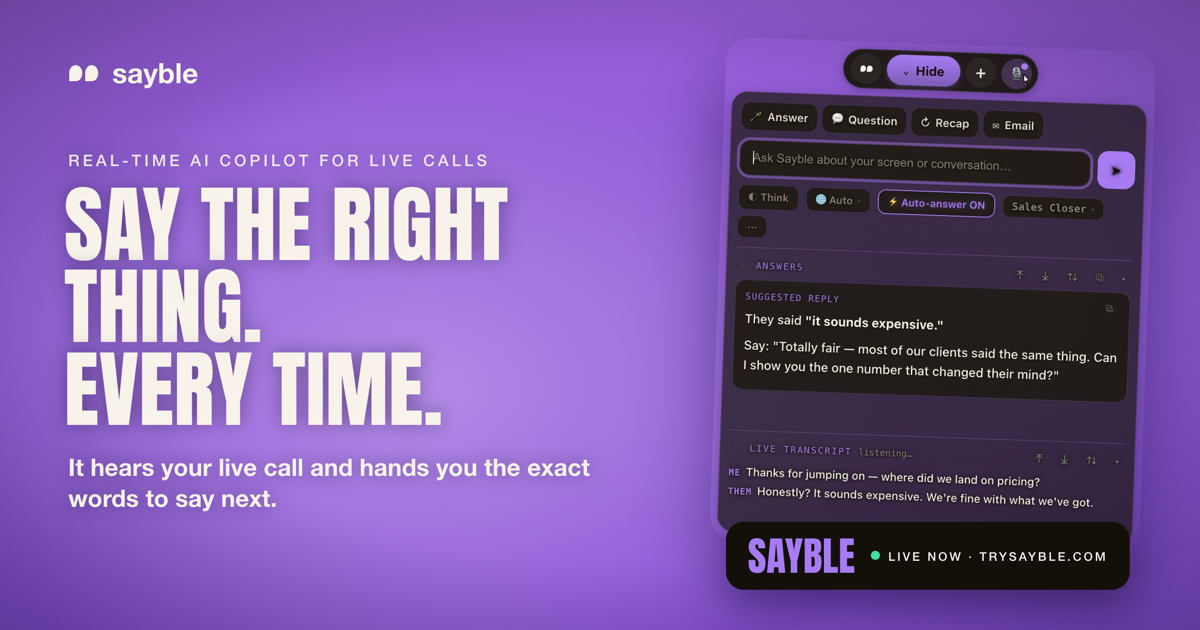
Sayble is a real-time AI copilot for sales calls, client meetings and negotiations. It listens to the conversation as it happens, hears what the other person just said, and hands you the exact words to say next — one clear line to say, plus a backup line, arriving in about half a second while they are still talking. Sayble is made for professionals whose income depends on the next conversation going well: sales closers, SDRs, account executives, founders, mortgage and insurance professionals, real estate agents, customer success teams, call centers, recruiters, consultants, coaches and financial advisors. After the call, it writes a structured recap and a ready-to-send follow-up email from what was actually agreed. Every conversation is also remembered as data you can interrogate in plain language. Sayble runs on Mac and Windows and works on the calls you already take. The context Sayble is built around is the pressure of live, high-stakes conversation. When a prospect says “your price is way higher than the other quote I got,” or “let me think about it,” or “we already have a vendor,” you have to produce a clean, human answer immediately — while still listening, still tracking the deal, and still sounding like yourself. Sayble's positioning is that the single best thing to say next is what changes the outcome, and that this moment is exactly when people freeze. It also targets the follow-through problem: after a busy day of back-to-back calls, details blur, the objection that actually stuck gets forgotten, and follow-up emails are delayed or never sent. Sayble addresses both sides of that problem — the live moment and the after-call work — from the same recorded transcript. The core capability is real-time live answers. Sayble listens to the call and writes the exact words to say back — in quotes, ready to speak, in about half a second, while the other person is still talking. The output is deliberately a single line rather than a wall of text you would never read mid-sentence, and in the app the line is paired with a backup line in case the first response does not land. The product page shows this in a sample objection scenario, where the prospect says the price sounds expensive and Sayble suggests a reframe. Sayble states that going from words spoken to an answer on your screen takes 0.8 seconds. This screen is described as designed to stay hidden on screen share — it appears on your screen only, not on the share and not in the recording. After the call, Sayble writes the recap and the follow-up. The second you hang up, it produces a structured summary of what was agreed, the objection that actually stuck, and what you owe the other side, pulled from the real transcript. It then drafts a ready-to-send follow-up email based on what was actually said, so the message is written before you have closed the laptop. The product page frames this as “the recap writes itself,” covering what was decided, the one objection that stuck and the next steps. Every recap ends with a drafted follow-up that you can review and send. This means the promise made on a call — a pricing sheet, an onboarding plan, a scope confirmation — is captured in writing immediately rather than reconstructed from memory later. The home screen pulls your day together. Today's calls are shown from your Google Calendar with one-click join, so you can join and prep from a single place. Yesterday's recorded calls are listed and ready to replay, and each one carries an auto-written recap covering what was agreed and what to send, plus the drafted follow-up email. Sayble states it remembers an unlimited number of conversations that it can recap. The result is that a call you took last week is not a vague memory but a transcript, a summary and a draft email you can return to. The home screen is one of three screens Sayble says you will actually use, alongside the live in-call view and the post-call recap view. Sayble also turns your calls into data you can question. It remembers every call, meeting and pitch, then lets you interrogate them in plain language — described as a private analyst that has sat in on all of your conversations and forgets nothing. You can ask over a range such as the last five days, the last thirty days, one hundred calls or this quarter. The product page gives the example question “What objection cost me the most deals this month?” and an answer showing that “It's too expensive” appeared in 61% of lost calls, with a note that in the calls won after that objection the rep reframed to monthly savings within 20 seconds, while in the losses the rep defended the price instead. Other example questions include who to follow up with first and what changed the mind of everyone who bought. Across the app, Sayble lists a set of supporting features. Live transcription captures every word as it is said, transcribing both sides and separating who said what so nothing is lost or misremembered. Recap produces a written summary before you hang up. The follow-up email is already written from what was actually agreed. Screen-share safe is included in your plan rather than sold as an expensive add-on — Sayble is designed to stay hidden from screen sharing and recording software. Google Calendar powers the Home screen so today's calls are one click away. Multilingual support covers ten languages natively, auto-detecting the conversation and answering in kind. Your setup — modes, prompts and reference files — follows your account across every device, and the app offers six skins with day and night canvases that switch live without a restart. Sayble's overall approach is to sit inside the calls you already take rather than ask you to change tools. It works on Google Meet, Zoom, Microsoft Teams, Slack huddles, phone calls and anything on screen, and it runs on Mac and Windows. It hears the conversation live, uses AI to analyze it and generate real-time suggestions, and then carries the same transcript forward into the recap, the follow-up email and the searchable call history. Sayble also states clearly that it uses AI to analyze the conversation and generate real-time suggestions, and that AI output can be incomplete or inaccurate — you stay in control and always use your own judgment. The app is available in version 1.2.30, with macOS (Apple Silicon, .dmg) and Windows 10 & 11 (.exe) downloads. The benefits Sayble claims are practical: sharper objection handling, faster thinking and more confidence under pressure during the call, and a written record after it. It aims to stop the thread being lost on back-to-back days by giving you live talking points during the call and a structured recap after. It surfaces what is actually losing you deals — the objection you fumble most, the moment calls go quiet, the promise you keep forgetting — from your own transcripts rather than a guess. It can condense a hundred calls into one answer and return the exact lines that worked, so you can repeat them. And it helps you never drop a follow-up by knowing who asked for pricing, who went cold and who is still waiting, then drafting the email. Concrete use cases described in the content include closers and SDRs killing an objection while the prospect is still talking, using a clean human answer in quotes; founders walking into partnership, negotiation and fundraising calls a step ahead, with Sayble tracking what was actually said when the room gets expensive; client teams such as customer success and support staying warm, on message and quick under pressure; and recruiters asking the sharp follow-up and summarising accurately every time. Back-to-back days are another scenario, with live talking points during and a structured recap after. Sayble is built for high-stakes conversations — for professionals who close, pitch and advise, and whose income depends on the next conversation going well. Sayble runs on Mac and Windows, with iOS and Android listed as coming soon along with the App Store, Google Play, Mac App Store and Microsoft Store. Pricing starts with a free download that lets you run the app live for three minutes with no card required. Sayble Pro is listed at a founder rate of $24.99 per month for your first 12 months, then $39.99 per month, and includes unlimited real-time live-call copilot, screen-share-hiding included, objection handling and closing lines, follow-ups, recaps and email drafts, call recording with recap and drafted follow-up, and multilingual support on Mac and Windows. Sayble Teams is custom-priced for sales floors and client-facing teams with per-seat access, team onboarding, priority support and volume pricing for call centers. Sayble's value proposition is that it turns the hardest part of any important conversation — knowing what to say next, and remembering what was said — into something handled for you. It pairs a single line of guidance delivered in under a second with a recap and follow-up written from the real transcript, then keeps every call as data you can question. For anyone who lives on calls, it is a quiet edge: perform better when the conversation matters.
Bump is an AI collections engine for accounts receivable. It is built for freelancers, agencies and small businesses in the United States, Europe and India, and its job is to work every overdue invoice to paid. Instead of an owner writing and re-sending payment reminders by hand, Bump chases across email and WhatsApp, reads replies, tracks promises to pay and payment plans, and escalates on its own. The result Bump describes is that getting paid runs itself, so the cash comes in without sending another "just following up" email. Bump positions itself as an automated AR collections team — like adding a collections team, without hiring one. Late payment is a structural problem for small businesses, and Bump frames the problem in three parts. First, one in four invoices to small businesses is paid late, meaning cash that has already been earned stays stuck. Second, the average owner burns 14+ hours a month writing and re-sending payment reminders. Third, and in Bump's words the worst part, it feels rude to chase clients you want to keep — so most people simply wait. That combination of tied-up cash, wasted hours and reluctance to apply pressure is the gap Bump is designed to close by handling the chasing automatically and consistently. Getting started begins with connecting invoices. Bump allows users to enter invoices directly, import them from a CSV, or sync them from Stripe, QuickBooks and Xero. Once the invoices are in, Bump tracks what is owed and prioritises who to chase first, so the most important outstanding accounts are worked ahead of the rest rather than being handled in whatever order reminders happen to appear. Because Bump can pull from payment and accounting systems a business may already run, the collections workflow sits on top of existing records instead of requiring a separate manual ledger. This first step is described as "set it once" — connecting the invoices once is what allows the rest of the process to run without repeated manual input. Bump meets clients where they actually reply, using two channels. Email carries a polished, professional, on-brand reminder with a clear pay link, which gives the business a paper trail. WhatsApp provides a friendly message for the moments when email gets ignored — Bump describes it as the channel that gets read in minutes, essential in India and growing fast in Europe. Bump picks the channel that gets a response and keeps the tone human on both. The site shows a drafted WhatsApp message asking about invoice #1043, due the previous Friday, with a payment link, followed by the client's reply that it slipped their mind and they are paying now — after which the invoice is marked paid and nudges stop automatically. Bump works every account in the user's voice. It escalates from friendly to firm and from email to WhatsApp, reads replies, and tracks promises to pay and payment plans so nobody slips. Reading replies is what allows Bump to distinguish a genuine commitment from a message that needs more pressure, and tracking promises and payment plans is what keeps an agreed instalment schedule from quietly going unfulfilled. Because the escalation happens within a defined progression rather than as a one-off reminder, an overdue invoice keeps moving forward until it is resolved. Once it is running, Bump collects hands-off. On autopilot it sends within your guardrails, follows up on broken promises, brings you only the exceptions, and stops the second an invoice is paid. Control stays with the user: you can approve the first message to any client before it sends, or flip on full autopilot. Bump respects quiet hours, never double-texts, and stops instantly the moment an invoice is paid or a client replies. That combination of automation and boundaries is what makes the system usable for businesses that do not want an uncontrolled process contacting their customers. Bump is built for three markets out of the box. In the United States it uses USD formatting, has TCPA / CAN-SPAM opt-out built in, and adopts a firm-but-friendly tone. In Europe it supports multi-currency (€ and £), takes a GDPR-first approach to data handling, and uses a formal-leaning tone. In India it formats amounts in ₹, works to IST timing, leads with WhatsApp outreach, and uses a warm, relationship-led tone. Across all three, Bump nudges in your client's local business hours, formats money the way they expect, and respects the rules that matter. The outcomes Bump points to are faster payment and less unpaid work. Chasing runs without the owner writing and re-sending reminders, which addresses the 14+ hours a month the average owner spends on that task. Overdue invoices keep being worked instead of sitting untouched, and because messaging is drafted in the user's voice with a human tone, the follow-up does not have to feel rude to clients the business wants to keep. Exceptions are surfaced rather than everything, so the owner only steps in where a decision is actually needed. Concrete scenarios follow directly from the setup Bump describes. A freelancer can hand over a handful of overdue invoices and let Bump nudge clients across email and WhatsApp. An agency can sync invoices from Stripe, QuickBooks or Xero and let Bump prioritise which client to chase first. A business in India can run WhatsApp-first outreach in IST with rupee formatting, while a European business can handle € and £ invoices with GDPR-first data handling and a more formal tone. Where a client promises to pay later or agrees a payment plan, Bump tracks the commitment and follows up if it is broken — and when payment lands, the nudges stop automatically. Bump is aimed at freelancers, agencies and small businesses in the US, Europe and India. It connects to Stripe, QuickBooks and Xero for invoice data, supports CSV import and manual entry, and reaches clients through email and WhatsApp. Pricing is simple to start: Bump is free for up to 3 clients, with no credit card required, and sign-up is available directly on the site. The Product Hunt listing describes Bump as "your AI collections team for email and WhatsApp" and categorises it under Productivity, Fintech and Artificial Intelligence. Bump's core promise is that accounts receivable collection can run itself. By connecting invoices once and then chasing across email and WhatsApp, reading replies, tracking promises and payment plans, and escalating automatically within the user's guardrails, Bump turns awkward invoice follow-ups into a simple, repeatable workflow — an automated AR collections team that works every overdue invoice to paid.
VehicleERP is cloud-based used car dealership software built in Surat, Gujarat, for used car dealers across India. It lets a dealership buy, sell, and track the true profit on every car, then run the entire business from one platform — inventory, payments, GST bills, partners, staff, and every branch. The company describes it as software that shows your profit on every car the instant you sell it, replacing Excel sheets, WhatsApp chats, and separate tools. It works on any phone, in the dealer's own language, and the vendor states that your data stays yours. For dealership owners who currently piece together stock, expenses, and sales across disconnected files, VehicleERP's purpose is to keep stock, books, and profit in agreement inside one connected system. The problem VehicleERP addresses is familiar to used car dealers: most only find out what they really made months later — if at all. The site contrasts this old way with a connected system. In the old way, stock is tracked in Excel sheets and WhatsApp chats, real profit is only known once the books are closed, pricing is a guess based on gut feel, GST bills are typed out by hand in Excel, the business cannot be checked from a phone, there is no idea what is happening across branches, and partner shares are settled by hand and argued over. VehicleERP positions itself as one platform built for how dealers actually work, replacing the pile of spreadsheets and separate tools so that the numbers behind stock, billing, and profit always match. At the centre of VehicleERP is profit per car. Every cost — purchase price, reconditioning, and other expenses — is tracked against the exact vehicle, so the real profit is calculated the moment a sale is recorded. The website's example shows a 2019 Honda City bought for ₹6,20,000 with ₹28,000 of reconditioning and ₹12,000 of other expenses, sold for ₹7,45,000, producing ₹85,000 of profit on that car. Inventory management keeps every car, its cost, and its papers in one place, always up to date, and the site states that the full inventory can be searched in seconds. Purchases can be logged in seconds by scanning the invoice and RC, so the car is on the books the moment it arrives. In total the platform records all 16 kinds of entries a dealership runs on, connected so that stock, books, and profit always agree. On the money side, VehicleERP tracks every rupee in and out in one place, so dealers can follow payments and cash flow alongside borrowings and extra income. GST-ready bills can be generated in seconds rather than typed by hand in Excel, which the vendor positions as a core advantage over spreadsheets. Running costs and office expenses are captured and tied back to real profit rather than recorded separately. The site groups this area as "Track every payment & GST", covering cash flow, borrowings, extra income, and GST bills. Because payments, expenses, and GST sit in the same system as inventory, the numbers a dealer sees for profit are the same numbers behind the billing, which removes the reconciliation work that normally sits between a sales sheet and an accountant's ledger. Partner settlement is handled automatically: each partner's investment is recorded and their profit share is calculated without manual reconciliation. The site illustrates this with partner balances such as ₹40.0L at 42%, ₹28.5L at 30%, and ₹26.7L at 28%. Branch management gives owners one consolidated, owner-level view of inventory, sales, and staff across locations — the example dashboard shows Andheri with 48 cars in stock, Bandra with 36, and Pune with 29. Sales management tracks every enquiry across branches so follow-ups are not missed and more deals can be closed. Employee management keeps the team, their roles, access, and salaries in one place. Dealers who sell cars on commission as well as their own stock can manage both types of vehicles in the same system. AI runs quietly in the background on the data a dealership already enters. It suggests the right price for each car by looking at past sales, ageing stock, and the market — the sample screen shows AI pricing a 2021 Honda City at ₹8.4L as "priced right to sell within ~9 days". It flags ageing stock before it ties up cash and can suggest a markdown, for example a ₹35k reduction to move three vehicles ageing over 60 days. Document scanning reads invoices, RCs, and other documents and fills the fields automatically, cutting hours of paperwork. Dealers can ask questions in plain language, such as which branch made the most profit this month, and get an instant answer from their own data with no reports to build. AI also watches every entry and flags duplicates, unusual expenses, and wrong numbers before they become costly mistakes, and produces a morning summary of what changed — cars sold, profit earned, stock at risk, and what needs attention. VehicleERP follows the real lifecycle of a vehicle from purchase to profit, with AI at every step. In the Acquire step, the invoice and RC are scanned and AI reads the details and files the purchase the moment a vehicle arrives. In Recondition, reconditioning work and expenses are logged so every vehicle carries its true cost. In List & Sell, AI recommends the right price and surfaces the hottest enquiries, with stock synced across branches. In Settle & Profit, profit, partner shares, and ledgers update automatically the instant the car is sold. The AI itself needs no setup and no data team: it connects to the business as soon as a purchase, sale, or expense is logged, learns how the dealership actually buys, prices, and sells so insights fit that business rather than a generic template, and then acts with recommendations, alerts, and daily briefings. The vendor claims results of 90% less manual data entry, 3x faster pricing decisions, 24/7 anomaly monitoring, and zero reports built by hand. The outcome VehicleERP promises is clarity on stock, profit, and the business. Users get one live inventory searchable in seconds, exact profit the moment a car is sold rather than at month-end, AI-suggested pricing instead of gut feel, GST-ready bills in seconds, and the ability to run everything from a phone in their own language. Owners get a live view of every branch on one screen and partner shares calculated automatically, which the vendor contrasts with disputes over hand-settled shares. The old way is described as Excel sheets, WhatsApp chats and separate tools where profit is only known once the books close; the VehicleERP way is one connected system. Dealers quoted on the site describe easier daily work, better control over the business, faster understanding of business numbers, and clearer visibility of vehicle-wise profitability. VehicleERP is built for how Indian dealers actually work — down to GST, partners, and multiple branches. The site names three audiences: used-car dealers running single showrooms who want their real profit on every deal without wrestling with Excel; multi-branch groups running two or more locations who need one live view of stock, sales, and cash across every branch; and traders and partnerships where partner and investor profit shares should be calculated automatically. Typical workflows include logging a purchase by scanning the invoice and RC, tracking reconditioning and expenses against a vehicle, following up enquiries across branches, generating GST bills, settling partners, and checking branch-level profit and AI reports. The company states it is trusted by dealerships across India, that the software is cloud-based, works on any phone, in your language, with WhatsApp updates, and that it is made in India. Onboarding starts with a free demo mapped to the dealer's own business, with no commitment and no jargon. The site also links to a pricing page, but no specific plan prices are stated in the content provided. In short, VehicleERP is a purpose-built, AI-assisted management platform for used car dealerships in India. Its central promise is simple and specific: know the true profit on every car the instant you sell it, and run inventory, payments, GST billing, partners, staff, and every branch from a single platform on your phone, in the language you work in. By replacing spreadsheets and scattered chat threads with one connected system, and by adding AI pricing, ageing-stock alerts, document scanning, anomaly checks, and plain-language answers, it aims to turn day-to-day dealership data into decisions. Dealers who want clarity on their stock, their profit, and their business can book a free demo to see it mapped to their own dealership.
Dub Program Marketplace is a destination where you can browse and apply to the best SaaS affiliate programs and start monetizing your audience today. According to the marketplace, it lets partners explore the variety of SaaS affiliate programs available and begin monetizing their traffic or audience immediately. The marketplace features world-class companies such as Wispr Flow, Framer, Granola, Superhuman, and CodeRabbit, among many others. Every program listing presents the partner company's logo and name, a short description of what the company does, the reward structure it offers, and a link to the company's website, so prospective affiliates can understand a program before deciding to apply. The marketplace is part of Dub, which is described as the modern link attribution platform for short links, conversion tracking, and affiliate programs. Affiliate programs are one of the most common ways for creators, publishers, and website owners to earn revenue from an audience, but discovering programs, comparing their reward structures, and knowing which companies actually run partner programs can be time-consuming. Dub Program Marketplace consolidates SaaS affiliate programs into a single, browsable destination. Rather than searching company by company, visitors can explore programs that are already organized into categories and curated sections. The marketplace is headlined as offering the best SaaS affiliate programs in 2026 and is aimed at anyone who wants to turn their traffic or audience into income through affiliate partnerships. By presenting each program alongside its reward details, the marketplace makes it easier to evaluate which opportunities are worth applying to. The core of the marketplace is a collection of program listings. Each listing shows the partner company's logo and name, a concise description of the product or service, the reward structure, and a link to the company's website, along with a short call to action such as "View" for the specific program. This consistent presentation means that a visitor can quickly scan multiple programs and understand the essential facts of each one. For example, a listing for Superhuman describes it as the AI productivity suite that gives you superpowers everywhere you work, and states its reward as 35% per sale for 1 year. A listing for beehiiv describes it as access to the best tools available in email, helping your newsletter scale and monetize like never before, with rewards of 50% per sale for 1 year, up to $15,000 per customer. This level of detail helps affiliates compare programs at a glance before applying. Programs in the marketplace are organized into categories to help visitors find opportunities that match their audience. The categories displayed include AI, Fitness, Marketing, FinTech, DevTools, Support, Design, Ecommerce, Consumer, and Education, and each one has a dedicated view with a "View all" link. Within categories, visitors can explore representative programs; for instance, the AI category features Viktor.com, FLORA, Runable, Marblism, and CodeRabbit, while the Design category features Framer, LottieFiles, Betterpic, CleanShot, and Hedra. In addition to categories, the marketplace highlights other sections such as Most popular and New, each with its own "View all" link, so visitors can discover both established and recently added programs. Sorting options are exposed through links such as sortBy popularity and sortBy recency, allowing visitors to browse programs ordered by popularity or by how recently they were added. Reward structures in the marketplace vary widely, and each program's listing makes the terms explicit. Superhuman offers 35% per sale for 1 year, beehiiv offers 50% per sale for 1 year up to $15,000 per customer, Granola offers $20 per lead, Polymarket offers $10 when a referral makes their first deposit plus 20% revshare on their Perps trading fees, Framer offers 50% per sale for 1 year, and Runable offers 100% per sale for 4 months. Wispr Flow offers 25% per sale for 1 year and Viktor.com offers 15% per sale for 1 year. Other examples include CodeRabbit at $30 per lead, Marblism at 30% per sale for the customer's lifetime, and Weav at 30% per sale for 2 years, alongside models such as 15% per sale for 1 year for Privy and 25% per sale for the customer's lifetime for Superlist. Because these terms are shown directly on each listing, visitors can compare commission percentages, durations, and payout types across programs. Using the marketplace follows a straightforward flow. A visitor arrives at the marketplace, browses programs either through the curated sections or the category views, and reviews each listing's description, reward structure, and linked website. From there, the visitor can move to a program's dedicated page to apply. The marketplace is part of Dub, the modern link attribution platform for short links, conversion tracking, and affiliate programs, and Dub itself also appears as a program in the Marketing category with rewards of 30% per sale for 1 year. Dub's own description notes that it provides short links, conversion tracking, and affiliate program infrastructure, which is the same domain the marketplace serves for companies and partners. For creators, publishers, and marketers, the marketplace's main benefit is the ability to find and apply to SaaS affiliate programs from a single place and start monetizing their audience. Because programs are grouped by category and by popularity and recency, visitors can more easily find opportunities aligned with the topics their audience already cares about. Because reward terms are shown on each listing, visitors can make a more informed decision about which programs to pursue. Featured companies include names such as Wispr Flow, Framer, Granola, Superhuman, and CodeRabbit, which the marketplace presents as world-class companies, giving participants access to established brands to partner with. Concrete scenarios emerge from the categories and examples in the marketplace. A creator who runs an email newsletter and wants to earn from email-related tools can explore the email and marketing programs, such as beehiiv, which is built to help newsletters scale and monetize. A designer or design-focused content creator can browse the Design category and consider programs like Framer, a no-code website builder, or LottieFiles, CleanShot, and Hedra. A developer or technical writer can look at the DevTools category, which includes Fillout, Replo, Knock, Anything, and Zernio. Someone writing about artificial intelligence can explore the AI category, which lists Viktor.com, FLORA, Runable, Marblism, and CodeRabbit. People interested in finance and trading can review the FinTech category, which features TradeZella, Kick, Pinnacle Odds Dropper, Carry, and Papermark, and those covering health and fitness can browse the Fitness category, which includes Superpower, pliability, Rythm Health, Hundred Health, and MoldCo. In each case, the workflow is the same: browse the relevant category, review the reward terms on the listing, and apply to the program. The marketplace is aimed at affiliates, partners, creators, publishers, and anyone with traffic or an audience to monetize, since it invites visitors to "start monetizing your traffic/audience today." It serves both sides of an affiliate relationship: companies that want partners and individuals who want to earn from promoting SaaS products. Programs span many industries including AI, Fitness, Marketing, FinTech, DevTools, Support, Design, Ecommerce, Consumer, and Education. The marketplace states that it features world-class companies like Wispr Flow, Framer, Granola, Superhuman, and CodeRabbit, and more. The marketplace pages offer Log in and Sign Up actions for users who want to participate. No specific pricing, tech stack details, or integrations are stated in the provided content for the marketplace itself. Overall, Dub Program Marketplace is a central place to browse and apply to SaaS affiliate programs, organized into categories and curated sections such as Most popular and New, with each listing presenting the partner company's description, reward structure, and website. For anyone looking to turn their traffic or audience into income through affiliate partnerships, it offers a straightforward way to discover, compare, and apply to programs from a range of companies.
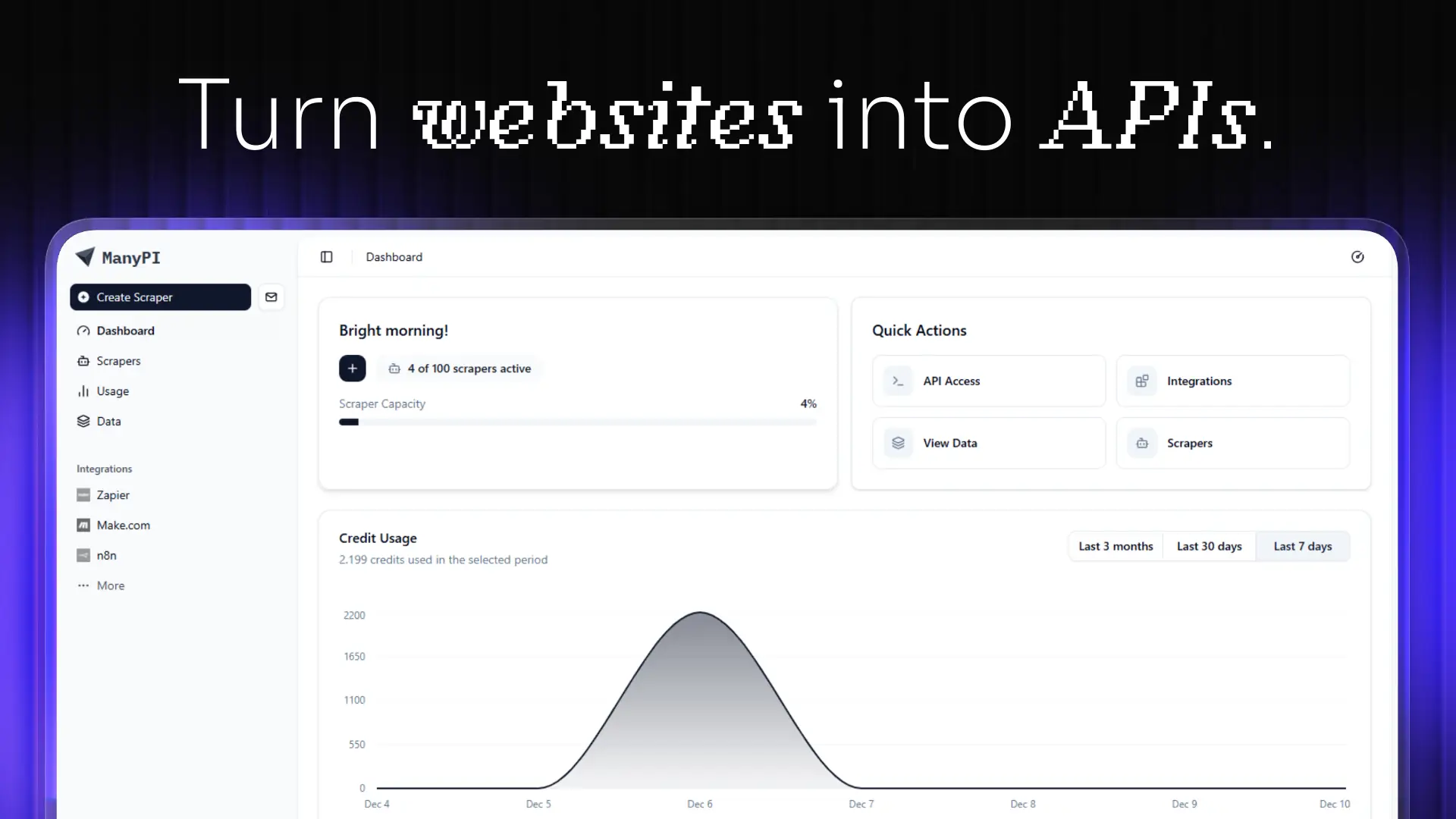
ManyPI is an AI sales agent for lead generation and cold email outreach. It is aimed at teams and founders who need a steady stream of new customers, and it works from a single sentence: you describe your ideal customer, and ManyPI finds matching companies and the people who sign on the live web. From there it verifies every email address, validates pain points and emotional buying triggers, and sends hyper-personalized outreach that turns those signals into sales. The product bundles the whole outbound workflow — lead generation, email verification, cold email campaigns, workflow automation, a CRM and pipeline, a unified inbox, an AI agent, web scraping, data analysis, and API access — into a single subscription rather than a stack of separate tools. Outbound sales is usually a chain of disconnected steps. A list gets built in one place, verified somewhere else, sequenced in a third tool, and then tracked manually in a spreadsheet or inbox. The ManyPI homepage frames the pain with the simple question "Up late, want more customers?", alongside three starting actions: find new leads, enrich a lead list, and send outreach. The problems this creates are familiar: unverified addresses bounce, duplicates creep in, and bounces can burn a sending domain. Replies scatter across inboxes, and the logic of what happens after a reply lives in someone's head. ManyPI's stated purpose is to close those gaps by running the whole flow — find, verify, validate, reach out, and follow up — inside one product, so that the signal from a prospect turns into a sales conversation instead of being lost between tools. Lead generation in ManyPI starts with a plain-language description of your ideal customer. The example shown on the site is "Marketing agencies in Berlin with 10–50 employees", and the product returns matching companies along with the people who sign. The site illustrates this with 1,284 companies matching a query and named results such as Northwind Studio in Berlin and Kranz & Partner in Hamburg. Email verification is the second step: every address is checked before you send, so that there are no bounces, no duplicates and no burned domain. Addresses come back verified and scored, for example Northwind Studio at 92 and Kranz & Partner at 87, while a low-scoring record such as Wide Net GmbH at 34 is dropped from the list. Verification therefore acts as a filter that protects deliverability and keeps the list clean before any message is sent. Cold email outreach is handled with multi-step campaigns sent from your own inboxes, with warmup running in the background and replies collected in one place. The site illustrates a three-touch sequence: an intro on day 0 marked as sent, a follow-up on day 3 also sent, and a last touch on day 7 queued — with a reply from Northwind Studio arriving two hours earlier. Workflow automation then picks up where sending stops. When a lead replies, ManyPI tags it and starts the next step, and the site notes there is no wiring to maintain. In practice this means the sequence, the tagging and the transition to the next action happen automatically once a reply lands, instead of someone manually moving a record and remembering what comes next. ManyPI also includes the surrounding infrastructure. CRM and pipeline, a unified inbox for replies, an AI agent, web scraping, data analysis, and API plus webhooks are all described as available in every plan. The unified inbox matters because replies from multi-step campaigns would otherwise be scattered across multiple sending accounts; the CRM and pipeline give those replies a place to live and move through; the AI agent is the component that does the finding, verifying and outreach work; web scraping and data analysis support the live-web research that produces the leads; and the API and webhooks let the rest of your stack react to what happens inside ManyPI. Integrations push verified leads straight into the CRM your team already runs on, with HubSpot and Salesforce listed alongside Claude and OpenAI. ManyPI also exposes its lead generation through an MCP server, which the site notes is now live. The endpoint is mcp.manypi.com/mcp, and it lets you ask for leads from Claude, ChatGPT, Gemini or any MCP client. The distinction the site makes is that the list lands in your table, not in the transcript, so results arrive as structured data rather than as chat text you would have to copy out. Taken together, the product works as one pipeline: describe your ideal customer, receive matched companies and the people who sign, have every address verified and scored, run multi-step cold email from your own inboxes, and let automation tag replies and trigger the next step, with results flowing into a CRM through built-in integrations, the API, or an MCP client. The stated benefits are revenue growth through better lead finding, cleaner sending through verification that prevents bounces and duplicates, outreach that is more relevant because it is based on validated pain points and emotional buying triggers, and less operational overhead because campaigns, replies, tagging and follow-up steps live in one place. The site positions the product as a single subscription that covers tools which would otherwise be bought separately, and it presents its lead-finding step as the reason teams are no longer searching manually for their next customer. It also states that more than 1,700 growing companies have joined. Concrete workflows appear throughout the site. A team can start by finding new leads, describing a customer profile such as marketing agencies in Berlin with 10–50 employees and receiving matched companies. Another team can enrich an existing lead list, sending it through verification and scoring so weak records are dropped before sending. A third workflow is sending outreach: building multi-step campaigns from your own inboxes, with warmup, and watching replies arrive in the unified inbox. A fourth is automation, where a reply triggers a tag and the next step without any wiring to maintain. Beyond that, verified leads can be pushed into HubSpot or Salesforce through integrations, and teams working inside Claude, ChatGPT, Gemini or another MCP client can request leads and have the list land in their table. ManyPI is aimed at organizations that need customers: sales teams, marketing and lead generation agencies, and founders or growing companies. The site displays logos of organizations using it, including Berkeley, Cornell University, Supercent, Codeway, Valsoft and others, and says 1,700+ growing companies have joined. Product Hunt topics associated with it are Sales, Email Marketing and Marketing. It is a web product accessed through app.manypi.com, with an API and webhooks as well as an MCP endpoint for programmatic and agent-driven access. Pricing starts with a free plan and paid plans from $25 per month, and the core toolkit — CRM and pipeline, unified inbox, AI agent, web scraping, data analysis, and API and webhooks — is stated to be included in every plan. The summary takeaway is straightforward: ManyPI is a single AI sales agent that replaces a fragmented outbound stack. It finds leads from a sentence, verifies and scores every address, validates buying signals, sends multi-step cold email from your own inboxes, and automates what happens after a reply — then pushes the results into the CRM your team already uses or into an AI client through its MCP server.
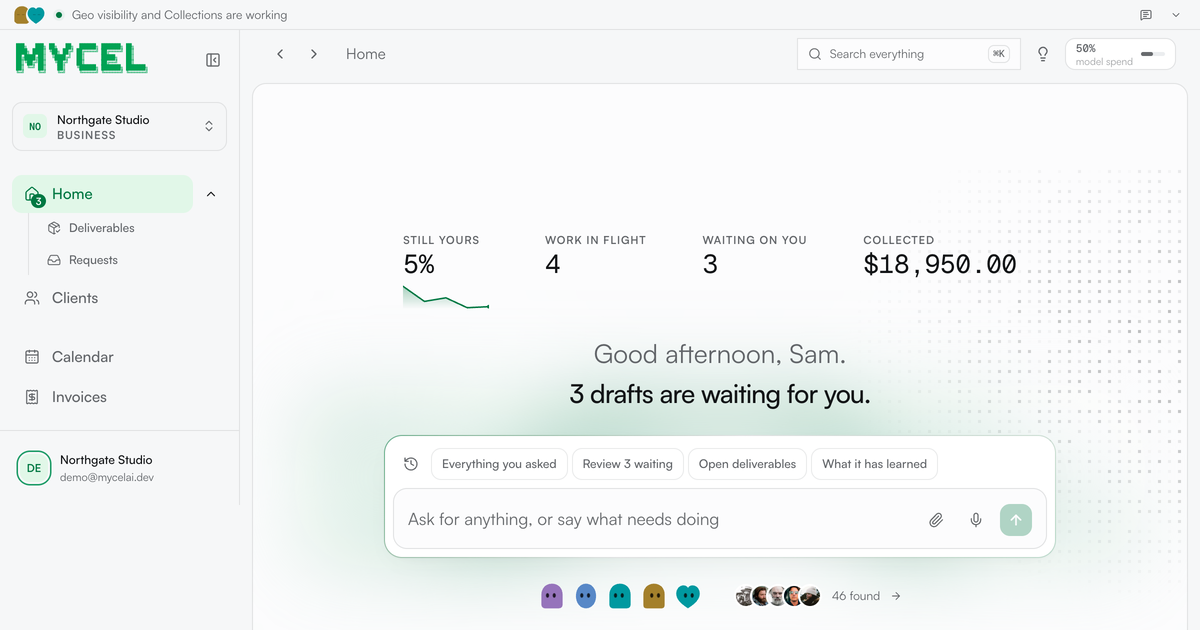
Mycel is an AI platform that runs the work a service business sells — its clients, its deliverables, its approvals and its invoices. You bring one past deliverable, anything you have already sent a client: a close, a proposal, a report or a shortlist. Mycel learns how your firm does it and drafts every future one, waiting for your approval before anything ships. It is built for service businesses whose work still crosses one desk — the agencies, bookkeepers, recruiters, GEO and web studios and contract desks where every draft waits on the same person. The framing Mycel uses is blunt: you are the last pair of eyes on everything, and that is what caps you. Every deliverable goes through you, every client asks for you by name, and every draft waits for a free afternoon that never comes. The alternatives the company prices against are telling. It compares its own Starter plan — twelve months, two businesses, three seats, nothing to negotiate, listed at $3,588 for a year — with an offshore contractor at roughly $1,200 a month, or about $14,400 a year, where the work still returns to your review every time, so the correction you made in March is one you make again in May. Hiring, it notes, costs $80,000 a year and six weeks of ramp, and the person hired still asks the questions you were trying to stop answering. Mycel's stated position is that it does not replace you; it makes you the only person who needs to look at the draft. Setup is described as an afternoon. You describe the service, upload one past deliverable and give it this week's work; from there the loop is fixed: it drafts, you approve, you send. The product types named on the site are ordinary service-business artifacts — a close, a proposal, a report, a shortlist — and the company's claim is that it learns how your firm does it rather than producing generic text. Early customers quoted on the site describe exactly that shift. Mailwarm (YC S20) says Mycel 'drafted a client report I would have lost an afternoon to. I changed maybe a fifth of it and sent it.' figr.so says 'the second draft is the part that got me. It came back written closer to how I actually write.' An SEO agency says it stopped rewriting the opening paragraph somewhere around the third draft. Nothing leaves the business without passing through the approval queue. Before approving you can edit the wording, and that edit becomes training — the correction is kept, which is why the company frames the system as compounding rather than static. Sending rules are configurable: on the demo business, a status update and a document reminder were allowed to go out without stopping for approval, while anything involving money, a commitment or a first approach still had to wait. The payoff is measured on a chart of how much of the work no longer needs you: the share of each draft rewritten by week ran at 94% on 11 August, 28% on 18 August, 44% on 25 August, 0% on 1 September and 5% in the latest week, with one week needing no changes at all. The headline the site draws from that is that drafts need 90% less editing than when you started. Feature-wise, Mycel groups its work into desks. GEO monitor answers 'when buyers ask ChatGPT' by reporting what the assistants tell your client's buyers, with Claude and Gemini shown as the assistants in play. Invoice chaser handles accounts receivable 'when it is late,' described as money in without you asking twice, and lists Gmail among its connections. Books keeper closes the month with a pack to send. GTM operator works the pipeline daily, generating new conversations with people who fit. Recruiting desk delivers a longlist screened in writing per search, using Gmail and Slack. Contract desk produces a redline ready for your signature per contract, using Notion and Gmail. The company's point is that bookkeeping, recruiting, GEO, legal, web, ops and contract desks all run the same loop across different trades — the judgment stays yours. Underneath sits a back-office surface covering clients, open engagements, deliverables in flight, invoices and requests. It shows what is owed, what has landed, what clients have signed off and what is overdue: on the demo data, 1,701 jobs run with 96 that did not finish and every one of them on the timeline, $29,150 owed with $18,950 landed in the last eight weeks, and nine deliverables accepted by clients in the same period. A 'worth doing next' list turns that data into specific, explainable prompts — an invoice 37 days overdue with $8,750 outstanding that has never been chased, with seven more overdue and unchased invoices worth $20,400 behind it; a client with four open requests that has never been given a way to see them, where the fix is to open their page, copy the portal link and send it; two engagements the client accepted but which were never invoiced; and an engagement that cannot start because the service declares no job that produces a deliverable. There is an audit view for who changed what, and scheduled runs such as opening engagements for clients that have none, starting ready engagements and a weekly GEO probe. The methodology is deliberately narrow at the front door. You bring one file, and Mycel drafts everything downstream of it. Each job runs in a disposable sandbox that never holds a credential, and nothing reaches a client until you approve it — a job here means one piece of work done: a message answered, a sync run, a document produced. The dashboard even names what the system will not do: on the demo business, Mycel does not build or maintain the clients' Webflow sites beyond the recommended commercial pages from the visibility work. When something cannot proceed, it says so rather than stalling silently. The benefits the site claims are framed as things you stop doing. Starter is sold as the point where you stop being the one who keeps it running; Growth as the point where you stop turning the next client away; Scale as the point where you stop waiting weeks for a procurement review. Across all of them the outcome is the same: you remain the only person who needs to look at the draft, the share of each draft you rewrite keeps falling, and the approvals, invoices and client requests that used to live in your head are held somewhere that tells you what is worth doing next. Concrete uses visible in the product include recurring client reporting — visibility reports on geo visibility and weekly reports on search presence — plus the collection work that follows: raising invoices, chasing collections and closing the books monthly. Client work in flight on the demo business includes a pricing page copy and query job, a four-practice listing audit, a competitor sweep, a reviews summary and local SEO positions across three towns. The pipeline desk runs outbound conversations daily, the recruiting desk screens candidates per search, and the contract desk returns a redline per contract ready for signature. Integration marks on the site include Gmail, Slack, Notion, Claude and Gemini, and setup steps include connecting LinkedIn to send, giving the work an address to send from and connecting a mailbox for the portal. Plans start with a 7-day free trial; during the Product Hunt launch, Starter is $149.50/month for three months and then $299/month, Growth is $449.50/month for three months and then $899/month, and Scale is quoted on request with no limit on businesses, people or jobs, AI capacity set to your volume and the option to run inside your own private cloud. Starter covers 2 businesses, 3 people and 2,000 jobs a month; Growth covers 10 businesses, 10 people and 10,000 jobs a month, works several inboxes at once, keeps every client's logins apart and adds priority support. Self-hosting is free forever under Apache-2.0 with nothing metered, run on your own servers with your own model key and installed with a single curl command on macOS, Linux or Windows. Mycel's value proposition reduces to one idea: bring one past deliverable, and every future one arrives drafted, corrected once, and held for your signature. The judgment stays with you; the repetition does not. If you are the bottleneck on recurring client work that still crosses one desk, Mycel is built to make you the only person who has to look.