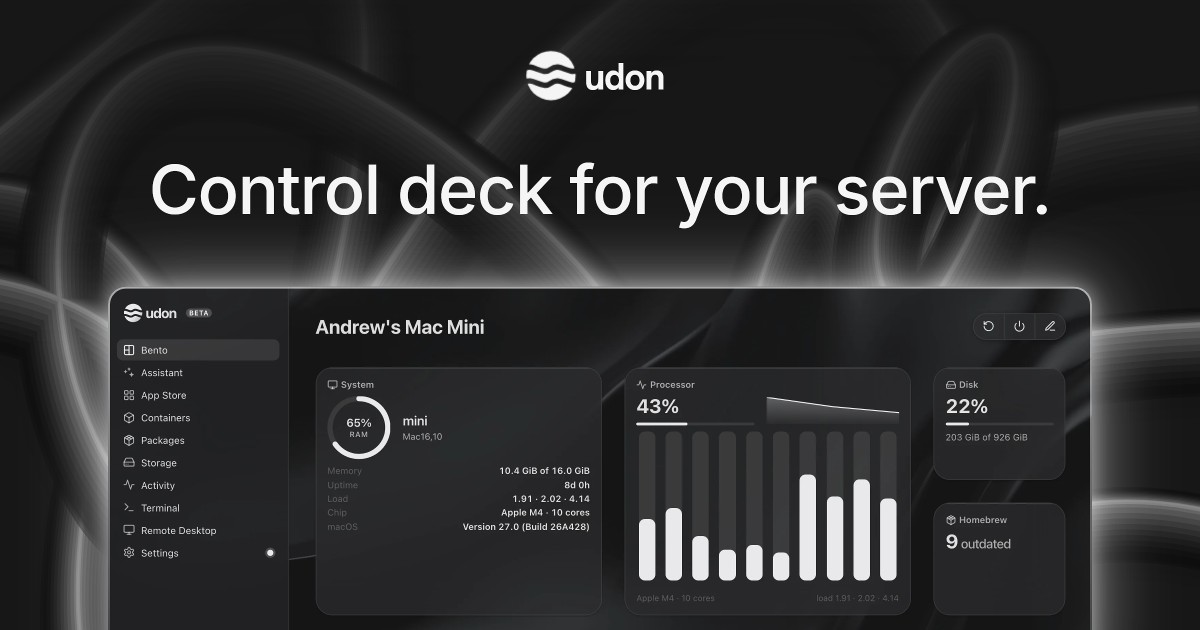
Udon is a control deck for a home server built on an Apple Silicon Mac. It turns a Mac mini, Mac Studio, MacBook, or iMac into a home for your files, photos, media, and apps, and lets you manage all of it from your browser. Udon installs with a single terminal command, and the Mac keeps working as a normal Mac. Any Apple Silicon Mac (M1 or newer) running macOS 26 or later is supported; Intel Macs are not. A Mac mini is the usual pick for an always-on home server because it is small, quiet, and draws a few watts at idle. An optional AI sysadmin can help you install apps, check the server, and investigate problems. The product is built for people who want to own their digital life and keep their data on hardware they own.
macOS has no dashboard for running self-hosted apps, and Udon exists to add one. Without a control panel, running services on a Mac means working manually over SSH with a container tool such as Portainer, which puts everyday management out of reach for many people. The established alternatives are Unraid, TrueNAS, or Proxmox on dedicated x86 hardware, a Synology NAS, or Umbrel, CasaOS, or OpenMediaVault on a Raspberry Pi or spare PC. Each of those routes asks for extra hardware, extra power draw, or extra maintenance. Meanwhile a Mac mini idles at a few watts, runs near silent, and still has power to spare for media, photos, and a dozen containers, so the hardware is often already sitting on the desk. Udon provides the missing software layer that makes that machine manageable as a server.
The AI sysadmin is Udon's most distinctive component. It is optional and stays off until you turn it on. When enabled, you can ask it to install apps, check your server, or investigate a problem, rather than working through each screen of the dashboard yourself. You choose the AI provider: connect an Anthropic or OpenAI API key, a coding CLI such as Claude Code or Codex, or a local model running on the same Mac. By default the assistant asks before every change, and it records its actions in an audit log, so you keep control over what happens to your machine. If you connect a cloud model, it sees what you ask the assistant to work on, which the website states plainly.
Containers and packages are managed in one place. Udon runs standard images from Docker Hub, GitHub Container Registry, or any other registry, on Apple Container, Apple's native runtime, or on OrbStack, which is Docker-compatible. On OrbStack you can also build compose stacks in the visual Composer. Alongside containers, Udon manages Homebrew packages, so the software your Mac runs is chosen and tracked from a single interface instead of a mix of command-line tools. This matters because container and package management is usually the part of self-hosting that people find hardest to keep organised.
The built-in App Store makes the first steps easier. You can install self-hosted apps with settings pre-filled, so building a photo library, streaming your media, or organising documents at home does not require configuring every service by hand. If the catalogue does not cover what you need, Udon points you to more apps on Docker Hub and Homebrew, and the documentation includes a guide on how to deploy a container.
Terminal and remote desktop access are built into the dashboard. You can work on your Mac from any browser, with its terminal and its desktop within reach, and terminal sessions stay open between visits, so a long-running task is still there when you come back. Storage and sharing are handled in the same place. Your files stay on your own drives, and Udon lets you browse and preview them, check drive health, and share folders across your home network as SMB shares.
Remote access is handled through Tailscale. Your files and apps live on your Mac, and you stay in control of them; Udon connects over your own Tailscale network with trusted HTTPS for the dashboard, so you can manage the server from your phone's browser at home or away without exposing it publicly. The Activity view shows how your Mac is doing at a glance: CPU, memory, network, and power use live, plus which processes are running. Together these two areas cover both reaching the server and understanding what it is doing.
Udon's overall approach is to take a machine you already own and give it a browser-based control deck. Installation is a single terminal command, and after that the dashboard is reached at an address such as mac-mini.local:4443. Everything the product manages — containers and compose stacks, apps from the App Store, files and SMB shares, drive health, live system stats, Homebrew packages, a terminal, and the Mac's screen through remote desktop — is available from any browser. The Mac keeps working as a normal Mac throughout. A companion app for iPhone and Android is coming soon, and until then the dashboard works from a phone's browser.
The benefits follow directly from that design. Your files, photos, and media stay on your Mac rather than in a cloud service, and the dashboard is served over HTTPS with remote access over your own Tailscale network. Udon is a one-time purchase rather than a subscription, so there is nothing to renew. Trying it does not require a card, and if you do not buy a licence after the free days, nothing is charged: the dashboard locks, but containers keep running and your files and settings stay exactly as they are.
In practice, people use Udon to run the self-hosted services that would otherwise need a NAS or a separate server. Streaming media with Jellyfin or Plex, backing up photos with Immich, syncing files with Nextcloud, keeping passwords in Vaultwarden, blocking ads for the whole network, archiving documents with Paperless, and automating workflows with n8n are all named as things you can self-host on a Mac. Udon can also host your dev environments and coding agents, which you reach from a laptop or an iPad anywhere.
Udon is available for Apple Silicon Macs running macOS 26 or later, with the dashboard managed from a web browser. It runs Docker images on Apple Container or OrbStack, manages Homebrew packages, and uses Tailscale for remote access. Pricing is a free 5-day trial with no card required, followed by a one-time payment: early supporters pay $29, reduced from $49, for a lifetime licence that includes every feature and updates and is tied to the Mac's serial number with no accounts. Every purchase comes with a 14-day money-back guarantee.
Udon's core proposition is simple: own your digital life, start with your Mac. It takes an Apple Silicon Mac you already have, adds the dashboard macOS is missing, and brings self-hosted apps, containers, storage, monitoring, and an optional AI sysadmin together in one browser-based control deck.
Publisher
A
admin
Launch Date2026-10-09
Platformweb
Pricingpaid
Tech Stack
#Docker#OrbStack#Apple Container#Homebrew#Tailscale#macOS