Category Focus/categories/api
API AI Tools
Discover and compare the best api AI tools and software. Browse 109+ curated tools with reviews and rankings.
Projects tracked
109
Sort mode
RECENT
Page
1
Discover and compare the best api AI tools and software. Browse 109+ curated tools with reviews and rankings.
Projects tracked
109
Sort mode
RECENT
Page
1
Microsoft-Decision-1 is a new decision-scoring model from Microsoft, available in Microsoft Foundry and through OpenRouter. It is purpose-built to deliver structured outputs that software can immediately act on, and it is designed for routing, classification, prioritization, verification, and workflow control. The model is intended to make it easier to incorporate decision intelligence into existing applications, agents, and workflows in a secure, trusted environment. Give Microsoft-Decision-1 a set of fixed options and it returns a calibrated probability for each option in a single pass, as structured output that software can act on directly. It is positioned as a model for fast decision-making, delivering top performance in latency and quality on structured decision tasks to outperform both LLMs and other decision models. Decision models are quickly emerging as an important new category in AI. Unlike LLMs, which are designed to generate text or reason through complex problems, decision models are purpose-built to deliver structured outputs that software can immediately act on. Microsoft frames this as a shift: once you understand the capability of making decisions and classifying things at very low cost with high performance, all kinds of useful tasks get unlocked. Traditional large language models are oriented toward generation and reasoning rather than acting as reliable decision engines, and Microsoft-Decision-1 is designed specifically for that gap. By focusing on structured decision tasks rather than open-ended text generation, the model aims to outperform both LLMs and other decision models on latency and quality, so teams do not have to choose between the flexibility of a general model and the reliability of a purpose-built decision component. Accuracy is a central claim for Microsoft-Decision-1. Microsoft reports that the model achieved the highest accuracy in its 36-benchmark comparison, spanning nearly 150,000 questions across benchmarks kept blind from training. The accuracy figure is reported as a mean score across 36 benchmarks, covering 147,137 questions. This breadth — dozens of separate benchmarks and well over a hundred thousand questions — is intended to demonstrate that the model's strength is not limited to a single task type but holds across a wide range of structured decision problems. For teams evaluating a model for routing or classification, that breadth matters because it suggests the model can be trusted across varied inputs rather than only on a narrow distribution of examples. Microsoft also notes that Strands-Decider 2B was scored as the average of the 23 of 36 benchmarks it could answer, illustrating how comparisons were handled for models that could not complete the full benchmark set. Latency is the second headline capability. Microsoft states that in its benchmarking, Microsoft-Decision-1 was the fastest measured, running 2.5 times quicker than H2O-Lightning-4B v1.1, the runner-up, and 35 times quicker than GPT-6 Sol. The latency figures are described as JevBench v1.6.1 adjusted median (p50), checked on October 7, 2026, with Microsoft-Decision-1 measured through Foundry in the same region. The Product Hunt listing echoes this with the claim that the model is about 35 times faster than GPT-6 Sol at median latency. Speed matters for decision tasks because routing, classification, verification, and workflow control often sit directly in the critical path of an application or agent loop. When a decision must be made on every request, a model that returns answers in a fraction of the time can change what is practical to build — for example, making it feasible to score many inputs cheaply and quickly instead of batching decisions or skipping them altogether. Calibration is the third dimension Microsoft highlights. In the benchmark comparison, Microsoft-Decision-1 placed third on calibration, 1.5 behind Jev. Calibration is defined in the source material as a measure where 100 means a model's confidence exactly matches how often it is right — in other words, a well-calibrated model's stated probability reflects its true likelihood of being correct. Because Microsoft-Decision-1 returns a calibrated probability for each fixed option in a single pass, downstream software can act on those probabilities directly, for example by applying thresholds, comparing options, or routing based on confidence. The model produces structured output that software can act on directly, rather than free-form text that must be parsed or interpreted. That combination — calibrated probabilities delivered as structured output in a single pass — is what makes the model suitable for use as a decision component inside larger systems. How Microsoft-Decision-1 works overall can be summarized from the source material: it is a decision-scoring model that is post-trained from Qwen3.5-9B. Rather than generating prose, it is given a fixed set of options and returns a calibrated probability for each option in a single pass, as structured output. This single-pass, fixed-option approach is the model's distinctive methodology. The model is available in Microsoft Foundry and through OpenRouter, so teams can access it through those platforms rather than deploying a bespoke system. Microsoft describes it as delivering top performance in latency and quality on structured decision tasks, and the benchmarking data presented alongside the launch compares it against both LLMs and dedicated decision models on accuracy, median latency, and calibration. For users, the stated benefits center on speed, cost, and reliability of decisions. Microsoft says the model makes it easier to incorporate decision intelligence into existing applications, agents, and workflows in a secure, trusted environment. Because it returns calibrated probabilities that software can act on directly, it reduces the need to translate model output into actionable signals. The combination of high accuracy across a broad benchmark set, the fastest measured median latency, and calibrated confidence is intended to give teams confidence when embedding the model in automated decision paths. Microsoft also emphasizes low cost: making decisions and classifying things at very low cost with high performance is framed as the capability that unlocks useful tasks. On Product Hunt, the model is listed at $0.042 per million input tokens, with free output. The source material names specific use cases for Microsoft-Decision-1: routing, classification, prioritization, verification, and workflow control. It is also described as a model for agents and workflows, and more broadly as a decision model for agent control. These use cases share a common shape — they are structured decision tasks where a system needs to choose among a fixed set of options and act on the result. Routing describes directing a request, item, or task to the right destination or handler. Classification describes assigning items to categories. Prioritization describes ranking or ordering work. Verification describes checking whether something meets a condition. Workflow control describes deciding how a process should proceed. In each case, the model returns calibrated probabilities for the available options in a single pass, giving the surrounding application or agent a structured signal it can act on. Microsoft-Decision-1 is aimed at teams that want to incorporate decision intelligence into existing applications, agents, and workflows. Its intended environments are those where a secure, trusted model of this kind is valuable. It is available in Microsoft Foundry and through OpenRouter, giving teams two routes to access it. The model is post-trained from Qwen3.5-9B, which is the base model identified in the source material. Pricing is described on Product Hunt as $0.042 per million input tokens, with free output, and the model is presented as making decisions and classifying at very low cost. The benchmarking in the launch material reports accuracy as a mean score across 36 benchmarks (147,137 questions), latency as JevBench v1.6.1 adjusted median (p50) checked October 7, 2026, and calibration on a scale where 100 means confidence exactly matches how often the model is right. Taken together, Microsoft-Decision-1 represents Microsoft's entry into the emerging category of decision models — models purpose-built to deliver structured outputs that software can immediately act on. Its value proposition rests on three measured dimensions: the highest accuracy in Microsoft's 36-benchmark comparison spanning nearly 150,000 questions, the fastest measured latency (2.5 times quicker than the runner-up H2O-Lightning-4B v1.1 and 35 times quicker than GPT-6 Sol), and competitive calibration (third, 1.5 behind Jev). By returning calibrated probabilities for fixed options in a single pass as structured output, and by being available in Microsoft Foundry and through OpenRouter, it gives teams a practical way to add fast, reliable decision-making to their applications, agents, and workflows.
Pine Computer is a cloud computer built for AI to use. Rather than pointing an AI agent at an ordinary desktop, you hand Pine Computer a job — research, forms, spreadsheets, or portals that have no API — and the finished work comes back to your product. It exists so that software products can complete real work on the web rather than merely describe it. A single SDK lets you spin up a computer per customer, you can bring your own model or use Pine's, and a person can take over whenever a sign-in or approval is required. Pine Computer is invite-only while in beta. The starting point is that today's agents are usually run on computers built for humans. A human looking at a screen sees pixels; a human has to keep checking that screen for change; and a human works on one or two screens at a time. An AI agent driving that same machine inherits every one of those constraints, which makes long, real-world tasks across many apps slow and expensive. Pine Computer also targets a specific and widespread gap: the many portals, seller sites, city systems and insurer forms that have no API at all, so the only way to get work done on them is to actually use them. On the same long, real-world tasks across apps, Pine reports that its preliminary tests ran 2–5× faster than AI agents on ordinary computers, at 1/25 the model API cost. Two of Pine Computer's core ideas are reading structure and sensing change. Because humans see pixels but AI can read what each thing on a screen is and what it can do, Pine's AI works from the structure of an app rather than from images. In the examples shown on the site, that structure looks like a heading called Invoices, a field labelled Email that is empty, a field for PO number, a Submit button that can be clicked, a table with 12 rows and 3 columns, or a link that downloads a PDF. Working from that structure means the agent does not have to guess at coordinates or recognise pictures of buttons — it knows what a control is and what it can do with it. The second idea is sense: humans keep checking the screen, while Pine's AI is told what changed the moment it does. Notifications such as a completed download, or a window gaining focus, arrive as events rather than requiring the agent to poll and re-inspect the page. The third idea is seeing: humans work on one or two screens, but Pine's AI gets many screens, rendered in memory and only when it needs to look. That is what allows an agent to fill a basket at three shops at the same moment, or to renew permits on three different city portals at once, without needing physical displays to exist the whole time. The fourth idea is access: the computer is sealed off on its own and reached through your code, and your keys stay with you. Together these four ideas — read, sense, see, access — describe how Pine Computer differs from running an agent on a machine designed for a person. Pine Computer is designed to be embedded in your product. You spin up a computer per customer through one SDK, so each customer's work runs on its own machine rather than sharing a queue. You can bring your own model or use Pine's, which lets teams keep the model relationships, credentials and evaluation setups they already have. And a person can take over for sign-ins or approvals: where a portal asks for a login that only the account owner can provide, the human signs in on the live screen and hands the computer back to the AI. The site shows this in several examples — a property owner signing into a city portal for a permit, an analyst signing into a subscription research source, a shop owner signing into a marketplace, and a shopper approving a purchase before anything is spent. The developer experience starts with code. The Ruby example on the site creates a computer with a location and an ephemeral flag, opens a browser session on it, and then runs a job written in plain language: pull last month's invoices from the supplier portals into the ledger. From the outside, Pine Computer behaves like a machine your product can hand a job to: the product submits the task, the AI drives the apps it needs, and the finished work comes back. Because each computer is sealed off and reached through your code, the integration boundary stays inside your own system rather than in a shared browsing environment, and because each customer gets their own computer, work can run in parallel instead of one task waiting behind another. The stated benefits are speed and cost. In Pine's preliminary tests, on the same long, real-world tasks across apps, Pine Computer ran 2–5× faster than an ordinary computer driven by AI agents, and used 1/25 of the model API cost — model API cost only, with results varying by task. Beyond the headline numbers, the four design ideas produce practical outcomes: reading structure instead of pixels reduces the guessing that makes agents brittle; being told what changed removes the constant re-checking that burns time and tokens; virtual screens let one job fan out across several apps at once; and the sealed, code-reached design keeps access limited to you and your code. The site lists 26 use cases, grouped into sites with no API, research, documents, assistants, sales and marketing, and engineering. Six are shown in detail. Renew permits: a customer clicks Renew once, and every permit due this quarter is renewed on its own city's portal, with each city's receipt returning to its permit's row as a PDF. Research a market: an analyst names a market and gets a report in which every figure carries the number of its source, including both figures where two sources size the market differently. Fill PDF forms: each client's row on a broker's sheet becomes a filled copy of the insurer's current PDF form, read back field by field, and nothing goes to the insurer until the broker has read each copy. Compare and buy: an assistant checks three shops at once, fills a basket in each, stops before payment, returns a comparison with delivery included in every total, and only places the order once the person approves. Update marketplace listings: a spring range is updated on Larkspur Market, Harbour Lane and Ferrow in turn, with each change recorded once the live listing reads back right. Test a web app: users write test steps in plain English, and each run follows them in a real browser on a fresh computer and screenshots every step. Pine Computer is built for teams that are putting AI to work inside their own products — the examples describe property software, research software, broker software, an assistant, commerce software and a testing platform handing jobs to Pine. Access is currently invite-only while in beta; interested teams leave an email address, join the last step of an application, and request access. The site documents an SDK with a Ruby example, plus developer docs, and a create-computer call that takes a location such as country US and an ephemeral flag. There is no published pricing on the page, and no list of third-party integrations beyond the choice to bring your own model or use Pine's. The takeaway is that Pine Computer turns the hard, human-shaped parts of web work into something your product can delegate. Read structure, sense change, see many virtual screens, and stay sealed off behind your own code — you hand it a job, and the finished work comes back, 2–5× faster and at 1/25 the model cost in Pine's preliminary tests.
Busabase is an open-source (MIT) database and workspace for AI agents, described in its own words as the general system of record for AI agents. It gives people and AI agents one shared base where business records, docs, skills, and apps live in the same place, so the next task can build on whatever the previous one produced. Instead of letting agent output sit in a chat window, Busabase keeps it as data, docs, skills, and apps that a team can reuse. It is aimed at teams that already work with agents such as Claude Code, Codex, Cursor, Hermes, OpenClaw, WorkBuddy, and Buda AI, and it can be run on your own machine, self-hosted inside your network, or used through Busabase Cloud. The problem Busabase addresses is that agent work keeps evaporating. A team already uses AI and the work does get done, but it scatters across personal chat windows: one person drafts a quote in ChatGPT, another cleans up a customer list in Claude, a third finishes a data cleanup script in Cursor, and someone else records a pricing decision in Gemini. The site states the consequences plainly: results stay in a chat log nobody finds again, every session starts from zero, and when someone leaves the company, their work goes too. Busabase takes the opposite position: the work lands in one workspace and stays after people leave, so the next agent reads what the last one wrote and the work stays with the company. Busabase organizes that shared work into bases. The Data Base holds customers, projects, and inventory in tables with fixed columns, and because the columns are typed, every agent reads and writes the same fields rather than inventing its own shape for the data. The Knowledge Base is described as the team's shared memory: answers you can find, with a source, that someone checked. A record there carries its body, its sources, and its review history, so a fact can be traced back to where it came from and to whoever verified it. Together these two bases give agents a stable place to read from and write to, and give people a place to check the result. Three more bases extend the same idea. The Apps Base holds internal tools, called AirApps, built on the same data, so every screen shows the latest version — the site shows Busa CRM, a pipeline with deals and follow-ups that reads the same records. The Skills Base lets you save a workflow once as a skill, and any agent can run it next time. Playbooks are where a team writes down how it does things: agents check the playbook before every task and follow it instead of improvising. The site's summary of the workspace is Data, Knowledge, Apps, Skills, Playbooks, and External Agents, all in one place for people and agents. Agents connect to Busabase from wherever they already run. You can talk to a connected agent right inside Busabase, or connect 40+ external agents over Agent Skills, MCP, and more — Claude Code, Codex, and OpenClaw are named. Either way, those agents read and write the same workspace. The connection options listed are Agent Skills, MCP, OpenAPI, and the CLI, and the FAQ broadens this to any agent that can call a REST API, naming Claude Code, Codex, Gemini CLI, n8n, Zapier, LangChain, or your own agent; for that route the instruction is to paste the SKILL.md and go. Because the same structured data sits underneath, an agent does not have to be told the shape of the business each time it starts. The workflow Busabase describes has three steps. First, connect your agents: nothing to switch, your agents keep working the way they do today and simply write here. Second, every write is on the record: each change carries who made it, what changed, and a full history, and for the writes that matter you can hold the change for a person to review. Third, reuse it next time: the next agent, a teammate, or an AirApp reads the same data, so nobody starts from zero. Underneath, Busabase is open source under the MIT license, and the same engine runs on your laptop, on your own server, or in Busabase Cloud. Busabase Desktop keeps data in a folder on your computer with no usage tracking and keeps working offline; the Docker image is deployed inside your company network so data never has to leave it; Cloud needs nothing installed. The benefits the site claims follow from that structure. Work that would otherwise sit in personal chat windows lands in tables, docs, and apps you can open tomorrow, and it stays with the company after people leave. Knowledge comes with a source that someone checked, rather than as an unsourced answer. Every change keeps its history, so the record remains explainable later — approve, request changes, and reject decisions all stay attached, and rejected work never enters the canonical data. And because the same data feeds agents, people, and internal apps, a new session does not begin from nothing. For teams with a security review coming up, Busabase points to its self-hosting documentation about keeping data inside your network. The website lists eight kinds of work you can start keeping today. Customer support stores Q&A and product facts so agents draft the reply and a person approves it. Marketing keeps CRM contacts, campaign records, social posts, and creative assets in one place. Content moves briefs, drafts, and published pieces through a single pipeline. Team memory captures decisions, meeting notes, and context the next agent can read. Operations tracks projects, to-dos, and supplier details. Research collects market signals and monitored sources, verified and adding up over time. Product catalog holds SKUs, specs, pricing, and relations, searchable and managed in one place. Compliance covers access reviews, vendor checks, and a complete audit log. A demo on the site shows a content board where scheduled posts carry visual, platform, copy, scheduled status, and read-from relations, with the price pulled from the Products base. Busabase is built for teams and individuals who want agent output to accumulate somewhere shared. Named agent integrations are Claude Code, Codex, Cursor, Hermes, OpenClaw, WorkBuddy, and Buda AI, with n8n, Zapier, LangChain, and Gemini CLI mentioned in the FAQ, and connection surfaces including Agent Skills, MCP, OpenAPI, webhooks, a CLI, and REST APIs. Pricing has three tiers. Free costs $0 for one person keeping what their agents produce, with 1 space you own, 3 seats per space, 5,000 records per space, 1 GB of attachment storage, and 1 self-hosted connection online. Plus is $10 per seat per month, billed $120 per seat annually, with 3 spaces you own, 10 seats per space, 20 GB of attachment storage, and OpenAPI, webhooks, and MCP. Pro is $20 per seat per month, billed $240 per seat annually, with unlimited spaces you own, unlimited seats, 100 GB of attachment storage, and priority support over WhatsApp, WeChat, or email. The open source engine is free forever, and Cloud starts free and grows per seat. Taken together, Busabase's value proposition is simple: give your agents a workspace worth building in. The work they produce becomes typed data, sourced docs, saved skills, and internal apps that the next agent, the next teammate, or an AirApp can read; every change keeps its source and its full history; and sensitive work can stay on your machine, on your own server, or in Busabase Cloud. You can start local for free and add Cloud when your team is ready.
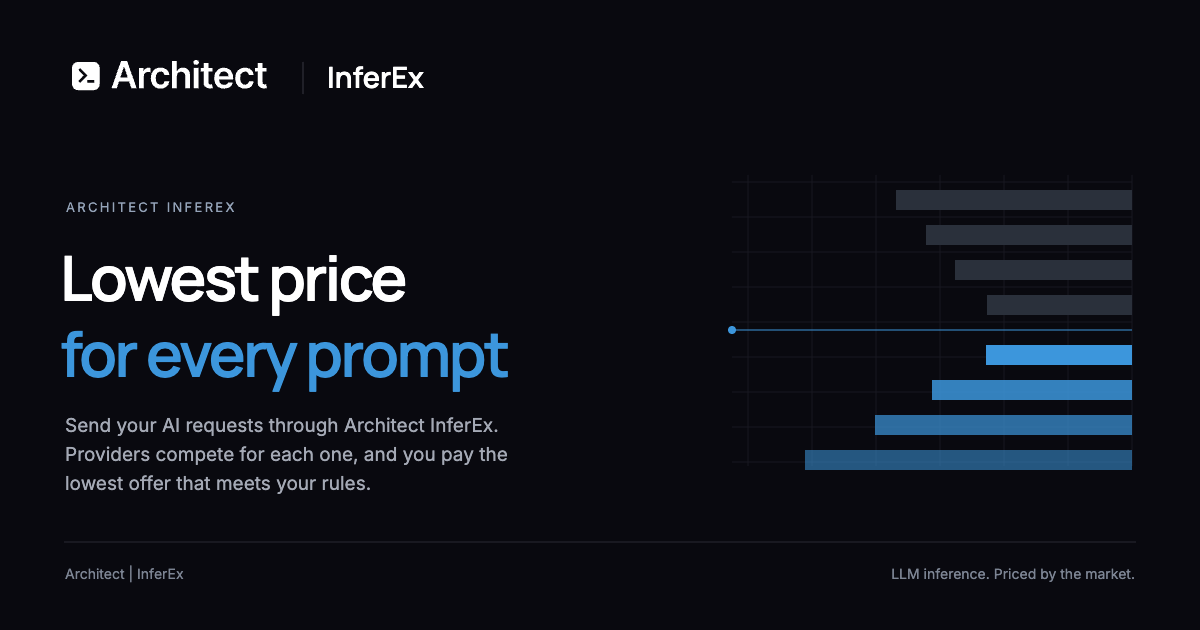
Liquid Inference is an LLM router that runs an instant auction for every AI request. You send an ordinary chat request, and providers compete to answer it at the lowest price that meets the rules you set. Instead of committing to one vendor's rate card, you describe what the request needs — model, region, speed and minimum quality — and the cheapest provider that satisfies those requirements answers. The product is built for developers and teams already working with large language models through coding agents, SDKs or direct API calls, and who want access to hundreds of open- and closed-weight models without managing a separate account, key and billing relationship for each one. Choosing a model provider has usually meant accepting a published, fixed rate and paying it whether or not cheaper capacity exists somewhere else at that exact moment. Inference capacity fluctuates with supply and demand, so providers often hold spare capacity they would be willing to sell at a lower price, but buyers have had no practical way to discover and capture that price request by request. Liquid Inference turns every prompt into a small auction to close that gap. Providers publish a price per token for each model and can change it at any time, lowering it when they have spare capacity. The result is that a buyer pays the lowest marginal cost available for that request while still getting the model, region, speed and quality constraints they specified. The auction runs in three steps. First, providers set their prices: each provider sets a price per token for each model and may change it whenever they like, so the offers on the book move with supply and demand. Second, the cheapest match answers: you set the rules — model, region, speed and minimum quality — and the cheapest provider that meets them answers your request. Third, you pay for what you use: before the model starts, you know the most a request can cost, and you are billed only for the tokens it produces. Because the cap is fixed before the first token is generated, the price of a request is known up front rather than discovered later on the invoice. Control over routing is explicit. A price limit is placed on every request before the first token, so you know the maximum a request can cost and pay only for the tokens produced. Routing rules let you choose the model, region, speed and minimum quality, and only providers that meet those requirements compete for the work. To support trust in the marketplace, Liquid Inference tests every provider regularly with standard benchmarks and publishes the results, so the speed and measured quality of providers are visible and the same rules apply to everyone. Billing is itemized, showing what every request cost line by line, and public price history lets you download live and past prices for every model so you can send work when prices are low. Liquid Inference covers hundreds of open- and closed-weight models, spanning families such as GPT, Qwen, Gemini, GLM, Deepseek, Gemma, Kimi, Grok, Claude, Mistral, O, Nemotron, Ernie, Mimo, Llama, Phi, Nova, Command, Hermes, Granite, Sonar and many more. Model counts per family are listed on the site alongside the lowest current offer in USD per million output tokens, which ranged from $0.01 for Nemotron to $4.62 for O at the time of capture. Compatibility is deliberately simple: one key covers both OpenAI Chat Completions and Anthropic Messages on a single base URL, so existing code works unchanged, and getting started requires changing one URL. The product also supports full multi-modal requests. The overall approach is to treat inference as a live market rather than a static catalogue. Providers compete dynamically on price for every single prompt, offering the lowest marginal cost at the moment the request is made. You can create routing rule presets or use the Auto routing algorithms to decide how requests are matched, and the rules you set determine which offers are allowed to compete. Because providers can raise or lower prices at will and stop quoting when they are full, the offers on the book reflect current capacity. The buyer's side of the market is equally concrete: a single base URL, one API key, and code that already speaks the OpenAI or Anthropic API continues to work. Practically, this means a lower cost per request for equivalent work, because you are matched to the cheapest provider that meets your stated requirements rather than paying a fixed published rate. It means more predictable spend, since a price limit is fixed before the first token and you are billed only for produced tokens, with itemized billing showing what each request cost. It gives you leverage over supplier choice — model, region, speed and quality are yours to specify — while independent benchmark results keep providers comparable. And because prices move with supply and demand, public price history gives you the information needed to time workloads when prices are low. Concrete workflows follow from those capabilities. A developer using an agentic coding tool such as Claude Code, Codex, Cursor, OpenCode, Cline or Pi can point the tool at Liquid Inference by changing the base URL, keeping their existing client while gaining access to every listed model. A team planning spend can pick a model and a monthly output volume in the cost estimator and see the lowest offer now and the estimated cost per month. A workload that is price-sensitive rather than latency-sensitive can be scheduled using public price history when prices are low. A user who needs multi-modal support can send those requests through the same single key. And anyone already running inference on their own models can join as a provider, post a price and be paid for the tokens they serve. For buyers, sign-up is free with email and the first 500 users receive $20 of free inference; referring others earns 20% of referred fees as free inference, with 10% for second-level referrals. Access is through an API key and the base URL https://router.inference.ai.exchange/v1. The documented list of compatible clients and SDKs includes Claude Code, Codex, Pi, Oh My Pi, Cursor, OpenCode, Cline, Roo Code, Kilo Code, Goose, Open WebUI, Cherry Studio, n8n, the OpenAI SDK, the Anthropic SDK, the Claude Agent SDK, the OpenAI Agents SDK, the Vercel AI SDK, LiteLLM, LangChain and curl. On the supply side, anyone running models can create an account, register the deployment they want to serve, have an operator review and list it, then connect their agent and start quoting. Registration as a provider is free, and Liquid Inference charges its fee to the customer, not to the provider. In short, Liquid Inference replaces fixed inference pricing with a per-prompt auction in which providers compete to serve your request at the lowest price that still satisfies your rules. You keep the models and tools you already use, gain a price cap before the first token, itemized and predictable billing, benchmark-backed provider trust and public price history, while providers gain a live market for their spare capacity. The value proposition is straightforward: complete your AI requests and pay the lowest offer that meets your requirements.
Maisters TalentIQ™ is an AI-powered recruitment platform designed for government agencies and public-sector organizations that need to modernize hiring without sacrificing transparency, fairness, or compliance.The platform automates time-consuming recruitment activities including candidate screening, qualification checks, structured first-round interviews, candidate scoring, interview documentation, and compliance recordkeeping. AI-powered structured interviews give every candidate consistent questions and evaluate responses against agency-defined competencies and scoring rubrics.TalentIQ™ is designed with government hiring requirements in mind. It provides explainable candidate scoring, bias monitoring, veteran preference handling, compliance documentation, configurable records retention, and complete audit trails that help HR teams prepare for reviews, public-records requests, and internal oversight.Hiring managers receive ranked candidate shortlists supported by interview transcripts, scoring details, evaluation criteria, and decision evidence. Human staff retain final hiring authority throughout the process.The platform also provides workforce analytics for monitoring time-to-fill, candidate sources, hiring patterns, pipeline diversity, and recruitment performance. It can integrate with existing applicant tracking systems, HRIS platforms, background screening providers, credential verification services, identity providers, and agency-specific workflows through APIs.Maisters TalentIQ™ helps public-sector HR teams reduce administrative workload, accelerate recruitment, improve consistency in candidate evaluation, and maintain documented, audit-ready hiring processes.
Mega Jell-EEZ Peelable Mango is a fun and flavorful jelly candy made for mango lovers. Its peelable design adds an enjoyable way to eat the soft, chewy candy while delivering a sweet and fruity mango flavor in every bite. The playful texture and easy-to-peel format make it a fun choice for candy lovers, parties, sharing, and everyday snacking. Perfect for retailers and wholesale buyers looking to add an eye-catching mango treat to their candy selection. Visit us for more information!
AUDR (Agent Usage Detail Record) is an open standard for recording who initiated your agent runs and how much each cost, across every system a run passes through. It defines a common JSON schema that any harness, router, or billing system can emit and ingest. The goal is to help businesses make sense of the economics at the run level, giving every team building or monetizing agents a reliable record of what an agent run consumed and who or what it was associated with. It was drafted at Chargebee and is being improved with collaboration across the ecosystem, stewarded by Chargebee under the Apache 2.0 license. The problem AUDR addresses is that a run can be fully observable at every individual layer and still leave you without a single end-to-end record of who ran it and what it cost. A single agent run touches multiple systems: the application knows the customer and the feature, the router knows the tokens and the cost, and the tools know what they executed. Without a shared way to join these, usage data is orphaned from the business context that gives it meaning. The telecom industry solved a similar problem with the Call Detail Record, an open standard carriers converged on so a call's attributes could be captured and exchanged in a common format, independent of any single carrier's systems. AUDR is built on the same principle: a common record for agent runs that any harness, router, or billing system can emit and ingest. AUDR adds three core rules that let reports from different layers come together into one record. The first is a shared run ID, minted by the harness, passed to the router in request metadata, and echoed back, so every system that touches the run carries the same ID. The second is clear authority per field: the harness owns attribution such as customer, environment, and initiator, while the router owns usage such as tokens and provider. Each fact has exactly one source. This ensures that a record can carry raw counts that drive cost—tokens, tool calls, seconds of compute—alongside the business context that says whose cost it is. The record structure includes a run block with run ID and span ID, an attribution block sourced from the harness, a usage block sourced from the router, and an emitter block that identifies the component that produced the record. The third rule is strict merge rules. The sink assembles records sharing a run and span ID, and no component rewrites another's block. Conflicts are rejected, and a correction is a new record, never a mutation. This makes the record durable and reliable, and ensures that retries remain idempotent. The example in the spec shows a run with a run ID minted by the harness, attribution sourced from the harness, usage sourced from the router, and the emitter identified as the router. Because each field has exactly one authoritative source, the merged record is consistent and auditable, and any correction is preserved as a new record rather than silently overwriting history. AUDR provides adapters for runtimes you already use, so you can register an adapter and get a usage record for every model and tool call, including the customer it belongs to. Available adapters include NVIDIA NeMo Relay, LiteLLM, Merge Gateway, Vercel AI SDK, and Mastra. The core SDK builds, validates, and delivers records straight from your own code, with Python and TypeScript packages. Sinks deliver records to destinations you already use: Chargebee and Lago for usage-based billing. Adapters read identifiers, usage, and timings, never prompts or outputs. Every package is Apache 2.0 and published to PyPI or npm. The architecture is runtime → adapter → core client → sink → destination. Support for OpenRouter is in development. You can write records to a local file to start, with no account, hosted backend, or pricing configuration needed. AUDR is designed to sit on top of OpenTelemetry, not compete with it. OTel's GenAI semantic conventions provide the foundation for describing model calls and usage, and AUDR reuses them. An AUDR record can be emitted as an OTel span, and the OTel collector is a first-class sink. What OTel does not define is the set of rules needed when usage becomes a durable record: which attributes are required, how attribution is handled when it's missing, how retries remain idempotent, or how corrections are made. Observability can tolerate a dropped span, but a usage record cannot. AUDR adds those requirements and delivery semantics on top of OTel. It also complements standards like FOCUS, which standardizes billing data received from providers; AUDR standardizes the usage emitted when an agent run happens, before that usage is priced. The benefits are practical. With AUDR, you can answer questions like: How much does this agentic feature cost? What does this customer's agent usage look like, and how much does it cost? What are the unit economics and margins per customer for my agentic features? Which workflows or models are driving our costs? Which power users are driving our costs? Because records are emitted asynchronously and out of band, recording usage adds no synchronous work to inference in the normal request path. The only exception is optional pre-flight budget gating, which makes a single check before a run starts. You can store records locally, send them to a warehouse, feed them into an observability system, or use them for internal cost analysis or future projections. Use cases include usage-based billing, where records are delivered to a Chargebee site's usage-ingest batch endpoint or Lago's batch event endpoint. Teams can also use AUDR for internal cost analysis, to understand unit economics and margins, to identify which workflows or models drive costs, and to track power users. It supports cost governance by providing a common record that any system can emit and ingest. You can write records to a local file to start, with no account, hosted backend, or pricing configuration needed. For observability, the OTel collector acts as a first-class sink, and records can be used for future projections. AUDR is aimed at teams building or monetizing agents, developers, platform engineers, and billing teams. It does not assume what you do with the data after it is emitted; a billing system is just one possible consumer. It carries no prices or rating logic, and the SDK has no concept of plans, invoices, or how a customer should be charged. It records what happened and who it happened for. You can point the records at Chargebee, a competing rating engine, your own, or a warehouse for analytics. The spec is Apache 2.0, stewarded by Chargebee, and the goal is to move cost governance to an independent foundation as adoption grows. Contact is audr@chargebee.com. The three core rules are stable and will not change without a major version, while the field set will continue to grow as providers introduce new things to measure. In summary, AUDR is an open standard that provides a common language for recording agent run usage and cost across every system a run passes through. By combining a shared run ID, clear field ownership, and strict merge rules, it turns orphaned usage data into a durable, end-to-end record that supports cost analysis, usage-based billing, and agent unit economics. It is open, neutral, and community-owned, with packages published under Apache 2.0.
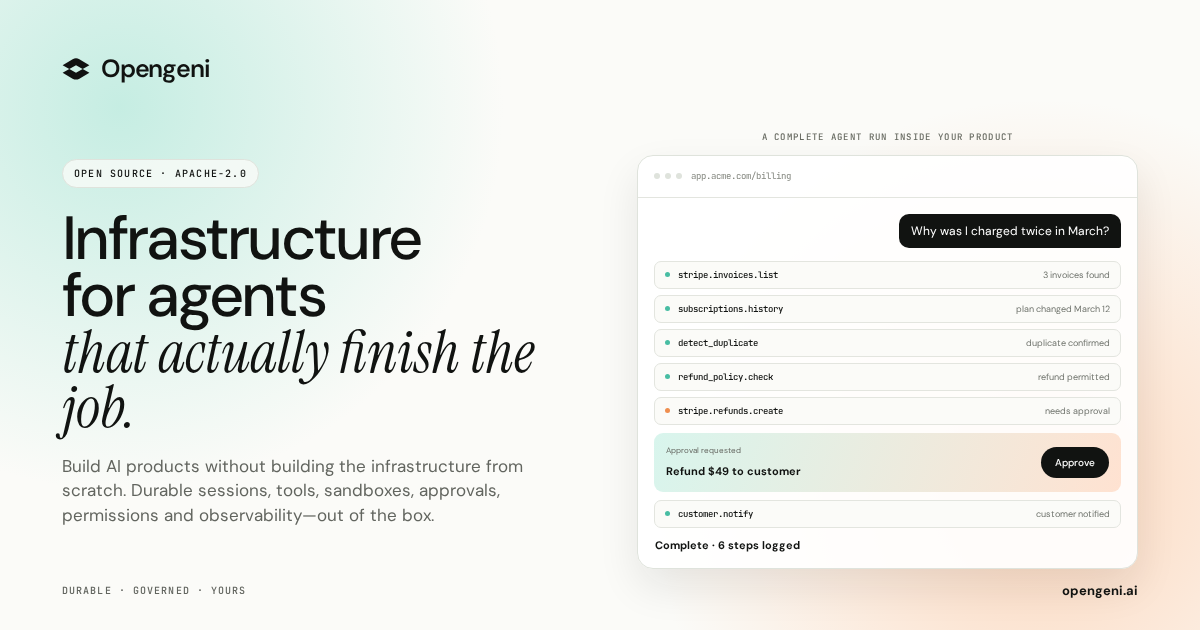
Opengeni is open-source AI infrastructure for putting agents directly inside your own product. It gives developers the pieces an agent needs to run reliably in production — durable sessions, isolated sandboxes, credentials, tools and MCP, memory, multi-tenancy and ready-made React components — and lets you either use the managed Opengeni cloud or run the same stack in your own environment. The purpose is stated plainly on the site: agents in your product, infrastructure out of the box. You focus on your agents, Opengeni handles the infrastructure, and the promise of the launch is shipping agents to production in hours rather than spending that time building plumbing. The project is released under Apache-2.0, its source lives on GitHub, and the site notes it is built from running agents in production, with Hydro, Havila and Posten shown as brands already working with it. Getting an agent demo running is easy; running agents for real customers is not. A single dropped connection can end a run. Agent code cannot safely execute next to your secrets. Every user needs their own OAuth tokens, and every API has to be wired before an agent can call it. Agents forget everything between sessions, and in a multi-tenant product every query has to know who is asking. Opengeni frames this as a list of things you do not have to build, and the site walks through each one in turn: durable sessions, sandboxes, credentials, tools and MCP, memory, multi-tenancy and model choice. Each of those is presented as a problem that would otherwise land on your team before the first real user ever touches the agent. Durable sessions are the first building block. Opengeni keeps a run alive when a worker restarts or a tab is closed: the run keeps going and resumes at the event where it left off, with the site's example showing a run resuming at event 128. Agent code then runs in an isolated sandbox, so it cannot run next to your secrets. In the example, the sandbox executes a Python script that detects a duplicate charge, and the credentials it uses are described as scoped and short-lived. That combination matters because agent work is often long-running and unpredictable: durable sessions turn a failure into a pause instead of a lost run, and sandboxes let you hand an agent real code execution without exposing production secrets to it. Credentials and tools cover the other half of the integration problem. Every user of your product needs their own OAuth tokens, and Opengeni handles that: the site shows Stripe, GitHub and Google Drive accounts connected per user, with tokens refreshed automatically over time. On top of credentials, Opengeni lets you plug tools in from an existing API definition — an OpenAPI file such as billing.openapi.yaml yields callable operations like invoices.list, refunds.create and customers.get, and the site presents adding three tools as a single step. Tools and MCP are both supported, which means an agent can act on the systems your customers already rely on rather than only talking about them. Memory, multi-tenancy and model choice complete the core. Memory is built in, so agents learn from past sessions instead of forgetting everything between them; the examples separate workspace-level memory (refunds go to the original card), user-level memory (sends invoices by email) and entries flagged to review first (bills in EUR from April). Multi-tenancy keeps customers apart, with distinct workspaces such as Acme, Globex and Initech and row-level security so that every query knows who is asking. Model choice stays open: OpenAI, Azure OpenAI, OpenRouter or your own OpenAI-compatible endpoint are all listed, and Opengeni states that you can swap models freely as better ones ship, without being locked in. Opengeni's overall approach is that the same session can appear on any surface, because every surface is a client of the same API. The site shows three of them. First, the Opengeni app at app.opengeni.ai, where a session can be started and tracked, including a completed example run that lists each step the agent took. Second, your product, shown as a billing assistant embedded in a customer's billing page, where the same session runs under your own brand. Third, the code, where a React component such as BillingAssistant.tsx is assembled from the @opengeni/sdk and @opengeni/react packages, using OpenGeniClient, OpenGeniProvider and SessionConversation. The client talks to your backend, and the documentation notes that your backend holds the API key and proxies the session routes so the key never reaches the browser. The React components are designed to be restyled quickly. The site lists a five-step customization flow: one variable recolors every surface through your accent, corners can be sharp, soft or round, you can use the font you already ship, and a single attribute flips between light and dark themes. The sample CSS shows custom properties for accent color, radius and font family, and an interactive control panel lets you try accent, corner, font and theme options directly. Because these are the same packages the Opengeni app is built on, the streaming responses, tool steps and composer come with the component rather than having to be rebuilt, which shortens the work between having a working agent and having it appear inside your product. The outcomes Opengeni emphasizes follow directly from those pieces. Sessions that recover from failures mean a run is not lost to a restart. Sandboxes mean agent code does not run beside your secrets. Handled credentials mean each user's own OAuth tokens are managed and refreshed. Tools and MCP mean APIs are wired from an existing definition instead of by hand. Memory means agents carry learning across sessions. Multi-tenancy and row-level security mean customer data stays separated. Model freedom means a better model can be adopted without a rewrite. The launch description also highlights 100+ integrations, human approvals and visibility into every step and dollar spent, so teams can see what an agent did and what it cost. The concrete workflows on the site are customer-support and billing shaped. A customer asks why they were charged twice in March; the agent lists invoices, runs a duplicate-detection step, confirms the duplicate and issues a refund, then explains that two $49 charges landed on March 12 and the duplicate is going back to the card. The same exchange is shown inside a branded billing assistant, with a confirmation that $49 was refunded to a card ending in 4242. Other listed session examples include a weekly churn summary, updating a refund policy document and triaging failed webhooks — all presented as work an agent can carry out inside the same environment, with the steps visible as they happen. Opengeni is aimed at developers and product teams who want agents inside their own product rather than in a separate tool. The integrations shown are Stripe, GitHub and Google Drive, alongside the broader mention of 100+ integrations and support for tools and MCP. The stack is open source under Apache-2.0 and can be self-hosted with a Helm chart on any Kubernetes, with Terraform for AWS, Azure and GCP; the repository is cloned from GitHub. Two deployment paths are offered: the managed Opengeni cloud, where you pay model cost plus 5%, or your own cloud running the same Opengeni API, workers and web app. Self-hosting is free, and a launch promotion gives the first 100 users $100 in cloud credit with the promo code PRODUCTHUNT100. The takeaway is straightforward: Opengeni is infrastructure for agents that actually finish the job. It packages the parts that are tedious and risky to build — durable sessions, sandboxes, credentials, tools, memory, multi-tenancy and model swapping — behind an open-source stack with React components you can restyle in seconds. You can start in the Opengeni cloud or keep everything in your own Kubernetes, and the same session can run in the Opengeni app, inside your product, or straight from your code, all on one API.
FastRouter.ai is a unified AI gateway and control plane for developers and enterprise teams building with large language models. It routes every request to the right model across more than 200 LLMs through a single OpenAI-compatible API, optimizing for cost, latency, quality, and reliability. The product gives organizations one consistent way to reach leading models including Claude Fable 5, Gemini 3.1 Pro, GPT-5.5, Grok 4.3, Veo 3.1, Nano Banana, and Claude 4.8 Opus, without integrating with each provider separately. Teams point their existing OpenAI SDK at FastRouter's base URL and immediately gain intelligent routing, automatic failover, built-in governance, and observability from a single high-performance gateway. It is positioned as the fastest gateway for every model, covering text, image, video, embeddings, and speech, and it lets teams add or swap models without code changes. Building with LLMs has become a multi-provider problem. New models arrive every few weeks, and benchmark results rarely tell the full story for a specific application, so the best model for a given task changes frequently. Teams that hard-code a single provider run into vendor lock-in, unpredictable spend, and outages they cannot control. One FastRouter user, Dr. Rishabh Bhandari of Medisha, explains that with new LLMs coming out every few weeks and benchmarks not giving the full picture, they rely on FastRouter.ai to optimize the cost-versus-quality balance. Another user, Sainath Gupta of Knit Finance, highlights that reliable access to models across providers removes the worry about outages or vendor lock-in. FastRouter addresses this by sitting between applications and model providers, giving teams a single point of access where they can compare models, control spend, and keep applications running when a provider degrades. The stated goal is to let teams scale AI apps without vendor lock-in or code changes. The foundation of the product is unified access. FastRouter provides an OpenAI-compatible API across different providers, so existing OpenAI SDK code keeps working while gaining access to many models. The gateway covers text, image, video, embeddings, and speech workloads, and it allows teams to add or swap models without code changes. Enterprises get access to top models such as Claude Fable 5, Gemini 3.1 Pro, GPT-5.5, Grok 4.3, Veo 3.1, Nano Banana, and Claude 4.8 Opus from a single API. This matters because it removes the need to maintain separate integrations, keys, and code paths for each provider, and it means a model change is a configuration change rather than an engineering project. Smart routing is the mechanism that keeps quality high while controlling spend. FastRouter routes every request to the best LLM based on cost, latency, and output quality with no manual tuning required. Its Auto Router chooses models that deliver the highest accuracy and relevance for the request under a cost-optimized policy. A low-latency policy selects the quickest model available to keep experiences smooth and responsive, while a high-throughput policy prioritizes models that handle high request volumes at scale. Intelligent cost optimization adds smart routing to cost-efficient models, prevention of unnecessary premium model usage, and batch processing for high-volume workloads. Together these capabilities help teams reduce AI spend while still matching each request to an appropriate model. Reliability and governance are built in. FastRouter provides automatic retries across providers, fallback models when failures occur, and virtual model lists for seamless failover. Instant failover automatically reroutes requests to other healthy providers for the chosen models, fallback lists let teams define prioritized fallback models so requests continue seamlessly, and aggregated capacity across providers supports higher rate limits. On the governance side, the platform offers project and API key limits, member roles and access controls, and protections designed to prevent spend shocks and bill spikes. Consolidated dashboards and alerts give complete visibility across every model, provider, and project, with powerful filters for cost, latency, and errors, plus alerts for usage and spikes. Observability and model comparison round out the platform. FastRouter tracks usage, latency, errors, and costs across all models with real-time metrics and detailed logs. Unified metrics monitor performance, latency, and error rates across models and providers; an activity log gives clear visibility into usage and performance for each request; and ongoing evaluations monitor model outputs to ensure consistent quality and performance. The Model Council and Playground let teams compare latency, output quality, and cost across models in interactive playgrounds, combine multiple models to cross-check outputs and reduce errors for stronger reasoning, and use the strengths of each model to deliver consistently better results. Insights adds a weekly read-only pass over the traffic you already route, producing a ranked list of changes, each with the sampled requests, the savings math, and the exact screen where you make the change. FastRouter's overall approach is one API for every model, production ready. Developers point the OpenAI SDK or a direct API call at the FastRouter base URL, https://api.fastrouter.ai/api/v1, supply a FastRouter API key, and select a model ID, so the integration looks like a standard OpenAI chat completions call in Python or TypeScript. Virtual model lists let teams mix providers and models into a unified model alias with policy-driven selection. Beyond routing, the platform covers evaluations, guardrails, alerts, and virtual model lists. For organizations with stricter requirements, FastRouter can be self-hosted in your own cloud so that prompts, responses, logs, and provider keys never leave your network, available on the Enterprise plan with the team helping on deployment and upgrades. The benefits follow directly from that architecture. Teams reduce AI spend through intelligent routing, batching, and model controls; they protect against spend shocks and bill spikes with limits and access controls; and they keep AI applications running with automatic failover, multi-provider redundancy, and intelligent traffic routing. Because the API is OpenAI-compatible, developers get drop-in integration with fast routing and built-in failover, while engineering leaders control costs without compromising reliability or scale. Product teams gain actionable insights to power faster, smarter AI product development. Crucially, users report that reliable access to models across providers removes the worry about outages or vendor lock-in, which is the central promise of the platform. Concrete use cases appear throughout the product. A team unsure which LLM suits its use case can play with models in the playground, compare them against each other, and then call normal OpenAI-compatible APIs to use the chosen model. A high-volume workload can be routed to cost-efficient models and batch processed to lower spend. An application that depends on a model which becomes slow or unavailable can rely on instant failover and fallback lists to keep serving requests. An engineering leader can set project and API key limits plus member roles and access controls to prevent spend shocks across teams. Teams can run evaluations and guardrails to validate and monitor inputs and outputs for safety, compliance, and consistency. Finally, an organization with strict data requirements can self-host the gateway so prompts, responses, logs, and provider keys never leave its network. FastRouter is aimed at developers, engineering leaders, and product teams inside organizations that build with LLMs. Developers get drop-in OpenAI-compatible APIs with fast routing and built-in failover; engineering leaders get cost control without compromising reliability or scale; product teams get actionable insights for faster, smarter AI product development. The site states that FastRouter is trusted by teams at Media.net, Amazon, Optum, GlobalFoundries, Verticurl, and Supaboard, and describes it as forged from the insights of high-performance engineering organizations. Getting started requires no set-up fees, no monthly minimums, and no credit card: new users receive millions of tokens in free credits to build, test, and explore the unified API, and a self-hosted deployment is available on the Enterprise plan. In summary, FastRouter.ai turns the messy reality of many model providers into one coherent gateway. It combines a single OpenAI-compatible API across 200+ models with smart routing for cost, latency, quality, and throughput; automatic failover and fallback lists for uptime; governance controls for spend; and dashboards, logs, evaluations, and weekly Insights for visibility. The primary value proposition is straightforward: route faster, scale smarter, and build better AI apps by sending every request to the right model without vendor lock-in or code changes.
Octri.dev is a platform that takes an OpenAPI specification as its single input and generates four connected products: a documentation site, client SDKs in ten programming languages, an MCP server that exposes your API as tools for AI agents, and production monitoring that reports errors from wherever those SDKs run. It is built for developers and teams who publish APIs and want documentation, client libraries, agent integrations, and observability to stay in sync without manual effort. The problem Octri addresses is what happens after an SDK leaves your control. As the site puts it, "Everyone else stops at 'here's your SDK.' That's the moment your code leaves your visibility. It runs on someone else's machine, fails on someone else's machine, and you hear about it in a support ticket three days later." Without Octri, an API team may spend three days with something still broken in production, receiving angry support tickets. With Octri, the same team can ship a fix in nine minutes with zero support tickets because the SDKs themselves report errors back. This visibility gap is the core motivation behind the monitoring that is built into every generated SDK. The first product is API Studio, a documentation generator. Octri reads your OpenAPI spec and AI writes a first draft for every endpoint. You then edit the documentation like a document, so nobody on the team has to open the YAML. The generated docs include three-column endpoint pages with schema trees that open a level at a time, a live "try it" playground on every endpoint, MDX guides alongside the generated reference, and your own domain on every tier including the free plan. You can rename methods, exclude endpoints, and publish when it reads right. Docs changes are stored per page, so a new spec revision only disturbs the endpoints that actually changed. The second product is SDK Studio, which generates idiomatic client libraries in ten languages: TypeScript, Python, Go, Java, Dart, Ruby, PHP, Rust, Swift, and Kotlin. Each SDK is generated from the same OpenAPI document and published to the registry its users already install from: npm for TypeScript, PyPI for Python, Maven Central for Java and Kotlin, crates.io for Rust, RubyGems for Ruby, Packagist for PHP, pub.dev for Dart, and git tags for Go and Swift. SDK Studio provides per-language configuration for namespaces, pagination, idempotency, and code style. You can rename methods, exclude endpoints, pick your HTTP engine (fetch or axios for TypeScript, OkHttp or Ktor for Kotlin, standard library HTTP for Go), and choose folder structure. Custom hooks you write are compiled into the client. Auto-publish handles releases, and build history shows exactly what shipped and when. The SDKs are "configured, not forked," meaning you tune them to your house style without maintaining separate versions. The third product is Monitoring, which offers two ways to get visibility. You can flip it on and the telemetry compiles into your generated SDKs, so every client reports its own production errors back to you. Alternatively, you can drop the standalone package straight into your backend. Either way, there is no agent to deploy and nothing to instrument. Monitoring includes several capabilities: Logs, which let you query structured events directly by level, route, status code, or release; Issues, which group errors by fingerprint, each with the function and file that threw it; Traces, which show one request end to end across client, server, cache, database, and queue, with the slow span called out; a Service map that shows every service, the calls between them, and the error rate on each edge; N+1 query detection that finds the same query fired in a loop and counts it across traces; Uptime synthetic probes on a schedule with run history; and Alerts that fire on burn rate and regressions, so a single stray 500 never wakes anyone. Security is built in: credentials and identifiers are redacted client side before an event leaves your process, then again at ingest, and personal context waits on your app's consent under a pre-signed GDPR Article 28 DPA. Monitoring is off by default and switches on from the dashboard. The fourth product is the MCP server. MCP is described as "how an agent reaches something it was never trained on." Without it, Claude or Cursor might integrate your API from memory, hallucinating endpoints and parameters. With Octri's MCP server, one command turns your project into a server that these agents connect to. The agent can then list your real endpoints and call them. The MCP server includes seven documentation tools to search, read, and navigate your docs, and one callable tool per endpoint so the agent can hit your API for real. It is curated by SDK Studio, so your exclusion list becomes the agent's permission list. Installation is one line: npx @octri/mcp, with nothing to host. Octri also offers an OpenAPI audit tool. You paste your OpenAPI URL or upload a spec file in JSON or YAML, and you get a score out of ten on the same rules the SDK Studio runs. The audit checks fourteen rules, showing every missing schema, undeclared path parameter, and awkward method name before anyone generates a client from it. Example check results include operationIds being unique, every path placeholder having a parameter, a server URL being declared, authentication being described, shared models living in components and being referenced, request bodies being documented, and successful responses declaring a schema. The audit runs across operations and returns a readiness score, helping teams prepare their spec for code generation. How does Octri work overall? The platform is built on one source underneath all four products. According to the site, "Change one. All four follow." If you deprecate an endpoint in API Studio, the SDKs mark the method, the agent tools stop offering it, and monitoring shows you who still calls it. Add a language, cut a release, or push a new spec: the same synchronization happens. There is never a second place to go and update. The workflow from spec to shipped can be done in an afternoon: connect your spec by uploading a file or linking a GitHub repo (Postman and AsyncAPI are translated), review the AI-written draft for every endpoint and edit anything, pick your languages and configure the SDKs while flipping on monitoring, then push to repository. Every spec change reruns the whole pipeline, keeping docs, SDKs, agent tools, and monitoring in sync. GitHub sync regenerates everything on every merge. Benefits for users center on speed and visibility. The site contrasts a three-day cycle where something is still broken in production and support tickets pile up with a nine-minute cycle where a fix is shipped and nobody notices. Because every SDK reports its own production errors, integration failures reach the API team before users file tickets. The monitoring traces errors to a commit, so teams can see what broke and why. The MCP server stops agents from hallucinating your API and lets them call real endpoints. The docs site gives readers a polished reference they actually finish. SDKs ship in ten languages and publish themselves to registries, reducing maintenance burden. The migration importer reads existing config and brings it across, including navigation, custom pages, SDK settings, endpoint overrides, and theme, so teams do not start from a blank project. The platform aims to keep everything in sync from one spec, eliminating the need to update multiple places when the API changes. Use cases for Octri include: API-first teams who want to generate and maintain client SDKs across multiple languages from a single OpenAPI spec; developer documentation teams who need polished reference docs with editing, guides, and a playground; platform teams who want to give AI agents like Claude and Cursor reliable access to their API via MCP; backend teams who need production observability for SDKs and APIs, including error grouping, tracing, and alerts; teams preparing their OpenAPI spec for code generation who use the audit to find missing schemas and other issues; and teams migrating from another docs or SDK tool who want to bring their configuration with them. Target users range from indie developers shipping real APIs on the Starter plan, to growing teams shipping fast on Growth, to scaling products that need more on Business, and enterprises needing unlimited scale with SLA guarantees. Pricing is combined for docs, SDKs, and monitoring, with extra SDK languages as a flat add-on. The Free plan costs $0/mo and includes 1 SDK language, 50 API endpoints, 100 one-time AI credits, 100 MB monitoring ingress per month, GitHub sync, custom domain, and registry auto-publish. Starter is $49/mo plus tax with 2 SDK languages, 100 endpoints, 1,000 AI credits per month, and 1 GB monitoring ingress. Growth is $99/mo plus tax with 4 SDK languages, 300 endpoints, 2,500 AI credits, 5 GB ingress, versioning, and custom code and components. Business is $249/mo plus tax with all 10 SDK languages, 600 endpoints, 5,000 AI credits, 20 GB ingress, white-label, and SDK CDN hosting. Enterprise offers custom pricing with unlimited scale, SLA guarantees, SSO/SAML, dedicated support, and the option to run the generator and docs renderer in your own infrastructure. Additional SDK languages are $50/mo each on plans where they are not included, and annual billing saves 15%. In summary, Octri.dev turns one OpenAPI spec into a complete ecosystem: documentation, SDKs in ten languages, an MCP server for AI agents, and production monitoring that reports errors from the SDKs themselves. It is designed for any team that ships an API and wants to keep docs, clients, agent tools, and observability synchronized from a single source of truth, reducing the time from spec change to shipped update to an afternoon.