Category Focus/categories/automation
Automation AI Tools
Discover and compare the best automation AI tools and software. Browse 592+ curated tools with reviews and rankings.
Projects tracked
592
Sort mode
RECENT
Page
2
Discover and compare the best automation AI tools and software. Browse 592+ curated tools with reviews and rankings.
Projects tracked
592
Sort mode
RECENT
Page
2
Ana by Vertice is an autonomous negotiation agent built specifically for software purchases. Ana runs software negotiations on your behalf: it reads your requirements, builds the strategy, drafts every email and tracks every round, updating the plan the moment a vendor responds. It is built for procurement buyers and sourcing teams who want negotiation expertise applied to every purchase rather than only to the largest or most strategic deals. Ana is trained on what Vertice describes as the world's largest procurement intelligence dataset and has negotiated $500 million in spend over more than 4,000 negotiations. Ana is built by Vertice. Most teams overpay on SaaS renewals because they go into the negotiation without knowing what a competitive price actually looks like. The negotiation itself is also a chore: rounds of back-and-forth email, spreadsheets and vendor pressure that consume hours of skilled procurement time and rarely leave a clear record of why a deal was struck. As one customer quoted on the page puts it, Ana "replaces chore, not core - it's scalable, takes away the non-value-add back and forth, and frees up time to tap into commercial value you wouldn't otherwise have had time for." The product is built to deliver negotiations at scale and specializes in long tail spend, giving hours back on every renewal. Ana's core advantage is data. It is trained on the world's largest software pricing dataset, built from thousands of comparable live negotiations, with 32,000+ vendors benchmarked across every category, 2M+ vendor price points powering every negotiation, and $75bn+ of real vendor spend analysed and applied. Because it has been trained on thousands of comparable live negotiations, Ana knows how vendors price, when they concede, and what it takes to secure the best terms. Every insight Ana produces is backed by data rather than instinct. That intelligence is what allows a buyer without deep negotiating experience to benchmark a deal accurately and to know which requests are realistic. Working from that intelligence, Ana starts by analysing your deal and benchmarking it against thousands of comparable contracts across 32,000+ vendors and 2M+ price points. It then builds a negotiation strategy specific to your vendor and your requirements, drafts the outbound emails with the reasoning explained, and adapts its approach as your vendor responds. In practice this means you always know what to ask for and how to ask for it, rather than guessing. Users comment on the quality of the writing: one Global IT Sourcing Manager at a global security services company said the AI wording is very natural, and that it looks professional but also like a human wrote it. Control sits with the buyer. Ana is explicitly designed as a co-pilot, not an autopilot: it drafts every email, includes the reasoning behind it, and waits for your approval before anything is sent, and tone settings and constraints are configured upfront so Ana operates within boundaries you define. You can review, edit or ignore any recommendation before it goes anywhere, and tone, timing and escalation decisions always remain yours. Ana also tracks every round and updates the plan the moment a vendor responds. Its deal overview and analysis lets you go back and see the evidence for why a purchase was approved, which one customer described as important from an audit trail perspective. Ana's overall approach combines an aggregate procurement dataset with a human-in-the-loop workflow. It handles the data-heavy parts of negotiation - analysing the deal, benchmarking it, building the strategy and drafting the emails - while leaving judgement calls to the procurement team. Vertice states that Ana is trained on its aggregate dataset, built from years of vendor negotiations across thousands of contracts, and that your individual contract data is not shared with other customers or used to train against your interests. One customer highlighted that everything lives on the same page, rather than a tab for Gmail, another for an AI assistant and another for an Excel comparison. The reported outcomes are concrete. Procurement buyers using Ana achieve 18% savings on average, and 15 days cut from renewal cycles. Beyond headline savings, the product gives procurement teams hours back on every renewal by removing repetitive vendor back-and-forth and replacing it with a structured, evidence-backed process. Because every recommendation arrives with its reasoning attached and every step is approved by your team, those savings are achieved without giving up control of vendor relationships or the audit trail that procurement functions are expected to maintain. Ana is used wherever software is bought or renewed. Typical scenarios include negotiating a SaaS renewal where the team does not know what a competitive price looks like; benchmarking a contract against comparable deals across 32,000+ vendors and 2M+ price points before going back to a vendor; handling long tail spend, the many smaller agreements that would otherwise receive little or no negotiation attention; running multi-round negotiations in which the vendor responds and the strategy must adapt; and keeping a record of the analysis and evidence behind an approved purchase for audit purposes. Ana is aimed at procurement buyers, sourcing teams and procurement experts responsible for vendor negotiations. Named users quoted on the site include a Procurement Lead at Baringa, the APAC & EMEA Head of Strategic Sourcing at Bloomberg, a Procurement Expert at Lenqi and a Global IT Sourcing Manager at a global security services company; customer logos displayed on the page include Santander, BlackBerry, ARM, ClearScore and Factorial. The page does not publish pricing or plan details - the primary calls to action are to book a demo or get started with Ana. Ana is accessed through Vertice's website at vertice.one, where the product is described as the #1 AI agent for vendor negotiations. Ana by Vertice brings negotiation expertise to every software purchase by combining the world's largest procurement intelligence dataset with a co-pilot workflow that keeps procurement teams firmly in control. It analyses and benchmarks your deal, builds and adapts the strategy, drafts and tracks every email, and leaves approval and escalation decisions with you - delivering 18% average savings, 15 days cut from renewal cycles and hours back on every renewal.
Wabi describes itself as a new kind of messenger that gets things done. According to its website, it is a messenger that makes apps and gets things done for you and your friends, so that a conversation becomes the place where plans actually happen. The company frames the product as "the OS for the agentic era — software that adapts to your life, gets things done, and makes more room for the people and things that matter." Its messaging is aimed at groups: friends organizing a trip, people who share bills and subscriptions, students, book clubs, pet owners, dinner planners and concert-goers. The promise on the site is simple and repeated in its call to action, "Let Wabi handle your next group trip," followed by "More of what you want to do. Less of what you have to." The problem Wabi addresses is visible in the way group chats usually end up: a lot of talking, and then a lot of loose ends. The website's use-case list reads like a catalog of exactly those loose ends — group trips that still need to be organized, bills and subscriptions that quietly grow, school items, group pets, games, book clubs, dinner plans and live music. One of the example conversations on the site makes the problem concrete: Wabi tells a user that their Comcast bill went up $41 a month and asks, "Want me to try to renegotiate it?" The point is not that people need another place to type messages; it is that the things discussed in a chat typically require separate apps, separate reminders and separate effort to finish. Wabi positions itself as the layer that closes that gap between talking about something and actually doing it. The most distinctive claim in the content is that Wabi not only carries a conversation but also builds the small apps that the conversation needs. The Product Hunt description states that Wabi is "a new kind of messenger that makes apps and gets things done for you and your friends." The website illustrates this with a set of use-case tiles that recur throughout the page: Group trip, Bills & subs, School, Group pet, Games, Book club, Dinner plan and Live music. Each of these is presented together with its own icon and the label of the app or scenario it represents, suggesting that these are the kinds of lightweight, purpose-built spaces Wabi can create around a group's activity. In other words, instead of asking users to leave the chat for a dedicated planning tool, Wabi brings the tool into the conversation, where the context — who is involved, what was decided, when it happens — already exists. A second, equally prominent theme in the content is proactivity. In the "Wabi conversation" example screens shown on the site, Wabi is not waiting to be asked questions; it is reporting things it has noticed. In one thread, Wabi says: "Your flight confirmation email just landed. San Francisco (SFO) → Mexico City (MEX). Sep 30 – Oct 5." The same thread displays a flight card with departure 09:55 and arrival 14:20, a destination label reading "CDMX," a trip countdown reading "DEPARTURE ✈ 14 DAYS 08 HRS 32 MIN," and a widget labelled "Mexico City · Local recs." In another conversation, Wabi says "I've put all your upcoming live shows into one app," above a list of concerts (Turnstile Sep 25, sombr Oct 4, Disclosure Nov 12). A third example shows a Subscriptions app with a monthly total of $327.60 and Wabi's offer to renegotiate a bill. Each example follows the same pattern: an inbound piece of information is detected, organized and surfaced inside the chat with a suggested action attached to it. Wabi's shared, group-oriented side is expressed through its use-case categories. The page names Group trip, Bills & subs, School, Group pet, Games, Book club, Dinner plan and Live music, and the site's headline call to action is "Let Wabi handle your next group trip." Those labels cover both logistics — a trip with flights, a countdown and local recommendations — and recurring group life, such as dividing bills and subscriptions, coordinating school matters, tracking a shared pet, running games, choosing a book, planning a dinner, or keeping track of live music everyone wants to attend. Because these appear as reusable tiles rather than one-off screens, the implication of the content is that a group can spin up a working space for whatever activity it currently cares about, inside the same messenger the group already uses for conversation. The overall approach, as described, is to treat the messenger as an operating layer rather than a chat window. Wabi calls this "building the OS for the agentic era," and defines that software as something that "adapts to your life, gets things done, and makes more room for the people and things that matter." The examples support that framing: information arrives from the outside world — an emailed flight confirmation, a set of upcoming shows, an increase in a monthly bill — Wabi turns it into an organized in-chat object such as a trip card with a countdown, a consolidated shows app, or a subscriptions view with a monthly total, and then offers the next step, such as trying to renegotiate that bill. The "+Message" control visible in each mock conversation indicates that Wabi sits inside the normal flow of messaging, so users keep responding with plain messages rather than switching tools or learning a new interface. The benefits stated or directly shown in the content follow from that structure. The site's closing line, "More of what you want to do. Less of what you have to," summarizes the value proposition: less administrative overhead and more time for the actual point of the group, whether that is a trip, a book, a show or a dinner. Practical benefits visible in the examples include being told about a flight confirmation without hunting for it, seeing a countdown to departure, having upcoming live shows gathered in a single app, seeing subscription spending in one monthly figure, and being offered help when a bill increases. The underlying promise is that nothing important said in the chat gets lost, and that the follow-through happens alongside the conversation rather than somewhere else entirely. The content describes a wide spread of concrete situations. A group trip is the flagship example: the site explicitly invites users to "Let Wabi handle your next group trip," and the conversation mock-up walks through a San Francisco to Mexico City itinerary with flight times, a countdown to departure and local recommendations for CDMX. Bills & subs is another: a Subscriptions app showing a $327.60 monthly total, plus the example of Wabi flagging a Comcast increase of $41 a month and offering to try to renegotiate it. Live music is shown as a consolidation task, with several upcoming concerts collected into one app. The remaining named scenarios — School, Group pet, Games, Book club and Dinner plan — appear as use-case tiles describing other kinds of everyday group activities that Wabi is presented as supporting. The audience implied by the content is people who organize life in groups: friends and travel companions, households and bill-splitters, students, club and hobby organizers, pet owners and concert-goers. The meta keywords on the site list "Wabi, messenger, group chats, trip planning, everyday tasks," which matches that framing. On availability, the site provides a "Get Wabi" call to action, and its page metadata includes an apple-itunes-app identifier (app-id 6747768928), indicating a mobile app presence, alongside the web page at wabi.ai. No pricing, plan tiers, technology stack or integration details are stated in the provided content, so those specifics cannot be confirmed here. In summary, Wabi is a messenger that aims to get things done rather than just carry messages. It positions itself as an operating system for the agentic era, making apps and handling everyday tasks for you and your friends, and illustrates that idea with group trips, bills and subscriptions, live music, school, book clubs, dinner plans, group pets and games. Its stated value is straightforward: more of what you want to do, and less of what you have to.
DevAlly is an AI-powered accessibility compliance platform built for product teams who ship quickly. Its purpose is to make a digital product accessibility conformant fast, so that teams can build products for everyone rather than treating accessibility as a one-off audit. The platform covers the accessibility lifecycle end to end — scan, identify, remediate, prove and scale — and combines automated auditing with AI that generates exact code-level fixes. DevAlly AI Agent, the product's launch on Product Hunt, extends this by letting a user describe a user journey in plain English; the agent then navigates the application and records that journey, saving hours of engineering work. DevAlly then audits each stage of the recorded journey against the WCAG criterion and suggests fixes for every issue it finds. The company positions the product for teams that need accessibility compliance without slowing down their roadmap. The context behind DevAlly is a regulatory and legal landscape that is tightening. According to figures presented on the website, a large share of websites fail basic accessibility requirements, and thousands of ADA lawsuits are filed in the United States annually. The site notes that ADA Title III exposes private businesses to civil lawsuits, with demand letters, class actions and settlements rising every year, and that settlements often exceed $50,000. At the same time, the US, the EU and the UK have each set their own accessibility requirements, and the direction is described as mandatory, enforceable and increasingly expected by the enterprise customers teams are selling to. For US federal procurement, VPATs are required, and they are increasingly expected by enterprise buyers more broadly. Because products change constantly, accessibility requires consistent monitoring rather than a single audit — which is exactly the gap the DevAlly Agent is designed to close. DevAlly organises accessibility work into five stages. The first is Scan: you sign up and run your first automated audit in under ten minutes, with no configuration required. The website states that no credit card and no accessibility expertise are needed to begin, so a team can enter its product URL and get started straight away. The second stage is Identify, where issues found by an audit are prioritised by severity and by compliance standard. The point of that prioritisation is to surface the necessary fixes first rather than the nice-to-haves, so a team working through a long list of findings knows which items actually block conformance and which can wait. Together, Scan and Identify turn an open-ended question — is our product accessible? — into a ranked, standard-based list of things to fix. The third stage, Remediate, is where DevAlly's AI generates exact code-level fixes rather than generic advice. Those fixes are integrated directly into GitHub and into a CI/CD pipeline, which means accessibility issues can be caught before they ship instead of being discovered after release. This matters because it moves accessibility into the same workflow engineering already uses for other quality checks: remediation happens where the code lives, and the pipeline becomes a gate rather than a report. The website also notes that the DevAlly MCP brings accessibility compliance into your editor, so you can ask what is failing WCAG and get the fix without leaving your workflow. The company describes this combination as accessibility that stays built in, not bolted on. The fourth stage is Prove. When procurement, legal or a customer asks about accessibility, DevAlly is designed to have the documentation ready: VPATs, compliance dashboards and accessibility statements on demand. Because VPATs are required for US federal procurement and are increasingly expected by enterprise buyers, being able to produce them quickly is a commercial concern as well as a compliance one. The fifth stage is Scale: as a product grows, DevAlly grows with it, and continuous monitoring catches regressions before users do. Continuous monitoring is the direct answer to the problem of constant change — a product that passed an audit last quarter may fail today's WCAG criteria after a release, and DevAlly's approach is to keep checking rather than to re-audit from scratch. Taken together, the platform's methodology is an end-to-end, AI-driven loop rather than a point-in-time audit. A team enters its product URL or signs up, runs an automated audit, and receives findings prioritised by severity and compliance standard. For each issue, AI generates code-level fixes that flow into GitHub and the CI/CD pipeline. Documentation for compliance and procurement is produced from the same system, and monitoring continues so that regressions are caught as the product evolves. The DevAlly AI Agent adds a natural-language layer on top of this: instead of scripting a test path, you describe a user journey in plain English, the agent navigates the app and records the journey, and the platform audits each stage of that journey against the WCAG criterion and suggests fixes for every issue it finds. The website frames the overall promise simply — DevAlly handles the auditing, the prioritisation and the documentation, and the team handles the building. The intended outcomes are that teams become accessibility conformant quickly, without needing in-house accessibility expertise and without slowing down the roadmap. Practically, that means less engineering time spent recording and replaying user journeys by hand, a short path from sign-up to first audit, and a prioritised list of fixes instead of an undifferentiated backlog of violations. It also means documentation that is ready when it is requested by procurement, legal or customers, and monitoring that keeps a product conformant as it changes. The website summarises the goal as building products for everyone, not just running audits. Concrete scenarios described in the content include a product team that wants to run a first automated audit with no configuration simply by entering its product URL; engineering teams that need AI-generated, code-level fixes wired into GitHub and their CI/CD pipeline so issues are caught before they ship; teams asked for a VPAT or an accessibility statement by procurement or a customer, who need compliance dashboards and documentation on demand; and growing products that need continuous monitoring to catch regressions introduced by new releases. The DevAlly AI Agent supports the case where a team wants to verify a full user journey — described in plain English — and have each stage of it audited against WCAG automatically. DevAlly is aimed at product teams who ship fast, and specifically at teams selling into markets where accessibility is mandatory or expected — the US, the EU and the UK — as well as organisations for which federal procurement and enterprise buyers require VPATs. The site emphasises that no accessibility expertise is needed, which suggests it is intended to be usable by teams without a dedicated accessibility specialist. Mentioned integrations and touchpoints include GitHub, CI/CD pipelines, an MCP integration for the editor, and a Chrome extension called Wendy described in the company's blog. On pricing, the website offers a free way to get started, with no credit card required, alongside a Request a Demo path for teams that want a walkthrough. The product is described as being live on Product Hunt as DevAlly AI Agent. The core value proposition is straightforward: DevAlly makes accessibility compliance something a fast-moving product team can actually keep up with. By combining automated scanning, severity-based prioritisation, AI-generated code-level fixes, on-demand compliance documentation and continuous monitoring into one end-to-end platform — and by letting a user journey be captured in natural language — it turns accessibility from a periodic, expensive audit into an ongoing part of shipping software.
Supademo's AI Demo Agent is an always-on agent that runs product demos for prospective buyers. According to Supademo, you deploy self-improving AI agents that run discovery, answer questions, handle objections, and showcase interactive content to drive warmer leads from day one. Rather than filling out a demo form and waiting for a sales representative, a buyer meets the agent, is asked about their role, goals, pain points, and what brought them there, and then receives a tailored experience assembled from the vendor's own interactive demos, videos, decks, pricing, case studies, and documentation. The agent is aimed at revenue teams — sales and SDR teams, solutions engineers and presales, and PLG and growth teams — that need to qualify and educate buyers at scale. It runs 24/7 across time zones and supports voice and text in more than fifty languages, so buyers can interact however they prefer, whenever they arrive. Supademo frames the problem bluntly: your demo process is losing you deals. Buyers want to see the product before they talk to sales, but today they have to fill out a form, wait for a rep, and hope the timing works — and most don't bother. A prospect who lands at 11pm sees a "Book a demo" button, and by morning has shortlisted a competitor that let them explore instantly. Meanwhile, reps repeat the same pricing, integration, and security questions every week instead of spending that time closing. Static assets such as decks, one-pagers, and case studies get skimmed and, without guided context, even great content fails to prove value. And demos are limited by capacity: the team has limited hours, but buyers have questions 24/7 across every time zone, meaning prospects slip through the cracks. Supademo positions the AI Demo Agent as the replacement for dead-end demo forms — an always-on experience that answers questions, shows the product, and guides each buyer to the next step based on what matters most to them. The experience begins with smart discovery. Supademo states that every demo starts by understanding who is on the other side: the agent asks about the buyer's role, goals, pain points, and what brought them there, then uses that context to shape the entire experience. From there, personalization happens in real time. Based on what each buyer shares, agents surface the most relevant demos, videos, decks, content, and use cases for that specific person. Supademo explicitly contrasts this with generic walkthroughs, noting that no two demo sessions are exactly the same. Crucially, the buyer is not passively watching a screen: they click through real interactive demos hands-on, take any path, jump back, skip ahead, or have the agent guide them step by step. The agent listens, answers the actual question asked, and surfaces the right proof — by voice or by text — rather than continuing a scripted monologue. Agents then score, summarize, and route buyers to the right next step. Supademo says agents identify high-intent visitors, recommend next steps, and give the sales team a full session summary with key takeaways and action items. The example summary shown on the site includes the topics discussed (team size and structure, SOC 2 and GDPR compliance needs, integration with an existing CRM, pricing for a 50-seat team, and implementation timeline), key takeaways (the buyer is evaluating two other vendors, security and compliance is the top concern, and CRM integration is needed before trial), the assets viewed (a security demo, an SOC 2 case study, a pricing page, and a CRM integration guide), and the outcome, such as a meeting booked and sent to a rep. Instead of a rep starting cold with a name and email from a form, the handoff carries a conversation summary, topics discussed, a fit score, and the assets the buyer actually viewed. Control and grounding are central to how the agent behaves. Guardrails govern how the agent handles pricing, competitors, escalation, and sensitive topics. In the configuration example on the site, Supademo shows three guardrail types: off-limits topics as a hard rule (for example, competitor pricing and internal roadmap), escalation triggers as a hard rule (enterprise security and custom contracts), and approved responses as a soft rule (pricing tiers, integrations, and compliance). The agent is trained on approved sources you choose — interactive demos, decks, pricing, case studies, and docs — and stays grounded in that content with no hallucination and no off-brand answers, evolving automatically as you add or update sources. Interaction happens through both voice and text: voice mode handles natural back-and-forth including clarifying questions, follow-ups, and objections while still surfacing interactive demos and visual proof in real time, and both modes use the same approved sources and guardrails so the experience stays consistent. The agent can also generate tailored proof experiences and lightweight visuals based on buyer context, and it can route a buyer who says they would rather talk to a human to a team member. Getting live is deliberately lightweight. Supademo describes a four-step setup: add interactive demos, decks, pricing, and case studies; guide buyers with conversation, interactive demos, and approved assets; qualify and route buyers to the right actions around the clock; and learn from every conversation automatically. The site states most teams go live in days, not weeks, and that the agent improves from real conversations rather than manual retraining. Every buyer interaction generates signal — which demos resonate, what questions come up most, where buyers drop off, and what content drives conversion — and the agent uses these patterns to surface better answers and assets over time. Supademo calls this self-improving expertise and compounding value: every interaction sharpens qualification, surfaces better proof, and improves conversion without adding headcount. A sample agent performance dashboard tracks conversations, demos surfaced, CTA conversion, and top topics such as pricing and plans, security and compliance, and integration support. The outcomes Supademo claims for buyers and sellers follow directly from that workflow. Buyers get answers and see the product instantly instead of waiting for a callback. Interactive demos are surfaced based on what the buyer actually asks, rather than being gated behind a scheduled call or a generic recording. Availability is no longer limited to rep working hours: the agent runs 24/7 across every timezone in 50+ languages. Qualification happens in real time, before the call, instead of being done manually on a 30-minute call. Content delivery is personalized — the agent surfaces the most relevant asset for that buyer's use case rather than a generic PDF or a follow-up email. On the rep side, handoff stops being a cold start: sellers receive a conversation summary, topics discussed, fit score, and assets viewed, plus a concise summary instead of a blank form fill. And intelligence is no longer trapped in individual rep notes: every conversation generates structured data covering top questions, feature interest, and conversion patterns. Supademo presents the ROI for teams that need to qualify and educate at scale in terms of fewer unqualified sales calls, a short average setup time to go live, and more buyers arriving at the "aha" moment. Concrete use cases map to three stated audiences. Sales and SDR teams use the agent to qualify inbound buyers faster and move the right accounts to a meeting or next step without waiting on rep availability. Solutions engineers and presales use it to offload repetitive technical walkthroughs while keeping the live demo focused on high-value discussion. PLG and growth teams use it to give high-intent prospects a self-serve path to understand fit and experience the product before they talk to sales. In session, the agent can run structured discovery around role, use case, and urgency; pull up the most relevant Supademos, docs, pricing, or case studies in real time; let buyers explore multiple demos in a learn-by-doing way or guide them step by step; answer pricing, integration, and security questions; and hand qualified buyers to a rep with full context attached. Supademo is explicit that the agent does not replace the sales team — it replaces the dead space before and after the sales conversation. AI SDRs chase and schedule meetings, while the AI Demo Agent qualifies and educates buyers through real product experiences, so reps spend less time on basics like pricing and integrations and more time on deal strategy and relationships. On target users and commercial details, Supademo says the product is trusted by 200,000+ top operators and 3,000+ paying organizations across companies such as Beehiiv, Lightspeed, Khan Academy, Jotform, Bullhorn, Typeform, NetApp, Turo, Siemens, and others, with quoted users in sales enablement, presales, product enablement, customer education, and instructional design roles. AI Demo Agents are a usage-based add-on available on all paid plans (Scale and up); Enterprise customers enable it through their account team. Every workspace starts with 1,500 free credits (roughly 75 demo calls) and credits never expire. On security, agents run within Supademo's SOC 2 Type II framework with AES-256 encryption at rest and TLS in transit; customer data is never used to train AI models, and third-party AI providers the agent calls don't retain or train on your data either. The Enterprise plan adds workspace governance, role-based access control, audit logs of every conversation, and approved-source grounding. The takeaway Supademo reinforces is simple: stop losing deals to slow follow-ups and gated demos. The AI Demo Agent lets buyers experience your product and self-qualify on their own terms, 24/7 and in 50+ languages, with guardrails your team controls and every conversation feeding back into a demo experience that compounds in value the longer it runs.
Alkera is an agentic data platform that brings data engineering, analysis, and science into collaborative multiplayer workspaces for humans and agents. Its open-source offering, Databench by Alkera, is described as the multiplayer workspace for data science, analytics, and engineering, where teammates and agents collaborate live inside notebooks and chats. The platform is built so that users can run any cell or agent on their laptop, another computer, or a GPU node, and can launch many agents in parallel to explore ideas. Every result traces back to the data and code behind it, so the people working in a workspace can follow a number straight to its source. Alkera is aimed at data teams that want one agentic platform to cover their entire data stack, rather than moving between disconnected tools. The context Alkera addresses is a data stack where engineering, analysis, and science are the daily work of the same team, and where agents are increasingly part of that work. Alkera's positioning is to bring those disciplines together in one place: the site promises "One agentic platform. Your entire data stack." and describes data engineering, analysis, and science happening in collaborative multiplayer workspaces for humans and agents. The promotional copy for the platform frames the outcome as "bringing confidence and speed to your agentic data stack." That combination — confidence and speed — is reflected in two of the platform's stated properties: results that trace back to the data and code behind them, and the ability to run many agents in parallel rather than one at a time. Alkera also emphasizes that it works with the applications and tools teams already use, so the platform is intended to sit alongside an existing stack instead of replacing it. Collaboration is the core of the workspace. Alkera supports multiplayer notebooks and chats in which humans and agents work side by side in the same session. The company's demo shows this directly: a user named Priya asks a signals agent to chart monthly revenue by segment for the year; the agent uses notebook tools, runs the notebook file q3-revenue.alknb.py across three cells, reports that enterprise is growing fastest at roughly 5% a month and drives most of the year's growth, and the run is marked finished. Marcus then joins the same conversation and asks to split the chart by region as well. The dbt agent responds by adding a region facet to the trend chart and editing a single cell in the same q3-revenue.alknb.py notebook. Because everyone is in the same workspace, these exchanges happen live: questions, agent actions, notebook edits, and results all appear in the same thread. Notebooks and dashboards are documented as first-class features, with a feature page dedicated to them. Agents in Alkera are not limited to a single machine or a single thread of work. The Product Hunt description states that users can run any cell or agent on their laptop, on another computer, or on a GPU node, and can launch many agents in parallel to explore ideas. That flexibility matters because different pieces of data work need very different compute: a quick chart can run locally, while a large model training run needs accelerators. The website illustrates this with a pretraining example that shows an FSDP-wrapped Llama model on 8x NVIDIA B200 hardware, with a loss curve charting training progress against tokens. In the interface, agents are presented with a model and behavior configuration: the demo shows Claude Opus selected, alongside settings labeled "High" and "Ask first," with the agent's activity counted as it uses tools (for example, "Used 2 notebook tools"). Agents also work with a charting API: the demo code calls alkera.chart(revenue).line with parameters for the x axis, the summed y value, a color split by segment, a title, a tooltip, and a facet, producing a monthly revenue by segment chart with Enterprise, Mid-market, and SMB series. Traceability is a stated property of the platform: every result traces back to the data and code behind it. Alkera extends this idea in several documented ways. Column-level lineage is shown across warehouse, transformation, and analysis layers, so a field can be followed from where it is stored, through the transformation that shapes it, to the analysis that consumes it. The platform also includes a knowledge base in which each knowledge entry shows its sources and whether it is human-verified — a visible signal of provenance for the information agents and people rely on. For changes, Alkera provides sandbox environments so modifications can be tested safely before they touch production, illustrated by a self-healing pipeline demo with a page for reviewing occurrences. Together these features give the workspace a record of where numbers come from, what depends on what, and what has been checked by a person. Alkera is organized as one platform that connects to the rest of a data stack through plugins and connections. The site states that Alkera works with the applications and tools you already use, and lists connectors spanning orchestration (Airflow), transformation (dbt), analytics databases (ClickHouse, DuckDB), lakehouse (Databricks), data warehouses (Snowflake, BigQuery, Redshift), query engines (Trino), databases (PostgreSQL, MySQL, SQLite, and generic SQL), object storage (AWS S3), data ingestion (Fivetran), business intelligence (Tableau, Looker, Sigma), data analysis (Hex), observability (Datadog), code and CI/CD (GitHub), communication (Slack), issue tracking (Linear), and knowledge sources (Google Docs, Confluence, Notion). A dedicated documentation page covers available plugins. On top of those connections, the workspace supplies notebooks, dashboards, chats, agents, knowledge entries, lineage, and sandboxes. Databench, the open-source workspace, can also be hosted by the user rather than used as a hosted service. The benefits Alkera claims are confidence and speed in an agentic data stack. Confidence comes from traceability and verification: results link back to the data and code that produced them, lineage runs down to the column level, and knowledge entries indicate their sources and whether a human has verified them. Speed comes from working with agents inside the same workspace where people already collaborate: an agent can run notebook cells, produce a chart, or edit a single cell in response to a teammate's follow-up question, and a user can fan out many agents in parallel instead of waiting on one. Running cells and agents on a laptop, another computer, or a GPU node lets teams match compute to the job, and sandbox environments let them test changes safely before they go live. All of this happens in a single workspace shared by humans and agents, so the work itself stays in one place. Several concrete scenarios appear in the material. In an analytics workflow, a user asks an agent to chart monthly revenue by segment for the year; the agent runs a .alknb.py notebook, returns the chart and a short read on growth, and a second teammate asks for a regional breakdown, which the agent adds as a facet to the same chart. In a data engineering workflow, changes are tested safely in sandbox environments before being applied, and column-level lineage shows how a field moves through warehouse, transformation, and analysis, which supports understanding impact. In an engineering and research workflow, a pretraining run is executed on 8x NVIDIA B200 GPUs with a loss curve tracking progress against tokens, using code and a run display that appear alongside the rest of the workspace. In a knowledge workflow, entries capture information with their sources and human verification status. Across all of them, the same thread of notebooks, chats, and agent actions carries the work forward. Alkera is built for data teams: data scientists, analysts, and data engineers, plus the agents that work alongside them. Its connector list indicates the surrounding stack such teams already use, from Airflow and dbt to Snowflake, BigQuery, Databricks, Tableau, Looker, and Slack. The public materials mention a generous free tier and a "Start for free" call to action, along with the option to book a demo with the founders. Databench, the open-source workspace, is available on GitHub for self-hosting. Alkera also publishes documentation for its foundations and plugins, provides security, privacy policy, and terms of service pages, and can be contacted at contact@alkera.ai. Because the open-source workspace and the hosted platform are described together, teams can choose to adopt the hosted experience or run the workspace themselves. Alkera's primary value proposition is a single agentic platform for the whole data stack: data engineering, analysis, and science performed in collaborative multiplayer workspaces where humans and agents work together. It combines parallel agent execution, flexible compute from laptop to GPU node, full traceability from result back to data and code, column-level lineage, verified knowledge entries, and safe sandbox testing, while connecting to the tools teams already use. For data teams that want to move quickly with agents without losing confidence in what those agents produce, Alkera is designed to keep the work — and the evidence behind it — in one shared place.
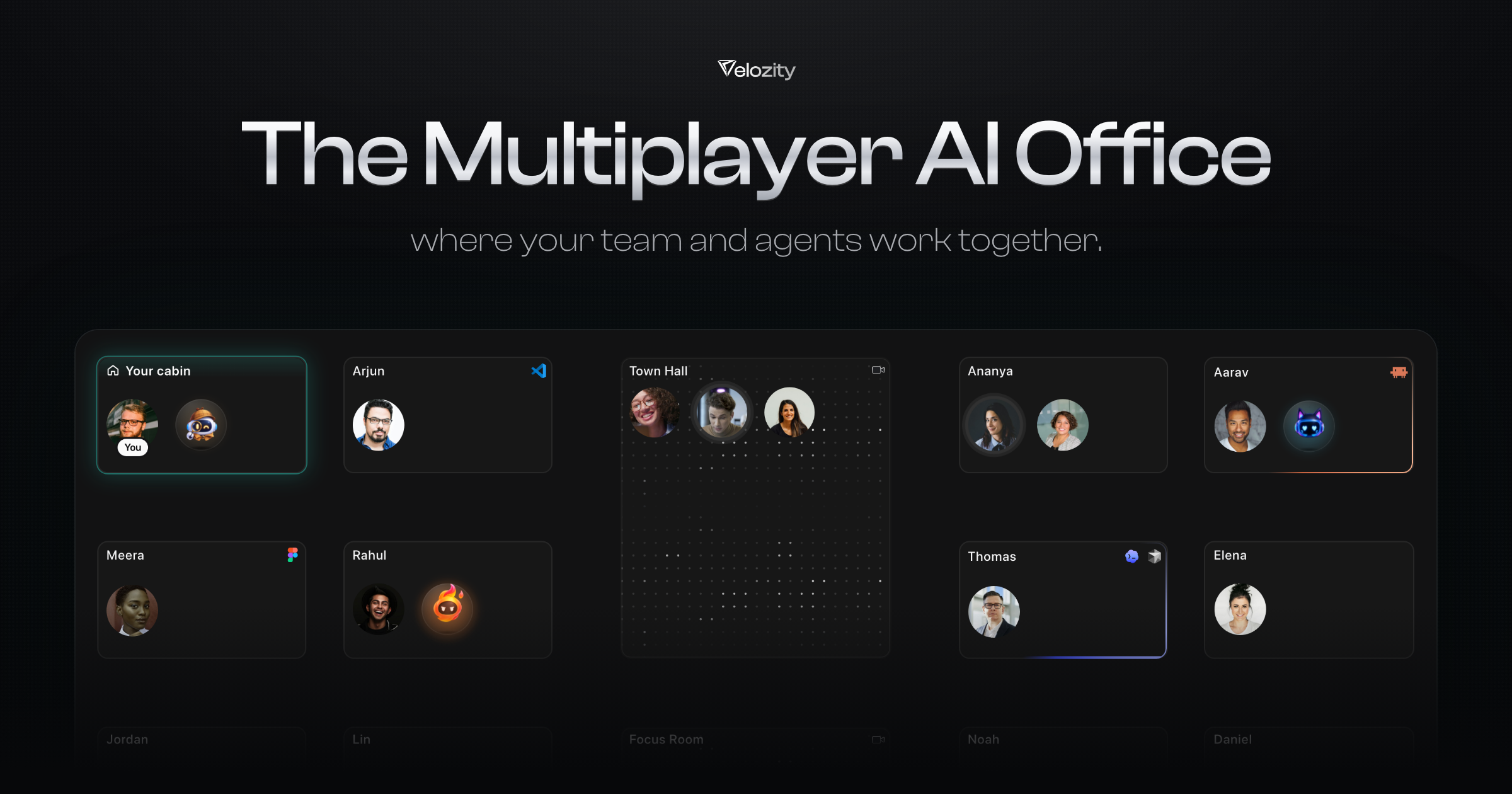
Velozity is the Multiplayer AI Office, a workspace where your team and your AI agents work together in one place. Instead of your team chatting in one app, meeting in another, and every AI working alone, Velozity brings it all into a single window. You can walk into a cabin in Workspace or talk to your agents in AI Space, using chat, audio and video calls with transcripts, tasks, calendar and files alongside AI agents such as Claude and Codex running on the subscriptions you already pay for. It is designed for startups, teams in development, product, sales and operations, and solo users juggling several AIs. Modern teams suffer from tool fragmentation. As the Product Hunt listing describes it, your team chats in one app, meets in another, and every AI works alone, forcing people to constantly switch between tools and re-explain context. Velozity's answer is to bring communication, meetings, tasks, calendar and files into one place, and to give every agent the same shared context so work moves between people and agents without having to re-explain. User stories on the site reinforce this: one describes replacing a whole suite of tools like Slack, Zoom, Notion, Calendly and even physical office setups, and another reports 97% less tool switching. The premise is that context is expensive, and keeping people and agents on the same page saves both time and money, with no second AI bill. Velozity is organized as a virtual office rather than a flat chat app. You walk into a cabin inside Workspace, and you can drag to walk around the floor to see who and which agents are working where. Each cabin and space shows live presence, so you can see that Arjun is using VS Code, Meera is using Figma, or that agents like Atlas, Tabby and Nova are working. From any cabin you can Drop In, chat, or invite someone over. Shared rooms such as a Town Hall and a Focus Room let people join a room for meetings, and the whole experience is designed so your team works there while your agents already know what happened. Velozity bundles the communication tools a team normally pays for separately. It supports chat with reactions, reply, quote reply, forward, copy text and copy link, plus at-a-glance context indicators such as the number of Context items and Routines in a space. It also includes audio and video calls with transcription and recording: the site shows a video call with a recording timer and a live transcript capturing who said what. Presence is continuous, so you can see who is online and what they are doing, and the meeting conversation flows directly into the office's shared context rather than being trapped in a separate app. Beyond communication, Velozity includes the operational tools teams juggle every day. There is a task system with a Smart and Fast AI task mode: Smart checks your existing tasks first and can update one, mark it done or flag a duplicate while picking the assignee and project, while Fast always creates a new task and never looks at existing ones. Tasks can be typed or spoken, with a voice recorder that opens in a small window, and they support due dates and priority. A booking calendar shows a week view of standups, demo calls, design sessions and one-to-ones, and tasks appear in grouped states such as in progress, open and completed. Files and docs live inside spaces, and Guest Pass Management lets you create and manage external guest access with validity options of 7 days, 30 days, unlimited or one-time use, with a Reception where the guest waits until you let them in. Velozity's defining capability is its agents. You use the AI subscription you already pay for, with Claude Code, Codex and Grok shown, to create your agents, and your whole team can tag their own agents in the same conversation. The site demonstrates named agents such as Jack (designs interfaces), Hulky (builds and ships code), Snoop (digs up research), Kai (prototypes screens) and Monkey (writes product copy) all working inside one space. You can spawn a department and watch it run: Engineering triages bugs, opens the fix, gets it reviewed and writes the release note; Marketing plans a campaign, writes it, designs it and reports what it brought in; Sales finds leads, writes the first email and books the demo in your diary; Customer Support answers tickets, escalates real bugs and keeps the customer posted; Finance reads invoices, matches them to orders and lines up the payment run; and HR & People screens CVs, books interviews and has the offer ready. Each department runs with four agents. Crucially, nothing is sent, paid or signed without you. Agents can run on this device or on a cloud computer. A cloud computer keeps agents working 24/7: the example shows Aria answering and following up support tickets overnight while your laptop is asleep, and capturing and qualifying unlimited leads all day. Velozity also ships Speed, its built-in agent that is on your team from day one and needs no Claude Code or Codex subscription. Speed reads your sources such as email, transcripts and files; creates tasks with a priority and due date; captures tasks from transcripts and email; performs deep research that answers questions from your own data; and delivers a morning brief every day at 8 covering what is due, who is waiting and what is on your calendar. Velozity connects to 100+ integrations and pairs them with a cloud computer for legacy apps. Documented integrations include Gmail (reads and sends email), Jira (captures and tracks issues), GitHub (tracks pull requests), Google Sheets (reads and writes rows), Google Drive (finds the right document), Outlook (reads and sends email) and Google Calendar (finds a slot and books it). Where there is no integration, for example Tally, your agent simply uses the app on a cloud computer. The shared context, sometimes framed as a Company Brain, means agents can answer questions such as where the team landed on a customer's pricing by checking calls and docs. The site illustrates an end-to-end flow: a customer email arrives at 09:12, a bug is captured in Jira at 09:13, a refund is posted in Tally at 09:20 with no integration needed, a fix is merged on GitHub at 11:48 and the customer gets a reply at 11:50. The benefits described on the site are practical and measurable from user stories. Consolidating work tools is said to save $214 per user per month, deliver 97% less tool switching, produce 85% less friction in day-to-day collaboration, make team coordination 4X quicker and enable 10X smarter collaboration powered by AI. Because Velozity uses the AI subscriptions you already pay for, there is no second AI bill, and because everything happening in the office is shared context, you do not waste time switching between apps and meeting notes are ready without anyone writing them manually. Founders get complete visibility and accountability without micromanaging, and remote-first teams get a virtual office that makes distributed work feel like working side by side. Velozity suits startups and teams working in development, product, sales and operations, as well as solo users juggling several AIs. Concrete scenarios shown on the site include a support agent resolving tickets around the clock on a cloud computer, a sales agent capturing and qualifying leads throughout the day, an engineering department triaging bugs and shipping fixes and release notes, a finance agent reconciling September invoices against payouts, a hiring agent screening curator portfolios, and a social and content studio pulling the last 30 days of X and LinkedIn performance. It is free to start with no card needed, and guests can be given time-limited or unlimited passes. Ultimately, Velozity positions itself as one office for your people and your agents: calls, presence, tasks and transcripts in the same window, every agent sharing the same context, and the ability to bring your own AI subscription. For teams tired of tool fatigue and of re-explaining context to isolated AIs, the Multiplayer AI Office aims to make remote work feel like working together, side by side.
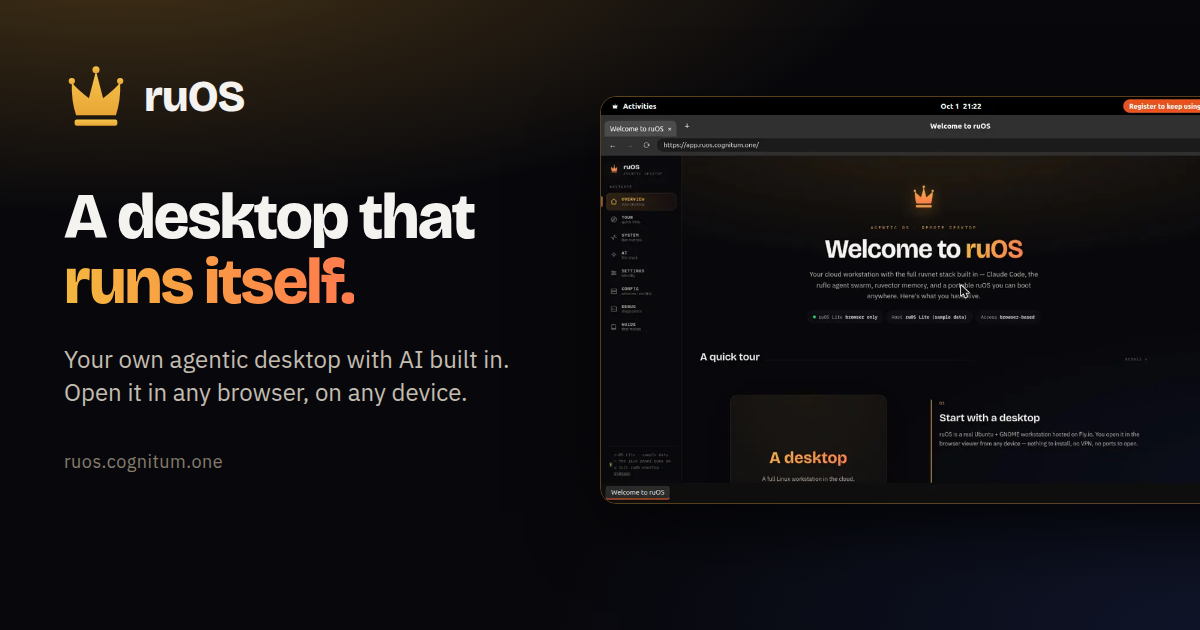
ruOS is a private cloud desktop with an AI team built in. It is designed for people who want an agentic workspace where AI does the work for them — research, writing, and code — without installing anything. You sign up, ruOS sets up your own private desktop, and you open it from any web browser on a Mac, iPad, Chromebook, or Linux laptop. A free option, ruOS Lite, runs a real Chrome browser drawn as your ruOS desktop right in your web page, and opens in about a second with no sign-up required. Most AI tools today live in a single chat window. You ask a question, you get an answer, and then you copy that answer somewhere else to actually finish the work. Your context, your files, and whatever the AI learned are scattered across tabs, apps, and devices. ruOS starts from a different premise: instead of a chat box you visit, you get a desktop that runs itself, with AI helpers already installed, signed in, and working side by side. Nothing has to be configured, and nothing has to be synced, because the desktop and everything on it live in one place that you reach from any browser. Everything is ready the moment you sign in. ruOS ships with smart AI helpers built in that write and run code, research on the web, remember your projects, and understand what is on your screen — all working together from day one. Claude Code is ready to write and run code for you. ruflo is a team of AI helpers. ruvector remembers your work, giving your agents long-term, self-learning memory. ruview understands your screen. Codex is available as extra coding help, and VS Code is the code editor. Because the helpers are preinstalled and signed in, the AI stack is ready as soon as your desktop starts — you do not have to wire up models or connections yourself. ruOS opens in any web browser, so there is nothing to install. The same session reshapes to any screen: sharp on a big monitor and comfortable on a tablet, with no fiddling with zoom. You can start on a laptop and keep going on an iPad, because your whole desktop goes with you. ruOS Lite goes further in simplicity — it draws a real Chrome browser as your ruOS desktop inside your web page, with tabs and windows, a dock of apps, and the ruOS app first. It opens in about a second, and it picks up where you left off: sign-ins, site data, and open tabs are saved and encrypted. Persistence is built in. Your files and everything the AI has learned are saved automatically, so you can come back tomorrow and pick up right where you left off — even from a different device. The desktop is yours and private: your files, your work, and your AI are kept separate and private from everyone else's. In ruOS Lite, VS Code and extensions are available too — vscode.dev sits in the dock, along with 1Password, Bitwarden, Claude, and uBlock Origin Lite when you turn them on. Your AI can drive it: ChatGPT and Claude see and click the desktop through the ruOS connector, never your extensions, and payments wait for you. The workflow is four simple steps. First you sign up: enter your email and ruOS sets up your own private agentic desktop, bound to your account, with no setup and nothing to configure — it is ready in minutes. Second, your desktop turns on: a private desktop starts up in seconds with the whole AI stack preinstalled and signed in, including Claude Code, a team of helpers, and self-learning memory. Third, the AI gets to work: ask for something and it is done, with a whole team of AI helpers researching, writing, and coding side by side while you watch — or step away and come back to finished work. Fourth, you open it anywhere: your desktop streams to any web browser and reshapes to the screen, the same session on your Mac, iPad, or laptop, with nothing to install and nothing to sync. Once you are in, the things you can ask for are simple. It writes and runs code: tell it what you want changed, and it edits the files, runs the tests, and tells you when it is done. It works as a team: it splits a big job across several AI helpers that work side by side. It remembers: it keeps track of what you are working on, so you never explain twice. It researches: ask a question and it browses the web, reads the sources, and brings back the answer. And it goes with you: your whole desktop travels with you, so you can start on your laptop and keep going on your iPad. Hand ruOS a task and it picks the right tool and gets to work. The outcome for users is fewer hand-offs and less copying between tools. Because the AI helpers run on the same desktop where your files live, research, writing, and code happen in one place rather than across scattered apps. Because memory persists, you do not repeat yourself or rebuild context each session. Because the desktop is private and per-account, your files, work, and AI stay separate from everyone else's. And because everything opens in a browser, switching devices does not mean setting anything up again. For developers and power users, ruOS is also a build platform. Under the hood it is a real Linux box with the full ruvnet stack and programmatic control, and everything is already installed on your desktop. ruOS runs an MCP server — ruos-computeruse-mcp — so an AI client like Claude can drive the desktop for real: see the screen, move the mouse and type, run shell commands, trigger system actions, and change the resolution on the fly. The exposed tools include screenshot, mouse_move / left_click, type_text / key (xdotool), run_shell, system_action, and desktop_resolution. You can point an MCP client at your desktop using stdio over SSH, and after launch you can resize with desktop_resolution presets of 720p, 1080p, 1440p, or qxga, or a custom width × height, applied server-side via xrandr. A hosted MCP endpoint is on the roadmap. The ruvnet stack is one command away, all preinstalled. Open a terminal on your desktop and use the same commands the AI helpers run for you: npx ruflo@latest init wizard to set up agent-swarm orchestration, npx ruflo@latest swarm init --topology hierarchical to spin up a team of AI agents, npx ruvector to give your agents long-term, self-learning memory, and npx ruflo to run the ruflo agent runtime. For quick start, ruOS provides an MCP address at https://ruos.cognitum.one/mcp. In ChatGPT you go to Settings → Apps & Connectors → Create, paste the address, and sign in. In Claude you go to Settings → Connectors → Add custom connector, paste the address, and sign in. In Claude Code you run claude mcp add --transport http ruos https://ruos.cognitum.one/mcp. ruOS in ChatGPT uses only the desktops and metered entitlements already assigned to your account. The ChatGPT app and its linked review surfaces do not present pricing, checkout, subscriptions, upgrades, or credit purchases. Getting started is straightforward: you can try ruOS Lite free in seconds with no sign-up, or get early access by signing up, after which your desktop is ready a few minutes later. ruOS takes the idea of an AI assistant and turns it into a place you work. It is a browser-reachable, private, agentic desktop where a team of AI helpers — Claude Code, ruflo, ruvector, ruview, and Codex — researches, writes, and codes alongside you, remembers your projects, and follows you from device to device. Nothing to install, nothing to sync, and nothing to configure: sign up once and the desktop does the rest.
Ghostifier is a privacy tool that finds every company holding your personal information and asks each one in writing to stop selling or sharing your data and to delete it. Instead of filling out one removal form per company, it starts from your Gmail inbox: you connect Gmail once, and the first scan looks back about two years to build a list of every company that has your details. It is built for anyone who wants their personal information removed from marketing lists, company databases and data brokers without chasing down dozens of privacy pages by hand. The problem Ghostifier addresses is laid out plainly on its website. Companies hold your name and address, handed over with every account you open and every order you place. They hold what you buy, kept in a profile with your name on it. They hold how you browse, habits and interests gathered to target ads at you. They hold where you go, location details collected by apps and sometimes sold. On top of that, data brokers collect and sell information about people who never heard from them at all. Because each company handles privacy differently, asking for removal one company at a time is slow and easy to abandon. Ghostifier's starting point is your inbox, because that is where the evidence of who holds your data already sits. It unsubscribes you and opts you out of sale and sharing on day one, waits out return windows, then sends deletion requests and tracks every reply. The first thing Ghostifier does is find the companies. You sign in with Google, and, in the words of the site, one sign-in starts the scan right away. Ghostifier uses your inbox to identify the companies that email you, and the scope of what it can see is deliberately narrow. It sees the sender, the subject line, the date and any unsubscribe link in the header. It cannot see message bodies or attachments, and it never opens your emails. The company states that Gmail access is headers only, so it never reads your email bodies, and that there is no AI: every decision follows fixed rules. From that metadata it builds a list of every company that has your information, along with what kind of company it is, and the free scan shows you the result — for example, a count of how many companies have your data, how many relate to marketing mail, and which ones Ghostifier will not delete. Nothing is sent at this stage. You see every company and the plan before anything goes out. You stay in control of what happens next. After the first scan, you can see every company and the plan for it, and nothing goes out until you say go; you also have the option to approve each company yourself. Ghostifier groups companies by relationship type in a control center, with settings for unsubscribe, opt-out and deletion that can be set to automatic, ask me or leave alone. Under the Balanced preset, marketing-only companies get automatic unsubscribe, automatic opt-out and automatic deletion held for 48 hours first; account and updates companies are set to ask me for unsubscribe and opt-out and to be left alone for deletion; purchase companies are likewise ask-me for unsubscribe and opt-out and left alone for deletion. You can change these settings at any time, for each kind of company, and pick how much Ghostifier does on its own. There is also a set of companies Ghostifier never deletes, whatever you pick: banks, insurers, doctors, schools and employers; password managers, email and storage, domains and crypto; anything you used in the last year; and household names like Google and Spotify. Those companies can still be asked to stop selling your data, according to your settings. When you give the go-ahead, Ghostifier does the work in stages. It unsubscribes you from every list that supports one-click unsubscribe, free on every plan. It opts you out of sales, telling each company in writing not to sell or share your data. Once any waiting period has passed, such as the return window on an order, it asks the company to delete your data. If a company misses its deadline, Ghostifier follows up once. Every step is tracked to the legal deadline where one applies. The deletion request itself is sent as an authorized agent request; the sample letter on the site is made out under the California Consumer Privacy Act, as amended by the California Privacy Rights Act, which the letter states requires a response within 45 days and allows a request to be made through an authorized agent holding signed written permission. Ghostifier contacts companies from its own address on your behalf, and you give it written permission once, when you pick a plan. Receipts are kept for every request: the letter, when it went out, and what each company said back. The activity page shows the status of each request — queued, waiting on them, replied, done or problems — alongside the request type, whether unsubscribe, opt-out or deletion. Data brokers are handled separately. Ghostifier asks 220 registered data brokers to delete your details, even if they never emailed you — a group that by definition collects and sells information about people who have never heard from them. This is included with the Cleanup and Autopilot plans. The dashboard tracks how many brokers were asked, how many replied and how many are done, meaning deleted or with none on file. A separate sample letter shows the broker request, which notes that the broker is registered in California, that you may have no relationship with it, and that the request covers records gathered from other sources; it also asks the broker to instruct service providers and third parties to delete as well, and to say so if it holds no records. Overall, Ghostifier works from a single connection rather than repeated manual requests. You connect Gmail, the first scan builds the list, you review it and say go, and Ghostifier handles unsubscribes, opt-outs and deletion requests. On the Autopilot plan, this becomes ongoing: a daily check of your inbox deals with new companies as they appear, companies still emailing after you unsubscribe are followed up, and you get a weekly summary email. Because companies often write directly to you to verify a deletion request, Ghostifier surfaces those messages in a Needs you area — it can see that the email arrived but cannot read your email or answer from your address, so you open it, do what it says and mark it done. The benefits are the ones the site states directly: fewer companies hold your data, and each request is tracked rather than lost. You get proof in the companies' own words — for example a confirmation reading "Your data has been deleted from our systems," kept as a receipt. You do not have to hunt for contact addresses, write letters or remember follow-ups. Nothing is sent without your approval, nothing is sold, and you can leave at any time. And because Gmail access is limited to headers and the system runs on fixed rules rather than AI, the tool gathers what it needs to identify companies without reading the contents of your inbox. Concrete scenarios follow the company's own examples. Someone who has been online for years signs in, sees a scan result such as 412 companies holding their data, and reviews the list before approving anything. A shopper's purchase data sits in a retailer's profile; Ghostifier waits out the return window before requesting deletion, so an order in progress is not disturbed. A person who keeps receiving mail from companies they never heard of can have broker deletion requests sent to the 220 registered brokers, including firms that never emailed them. Someone who wants to keep a Google or Spotify account can still unsubscribe from marketing and ask those companies to stop selling their data, while the accounts themselves are never deleted. A user who receives a verification email from a company can find it flagged in Needs you, complete the step and mark it done. Ghostifier is aimed at people who want their personal information removed from company databases and data broker files without doing the paperwork themselves. It works with Gmail and is a web application. Seeing who has your data is free forever, and the free plan includes the ability to see every company that has your data and to unsubscribe from every list that supports one-click unsubscribe. Cleanup costs $29 once and adds opt-out and deletion requests to every company found so far, deletion requests to 220 registered data brokers, deadline tracking with a follow-up, and a receipt for every request; it counts toward Autopilot if you upgrade within 60 days. Autopilot is $59 a year — about $5 a month, billed yearly, or $8 monthly — and adds companies found later, a daily inbox check, follow-ups on companies still emailing after you unsubscribe, and a weekly summary email. Upgrading to Autopilot within 60 days means the $29 Cleanup counts toward the first year. Payments go through Stripe, and Ghostifier never sees your card. On data storage, the site states that Ghostifier keeps a list of the companies it found and a few dates, such as when they last emailed you; once requests go out it also keeps each letter and the replies companies send back, encrypted so only you can read them, until 30 days after a request finishes. You can delete them sooner, it does not store your emails, everything it holds is visible in Settings, and you can delete it all in one step. In short, Ghostifier's primary value is turning data removal from an endless series of individual forms into one connected workflow: scan your inbox to find who has your data, decide what should happen, and let Ghostifier unsubscribe, opt out and request deletion while keeping a receipt for every request. Seeing who has your data is free; asking them to delete it is where the paid plans come in.
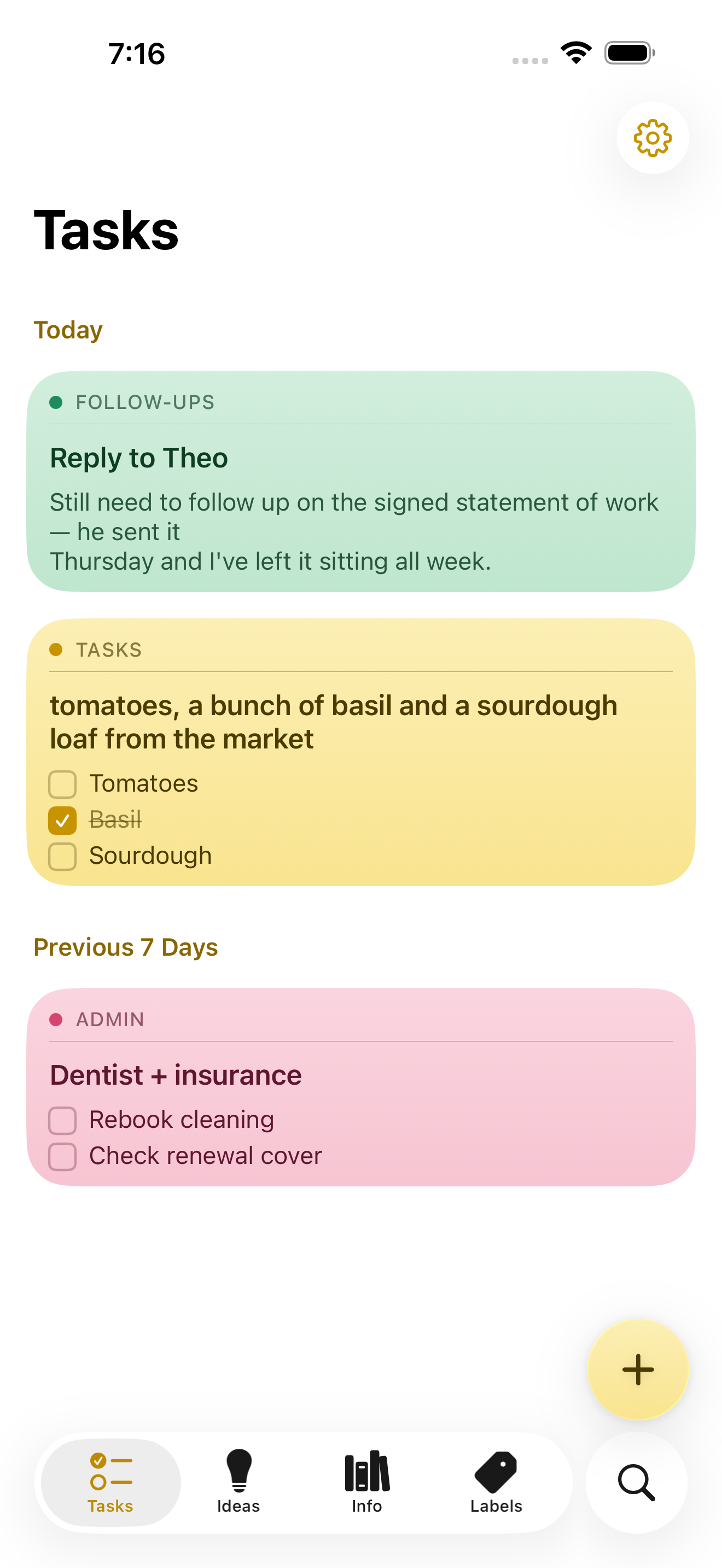
NoteWorthy is a notes app for iPhone, iPad and Mac that finishes the note after you have written it. You jot anything down — a messy line, a quick capture, a scraped list — and NoteWorthy writes a title, summarizes what you wrote, cleans up the formatting and files the note into the right place. Its purpose is captured in its own headline: You write the note. It does the rest. The app is built for people who capture quickly and organize slowly, and it is designed from the ground up to run entirely on the device it is installed on, without an account, without a subscription and without any note leaving the machine it was written on. The app aims at a familiar problem. Note-taking tools are easy to start and hard to keep. Notes arrive without titles, without structure and without a home, and the fixing-up work — naming, tidying, filing — is exactly the work people skip. At the same time, most modern notes apps ask for an account, hold content on remote servers and charge a subscription for the privilege. NoteWorthy's answer is to put the clerical part of note-taking on the device itself, so that titling, summarizing, formatting and filing happen automatically and privately, with nothing to trust beyond the hardware in your hand. Writing in NoteWorthy is rich text with real Markdown underneath. Checkboxes, headings, bold and italic, tables and images all work the way you would expect, and the note is stored as Markdown you can take anywhere. Six paper colors let you separate the look of different notes, you can scan text straight out of a photo, and any note can be exported as Markdown that opens in any other editor. The Markdown foundation matters because it makes the library portable by default: if you ever want to leave, you take your notes with you rather than leaving them behind inside a proprietary format. Two on-device writing tools do the tidying. AI Format turns a scrappy line into headings, bullets and checkboxes without changing your wording — it restructures, it does not rewrite. AI Summarize pulls a page of thinking down to a single sentence. In both cases you see the result before it touches the note, and you can then copy it, insert it, or replace the original with it. Both run on the device with no network in either direction, and on older hardware they fall back to fast built-in heuristics so the feature still works. AI Organize handles placement. Every note gets a title and files itself into Tasks, Ideas, Info or Personal, and you can make your own labels with your own icon and color and pin the ones you use most to the tab bar. A single tap on AI Organize tidies the whole library. The filing is deliberately deterministic: run it twice and nothing moves, because filing reads what is already stored on the note rather than asking a model to guess a second time. That detail is what makes automatic filing safe to rely on — the library does not reshuffle itself every time you press the button. Capture and retrieval extend the app beyond its own window. You can select something in Safari, share it, and it becomes a note; Siri and Shortcuts do the rest. There are five Shortcuts actions, and Summarize and Format work on text from any app. Widgets come in four sizes and include checkboxes you can tick without opening anything. Search works both inside the app and from the Home Screen: keyword search with highlighted matches that can be filtered by color, and every note indexed with Spotlight so the system search finds it without opening NoteWorthy, with Spotlight results opening the note directly. Indexing happens on device, like everything else. Notes also know what they contain: a date becomes a calendar event, a name links to your contacts, an address opens in Maps, and writing "remind me before Friday" prompts the note to offer to set a reminder. All of that detection happens on device and is never uploaded, nothing happens until you tap it, and reminders arrive as a local notification. Privacy here is presented as a property of the build rather than a promise. There is no server to trust because the app makes no network requests at all. There is no account to create and no connection required, so airplane mode changes nothing. The app can be locked with Face ID, notes are written to disk with file protection on iPhone and iPad and stay inside the app's sandbox on a Mac, and nothing is collected and nothing is tracked — no analytics, no advertising and no crash reporter of the developer's own. You can verify the claim rather than believe it: on a Mac the app is sandboxed without the network entitlement, so macOS itself would refuse any connection, and the entitlement list can be printed with a codesign command. On iPhone and iPad you can turn on App Privacy Report, and NoteWorthy never shows up under network activity. Underneath, two models run on the device. Apple's Foundation Models, part of Apple Intelligence running on the Neural Engine, write the words: note titles, summaries and the Markdown rewrite. Google's EmbeddingGemma 300M — a 300-million-parameter embedding model, quantized to 4-bit, bundled inside the app and run through MLX — decides where things go. Because it is an embedding model, it matches a note to a label by meaning rather than by keyword, and it can also conclude that none of the labels fit. It is loaded lazily and never downloads; the weights ship inside the app. As the site puts it, one writes and the other decides where things go, and neither can reach the internet because the app cannot. NoteWorthy is universal for iPhone, iPad and Mac and is a single Universal Purchase covering all three. It needs iOS or iPadOS 26 or later, or a Mac with Apple silicon running macOS 26 or later. Apple Intelligence is required only for the writing features — AI Format, AI Summarize and generated titles — and the app falls back to built-in heuristics without it, with writing, filing and search still working. Everything the app does today is free, with no ads and no subscription. iCloud Sync and Shared Notes are announced but not shipped; when they arrive they will go through your own iCloud account rather than a server of the developer's, and they will be a single one-time unlock. Until sync ships, each device keeps its own notes and you can move one across by exporting it as Markdown. The Mac version is in review for the Mac App Store; until it clears, it can be installed from a DMG or with a Homebrew cask. The intended audience is people who already live on Apple devices and want the convenience of AI assistance without handing their writing to a server. That includes anyone who captures thoughts in a hurry and never gets around to filing them, and anyone for whom privacy is a requirement rather than a preference. Because the app works offline and asks for no account, it also suits people taking notes in places where a connection is unavailable or unwanted, and people who simply do not want another subscription. The outcome for a user is a library that stays organized without a filing session. Notes arrive titled, structured and classified, which means search and Spotlight can find them later and the labels remain meaningful instead of becoming a junk drawer. Because there is no network path at all, notes carry no exposure: nothing to leak, nothing synced to a third party, nothing collected. And because the format is Markdown, the library is not a commitment — it is a set of plain text notes you can carry elsewhere. That plays out in ordinary workflows. You are reading something in Safari and a paragraph is worth keeping, so you select it, share it to NoteWorthy and it becomes a note; later a single tap on AI Organize titles it and puts it under Ideas. You dictate a messy list of errands; AI Format turns it into checkboxes without touching the wording, and the items can be ticked from a widget without opening the app. You have written a long page of thinking about a decision and want the gist, so AI Summarize offers a sentence you can insert while keeping the original underneath. You write "remind me before Friday" in a note about a signed statement of work, and the note offers to set a reminder that arrives as a local notification. The website's own sample notes show exactly this shape of use: a follow-up about a reply, a market list with items already ticked, a dentist and insurance note, a packing list for Lisbon and a sourdough starter idea, each one titled and filed under its own label. NoteWorthy's core proposition is narrow and firm: the AI help in a notes app does not have to travel. Titles, summaries, Markdown cleanup and semantic filing all happen on the iPhone, iPad or Mac you are already holding, the library is stored as Markdown you can export, and every feature the app ships today is free. For anyone who wants smart notes without a smart server, that combination — automatic organization plus an app that makes no network requests at all — is the whole point.
Incredible is an AI that does tasks on your computer. It is a desktop app for macOS and Windows that clicks and types in your browser, in files, and in apps, exactly like you do, so the busywork gets done while you do something else. You give Incredible a task, and Incredible does the work on your computer, in the same places you would. The company describes the product as "vibe computing" and as an AI you control with your voice, built for anyone who spends their day inside a browser, a set of business apps, and a folder of files. The problem Incredible addresses is simple to state and hard to solve. A chatbot writes the answer, but you still have to put it into each app yourself; Incredible puts it there for you. The repetitive parts of knowledge work — clicking through pages, reading reviews, copying numbers between a PDF and a spreadsheet, filling in forms, drafting and sending the same email again and again — still land on a person. Incredible is built to get that repetitive work done faster. The site illustrates the difference with a comparison across repetitive workflows: 1x on your own, 2x with a chatbot, and 14x with Incredible, measured on select repetitive workflows across multiple domains, with results varying by task. Product Hunt lists the product under Productivity, Artificial Intelligence and Menu Bar Apps. Incredible is driven by voice and by what is on your screen. Hold the activation key and say what you need in your own words; you can also type the task instead. When you activate Incredible, Incredible can see the page or document in front of you, so you can say "reply to this" without explaining which email you mean. That awareness is paired with the material already sitting on your machine: Incredible works from what is already on your computer, using your files and the page in front of you as context, so you can give a task without explaining everything first. The app lives up in the menu bar — "Hey! I'm Incredible. I live up here" — with a small set of keyboard commands shown in the interface: fn to talk, Alt+C to add files, Alt+X to capture text, a screenshot command, up and down arrows for history, esc to close, and Enter to send. Apps, browser and files are where the actual work happens. Incredible opens the apps you already use and moves information between them, so you no longer copy and paste from one app to the next. It sends the emails and fills in the forms for you, then tells you when the task is done. In the browser, Incredible uses websites the way you do, clicking through pages and filling in forms on sites you are already signed in to. In your files, Incredible can read and update the spreadsheets and documents on your computer, so you stop copying numbers between them by hand. The site's example shows a proposal PDF, a model spreadsheet with a total updated, a brief document and a deck with slides added, alongside counters such as 12 calls logged and 12 follow-ups booked. More than 3,000 apps connect to Incredible directly, and any other app you can open in your browser works too. Apps named on the site include Gmail, Slack, Notion, LinkedIn, Google Drive, Google Sheets, Google Calendar, HubSpot, Zoom, Microsoft Teams, Salesforce, GitHub, Figma, WhatsApp, Outlook, Excel, Google Docs, Discord, Telegram, Shopify, Trello, Chrome, Jira, Dropbox, iMessage, Airtable, PayPal, X, Google Meet, Zendesk, Confluence, Snowflake, Sentry, QuickBooks, Xero, Zoho, Sage, Odoo, Linear, Vercel, SharePoint and PostgreSQL. Three further controls round out the experience. Reminders let you tell Incredible what needs your attention and when; Incredible reminds you at that time, with the details you gave attached to the reminder. Control means Incredible asks you before anything is sent — you can approve the step or change it first, and you can stop Incredible at any time. Privacy is explicit: Incredible only looks at your screen after you activate Incredible, and the rest of the time your screen stays private. Together these settings keep a person in the loop over anything that leaves the machine. The overall approach is to work inside the tools rather than beside them. Incredible does work for you directly inside your apps, in the same places you would work, rather than producing an answer in a separate chat window that you then have to move into each system yourself. Because it acts on the page, the document and the application in front of it, it can carry a task through several steps and several apps — reading something in one place, clicking or typing in another, filing the result somewhere else, and reporting back when the task is finished. That is why the same assistant can handle a spreadsheet update, a form submission and a reminder without the user rebuilding the workflow by hand each time. The stated outcome is leverage rather than replacement. CellMark, a customer that uses Incredible in its offices in Sweden, France and the United States, describes the effect this way: "It's not about taking the work away from me. It's about boosting me. We are seeing higher accuracy and better results across the board," says Håkan Enhager, VP Global IT & Digital at CellMark. The site frames the benefit as handing over routine work, so the person keeps the judgment while the busywork gets done. The result is fewer manual handoffs between apps, less copying and pasting, and work that continues while you turn your attention elsewhere. Concrete workflows are laid out by role. For sales, Incredible finds and reaches out to prospects — the example task is finding 50 VP of Product at fintech SMEs with personal intros, reading profiles, adding contacts and sending personalized emails — while researching prospects and keeping the CRM up to date work the same way. For marketers, it reads 100 G2 reviews of a competitor, pulls out what users complain about, tags the complaints and writes the summary, and the site notes it can also research competitors and turn the findings into content. For recruiters, it screens a folder of 200 resumes against the role being hired for, scores candidates, builds a ranked shortlist with reasons, and drafts replies to the people picked. For operations, it finds every receipt in an inbox for the month, renames and organizes the files and logs the amounts, and it files invoices the same way every month. For founders, it finds the speakers at a conference, sends requests and dinner invitations, and follows up with everyone met at an event. For everyone, it turns a long email thread into a meeting with all attendees included — reading the emails, finding a slot for all six, and posting the invite in Slack. Incredible is aimed at people and teams who work across a browser, standard business apps and local files, and who have routine tasks they repeat. The company markets a downloadable desktop app for Mac and Windows — "Download for Mac", "Download for Windows", "Try for free", "Get started" and "Book a demo" — and Product Hunt lists it as a Menu Bar App. Security and privacy documentation is published in a Trust Center: SOC 2 Type 2 audited by Sensiba, GDPR compliant, data encrypted at rest and in transit, and no training on your data. The site also lists protection against malicious code, confidentiality agreements with staff and partners, feedback on every response, and a dashboard of your team's usage, plus support from a dedicated success team, priority support with an SLA, guidance on setting up your first tasks, and onboarding for your whole team. Incredible announced a $2.7M pre-seed round. Incredible's proposition is narrow and practical: it is an AI that does tasks on your computer, clicking and typing in the browser, apps and files you already use. You speak or type a task, it works in the same places you would, it asks before anything is sent, and it tells you when the task is done — so the routine gets handled while you do something else.