Category Focus/categories/automation
Automation AI Tools
Discover and compare the best automation AI tools and software. Browse 627+ curated tools with reviews and rankings.
Projects tracked
627
Sort mode
RECENT
Page
1
Discover and compare the best automation AI tools and software. Browse 627+ curated tools with reviews and rankings.
Projects tracked
627
Sort mode
RECENT
Page
1
OpusClip 4.0 is an AI video editing tool that takes a raw take and turns it into finished, ready-to-publish video content. In the company's own words, it "edits your whole video, from raw take to every format you post." You drop in raw footage or paste a link, switch on what you want applied — speech cleanup, captions, B-roll and more — and a finished video comes back. The product is built for people who now have to make video content, from founders and operators to a dentist answering patient FAQs on camera every week or someone teaching their 3,000 followers how to make high-protein meals. Its stated purpose is to give a "team of one" some of the range that media companies get from a room full of editors. The background explains why the product changed shape. OpusClip was originally built to "slice a clean fish": people brought finished videos, such as a podcast episode that was already edited or a keynote someone had cleaned up, and OpusClip found the best moments and turned them into clips. That worked — scroll your feed for a few minutes and there's a good chance you'll see a clip that came through OpusClip. But what people bring has changed. More and more, it is a raw take that nobody has had time to edit. As the company puts it, "the edit is where things stall." Founders film in one take because they know they'll never get around to cutting it, and post it as is; many already have their next good video on their phone, filmed weeks ago and never edited. For a while, OpusClip kept making clipping better and left the hardest part — the edit itself — to the user. OpusClip 4.0 takes that on. Auto-edit is the headline capability. Built for talking videos, it lets you drop in raw footage or paste a link and then switch on speech cleanup, captions, B-roll and more. What comes back is a finished video rather than a rough cut. For the audience the product describes — founders and operators who say they almost never enjoy editing — this removes the step that previously stalled their content. Instead of posting a single unedited take because cutting it would never happen, a creator can hand over the raw recording and receive something publishable, with clean speech, on-screen captions and B-roll already applied. Every format addresses the reality that one video is rarely enough. A single edit can become whatever you need that week: 60 to 90 second highlight clips, a 3 to 5 minute extended cut, or a quick lo-fi update. Recipes make that repeatable. Most people make the same kind of video over and over, so you can save your own setup as a Recipe — or start from one of OpusClip's — and your next video gets edited the same way. This matters for consistency: once you have found a look and structure that works for your audience, you don't have to rebuild it from scratch each time you record. Viral Hook and Motion Graphics cover two tasks that, according to the company, editors spend hours on. Viral Hook gives your first few seconds a hook style drawn from a template library, targeting the opening moment that decides whether a viewer keeps watching. Motion Graphics turns what you say into animated icons, numbers and charts on screen, so spoken points become visual elements automatically. AI Producer extends editing into tools people already use: if you work in ChatGPT or Claude, you can edit from there with the OpusClip plugin — show it a style you like and it edits your footage to match. Taken together, the product's approach is to own the entire path from raw recording to finished, formatted output. Clipping isn't going anywhere — it's still what OpusClip is best known for and is still getting better — but it is now one part of the platform. The method is style-driven and repeatable: you supply the footage (or a link), you choose the treatments to apply, you can preserve a setup as a Recipe, and you can demonstrate a preferred style to the AI Producer plugin rather than describing it in detail. One edit then fans out into multiple formats, so the same source material serves the different places you post. The intended benefits follow directly from that. A solo creator gets a wider range of output without hiring editors, matching the observation that people who stay top of mind post often in a lot of formats — something media companies achieve with a room full of editors and a founder with a phone and a packed calendar usually cannot. Time previously spent on cutting, captioning, hook writing and motion graphics is redirected into recording. Content that would otherwise sit unedited on a phone can be shipped. Concrete scenarios appear throughout the announcement. A founder recording a two-minute product update on their phone between meetings is the person the team kept picturing. A dentist answering patient FAQs on camera every week is another fit, as is someone teaching their 3,000 followers how to make high-protein meals. The original workflow still applies: an already-edited podcast episode or a cleaned-up keynote can be mined for the best moments and turned into clips. On top of that, a single recording can be delivered as a 60 to 90 second highlight clip, a 3 to 5 minute extended cut, or a quick lo-fi update, and the same Recipe can be reused the next time that format is needed. OpusClip 4.0 runs through a web dashboard at clip.opus.pro, where you can sign in, sign up for free, or paste a link or upload footage. Pricing information in the announcement includes a Free Forever Plan described as letting you create and post one short video every day for free, plus a Pro monthly plan for which new users are offered 40% off the first month. The wider Opus platform also includes OpusSearch, which uses AI to surface the exact clip you need from hours of footage in seconds, and Agent Opus, which the site describes as running the entire video pipeline — research, scriptwriting, storyboarding, motion, voice and edit. The company says OpusClip is used by more than 20 million creators and brands. In short, OpusClip 4.0's value proposition is that the edit no longer has to be the bottleneck. One raw take goes in, and finished videos in the formats you actually post come out — cleaned up, captioned, styled with hooks and motion graphics, and repeatable through Recipes, so a team of one can publish like a much larger operation.
Cedric AI for Meetings is an AI meeting assistant that works before, during, and after a call. It joins meetings on Google Meet, Zoom, and Microsoft Teams, where it can take notes, answer live questions, share its screen and present a deck or page slide by slide, or attend on your behalf when you cannot be there. The product is built for teams whose work happens in conversations: the site lists sales, recruiting, marketing, user research, engineering, finance, healthcare, media and podcasting, and venture capital. Its purpose is to carry the meeting and the work around it — notes, minutes, decisions, action items, and follow-ups — so you review and approve output instead of producing it from scratch. Most meeting tools record. Cedric is positioned as a meeting AI assistant rather than only an AI meeting note taker: it actively participates in the conversation and handles the work around it. The problem it addresses will be familiar to anyone who runs client calls, pipeline reviews, or internal check-ins. People join late and miss context. People cannot attend at all and send nobody. Someone has to write the recap, update the CRM, file the notes, and chase the next step. And decisions made out loud are easily lost once the call ends. Cedric is designed so the call produces the record and the follow-up work in the same pass, with the approvals left in human hands. Cedric can take the presentation. Inside a live call he shares his screen and presents a deck or a page, slide by slide. Participants can ask for a specific slide — the page shows someone saying “Cedric, show the pricing slide” — or ask him to move to the next slide, and he can take questions at the end. Pages he builds in the workspace can be loaded straight into a call, connecting preparation and presentation. During the call he can also answer questions using your workspace, connected tools, or the web. He says what he is checking while he works and gives the answer out loud, so the room hears the sourcing rather than a silent lookup. Someone who joins late can ask what they missed and be brought up to speed on the conversation so far. Before a booked meeting Cedric asks what matters: goals, topics to watch for, and what not to say. You prepare the agenda and review attendees and open commitments with him, and behavior profiles let him adapt how he participates in each person's calls. When he joins, you choose his role. As Assistant, the default, he takes notes, keeps the meeting on its agenda, and does what you ask during the call. As Note-taker only he stays silent for the whole call and you get the notes and action items afterwards. As Attend for me, he joins in your place, asks your questions, answers from what he knows, and briefs you after. Listener and Moderator (beta) roles are also described, with the moderator able to moderate the discussion. Several Cedrics can join the same call. The team's Listener can stay in the meeting while a Stand-in represents an absent colleague, or two absent people can each send their own. Tiles carry distinct labels such as “Cedric for Ana” or “Cedric (moderator)” so it is clear who each one represents. Saying “Cedric” addresses the Listener, and everyone's notes draw from one shared meeting record. In the example shown on the page, a single record for a weekly pipeline call at 11:00 serves the whole group rather than splitting the conversation into separate copies. Cedric is also an AI meeting note taker. Every call ends with AI meeting notes and AI meeting minutes: a searchable transcript, a clear summary, the decisions, and the action items, ready to review and share. Decisions are separated from open questions, and action items carry owners and deadlines where they were agreed. In the sample record on the page, a 31-minute, four-person check-in yields a summary line about a confirmed two-week pilot, a decision that the pilot sits on the standard plan, action items assigned to Lucia and Ana with days attached, and an open question about who joins from the client's IT team. Meeting knowledge stays connected to the people, decisions, and preferences remembered across the workspace. Each meeting has a dedicated page in the dashboard with Notes, Transcript, and Follow-ups, and you can search that record or ask Cedric about earlier conversations — who owns a next step, or what a client requested. The page shows the pattern: a teammate asks @Cedric who owns the Meridian onboarding plan and gets the owner, the deadline, and the meeting where it was agreed. Nothing has to be reconstructed by hand from a recording. After the call, Cedric drafts the work in your tools. On the page, a single call produces six drafts: a recap email in Gmail, a deal moved to pilot in HubSpot, call notes on the account in Zoho CRM, a pilot plan page in Notion, a Google Ads campaign, and a LinkedIn post. You review each one, and nothing goes out until you approve it. The FAQ adds that he can create tasks in connected project management tools, add meeting information to CRM records, book follow-up meetings, and run reminders and multi-day follow-ups, with available capabilities determined by the tools you have connected. The overall approach is one loop with a human checkpoint. Invite Cedric to the call and choose his role, brief him on what matters, then ask questions or let him present while he works from your workspace, connected apps, and the web. Afterwards, review the transcript, summary, decisions, and action items, then approve the follow-up work across your connected tools. The same meeting record sits underneath all of it, so preparation, participation, notes, and follow-ups refer back to one source. Cedric works with Google Meet, Zoom, and Microsoft Teams; you reach him through the browser, Slack, Microsoft Teams, Discord, or Telegram; and he connects to Google Calendar, Gmail, HubSpot, Notion, Outlook, Salesforce, Slack, and, per the FAQ, 3,200+ other tools. The stated benefit is that the call stops being the end of the work and the start of a second job. If you join late, Cedric catches you up. If you cannot join, he represents you within a brief and brings back the decisions and next steps. Commitments get captured with owners and deadlines instead of evaporating. Follow-up work arrives as drafts you approve, so speed does not come at the cost of control. And because his shared memory ties conversations to people and preferences, you can ask questions across meetings rather than digging through recordings. Sales is the case the page develops in most detail: a deal recap summarizing customer goals, objections, requirements, and agreed next steps; a follow-up email drafted from what the buyer actually discussed; and proposed CRM call notes and task updates in the connected CRM. The same mechanics carry into the other functions the page names — recruiting, marketing, user research, engineering, finance, healthcare, media and podcasting, and venture capital. Concrete scenarios shown or described include presenting a pricing deck to a client and taking questions at the end, sending a Stand-in when a colleague is absent, asking who owns an onboarding plan agreed in a previous check-in, and telling Cedric to send a revised quote after the call so he drafts it and checks before it sends. The page does not publish a conventional price list. It offers a free start, plus a welcome gift of $100 free and $50 more with the code PRODUCTHUNT2026. Figures that appear inside the demos on the page include a standard plan at 12 seats for $108/mo, or $1,296 per year, and a seat price of nine francs a month for twelve weeks. Live joining, recording imports, and other capabilities depend on the meeting platform and the connected integration, and the browser dashboard and chat integrations are places to work with Cedric rather than identical conferencing surfaces. Cedric's proposition is narrow and concrete: an AI meeting assistant that presents, answers, notes, and attends, then turns the conversation into drafts you approve. For teams whose commitments are made on calls, that closes the gap between what was said and what gets done.
Embage is a no-code platform for building AI chat and voice agents that talk to your customers. You choose whether the agent handles support, sales or feedback, shape its tone, and put it live on your website as a chat window, a browser-based voice agent, or both — and on Telegram for chat. The agent answers from your own documents, acts inside the tools you already use through sub-agents, and leaves your team a scored record of every conversation. It is built for teams that want customer conversations handled automatically without writing code or installing anything, and it can be live in three steps: build, connect and embed. Embage frames the underlying problem simply: most companies throw the conversation away. Visitors arrive, ask questions, and leave, and whatever they said is lost unless someone happens to be watching. Embage positions its agent as a way to answer 24/7 while your team sleeps, to save every chat as a lead, ticket or feedback record, and to end each conversation with a next step — a score and a follow-up — rather than a raw transcript nobody reads. That framing runs through the whole product: the conversation is treated as data worth keeping and acting on, not just a support cost. Chat and voice both run live on your site. You can add a chat window, a voice agent, or both, and chat agents can also answer on Telegram. Voice runs in the browser with nothing for visitors to install, and visitors can interrupt mid-sentence instead of waiting for the agent to finish. At any point the conversation can be handed off to your team. Because the voice agent acts mid-call, it can book meetings and save records while it is still talking, and when a human takes over their replies are spoken aloud to the visitor. The same documents, tools and scored record apply whether the conversation happens by chat or by voice. The knowledge base is what the agent answers from. You upload files or add web pages, and the agent searches them before it answers rather than improvising. Supported formats include PDF, Word, PowerPoint, Excel, CSV and Markdown. Articles can be edited in place so answers update to match, and questions the agent could not answer are surfaced as knowledge gaps — a direct signal of what your documentation is missing. This keeps replies grounded in your own material and gives the team a feedback loop for improving it over time. The datastore turns chats into records. While the agent talks, it saves tickets, leads and feedback, using templates for tickets, a sales CRM, feedback and events. It asks for missing fields before saving, so a half-complete ticket does not land in your queue, and every row can be filtered, edited and acted on afterwards. That means the outcome of a conversation is structured data your team can work with, rather than free text someone has to re-read and retype into another system. Sub-agents are how the agent does the work rather than only describing it. They are workflows written in plain English that call your tools mid-conversation, connected through 360+ apps with one-click sign-in — Zendesk, Shopify, HubSpot, Gmail, Salesforce, Google Calendar, Google Meet, Slack and Stripe among them. Every tool call is logged. The contrast Embage draws is between the old sequence — leave the chat, search the docs in another tab, do the task in Shopify — and running the sub-agent, where the knowledge base is checked, the workflow is done and the reply is ready, all inside the conversation. Embage lets you bring your own model key. You can pick from 200+ models, or plug in your own key so your agent's replies bill to your provider rather than to Embage credits. Connection is through OpenRouter or Vercel AI Gateway, and a different model can be assigned to each agent and each sub-agent. Keys are encrypted and never shown again after they are entered. Mixed model choice matters because different agents and sub-agents have different jobs, and the option to run on your own key changes the cost profile: on the Free plan, chat replies on your own API key use zero Embage credits. After the conversation ends, Embage evaluates it. Every chat receives a 0–100 score plus a sentiment reading and a summary, action items with a priority and an owner, and a note of what your docs are missing. A conversation record might show a score, a short description of what the customer asked, a next step marked high priority, and a knowledge gap such as international returns. This is the second half of the product's promise: the interaction is not finished when the visitor leaves, because the record of it continues to drive follow-up work. Getting an agent live follows three steps. First you build: pick support, sales or feedback, and shape its tone — no code involved. Second you connect: add your docs, your forms and the apps you use. Third you embed: paste one snippet on your site, or connect Telegram. From there the agent runs on the channels you connected, using the same knowledge base, the same sub-agents and the same scored record, whether a customer reaches it by chat window, browser voice or Telegram. The stated outcomes follow from those pieces. The agent answers while the team is unavailable, including 24/7, so visitors are not left waiting. Every conversation becomes a lead, ticket or feedback record instead of disappearing when the tab closes. Questions that the agent cannot answer become visible knowledge gaps instead of silent failures. And each conversation closes with a score, a summary and a prioritized next step, so follow-up starts from a structured record. Because the voice agent acts mid-call, booking and record-saving happen during the conversation rather than afterwards. In support, the agent handles questions such as changing a delivery address on an order, starting a return within the free 30-day window, or looking up a refund, while the outcome is logged as a ticket. In sales, it qualifies visitors and saves them into a sales CRM template, then books meetings through connected calendar tools. In feedback collection, responses land in the datastore as feedback records. With voice enabled, an agent can act as a receptionist that books a demo for a specific slot and confirms it out loud. Each of these sessions is then scored and summarised, and the lead quality or follow-up work is attached to the record. Embage is in early access and priced to match usage. The Free plan costs $0 forever and is enough for a website agent if you bring your own OpenRouter or Vercel AI Gateway key, with chat replies using 0 Embage credits; it includes 200 knowledgebase searches, 500 datastore writes and 250 integration calls per month plus the website chat embed. Starter is $19/month with 1,000 AI credits, 100 voice sessions, 1,000 knowledgebase searches, 1,000 datastore writes and 200 integration calls, aimed at small businesses adding support, leads and feedback to a site. Pro is $59/month with 3,800 AI credits, 500 voice sessions, 1,500 knowledgebase searches, 10,000 datastore writes and 300 integration calls, positioned for growing teams using Embage as a daily AI receptionist. Enterprise is custom, for teams needing custom limits, dedicated support and security and deployment review. Paid plans are free for 7 days, voice is priced per session, and no credit card is required to start. Taken together, Embage is a way to put a working agent on your website and Telegram that answers from your own material, performs tasks in your connected tools, keeps every conversation as structured data, and reports back on what happened. Its value proposition is that the conversation is captured, acted on and analysed rather than thrown away.
Riverside Agents is a team of AI specialists built only for video, designed to take on the production work around a recording so the person in charge can stay in the director's chair. The team is made up of four named agents — Producer, Editor, Clipper and Marketer — that cover prep, editing, clipping and publishing. Riverside frames the product around a simple shift: where a creator or business team used to be the whole team, they now act as the director while the agents handle the prep, editing, clipping and publishing. Users choose how much to hand off or do by hand, and nothing is published until they approve it. The agents work natively inside Riverside's own tools, which are built for conversations and talking head videos. The problem the product addresses is the sheer number of separate jobs involved in publishing video consistently. Preparing a session, running the recording, editing the episode, finding the moments worth sharing, writing captions and scheduling posts all traditionally fall on the same person. Riverside describes the old reality bluntly: "You used to be the whole team." General-purpose AI assistants, the site argues, do a bit of everything, which means they are not specialized for video and do not have direct access to your recordings or to video production tools. Riverside Agents are presented as the alternative — specialists that only do video, each running on proprietary AI built for its one job, working natively inside Riverside so they can reach your recordings and the platform's production tools directly. That focus is also positioned as a speed advantage: the site states you can edit, clip and publish full episodes without hitting your AI usage limit halfway through. The Producer preps the session and helps you run it. In the site's example, a user asks the Producer to prepare them for an interview with a guest about growing a design studio past 20 people. The Producer returns a plan with eight questions spanning from first client to first hire, plus three talking points to come back to if the conversation drifts. It also preps the studio itself — loading a saved two-person layout, loading the brand kit and pinning the script — and reports back that the studio is set and ready to check. The Producer is described as the agent that "runs your show," with the stated outcome that you walk in ready and confident because your questions, script and studio are already prepared. The Editor turns a raw recording into a standout episode. According to the FAQ, it tightens the pacing, cleans up the audio, switches layouts, and adds your branding and captions, then suggests what would take the episode further, such as B-roll or motion graphics. It also handles pause and filler-word cleanup and builds rough cuts. In the on-page examples the Editor reports that it tightened the intro so you get to the guest faster, and when a user types "Tighten the open," it replies that it cut 21 seconds of preamble in about a minute. Users retain the final say on every change, and the site notes that if you do know your way around an edit, you can direct every detail. The Clipper finds your best moments and cuts them for social. It produces vertical clips from a finished recording — the site shows two finished vertical video clips made from a recording and a Clipper message reporting that it made two clips from Episode 42, or found two clips that will land with the audience. A phone lock-screen example shows a Clipper notification reading "I cut 4 clips. Jump in to review them." The stated outcome for creators is that the agents cut clips, write captions and fill your calendar, so you stay consistent without the grind, and that the agents can also find the best moments in old recordings and turn them into new posts so you can repurpose your back catalog. The Marketer writes your captions and schedules every post. It drafts your posts, captions and newsletter, and fills your calendar with scheduled posts — the site's example shows the Marketer reporting that two posts are scheduled. Critically, nothing gets published until you approve it; the agents draft the content, but publishing waits on your sign-off. You can step in at any point, change anything, or keep any step manual. For businesses, the agents can also support webinar prep: sharing a brief lets the agents build the registration page, invites, run of show and Q&A. The overall approach is that the agents do not wait to be asked. The moment you stop recording, they come back with how to edit it and which clips to cut, so the work keeps moving without you having to initiate each step. Interaction is conversational — you tell the team what you want in plain words and it suggests the edits, clips and posts that get you there. Everything the agents do on web they also do on mobile, so you can review clips, approve posts or tweak an edit on the go. The site also emphasizes that edits come back at the speed you work, so you are not waiting between rounds, and that each agent runs on proprietary AI built for its specific job rather than a general-purpose model. The benefits stated on the page follow from that structure. Creators walk in ready to record rather than scrambling to prep; they get studio-level edits with suggested cuts, B-roll and motion graphics that make the show look polished; they post consistently because clips, captions and the calendar are handled; and they can repurpose old recordings into new posts. For businesses, the agents enable producing videos at scale without a video team — record once and turn it into on-brand videos for every channel — capturing customer testimonials from customer interviews as polished testimonials and quotes, keeping every recording on brand through the brand kit, and keeping every channel active. The FAQ adds that no editing experience is required, since you can simply describe what you want in plain words. Concrete use cases named on the site include podcast and interview prep, where the Producer generates questions, talking points and a pre-configured studio; episode editing, where the Editor tightens pacing, cleans audio, switches layouts and adds branding and captions; social clipping, where the Clipper produces vertical clips from the best moments; and publishing, where the Marketer writes captions and schedules posts. For creators the page also lists repurposing a back catalog of old recordings into new posts. For businesses it lists webinar preparation with a registration page, invites, run of show and Q&A; producing videos at scale for every channel; capturing customer testimonials from interviews; keeping every recording on brand; and showing up on every channel with clips and posts from each recording. Riverside Agents are included in every Riverside plan, and Riverside can be tried free for 14 days. What the agents can do depends on your plan, the same as the rest of Riverside, and features that run on AI credits — such as video enhancement — still use credits when an agent applies them. The product is presented for creators and businesses alike: podcasters, video creators, marketers and teams without a dedicated video team who record conversations and talking-head videos. It sits natively alongside Riverside's recording, editing, clipping and publishing tools rather than acting as a separate add-on. In summary, Riverside Agents positions itself as the first team of AI agents built only for video, covering prep, editing, clipping and publishing while keeping the user in the director's chair. The value proposition is specialization plus control: proprietary agents focused on one job each, working inside the tools built for conversations and talking head videos, returning results fast and publishing nothing without approval.
Backenly is an autonomous backend platform built for AI coding agents. Its premise is direct: your coding agent builds the backend over MCP, and Backenly maintains it on its own, fixing what it can verify and undo and holding anything risky for you. Everything a production backend needs is wired to one Postgres schema per project from the first table: Postgres, REST APIs, auth, storage, functions, realtime, row-level security, branches and teams. It is aimed at developers and teams who let Claude Code, Cursor, Codex, Antigravity, Cline, GitHub Copilot, Zed or another MCP host write their backend, and who want that backend to be real production infrastructure rather than a prototype that quietly degrades after the agent disconnects. The problem Backenly addresses is the second half of agent-built software: upkeep. Generating tables and endpoints is the easy part; keeping a running backend healthy, safe and reversible is where things break. Backenly draws an explicit contrast with Supabase and Firebase, which it says hand you excellent parts and leave the assembly, configuration and upkeep to you, making you the operator. Backenly does not just generate resources; it manages backend change safely. Changes are planned, destructive ones wait for your approval, schema changes are read back from the live database before they count as done, and a resident autonomy loop keeps fixing the running backend, with receipts, when no one is at the keyboard. The other half of the problem is risk: an agent issuing a DROP TABLE or dropping a column can take live rows with it, so Backenly treats those requests as things that park and wait for a person. The data layer is standard PostgreSQL with a schema of your own per project. Tables, relations, indexes, constraints and pgvector live in a PostgreSQL schema per project, and isolation is a Postgres grant rather than a WHERE clause, with no shared tables between projects. Backenly exposes direct connection strings and pg_dump exports, so psql, TablePlus or any BI tool can connect, and an export restores on any Postgres. On top of that schema, REST APIs are served by PostgREST for every table from the catalog, including filters, ordering, pagination, embedded resources and OpenAPI documentation, so endpoints exist as soon as tables do. Auth covers sign-up, OAuth, magic links and verification emails for your users, and each project signs with its own secret so a JWT signing key is never shared across projects. Storage provides buckets, uploads, metadata and expiring signed URLs on local disk or any S3-compatible provider, including private buckets with no public read. Realtime delivers inserts, updates and deletes as they land, plus presence and broadcast, delivered over SSE with no socket server to run. Functions and triggers run code on insert, update, delete or signup, or on a cron schedule, with webhooks and rate limits included and every run logged. Beyond the core primitives, Backenly builds in row-level security by description: you say who can read and write what and Backenly writes and enforces the Postgres policies. Branches support risky work, letting you clone the backend, let your agent experiment, review the diff and merge what works. Teams and organizations let you invite teammates with roles, and every actor writes to the same change ledger. The dashboard exists for oversight: inspecting every table, user, file and function, approving or rejecting destructive requests under Waiting on you, reading the agent journal and autonomy receipts, managing keys, teams and branches, and restoring earlier versions from restore points. The unique approach is the autonomy loop attached to the live backend. Backenly checks the backend every minute against 26 guarantees in a five-stage cycle: observe, detect, propose, apply, verify. Verify feeds the next observe, and no human sits at the top of the loop. Safe, additive fixes ship on their own because each is snapshotted first, and undo restores the exact state captured before the fix ran. Autopilot mode lets safe fixes ship while everything risky waits for you, and the safety floor never moves: auth, destructive and irreversible changes always need your approval in every mode. Dropping or emptying a table, dropping a column, deleting files and revoking keys do not run; each parks as an approval request with the impact laid out, including how many live rows are affected and whether the data is recoverable. The agent's key can request and poll, never approve. Schema changes are verified on the live database, and schema restructuring follows a notice, rehearse, approve, move, open sequence: the change runs first on a copy of the real rows and rolls back, nothing runs until you approve that exact plan, the new table is built beside the old one with columns kept in step both ways, and nothing is removed from the original table so old and new code both keep working. For users, the outcome is a backend that keeps working when nobody is asking. Every automated repair leaves a receipt in a guardrail log, every change is versioned and undoable, and risky operations are surfaced rather than silently executed. Because the contract is standard REST plus a typed SDK and the database is standard PostgreSQL, teams are not locked in: direct read-only and read-write connection strings and pg_dump exports are available on every plan, including Free, and the platform itself is open source, so the exit path includes running Backenly on your own servers. Concrete workflows look like this. In the documented example, a coding agent builds the UrbanCart store backend through Backenly MCP tools, creating the products, orders, order_items and users tables, enabling email/password auth, applying an RLS policy on orders, connecting Stripe with the key verified and stored encrypted, and enabling realtime on orders, with each change verified on the live database before it is considered done. Later, Backenly adds an index on orders.customer_id after a slow query is detected, then re-checks to confirm the fix. When the agent asks to drop the carts table, it stops at an approval gate with all 1,284 rows untouched, and when a relation on order_items has no foreign key, that change waits because adding one alters which writes are accepted. Teams also clone the backend into branches for risky experiments and merge what works, and review the agent journal to see exactly what happened while they were away. Target users are developers and teams using MCP-capable coding agents, from solo builders to organizations that need roles, change ledgers and review. Integrations and technical context mentioned include MCP hosts such as Claude Code, Cursor, Codex, Antigravity, Cline, GitHub Copilot and Zed, the CLI (npx @backenly/cli) for schema, generated types, CI diffs, logs and read-only SQL, a canonical agent skill at backenly.com/skill.md, PostgREST, pgvector, S3-compatible storage and Stripe. Backenly Cloud runs in Mumbai, Frankfurt, US East, US West and Singapore, while self-hosted Backenly runs wherever your servers do. Self-hosting is free under Apache-2.0, with an AI provider key needed only for model-based features such as natural-language build tools, since the self-healing fixes are rule-based. On Backenly Cloud the Free plan is genuinely free with no credit card and includes a real, permanent backend plus the self-healing loop every minute; Pro is $25/month and raises capacity rather than the self-healing, which is never capped on any plan; Enterprise is custom. Driving the backend from your own coding agent through the typed MCP tools is never metered as AI, and autonomy is included on every Cloud tier. The platform is open source under Apache-2.0, including the autonomy engine, and the SDK, CLI, MCP server and agent skill are MIT. In short, Backenly is the autonomous backend that lets a coding agent do the building while the platform does the keeping: real Postgres and production primitives, a self-healing loop that repairs what it can prove and undo, and an approval gate in front of anything that could break your data.
fastbrowse is an open source browser agent, released under the MIT license, that gives an AI agent a real browser to complete web workflows. You hand it a task and, optionally, a starting page; it works through the site and returns a result backed by quoted page text. Answers come back either as a cited response or as structured, schema-validated data that your code can read directly. The project is aimed at developers and teams who need browser work performed by an agent but who also need to check what the agent did: every result carries the steps it took, the model calls it made and the cost of the run. fastbrowse can run locally, in a hosted sandboxed browser pool, in a cloud browser, or attached to a browser that is already open. Browser automation performed by language models is hard to trust if the only thing you receive is an outcome. fastbrowse is built around making each part of a run inspectable and constrainable. Action selection is narrowed to controls that actually exist on the page. Factual claims in a complete answer must cite verbatim quotes copied from the page, and fastbrowse checks those quotes and the task requirements before reporting the task as complete. Credentials are referenced by name and resolved only for their permitted website, so their values never enter a prompt. Actions classified as irreversible pause for approval unless the caller has authorized them. Together these choices mean a run produces evidence and control points rather than an unverifiable assertion that something happened. The core of fastbrowse's action selection is an indexed list of the controls a page offers. fastbrowse reads every button, link and field on the page and indexes those controls into a list. A System One model called Jev then chooses the operation and its target from that list in a single request, selecting from real controls rather than free-generating an action. Short factual reads can use Jev as well, while the LLM plans the task and reads longer passages. If Jev is unsure, fastbrowse falls back to a standard model. After acting, the page is observed again before the next action is selected, so the state of the site is checked between steps. fastbrowse treats a result as something the caller should be able to check. Factual claims in a complete answer cite verbatim quotes from the page, and the Python and JavaScript SDKs expose those citations with the quote text and a deep link. Structured output is schema-validated before your code reads it: in the Python SDK you pass a Pydantic model as output_schema, and in the JavaScript SDK a Zod schema as output. A run is only finished when its status is complete. Completion also requires evidence that the task was actually carried out; in the recorded demo, placing an order required evidence that the order was placed. Each result includes the steps taken, the model calls made and the cost of the run, so agents can be compared on task success, speed and cost. Credentials are handled so that they stay out of model prompts. When a credential is needed, fastbrowse resolves the named secret for its permitted website without putting the value in a prompt. In the CLI a secret is passed by name, for example --secret password=SAUCE_PASSWORD, and that name resolves on the allowed origin only. fastbrowse can reuse a saved local or cloud browser profile, or attach to an existing browser, so an already signed-in session can be used. It also resolves logins from an unlocked Bitwarden CLI by their saved website address, including one-time codes when configured. Before actions classified as irreversible, fastbrowse asks for approval; the caller can authorize the run in advance, as the demo does with --authorize. The documentation notes that the classifier can miss an irreversible action. fastbrowse offers several ways to supply the browser. Hosted runs execute in a sandboxed Chrome on a managed browser pool that fastbrowse runs on Google Kubernetes Engine, with nothing to install. With --local, Chrome runs on your own machine; --headed shows the window and --profile keeps a signed-in profile on disk. The default is a Browser Use Cloud browser, which the project says passes bot checks that a fresh local Chrome can fail, and it prints a URL so you can watch the run live. You can drive a browser that is already running over --cdp-url or --cdp-port and leave it running after the task, and --attach takes over an open window such as an Electron app. Up to three ready Browser Use Cloud extensions can be loaded by ID with cloud_extensions, available on a cloud browser only. The practical benefit is a run you can audit without slowing the work down. Choosing from an indexed list of controls keeps action selection to one request for the operation and target, and the project positions fastbrowse as fast and cheap: the recorded Sauce Demo run completed in 41.3 seconds across 19 steps for $0.0501 in model cost, covering all model calls with no cloud-browser charge. Because answers cite verbatim page text and structured output is schema-validated, downstream code can rely on the shape of the data it receives. Because secrets resolve by name and irreversible actions can require authorization, credentials and writes stay under the caller's control. Everything is MIT licensed and open source. The documented examples show the range. From Codex or Claude Code, an agent can be asked to find the top story on Hacker News and return its title with a citation, or to find the httpx package on PyPI and report its latest released version as a validated object with package and version fields. Without a starting page, fastbrowse proposes the first address from the task. A longer recorded workflow signs in as a standard user, adds two products to a cart, checks out as a named customer with a postcode, finishes the order and reads the total, with the credential passed by name and the order authorized in advance. Developers can run the same tasks from the CLI, the Python SDK or the JavaScript SDK, or serve a single browse tool to MCP clients such as Claude Code, Claude Desktop and Cursor through fastbrowse-mcp. fastbrowse is aimed at developers building browser work into a product or into an agent workflow: the free hosted plan is described as being for building an integration, and paid tiers for products with browser work in them. The CLI, Python SDK and JavaScript SDK cover different stacks; the JavaScript SDK requires Node.js 20 or newer and needs no Python or uv on the machine, since the npm package installs a native binary for the platform. fastbrowse-mcp serves one browse tool to MCP clients, and the embedding API exposes browser steps, quotes and model spend. Hosted runs are sent as one request per task to POST /v1/runs at api.fastbrowse.ai, with keys, secrets, billing and run history in the console, and a test key runs a simulator that returns the same response shapes at no cost. Pricing is per run: a per-run fee plus usage, never below $0.005, paid from a balance filled by the plan's monthly allowance and top-ups. Plans run from Free ($0, with $2.00 of runs a month, one run at a time and 7-day history) through Starter ($29 a month, $35 of runs, five runs at a time, 30-day history, secrets, profiles, schedules and webhooks), Pro ($199 a month, $250 of runs, 25 runs at a time, 90-day history, session recordings, audit log and SSO-ready roles), Scale ($999 a month, $1,400 of runs, 100 runs at a time, 180-day history, queue priority and a shared Slack channel) to Enterprise by agreement, with a dedicated browser fleet, custom retention and residency, invoiced billing and an uptime commitment. A run is charged when the agent did the work, whatever it proved, including a run that stopped at a sign-in wall or bot check; provider outages, errors inside the agent, cancelled runs, runs that expired in the queue and test-key runs are not charged. fastbrowse also runs through Nebula, which uses fastbrowse for browser tasks and shows its steps and results; connecting Bitwarden or 1Password through Nebula lets saved logins be used on websites you authorize. For teams that want an agent to operate a browser without handing over credentials or accepting an unverifiable answer, fastbrowse pairs indexed, list-based action selection with cited answers, schema-validated output and an authorization gate. That combination is the product's primary value: browser automation with results you can verify.
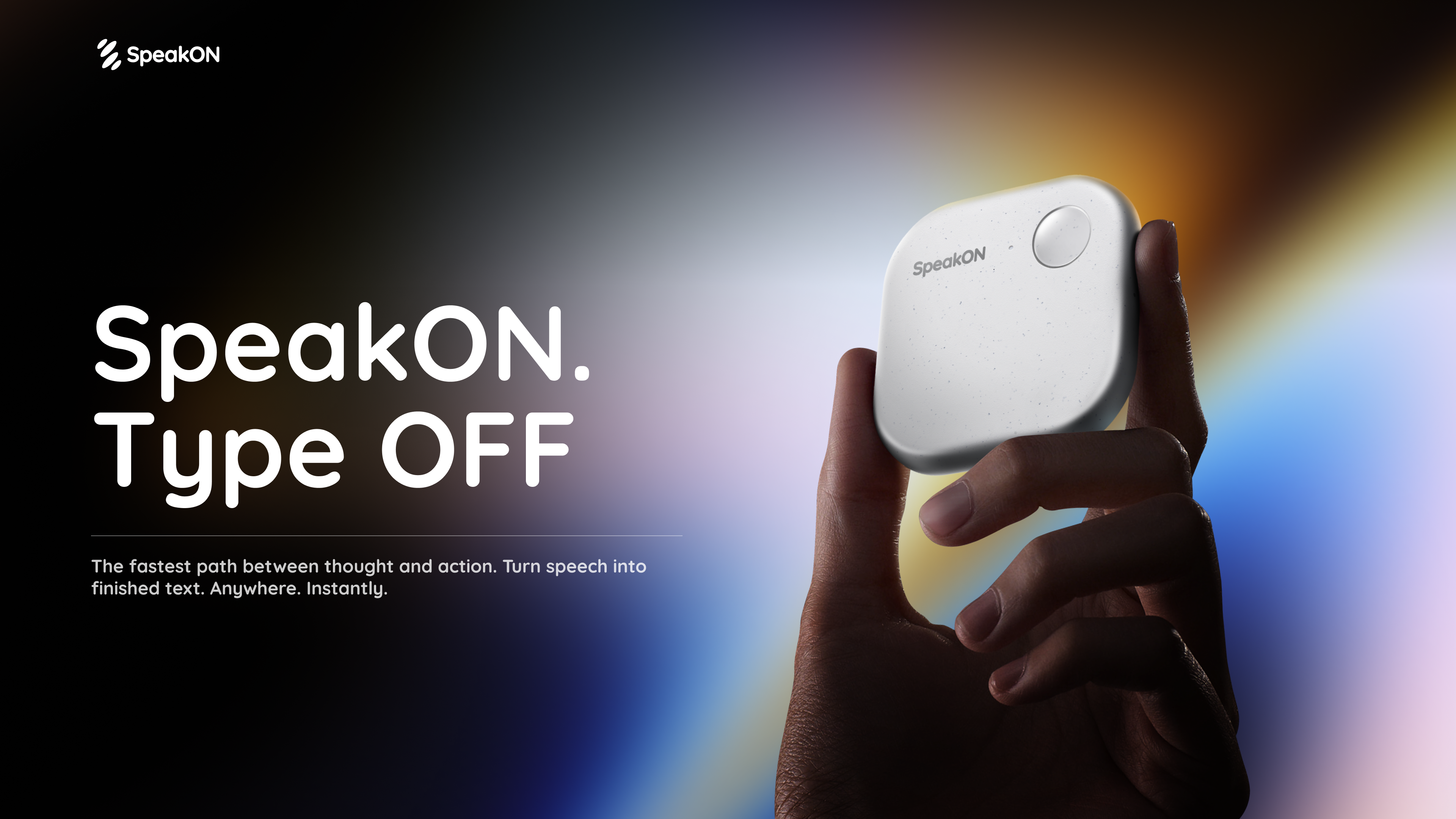
SpeakON Agent is a voice-first AI communicator that turns natural speech into real work. Rather than typing a request into an app, you speak it: the Agent understands your Notes, connects the tools you already use, and prepares Actions for you to review and confirm. The product is described on its page as a voice-first AI communicator built on a simple promise — speak naturally, and the Agent understands your intent, finds the right context, and executes the next steps you approved. SpeakON Agent pairs a SpeakON device that snaps onto your phone with the SpeakON AI Voice Keyboard app for iPhone, and it is aimed at people who want spoken thoughts to become tasks, messages, and reminders instead of staying as unstructured voice memos. The starting point for SpeakON Agent is the friction of typing. The product page frames the idea as "the last keystroke": the next workflow does not have to start with another keystroke. Creator videos featured on the page repeat the same theme in different words — ideas move faster than fingers, brains have too many tabs open, and repetitive messages get typed over and over. SpeakON's answer is to let people say what they need, review what the Agent prepares, and move it forward. Rather than replacing the tools people already use, the Agent works across the Notes they have written and the apps they have connected, so a single spoken request can become a scheduled meeting, a Slack announcement, an email draft, and a reminder. Voice input is the front door to the product. With the SpeakON hardware, you press the button, speak, and the device turns your voice into clean, ready-to-send text; creators on the page note that it tidies up messy sentences and changes the tone depending on whether you are writing an email or texting a friend. The SpeakON AI Voice Keyboard for iPhone extends the same voice-first approach to typing anywhere on the phone. Both pieces are described as a "press to speak" experience, and the page's overall message is "zero typing, just talk." For the Agent specifically, voice is how a request is handed over: one natural spoken request can contain several different actions, and the Agent is expected to make sense of all of them at once. SpeakON Agent starts with your Notes. The Agent turns your current Note into a task and can use relevant details from saved Notes and connected apps. That means the context for a request does not have to be retyped — it can come from the note you are looking at, or from earlier notes you have saved. The page illustrates this with examples: asking the Agent to book a one-hour product review with Devin in Room Berlin tomorrow at 10:30, send him the details on Slack and Gmail, and set a reminder 30 minutes before; or asking it to find customer feedback Notes from the past month and summarize the biggest issues. Notes therefore act as both the instruction and the source material the Agent works from. Connectors bring in context from the apps you already use. The page lists Gmail, Google Drive, Calendar, Slack, Reminders, Contacts, Notion, Evernote, and Obsidian, and states that more integrations are to come. In the worked example on the page, the Agent checks calendar availability, identifies Conference Room 203, locates Daniel from Marketing in Contacts, and pulls the source Note and product brief. Slack is used for the #productteam announcement, Gmail for the invitation to Daniel, and Reminders for the personal reminder to review the product brief. Because the Agent can reach into these tools, a single spoken request can be prepared across several apps rather than being copied and pasted between them. One request can contain multiple actions, and the page describes the Agent's flow in six stages. First you Request: speak naturally and give the Agent the full request. It then Understands, identifying the people, timing, and every action inside the request. It Finds Context — calendar availability, the room, Daniel's contact, and the relevant Notes. It Prepares the Task: the event, the Slack announcement, the invitation, and the reminder. You Review the email to Daniel before the Agent sends it. Finally, after you confirm, the Agent Completes the approved actions. The page's example shows four tasks identified from one request: scheduling the product discussion, notifying #productteam, emailing Daniel and adding him to the invite, and creating a reminder to review the product brief. You decide what happens next. The Agent moves things forward and checks with you when it needs your approval; you can review the details and make changes along the way. Messages stay unsent until approved, and only the actions you approved are completed. The page shows a Gmail draft waiting for review, with a voice edit option and a confirm step, before the meeting is scheduled, the team is notified, Daniel is invited, and the reminder is set. This review layer is central to how SpeakON Agent is positioned: the Agent does the preparation and the legwork, but the person speaking the request keeps control over what actually gets sent or scheduled. The page's "Agent In Action" section shows concrete scenarios. In "Move a Launch Forward," one request coordinates a launch check-in, invites Maya, posts the agenda in #launch, and sets a reminder to review the rollout checklist. In "Keep a Shipment Moving," the Agent finds the latest update on the Rotterdam shipment, summarizes the delay, drafts a customer email, notifies #operations, and sets a follow-up reminder. "Follow Up After a Showing" turns a property Note into client communication and a second viewing appointment, including a reminder to send the disclosure documents. "Prepare a Renewal Response" finds the latest renewal proposal, compares it with a previous Note, summarizes what changed, and prepares a reply. SpeakON Agent is presented for iPhone users who handle coordination, communication, and follow-up as part of their day — the scenarios on the page involve product launches, shipping and operations, real estate showings, and sales renewals. The experience runs on iOS through the SpeakON AI Voice Keyboard app, alongside the SpeakON device that snaps onto your phone. The page also references a Creator Challenge in which people follow SpeakON on social media, join its Discord community, and take part for a chance to win a SpeakON device or AI Agent credits. Media logos displayed on the page include USA Today, MakeUseOf, Tech Times, MarkTechPost, Gadget Flow, iLounge, Stuff, and How-To Geek. Taken together, SpeakON Agent is best understood as a voice-first layer over the work you already do on your phone. You speak a request in plain language; the Agent reads your Notes, gathers context from connected apps such as Calendar, Slack, Gmail, and Reminders, and prepares the resulting actions as drafts for your review. Nothing is sent until you approve it, and you can adjust details with a voice edit before confirming. The value proposition the page repeats is straightforward: less typing, fewer repetitive messages, and a way for ideas and instructions to move from speech to completed work without disappearing along the way.
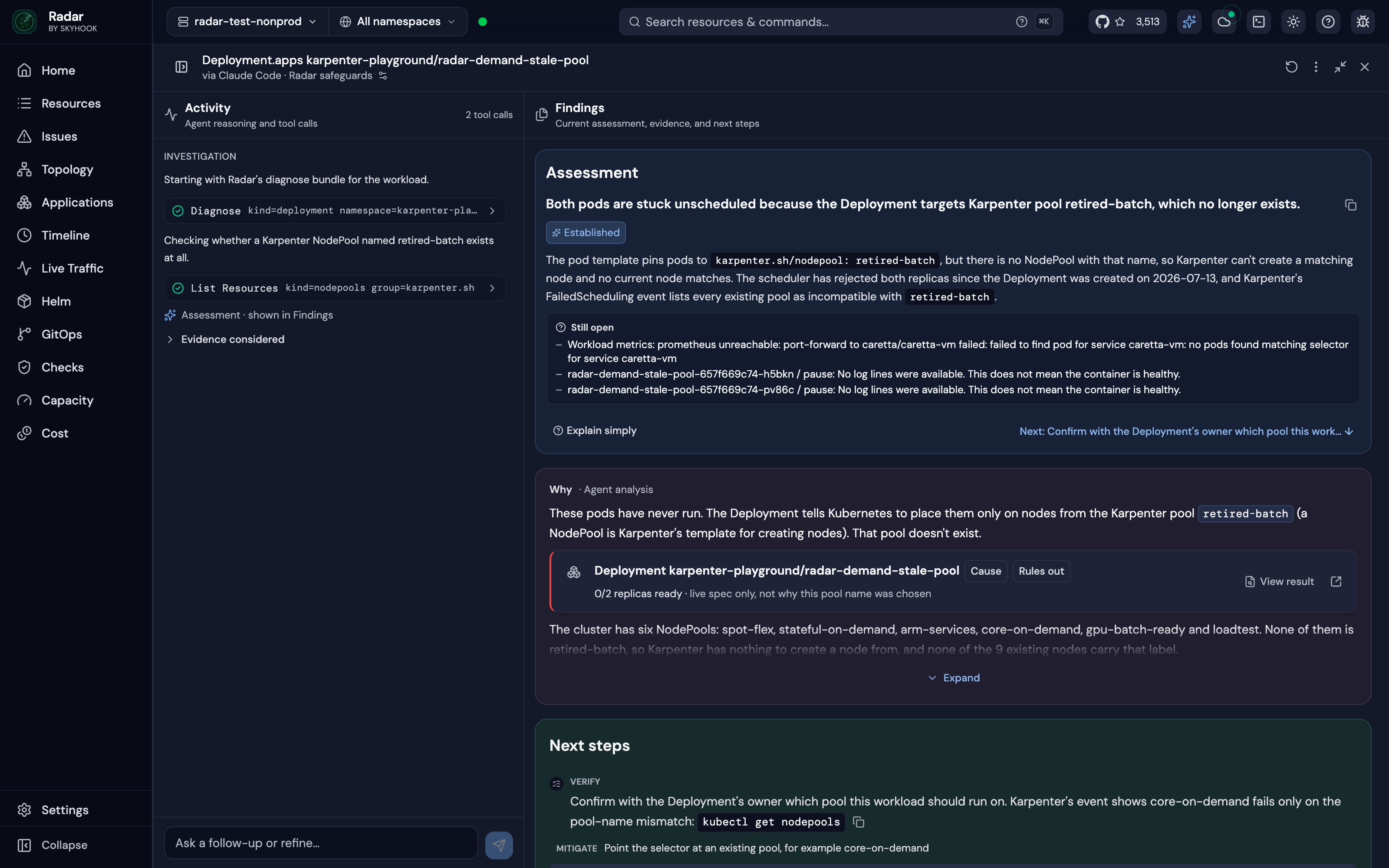
Radar is an open-source Kubernetes UI and MCP server that lets the AI agent a team already uses investigate broken workloads. From Radar, a user clicks Investigate on an issue, and Radar runs Claude Code, Codex, Cursor or OpenCode read-only on the user's machine; it then lays out the findings, the evidence and a fix the user can approve. The same investigation can be started from an MCP client, and Radar Cloud runs the same setup when an alert fires. Its main purpose is to give an existing agent the cluster context it needs to find the root cause of a Kubernetes failure. The result is a root cause view that combines an agent's reasoning with cluster data the user can inspect. The product addresses a specific gap: an agent knows Kubernetes, but it does not know your cluster. A generic chat can return an answer one line at a time without showing the changes, topology, logs and ownership relationships behind it. Radar is built to supply that context before and during an investigation, so the agent starts from a cluster model that is already joined, time-indexed and checked for failures. This matters because an investigation is only as good as the cluster context the agent reads, and Radar aims to make that context available without asking a user to paste prompts or assemble evidence manually. Radar's Issues list ranks what is broken across the cluster, and an Investigate button sits on every issue. There is no prompt to write and no context to paste. Past runs stay under Investigations, each with its own link, and the UI investigations are read-only because write tools are not loaded. After an investigation, the answer arrives with its evidence: the log lines, events, metric charts and resources the agent relied on, drawn by Radar from what it recorded. One click opens the real object, and Radar states how sure the finding is as Established, Likely or Still open. A follow-up question continues the same investigation from where it stopped, and an approved fix is checked to see whether it worked. This arrangement keeps the history of an investigation attached to the issue it concerns and makes the result easy to share or revisit. The open-source path lets an agent work over MCP. Claude Code, Codex, Cursor, GitHub Copilot, OpenCode or any MCP client can ask Radar from a terminal or IDE, and Radar's MCP server returns resources with their relationships and recent changes. The second path runs an agent CLI from Radar itself: clicking Investigate on anything broken runs Claude Code, Codex, Cursor or OpenCode read-only on the machine and lays out the findings, evidence and a fix to approve. Radar detects which supported agents are on the PATH. The third path is Radar Cloud, which brings its own agent: it runs automatically when an alert fires or on demand, sends the root cause with the alert, evidence included, to Slack or a webhook, and requires nothing to be installed on anyone's laptop. The speed comes from the cluster model the agent starts with. Radar's Issues engine ranks failures before anyone asks, and in the benchmark it was the agent's first call on all 50 faults. Spec changes and events sit on a timeline, so the question of what changed before something broke is one call. Resources come back joined: owners, topology and error-filtered logs are correlated and secret-redacted in one response, so the agent begins with connections already made. Radar keeps, for every cluster, the resources joined into a graph, every change on a timeline and detectors that connect a symptom to its likely cause. The topology graph lays out every resource and connection using ELK.js and updates via SSE, and the same app includes Helm and GitOps context for checking an answer. Because those pieces are already assembled, the agent does not spend its early calls reconstructing ownership or collecting logs; it can move into diagnosis. Radar also adds guardrails around investigations. In Radar's UI and Radar Cloud, investigations are read-only: write tools are not loaded. Over MCP, the agent's write access is the user's choice within their RBAC. An approved fix runs alone in its own session, and changes to resources managed by Argo CD, Flux or Helm ask for explicit acknowledgment because the next sync or Helm upgrade would revert them. This separation keeps an investigation from turning into an uncontrolled change to the cluster, and it gives the user a clear point to review before anything is applied. With Radar OSS, investigations run on the user's machine and use the user's own model account; what the agent reads goes to the user's model provider, not to Radar. In Radar Cloud, each investigation runs as a sandboxed job with read-only access, and an owner accepts that once for the organization. The product is backed by benchmarks on live faults. In a benchmark of 50 live Kubernetes faults across six AI SRE tools, Claude Code on Radar's tools was the most accurate of the six, clearly ahead of HolmesGPT, OpenSRE, kagent and AWS DevOps Agent and slightly ahead of kubectl-ai. It answered in an average of 79 seconds at $0.27 a fault, the fastest and cheapest of the six, and Radar was 1.6–3.6× faster and 30–85% cheaper than the AI SRE tools tested. On faults that announce themselves, all six products scored between 24 and 27 of 28; on the 14 faults where every pod reports Ready, Radar scored 12. These results support the claim that an existing agent with Radar's context can outperform dedicated AI SRE tools. The benchmark page provides downloadable results, and Radar links to separate benchmarks for Kubernetes MCP servers and MCP versus kubectl. Concrete workflows follow from these capabilities. A user can investigate a Pod in CrashLoopBackOff and see that a ConfigMap lost DB_URL a minute before the crash loop. For a Deployment whose pods cannot be scheduled, the agent can check resources and changes, establish that the pods target a Karpenter node pool that no longer exists, and show the Deployment as the cause with next steps. When an alert fires, Radar Cloud investigates it and posts the finding to Slack or a webhook. Developers can also run investigations from Claude Code, Codex, Cursor or another MCP client in the terminal or IDE, then review the timeline, topology, logs, Helm history and GitOps state to verify the agent's story. Evidence cards are tagged and linked to the objects they describe, so the user can move from a claim to the underlying resource. Radar is distributed as an open-source, single binary under Apache 2.0 with no account for local use, and it can be run on a laptop or in a cluster. Installation options include Homebrew, a desktop app, in-cluster use, Krew, Scoop, .rpm and direct download. The quick install command shown is curl -fsSL https://get.radarhq.io | sh && kubectl radar. Radar Cloud is available free for three clusters, and its pricing page is linked for further plans. The product connects to agents including Claude Code, Codex, Cursor, GitHub Copilot, OpenCode and Google Antigravity over MCP; from Radar's UI it supports Claude Code, Codex, Cursor and OpenCode, while Radar Cloud brings its own agent. The same binary also includes Issues and root cause, Applications view, GitOps for Argo and Flux, and a live topology graph. Radar's primary value is that it turns an existing AI agent into a Kubernetes investigator by giving it a prepared cluster model, evidence and read-only safety instead of asking teams to buy a separate AI SRE. It supports investigation from an MCP client, from Radar's UI with a local agent CLI, or automatically through Radar Cloud, and it keeps the cluster context around the answer so users can check the root cause themselves.
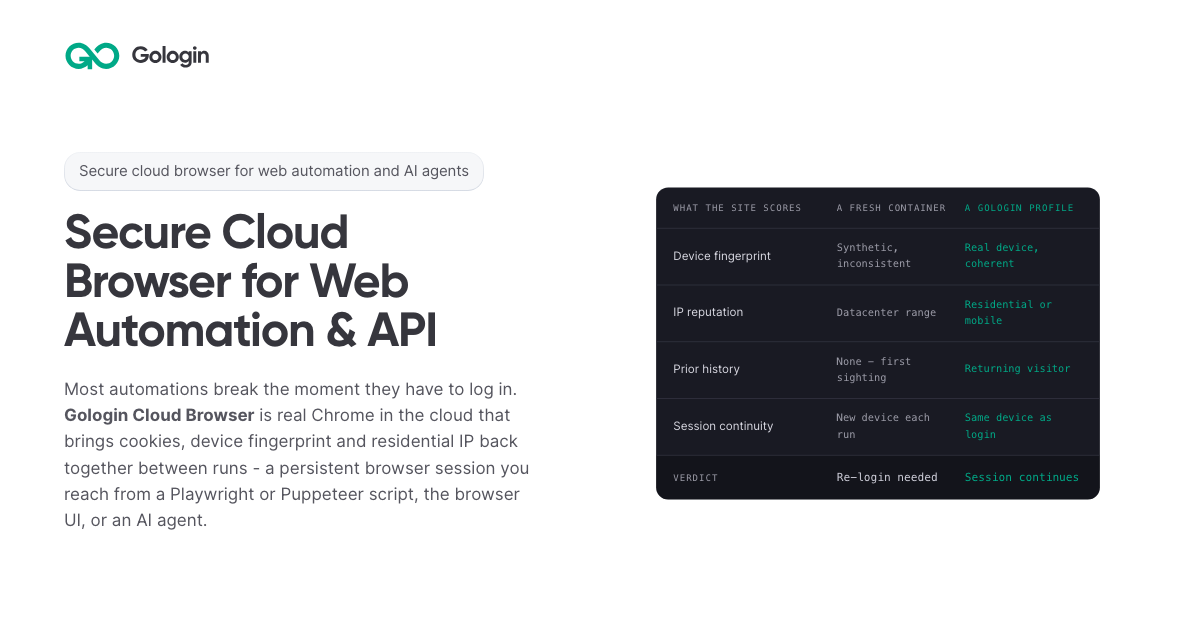
Gologin Cloud Browser delivers real Chromium browsers running in the cloud for AI agents, scrapers and web automation. Instead of launching a fresh browser on every run, developers connect to a persistent browser session that keeps its cookies, device fingerprint and IP address between runs. The browser can be driven from a Playwright or Puppeteer script over a WebSocket connection, from the browser UI by hand, or by an AI agent. It is aimed at developers and teams building scrapers, agents, internal tools and recurring workflows that need to stay signed in to real websites. The product is part of the wider Gologin stack, alongside Web Unlocker, Gologin Browser, Cloud Android, Gologin Proxies and the MCP server. The product addresses a specific failure mode: most automations break the moment they have to log in. According to the site, getting behind a login once is easy, but still being there next month is the hard part. Cookies do not keep a session alive on their own, because sites tie a session to the cookie, the device and the network it came from. A browser container that did not exist three seconds ago has no history, so every run starts as a first visit. Restoring only the cookies means the session arrives on a device the site has never seen, and the site responds by asking for a new login, a code or a check. The page's comparison illustrates this: a fresh container shows a synthetic and inconsistent device fingerprint, a datacenter IP range, no prior history, a new device on each run, and a verdict of re-login needed. Gologin Cloud Browser solves that by reconstructing three things together. The first is the session state: cookies, local storage and everything else the site saved in the browser. The second is the same device: the canvas, WebGL, audio and hardware profile that was present at login. The third is the same network: the residential or mobile IP the account signed in from. Combined, these three make the browser look like a returning user rather than a first-time visitor. The page frames the principle simply: cookies don't keep you logged in, identity does. A Gologin profile brings back all three components, and the FAQ notes that a session stays logged in as long as the site's own login lasts, because what ends a login is the site expiring it, not the platform. Connecting an existing script takes one line. Developers sign up with Google, copy an API key from the dashboard, and create a profile either with one click in the dashboard or with one API call; the profile keeps the device, the IP and the login. Then they install the library (npm install playwright-core, npm install puppeteer-core, or pip install playwright) and replace the script's launch() call with a connect line pointing at wss://cloudbrowser.gologin.com/connect?token=...&profile=.... The page shows complete, working Playwright, Puppeteer and Python Playwright examples that scrape quotes.toscrape.com, using chromium.connectOverCDP or puppeteer.connect with a browser WebSocket endpoint. According to the site, every line below the connect call stays exactly as it was, so selectors, assertions, waits and CI configuration are unchanged and the browser simply runs in the cloud. The browser comes with built-in stealth and anti-bot protection, and it runs on residential and mobile IPs from Gologin Proxies, which can be added to a profile in one API call, or on the user's own proxy. Profiles are isolated from one another: each has its own cookies, its own fingerprint and its own IP, and nothing is shared between them, so a problem in one profile does not reach the others. On the security side, the site states that pages load on Gologin's servers rather than the user's machine, so the target site never reaches the user's device or home IP. The cloud infrastructure is described as fully serverless and able to scale to thousands of browsers, and the company behind it cites seven years of expertise, SOC 2 Type II compliance and a 99.9% SLA. Every session includes a Live View link. Users can open it to watch the script work in real time, or take over by hand to complete a two-factor authentication step or fill in a tricky form, then hand the session back to the script. This matters for the failure case too: if a run fails halfway through, the profile keeps what the run built, meaning the cookies, the device and the IP, so starting the next run in the same profile picks up signed in rather than from the login page, and Live View can show where it stopped. The comparison table also states that no limit applies to session length on the first paid plan, versus 6 hours on Browserbase, 4 hours on Browser Use and 15 minutes on Steel as listed on the page. For AI agents, a Gologin MCP server gives Claude direct control of profiles, proxies and cloud sessions. Users install it with a single command (claude mcp add gologin -e API_TOKEN=... -- npx gologin-mcp) and then describe the job in natural language. The page's example prompt asks for three profiles on US residential IPs and a script that logs into each seller account and pulls last month's invoices; the server creates the three profiles with one US residential IP each, writes invoices.py against the Cloud Browser API, and saves the profiles so the next run starts already logged in. The site describes this as describing the job and letting the tool set up the accounts and write the automation, and it links to a dedicated Browser for AI agents page and a dedicated MCP server page. Pricing is built around browser hours rather than requests. The free tier requires no card and provides 3 runs of up to 15 minutes each on 1 parallel session. Professional costs $4.50 per month for individual developers with 50 browser hours, 1 parallel session, unlimited runs and $0.09 per extra hour. Business costs $8 per month with 100 browser hours, 2 parallel sessions and $0.08 per extra hour. Enterprise costs $14 per month with 200 browser hours, 3 parallel sessions and $0.07 per extra hour. Custom plans start from 4 parallel sessions and include a dedicated account manager, a premium SLA and tailored onboarding. Additional parallel sessions cost $2 per month each on any plan, and proxy traffic beyond the allowance is $1/GB. The site emphasizes that there are no per-request fees, so a retry does not cost twice, and compares its $1/GB residential traffic with published rates of $5/GB for Browser Use, $6/GB for Steel, $8/GB for Anchor and $10/GB for Browserbase. The page maps six use cases. Playwright and Puppeteer users connect over CDP with one line and keep the same selectors, tests and CI while the browser runs in the cloud. Dynamic web scraping handles feeds, load-more buttons and JavaScript-built pages, loading them the way a person's browser would. Web automation that stays logged in targets portals and dashboards that are signed into once and then run on a schedule. AI agents get their own fingerprint, cookies and IP per profile so they can do real work. The Cloud Browser UI covers live sessions where a person watches automation and steps in for 2FA. A scraping browser gives Puppeteer or Playwright real Chromium with its own device fingerprint and a residential IP. The site distinguishes this from Web Unlocker, which is recommended for public pages without a session and bills only on success. The product is positioned for developers, growing teams and organizations running critical operations, as reflected in the Professional, Business, Enterprise and Custom plan tiers. It fits into a broader Gologin ecosystem of one account, one proxy network and one ecosystem: Cloud Browser for sessions that stay logged in, Web Unlocker for sending a URL and getting the rendered page, Gologin Browser for isolated desktop profiles driven by hand, Cloud Android for platforms that only trust a phone, Gologin Proxies for residential, mobile, datacenter and ISP IPs, and MCP and AI Skills for describing a job to Claude and getting a working tool. Support resources include API documentation, a getting started guide and dedicated pages for Playwright and Puppeteer, dynamic scraping, web automation, AI agents, the Cloud Browser UI and the scraping browser. The core promise is simple and repeated throughout the page: log in once, stay logged in. By keeping session state, device fingerprint and residential or mobile IP together across runs, Gologin Cloud Browser lets scrapers, agents, internal tools and daily workflows behave like returning users instead of new visitors, while a one-line connection keeps existing Playwright and Puppeteer code intact. Free to start with no card and residential IPs included, it gives developers a serverless, stealth-capable browser fleet that can scale from a single test run to thousands of browsers.
The Arcade Controller Pro is a compact all-button arcade controller from 8BitDo, described by the company as built for serious fighters with full control for every match. It is an all-button fight controller with no stick, designed for competitive fighting games, and it combines on-device settings, deep customization, and long-session comfort. The unit pairs a compact button layout with a 1.47-inch built-in display, five programmable buttons, hot-swappable mechanical switches, RGB lighting, and a magnetic wrist rest. It works with Switch, Switch 2 and Windows, over 2.4G wireless, Bluetooth, or a wired USB-C connection, and it is available to pre-order on Amazon in the US and on the 8BitDo eShop worldwide. 8BitDo positions it as hardware for players who want every input within natural reach and full control over how the controller behaves during a match. The Arcade Controller Pro is explicitly built for competitive fighting games. 8BitDo states that it is the presenting sponsor of Street Fighter League Americas and Street Fighter League EMEAA 2026, and the company says it proudly supports the community that brings every match to life. The design responds to the realities of that environment: matches are decided by fast inputs and sudden movements, play sessions can run long, and cabling has to survive high-pressure play. Compared to the original 8BitDo Arcade Controller, the Pro features smaller buttons and tighter spacing, creating a more compact layout that keeps every input within natural reach and that the company describes as comfortable and easy to control through long play sessions. A metal locking mechanism keeps the USB-C cable firmly in place so it stays secure during fast inputs, sudden movements and high-pressure matches. The result is a controller shaped around the demands of competitive play rather than around a traditional joystick. The button system is the core of the product. Five programmable buttons, labeled P1 through P5, can be fast-mapped directly on the controller, and 8BitDo notes that the added P5 button expands control options while leaving more room for natural left-hand movement. Each of those buttons can be replaced with a flat lock cap to prevent accidental presses, and five lock caps are included and stored inside the magnetic wrist rest. Dynamic button labels instantly switch between Switch and PC button layouts, with illuminated labels that change to match. Improved round button caps can be installed from any orientation, which makes them quick to fit and easy to replace, and they are held firmly beneath the tempered glass faceplate. A dedicated capture button lets players take screenshots instantly on Switch. Settings and monitoring happen on the device itself. The 1.47-inch display works with built-in Ultimate Software so players can view inputs, check battery status, and adjust essential settings directly on the controller, described as clear, immediate, and always within reach. The display covers input monitoring, SOCD settings, button mapping and RGB lighting, so players can see every input in real time and change how the controller responds without leaving the hardware. An independent control panel keeps essential controls separated from the action buttons; with its turn-and-click dial, players can switch connection modes, adjust volume and display settings, or activate Tournament Lock. SOCD cleaning is also listed among the controller's special features, and SOCD modes can be switched as part of the customization options. The hardware is designed to be opened and reworked. The controller ships with hot-swappable 8BitDo Core Green low-profile linear mechanical switches, co-developed with Kailh for fast actuation, quiet operation and a smooth feel, and the hot-swappable PCBA means switches can be changed without soldering. Three spare switches and a switch puller are stored inside the controller. A quick-release tempered glass faceplate lifts when the release button on the back is pressed, giving access to the internal components with the additional switches. The magnetic wrist rest supports a more natural hand position on a desk or on a lap, attaches securely when needed, and removes easily for a more compact setup, while also housing the lock caps. Dual USB-C ports let players connect the cable from the top or the side for charging and wired play, choosing the route that fits their setup, reduces cable clutter and gives more space around their hands. Overall, the Arcade Controller Pro works as a self-contained control surface. On-device settings through the display and the independent control panel handle everyday adjustments, while 8BitDo Ultimate Software V2 goes deeper on a computer, letting players customize button mapping, create macros that assign a long sequence and action to a single button, switch between different modes of SOCD, and adjust lighting modes and RGB colors. Connectivity covers 2.4G wireless for Windows, Bluetooth for Switch, and wired play for Windows and Switch, and 8BitDo describes the wireless performance as low-latency for responsive, consistent play without the cable. The practical benefits follow from those choices. A tighter button layout keeps inputs within natural reach during long sessions, and the magnetic wrist rest supports a more natural hand position whether the controller sits on a desk or on a lap. Fast-mapping on the controller means button changes are made in the moment, while replaceable lock caps guard against accidental presses on buttons a player does not want to trigger. The cable lock system protects against disconnects during fast inputs and sudden movements, and dual USB-C ports let players route cabling away from their hands. Spare switches and a switch puller stored inside the controller mean replacements are on hand, and a 3000mAh rechargeable battery provides 15 hours of usage via Bluetooth or 2.4G wireless with RGB off, with a 4-hour charging time. Concrete usage scenarios match the way the controller is presented. It is aimed at competitive fighting game matches, where every input needs to be within reach and cabling has to stay locked in place. Long practice sessions are addressed by the compact layout, the wrist rest and the ability to lock unused buttons. Players who move between Switch and PC can rely on dynamic button labels that change to match the active layout, and a dedicated capture button handles screenshots on Switch. On a desk, the wrist rest and the choice of top or side USB-C routing keep the setup tidy; on a lap, the wrist rest can be removed for a more compact arrangement. Tournament play is covered by Tournament Lock on the independent control panel. Supported platforms are Switch (3.0.0 and above), Switch 2 (20.1.1 and above) and Windows 10 (1903) and above. Connectivity options are 2.4G wireless for Windows, Bluetooth for Switch, and wired for Windows and Switch. The controller measures 301 x 201 x 16 mm and weighs 1090g, and it uses a 3000mAh rechargeable Li-ion battery rated at 15 hours of usage via Bluetooth or 2.4G wireless with RGB off and 4 hours of charging time. In the box are the Arcade Controller Pro, a 2.4G adapter, the magnetic wrist rest, three additional switches, a switch puller, five lock caps for the programmable buttons, a cable and a manual. It is available in a new White Edition, described as a clean white finish ideal for a sleek and minimalist desk, and pre-orders are offered on Amazon in the US and on the 8BitDo eShop worldwide. Taken together, the Arcade Controller Pro is an all-button arcade controller built around competitive fighting games, combining a compact layout, on-device display and settings, programmable buttons with lock caps, hot-swappable switches, a quick-release tempered glass faceplate, a magnetic wrist rest and dual USB-C ports with a cable lock, so players can swap, configure and tailor their arcade experience.