Gologin Cloud Browser delivers real Chromium browsers running in the cloud for AI agents, scrapers and web automation. Instead of launching a fresh browser on every run, developers connect to a persistent browser session that keeps its cookies, device fingerprint and IP address between runs. The browser can be driven from a Playwright or Puppeteer script over a WebSocket connection, from the browser UI by hand, or by an AI agent. It is aimed at developers and teams building scrapers, agents, internal tools and recurring workflows that need to stay signed in to real websites. The product is part of the wider Gologin stack, alongside Web Unlocker, Gologin Browser, Cloud Android, Gologin Proxies and the MCP server.
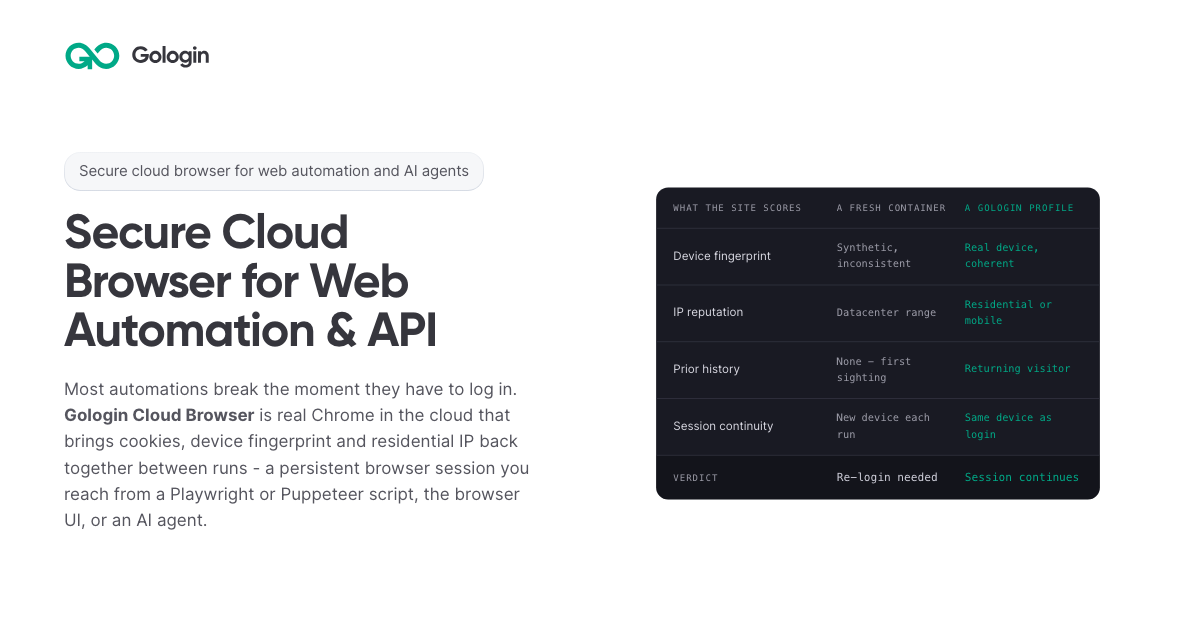
The product addresses a specific failure mode: most automations break the moment they have to log in. According to the site, getting behind a login once is easy, but still being there next month is the hard part. Cookies do not keep a session alive on their own, because sites tie a session to the cookie, the device and the network it came from. A browser container that did not exist three seconds ago has no history, so every run starts as a first visit. Restoring only the cookies means the session arrives on a device the site has never seen, and the site responds by asking for a new login, a code or a check. The page's comparison illustrates this: a fresh container shows a synthetic and inconsistent device fingerprint, a datacenter IP range, no prior history, a new device on each run, and a verdict of re-login needed.
Gologin Cloud Browser solves that by reconstructing three things together. The first is the session state: cookies, local storage and everything else the site saved in the browser. The second is the same device: the canvas, WebGL, audio and hardware profile that was present at login. The third is the same network: the residential or mobile IP the account signed in from. Combined, these three make the browser look like a returning user rather than a first-time visitor. The page frames the principle simply: cookies don't keep you logged in, identity does. A Gologin profile brings back all three components, and the FAQ notes that a session stays logged in as long as the site's own login lasts, because what ends a login is the site expiring it, not the platform.
Connecting an existing script takes one line. Developers sign up with Google, copy an API key from the dashboard, and create a profile either with one click in the dashboard or with one API call; the profile keeps the device, the IP and the login. Then they install the library (npm install playwright-core, npm install puppeteer-core, or pip install playwright) and replace the script's launch() call with a connect line pointing at wss://cloudbrowser.gologin.com/connect?token=...&profile=.... The page shows complete, working Playwright, Puppeteer and Python Playwright examples that scrape quotes.toscrape.com, using chromium.connectOverCDP or puppeteer.connect with a browser WebSocket endpoint. According to the site, every line below the connect call stays exactly as it was, so selectors, assertions, waits and CI configuration are unchanged and the browser simply runs in the cloud.
The browser comes with built-in stealth and anti-bot protection, and it runs on residential and mobile IPs from Gologin Proxies, which can be added to a profile in one API call, or on the user's own proxy. Profiles are isolated from one another: each has its own cookies, its own fingerprint and its own IP, and nothing is shared between them, so a problem in one profile does not reach the others. On the security side, the site states that pages load on Gologin's servers rather than the user's machine, so the target site never reaches the user's device or home IP. The cloud infrastructure is described as fully serverless and able to scale to thousands of browsers, and the company behind it cites seven years of expertise, SOC 2 Type II compliance and a 99.9% SLA.
Every session includes a Live View link. Users can open it to watch the script work in real time, or take over by hand to complete a two-factor authentication step or fill in a tricky form, then hand the session back to the script. This matters for the failure case too: if a run fails halfway through, the profile keeps what the run built, meaning the cookies, the device and the IP, so starting the next run in the same profile picks up signed in rather than from the login page, and Live View can show where it stopped. The comparison table also states that no limit applies to session length on the first paid plan, versus 6 hours on Browserbase, 4 hours on Browser Use and 15 minutes on Steel as listed on the page.
For AI agents, a Gologin MCP server gives Claude direct control of profiles, proxies and cloud sessions. Users install it with a single command (claude mcp add gologin -e API_TOKEN=... -- npx gologin-mcp) and then describe the job in natural language. The page's example prompt asks for three profiles on US residential IPs and a script that logs into each seller account and pulls last month's invoices; the server creates the three profiles with one US residential IP each, writes invoices.py against the Cloud Browser API, and saves the profiles so the next run starts already logged in. The site describes this as describing the job and letting the tool set up the accounts and write the automation, and it links to a dedicated Browser for AI agents page and a dedicated MCP server page.
Pricing is built around browser hours rather than requests. The free tier requires no card and provides 3 runs of up to 15 minutes each on 1 parallel session. Professional costs $4.50 per month for individual developers with 50 browser hours, 1 parallel session, unlimited runs and $0.09 per extra hour. Business costs $8 per month with 100 browser hours, 2 parallel sessions and $0.08 per extra hour. Enterprise costs $14 per month with 200 browser hours, 3 parallel sessions and $0.07 per extra hour. Custom plans start from 4 parallel sessions and include a dedicated account manager, a premium SLA and tailored onboarding. Additional parallel sessions cost $2 per month each on any plan, and proxy traffic beyond the allowance is $1/GB. The site emphasizes that there are no per-request fees, so a retry does not cost twice, and compares its $1/GB residential traffic with published rates of $5/GB for Browser Use, $6/GB for Steel, $8/GB for Anchor and $10/GB for Browserbase.
The page maps six use cases. Playwright and Puppeteer users connect over CDP with one line and keep the same selectors, tests and CI while the browser runs in the cloud. Dynamic web scraping handles feeds, load-more buttons and JavaScript-built pages, loading them the way a person's browser would. Web automation that stays logged in targets portals and dashboards that are signed into once and then run on a schedule. AI agents get their own fingerprint, cookies and IP per profile so they can do real work. The Cloud Browser UI covers live sessions where a person watches automation and steps in for 2FA. A scraping browser gives Puppeteer or Playwright real Chromium with its own device fingerprint and a residential IP. The site distinguishes this from Web Unlocker, which is recommended for public pages without a session and bills only on success.
The product is positioned for developers, growing teams and organizations running critical operations, as reflected in the Professional, Business, Enterprise and Custom plan tiers. It fits into a broader Gologin ecosystem of one account, one proxy network and one ecosystem: Cloud Browser for sessions that stay logged in, Web Unlocker for sending a URL and getting the rendered page, Gologin Browser for isolated desktop profiles driven by hand, Cloud Android for platforms that only trust a phone, Gologin Proxies for residential, mobile, datacenter and ISP IPs, and MCP and AI Skills for describing a job to Claude and getting a working tool. Support resources include API documentation, a getting started guide and dedicated pages for Playwright and Puppeteer, dynamic scraping, web automation, AI agents, the Cloud Browser UI and the scraping browser.
The core promise is simple and repeated throughout the page: log in once, stay logged in. By keeping session state, device fingerprint and residential or mobile IP together across runs, Gologin Cloud Browser lets scrapers, agents, internal tools and daily workflows behave like returning users instead of new visitors, while a one-line connection keeps existing Playwright and Puppeteer code intact. Free to start with no card and residential IPs included, it gives developers a serverless, stealth-capable browser fleet that can scale from a single test run to thousands of browsers.
Publisher
A
admin
Launch Date2026-10-30
Platformweb
Pricingfreemium
Tech Stack
#Chromium#Playwright#Puppeteer#Python Playwright#WebSocket (CDP)#MCP