Category Focus/categories/productivity
Productivity AI Tools
Discover and compare the best productivity AI tools and software. Browse 874+ curated tools with reviews and rankings.
Projects tracked
874
Sort mode
RECENT
Page
12
Discover and compare the best productivity AI tools and software. Browse 874+ curated tools with reviews and rankings.
Projects tracked
874
Sort mode
RECENT
Page
12
Maximem Synap is a memory and context management layer for AI agents, shipped as a developer SDK, a REST API, and a hosted MCP endpoint. You send Synap the conversation as it happens, and before your agent replies you ask what is known about this person; Synap returns a short, ranked set of facts, formatted and ready for the prompt. The product is aimed at teams building agents for customer support, sales, voice, healthcare, and multi-agent workflows, so that every conversation does not start from zero. Synap handles entity resolution, temporal reasoning, and multi-level scoping automatically, and the company states there is no vector database to run, no extraction pipeline to build, no retrieval ranker to tune, and no scoping logic to get right - those are the product. Reported accuracy is 92% on LongMemEval and 93.2% on LoCoMo, with in-conversation retrieval under 15ms at P75. Synap exists because agents forget, and the site treats that as an architecture problem rather than an interface nitpick. The listed symptoms are concrete: the agent re-asks for information the user already gave, recommends what the user already rejected, contradicts itself across sessions, or compensates by stuffing everything into the prompt, which produces slow replies and a blown token budget. The company frames these failures as tickets, refunds, and churn. It also argues that every alternative has been tried and each one stops short. A bigger context window runs into U-shaped attention, so models lose the middle; quality falls as the window fills and cost grows quadratically because history is replayed every turn. A vector database and RAG finds text that looks alike but has no view of what is current, no record of where a fact came from, and no idea that 'Acme' and 'Acme Corp' are one company. Agent skills steady a procedure but do not supply a fact - across 528 matched runs, the skill was steadying the procedure 65.7% of the time and supplying a missing fact 4.5% of the time. Summarising as you go compounds losses, and doing it properly means entity extraction, temporal reasoning, contradiction handling and validation, at which point you have built a memory system. Building it in-house is possible, but retrieval is the easy part; the months go into deciding what to keep, resolving entities, handling contradictions, and keeping tenants apart, then maintaining all of it forever. Every one of these workarounds is described as a stand-in for a missing layer. Synap treats memory as three layers rather than one bucket. Short-term memory is the current session, the working memory that most memory tools provide. Long-term memory persists across sessions, per person - the layer a user means when they say an agent remembers them. Organisational memory is shared across users and tenants: policies, product facts, and pricing, meaning company knowledge rather than personal knowledge. The company states that most memory tools give you the session and that the value sits in the two layers above it. Scoping enforces that structure: a request sees its own level and every level above it, never below and never sideways. The out-of-the-box hierarchy is Client, Customer, User - shared product knowledge visible to everyone, tenant-level policies, teams and shared projects, and the facts, preferences and episodes private to one person. One person's memory does not reach another person's session and one tenant's does not reach another tenant's. When three levels is not the right shape, teams can define a custom hierarchy at any depth with the names they already use, such as Hospital, Department, Clinician, Patient. On the read side, Synap focuses on anticipatory retrieval. Context is pre-fetched while the conversation is still going, so it is ready before the agent asks, at under 15ms at P75 in-conversation. That matters most for voice agents, which stay conversational instead of pausing mid-turn. Retrieval is also described as resilient: a bad day for one part of the system is not an outage, and retrieval nets across all stores. Agentic compaction keeps context lean as conversations grow, so cost does not balloon and quality does not rot; it keeps the signal, drops the noise, and tells you when it worked. Validation is part of the pitch, since compaction is reported rather than assumed. Together, these read-side capabilities are what the company presents as the difference between storing memory and actively managing context, and they are the reason a growing conversation does not automatically mean a growing prompt. On the write side, a conversation turn does not land in a database. It runs through a pipeline that turns raw dialogue into structured, scoped memory: asynchronous ingest, extraction of structure rather than raw text, and storage across vector, graph, and file stores - vectors for semantic similarity, a graph for entity relationships, and files for documents and raw material. The write call returns before any of that happens, so it never blocks the agent. What governs the pipeline is a custom context architecture generated for each agent, controlling extraction, scoping, retention and more, rather than a one-size schema. Structured capture and entity resolution mean that 'Sarah', 'Sarah Chen' and 'SC' resolve to one person automatically, and references such as 'my manager' are linked across sessions. Temporal awareness weights recent context higher than stale context. Conscious forgetting processes retractions and contradictions, and because a change never destroys the previous version, every memory can be traced back through provenance. Consolidation runs as background cycles on the stores in three tiers - meditation, a light pass every few hours; nap, a deeper pass once a day; and sleep during quiet hours for deep consolidation and conscious forgetting. Synap's distinctive approach is that it treats memory as an active context-management problem layered on top of storage, rather than a storage problem alone. It works in two calls: you record the conversation as it happens, and before your agent replies you fetch what is known, receiving formatted context ready for the prompt. Everything the pipeline does behind that write call is invisible to the agent - extraction, scoping, retention, and consolidation run behind it. The memory architecture itself is generated for your specific agent instead of being fitted to a universal memory model, which the company contrasts with approaches built on extracted facts plus embeddings or on a temporal knowledge graph. Reads mostly never leave your process because context is pre-fetched while the conversation is still going. The framework is described as native across 23 agent frameworks, with adapters that let developers install the SDK, configure an API key, and start managing context in a few lines of code. The stated outcomes are reliability, cost control, and speed. Agents remember every user across sessions, channels, and months rather than the last twenty turns, so they stop re-asking for information and stop recommending what was already rejected. They remember the organisation through shared policies, product knowledge, and team context made visible to the agents that should see them and isolated from the users and tenants that should not. Context stays lean as conversations grow, which means the token bill does not balloon and quality does not rot; compaction keeps signal over noise and reports when it worked. Context arriving before the agent asks keeps voice agents conversational. Accuracy is reported at 92% on LongMemEval - the benchmark that tests whether a memory system retrieves the right fact from a long conversation and holds that accuracy as the conversation grows - and 93.2% on LoCoMo, with the methodology published and the eval harness open source so teams can run it against any system they are evaluating. Synap is not limited to a fixed list of applications. The site names customer support and sales agents, voice concierges, healthcare assistants, and multi-agent workflows among the places teams run it today, with dedicated use-case pages for healthcare, customer support, sales, voice AI, and multi-agent systems. In support and sales, the relevant value is recall of what a customer said in earlier sessions so an agent does not reopen a resolved issue or contradict a previous answer. In voice, the value is latency: sub-15ms P75 in-conversation retrieval keeps a voice agent conversational instead of pausing to think. In healthcare, the scoping model and custom hierarchy matter - the site illustrates a Hospital, Department, Clinician, Patient shape. In multi-agent workflows, shared organisational context reaches the agents that should see it while per-user and per-tenant memories stay isolated. The primary audience is developers and teams building AI agents who need production-grade memory without building it themselves. Synap provides Python and TypeScript SDKs, a REST API usable from any language, a hosted MCP endpoint for no-code platforms, and a CLI. The documentation states that most developers are up and running in under five minutes. Native integrations cover 23 agent frameworks, including LangChain, LangGraph, LlamaIndex, OpenAI Agents, Pydantic AI, CrewAI, AutoGen, Google ADK, Haystack, Agno, Semantic Kernel, Microsoft Agent Framework, NeMo Agent Toolkit, LiveKit Agents, Pipecat, Claude Agent SDK, Mastra, Vercel AI SDK, Vercel eve, Strands Agents, CAMEL-AI, Smolagents, and deepagents. Security includes encryption in transit and at rest, strict tenant isolation, BYOK for model providers, and on-premise, self-hosted, and air-gapped options, with PII posture applied per kind of data and down to what an individual API key may see. Enterprise plans add VPC and private deployment, SSO and SAML, configurable RBAC, and custom SLAs. The free tier requires no credit card and supports Google or GitHub sign-in, and the SDK plus the benchmark eval harnesses are open source on GitHub. For teams whose agents need to remember, Maximem Synap packages the whole problem - what to keep, how to scope it, when to retrieve it, and when to let it go - into a memory and context layer with reported benchmark accuracy of 92% on LongMemEval and 93.2% on LoCoMo, in-conversation retrieval under 15ms at P75, and native coverage of 23 agent frameworks. It replaces the workarounds teams currently reach for, including larger context windows, vector RAG, agent skills, rolling summaries, or a homegrown system, with a two-call interface and background consolidation, so that every conversation no longer starts from zero.
CtrlOps is a local-first desktop application for managing Linux servers from one screen with AI assistance. It brings an AI-assisted terminal, visual file management, real-time infrastructure monitoring, security auditing, access management, and single-click deployments together in a single app. The product is designed for developers, DevOps engineers, technical leads, founders, and non-terminal users who need to run one server or an entire fleet without juggling terminal tabs, remembering IP addresses, or opening separate SFTP clients. Its stated purpose is to give teams full visibility across all their servers in one place, in a tool intuitive enough for a non-terminal person to use, without making the team dependent on a single engineer to keep everything running. The founders built CtrlOps after running an IT service company. They were designers and product people at heart who understood interfaces and users, and every client they worked with had their own server. To check anything, even something as simple as why a server was slow by looking at memory and CPU, someone had to open a terminal, remember the right IP, find the right credentials, and log in separately, every single time, for every client. With a minimum of seven to ten projects and forty-plus servers running each month, there was no unified view and no quick way to know what was happening across the infrastructure without pulling in the one person on the team who knew how to navigate it all. Everything ran through him; if he was unavailable, the team was blind. CtrlOps was built to answer one question: why does managing Linux servers have to feel like this, and why is there no tool that gives full visibility across all servers, feels intuitive for a non-terminal person, and does not create dependency on a single engineer? They built it first for themselves, then made it for everyone. The AI terminal is the centerpiece of the app. Instead of memorizing command syntax, users describe what they need in plain English and CtrlOps translates it into the commands that will run against the selected server. Crucially, it is built as AI with a human in the loop: every command is shown for review and must be approved before it executes. For example, asking to clear disk space on prod-web surfaces a specific command such as sudo apt clean combined with journalctl --vacuum-size=200M, with Run and Edit options available. Web search and MCP servers are built into the terminal, along with one-click saved scripts. Reviewers repeatedly highlight the approval step as the reason they trust the tool: asking in plain English, seeing the exact command before it runs, and approving it is described as the whole game when AI touches live infrastructure. A related scripts feature lets users save, reuse, and run scripts directly from the panel, and one reviewer calls the playbook feature underrated because common fixes can be configured once and then triggered in a single click. The security audit capability runs twenty-five checks over SSH against a server and produces a hardening score. The interface summarizes results in a single line such as seventeen passed, five warnings, and zero failed. Beyond the score, CtrlOps generates a PDF audit report and provides fix commands for every issue found; those fixes wait for user approval before running. Separately, the access management feature scans an entire fleet to show who can log in to which server and who holds sudo privileges. When someone leaves a team, their access can be removed from every server at once rather than being revoked server by server. Any level of roles and access can be assigned without touching the terminal. This directly addresses the question the Product Hunt description opens with: do you actually know who has access to your servers right now? A reviewer in an HR role noted that offboarding, which previously required back-and-forth with the technical team, can now be checked and flagged in about two minutes. Multi-server management keeps the whole fleet in one app so users switch between servers by alias and no longer track IPs by hand. The interface shows entries such as prod-web at ubuntu@54.236.240.26 alongside auth-service and db-01, and reviewers single out named servers instead of IPs as a small but brilliant usability decision. Real-time infrastructure monitoring displays live CPU, memory, disk, and network metrics for every server, giving an at-a-glance view of what each machine is doing. The visual file manager lets users upload, download, and unzip in one click, replacing scp and separate SFTP clients; users can open a config file and edit it directly. Single-click deployment requires no scripts and no CI/CD setup: the user fills one form with a GitHub repository, environment variables, and a domain, and the app goes live with PM2, Nginx, and SSL handled automatically. The product also covers backups that prove they ran and makes every log file findable and searchable without SSH. CtrlOps connects to any server over SSH, so the provider does not matter. It is shown working with AWS, Google Cloud, Azure, DigitalOcean, and any VPS. The architecture is deliberately local-first: CtrlOps speaks SSH directly to your fleet, with no service in between to breach and no vendor lock-in, no cloud bridge, and no telemetry. No agent needs to be installed on the servers themselves, a detail reviewers say sold them immediately. Zero data sharing is the design principle: the app runs entirely on the user's machine, and SSH keys, server IPs, and credentials never touch a cloud. It needs only the user's SSH key, never AWS IAM credentials, a GCP service account, or Azure credentials. Sensitive data and SSH keys are stored only on the device, so servers can be managed without uploading secrets anywhere. The whole flow is human-approved: nothing runs before the user sees and approves it. The stated outcome is that the same servers require far less of the week: the work does not go away, it simply stops taking an afternoon. Users get every server in one window, deployments from GitHub in minutes, CPU, memory, and disk values at a glance, every log found for them, commands expressed in plain English, file movement by dragging, visibility into who can reach every server, faster onboarding of developers, and backups that prove they ran. Reviewers describe the practical results: doing in ten minutes what used to take an hour; catching two issues on a staging environment before they became outages; no longer stressing over deployments; and replacing a mess of SSH tabs and random bash scripts. One commenter argues the plain-English terminal lowers the barrier so developers can own their environment instead of depending on a single DevOps hero, describing it as a shift in team dynamics rather than just tooling. CtrlOps is used across a range of concrete scenarios. A UI/UX designer who does not write code and does not know DevOps used the AI terminal to be walked through deployment step by step and put a website live alone for the first time, after previously waiting on a friend to handle server work. A solo founder building a product used it to manage every deployment personally, eliminating hiring, favors, and waiting on someone else's calendar. A DevOps professional managing multiple client servers reports using the file manager more than the AI features, because editing a config inside one app removes a separate login and window. An HR team member uses SSH management to check and flag access removal within about two minutes of someone leaving. Teams also run it on staging environments before moving production over, and use it to onboard new developers quickly. CtrlOps reports being trusted by more than seven hundred engineers in over one hundred sixty countries and holds a 4.8 out of 5 rating on G2. It installs as a desktop application: a Mac build with separate downloads for Apple Silicon (M1 through M5) and Intel x64 (Core i5, i7, i9), a Windows build distributed through the Microsoft Store, and a Linux option. Pricing starts free, with a one-month free trial that requires no credit card; lifetime subscriptions are also available, as mentioned in a user review. The stack centers on direct SSH connections using ED25519 keys, with PM2, Nginx, and SSL handled during deployments, plus built-in web search and MCP servers in the AI terminal. CtrlOps takes the daily reality of managing Linux servers, logging in, checking resources, reading logs, moving files, controlling access, deploying apps, and hardening machines, and consolidates it into one local-first desktop app driven by an AI terminal that always asks permission first. Its core promise is visibility and control across an entire fleet without sacrificing privacy: your credentials never leave your machine, no agents are installed on your servers, and nothing runs without your approval.
CodeSpotlight is a plugin for IntelliJ IDEA that turns ordinary code selection into a customizable animated visual focus. Rather than leaving selected code with a flat highlight, the plugin surrounds the selection with glowing borders, moving lights, and smooth visual effects so that the code currently being discussed becomes the obvious center of attention on screen. It is designed for people who show code to an audience — coding YouTubers, tutors, instructors, course creators, livestreamers, and technical presenters — and for anyone who wants selected code to be impossible to miss. Its purpose is straightforward: select code, focus attention, and customize the look, all without leaving the editor or changing a single line of the source file. Presenting code is harder than it looks. A cursor alone is easy to lose on a busy screen, and the default selection highlight in a code editor is subtle by design — it is meant to support editing, not to survive a compressed video, a projector, or a livestream where viewers may be watching on a phone. As a result, viewers of technical tutorials, live coding sessions, screen recordings, and code demonstrations can struggle to follow which lines are being explained at any given moment. CodeSpotlight addresses that visibility gap. It keeps the developer's normal workflow intact while adding a configurable visual focus layer around the current selection, so the audience's eye is guided to the right place. According to the plugin's own overview, the goal is to help selected code remain visually easy to follow during presentations, technical tutorials, screen recordings, live coding, code demonstrations, reviews, and everyday development workflows. At its core, CodeSpotlight visually highlights selected code, including multi-line selections, which matters because real explanations often span a whole method, a loop, or a block rather than a single word. Crucially, the plugin preserves IntelliJ IDEA's normal selection and editing behavior: the text still behaves like ordinary IntelliJ IDEA code, and the plugin simply adds a configurable visual focus layer around the current selection. The animated effects are drawn as an overlay, so there is no need to modify source code, insert markers, or maintain a separate presentation copy of a file. For developers who present from their real project, that means the code they demonstrate is the same code they ship. CodeSpotlight offers multiple animation styles so the effect can match the tone and pace of a session. The free tier includes Traveling Border, Pulse, Breathing Glow, and Static Glow. CodeSpotlight Pro expands this with Travel + Pulse, Energy Sweep, Aurora, and Orbit, alongside everything available in the free tier. Traveling Border sends movement around the edge of the selection, which naturally draws the eye without covering the code itself. Pulse and Breathing Glow create rhythmic brightness changes that keep attention on a region while it is being explained. Static Glow provides a steady, non-moving highlight for situations where motion would be distracting. The additional Pro modes — Energy Sweep, Aurora, and Orbit — give presenters more distinctive looks to choose from when they want a signature style. Appearance controls let developers tune how the focus layer looks. The free tier ships with built-in color presets, and Pro adds custom primary and secondary colors for full control over the palette. Border thickness, glow radius, corner radius, and glow intensity can all be adjusted, so the effect can range from a thin outline to a soft, wide halo that frames the selection without obscuring it. These parameters matter because readability changes with context: a bright glow that works on a large monitor may need to be dialed down for a compressed recording, while a subtle outline may need to be strengthened for a projector. Because every control lives in the IDE settings, presenters can quickly match the effect to their recording setup, their editor theme, and their audience. Animation behavior is configurable as well. Users can choose the animation mode and speed, adjust moving light segments, and set the animation frames per second. Light trail controls add a trailing effect behind moving elements; the free tier covers a standard trail plus trail enablement, while Pro adds advanced trail length and intensity/fade controls. Moving light segments range from one in the free tier to one to four in Pro, which changes the density and feel of the motion — a single traveling light reads as a clean pointer, whereas several segments create a richer, more energetic look. The visual controls in the free tier include speed, glow intensity, border thickness, glow radius, corner radius, and animation FPS, and Pro includes everything from the free tier. To avoid re-tuning settings for every recording, CodeSpotlight supports saved presets: up to two in the free tier and unlimited presets with Pro. Presets make it practical to keep a distinct look for tutorials, another for livestreams, and another for client demos, and to switch between them rather than rebuilding the configuration each time. Two further Pro capabilities round out the package. Focus Mode, refined in version 1.0.1 with a darker selected-code surface and an unchanged surrounding editor, isolates attention on the current selection. Pro also includes the optional CodeSpotlight Dark editor color-scheme integration, so the surrounding editor can match the visual treatment. Configuration lives entirely inside the IDE. The workflow is: open Settings, go to Tools → Animated Selection (CodeSpotlight), enable animated selection, choose colors and animation mode, adjust the available visual parameters, then return to the editor and select code. Changes appear instantly, so there is no restart-and-check loop. The plugin's stated design principle is to stay out of the way — your code remains native IntelliJ IDEA code while the plugin adds a configurable visual focus layer around the current selection, and both appearance and animation settings are available directly inside IntelliJ IDEA. The plugin notes that everything can be customized from IntelliJ IDEA Settings with no code changes required. The plugin is explicitly aimed at situations where code is watched rather than just written. That includes technical presentations where a room needs to follow the active block, tutorials and course content where the explanation should track the highlighted lines, screen recordings where compression can wash out subtle selection highlights, live coding streams where viewers join mid-session, and code demonstrations and reviews where a reviewer wants to point at a specific region while discussing it. It also applies to everyday development workflows, since the same visual focus can make it easier for a developer to keep track of what they have selected in a large file, even when nobody else is watching. CodeSpotlight is compatible with IntelliJ IDEA, Android Studio, and 13 more IntelliJ-based products, and it is distributed through the JetBrains Marketplace. It is built for coding YouTubers, tutors, instructors, course creators, livestreamers, technical presenters, and developers who want to make their code impossible to miss. The plugin follows a free-plus-Pro model: animated selection highlighting, the four base animation modes, built-in color presets, one moving light segment, a standard light trail, core visual controls, up to two saved presets, and an optional CodeSpotlight Dark color-scheme integration are available without a paid plan. Some features require a paid subscription, and the Pro tier unlocks additional animation modes, custom primary and secondary colors, one to four moving light segments, advanced trail length and intensity/fade controls, Focus Mode, unlimited saved presets, and the included editor color scheme. Version 1.0.1 was released on 21 Sep 2026, and the plugin is published by the vendor CodeSpotlight. CodeSpotlight's value proposition is simple: make your selected code the visual focus. By combining animated highlighting, configurable appearance and animation controls, saved presets, and an optional Focus Mode inside IntelliJ IDEA, it makes code easier to follow for anyone watching — without altering the code itself. Select. Focus. Customize. Code.
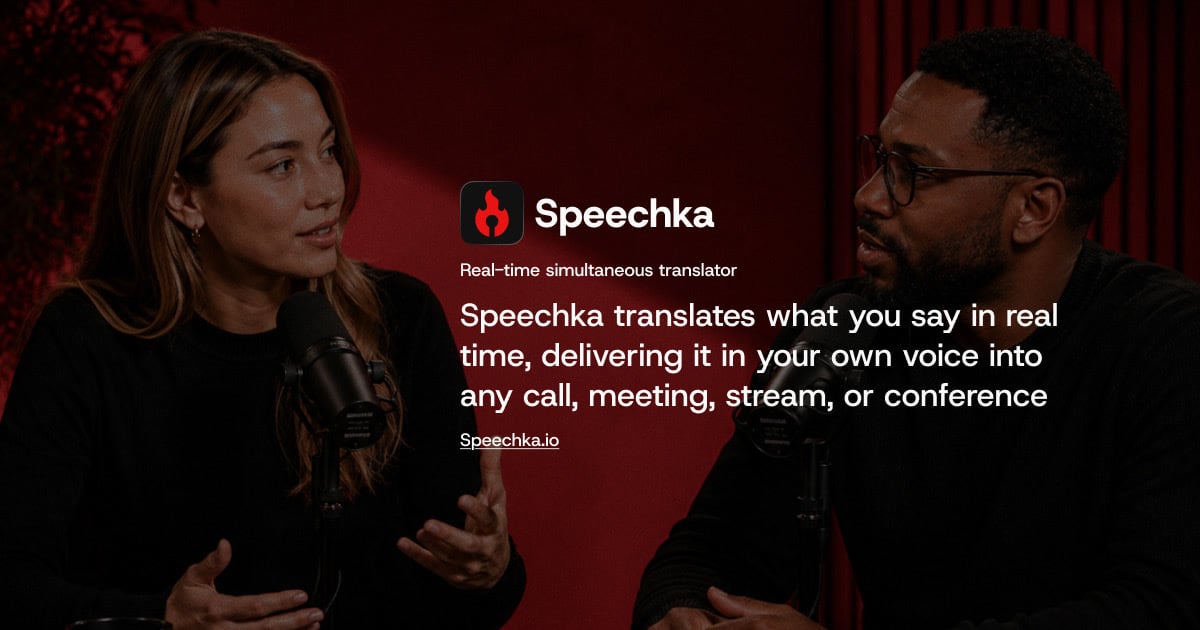
Speechka is a real-time voice translation app that lets you speak naturally in one language while other people hear you in theirs. Instead of captions or transcripts, Speechka listens to what you say, translates it, and delivers the result as spoken words in your own voice, so your identity and speaking style carry across every language. The product is built for live conversations of all kinds — online meetings, calls, livestreams, conferences, keynotes, workshops, and classrooms — and it is available as a desktop app for macOS and Windows, as well as directly in the browser. Speechka supports translation both ways between 44 languages, and its stated purpose is to remove language as an obstacle in the middle of a conversation. Most multilingual communication today relies on subtitles, captions, or transcripts. Those tools force listeners to read instead of listen, shift attention away from the speaker, and break the natural rhythm of a conversation. Speechka was built specifically as an alternative to that approach: as the site puts it, it is built for conversations, not subtitles. By turning translated text back into natural speech that plays in real time, Speechka aims to keep multilingual conversations fluid rather than turning them into delayed, disjointed voice messages. The outcome the product is designed to deliver is simple: no subtitles to follow and no repeating yourself, just conversations that keep moving even when the people involved do not share a language. Speechka's core capability is real-time voice translation. You speak in your own language, and the people you are talking to hear you in theirs. The translation is described as low-latency and is designed for meetings, calls, conferences, and live conversations. Alongside raw speed, Speechka emphasizes flow: it listens, translates, and delivers every sentence in sequence, which is meant to keep conversations smooth, natural, and easy to follow. The second core capability is the Personal voice. Rather than substituting a generic AI narrator, Speechka preserves your own voice across languages, including your speaking style and your natural accent. To set this up, you record a short sample of your voice — the app records up to 10 seconds of your voice — and that sample is then used for your translations. You can listen to the recording, re-record it if needed, and replace or remove your recorded voice at any time. Speechka's translation engine is described as context-aware. Instead of processing isolated words, it works with complete ideas, recognizing context, sentence structure, tone, and intent so that translated speech sounds natural rather than robotic or fragmented. This matters most in live settings, where literal word-for-word output quickly becomes hard to follow. Speechka also handles something subtler: timing. It automatically manages pauses, sentence boundaries, and playback timing so that translated speech follows the rhythm of a real conversation instead of arriving in awkward chunks. Related to this is ordered playback, where every translated sentence is delivered in the correct order. That ordering keeps multilingual conversations clear even when more than one person is speaking, so listeners always hear statements in the sequence in which they were actually made. Speechka offers two distinct ways to use its translation, described in its FAQ. Listen Mode plays the translated speech only for you, through your headphones or speakers. Broadcast Mode sends the translated speech directly to the other participants through your microphone, so they hear the translation while you continue speaking naturally. There are also two quality modes to choose from. Faster is optimized for the lowest possible latency and is positioned as ideal for fast-paced conversations. High quality prioritizes the most natural voice generation and translation quality, and is recommended for presentations, meetings, podcasts, and professional communication. Language coverage spans 44 languages, including English, Spanish, French, German, Italian, Portuguese, Chinese, Japanese, Korean, Arabic, Hindi, Russian, Ukrainian, Bengali, Bulgarian, Croatian, Czech, Danish, Dutch, Finnish, Georgian, Greek, Gujarati, Hebrew, Hungarian, Indonesian, Kannada, Malay, Malayalam, Marathi, Norwegian, Punjabi, Polish, Romanian, Slovak, Swedish, Tagalog, Tamil, Telugu, Thai, and Turkish. The overall workflow is deliberately short. You choose the languages you want to translate between — the site notes that you can translate both ways between 44 languages — then create your personal voice by recording a short sample, and then start translating. From there, Speechka listens to your speech, translates it in real time, and plays the result back in your voice, either privately to you in Listen Mode or out to the call in Broadcast Mode. Speechka is designed to integrate with the communication tools people already use rather than asking them to switch platforms. Because it works with virtually any application that accepts microphone input, the same workflow carries across video conferencing software, chat and voice platforms, browser-based meetings, livestreaming software, and many other communication platforms. It ships as a desktop app for macOS and Windows, and the same core experience can be tried directly in the browser, where the demo provides your first 5 free minutes before prompting you to download the app and complete your account. The benefits Speechka describes all come back to removing friction from live multilingual conversation. People who speak different languages can participate in the same meeting or call without one side reading captions or waiting for a delayed voice message. Because translations arrive in your own voice, listeners hear the person they are talking to rather than a generic synthetic narrator, which preserves your identity and speaking style across languages. In online meetings, the promise is that daily stand-ups, client calls, and remote workshops keep moving without anyone slowing down to repeat themselves. For conferences, keynotes, and workshops, a single presentation can reach a multilingual audience without interrupting the flow of the presentation. For livestreamers, it means going live for a global audience in your own language without creating separate streams, subtitles, or dubbed recordings. The choice between Faster and High quality modes lets users trade a little latency for more natural voice output when a presentation or a professional conversation calls for it. Speechka's own materials name a set of concrete scenarios. Online meetings are the first and most obvious: daily stand-ups, client calls, and remote workshops where participants speak different languages. Conferences, keynotes, workshops, classrooms, and international events are called out for presenting in your own language while the translated voice is delivered to a multilingual audience in real time. Livestreaming is another: streaming on Twitch, YouTube, Kick, TikTok, or your own platform while Speechka translates your voice live for viewers, so every viewer hears the same content naturally translated into their language and spoken in your own voice. The product is also positioned for professional communication such as sales calls, podcasts, and customer calls — the contact form even invites people to describe how Speechka should fit into their meetings, streams, conferences, or customer calls. Finally, the browser experience is a way to test the entire flow — choosing languages, creating a voice, and starting translation — before committing to the desktop app. Speechka is aimed at anyone who communicates across languages regularly: people running meetings, presenting at conferences, hosting livestreams, working in sales, or taking customer calls with international participants. On the integration side, it is shown working alongside Zoom, Google Meet, Microsoft Teams, Slack, Discord, Webex, and OBS, and it is described as compatible with virtually any application that accepts microphone input, including browser-based meetings and livestreaming software. Platform support covers a desktop app for macOS and Windows, plus a browser experience for free trial translation. Pricing starts with a free trial: 7 days free with 10 credits, with no feature limitations, enough to explore Speechka with real meetings, calls, presentations, or livestreams. Beyond the trial, a Pro subscription costs $19.99 per month and includes 180 credits every month. Additional credits can be purchased at any time without changing the subscription: 60 credits for $9.99, 180 credits for $24.99, or 360 credits for $39.99. Speechka's value proposition is straightforward: speak naturally in your own language and be heard in someone else's — in your own voice, in real time, in the tools you already use. By replacing subtitles and delayed transcripts with natural translated speech, keeping your Personal voice, handling context and timing, and working across 44 languages and virtually any app that accepts a microphone, Speechka is designed to make language a detail of the conversation rather than a barrier to it.
GBrain is an AI memory and workspace product for teams that use several AI tools at once. The website describes it as one workspace the whole team prompts together, with one memory synced to every AI they use. The product is made up of four parts — Memory, Tools, Skills and Workspace — and the team is expected to use all four at once. GBrain is sold per workspace rather than per person, so the whole team can be invited in and share the same conversation and the same memory. It is priced at $99 for the first month and then $199 a month, billed monthly, and it can be stopped any time from the workspace's own billing page. The problem GBrain addresses is that AI tools tend to keep separate memories and separate configuration. The Product Hunt description explains the situation directly: GBrain gives you a memory and a set of connected accounts that every AI can reach. Without that, writing a note in one tool has no effect on another, and connecting an account such as Gmail has to be repeated for each tool, often with a key placed in a config file. GBrain's answer is to hold the memory and the connections in one place so that Claude Code, ChatGPT, Cursor and other AIs can all reach the same context, and so that a team does not have to re-establish the same setup for every assistant it uses. Memory is described as what the workspace knows about the team and the work, kept in files the team owns. The memory is a folder of markdown files that you can read, correct and take with you. Because the files are plain markdown, the team can inspect exactly what the workspace has learned rather than trusting an opaque store, and can correct anything that looks wrong. The company states that leaving takes the notes with you: everything the workspace has learned is plain markdown in a folder you can copy, and the open source parts are free to run yourself. That makes the memory both portable and auditable, which matters for a shared team asset that accumulates over time and is meant to outlive any single tool the team happens to be using. Tools are the accounts the workspace reaches, along with what each AI may do with them. The site says email, calendar and the web are connected once, and the Product Hunt description gives the concrete example that connecting Gmail once lets Cursor search it with no key in a config file. Because the connections live in the workspace rather than in each individual tool's configuration, a new AI does not have to be given its own credentials for services the team already connected. The permission model is part of the Tools concept: the workspace defines what each AI may do with the accounts it can reach, so access is decided once in the workspace rather than separately inside every assistant. Skills are the jobs the workspace knows how to run, on demand or on a schedule. The launch offer lists skills already installed, meaning a new workspace arrives with jobs ready to run rather than requiring the team to build them from scratch. Scheduled work is called out separately in the offer as work that runs while you sleep. This turns the memory and the connected tools into something that acts — a skill can use what the workspace knows and the accounts it can reach to carry out a job at a chosen time, without someone having to trigger it manually. An on-demand skill, by contrast, is run when the team asks for it. Workspace is the room a team works in, and the server underneath it. This is where the multiplayer aspect lives: the whole team is in one workspace, sharing the same conversation and the same memory, and adding the rest of the team costs nothing extra. The workspace also handles model choice — models from Anthropic and OpenAI can be switched any time — and the company states that it can run on your own inference or ours. Because the workspace sits on the company's servers, there is nothing to install: the site says you sign in and the workspace is running in about two minutes. The overall approach is to keep one shared memory and one set of connected accounts, then let every AI the team uses read from and write to that same store. Memory is held as a folder of markdown files; Tools hold the accounts and the permissions over them; Skills hold the jobs that can be run on demand or on a schedule; and the Workspace is the shared room and the server that ties it together. The company supports this with onboarding and support direct from the team, and the offer includes $100 of usage credit a month for AI and metered tools such as web search and page crawling. Practically, the benefits stated on the page are about teamwork, cost and portability. A single price covers the workspace and everyone invited into it, so adding the rest of the team costs nothing extra and no one works in a separate silo. The monthly $100 usage credit pays for the AI models the workspace thinks with and for metered tools such as web search and page crawling, and the workspace tells you before you run out rather than after. Because the memory is a markdown folder, knowledge built up in the workspace can be copied and taken along, and the open source parts can be run yourself. Several concrete workflows are described in the material. Writing a note in Claude Code means ChatGPT knows it, because both reach the same memory. Connecting Gmail once lets Cursor search it without a key in a config file. Scheduled skills run work while the team sleeps. An email, calendar and web connection made once serves every AI in the workspace. A team that signs in gets a running workspace in about two minutes, with onboarding and support direct from the company, and everyone can prompt together in the same room against the same memory while switching between Anthropic and OpenAI models as needed. GBrain is aimed at teams that share AI work rather than individuals working alone. The Product Hunt launch price is $99 for the first month and then $199 a month, billed monthly, and it can be stopped any time from the workspace's billing page. The price is per workspace, not per person, and covers everyone invited into it; it includes $100 of usage credit each month, with more purchasable from the billing page. The launch link stops selling that price on September 29, and a workspace started before then keeps the price it started on. The takeaway is straightforward: GBrain gives a team one place to keep what it knows and one place to connect the accounts it works with, then syncs both to every AI the team uses. The memory stays in markdown files the team owns and can take with it, models can be swapped between Anthropic and OpenAI, skills can run on demand or on a schedule, and the whole team shares one workspace at one price.
ToneBird is a socially fluent AI reply assistant for Mac and Windows that helps you answer messages without getting stuck on words. It understands your relationships, what you have already said, and where you left off, then drafts the next reply in your voice directly inside Gmail, Slack, WhatsApp, iMessage, Discord, WeChat, Lark, Google Chat, X, Reddit, LinkedIn, Instagram and other apps you already type in. Instead of leaving the conversation, building a giant prompt, explaining the backstory and bringing the output back, ToneBird works beside the reply box. You open a reply, choose the wording that fits, tweak it if needed, and insert it into the conversation before reviewing and sending it yourself. Replying well sounds simple until context is involved. A client asks for the price you agreed on weeks ago, your manager asks for an update on something that already slipped once, or a customer pushes back on a renewal increase you have discussed before. A good answer depends on the relationship, the history and the commitments, and the apps people type in rarely keep that context available at the moment of writing. Generic AI assistants can produce fluent text, but they start from a blank page, so the person writing has to re-explain who they are talking to and what happened previously. ToneBird is built on the idea that the right reply starts with the context, and that the context already lives in your conversations and your files. Relationship memory is the core of the product. ToneBird uses your earlier conversations when drafting a reply, including the date you promised to confirm or the request a person made after a deadline slipped. It also pulls in facts from your files: when a client asks for the agreed price, ToneBird can find it in your connected proposal and include it in the draft. The interface shows a "Knowledge Recalled" panel, so you can see what the assistant remembered for that specific reply, such as a checkpoint that was requested, a scope change from last quarter, or a previously reported issue. You retain control over what is kept: facts and writing preferences learned from the conversation are surfaced for review, and you choose what to save. ToneBird also adapts wording to the person you are replying to. A client waiting on a deadline needs a different reply from a teammate checking in, and the assistant uses your past conversations with each person to adjust the phrasing. For any message, ToneBird can produce several options so you can compare three replies, then tweak the one you want before inserting it. Tweak controls include More Precise, Warmer and Add Humor, and there are context switches for Internal or external replies plus sliders for Directness, Formality and Warmth. Saved preferences such as "keep replies concise" carry into later conversations, so you skip the introduction and start from your own style. ToneBird is designed to follow you across apps and languages rather than pulling you into another tool. It works beside readable reply fields in apps such as Gmail, Slack, WhatsApp, iMessage, Discord, WeChat, Lark and X. When a message arrives in another language, ToneBird can draft the reply and show a translation, as in the example where a customer writes in Spanish and the assistant produces a Spanish answer with an English translation underneath. Beyond replying, ToneBird turns the conversation into follow-up work: when you and another person agree on a time, it prepares the event in Apple Calendar or Google Calendar from your chat, and a follow-up list gathers promised quotes, unanswered questions and dates to confirm in one place, marked by the app they came from. ToneBird also lists English, Español, 中文 and 日本語 among its available languages. The overall workflow is deliberately short. You click the orb, or press Option twice on Mac or Ctrl twice on Windows, while you are in a reply field. ToneBird reads the thread, recalls relevant context from your relationships and files, and shows suggestions; you click the arrows or use the left and right arrow keys to move between replies, tweak the wording, and then insert it into the reply box. Inserting is not sending. ToneBird does not send messages for you: the draft goes into the reply box, and you review it and use the app's own send button, so the final decision always stays with you. The benefits follow from that approach. You do not have to be stuck on words again, and you do not have to postpone a reply because you cannot face reconstructing the context. Promises, prices and dates that would otherwise require digging through old threads or documents are brought forward automatically, which reduces the risk of contradicting yourself or repeating an issue that was already raised. Because the assistant keeps your voice intact rather than making every reply sound generically "better", the person on the other side of the conversation experiences a consistent version of you, whether they are a customer, a manager or a teammate. Follow-ups that would normally be forgotten become visible tasks, and scheduling happens from the conversation itself instead of in a separate calendar app. Concrete scenarios show how this plays out. In Slack, a manager asks for a launch plan by Friday after a previous slip; ToneBird drafts a reply that commits to a core plan by Friday with a checkpoint later that day. In WhatsApp, a customer says a renewal increase is hard to approve; ToneBird recalls that the scope changed last quarter and drafts a reply that offers to work through the renewal over coffee near the customer's office, with proposed times. In Gmail, a customer writes in Spanish about a repeated export problem; ToneBird drafts a Spanish reply apologising and committing to check workspace permissions and send findings before 4 PM, with an English translation. When the customer later confirms Thursday at 4, ToneBird prepares a 30-minute proposal review event that can be added to Apple Calendar or Google Calendar, and the resulting task list reminds you to send a revised quote or confirm a delivery date. ToneBird is for people whose work happens in email and chat apps, including customer-facing and sales conversations, client renewals, manager and teammate updates, and anyone who needs to reply across several apps and sometimes several languages in the same day. It runs as a downloadable app for Mac and Windows, chosen on the download page, and it works beside readable reply fields in supported apps, though support depends on the app and some fields may not be readable. Your tone profile, person cards, learned corrections and usage counts live on your device, and you can export or delete them any time in Settings. On data handling, the model provider receives the context and instructions needed for your reply: with a managed model ToneBird forwards the request, and with your own model key writing requests go directly to that provider. Pricing starts free, and scales through Standard at $9.90 per month with 100 uses every day and 100 contacts, Pro at $39.90 per month with 1,000 uses every day and 1,000 contacts, and Enterprise with custom pricing for your team; billing is monthly or annual, with about 20 percent saved annually. ToneBird's primary value is that it turns the context you already have into the reply you need next. It remembers your relationships, retrieves relevant facts from past conversations and connected documents, adapts the wording to the person and keeps your voice intact, all inside the apps where the conversation is already happening. You pick a suggestion, tweak it, insert it, and send it yourself. Free to start and with room to grow, ToneBird is aimed at anyone who wants to stop being stuck on words without handing over control of what gets sent.
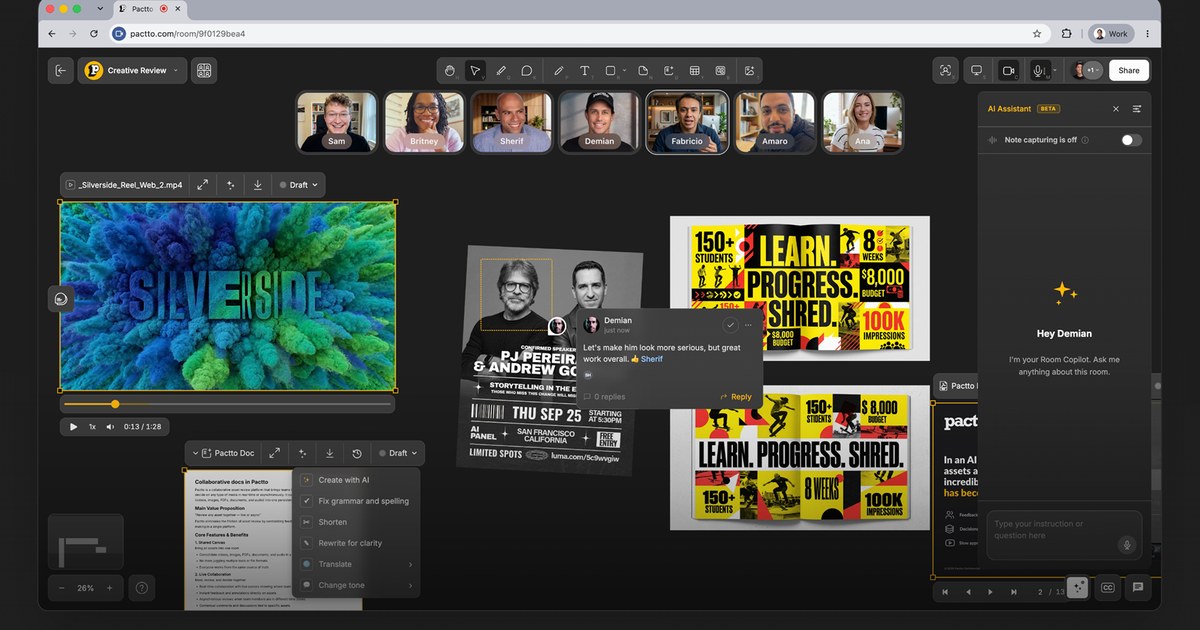
Pactto is an AI-native platform for creative teams to present their work at studio quality, review assets with the assistance of AI agents that understand creative intent and capture every note, and then turn that feedback into changes, live. Each Pactto room is a persistent workspace for a project, campaign, client, or team where assets, people, discussions, decisions, and AI context live together. It is built so that a whole team sees the same work, hears the same conversation, and makes decisions together inside one shared context instead of scattering them across separate tools. The problem Pactto sets out to solve is described plainly on the site: with AI, assets are created faster than ever, but the review process has not caught up. Feedback is scattered everywhere, decisions get lost after sessions, approval cycles take forever, and versioning has reached insanity, so humans and traditional review processes become the bottleneck. Video calls and async review tools each only cover part of the job. Unlike Zoom or Google Meet, where context disappears when the call ends, Pactto rooms remember everything — every conversation, every decision, every piece of feedback — so context does not disappear, it compounds. At the center of the product are persistent creative rooms. Each room is a smart canvas that supports videos, images, PDFs, SVGs, audio, and multi-screen sharing, and it is assisted by an AI agent that is always available with full context. Rooms persist for every project so teams can meet, collaborate, present work at the same time, and access the room memory at any time. Because the canvas holds every asset, board, and decision, work is reviewed at full quality rather than through a compressed screen share, and multiple people can share screens simultaneously — for example an editor in Premiere on one side and a designer in Figma on the other, with the director watching and guiding both. Live Editing is the feature the company describes as unique: say it and watch it change, right in front of everyone. The AI assistant is always listening, building context, suggesting actions, and taking action. A director can say that the pacing feels slow or that the color on the hero shot is too cool; the assistant captures that as a structured comment with full context and then suggests a warmer grade that can be applied in one click so the image updates on the canvas while everyone watches. The same assistant can generate three alternative hero shots, create a doc with all the action items from a session, or execute commands such as creating a doc with all tasks for a specific person, or moving all images to the right and all sticky notes to the left. Teams can add their own rules and customize the assistant's behavior per room to match their workflow. Review tools extend well beyond text. Users can draw directly on any frame with lines, shapes, text, or freehand, pin comments to specific frames or frame ranges, and even speak comments instead of typing them. The assistant sees those annotations and builds on them, turning feedback into edits, summaries, and tasks in the browser. Statuses can be tracked visually on a board or via agents, docs update live, and approvals get tracked. Room memory is what makes the context compound: come back next week for a follow-up review and the AI already knows what was discussed, what was decided, and what still needs attention — in the company's words, the room is the notes. Real-time translation removes language barriers: the assistant transcribes the conversation in real time, separated by speaker and timestamp, and translates it live into each participant's language, supporting English, Português, Español, French, 中文, 日本語, 한국어, Deutsch, Bahasa Indonesia, Italiano, and العربية. Pactto organizes its approach around three things every creative team does — present, review, and approve — and accelerates all of them in one place. For presenting, video plays at studio quality for everyone at the same time without lag, color-accurate and frame-accurate, with no compression artifacts and no dropped frames. For reviewing, voice comments go in and agents act live, capture and act happen in the same room and the same breath, and everyone watches the same frame through synced playback. For approving, decisions happen inside the room, docs update live, approvals are tracked, and rooms persist so every decision, asset, and version stays exactly where it was left. Assets arrive from local drag and drop, from Adobe Frame.io through a partnership with Adobe, from Google Drive, and via Google Sign In, with Dropbox and Air listed as coming soon. The stated outcome for teams is faster delivery: the company cites teams delivering work in days instead of weeks and moving from v1 to vFinal faster than ever. Approvals happen before the conversation ends rather than after a cycle of uploading v3, waiting for notes, uploading v4, and starting over. Because the room keeps every decision and the AI keeps every note, nobody has to pull up notes from last time, and no nuance is lost while someone scrambles to write feedback down. Every stakeholder gets notified, every status gets updated, and everything moves forward. Testimonials on the site describe Pactto as a candidate to become the operating system of the new creative process, and as a new interface for creative teams producing work using AI. Pactto lists a wide range of use cases, each framed as one room used a different way. Creative agencies can run their most complex AI projects in one room, managing every asset, board, and decision and tracking images, video, and PDFs from v1 to launch. Podcast teams can give every episode its own room, brief it, review the cut at real quality, generate cover art, and map every social short in every format. Roundtables can host recurring group sessions in a persistent room where the AI keeps summaries and action items and new members catch up on full history. Language tutors can keep one room per student, share materials, mark up pronunciation and grammar, and let the AI keep every correction and vocabulary list. Sports and mental coaching use frame-accurate video review, live annotation of form, and a room per athlete where training logs and commitments build week over week. Architects present renders, plans, and PDFs at full resolution and get sign-off live. Founders can pitch investors in a room that captures every question and follow up in the room rather than with an attachment. Event organizers can track roles, sponsor commitments, and the run of show in live tables and boards. Pactto is aimed at distributed creative teams and the people around them: directors, editors, designers, producers, agencies, podcast teams, coaches, tutors, architects, founders, and event organizers, along with the clients and reviewers who need to participate. Reviewers and clients do not have to pay on Pro — unlimited guests can be invited to a room with a link without an account or a paid seat. On the free plan there is no guest link, so people join by direct invite only. The free plan costs $0 with no card required and includes two active rooms, all editing and commenting tools, 5GB of storage, five members with room access, 60-minute meetings, 10 one-time AI credits, 60 minutes of live translation, and room memory that remembers the most recent session. Pro costs $19 per month billed annually ($228 a year) or $25 billed monthly and adds unlimited rooms and guests, 500GB of storage, persistent room memory, unlimited meeting summaries and guest sessions, 100 AI credits monthly, eight hours of live translation, integrations with Frame.io, Google Drive and Air, and CLI access that lets teams point Claude Code or Codex at a room to read or write its contents from the terminal. Security features include end-to-end encryption, SOC 2 in progress, and encryption on AWS S3 buckets, and fully white-labeled deployments are offered for agencies and enterprises that want to present Pactto under their own brand. Pactto's primary promise is a single persistent room where creative teams present at the quality their work deserves, review with an AI agent that understands creative intent and captures every note, act on feedback live, and approve before the conversation ends — with context that compounds instead of disappearing.
Solid gives AI agents their own computers, accounts, and budgets so that long-running, complex jobs can be handed over and finished without the user needing to supervise every step. You bring the goal and the ground rules; the agents work out the steps, check the result, and report back. The product is described as being built for complex, long-running work for you and your team, rather than being a personal assistant: agents can build apps, automate workflows, and tackle work you lack the time or expertise for. They pick and set up their own real machines, create accounts, and pay for services, and they use your apps either through APIs or by logging in like a person. Close your laptop, and Solid owns the job from start to finish. The context Solid addresses is the gap between a chat window and a completed piece of work. Conventional assistants stop when the conversation closes, and many agent products depend on prebuilt connectors, which means they only work with tools that someone has already integrated. Solid's premise is that the agent should instead handle the setup and the troubleshooting itself. As the site puts it, agents connect to any tool the job needs, build what is missing, and check the result, with no prebuilt connectors required. That matters because the real friction in delegating work is rarely the initial request — it is the tool access, the account sign-ups, the failed steps, and the loose ends that a person would otherwise have to chase. Solid is designed so that users describe a job in plain language and receive finished work they can review, ready to use or share. The first autonomy area is self-sufficiency. Solid's agents choose the tools and handle the setup, including for software you have never used, on the stated principle that if a person can use it, they can too. They operate their own devices, which the site lists as Windows and macOS computers, Linux servers, iPhones, and Android phones. They maintain their own accounts, such as Google and Apple accounts, and they can sign up for and pay for services within the budget and approval rules you define. Because they do not need a prebuilt connector, you are not limited to a connector list: agents can connect through an API, build a missing integration, or operate a website, desktop application, or phone app directly. This means a job can proceed even when the right tool was never officially integrated. Two further autonomy areas cover failure and learning. Self-healing: if a tool fails or their setup breaks, agents can investigate, make a repair, and check that the job runs again. When they need help, they explain what is blocking progress rather than silently stalling, and users can also talk to a real person on the Solid team. Self-improving: agents keep the fixes that worked and learn from team corrections, and those lessons change how they use tools and approach future jobs. Solid states that agents remember your team's instructions and feedback across jobs, so when you correct how something is done, they keep that lesson and apply it the next time it is relevant. The practical effect is that explanations do not have to be repeated every time, and the agent's approach to shared context improves over time. The fourth autonomy area is self-scaling. Agents can bring in help and manage it: they create more Solid agents or bring in agents such as Codex and Claude Code, divide the work across any tools the job needs, coordinate the team, and return one checked result. For users this means a large job does not have to be decomposed and managed by hand. The agent acts as the coordinator, parceling out portions of the work and collecting the outcomes into a single verified deliverable that a person can review. In one of the site's illustrations, a Solid agent gathers results from other agents working across business tools and hands one checked result to a person, which is the intended pattern for larger workloads. Overall, Solid works as a meta-agent: it can see and manage its own workspace within the access you give it, so you can ask what is running, why it is needed, or how much a job cost at any time, and it can break down the AI usage, machines, and purchases used for the job. The workflow begins with a plain-language description of the job; for example, asking for a dashboard update triggers a sequence in which the agent connects to Gmail and HubSpot, researches on LinkedIn, builds the dashboard, deploys it, and verifies the data. Agents keep working after you close your laptop, then message you with the result, ready to use or share, and they will ask when they need a decision. Boundaries are set by you: you choose what agents can access and which actions require approval, so you might let them research and draft while requiring approval before sending a message, buying a service, or deploying a change. The outcomes described are about delegation with control. Users can hand over work that they lack the time or expertise to do, while retaining oversight through access controls, budgets, approval rules, and the ability to review work along the way. Because agents check their own results and revise from feedback, and because they explain what is blocking progress when they cannot proceed, the user is not required to monitor every step. Because they remember team instructions, the cost of briefing does not have to be paid again for each job. And because the whole monthly payment becomes one balance for AI usage, machines, and purchases, there is no separate platform fee layered on top, which keeps cost accountability inside the budget and approval rules the user defines. Solid publishes a set of example workflows. In sales demos, agents turn customer meeting notes into a tested demo and return the hosted link in your conversation, following steps from reading the notes and mapping the buyer's workflow to building with sample data, hosting and testing the app, and returning the link and test results. In LinkedIn lead generation, agents research accounts using your ideal customer profile, show the evidence, draft outreach for approval, follow up on approved messages, book qualified meetings, and update the CRM. In AI product evaluation, agents build eval scenarios and success criteria, run them after each release or change, simulate users completing real tasks, judge outcomes against expected behavior, and report what passed, failed, and why. In production bug resolution, agents investigate the alert, reproduce the issue, assess impact, write and test a fix, open a pull request for engineer approval, and verify recovery after deployment. In customer support, agents read a stalled ticket, gather the full customer history, find the cause across systems, apply the fix within your policies, and confirm and record the resolution. A customer service resolution workflow is also listed among the finished-job examples. Solid says builders and operators at companies including Revolut, ElevenLabs, EY, British Airways, Stanford, Berkeley, NVIDIA, MIT, Swiggy, NYU, and the Government Digital Service use it, and the product is aimed at individuals and teams with complex, long-running work. Pricing has three monthly subscriptions: Starter at $40 per month for getting started with a focused task, a simple app, or a small workflow; Pro at $160 per month for regular work, active app building, and more room to test and iterate; and Max at $640 per month for heavier workloads, larger apps, and several projects running at once. The full monthly payment becomes one balance for AI usage, machines, and purchases your agents make, with no extra platform fee, and a trial starts with $20 on Solid. For developers, the Solid API lets you deploy always-on agents inside your product or as the product, keeping context, working across approved systems, building missing pieces, and carrying long-running jobs under the controls you set. For enterprises, you can set access, budgets, policies, and approvals across your workspace and run on Solid Cloud, in your own VPC, or on-premises, with availability depending on your setup. Taken together, Solid's proposition is that agents should own a job end to end rather than assist inside a single conversation. By giving agents their own machines, accounts, and budgets — and by adding self-healing, self-improvement, and the ability to scale with additional agents — Solid targets work that is too long-running and too multi-step for a chat-based assistant. The control layer is what makes the delegation practical: you set budgets, access, policies, and approvals, agents report what they used and what they need, and you get finished work delivered back to you.
Fez is a desktop app for Mac where several AI agents work together as members of one workspace, and the room itself does the managing. Each agent is its own member with its own identity, model and skills, and rather than switching between separate assistants you talk in a channel. The room decides who takes a message, whether the work is done, and whether you need to read the reply at all. It is an early-stage app for macOS on Apple silicon, MIT licensed, built on nostr and on Jev, a judgment model created by TypeSafe. Fez is aimed at people who want a team of agents to behave like teammates in a shared room rather than like tools waiting to be dispatched. Most agent apps give you one assistant. Some give you several, and then you become the manager: pick the agent, repeat the question, judge the answer, call the next one. That management work — routing, checking, and deciding whether a message even deserves a response — is exactly the overhead that makes multi-agent setups tiring. Fez takes that job away from the user and hands it to the room. Instead of you choosing which agent should respond, the room reads the message and picks the agent, or nobody. Instead of you checking whether the answer is complete, the room checks it against what you asked. Instead of you deciding whether a thanks needs a full reply, the room decides, and a thanks gets a reaction rather than a paragraph, with no turn and no cost. The routing engine is a judgment model called Jev, built by TypeSafe. Every message in a Fez channel goes to Jev. It does not write; it decides. For each message it produces a calibrated probability in under a second and at a fraction of a cent, which means chat models only run when there is real work to do. The app's own demo surfaces three sequential judgments: who takes it (a probability of 0.95 in the example, with the room picking the agent or nobody), is it done (0.94, where the answer is checked against what you asked and signed off silently), and does it need a reply (0.08, where a small acknowledgement is enough). Fez published routing results from one pass with three agents against frozen fixtures: 96 of 97 routed to the right agent, a 184 ms median decision, and $0.002 for the whole run — figures the app explicitly notes are not a universal guarantee. The roster is where the agents live. Fez ships with @fez, the guide, described as docile and helpful: it knows its way around, and when you mention @fez in a channel it brings in the teammate the work belongs to. The published roster also lists @drift and @quill. Each agent is its own member with its own identity, its own model, and its own skills, so a channel can hold several agents at once without them collapsing into one voice. The recorded demo follows two agents, two models, two keys and one thread over seven minutes. Because each agent is a member with a distinct identity rather than an option in a dropdown, the conversation reads like a room with participants who have their own lanes. Identity in Fez is not an account. On first launch the app generates a keypair, and every agent has one too. Every message is signed by the key that posted it, and because nobody issued the keys, nobody can suspend them. Everything lives on a nostr relay rather than inside the app: you can run one on your laptop or on a server, and Fez is simply a window onto it. The relay, not the client, keeps the record — the app sums up the interaction model as mentioning an agent with @, pressing Enter to have it answer, and pressing Esc while the relay remembers. Fez's approach is to make the room, not the user, the manager. A message arrives, Jev judges it, and based on that judgment the room either assigns it to an agent, marks it done, downgrades it to a reaction, or lets it pass. Chat models are invoked only when the judgment says there is work worth doing, which keeps cost and latency down. The app frames this as three questions asked in sequence: who takes it, is it done, and does it need a reply. The guide agent @fez sits at the front door, so a question can be asked of @fez and the work is handed to whichever teammate owns it. Underneath, keys and signed messages keep authorship clear, and the nostr relay keeps the record outside the app. For users, the benefit is that multi-agent work stops requiring a human dispatcher. You no longer have to pick the agent, repeat the question, judge the answer and call the next one, because the room handles routing, verification and the decision about whether a reply is warranted. Serving the judgment from Jev keeps decisions under a second and at a fraction of a cent, so lightweight messages don't need to spin up a chat model. And because identity is a self-generated keypair stored against a relay you can host yourself, there is no account to create and no central party who can suspend your identity. Concrete use cases follow the app's own framing. You ask a question in a channel and let the room decide which agent, if any, should take it. You mention @fez and it brings in the right teammate for the work. You run several agents with different models in one thread, as in the recorded demo of two agents, two models and two keys in seven minutes. You send a low-stakes message such as a thank-you, and the room answers with a reaction instead of spending a turn. You self-host a nostr relay on a laptop or a server and use Fez as the window onto that shared conversation record. Fez is a Mac app for Apple silicon, downloaded as fez-macos-arm64.dmg from its GitHub releases. It is released under the MIT license with all code on GitHub, and the project tags itself as Mac, open source and artificial intelligence, built on nostr and Jev. Updates are distributed as new releases with notes on what changed. There is no stated pricing beyond the free download of an MIT-licensed app, and no account system — the only setup is a keypair generated on first launch and a nostr relay to point at. The audience the content speaks to is people who want to keep their agent conversations in a shared room on infrastructure they control rather than on a hosted account. Fez's core idea is simple and specific: agents belong in a room, and the room should do the managing. By routing messages through a fast, cheap judgment model, checking whether work is done, and deciding whether a reply is even needed, it removes the dispatcher role from the user. With keypair identities, signed messages and nostr relay storage, the whole conversation stays legible and portable — a chat room where a team of agents works, and the room does the managing.
Edyt is a lightweight desktop app for Mac and Windows that adds AI actions to any text field. You select text, press a shortcut, and the result appears in place, right where your cursor is. It is aimed at anyone who writes across many different programs each day, such as email clients, browsers, notes apps, and chat apps. The available actions are Rewrite, Proofread, Alternatives, Explain, Translate, and Use Prompt, and the product positions itself as AI that lives right where you write. A free plan is described as enough for most people, while Pro removes the usage limits. Writing rarely stays inside one application. A reply is drafted in email, a paragraph is tightened in a document, a question is answered in a chat window, and a contract arrives as a PDF. Conventional AI tools and grammar checkers require copying text out, switching windows, and pasting results back. Edyt is built around avoiding all of that: the site describes selecting text in any app with no copying and no switching windows. The developers also argue their approach beats a traditional proofreader in specific ways, saying Edyt does better at explaining text, sounding like you, offering a genuinely free tier, working in every app on a Mac, and staying out of your way. There is a further gap the product targets: text you cannot even select, such as a PDF, a screenshot, or a shared screen. Rewrite polishes tone, grammar, and clarity in place, and the listing adds that Rewrite keeps your tone and follows your instructions. Proofread is built for catching mistakes thoroughly. Select the text, press Control+Shift+H, and every issue is flagged in place and grouped by kind on the left. The down arrow moves between issues and Enter fixes one; you can also fix them all at once. The text stays editable, so you can type and then re-check to catch anything new, and Insert pastes the result back in, formatted, right where it came from. The demo shows a correctness control, an ignore option, and an easy-to-read word count as the changes are reviewed. Alternatives answers the question of how else to phrase something. Select the text, press Control+Shift+L, and Edyt suggests options, listing several ways to say the same thing. If none of them fit, Show another produces a genuinely new one, never a repeat. You move between options with the down arrow and press Enter to open Insert or Copy, so a suggestion can go straight into the app or onto the clipboard. Explain takes the opposite direction and focuses on understanding. Press Control+Shift+X and definitions appear on the left with the explanation on the right. You can ask a follow-up question, which keeps the conversation going, so an explanation can deepen as far as you need. The site sums both up with the lines See it several ways and Understand instantly. Translate handles messages written in other languages. Select the message, press Control+Shift+T, and the meaning is rendered in your own language; select it again with the same shortcut and choose their language to reply. Insert drops the translation into the reply box and you send it. Recent languages are shown for quick switching, and you can ask how to adjust a translation if the wording is not quite right, which is useful for client conversations where precision matters. Use Prompt runs your own saved prompts on anything you select. Press Control+Shift+J and Edyt runs your last prompt right away, or you pick another prompt from the list on the left. Personalized prompts remember how you like things phrased, you can ask follow-up questions to refine the result, and Insert drops it straight into the document with no retyping. The listing adds that saved prompts follow your account to every machine. Not all text can be selected. Edyt's screen reading mode covers that case: hold Option on Mac or Alt on Windows and drag over a PDF, a screenshot, or a shared screen. Edyt reads the text on your device, using Apple's built-in recognition on Mac and the built-in Windows OCR on Windows, so the image never leaves your device. On Mac this uses the Screen Recording permission, only to capture the area you drag; Windows asks for no extra permission. Once the text is read, the same actions apply, so you can explain, proofread, translate, or run a prompt. In one demo a lease agreement PDF is dragged over and an automatic renewal clause is explained in plain language, including the 60 days' written notice requirement, followed by a direct question about the deadline. Edyt's workflow is described in three steps. First you select your text by highlighting anything in any app, such as email, docs, or chats, without copying or switching windows. Second, you press Control+Shift+Space to bring up the toolbar and pick the action you want. Third, Edyt calls the AI and drops the result right where your cursor is, described as instant and in place. Each action also has its own shortcut for speed: Control+Shift+C for Rewrite, Control+Shift+H for Proofread, Control+Shift+L for Alternatives, Control+Shift+X for Explain, Control+Shift+T for Translate, and Control+Shift+J for Use Prompt. Every action's shortcut can be remapped, and you can write your own prompts and organize them in your library from your dashboard. The stated benefits follow from that design. Results land where the cursor is, so there is nothing to copy and no window to switch to. Rewrite keeps your tone while it cleans up grammar and clarity, which matters when the writing has to still sound like you. Alternatives produces phrasing better than what you typed without you having to hunt for it yourself. Explain and Translate go as deep as you ask, because each result can be followed up with another question. Proofread can fix every issue at once or one at a time, in text that remains editable. Use Prompt turns your own preferences into reusable instructions, and saved prompts follow your account to every machine you use. The demos on the site map onto everyday tasks. In a chat, someone asks a colleague to look over an email to a client because the grammar is a mess; Edyt fixes it in seconds. Another demo proofreads an essay saved as Reflections.docx, flagging repeated words and awkward phrasing in place while the writer keeps editing. A third shows a client email being reworded several ways before it is sent. In a messaging app, a Spanish message about billing terms and an auto-renewal clause is translated so it can be answered in English. A lease agreement PDF is dragged over to explain an automatic renewal clause and its notice deadline. And in a document editor, a saved prompt rewrites a weekly sync announcement into tighter, more focused wording. Edyt is for people who write in many apps rather than one: email, documents, chats, and browsers, on Mac and Windows. On Mac it runs on macOS 12.3 (Monterey) or later, on both Apple Silicon and Intel. On Windows it runs on Windows 10 or later, 64-bit, currently as a beta, and the Product Hunt listing notes Ubuntu is next. It works inside any app with an editable text field. The free plan includes generous daily, weekly, and monthly usage with no credit card required, and Pro removes the limits for unlimited use. Edyt is not on the Mac App Store because reading and typing text in other apps needs macOS's Accessibility API, which does not work inside the App Store sandbox, so it is distributed directly from the site, signed and notarized by Apple. Privacy is stated plainly. Your text is sent over an encrypted connection for processing and then discarded; Edyt says it never stores it, logs it, or uses it to train AI models, with details on a Security page. The screen reading feature is handled on the device itself, so images never leave it. The footer repeats the same commitments: signed on Mac and Windows, your text is never stored, and never used to train AI models. Edyt's proposition is narrow and clear: AI for text, wherever it happens to live. By putting Rewrite, Proofread, Alternatives, Explain, Translate, and your own saved prompts behind a single shortcut inside any app, and by adding on-device reading for text that cannot be selected at all, it removes the copying, window switching, and friction that usually sit between you and a finished sentence.