Category Focus/categories/automation
Automation AI Tools
Discover and compare the best automation AI tools and software. Browse 592+ curated tools with reviews and rankings.
Projects tracked
592
Sort mode
RECENT
Page
5
Discover and compare the best automation AI tools and software. Browse 592+ curated tools with reviews and rankings.
Projects tracked
592
Sort mode
RECENT
Page
5
ZenABM's LinkedIn Ads AI Analyst is a set of AI-powered tools for creating, launching, understanding, optimizing and reporting on LinkedIn Ads. It works in two ways: through Zena, ZenABM's native AI agent, and through the ZenABM MCP server, which lets you build, manage and optimize LinkedIn ads and campaigns directly from Claude, ChatGPT, Perplexity, Gemini or any other AI tool. Zena, the MCP server and the API are all powered by the same company-level ABM data, so campaign building, analysis and reporting draw on LinkedIn Ads, ABM, CRM and revenue data together. The product is aimed at people who run LinkedIn Ads and ABM campaigns and want to do that work inside the AI tools they already use. ZenABM frames the core problem simply: running LinkedIn Ads today often means copy-pasting between your tools and LinkedIn Campaign Manager. Campaigns, ad sets, ads, copy and settings all have to be moved by hand, and reporting tends to arrive as a raw data dump rather than a set of insights and next actions. The result is slow campaign launches, fragmented performance data, and reporting that takes time to turn into decisions. ZenABM's approach is to remove that manual middle layer - generation, management, optimization and reporting happen through AI, with the user reviewing and approving the outcome rather than doing the assembly work. Rather than replacing Campaign Manager, ZenABM hands you a link to review and approve there, so nothing launches until you approve it. Zena, ZenABM's AI agent, builds and manages LinkedIn campaigns directly. You describe the campaign you want and Zena builds it end to end: the campaign, ad sets, targeting and the ads themselves - copy written for you and creatives pulled from your media library. Before committing, you can check the audience size, and you can reuse your saved audiences and lead forms or duplicate what already works. Nothing goes live until you confirm it, which keeps a human in the loop at the approval step while the assembly is automated. Through the MCP server, the same capability is available wherever you already work. You ask Claude, ChatGPT, Perplexity or Gemini for the ads you need; the ZenABM MCP generates them, pushes them into a new ad set with the objective, budget and bidding you asked for, and returns a link to review and approve in Campaign Manager. The site describes the MCP server as offering 15 expert skills built in and 96 read and write tools across your LinkedIn ads and ABM data, extending the agent's reach beyond ad creation into the data around your campaigns. Those expert skills are 15 ready-made ABM skills you run as slash commands, covering tasks such as audits, monthly reports, strategy planning, ad decay checks and sales handoff lists, all graded against ZenABM benchmarks. Underneath them sit the 96 read and write tools spanning LinkedIn Ads, ABM, CRM and revenue data. The point of combining skills with tools is that the AI is not only answering questions about your ads - it has defined, benchmark-aware routines it can execute against your own account data. Reporting is automated rather than assembled by hand. Zena produces weekly, monthly and quarterly reports written for you and sent straight to your inbox, with insights and action items Zena can carry out on your approval, rather than a raw data dump. You can also request a report on the spot: performance is cross-referenced with your pipeline, top and low performers are surfaced, and the result is shareable in seconds. Optimization follows the same pattern. Zena finds and fixes underperforming LinkedIn Ads and campaigns without leaving the chat. It surfaces your lowest and best performing assets, then lets you act on them: pause inefficient ad sets and campaigns, change bids and budgets, and build retargeting audiences from ad engagement and CRM events. Every change waits for your approval, so the AI proposes and the user decides. Alongside execution, ZenABM positions Zena as an advisor. Zena is trained on knowledge from 30+ ABM and LinkedIn ads experts, including Tim Davidson, Ali Yildirim and Max Herzeg, drawn from their own posts. When you ask about list building or ABM strategy, the answer comes back tied to your own data and to benchmarks from other accounts, so the comparison is real rather than generic. The site also advertises expert LinkedIn Ads advice available 24/7. The third surface is the API, which lets you connect your LinkedIn Ads data anywhere and build your own dashboards. It pulls LinkedIn ads engagement, campaign performance and intent stages into whatever system you need. ZenABM notes that whether you use Zena, plug ZenABM into your AI client, or build on the API, it is all powered by the same company-level ABM data - so the agent, the MCP server and the API are three ways into one data foundation rather than three separate products. The benefits follow from that setup. Campaigns that previously required manual rebuilding in Campaign Manager can be generated from a description or a prompt in an AI client. Reporting that previously required pulling data and writing commentary arrives weekly, monthly or quarterly with insights and action items attached. Optimization that previously depended on someone spotting a poor performer moves into the same chat where the performance surfaced, with pause, bid and budget changes queued for approval. And because answers are tied to your own data and benchmarks from other accounts, advice is comparative rather than abstract. Concrete scenarios appear throughout the site. In one illustrated workflow, Claude generates four document ads for a ZenABM workshop in London, with draft ads named for the event, including single-image ads tied to a London Event ad set. Another scenario is ongoing program management: asking Zena to analyze LinkedIn ads performance, find top engaged companies, and surface and pause underperforming ads. Reporting scenarios include a scheduled monthly report cross-referenced with pipeline, and an ad-hoc report requested on the spot. Audits, ad decay checks and sales handoff lists are listed as skill-driven tasks, while retargeting audiences built from ad engagement and CRM events support follow-up campaigns. On targeting and access, ZenABM addresses the product both to people running LinkedIn Ads and to those running ABM programs, including users who want to work inside Claude, ChatGPT, Perplexity, Gemini or Cursor. The site includes FAQ entries asking whether you need to be technical, which AI clients the MCP server works with, whether ZenABM AI can take actions or only read data, whether data is secure, which ZenABM plans include the AI features, and whether you can try ZenABM AI before paying - indicating both a free way to start and tiered plans. Calls to action invite you to start for free or book a demo, and a three-minute walkthrough video is offered. In summary, ZenABM's LinkedIn Ads AI Analyst takes the manual work out of LinkedIn Ads - building campaigns, creating ads, understanding performance, optimizing spend and reporting results - and delivers it through an AI agent, an MCP server for your preferred AI client, and an API, all on the same company-level ABM data.
ReadyHermes is a hosted platform for the open-source Hermes Agent by Nous Research, offering an AI that remembers, learns skills, schedules tasks, and connects to apps.What it does: ReadyHermes provides a private, always-on AI agent that runs on a dedicated Linux machine, featuring long-term memory, reusable skill automation, built-in web search, and real browser interaction for complex workflows. Chat from Telegram, WhatsApp, Discord, WeChat, Feishu/Lark or the browser.Pricing: 30-minute free trial with no card required. Lite is $5/month and Pro is $10/month.
Arc is a free AI assistant app that works on the screen you are already looking at. On Android it appears as a floating sidebar layered over every app; on Mac it is a panel you summon with Control+Space over any window. Rather than asking the user to describe their situation, Arc reads the current screen and acts on it — summarizing, reading aloud, rewriting, chatting, extracting structured details and running automated actions. It is designed for people who move between many apps and want AI help without leaving the app they are in, including students, writers, researchers, knowledge workers and anyone who benefits from hearing text read aloud. Arc is available on Android and Mac, with Windows in beta and iPhone in development. The problem Arc addresses is the friction of the conventional chatbot workflow. With a chatbot, the content that matters is never where the assistant is: a user has to select the text, copy it, open the AI app, paste it and explain the context, then copy the answer back. Arc's own site frames that as "5 steps · 2 apps · context lost every time." That overhead is small per action but constant in aggregate, and it discourages people from using AI for the long tail of everyday tasks — trimming a long email, checking the tone of a reply, pulling a tracking code out of a shipping message, or hearing an article while commuting. Arc's premise is the inverse: chatbots make you bring the screen to them, while Arc is already on it. Because it sits over the app you are using, the context is available without description, and the answer lands where the work is happening, producing "1 step · 0 app switches." Arc's summarizing capability turns articles, PDFs, long emails and message threads into numbered key points with an auto-detected title and source, so a reader can grasp the argument of a document at a glance. Because the summary is generated from the screen the user is on, follow-up questions can be asked about that same page without re-explaining the context, and the content can be explained or translated in more than ten languages, including English, Spanish, French, German, Hindi and Chinese. Summaries can be listened to, copied or saved to the library. The Listen feature complements it with natural text-to-speech voices and automatic language detection: any screen — article, document or message — can be read aloud with one tap from the floating sidebar, which Arc notes was built with accessibility in mind. That makes it practical to consume long material while commuting, cooking or resting the eyes. AI Writer works inside the text box the user is already typing in. It can rewrite a passage in a chosen tone, fix grammar, draft a reply or turn rough notes into a post, and then insert the finished text directly back into the focused field — in Gmail, WhatsApp, Slack or any other app with a text field — without any copy-paste. Replies can also be generated from the context of the conversation on screen, which is useful when a message needs an answer in a particular tone and there is no time to craft one. Smart Extract covers the opposite need: pulling structured facts out of a screen. It reads what is visible and returns dates, contacts, links, phone numbers, addresses, meeting times and tracking codes in a single pass, with nothing to highlight first, and every item can be copied with one tap. Beyond built-in actions, Arc lets users turn their best prompts into one-tap actions. A prompt written once is saved as a custom action that can be run on any screen, and it can be bound to a global hotkey so a repeated task becomes a single keystroke. For people who would rather not build from scratch, Arc hosts a community library of more than 500 ready-made actions created by other users for work, study, writing and research; the library can be filtered by category and language, added to the sidebar with a tap, and users can share their own actions in return. Arc also includes a study feature: it can generate a flashcard deck from the page, lecture notes or paper on screen and review it inside the app in a question-and-answer mode, with decks saved to the library across devices. Arc's workflow is deliberately short. On Mac, pressing Control+Space opens the panel over whatever is on screen; on Android, tapping the floating Arc bubble opens the sidebar over any app. From there the user picks an action — summarize, read aloud, write, chat, extract, or one of their own custom actions — or simply types a prompt. The result arrives in place: it can be inserted straight into the field the user was typing in, listened to, copied, or saved to the library, and pressing Escape returns them to work. Arc describes the whole sequence as "three seconds from question to answer" and contrasts it with the chatbot route, which takes five steps across two apps and loses context on every hand-off. There is also a chat mode that holds a conversation about the content on screen, so questions, clarifications and further exploration stay anchored to the document in front of the user. Privacy is treated as a condition of the product rather than an add-on. Arc reads the screen only when an action is run — there is no background monitoring and no keylogging — and it disables itself automatically in nearly 400 sensitive apps such as banking, crypto and password-manager tools, with users able to add their own exclusions. Screen content is processed to produce the answer and then discarded rather than stored on Arc's servers, and saved items remain on the device unless the user switches on Google Drive backup. Arc also never runs in the background, requires no account to start, shows no ads and has no expiring trial. A single account and a single subscription carry saved items across platforms, so summaries, answers and flashcard decks follow the user from phone to laptop. The practical uses follow directly from the actions. A reader facing a long article, PDF or email thread can get numbered key points in seconds and then ask follow-up questions about the same page. Someone answering messages can draft, rewrite or correct a reply in the right tone without leaving Gmail, WhatsApp or Slack. A commuter or someone resting their eyes can have any screen read aloud with automatic language detection. Anyone dealing with logistics can Smart Extract meeting times, addresses, phone numbers or tracking codes from a confirmation message, with each item ready to copy. A student can turn lecture notes or a paper into flashcards and review them in question-and-answer mode. And anyone who repeats the same AI task every day can bind a custom action to a global shortcut and run it on whatever is on screen. Arc is available now on Android, where it runs as a floating sidebar with every feature, and on Mac, where it runs as a Control+Space panel notarized by Apple and requires macOS 14.0 or later on Apple Silicon or Intel. A Windows beta is open, and an iPhone version is in development. The free plan costs nothing forever on every platform and includes seven requests per week on basic features; it can be used as a guest with no account, and Google Sign-In is optional, needed only for cloud backup and community features. Premium removes the limit for power users with unlimited AI summaries, unlimited text-to-speech, AI chat about any screen and workflow automation with custom actions, priced in local currency inside the app, with one subscription covering every platform. Arc's value proposition is narrow and clear: the AI should already be where the work is. By living on top of the screen instead of in a separate tab, it removes the copy-paste loop, keeps the context intact and puts the result back into the app the user never left — free to start on Android and Mac.
Harness Router is a decision layer for agent harnesses. It is built for AI coding agents such as Codex and Claude Code, and its purpose is to route tool calls before they run. Instead of letting the model reason through every closed-choice tool selection, Harness Router decides which tool to call and returns that decision. It works two ways: use the skill to stop model reasoning about obvious tool calls, or let PreToolUse intercept and route calls automatically. Fast route handles ordinary choices, while real ambiguity can escalate to Jev-backed MCTS. It ships as a native stdio MCP server with two tools and it is MIT open source. The problem it addresses is the cost of reasoning about the obvious. The site's core instruction is to stop reasoning about obvious tool calls, explaining that with the skill, Codex can delegate closed-choice tool selection to Harness Router instead of spending a full model reasoning step on an obvious choice. The headline statistics are 2 MCP tools, 1 Jev prior max in MCTS, and 0 extra model reasoning required before hook routing. That matters because a routing decision is far narrower than a generation step. The site compares Jev with GPT-6 Astra: Jev input is about 238× cheaper, at $0.042 per million input tokens versus $10, and Jev output tokens are free while GPT-6 Astra is $50 per million output tokens, so the total request-cost gap can be substantially larger depending on output usage. The stated point is not to replace Codex's planner: Jev handles the narrow, closed-choice routing step, while Codex keeps the broader reasoning and execution loop. The first feature group is the two ways into the router. Use the skill when you want explicit control, or use the hook when you want every tool call checked automatically. With the skill, Codex can delegate closed-choice tool selection to Harness Router instead of spending a full model reasoning step on an obvious choice. Prefer automatic enforcement? The PreToolUse hook applies the same routing layer before execution without requiring the model to invoke the skill explicitly. The site illustrates typical decisions with a few simple transitions: a known file leads to read, an edit that has finished leads to test, and four plausible tools lead to route. Compact state goes in and one tool choice comes out. The second feature group is the native MCP server and its tools. Codex gets a native stdio server instead of a heavy helper flow. There are 2 MCP tools, route and route_mcts. route takes a compact goal, the latest observation, and a small shortlist. The server keeps its provider alive, reuses connections, and returns a tiny structured result. Registration is done by adding a mcp_servers.harness-router block to ~/.codex/config.toml with the harness-router-mcp command and the OPENROUTER_API_KEY environment variable, then restarting Codex and verifying both tools with /mcp. The third feature group is route_mcts, for when one move is not enough and the product needs to search. route_mcts explores a supplied side-effect-free state graph. Jev can seed the root once, and the remaining simulations are local. The server never executes simulated writes, shell commands, browser mutations, or network mutations; it selects only the first real action. A representative benchmark profile is described as 4,096 sims at depth 3, with 1 Jev prior max in MCTS. The site shows a small example tree with branches such as quick at 0.60, invest at 0.78, verify at 0.31, and an inspect path leading to finish at 1.00 or a fallback. The fourth feature group is the project hooks and their safety behavior. You choose Codex or Claude Code. The project hook prepares a session tool catalog, then uses Harness Router to check tool choices before execution. The installer runs in your project root, adds the hook scripts, merges the configuration, and keeps generated state out of Git; it keeps existing settings and other hooks, backs up changed files, and is safe to run again. For Codex, the startup hook discovers its MCP tool inventory and builds the session catalog. For Claude Code, the startup hook discovers native tools from claude mcp serve and configured MCP tools through the SDK control interface, then publishes the live registry via HARNESS_ROUTER_TOOL_REGISTRY, and discovery makes no model call. Behavior is fail open and keeps approvals: each PreToolUse call uses fast route first, and when that decision is uncertain and a side-effect-free graph provider is configured, the hook can escalate to route_mcts. Without a graph provider it never invents an MCTS tree. The same choice, a fallback, a timeout, or a router error lets the original call continue, while a different confident choice blocks only that call and asks your agent to re-plan once. Sandbox and approval rules remain untouched. Overall, the rule is one router with two ways in: skill or hook. The router validates the call against the discovered tool inventory before execution, keeps deterministic transitions cheap while still checking the selected tool, and returns one tool choice from compact state. Simple decisions stay on the fast path and route_mcts is brought in only when the choice needs deeper search. Installing takes three steps. First, install the latest main branch globally and isolated through uv tool with the mcp>=2,<3 dependency and the harness-router git URL. Second, expose your OpenRouter key to the local MCP process by exporting OPENROUTER_API_KEY; the server can load without it, but Jev routing needs it when route is called. Third, register the stdio server in Codex with codex mcp add harness-router -- harness-router-mcp, then verify with codex mcp list. Project hook installation is a separate step that runs the installer in your project root with a provider flag for Codex or Claude Code. The reported outcomes are about decision latency, measured on 26 Sep 2026 with two experiments of 24 paired decisions each, using four, eight, or sixteen candidates, where timing stopped at the choice and selected tools were never executed. For route on ordinary tool choices, Harness Router was 9.5× faster on observed mean latency, 3,842.1 ms for Codex versus 404.5 ms; 10.2× faster on median, 3,384 ms versus 332 ms; and 9.0× faster on p95, 6,435 ms versus 718 ms, with 24/24 choices matching Codex. For route_mcts on three-step trees with 4,096 sims, it was 12.3× faster on mean, 4,772.4 ms versus 388 ms; 11.6× faster on median, 4,328.5 ms versus 372.5 ms; and 12.8× faster on p95, 6,958 ms versus 545 ms, with 24/24 optimal at 100%. The methodology notes that Codex chose a name only and its timer includes response generation, host scheduling, and dispatch, while router timings include MCP transport and the provider round trip, with MCTS also including local search; graph preparation, pure reasoning time, and task completion time were not measured. These exploratory runs used different workloads in an existing Codex conversation, matching choices measure agreement, and the MCTS test checks the highest-reward branch. Concretely, the workflows shown on the site include routing a known file straight to read instead of reasoning about it; keeping deterministic post-edit transitions such as edit finished to test cheap through fast routing while still checking the selected tool; handling a shortlist of four plausible tools by sending compact state in and getting one tool choice out; escalating a three-step decision to route_mcts over a supplied side-effect-free state graph that selects only the first real action; and installing a project hook so a session tool catalog is prepared and every tool choice is checked before execution for either Codex or Claude Code. Harness Router is aimed at developers and teams running AI coding agents such as Codex and Claude Code who want tool selection to be faster, cheaper, and more reliable before execution. It integrates through MCP as a native stdio server, supports project hooks for Codex and Claude Code, requires Python 3.11+ in the project root for hook installation, uses uv tool for an isolated global install, and needs OPENROUTER_API_KEY when Jev routing is called. It is released under the MIT license and is free to install and use. In short, Harness Router keeps simple decisions fast and brings in route_mcts only when the choice needs deeper search, routing tool calls before they run through either a skill or a hook.
Mochi is a downloadable desktop pet for macOS: a little pink blob who lives on your screen. It floats around while you work, reacts to what you are doing, naps now and then, and, if you let it, keeps your Desktop tidy by carrying loose files into folders such as Screenshots, Documents and Media. Mochi is made for Mac users who want a cozy companion on their desktop and a gentle hand in keeping that desktop from filling up with stray files. It lives in your menu bar at the top of the screen, and its creator nickmorefun describes it as a cute Mac desktop pet that organizes your loose files. Desktop clutter builds up quietly. Loose files land on the Desktop and stay there, mixed together, until the pile becomes something you would rather not look at. Mochi approaches that problem differently from a conventional cleanup utility. Instead of asking you to select items and choose destinations, or to trust a rule set that might move things you did not intend to move, Mochi turns the task into part of its personality: it flies over, picks up a loose file, and carries it into folders such as Screenshots, Documents and Media, one file at a time. Just as importantly, the product is explicit that it never deletes or overwrites anything, and that every move can be undone from the menu bar. That combination, a friendly character plus full reversibility, is what makes a pet rather than a filing tool the way Mochi addresses a messy Desktop. Desk Patrol is Mochi's core organizing capability. Mochi flies to loose Desktop files and files them away, one by one, sorting them into folders like Screenshots, Documents and Media. Nothing is deleted and nothing is overwritten, so the action is purely a move. If you want to check on or reverse what happened, the menu bar includes an entry called Where Did My Files Go?, from which every move can be undone. Users who would rather keep Mochi purely as a companion and not as an organizer can choose the Just keep me company option, which leaves the Desktop alone while Mochi continues to float, react and nap. Because files are moved one at a time and the record is exposed through a menu bar path, the feature stays easy to follow: you can see where things went and put them back if you disagree with the destination. Mochi's second layer is behaviour and personality. It ships with hundreds of reactions that respond to the apps you use, how long you have been working, and late nights. Those reactions make Mochi feel present during a work session without behaving like another notification system: it is a character on your screen rather than an alert asking for a decision. There are also optional AI comments, which can be switched on using your own Claude, ChatGPT or Gemini key, so the extra commentary is opt-in and runs against a key you supply. Interaction is direct and physical: you can drag Mochi anywhere on screen, click to pet it, and double-click to give it a treat. Those small gestures make the pet something you can engage with for a moment and then put aside. Mochi Pro adds a tiny life sim on top of the pet. In it you grow a strawberry tree, build a nest, lay and hatch an egg, and raise a little family. Strawberries are scarce, so you keep watering, and the content warns that if you do not, things get dramatic. Mochi Pro is available on Gumroad from $5, and it can be tried free for 30 minutes, so you can see whether the life sim side fits the way you use your Mac before paying. The free download gives you Mochi itself with Desk Patrol, the reactions and the interactions, while Pro is the layer that introduces growing, nesting, hatching and family-raising. The trial period is a chance to experience the strawberry tree, the nest building and the egg hatching without committing to the price. Underneath the character, Mochi is a Mac app that lives in your menu bar and floats on your screen. Installation is deliberately manual. You download the .dmg, drag Mochi into Applications, and open it. The first time, macOS will say it cannot verify Mochi, because it is a free indie app without a paid Apple certificate yet. You click Done, then go to System Settings, then Privacy & Security, and click Open Anyway, confirming with your password or Touch ID. This is a one-time step, and full instructions are included in a file called How to open Mochi.txt inside the download. Mochi runs entirely on your Mac with no account and no tracking, and it requires macOS 13 (Ventura) or later on either Apple Silicon or Intel. Downloads are offered as a disk image and as a zip. The practical benefit is a Desktop that stays presentable without you managing it by hand. Because Mochi files loose items into folders such as Screenshots, Documents and Media, and because it never deletes or overwrites and every move can be undone, you get tidiness without the risk of losing something. The Where Did My Files Go? menu bar entry keeps the record of moves accessible rather than hidden, and the Just keep me company option means you can switch the organizing off entirely if you prefer. On top of the utility, Mochi provides company during long work sessions: it floats, naps, and reacts to the apps you are using and to how long you have been working. And because there is no account and no tracking, using it does not add another login or another stream of data leaving your machine. In day-to-day use, Mochi fits around work rather than interrupting it. You might open your Mac in the morning with a Desktop full of loose files, let Mochi fly over and file them one by one into Screenshots, Documents and Media, and then use Where Did My Files Go? to confirm the moves or undo any you did not want. If you would rather handle the Desktop yourself, you choose Just keep me company and Mochi simply floats and reacts while you work. During late-night sessions its reactions acknowledge the hour, and if you have an AI key configured, it can add comments using Claude, ChatGPT or Gemini. In spare moments you can drag Mochi around, click to pet it, or double-click for a treat. For players who want more, Mochi Pro turns the same character into an idle life sim of watering, nest building, hatching an egg and raising a family, which suits the long sessions the app is built for. Mochi is aimed at macOS users who want a cozy, low-pressure companion on their desktop and are willing to let something tidy loose files for them. That includes people drawn to desktop pets, tamagotchi-style virtual pets and cozy idle games, as well as anyone whose Desktop collects stray screenshots and documents. It runs on macOS 13 (Ventura) or later on Apple Silicon or Intel, uses mouse input, and is available in English. The core download is free, listed as Mochi 1.0.3 for Mac in both a 3.4 MB disk image and a 3.1 MB zip, while Mochi Pro is sold on Gumroad from $5 with a 30-minute free trial. The listing describes the app as simulation, casual, companion, cozy, cute, desktop pet, idle, productivity, relaxing, tamagotchi and virtual pet, and notes an AI disclosure covering assisted code, graphics and text. Mochi's value proposition is a combination that is hard to find in a single download: a cute desktop pet that also keeps your Desktop tidy. It floats and naps, reacts to your apps and late nights, can comment through your own AI key, and files loose files into folders such as Screenshots, Documents and Media without ever deleting or overwriting anything, with every move undoable from the menu bar. If you want a companion only, Just keep me company turns the organizing off; if you want more, Mochi Pro adds a strawberry tree, a nest and a family to raise. It runs entirely on your Mac with no account and no tracking, needs macOS 13 (Ventura) or later, and is free to download, with Pro from $5.
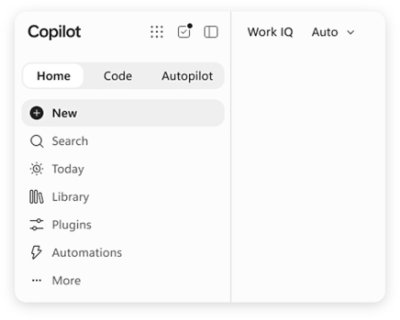
Microsoft Copilot is an AI assistant built for work. According to Microsoft, Copilot connects with your work content and the apps you already use, bringing together the latest AI models to help you create finished work, not just answers. It is described as a place to think, create, and move work forward, and it is offered in versions for individuals, business, and enterprise. Microsoft frames the new Copilot as connecting the tools people rely on with the next generation of capabilities they will need to build, customize, and scale AI across work. Rather than functioning as a standalone chatbot, Copilot is positioned as an assistant that lives inside the everyday tools of a working day, including Word, Excel, PowerPoint, Outlook, and Teams, while also appearing as its own app across desktop, mobile, and web. Much of the friction in modern work comes from moving between tools and from AI experiences that answer questions without producing anything usable. Microsoft's framing of the problem is direct: people want finished work, not just answers. Copilot is presented as a response to that gap, connecting the tools people rely on with the next generation of capabilities they need to build, customize, and scale AI across work. Because Copilot is grounded in work content and lives in the apps where work already happens, it aims to shorten the distance between asking for help and getting a completed artifact. The introduction of Work IQ, alongside the ability to hand off multi-step work to Cowork, signals a shift from simple question answering toward AI that participates in real workflows. The new Copilot app introduces Home as your starting point, bringing Chat and Cowork together in one place. From Home you can review recent activity, discover suggested actions, pick up where you left off, or start something new. Chat is described as the place for answers grounded in your work, while Cowork lets you hand off complex, multi-step work across your apps, data, and workflows. This combination is useful because it separates two very different modes of working with AI: quick, grounded questions that need a reliable answer, and longer tasks that span multiple steps and multiple tools. Keeping both in one Home view means users do not have to decide in advance which mode they need. Microsoft notes that Home view is available in Microsoft Frontier. Copilot extends beyond conversation into building and background execution. Copilot Code is described as requiring no coding experience: you describe the dashboard, tracker, or app you want, and Copilot builds it with the power of code. Copilot Code is available in Microsoft Frontier. Copilot Autopilot is positioned as an always-on personal agent with its own identity, memory, and access to tools. It is cloud-hosted and keeps work moving in the background, using Microsoft 365 and Work IQ to take action within the guardrails you and your organization set. Autopilot is available in Private Preview. Together, these features show how Copilot is meant to move from answering prompts to producing working artifacts and carrying out ongoing work. Copilot is integrated into Word, Excel, PowerPoint, Outlook, and Teams, the apps where work already happens, so assistance appears in context rather than in a separate destination. Work IQ grounds Copilot in your company, your team's roles, and the context behind your projects, which is what makes responses relevant to a specific organization rather than generic. Copilot also brings together leading AI models with Work IQ so users can benefit from the distinct strengths of each in a single experience, instead of managing multiple AI tools separately. Auto addresses model choice: it weighs accuracy, speed, and cost for each request to help determine the right model and effort for the task at hand. Microsoft says that looking ahead, Copilot will also help orchestrate work across Chat, Cowork, and Code. You can build your own agents with Copilot. Agent Builder lets you turn your expertise into personalized, work-grounded agents in minutes using natural language, and you can extend and manage those agents with Copilot Studio when you are ready to scale. This matters because it gives teams a way to capture specialized knowledge and repeatable processes without deep technical work. Copilot is also described as one Copilot across your devices: you can work with it across desktop, mobile, and web using voice, keyboard, or pen. Security is a core theme as well. Copilot is designed to be secure and private, built on the trusted Microsoft 365 foundation your organization already uses. Enterprise-grade controls protect your data, people, and business, while keeping work and personal accounts separate. The stated benefit of Copilot is that it helps you create finished work, not just answers. Because it connects with your work content and the apps you already use, it can operate with the context of your company, your team's roles, and the background of your projects. Agent Builder lets individuals and teams turn expertise into reusable agents in minutes, and Copilot Studio provides a path to scale those agents when needed. Auto removes the burden of choosing a model by weighing accuracy, speed, and cost for each request. Autopilot keeps work moving in the background within organizational guardrails. Across devices and input methods, Copilot aims to stay available wherever and however people work, while enterprise-grade controls are intended to protect data and keep work and personal accounts separate. Several concrete scenarios are described on the Copilot page. In the Copilot app, a user can open Home to review recent activity, follow a suggested action, resume unfinished work, or start something new. A user with a question can use Chat to get answers grounded in their work. A user facing complex, multi-step work can hand it off to Cowork to be carried out across apps, data, and workflows. Someone who needs a dashboard, tracker, or app can describe it and let Copilot Code build it without coding experience. Teams can create personalized, work-grounded agents with Agent Builder and manage them at scale in Copilot Studio. Autopilot can take action in the background using Microsoft 365 and Work IQ within the guardrails an organization sets. Security scenarios include keeping work and personal accounts separate while applying enterprise-grade controls. Copilot is offered for three audiences. Copilot for Individuals simplifies everyday work in the apps you use, from creating to managing your email and calendar, so you can stay focused on what matters. Copilot for Business helps a business work smarter with AI built into the apps the team uses every day, so everyone can move from ideas to impact. Copilot for Enterprise empowers an organization with secure AI grounded in your business and built into the apps teams use every day. Plan details listed on the page start at $9.99 per month for individuals, $23.50 user/month paid yearly for business, and $30.00 user/month paid yearly for enterprise, the last including Copilot Studio and enterprise-grade security. Availability varies by market, and some experiences such as Home view and Copilot Code are noted as available in Microsoft Frontier, while Autopilot is in Private Preview. Microsoft Copilot is presented as AI built for work: an assistant that knows your work, lives in the apps you already use, and brings together leading AI models in one place. Its core promise is to help people and organizations create finished work rather than merely receive answers, by grounding responses in work context through Work IQ, integrating with Word, Excel, PowerPoint, Outlook, and Teams, and offering pathways to build agents, generate apps with code, and delegate background work to an always-on agent. With plans for individuals, business, and enterprise, and a foundation of enterprise-grade security and privacy on Microsoft 365, Copilot is positioned as a single, scalable AI experience across desktop, mobile, and web.
Okara is an AI Chief Marketing Officer (AI CMO) designed to put marketing on autopilot. It is built for businesses that need consistent marketing execution without building a full in-house team. By entering your website, Okara studies your product, competitors, and brand voice, then deploys 10+ specialized marketing agents that handle SEO, AI search optimization, Reddit engagement, X (Twitter) and LinkedIn posting, creator outreach, content writing, UGC video creation, and technical SEO fixes. The platform is used by over 100,000 businesses and trusted by teams at companies like HeMed, Lovie, Unlayer, Kong, Razer, and Photoroom. Marketing teams often struggle to maintain consistency across channels, keep up with SEO changes, and produce enough content to drive growth. Many businesses cannot afford a full marketing department or a dedicated CMO, leading to fragmented efforts and missed opportunities. Okara solves this by acting as an always-on marketing executive that not only drafts content but also researches and prepares strategy documents first. It automates repetitive tasks like finding keyword gaps, drafting social posts, and identifying Reddit threads, allowing lean teams to focus on higher-level decisions while ensuring nothing drifts off-message. The platform's core features begin with its research phase. Before any agent writes a word, Okara generates five foundational strategy documents: Product Information, Marketing Strategy, Competitor Analysis, Brand Voice, and Content Strategy. These documents are created by analyzing your website and other sources (e.g., 24 pages in a typical initial scan). Every agent then reads these five documents to ensure all output is aligned with your brand and strategy. This shared context prevents the common problem of different channels producing inconsistent messaging. Once research is complete, Okara's marketing agents execute the strategy channel by channel. The agent suite includes: Influencer Agent, which connects you with the right influencers automatically; Reddit Agent, which finds relevant threads and drafts reply ideas and posts for review; SEO Agent, which suggests keyword opportunities and drafts blog posts and landing pages; Writer Agent, which drafts long-form content, articles, and copy in your brand voice; X (Twitter) Agent, which generates post and thread drafts you can edit, then post or schedule; LinkedIn Agent, which drafts professional posts you can personalize and publish; GEO Agent, which works to get your brand cited in ChatGPT and Google AI Overviews; Coding Agent, which automates technical SEO fixes and site improvements; and UGC Videos Agent, which produces guided briefs, multi-aspect AI clips, and downloads for social and ads. There is also a Link Broker Agent (coming soon) for automated high-quality backlink building and management. Publishing is integrated directly into your existing stack. You can connect WordPress, Webflow, Framer, Wix, Sanity, Google Search Console, Google Analytics, GitHub, LinkedIn, X (Twitter), WhatsApp, Telegram, TikTok, Instagram, and Slack once, and then approved work publishes and reports back automatically. For example, the Writer and SEO agents publish finished posts straight to WordPress with categories and images already set; approved articles land in Webflow CMS collections; content syncs to Framer sites; finished articles publish to Wix blogs with headings, tables, and cover images; and content writes into Sanity datasets mapped to existing schemas. Google Search Console feeds live search performance data to the SEO agent, while Google Analytics provides GA4 data so agents prioritize pages and channels driving traffic. The Coding agent opens pull requests with technical SEO fixes directly in GitHub. On approval, the LinkedIn agent posts to company or personal pages, and the X agent posts threads. WhatsApp and Telegram allow you to chat with agents and receive drafts and reports. TikTok, Instagram, and Slack integrations are coming soon. Okara works through a three-step process: Research, Execution, and Publish. In the Research step, it prepares all strategy documents. In Execution, all agents work from those same documents to draft content, so nothing drifts off-message. You stay in control because every draft requires your approval. In the Publish step, connected integrations automatically distribute approved content and report back performance data. This approach combines the strategic oversight of a CMO with the execution speed of an AI-powered team. The benefits for users include significant growth in search visibility and traffic. For example, Lovie grew its search visibility by 56%, lifted click-through rates by 73%, and increased US traffic by 20% without building a separate marketing team. HeMed grew GA4 sessions by 56% and increased Google impressions by 27% over two weeks. Unlayer reached 171,600 people in 24 hours with 26 creators delivered. Users also report replacing functions that would otherwise cost $3,000–$5,000 per month in a junior marketing hire. The platform delivers actionable marketing insights and opportunities 24/7, helping lean teams maintain marketing momentum even when focused elsewhere. Okara is used across many scenarios. B2B SaaS companies use it to build pipeline from SEO and content. Startups use it to go from zero to their first users. Ecommerce businesses use it for creators, content, and ads. Digital agencies run more accounts with one team. Professional services firms turn expertise into demand. Small businesses get marketing without the headcount. Real estate professionals list properties and generate demand on autopilot. Financial advisors create compliant content and get more referrals. Healthcare providers fill their calendar with patients. Recruiters build a brand candidates trust. Restaurants own local search and social. Law firms rank for the cases they want. Additional use cases include solo founders, investment banks positioning across languages and verticals, and dating apps managing marketing resources. Okara targets businesses of all sizes, from solo founders to growing teams. It is particularly suited for B2B SaaS, startups, ecommerce, digital agencies, professional services, small businesses, real estate, financial advisors, healthcare, recruiters, restaurants, and law firms. Pricing is free to start with no credit card required, making it accessible for anyone to try. The platform is web-based. The company also offers a Learn section with Skills, Prompts, Launch Library, and Docs, as well as free tools like AI Humanizer, LLMs.txt Generator, Meta Description Generator, Meta Tag Checker, Robots.txt Generator, Sitemap.xml Generator, UTM Builder, X Video Downloader, and Schema Markup Generator. In summary, Okara serves as an AI CMO that puts marketing on autopilot by combining research, strategy, execution, and publishing. It enables businesses to maintain consistent, brand-aligned marketing across channels without expanding headcount, with the control of approving every draft. By automating SEO, content creation, social media, and creator outreach, Okara helps teams grow visibility, traffic, and engagement efficiently.
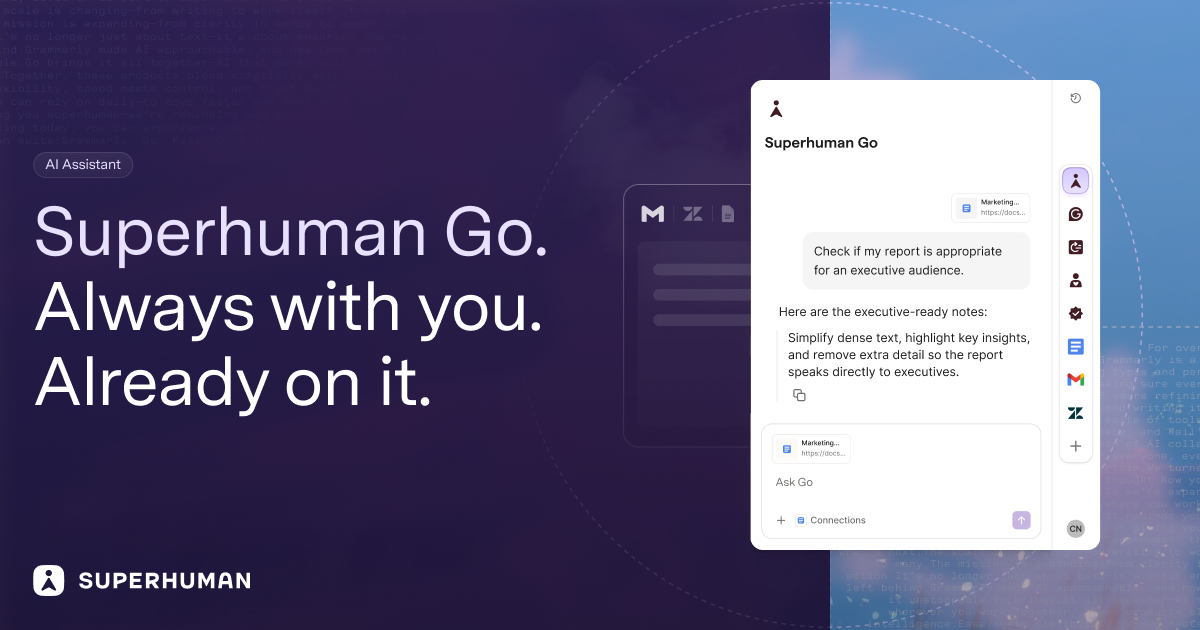
Superhuman Go is an AI assistant and agent platform that works everywhere you already work. Rather than waiting for a prompt, Go looks for opportunities to help you say something better or do something faster, offering proactive suggestions inline across more than 1 million apps and websites. It runs inside Gmail, Slack, your documents, and your browser, and it can also be used through a dedicated Go app for focused work with AI. The product is built for people who want AI help in the flow of what they are already doing, and it is designed to fit into an existing workflow rather than replacing it. Superhuman describes Go as an AI assistant that moves with you to save time, improve focus, and make work effortless. The problem Go addresses is that most AI assistants are destinations. The Superhuman Go FAQ frames this directly: tools like ChatGPT, Claude, Cowork, and Gemini are powerful general-purpose chatbots, but you have to open a separate window, describe what you need, and copy the result back into your work. That means switching tabs, re-explaining context, and pasting answers back and forth. Go is built for the opposite experience. Because it lives inside the apps where you already write and work, it already understands the email you are replying to, the document you are drafting, or the message you are about to send, so no prompt engineering is required. Instead of waiting for a request, Go surfaces the right suggestion at the right moment, the way Grammarly's underlines always have. The result, according to Superhuman, is depth where it matters most: drafting, rewriting, replying, and getting tone right across every app you use. Suggestions as you type. Everywhere you write, Go annotates in real time and points out where you could be clearer, more convincing, or simply wrong. It can give you the knowledge you need as you type, whether that is a grammatical rule, a company-approved stat, or a forgotten tidbit from last week's meeting. The writing intelligence comes from a customizable Grammarly agent: you tell it which underlines you find useful and it adjusts its feedback going forward. A separate Knowledge Checker agent acts as a researcher behind the scenes, searching your data sources for evidence to back up your claims and preventing you from making the wrong one. Managing email and meetings. Go sorts your incoming mail and pre-drafts replies in your voice and with your context, so you can respond in record time. That work is handled by the Email Assistant agent, which is informed by your voice, calendar, and connected apps and is powered by Superhuman Mail. Go also serves as a meeting co-host: you can ask it to handle the prep and the follow-through, having it crowdsource the agenda before a team sync or auto-assign tasks when the meeting ends. A team of agents. Go comes with a powerful set of default agents and lets you build your own. The Agent Store is a growing library of ready-made agents from Superhuman and its partners, with agents for schoolwork, sales teams, accountants, and more. A Daily Brief agent starts every day with a custom report based on your apps, showing deals about to close in Salesforce, Jira tickets from last night, and tasks and meetings that need your attention. Custom agents are designed for your own workflows and routines, and can be configured to show up as you type, on a schedule, or after an event, such as when a meeting ends or someone sends you an email. Agents are described as your team of AI collaborators, built for common tasks that fill up your workday, like summarizing long threads, drafting reports, or finding information across tools. No coding required. Anyone on the Pro, Business, or Enterprise plans can build custom agents through a simple chat conversation or a visual agent builder, and agents can be shared directly with teammates or published to a company agent directory. For deeper integrations, the Superhuman Agents SDK lets developers build agents that plug into an organization's unique tools, systems, and workflows. Connectors and context. AI is only as good as the context you give it, so Go connects to the apps you use most through pre-built or custom MCP connectors. Everything Go says and does is grounded in your knowledge, which is what allows it to take on more complex tasks, such as building out a team project tracker and keeping it up to date. Superhuman calls this your second brain: the combination of connected data sources and agents that makes the assistance genuinely useful rather than generic. Go changes shape to meet you where you are and conform to how you work. In your text it appears as an underline that delivers the knowledge you need as you type. A context-aware side chat is always at your side, ready to chat about whatever you are reading, writing, or wondering. On your cursor, highlighting text in any app cues a list of actions from your favorite agents. In Slack, you can message Go like a teammate or at-mention it in a group channel for a quick answer or task. Because Go understands what is on your screen, you never have to copy-paste or describe what you are working on. The standalone Go app is the home base for tackling complex tasks and managing all of your Go agents. The intended outcome is time saved, improved focus, and work that feels effortless. Superhuman positions Go as a practical AI work assistant that reduces your daily admin tasks, and it states that nothing happens without your approval: Go suggests, and you decide. On trust, Superhuman maintains Grammarly's 17-year track record of safe, responsible AI, and its infrastructure is trusted by over 40 million people. The company follows industry best practices in security and privacy, you control whether your content is used to train Go's AI models, and for Enterprise users AI training is off by default. Use cases include drafting and refining documents inside the tools you already use, coordinating meetings end to end from scheduling to follow-up, managing tasks across tools like email, Asana, and Jira, and surfacing past decisions or context on demand. Go is aimed at professionals and teams who need real results rather than just a chatbot, and the Agent Store also lists agents for schoolwork, sales teams, and accountants. It is available through the Superhuman desktop app for Windows and Mac, browser extensions for Chrome and Edge, and mobile apps for iOS and Android, and it can also be used in your browser with nothing to install. Go is free to start and included in every Superhuman plan, while custom agent building is available on Pro, Business, and Enterprise plans. If you already use Grammarly, you can switch on 'Use Superhuman Go' in your Grammarly settings with no new install, and you can switch back anytime. Superhuman Go's primary value proposition is proximity: it brings proactive, context-aware AI to the apps and websites where work actually happens, backed by a team of customizable agents and Grammarly's writing intelligence, so better phrasing, faster replies, and well-prepared meetings arrive without you having to go looking for them.
Bump is an AI collections engine for accounts receivable. It is built for freelancers, agencies and small businesses in the United States, Europe and India, and its job is to work every overdue invoice to paid. Instead of an owner writing and re-sending payment reminders by hand, Bump chases across email and WhatsApp, reads replies, tracks promises to pay and payment plans, and escalates on its own. The result Bump describes is that getting paid runs itself, so the cash comes in without sending another "just following up" email. Bump positions itself as an automated AR collections team — like adding a collections team, without hiring one. Late payment is a structural problem for small businesses, and Bump frames the problem in three parts. First, one in four invoices to small businesses is paid late, meaning cash that has already been earned stays stuck. Second, the average owner burns 14+ hours a month writing and re-sending payment reminders. Third, and in Bump's words the worst part, it feels rude to chase clients you want to keep — so most people simply wait. That combination of tied-up cash, wasted hours and reluctance to apply pressure is the gap Bump is designed to close by handling the chasing automatically and consistently. Getting started begins with connecting invoices. Bump allows users to enter invoices directly, import them from a CSV, or sync them from Stripe, QuickBooks and Xero. Once the invoices are in, Bump tracks what is owed and prioritises who to chase first, so the most important outstanding accounts are worked ahead of the rest rather than being handled in whatever order reminders happen to appear. Because Bump can pull from payment and accounting systems a business may already run, the collections workflow sits on top of existing records instead of requiring a separate manual ledger. This first step is described as "set it once" — connecting the invoices once is what allows the rest of the process to run without repeated manual input. Bump meets clients where they actually reply, using two channels. Email carries a polished, professional, on-brand reminder with a clear pay link, which gives the business a paper trail. WhatsApp provides a friendly message for the moments when email gets ignored — Bump describes it as the channel that gets read in minutes, essential in India and growing fast in Europe. Bump picks the channel that gets a response and keeps the tone human on both. The site shows a drafted WhatsApp message asking about invoice #1043, due the previous Friday, with a payment link, followed by the client's reply that it slipped their mind and they are paying now — after which the invoice is marked paid and nudges stop automatically. Bump works every account in the user's voice. It escalates from friendly to firm and from email to WhatsApp, reads replies, and tracks promises to pay and payment plans so nobody slips. Reading replies is what allows Bump to distinguish a genuine commitment from a message that needs more pressure, and tracking promises and payment plans is what keeps an agreed instalment schedule from quietly going unfulfilled. Because the escalation happens within a defined progression rather than as a one-off reminder, an overdue invoice keeps moving forward until it is resolved. Once it is running, Bump collects hands-off. On autopilot it sends within your guardrails, follows up on broken promises, brings you only the exceptions, and stops the second an invoice is paid. Control stays with the user: you can approve the first message to any client before it sends, or flip on full autopilot. Bump respects quiet hours, never double-texts, and stops instantly the moment an invoice is paid or a client replies. That combination of automation and boundaries is what makes the system usable for businesses that do not want an uncontrolled process contacting their customers. Bump is built for three markets out of the box. In the United States it uses USD formatting, has TCPA / CAN-SPAM opt-out built in, and adopts a firm-but-friendly tone. In Europe it supports multi-currency (€ and £), takes a GDPR-first approach to data handling, and uses a formal-leaning tone. In India it formats amounts in ₹, works to IST timing, leads with WhatsApp outreach, and uses a warm, relationship-led tone. Across all three, Bump nudges in your client's local business hours, formats money the way they expect, and respects the rules that matter. The outcomes Bump points to are faster payment and less unpaid work. Chasing runs without the owner writing and re-sending reminders, which addresses the 14+ hours a month the average owner spends on that task. Overdue invoices keep being worked instead of sitting untouched, and because messaging is drafted in the user's voice with a human tone, the follow-up does not have to feel rude to clients the business wants to keep. Exceptions are surfaced rather than everything, so the owner only steps in where a decision is actually needed. Concrete scenarios follow directly from the setup Bump describes. A freelancer can hand over a handful of overdue invoices and let Bump nudge clients across email and WhatsApp. An agency can sync invoices from Stripe, QuickBooks or Xero and let Bump prioritise which client to chase first. A business in India can run WhatsApp-first outreach in IST with rupee formatting, while a European business can handle € and £ invoices with GDPR-first data handling and a more formal tone. Where a client promises to pay later or agrees a payment plan, Bump tracks the commitment and follows up if it is broken — and when payment lands, the nudges stop automatically. Bump is aimed at freelancers, agencies and small businesses in the US, Europe and India. It connects to Stripe, QuickBooks and Xero for invoice data, supports CSV import and manual entry, and reaches clients through email and WhatsApp. Pricing is simple to start: Bump is free for up to 3 clients, with no credit card required, and sign-up is available directly on the site. The Product Hunt listing describes Bump as "your AI collections team for email and WhatsApp" and categorises it under Productivity, Fintech and Artificial Intelligence. Bump's core promise is that accounts receivable collection can run itself. By connecting invoices once and then chasing across email and WhatsApp, reading replies, tracking promises and payment plans, and escalating automatically within the user's guardrails, Bump turns awkward invoice follow-ups into a simple, repeatable workflow — an automated AR collections team that works every overdue invoice to paid.
Inqueria is a next-generation qualitative research platform built around AI-moderated interviews. Instead of asking a researcher to write a discussion guide and sit through every conversation personally, Inqueria lets a team describe a research objective in plain English and then runs the interviews itself, following adaptive conversational paths with each participant. It is designed for people who need to understand why users behave the way they do — why they churn, why they choose an alternative, or where onboarding breaks down — and who need that understanding at a scale a single moderator cannot reach. The platform's stated promise is direct: run 50 deep interviews overnight rather than spending the month it takes to schedule five. Traditional qualitative research is slow and manual by nature. A human researcher runs one interview at a time, so studies queue behind calendars, participants have to be recruited and scheduled one by one, and weeks or months can pass before a single insight surfaces. Analysis is just as heavy, because transcripts have to be coded by hand before themes emerge. Surveys sit at the opposite extreme: fast and broad, but unable to probe a thin answer, chase an unexpected thread, or capture the hesitation behind a response. Inqueria is positioned in that gap. It offers the conversational depth of an interview without a scheduling queue, and it replaces manual transcript coding with one-click synthesis, so teams can start learning instead of waiting for a study window to open. The site frames the shift simply as: stop manual transcript coding, start learning. The first step is research design, which happens in minutes rather than days. A team member describes the research objective in plain English — for example, "Understand why new users churn within their first week, and what would have made them stay" — sets the audience such as recently churned users, and picks a tone such as warm and professional. Inqueria then generates a complete question plan, including a system prompt, follow-up probes and an ideal conversational flow, ready to share in under five minutes. The site lists average setup time at five minutes with instant AI generation, and the product emphasises that there is no scripting and no guesswork involved. Rather than writing a guide from scratch, the researcher reviews and works from the plan Inqueria produced from a single sentence of intent, such as an eight-question plan built from one churn objective. The second step is adaptive interviewing. Participants join through a secure link and speak directly with Inqueria. The AI moderator listens to each answer, probes deeper when a response is thin, and follows threads the researcher did not anticipate — behaviour the company describes as interviewing users the way a trained researcher would. No human moderator is involved in the conversation itself. The product demo shows a participant being asked, on question 3 of 8, to walk through the specific moment they realised onboarding was not working for their team, inside an anonymous session where they can type or speak their response. Crucially, these sessions run concurrently rather than in sequence. Inqueria advertises unlimited parallel capacity, meaning as many interviews as your plan allows can be conducted at the same time, with no calendar to fill and response limits that apply by plan. The third step turns those conversations into a research library. One click surfaces cross-session themes, sentiment and verbatim quotes, and then goes further: cross-study patterns, theme saturation and response-level engagement signals. The synthesis view shown on the site, drawn from 148 sessions, displays top themes with prevalence figures, a net sentiment score, an engagement signal noting that 23 respondents described setup as "fine" but hesitated and backtracked while explaining it, a compounding indicator showing a theme also appeared in three past studies, and a saturation marker showing the point at which themes stopped changing. Because every study adds to the research library, patterns surface across all of a team's work rather than being trapped inside a single project file. Themes stay evidence-linked: Inqueria traces each one back to the exact quote it came from and checks the theme against every transcript, showing you the participants who disagree. Privacy is built into the pipeline rather than bolted on afterwards. Inqueria performs automated PII redaction in-house, detecting and stripping names, emails, phone numbers, IDs and addresses before any data leaves the platform — the site illustrates a raw input such as "My name is John and I work at Apple" becoming "My name is [REDACTED] and I work at [REDACTED]". Because redaction happens before any model sees a transcript, sensitive details never reach the AI layer, and data-retention policies are configurable. On the methodology side, Inqueria does not treat every study identically. Describe an objective and it recommends the best-fit method from a rigorous toolkit, then tells you why it chose it, and you can override the choice at any time. The named methods include Jobs-to-be-Done, Laddering, Critical Incident, Journey, Evaluative, Phenomenological and Semi-structured. The site describes this as methodological rigor: the right method, chosen for you. Overall, the approach is adaptive, concurrent and evidence-linked. A study begins with an objective rather than a rigid script, runs as many simultaneous conversations as the plan allows instead of one at a time, and finishes in a synthesis layer that ties every theme to the quotes underneath it. Inqueria summarises its own output as conversational, cross-study and evidence-linked qualitative research, where the research library compounds with each new study rather than sitting as a folder of stale transcripts. Interviews adapt to every answer, and the analysis is checked against every transcript, so the themes are not just generated but validated against the raw material and traced back to the participants who produced them. The practical benefits follow from that structure. Setup takes under five minutes on average, so a study can be designed and shared the same day the question is asked. Because interviews run concurrently, a team can reach volumes that would be impossible for a human moderator working one session at a time — the site's framing is running 50 interviews overnight versus skipping the month it takes to schedule five. One-click thematic synthesis removes the manual coding stage, and because each theme carries its verbatim quotes and its prevalence figure, findings arrive with the evidence attached. Engagement signals flag responses where wording and delivery diverge, and saturation markers show when additional interviews stop adding new themes, which helps teams judge when they have heard enough. Privacy redaction lets organisations collect candid feedback without exposing participant identities, and the accumulating library means each study makes the next one more valuable. Inqueria lists strategic use cases across several kinds of qualitative discovery: Customer Discovery, Churn & Retention, Market Validation, Concept & Packaging, Brand Perception, Employee Experience, Academic Research, Community & Policy, and "something else entirely" for work outside those categories. Customer Discovery is described in the most detail: uncovering the jobs, triggers and switches behind why people choose you, or don't, with an example question such as "When did you first realise the alternatives weren't solving your problem?" The Churn & Retention category maps directly to the churn example used throughout the site, where recently churned users are interviewed about the moment the product stopped working for them and what would have made them stay. These categories describe the kinds of studies the platform is presented as built for. For target users, the site says Inqueria is used by top product teams at fast-growing startups, and its pricing tiers point to three further audiences. Research is aimed at freelance researchers and UX teams. Consultant is built for consulting teams sharing findings with clients, and adds a client read-only insights share link plus the ability to remove Inqueria branding from the participant page. Scale is for larger corporate teams and includes five team seats, while Enterprise covers unlimited interviews, studies and seats with SSO, security review and dedicated support. Pricing is presented as being based on outcomes rather than features. Explore is free, with no card needed, one active study, three interviews per month, the qualitative AI agent and 10 insight refreshes monthly. Research is $55 USD per month for 30 interviews with unused allowance rolling into the next month, 5 active studies, thematic synthesis and sentiment, 15 insight refreshes, Excel spreadsheet export and a custom AI interview persona. Consultant is $109 USD per month for 75 interviews, 10 active studies, 30 insight refreshes, the client share link and branding removal. Scale is $169 USD per month with 5 team seats, 150 interviews per month, unlimited active studies, 50 insight refreshes and personalised email distributions. Enterprise is custom, and a one-off study pack of 20 interviews is available for $35 USD with no expiry. GST is added at checkout for Australian customers, with AUD billing. In summary, Inqueria replaces the slow, manual loop of scheduling interviews and hand-coding transcripts with an AI-moderated research process that designs the study, runs every conversation concurrently along adaptive paths, redacts PII before any model sees the data, and synthesises themes that stay linked to the exact quotes behind them. Its primary value proposition is depth at scale: fifty interviews overnight, evidence-linked findings checked against every transcript, and a research library that gets more useful with each study.