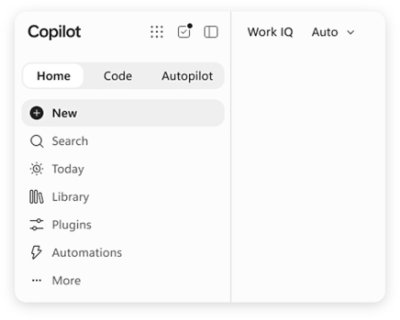
Microsoft Copilot is an AI assistant built for work. According to Microsoft, Copilot connects with your work content and the apps you already use, bringing together the latest AI models to help you create finished work, not just answers. It is described as a place to think, create, and move work forward, and it is offered in versions for individuals, business, and enterprise. Microsoft frames the new Copilot as connecting the tools people rely on with the next generation of capabilities they will need to build, customize, and scale AI across work. Rather than functioning as a standalone chatbot, Copilot is positioned as an assistant that lives inside the everyday tools of a working day, including Word, Excel, PowerPoint, Outlook, and Teams, while also appearing as its own app across desktop, mobile, and web.
Much of the friction in modern work comes from moving between tools and from AI experiences that answer questions without producing anything usable. Microsoft's framing of the problem is direct: people want finished work, not just answers. Copilot is presented as a response to that gap, connecting the tools people rely on with the next generation of capabilities they need to build, customize, and scale AI across work. Because Copilot is grounded in work content and lives in the apps where work already happens, it aims to shorten the distance between asking for help and getting a completed artifact. The introduction of Work IQ, alongside the ability to hand off multi-step work to Cowork, signals a shift from simple question answering toward AI that participates in real workflows.
The new Copilot app introduces Home as your starting point, bringing Chat and Cowork together in one place. From Home you can review recent activity, discover suggested actions, pick up where you left off, or start something new. Chat is described as the place for answers grounded in your work, while Cowork lets you hand off complex, multi-step work across your apps, data, and workflows. This combination is useful because it separates two very different modes of working with AI: quick, grounded questions that need a reliable answer, and longer tasks that span multiple steps and multiple tools. Keeping both in one Home view means users do not have to decide in advance which mode they need. Microsoft notes that Home view is available in Microsoft Frontier.
Copilot extends beyond conversation into building and background execution. Copilot Code is described as requiring no coding experience: you describe the dashboard, tracker, or app you want, and Copilot builds it with the power of code. Copilot Code is available in Microsoft Frontier. Copilot Autopilot is positioned as an always-on personal agent with its own identity, memory, and access to tools. It is cloud-hosted and keeps work moving in the background, using Microsoft 365 and Work IQ to take action within the guardrails you and your organization set. Autopilot is available in Private Preview. Together, these features show how Copilot is meant to move from answering prompts to producing working artifacts and carrying out ongoing work.
Copilot is integrated into Word, Excel, PowerPoint, Outlook, and Teams, the apps where work already happens, so assistance appears in context rather than in a separate destination. Work IQ grounds Copilot in your company, your team's roles, and the context behind your projects, which is what makes responses relevant to a specific organization rather than generic. Copilot also brings together leading AI models with Work IQ so users can benefit from the distinct strengths of each in a single experience, instead of managing multiple AI tools separately. Auto addresses model choice: it weighs accuracy, speed, and cost for each request to help determine the right model and effort for the task at hand. Microsoft says that looking ahead, Copilot will also help orchestrate work across Chat, Cowork, and Code.
You can build your own agents with Copilot. Agent Builder lets you turn your expertise into personalized, work-grounded agents in minutes using natural language, and you can extend and manage those agents with Copilot Studio when you are ready to scale. This matters because it gives teams a way to capture specialized knowledge and repeatable processes without deep technical work. Copilot is also described as one Copilot across your devices: you can work with it across desktop, mobile, and web using voice, keyboard, or pen. Security is a core theme as well. Copilot is designed to be secure and private, built on the trusted Microsoft 365 foundation your organization already uses. Enterprise-grade controls protect your data, people, and business, while keeping work and personal accounts separate.
The stated benefit of Copilot is that it helps you create finished work, not just answers. Because it connects with your work content and the apps you already use, it can operate with the context of your company, your team's roles, and the background of your projects. Agent Builder lets individuals and teams turn expertise into reusable agents in minutes, and Copilot Studio provides a path to scale those agents when needed. Auto removes the burden of choosing a model by weighing accuracy, speed, and cost for each request. Autopilot keeps work moving in the background within organizational guardrails. Across devices and input methods, Copilot aims to stay available wherever and however people work, while enterprise-grade controls are intended to protect data and keep work and personal accounts separate.
Several concrete scenarios are described on the Copilot page. In the Copilot app, a user can open Home to review recent activity, follow a suggested action, resume unfinished work, or start something new. A user with a question can use Chat to get answers grounded in their work. A user facing complex, multi-step work can hand it off to Cowork to be carried out across apps, data, and workflows. Someone who needs a dashboard, tracker, or app can describe it and let Copilot Code build it without coding experience. Teams can create personalized, work-grounded agents with Agent Builder and manage them at scale in Copilot Studio. Autopilot can take action in the background using Microsoft 365 and Work IQ within the guardrails an organization sets. Security scenarios include keeping work and personal accounts separate while applying enterprise-grade controls.
Copilot is offered for three audiences. Copilot for Individuals simplifies everyday work in the apps you use, from creating to managing your email and calendar, so you can stay focused on what matters. Copilot for Business helps a business work smarter with AI built into the apps the team uses every day, so everyone can move from ideas to impact. Copilot for Enterprise empowers an organization with secure AI grounded in your business and built into the apps teams use every day. Plan details listed on the page start at $9.99 per month for individuals, $23.50 user/month paid yearly for business, and $30.00 user/month paid yearly for enterprise, the last including Copilot Studio and enterprise-grade security. Availability varies by market, and some experiences such as Home view and Copilot Code are noted as available in Microsoft Frontier, while Autopilot is in Private Preview.
Microsoft Copilot is presented as AI built for work: an assistant that knows your work, lives in the apps you already use, and brings together leading AI models in one place. Its core promise is to help people and organizations create finished work rather than merely receive answers, by grounding responses in work context through Work IQ, integrating with Word, Excel, PowerPoint, Outlook, and Teams, and offering pathways to build agents, generate apps with code, and delegate background work to an always-on agent. With plans for individuals, business, and enterprise, and a foundation of enterprise-grade security and privacy on Microsoft 365, Copilot is positioned as a single, scalable AI experience across desktop, mobile, and web.
Publisher
A
admin
Launch Date2026-09-29
Platformweb
Pricingpaid
Tech Stack
#Microsoft 365#Work IQ#Copilot Studio
Traffic Insights
Month2026-09
Estimated Visits1.1B
MoM Visits GrowthN/A
Avg Time on Site-
MoM Time GrowthN/A