Category Focus/categories/automation
Automation AI Tools
Discover and compare the best automation AI tools and software. Browse 637+ curated tools with reviews and rankings.
Projects tracked
637
Sort mode
RECENT
Page
10
Mochi is a downloadable desktop pet for macOS: a little pink blob who lives on your screen. It floats around while you work, reacts to what you are doing, naps now and then, and, if you let it, keeps your Desktop tidy by carrying loose files into folders such as Screenshots, Documents and Media. Mochi is made for Mac users who want a cozy companion on their desktop and a gentle hand in keeping that desktop from filling up with stray files. It lives in your menu bar at the top of the screen, and its creator nickmorefun describes it as a cute Mac desktop pet that organizes your loose files. Desktop clutter builds up quietly. Loose files land on the Desktop and stay there, mixed together, until the pile becomes something you would rather not look at. Mochi approaches that problem differently from a conventional cleanup utility. Instead of asking you to select items and choose destinations, or to trust a rule set that might move things you did not intend to move, Mochi turns the task into part of its personality: it flies over, picks up a loose file, and carries it into folders such as Screenshots, Documents and Media, one file at a time. Just as importantly, the product is explicit that it never deletes or overwrites anything, and that every move can be undone from the menu bar. That combination, a friendly character plus full reversibility, is what makes a pet rather than a filing tool the way Mochi addresses a messy Desktop. Desk Patrol is Mochi's core organizing capability. Mochi flies to loose Desktop files and files them away, one by one, sorting them into folders like Screenshots, Documents and Media. Nothing is deleted and nothing is overwritten, so the action is purely a move. If you want to check on or reverse what happened, the menu bar includes an entry called Where Did My Files Go?, from which every move can be undone. Users who would rather keep Mochi purely as a companion and not as an organizer can choose the Just keep me company option, which leaves the Desktop alone while Mochi continues to float, react and nap. Because files are moved one at a time and the record is exposed through a menu bar path, the feature stays easy to follow: you can see where things went and put them back if you disagree with the destination. Mochi's second layer is behaviour and personality. It ships with hundreds of reactions that respond to the apps you use, how long you have been working, and late nights. Those reactions make Mochi feel present during a work session without behaving like another notification system: it is a character on your screen rather than an alert asking for a decision. There are also optional AI comments, which can be switched on using your own Claude, ChatGPT or Gemini key, so the extra commentary is opt-in and runs against a key you supply. Interaction is direct and physical: you can drag Mochi anywhere on screen, click to pet it, and double-click to give it a treat. Those small gestures make the pet something you can engage with for a moment and then put aside. Mochi Pro adds a tiny life sim on top of the pet. In it you grow a strawberry tree, build a nest, lay and hatch an egg, and raise a little family. Strawberries are scarce, so you keep watering, and the content warns that if you do not, things get dramatic. Mochi Pro is available on Gumroad from $5, and it can be tried free for 30 minutes, so you can see whether the life sim side fits the way you use your Mac before paying. The free download gives you Mochi itself with Desk Patrol, the reactions and the interactions, while Pro is the layer that introduces growing, nesting, hatching and family-raising. The trial period is a chance to experience the strawberry tree, the nest building and the egg hatching without committing to the price. Underneath the character, Mochi is a Mac app that lives in your menu bar and floats on your screen. Installation is deliberately manual. You download the .dmg, drag Mochi into Applications, and open it. The first time, macOS will say it cannot verify Mochi, because it is a free indie app without a paid Apple certificate yet. You click Done, then go to System Settings, then Privacy & Security, and click Open Anyway, confirming with your password or Touch ID. This is a one-time step, and full instructions are included in a file called How to open Mochi.txt inside the download. Mochi runs entirely on your Mac with no account and no tracking, and it requires macOS 13 (Ventura) or later on either Apple Silicon or Intel. Downloads are offered as a disk image and as a zip. The practical benefit is a Desktop that stays presentable without you managing it by hand. Because Mochi files loose items into folders such as Screenshots, Documents and Media, and because it never deletes or overwrites and every move can be undone, you get tidiness without the risk of losing something. The Where Did My Files Go? menu bar entry keeps the record of moves accessible rather than hidden, and the Just keep me company option means you can switch the organizing off entirely if you prefer. On top of the utility, Mochi provides company during long work sessions: it floats, naps, and reacts to the apps you are using and to how long you have been working. And because there is no account and no tracking, using it does not add another login or another stream of data leaving your machine. In day-to-day use, Mochi fits around work rather than interrupting it. You might open your Mac in the morning with a Desktop full of loose files, let Mochi fly over and file them one by one into Screenshots, Documents and Media, and then use Where Did My Files Go? to confirm the moves or undo any you did not want. If you would rather handle the Desktop yourself, you choose Just keep me company and Mochi simply floats and reacts while you work. During late-night sessions its reactions acknowledge the hour, and if you have an AI key configured, it can add comments using Claude, ChatGPT or Gemini. In spare moments you can drag Mochi around, click to pet it, or double-click for a treat. For players who want more, Mochi Pro turns the same character into an idle life sim of watering, nest building, hatching an egg and raising a family, which suits the long sessions the app is built for. Mochi is aimed at macOS users who want a cozy, low-pressure companion on their desktop and are willing to let something tidy loose files for them. That includes people drawn to desktop pets, tamagotchi-style virtual pets and cozy idle games, as well as anyone whose Desktop collects stray screenshots and documents. It runs on macOS 13 (Ventura) or later on Apple Silicon or Intel, uses mouse input, and is available in English. The core download is free, listed as Mochi 1.0.3 for Mac in both a 3.4 MB disk image and a 3.1 MB zip, while Mochi Pro is sold on Gumroad from $5 with a 30-minute free trial. The listing describes the app as simulation, casual, companion, cozy, cute, desktop pet, idle, productivity, relaxing, tamagotchi and virtual pet, and notes an AI disclosure covering assisted code, graphics and text. Mochi's value proposition is a combination that is hard to find in a single download: a cute desktop pet that also keeps your Desktop tidy. It floats and naps, reacts to your apps and late nights, can comment through your own AI key, and files loose files into folders such as Screenshots, Documents and Media without ever deleting or overwriting anything, with every move undoable from the menu bar. If you want a companion only, Just keep me company turns the organizing off; if you want more, Mochi Pro adds a strawberry tree, a nest and a family to raise. It runs entirely on your Mac with no account and no tracking, needs macOS 13 (Ventura) or later, and is free to download, with Pro from $5.
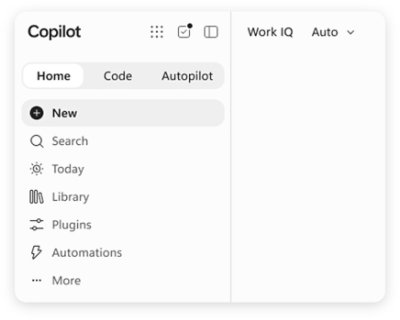
Microsoft Copilot is an AI assistant built for work. According to Microsoft, Copilot connects with your work content and the apps you already use, bringing together the latest AI models to help you create finished work, not just answers. It is described as a place to think, create, and move work forward, and it is offered in versions for individuals, business, and enterprise. Microsoft frames the new Copilot as connecting the tools people rely on with the next generation of capabilities they will need to build, customize, and scale AI across work. Rather than functioning as a standalone chatbot, Copilot is positioned as an assistant that lives inside the everyday tools of a working day, including Word, Excel, PowerPoint, Outlook, and Teams, while also appearing as its own app across desktop, mobile, and web. Much of the friction in modern work comes from moving between tools and from AI experiences that answer questions without producing anything usable. Microsoft's framing of the problem is direct: people want finished work, not just answers. Copilot is presented as a response to that gap, connecting the tools people rely on with the next generation of capabilities they need to build, customize, and scale AI across work. Because Copilot is grounded in work content and lives in the apps where work already happens, it aims to shorten the distance between asking for help and getting a completed artifact. The introduction of Work IQ, alongside the ability to hand off multi-step work to Cowork, signals a shift from simple question answering toward AI that participates in real workflows. The new Copilot app introduces Home as your starting point, bringing Chat and Cowork together in one place. From Home you can review recent activity, discover suggested actions, pick up where you left off, or start something new. Chat is described as the place for answers grounded in your work, while Cowork lets you hand off complex, multi-step work across your apps, data, and workflows. This combination is useful because it separates two very different modes of working with AI: quick, grounded questions that need a reliable answer, and longer tasks that span multiple steps and multiple tools. Keeping both in one Home view means users do not have to decide in advance which mode they need. Microsoft notes that Home view is available in Microsoft Frontier. Copilot extends beyond conversation into building and background execution. Copilot Code is described as requiring no coding experience: you describe the dashboard, tracker, or app you want, and Copilot builds it with the power of code. Copilot Code is available in Microsoft Frontier. Copilot Autopilot is positioned as an always-on personal agent with its own identity, memory, and access to tools. It is cloud-hosted and keeps work moving in the background, using Microsoft 365 and Work IQ to take action within the guardrails you and your organization set. Autopilot is available in Private Preview. Together, these features show how Copilot is meant to move from answering prompts to producing working artifacts and carrying out ongoing work. Copilot is integrated into Word, Excel, PowerPoint, Outlook, and Teams, the apps where work already happens, so assistance appears in context rather than in a separate destination. Work IQ grounds Copilot in your company, your team's roles, and the context behind your projects, which is what makes responses relevant to a specific organization rather than generic. Copilot also brings together leading AI models with Work IQ so users can benefit from the distinct strengths of each in a single experience, instead of managing multiple AI tools separately. Auto addresses model choice: it weighs accuracy, speed, and cost for each request to help determine the right model and effort for the task at hand. Microsoft says that looking ahead, Copilot will also help orchestrate work across Chat, Cowork, and Code. You can build your own agents with Copilot. Agent Builder lets you turn your expertise into personalized, work-grounded agents in minutes using natural language, and you can extend and manage those agents with Copilot Studio when you are ready to scale. This matters because it gives teams a way to capture specialized knowledge and repeatable processes without deep technical work. Copilot is also described as one Copilot across your devices: you can work with it across desktop, mobile, and web using voice, keyboard, or pen. Security is a core theme as well. Copilot is designed to be secure and private, built on the trusted Microsoft 365 foundation your organization already uses. Enterprise-grade controls protect your data, people, and business, while keeping work and personal accounts separate. The stated benefit of Copilot is that it helps you create finished work, not just answers. Because it connects with your work content and the apps you already use, it can operate with the context of your company, your team's roles, and the background of your projects. Agent Builder lets individuals and teams turn expertise into reusable agents in minutes, and Copilot Studio provides a path to scale those agents when needed. Auto removes the burden of choosing a model by weighing accuracy, speed, and cost for each request. Autopilot keeps work moving in the background within organizational guardrails. Across devices and input methods, Copilot aims to stay available wherever and however people work, while enterprise-grade controls are intended to protect data and keep work and personal accounts separate. Several concrete scenarios are described on the Copilot page. In the Copilot app, a user can open Home to review recent activity, follow a suggested action, resume unfinished work, or start something new. A user with a question can use Chat to get answers grounded in their work. A user facing complex, multi-step work can hand it off to Cowork to be carried out across apps, data, and workflows. Someone who needs a dashboard, tracker, or app can describe it and let Copilot Code build it without coding experience. Teams can create personalized, work-grounded agents with Agent Builder and manage them at scale in Copilot Studio. Autopilot can take action in the background using Microsoft 365 and Work IQ within the guardrails an organization sets. Security scenarios include keeping work and personal accounts separate while applying enterprise-grade controls. Copilot is offered for three audiences. Copilot for Individuals simplifies everyday work in the apps you use, from creating to managing your email and calendar, so you can stay focused on what matters. Copilot for Business helps a business work smarter with AI built into the apps the team uses every day, so everyone can move from ideas to impact. Copilot for Enterprise empowers an organization with secure AI grounded in your business and built into the apps teams use every day. Plan details listed on the page start at $9.99 per month for individuals, $23.50 user/month paid yearly for business, and $30.00 user/month paid yearly for enterprise, the last including Copilot Studio and enterprise-grade security. Availability varies by market, and some experiences such as Home view and Copilot Code are noted as available in Microsoft Frontier, while Autopilot is in Private Preview. Microsoft Copilot is presented as AI built for work: an assistant that knows your work, lives in the apps you already use, and brings together leading AI models in one place. Its core promise is to help people and organizations create finished work rather than merely receive answers, by grounding responses in work context through Work IQ, integrating with Word, Excel, PowerPoint, Outlook, and Teams, and offering pathways to build agents, generate apps with code, and delegate background work to an always-on agent. With plans for individuals, business, and enterprise, and a foundation of enterprise-grade security and privacy on Microsoft 365, Copilot is positioned as a single, scalable AI experience across desktop, mobile, and web.
Okara is an AI Chief Marketing Officer (AI CMO) designed to put marketing on autopilot. It is built for businesses that need consistent marketing execution without building a full in-house team. By entering your website, Okara studies your product, competitors, and brand voice, then deploys 10+ specialized marketing agents that handle SEO, AI search optimization, Reddit engagement, X (Twitter) and LinkedIn posting, creator outreach, content writing, UGC video creation, and technical SEO fixes. The platform is used by over 100,000 businesses and trusted by teams at companies like HeMed, Lovie, Unlayer, Kong, Razer, and Photoroom. Marketing teams often struggle to maintain consistency across channels, keep up with SEO changes, and produce enough content to drive growth. Many businesses cannot afford a full marketing department or a dedicated CMO, leading to fragmented efforts and missed opportunities. Okara solves this by acting as an always-on marketing executive that not only drafts content but also researches and prepares strategy documents first. It automates repetitive tasks like finding keyword gaps, drafting social posts, and identifying Reddit threads, allowing lean teams to focus on higher-level decisions while ensuring nothing drifts off-message. The platform's core features begin with its research phase. Before any agent writes a word, Okara generates five foundational strategy documents: Product Information, Marketing Strategy, Competitor Analysis, Brand Voice, and Content Strategy. These documents are created by analyzing your website and other sources (e.g., 24 pages in a typical initial scan). Every agent then reads these five documents to ensure all output is aligned with your brand and strategy. This shared context prevents the common problem of different channels producing inconsistent messaging. Once research is complete, Okara's marketing agents execute the strategy channel by channel. The agent suite includes: Influencer Agent, which connects you with the right influencers automatically; Reddit Agent, which finds relevant threads and drafts reply ideas and posts for review; SEO Agent, which suggests keyword opportunities and drafts blog posts and landing pages; Writer Agent, which drafts long-form content, articles, and copy in your brand voice; X (Twitter) Agent, which generates post and thread drafts you can edit, then post or schedule; LinkedIn Agent, which drafts professional posts you can personalize and publish; GEO Agent, which works to get your brand cited in ChatGPT and Google AI Overviews; Coding Agent, which automates technical SEO fixes and site improvements; and UGC Videos Agent, which produces guided briefs, multi-aspect AI clips, and downloads for social and ads. There is also a Link Broker Agent (coming soon) for automated high-quality backlink building and management. Publishing is integrated directly into your existing stack. You can connect WordPress, Webflow, Framer, Wix, Sanity, Google Search Console, Google Analytics, GitHub, LinkedIn, X (Twitter), WhatsApp, Telegram, TikTok, Instagram, and Slack once, and then approved work publishes and reports back automatically. For example, the Writer and SEO agents publish finished posts straight to WordPress with categories and images already set; approved articles land in Webflow CMS collections; content syncs to Framer sites; finished articles publish to Wix blogs with headings, tables, and cover images; and content writes into Sanity datasets mapped to existing schemas. Google Search Console feeds live search performance data to the SEO agent, while Google Analytics provides GA4 data so agents prioritize pages and channels driving traffic. The Coding agent opens pull requests with technical SEO fixes directly in GitHub. On approval, the LinkedIn agent posts to company or personal pages, and the X agent posts threads. WhatsApp and Telegram allow you to chat with agents and receive drafts and reports. TikTok, Instagram, and Slack integrations are coming soon. Okara works through a three-step process: Research, Execution, and Publish. In the Research step, it prepares all strategy documents. In Execution, all agents work from those same documents to draft content, so nothing drifts off-message. You stay in control because every draft requires your approval. In the Publish step, connected integrations automatically distribute approved content and report back performance data. This approach combines the strategic oversight of a CMO with the execution speed of an AI-powered team. The benefits for users include significant growth in search visibility and traffic. For example, Lovie grew its search visibility by 56%, lifted click-through rates by 73%, and increased US traffic by 20% without building a separate marketing team. HeMed grew GA4 sessions by 56% and increased Google impressions by 27% over two weeks. Unlayer reached 171,600 people in 24 hours with 26 creators delivered. Users also report replacing functions that would otherwise cost $3,000–$5,000 per month in a junior marketing hire. The platform delivers actionable marketing insights and opportunities 24/7, helping lean teams maintain marketing momentum even when focused elsewhere. Okara is used across many scenarios. B2B SaaS companies use it to build pipeline from SEO and content. Startups use it to go from zero to their first users. Ecommerce businesses use it for creators, content, and ads. Digital agencies run more accounts with one team. Professional services firms turn expertise into demand. Small businesses get marketing without the headcount. Real estate professionals list properties and generate demand on autopilot. Financial advisors create compliant content and get more referrals. Healthcare providers fill their calendar with patients. Recruiters build a brand candidates trust. Restaurants own local search and social. Law firms rank for the cases they want. Additional use cases include solo founders, investment banks positioning across languages and verticals, and dating apps managing marketing resources. Okara targets businesses of all sizes, from solo founders to growing teams. It is particularly suited for B2B SaaS, startups, ecommerce, digital agencies, professional services, small businesses, real estate, financial advisors, healthcare, recruiters, restaurants, and law firms. Pricing is free to start with no credit card required, making it accessible for anyone to try. The platform is web-based. The company also offers a Learn section with Skills, Prompts, Launch Library, and Docs, as well as free tools like AI Humanizer, LLMs.txt Generator, Meta Description Generator, Meta Tag Checker, Robots.txt Generator, Sitemap.xml Generator, UTM Builder, X Video Downloader, and Schema Markup Generator. In summary, Okara serves as an AI CMO that puts marketing on autopilot by combining research, strategy, execution, and publishing. It enables businesses to maintain consistent, brand-aligned marketing across channels without expanding headcount, with the control of approving every draft. By automating SEO, content creation, social media, and creator outreach, Okara helps teams grow visibility, traffic, and engagement efficiently.
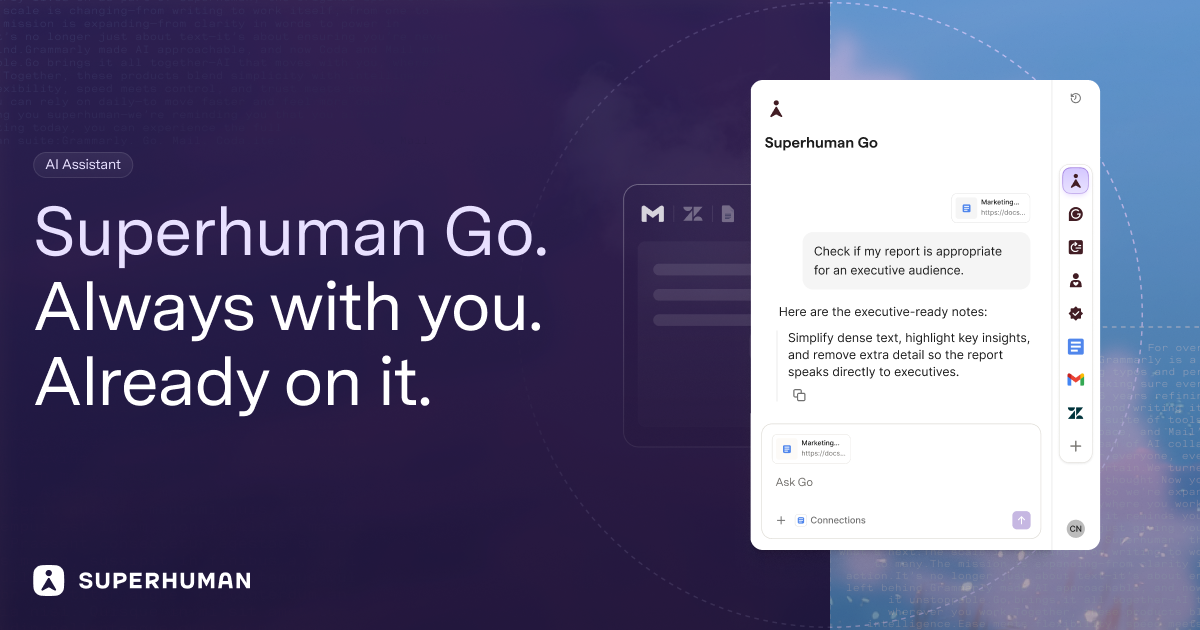
Superhuman Go is an AI assistant and agent platform that works everywhere you already work. Rather than waiting for a prompt, Go looks for opportunities to help you say something better or do something faster, offering proactive suggestions inline across more than 1 million apps and websites. It runs inside Gmail, Slack, your documents, and your browser, and it can also be used through a dedicated Go app for focused work with AI. The product is built for people who want AI help in the flow of what they are already doing, and it is designed to fit into an existing workflow rather than replacing it. Superhuman describes Go as an AI assistant that moves with you to save time, improve focus, and make work effortless. The problem Go addresses is that most AI assistants are destinations. The Superhuman Go FAQ frames this directly: tools like ChatGPT, Claude, Cowork, and Gemini are powerful general-purpose chatbots, but you have to open a separate window, describe what you need, and copy the result back into your work. That means switching tabs, re-explaining context, and pasting answers back and forth. Go is built for the opposite experience. Because it lives inside the apps where you already write and work, it already understands the email you are replying to, the document you are drafting, or the message you are about to send, so no prompt engineering is required. Instead of waiting for a request, Go surfaces the right suggestion at the right moment, the way Grammarly's underlines always have. The result, according to Superhuman, is depth where it matters most: drafting, rewriting, replying, and getting tone right across every app you use. Suggestions as you type. Everywhere you write, Go annotates in real time and points out where you could be clearer, more convincing, or simply wrong. It can give you the knowledge you need as you type, whether that is a grammatical rule, a company-approved stat, or a forgotten tidbit from last week's meeting. The writing intelligence comes from a customizable Grammarly agent: you tell it which underlines you find useful and it adjusts its feedback going forward. A separate Knowledge Checker agent acts as a researcher behind the scenes, searching your data sources for evidence to back up your claims and preventing you from making the wrong one. Managing email and meetings. Go sorts your incoming mail and pre-drafts replies in your voice and with your context, so you can respond in record time. That work is handled by the Email Assistant agent, which is informed by your voice, calendar, and connected apps and is powered by Superhuman Mail. Go also serves as a meeting co-host: you can ask it to handle the prep and the follow-through, having it crowdsource the agenda before a team sync or auto-assign tasks when the meeting ends. A team of agents. Go comes with a powerful set of default agents and lets you build your own. The Agent Store is a growing library of ready-made agents from Superhuman and its partners, with agents for schoolwork, sales teams, accountants, and more. A Daily Brief agent starts every day with a custom report based on your apps, showing deals about to close in Salesforce, Jira tickets from last night, and tasks and meetings that need your attention. Custom agents are designed for your own workflows and routines, and can be configured to show up as you type, on a schedule, or after an event, such as when a meeting ends or someone sends you an email. Agents are described as your team of AI collaborators, built for common tasks that fill up your workday, like summarizing long threads, drafting reports, or finding information across tools. No coding required. Anyone on the Pro, Business, or Enterprise plans can build custom agents through a simple chat conversation or a visual agent builder, and agents can be shared directly with teammates or published to a company agent directory. For deeper integrations, the Superhuman Agents SDK lets developers build agents that plug into an organization's unique tools, systems, and workflows. Connectors and context. AI is only as good as the context you give it, so Go connects to the apps you use most through pre-built or custom MCP connectors. Everything Go says and does is grounded in your knowledge, which is what allows it to take on more complex tasks, such as building out a team project tracker and keeping it up to date. Superhuman calls this your second brain: the combination of connected data sources and agents that makes the assistance genuinely useful rather than generic. Go changes shape to meet you where you are and conform to how you work. In your text it appears as an underline that delivers the knowledge you need as you type. A context-aware side chat is always at your side, ready to chat about whatever you are reading, writing, or wondering. On your cursor, highlighting text in any app cues a list of actions from your favorite agents. In Slack, you can message Go like a teammate or at-mention it in a group channel for a quick answer or task. Because Go understands what is on your screen, you never have to copy-paste or describe what you are working on. The standalone Go app is the home base for tackling complex tasks and managing all of your Go agents. The intended outcome is time saved, improved focus, and work that feels effortless. Superhuman positions Go as a practical AI work assistant that reduces your daily admin tasks, and it states that nothing happens without your approval: Go suggests, and you decide. On trust, Superhuman maintains Grammarly's 17-year track record of safe, responsible AI, and its infrastructure is trusted by over 40 million people. The company follows industry best practices in security and privacy, you control whether your content is used to train Go's AI models, and for Enterprise users AI training is off by default. Use cases include drafting and refining documents inside the tools you already use, coordinating meetings end to end from scheduling to follow-up, managing tasks across tools like email, Asana, and Jira, and surfacing past decisions or context on demand. Go is aimed at professionals and teams who need real results rather than just a chatbot, and the Agent Store also lists agents for schoolwork, sales teams, and accountants. It is available through the Superhuman desktop app for Windows and Mac, browser extensions for Chrome and Edge, and mobile apps for iOS and Android, and it can also be used in your browser with nothing to install. Go is free to start and included in every Superhuman plan, while custom agent building is available on Pro, Business, and Enterprise plans. If you already use Grammarly, you can switch on 'Use Superhuman Go' in your Grammarly settings with no new install, and you can switch back anytime. Superhuman Go's primary value proposition is proximity: it brings proactive, context-aware AI to the apps and websites where work actually happens, backed by a team of customizable agents and Grammarly's writing intelligence, so better phrasing, faster replies, and well-prepared meetings arrive without you having to go looking for them.
Bump is an AI collections engine for accounts receivable. It is built for freelancers, agencies and small businesses in the United States, Europe and India, and its job is to work every overdue invoice to paid. Instead of an owner writing and re-sending payment reminders by hand, Bump chases across email and WhatsApp, reads replies, tracks promises to pay and payment plans, and escalates on its own. The result Bump describes is that getting paid runs itself, so the cash comes in without sending another "just following up" email. Bump positions itself as an automated AR collections team — like adding a collections team, without hiring one. Late payment is a structural problem for small businesses, and Bump frames the problem in three parts. First, one in four invoices to small businesses is paid late, meaning cash that has already been earned stays stuck. Second, the average owner burns 14+ hours a month writing and re-sending payment reminders. Third, and in Bump's words the worst part, it feels rude to chase clients you want to keep — so most people simply wait. That combination of tied-up cash, wasted hours and reluctance to apply pressure is the gap Bump is designed to close by handling the chasing automatically and consistently. Getting started begins with connecting invoices. Bump allows users to enter invoices directly, import them from a CSV, or sync them from Stripe, QuickBooks and Xero. Once the invoices are in, Bump tracks what is owed and prioritises who to chase first, so the most important outstanding accounts are worked ahead of the rest rather than being handled in whatever order reminders happen to appear. Because Bump can pull from payment and accounting systems a business may already run, the collections workflow sits on top of existing records instead of requiring a separate manual ledger. This first step is described as "set it once" — connecting the invoices once is what allows the rest of the process to run without repeated manual input. Bump meets clients where they actually reply, using two channels. Email carries a polished, professional, on-brand reminder with a clear pay link, which gives the business a paper trail. WhatsApp provides a friendly message for the moments when email gets ignored — Bump describes it as the channel that gets read in minutes, essential in India and growing fast in Europe. Bump picks the channel that gets a response and keeps the tone human on both. The site shows a drafted WhatsApp message asking about invoice #1043, due the previous Friday, with a payment link, followed by the client's reply that it slipped their mind and they are paying now — after which the invoice is marked paid and nudges stop automatically. Bump works every account in the user's voice. It escalates from friendly to firm and from email to WhatsApp, reads replies, and tracks promises to pay and payment plans so nobody slips. Reading replies is what allows Bump to distinguish a genuine commitment from a message that needs more pressure, and tracking promises and payment plans is what keeps an agreed instalment schedule from quietly going unfulfilled. Because the escalation happens within a defined progression rather than as a one-off reminder, an overdue invoice keeps moving forward until it is resolved. Once it is running, Bump collects hands-off. On autopilot it sends within your guardrails, follows up on broken promises, brings you only the exceptions, and stops the second an invoice is paid. Control stays with the user: you can approve the first message to any client before it sends, or flip on full autopilot. Bump respects quiet hours, never double-texts, and stops instantly the moment an invoice is paid or a client replies. That combination of automation and boundaries is what makes the system usable for businesses that do not want an uncontrolled process contacting their customers. Bump is built for three markets out of the box. In the United States it uses USD formatting, has TCPA / CAN-SPAM opt-out built in, and adopts a firm-but-friendly tone. In Europe it supports multi-currency (€ and £), takes a GDPR-first approach to data handling, and uses a formal-leaning tone. In India it formats amounts in ₹, works to IST timing, leads with WhatsApp outreach, and uses a warm, relationship-led tone. Across all three, Bump nudges in your client's local business hours, formats money the way they expect, and respects the rules that matter. The outcomes Bump points to are faster payment and less unpaid work. Chasing runs without the owner writing and re-sending reminders, which addresses the 14+ hours a month the average owner spends on that task. Overdue invoices keep being worked instead of sitting untouched, and because messaging is drafted in the user's voice with a human tone, the follow-up does not have to feel rude to clients the business wants to keep. Exceptions are surfaced rather than everything, so the owner only steps in where a decision is actually needed. Concrete scenarios follow directly from the setup Bump describes. A freelancer can hand over a handful of overdue invoices and let Bump nudge clients across email and WhatsApp. An agency can sync invoices from Stripe, QuickBooks or Xero and let Bump prioritise which client to chase first. A business in India can run WhatsApp-first outreach in IST with rupee formatting, while a European business can handle € and £ invoices with GDPR-first data handling and a more formal tone. Where a client promises to pay later or agrees a payment plan, Bump tracks the commitment and follows up if it is broken — and when payment lands, the nudges stop automatically. Bump is aimed at freelancers, agencies and small businesses in the US, Europe and India. It connects to Stripe, QuickBooks and Xero for invoice data, supports CSV import and manual entry, and reaches clients through email and WhatsApp. Pricing is simple to start: Bump is free for up to 3 clients, with no credit card required, and sign-up is available directly on the site. The Product Hunt listing describes Bump as "your AI collections team for email and WhatsApp" and categorises it under Productivity, Fintech and Artificial Intelligence. Bump's core promise is that accounts receivable collection can run itself. By connecting invoices once and then chasing across email and WhatsApp, reading replies, tracking promises and payment plans, and escalating automatically within the user's guardrails, Bump turns awkward invoice follow-ups into a simple, repeatable workflow — an automated AR collections team that works every overdue invoice to paid.
Inqueria is a next-generation qualitative research platform built around AI-moderated interviews. Instead of asking a researcher to write a discussion guide and sit through every conversation personally, Inqueria lets a team describe a research objective in plain English and then runs the interviews itself, following adaptive conversational paths with each participant. It is designed for people who need to understand why users behave the way they do — why they churn, why they choose an alternative, or where onboarding breaks down — and who need that understanding at a scale a single moderator cannot reach. The platform's stated promise is direct: run 50 deep interviews overnight rather than spending the month it takes to schedule five. Traditional qualitative research is slow and manual by nature. A human researcher runs one interview at a time, so studies queue behind calendars, participants have to be recruited and scheduled one by one, and weeks or months can pass before a single insight surfaces. Analysis is just as heavy, because transcripts have to be coded by hand before themes emerge. Surveys sit at the opposite extreme: fast and broad, but unable to probe a thin answer, chase an unexpected thread, or capture the hesitation behind a response. Inqueria is positioned in that gap. It offers the conversational depth of an interview without a scheduling queue, and it replaces manual transcript coding with one-click synthesis, so teams can start learning instead of waiting for a study window to open. The site frames the shift simply as: stop manual transcript coding, start learning. The first step is research design, which happens in minutes rather than days. A team member describes the research objective in plain English — for example, "Understand why new users churn within their first week, and what would have made them stay" — sets the audience such as recently churned users, and picks a tone such as warm and professional. Inqueria then generates a complete question plan, including a system prompt, follow-up probes and an ideal conversational flow, ready to share in under five minutes. The site lists average setup time at five minutes with instant AI generation, and the product emphasises that there is no scripting and no guesswork involved. Rather than writing a guide from scratch, the researcher reviews and works from the plan Inqueria produced from a single sentence of intent, such as an eight-question plan built from one churn objective. The second step is adaptive interviewing. Participants join through a secure link and speak directly with Inqueria. The AI moderator listens to each answer, probes deeper when a response is thin, and follows threads the researcher did not anticipate — behaviour the company describes as interviewing users the way a trained researcher would. No human moderator is involved in the conversation itself. The product demo shows a participant being asked, on question 3 of 8, to walk through the specific moment they realised onboarding was not working for their team, inside an anonymous session where they can type or speak their response. Crucially, these sessions run concurrently rather than in sequence. Inqueria advertises unlimited parallel capacity, meaning as many interviews as your plan allows can be conducted at the same time, with no calendar to fill and response limits that apply by plan. The third step turns those conversations into a research library. One click surfaces cross-session themes, sentiment and verbatim quotes, and then goes further: cross-study patterns, theme saturation and response-level engagement signals. The synthesis view shown on the site, drawn from 148 sessions, displays top themes with prevalence figures, a net sentiment score, an engagement signal noting that 23 respondents described setup as "fine" but hesitated and backtracked while explaining it, a compounding indicator showing a theme also appeared in three past studies, and a saturation marker showing the point at which themes stopped changing. Because every study adds to the research library, patterns surface across all of a team's work rather than being trapped inside a single project file. Themes stay evidence-linked: Inqueria traces each one back to the exact quote it came from and checks the theme against every transcript, showing you the participants who disagree. Privacy is built into the pipeline rather than bolted on afterwards. Inqueria performs automated PII redaction in-house, detecting and stripping names, emails, phone numbers, IDs and addresses before any data leaves the platform — the site illustrates a raw input such as "My name is John and I work at Apple" becoming "My name is [REDACTED] and I work at [REDACTED]". Because redaction happens before any model sees a transcript, sensitive details never reach the AI layer, and data-retention policies are configurable. On the methodology side, Inqueria does not treat every study identically. Describe an objective and it recommends the best-fit method from a rigorous toolkit, then tells you why it chose it, and you can override the choice at any time. The named methods include Jobs-to-be-Done, Laddering, Critical Incident, Journey, Evaluative, Phenomenological and Semi-structured. The site describes this as methodological rigor: the right method, chosen for you. Overall, the approach is adaptive, concurrent and evidence-linked. A study begins with an objective rather than a rigid script, runs as many simultaneous conversations as the plan allows instead of one at a time, and finishes in a synthesis layer that ties every theme to the quotes underneath it. Inqueria summarises its own output as conversational, cross-study and evidence-linked qualitative research, where the research library compounds with each new study rather than sitting as a folder of stale transcripts. Interviews adapt to every answer, and the analysis is checked against every transcript, so the themes are not just generated but validated against the raw material and traced back to the participants who produced them. The practical benefits follow from that structure. Setup takes under five minutes on average, so a study can be designed and shared the same day the question is asked. Because interviews run concurrently, a team can reach volumes that would be impossible for a human moderator working one session at a time — the site's framing is running 50 interviews overnight versus skipping the month it takes to schedule five. One-click thematic synthesis removes the manual coding stage, and because each theme carries its verbatim quotes and its prevalence figure, findings arrive with the evidence attached. Engagement signals flag responses where wording and delivery diverge, and saturation markers show when additional interviews stop adding new themes, which helps teams judge when they have heard enough. Privacy redaction lets organisations collect candid feedback without exposing participant identities, and the accumulating library means each study makes the next one more valuable. Inqueria lists strategic use cases across several kinds of qualitative discovery: Customer Discovery, Churn & Retention, Market Validation, Concept & Packaging, Brand Perception, Employee Experience, Academic Research, Community & Policy, and "something else entirely" for work outside those categories. Customer Discovery is described in the most detail: uncovering the jobs, triggers and switches behind why people choose you, or don't, with an example question such as "When did you first realise the alternatives weren't solving your problem?" The Churn & Retention category maps directly to the churn example used throughout the site, where recently churned users are interviewed about the moment the product stopped working for them and what would have made them stay. These categories describe the kinds of studies the platform is presented as built for. For target users, the site says Inqueria is used by top product teams at fast-growing startups, and its pricing tiers point to three further audiences. Research is aimed at freelance researchers and UX teams. Consultant is built for consulting teams sharing findings with clients, and adds a client read-only insights share link plus the ability to remove Inqueria branding from the participant page. Scale is for larger corporate teams and includes five team seats, while Enterprise covers unlimited interviews, studies and seats with SSO, security review and dedicated support. Pricing is presented as being based on outcomes rather than features. Explore is free, with no card needed, one active study, three interviews per month, the qualitative AI agent and 10 insight refreshes monthly. Research is $55 USD per month for 30 interviews with unused allowance rolling into the next month, 5 active studies, thematic synthesis and sentiment, 15 insight refreshes, Excel spreadsheet export and a custom AI interview persona. Consultant is $109 USD per month for 75 interviews, 10 active studies, 30 insight refreshes, the client share link and branding removal. Scale is $169 USD per month with 5 team seats, 150 interviews per month, unlimited active studies, 50 insight refreshes and personalised email distributions. Enterprise is custom, and a one-off study pack of 20 interviews is available for $35 USD with no expiry. GST is added at checkout for Australian customers, with AUD billing. In summary, Inqueria replaces the slow, manual loop of scheduling interviews and hand-coding transcripts with an AI-moderated research process that designs the study, runs every conversation concurrently along adaptive paths, redacts PII before any model sees the data, and synthesises themes that stay linked to the exact quotes behind them. Its primary value proposition is depth at scale: fifty interviews overnight, evidence-linked findings checked against every transcript, and a research library that gets more useful with each study.
GoodSocials is an AI social media manager for LinkedIn. It writes high quality LinkedIn posts from deep research or from your own data, you approve them on a board, and it schedules them so you post regularly — five times a week, close to daily. The example board on the site is set up for TimeTuna.com, a scheduling service, with the stated goal of inbound leads. Signing in with LinkedIn and pasting your website fills a board with seven posts in 90 seconds. GoodSocials says it is built for the person whose name is on the profile, and it is positioned around only authentic content: research, deep dives and your numbers, nothing else. The problem GoodSocials addresses is cadence and cost. A social media manager costs around $3,000 a month. Against that, GoodSocials notes that a manager posts most weeks, needs about a week of onboarding before first drafts arrive, and stops when you are on holiday — while the product posts every weekday, delivers first drafts in 90 seconds, and posts what you queued while you are away. The cadence section frames the issue bluntly: three posts in your last three months versus twenty posts next month, with the promise that profile views, followers and inbound leads follow a steady month. There is also an explicit quality argument running through the marketing, which is built around avoiding 'AI slop', cringe openings and clichés such as 'nobody talks about this' or 'it's not X, it's Y'. Every post GoodSocials writes is one of three kinds: market research, deep dive, or your numbers. Market research posts draw on comparisons of the market — for example, one card reports that of 12 scheduling tools compared that month, 9 put round-robin behind a paid tier and two moved it there last quarter. Deep dives go further into a single source: one card codes the most frequent week-one question from 1,200 support threads and notes it points somewhere the roadmap had not looked; another reviews Iyengar & Lepper (2000) and Scheibehenne et al. (2010) to explain why a product shows three slots, weighing one famous jam study against a meta-analysis of 50 experiments. Your numbers posts report figures read from your own connected tools, such as failed deploys per release falling about 62% after one CI rule on a small sample of 11 releases, or 31% of August signups choosing annual, up from 19% in July. The claim is that the content comes from research, deep dives or your numbers — nothing else. GoodSocials is also explicit about what it will not write. The site shows a rejected example: 'Nobody talks about this, but scheduling is broken. I spent 10 years in SaaS. Here is what I learned: It's not about the tool. It's about the mindset. Agree?' The stated rules are no cringe, no 'no one talks about this', and no 'it's not X, it's Y'. What it writes instead is grounded in a specific number with the source attached — for example a post reporting that reschedules fell from 18% in May to 7% in August after one change, with n = 9,412 meetings, an acknowledgement that seasonality could explain part of it, a holdout running in October, and a next question about no-shows. That stylistic discipline is the differentiator the site leads with. You stay in control through an approval board. Posts arrive as cards, you review and revise them, and only approved items are scheduled. Cards display the posting time, such as 'Publishes Tue 09:00', and the board reflects a weekday cadence of five posts a week. The pipeline shown on each card is: reads your tools, writes the post, draws the image, you approve, publishes. The cadence section states the product takes you from three posts in your last three months to twenty posts next month, and the aim is to show up every weekday because the rest — profile views, followers and inbound leads — follows a steady month. Correcting the output is a first-class feature, described as 'Correct it once. Every post after follows.' The mechanism has three steps. First, you leave a note on a card, such as 'Open on the number, not a question.' Second, that note rewrites the card and becomes a rule in your voice; rules accumulate under a VOICE heading, with examples like 'Reports, does not sell' and 'Opens on the number.' Third, every next post follows the accumulated rules. The site illustrates the compounding effect with a timeline: Week 1, one rule; Week 4, two rules; Week 12, five rules, every one from a note of yours. The Pro plan also lists three brand principles that learn from every revision. GoodSocials works from your own data by reading your tools. The example board lists connected data sources: PostHog, Stripe, GitHub, Plausible and Notion, all connected read only. Those sources feed the 'your numbers' post type, which is why a card can quote reschedule rates, signup mix or deploy frequency with the tool named underneath it. Images are generated as part of the workflow, since the pipeline includes 'draws the image', and the Pro plan includes up to 200 generated images a month. The site also notes what is coming next: Codex, Claude Code and Grok bot integrations. The overall approach is a repeating loop rather than a one-off generation. You sign in with LinkedIn and paste your website; the board fills with seven posts in 90 seconds, with 7 days free and then $100 a month. Each post then runs through the same five-step pipeline: it reads your tools, writes the post, draws the image, you approve, and it publishes at a scheduled time such as Tuesday 09:00. Research and deep dives come from outside sources with citations, while your numbers posts come from connected analytics. Because approval happens before publishing, and because corrections become persistent voice rules, the system is designed to improve week over week instead of resetting each time. The outcomes GoodSocials claims follow from the cadence: profile views, followers and inbound leads follow a steady month of showing up every weekday. The comparison table against a $3,000 a month manager lists the concrete differences — posts every weekday rather than most weeks, first drafts in 90 seconds rather than after a week of onboarding, and posting what you queued when you are on holiday rather than stopping. The board is full in 90 seconds, so there is no long ramp before the first post appears. And because every correction becomes a rule, the site argues the output moves closer to your voice over time, which is the basis for its 'only authentic content' positioning. GoodSocials is built, in its own words, for the person whose name is on the profile: founders, consultants, operators and agencies. The site maps each group to the kind of data it writes from — founders to Stripe numbers, consultants to Notion-based client work and engagement patterns, operators to GitHub and engineering numbers, and agencies to each client's own data. Pricing has three tiers with 7 days free on each and no setup fee. Pro is $100 a month for one LinkedIn profile, including three brand principles that learn from every revision and up to 200 generated images a month. Agency is $1,000 a month for up to 10 profiles with one board per client, where each client authorises their own profile so you never hold a password, and GoodSocials emails you before a client's access runs out. Consultancy is $2,000 a month, where Pasha, the founder, sets up your themes, principles and sources with you and holds a call with you every week. Plans can be changed or cancelled from the pricing page or settings. In short, GoodSocials is a LinkedIn posting system that combines deep research and your own product data with a human approval board and a voice that improves from every correction. Its value proposition is showing up every weekday with content drawn from real research or real numbers, at $100 a month instead of the $3,000 a month a social media manager costs.
Jango is a macOS application for testing multi-user applications with AI participants instead of people. It gives your app a cast of AI users, and each cast member gets its own isolated browser, its own account, a goal and a memory. You point Jango at your development URL and watch those participants sign in, navigate your app, fill forms and take actions in real time — from posting in a social feed, to placing test orders in a sandbox order book, to updating shared tasks. Jango is built for developers and teams who need to exercise the parts of an application that only appear when more than one person is involved, and it runs on macOS for both Apple silicon and Intel Macs. The problem Jango addresses is that a large class of application behaviour simply cannot be tested alone. Messaging and communities, marketplaces and order books, and teams and collaboration all depend on other people showing up, holding their own accounts and doing something at the same time as someone else. Coordinating a group of testers for every change is slow and impractical, particularly for solo developers who are building these features without a testing team. Even when testers are available, the context around a test — who the participants were, what they did and what the app showed — tends to be lost and has to be rebuilt the next day. Jango is designed to remove the wait and to keep that context instead of discarding it. At the centre of the product is the cast. Each participant receives its own account and an isolated browser session, so buyers, sellers, teammates and market participants can hold separate identities inside the same running application. You assign roles and goals — a buyer places a test order, a seller lists an item, a teammate updates a task — and the participants act through their own browsers to accomplish them. Cast members are not limited to chatting: they operate your web app the way a user would, navigating pages, clicking controls, filling forms, selecting options and uploading supplied images, with actions depending on the controls Jango can observe in your app. The product is explicit that these are AI participants acting through real browser sessions rather than real people, and that they help you exercise interactions and explore scenarios rather than replace research with real users. Setting up a scenario follows three explicit steps. First you give Jango a place to go: you add your development URL and test accounts, and each participant gets its own isolated browser. Next you choose who shows up, assigning roles and goals such as a buyer placing a test order, a seller listing an item or a teammate updating a task, and each participant acts through their own browser. Finally you join in and check both sides — you use your app alongside the participants, inspect their screens, pause when something breaks and save the cast for your next change. You can log into your app as yourself while the cast uses its assigned accounts, give directions to participants, pause them or take control of any user's screen. The documentation shows the same idea through the CLI, where a command can direct a participant, for example asking one participant to invite another to a group. Every run is designed to leave something useful behind. Jango keeps three kinds of context you would otherwise rebuild tomorrow: known identities (roles, relationships and encrypted login state), observed app controls (reusable hints with execution history) and run evidence (activity, observable checks and comparisons). A run can therefore leave behind a repeatable situation, a navigation hint backed by an actual action, and evidence that an expected message appeared. At the end of a session Jango produces a report containing actions, errors and screenshots, and paid plans add multi-user checks and saved checkpoints. Casts themselves can be saved, so the same participants, accounts and goals can be brought back for the next change to the app. Jango is meant to fit where you already build. You can use the dashboard, launch from your terminal with the Jango CLI, or give your coding assistant access through MCP, and the cast and its memory stay together across those entry points. For AI sessions you can connect OpenAI, Anthropic or Vercel AI Gateway. You can bring your own AI key — in which case your AI provider bills you directly and Jango charges no extra on any plan — or buy prepaid managed AI credits from Account settings, with no subscription needed. The application ships with Node.js and Chromium bundled, along with the browsers and tools Jango needs, so no separate Node or Playwright installation is required. Updates are handled automatically on macOS: Jango checks for and downloads them in the background and installs them when you restart immediately or quit later, saving your workspace before installation, with a manual Help → Check for updates option available as well. The outcome for users is being able to test the parts of an app that need other people without waiting for other people. Instead of scheduling testers, you define a cast once and reuse it: casts can be saved for the next change, and run evidence and checkpoints carry forward, so the situation you created becomes repeatable rather than something you rebuild each time. Because participants each have a separate browser and account, you can observe both sides of an interaction at once — a buyer and a seller, or a group of collaborators — pause when something breaks and inspect the exact screen where it happened. Jango states plainly what it does not replace: AI participants help you exercise interactions and explore scenarios, but they are not a substitute for research with real users. Jango's published use cases cover social app testing (invitations, conversations, community roles and shared activity, exercised alongside your own test account), chat app testing (messaging and group chat flows without coordinating a group of testers, by directing AI participants in separate browsers and joining the conversation yourself), collaboration testing (team invitations, shared tasks and role-based workflows in collaborative web apps without gathering a testing team), and order books and marketplaces (sandbox order books and marketplace workflows where separate AI participants navigate pages, fill forms and submit test orders). It also publishes a guide for the solo developer: a practical workflow for testing social and collaborative apps alone using separate accounts, purposeful scenarios, AI participants and checks across browsers. The homepage illustrates an order book scenario in which a buyer selects Buy, enters three units at $100 and submits a limit order, a seller offers two units at $99 and checks the resulting fill, and a market participant places another test order and reviews the updated book. Jango is aimed at developers and teams building multi-user web applications, and it is positioned especially for solo developers testing social and collaborative apps without a testing team. It is available for macOS on Apple silicon and Intel, with a separate build for each, and the version listed on the site is 1.1.1, signed with the company's Apple developer certificate and notarised by Apple. Pricing has three tiers. Free costs $0 and includes three participants per session, one project, your own AI key and managed AI credits at cost plus 20%. Pro costs $9 per month and is described as a founding price that stays the same for as long as you subscribe; it includes 12 participants per session, unlimited projects, multi-user checks and saved checkpoints, and managed AI credits at cost plus 10%. Enterprise is custom priced for larger casts, participant limits set with you, custom limits, invoiced billing, negotiated managed AI rates, support terms and direct support. Jango also documents its limits and data handling: use test accounts in apps you control, and note that canvas-only apps, popup sign-in flows and CAPTCHA may need a different integration. Your account keeps projects, evidence and browser checkpoints in the cloud, browsers run on your computer, sign-in credentials use your operating system's credential protection, relevant page text, goals and participant memories are sent to your selected AI provider, and browser destinations are restricted to your configured app origins. In short, Jango replaces the wait for other people with a reusable cast of AI participants that each hold their own browser and account, pursue the goals you give them inside your development URL, and leave behind evidence, memory and reports you can build on.
Quiver is an agentic developer marketing system built for technical founders, developer marketing teams and the agents working alongside them. It gives developer marketing the architecture engineers already expect: a source of truth, version history, explicit states, APIs, observability and feedback loops. The system connects product context, customer research, campaigns, content, tasks and performance in one controlled place, so everything a team learns, creates, ships and measures stays connected rather than scattering across chats, documents and separate tools. Quiver is offered in two forms: a managed hosted product with built-in tasks and managed team access, and a free, MIT-licensed self-hosted edition that teams run on their own infrastructure. Quiver starts from a blunt observation about how marketing usually arrives at a technical founder: as vibes and disconnected tactics. One chat holds the positioning, a document holds the plan, customer evidence lives somewhere else, content loses its history the moment it ships, and performance gets reported and then disappears before the next decision is made. The website frames the gap directly, noting that just posting more is not an architecture. The practical consequence is that each marketing cycle tends to restart from scratch rather than compound on what came before, because nothing preserves the evidence, the decisions and the results in one place. Quiver responds by giving the whole marketing operation state, structure and memory, so people and agents can work inside the same controlled system instead of rebuilding context every time. The foundation of Quiver is a set of primitives presented as the actual operating properties of the product rather than a metaphor painted over a chatbot. The first is a source of truth: positioning, ICP, messaging, customer language, proof points and hypotheses all live in one active product context that every agent can draw on. The second is version control for decisions: every change to context and artifacts is versioned and restorable, agents can propose updates, and a person decides what becomes true. The third is a state machine for production workflow: work moves through Draft, Review, Approved, Live and Archived, so finished work is not lost inside chat history. Together these primitives mean the same context and the same production discipline that engineers expect from their own systems are applied to marketing work. Two further primitives connect Quiver to the rest of a team's stack and to real outcomes. Interfaces: Quiver publishes approved content as structured JSON through a public Content API, and an MCP interface lets the agents a team already uses operate Quiver through a real tool surface. That combination allows Quiver to remain the source of truth while a company's own website keeps ownership of presentation. Observability: the plan, research, content, tasks and performance stay connected, so a team can trace what shipped and what happened next instead of treating reporting as a dead end. Feedback loops then close the cycle: outcomes are logged, what worked is captured, and proposed context changes are reviewed before that learning shapes the next cycle, with humans approving what enters the system. The runtime is organized around the idea that the system gets better because the work stays connected. Quiver does not train a mystery model on a company. Instead it preserves the evidence, decisions, shipped work and results that should inform what happens next, and keeps the team in control of what becomes part of the system. The work runs in four steps. First, give the system context: start with the product, audience, positioning, customer language, proof and hypotheses rather than a blank chat window. Second, operate the work: research, sessions, artifacts, content and tasks stay connected to the initiative they are meant to move forward. Third, ship through explicit states: review what agents create, approve what is true, and publish finished work without collapsing generation and production into one step. Fourth, feed results back in: measure the outcome, preserve the learning and improve the context and decisions behind the next cycle, with human approval at the point where proposals become truth. Viewed by function, Quiver describes itself in four ways. For your agents, it provides operators rather than chat tabs: agents get durable context, operational state and tools, and teams can use purpose-built Strategy, Create, Feedback, Analyze and Optimize sessions or connect an external agent through MCP, with the work landing in the system instead of disappearing with the conversation. For your content, it is infrastructure rather than a text box: content keeps its versions, publish state, SEO and social metadata, distribution history, repurposing lineage and metrics, and the Content API serves approved work as structured JSON. For your customer evidence, it is research that changes the system: calls, surveys, reviews and field notes become themes, Voice of Customer quotes, product signals and evidence for or against active hypotheses, and that language is then made available to the agents doing the next piece of work. For your results, it is a loop that actually closes: when work goes live, Quiver creates the reminder to measure it, teams log quantitative results and qualitative notes, synthesize what worked, and review proposed context updates before they affect future sessions. Getting started follows three bootstrap steps. First, initialize the context: paste your website or describe the product, and Quiver drafts the starting context, which you review and make your own by checking the assumptions. Second, connect your model: bring an Anthropic, OpenAI, Google, OpenRouter or any OpenAI-compatible account and choose the model that fits each job, with your provider account determining model cost and the policy governing model usage. Third, start operating: open a session, connect an MCP client or begin with research, knowing that every action starts from the same approved context and writes back to the same system. Several boundaries are stated explicitly. Quiver is not a replacement for a CMS, CRM or analytics tool; it describes itself as the context and decision layer around those systems, using its Content API, MCP interface and publishing workflows to preserve the reasoning, approvals and learning that individual tools often leave disconnected. It also differs from using a standalone model chat directly, because a standalone chat starts with only the context supplied to that conversation, whereas Quiver gives every session and connected agent the same approved, versioned source of truth and then connects the resulting work to campaigns, publishing states and results. It also distinguishes approved knowledge from assumptions: context and artifacts keep their version history and explicit state, and agent proposals do not silently become truth, because a person reviews and approves what enters the active context or moves from draft to live. On deployment, Quiver offers two paths. The Open Source edition is the self-hosted foundation for technical founders and startups comfortable owning the stack, priced at $0 forever with unlimited seats on your own infrastructure: you host the app and database, maintain the deployment and bring your own model account, and you deploy and expose the MCP server code yourself. The hosted editions are run for you. Founder costs $49 per month for up to three seats, or $490 per year billed annually with two months free, and is described as a ready-to-use shared system for a technical founder and up to two teammates. Team costs $99 per month with unlimited seats, or $990 per year billed annually with two months free, and is the expanding hosted team product with room for the whole company. Founder and Team differ only by seats. Hosted plans add built-in tasks, assignments and reminders, a ready-to-invite shared workspace, managed authentication, infrastructure and updates, and a ready-to-connect MCP endpoint with OAuth or scoped tokens. All hosted plans include a 14-day trial, card required, cancel any time. Across editions the same capability list applies: versioned product context with restore, Strategy, Create, Feedback, Analyze and Optimize modes, versioned artifacts with approval and publish states, campaigns linking sessions, research, content and results, customer research synthesis and a Voice of Customer library, hypothesis evidence tracking, a content calendar with SEO/social metadata and repurposing, distribution records and content metric history, a public Content API for approved content, performance synthesis and reviewed context proposals, and BYOK with per-job model selection. The takeaway Quiver reinforces throughout is simple: stop rebuilding the context. By keeping context, work, decisions and learning connected in one approved system, a developer marketing operation gains a system of record that both the human team and its agents can operate from, so each cycle improves the context and the decisions behind the next instead of starting over.
IntellAgents.io is a single AI agent platform for customer communication. It answers inbound calls, places outbound calls, and handles conversations across WhatsApp, Instagram, Facebook, Telegram, and a website widget — all live 24/7, in over 36 languages, drawing from one knowledge base that a business sets up once. The system is built for companies that want every customer request answered promptly without staffing a round-the-clock support desk, and it covers both AI agents and human operators in the same system. The product is positioned around a specific, common failure: missed calls and slow replies. As the site puts it, most businesses juggle a different tool for every channel — one for phone support, another for WhatsApp, another for the website chatbot. That fragmentation means leads wait, messages sit unanswered overnight, and context is scattered across tools. IntellAgents replaces all of it with one AI agent that covers the phone line, the social inboxes, and the website at the same time, so a customer writing in French at 1:30 AM gets the same quality of answer as someone calling during business hours. The stated goal is simple: stop losing customers to missed calls and slow replies. Call handling is the core of the platform. The Inbound Call Handling capability means the AI answers every customer call instantly, 24/7 — no queue and no missed calls. Phone numbers and SIP support make it a complete voice agent for your line: it answers every inbound call and can place outbound ones too. A 24/7 hour availability promise means agents handle every inquiry around the clock, across every time zone, without fatigue. Language coverage spans over 36 languages, so the AI communicates fluently with customers without needing a translator; the platform's plans offer three languages on Starter, up to five on Pro, and unlimited languages on Business. Beyond voice, IntellAgents connects the messaging channels where customers already are. Facebook Messenger conversations are handled without anyone watching the inbox. Instagram DMs are answered the moment they arrive, day or night. Telegram is supported through your own Telegram bot, connected in a couple of clicks. WhatsApp Business gets two-way conversations answered automatically. On the website, a single snippet drops in a widget where visitors can either type to the agent or start a live voice call with it without leaving the page. Connecting a channel takes a couple of clicks — no developer and no separate bot to train for each one. A unified knowledge base sits behind all of it. All conversations — calls, DMs, comments — feed into a single unified source, and updating once reflects everywhere. Chat Summaries are generated instantly after every interaction, giving a clear and concise record so your team always knows exactly what happened. Escalation Workflows detect when a human touch is needed and route the conversation to the right person instantly with full context. Every escalation, follow-up, complaint, or callback can be logged as a ticket mid-call on a Requests board, where tickets move across New, Triage, In Progress, and Resolved and are tagged with the channel they arrived on. It works the same whether the request came in on phone, chat, or email, so nothing falls through the cracks. The platform's defining approach is unification. IntellAgents unifies AI agents, human operators, customer history, and escalation workflows into one system. AI resolves requests instantly, and when a human is needed, the conversation hands off with full context so the team never starts from zero. Rather than deploying a separate bot per channel, businesses configure the agent once against a single knowledge base and let it operate everywhere their customers are — from the first phone call to the last DM. The stated outcome is straightforward: cut support costs and never miss a lead. One AI system handles calls, messages, and follow-ups across every channel automatically, reducing support costs, responding instantly, and freeing the team to focus on what matters most. The AI agent service can answer common questions, qualify leads, book appointments, and support customers 24/7, and it can transfer the customer to a real person when needed. Plan descriptions frame the value in terms of headcount: Starter handles up to 60% of repetitive calls automatically, Pro is positioned as replacing one to two support agents on repeat queries across all channels, and Business as replacing three to five support agents with full call and chat automation at scale. The site lists industry starting points that suggest where the product is applied: Restaurant, Dental Clinic, Orders & E-commerce, Salon & Spa, Auto Service, Call Center, Bank, IT Company, and Telecom, plus a Custom Board option. A typical scenario is an overnight social inbox: a customer asks in Spanish at 11:42 PM whether the business is open tomorrow and gets an answer; a question in Russian at 4:07 AM about consultation pricing is answered too; an Instagram DM at 2:15 AM about north-side delivery is handled; a Facebook question in French at 1:30 AM about weekend delivery is answered. During a call, an agent can log an escalation, follow-up, complaint, or callback as a ticket without leaving the conversation. Pricing is published in monthly and annual terms, with annual saving 20%. A social-channels-only option is listed at $20/mo with approximately 3,000 AI replies included per month. The Starter plan is $45/mo with 200 minutes per month, $0.12/min after that, and 7,500 AI replies per month, including inbound calls 24/7, basic FAQ responses, call summaries, one knowledge base, three languages, and basic human handoff. Pro is $149/mo with 700 minutes, 25,000 AI replies, inbound and outbound calls, Instagram, Facebook, WhatsApp and Telegram, a unified knowledge base, human handoff and escalation, up to five languages, and follow-up workflows. Business is $449/mo with 2,000 minutes, 75,000 AI replies, task creation and CRM sync, advanced call routing, unlimited languages, priority support, and advanced analytics. Enterprise offers a custom setup with unlimited minutes, multi-agent setup, custom workflows, branded voice, CRM/API integrations, advanced routing, and dedicated support. Extra minutes are billed at $0.12/min on all plans, and no credit card is required to start. In short, IntellAgents.io brings the phone line, the social inboxes, and the website widget under one AI agent driven by a single knowledge base. By answering every call and every message 24/7 in the customer's own language, escalating to people only when it matters, and logging every request on one board, it lets a business respond instantly across every channel without adding headcount.