Category Focus/categories/video
Video AI Tools
Discover and compare the best video AI tools and software. Browse 112+ curated tools with reviews and rankings.
Projects tracked
112
Sort mode
RECENT
Page
2
Discover and compare the best video AI tools and software. Browse 112+ curated tools with reviews and rankings.
Projects tracked
112
Sort mode
RECENT
Page
2
Pexo is an AI video agent that turns your ideas into videos through natural conversation. It is built so that anyone can simply talk to Pexo and create publish-ready videos instantly, without needing advanced AI video generator skills. You start by telling Pexo what video you want to create, and you can begin from a URL, PDF, image, video, audio, or just your own idea. Pexo describes itself as one agent for every kind of video, built for product teams and marketers who need clear, polished visual storytelling and feature explanation, as well as for anyone producing content for social platforms. Rather than operating a tool, you direct a single agent from the first idea all the way through to a finished, on-brand video. Pexo's core premise addresses a specific gap described on its own website: most AI video generators are tools you operate. With them, you write prompts, pick a model, and edit the output yourself, then assemble the pieces into something usable. That workflow assumes you already know which model fits which shot, how to prompt it, and how to stitch the results together. Pexo flips that model by acting as an agent rather than a tool. You just describe what you want in plain language. It figures out the approach, chooses the right model for you, and delivers a finished video, not a short clip. You can still review the plan and adjust as it goes, so creative control is preserved without requiring technical skill, and the result is a complete video rather than a collection of raw generated fragments. You can begin a project from almost any starting material. Pexo's text to video feature lets you describe your idea in plain language and have it turned into a finished video. Image to video takes an uploaded image and animates it into a moving video. URL to video lets you paste a product or page link and receive a finished video. Audio to video turns a song, podcast, or voice note into a visual video. Script to video accepts a written script and Pexo produces the full video from it. The homepage lists URL, PDF, image, video, audio, or your idea as valid starting points, and it offers example requests such as creating a mascot launch video, a collage-style explainer, an AI avatar video, a SaaS launch video, a kinetic typography explainer, a brand launch video, an educational explainer, an infographic product animation, an app demo, an explanation of a service, social ads, a cinematic short film, a live-action instructional video, or an animation. This range means the same agent can handle a one-minute launch video for a website with dynamic motion graphics just as easily as a short social ad. Beyond assembling clips, Pexo handles the full production layer. It delivers polished videos complete with voiceover, music, motion graphics, captions, subtitles, narration, and transitions. Its image generation feature lets you describe any scene and receive a high-quality image in seconds. Its music generation feature lets you describe a mood or genre and Pexo composes original music instantly. Its AI avatar feature provides a lifelike AI avatar that speaks your script in any language. Pexo also supports a wide catalogue of video styles and formats, including kinetic typography, 2.5D animation, whiteboard animation, paper animation, line art, animated explainer videos, motion graphics, app launch videos, talking head videos, music videos, anime, UGC ads, product ads, product videos, YouTube Shorts, AI dancing videos, AI kissing videos, and ASMR videos. The output is platform-ready, made for TikTok, YouTube, Instagram, X, and more, so you can post anywhere without extra editing. A central part of how Pexo works is its model routing. Pexo works with what the site calls the world's leading AI models. Pexo understands your request, selects the right model, and routes each step for the best result. The models named on the site include Seedance 2.0, Happy Horse 1.0, GPT-Image 2, Nano Banana, and Kling AI 3.0, alongside logos for Hailuo AI, Pika, Midjourney, Kling AI, GPT Image, Veo, Seedance, Luma AI, MiniMax, and Runway. Because Pexo chooses the model per task rather than asking you to choose, you are not required to understand the differences between generation engines or to re-prompt when one model performs better than another on a particular shot. This is what allows a single conversational request to become a finished video assembled from multiple model outputs. The end-to-end workflow follows four stages. First, start with an idea: share a link, image, audio clip, or reference, and tell Pexo what you want to create. Second, Pexo plans it all: it works with you to develop the script, scenes, shots, and creative direction. Third, chat to refine the video: you mark what you want to fix and make changes through conversation, just like commenting in a Google Doc. Fourth, get a ready-to-post video: Pexo delivers a polished video complete with voiceover, music, motion graphics, and more. Underpinning these stages are four capabilities the site uses to differentiate Pexo from other AI video generators. Pexo understands your intent, reading context, references, and creative direction beyond prompts. It plans the creative work, building storyboards, selecting references, and structuring the video. It delivers finished content, creating complete videos with narration, music, subtitles, and transitions. And it improves through feedback, applying revisions naturally without restarting from scratch. For users, those capabilities translate into concrete outcomes described on the site. Pexo turns product photos into scroll-stopping video ads in minutes, replacing hours of editing with an upload-and-go flow. It lets people who are not technical describe what they want, pick a style, and get a polished video ad ready for Instagram and TikTok. Testimonials state that the videos look professional, match the user's brand perfectly, and avoid awkward AI artifacts. One reviewer reports generating five to ten product videos a week, where the same work previously cost around $500 per video from freelancers and is now handled in minutes. Another describes Pexo as the first true AI video agent, one that suggests directions and ships a full ad ready to post. Use cases are broad and explicitly listed. Pexo can be used for product ads, social posts, explainers, launch videos, and personal memories. It can create short-form social videos, product demos, brand ads, story videos, and publish-ready clips. A typical request might be a one-minute launch video for a website with dynamic motion graphics, a SaaS or brand launch video, an educational or collage-style explainer, an app demo, an infographic product animation, or social ads. Because Pexo produces platform-ready output, the finished videos are intended for publishing directly to TikTok, YouTube, Instagram, X, and similar channels without additional editing. The primary audience described on the site is product teams and marketers who need clear, polished visual storytelling and feature explanation. The site also addresses non-technical creators who are not techy at all but still want a polished video ad, and sellers who produce product videos at volume. Pexo runs as a web product at pexo.ai, and the site invites visitors to start for free. Its approach of understanding natural-language requests plus added links, images, music, notes, or references means anyone who can describe a video idea can use it, regardless of editing or prompting experience. Pexo's takeaway value proposition is simple: it is an AI video agent, not just another generator. You describe in plain language what you want, Pexo plans the story, chooses the right model for each task, and delivers a finished, on-brand video you can post.
Arsaze is an AI-native video editor built for agents and humans alike. It describes itself as a real multi-track video editor — "think Cursor for video editing" — where you can cut, rewrite, generate, grade and review footage by hand, or let Claude and ChatGPT drive the exact same timeline. The product is designed for people who want a genuine non-linear editing environment rather than a black-box generator, and for teams who want an agent to operate real editing software. Its core purpose is to put AI video editing, AI video generation and agent-driven video editing on one real timeline, so that work does not have to be shuffled between separate tools or re-imported after generation. The problem Arsaze addresses is fragmentation. AI video, image and audio generation normally lives in separate products, which means tab-hopping between several subscriptions and downloading and re-importing files before they can actually be edited. At the same time, AI editing tools are often opaque: you describe what you want and hope for the best, with no timeline, no manual control and no clean way to undo a bad decision. Arsaze answers both issues by being a full manual NLE first — timeline, trim modes, color wheels, keyframes — with the agent acting as an operator you can hand the controls to rather than a requirement. Everything the agent does stays on a real, editable timeline. The first of the four power tools is Rewrite, which lets you edit video like a document: delete the words and the cut happens. Every clip is transcribed word by word, so you can select a sentence and cut it out, find retakes, strip filler words and shorten pauses, with the timeline following the transcript automatically. This makes text-based editing, retake detection and the removal of fillers and silence a single operation rather than a manual chore. Because the transcript drives the timeline, an editor — or an agent — can make precise structural changes to a talking-head recording without scrubbing through every second of footage. Playground is a node editor for generation, built for both you and your agents. You chain prompts, AI image models and AI video models into reusable graphs — for example, Gemini Image feeding into Seedance, or two stills combined into one transition — and drop the result straight onto your timeline. Because the graphs are reusable, a workflow you build once can be run again and again. A single credit balance covers AI video, image and audio generation on every paid plan, so there is no downloading and re-importing between tools. Supported video models listed by Arsaze include Veo 3.1, Seedance 2.5, Kling 3.0 and PixVerse v6. Color is a full grading stack that you can drive by hand or by asking. It includes a keyer, shot match, light controls, wheels, curves, HSL qualifiers, film-stock LUTs and finishing tools, all non-destructive, applied per shot and rendered on export; you can also import your own .cube files. Shot matching lets you match one shot's look to another, while film and creative LUTs supply ready-made looks. Remarker, the fourth power tool, handles frame-accurate client review: you share a link, clients pin comments to the exact frame and version, reply in threads and rate scenes, and your agent can read every note and make the fix. Feedback therefore survives the next cut instead of getting lost. Underneath, Arsaze runs a dual engine: two renderers, one project. Engine one is a real-time multi-track timeline with unlimited video and audio tracks, frame-accurate trims, keyframes, transitions and live preview — the NLE you already know. Engine two is code-to-video rendering, where title cards, kinetic type and animated scenes are written as code, by you or your agent, and rendered frame-perfect onto the timeline. Both engines sit side by side in the same edit, so traditional cutting and programmatic motion graphics coexist in one project, driven by either a human or an agent. Getting an agent to edit is deliberately simple. You connect your agent by adding Arsaze as a custom connector in Claude, ChatGPT or Grok over MCP — the documentation states this takes two minutes and requires no code. Then you say what you want, in plain language: cut the silences, add b-roll where I mention the car, grade it teal and orange. The agent edits the real timeline, and its tool calls play back live in your editor. At any point you can step in manually, share a review link, and export MP4 or FCPXML for DaVinci Resolve and Premiere Pro, with cuts, transitions and captions intact. Alongside the four power tools, Arsaze ships the everyday tools an editor needs, each of which is also available as a tool your AI can call. Auto captions are word-timed and use styles you can reuse across a project, and they are editable like any other clip. Cut silences and filler words removes dead air and ums from a talking-head recording in one pass, with fine-tuning afterwards on the timeline. AI b-roll and generation puts generated video, images, voiceover, music and sound effects straight onto the timeline. Color grading offers wheels, curves, HSL secondaries and LUTs. Clean audio covers voice isolation, noise reduction, loudness normalization and automatic ducking under speech. Version history versions every edit as it happens, so you can branch, compare and return to any earlier cut, and export works to MP4, local Windows export, or FCPXML. The payoff is control without losing the speed of AI. Because every edit is versioned automatically, nothing the agent does is one-way — if it makes a bad edit you can step back to any earlier state. Because exports render on Arsaze's servers by default, you do not need a fast machine: the editor is just a browser tab. If you would rather use your own PC, the Windows app can export locally, free and without a watermark. And because footage is not used to train models without your consent, uploads, generated video and voice models stay tied to your account. Concrete scenarios follow directly from the toolset. An editor working through a long interview or talking-head recording uses Rewrite to find retakes and strip filler words, then cleans up audio with voice isolation and noise reduction. A creator who needs b-roll builds a Playground graph that generates images and animates them into clips, dropping them straight onto the timeline. A colourist grades per shot with wheels, curves and HSL qualifiers, matches one shot to another, and applies film-stock or creative LUTs non-destructively. A freelancer shares a Remarker review link so a client can pin notes to exact frames, then asks an agent to read those notes and make the fixes before the next version. Arsaze runs in the browser, with a downloadable Windows app for local exports. On the integrations side, Claude, ChatGPT and Grok are supported today over MCP; the site also displays logos for Codex, Gemini, Cursor, Windsurf, Zed, Copilot and Perplexity. Pricing starts with a free plan that includes 50 welcome AI credits for audio analysis of your videos — transcripts, captions and silence detection — and requires no credit card. AI generation (video, image, voice and music) and the built-in AI assistant come with the paid plans, which add monthly AI credits and cloud export hours. Credit top-ups never expire, and exports rendered on your own PC with the Windows app are always free. Arsaze's core promise is a single, real timeline that both humans and AI agents can operate. It combines a professional non-linear editor, generation models, a code-to-video renderer, colour grading and frame-accurate review in one place, so teams can stop scrubbing and start directing — hand the work to an agent when that helps, and take the controls back whenever it does not.
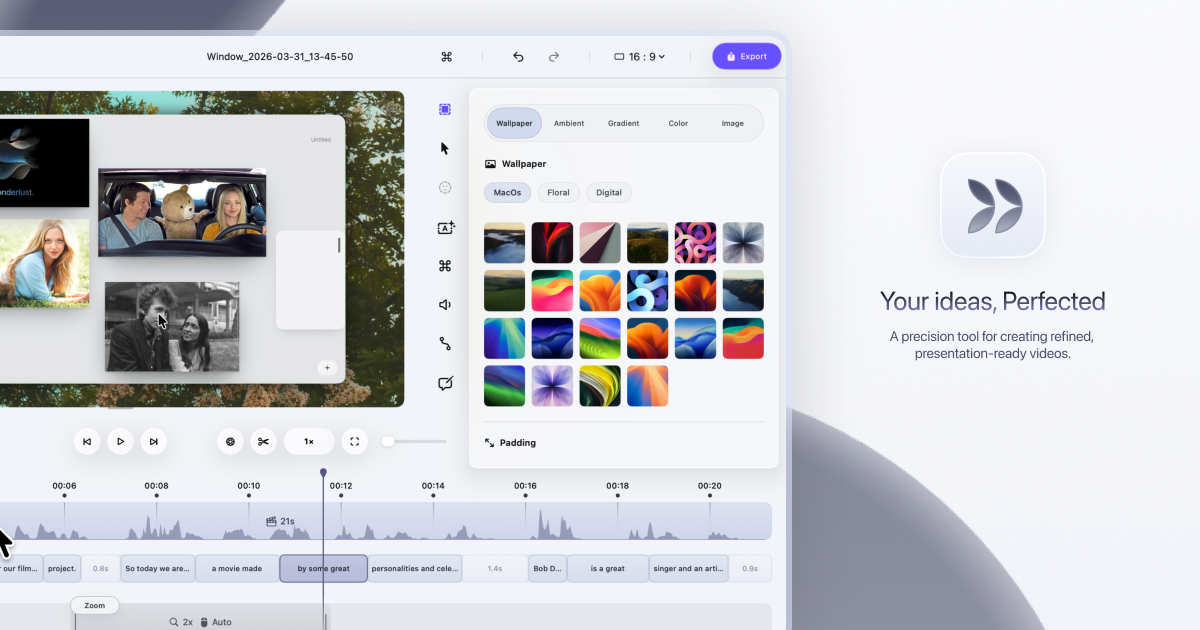
Dina is a native macOS screen recorder that turns everyday screen recordings into polished, presentation-ready videos. It records your screen and then refines the result automatically, adding motion, zoom, and clarity so that what your audience sees is as clear as what you imagined. The site describes it plainly: Dina is built to create beautiful videos from your screen, with motion, zoom, and clarity handled for you, so every recording feels ready to present. It is aimed at people who record their screen to explain something — product demos, tutorials, courses, and social media videos — and who want that recording to look intentional rather than raw. Most screen recordings are honest but not watchable. They show everything at once: the whole desktop, a cursor drifting across the screen, moments of hesitation, filler words, and background clutter. Making that footage look good usually means moving it into a separate editing tool, cutting and re-timing clips by hand, zooming into regions frame by frame, and adding captions or narration in yet another app. Dina's premise is that this work should not be manual. The website states that Dina records your screen and refines it automatically, so a recording starts to feel ready to present as soon as the capture ends, without a long post-production pass. Capture is handled by the recording panel. Dina captures everything that matters in one take: screen, audio, camera, cursor, and keystrokes. You can capture your screen, window, or area with camera, mic, and system audio, all in one place, in high quality. Scheduled Recording lets you set a time and let Dina handle the rest, so you can start recording without being there. Pause Recording lets you pause and resume whenever you need to, so you can record at your own pace instead of in one unbroken take. Dina then makes every frame feel intentional. It automatically zooms into key interactions, helping your audience stay focused without distraction, so demos and tutorials feel clearer, more engaging, and effortless to watch. You can choose between automatic zoom or precise manual control, and use smooth, intentional zoom animations to guide viewers through every important detail. On top of that, Dina adds subtle 3D camera movement and depth so every scene feels more cinematic and alive, with perspective presets ranging from a gentle perspective to a dynamic top-down shot, plus fine-tuning of camera position, distance, roll, and depth blur. Cursor movement is gently refined so motion feels steady and intentional, while cursor size, variant, and highlight effects can be customized to match your brand, and keyboard shortcuts can be shown on screen as each key is pressed so your audience can follow along. Complete layouts bring titles, slides, images, and video together into cohesive scenes that feel balanced, intentional, and ready to present. Slide Layout adds slides directly into your recording with control over color, timing, and animation so they feel like part of the video, not an overlay. Text Layout adds text with solid or gradient fills and refined animations, timed to appear and exit naturally as the recording progresses. Mask Layout hides sensitive information with flexible, multi-region masking exactly where you need it. Annotations guide attention where it matters: arrows, highlights, shapes, and callouts can be added directly into your video, with callouts offering customizable text, colors, and timing so notes feel part of the video rather than breaking the flow. You can also change the background and adjust spacing around your video to frame your content clearly and consistently. A large part of Dina's polish comes from its AI features, which are built around turning your recording into text you can edit. In transcript editing, your recording appears as text — so you can edit your video by editing the transcript, while AI removes fillers and silence automatically. Editable captions are generated automatically, and you can fine-tune words, timing, and phrasing so captions read clearly and accurately. AI voiceovers turn text into natural-sounding narration: you write your script and Dina generates natural voiceovers from text using efficient on-device models, ready to fit your video perfectly. For presence, Dina records your webcam, microphone, and captions together to add context and clarity without extra setup, and you can record voiceovers directly in your timeline so narration can be added, edited, and refined without breaking your flow. The webcam is adjustable in size, shape, roundness, and position so you can place your camera exactly where it belongs in the frame. Once captured, Dina gives you both a full timeline and transcript control: trim, split, zoom, and refine with precision. Keyframes help you create smooth, natural transitions, highlight important moments, and guide your viewers' attention. Output is studio-quality and ready instantly, with 4K output, multiple formats, and fast rendering. Layer Export lets you export videos in layers to preserve quality and flexibility for professional editing workflows, and native resolution exports keep videos in their original resolution without quality loss for high-quality demos and tutorials. Dina also handles iOS: it captures your iPhone in original resolution and enhances it with smooth motion and refined presentation, presenting recordings inside a range of iPhone device mockups — you can connect your iPhone with a USB cable or choose the iPhone mirroring window and start recording. Sharing is simple: a public link lets anyone watch, review, and collaborate on your video without needing an account. Dina's approach is deliberately native. It is designed exclusively for macOS and built for the latest versions of macOS, so it feels right at home with native performance, seamless integration, and an experience that matches the system. It runs natively on Macs powered by Apple Silicon, delivering exceptional performance, efficiency, and responsiveness across recording, rendering, and real-time effects. Using Metal, Dina taps directly into the GPU to power smooth motion, real-time visual effects, and high-quality video processing. The interface is crafted with SwiftUI for fluid animations, precise interactions, and a clean macOS-native experience, and intelligent features — from transcript generation to voice synthesis — run on-device with Core ML models. That combination is what lets Dina automatically add cinematic zoom, smooth animations, and AI-powered refinements rather than leaving that work to you. The outcome is speed without a loss of polish. Recordings arrive closer to finished, so you spend your time explaining rather than editing: filler words and silence are removed, captions are generated and can be corrected, and zooms, cursor motion, and 3D movement guide attention instead of distracting from it. Because capture, refinement, export, and sharing live in one workflow, there is no round trip to a separate editor for the common case. Dina also emphasizes privacy and ownership: all recordings are saved locally on your Mac, the app works completely offline, AI features run on-device via Core ML, and no account or cloud connection is required. In practice, that makes Dina useful for a range of concrete scenarios: founders and product teams recording product demos and walkthroughs that need to look presentable; tutorial and how-to videos where automatic zoom and visible keyboard shortcuts help viewers follow along; course and educational content that benefits from captions and transcript-based editing; social media videos that need cinematic framing and quick export; and iOS app recordings presented inside device mockups. For team workflows, a public link lets anyone watch, review, and collaborate without an account, and layer export supports professional editing workflows where the video becomes source material for further editing. Dina is built for macOS users who need to record and present clearly: professionals creating demos, tutorials, courses, and social media videos. The site notes it is trusted by professionals at FloraAI, Sketch, Windsurf, and Typeform. It requires macOS Sequoia or later, and there is no Windows version, since Dina is built exclusively for macOS to take full advantage of Apple Silicon and Metal. Pricing is a one-time Mac licence at $58 per device with lifetime updates, offered in 1-device and 3-device options, including a lifetime license, free updates forever, files saved locally, fully offline operation, and all features unlocked — no subscriptions and no recurring fees. The site also invites visitors to get started for free, and points to a Slack community and X/Twitter for updates. In short, Dina's value proposition is a screen recorder that does the finishing work. Instead of capturing raw footage and leaving the polish to you, it captures in one take, refines automatically with cinematic zoom, smooth cursor motion, 3D perspective, layouts, annotations, captions, and transcript-based AI editing, then exports in high quality or shares by link — all natively on macOS, on-device, and without a subscription.
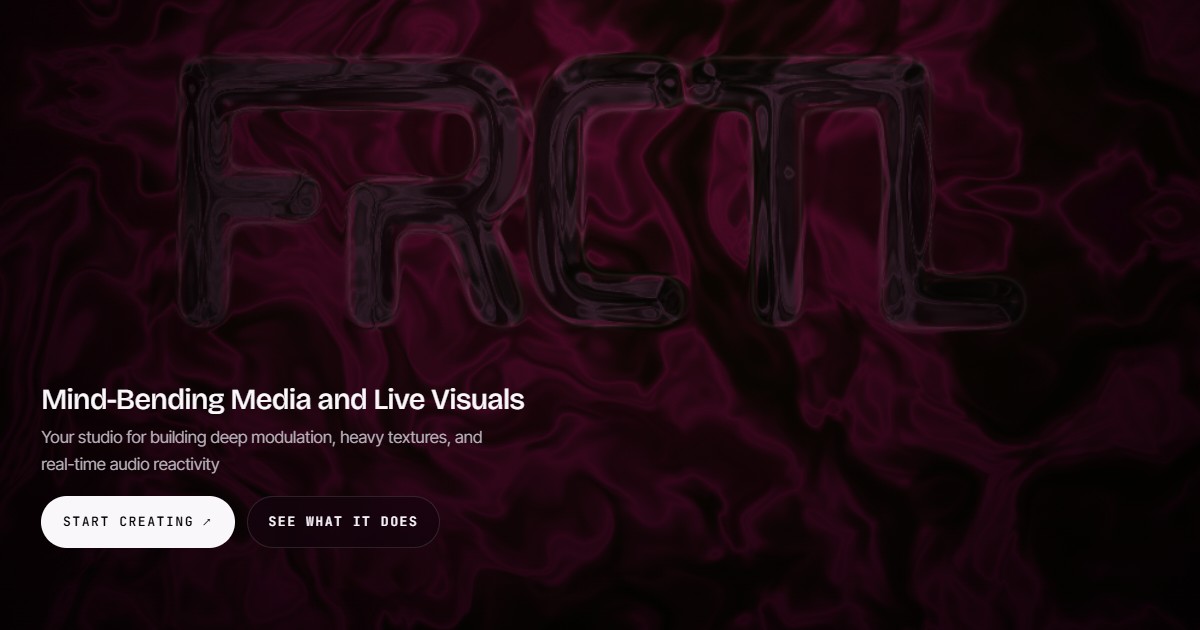
FRCTL is a browser-based VJ studio built for DJs and visual artists who need live, audio-reactive visuals on screen. It describes itself as one engine for everything an artist ships and runs in the browser: you can import your own footage or create generative shader scenes, build a look, and then either pull deliverables such as cover art, a Spotify Canvas or a social clip, or run the loop live with direct full-screen output. FRCTL positions itself as a studio for building deep modulation, heavy textures and real-time audio reactivity, and its tagline invites you to fold it, flip it, glitch it and warp it. The problem FRCTL addresses is fragmentation. Making VJ-style visuals traditionally means switching between tools: one environment for generative or shader-based creation, another for exporting stills and clips, a separate rig for live performance, and yet another place to sell or share presets. Artists who want a signature look usually have to rebuild it at every stage. FRCTL condenses creation, performance and monetization into a single browser-based environment, so the same look can be exported as content or pushed live to a screen. Its free tier deliberately removes the usual barrier: the whole toolkit, no watermark, and full access to both Studio and Live, with limits applied only to file exports. Inside the Creative Studio, FRCTL provides every effect, shader and preset slot with no watermark, and the plan comparison states that the creative power is the same across tiers, with resolution and export length being what changes. The platform advertises 190+ effects with infinite modulation, meaning parameters can be driven and layered continuously rather than applied as static filters, and audio can be routed into any parameter so sound directly controls the image. Artists can start from generative shader scenes or import their own footage as source material, then stack effects and modulation to build heavy textures and deep movement. Unlimited saved presets let a creator maintain a personal library of looks, and the FAQ confirms that presets, saved projects and custom effects remain entirely yours and open normally even if a subscription is cancelled. Live mode delivers real-time performance and audio reactivity directly in the browser. Performers can run their loops with direct full-screen output, sending the visual to the screen without leaving the tool, and live mode also supports camera and canvas capture so a performance can mix captured camera input with the generative canvas. Real-time audio reactivity is the core of the live rig: audio is routed into any parameter, so reactive visuals respond to the music as it plays. The desktop build extends this with live output to Spout and NDI, the routing standards used to send visuals into other applications and into stage, venue or broadcast workflows. From a finished look, FRCTL produces concrete deliverables: cover art, a Spotify Canvas or a social clip. Export capability scales by plan. Free covers 1080p at 30fps with a two-minute timeline cap; Creator moves to 1080p at 60fps with a ten-minute cap; Pro reaches 4K at 60fps with hour-long exports, plus keyed exports with transparency. Pro also unlocks the desktop build for local 4K MP4 rendering. Alongside exports, the Collective is where users sell, share and collaborate: artists can sell presets or loops in the Collective or post and comment on the member feed. Creator and Pro include the commercial license required for paid client work and monetized deliverables, along with version history for projects. FRCTL's overall approach is to run everything from one engine in the browser, so the same creative work flows from studio to export to stage. The workflow described is: import footage or create generative shader scenes, build a look using effects and modulation, then either export cover art, a Spotify Canvas or a social clip, or run the loop live with direct full-screen output. Audio reactivity, camera capture and canvas capture all operate inside that same live environment, and on desktop the same visuals can be routed out through Spout or NDI or rendered locally as 4K MP4. The benefits follow directly from that structure. Artists work in a single tool instead of assembling a chain of separate applications, and they keep ownership of their presets, saved projects and custom effects regardless of subscription status. Because audio can be routed into any parameter, visuals move with the music rather than requiring manual triggering. Because the free tier has no watermark and includes the full toolkit, creators can evaluate the complete creative range before paying, while the commercial license on Creator and Pro gives clear legal clearance for paid client work. Export tiers then scale resolution, frame rate and length as a project grows from a social clip to a 4K, hour-long render. Concrete use cases include running live visuals for DJ sets and club or venue performances with real-time audio reactivity and full-screen output; producing social clips from a saved look; creating a Spotify Canvas for a release; pulling cover art from the same project; and delivering paid client or brand work under a commercial license. Creators can also sell presets and packs in the Collective, post and comment on the member feed, or take part in the partner program, where ambassadors run FRCTL in their sets, events such as festivals, venues, labels and agencies use it for stage visuals and workshops, and brands explore integrations, hardware and designs. Target users are described plan by plan: the Free tier is for anyone making visuals, Creator is aimed at flow artists, small DJs and content creators, and Pro is built for promoters, venues, active DJs and small event brands. A Lifetime tier that includes everything in Pro as a one-time purchase is listed as coming soon. FRCTL runs in the browser, with a desktop build that adds local 4K MP4 rendering and live output to Spout and NDI. Commercial use, selling in the Collective and version history are included from the Creator tier upward, and the first seven days of Pro are free as a trial. In short, FRCTL is one browser-based engine for building audio-reactive looks and then either shipping them as content or performing them live. Its promise is create, perform, monetize and collaborate in a single place, with the full creative toolkit available free and resolution, licensing and routing scaling up through the paid tiers.
Kapshot is a screen recorder for macOS that turns ordinary screen captures into polished, presentation-ready videos. It is built for anyone who shares their screen — content creators, developers, educators, and product teams — who need professional-looking demos, tutorials, walkthroughs, and presentations without spending hours in a separate video editor. You record your screen normally, and Kapshot automatically zooms into clicks, smooths your cursor, and frames every shot, so the finished recording looks as though it was edited on a timeline. The promise on the site is simple: record your screen, get a polished video. The usual workflow for a screencast is slow and awkward. You record your screen, then open a video editor to add zooms, fix the cursor, and frame every interaction by hand. That editing work costs hours and demands skills that many people who simply want to share their screen do not have. One testimonial on the site frames the math bluntly: "$19 lifetime is cheap for what editing zooms and cursor framing manually costs in hours." Kapshot removes that extra step entirely by doing the polish automatically while you record, so the result looks intentional instead of like a raw screen grab. Auto-zoom is the feature that gives recordings their edited feel. When you click something, Kapshot zooms in on that area so viewers do not miss it, then eases back out. Zoom runs from 1x to 4x with cinematic easing, and rapid clicks in the same spot are handled with smart clustering — instead of a series of jarring jumps, they become one smooth zoom. The cursor receives the same treatment. Kapshot replaces your real pointer with a clean, smooth cursor that glides instead of jittering, using spring physics. You can choose the cursor size from 16 to 200 pixels, toggle click animations, and add ripples that show exactly where you clicked. Styled backgrounds place your recording on a customizable canvas so it looks like a product demo rather than a raw screen grab. You can pick from background presets — the site describes seven background presets and, elsewhere, five gradient presets — or use your own image, then apply padding, rounded corners, and drop shadows. The built-in editor means you do not need any extra apps. It offers trim and cut, timeline scrubbing, and the ability to adjust zoom segments, all with a real-time preview, so what you see in the editor is exactly what you get in the file. Auto-zoom segments are already placed when the editor opens. Recording itself is deliberately minimal. A compact capture bar appears, where you choose Display or Window and toggle the camera; an optional camera overlay can be included during recording. A minimal floating dock controls the recording and is never captured in the video, so it stays out of the way while you present. Capture runs at 60 FPS natively through ScreenCaptureKit, keeping fast scrolls and animations fluid. Export is one click: the finished recording becomes an H.264 MP4 with CRF 18 quality encoding, yuv420p pixel format, and fast start so the file plays while it loads, with no render queues. Kapshot also lists support for MP4, WebM, MOV, MKV, and AVI files. Everything — recording, editing, and exporting — happens locally on your Mac, and no data is sent to any server. The overall approach is captured in four steps that run inside one app. First, Launch: a compact capture bar appears, you choose Display or Window, then toggle the camera. Second, Record: a minimal floating dock controls the recording, and the dock itself is never captured. Third, Edit: the editor opens with your recording on a styled canvas, with auto-zoom segments already placed. Fourth, Export: you click Export MP4, and the video is H.264 encoded and optimized for fast sharing. The core idea is that Kapshot does the polish automatically while you record, rather than asking you to reconstruct it afterwards in a timeline. The outcomes are direct. Recordings look professionally edited without any timeline work, so viewers see exactly where you clicked instead of losing track of a jittery pointer. Because the zooms, cursor treatment, backgrounds, and framing are applied automatically, you skip the hours of manual editing that zooms and cursor framing normally cost. The editor's real-time preview means there is no guesswork about the final result, and the one-click MP4 export removes render queues from the process. Because everything happens locally on your Mac, your recordings, edits, and exports stay on your machine. The site names four groups who share their screen. Content creators use Kapshot for tutorial and demo videos that look professional. Developers use it for feature walkthroughs and bug reproductions. Educators use it for screencasts for courses and lessons. Product teams use it for polished demos for launches and presentations. In each case the workflow is the same: launch the capture bar, record with the floating dock, review the auto-zoomed result on a styled canvas in the editor, then export a shareable MP4. Kapshot is a native macOS app that requires macOS 14 or later and runs on Apple silicon and Intel. Capture is done through ScreenCaptureKit at 60 FPS, and the output is MP4 (H.264) with CRF 18 and faststart. Windows and Linux are listed as planned. Pricing is a one-time purchase: a launch price of $19 instead of the regular $49, with one-time payment, no subscription, all pro features unlocked, lifetime updates, and a 14-day money-back guarantee if it does not fit how you work. If you have already bought it, the download link is on the site. The FAQ notes that you launch Kapshot from your Applications folder, that the recording dock hides itself and is never captured, that every feature is optional, and that recordings, editing, and exporting all happen locally. Kapshot's value proposition is that polish happens while you record rather than after. Auto-zoom, cursor smoothing, styled backgrounds, a built-in editor, and one-click MP4 export all live in a single macOS app, so your screen recordings look like you meant it — without a timeline, a render queue, or a second editing tool.
SocialGPT is an AI-powered video creation and editing tool that works through conversation. Its own site frames the promise as "Your ideas. In motion." and "Create and edit with AI. Make it yours," while its Product Hunt tagline describes the core interaction as editing videos by chatting with your timeline. You upload your footage, tell SocialGPT what you want changed, and it applies those changes for you. It is built for creators and business owners who want to make videos without learning every editing tool, so the emphasis falls on direction rather than technical operation — as the site puts it, "SocialGPT. You direct." Video editing has traditionally demanded both time and familiarity with complex software. The Product Hunt description is explicit about the audience this creates friction for: creators and business owners who want to make videos but do not want to learn every editing tool. For those users, the barrier is rarely a shortage of ideas — it is execution. Turning raw footage into a finished, polished clip normally requires knowing where the cuts should go, how to add captions, when to bring in B-roll, and how to layer music and sound effects on top. Each of those steps is its own skill, and together they represent a learning curve that many people never get past. SocialGPT addresses that gap by letting the editing instructions be given in plain conversation instead of through a dense interface full of panels, tracks, and settings. The result is a workflow where the person supplies the creative direction and the tool handles the mechanics of applying it to the timeline, which lowers the barrier enough that someone can ship a video without first becoming an editor. The central capability is chat-based editing. You upload your footage and then simply tell SocialGPT what to change. Instead of hunting through menus or manually dragging clips into position, you describe the edit you want in the same way you would brief an editor on your team. The Product Hunt description emphasises that this is not a one-shot process: you keep refining through chat, which means you can review what the tool produced, describe the next adjustment, and iterate until the video matches what you had in mind. That loop of describe, review, refine is what makes the chat interface practical rather than a novelty — small corrections are as easy to request as large ones. The website reinforces this conversational model with the line "SocialGPT. You direct." — positioning the user as the director and the AI as the one carrying out the instructions. Chat is not the only way to work. SocialGPT also lets you edit the timeline yourself, so a chat-based instruction and a manual adjustment can live in the same project. This dual approach matters because different tasks suit different methods: a broad instruction such as tightening a cut is natural to say out loud, while a precise trim or the exact placement of a clip may be faster to handle by hand on the timeline. Because both options are available in the same place, you are not forced to choose between a fully automated tool and a fully manual one. You can direct with words and step in directly whenever you prefer, which keeps the user in control of the final result rather than surrendering the whole edit to automation. SocialGPT handles a set of specific editing tasks that the product description calls out directly. It can tighten the cut, which shortens and sharpens a video by removing slack. It can add captions, so the spoken content of a video is displayed on screen. It can bring in B-roll, the supplementary footage that plays alongside the main shot. It can also bring in music and sound effects, giving a video its audio bed and its accents. Each of these is expressed as an instruction you can give in chat rather than as a separate tool you need to open, buy, or learn. Taken together they cover the most common finishing steps required to turn raw footage into a postable clip, which is why the chat interface can plausibly replace a substantial portion of manual editing work for the audience the product targets. The product's distinctive approach is that it treats editing as a conversation with your timeline rather than a fixed pipeline. Instead of presenting a rigid set of templates or a single automated "make me a video" button, SocialGPT is built around iterative direction: you say what to change, review the result, and keep refining. The timeline stays visible and editable throughout, so the AI and the user operate on the same object and the conversation and the edit remain in sync. The site's framing — "Create and edit with AI. Make it yours." — captures both halves of that idea. Creation and editing are AI-assisted, but the output is meant to be shaped by the person directing it, not handed over wholesale. The phrase "You direct" is the clearest statement of the underlying methodology: the human sets intent, the system executes, and the loop repeats until the video is right. The most concrete benefit stated in the available content is the ability to make videos without learning every editing tool — the learning curve is effectively replaced by a description of what you want. That changes who can produce video. Creators and business owners can go from raw footage to a finished clip without first building editing expertise, which means the work can stay focused on the idea rather than the software. The site also describes SocialGPT in terms of managing and growing your social media presence with AI-powered insights, tying the editing workflow to a broader social media outcome rather than treating editing as an isolated task. Because refinement happens through chat, improvements are also fast and incremental: each round of feedback is a sentence rather than a rebuild, so the distance between a rough draft and a finished video shrinks noticeably. Use cases follow directly from those stated capabilities. A creator with a folder of raw footage can upload it and ask SocialGPT to tighten the cut, producing a shorter, punchier edit without manually scanning the timeline for dead air. A business owner with a product or promotional clip can add captions so the message reads clearly, then bring in B-roll to illustrate the points being made. Anyone assembling a finished social clip can layer in music for tone and sound effects for emphasis without sourcing and timing them by hand. When a chat instruction gets close but not quite right, the timeline is there for a final manual touch-up, letting the user dial in the exact result themselves. Across all of these, the common thread is producing video content for social media faster than a conventional edit would allow, while still growing a presence that benefits from the platform's AI-powered insights. SocialGPT is explicitly aimed at creators and business owners, and its Product Hunt topics place it in Social Media, Artificial Intelligence, and Photo & Video. Access is through the web app at app.gpt.social, where new users sign up with email or continue with Google. Signing up requires agreeing to the Terms of Use and Privacy Policy, and there is an optional checkbox to receive product updates and tips. Existing users sign in from the same page, and the product also maintains a presence on Product Hunt. No pricing details are stated in the available content. In short, SocialGPT is a chat-driven video editor: you upload footage, describe the changes you want, and refine the result by talking to your timeline or by editing it yourself. For creators and business owners who want to make videos without learning every editing tool, that combination of conversational direction and hands-on control is the core value proposition.
PixVerse R2 is a real-time world model that generates continuously evolving audiovisual worlds instead of fixed video clips. Powered by PixVerse, it invites people to step into worlds they can shape, exploring live experiences where characters, scenes, and stories respond in real time. The product brings multimodal understanding, long-horizon context modeling, and responsive audiovisual generation into a unified world model. Its central purpose is to advance interactive world models, so that users are not merely watching a rendered result but interacting with a world that keeps generating what happens next — powering everything from interactive stories and characters to playable generative worlds. Most generative video produces clips: a prompt goes in, a fixed piece of footage comes out, and the sequence is over. That format works for passive viewing, but it does not support the feeling of being inside a world that keeps responding. PixVerse R2 is positioned as a different approach. Instead of delivering a fixed clip, it produces continuous visual streams that respond instantly to user input. The company describes the step forward as scaling to longer, more coherent, and more controllable experiences. The underlying problem is one of continuity and control: interactions should matter, earlier moments should still count later in the session, and the world should keep unfolding coherently rather than resetting with every new request. One of the core capabilities is multimodal input during generation. PixVerse R2 accepts text, images, audio, and actions while it is generating, which means the user is not limited to writing a single prompt before the experience begins. These different input types can shape what the world does as the session proceeds: text can describe what should happen or how the world should change, images can contribute visual reference, audio is part of the audiovisual stream being produced, and actions let the user interact with the world directly. This multimodal understanding is one of the three pillars the company names — alongside long-horizon context modeling and responsive audiovisual generation — combined into a single world model. The practical benefit is that control is continuous rather than front-loaded: the world can be steered while it is running, not only before it starts. A second pillar is long-horizon context modeling. PixVerse R2 remembers what happened earlier in the session and carries those changes forward in real time. That memory is what allows an experience to accumulate rather than restart: a change made earlier remains part of the world state as the session continues. The model interprets each interaction and maintains a coherent world state, so the world does not lose track of what came before as it generates what happens next. This is described as scaling to longer, more coherent, and more controllable experiences, which matters especially for anything story-driven, where continuity is the difference between a string of disconnected moments and an experience that holds together over time. The third pillar is responsive audiovisual generation. PixVerse R2 produces continuous visual streams, and the product is described as an audiovisual world model, meaning the output is generated in response to input rather than rendered once and fixed. Two feature groups are highlighted on the site. Evolving Worlds lets users shape worlds through real-time interaction, with coherent characters, scenes, and stories. Lifelike Characters focuses on creating memorable characters with expressive personalities and lifelike presence for story-driven experiences. Together, these describe the surface the user actually meets: a world that evolves as it is interacted with, populated by characters whose presence is intended to feel lifelike and to support narrative. The product's overall approach is described as a unified world model. PixVerse brings multimodal understanding, long-horizon context modeling, and responsive audiovisual generation into one system. In operation it interprets each interaction, maintains a coherent world state, and continuously generates what happens next. That three-step cycle — interpret, maintain, generate — is the methodology that distinguishes R2 from clip-based generation. Rather than treating each request as an isolated render, the system treats the session as a continuous stream of interactions against an evolving state, which is what allows earlier events to be carried forward and new input to be absorbed while generation is already underway. The stated benefits follow from that design. Experiences can be longer and more coherent, and users have more control over what happens as a session unfolds. Because the world remembers and responds in real time, it can support interactive stories in which the experience responds to the user, characters with expressive personalities and lifelike presence, and playable generative worlds. The company frames the result as powering everything from interactive stories and characters to playable generative worlds — a spectrum that ranges from story-driven experiences to worlds the user can actively play in. Concrete experiences are surfaced through a gallery of live worlds, and a number of them are named on the homepage. Chef of the Midnight Hearth, Your Mafia Husband, and NYC Bilingual Japanese Teacher illustrate character-driven scenarios: a midnight-hearth cooking setting, a story scenario built around a character, and a bilingual teaching character. ECHOES OF ABERRATION and ZERO MARK appear alongside them. Other gallery entries include Dragon Riding, Ocarina of Time, Winter Palace, Escape the Warzone, Prairie Overdrive, Wukong's Pilgrimage, The Airstrip, and Future Nexus, each presented with an Explore action. A visitor can press Play Now to open a preset experience directly, use autoExplore, or go to the gallery to browse more live experiences, characters, and story worlds, which the site frames as a way to find your next experience. PixVerse R2 is delivered as a web experience. Users reach it through the PixVerse R2 site, where they can play now, explore individual presets, and browse the gallery of live experiences. A blog post linked from the page covers the technical framing — scaling real-time omni world models — for readers who want the deeper perspective behind the product. The Product Hunt listing places it under Developer Tools and Artificial Intelligence alongside Games, and the site's own keywords reference AI, video generation, realtime, WebRTC, and streaming, indicating that real-time delivery is central to how the experience reaches users. No pricing or plan details are stated in the material reviewed here. In short, PixVerse R2 is a real-time world model rather than a clip generator. It accepts text, images, audio, and actions while generating, remembers what happened earlier in a session, and carries those changes forward, so that characters, scenes, and stories respond in real time. By unifying multimodal understanding, long-horizon context modeling, and responsive audiovisual generation, it aims at longer, more coherent, more controllable experiences — from interactive stories and lifelike characters to playable generative worlds you can step into and shape.
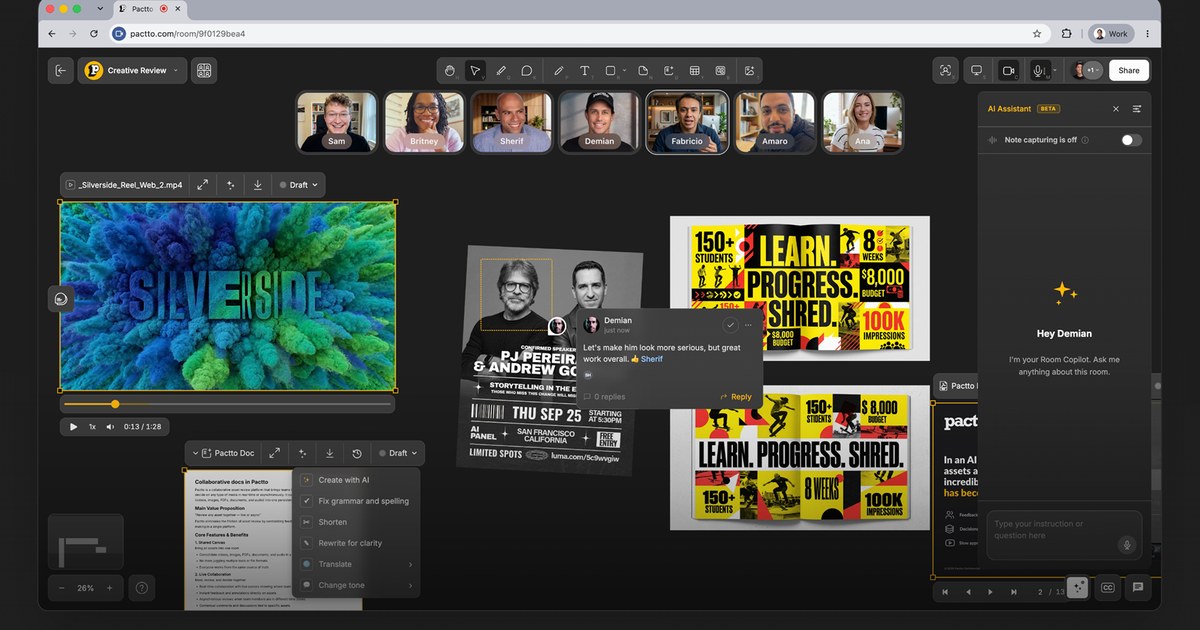
Pactto is an AI-native platform for creative teams to present their work at studio quality, review assets with the assistance of AI agents that understand creative intent and capture every note, and then turn that feedback into changes, live. Each Pactto room is a persistent workspace for a project, campaign, client, or team where assets, people, discussions, decisions, and AI context live together. It is built so that a whole team sees the same work, hears the same conversation, and makes decisions together inside one shared context instead of scattering them across separate tools. The problem Pactto sets out to solve is described plainly on the site: with AI, assets are created faster than ever, but the review process has not caught up. Feedback is scattered everywhere, decisions get lost after sessions, approval cycles take forever, and versioning has reached insanity, so humans and traditional review processes become the bottleneck. Video calls and async review tools each only cover part of the job. Unlike Zoom or Google Meet, where context disappears when the call ends, Pactto rooms remember everything — every conversation, every decision, every piece of feedback — so context does not disappear, it compounds. At the center of the product are persistent creative rooms. Each room is a smart canvas that supports videos, images, PDFs, SVGs, audio, and multi-screen sharing, and it is assisted by an AI agent that is always available with full context. Rooms persist for every project so teams can meet, collaborate, present work at the same time, and access the room memory at any time. Because the canvas holds every asset, board, and decision, work is reviewed at full quality rather than through a compressed screen share, and multiple people can share screens simultaneously — for example an editor in Premiere on one side and a designer in Figma on the other, with the director watching and guiding both. Live Editing is the feature the company describes as unique: say it and watch it change, right in front of everyone. The AI assistant is always listening, building context, suggesting actions, and taking action. A director can say that the pacing feels slow or that the color on the hero shot is too cool; the assistant captures that as a structured comment with full context and then suggests a warmer grade that can be applied in one click so the image updates on the canvas while everyone watches. The same assistant can generate three alternative hero shots, create a doc with all the action items from a session, or execute commands such as creating a doc with all tasks for a specific person, or moving all images to the right and all sticky notes to the left. Teams can add their own rules and customize the assistant's behavior per room to match their workflow. Review tools extend well beyond text. Users can draw directly on any frame with lines, shapes, text, or freehand, pin comments to specific frames or frame ranges, and even speak comments instead of typing them. The assistant sees those annotations and builds on them, turning feedback into edits, summaries, and tasks in the browser. Statuses can be tracked visually on a board or via agents, docs update live, and approvals get tracked. Room memory is what makes the context compound: come back next week for a follow-up review and the AI already knows what was discussed, what was decided, and what still needs attention — in the company's words, the room is the notes. Real-time translation removes language barriers: the assistant transcribes the conversation in real time, separated by speaker and timestamp, and translates it live into each participant's language, supporting English, Português, Español, French, 中文, 日本語, 한국어, Deutsch, Bahasa Indonesia, Italiano, and العربية. Pactto organizes its approach around three things every creative team does — present, review, and approve — and accelerates all of them in one place. For presenting, video plays at studio quality for everyone at the same time without lag, color-accurate and frame-accurate, with no compression artifacts and no dropped frames. For reviewing, voice comments go in and agents act live, capture and act happen in the same room and the same breath, and everyone watches the same frame through synced playback. For approving, decisions happen inside the room, docs update live, approvals are tracked, and rooms persist so every decision, asset, and version stays exactly where it was left. Assets arrive from local drag and drop, from Adobe Frame.io through a partnership with Adobe, from Google Drive, and via Google Sign In, with Dropbox and Air listed as coming soon. The stated outcome for teams is faster delivery: the company cites teams delivering work in days instead of weeks and moving from v1 to vFinal faster than ever. Approvals happen before the conversation ends rather than after a cycle of uploading v3, waiting for notes, uploading v4, and starting over. Because the room keeps every decision and the AI keeps every note, nobody has to pull up notes from last time, and no nuance is lost while someone scrambles to write feedback down. Every stakeholder gets notified, every status gets updated, and everything moves forward. Testimonials on the site describe Pactto as a candidate to become the operating system of the new creative process, and as a new interface for creative teams producing work using AI. Pactto lists a wide range of use cases, each framed as one room used a different way. Creative agencies can run their most complex AI projects in one room, managing every asset, board, and decision and tracking images, video, and PDFs from v1 to launch. Podcast teams can give every episode its own room, brief it, review the cut at real quality, generate cover art, and map every social short in every format. Roundtables can host recurring group sessions in a persistent room where the AI keeps summaries and action items and new members catch up on full history. Language tutors can keep one room per student, share materials, mark up pronunciation and grammar, and let the AI keep every correction and vocabulary list. Sports and mental coaching use frame-accurate video review, live annotation of form, and a room per athlete where training logs and commitments build week over week. Architects present renders, plans, and PDFs at full resolution and get sign-off live. Founders can pitch investors in a room that captures every question and follow up in the room rather than with an attachment. Event organizers can track roles, sponsor commitments, and the run of show in live tables and boards. Pactto is aimed at distributed creative teams and the people around them: directors, editors, designers, producers, agencies, podcast teams, coaches, tutors, architects, founders, and event organizers, along with the clients and reviewers who need to participate. Reviewers and clients do not have to pay on Pro — unlimited guests can be invited to a room with a link without an account or a paid seat. On the free plan there is no guest link, so people join by direct invite only. The free plan costs $0 with no card required and includes two active rooms, all editing and commenting tools, 5GB of storage, five members with room access, 60-minute meetings, 10 one-time AI credits, 60 minutes of live translation, and room memory that remembers the most recent session. Pro costs $19 per month billed annually ($228 a year) or $25 billed monthly and adds unlimited rooms and guests, 500GB of storage, persistent room memory, unlimited meeting summaries and guest sessions, 100 AI credits monthly, eight hours of live translation, integrations with Frame.io, Google Drive and Air, and CLI access that lets teams point Claude Code or Codex at a room to read or write its contents from the terminal. Security features include end-to-end encryption, SOC 2 in progress, and encryption on AWS S3 buckets, and fully white-labeled deployments are offered for agencies and enterprises that want to present Pactto under their own brand. Pactto's primary promise is a single persistent room where creative teams present at the quality their work deserves, review with an AI agent that understands creative intent and captures every note, act on feedback live, and approve before the conversation ends — with context that compounds instead of disappearing.
Keet is a personal learning platform that describes itself as an app to generate courses on any topic. Rather than offering a fixed catalog of pre-recorded classes, it produces personalized, interactive courses that combine short explainer videos with Duolingo-style games and quizzes. Each generated course comes with a structured roadmap, so learners move through bite-sized lessons and build towards real understanding instead of jumping between disconnected resources. The product is backed by Y Combinator and is available as a download for iOS, where users create an account and start building courses on subjects ranging from mathematics and physics to history and engineering. Most online learning platforms ask you to choose from the catalog they already have. If the subject you care about is niche, such as the history of San Francisco, Mongol war tactics or the mechanics of modern rocket engines, the material you want may not exist as a structured, interactive course at all, leaving learners to assemble scattered articles and videos on their own. Keet approaches the problem from the other direction: the topic comes first, and the course is generated around it. The site states that Keet is different from other learning apps because it lets you generate personalized, interactive courses on any topic that have a structured roadmap to follow. That combination of arbitrary subject matter plus a roadmap is the core of the product's promise, and it is why the platform frames itself as personal rather than catalog-based. Course creation starts with a topic. The website shows examples across several disciplines: Topology under Mathematics, Quantum Physics under Physics, Yankee Traders under History and Modern Rockets under Engineering, alongside cover art for The Big Bang, History of San Francisco, Mongol War Tactics and History of New York City. When you create a course, you can customize it: Keet lets you set the desired depth, complexity and narration style, so the same subject can be generated at different levels and delivered in the style you prefer. Getting started is described simply on the site: download Keet and create an account to start building personalized courses. Finished courses appear as cards with cover art, such as Introduction to Topology, History of San Francisco, Yankee Traders and Modern Rocket Engines. Each course generates with a set of lessons that contain videos and quizzes to help you learn. The videos are short explainer videos, and the lessons are deliberately brief. The sample Topology curriculum lists lessons such as Sets and Subsets, Limits of Visualizing Sets, Paradoxes and the Universal Set, Set Operations as Boolean Logic, Complements and Subtraction, Element-Chasing Proofs and The Empty Set and Vacuous Truth, each marked at around four minutes. The accompanying quizzes test what the video has just covered, so understanding is checked immediately rather than at the end of a long module. Watching a short explanation and then answering questions about it keeps the learner active, which is why the format pairs a video with testing at every step instead of separating teaching and assessment. Testing is delivered through games. Each lesson has several games that you can play to test your knowledge, and the site lists the formats available: Multiple Choice, Swipe, Order, Connections and Custom. Multiple Choice, for example, presents a question such as what the primary function of mitochondria in a cell is, offering options including protein synthesis, cell division, energy production through ATP synthesis and DNA replication, followed by a Check button to confirm the answer. Moving between formats, from swiping to ordering items to finding connections, turns review into something closer to Duolingo-style practice than a conventional quiz, which makes repetition more engaging and helps knowledge stick through varied recall. Courses have structured roadmaps, which are the backbone of how the material is organised. In the Topology example, the roadmap is divided into modules, and each module into lessons. Module 1, Abstract Set Theory, contains Lesson 1 Sets and Subsets, Lesson 2 Functions and Preimages, Lesson 3 Equivalence Relations and Lesson 4 Cardinality and Infinity. Module 2, Topological Spaces, covers Topological Spaces, Closed Sets and Closures and Topological Bases. Module 3, Continuity and Space Construction, includes Continuous Functions plus Subspace and Product Topologies. Module 4, Topological Properties, closes with Connectedness, Compactness and Hausdorff Spaces. Modules carry their own sticker artwork, and lessons list their individual topics and durations. The roadmap makes it easy to learn in bite-sized chunks, because each lesson is a small, finishable unit placed in a defined order that builds towards real understanding of the whole subject rather than offering isolated facts. Overall, Keet works in a generate-then-follow loop. You name a topic, adjust depth, complexity and narration style, and Keet generates a course: a set of lessons containing explainer videos and quizzes, grouped into modules that form a roadmap, with games attached to each lesson for practice. From there the experience is guided. The roadmap tells you what comes next, the video explains it, the quiz confirms it and the games reinforce it. Because the course is generated rather than curated from an existing library, the same mechanism applies whether the subject is a formal academic field like topology or a narrower historical topic. Access begins in the iOS app, where creating an account is the first step. For learners, the practical benefit is that the subject they actually want to study is the one they get a course about, with a structure that removes the guesswork of where to start and what to cover next. Lessons of roughly four minutes fit into spare moments, so progress does not require blocking out long study sessions. Quizzes and games provide immediate testing, which turns passive watching into active recall and gives fast feedback on what has been absorbed. Customisable depth, complexity and narration style mean the same topic can be matched to different levels of prior knowledge, so a beginner and a more advanced learner can generate different courses from the same subject and work at a pace and tone that suits them. The examples on the site hint at the range of use cases. A learner curious about mathematics can generate Introduction to Topology and work through abstract set theory, topological spaces, continuity and space construction, and topological properties in order. Someone interested in history can build courses such as History of San Francisco, History of New York City, Yankee Traders or Mongol War Tactics. A physics enthusiast can generate Quantum Physics, and an engineering-minded learner can study Modern Rockets or Modern Rocket Engines, or start from a topic like The Big Bang. In each case the workflow is the same: pick the topic, customise the course, then follow the roadmap lesson by lesson, watching explainer videos and playing the games that come with each lesson. Keet is positioned as a personal learning platform for anyone who wants to learn about a subject on demand, and the examples span academic disciplines, history and engineering, which suggests it is aimed at curious, self-directed learners rather than institutions. The product is downloaded for iOS, and iOS is the only platform named on the site, with the download linked to the App Store. Cost is described on the site in terms of credits rather than a subscription: if you sign up now you get two free courses, and after that you need to purchase credits to generate more courses. The site also notes that Keet is backed by Y Combinator. Keet's value proposition is straightforward: generate a personalized, interactive course on any topic, then learn it through short explainer videos, quizzes and Duolingo-style games arranged on a structured roadmap. It replaces the search for scattered material with a generated curriculum that is customisable in depth, complexity and narration style, and it makes progress tangible through modules, lessons and games. For learners who want a specific subject taught in a bite-sized, interactive format, from topology to the history of San Francisco, Keet offers to build the course on demand.
Creads is a team of AI agents that runs a brand's marketing on its own. According to the site, it is built to run your Meta ads, your Instagram, your growth on X, your TikTok and your LinkedIn, with agents that already know your brand. Those agents create the content, publish it and learn what works, so the user gets the outcome rather than the workflow. Creads is positioned as a full marketing team that runs itself, aimed at founders and marketing teams who want the function handled without assembling it themselves. The site frames the problem in terms of the work that fills a marketer's day. Running paid and organic across many platforms means writing copy, shooting and editing video, scheduling posts, launching campaigns and then reading the numbers. Creads describes an alternative to writing prompts and learning editing timelines: the closing message claims that competitors using AI video ads spend about 90 minutes, while a Creads user spends five. The site also argues that every other AI tool starts from zero, which motivates a system built to keep everything it learns on the way round. Setup is described as taking about five minutes from a link. You paste your URL and Creads reads your site, learning your brand: brand colours, typeface, tone of voice and the products found in your catalogue. This produces a Business DNA that every employee works from, and the FAQ notes that any correction you make in chat sticks, so the profile gets sharper the more you use it. You then hire the employees you need. The agents listed on the page are Il Direttore (Orchestrator), Marco (Ads), Gaia (Social), Elena (Intelligence), Luca (Copy) and Sofia (Video). After you connect your accounts, it runs. The first step of the loop is described as 'Ask, and it creates.' You tell Creads what you want in plain words — the site says no prompts and no brief are needed. It shoots the photos, writes the script and edits the UGC video in your brand's voice. The page shows a chat where the user asks to 'shoot my new drop' and the agent explains what it pulled from the brand, which angles it shot and why, then returns a set of generated product shots. The FAQ adds that no prompt writing or editing knowledge is required: you talk to it like a teammate — 'make it funnier', 'try a younger actor', 'three more variants' — and it redoes that piece while keeping the rest, with cuts, captions, music and export handled for you. Creads also lists content formats it can automate: UGC SAAS, Product Reveal, Instant Ad, Static Ad, UGC Unboxing, Styled Flat Lay and UGC Ad. The second step is 'It publishes itself.' The site states that Marco launches the ads and Gaia schedules the posts straight to Meta, TikTok and every platform you connect. Connections shown on the page include Instagram, Facebook, TikTok, LinkedIn, X, YouTube, Pinterest, Threads, Reddit, Google Business, Meta Ads, Google Ads and Shopify. Everything queued or shipped appears on a scheduled calendar, where the user can cancel anything before it goes live. The FAQ confirms that Creads does more than produce files: it schedules to Instagram, TikTok, LinkedIn, YouTube and the rest, and takes campaigns live on Meta and Google Ads. The third step is 'It learns and reports back.' Performance flows back into what the site calls the brand brain, so every next batch is sharper than the last. A Social Insights screen shows reach, impressions, engagements and video views across every connected account, with a comparison against the previous period, described as a check on whether the current numbers are better than last time. The FAQ describes individual agent memory: each employee keeps its own memory, so the one running your ads is not starting from zero every week. Creads is described as running the whole loop — creating, publishing and reading the results — and keeping everything it learns along the way. The fourth step is 'Then it runs itself, daily.' Any flow can be saved as an automation that repeats the whole loop every day on its own. The site lists two modes, set per automation: ask-first, where Creads prepares the work and waits for your yes, and autopilot, where it ships and tells you afterwards. Example automations shown on the page include a Best-performer recap, a Daily UGC reveal ad, a Meta CPC guardrail that runs every 15 minutes, Weekly carousel drafts, a Midnight reflection and a Competitor scan. An automations screen shows counts of running, auto and paused flows, along with their schedules and next run times. Creads describes its approach as running one continuous loop rather than producing isolated outputs. Because the same system creates, publishes and reads the results, the brand memory keeps accumulating: the site says every other AI tool starts from zero, while Creads keeps everything it learns on the way round and gets sharper every lap. The division of responsibility is explicit — Il Direttore orchestrates, Marco handles paid, Gaia handles organic, Elena reads the numbers, Sofia makes the video and Luca handles copy. Each agent does one job and works from the same Business DNA, so the output stays on brand. For outcomes, the site reports averages across accounts running Creads on autopilot, measured against their own 60 days before, with a note that individual results vary. The published figures are a 41% lower cost per acquisition in the first 60 days, 3.2x blended ROAS across the accounts it runs, and 8x more creative shipped every month. A 'Conversions by creative' table illustrates the reporting style, breaking results down by asset — for example a reel with a 'fluo' hook at 38 conversions for €412, an unboxing reel at 24 conversions for €287, and a static flat lay at 4 conversions for €96. The site presents three teams using Creads. Luca R., founder of a DTC skincare brand, launched his first ads without ever having run one: he pasted his domain and went to bed, and the ads agent read the brand, wrote four creatives, launched at €40 a day and paused the two that never got going. Sara M., head of content at a fashion label, and Andrea C., founder of a creative agency, are listed alongside him. The FAQ adds that agencies running several brands get separate employees, memory and voice per brand, plus one morning summary per brand instead of logging into eight dashboards. Creads targets founders and marketing teams — including agencies and multi-brand operators — who want marketing handled without hiring a full team or learning production tools. Integrations mentioned on the page span Instagram, Facebook, TikTok, LinkedIn, X, YouTube, Pinterest, Threads, Reddit, Google Business, Meta Ads, Google Ads and Shopify. On pricing, the FAQ describes a monthly plan with a credit allowance included, where generating, editing, publishing and launching all draw from the same balance; top-up packs never expire and stay yours even if you cancel, and new accounts start with free credits so you can run the whole loop before paying anything. The core promise, in the words of the site, is to stop writing prompts and start making ads: Creads gives a brand a team of AI agents that learns the brand from its own website, makes the content, publishes and launches it across connected platforms, learns from the results and can repeat the whole cycle daily. The value is framed as outcome over workflow — you get the finished ads and posts, not another tool to operate.