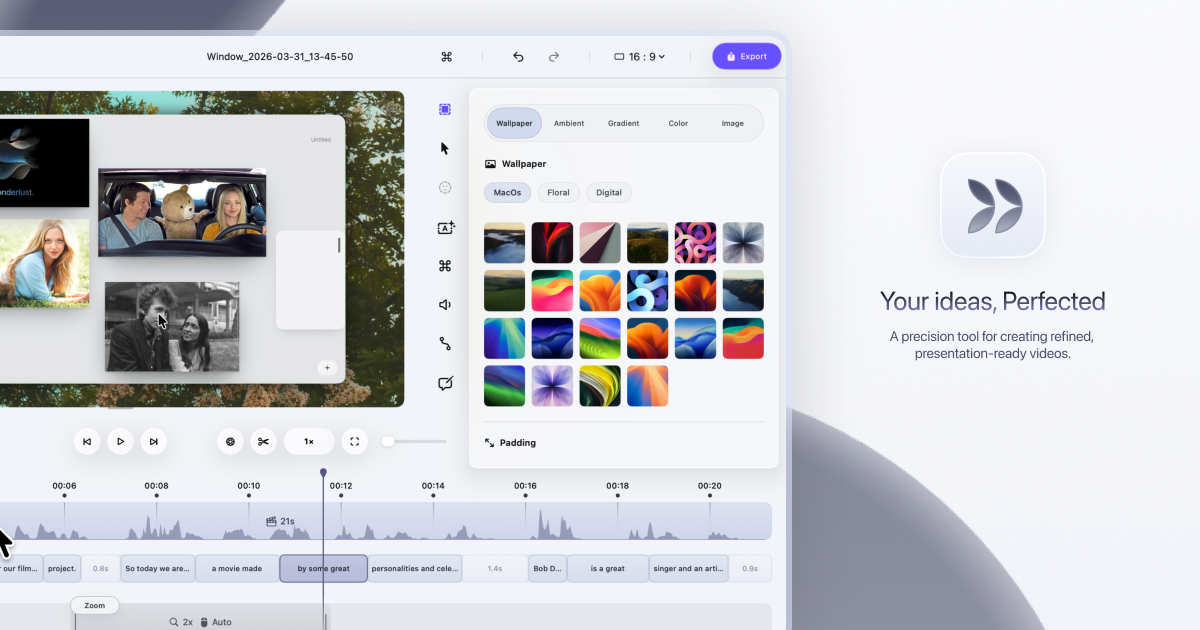
Dina is a native macOS screen recorder that turns everyday screen recordings into polished, presentation-ready videos. It records your screen and then refines the result automatically, adding motion, zoom, and clarity so that what your audience sees is as clear as what you imagined. The site describes it plainly: Dina is built to create beautiful videos from your screen, with motion, zoom, and clarity handled for you, so every recording feels ready to present. It is aimed at people who record their screen to explain something — product demos, tutorials, courses, and social media videos — and who want that recording to look intentional rather than raw.
Most screen recordings are honest but not watchable. They show everything at once: the whole desktop, a cursor drifting across the screen, moments of hesitation, filler words, and background clutter. Making that footage look good usually means moving it into a separate editing tool, cutting and re-timing clips by hand, zooming into regions frame by frame, and adding captions or narration in yet another app. Dina's premise is that this work should not be manual. The website states that Dina records your screen and refines it automatically, so a recording starts to feel ready to present as soon as the capture ends, without a long post-production pass.
Capture is handled by the recording panel. Dina captures everything that matters in one take: screen, audio, camera, cursor, and keystrokes. You can capture your screen, window, or area with camera, mic, and system audio, all in one place, in high quality. Scheduled Recording lets you set a time and let Dina handle the rest, so you can start recording without being there. Pause Recording lets you pause and resume whenever you need to, so you can record at your own pace instead of in one unbroken take.
Dina then makes every frame feel intentional. It automatically zooms into key interactions, helping your audience stay focused without distraction, so demos and tutorials feel clearer, more engaging, and effortless to watch. You can choose between automatic zoom or precise manual control, and use smooth, intentional zoom animations to guide viewers through every important detail. On top of that, Dina adds subtle 3D camera movement and depth so every scene feels more cinematic and alive, with perspective presets ranging from a gentle perspective to a dynamic top-down shot, plus fine-tuning of camera position, distance, roll, and depth blur. Cursor movement is gently refined so motion feels steady and intentional, while cursor size, variant, and highlight effects can be customized to match your brand, and keyboard shortcuts can be shown on screen as each key is pressed so your audience can follow along.
Complete layouts bring titles, slides, images, and video together into cohesive scenes that feel balanced, intentional, and ready to present. Slide Layout adds slides directly into your recording with control over color, timing, and animation so they feel like part of the video, not an overlay. Text Layout adds text with solid or gradient fills and refined animations, timed to appear and exit naturally as the recording progresses. Mask Layout hides sensitive information with flexible, multi-region masking exactly where you need it. Annotations guide attention where it matters: arrows, highlights, shapes, and callouts can be added directly into your video, with callouts offering customizable text, colors, and timing so notes feel part of the video rather than breaking the flow. You can also change the background and adjust spacing around your video to frame your content clearly and consistently.
A large part of Dina's polish comes from its AI features, which are built around turning your recording into text you can edit. In transcript editing, your recording appears as text — so you can edit your video by editing the transcript, while AI removes fillers and silence automatically. Editable captions are generated automatically, and you can fine-tune words, timing, and phrasing so captions read clearly and accurately. AI voiceovers turn text into natural-sounding narration: you write your script and Dina generates natural voiceovers from text using efficient on-device models, ready to fit your video perfectly. For presence, Dina records your webcam, microphone, and captions together to add context and clarity without extra setup, and you can record voiceovers directly in your timeline so narration can be added, edited, and refined without breaking your flow. The webcam is adjustable in size, shape, roundness, and position so you can place your camera exactly where it belongs in the frame.
Once captured, Dina gives you both a full timeline and transcript control: trim, split, zoom, and refine with precision. Keyframes help you create smooth, natural transitions, highlight important moments, and guide your viewers' attention. Output is studio-quality and ready instantly, with 4K output, multiple formats, and fast rendering. Layer Export lets you export videos in layers to preserve quality and flexibility for professional editing workflows, and native resolution exports keep videos in their original resolution without quality loss for high-quality demos and tutorials. Dina also handles iOS: it captures your iPhone in original resolution and enhances it with smooth motion and refined presentation, presenting recordings inside a range of iPhone device mockups — you can connect your iPhone with a USB cable or choose the iPhone mirroring window and start recording. Sharing is simple: a public link lets anyone watch, review, and collaborate on your video without needing an account.
Dina's approach is deliberately native. It is designed exclusively for macOS and built for the latest versions of macOS, so it feels right at home with native performance, seamless integration, and an experience that matches the system. It runs natively on Macs powered by Apple Silicon, delivering exceptional performance, efficiency, and responsiveness across recording, rendering, and real-time effects. Using Metal, Dina taps directly into the GPU to power smooth motion, real-time visual effects, and high-quality video processing. The interface is crafted with SwiftUI for fluid animations, precise interactions, and a clean macOS-native experience, and intelligent features — from transcript generation to voice synthesis — run on-device with Core ML models. That combination is what lets Dina automatically add cinematic zoom, smooth animations, and AI-powered refinements rather than leaving that work to you.
The outcome is speed without a loss of polish. Recordings arrive closer to finished, so you spend your time explaining rather than editing: filler words and silence are removed, captions are generated and can be corrected, and zooms, cursor motion, and 3D movement guide attention instead of distracting from it. Because capture, refinement, export, and sharing live in one workflow, there is no round trip to a separate editor for the common case. Dina also emphasizes privacy and ownership: all recordings are saved locally on your Mac, the app works completely offline, AI features run on-device via Core ML, and no account or cloud connection is required.
In practice, that makes Dina useful for a range of concrete scenarios: founders and product teams recording product demos and walkthroughs that need to look presentable; tutorial and how-to videos where automatic zoom and visible keyboard shortcuts help viewers follow along; course and educational content that benefits from captions and transcript-based editing; social media videos that need cinematic framing and quick export; and iOS app recordings presented inside device mockups. For team workflows, a public link lets anyone watch, review, and collaborate without an account, and layer export supports professional editing workflows where the video becomes source material for further editing.
Dina is built for macOS users who need to record and present clearly: professionals creating demos, tutorials, courses, and social media videos. The site notes it is trusted by professionals at FloraAI, Sketch, Windsurf, and Typeform. It requires macOS Sequoia or later, and there is no Windows version, since Dina is built exclusively for macOS to take full advantage of Apple Silicon and Metal. Pricing is a one-time Mac licence at $58 per device with lifetime updates, offered in 1-device and 3-device options, including a lifetime license, free updates forever, files saved locally, fully offline operation, and all features unlocked — no subscriptions and no recurring fees. The site also invites visitors to get started for free, and points to a Slack community and X/Twitter for updates.
In short, Dina's value proposition is a screen recorder that does the finishing work. Instead of capturing raw footage and leaving the polish to you, it captures in one take, refines automatically with cinematic zoom, smooth cursor motion, 3D perspective, layouts, annotations, captions, and transcript-based AI editing, then exports in high quality or shares by link — all natively on macOS, on-device, and without a subscription.
Publisher
A
admin
Launch Date2026-09-29
Platformdesktop
Pricingfreemium
Tech Stack
#SwiftUI#Metal#Core ML#Apple Silicon#macOS Sequoia