Category Focus/categories/productivity
Productivity AI Tools
Discover and compare the best productivity AI tools and software. Browse 874+ curated tools with reviews and rankings.
Projects tracked
874
Sort mode
RECENT
Page
7
Discover and compare the best productivity AI tools and software. Browse 874+ curated tools with reviews and rankings.
Projects tracked
874
Sort mode
RECENT
Page
7
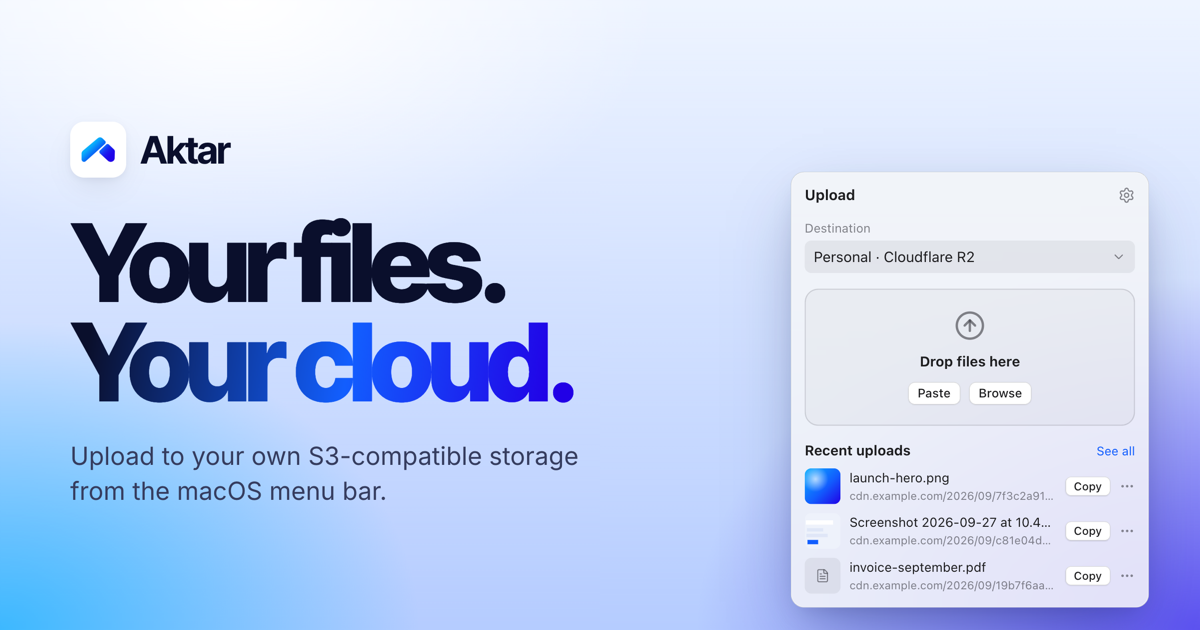
Aktar is a free, open-source app for instantly sharing files through your own S3-compatible storage. It lives in the macOS menu bar as a small native app, and is also available for Windows 10 and 11, iPhone and iPad, and as a Raycast extension. When you drop a file — a screenshot, a log, a build or a video — Aktar uploads it straight to a bucket you control and copies the shareable link to your clipboard. There is no account to create and no middleman: files travel directly from your machine to the endpoint you configure, and the resulting link is ready to paste anywhere. Most file sharing today means handing your file to someone else's service. You create an account, accept an upload limit, and end up with a link on a domain you do not own. Meanwhile, anyone who already pays for object storage — Amazon S3, Cloudflare R2, Backblaze B2, DigitalOcean Spaces or MinIO — has capacity and a domain sitting largely idle. Turning a local file into a shareable link still usually means opening a provider console in a browser or writing a script. Aktar closes that gap by reducing file sharing to a single gesture: connect a bucket once, and every future share is a drop and a paste. Because Aktar runs no servers of its own, there is nothing to sign up for, no upload limit on Aktar's side, and no intermediary that can see your files. Aktar works with the storage you already have. Amazon S3, Cloudflare R2, Backblaze B2, DigitalOcean Spaces and MinIO all have built-in presets, and anything else that speaks the Amazon S3 API works through the "Other S3-Compatible" option. Connecting a bucket takes under a minute: pick a provider, paste your access keys and bucket name, and the presets fill in the right endpoint and region for you. The destination form includes fields for Account ID, region, Access Key ID, Secret Access Key, bucket name, a Public Base URL and an object path. The Public Base URL is the address your files are served from — such as a custom domain or a CDN in front of your bucket — and Aktar joins it with the object path to build the link it copies. You can also keep multiple destinations, for example one bucket for screenshots and another for client work, and switch between them right from the popover; the app shows destinations such as Personal on Cloudflare R2, Client Work on Amazon S3 and Homelab on MinIO. The upload workflow is designed to disappear into your habits. You can drag files onto the menu bar popover, pick them from Finder, or press the global shortcut Control-Shift-Command-U in any app to upload whatever is currently on your clipboard — a file you copied in Finder or an image such as a screenshot. That shortcut works even when the panel is closed, and you can record your own combination in Settings. Aktar can upload several files at once and lets you retry failed uploads with a click. After an upload finishes, whatever you choose in Settings → Output is copied to your clipboard: the plain URL, Markdown, HTML, or your own custom template with variables such as {url}, {filename}, {name} and {ext}. Images get embed markup, while everything else gets a regular link. Object paths are templates too: the default is {year}/{month}/{uuid}.{ext}, and you can mix in other variables including {day}, {date}, {time}, {filename}, {random} and more, so your bucket keeps your naming and structure. Temporary sharing is built in. New in v0.6.0 are temporary links at upload: choose Delete after 1, 7, 14 or 30 days and the bucket's own lifecycle rules delete the file on schedule, even when Aktar is not running, so temporary shares do not pile up. Aktar sets those rules up in one click and leaves your other rules alone — for example it creates aktar-expire-1d on the tmp/1d/ prefix and aktar-expire-7d on tmp/7d/, while an unrelated archive-old-logs rule on logs/ stays untouched. When you are browsing files, you can also copy temporary links valid for 7 days, 1 day or 1 hour, which work for private buckets too. And if you shared the wrong file, you can delete it from the source: Aktar removes it from your bucket right from the history, not just from the list. The Library lets you browse your buckets rather than only the files Aktar uploaded. You can see every folder and file in your buckets, search the whole bucket, preview files, and upload, rename, move or delete without leaving the app. Upload history is searchable and shows thumbnails and previews for images, PDFs, text and Markdown, with filtering by destination so you can select several entries and copy them in bulk. Privacy is the point rather than an add-on. Aktar has no servers: there is nothing to sign up for and nothing to phone home to. Your access keys are stored in the macOS Keychain and are only used to sign requests to your own endpoint. Files travel straight from your Mac to your bucket — no proxy, no middleman. There is no telemetry, no analytics, no tracking and no account system in the app. Aktar runs in the App Sandbox with the Hardened Runtime, and every release is notarized by Apple. It is MIT licensed and open source, so you can read the code, build it yourself or send a pull request. The website itself uses Google Analytics to see how people find and use it, while the Aktar app collects nothing. The outcome for users is simpler sharing on your own terms. Your files stay in your own storage, and you pay your storage provider rather than a file-sharing service. There is no subscription, no account and no upload limit on Aktar's side. A screenshot becomes a link with two shortcuts, and a file drop becomes a pasted URL. The app also stays out of your way with optional notifications when an upload completes, an option to close the popover after a successful upload, and launch at login, plus automatic update checks against GitHub once a day and background installs that apply when Aktar quits. In practice the app fits a wide set of small workflows. A support engineer presses Control-Shift-Command-4 to capture an area to the clipboard, then Control-Shift-Command-U, and pastes the resulting link into a ticket. A developer shares a deploy.log, release notes or a build file without opening a console. Someone sending a proposal draft or invoice can drop it into a client-work bucket, while screenshots go to a personal bucket. Anyone who needs to share something only for a while picks a 1, 7, 14 or 30 day expiry instead of cleaning up later. And when a file needs managing rather than just uploading — browsing folders, previewing an image, renaming or moving an object, deleting a remote file — the Library handles that without leaving the app. Through the Raycast extension, the same actions are available from Raycast: upload the clipboard or files selected in Finder, search your history and browse your buckets, while your keys stay in Aktar. Aktar is built with SwiftUI, so it feels right at home on macOS, where it requires macOS 14 Sonoma or later; it is also available for Windows 10 and 11 and for iPhone and iPad, with an Android release noted as coming soon. It can be installed as a .dmg or via Homebrew. The app is free and open source under the MIT license, with no subscription, no account and no upload limit on Aktar's side — you simply pay your own storage provider for the bucket you use. That makes it relevant to developers, designers, support teams, freelancers and homelab users who already own S3-compatible storage and want their files to stay there. Your next link is one drop away: download Aktar, connect your bucket, and never open an upload form again.
Clink is a custom keyboard app for iPhone and iPad that replaces the default iOS keyboard with one the user sets up and controls. It bundles themes, layouts, sound packs, swipe typing, on-device autocorrect and a set of tools directly into the keyboard, so the thing you type with all day also does jobs you would otherwise switch apps for. The app runs on iOS 17 or later, downloads from the App Store, and is set up through the standard iOS path: Settings → General → Keyboard → Keyboards → Add New Keyboard → Clink, after which you hold the globe key in any app and pick Clink. Clink is for anyone who wants a keyboard that looks and behaves how they want, from people who care about privacy to people who simply want a number row, a split layout or a click that sounds like a real mechanical board. Most keyboards are fixed products: you get the layout, look, sound and behaviour the vendor decided on, and the only lever you have is turning a few settings on or off. Clink's premise is ownership — the site states plainly that this is the iOS keyboard you actually own and that nothing you type ever leaves the phone. The project answers a set of recurring frustrations: missing keys and rows, no way to change how typing feels, and privacy policies that leave users unsure what is happening with their keystrokes. To help people choose, the site publishes honest comparison guides against Apple's default keyboard, Gboard, SwiftKey and Typewise, framing the trade-offs directly — themes and ownership versus Search, GIFs and Google; offline control versus multilingual prediction and Copilot; normal layouts and deep themes versus hex privacy branding. Customisation starts with appearance. Themes cover solid colour, brushed metal, sculpted 3D keycaps and Liquid Glass; you can start from a preset and change as much of it as you like, including photo backgrounds. Layout is equally adjustable. A number row, a split keyboard and a one-handed mode are switches in settings, and the Layout editor goes further by letting you build keys, rows and whole extra pages of your own. Sound is a first-class setting too: swap the sound pack, or make one from your own recordings. Clink's haptics are its own rather than the system's, so they still work even where the system click is turned off. Together these three areas — look, layout and feel — are what make the keyboard something you configured rather than a component that was handed to you. Automations take owning your keyboard further by handling settings you would otherwise keep changing by hand. They are rules that change your keyboard automatically — split the keys in landscape, quiet the clicks at night, then return to your usual setup. You can start from a preset or choose your own conditions, and no code is needed. Plugins add features you wish your keyboard had: they are add-ons that bring new tools, typing features and effects to Clink, such as putting your typing speed on the space bar or giving keys a new look. Plugins are short Python scripts that run in the keyboard, and they cannot reach the internet or read your files. Repositories are collections of themes, layouts and plugins you can browse and install in Clink; you can add an official or community repository to find your next setup, or publish your own creations for others to use. Clink Pro adds an AI-assisted build path: describe a plugin, panel, action or automation and Clink Pro can turn the idea into a draft to review and edit. The example given on the site is a request such as making an action that turns selected text into uppercase. The build can use Apple Intelligence on compatible devices, or you can choose a cloud provider and bring your own key for OpenAI, Anthropic, Gemini or an OpenAI-compatible endpoint, with cloud usage billed separately. You can close the editor without cancelling your build and use Build tasks to check progress, open a result or retry. Typing itself leans on gestures: slide through the letters and lift for one stroke per word, and slide the spacebar to move the cursor, while autocorrect and next-word suggestions run on the phone with no network on the typing path. Dictation lets you say it or rewrite it — dictate straight into the field you are in, and proofread, shorten or change the tone of what is already there without leaving the app. The tools come with the keyboard: clipboard history, a notepad, a calculator, a translator and more, opened and used without breaking your typing flow. The site lists Emoji, GIFs, Clipboard, Notepad, Dictation, Handwriting, Translate, Dictionary, AI Tools, Text FX, Calculator, Conversion, Cling, Replacements, Profiles and Layouts as the tools. Clink supports 78 languages, each with an on-device typing pack, and you can type in all of them at once or one at a time; the app's own screens are translated separately, so Clink can be in one language while the keyboard writes another. Structurally, Clink is built around a few clear ideas. The keyboard runs its typing intelligence on the device: suggestions and predictions stay on device, and there is no network on the typing path. Full Access is optional for typing — enabling it turns on clipboard features, custom feedback and the cloud AI requests you choose to run. Plugins are short Python scripts that run in the keyboard and cannot reach the internet or read your files, which is what makes installing one a contained decision. Community packs are read from public GitHub repositories: Clink browses official shelves in the app, lets you add community ones beside them, and verifies every file before it lands on your phone. You can install a pack without making an account, and publishing your own creation means releasing it so others can add your repository by name. The benefits follow from those choices. Typing stays on the phone, so what you write is not routed through a keyboard vendor's servers by default. You get a keyboard that matches your habits instead of the other way round — the keys where you want them, the sound you like, the theme you picked. Automations remove the small recurring chores of switching modes manually. Plugins and repositories mean the feature you are missing may already exist, or can be written. Clink Pro's AI build path lowers the barrier to making that plugin yourself. And because no account is required and Full Access is optional, adopting Clink does not demand handing over an identity or extra permissions. Concrete scenarios described in the content include quieting the clicks at night and returning to your usual setup afterwards; splitting the keys in landscape for two-thumb typing; and putting your typing speed on the space bar with the WPM Spacebar plugin. The plugin example on the site expands omw into on my way and brb into be right back when you type the word and a space. Clink Pro's example request turns selected text into uppercase. Dictation is used to speak into the field you are already in, and to proofread, shorten or change the tone of existing text without leaving the app. Multilingual users can type across 78 languages at once or one at a time. Community users browse official shelves, add community repositories, and publish their own themes, layouts or plugins as releases for others to install. Clink targets iPhone and iPad users on iOS 17 or later who want control over their keyboard, including privacy-conscious typers and people who type in several languages. On the integration side, it reads packs from public GitHub repositories, supports iCloud Sync on the free tier, uses Apple Intelligence on compatible devices for AI builds, works with bring-your-own-key access to OpenAI, Anthropic, Gemini or an OpenAI-compatible endpoint, and uses on-device SpeechTranscriber for dictation when available on iOS 26 with its language resources ready — noting that the compatibility speech recognizer can send audio to Apple's servers, including while those resources download, so dictation is not always offline. Pricing is freemium: the free tier covers typing, swipe, emoji, preset themes and layouts, the number row, split and one-handed modes, language switching and iCloud Sync. Membership adds AI Tools, Clipboard, Notepad, Translate, Calculator, Handwriting and Text FX, plus plugins, pets, stickers and sound packs, themes, layouts and profiles of your own, and the fine-tuning sliders. Membership is monthly, yearly or a one-time lifetime payment, with your local price on the App Store and a possible trial for eligible accounts. Clink is a keyboard you configure rather than accept: themes, layouts, sounds, automations, plugins and repositories let you reshape the thing you type with every day, while typing stays on the device and accounts stay optional. For iPhone and iPad users who want their keyboard to feel like their own, and for developers and communities who want to publish into it, that combination of deep customisation, an offline typing path and an open pack format is the whole proposition.
Declutr is a Mac app that organizes your Desktop, Downloads folder, or any folder you pick into folders by file type in one click. It sorts files into categories such as Images, Documents, Videos, Audio, Archives, Code & Scripts, 3D Models and Other, so a cluttered folder turns into a structured one without any manual dragging. The app is designed for Mac users who want a tidy Desktop or Downloads folder but do not want to build their own automation. It runs on any Mac with macOS 13 Ventura or later, on both Apple silicon and Intel, and it is distributed through the Mac App Store, where it holds a 5.0 rating. Download folders and Desktops fill up with things people did not mean to keep there: screenshots, invoices, installers, exported videos, spreadsheets and code files all land in the same place. Cleaning that up by hand means opening the folder, judging each file, creating folders, and dragging items one by one, which is work that is easy to postpone. Existing options each ask something first: Hazel requires you to write rules before anything happens, AI organizers take a description of what you want but often do not keep files on your Mac, and the tools built into macOS mean building Automator or Shortcuts workflows. Declutr's premise is that the first cleanup should take one click. At its core, Declutr moves files into category folders inside the folder you selected. The categories cover Documents, Images, Videos, Audio, Archives, Code & Scripts and 3D Models, plus an Other folder for anything that does not match. In the on-site demo, a Downloads folder containing Invoice_2026-09.pdf, IMG_7851.HEIC, design-files.zip, clip-export.mov, Resume_final_v4.docx, config.json, podcast-ep42.mp3, hero-banner@2x.jpg, Raycast.dmg, phone-stand.stl, tutorial-part1.mp4, calendar.ics, logo-final-FINAL.png, index.html, site-export.tar.gz and desk-lamp.usdz is sorted into Images, Documents, Audio, Archives and Code & Scripts. Each category folder gets its own icon, so you can spot it in Finder without reading the name. Every cleanup can be reversed. The final screen of the flow shows what happened, for example the number of items processed, with Undo available, and includes an Undo Changes button that puts every file back where it was. Declutr does not delete anything; it moves files into folders inside the folder you picked, so undo simply reverses those moves. There is also a safety behaviour: before a folder that looks sensitive, Declutr stops and asks first. That combination makes the one-click sort low risk, because a mistake costs one click to fix rather than a manual recovery effort. Pro adds automation on top of the manual cleanup. Watched folders sort new files the moment they land, which suits a Downloads folder that constantly receives new items, because nothing accumulates when each arrival is filed immediately. Alternatively, a schedule can run a cleanup every day while you work, so the folder is tidied on a routine rather than only when it becomes unbearable. Both options keep working after the first click: the initial sort is a one-off action, while watching and scheduling turn Declutr into an ongoing habit that maintains order in the background. Smart Rules exist for the files that do not fit the default categories. A rule matches a file by name, extension, age or size, and conditions can be combined with AND/OR logic. When a file matches, Declutr can send it to a folder you name, or skip it and leave it alone. Rules run before the default categories, so a rule always takes precedence over the built-in grouping. You can pin receipts or invoices to a named folder, push installers aside, or protect files you want to keep in place. The New Rule sheet in the app shows this pattern directly: a Name contains condition followed by a Move to folder or Skip action. Categories are editable rather than fixed. Declutr ships with ten categories out of the box, and you can add an extension to an existing category, move an extension from one category to another, or create an entirely new category with its own icon. That means the sorting logic can follow the way you actually work: a designer can give 3D model formats their own home, a developer can group scripting languages together, and anyone with an unusual file type can stop it falling into Other. The file-types settings screen lists the extensions inside a category and lets you remove any of them. Declutr's approach is deliberately rule-based rather than AI-based. It sorts by file type and by the rules you set, covering name, extension, age and size, and it never opens a file, never uploads one, and there is no account to create. Because the work happens on your Mac, nothing leaves the machine. The site contrasts this with alternatives: Declutr decides using file type and your rules, keeps files on your Mac, reaches a first cleanup in one click, and costs nothing or $8.99 once; Hazel decides by rules you write, also keeps files local, requires rules before the first cleanup, and costs $42 once; AI organizers rely on a model to guess and often do not keep files on your Mac; and macOS built-ins need workflows you build yourself. The stated benefit is time and mental overhead saved. Reviewers describe a desktop and documents folder that had been messy for years being sorted in seconds, and one review from a user with ADHD describes a chaotic sea of docs becoming organized, calling the app a total game-changer. Others highlight speed, ease of use, clear categories and the visual result of folders that feel neat and accessible, and note that finding pictures, music and dmg files in Downloads is much easier afterwards. Because files stay on the Mac and nothing is deleted, the payoff comes without a trade-off in privacy or risk. The clearest use case is the Downloads folder: it receives PDFs, images, audio, archives and installers constantly, and Declutr can either clear it on demand or keep it tidy automatically with a watched folder or a daily schedule. The Desktop is the other primary target, useful for anyone whose screen fills with screenshots and working documents. Any custom folder works too, so a project folder or an archive of mixed files can be organized with the same flow. Smart Rules cover edge cases such as receipts, invoices or installers that should go to a named folder instead of a category, or files that should be skipped entirely. Declutr is aimed at Mac users who want their files organized without configuring automation. It is available for free on the Mac App Store and requires macOS 13 Ventura or later on Apple silicon or Intel. Free covers organizing the Desktop, Downloads or any folder, sorting files by type into category folders, and undoing any cleanup in one click. Pro is a single in-app purchase of $8.99 in the US, with no subscription and no account, and it adds scheduled cleanups, Smart Rules that run on their own, watch folders, and your own categories and extensions. The App Store shows the price in your local currency. Declutr reduces Mac file organization to a single click on a folder, with an Undo button that makes the action safe and optional automation for people who want the tidy state maintained. It sorts by file type and user-defined rules, keeps everything on the Mac, and offers a one-time Pro upgrade: a simple, private answer to messy Desktops and Downloads folders.
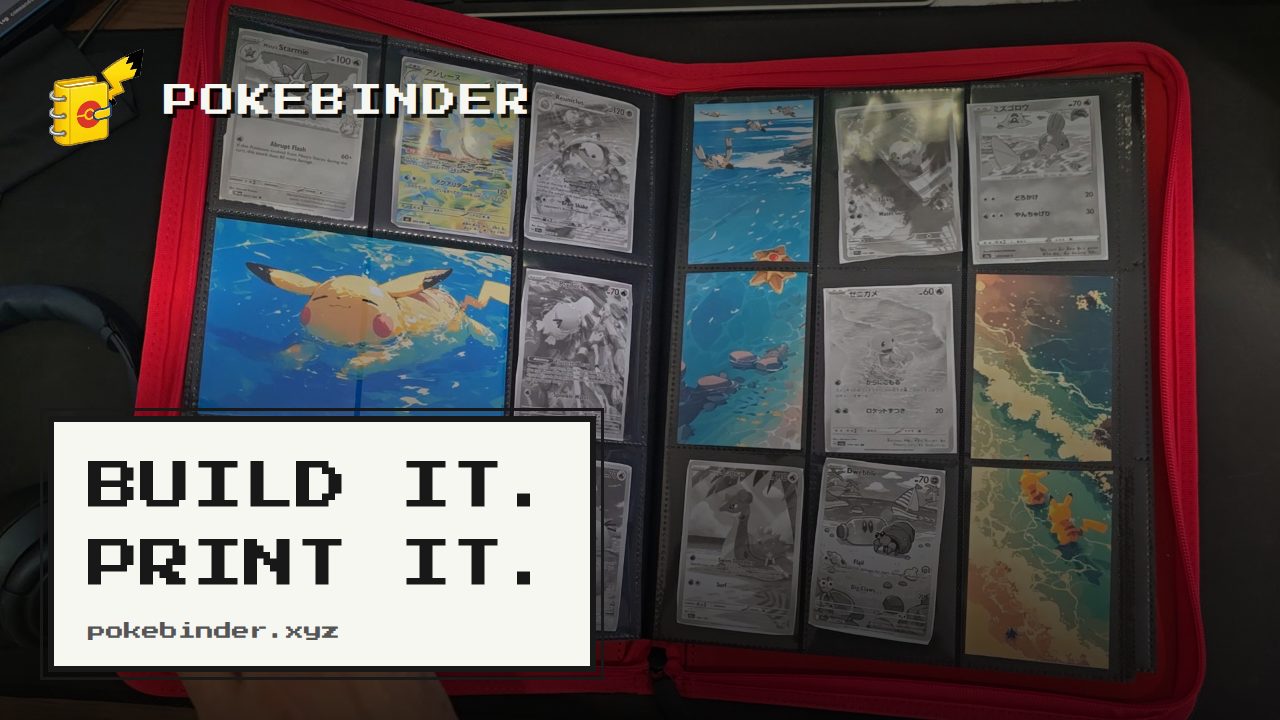
Pokébinder is a free binder planner for Pokémon Trading Card Game collectors. It lets you search a large catalogue of English and Japanese cards, arrange them into 3×3 binder pages, drop your own artwork behind or across the pockets, and then print true-size placeholders for only the cards you do not own yet. The tool is built for collectors who want to plan a binder before spending money on cards, and for anyone who wants a printed stand-in that holds the right pocket until the real card turns up. No account is required, there is no watermark, and your binder stays in your browser. Collectors often plan binder pages in their heads or on paper, then end up reorganising whole spreads after a purchase arrives. Working out how a page will actually look — which cards sit where, and whether a themed spread holds together — normally only becomes clear once the cards are bought and sleeved. Meanwhile, empty pockets sit as gaps in an otherwise complete page. Pokébinder addresses this by letting you try out layouts and move things around before buying, then printing placeholders so those gaps are filled with correctly sized stand-ins that double as a shopping list of what is still missing. Card search is the entry point. Pokébinder lets you search over 20,000 English cards by name, set or artist, and over 21,000 Japanese cards by name or set, including the printings collectors actually chase. Both English and Japanese printings are available in one place, and the artist field makes it possible to build pages around a favourite illustrator rather than only a character or a set. You start building from the search page, find the card you want, and drop it into a pocket. Designing a page is built around a fixed 3×3 grid of nine pockets, with five documented ways to use artwork. In "The Michi page" layout, one image fills all nine pockets and your cards sit on top of it in whichever pockets you choose, so the art carries on around them and the page reads as one picture; take a card out and its slice shows through. You can also stretch one image across a row (one image, three pockets), down a column (one image, two pockets), use a different image in each pocket (five images, one pocket each), or use no art at all with nine cards. In every case the nine pockets stay the same — what changes is how much of the page the art carries. You can zoom and nudge the image until the framing is right, and hovering over a card reveals the binder's own controls. Printing is where the plan becomes physical. Mark anything in your binder as not owned yet and it prints at exactly 6.3 × 8.8 cm with a dashed cut guide around it. Placeholders print at 300 dpi, nine to an A4 or US Letter sheet, and any artwork you have spanned across pockets prints too, aligned to the same cut guides as the cards. Cut the printed placeholder on the dashes and add it to the page. An amber cart marker indicates a card that is in the binder but not owned yet — that is the one that prints. When the real card turns up, you slide the printed one out and the real one in, and nothing else on the page moves. The tool works entirely in the browser with no account and no watermark, and your binder stays in your browser. It opens as a two-page spread with a real page curl on a desktop, and turns one page per swipe on a phone, so flipping through behaves like the binder on your shelf. Its distinctive approach is automating the Michi method: rather than printing backing art by hand and cutting it to size, you drop an image into a pocket and let it run across up to three pockets horizontally or vertically, or fill the whole page behind your cards, then zoom and reposition until the framing is right. Pokébinder credits the method as popularised by @peeplop and written up at The Michi Method. The practical outcome is that you see how a spread will look before spending money on it, and you can change your mind on paper instead of at the counter. Because placeholders print at true card size with cut guides, gaps in a page stop being empty pockets and become settled slots instead. The printed cards also work as a shopping list: you always know what you are missing and exactly where it goes. And because swapping a printed placeholder for a real card leaves the rest of the page untouched, buying something new never forces you to reorganise the binder. A typical flow starts on the search page, where you look up a card by name, set or artist and drop it into a pocket of a 3×3 page. You then arrange the page, add artwork, and check the print preview before committing. From there you print placeholders for the cards you do not own, cut them on the dashed lines, and add them to the physical binder. Another common scenario is planning a themed or artist-focused spread, testing whether the layout reads as intended before buying. The walkthrough video covers the whole sequence in sixty-five seconds: search, arrange, print, cut, sleeve, done. The binder view is also used simply to flip through pages on a phone or a desktop. Pokébinder is aimed at Pokémon TCG collectors, including those who chase specific printings in English and Japanese and those who build art-led binder pages, as well as collectors who want to visualise a spread before buying. The site describes itself as an independent fan project made by one collector, and states that it is not produced, endorsed or supported by Nintendo, Creatures Inc., GAME FREAK, The Pokémon Company or Wizards of the Coast; card images are served from their original sources. Pricing is free, with no account, no ads and no watermark. Pokébinder turns binder planning into a single browser-based workflow: search the cards, design the page, print what is missing, and flip through the result. It is free, requires no account, and keeps your binder in your browser, while its true-size placeholders and Michi-method artwork spanning remove the guesswork from building a Pokémon TCG binder.
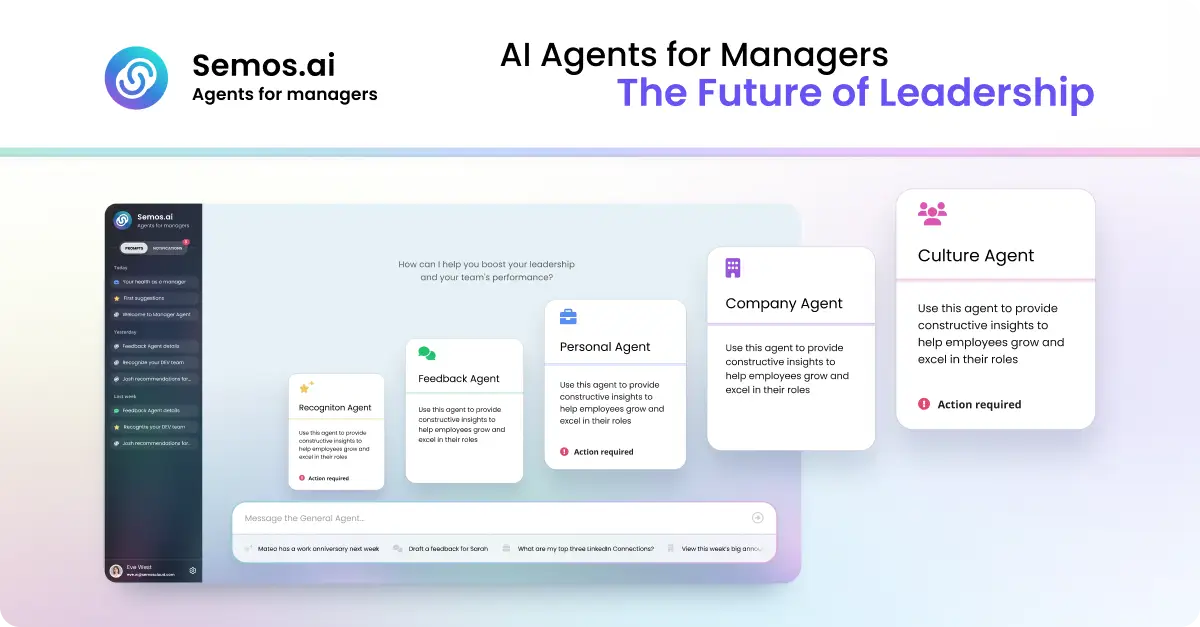
Semos.ai Manager Agents are AI agents purpose-built for managers. Described as your key to 10x leadership impact, the product builds context from your meetings and backs it with behavioral science, so you can handle difficult conversations, develop your people, and grow as a leader. It is aimed squarely at people managers rather than at HR departments or general users: the job it takes on is the daily work of leading a team. Instead of waiting passively for a question, the agents learn from the meetings you have and then point you to what needs your attention next — the feedback that is overdue, the recognition you missed, the conflict you are avoiding, and the growth talk that keeps slipping. You can ask questions in plain language or start from quick prompts such as Recognize someone, Give feedback, Help me prepare for 1-on-1s, Check team engagement, and Review PTO balance. The problem the product sets out to solve is described concretely on the site: notes from six different 1:1s scattered across three places, and a review due Friday you haven't opened. Managing people generates a continuous stream of context, and the moments that matter most — a difficult conversation, a piece of specific recognition, a career conversation — are the ones most easily postponed until it is too late to handle them well. Manager Agents are designed to surface those moments before you think to ask. The site frames the value in terms of access: the support that used to sit behind a budget line, such as an HR business partner, an executive coach, or management training, is now available directly to the manager, including at 10pm before a conversation you have been dreading. Manager Agents are organised as a set of named agents, each covering a different part of the manager's job. The Meeting Agent is described as the foundation: it builds context from every meeting you have and feeds that context to every other agent, which is what allows the rest of the system to know what has actually been happening with your team. The Feedback Agent covers difficult conversations, helping you say the hard thing clearly before it's too late to say it well. The Recognition Agent helps you give recognition that is specific, timely, and fair — the three qualities the site highlights as what makes recognition land rather than feel generic. The HRBP Agent addresses people challenges by structuring the conversation and the documentation before you have it, so that you walk into a sensitive discussion with a shape and a record rather than improvising. The Culture Agent focuses on team health, surfacing shifts in sentiment and participation before they show up in a survey — an early-warning view of how the team is doing. The Career Agent supports career conversations and growth plans for your team, helping managers hold the development conversations that otherwise slip quarter after quarter. The Company Agent provides sector awareness, keeping you current on what's happening in your market in minutes a week. The site notes that more agents are available in Enterprise mode. The product's workflow is described in four steps. The first is proactive: Manager Agents don't wait for you to ask. A missed recognition, a quiet direct report, or a hard conversation coming up is surfaced before you think to ask about it. The second is draft: instead of leaving you staring at a blank box, the agents give you a start — a message, a talking point, a structure for the conversation — grounded in what's actually been happening on your team. The third is send, or built for action: the output is concrete, whether that is a message, a plan, or a next step, designed to be acted on right away rather than filed away. The fourth is learn: every suggestion comes with the reason behind it, so that over time the judgment becomes yours and you start seeing the pattern yourself. Underpinning all of this is what the site calls the science behind the product — proven, precise, verified. Every output draws on real behavioral science: Stanford's 4Is feedback framework, Big Five personality traits, and Hofstede's cultural dimensions. The stated intent is to use frameworks built for how people actually change, not just what sounds right. The unique approach compared with generic AI is continuity of context. As the site puts it, generic AI starts from zero every time: no memory of your team, no sense of your history with them, so you have to explain the whole situation before you get an answer, and the answer is the same one anyone else would get. Manager Agents carry your context forward, drawing from the same pool of meetings, team, and patterns, so every conversation adds to what they know about how you lead and the guidance gets sharper over time. The benefits are stated with specific figures. According to the site, managers capture three times more recognition, feedback, and coaching moments each week. 85% of feedback recipients say guidance is clearer and more actionable. And there is an average improvement of 23% in engagement scores during the first week. Beyond the numbers, the positioning is that Manager Agents don't just help you lead — they make you great at it — and that the judgment behind each suggestion gradually transfers to the manager. Compared with alternatives listed on the page, an HRBP is bundled into overhead at roughly one per 200 people and available only in business hours across dozens of managers; an executive coach costs $300 to $500 per session and is scheduled weeks apart; management training costs $2,000 to $8,000 as a one-off week. Semos.ai is described as self-serve and monthly, available whenever you need it, and built for you rather than for HR — getting sharper over time. The examples on the site show how managers actually use the product. One manager asks for help preparing for their first underperformance conversation tomorrow. Another asks the system to turn notes from the last quarter into a review for a team member named Marcus. A third asks who on the team hasn't been recognized in the last month, while another asks for help planning a development conversation for someone ready for more. Other examples include drafting feedback for someone who's been missing deadlines, writing a message recognizing the work someone put in this sprint, structuring a conversation about a conflict between two people on the team, asking what's changed in the sector this week that the team should know, checking whether anyone has gone quiet in the last few 1:1s, figuring out how to bring up a promotion case with one's own manager, and asking, after someone hands in their notice, what was missed. There is also a prompt for working out what to do next when a 1:1 didn't go how you wanted. The target user is the people manager — the individual responsible for running 1:1s, giving feedback, recognizing work, and developing a team. The product is accessed on the web: the site directs visitors to Get started or Try it yourself at app.semos.ai/auth/login, and the marketing pages invite visitors to join the waitlist. On cost, the comparison table lists Semos.ai as self-serve and monthly, distinguishing it from the bundled overhead of an HRBP, the per-session pricing of an executive coach, and the one-off cost of management training. The Product Hunt listing categorises the product under Meetings, Artificial Intelligence, and Human Resources. Taken together, Manager Agents position themselves as a manager's own support system: a set of AI agents that carry your context forward, surface what needs your attention, draft something concrete to act on, and explain the reasoning so the judgment becomes yours. The promise is straightforward — lead smarter, handle the hard conversations well, and get measurably better at leading your people.
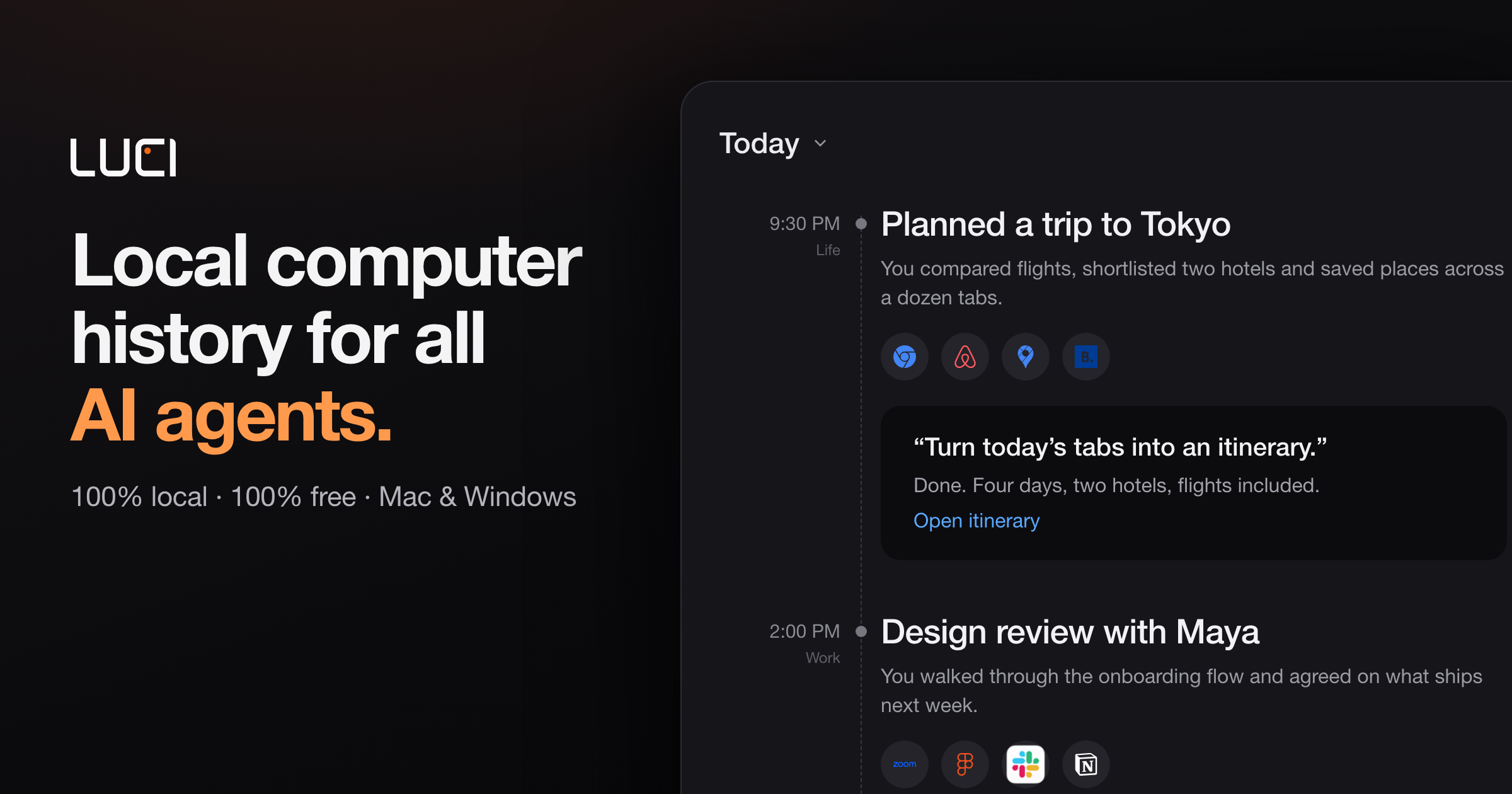
LUCI is a desktop memory layer that remembers your whole day on the computer and hands that memory to the AI agents you already use. It captures meetings, code, email, and everything in between — your screen history and your meeting transcripts — and stores it locally on your machine. Rather than being a standalone assistant, LUCI acts as a shared record that agents such as Claude Code, Cursor, Codex, and Gemini can draw on when you ask them for help. It runs on Mac and Windows, is free to download, and is built for anyone whose workday spans many apps, calls, and conversations that no single chat window can hold. The problem LUCI addresses is the repeated loss of context. Context windows reset between sessions, so agents forget what you were doing, what you decided, and what you already looked at. People end up copy-pasting error traces, Figma specs, client constraints, and meeting decisions back into their tools, or spending Friday afternoons reconstructing decisions from scattered calls and threads. Connector-based approaches add another layer of friction, because each tool needs its own OAuth flow, API keys, and configuration to stay in sync — and internal tools and private docs rarely have connectors at all. LUCI takes a different route: it reads directly from your screen and your calls, so every app you open is already part of the record. LUCI builds a chronology of your day, laying it out end to end so you can walk back to any moment instead of trying to remember it. Its visual memory reads and understands what is on screen, on your device, and keeps it findable — so the page you forgot to bookmark, or the reference you scrolled past on Tuesday, can be described later and found again. Alongside the screen, LUCI captures voice and transcripts: every word, yours and theirs, in meetings and calls, attached to the day it happened. On-device transcription is included, so meeting transcripts are produced on your machine rather than in the cloud. Once the day is captured, your agent distills it. LUCI turns the raw day into a short written record — a daily report and summary — and files it in your Life folder as plain files. The product surfaces tracked days, total samples, average capture hours per day, and meetings logged, with each day summarized in a sentence or two alongside the people, projects, and organizations involved. Search and insights let you ask in plain English across screen and meetings, and see where the day actually went. Because a day's report is a readable file rather than a locked database entry, it stays useful and portable over time. Privacy is handled on-device. LUCI uses local models — Phi, Qwen, Llama, and DeepSeek are named — and you can pick one, switch whenever you like, and your memory stays where it is. Zero-leak redaction blacks out cards, keys, and passwords before anything is saved, so secrets never touch the record. Retention is yours to set: keep a week or keep a year, and deleting a day removes it entirely. The site states that everything LUCI remembers lives on your machine, encrypted at rest, with no cloud copy, and that LUCI is GDPR compliant and SOC 2 Type 2 certified. The core mechanism is the Agent Bridge. LUCI connects itself to your agents, with nothing to set up, nothing to paste, and no per-agent configuration to keep in sync — add a new agent tomorrow and your memory is already there. There are zero connectors: no OAuth, no API keys, and nothing to configure, because LUCI reads directly from your screen and your calls. That means every app you open is already supported, including internal tools and private docs. The agents and tools named on the site include Claude Code, Cursor, Codex, Gemini, Copilot, Windsurf, Zed, opencode, Amp, Cline, Kilo Code, Warp, VS Code, and Grok, plus any agent you install next. The outcome is continuity. Agents can resolve "this" and "that" across sessions, letting you pick up where you left off and jump straight to the right source. A staff software engineer reports no longer copy-pasting error traces and Figma specs into Cursor, because the agent queries LUCI for what was on screen five minutes ago. A head of product says an agent now distills the whole week into the project log in seconds. A founder describes an agent that writes the Life folder each evening with an honest summary of where time actually went. A principal AI engineer notes that although context windows reset between sessions, LUCI remembers — so Codex can recall why a specific architecture pattern was chosen three weeks earlier. The site frames four questions you will ask on day one: ask about whatever is in front of you on screen; catch up on a call and get every word, yours and theirs, without taking notes; recap your week as your agent distills the day into plain files in your Life folder; and search what you saw by describing it the way you would to a colleague. In practice this covers recalling a decision from a call, finding a page you forgot to bookmark, pulling the exact constraints a client mentioned into a proposal draft, and tracing the exact thread, screen, and decision behind a support ticket. LUCI is built for anyone whose day does not fit in a chat window: developers who resolve references across sessions, founders who want an agent personalized to them and an honest picture of their week, researchers who need everything read and watched to stay findable weeks later, consultants whose calls are written up without manual notes, designers who revisit a reference by describing it, and support and ops teams who need the context behind a ticket without asking three people. Applications shown in the interface include Slack, Notion, Linear, Zoom, Google Meet, Microsoft Teams, Gmail, Chrome, Figma, YouTube, and Discord. LUCI is free for Mac and Windows, and daily summaries are produced with Microsoft Foundry Local. LUCI's value proposition is straightforward: your whole day on the computer, remembered on your machine, fully local, free, and handed to whichever agent you ask.
ReadyHermes is a hosted platform for the open-source Hermes Agent by Nous Research, offering an AI that remembers, learns skills, schedules tasks, and connects to apps.What it does: ReadyHermes provides a private, always-on AI agent that runs on a dedicated Linux machine, featuring long-term memory, reusable skill automation, built-in web search, and real browser interaction for complex workflows. Chat from Telegram, WhatsApp, Discord, WeChat, Feishu/Lark or the browser.Pricing: 30-minute free trial with no card required. Lite is $5/month and Pro is $10/month.
RemoveMate offers an AI-powered tool to automatically remove backgrounds from images, allowing users to easily isolate subjects. The process is straightforward: upload your photo, and the AI handles the background removal without requiring any prompts. Users can then preview the cutout to ensure accuracy, especially around intricate details like hair or fur, before downloading the final image. This tool supports common image formats such as JPG, PNG, and WebP, making it versatile for various needs.The service is designed for efficiency and ease of use, catering to individuals and businesses looking to quickly enhance their visuals. Whether you're working with product photos for an e-commerce store, portraits for professional profiles, or creative projects involving pets and everyday objects, RemoveMate streamlines the background removal process. The automated nature of the tool means no complex editing skills are necessary, making professional-looking results accessible to everyone.Key use cases include preparing product images to stand out in online listings or catalogs by removing distracting backgrounds. For portraits, the tool helps maintain focus on the individual, ideal for profile pictures or team pages. Pet owners can easily create cutouts of their animals for use in cards, collages, or other creative designs. Additionally, artisans and creators can use RemoveMate to showcase the shape and detail of objects, such as handmade crafts or decorative items, for portfolios or sales platforms.RemoveMate simplifies image editing by automating the background removal task. The platform provides a clear workflow: upload, process, preview, and download. This approach ensures that users can achieve clean, professional cutouts quickly and efficiently. The ability to preview the results allows for a final check on the quality of the separation, ensuring that fine details are preserved.
Arc is a free AI assistant app that works on the screen you are already looking at. On Android it appears as a floating sidebar layered over every app; on Mac it is a panel you summon with Control+Space over any window. Rather than asking the user to describe their situation, Arc reads the current screen and acts on it — summarizing, reading aloud, rewriting, chatting, extracting structured details and running automated actions. It is designed for people who move between many apps and want AI help without leaving the app they are in, including students, writers, researchers, knowledge workers and anyone who benefits from hearing text read aloud. Arc is available on Android and Mac, with Windows in beta and iPhone in development. The problem Arc addresses is the friction of the conventional chatbot workflow. With a chatbot, the content that matters is never where the assistant is: a user has to select the text, copy it, open the AI app, paste it and explain the context, then copy the answer back. Arc's own site frames that as "5 steps · 2 apps · context lost every time." That overhead is small per action but constant in aggregate, and it discourages people from using AI for the long tail of everyday tasks — trimming a long email, checking the tone of a reply, pulling a tracking code out of a shipping message, or hearing an article while commuting. Arc's premise is the inverse: chatbots make you bring the screen to them, while Arc is already on it. Because it sits over the app you are using, the context is available without description, and the answer lands where the work is happening, producing "1 step · 0 app switches." Arc's summarizing capability turns articles, PDFs, long emails and message threads into numbered key points with an auto-detected title and source, so a reader can grasp the argument of a document at a glance. Because the summary is generated from the screen the user is on, follow-up questions can be asked about that same page without re-explaining the context, and the content can be explained or translated in more than ten languages, including English, Spanish, French, German, Hindi and Chinese. Summaries can be listened to, copied or saved to the library. The Listen feature complements it with natural text-to-speech voices and automatic language detection: any screen — article, document or message — can be read aloud with one tap from the floating sidebar, which Arc notes was built with accessibility in mind. That makes it practical to consume long material while commuting, cooking or resting the eyes. AI Writer works inside the text box the user is already typing in. It can rewrite a passage in a chosen tone, fix grammar, draft a reply or turn rough notes into a post, and then insert the finished text directly back into the focused field — in Gmail, WhatsApp, Slack or any other app with a text field — without any copy-paste. Replies can also be generated from the context of the conversation on screen, which is useful when a message needs an answer in a particular tone and there is no time to craft one. Smart Extract covers the opposite need: pulling structured facts out of a screen. It reads what is visible and returns dates, contacts, links, phone numbers, addresses, meeting times and tracking codes in a single pass, with nothing to highlight first, and every item can be copied with one tap. Beyond built-in actions, Arc lets users turn their best prompts into one-tap actions. A prompt written once is saved as a custom action that can be run on any screen, and it can be bound to a global hotkey so a repeated task becomes a single keystroke. For people who would rather not build from scratch, Arc hosts a community library of more than 500 ready-made actions created by other users for work, study, writing and research; the library can be filtered by category and language, added to the sidebar with a tap, and users can share their own actions in return. Arc also includes a study feature: it can generate a flashcard deck from the page, lecture notes or paper on screen and review it inside the app in a question-and-answer mode, with decks saved to the library across devices. Arc's workflow is deliberately short. On Mac, pressing Control+Space opens the panel over whatever is on screen; on Android, tapping the floating Arc bubble opens the sidebar over any app. From there the user picks an action — summarize, read aloud, write, chat, extract, or one of their own custom actions — or simply types a prompt. The result arrives in place: it can be inserted straight into the field the user was typing in, listened to, copied, or saved to the library, and pressing Escape returns them to work. Arc describes the whole sequence as "three seconds from question to answer" and contrasts it with the chatbot route, which takes five steps across two apps and loses context on every hand-off. There is also a chat mode that holds a conversation about the content on screen, so questions, clarifications and further exploration stay anchored to the document in front of the user. Privacy is treated as a condition of the product rather than an add-on. Arc reads the screen only when an action is run — there is no background monitoring and no keylogging — and it disables itself automatically in nearly 400 sensitive apps such as banking, crypto and password-manager tools, with users able to add their own exclusions. Screen content is processed to produce the answer and then discarded rather than stored on Arc's servers, and saved items remain on the device unless the user switches on Google Drive backup. Arc also never runs in the background, requires no account to start, shows no ads and has no expiring trial. A single account and a single subscription carry saved items across platforms, so summaries, answers and flashcard decks follow the user from phone to laptop. The practical uses follow directly from the actions. A reader facing a long article, PDF or email thread can get numbered key points in seconds and then ask follow-up questions about the same page. Someone answering messages can draft, rewrite or correct a reply in the right tone without leaving Gmail, WhatsApp or Slack. A commuter or someone resting their eyes can have any screen read aloud with automatic language detection. Anyone dealing with logistics can Smart Extract meeting times, addresses, phone numbers or tracking codes from a confirmation message, with each item ready to copy. A student can turn lecture notes or a paper into flashcards and review them in question-and-answer mode. And anyone who repeats the same AI task every day can bind a custom action to a global shortcut and run it on whatever is on screen. Arc is available now on Android, where it runs as a floating sidebar with every feature, and on Mac, where it runs as a Control+Space panel notarized by Apple and requires macOS 14.0 or later on Apple Silicon or Intel. A Windows beta is open, and an iPhone version is in development. The free plan costs nothing forever on every platform and includes seven requests per week on basic features; it can be used as a guest with no account, and Google Sign-In is optional, needed only for cloud backup and community features. Premium removes the limit for power users with unlimited AI summaries, unlimited text-to-speech, AI chat about any screen and workflow automation with custom actions, priced in local currency inside the app, with one subscription covering every platform. Arc's value proposition is narrow and clear: the AI should already be where the work is. By living on top of the screen instead of in a separate tab, it removes the copy-paste loop, keeps the context intact and puts the result back into the app the user never left — free to start on Android and Mac.
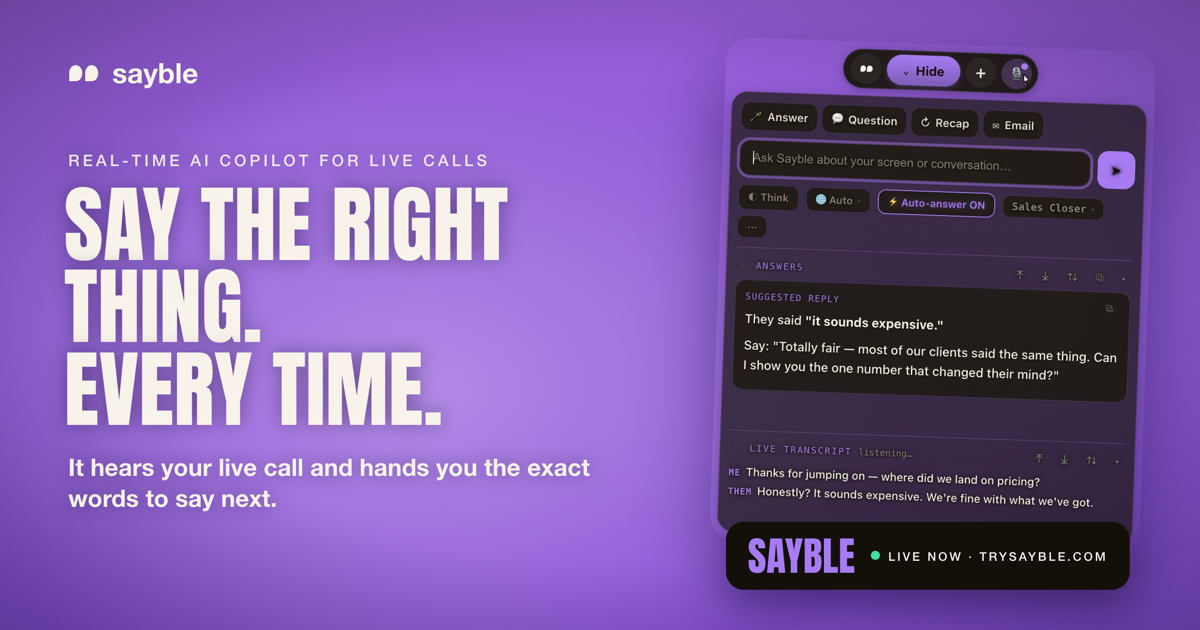
Sayble is a real-time AI copilot for sales calls, client meetings and negotiations. It listens to the conversation as it happens, hears what the other person just said, and hands you the exact words to say next — one clear line to say, plus a backup line, arriving in about half a second while they are still talking. Sayble is made for professionals whose income depends on the next conversation going well: sales closers, SDRs, account executives, founders, mortgage and insurance professionals, real estate agents, customer success teams, call centers, recruiters, consultants, coaches and financial advisors. After the call, it writes a structured recap and a ready-to-send follow-up email from what was actually agreed. Every conversation is also remembered as data you can interrogate in plain language. Sayble runs on Mac and Windows and works on the calls you already take. The context Sayble is built around is the pressure of live, high-stakes conversation. When a prospect says “your price is way higher than the other quote I got,” or “let me think about it,” or “we already have a vendor,” you have to produce a clean, human answer immediately — while still listening, still tracking the deal, and still sounding like yourself. Sayble's positioning is that the single best thing to say next is what changes the outcome, and that this moment is exactly when people freeze. It also targets the follow-through problem: after a busy day of back-to-back calls, details blur, the objection that actually stuck gets forgotten, and follow-up emails are delayed or never sent. Sayble addresses both sides of that problem — the live moment and the after-call work — from the same recorded transcript. The core capability is real-time live answers. Sayble listens to the call and writes the exact words to say back — in quotes, ready to speak, in about half a second, while the other person is still talking. The output is deliberately a single line rather than a wall of text you would never read mid-sentence, and in the app the line is paired with a backup line in case the first response does not land. The product page shows this in a sample objection scenario, where the prospect says the price sounds expensive and Sayble suggests a reframe. Sayble states that going from words spoken to an answer on your screen takes 0.8 seconds. This screen is described as designed to stay hidden on screen share — it appears on your screen only, not on the share and not in the recording. After the call, Sayble writes the recap and the follow-up. The second you hang up, it produces a structured summary of what was agreed, the objection that actually stuck, and what you owe the other side, pulled from the real transcript. It then drafts a ready-to-send follow-up email based on what was actually said, so the message is written before you have closed the laptop. The product page frames this as “the recap writes itself,” covering what was decided, the one objection that stuck and the next steps. Every recap ends with a drafted follow-up that you can review and send. This means the promise made on a call — a pricing sheet, an onboarding plan, a scope confirmation — is captured in writing immediately rather than reconstructed from memory later. The home screen pulls your day together. Today's calls are shown from your Google Calendar with one-click join, so you can join and prep from a single place. Yesterday's recorded calls are listed and ready to replay, and each one carries an auto-written recap covering what was agreed and what to send, plus the drafted follow-up email. Sayble states it remembers an unlimited number of conversations that it can recap. The result is that a call you took last week is not a vague memory but a transcript, a summary and a draft email you can return to. The home screen is one of three screens Sayble says you will actually use, alongside the live in-call view and the post-call recap view. Sayble also turns your calls into data you can question. It remembers every call, meeting and pitch, then lets you interrogate them in plain language — described as a private analyst that has sat in on all of your conversations and forgets nothing. You can ask over a range such as the last five days, the last thirty days, one hundred calls or this quarter. The product page gives the example question “What objection cost me the most deals this month?” and an answer showing that “It's too expensive” appeared in 61% of lost calls, with a note that in the calls won after that objection the rep reframed to monthly savings within 20 seconds, while in the losses the rep defended the price instead. Other example questions include who to follow up with first and what changed the mind of everyone who bought. Across the app, Sayble lists a set of supporting features. Live transcription captures every word as it is said, transcribing both sides and separating who said what so nothing is lost or misremembered. Recap produces a written summary before you hang up. The follow-up email is already written from what was actually agreed. Screen-share safe is included in your plan rather than sold as an expensive add-on — Sayble is designed to stay hidden from screen sharing and recording software. Google Calendar powers the Home screen so today's calls are one click away. Multilingual support covers ten languages natively, auto-detecting the conversation and answering in kind. Your setup — modes, prompts and reference files — follows your account across every device, and the app offers six skins with day and night canvases that switch live without a restart. Sayble's overall approach is to sit inside the calls you already take rather than ask you to change tools. It works on Google Meet, Zoom, Microsoft Teams, Slack huddles, phone calls and anything on screen, and it runs on Mac and Windows. It hears the conversation live, uses AI to analyze it and generate real-time suggestions, and then carries the same transcript forward into the recap, the follow-up email and the searchable call history. Sayble also states clearly that it uses AI to analyze the conversation and generate real-time suggestions, and that AI output can be incomplete or inaccurate — you stay in control and always use your own judgment. The app is available in version 1.2.30, with macOS (Apple Silicon, .dmg) and Windows 10 & 11 (.exe) downloads. The benefits Sayble claims are practical: sharper objection handling, faster thinking and more confidence under pressure during the call, and a written record after it. It aims to stop the thread being lost on back-to-back days by giving you live talking points during the call and a structured recap after. It surfaces what is actually losing you deals — the objection you fumble most, the moment calls go quiet, the promise you keep forgetting — from your own transcripts rather than a guess. It can condense a hundred calls into one answer and return the exact lines that worked, so you can repeat them. And it helps you never drop a follow-up by knowing who asked for pricing, who went cold and who is still waiting, then drafting the email. Concrete use cases described in the content include closers and SDRs killing an objection while the prospect is still talking, using a clean human answer in quotes; founders walking into partnership, negotiation and fundraising calls a step ahead, with Sayble tracking what was actually said when the room gets expensive; client teams such as customer success and support staying warm, on message and quick under pressure; and recruiters asking the sharp follow-up and summarising accurately every time. Back-to-back days are another scenario, with live talking points during and a structured recap after. Sayble is built for high-stakes conversations — for professionals who close, pitch and advise, and whose income depends on the next conversation going well. Sayble runs on Mac and Windows, with iOS and Android listed as coming soon along with the App Store, Google Play, Mac App Store and Microsoft Store. Pricing starts with a free download that lets you run the app live for three minutes with no card required. Sayble Pro is listed at a founder rate of $24.99 per month for your first 12 months, then $39.99 per month, and includes unlimited real-time live-call copilot, screen-share-hiding included, objection handling and closing lines, follow-ups, recaps and email drafts, call recording with recap and drafted follow-up, and multilingual support on Mac and Windows. Sayble Teams is custom-priced for sales floors and client-facing teams with per-seat access, team onboarding, priority support and volume pricing for call centers. Sayble's value proposition is that it turns the hardest part of any important conversation — knowing what to say next, and remembering what was said — into something handled for you. It pairs a single line of guidance delivered in under a second with a recap and follow-up written from the real transcript, then keeps every call as data you can question. For anyone who lives on calls, it is a quiet edge: perform better when the conversation matters.