Category Focus/categories/marketing
Marketing AI Tools
Discover and compare the best marketing AI tools and software. Browse 207+ curated tools with reviews and rankings.
Projects tracked
207
Sort mode
RECENT
Page
5
Discover and compare the best marketing AI tools and software. Browse 207+ curated tools with reviews and rankings.
Projects tracked
207
Sort mode
RECENT
Page
5
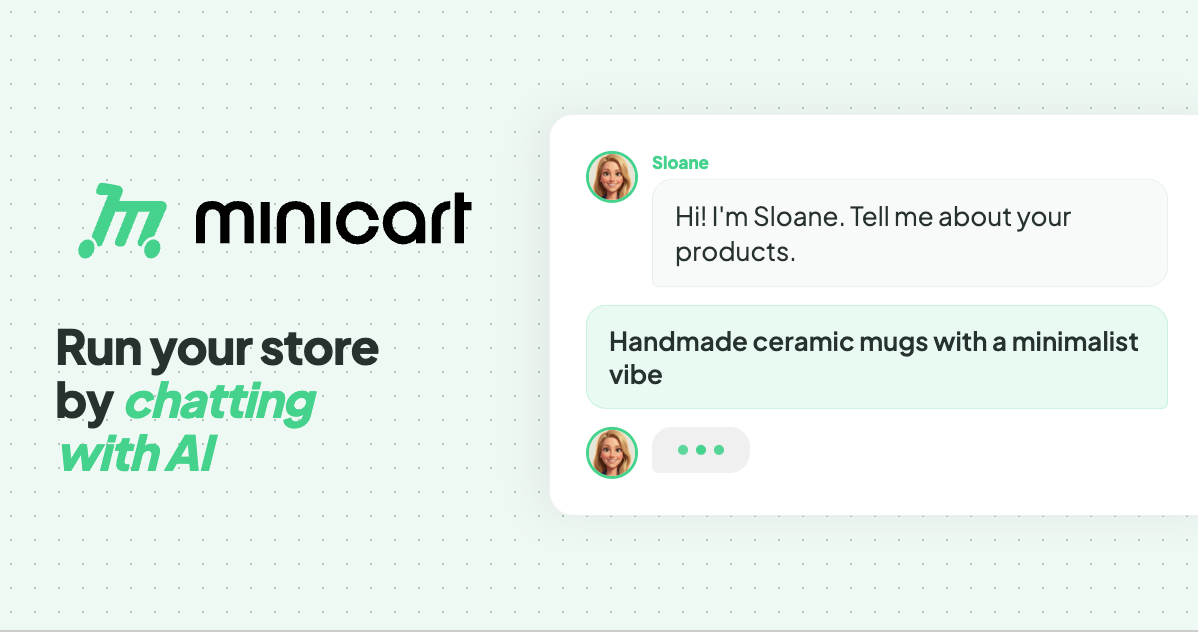
Minicart is a platform that lets makers, creators and resellers launch and run an online store by chatting with AI. Its central promise is simple: take a photo of what you make, answer a few quick questions, and Minicart builds a real website that you own, complete with a polished product listing, a pricing suggestion and a full storefront. From there, a team of AI teammates runs the store day to day. The product is aimed at people who want to sell online without learning ecommerce software — the site puts it as "if you can text, you can run a store." Everything is managed through a simple chat interface, with no code, no design work and nothing to configure, and the site stresses that nothing goes out without your say-so. Traditional ecommerce platforms ask a lot of a first-time seller. Building a store means choosing themes, writing listings, configuring payments, learning dashboards and app stacks, and often paying monthly fees plus listing fees on top. Marketplace sellers face a different problem: their storefront is a booth inside someone else's feed, so the brand, the domain and the customer relationship all belong to the platform. Minicart frames its purpose around both frustrations. The site describes its store as "a store that's actually yours" — your brand, your domain, your customers — rather than "a booth in someone else's marketplace." It also states that there are no listing fees, ever, and that Minicart only charges a small card fee when you actually make a sale, and that it only earns when you earn. The first capability is photo-to-store creation. You snap a picture of what you make and answer a few quick questions, and Minicart turns that photo into a polished product listing — title, description and pricing suggestion — and a full website, automatically. The site says one photo is enough to get started and that a store can be live in under 10 minutes. In the example shown on the page, the assistant takes a single candle photo and reports that it built four product photos from it and launched the store. The workflow is described as three steps: snap a photo, we build your store, then go live and sell. Your own domain and brand come with it, and the page repeats that there are no listing fees, ever. Second, Minicart handles sellers who are already selling elsewhere with one-click imports. You paste your Etsy shop link, your Shopify store link, or your eBay store or seller link, and Minicart pulls in your listings — titles, prices, photos and variations — and rebuilds them on a site you own. The site says a full catalog is imported in minutes, with no exporting, no copy-paste and no re-uploading photos. Crucially, the connection is described as read-only: Minicart states it never touches or pauses your existing store, so you can keep selling on the marketplace while you build. For Etsy users it highlights keeping the shop open and running while finally owning the customer list; for Shopify users it highlights being live in 10 minutes rather than weeks, dropping the monthly fees and app stack, and letting three AI teammates run the busywork; for eBay users it highlights importing listings in minutes while continuing to sell on eBay and owning the customer, not just the sale. Third, and at the heart of the product, are the three AI teammates who work 24/7. Sloane, the storefront teammate, builds your site, takes payments, tracks your sales and keeps your listings current. Milo, the marketing teammate, drafts lifestyle photos, social posts and discount codes that bring people in. Logan, the logistics teammate, ships orders, tracks inventory, handles refunds and drafts your customer replies. The page shows a day in the life: Sloane turning your photos into three products, Milo drafting Instagram posts for those three new products, Logan prepping a shipping label for an order and writing your reply to a customer question, and Sloane processing the day's payments and sending your payout. Each item is marked done or ready, reinforcing that the owner remains in control of everything the team produces. Fourth, everything is operated through chat, including bulk changes. The site describes the interface as "if you can text, you can run a store": you manage inventory, draft social posts and talk to customers by sending plain-language messages. A dedicated bulk editor lets you update everything at once — for example, "increase price of all red necklaces by $5" — and your team lines up the changes, figures out what is affected and shows you a list to review. Nothing changes until you confirm: you can check or uncheck anything you want to skip and then approve. The same pattern applies to inventory updates, such as reporting that you have made five new blue butterfly bracelets and 12 ruby necklaces and confirming the new stock numbers. The site states plainly that you are always in control and nothing goes out without your say-so. Fifth, Minicart emphasizes ownership and economics. The store lives on your own domain under your brand — the FAQ notes it runs on your own Minicart domain, for example yourstore.minicart.com, and that you can connect a custom domain you own. You can bring your own domain or grab a new one, and the store carries your name, colors and style from day one. Your customer list is yours to keep and grow rather than locked inside a marketplace, which the site ties to building repeat customers and a brand you can grow for years. There are no listing fees — list as much as you want — and Minicart says it only charges a small card fee when you actually make a sale. Taken together, the approach is to replace ecommerce software with a chat-driven AI team. Instead of learning a dashboard, you describe what you need in plain language, and the AI teammates figure out what is affected, do the work and present it for your review. Launch can start from a single photo or from an imported catalog, and operations continue as a running dialogue: turn photos into products, draft an Instagram post, create a promo code, prep a shipping label, write a customer reply, process payments and send a payout. The site summarizes this as "see it in action — watch how your simple text commands trigger a complex chain of storefront updates." The stated control model is consistent throughout: the team proposes, you approve. The promised outcomes are speed, control and ownership. Speed: a store live in 10 minutes, a full catalog imported in minutes, and 24/7 AI teammates rather than hiring help. Control: every action is reviewed and confirmed before it goes out, with a checklist you can edit before approving. Ownership: your own website, your own domain, your own brand and your customer emails. The site also stresses economics — no listing fees, ever, and paid plans that lower card rates. Real stores built with Minicart are showcased on the page: Butterfly Boutique, Fame City Card Co, Trammell's What The Flip, Treasured Tees and Things and Diecast Car Culture, described as selling trading cards, sneakers, boutique gifts and more, with owners who launched fast and run their business by chatting with their AI teammates. Concrete scenarios appear throughout the page. A maker photographs what they create and Minicart turns it into a listing and a live store, with one example showing a candle photo producing four product photos. A bracelet maker tells the team to create a 20% summer promo code for all bracelets and gets confirmation that all bracelets are now 20% off with code SUMMER20. A seller asks for an Instagram post for a blue butterfly bracelet. An owner says to increase the price of all red necklaces by $5 and reviews five affected items with their old and new prices. A seller reports new inventory — five blue butterfly bracelets and 12 ruby necklaces — and confirms the updated numbers. And existing marketplace sellers paste an Etsy, Shopify or eBay link and get their catalog rebuilt on a site they own. Minicart is built for makers, creators and resellers — including craft sellers, trading card and sneaker resellers, boutique gift shops and apparel sellers — who want to sell online without learning ecommerce software or managing a booth inside a marketplace. The FAQ emphasizes that no tech or design skills are required, that there is nothing to code, design or configure, and that the AI teammates handle the setup and the day-to-day. On pricing, the site states there is a generous free plan where there are no monthly fees to start selling, that paid plans lower Minicart's card rates, and that no credit card is required to start. A current promotion offers 45% off the Assistant plan plus a free custom domain. Minicart's core value proposition is to let anyone turn what they make into a store they own and then hand the busywork to AI. A photo or an imported catalog becomes a live website in minutes; Sloane, Milo and Logan keep it running around the clock; and every change is confirmed by you before it ships. For sellers tired of marketplace dependence and complicated ecommerce software, Minicart offers a simpler path: take a photo, review your team's work, and keep building your business.
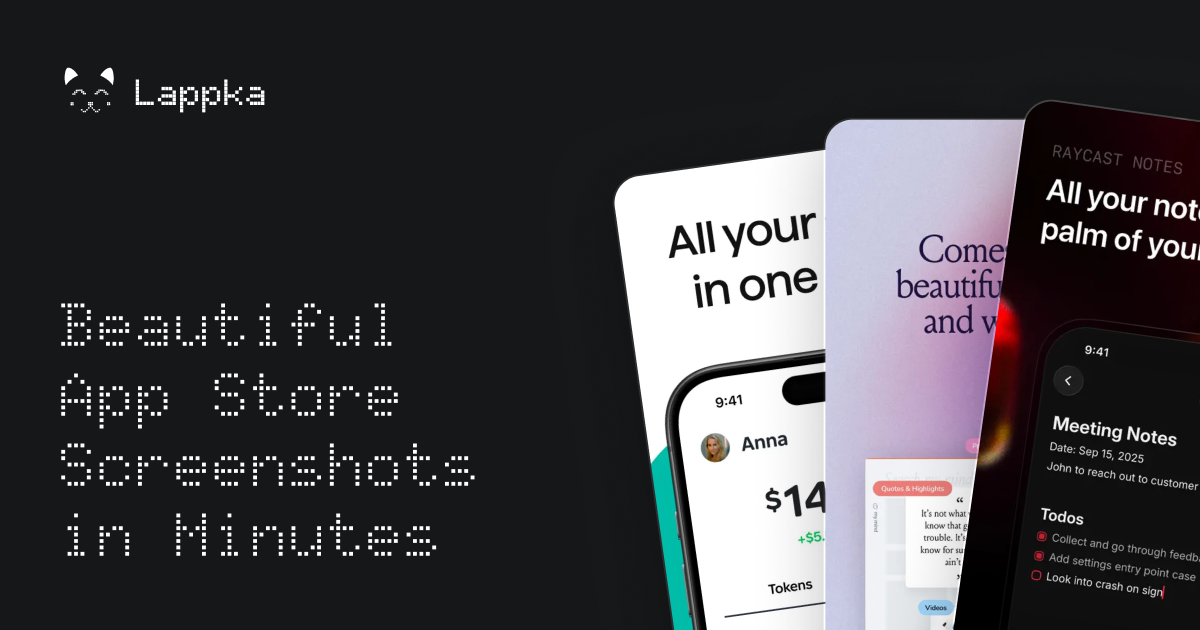
Lappka is an AI-powered App Store screenshot generator that turns raw app screens into a complete, conversion-focused screenshot story for an App Store listing. It is aimed at mobile makers — independent developers, solo builders, and small teams — who have an app built and now need to communicate what it does before a visitor decides to download. The product covers the whole screenshot workflow in one place: planning copy with AI, choosing and customizing editable templates, designing every detail, localizing the copy for other markets, previewing the full set the way App Store visitors will see it, and exporting store-ready screenshots. Its stated purpose is simple: your app is built, and Lappka helps you tell its story. A store listing has limited room to explain an app, and screenshots carry much of that explanation. Lappka starts from the idea that screenshots should be treated as a story rather than a set of unrelated images: there is a message to communicate, an order in which to say it, and copy that has to stay clear on every screen. Turning raw app screens into that story usually involves separate decisions about layout, wording, sequence, and language, and doing it again for each market multiplies the work. Lappka brings those decisions into a single tool where AI handles the starting strategy and copy, while the maker keeps control over what ships. The AI layer is Lappka AI, which uses your app context and your product screens to help decide what to communicate, how to order the story, and how to make every line of copy clearer. That means the AI is not only writing headlines; it is helping plan the narrative of the screenshot set and improving the wording of each line as the story develops. Because the output stays editable, the AI acts as a starting point rather than a finished product — the landing page puts it plainly: AI gets you started, you decide what ships. Templates give the story a visual structure from the beginning. Lappka offers screenshot templates inspired by visual patterns from leading apps, with named sets shown on the landing page such as Joi, Moment, Canvas, and Boldonse. The template previews use consistent screen roles across sets — opening promise, feature depth, proof, motivation, and closing call-to-action frames — which suggests a template is a sequence of screenshot positions rather than a single style. Starting from a template means the App Store conventions are already in place, so the maker begins from a design that feels at home on the store instead of from a blank canvas. From that starting point, an advanced editing tool lets you perfect every detail. The editor supports custom backgrounds, font pairs, and device frames, which are the three customization areas the landing page highlights under the idea that AI gets you started while you decide what ships. Custom backgrounds let a screenshot set match a brand's look, font pairs control how typography is paired across the story, and device frames place product screens into realistic hardware mockups. The advanced editing tool is listed on every plan, including the free one, so full control over the design is not gated behind a subscription. Localization takes the same story to every market. Lappka lets you translate your screenshot copy with AI, replace product screens for individual locales, and review every language without rebuilding the design from scratch. This addresses a common friction point: a localized screenshot set traditionally means maintaining separate design work per language, and any change to the visual story has to be repeated everywhere. With Lappka, the design stays shared while the copy and, where needed, the product screens change per locale. Localization for any language is included in the Plus and Pro plans. Preview closes the loop before export. You can review the complete screenshot order, catch weak transitions, and export store-ready assets when every screen is in the right place. Looking at the whole sequence — rather than a single screenshot — is how you find places where the story loses momentum or where one screen does not connect to the next. Once the order holds up, the screenshots are exported as assets intended for the App Store, and unlimited exports are listed on every plan, including Free. The overall method follows four visible steps: plan the story, choose a template and describe your app, design, and then export. Planning begins with the AI copy strategy; the template step pairs a visual set with a description of the app so the AI has context to work from; design is where every detail is edited; and the final step combines localization, preview, and export. That linear flow mirrors how a screenshot set is actually produced — decide the message, give it a shape, refine it, then ship it — and keeps each stage inside one project. The benefits described on the site are practical. AI removes the blank-page problem by proposing what to communicate and how to order it; templates remove the need to invent a store-ready layout; the editor removes dependence on separate design tools; localization removes the need to rebuild a story per language; and previewing reduces the risk of publishing a set with a weak flow. Every plan includes Lappka AI copy strategy, the advanced editor, professionally designed templates, App Store-ready screenshots, and unlimited exports, so the core outcome — exportable screenshots that tell the app's story — is available from the free tier. Concrete use cases follow from those plans. An independent developer shipping multiple apps would use Plus for AI copy strategy, localization in any language, unlimited projects, and unlimited exports across a portfolio. A small team producing more localized stories would use Pro for its monthly fish credits, pro designed templates, and priority support. A solo developer creating a first screenshot story can start free with 20 fish granted once, one project, the advanced editing tool, and unlimited exports. Anyone expanding into new markets uses the localization workflow to translate copy with AI and swap product screens per locale while keeping the design intact. Lappka is delivered as a web app at lappka.store, and its titles describe it as an iPhone App Store screenshot generator, so the App Store is the focus of the workflow. Pricing is tiered: Free at $0 with 20 fish granted once and one project; Plus at $10 per month billed monthly with 100 fish monthly, unlimited projects, localization for any language, and priority support; and Pro at $20 per month billed monthly with 300 fish monthly and the same feature set for small teams. Yearly billing is offered with a stated saving of 40%. Fish are the product's usage credits, granted once on the Free plan and monthly on paid plans; the site's FAQ includes questions about what fish are and whether chatting with Lappka AI uses them. Lappka's value proposition is direct: your app is built, and now you need to tell its story on the App Store. By combining AI copy strategy, editable templates, an advanced editor, localization, preview, and export in one workflow, it takes a maker from raw app screens to a finished, store-ready screenshot set — with AI providing the starting point and the maker deciding what ships.
Playly.ai is a no-code gamified marketing platform that empowers businesses to create interactive experiences that capture attention, increase customer engagement, and drive measurable results. Built for modern marketers, agencies, brands, and businesses of all sizes, Playly.ai transforms traditional marketing campaigns into engaging experiences that audiences genuinely enjoy participating in. Today's customers expect more than static advertisements and conventional lead forms. They want meaningful interactions that are personalized, memorable, and rewarding. Playly.ai helps businesses meet these expectations by enabling them to build interactive campaigns using ready-to-use templates such as quizzes, Spin & Win, scratch cards, polls, memory games, puzzles, prediction games, personality tests, and more—all without writing a single line of code.Whether you're generating leads, launching a product, promoting an event, growing your email list, collecting zero-party data, or increasing customer participation, Playly.ai provides the tools to create campaigns that turn passive visitors into active participants. Every interaction becomes an opportunity to engage audiences, gather valuable customer insights, and improve marketing performance.Designed with simplicity and flexibility in mind, Playly.ai allows marketers to customize games with their own branding, messaging, rewards, and campaign goals. Interactive experiences can be embedded on websites, landing pages, email campaigns, social media, QR codes, digital ads, and event activations, making it easy to engage customers across multiple touchpoints.Our mission is to make marketing more interactive, engaging, and enjoyable. We believe the future of marketing isn't about interrupting audiences with more advertisements it's about creating experiences that invite participation and build stronger customer relationships.Through our blog, Playly.ai shares practical insights, industry trends, campaign ideas, gamification strategies, customer engagement techniques, and interactive marketing best practices to help businesses stay ahead in an increasingly competitive digital landscape. From retail and real estate to healthcare, education, banking, hospitality, SaaS, and events, we explore how gamification can be applied across industries to improve engagement, generate quality leads, and increase conversions.At Playly.ai, we're helping brands rethink the way they connect with their audiences one interactive experience at a time.Marketing That People Want to Play.
Anthropologic is a consumer research platform that describes itself as "the zero distance consumer research platform." According to its Product Hunt listing, it reads the whole internet through its Human Context Protocol to uncover consumer, category and cultural truths. The platform bundles nine workflows and covers 239 markets and more than 100 languages, with the promise of research, innovation and foresight answers delivered in minutes. On the website, those workflows are presented as a Quickstart menu of launchable tools — Trends, Discourse, Digital Segmentation, Foresight Simulator, Creative Evaluation, Synthetic Survey, Ask an Anthropologist, Brand Performance and Cultural Semiotics — plus an Innovation workflow marked "coming soon." Anthropologic frames itself against three existing approaches to understanding consumers. Traditional research, in its own words, is deep but slow. Social listening is fast but shallow. Large language models are fluent but culturally blind. Each of these has a cost: slow research struggles to keep pace with a category that moves week to week, fast social listening captures volume but not meaning, and fluent AI output can sound authoritative while missing the cultural codes that actually govern behaviour. Anthropologic positions its Human Context Protocol as the answer to that gap — a way to read the internet at scale while retaining cultural context, so that the resulting insight is both broad and grounded. The stated outcome is consumer, category and cultural truth, available in minutes rather than through a lengthy research cycle. The platform's discovery workflows are designed to map what is happening in a category. Trends shows what is moving in a category, backed by social proof and search patterns — the site illustrates this with search volumes and behavioural statistics such as 1,220 monthly UK searches for alcohol-free club nights, 36,000 US stores stocking overnight oats, and a 300% spike in sherbet-toned product searches every March. Discourse captures what people think, say and feel, organised around positions, tensions and narratives, which lets a team see not just that a topic is popular but where opinion is splitting. Digital Segmentation builds psychographic segmentation based on online behaviours, grouping audiences by what they actually do online rather than by demographic boxes alone. The Foresight Simulator uncovers probable future scenarios reshaping a category, giving teams a structured way to think about what comes next. Anthropologic also provides evaluation and simulation workflows. Creative Evaluation scores a video ad for cultural strength, grounded in signals, endorser and pillars — a way to test creative before it goes live. Synthetic Survey simulates consumer responses at scale using cultural ontologies, which points to quantitative-feeling answers without fielding a traditional questionnaire. Ask an Anthropologist interprets an insight using cultural codes, effectively putting an interpretive layer on top of a finding. Brand Performance shows how a brand performs across Social, Search and LLM, extending brand tracking into the places where consumers now encounter and describe brands, including AI-generated answers. Cultural Semiotics reads a space in a market — the codes that govern it, the tensions between those codes, and where a brand can stand. This is the most interpretive of the available workflows and speaks directly to the platform's claim of cultural, rather than merely behavioural, understanding. Innovation, listed on the site as coming soon, is described as identifying opportunity spaces through convergence modelling and developing novel concepts. Alongside the workflows, the site publishes Research Thinking — foresight pieces such as Death of the Sugar High, Future of Fashion is Value, Medicalized Mouth, Rolling Forward: Future of Film, Beyond Classrooms' Four Walls, Redesigned: Future of Aging, The End of Quiet, Future of Sportswear, Beauty after GLP-1, Fitness: Algorithmically mediated and Future of Wearables. The unifying mechanism is the Human Context Protocol, which Anthropologic describes as the way it reads the whole internet. Rather than sampling a narrow panel or scraping a single platform, the platform is presented as reading internet-scale data and interpreting it through cultural context. That combination is what allows it to operate across 239 markets and more than 100 languages without treating every market as an English-language default. The workflow structure — nine launchable tools on the Quickstart screen — means a user starts from a question type (what is moving, what people think, how a category might evolve, how a brand performs) and the platform returns an answer in minutes. Cultural ontologies underpin the synthetic survey capability and cultural codes underpin the Ask an Anthropologist capability, so interpretation is built into the product rather than left entirely to the user. For users, the stated benefit is speed and depth at the same time. Research that would traditionally take a long cycle is framed as an answer in minutes, while retaining the cultural grounding that distinguishes it from raw social listening or uncontextualised LLM output. Because the workflows cover discovery, segmentation, creative testing, brand tracking and foresight, a team can move from spotting a shift to interpreting it, testing creative against it and modelling what comes next without switching tools. The trend material shown on the site illustrates the granularity involved: 64% of Gen Z drinking mainly at home, up from 42%; 80%+ of UK Gen Z luxury buyers choosing pre-owned over new; 62% of Gen Z shopping secondhand in 2025; and 55% of UK Gen Z streetwear leaning toward visible status signalling. Concrete scenarios follow directly from the workflow list. A brand team wanting to know whether a behaviour is genuinely accelerating can run Trends and check the social proof and search patterns behind it. A strategist trying to understand a polarised conversation can run Discourse to see the positions, tensions and narratives at play. A team entering a new market can use Cultural Semiotics to read the codes governing that space and find where a brand can credibly stand. A creative team can score a video ad for cultural strength before launch. An insights team can simulate consumer responses at scale with Synthetic Survey, then use Ask an Anthropologist to interpret a specific finding through cultural codes. A brand tracking a launch can monitor performance across Social, Search and LLM in one view, and a foresight function can examine probable future scenarios with the Foresight Simulator. Anthropologic's framing points to research, innovation and foresight teams as its primary audience — the people who need consumer, category and cultural truth, and who currently choose between depth and speed. The breadth of 239 markets and 100+ languages also speaks to global brand, marketing and insights functions working across many markets at once. On the technical side, the site's cookie consent notice lists Stripe (fraud prevention, session and device identification) and Google Analytics (visitor, session and campaign measurement), indicating that the platform uses Stripe and Google Analytics on its own web property. No pricing or plan details appear in the provided content, and no integration partners are named. Anthropologic's core proposition is zero distance: closing the gap between the consumer and the decision by reading the whole internet through a Human Context Protocol and returning consumer, category and cultural truths in minutes rather than weeks. Nine workflows, 239 markets and 100+ languages are the mechanics; cultural context at internet scale is the value.
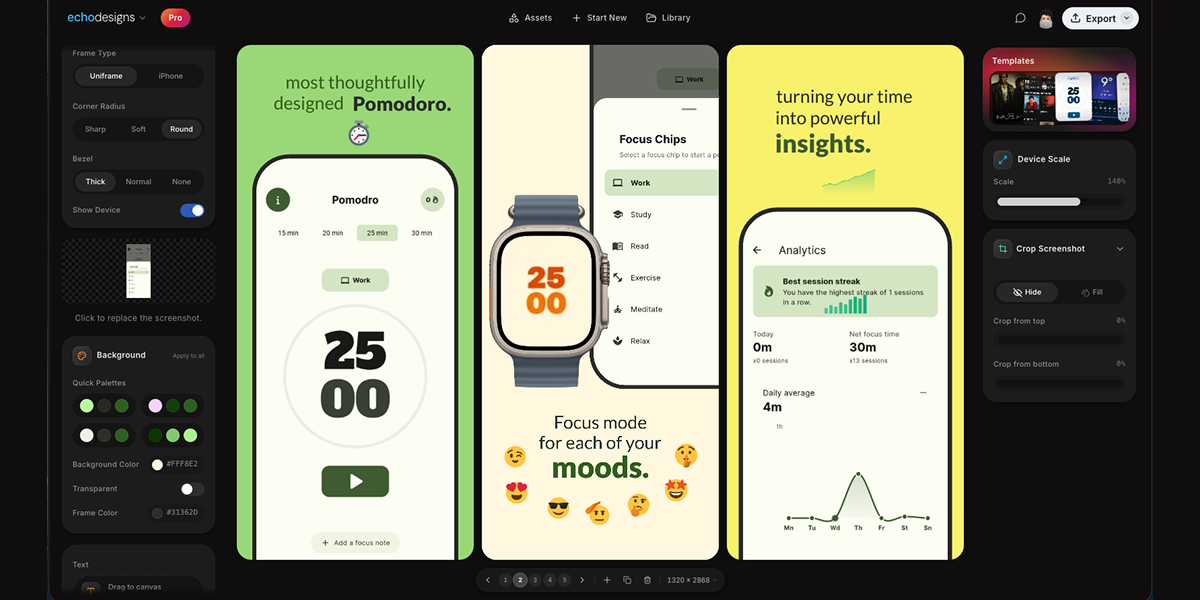
appdesigns is a free, browser-based editor for creating App Store and Google Play screenshots. As its homepage puts it, it makes 'Amazing app screenshots. Completely free.' You drop in your own app screens, frame them inside the latest iPhone, iPad, Mac or Watch devices, and add headlines, backgrounds and stickers before exporting at the exact sizes App Store Connect asks for. The tool is aimed at anyone who has to prepare a store listing - app developers, indie makers, designers and marketers - and its core purpose is to let them produce a polished, complete set of store screenshots directly in the browser, without an account and without installing design software. Store screenshots matter because they are the visuals shoppers see before they read a word of the description, and both the App Store and Google Play expect images at specific sizes and formats. Getting that right usually means either learning a full design tool, paying for a screenshot service, or settling for a free plan that caps how much you can export. appdesigns is positioned against exactly that friction: the site describes it as 'Truly free, not free to start', with unlimited exports, no watermark and no account required to start. In other words, the steps that normally sit between an idea for a screenshot and the finished file - sign-ups, paywalls, watermarks and manual resizing - are removed, and only the design work remains. The device framing system covers Mobile, iPad, Mac and Watch, so a single editor serves phone, tablet, desktop and watch listings. Within the mobile set you can pick from specific frames, including an iPhone Duo frame alongside iPhone 18 Pro, iPhone 18 Pro Max and iPhone 17 Pro Max models shown as the latest options, plus a further group of choices presented as '3 more'. Frame Type options such as Uniframe and iPhone appear next to the Device selector, there is an Orientation switch for Portrait and Landscape, and a Show Device toggle that lets you reveal or hide the frame itself. Framing screens in a recognisable device matters because store listings read more clearly when the mockup matches the hardware your app actually runs on, and the breadth of frames here means one workflow can cover a phone-only app or a product shipping on iPad, Mac and Watch at the same time. Once a screenshot is uploaded through the 'Upload a screenshot' control, the canvas becomes the working surface for the rest of the design. Backgrounds are handled with a Background Color picker that shows a hex value such as #FF512F, a Transparent option for screens that should sit on nothing at all, and an 'Apply to all' action that pushes the chosen background across the entire set rather than one image at a time. Text is added from an 'Add text' button, with the on-canvas hint telling you to 'Click or drag to the canvas. Press T to place.' - so a headline can be typed, positioned by dragging, or dropped in quickly with the T key. The editor also displays the working canvas dimensions, shown on the site as 1242 x 2688, which keeps the export size visible while you compose. Together these controls cover the three things most store screenshots need beyond the app screen itself: a background, a short headline, and the correct pixel dimensions. The editor goes beyond static framing with a Scale & Tilt panel, where values such as Scale 135% and Tilt 0 degrees can be dialled in to change how the device sits on the canvas - useful for angled, dynamic compositions rather than a straight-on shot. A Templates section presents a row of thumbnail previews to start from, matching the product description's note that you can 'start from a community template' instead of building every screen from scratch. And rather than treating each image as an isolated task, appdesigns is built for working across the whole set: the Product Hunt description states you can 'design the whole set side by side', which is how a coherent, consistent sequence of store screenshots gets produced. The homepage reduces the entire process to three steps: 'Upload your app screenshots', 'Choose a device frame', and 'Customise and export'. Everything runs in the browser, and the page is explicit that the editor needs a laptop-sized window, offering a 'Copy the link for your laptop' option - so the intended environment is a desktop or laptop browser rather than a phone. First-time visitors are given a choice of onboarding: 'Show me around' for a guided tour, or 'I'll explore on my own' for people who would rather go straight to the canvas. Because it is truly free rather than free to start, the practical benefits are straightforward: unlimited exports, no watermark on the finished images, and no account needed to begin. That means you can iterate on a headline, swap a device frame, or re-export a full set as many times as the listing needs, with nothing stamped across your artwork and no sign-up step in the way. Backgrounds can be standardised across every screen in one action, and community templates give a head start when you would rather not begin from an empty canvas. The site adds that 'Support is appreciated, never required', reinforcing that the core tool is not gated behind payment. The most concrete use case shown on the site is a reference set of three App Store screenshots for a health or habit app, laid out on the canvas with the headlines 'Plan your week', 'Never miss a habit', 'Share progress' and 'Widgets too'. That is the classic pattern: upload several screens from the app, give each one a short benefit-led headline, place them in a phone frame, and export them as an ordered set. The same flow applies when producing Google Play screenshots, when building iPad, Mac or Watch visuals using the matching frames, when assembling a full set side by side with a shared background applied to all, and when using Scale & Tilt to create angled device shots instead of flat, straight-on images. appdesigns runs on the web and is free to use. It is built for app developers, indie makers, designers and marketers who need store-ready screenshots, and it does not require an account to start. The device library covers Mobile, iPad, Mac and Watch frames, the canvas supports text, solid or transparent backgrounds and a working size displayed at dimensions such as 1242 x 2688, and exports are unlimited with no watermark. A guided tour is available for new users, and the editor is designed for a laptop-sized browser window. In short, appdesigns turns a job that normally involves paid tools, accounts and resizing work into a three-step browser workflow: upload your screens, choose a device frame, customise with backgrounds and headlines, and export at the sizes the stores expect. It is free rather than free to start, it leaves no watermark, and it lets you design the whole set side by side - which is why it is a practical choice for anyone preparing an App Store or Google Play listing.
Naoma AI Demo Agent V2 is an AI video sales agent that gives every prospect a live, personalized product demo the moment they want one. Instead of asking visitors to fill in a book-a-demo form and wait for a rep, Naoma starts the demo instantly, walks the prospect through the live product, answers their questions, qualifies them and books the meeting. It is built for B2B SaaS teams that want to run more demos without hiring more reps, and it works on a website, inside an app, or in outbound emails. Naoma speaks 33 languages, runs 24/7, and writes every session back into the CRM so no conversation is lost. The problem Naoma targets is the gap between buyer interest and buyer access. A typical book-a-demo button converts only 1-2% of website visitors; everyone else leaves without ever seeing the product. Demos also tend to be constrained by business hours, time zones and the languages a sales team can realistically staff, which means a prospect researching at 11:42 PM, 3:15 AM or 5:07 AM may simply never get a demo at all. Long enterprise buying cycles make the gap worse, because a single opportunity often involves multiple decision-makers across marketing, operations, IT, procurement and management, each with different priorities, KPIs and questions. Naoma's premise is that a demo should be available immediately, in the buyer's language, whenever the buyer is ready - not whenever a rep happens to be free. Naoma's core capability is the automated demo itself. When a visitor requests a demonstration, there is no scheduling and no waiting: the demo starts immediately, and Naoma states that demos can start in 10 seconds. The AI agent handles discovery, tailors the session to the prospect's needs, industry and role, shows the features that matter to that person, and answers questions as they come up. After the session it qualifies the prospect and routes them onward: qualified leads go straight to the CRM, high-intent buyers can be sent to checkout, and Naoma can book a meeting with the sales team, all without a manual handoff. In practice each demo ends in one of three outcomes - meeting booked, qualified, or disqualified - so the sales team receives a pre-qualified list rather than raw traffic. Hyper-personalization is what makes each demo feel relevant rather than generic. Naoma learns the product from the material the company already has: sales scripts, demo recordings, the knowledge base, sales presentations and the demo environment itself. Because it is trained on those sources, it can handle complex technical questions and adapt the conversation to the context of the specific visitor. This is what allows the same agent to demo a deep, feature-rich platform credibly without a human rep driving the screen, and it is why teams describe the experience as doing discovery for them. Language coverage is a headline feature. Naoma speaks 33 languages, on the principle that buyers prefer to explore a product in their native language, which removes friction and helps every prospect understand the product and its value in the language they think in. The website illustrates this with named agent personas such as Alexandra Chen (VP of Sales) in English, Carlos Rodriguez (Head of Customer Success) in Spanish and Sophie Martin (Product Marketing Director) in French. Teams can also choose the face of their demos: the signature Naoma agent, a branded mascot, an animated avatar, or a static realistic avatar generated from a real photo, so the demo experience fits the brand and stays memorable. Beyond revenue, Naoma captures intelligence that buyers do not usually volunteer to a rep: competitors, objections, questions and feature requests. The company frames this as intel for sales, marketing and product teams, not just a source of pipeline. Because every session runs through the agent, the objections and questions raised during demos are recorded systematically, which gives marketing and product a view of what buyers actually ask and resist. Naoma also remembers returning visitors and picks up where they left off, so a prospect who starts exploring and comes back later continues the same thread instead of starting over. Naoma describes its workflow in four automated steps. First, a prospect on the website or in the app requests a demo - no scheduling and no waiting, the demo starts immediately. Second, the AI sales agent runs a live, personalized demo tailored to the prospect's needs, industry and role, handling discovery, showing relevant features and answering questions. Third, qualified leads are routed straight to the CRM, with the option to book a meeting with the sales team or send high-intent buyers to checkout, with no manual handoff. Fourth, the agent surfaces buyer insights, including competitors, objections, questions and feature requests, for sales, marketing and product. End-user feedback from live demos is used to benchmark quality: 89% of end users mention how human the experience feels, 77% praise how it handles interruptions, and fewer than 2% of sessions hit any technical issue. The stated outcome for customers is more demos from the same traffic and the same budget. Naoma reports that typical visitor-to-demo conversion is 1-2%, while visitor-to-AI-demo conversion with Naoma reaches 6-20%. The company also positions the product around running 5x more demos without hiring more reps. Because the agent operates 24/7 and in 33 languages, prospects get demos at peak buying moments across every time zone rather than waiting for a reply. Reviewers on G2 describe the practical effect: prospects learn about the platform whenever it is convenient for them, discovery is effectively done for the sales team, and reps can focus on higher-value conversations. Naoma holds a 4.9 rating on G2 and states that 50,000+ demos have been run for B2B SaaS teams. Concrete use cases come from published case studies. Hoteza, a web-based guest engagement platform for hotels, placed Naoma behind a "Get AI demo now" button so leads arriving across every time zone and language get an interactive demo immediately; the company reports that since April, 57 hotels explored the product this way and one regional partner signed after going through the AI demo. AiSDR uses Naoma to run personalized demos of its AI sales development platform for website visitors. UXPressia uses it to demo journey maps, personas and an AI persona builder for visitors who might not discover the platform's depth in a self-serve trial. App Radar uses it to qualify visitors and surface larger accounts worth routing into a sales-assisted funnel. Mellow uses it to reduce demos run with prospects who are not the right fit, and Hoteza and Mellow both cite that same qualification goal. Naoma is aimed at B2B SaaS teams - its customer logos include Yesim, Mellow, Runwayer, MarketOwl, Magify, UXPRESSIA, AiSDR, Hoteza and App Radar - and G2 reviewers span small businesses, mid-market companies and enterprise buyers. The product routes into a CRM, a calendar or checkout, and the site points to a knowledge base covering pricing, setup, security, CRM integrations and multilingual demos. On the security side, Naoma states that it is GDPR compliant and protects both customer data and their customers' information with enterprise-grade security. Naoma has also been recognized publicly, including Product Hunt daily and monthly top-post badges, Tekpon's Top Demo Automation Software Q1 2026 and a Global Startup Award from The Ventures, alongside press coverage of a $440k pre-seed round. Prospects can start a demo directly from the website, teams can build an agent in Naoma's app, and the company offers an ROI calculator. Naoma AI Demo Agent V2 is a purpose-built AI video sales agent for instant, personalized product demos. By replacing the book-a-demo form with an agent that demos, qualifies and routes in real time across 33 languages, it turns existing website traffic into booked, qualified meetings without adding sales headcount - and it feeds the objections, questions and competitor mentions back to the teams that need them.
DemoTV is a 24/7, audience-ranked television channel for product demos, built for people who want to discover independent products by watching them in action. The station streams short demos continuously, and the audience decides which products occupy Channels 1, 2 and 3 by backing the demo they would actually try. Anyone with a product can submit a short demo for free, and founders can embed a demo on their own website, recruit testers and collect product feedback. As the site states, "Audience Elo decides the rank — airtime never buys rank," so the top of the board reflects viewer preference rather than advertising spend. Product discovery is crowded, and the usual signals — paid placements, sponsored slots and banner inventory — are hard for a viewer to separate from genuine popularity. DemoTV addresses that by splitting the two ideas apart completely. Ranking is produced only by viewers backing the demo they would try in head-to-head battles, while any commercial placement is clearly labelled and confined to exposure. In the site's own words, "money buys exposure, completed views and clicks, never the ranking." For viewers this means a leaderboard they can read at face value; for makers it means the path to Channels 1-3 runs through the quality of the demo itself rather than the size of a budget. Channel Battle is the central mechanic. Two products for the same job are shown side by side — for example an app builder versus another app builder — and viewers are asked simply to "Watch both. Back the one you'd try — no sign-up." The pick is cast without creating an account, and that pick feeds the audience rank. Because the battles are head to head and paired by category, the comparison is like for like. Wins and battles are counted per demo and shown alongside an audience score, so a listing might display an audience score with a running tally of wins and battles. The station explains that Channels 1-3 are the current top three, that Rank 1 is the demo viewers picked most, and that airtime never buys either. Filling the channel is deliberately simple for makers. Submitting a demo is free and needs no card: a YouTube link or an MP4 upload is enough, with an optional MP4 capped at 40MB, and every submission is reviewed before it goes live. The submission flow has four steps — website details, video, visitor action, then review — and after station approval the maker gets a private dashboard holding one embed code for their website. That widget is included with an approved listing and carries the video, an optional try link and a button the maker chooses, such as Visit website, Start free, Join waitlist, Book a demo or Claim offer. From the dashboard makers can also request testers, cap reveals and copy the embed, while details like video start automatically only when a viewer presses play. Discovery on the station runs through a demo directory that lists all broadcasts, paged ten at a time and sortable by audience rank or newest. Demos are filed under categories that also determine which battles they join, spanning groups such as AI agents, AI app builders, video generation, chat assistants, computer use, developer tools, design and no-code, data and analytics, marketing and sales, productivity, infra and APIs, games, crypto and web3, crypto wallets, crypto infra, robotics and hardware, fintech and payments, security and privacy, education, consumer and social, climate and energy, and other. Category leaderboards highlight positions such as first place in a given category, and the site displays aggregate station numbers — live demos, audience backings, views and visitors — only once live demos exist. Paid reach on DemoTV is explicitly separated from ranking. Makers who want more visibility can buy labelled airtime after claiming their listing; airtime units add promoted placements across the reel and the directory and never change a demo's audience score or channel. Advertisers can also become featured partners through labelled homepage cards, described as $39 for 30 days with labelled placement that never buys Channel rank, or take a Launch Week labelled 7-day sponsorship. There is also Demo Studio, priced at $79, where a maker pastes their site and receives automated production with station QA before air and maker approval, while rank stays audience-only. Optional viewer thank-yous let a maker offer a backer code, a time-boxed free week or a discount, shown with a one-line pitch; the site notes that this never moves Elo and that battle buttons will not show it. Makers are also told they pay only if they want extra reach, and that none of these options buy Channel rank. The wider methodology is consistent throughout: everything is audience-only until a maker chooses to pay, and payment is confined to exposure, completed views and clicks. Airtime is bought in units, with larger unit counts adding more promoted placements and the price shown at checkout. Advertising on the reel is clearly labelled, and the site repeats that paid airtime never touches the rank. Claiming a listing is free and does not by itself approve a claim, and signing in alone is not enough. Community safety is handled through a report flow listing reasons such as scam or misleading, spam, malware or unsafe link, adult or offensive content, impersonating another product, broken video or link, and something else, with reports going to the DemoTV team for review. Contact for takedowns and press is handled by email, and viewers are offered an optional first-party analytics choice that connects a visit with signup and purchase results, with no ad trackers or search terms and a statement that the choice does not affect the site. For viewers, the benefit is a ranked channel of product demos that can be watched and compared without signing up, where the ordering reflects what other people said they would try. For makers, the benefit is a free route to being seen, a free embeddable widget that puts the demo on their own site, and a dashboard for recruiting testers and collecting feedback. Because the ranking is audience-driven, smaller products can climb the board on the strength of the demo rather than the size of a media budget, and because paid placements are labelled, viewers can trust what the rank means. The station frames this as demo quality driving the possibility: what the board has counted grows only as live demos accumulate. Concrete workflows on DemoTV follow a few clear patterns. A viewer browses the directory or the TV view, presses play on a channel, then enters a Channel Battle, watches both demos and backs the one they would try, with no sign-up required. A founder pastes their project URL, submits a title and tagline, chooses the category whose battles the demo will join, adds a YouTube link or MP4, and waits for review. A maker without a video yet can commission one through Demo Studio. Once approved, the maker claims the company, takes the embed code and places the widget on their website with a chosen button and destination. From the dashboard the maker can request testers and cap reveals, and separately buy airtime units, a Featured partner card or a Launch Week sponsorship if they want extra reach. DemoTV runs on the web at demotv.lol and reaches makers and viewers through an embeddable widget, a submission form and a private dashboard. Its audience includes founders and small teams submitting demos, companies that already have a listing and want to claim it, advertisers buying labelled placements, and viewers looking for new products to try. Pricing is straightforward: submission and review are free with no card needed, claiming a listing is free, and paid options are optional — labelled airtime, Featured partners at $39 for 30 days, Demo Studio at $79, and Launch Week labelled seven-day sponsorship — none of which buy Channel rank. Maker contact, takedowns and press are handled through the station's contact address. The takeaway is that DemoTV turns product demos into a ranked channel where the audience, not the advertiser, decides what sits on Channels 1-3. Free submission, a free embeddable widget, tester recruitment and feedback tools give makers the means to be discovered, while clearly labelled airtime gives them a way to buy exposure without ever buying the rank.
ColdLine.ai is an AI tool that turns cold prospects into hot leads with AI-powered personalized pitches. It is built for anyone who sends outreach to people they have not spoken to before and needs each message to feel relevant rather than generic. The product works from information you already have about a prospect: you simply add your prospect's details, and ColdLine.ai creates a relevant, human-sounding pitch in seconds. Its stated purpose is to save time, personalize your outreach, and get more replies — without writing every message from scratch. The people it is positioned for are founders, sales teams, marketers, recruiters, and agencies. Cold outreach is difficult precisely because it is cold. A message that reads like a template is easy to ignore, while a message that speaks to the recipient's specific situation is far more likely to be read and answered. Producing that kind of message at any volume, however, is slow work: each prospect has to be considered individually, and each pitch has to be written from a blank page. ColdLine.ai addresses that tension head-on. Instead of forcing a choice between personalization and speed, the product is designed to deliver both, generating a relevant pitch for each prospect quickly enough that outreach can continue at volume. The stated outcome is more replies from prospects who were previously cold. The first step in the ColdLine.ai workflow is providing the details of the prospect you want to reach. You add your prospect's details, and that information becomes the basis for the pitch the tool generates. This input is what makes personalization possible: rather than a single generic message reused across a list of contacts, the pitch is built around the specific prospect in front of you. Because the only thing you have to supply is the prospect's details, the barrier to producing a tailored message is low, and the process fits naturally into an existing prospecting routine rather than replacing it. ColdLine.ai generates the pitch in seconds. That speed is at the core of the value proposition, because personalized outreach normally costs time — and time is what limits how many prospects a person or a team can realistically approach. By compressing the writing step to seconds per prospect, ColdLine.ai makes it practical to personalize outreach consistently instead of reserving personalization for the handful of prospects who seem most important. The stated benefit is tied directly to this speed: save time, personalize your outreach, and get more replies. The pitches ColdLine.ai creates are described as relevant and human-sounding. Relevance means the message is connected to the prospect's details rather than being a generic template; human-sounding means the result is intended to read like something a person would actually write, not like an obviously automated message. Together, these qualities are what allow a pitch to be sent to a cold prospect without immediately marking it as bulk outreach. A relevant, human-sounding message is more likely to be engaged with, which is how the product aims to turn cold prospects into hot leads. ColdLine.ai follows a deliberately short methodology. You bring the prospect details; ColdLine.ai handles the writing. No elaborate setup is described, and no writing is required from you — the product exists so that you do not have to compose every message from scratch. The workflow is simple: add your prospect's details, receive a personalized pitch created by AI in seconds, and send it. The AI's role is to turn the raw facts you have about a prospect into a pitch that is relevant and sounds human, at a speed that manual writing cannot match. The benefits stated for ColdLine.ai are threefold: saving time, personalizing outreach, and getting more replies. Saving time matters because outreach volume is usually limited by writing capacity. Personalization matters because relevant messages perform better than generic ones. More replies matter because a reply is the point at which a cold prospect starts to become a lead. Because the product removes the need to write every message from scratch, the time that would have gone into drafting can instead go into reaching more prospects or following up with the people who respond. ColdLine.ai is described as suitable for founders, sales teams, marketers, recruiters, and agencies. For a founder, it means reaching out to prospective customers or partners without spending the day writing introductions. For a sales team, it means personalized first-touch outreach across a pipeline of prospects. For a marketer, it supports outreach campaigns that need to feel individually written. For a recruiter, it means approaching candidates with messages tailored to each person. For an agency, it means producing personalized outreach for multiple clients without the writing overhead that would normally be involved. The target users named in the product's own description are founders, sales teams, marketers, recruiters, and agencies — people and teams whose work depends on starting conversations with prospects they do not yet know. ColdLine.ai is presented squarely as a tool for that outreach step. Beyond the fact that it is an AI-powered product reached through its website at coldlineai.xyz, the available content does not state specific integrations, a technical stack, or pricing plans. ColdLine.ai's value proposition is straightforward: cold prospects become hot leads when the pitch they receive is relevant and human-sounding, and producing that kind of pitch at scale is normally too slow to do consistently. ColdLine.ai automates the writing step so that you add your prospect's details and get a personalized pitch in seconds. The result is outreach that is faster to produce, personalized by default, and designed to earn more replies — without writing every message from scratch.
Youkti is an outbound revenue system that turns account knowledge and relationship data into revenue. In its own words, it is "the outbound system of thinking and action": it keeps a memory of every account, conversation, and deal, then tells a sales team the exact next move — which deal is slipping, which dormant account just fired a signal, and what to prepare for tomorrow's meeting. It is built for account executives, RevOps teams, outbound reps, and sales leaders who want to win more new logos, move more pipeline, and reactivate dormant accounts. The stated promise is intelligent outbound, live signals, and a complete memory of every account, surfaced through command surfaces tuned to each role. The problem Youkti addresses is not a shortage of sales data but a shortage of attention and timing. Deals slip out of the pipeline before anyone notices they have stalled, dormant accounts quietly launch new initiatives, and buying committees change shape without the account team knowing. Sales teams are left doing manual updates, digging for context, guessing at next steps, and missing follow-ups. Battlecards go stale, competitive context arrives too late, and CRM records drift out of accuracy unless someone maintains them by hand. Youkti positions itself against that fragmentation, and even frames its automatic CRM sync as an alternative to spending $100K+ on Salesforce Data Cloud 360 and implementations. The first layer of the product is ARYA, described as a conversational GTM builder rather than a static workflow. You tell ARYA what you want in plain English and it builds the entire flow through conversation: signal triggers, persona matching, outreach rules, and cadence. The configuration updates live as you talk, with no drag-and-drop and no if-else logic — conversation in, config out. A visible flow runs Signal, Signal Filter, Persona Match, then Auto-Sequence. Signal triggers can include Funding Raised and Hiring Surge; target personas can be VP Sales, CRO, Head of Sales, VP Marketing, and CMO. Outreach rules can branch, for example: if Funding Raised AND Hiring Surge, use an aggressive tone, a cadence every 3–4 days, and 5 emails; if Funding Raised OR Hiring Surge, use a consultative tone, a weekly cadence, and 3 emails. The interface shows a live config review that updates as you chat with ARYA, and the product describes itself as a system that learns itself. The second layer is execution through a daily cockpit. Every morning reps open one screen where accounts are prioritized, signals are overlaid, personas are matched, and sequence hooks are written — one click pushes the sequence. A sample dashboard shows 15K accounts, 892 active signals, 609 plays for the day with 61 marked high priority, 165 live sequences, and meetings tracked for the day, with tabs for Queue, Insights, Alerts, Pipeline, and Cards. Each account row shows the account and domain, the signal and why it fired now, the matched personas, the sequence hook with its step count and duration, and a push button. Once an account is pushed, it enters an Account Journey. Youkti tracks status, engagement, replies, and meetings, and surfaces the next step automatically. There are no manual updates, no digging, no guessing, and no missed follow-ups. Journeys include auto-tracked engagement, health scoring, and AI-generated next steps, with account states such as Growing, Stable, Needs Attention, and At Risk. In a sample journey, Storylane is shown with 10 emails sent, 10 replies, and 3 meetings and a recommended next step of reaching out with a relevant case study; Intuit shows 5 emails with 5 replies and a suggestion to push for a meeting; WinSupply is shown with 16 emails, 16 replies, and 22 meetings. A deep dive view gives account intelligence with deal context and next actions. Clicking into any account reveals next actions with reasoning, the latest meeting brief with talking points, stakeholder maps, a full timeline, signals, and talk tracks. The system recommends and the user decides. In the Storylane example, the board shows emails sent, replies, meetings, and LinkedIn activity, plus seven next actions such as engaging on a product update, checking in after trial onboarding, re-engaging after 25 days of inactivity, and discussing tech stack changes, alongside a dated meeting brief and a timeline. Behind this sits an intelligence layer that scores every account on readiness, ICP fit, budget, timeline, and sales cycle, then generates deal actions, strategic approach, entry points, key messages, and email templates — described as a 6-step account-based campaign in 1 click. The scorecard example shows readiness 9/10, ICP fit 8/10, high budget backed by a $250M Series F, a 1–3 month timeline for pilot approval, a 3–5 month sales cycle, high ROI potential, a high effort level, and a best timing recommendation, along with concrete next steps. Signals are monitored across the entire TAM — funding, hiring, leadership changes, lawsuits, competitive moves, and tech stack swaps — and when one fires, the system provides analysis, reasoning, and a timing window rather than just an alert. It provides confidence scoring with reasoning, a "Why It Matters" explanation for every signal, and timing guidance such as "Next 2-4 weeks." Youkti then generates complete multi-step sequences with A/B variants, each tied to specific signals and account context. Campaign strategy, messaging angles, subject lines, and email bodies are grounded in account intelligence rather than templates. A sample sequence shows 6 total steps, 12 total emails, and a 16-day duration, where Variant A leverages a customer award and Variant B focuses on an ARR milestone and tech-stack consolidation. The selected variant can be pushed to Lemlist, Outreach, or any SEP with one click, with no copy-paste. The platform module list covers Prospects & Lists for building, distributing, and tracking prospect lists at scale; Account Intelligence for 100+ parameters of contextual company intelligence in under 60 seconds with a single click; Outreach Automation for messaging angles, follow-ups, and outreach guidance tied to real signals; Competitive Intelligence for tracking competitors, comparisons, and real-time changes affecting active deals; Sales Enablement for centralizing decks, case studies, and battlecards; CRM Enrichment for automatically updating accounts, contacts, and activity; ARYA, the AI GTM agent; Account Journey for personalized, adaptive multi-touch engagement; and Execution Analytics for tracking outbound execution across every rep, account, and play. Integrations span email and calendar (Gmail, Google Calendar, Outlook, Exchange, Office 365), data (Snowflake, AWS, OneDrive, SharePoint, Google Drive), CRM (Salesforce, HubSpot, Zoho CRM, Pipedrive, Freshsales), prospecting data providers (LinkedIn Sales Navigator, Apollo.io, Lusha, Cognism, Clearbit, People Data Labs, ZoomInfo, Full Enrich, Kipplo, Prospeo, BetterContact, Clay, Bitscale), sales engagement (Outreach, Salesloft, Apollo.io, HubSpot Sales), and signals (Google Analytics, rB2B, SEMrush, Ahrefs, Hotjar). Youkti states that other tools sync with your CRM while Youkti syncs automatically. Outcomes described on the site include NeoSOFT generating $50K+ pipeline growth, Samvidh increasing revenue 20% QoQ, and Deeploop increasing selling time by 3× with Youkti. The homepage says Youkti is trusted by high-performing teams including NeoSOFT, Samvidh Tech, Deeploop, and T-Hub, and that signal-based discovery spans 100M+ companies. Contact data, buying signals, and intent are described as free, with no card and no meter, and the product promises execution from day one rather than after weeks of setup, with a demo available. Concrete use cases shown in the product include protecting an at-risk deal such as Westbridge Industrial, an $180K ARR manufacturing account awaiting board approval for 16 days with a suggested meeting; prioritizing a high-intent account such as Northfield Systems, a Series B SaaS company with a new CRO, nine open sales leadership roles, new funding, and a 96/100 ICP score; reactivating a dormant account such as Crestview Health, last contacted 94 days ago, after a digital transformation initiative launched; opening an expansion opportunity such as Brookstone Manufacturing, with a renewal in 60 days and two business units engaged; and preparing for a strategic meeting such as Everline Retail, where a CIO joined tomorrow's meeting, triggering stakeholder map review, security question resolution, and talking point preparation. Youkti is aimed at leaders, AEs, and outbound reps, each getting a command surface tuned to their job: leaders and RevOps get intelligence on deals at risk, top competitors, and client objections; AEs and sales leaders get actions and preparation for strategic conversations; reps and GTM teams get outbound execution. The core takeaway is that Youkti turns account knowledge, relationship data, and live signals into specific revenue actions — telling each seller exactly what to do next, for every deal, every account, and every stage from first signal to last touch.
Wisry is an agentic ad-cloning platform built for ecommerce brands, described on its website as an 'Agentic AdClone for ecommerce.' Its core promise is simple to state and ambitious to deliver: AI agents run the whole play. They scan the Meta and TikTok ad libraries for the ads already winning in your market, clone them into your brand as static and video ads, and launch them to Meta and Google, optimized for ROAS. Wisry presents itself as a way to get 'Winning ads, without the guesswork,' and headlines its home page with the claim 'Launch high-ROAS ads, 10x faster.' The platform says it is trained on over $1B of ad spend, and that the strategist agent is backed by $1B+ in ad spend used to train it. The intended audience is ecommerce brands and the marketers, agencies and growth teams that run paid social for them. Onboarding begins with a single input: paste your store URL, and Wisry builds brand memory covering products, voice, visual identity and audience, so that every agent stays on-brand. From there the platform is meant to act as an autonomous ecommerce growth team. Paid social for ecommerce is a research-and-iteration problem as much as a creative problem. The Wisry site frames the status quo as slow and uncertain: marketers spend weeks on research, creative production and launch, and much of that effort is guesswork about which hooks, angles and formats will actually convert. Wisry's own customers describe the pain directly. One supplement brand says that in its category 'speed is everything' - it does not need more creative ideas, it needs to spot what is winning and replicate it before the window closes. An agency customer says the bottleneck 'was always research and iteration,' and that agentic research finds what is working across a market and turns it into output at a pace a manual team could not touch. Another customer, selling hardware to Tesla owners, notes that it operates in a niche audience 'where every ad dollar counts' and that it is no longer 'testing blindly' but scaling what is proven. Wisry's answer to this is to replace open-ended guessing with evidence pulled from ads that are already spending and converting in the market. The first group of capabilities is research and strategy. Wisry's flagship feature is agentic ad research: research agents read the ads already running in your market, cite what they found, and turn the winners into angles you can brief. The site shows this working against the Meta ad library and TikTok top ads, ranking the ads it finds - for example, a ranked set where the top three of nineteen are surfaced with details such as how long each ad has been live (64 days, 35 days, 23 days), how many variants sit behind the concept (17, 10 and 6), and impression counts in the millions. The reasoning shown is explicitly performance-based: the longest unbroken spend in the run, a format that survived a full test cycle, and the fastest variant ramp in the category. A strategist agent then turns that research into campaign concepts covering audience, hooks and messages, and attaches source citations behind every angle. Because Wisry builds brand memory from your store URL - products, voice, visual identity and audience - every agent in this chain stays on-brand rather than producing generic output. The second group is creative production. Wisry clones video ads: point it at a video ad that works and get your own version of it, matching the same structure and pacing while swapping in your product and your brand; the site illustrates this as 'Structure matched' across hook, proof and close. Static ad cloning follows the same logic: Wisry rebuilds a winning static in your palette, your type and your product shots, then fans it out into every placement you need. The site is explicit about what is kept and what is swapped - layout, headline structure and type are kept, while palette, product and type are swapped for your brand. On top of cloning, Wisry ships ad templates so campaigns start from formats with a track record instead of a blank canvas; templates include listicle, problem-solution, quiz, portrait, us-vs-them, seasonal, feature-benefit and how-to, arriving in feed (1:1 and 4:5), portrait (2:3), landscape (16:9) and story (9:16) sizes, and each one is sized and safe-area-checked for its placement, including Reels, Story and Feed. Finally, every generated cut opens in a real video editor inside Wisry, where you can retime scenes, restyle captions, swap a shot and re-render without leaving the platform. The third group is launch and optimization. Once creatives exist, an ads agent ships them to Meta and Google, watches performance, moves budget to winners, and keeps new creatives coming - a loop the site summarizes as 'launches, optimizes, repeats. 24/7.' This is what makes the system agentic rather than a one-off generator: the same platform that produced the ads from market evidence also handles distribution and budget allocation based on how those ads perform. Wisry describes its studio as shipping nine capabilities, all pointed at selling more of your products, with the two flagship features being the ones everything else is downstream of. The end-to-end loop is presented as a continuous cycle rather than a campaign: research feeds strategy, strategy feeds creative, creative feeds launch, and launch performance feeds the next round of iteration. Wisry's overall approach is deliberately end-to-end and evidence-first. The workflow is described in five steps: first, Wisry pulls your brand and products after you paste your store URL, building brand memory across products, voice, visual identity and audience; second, a research agent deep-analyzes your Meta and TikTok competitors' ads and content to find what is already converting; third, the strategist agent generates evidence-backed angles for your campaigns, including audience, hooks and messages with source citations; fourth, the agents copy winning creatives for your products, generating video and static ads from the best-performing ads and your chosen angles; and fifth, the ads agent launches, optimizes and repeats around the clock. The site summarizes the whole flow as 'Your store in. Winning ads out.' Under the hood, Wisry says it is orchestrated using leading models, listing Grok, Gemini, OpenAI, Claude, KlingAI and Nano Banana as the models involved. The distinguishing idea is that every angle is traceable to a real ad that is already winning, and every output stays inside the brand memory built at onboarding. The benefits Wisry claims are framed in performance and speed terms. The site advertises a +200% average boost in ad performance, $1B+ in ad spend used to train the strategist, a 10x faster path to launching a high-ROAS campaign, and a shift from weeks to minutes for research, creative and launch handled end to end. Customer quotes add concrete outcomes: a hardware brand selling to Tesla owners reports ROAS up 300% since starting and describes scaling what is proven instead of testing blindly; a supplement brand reports shipping winning variations 2x faster and describes the difference as reacting to trends versus riding them; and an agency says it has scaled client accounts much faster because agentic research finds what works across a market and turns it into output at a pace its team could not match manually. Concrete scenarios described in the content include a niche hardware brand that sells to Tesla owners and needs every ad dollar to count, scaling what already works in its account; a supplements brand operating in a fast-moving category that needs to spot winning creative and replicate it before the window closes; and an agency running ads for many clients, where research and iteration were the bottleneck and agentic cloning lets it scale client accounts faster. More generally, the product is built around the ecommerce advertising workflow of importing a store, researching a market's Meta and TikTok ads, generating evidence-backed angles, cloning winning static and video creatives into a brand's own palette, product shots and type, fanning them out across placements using templates, launching to Meta and Google, and then continuously moving budget toward the winners while new creatives are produced. Wisry is a paid product. The pricing section offers three commitment lengths with one payment up front, after which the plan continues month to month: 2 weeks at $49.50 (discounted to $34.65, saving 30%), 4 weeks at $99 (discounted to $49.50, saving 50%, marked Most Popular), and 8 weeks at $198 (discounted to $89.10, saving 55%). The site highlights a per-day cost of $3.53 at full price, reduced to $2.48, $1.77 and $1.60 per day at the three tiers, and the entry call to action is 'Get started for $49.50' with the note that this is one payment of $49.50 for 4 weeks, then $99/month, cancel anytime, secured by Stripe. Wisry runs in the browser as a web app. The site also notes a Product Hunt launch promotion offering up to 55% off. In short, Wisry's primary value proposition is that ecommerce advertisers no longer have to guess what creative will work. By researching the Meta and TikTok ads already winning in a market, converting that evidence into cited angles, cloning the strongest static and video creatives into a brand's own identity, launching them to Meta and Google, and then optimizing budget around performance around the clock, Wisry turns paid social from a slow, speculative process into a faster, evidence-driven loop - 'Winning ads, without the guesswork.'