Category Focus/categories/developer-tools
Developer Tools AI Tools
Discover and compare the best developer tools AI tools and software. Browse 622+ curated tools with reviews and rankings.
Projects tracked
622
Sort mode
RECENT
Page
15
LucentraCode is an AI coding command-line interface built for developers who want to work with powerful frontier models without constantly worrying about usage limits or expensive subscriptions. It runs directly from the terminal: you install it globally and then launch the runtime, and it requires Node.js v20 or higher. The product is available on Linux, Windows, and macOS. Within the CLI you can choose from models such as GPT-6 Astra, GPT-5.6 Sol, Claude, Gemini, Grok, and Kimi, and use them for real development work — debugging, building features, refactoring, testing, and working across larger codebases. The problem LucentraCode sets out to address is the friction that comes with coding assistants built around tight quota windows. Its website frames the core pain directly: developers who are forced to stop and wait for a quota window to reset lose their flow. Competing tools that offer premium models often require jumping to a $100–$200 per month tier, and many products layer confusing rolling windows and multiple reset timers on top of that. LucentraCode positions itself against this model by offering frontier models on a $20 plan, eliminating rolling timers entirely, and replacing multiple meters with a single monthly usage pool. The headline promise on the site is "Built for Flow State. No 5-Hour Resets." — the idea being that a developer should be able to keep working for as long as the work requires rather than as long as the quota allows. The first pillar of the product is the removal of the five-hour reset cycle. LucentraCode advertises a session quota timer that is "uncapped (no 5h limit)", zero mid-execution lockouts, and a continuous flow state that is "guaranteed active". In practical terms, this means a coding session is not interrupted by a quota window rolling over while you are in the middle of a task. For a developer running an agent through a multi-step refactor or a test-and-fix loop, that difference matters: a lockout in the middle of an execution breaks context and forces you to restart the work. LucentraCode's stated design goal is that you can code for long sessions without being forced to stop and wait for a quota window to reset. The second pillar is access to frontier models on an accessible plan. The website states that premium models like GPT-6 Astra are available "without jumping straight to a $100–$200 tier", and it contrasts a competitor requirement of roughly $100–$200 per month with a LucentraCode plan at $20 per month that covers all models. The displayed model list for the Operator plan includes claude-opus-5, claude-opus-4.8, and gpt-6-astra, plus everything available in the Ordinary plan, while the Obsessed plan adds claude-fable-5.1 and claude-fable-5 on top of everything in Operator. The site also references models such as Claude 3.7 Sonnet, Opus 5, GLM 5.3, and Fable 5.1 among its examples of premium intelligence. The Product Hunt listing names GPT-6 Astra, GPT-5.6 Sol, Claude, Gemini, Grok, and Kimi among the models you can choose from. The third pillar is Smart Auto, the routing layer that decides which model handles which part of the work. According to the site, cheap models handle search, tests, and routine work, while stronger models handle implementation, architecture, and review. The stated reason is allowance efficiency: by spending premium intelligence only where it matters, the monthly allowance goes much further, and LucentraCode claims this results in 3x–5x more code shipped. For a developer, this means not having to manually decide which model to invoke for every step — routine operations are handled by efficient models and the heavier reasoning is reserved for the tasks that actually need it. The site presents this as "Smart Auto spends premium intelligence where it matters." The fourth pillar is billing simplicity: one simple monthly usage pool. Instead of confusing rolling windows or multiple reset timers, LucentraCode uses a single monthly meter described as a "single unified balance" with zero rolling timers and windows, letting you spend usage when you actually need it. The site summarizes this as "Single Monthly Allowance — zero artificial lockouts" and "Usage Freedom — spend when you need it." Underneath these promises is the product's overall approach: autonomous AI coding agents combined with multi-model routing architectures, running as a terminal-native CLI. The website itself is presented as a 3D cyberpunk CLI developer portfolio — an interactive 3D macOS terminal with realistic window controls, Matrix rain, a multi-agent demonstration, and CLI commands — while the site metadata describes Rust AST parsers among the technical components. The workflow is deliberately terminal-first: install globally, launch the runtime, and issue commands from the same environment where you already write and ship code. The benefits LucentraCode advertises follow directly from those pillars. Developers get longer uninterrupted sessions because there are no five-hour resets and, per the site, zero mid-execution lockouts. They get access to premium frontier reasoning without a $100–$200 monthly commitment, since the entry plan is listed at $20 per month. They get more output per unit of allowance thanks to Smart Auto's routing, which the site quantifies as 3x–5x more code shipped. And they get a single, predictable meter to reason about instead of juggling rolling windows. The site's framing is that this combination produces a "continuous flow state" in which a developer is not babysitting an agent or watching a clock. The use cases named in the product's own descriptions are concrete and ordinary parts of a developer's day. LucentraCode is intended for debugging, for building features, for refactoring, and for testing. It is also aimed at work that spans larger codebases, where an agent needs to move between many files and where switching models mid-task would be disruptive. The no-five-hour-reset messaging implies a workflow in which a developer stays in a single long session — running tests, applying fixes, running them again — rather than fragmenting work around quota windows. The "search, tests and routine work" versus "implementation, architecture and review" split described for Smart Auto also maps to a practical loop: let a fast model search the codebase and run tests, and let a frontier reasoning model implement the fix and review the result. LucentraCode targets working developers, particularly those who spend long sessions in the terminal and who want premium models without a premium-tier subscription. The site describes the Operator plan as "a higher-capacity runtime for serious builders — more models, real workflows, and enough room to actually ship larger systems", and the Obsessed plan as "the most powerful runtime we offer — flagship frontier models, unbounded reasoning, nothing held back." Pricing shown is $20 per month for Operator and $40 per month for Obsessed, with the site noting that international pricing is being displayed and that the Ordinary entry tier is available in India only, detected from the visitor's location. Operator is listed at 5X usage compared with the ordinary plan, and Obsessed at 2.5X more usage than Operator. The page states it is a pricing preview and that availability and billing details will be announced at launch, with full plan details at the platform dashboard. Technically the runtime requires Node.js v20 or higher and installs through npm, and the site lists support for Linux, Windows, and macOS. In short, LucentraCode's value proposition is "Code without the Clock". It is a terminal-native AI coding CLI that pairs frontier models with Smart Auto routing so that a single monthly usage pool stretches further, removes the five-hour reset cycle that interrupts long sessions, and prices access to premium intelligence at $20 per month rather than the $100–$200 tiers its marketing contrasts against. For developers whose work is judged by what ships, the pitch is simple: fewer clocks, fewer lockouts, and more of the session spent building.
Ruby UTCP is the Ruby implementation of UTCP 1.1, the Universal Tool Calling Protocol. It gives Ruby applications and AI agents a standard way to discover and call tools over native protocols, so a single library can connect to whatever interface a tool already exposes. Developers describe the tools they want in a simple JSON manifest and call those native APIs directly instead of standing up an intermediary wrapper server. The project is open source and MIT licensed, and it is built specifically for the Ruby ecosystem, which makes it relevant to Ruby developers who are creating AI agents and tool-powered applications and who want one consistent, standard approach to tool calling rather than a new integration pattern for every service. UTCP positions itself as a lightweight alternative to MCP, the protocol many teams reach for by default when connecting language models to external tools. The stated problem with the MCP route is its reliance on a heavy client and server architecture: for Ruby developers it usually means running a separate server process before anything can be called. UTCP describes this overhead as a "wrapper tax", an extra layer that adds latency and integration work on top of the tool itself. Ruby UTCP removes that layer by using a simple JSON manifest to connect to native APIs, so the call travels to the transport the tool already speaks rather than through an added wrapper. The project's broader pitch is that tool calling should be direct, scalable and secure from the start, rather than something that requires extra infrastructure to be stood up first. The most visible capability of Ruby UTCP is its transport coverage: it supports 12 native transports in a single open-source library, including HTTP, CLI, WebSocket, gRPC, GraphQL, MCP and WebRTC. That breadth matters because tool calling in practice is rarely uniform; one tool may be a REST endpoint, another a command-line program, another a GraphQL service, and another an existing MCP server. Supporting them all inside one Ruby library means teams do not have to write separate glue code for each protocol they want to reach. Keeping twelve transports consistent in one library is a large surface area, and community feedback notes that the documentation covers each transport well individually. Alongside transports, Ruby UTCP covers the mechanics that tool calling requires in production. It provides tool discovery so applications and agents can find out what tools are available and how to call them. It supports authentication, so protected tools can be called with credentials in place. It supports OpenAPI discovery, which lets tools described by OpenAPI specifications be discovered for use. Streaming is supported as well, so the library is not limited to simple request-and-response patterns on transports that stream. Together these capabilities mean the library handles discovery, access and data delivery rather than leaving each of them to be rebuilt for every integration a team wants to add. CodeMode is the piece of Ruby UTCP aimed at orchestration: it enables programmable multi-tool workflows written as compact Ruby code rather than long chains of individual calls. Instead of wiring tools together through repeated manual steps, developers can express a workflow in Ruby and have the tools invoked as part of it. The maker of Ruby UTCP specifically asked the community for feedback on the API and on CodeMode, which suggests these are the areas where the project is actively looking to learn from real usage. An earlier UTCP launch, Code Mode, framed the same idea around reducing token usage, with the stated goal of slashing MCP token usage by 68%. CodeMode in Ruby UTCP is therefore presented as the way to move from single tool calls to coordinated, multi-tool behaviour. How Ruby UTCP works overall is defined by the manifest-first approach that UTCP introduced. Rather than deploying a wrapper server that translates a protocol into an API, the developer describes tools in a single JSON manifest and the library calls the native protocols directly. The protocol itself has been through iterations: UTCP 1.0.0 brought a lean core, protocol plugins and a cleaner configuration so teams could scale tool usage without wrestling with glue code, and Ruby UTCP brings the newer UTCP 1.1 to Ruby with those ideas carried forward. In the 1.0.0 framing, the protocol itself is a plug-in protocol that lets apps call tools the same way whether they are HTTP APIs, CLIs or other transports. Ruby UTCP follows that model, keeping the standard consistent while individual transports are connected through the implementation. The benefits that follow from this approach are the ones the project itself emphasises. Removing the wrapper server means lower latency, because calls are not routed through an additional translating layer. It also means less infrastructure to run: a reviewer comparing the two approaches noted that in Ruby, MCP usually means running a separate server process, while UTCP's manifest-based approach skips that layer and calls the native transport directly, which felt lighter for a simple integration. A single library that spans twelve transports reduces the glue code a team has to maintain and keeps tool usage consistent across different kinds of services, so teams can scale how their apps and agents use tools rather than rebuilding the same plumbing repeatedly. Concrete scenarios follow from those capabilities. A Ruby developer building an AI agent can give it a manifest of tools and let it discover and call them, whether those tools are HTTP APIs, CLIs, WebSocket services or others among the twelve supported transports. A team that wants a simple integration without standing up a wrapper server can use one JSON manifest and call the native API directly. Developers orchestrating several tools in sequence can use CodeMode to express that workflow in compact Ruby code. Teams evaluating tool-calling options for Ruby can compare Ruby UTCP with the MCP approach and pick the one that avoids running a separate server process for simple integrations. The wider UTCP ecosystem also shows the pattern in practice: a project called Hexis announced that it uses UTCP behind the scenes for tool calling, providing Git-backed AI skills, tools and knowledge that any agent can use. Ruby UTCP is aimed at Ruby developers creating AI agents and tool-powered applications, and at teams deciding between UTCP and MCP for their tool-calling layer. It is open source under the MIT licence and is listed as free, with the code on GitHub and documentation on the project site. The transports it supports are the integration surface: HTTP, CLI, WebSocket, gRPC, GraphQL, MCP and WebRTC among the twelve, plus OpenAPI discovery for tools described by OpenAPI specifications. Ruby UTCP is the fourth launch from UTCP, following the original UTCP protocol, UTCP Agent for building tool-calling agents in four lines of code, and Code Mode. Community feedback asks for a single decision guide to help newcomers pick the right transport for their use case when evaluating UTCP against MCP. Summary: Ruby UTCP brings the UTCP 1.1 standard to Ruby as an open-source, MIT-licensed library that lets apps and AI agents discover and call tools directly over twelve native transports. By replacing wrapper servers with a JSON manifest, it removes the wrapper tax, lowers latency and reduces glue code, while streaming, authentication, OpenAPI discovery and CodeMode cover the rest of the tool-calling workflow. For Ruby teams building agents and tool-powered applications, it offers a lighter, standard-based route to tool calling.
Bolt Forge is an agent inside Bolt.new, the AI app builder, that runs on open-source AI models only. It launches on September 14, 2026 as a research preview and appears as a third agent in the agent picker alongside the Standard and Max agents that Bolt users already work with. Every individual Pro plan receives up to 50X more usage at no extra cost through October 14, 2026, which lets builders draft, test, tear down and rebuild without rationing prompts. Forge is designed for people who arrive at Bolt with an idea and the skill to see it through, and who want room to experiment widely before spending premium credits on polished production work. Price has decided who gets to build with AI at speed and scale. Builders arrive at Bolt with an idea and the skill to see it through, then ration prompts like fuel: every brainstorm, every rough draft, every dead end burns credits priced for polished work. The drafting phase of building, the part where you need room to wander, is exactly the part usage caps punish. Forge removes that penalty. The allocation is big enough to draft, test, tear down and rebuild, and it is where builders can test a big idea, play around with new concepts and experiment as far outside the box as they want to go. A second motivation sits on the model side. AI inference costs have dropped 280x in 18 months (Stanford HAI AI Index, 2025), and that collapse is what makes an allocation this size possible. Open-source models also improve when they see how real software gets built, the one thing that cannot be scraped. Opted-in Forge sessions provide it, with consent. Builders get room, and open models get better. Forge runs open models that builders can see and select. As of September 2026 that means GLM 5.3 Flash and GLM 5.3 alongside it, with Kimi K3 and DeepSeek v4 Pro as experimental options. The lineup will evolve, and when a new open model drops, Forge is the first place in Bolt it lands. Bolt documents two honest caveats. These models are experimental inside Bolt, so the guidance is to duplicate a project before switching a serious build into Forge and to keep complex production work in Standard or Max. The models also do not all cost the same to run: Kimi K3 and DeepSeek v4 Pro burn through usage faster than the GLM pair, so starting on the default and reaching for the heavier options when the work calls for it is the recommended path. Forge also cannot take PDF uploads yet. Capability was tested before shipping. The Forge lineup ran through the Bolt Build Index, Bolt.new's own benchmark for how well a model completes real Bolt projects, and came out at 91% of the top paid model's score (Claude Opus 5) as of September 2026. In raw numbers, Forge's open models score 92.2 against 101.0 for the top paid model in Bolt.new. The trade-off is nine points; the payoff is up to 50X more usage at no extra cost on every individual Pro plan. Bolt runs Forge on its own reserved hardware instead of paying a provider per request. A fixed, predictable cost means more of what a builder pays goes to building instead of markup. Forge projects run in the browser on WebContainers, the technology StackBlitz built and Bolt runs on, so no server is rented for every build. Builds stay fast and costs stay low. Between the reserved hardware and the browser runtime, the cost structure is the reason Forge's price works. Every individual Pro plan includes the Forge allocation at no extra cost through October 14: up to 50X more usage, drawn from a single monthly bar that resets on the renewal date. Every Pro tier gets the same allowance, Forge usage is separate from Standard and Max usage, and there are no daily limits. When the bar hits 100%, Bolt switches the builder back to Standard rather than charging an overage, so there is no daily math and no surprise pause mid-project. Training in Forge is opt-in: a one-tap consent screen spells out the trade in plain language before anyone builds in Forge. The shared data is prompts, code, project files and configuration, the tool calls Bolt makes, and edit histories including the fix traces Bolt creates. Bolt de-identifies shared sessions before anything leaves its infrastructure, stripping secrets, sensitive data and personal information as a rule, and validating the pipeline against seeded test data. The sessions go into datasets that Bolt licenses to AI developers under a data license agreement. Arcee AI, a U.S. open-model lab behind the Apache 2.0-licensed Trinity model family, is the first. Bolt has partnered with Arcee to help train a trillion-parameter-class model, and sessions builders share during the preview window, September 14 to October 14, 2026, feed the first training run, which begins in October. A data license agreement governs every transfer, StackBlitz may be paid for the datasets it licenses, and those datasets may go to other AI developers as well as Arcee. What makes the corpus valuable is what is in it: the models learn from the work people do in Forge and only there, starting projects, making edits, connecting databases and fixing errors. A model that has seen the job gets it right in fewer tries. The workflow is five steps from start to finish. First, pick Forge in the agent picker, where it appears as a third agent next to Standard and Max on every individual Pro plan. Second, opt in with one tap after a consent screen that spells out the trade in plain language. Third, build, drawing Forge usage from one monthly bar with no daily limits and a hard stop at 100%. Fourth, Bolt de-identifies shared sessions before anything leaves its infrastructure. Fifth, the sessions go into datasets that Bolt licenses to AI developers, starting with Arcee AI. Switching back to Standard or Max stops Forge from collecting anything new, and builders who want Bolt to stop using Forge content it has already collected can email privacy@stackblitz.com. The benefits are framed as what the trade buys. Brainstorms, MVPs and experiments stop competing with production work for premium credits. Builders get 91% of the top paid model's Bolt Build Index score, included with Pro at no extra cost. Usage is readable at a glance: one monthly bar, no daily limits, and a hard stop instead of an overage bill. And builders get a hand in what comes next, because their sessions teach open models how real software is actually built. In practice that means scenarios such as drafting and tearing down an MVP, exploring new concepts outside the box, running throwaway experiments while premium agents stay reserved for production work, and contributing consented build sessions that feed the next generation of open models. Forge is aimed at individual Pro builders in Bolt.new. Teams and Enterprise workspaces are excluded from Forge, and from AI training and dataset licensing. Sessions from the EEA, the UK and Switzerland are not used for training or datasets, so builders in those regions get the Forge allocation without the trade. Pro is $25 a month billed yearly and includes up to 50X Forge usage at no extra cost with no access code required. Builders not on Pro can join the Bolt Lite waitlist, with codes going out in waves and the first seats opening by September 21, 2026; Bolt Lite costs $9 a month and anyone on it when sign-ups close on October 14, 2026 keeps the plan at that price. Forge is a third agent beside Standard and Max, so premium agents, allocations and privacy settings stay exactly as they are, and builders can switch between agents at any time. After October 14, 2026 the research preview window closes, but Forge keeps going as an open-model lab: the up-to-50X allocation on Pro and the first training-data window with Arcee AI both run from September 14 to October 14, and what comes next depends on what the preview shows. Forge is experimental inside Bolt, so serious production work belongs in Standard or Max. The takeaway is the trade at the centre of the product: builders trade de-identified, opted-in build sessions for up to 50X more usage on open-source models that score 91% of Bolt's top paid model. Builders get room, and open models get better.
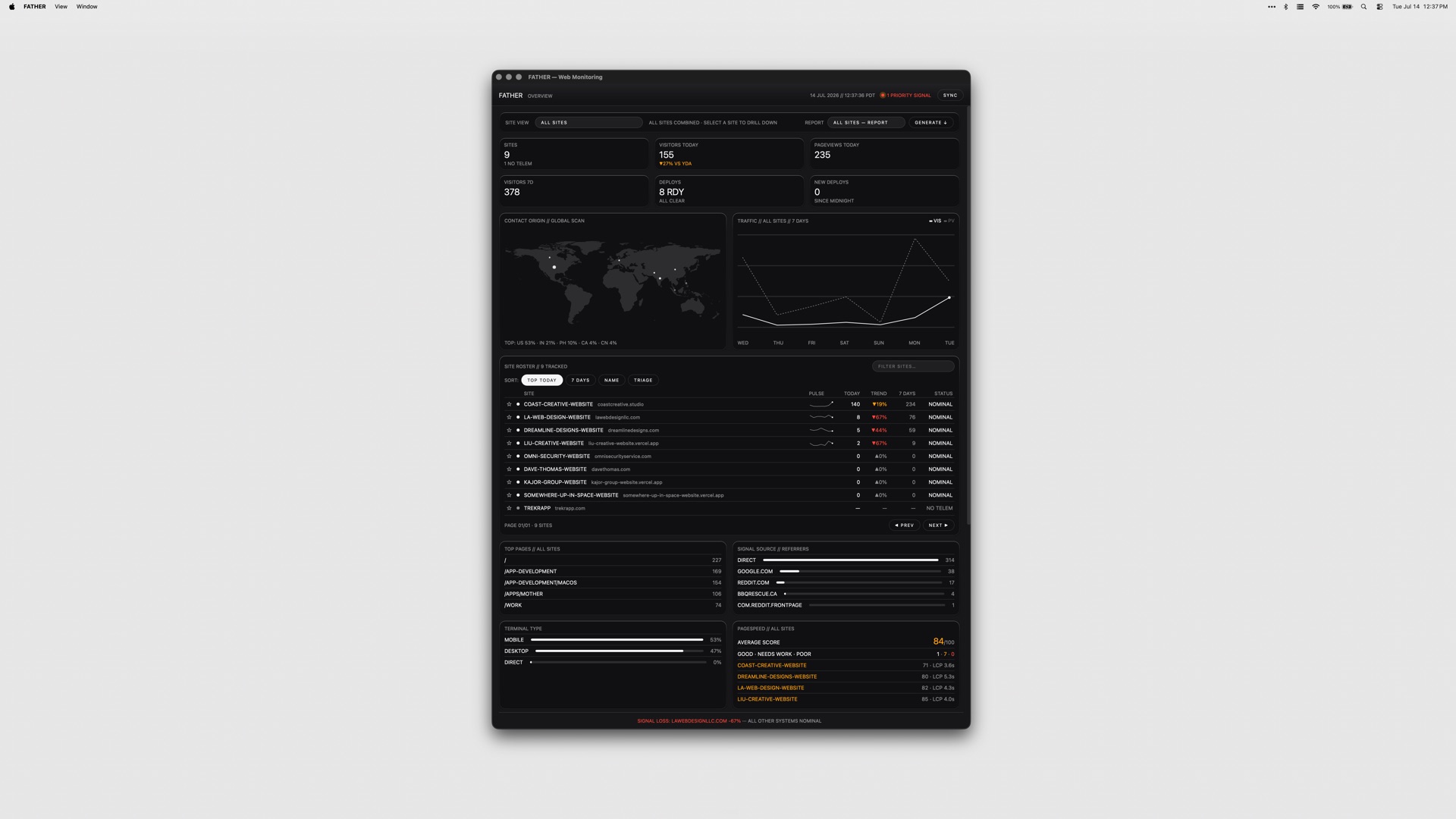
FATHER is a macOS web-monitoring app built as mission control for Vercel sites and deployments. It is designed for teams that ship on Vercel and need one place to watch the whole fleet instead of checking multiple dashboards by hand. Once you connect your Vercel account, the dashboard fills itself with deployments, uptime and speed metrics, live. Product Hunt describes it as a Mac dashboard for site traffic, deploys, uptime and SEO, while the developer's site frames it as a mission-control dashboard for your sites and deployments, built for teams shipping on Vercel. FATHER watches the fleet so you don't have to, and its stated goal is to make sure you know a site is down before your clients do. It runs as a universal app on Apple Silicon and Intel Macs. The underlying problem FATHER addresses is visibility. When a team ships on Vercel, the signals that matter — whether a build succeeded, whether traffic is arriving, whether a site is up, how fast it responds, how it ranks in search — are spread across the Vercel dashboard, Search Console, Bing, and other tools. Watching all of those manually means someone has to remember to look, and by the time a human notices a failed build or an outage, a client has usually already noticed it first. The product's framing is blunt about this: you should know a site is down before your clients do. Failing builds, expired SSL certificates, lapsing domain renewals and failing GitHub checks are all things that can take a site down or break it quietly, and each one lives in a different place. FATHER pulls those signals into a single Mac dashboard and pushes alerts to you when something needs your attention, rather than waiting for you to go looking. FATHER's data foundation is the Vercel API. Deploy tracking, speed metrics and uptime metrics all come from that API, which is why connecting your account token makes your projects appear automatically — there is no manual configuration of each project required to get started. Product Hunt's description notes that connecting your account makes every project fill in live with traffic, deploys, uptime and PageSpeed scores. Sites that are hosted somewhere other than Vercel can still be added manually, which gives them basic status checks alongside the Vercel projects. That combination means the app can act as one dashboard even for a mixed portfolio, while the deepest data — live deployments, speed and uptime from Vercel — applies to the projects actually running on Vercel. Because the connection is made with an account token, setup is a one-time linking step rather than an ongoing sync task. The dashboard's core view is the fleet at a glance: the status, uptime and response of every site on one screen. Instead of opening a hosting panel and reading project by project, you see the whole set at once and can spot the one that is off. Deploy tracking sits alongside that view and works live from Vercel, letting you watch builds progress as they run and catch failures the moment they land. The menu bar carries the same signal outside the window. The F shows a dot while builds are running and turns red when something needs you, so the state of the fleet is legible from the top of the screen without the dashboard being open. Together these three pieces cover the everyday loop of shipping: watch the build, confirm the site is up, and notice immediately when either stops being true. Alerts that find you are a deliberate part of the design: notifications fire even when the dashboard is closed. Product Hunt's description is specific about the failure case — when a build fails, the menu-bar F turns red and a notification fires, even with the window closed, so you know a site is down before your clients do. Beyond deploys and uptime, FATHER aggregates SEO signals: Search Console and Bing show clicks, rankings and indexing, which is the search-side view of how each site is performing. Operational housekeeping is covered too. SSL and domain renewals get a countdown, so a certificate or domain that is about to lapse shows up as something with a deadline rather than a surprise, and failing GitHub checks get flagged. Between them, these features put the search picture and the maintenance picture in the same place as the deploy and uptime picture. The overall approach is a single Mac app that acts as a reading layer over services you already use. You connect your Vercel account with a token; the app pulls deploy, speed and uptime data through the Vercel API and fills the dashboard automatically. Vercel-hosted projects appear on their own, and non-Vercel sites can be added manually for basic status checks. Search Console and Bing supply the SEO data, so ranking and indexing information lands next to hosting information. Alerts are delivered through system notifications and through the menu-bar item, which is what allows them to reach you when the dashboard window is not open. Tokens stay on your Mac, which the product presents as the security posture for the connection. FATHER is part of a suite of four apps that share the same set of themes, and it is sold as a one-time purchase rather than a subscription. The outcome FATHER aims for is fewer surprises. Because builds, uptime, response, traffic, PageSpeed scores, search clicks, rankings, indexing, SSL and domain deadlines and GitHub checks are all surfaced in one dashboard and through notifications, the things that normally get discovered late — a failed deploy, a site that has gone down, a certificate about to expire — get discovered as they happen. That is directly tied to the product's stated promise of knowing a site is down before clients do, which matters most for teams whose sites are the work they have delivered to someone else. Running in the menu bar means the status of the fleet is available at a glance throughout the day without opening anything, and the red F is a persistent, low-effort signal that something needs attention. The one-time purchase and the fact that tokens stay on your Mac keep the model straightforward: you buy the app, connect your account, and the data is read from services you already have. Concrete use cases follow from how the app is built. A studio or agency that ships client sites on Vercel can keep the whole portfolio on one screen and rely on notifications to learn about a failed build or an outage without polling hosting panels. A developer mid-deploy can watch the build progress live from Vercel and see the menu-bar F hold a dot while it runs, then turn red if it fails. A site owner tracking search performance can read Search Console and Bing clicks, rankings and indexing next to uptime and response, without switching tools. Anyone responsible for maintenance can use the SSL and domain countdown to act before a renewal lapses. Teams that also host sites outside Vercel can add those manually for basic status checks and keep them in the same fleet view. And because notifications fire with the dashboard closed, the app works as a background watch rather than a window you have to remember to open. FATHER is aimed at teams shipping on Vercel — the Product Hunt description describes it as being for teams, and the site repeats that framing. It is a macOS application and universal, running on both Apple Silicon and Intel Macs, with no other platforms listed. Its integrations are the services it reads: the Vercel API for deploy tracking and for speed and uptime metrics, Google Search Console and Bing for clicks, rankings and indexing, and GitHub, whose failing checks get flagged. Pricing is a one-time $7.99, or $22.99 for the full suite of all four apps from the same studio; no subscription is mentioned. The app ships with the same set of themes as the rest of the suite, and the tokens for the connection stay on your Mac. FATHER's value proposition is one screen and one alert channel for everything that can go wrong with a Vercel-hosted site. It does not ask you to change how you ship; it connects to the services you already run on and reads them back to you live — deployments, uptime, speed, traffic, search performance, renewals and checks — with a menu-bar indicator and notifications that reach you whether or not the dashboard is open. For teams whose clients depend on the sites they ship, that turns monitoring from something you remember to do into something that finds you first.
PeekPaste is a native clipboard manager for Mac, built by LucidBit, that keeps a thoughtful history of what you copy — text, code, links, images, colours and files — and brings it back with a simple gesture. Move your pointer to the edge of the screen and a panel of your recent clips slides in over your work; choose one and it goes straight back into the app you were in. It is designed for macOS 14 (Sonoma) or later as a native Apple Silicon (arm64) app, and it is aimed at anyone who copies and pastes throughout the day and wants that history to be instantly, unobtrusively reachable. The clipboard on macOS is a single slot: the moment you copy something new, whatever was there before is gone. That is fine until you need a snippet you copied half an hour ago, an address you copied before a phone call, or a screenshot that is still sitting somewhere on your desktop. The usual workarounds — keeping a scratch document, re-copying from the source app, or taking another screenshot — all cost attention. PeekPaste's answer is to treat the clipboard as something worth remembering. It stores your history locally, presents each item in a form that matches what it actually is, and makes retrieving it a matter of one small gesture rather than a search through other applications. The trigger is deliberately physical. Push your pointer against an edge of the screen and PeekPaste appears over whatever you were doing. You choose which edge, how long the pointer has to dwell there before the panel opens, and you can turn the edge trigger off entirely in favour of a global keyboard shortcut — or use both together. Hovering a card and pressing Space opens a full preview of the clip; move to the next card and the preview follows. Because the panel is an overlay rather than a window, there is no Dock icon and no window to manage, and light mode, dark mode and Reduce Motion are all respected. Each clip is presented for what it is. Code is syntax-highlighted, links carry their title and preview, colours become swatches, and files remain files; every item also remembers the app it came from. That context matters when a history grows, because a colour or a file name is far easier to recognise visually than it is as an anonymous row of text. Previewing before pasting means you can confirm the right clip — full-size images, readable documents, highlighted code — without leaving the app you are working in. Screenshots are a special case that PeekPaste handles on-device. Text inside captured images is recognised on your Mac and made searchable, so a screenshot of an error message, a receipt or a slide can be found by searching for words that appear inside the picture, exactly as if that text had been copied normally. The recognition runs locally; nothing about the image or the extracted text is uploaded. Beyond raw history, PeekPaste offers structure. You can pin the clips you reach for constantly, file the rest into categories you name and colour yourself, and filter the history when you need to narrow things down. You control how long clips are kept — a week, a month, a year, or forever — and older items clear themselves when their time is up. Transforms let you change the way a clip leaves the app: strip formatting so pasted text matches its destination, change case, trim whitespace, or encode a URL, all without touching the original. Privacy is a design decision rather than a setting. PeekPaste has no analytics, no account and no clipboard sync server; everything is local and stays on your Mac. When a password manager marks content as confidential, macOS flags it and PeekPaste honours that flag — the clip can be pasted again but is never legible on screen. You can also switch off password capture entirely, name specific apps that PeekPaste should never record from, or mark an individual clip as sensitive. When you copy a web link, PeekPaste can fetch that link's preview; your clipboard contents are not otherwise sent to LucidBit. If you want automatic pasting, PeekPaste asks for Accessibility permission so it can return to the app you were using and send the paste command for you — and you can skip that entirely, in which case the clip is simply placed on your clipboard ready to paste normally. The overall approach is gesture-first and local-first. Rather than asking you to learn a new place to look, PeekPaste borrows the edge of the screen you already use and stays out of the way until you summon it. Rather than sending your clipboard to a service, it keeps everything on the machine and gives you explicit controls over what is remembered. And rather than treating all clips as interchangeable strings, it renders each one in a form that reflects its type and origin. The benefit is time and attention. The thing you copied is still there when you need it, whether that was a minute or a month ago, and retrieving it takes a gesture rather than a detour. Because every item is previewed in its natural form, you paste with confidence instead of guesswork. Because retention, categories and pins are yours to configure, the history stays useful instead of becoming another inbox to manage. And because nothing leaves the Mac, using it does not require trusting a cloud service with your clipboard. Concrete workflows show where this matters. A developer copying functions, commands and configuration values keeps a syntax-highlighted, searchable trail of snippets that can be pasted again without returning to the source file. Someone reviewing an error message that arrived as a screenshot can search for the words inside the image rather than retyping them. A designer working with colours can revisit a swatch copied earlier and paste it into a document or codebase. Anyone collecting research can find a link by its title and preview instead of by its URL characters. Clips can be dragged directly into any app, or dropped on the Desktop to be saved as a file. And for people handling sensitive material, the app rules and confidentiality handling mean a searchable history can exist without a password manager's output ever being legible on screen. PeekPaste is a Mac-only, native arm64 build requiring macOS 14 (Sonoma) or later. Pricing is a one-time $9.99 purchase with a 7-day free trial; there is no subscription, every feature is unlocked from day one, lifetime updates are included, and no account is required. It is available from the Mac App Store or through Lemon Squeezy, with secure checkout via App Store local pricing or Lemon Squeezy in USD, powered by Stripe. A Product Hunt launch offer of $6.99 (30% off) using code PEEKPASTEPH was valid until September 30 for the first 50 redemptions. It will suit developers, designers, writers, researchers and privacy-conscious Mac users who want clipboard history that is fast to summon and stays on the machine. PeekPaste takes the most disposable part of a Mac workflow — the single clipboard slot — and turns it into a private, searchable, gesture-accessible history of text, code, links, images, colours and files. Your clipboard, within reach, and nothing of it anywhere but your Mac.
tiun. is an AI-native backend built for AI and SaaS companies, giving builders one system for authentication, payments, customer database, and analytics. According to the website, tiun gives AI and SaaS companies the backend they need to ship, scale, and grow their business in one unified platform, replacing a patchwork of single-purpose services with an ecosystem of services that are designed to work together from the start. The product is aimed at builders — developers and founders — who want to launch paid products quickly, and its public materials state that with one install command you can launch a paid product the same day you start building. The problem tiun addresses is the hidden complexity created by single-purpose tools. The website states that using separate services for auth, billing, customer data, and analytics creates multiple accounts, scattered data, and costs that compound as you scale. Builders are left maintaining business logic just to keep systems in sync, which makes the insights they need harder to reach. tiun describes itself as the backend powering the AI engineering era, and its stated approach is to remove that glue work: no webhook logic and no business logic to handle, because the services are designed to work together. This matters because every hour spent wiring up sync logic between disconnected tools is an hour not spent building the product itself, and because scattered data hides the very signals — who signs up, who pays, and how the product is used — that a company needs in order to price and grow. Authentication is the first of the core service groups. tiun provides sign up, login, and logout as simple and secure user authentication that is ready to use out of the box. It also ships User Button and User Profile components, which give users a dropdown menu to access their account so they can manage their profile and security settings without custom UI work. Multifactor authentication is supported through SMS passcodes, email, and social SSO. Together these pieces cover the account lifecycle that a paid product needs on day one, from creating an account to protecting it with a second factor or a social identity provider, and they remove the need for a builder to assemble and maintain that surface area themselves. Payments and billing form the second group, and tiun's stated promise is that you can start billing without writing payment code or wrangling webhooks. Users can create products and billing plans and accept one-time payments, subscriptions, and usage-based billing from day one. Checkout components are pre-built and ready to drop in as an overlay, so users never leave your page during the purchase flow. tiun also acts as your Merchant of Record: it processes your payments, pays out monthly, and includes tax compliance and chargebacks. The website compares transaction fees, showing tiun transaction fees of 2.9% + $0.30 and a total of roughly 3.4% + $0.30 in its example for international transactions. Because billing sits inside the same platform as the customer database, subscription state does not have to be reconciled across separate services. The customer database is the third group, and tiun states that every user, transaction, and session is stored in one place, with no syncing between tools. User management keeps each customer's subscription status up to date and stored with their user data, so builders do not have to build or maintain complex synchronization logic. Advanced event and session tracking records how users move through your product: every login, purchase, and product interaction is logged at the profile level. The platform also handles transactional emails for key user actions such as confirmations, password resets, and purchases, and it gives customers an invoice history where they can access, view, and download receipts and invoices from their user profile. Users can manage their own plans — upgrading, downgrading, or cancelling directly, with no support ticket required — and Data APIs provide one queryable API built on a consistent model, kept in sync and ready to plug into your stack. AI Analytics turns that shared data into something the whole team can act on. Because all data lives in one place, tiun says you can finally see the full picture: who is signing up, who is paying, how they use your product, where they get value, and how to price your product. The company frames this as one system that your entire team — business, engineering, product, and marketing — can work with, rather than a set of disconnected dashboards. For a SaaS or AI company this is significant because pricing, product, and go-to-market decisions all depend on the same underlying facts about customers, and having them in a single system reduces the friction of getting answers. Integration is handled through skills and the Model Context Protocol. The stated workflow is to install tiun's skills, connect the MCP, and let the AI agent do the hard work. The command shown on the site is npx skills add https://mcp.tiun.business, with deeper instructions in tiun's documentation. A customer testimonial on the site, from David Becker, founding member at Braintonic, describes trying the MCP integration and finding that it worked so well there was no backend, no webhooks, and no custom logic. Another, from Ferdinand Meyer, founder at moss, says he tried integrating tiun for a side project and it worked like a charm, calling it an absolute no brainer for future solo builders and founders. This agent-first installation is tiun's distinctive approach: rather than asking a developer to hand-wire several services together, it exposes the whole backend to an AI agent that performs the setup. The benefits follow from consolidation. Builders get a single system instead of multiple accounts and scattered data, and they avoid the compounding costs the site associates with maintaining several tools. The Product Hunt summary states the practical outcome plainly: one system for auth, payments, customer data, and analytics, one command to install, and the ability to launch a paid product the same day you start building. Because subscription status, events, sessions, and transactions live together, the insights needed to price and grow a product are reachable without extra integration work. The website also presents a case study: Res Publica increased their user base by 21% in the last 12 months by introducing usage-based billing with tiun, with Martin Stedler, CEO at Res Publica, Cicero, quoted alongside it. Concrete use cases described in the content include solo builders and founders starting a side project who need authentication and billing without building a backend, and new AI or SaaS products that need to launch a paid offering on the same day that development begins. Usage-based billing is a stated scenario: the Res Publica case study describes a company that grew its user base after introducing usage-based billing with tiun. Teams are another: business, engineering, product, and marketing functions are each named as groups that can work with the same unified system and the analytics it produces. Companies that want to accept one-time payments, subscriptions, or usage-based billing from day one, and that want tax compliance and chargebacks handled through a Merchant of Record arrangement, are also directly addressed by the payments offering. tiun is positioned for AI and SaaS companies and for builders generally — developers, founders, and operators who would otherwise assemble separate tools. The site notes that the company is supported by investors, founders, and operators. On integration, the platform connects through the Model Context Protocol and skills installed with a single command, and it is presented alongside a section labelled "INTEGRATE tiun with," although no specific third-party integrations are named in the content provided. Pricing information points to a dedicated pricing page and a "why tiun" comparison page; the visible fee example is 2.9% + $0.30 in transaction fees, with a total of roughly 3.4% + $0.30 for international transactions. Access starts with a "Try for free" action that leads to my.tiun.business, and documentation lives at docs.tiun.io. Taken together, tiun's value proposition is a single, AI-native backend that removes the seams between authentication, payments, customer data, and analytics. By installing skills and connecting MCP, builders let an agent wire up the backend, so there is no webhook logic and no business logic to maintain. The result, as the site puts it, is one system for auth, payments, customer database, and analytics — one that an entire team can work with, and that lets a builder launch a paid product the same day they start building.
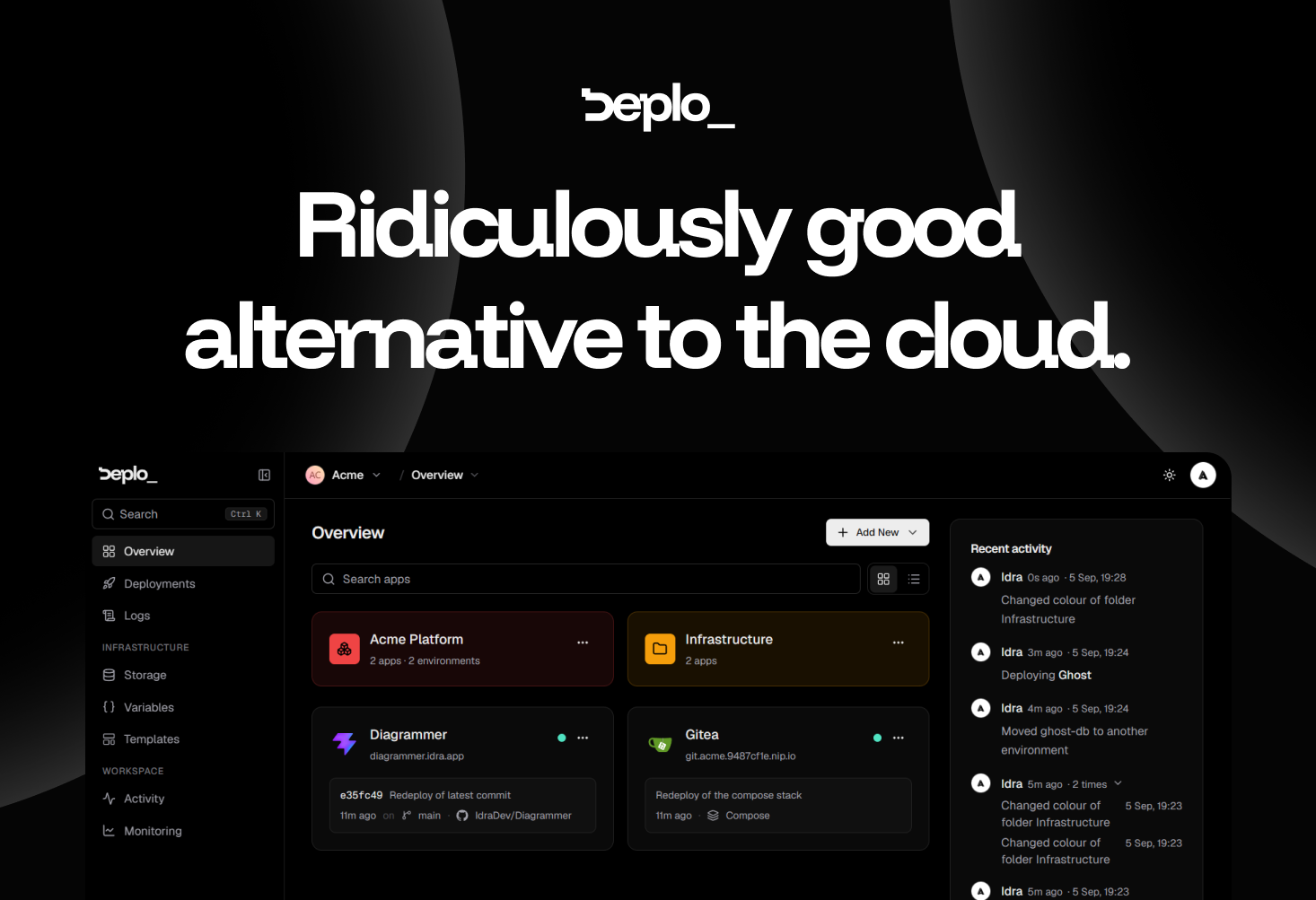
Deplo is an open-source, self-hosted alternative to cloud deployment providers. It keeps the push-to-deploy workflow developers already know — connect a repository, push code, and the application goes live — but it runs on a machine you already pay for instead of on someone else's cloud infrastructure. Installation is a single command executed on your own server. The product's homepage states the value proposition plainly: same push-to-deploy you already know, running on a machine you already pay for, with no Docker, no SSH and no invoice. Deplo is built for developers, small teams and operators who want the convenience of a modern deployment platform without giving up control of their hardware, their network and their data. Its stated purpose is to be a ridiculously good alternative to the cloud, delivering the boring operational parts already handled so that you only have to pick what to deploy. The problem Deplo addresses is the cloud bill and everything attached to it. Cloud platforms bundle deployment, TLS, backups, logs and metrics into metered services, and teams end up paying per-seat, for bandwidth, and for every additional environment. The site is candid about the psychology involved: nobody moves off a cloud bill this happily without looking for one, and it lists the six questions such a move usually raises. Deplo's answer is that you get the same push-to-deploy experience on a machine that is yours. It argues the result is usually faster, because resources are dedicated instead of shared and metered; more flexible, because anything that runs in a container runs; and cheaper, because you pay the server and nobody in between. There is also nothing proprietary to unpick the day you move it somewhere else. Deplo says that what you get on day one is deploys, backups, logs, metrics and TLS, already switched on, with nothing to buy on top and nothing to hunt down. Those are the operational basics that normally require assembling a monitoring stack, a certificate renewal process and a backup routine by hand. Deplo puts them in place as part of the platform, so a freshly installed instance is immediately useful rather than a bare server waiting to be configured. The interface supports this approach: simple by design, with a clean, intuitive UI that helps you understand what is happening without wasting time. The company frames the question of whether Deplo is another tool you have to learn as exactly what it is trying to avoid, describing the product as built to be intuitive from the start so you can understand what is happening without spending hours on another complicated interface. Two of the core workflows are shipping on every push and hosting a web application. For shipping, you connect GitHub, GitLab, Bitbucket or Gitea once. Every push to your production branch goes live, every pull request gets its own preview URL that disappears when it closes, and a bad release rolls back to the exact image that worked. The claim is that there is no CI pipeline to own, which removes a whole category of configuration and maintenance work. For hosting, you connect the repository and get a live URL with HTTPS on it; Deplo works out the framework and builds it for you, so there is no Dockerfile to write, no SSH, and nothing to hand-edit. Postgres or Redis sits next to your application in two clicks. The site notes it is the same stack you ran on the cloud — only the bill changed. Deplo is AI ready in a specific, documented way: it ships a native MCP server. You point Claude, Cursor or any MCP client at your instance, and that agent can deploy, read logs and roll back in plain language, under a token you mint and revoke. Your coding agent gets the same access a teammate gets, and the same permission checks that apply in the dashboard apply to the agent, so an agent can never do what you cannot. The capability is off by default, so it is opt-in rather than something you have to switch off after the fact. Deplo is built for a team rather than for one operator with root. It defines 46 fine-grained Capabilities, which let you express rules such as can deploy, cannot delete, and per-folder grants let you hand a member exactly one corner of the fleet. The activity trail answers who did what and when, directly in the UI, so nobody has to look in a database to find out. The site's shorthand for this is the question who did that — Deplo knows. Every action carries a name and a time on it, and you decide who is allowed to do what in the first place. Underneath, Deplo runs Docker, and the platform handles the container part for you: you deploy from a repository or a template rather than writing container configuration. There is a terminal and a compose escape hatch if you want one, and it stays out of your way if you do not — so a user really can avoid touching Docker, as the FAQ confirms. Anything that ships as a Docker image runs on Deplo, and every one of the hundred-plus templates is deployed and checked first, on the principle that a hundred that work beat a thousand that might. Templates include WordPress, Supabase, OpenClaw, Home Assistant, GitLab, Gitea, Nextcloud, Forgejo and Grafana. Deplo is open source under AGPLv3 and brings your own server: your hardware, your network, your data, with no lock-in and no pricing page to keep an eye on. The outcomes Deplo claims are straightforward. Setup is fast — ten minutes from now it is deployed, since install takes one command on a server you already pay for. The bill collapses to a single line: you pay your server provider and that is the whole cost, with no per-seat pricing, no bandwidth surprises and no charge for the tenth environment. Performance is usually better because resources are dedicated rather than shared and metered. Flexibility comes from the fact that anything that runs in a container runs. And exits are clean: your apps are standard Docker containers on a server you own, so leaving means moving containers rather than rebuilding on someone else's proprietary primitives, and because Deplo is AGPLv3 nobody can take it away or reprice it. Deplo's own use-case pages demonstrate how it is used. One is letting AI interact with your infrastructure: pointing an MCP client at your instance so an agent can deploy, read logs and roll back under a revocable token with the same permission checks as the dashboard. Another is shipping on every push, where pushes to a production branch go live and pull requests get preview URLs that disappear when they close, without owning a CI pipeline. A third is controlling who can do what on a shared fleet, using capabilities, per-folder grants and the activity trail. A fourth is hosting a web application from a repo with a generated HTTPS URL and a Postgres or Redis instance alongside it. Deplo also documents taking over an existing VPS and migrating from Coolify or Dokploy, and its template library covers services such as WordPress, Supabase, Nextcloud or Grafana. The audience is developers, small teams and operators who run their own servers or want to, and who want team-grade deployment without cloud pricing: Deplo is built for a team, not for one operator with root. Integrations explicitly named include GitHub, GitLab, Bitbucket and Gitea for repository connections, Claude and Cursor as MCP clients, and Docker as the underlying container technology. Templates cover services such as WordPress, Supabase, GitLab, Gitea, Forgejo, Nextcloud, Grafana, Home Assistant and OpenClaw. Pricing is free and open source under AGPLv3, and the only bill is whatever you pay your server provider. The product is currently in beta, with a stable release targeted for Q4 2026, and people are already using it for real workloads today. Deplo's takeaway is a single trade: keep the push-to-deploy experience you already like, move it onto hardware you already own, and stop paying a metered bill in between. With deploys, backups, logs, metrics and TLS on from day one, an MCP server for agent-driven operations, per-push shipping with preview URLs, fine-grained team permissions and an AGPLv3 open-source core, it positions itself as a simple-to-use alternative to cloud deployment that leaves your apps as standard Docker containers on a server that stays yours.
Juggler is a visual workbench for AI coding agents. It gives developers a desktop application, backed by a matching server, where conversations with a coding agent live as persistent trees rather than scrolling transcripts. Tool calls open into proper views, and every model transaction can be inspected to show exactly what the model received and returned. Juggler supports Claude Code, OpenAI Codex, GitHub Copilot, Gemini, Ollama and other providers through one interface. It is free to download, its core is open source, and it needs no account of its own. The product is aimed at developers who do hands-on work with coding agents and want to see and control what the model is doing to their codebase. Using a coding agent means reading and editing substantial amounts of text, and a conventional scrolling transcript is a poor interface for that work. Important detail — the arguments passed to a tool, the approval that was granted, the exact system prompt the model saw — tends to disappear into a log. Context behaves like a sealed container: once history has been assembled it is hard to see what is in it or to reshape it. At the same time, long-running agent sessions are fragile. A lost connection, a quit or a restart can end the work, and if the code lives on a dev box or a server, the session is stranded on that machine. Juggler exists to give that work a proper interface and to make the agent's behaviour inspectable rather than opaque. Conversations in Juggler are persistent trees rather than log files. You can branch at any point, recursively, and use a sub-thread for a tangent, a delegated task or a competing approach. When the sub-thread finishes, only its result returns to the parent instead of pouring its entire working history into the main context — delegated threads keep their intermediate work out of the parent context and return only the result requested. The Context Surgeon extends this idea: the agent's context is not treated as a sealed container. You can inspect the assembled system prompt and the available tools, fold selected history into a new thread, move or copy items between branches, expand a branch back into its parent, and undo structural changes. Everything important is inspectable. Tool calls open into proper views, and tool arguments, approvals and results can each be opened on their own. Any model transaction can be inspected to show its system prompt, messages, tool definitions, output, token use, timing and stop reason. Tool calls, item properties and nested sub-threads are laid out in a Finder-style Miller column view, with Miller-column navigation, focused views for tool calls and context, and controls designed for long sessions. Because the interface is built around inspection rather than a single stream of text, you can compare what is available now with what a past model turn actually received. Juggler can run where the code lives. For most work you launch the desktop app, which starts the local server itself and opens your project with no terminal required. When the project lives on a dev box or server, you run the headless juggler binary there instead and attach from a browser or the desktop app, locally or across the network. The server owns the session and does the work, and every connected client stays in sync, so you can keep a desktop view on your main screen, open another in a browser, or check the same session from your phone. Sessions also survive quits and reconnects because a session lives on disk, not just in memory: quit, relaunch or lose the connection and the conversation is still there, including an agent waiting for you to approve its next step. Juggler supports the usual LLM providers — Claude Code, Anthropic, OpenAI, Codex, GitHub Copilot, Gemini, Mistral, Z.AI, Ollama, OpenRouter, DeepSeek and other OpenAI-compatible providers — so you can bring a subscription you already pay for or your own API keys. Context limits are handled before they become your problem: Juggler sizes the complete request before each call, leaves room for the answer, and compacts older history when a conversation outgrows the model's window. MCP tools are fully inspectable as well: connect a local or remote MCP server and follow the whole handoff, including the schema offered to the model, generated arguments, approval, result and error. You can inspect server status and logs, filter individual tools, and compare what is available now with what a past model turn actually received. Under the hood, Juggler is Go, not Electron. It ships as a native desktop app and matching server; the backend is Go and the interface is type-checked JavaScript served directly, with no frontend compilation step. Conversations are Yjs documents synced live to every connected client. The application is built to be extended: context items, LLM loop strategies, slash commands, file viewers, info cards, Pinboard tabs and their UIs are JavaScript extensions you can inspect, fork or replace. Even tools such as read, write and bash use the public extension SDK, so the LLM-facing tools use the same SDK available to you. Writing an extension starts with a single scaffold command. The result is a workbench built for hands-on work that holds up over long sessions. Developers can see and control what their LLM is doing to the codebase, delegate work into sub-threads without flooding the main context, and inspect exactly what the model received and returned at any point. Sessions are durable and multi-client, so the work is not tied to one window or one machine. Because the main application is AGPLv3 and the extension SDK, bundled extensions and examples are Apache-2.0, extensions can remain closed source while the core stays open. Typical scenarios follow the product's design. A developer working through a large change opens a sub-thread for a tangent, delegated task or competing approach and returns only its result to the parent. Someone whose project lives on a dev box or server runs the terminal server there and attaches from a browser or the desktop app. Anyone connecting an MCP server can follow the schema, arguments, approval, result and error of each handoff. Long sessions benefit from tree navigation, focused tool-call views and context management, and an agent waiting for approval after a quit or reconnect can be picked up where it left off. Juggler is aimed at developers and other hands-on users who spend a substantial part of their working life inside a coding agent. It is free to download, its core is open source and it needs no Juggler account. It is available for macOS, Windows and Linux, either as the desktop app or as a headless terminal server, and it works with a wide range of LLM providers and OpenAI-compatible endpoints. The author behind it has spent more than 30 years building tools for developers and creators, including Tracktion, JUCE and Cmajor, and Juggler is in active development with frequent releases and a public changelog. Juggler's value proposition is control: a visual workbench that turns an AI coding agent's opaque transcript into inspectable trees, inspectable tool calls and editable context, running locally or on the machine where the code lives. It is free, open source and extensible — a foundation built to hold up for people who use coding agents every day.
Image to ASCII is a free browser-based converter that turns an image into a composition of characters. You can drop, paste or choose an image, adjust its width, character style, brightness, contrast and color, and then copy the result as plain text or Markdown, or export it as TXT, PNG, SVG, HTML or ANSI. The tool describes itself as an ASCII studio with three steps: upload, refine, export. It is built for people who want ASCII art they can actually use, such as a signature for a GitHub README, a mascot for a Discord server, a character-art cover for a blog post, or retro visuals for profiles, posters and landing accents. No signup is required, and images stay on your device. The underlying problem the product addresses is that ASCII art is easy to generate but surprisingly hard to place usefully. Spacing collapses in some destinations, fonts differ from the preview, and colored output does not survive as plain text. The converter handles this with a live preview, a before/after comparison, and explicit guidance that images may need a code block to preserve spaces or an image export when the destination changes the font. It also states clearly that GIF input produces a still result, not an animation, so output stays predictable. Detailed FAQ entries explain why ASCII art can look stretched, why colored ASCII does not work in TXT, and what width suits a GitHub README, giving users concrete ways to keep their text art readable after copying. Images can be uploaded by dropping, pasting or choosing a file, and the supported formats are JPG, PNG, WebP and GIF. Conversion happens locally in the browser using Canvas, so the source file never needs to leave the device. The site emphasizes this repeatedly: the image is read by your browser and converted locally with canvas, processed locally and never uploaded, and your file stays in this browser. GIF conversion uses the frame the browser provides. Alongside your own files, the tool ships with built-in sample images you can load to see real ASCII previews with their settings, including a prism portrait at 200 columns, silk in motion and a light portal at 220 columns, a glass bloom blog cover at 200 columns, an 80-column fox README mark, a 56-column Discord mascot, and a neon jellyfish demo. Output readability is controlled primarily by width and character style. The interface states that fewer columns give bolder characters while more columns give finer detail, and real examples run from 56 columns for chat code blocks to 80 columns for README marks and 200 to 220 columns for detailed editorial studies. Character styles include Detailed (a smooth photo ramp), Dense (@%#\*+=-:. ), Blocks (Unicode symbols), Simple (#*+=-. ) and Minimal (@. ), and an Invert option is available. Presets are split into two groups: visual styles such as Auto, Neon, Pixel, Gallery, Fine Art and Portrait, and presets for a destination such as Logo, README, Terminal, Social and Poster. Users can start from a preset and then fine-tune for the specific image in front of them. Under advanced tuning the tool groups light, texture and background controls. These include Tonal balance, described as recovering midtones without clipping the extremes, plus Brightness, Contrast, Sharpen, Saturation, Background Cleanup and Dither. The design intent is that the controls stay close to the preview, so you can see how every setting changes the final text art as you adjust it. A reset settings action returns you to a starting point, and the preview panel can be expanded while refining. Export options are separated into text formats and image formats. Text-side actions include Copy Plain, Copy Markdown, Copy README, Copy Comment and Copy ANSI, plus Download TXT and Download ANSI, along with a Copy Share Caption action. Image-side downloads include PNG, SVG and HTML. Color is preserved in PNG, SVG, HTML and ANSI export, while TXT, Markdown, README and comments stay plain for code blocks. The FAQ explains the distinction directly: TXT files store plain characters rather than per-character colors, so image exports should be used when the colored ASCII preview needs to travel with the artwork. Text exports keep editable characters; image exports preserve the look. Overall the product works by sampling your image in the browser, mapping brightness and detail to characters on a live canvas, and offering a comparison against the original. A compare slider lets you drag across artworks, Paper view and an expand preview option change how you inspect the result, and sample artworks can be reused with a "use this style" action. The converter compensates for tall text cells when sampling your image, which is why the documentation tells users to keep results in a monospace font and preserve line breaks, and notes that changing the column width changes detail rather than character proportions. A mobile-friendly workbench keeps upload, tuning, copy and export actions reachable on small screens. The practical benefit is ASCII art that survives its destination. For GitHub and code, the tool creates README banners, text signatures and code comment artwork. For terminals and forums it makes terminal welcome screens, Discord posts and forum text art. For retro visuals it turns a photo or picture to ASCII for profiles, posters and landing accents. Because conversion is local, users get this without uploading a personal photo or logo, and without creating an account. The site presents three purpose-built destinations with the settings and export choices that make them work. For a blog or editorial cover, a 200-column detailed color glass flower can be exported as PNG or SVG to preserve character texture and colors, while the headline stays in the blog editor so it remains readable and searchable. For a GitHub README, an 80-column simple monochrome geometric fox stays recognizable as a compact text mark, copied with Copy README for a fenced text block while project names and links stay outside the artwork. For Discord, a 56-column dense monochrome ghost mascot can be copied as Markdown and checked on a phone, or exported as PNG if the message wraps or clips. Dedicated guides cover the blog cover, GitHub README and Discord workflows. The tool also publishes preset recipes as starting points: Portrait uses a detailed ramp, dither on, mild sharpen and medium contrast; Logo uses Blocks style, a smaller width, high contrast and dither off; README uses a simple ramp around 80 columns and then Copy README or Copy Markdown; Terminal uses 80 columns with clean light backgrounds and exports ANSI or TXT; Social uses 56 columns for chat code blocks or PNG when spacing may collapse; and Poster uses a wider 200-column output exported as PNG, SVG or HTML. For GitHub READMEs the guidance is to start around 70 to 90 columns so the art fits code blocks on laptops and mobile screens, and for Discord or Slack it is to use Copy Markdown to wrap the output in triple backticks so spacing is preserved in a monospace code block. In short, Image to ASCII is a free, private, browser-based way to turn any picture into character art and then get it into the place it is meant to live. It keeps the source image on your device, gives you readable controls for width, character ramp, tone, color and dither, and offers both plain-text and color-preserving exports so the result works whether it lands in a README, a chat message, a terminal or a blog cover.
OzBrain is a hosted knowledge base that acts as a shared brain every AI agent you use can read and write. Rather than letting each platform build its own separate, partial memory, OzBrain gives Claude, ChatGPT, Claude Code, Cursor, Gemini Spark and other connected clients one structured source of truth that agents and teammates both read from and write to. It is a place to hold your projects, decisions, research and the thinking you have already done, so a new chat can begin with what the task actually needs. It is aimed at founders, small teams and individuals whose work increasingly happens inside AI agents, and who want one brain instead of a scattered pile of chats, documents and stale file copies. The problem OzBrain addresses is fragmentation. Today the context of your work lives in your chats, your teammate's context lives in theirs, and the two never meet, so you share a doc, drop a message, and paste the same things over and over again. Meanwhile copies of the same plan sit in Drive, on laptops, in Downloads and in email, and no one is sure which one is current. Platform memory does not solve this: it keeps scraps and summaries, a few preferences and a thin summary of past chats, not the work itself. OzBrain is positioned as the layer underneath the tools you already use, holding the projects, decisions, research and prior thinking that platform memory cannot hold. The first core capability is structure. OzBrain breaks your knowledge into nested pieces, so an agent pulls the exact slice it needs rather than loading everything. The site illustrates this with a launch plan that nests into launch campaigns, which in turn nests into a single launch email: the agent can retrieve the 218-token, 0.87 KB email instead of the 11,842-token, 47.3 KB plan. Because the agent has less to load, it answers faster and more cheaply, and it is less likely to invent an answer out of context it never needed. In practice this means an agent can go straight to the email body it has to write without dragging the whole launch plan, the campaigns and the surrounding research into the conversation. The second capability is freshness. When newer thinking lands, OzBrain goes back through your knowledge on its own, marks the old material as replaced, and points to the latest version. You never have to hunt down every place an old decision lived, and no agent answers from a version you have already moved past. The site shows a company-details article being updated with a new domain, and the website-launch-plan article being updated to record that a new website URL was set and that the old domain is forwarded. Alongside this, OzBrain keeps every change on the record: which agent made it, what changed, and the reasoning behind it. Changes are proposed before they land, so several agents can work at once without writing over each other, and you can always see how the brain got to where it is. A recent-changes table on the site lists the time, the agent, the article and the reason for each edit. The third capability area is privacy and portability. Your brain is encrypted at rest and sealed to your account, so nothing leaks between tenants. OzBrain states that it never trains on your data and never sells it, describing the brain as a sovereign place for your data. On top of that, you can export everything as markdown whenever you want, including after you cancel, and deleting your account removes your content. The company frames this as a deliberate position: your knowledge is yours, you should be free to use the best tools for it, and OzBrain would rather earn your stay than lock you in. OzBrain works as a brain you connect rather than a service you code against. It is explicitly not another memory API: memory APIs sell add and search endpoints to developers building apps, while OzBrain is a hosted brain behind the connector menu that Claude and ChatGPT already show you. There is nothing to install and no coding required: you add OzBrain from the connector menu in Claude or ChatGPT, sign in, and approve it. The knowledge itself is stored as structured articles with links, provenance and freshness. Every write is staged, routed and checked against what the brain already holds, which is what separates it from a notes app: notes are written by you for you, while a brain is written by your agents for your agents. The site also describes it as one URL, so anything that speaks the protocol can hold the same brain. The benefits described follow from that approach. Agents pull only what they need, so they make fewer mistakes and answer faster and more cheaply. Your new and better ideas replace old notes automatically, so you stop chasing outdated versions scattered across drives, downloads, chats and email. Because every change is recorded with its reasoning and proposed before it lands, multiple agents can work simultaneously without overwriting each other, and you can audit how the brain arrived at its current state. Your data stays encrypted and private, and you retain the ability to take it with you as plain markdown at any time. Concrete scenarios in the content include teams where every member's agents work on the same knowledge: point everyone at one OzBrain, and what one person works out is already available to everyone's agents. A launch workflow shows an agent retrieving just the launch email slice instead of the full plan. A domain migration shows an update to company details propagating so agents no longer answer from an outdated domain. A solo founder's export shows seven brains and 503 articles being exported as markdown, and an enterprise scenario shows org-owned shared brains that every seat's agents share. OzBrain connects to Claude and ChatGPT through their native connector flows, plus Claude Code, Cursor, OpenClaw, Hermes Agent and Gemini Spark where Google makes it available (US, Spark eligibility), and any client that supports connectors. Pricing starts free: the Free plan is $0 forever with up to 50 articles, sharing on brains you own, unlimited brains, reads, writes and connections, write-time size discipline, and markdown export anytime. Pro is $20 per month with up to 500 articles for one venture plus personal knowledge, and Max is $99 per month with up to 5,000 articles for when agents run the operation from one brain. Both paid tiers include unlimited brains, reads, writes and connections plus markdown export anytime. Enterprise adds org-owned shared brains above the Max ceiling with per-seat pricing designed with you. The site also publishes comparisons against Mem0 and Supermemory, ChatGPT Memory, Claude Projects, ChatGPT Projects, Notion and Obsidian. The takeaway is straightforward: OzBrain is the shared, structured, portable knowledge layer beneath every AI agent you use, so your agents and your teammates stop working from separate partial memories and start working from one current, auditable source of truth that you can export and leave with whenever you choose.