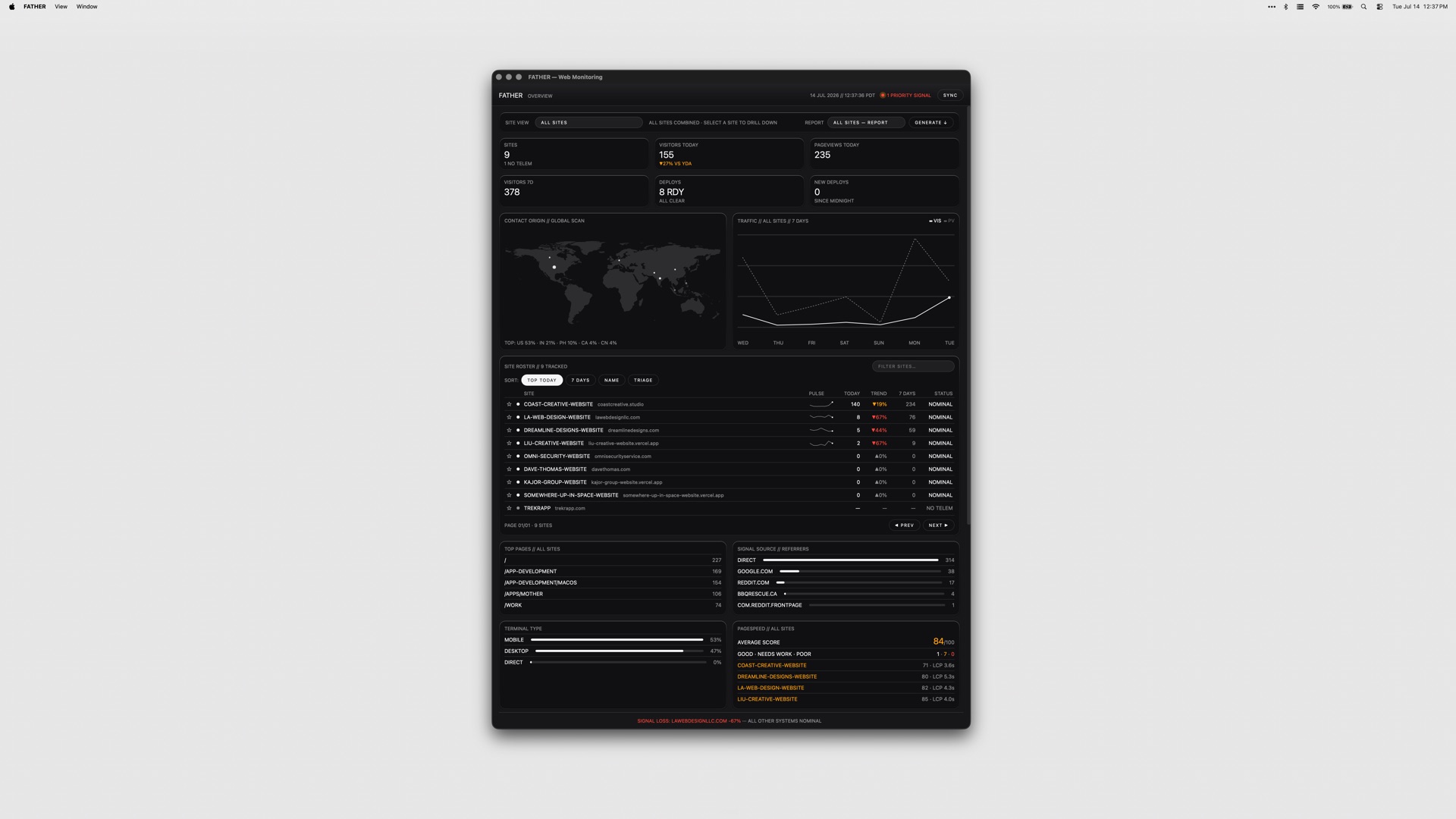
FATHER is a macOS web-monitoring app built as mission control for Vercel sites and deployments. It is designed for teams that ship on Vercel and need one place to watch the whole fleet instead of checking multiple dashboards by hand. Once you connect your Vercel account, the dashboard fills itself with deployments, uptime and speed metrics, live. Product Hunt describes it as a Mac dashboard for site traffic, deploys, uptime and SEO, while the developer's site frames it as a mission-control dashboard for your sites and deployments, built for teams shipping on Vercel. FATHER watches the fleet so you don't have to, and its stated goal is to make sure you know a site is down before your clients do. It runs as a universal app on Apple Silicon and Intel Macs.
The underlying problem FATHER addresses is visibility. When a team ships on Vercel, the signals that matter — whether a build succeeded, whether traffic is arriving, whether a site is up, how fast it responds, how it ranks in search — are spread across the Vercel dashboard, Search Console, Bing, and other tools. Watching all of those manually means someone has to remember to look, and by the time a human notices a failed build or an outage, a client has usually already noticed it first. The product's framing is blunt about this: you should know a site is down before your clients do. Failing builds, expired SSL certificates, lapsing domain renewals and failing GitHub checks are all things that can take a site down or break it quietly, and each one lives in a different place. FATHER pulls those signals into a single Mac dashboard and pushes alerts to you when something needs your attention, rather than waiting for you to go looking.
FATHER's data foundation is the Vercel API. Deploy tracking, speed metrics and uptime metrics all come from that API, which is why connecting your account token makes your projects appear automatically — there is no manual configuration of each project required to get started. Product Hunt's description notes that connecting your account makes every project fill in live with traffic, deploys, uptime and PageSpeed scores. Sites that are hosted somewhere other than Vercel can still be added manually, which gives them basic status checks alongside the Vercel projects. That combination means the app can act as one dashboard even for a mixed portfolio, while the deepest data — live deployments, speed and uptime from Vercel — applies to the projects actually running on Vercel. Because the connection is made with an account token, setup is a one-time linking step rather than an ongoing sync task.
The dashboard's core view is the fleet at a glance: the status, uptime and response of every site on one screen. Instead of opening a hosting panel and reading project by project, you see the whole set at once and can spot the one that is off. Deploy tracking sits alongside that view and works live from Vercel, letting you watch builds progress as they run and catch failures the moment they land. The menu bar carries the same signal outside the window. The F shows a dot while builds are running and turns red when something needs you, so the state of the fleet is legible from the top of the screen without the dashboard being open. Together these three pieces cover the everyday loop of shipping: watch the build, confirm the site is up, and notice immediately when either stops being true.
Alerts that find you are a deliberate part of the design: notifications fire even when the dashboard is closed. Product Hunt's description is specific about the failure case — when a build fails, the menu-bar F turns red and a notification fires, even with the window closed, so you know a site is down before your clients do. Beyond deploys and uptime, FATHER aggregates SEO signals: Search Console and Bing show clicks, rankings and indexing, which is the search-side view of how each site is performing. Operational housekeeping is covered too. SSL and domain renewals get a countdown, so a certificate or domain that is about to lapse shows up as something with a deadline rather than a surprise, and failing GitHub checks get flagged. Between them, these features put the search picture and the maintenance picture in the same place as the deploy and uptime picture.
The overall approach is a single Mac app that acts as a reading layer over services you already use. You connect your Vercel account with a token; the app pulls deploy, speed and uptime data through the Vercel API and fills the dashboard automatically. Vercel-hosted projects appear on their own, and non-Vercel sites can be added manually for basic status checks. Search Console and Bing supply the SEO data, so ranking and indexing information lands next to hosting information. Alerts are delivered through system notifications and through the menu-bar item, which is what allows them to reach you when the dashboard window is not open. Tokens stay on your Mac, which the product presents as the security posture for the connection. FATHER is part of a suite of four apps that share the same set of themes, and it is sold as a one-time purchase rather than a subscription.
The outcome FATHER aims for is fewer surprises. Because builds, uptime, response, traffic, PageSpeed scores, search clicks, rankings, indexing, SSL and domain deadlines and GitHub checks are all surfaced in one dashboard and through notifications, the things that normally get discovered late — a failed deploy, a site that has gone down, a certificate about to expire — get discovered as they happen. That is directly tied to the product's stated promise of knowing a site is down before clients do, which matters most for teams whose sites are the work they have delivered to someone else. Running in the menu bar means the status of the fleet is available at a glance throughout the day without opening anything, and the red F is a persistent, low-effort signal that something needs attention. The one-time purchase and the fact that tokens stay on your Mac keep the model straightforward: you buy the app, connect your account, and the data is read from services you already have.
Concrete use cases follow from how the app is built. A studio or agency that ships client sites on Vercel can keep the whole portfolio on one screen and rely on notifications to learn about a failed build or an outage without polling hosting panels. A developer mid-deploy can watch the build progress live from Vercel and see the menu-bar F hold a dot while it runs, then turn red if it fails. A site owner tracking search performance can read Search Console and Bing clicks, rankings and indexing next to uptime and response, without switching tools. Anyone responsible for maintenance can use the SSL and domain countdown to act before a renewal lapses. Teams that also host sites outside Vercel can add those manually for basic status checks and keep them in the same fleet view. And because notifications fire with the dashboard closed, the app works as a background watch rather than a window you have to remember to open.
FATHER is aimed at teams shipping on Vercel — the Product Hunt description describes it as being for teams, and the site repeats that framing. It is a macOS application and universal, running on both Apple Silicon and Intel Macs, with no other platforms listed. Its integrations are the services it reads: the Vercel API for deploy tracking and for speed and uptime metrics, Google Search Console and Bing for clicks, rankings and indexing, and GitHub, whose failing checks get flagged. Pricing is a one-time $7.99, or $22.99 for the full suite of all four apps from the same studio; no subscription is mentioned. The app ships with the same set of themes as the rest of the suite, and the tokens for the connection stay on your Mac.
FATHER's value proposition is one screen and one alert channel for everything that can go wrong with a Vercel-hosted site. It does not ask you to change how you ship; it connects to the services you already run on and reads them back to you live — deployments, uptime, speed, traffic, search performance, renewals and checks — with a menu-bar indicator and notifications that reach you whether or not the dashboard is open. For teams whose clients depend on the sites they ship, that turns monitoring from something you remember to do into something that finds you first.
Publisher
A
admin
Launch Date2026-09-16
Platformdesktop
Pricingpaid