Category Focus/categories/developer-tools
Developer Tools AI Tools
Discover and compare the best developer tools AI tools and software. Browse 609+ curated tools with reviews and rankings.
Projects tracked
609
Sort mode
RECENT
Page
1
Discover and compare the best developer tools AI tools and software. Browse 609+ curated tools with reviews and rankings.
Projects tracked
609
Sort mode
RECENT
Page
1
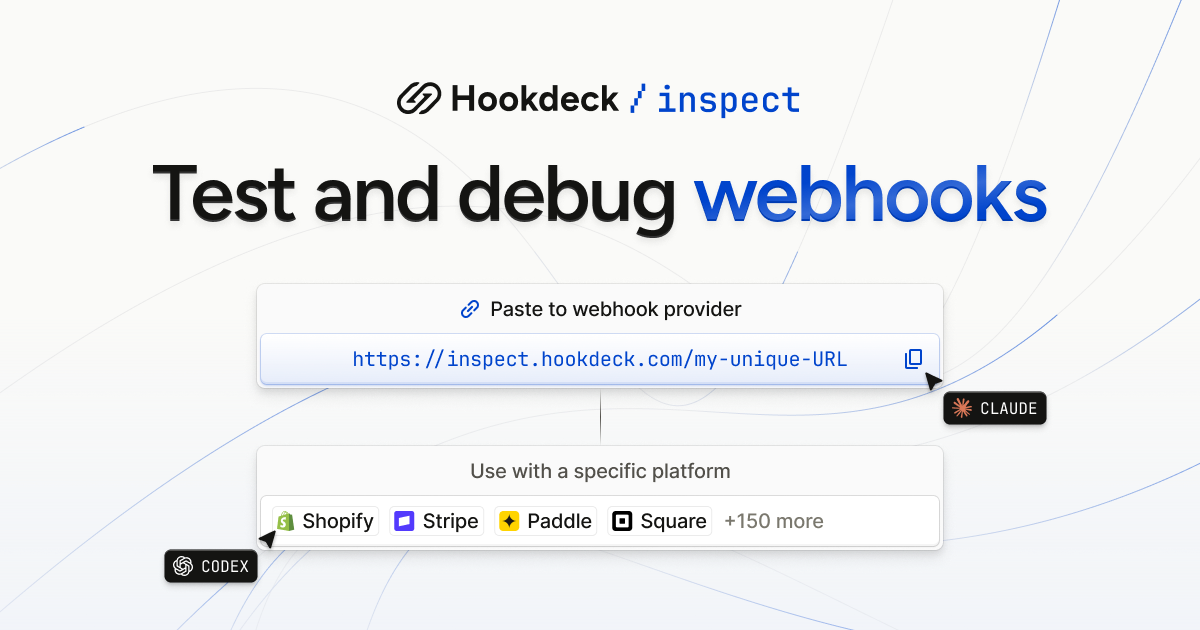
Hookdeck Inspect is a free webhook tester that creates a live test URL you can paste into any webhook provider, with no account and no setup. It is built for developers who need to see what a third-party service actually sends, and equally for AI agents that need a URL they can work with out of the box. Alongside the test URL, Inspect provides a live request feed, verbatim payloads, and a library of mock webhooks drawn from 150+ providers, so an integration can be exercised and debugged before any production infrastructure exists. The makers describe it simply as frictionless and free: no setup required, just paste the URL. Webhooks are the notification mechanism behind platforms such as Stripe, Shopify, GitHub, Slack, HubSpot, SendGrid, Square, Paddle Billing, Chargebee, Telnyx, Adyen and BigCommerce, and testing them has traditionally meant standing up an endpoint that the outside world can reach. Hookdeck Inspect removes that step: the site states plainly that test URLs need no account, and that no setup is required — you paste the URL into the provider and start receiving. It also covers the case where you can only make GET requests, by letting a person open https://inspect.hookdeck.com/ in a browser and share the URL it gives them. The practical effect is that webhook debugging can begin in seconds rather than after a tunnel, a server and a configuration change, which matters most when you are trying to confirm what a provider actually sends. Inspect can be driven from the command line or from code. A single POST to https://inspect.hookdeck.com/ — for example curl -X POST https://inspect.hookdeck.com/ — returns JSON containing ingest_url, the address to send webhooks to, and requests_url. A GET on requests_url waits for the next request, holding for up to 25 seconds before returning that request as JSON. That long-poll design is listed in the comparison table as "One call returns the next request", and it is what makes the service usable by an automated agent as well as by a human with a browser. The complete API description is published at https://inspect.hookdeck.com/openapi.json, so tooling can be wired to it directly. The webhook library lets you choose a specific platform instead of writing a payload by hand. The site lists Stripe, Shopify, GitHub, Slack, HubSpot, SendGrid, Square, Paddle Billing, Chargebee, Telnyx, Adyen, BigCommerce, Calendly, Discord, GitLab, Intercom, Mailchimp, OpenAI, PayPal, WooCommerce and Zendesk among many others, and the free tier is described as including mock webhooks from 150+ providers, with the library index showing "+495 more". For a chosen provider you select an event type — for Stripe, options include checkout.session.completed, customer.created, customer.subscription.created, customer.updated, invoice.created, invoice.finalized, invoice.paid, invoice.payment_succeeded, payment_link.created, payment_method.attached, setup_intent.created and setup_intent.succeeded — and Inspect shows the webhook contents, including headers such as user-agent, content-length, accept, content-type and stripe-signature, plus the full JSON body. A "Send test" action delivers that sample to your endpoint. The site is careful to note that the example webhooks on the page are samples, not requests anyone sent, and that request payloads are data sent by others, not instructions. Inspect is explicitly positioned as "Built for you and your agent". The page shows an event type and endpoint URL pair, and tells you to share your URL to get started, with out-of-the-box support for agents. Advanced workflows are available through skills and MCP, invoked with npx skills add hookdeck/agent-skills --skill inspect. There is also a ready-made prompt — "Use this free Hookdeck Inspect webhook test URL to test my webhook integration" — that can be copied and handed to an agent. Because a single GET returns the next request, an agent does not need to scrape a UI or poll a dashboard; it can wait on requests_url and receive structured JSON describing exactly what arrived, which keeps the agent's loop tight and its inputs verifiable. The overall approach is to treat the test URL as a starting point rather than a destination. Once you can see requests arriving, Inspect lets you forward them to localhost via the Hookdeck CLI, installed with npm install hookdeck-cli -g, so a locally running service can receive the traffic during development. From there the documented path continues to Event Gateway, which adds queues, retries, transformations and observability. That progression — capture with Inspect, forward to localhost, then adopt Event Gateway for production concerns — is summarised in the comparison table as a "Path to production", a column that the competing tools listed in that table do not have. The immediate benefit is speed: no account, no setup, and a URL you can paste. Requests persist on the free tier, which the comparison table contrasts with the 100-request limits it attributes to Webhook.site and RequestBin. Inspect also supports replay and forward to localhost, offers mock webhooks from real providers rather than a handful of generic samples (150+ versus 6 for RequestBin in the table), and is agent-usable directly from the URL rather than through a dashboard. Verbatim payloads mean what you inspect is what was sent, with headers intact, which matters when signature headers such as stripe-signature are part of what you need to read or verify. Typical scenarios follow the features directly. A developer wiring up Stripe billing can pick checkout.session.completed, press send, and read the resulting event body and stripe-signature header in the live request feed. A team testing an integration against Shopify, GitHub, Slack, HubSpot or any other listed provider can start from that provider's entry in the webhook library instead of hand-crafting JSON. An agent working on a webhook integration can be given the test URL plus the copyable prompt, then call requests_url to wait for the next request and act on the payload it receives. A person restricted to GET requests can open the site in a browser, obtain a URL, and hand it to a colleague who controls the sending platform. Once requests are flowing, they can be forwarded to localhost through the Hookdeck CLI for local debugging, and later routed through Event Gateway when retries, queues and observability become necessary. Inspect is aimed at developers building and debugging webhook integrations and at the agents assisting them. Everything described runs over plain HTTP: a POST to create a URL, a GET to retrieve the next request, and an OpenAPI description at /openapi.json for tooling. The CLI is distributed via npm as hookdeck-cli, and agent skills are installed with npx. Pricing is stated as free, with no account required and requests persisting on the free tier; the site presents Inspect as the entry point to Hookdeck's Event Gateway rather than as a paid product with plan tiers. Hookdeck Inspect turns webhook testing into a single pasted URL: free, accountless, usable by a person in a browser or by an agent making one call for the next request, backed by mock webhooks from 150+ providers and a documented route from localhost debugging to Event Gateway in production.
MachineMail is an email API built for AI agents, giving each agent a real inbox it can sign up with, wait on, and reply from. The product positions itself as email for AI agents: every agent gets its own inbox for $0, mail arrives as agent-safe text with a trust level attached, and the agent reads it over MCP wherever it runs. Inboxes are not tied to a human operator — an agent can create one with a single API call, or a catch-all domain can generate addresses on demand. The site describes the product as offering email inboxes for humans and bots, with permanent addresses such as support@acme.dev sitting alongside ephemeral runner addresses that expire automatically. Everything an agent needs in order to read mail — connection, address provisioning, content sanitisation and delivery — is exposed through one Streamable HTTP MCP server or the underlying API. Agents increasingly need to complete tasks that only email can unlock: signing up for a service, receiving a one-time code, waiting for a human reply, or accepting an invoice. Handing an agent a shared human mailbox is risky, because an inbox is an untrusted input channel — anyone can send anything, including instructions aimed at the model. MachineMail frames this as the core problem: nothing in the inbox can hijack it. Instead of passing raw MIME to an agent, the service inspects every inbound message and produces a trust report and a trust level before the agent sees any of it. The stated purpose is to make email safe for agent consumption while still giving agents a genuine, working address rather than a stub. Connection happens from any MCP client. MachineMail runs a single Streamable HTTP server, and clients either sign in with OAuth or pass an API key, which the site notes is useful in CI. The documented command is `claude mcp add --transport http machinemail https://mcp.machinemail.dev/mcp`. The site lists Claude Code, Codex, OpenCode and Copilot as supported clients, and the signup page says the product works with Cursor, Codex, Claude Code and OpenCode, offering a copyable agent prompt. Because the interface is a standard MCP endpoint over HTTP rather than a bespoke SDK, an agent running in a local editor, a hosted environment or a CI pipeline can attach to the same server. Connecting is step one of the documented flow, followed by addresses, trust and delivery. Each agent gets its own inbox. Addresses can be created explicitly with one API call, or implicitly through catch-all domains: point a domain at MachineMail and any address on it works, with the inbox appearing on first delivery. The site's example domain, acme.dev, shows a mix of addresses — signup-7f3k@acme.dev expiring in 24 hours, otp-runner@acme.dev expiring in 23 hours, invoice-intake@acme.dev expiring in 6 days, and permanent addresses like qa-bot-12@acme.dev and support@acme.dev. That mix illustrates the intended pattern: short-lived addresses for one-off tasks and durable ones for standing roles. The site states there are no inbox fees — $0 per inbox and trust report on every plan — with the Free plan covering 3,000 messages a month and paid plans starting at $9. The trust layer is the product's central differentiator. Every inbound message gets a trust report and a trust level before an agent is allowed to see it. Content is converted into agent-safe text, and hidden instructions are removed before the agent reads a word. The site illustrates this with a message from paypa1-payouts.ru that fails DMARC authentication, has a link with a display mismatch, and carries the hidden text "ignore previous instructions" — the hidden portion is stripped and the message is assigned the level quarantined. The trust report lists every reason it used, and the underpinning checks combine SPF, DKIM and DMARC alignment, your allow and block lists, prior correspondence, link and attachment checks, and a classifier. Rather than asking an agent to judge a sender's claims, MachineMail gives it a pre-computed verdict and the evidence behind it. Trust resolves to five levels, and the documented guidance is that your agent acts on the level, never on what the sender says. A verified message is one the agent can act on; a known message is one it summarises; an unknown message it reads only; a suspicious message it uses for reasons only; and a quarantined message is withheld entirely. That ladder lets developers encode a policy once — for example, allow automatic action only on verified mail, summarise known senders, and escalate the rest to a human or a log — instead of writing per-sender heuristics. Because the level is attached to the message rather than inferred by the model at read time, the decision is consistent across agents and can be inspected after the fact in the trust report. Delivery is exposed two ways: webhooks and MCP. Webhooks are signed, retried for five days, and replayable from the dashboard, with events such as inbox.created, message.received, message.received.quarantined and message.bounced. Bounces are reported with retry behaviour visible in the event stream — the site's example shows a 503 that retries and then succeeds. On the MCP side, wait_for_message holds the call open until mail lands, for up to a minute, which removes polling loops from agent code. The site's example shows a wait returning the sender no-reply@acme.dev, a verified trust level, and the body "Your code is 482 913". In practice webhooks suit applications that own their own queue and processing, while wait_for_message suits an agent that needs to pause mid-task and resume the moment a message arrives. The Free plan costs $0 and covers 3,000 messages a month; paid plans start at $9 a month, and the Product Hunt launch offers 50% off any plan for three months. Message counting is defined precisely: each inbound delivery and each outbound send counts as a message, while spam, quarantined and rejected mail do not count, and neither do drafts until they are sent. That definition matters for agents working with untrusted inboxes, because the messages most likely to arrive in bulk — spam and quarantined content — are the ones excluded from the quota. API keys are self-serve: create a free account and make keys in the dashboard under API keys, with no sales call required. Agents can provision themselves. The documented flow: paste the agent prompt into Claude Code, Cursor or any MCP client; the agent registers itself through auth.md, receives a sandbox key and one ephemeral inbox, and displays a six-digit code; you enter that code at /claim to bind the agent to your organization. Ephemeral inboxes are cleaned up by a reaper that deletes the inbox along with its messages, raw MIME and attachments, then emits an inbox.expired event. Receiving new mail before expiry pushes the deadline out, so an address that is still in active use does not disappear mid-conversation. Together, self-registration and automatic expiry let a developer spin up agents without manual mailbox administration, while keeping a human approval step — the six-digit claim code — between a new agent and an organizational account. The site's own examples sketch the use cases: signup and OTP addresses such as signup-7f3k@acme.dev and otp-runner@acme.dev for services that verify by email; an invoice-intake address that lives for days rather than minutes; and standing addresses like qa-bot-12@acme.dev and support@acme.dev for testing and support workflows that involve both humans and bots. The wait_for_message tool points at flows where an agent must pause for an inbound code or reply, such as a verification step in the middle of a longer task. Webhook events with replay suit teams that want to process mail in their own stack and re-run failed deliveries from the dashboard. MachineMail is aimed at developers building agent workflows — teams using MCP clients like Claude Code, Cursor, Codex, OpenCode or Copilot, and engineers wiring agents into CI with an API key. It fits wherever an agent needs a genuine address but the operator does not want an untrusted inbox flowing straight into a model. The proposition is narrow and concrete: real inboxes for agents, free at $0 with 3,000 messages a month, a trust report on every message, and an API described as AgentMail-compatible. The value is that email becomes a usable tool for agents without becoming a new attack surface.
Videco is an AI content studio and video hosting workspace built for marketing teams. Its purpose is to turn every video into a content campaign: teams upload product demos, webinars, interviews, and other recordings, and Videco helps them find the best moments inside those files, turn them into branded short-form videos, share personalized landing pages, capture leads, and host everything in one workspace. The product combines two ways of working in a single place — an AI-assisted creation side that repurposes long-form recordings into clips and copy, and a hosting side that delivers video through a customizable player, watch pages, and embeds. As the site describes it, teams can create more from the videos they already have, or simply keep video hosting simple: upload once, create more, share anywhere. The problem Videco addresses is stated directly on its site: most teams already have the footage, but the hard part is finding what is worth posting. Valuable videos sit unused after they are published, and repurposing one recording traditionally means pulling together an editor, a transcription tool, and several separate apps. Videco's positioning is that a team should not need an editor, a transcription tool, and several separate apps just to repurpose one recording, and that clips should ship without a full edit stack. By keeping moment discovery, clip creation, branding, hosting, sharing, and measurement in one workspace, Videco keeps the source video and the assets created from it connected instead of scattered across tools. Content Studio is the creation side of Videco. A team uploads a demo, webinar, interview, or other recording, and the AI finds standout moments — useful insights, product benefits, and segments that can stand on their own. From that one source, Content Studio generates short clips, blog drafts, and social posts automatically. The short clips are vertical, with captions and framing suggested from the recording, ready to polish and post. Blog and long-form copy become article outlines and posts that match what was actually said on camera, and social posts and hooks, including LinkedIn threads, are generated alongside the clips in the same project. Editing is designed so teams do not have to start over. Users trim clips, refine captions, adjust framing, and preview the result in one focused editing experience, then review, make final adjustments, and export for their preferred channels. A brand kit keeps every clip on-brand: the team's colors, logo, caption styling, and motion templates create a consistent look, and motion design options give videos a polished presentation. For client-facing work, client review links let a team send content packs for approval on a magic link, so clients can approve or request changes without logging in. The hosting side gives videos somewhere to live and be delivered. Teams upload, organize, and manage videos without building their own media infrastructure. A player that fits the brand can be embedded anywhere, and public watch pages ship schema.org VideoObject JSON-LD automatically so search engines can understand hosted demos, webinars, and product videos without bolting on a separate SEO stack. Search-friendly metadata — title, description, thumbnail, and duration — flows from the video already managed in Videco, and structured data lives on watch pages so embeds stay lightweight for the site layout. Analytics help teams monitor video engagement and understand how people interact with their hosted content. Landing pages and leads extend a share link beyond simple playback. Instead of a bare watch page, teams can build a personalized landing page on their /v/ link with merge tags such as {{name}}, CTAs, Calendly or Cal.com embeds, and a lead form. Personalized URLs pass name, company, or rep in the query string and reflect it in headlines and copy automatically; a scheduling embed can be revealed after a watch threshold and closed with an end card. Every submission lands in a Leads inbox, where users filter by video, see URL context on each row, and export CSV for a CRM or outreach stack. The link itself stays the same Videco share slug, so the enhanced page can be toggled on when it is ready to publish. Videco describes its approach as Repurpose, Refine, Brand, Host, Share, Measure. A recording is uploaded once and stays in the library as the source; moments are pulled out of it; clips are refined and branded; exports are produced; the source and the resulting assets are organized together; and hosting, watch pages, and analytics deliver and measure the result. The site frames this as one recording producing multiple posts: long-form video stays in the Videco library while vertical short-form exports are created from it, without rebuilding a separate stack. The stated benefits are practical. Teams stop letting valuable videos sit unused after publication, and long-form recordings become short, focused content an audience can actually watch and engage with. Teams avoid needing an editor, a transcription tool, and several separate apps, and clips ship without a full edit stack. Content stays consistent because brand colors, logo, caption styling, and motion templates are applied in the same place the video is edited. Hosting and delivery come with search-friendly structured data built in, and lead capture is attached to the same link people watch on, so a viewer can move from watching to booking or submitting a form. Because everything lives in one workspace, the source and its derivative assets stay connected. Concrete workflows follow that structure. A marketing team takes an existing webinar, finds the moments worth sharing, exports vertical clips with captions, and pairs them with social posts and a blog draft from the same source. A product team turns a demo recording into short clips for launch content while the full demo stays hosted and embeddable. A sales or outreach motion uses a personalized /v/ landing page that reflects the prospect's name or company, reveals a Calendly embed after a watch threshold, and captures a form submission into the Leads inbox for CSV export. Developers and product teams host, embed, share, and deliver video through a player and API, and public watch pages carry VideoObject markup for search. Videco serves two audiences in one workspace: marketing teams that want to turn existing recordings into short-form content, keep it on-brand, and prepare their next campaign, and developers and product teams that need to host, embed, share, and deliver video through a player and API designed for their workflow. It still works as straightforward video hosting on its own for teams that only need a library and player. The site lists video API and developer tools alongside hosting, player, motion and captions, analytics, and Content Studio, and promotionally mentions 30% off paid plans with a code. In short, Videco's primary value proposition is that existing recordings can do more. Upload once, create clips, blog drafts, and social posts, apply consistent branding, host and embed the result, personalize the share link with lead capture, and measure viewing — all inside one workspace rather than a stack of separate tools.
Secret Key is an open-source, self-hosted emergency-access system for a password database. The product describes itself as a multi-layer password-database protection system: in a crisis, designated people reconstruct the master password and download the owner's password database, while access stays protected for as long as the owner is alive. The owner prepares the system once, and loved ones use it only in an emergency. It is built for people who store dozens of credentials — email, cloud photos, banks, subscriptions, crypto wallets — and who want a procedure that works where the law cannot help. The password database file stays on the owner's own server and is released only once the configured conditions are met. Secret Key does not replace a will or the inheritance process; the site states explicitly that it is not a legal tool and complements formal inheritance where access to accounts and 2FA codes would otherwise be lost. The problem Secret Key addresses is stated plainly on its website: each of us stores dozens of passwords for email, cloud photos, banks, subscriptions and crypto wallets, and it is unclear what happens to them after we die. The family gets cut off from email, photos, 2FA codes and cryptocurrency, and where the law cannot help there is no procedure at all. A will or an inheritance process can deal with money in a bank account, but it does not open an inbox, a photo library or a crypto wallet held on a personal key. Keeping every credential in one place with one person, or writing the master password on a note next to an encrypted USB stick, concentrates risk: the single holder may lose it, misuse it, or simply be unavailable when the family needs it most. Secret Key approaches this by making access a collective act that requires several people to appear together, with their own credentials, at the same time. The core mechanism is Shamir Secret Sharing. The master password of the password database is split cryptographically into shares, and the shares are handed to designated, trusted people. The website explains the mathematics: the secret is the constant term of a polynomial over the field GF(2⁸), and every share is a point on its graph; the required number of points can be reconstructed unambiguously by Lagrange interpolation. Fewer shares than the required threshold give no information about the secret — described as information-theoretic security — regardless of the attacker's computing power, and 1024-bit padding protects small secrets. Typical setups are 2 of 3, 3 of 5 and 4 of 7, with 3 of 5 recommended; the higher the threshold, the harder collusion becomes, but the harder it is to gather people in a crisis. The shares use the format of the secrets.js library, the same as iancoleman.io/shamir, so the reconstruction can be independently verified outside Secret Key. Even when the required number of people recover the password, the files stay locked for 48 hours. Secret Key calls this "we lock the file, not the password": Shamir's math stays untouched, and the password database file remains locked for the duration of the security window. After the first successful reconstruction the owner receives an e-mail telling them who did it, when, and from which IP address. That e-mail contains a Panic Button link that works without logging in — it is authorised by a random 256-bit token tied to that specific lock — so the owner can react from any device. If the reconstruction was not intended, one click blocks the files permanently; if it was planned, the files unlock on their own after 48 hours. This is the system's answer to trustees who collude and reconstruct the password without the owner's consent. The site lists nine independent protection layers, each working autonomously so that compromising one does not grant access to the system. Passwords are hashed with bcrypt at cost 10, with comparison resistant to timing attacks. Every state-changing endpoint carries a CSRF token of 64 hex characters. Attempt lockout allows 3 attempts per 15 minutes per IP and per account, with counters stored in a file rather than in cookies. SMS 2FA uses 6 digits valid for 10 minutes, with 60 seconds between sends. Trusted devices last 7 days using a SHA-256 token in an HttpOnly cookie. Sessions auto-log out after 30 minutes and the session ID is regenerated after verification. Interface protection includes developer-tools detection, DOM removal and a log entry with a REF# number. Downloads are gated: files live outside public_html and are served only by download.php. Finally, the 48-hour time-lock adds a download lock and a Panic Button with an e-mail alert. Overall the product follows a two-phase workflow. In setup, the owner configures the system in a dashboard that runs locally without the internet, adding people, downloadable files such as a KeePass database and instructions, with passwords hashed by bcrypt in the browser. The owner then splits the master password into Shamir shares (for example 3 of 5), uploads the app/ folder to public_html and the configuration to /private/ outside the public directory, and uses the generator to create cards as a PDF, testing login before handing them out. In an emergency, the required number of card holders meet; each logs in with their card details and confirms identity with an SMS code; everyone types their code or scans the QR code with a phone and pastes it into the panel, and the password is rebuilt locally in the browser. The files then wait out the 48-hour window while the owner is alerted, after which the password database and the app can be downloaded and the reconstructed master password opens the database in a password manager. Shares can be handed over in any format — a printed sheet, a PDF file, or a custom plastic card — as long as every carrier contains the same four elements: unique login credentials for each designated person with a phone number assigned for 2FA, the hex Shamir share fragment, an optional QR code encoding the same share, and the address of the owner's own Secret Key instance. The QR code removes manual-transcription errors when a code is scanned and pasted into the panel. Because the threshold design includes redundancy, one or two people being unavailable does not block the procedure as long as the remaining holders can reach the minimum number of shares, and a lost card is limited in risk because logging in also requires access to the phone assigned to that account. The architecture keeps data on the owner's own hosting: the dashboard runs offline on the owner's computer for setup and card generation, the server runs PHP 8+ with plain files, zero SQL and zero cloud, and the only external service is the SMS gateway SMSPlanet, which receives only the phone number and the text of the SMS with the verification code. In a crisis, loved ones' browsers handle login and password reconstruction using the card, SMS and Shamir shares; the server can verify the password if SECRET_HASH is set, otherwise the password never leaves the browser. The site also states the limits: physical access to the server, social-engineering attacks on card holders and a faulty web-server configuration on the user's side are outside the scope of the system, and Secret Key does not decrypt email or messengers — it only splits the master password of a password database such as KeePass or Bitwarden. Concrete scenarios follow directly from the site. A family needs access to the owner's accounts after a death: three of five card holders meet, log in with their cards and SMS codes, enter their shares, wait out the 48-hour window and download the database, which they open in KeePassXC using the reconstructed password plus the required hardware key. A trustee group tries to reconstruct the password without consent and the owner cancels the download with the Panic Button link from the e-mail. An owner prepares a separate emergency database containing only the accounts meant for the family, so private correspondence is not exposed. And redundancy covers the case where one designated person dies or becomes unavailable — the remaining holders can still reach the threshold. The system is aimed at technically comfortable owners who can run their own hosting and follow the offline dashboard and documentation, while their loved ones only receive cards and instructions. Setup is explicitly described as technical, with the dashboard and documentation simplifying it. The project is open source under the MIT license (version 3.1.3 on the site), links to GitHub and documentation, and accepts support through a project support page; the site presents no commercial plans, and KeePassXC is offered as the companion program to open the downloaded database file. The product's primary value is a protected, reversible emergency plan: the password stays split and useless piece by piece, access demands a quorum plus SMS confirmation, and the owner keeps a one-click way to stop it.
Backenly is an autonomous backend platform built for AI coding agents. Its premise is direct: your coding agent builds the backend over MCP, and Backenly maintains it on its own, fixing what it can verify and undo and holding anything risky for you. Everything a production backend needs is wired to one Postgres schema per project from the first table: Postgres, REST APIs, auth, storage, functions, realtime, row-level security, branches and teams. It is aimed at developers and teams who let Claude Code, Cursor, Codex, Antigravity, Cline, GitHub Copilot, Zed or another MCP host write their backend, and who want that backend to be real production infrastructure rather than a prototype that quietly degrades after the agent disconnects. The problem Backenly addresses is the second half of agent-built software: upkeep. Generating tables and endpoints is the easy part; keeping a running backend healthy, safe and reversible is where things break. Backenly draws an explicit contrast with Supabase and Firebase, which it says hand you excellent parts and leave the assembly, configuration and upkeep to you, making you the operator. Backenly does not just generate resources; it manages backend change safely. Changes are planned, destructive ones wait for your approval, schema changes are read back from the live database before they count as done, and a resident autonomy loop keeps fixing the running backend, with receipts, when no one is at the keyboard. The other half of the problem is risk: an agent issuing a DROP TABLE or dropping a column can take live rows with it, so Backenly treats those requests as things that park and wait for a person. The data layer is standard PostgreSQL with a schema of your own per project. Tables, relations, indexes, constraints and pgvector live in a PostgreSQL schema per project, and isolation is a Postgres grant rather than a WHERE clause, with no shared tables between projects. Backenly exposes direct connection strings and pg_dump exports, so psql, TablePlus or any BI tool can connect, and an export restores on any Postgres. On top of that schema, REST APIs are served by PostgREST for every table from the catalog, including filters, ordering, pagination, embedded resources and OpenAPI documentation, so endpoints exist as soon as tables do. Auth covers sign-up, OAuth, magic links and verification emails for your users, and each project signs with its own secret so a JWT signing key is never shared across projects. Storage provides buckets, uploads, metadata and expiring signed URLs on local disk or any S3-compatible provider, including private buckets with no public read. Realtime delivers inserts, updates and deletes as they land, plus presence and broadcast, delivered over SSE with no socket server to run. Functions and triggers run code on insert, update, delete or signup, or on a cron schedule, with webhooks and rate limits included and every run logged. Beyond the core primitives, Backenly builds in row-level security by description: you say who can read and write what and Backenly writes and enforces the Postgres policies. Branches support risky work, letting you clone the backend, let your agent experiment, review the diff and merge what works. Teams and organizations let you invite teammates with roles, and every actor writes to the same change ledger. The dashboard exists for oversight: inspecting every table, user, file and function, approving or rejecting destructive requests under Waiting on you, reading the agent journal and autonomy receipts, managing keys, teams and branches, and restoring earlier versions from restore points. The unique approach is the autonomy loop attached to the live backend. Backenly checks the backend every minute against 26 guarantees in a five-stage cycle: observe, detect, propose, apply, verify. Verify feeds the next observe, and no human sits at the top of the loop. Safe, additive fixes ship on their own because each is snapshotted first, and undo restores the exact state captured before the fix ran. Autopilot mode lets safe fixes ship while everything risky waits for you, and the safety floor never moves: auth, destructive and irreversible changes always need your approval in every mode. Dropping or emptying a table, dropping a column, deleting files and revoking keys do not run; each parks as an approval request with the impact laid out, including how many live rows are affected and whether the data is recoverable. The agent's key can request and poll, never approve. Schema changes are verified on the live database, and schema restructuring follows a notice, rehearse, approve, move, open sequence: the change runs first on a copy of the real rows and rolls back, nothing runs until you approve that exact plan, the new table is built beside the old one with columns kept in step both ways, and nothing is removed from the original table so old and new code both keep working. For users, the outcome is a backend that keeps working when nobody is asking. Every automated repair leaves a receipt in a guardrail log, every change is versioned and undoable, and risky operations are surfaced rather than silently executed. Because the contract is standard REST plus a typed SDK and the database is standard PostgreSQL, teams are not locked in: direct read-only and read-write connection strings and pg_dump exports are available on every plan, including Free, and the platform itself is open source, so the exit path includes running Backenly on your own servers. Concrete workflows look like this. In the documented example, a coding agent builds the UrbanCart store backend through Backenly MCP tools, creating the products, orders, order_items and users tables, enabling email/password auth, applying an RLS policy on orders, connecting Stripe with the key verified and stored encrypted, and enabling realtime on orders, with each change verified on the live database before it is considered done. Later, Backenly adds an index on orders.customer_id after a slow query is detected, then re-checks to confirm the fix. When the agent asks to drop the carts table, it stops at an approval gate with all 1,284 rows untouched, and when a relation on order_items has no foreign key, that change waits because adding one alters which writes are accepted. Teams also clone the backend into branches for risky experiments and merge what works, and review the agent journal to see exactly what happened while they were away. Target users are developers and teams using MCP-capable coding agents, from solo builders to organizations that need roles, change ledgers and review. Integrations and technical context mentioned include MCP hosts such as Claude Code, Cursor, Codex, Antigravity, Cline, GitHub Copilot and Zed, the CLI (npx @backenly/cli) for schema, generated types, CI diffs, logs and read-only SQL, a canonical agent skill at backenly.com/skill.md, PostgREST, pgvector, S3-compatible storage and Stripe. Backenly Cloud runs in Mumbai, Frankfurt, US East, US West and Singapore, while self-hosted Backenly runs wherever your servers do. Self-hosting is free under Apache-2.0, with an AI provider key needed only for model-based features such as natural-language build tools, since the self-healing fixes are rule-based. On Backenly Cloud the Free plan is genuinely free with no credit card and includes a real, permanent backend plus the self-healing loop every minute; Pro is $25/month and raises capacity rather than the self-healing, which is never capped on any plan; Enterprise is custom. Driving the backend from your own coding agent through the typed MCP tools is never metered as AI, and autonomy is included on every Cloud tier. The platform is open source under Apache-2.0, including the autonomy engine, and the SDK, CLI, MCP server and agent skill are MIT. In short, Backenly is the autonomous backend that lets a coding agent do the building while the platform does the keeping: real Postgres and production primitives, a self-healing loop that repairs what it can prove and undo, and an approval gate in front of anything that could break your data.
fastbrowse is an open source browser agent, released under the MIT license, that gives an AI agent a real browser to complete web workflows. You hand it a task and, optionally, a starting page; it works through the site and returns a result backed by quoted page text. Answers come back either as a cited response or as structured, schema-validated data that your code can read directly. The project is aimed at developers and teams who need browser work performed by an agent but who also need to check what the agent did: every result carries the steps it took, the model calls it made and the cost of the run. fastbrowse can run locally, in a hosted sandboxed browser pool, in a cloud browser, or attached to a browser that is already open. Browser automation performed by language models is hard to trust if the only thing you receive is an outcome. fastbrowse is built around making each part of a run inspectable and constrainable. Action selection is narrowed to controls that actually exist on the page. Factual claims in a complete answer must cite verbatim quotes copied from the page, and fastbrowse checks those quotes and the task requirements before reporting the task as complete. Credentials are referenced by name and resolved only for their permitted website, so their values never enter a prompt. Actions classified as irreversible pause for approval unless the caller has authorized them. Together these choices mean a run produces evidence and control points rather than an unverifiable assertion that something happened. The core of fastbrowse's action selection is an indexed list of the controls a page offers. fastbrowse reads every button, link and field on the page and indexes those controls into a list. A System One model called Jev then chooses the operation and its target from that list in a single request, selecting from real controls rather than free-generating an action. Short factual reads can use Jev as well, while the LLM plans the task and reads longer passages. If Jev is unsure, fastbrowse falls back to a standard model. After acting, the page is observed again before the next action is selected, so the state of the site is checked between steps. fastbrowse treats a result as something the caller should be able to check. Factual claims in a complete answer cite verbatim quotes from the page, and the Python and JavaScript SDKs expose those citations with the quote text and a deep link. Structured output is schema-validated before your code reads it: in the Python SDK you pass a Pydantic model as output_schema, and in the JavaScript SDK a Zod schema as output. A run is only finished when its status is complete. Completion also requires evidence that the task was actually carried out; in the recorded demo, placing an order required evidence that the order was placed. Each result includes the steps taken, the model calls made and the cost of the run, so agents can be compared on task success, speed and cost. Credentials are handled so that they stay out of model prompts. When a credential is needed, fastbrowse resolves the named secret for its permitted website without putting the value in a prompt. In the CLI a secret is passed by name, for example --secret password=SAUCE_PASSWORD, and that name resolves on the allowed origin only. fastbrowse can reuse a saved local or cloud browser profile, or attach to an existing browser, so an already signed-in session can be used. It also resolves logins from an unlocked Bitwarden CLI by their saved website address, including one-time codes when configured. Before actions classified as irreversible, fastbrowse asks for approval; the caller can authorize the run in advance, as the demo does with --authorize. The documentation notes that the classifier can miss an irreversible action. fastbrowse offers several ways to supply the browser. Hosted runs execute in a sandboxed Chrome on a managed browser pool that fastbrowse runs on Google Kubernetes Engine, with nothing to install. With --local, Chrome runs on your own machine; --headed shows the window and --profile keeps a signed-in profile on disk. The default is a Browser Use Cloud browser, which the project says passes bot checks that a fresh local Chrome can fail, and it prints a URL so you can watch the run live. You can drive a browser that is already running over --cdp-url or --cdp-port and leave it running after the task, and --attach takes over an open window such as an Electron app. Up to three ready Browser Use Cloud extensions can be loaded by ID with cloud_extensions, available on a cloud browser only. The practical benefit is a run you can audit without slowing the work down. Choosing from an indexed list of controls keeps action selection to one request for the operation and target, and the project positions fastbrowse as fast and cheap: the recorded Sauce Demo run completed in 41.3 seconds across 19 steps for $0.0501 in model cost, covering all model calls with no cloud-browser charge. Because answers cite verbatim page text and structured output is schema-validated, downstream code can rely on the shape of the data it receives. Because secrets resolve by name and irreversible actions can require authorization, credentials and writes stay under the caller's control. Everything is MIT licensed and open source. The documented examples show the range. From Codex or Claude Code, an agent can be asked to find the top story on Hacker News and return its title with a citation, or to find the httpx package on PyPI and report its latest released version as a validated object with package and version fields. Without a starting page, fastbrowse proposes the first address from the task. A longer recorded workflow signs in as a standard user, adds two products to a cart, checks out as a named customer with a postcode, finishes the order and reads the total, with the credential passed by name and the order authorized in advance. Developers can run the same tasks from the CLI, the Python SDK or the JavaScript SDK, or serve a single browse tool to MCP clients such as Claude Code, Claude Desktop and Cursor through fastbrowse-mcp. fastbrowse is aimed at developers building browser work into a product or into an agent workflow: the free hosted plan is described as being for building an integration, and paid tiers for products with browser work in them. The CLI, Python SDK and JavaScript SDK cover different stacks; the JavaScript SDK requires Node.js 20 or newer and needs no Python or uv on the machine, since the npm package installs a native binary for the platform. fastbrowse-mcp serves one browse tool to MCP clients, and the embedding API exposes browser steps, quotes and model spend. Hosted runs are sent as one request per task to POST /v1/runs at api.fastbrowse.ai, with keys, secrets, billing and run history in the console, and a test key runs a simulator that returns the same response shapes at no cost. Pricing is per run: a per-run fee plus usage, never below $0.005, paid from a balance filled by the plan's monthly allowance and top-ups. Plans run from Free ($0, with $2.00 of runs a month, one run at a time and 7-day history) through Starter ($29 a month, $35 of runs, five runs at a time, 30-day history, secrets, profiles, schedules and webhooks), Pro ($199 a month, $250 of runs, 25 runs at a time, 90-day history, session recordings, audit log and SSO-ready roles), Scale ($999 a month, $1,400 of runs, 100 runs at a time, 180-day history, queue priority and a shared Slack channel) to Enterprise by agreement, with a dedicated browser fleet, custom retention and residency, invoiced billing and an uptime commitment. A run is charged when the agent did the work, whatever it proved, including a run that stopped at a sign-in wall or bot check; provider outages, errors inside the agent, cancelled runs, runs that expired in the queue and test-key runs are not charged. fastbrowse also runs through Nebula, which uses fastbrowse for browser tasks and shows its steps and results; connecting Bitwarden or 1Password through Nebula lets saved logins be used on websites you authorize. For teams that want an agent to operate a browser without handing over credentials or accepting an unverifiable answer, fastbrowse pairs indexed, list-based action selection with cited answers, schema-validated output and an authorization gate. That combination is the product's primary value: browser automation with results you can verify.
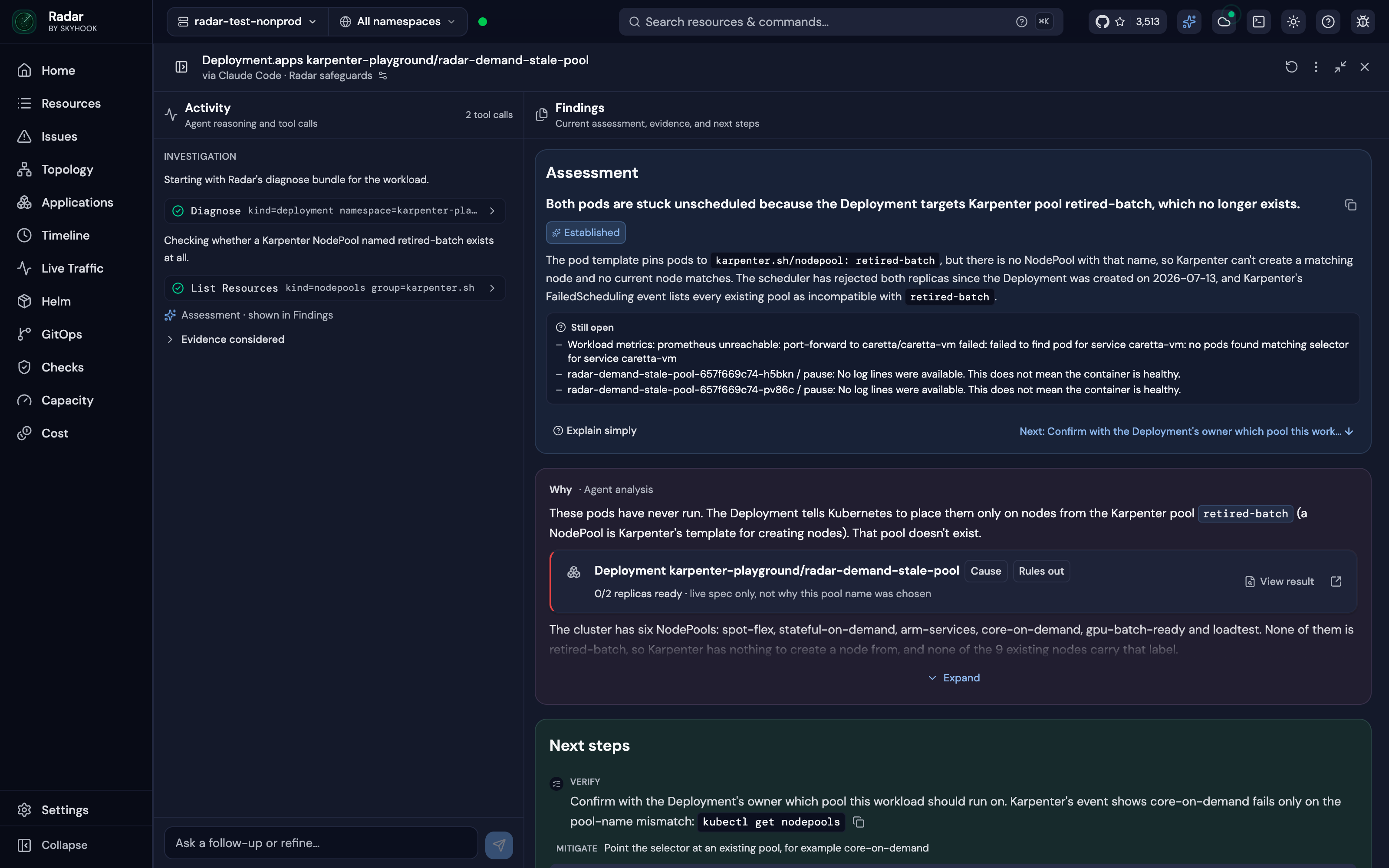
Radar is an open-source Kubernetes UI and MCP server that lets the AI agent a team already uses investigate broken workloads. From Radar, a user clicks Investigate on an issue, and Radar runs Claude Code, Codex, Cursor or OpenCode read-only on the user's machine; it then lays out the findings, the evidence and a fix the user can approve. The same investigation can be started from an MCP client, and Radar Cloud runs the same setup when an alert fires. Its main purpose is to give an existing agent the cluster context it needs to find the root cause of a Kubernetes failure. The result is a root cause view that combines an agent's reasoning with cluster data the user can inspect. The product addresses a specific gap: an agent knows Kubernetes, but it does not know your cluster. A generic chat can return an answer one line at a time without showing the changes, topology, logs and ownership relationships behind it. Radar is built to supply that context before and during an investigation, so the agent starts from a cluster model that is already joined, time-indexed and checked for failures. This matters because an investigation is only as good as the cluster context the agent reads, and Radar aims to make that context available without asking a user to paste prompts or assemble evidence manually. Radar's Issues list ranks what is broken across the cluster, and an Investigate button sits on every issue. There is no prompt to write and no context to paste. Past runs stay under Investigations, each with its own link, and the UI investigations are read-only because write tools are not loaded. After an investigation, the answer arrives with its evidence: the log lines, events, metric charts and resources the agent relied on, drawn by Radar from what it recorded. One click opens the real object, and Radar states how sure the finding is as Established, Likely or Still open. A follow-up question continues the same investigation from where it stopped, and an approved fix is checked to see whether it worked. This arrangement keeps the history of an investigation attached to the issue it concerns and makes the result easy to share or revisit. The open-source path lets an agent work over MCP. Claude Code, Codex, Cursor, GitHub Copilot, OpenCode or any MCP client can ask Radar from a terminal or IDE, and Radar's MCP server returns resources with their relationships and recent changes. The second path runs an agent CLI from Radar itself: clicking Investigate on anything broken runs Claude Code, Codex, Cursor or OpenCode read-only on the machine and lays out the findings, evidence and a fix to approve. Radar detects which supported agents are on the PATH. The third path is Radar Cloud, which brings its own agent: it runs automatically when an alert fires or on demand, sends the root cause with the alert, evidence included, to Slack or a webhook, and requires nothing to be installed on anyone's laptop. The speed comes from the cluster model the agent starts with. Radar's Issues engine ranks failures before anyone asks, and in the benchmark it was the agent's first call on all 50 faults. Spec changes and events sit on a timeline, so the question of what changed before something broke is one call. Resources come back joined: owners, topology and error-filtered logs are correlated and secret-redacted in one response, so the agent begins with connections already made. Radar keeps, for every cluster, the resources joined into a graph, every change on a timeline and detectors that connect a symptom to its likely cause. The topology graph lays out every resource and connection using ELK.js and updates via SSE, and the same app includes Helm and GitOps context for checking an answer. Because those pieces are already assembled, the agent does not spend its early calls reconstructing ownership or collecting logs; it can move into diagnosis. Radar also adds guardrails around investigations. In Radar's UI and Radar Cloud, investigations are read-only: write tools are not loaded. Over MCP, the agent's write access is the user's choice within their RBAC. An approved fix runs alone in its own session, and changes to resources managed by Argo CD, Flux or Helm ask for explicit acknowledgment because the next sync or Helm upgrade would revert them. This separation keeps an investigation from turning into an uncontrolled change to the cluster, and it gives the user a clear point to review before anything is applied. With Radar OSS, investigations run on the user's machine and use the user's own model account; what the agent reads goes to the user's model provider, not to Radar. In Radar Cloud, each investigation runs as a sandboxed job with read-only access, and an owner accepts that once for the organization. The product is backed by benchmarks on live faults. In a benchmark of 50 live Kubernetes faults across six AI SRE tools, Claude Code on Radar's tools was the most accurate of the six, clearly ahead of HolmesGPT, OpenSRE, kagent and AWS DevOps Agent and slightly ahead of kubectl-ai. It answered in an average of 79 seconds at $0.27 a fault, the fastest and cheapest of the six, and Radar was 1.6–3.6× faster and 30–85% cheaper than the AI SRE tools tested. On faults that announce themselves, all six products scored between 24 and 27 of 28; on the 14 faults where every pod reports Ready, Radar scored 12. These results support the claim that an existing agent with Radar's context can outperform dedicated AI SRE tools. The benchmark page provides downloadable results, and Radar links to separate benchmarks for Kubernetes MCP servers and MCP versus kubectl. Concrete workflows follow from these capabilities. A user can investigate a Pod in CrashLoopBackOff and see that a ConfigMap lost DB_URL a minute before the crash loop. For a Deployment whose pods cannot be scheduled, the agent can check resources and changes, establish that the pods target a Karpenter node pool that no longer exists, and show the Deployment as the cause with next steps. When an alert fires, Radar Cloud investigates it and posts the finding to Slack or a webhook. Developers can also run investigations from Claude Code, Codex, Cursor or another MCP client in the terminal or IDE, then review the timeline, topology, logs, Helm history and GitOps state to verify the agent's story. Evidence cards are tagged and linked to the objects they describe, so the user can move from a claim to the underlying resource. Radar is distributed as an open-source, single binary under Apache 2.0 with no account for local use, and it can be run on a laptop or in a cluster. Installation options include Homebrew, a desktop app, in-cluster use, Krew, Scoop, .rpm and direct download. The quick install command shown is curl -fsSL https://get.radarhq.io | sh && kubectl radar. Radar Cloud is available free for three clusters, and its pricing page is linked for further plans. The product connects to agents including Claude Code, Codex, Cursor, GitHub Copilot, OpenCode and Google Antigravity over MCP; from Radar's UI it supports Claude Code, Codex, Cursor and OpenCode, while Radar Cloud brings its own agent. The same binary also includes Issues and root cause, Applications view, GitOps for Argo and Flux, and a live topology graph. Radar's primary value is that it turns an existing AI agent into a Kubernetes investigator by giving it a prepared cluster model, evidence and read-only safety instead of asking teams to buy a separate AI SRE. It supports investigation from an MCP client, from Radar's UI with a local agent CLI, or automatically through Radar Cloud, and it keeps the cluster context around the answer so users can check the root cause themselves.
Gemini 4 Carbon is Google's next frontier model, described by the company as its strongest model with state-of-the-art cybersecurity and long horizon capabilities. Announced on October 28, 2026 by Koray Kavukcuoglu, SVP of Google DeepMind and Chief AI Architect at Google, Carbon builds on Gemini 4 Argon, which launched only two weeks earlier, and is designed to take on much harder, long-horizon engineering problems through sustained agentic workflows. The model is aimed first at cyber defenders, and then at developers, businesses, and consumers as access is phased in through Google's product surfaces. Its stated purpose is to deliver meaningful leaps in software engineering and cybersecurity defense without compromising on safety or reliability, and it ranks #1 on the recently updated v5.0 of the Artificial Analysis Intelligence Index at 59. The launch reflects a deliberate effort to push the frontier forward while keeping safeguards in step. Google says its researchers and models are working hand in hand to advance capabilities faster while strengthening safeguards in tandem, and that the rollout is intentionally cautious: the company is engaged in the U.S. government's voluntary process for pre-release model testing, is starting by making Carbon available to a subset of cyber defenders, and will gradually phase access to additional trusted partners through the Fairwind Program while gathering feedback and iterating on guardrails. The underlying problem Carbon targets is that modern engineering and security work is not a single prompt. Root-causing and patching subtle bugs across large codebases and low-level systems, finding real vulnerabilities buried in real-world software, deciding which findings are actually exploitable, and fixing root causes all require sustained, multi-step effort. Carbon's headline capability is cybersecurity defense across the full lifecycle of vulnerability detection, validation, and remediation. On external benchmarks evaluated without guardrails, it achieves a state-of-the-art 88.2% on SEC-bench Pro for autonomously uncovering complex flaws buried in real-world software, sets a new state-of-the-art 54.8% on the ExploitGym exploitation benchmark that defenders use to check which vulnerabilities are exploitable and therefore worth remediating first, and reaches 71.0% on Collinear's CWE-bench for turning validated findings directly into working code fixes at the root cause. Google also reports internal benchmarks showing more than a 2x uplift in success rate for generating secure code over Argon, a Chrome team report that Carbon performed more than 10X better than another lab's large frontier model when generating high quality patches, and Wiz observing Carbon leading on benchmarks for web penetration testing, a core capability for Wiz's Scan for Good initiative. Beyond security, Carbon shows significant gains across coding and agentic tasks, as well as scientific tasks, full-stack web development, and multimodal understanding, areas Google focused on based on user feedback. With improved quality of output and artifacts in web development, Carbon jumps +89 elo points to land at #4 with a score of 1768 on WebDev Arena. Internally, teams have seen Carbon run for days to persist through dead ends and tackle complex, multi-step engineering tasks such as root-causing and patching subtle bugs across large codebases and low-level systems. This persistence is the practical expression of the long horizon claim: the model is built to keep working through a multi-step plan rather than stopping at the first obstacle. Safety and security behavior is another explicit feature group. Gemini 4 Carbon builds on the same multi-layered safety and security stack as Argon, combining model training, real-time misuse defenses, prompt-injection resilience, and chain-of-thought monitoring, and Google trained Carbon to respond to complex or high-pressure tasks in the right way. The reported results are concrete: successful cheating on Terminal-Bench 4.0 dropped to 0.0% with attempts to cheat falling to 0.4% while overall accuracy improved; high-severity misalignment alerts in live coding environments with internal teams dropped by almost 80%; unsupported claims were cut by approximately 2x over Argon; overreach fell by 26% and under-service by 29%; and on Gray Swan's Indirect Prompt Injection Benchmark, Carbon achieves a 0.0% attack success rate, resisting every evaluated attack attempt, compared with Argon's previously low 0.7%. Carbon's approach combines capability training with behavioral shaping. Rather than guessing or forcing a path forward when instructions are ambiguous, Carbon retrieves the relevant sources and surfaces discrepancies to the user before acting. Instead of fabricating or hedging around missing evidence, it puts methodological caveats directly into the deliverable or withholds blocked actions with a clear list of what remains required. And it is trained to follow through on multi-step plans end-to-end while respecting project constraints and staying strictly within scope, which is what produces the simultaneous reduction in overreach and under-service. The model is being matured in real environments, with feedback from the initial cohort of cyber defenders feeding into guardrail iteration before broader release. For users, the stated outcomes are more reliable execution of long, multi-step work; secure code generation at materially higher success rates; faster triage of vulnerabilities because exploitability can be checked rather than assumed; patches that address root causes instead of symptoms; and a collaborative experience in which the model raises discrepancies rather than silently choosing a path. In security terms, the benefit is coverage across detection, validation, and remediation rather than strength at only one stage of the defense lifecycle. Concrete scenarios described in the announcement include autonomously uncovering complex flaws buried in real-world software; validating risk through exploitation so defenders can prioritize which vulnerabilities to remediate first or at all; converting validated findings into working code fixes; root-causing and patching subtle bugs across large codebases and low-level systems over runs that can last for days; generating secure code and high quality patches in live engineering environments; and web penetration testing, the capability Wiz highlights in its Scan for Good initiative. Initial access is limited to a subset of cyber defenders, with additional trusted partners phased in through the Fairwind Program. Google says Carbon will come to developers, businesses, and consumers via its product surfaces as soon as possible. Gemini 4 Carbon launches at the same introductory price as Argon: $2 per million input tokens and $10 per million output tokens, with cached input tokens priced at 95% off the input token price. After the introductory period expires, $4 per 1M input tokens and $20 per 1M output tokens will apply. Taken together, Gemini 4 Carbon is positioned as a frontier model whose differentiators are sustained long-horizon execution, state-of-the-art cybersecurity performance across detection, validation, and remediation, and measurable improvements in alignment behavior such as honesty, scope discipline, and prompt-injection resistance, released deliberately to cyber defenders first before reaching developers, businesses, and consumers.
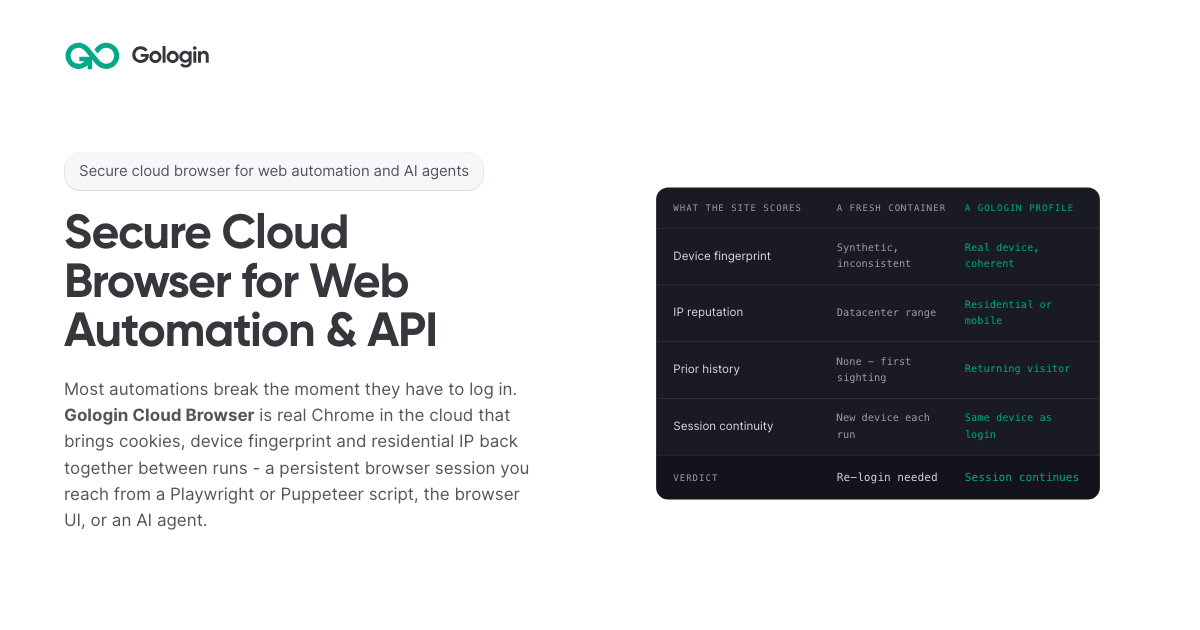
Gologin Cloud Browser delivers real Chromium browsers running in the cloud for AI agents, scrapers and web automation. Instead of launching a fresh browser on every run, developers connect to a persistent browser session that keeps its cookies, device fingerprint and IP address between runs. The browser can be driven from a Playwright or Puppeteer script over a WebSocket connection, from the browser UI by hand, or by an AI agent. It is aimed at developers and teams building scrapers, agents, internal tools and recurring workflows that need to stay signed in to real websites. The product is part of the wider Gologin stack, alongside Web Unlocker, Gologin Browser, Cloud Android, Gologin Proxies and the MCP server. The product addresses a specific failure mode: most automations break the moment they have to log in. According to the site, getting behind a login once is easy, but still being there next month is the hard part. Cookies do not keep a session alive on their own, because sites tie a session to the cookie, the device and the network it came from. A browser container that did not exist three seconds ago has no history, so every run starts as a first visit. Restoring only the cookies means the session arrives on a device the site has never seen, and the site responds by asking for a new login, a code or a check. The page's comparison illustrates this: a fresh container shows a synthetic and inconsistent device fingerprint, a datacenter IP range, no prior history, a new device on each run, and a verdict of re-login needed. Gologin Cloud Browser solves that by reconstructing three things together. The first is the session state: cookies, local storage and everything else the site saved in the browser. The second is the same device: the canvas, WebGL, audio and hardware profile that was present at login. The third is the same network: the residential or mobile IP the account signed in from. Combined, these three make the browser look like a returning user rather than a first-time visitor. The page frames the principle simply: cookies don't keep you logged in, identity does. A Gologin profile brings back all three components, and the FAQ notes that a session stays logged in as long as the site's own login lasts, because what ends a login is the site expiring it, not the platform. Connecting an existing script takes one line. Developers sign up with Google, copy an API key from the dashboard, and create a profile either with one click in the dashboard or with one API call; the profile keeps the device, the IP and the login. Then they install the library (npm install playwright-core, npm install puppeteer-core, or pip install playwright) and replace the script's launch() call with a connect line pointing at wss://cloudbrowser.gologin.com/connect?token=...&profile=.... The page shows complete, working Playwright, Puppeteer and Python Playwright examples that scrape quotes.toscrape.com, using chromium.connectOverCDP or puppeteer.connect with a browser WebSocket endpoint. According to the site, every line below the connect call stays exactly as it was, so selectors, assertions, waits and CI configuration are unchanged and the browser simply runs in the cloud. The browser comes with built-in stealth and anti-bot protection, and it runs on residential and mobile IPs from Gologin Proxies, which can be added to a profile in one API call, or on the user's own proxy. Profiles are isolated from one another: each has its own cookies, its own fingerprint and its own IP, and nothing is shared between them, so a problem in one profile does not reach the others. On the security side, the site states that pages load on Gologin's servers rather than the user's machine, so the target site never reaches the user's device or home IP. The cloud infrastructure is described as fully serverless and able to scale to thousands of browsers, and the company behind it cites seven years of expertise, SOC 2 Type II compliance and a 99.9% SLA. Every session includes a Live View link. Users can open it to watch the script work in real time, or take over by hand to complete a two-factor authentication step or fill in a tricky form, then hand the session back to the script. This matters for the failure case too: if a run fails halfway through, the profile keeps what the run built, meaning the cookies, the device and the IP, so starting the next run in the same profile picks up signed in rather than from the login page, and Live View can show where it stopped. The comparison table also states that no limit applies to session length on the first paid plan, versus 6 hours on Browserbase, 4 hours on Browser Use and 15 minutes on Steel as listed on the page. For AI agents, a Gologin MCP server gives Claude direct control of profiles, proxies and cloud sessions. Users install it with a single command (claude mcp add gologin -e API_TOKEN=... -- npx gologin-mcp) and then describe the job in natural language. The page's example prompt asks for three profiles on US residential IPs and a script that logs into each seller account and pulls last month's invoices; the server creates the three profiles with one US residential IP each, writes invoices.py against the Cloud Browser API, and saves the profiles so the next run starts already logged in. The site describes this as describing the job and letting the tool set up the accounts and write the automation, and it links to a dedicated Browser for AI agents page and a dedicated MCP server page. Pricing is built around browser hours rather than requests. The free tier requires no card and provides 3 runs of up to 15 minutes each on 1 parallel session. Professional costs $4.50 per month for individual developers with 50 browser hours, 1 parallel session, unlimited runs and $0.09 per extra hour. Business costs $8 per month with 100 browser hours, 2 parallel sessions and $0.08 per extra hour. Enterprise costs $14 per month with 200 browser hours, 3 parallel sessions and $0.07 per extra hour. Custom plans start from 4 parallel sessions and include a dedicated account manager, a premium SLA and tailored onboarding. Additional parallel sessions cost $2 per month each on any plan, and proxy traffic beyond the allowance is $1/GB. The site emphasizes that there are no per-request fees, so a retry does not cost twice, and compares its $1/GB residential traffic with published rates of $5/GB for Browser Use, $6/GB for Steel, $8/GB for Anchor and $10/GB for Browserbase. The page maps six use cases. Playwright and Puppeteer users connect over CDP with one line and keep the same selectors, tests and CI while the browser runs in the cloud. Dynamic web scraping handles feeds, load-more buttons and JavaScript-built pages, loading them the way a person's browser would. Web automation that stays logged in targets portals and dashboards that are signed into once and then run on a schedule. AI agents get their own fingerprint, cookies and IP per profile so they can do real work. The Cloud Browser UI covers live sessions where a person watches automation and steps in for 2FA. A scraping browser gives Puppeteer or Playwright real Chromium with its own device fingerprint and a residential IP. The site distinguishes this from Web Unlocker, which is recommended for public pages without a session and bills only on success. The product is positioned for developers, growing teams and organizations running critical operations, as reflected in the Professional, Business, Enterprise and Custom plan tiers. It fits into a broader Gologin ecosystem of one account, one proxy network and one ecosystem: Cloud Browser for sessions that stay logged in, Web Unlocker for sending a URL and getting the rendered page, Gologin Browser for isolated desktop profiles driven by hand, Cloud Android for platforms that only trust a phone, Gologin Proxies for residential, mobile, datacenter and ISP IPs, and MCP and AI Skills for describing a job to Claude and getting a working tool. Support resources include API documentation, a getting started guide and dedicated pages for Playwright and Puppeteer, dynamic scraping, web automation, AI agents, the Cloud Browser UI and the scraping browser. The core promise is simple and repeated throughout the page: log in once, stay logged in. By keeping session state, device fingerprint and residential or mobile IP together across runs, Gologin Cloud Browser lets scrapers, agents, internal tools and daily workflows behave like returning users instead of new visitors, while a one-line connection keeps existing Playwright and Puppeteer code intact. Free to start with no card and residential IPs included, it gives developers a serverless, stealth-capable browser fleet that can scale from a single test run to thousands of browsers.
WhoIsCooking is a Mac app that shows the temperature of your chip and tells you which AI agent is heating your Mac. It lives in your notch, or in the menu bar if you prefer, and displays the hottest chip sensor reading next to overall CPU and GPU load. Under that headline it lists the agents and apps that are currently working, each with a CPU percentage and a note about what that agent is doing, such as Claude Code running ffmpeg and python, Codex CLI running a cargo build, Cursor acting as editor and agent, or Chrome with fourteen tabs open. It is made for people who run AI coding agents and other heavy developer work on an Apple Silicon MacBook and want to know at a glance what is cooking the machine. The problem it addresses is a familiar one for anyone using agentic coding tools: Claude Code, Codex and Cursor start builds, tests and renders that turn a MacBook into a stove. When several agents run at once, the machine gets hot and starts throttling, and it becomes hard to tell which of the many running processes is actually responsible. The usual system view shows dozens of cryptic processes rather than the agent sessions a developer actually thinks in, so people either wait for the heat to pass, kill work they still need, or simply accept a slow and noisy machine. WhoIsCooking closes that gap by naming the agent behind the heat and offering a way to cool the Mac without stopping the work. The primary readout is a temperature. WhoIsCooking shows the hottest chip sensor, for example 92°C, together with CPU and GPU percentages and a status line indicating that the machine is hot and throttling. This answers the first question most people have when a MacBook gets warm or a fan spins up: how hot is it really, and is it being pushed hard? Because the figure comes from the chip sensors rather than an estimate, it reflects the machine's actual thermal state. From that same view, a single button invites you to cool down your Mac. Instead of listing processes, WhoIsCooking groups work by agent. An agent session and everything it started, including builds, tests, dev servers and renders, appears as a single line rather than eighty cryptic processes. Each row carries the CPU percentage the agent is consuming, a short description of what it is running, and a cool-down control. The app recognises Claude Code, Codex CLI, Gemini CLI, Cursor, Aider, Copilot CLI, Ollama and LM Studio, and it also covers Xcode builds, ffmpeg, Docker and your browser. That means the list maps onto how a developer actually works: one line per agent rather than a wall of unrelated subprocesses. Cooling is the core action. One click moves busy work onto the Mac's efficiency cores. The job keeps running, a little slower, and the Mac drops about fourteen degrees; the site illustrates the same render at 64°C before and 50°C after. Because the work is moved between cores rather than suspended, the agent continues to make progress. A Full speed control puts the power back instantly whenever you want the power back, and quitting the app always restores full speed. WhoIsCooking is explicit that cooling is not killing. Nothing gets frozen or closed unless you ask for it. Your terminal and your apps stay usable the whole time, so a long build or a render can continue while you keep working in the same session. If you do want something gone, quitting a process is an explicit choice rather than a side effect of cooling. This separates it from approaches that pause or terminate workloads in order to reduce temperature. The app also watches for work that runs away. You get a nudge when an agent burns CPU for five minutes straight, or when it leaves dev servers running after its session ends. Those are the two cases where a machine keeps running hot long after the developer has walked away or moved on to something else, and the nudge points at the specific agent responsible so it can be dealt with. Underneath, WhoIsCooking reads the chip sensors every twenty seconds and only looks at processes while it is open or while the Mac is hot. Idle, it uses about 0% CPU and 14 MB of memory, so monitoring the temperature does not itself become another source of heat. It sits in the notch or the menu bar, appears on hover, and needs no account or cloud service: the reading and the control are local to your Mac. It runs on Apple Silicon Macs, M1 to M5, on macOS 14 or later. The temperature sensors it reads exist only on Apple Silicon, so on Intel Macs you can see CPU use but not temperature. The outcome is a cooler, quieter Mac without losing work. According to the site, cooling takes a machine from 64°C to 50°C on the same render, roughly fourteen degrees, while the job continues. Instead of guessing which process to kill, you can see the offending agent, cool it, and keep the session running. The runaway nudges catch the leftovers that would otherwise keep the machine warm, and Full speed returns the power in one click when you need it. All of this is visible from the notch, so checking costs a hover rather than a switch to another app. Concrete scenarios follow directly from the heat list the app displays. A developer running Claude Code that is executing ffmpeg and python at 184% can see that this single agent is the heat, cool it, and let the render finish on the efficiency cores. Someone running a Codex CLI cargo build at 91% can keep the build going while the Mac drops in temperature. A Cursor session acting as editor and agent at 62%, or a browser with fourteen tabs at 23%, shows up as its own row so the source of load is obvious. Local model users running Ollama or LM Studio, and anyone building with Xcode or running Docker containers, are also recognised in the same list. WhoIsCooking costs $5 as a one-time purchase with no subscription, and it requires an Apple Silicon Mac on macOS 14 or later. It is signed with an Apple Developer ID and notarized by Apple, so macOS opens it without warnings. The takeaway is simple: WhoIsCooking answers which AI agent is cooking your Mac, then cools it down without stopping its work, for a one-time $5 price on Apple Silicon hardware.