Category Focus/categories/automation
Automation AI Tools
Discover and compare the best automation AI tools and software. Browse 592+ curated tools with reviews and rankings.
Projects tracked
592
Sort mode
RECENT
Page
3
Discover and compare the best automation AI tools and software. Browse 592+ curated tools with reviews and rankings.
Projects tracked
592
Sort mode
RECENT
Page
3
OpenBot is a free desktop application that runs AI agents as a team on your own computer. Instead of a single chat window, OpenBot gives you persistent AI teammates: each agent has its own name, its own instructions and its own workspace, and agents can message each other, hand off tasks and share files. OpenBot is built for people who already pay for an AI plan and want to turn it into a working team rather than a single assistant. It connects to Codex, Claude Code, Gemini, Grok, OpenCode, Cursor and Cline, to any OpenAI-compatible endpoint, or to local models running in Ollama or LM Studio. Most people who use AI every day are juggling several assistants at once. They may have a ChatGPT plan for one job, a Claude plan for another, and a Gemini or Grok subscription for something else, but each of those assistants works alone, in its own silo, and none of them can hand work to the others. OpenBot brings those providers into a single workspace where agents are given clear roles and can delegate to one another. Because the app runs on your own computer, workspaces, conversations, files and browser data stay on the machine that runs OpenBot rather than on a vendor's servers, and you keep paying only for the AI provider plan or API key you already have. It is also open source, so the code can be read, changed and run for noncommercial purposes. The core of OpenBot is the idea that agents work as a team. Each agent has its own name, its own instructions and its own workspace, so a Research agent and a Builder agent can hold different briefs and different context. Agents send each other messages, hand off tasks and share files. In the product's own walkthrough, a planner asks Research to verify the evidence and Builder to check the rollout path, then references @Research and @Builder by name to turn the work into a final launch brief with the source files attached. Because the handoffs are explicit, you can see who did what and keep every decision traceable. OpenBot does not ship its own model subscription. It runs on the AI plan you already pay for: Codex signs in with your ChatGPT plan, Claude Code with your Claude plan, and Gemini works with a Google AI Pro or Ultra plan. OpenCode offers free models that need no account at all. You can also connect any OpenAI-compatible endpoint, or run local models in Ollama or LM Studio. The providers listed on the site are Codex, Claude Code, Gemini, Grok, OpenCode, Cursor and Cline, and the same names appear in the app's agent picker. The result is that your existing spend on AI is turned into a team of agents instead of a single assistant. Three design choices define how OpenBot behaves in practice. First, everything is stored on your computer: workspaces, conversations, files and browser data stay on the machine that runs OpenBot, not on OpenBot's servers, although the AI provider you choose does receive the prompts your agents send to it, and pages an agent opens use the network. Second, you can change the provider and keep the agent: an agent keeps its workspace and conversation when you restart the app or move it to a different provider, so a long-running piece of work can continue under Claude Code after starting under Codex. Third, OpenBot includes a built-in browser, and agents can open, read and control pages in it, which is how an agent can load a local sign-in page such as localhost:3000/sign-in while doing QA work. OpenBot also lets you work at your own pace and with other people. You can queue the next task: send more work while an agent is busy, and messages wait in a queue that you can pause, resume or cancel. The app is multiplayer, too, so you can invite your team to collaborate live with the same agents, and colleagues can follow work in a shared channel and watch an agent hand a task from one teammate to another. Signing in is optional; the app works without an account, and you need one only to invite other people to your team. Getting started is deliberately short: download OpenBot, connect a provider, then describe the agent you want in one prompt, check its instructions and save it. The methodology behind OpenBot is straightforward. Instead of building one more chat interface, it gives agents roles, a workspace that persists, and the ability to talk to each other. A role is defined by the prompt you write when you create the agent: you describe the agent you want, check its instructions and save it. From then on that agent keeps its name, its instructions and its workspace, and it can be moved between providers without losing its place. Work is passed around by messages and attached files rather than by copy-pasting between tools, and a queue holds new requests until the agent is free. Everything runs on the computer that runs OpenBot, with a browser built in for the pages agents need to read or control. The practical benefit is that you pay nothing extra for the app itself. OpenBot costs $0, with no hidden fees and no locked features; the only cost is whatever you already pay your AI provider, through a plan or an API key. Because agents can hand work to each other, a single request can turn into a chain of checks, an evidence review, a rollout check, a test and a rollback step, without you shuffling between apps. Because the provider can be changed without losing the agent, you are not locked into one vendor's model for the life of a task. And because workspaces, conversations, files and browser data stay on your computer, the material you produce stays with you rather than living only in a hosted service. The scenarios described on the site are concrete. In a launch planning workflow, a planner agent prepares the launch plan, tags it Research and keeps every decision traceable, while a Research agent verifies the evidence and a Builder agent checks the rollout path, producing a launch brief and metrics files. In a coding workflow, an agent reads billing code, reports that six tables use it, moves the billing tables to their own schema, changes four files and writes the migration, then hands the test work to a provider that continues the migration. In a team channel, one teammate reports a failing sign-in test on Safari, passes it to another, who fixes it in session.ts and asks a third to review and merge it. Agents can also load a local sign-in page in the built-in browser, steer a request such as summarizing the support inbox or drafting the release notes, and queue extra work, like checking new sign-ups, while the agent is still busy. OpenBot is aimed at people and small teams who already use coding and chat agents and want those agents to work together: developers, technical teams, and anyone coordinating research, releases or QA with AI. It runs on macOS 13 or newer on Apple silicon or Intel, Windows 10 or newer on x64, and Linux on x64 or arm64 as an AppImage. The app is free at $0, with no account required unless you invite other people to your team. The source code is public on GitHub under the PolyForm Noncommercial License 1.0.0, so you can read, change and run it for any noncommercial purpose; commercial use needs a separate license. Users should note that OpenBot is a development preview: agents can read and change files, run commands, use the network and control the built-in browser without asking each time, so it should be given only tasks you trust, with backups kept. OpenBot's value proposition is simple: a free, local, open-source workspace that turns the AI plans you already pay for into a persistent team of agents that share work, files and conversations on your own computer, and lets your colleagues join them live.
HyperFrames Studio is a desktop video editor built specifically for AI agents. Developed by HeyGen, the team who open sourced HyperFrames, it packages all of HyperFrames Studio into a single desktop application that works with your files and apps to get things done. Rather than treating AI as a side utility, HyperFrames Studio turns coding agents into video editors while the human stays in the director's seat. It is aimed at creators, developers, and teams who already work with agents such as Codex or Claude Code and want to describe a video, let their agent make it with HyperFrames, and then refine the result together inside one shared studio editor. The product exists on a foundation that the team built in the open before releasing the Studio editor. HyperFrames is open sourced under the Apache-2.0 license on GitHub at heygen-com/hyperframes, and that project has grown to 57.4k GitHub stars, 813.1k npm downloads in the last week, 5.1k forks, and 80 contributors. HyperFrames Studio is built by the same team behind that open-source work. The problem it addresses is a familiar one for anyone who has tried to produce video: editing is traditionally a manual, hands-on craft that does not fit neatly into agent-driven workflows, and most video tools assume a person is doing every step by hand. HyperFrames Studio closes that gap by making the video editor itself something an agent can operate, so the same agents people already rely on for coding work can also participate in building video, with the human retaining direction over the result. One of the core pieces of HyperFrames Studio is that it is delivered as a desktop application. The website lists a macOS download and a Linux download, while Windows and Windows on arm64 are marked as coming soon. The desktop build is described as containing all of HyperFrames Studio in one app, and it is said to work with your files and apps to get things done. This desktop-first approach matters because video work involves media files, local assets, and repeated iteration, and a native application can sit directly alongside the files and tools a user already has open. For organizations that need more than an individual download, there is also an enterprise deployment option, which is available by contacting the HeyGen sales team through the contact page, so the same studio can be rolled out beyond a single creator's machine. The defining feature of HyperFrames Studio is its support for coding agents. The Product Hunt description explains that you can bring your favorite agent, either Codex or Claude Code, and that HyperFrames Studio turns those coding agents into video editors while you stay in the director seat. This is the core reason the product exists: instead of learning a separate automation layer or writing custom scripts, a user brings an agent they already work with and gives it the ability to operate inside a video editor. The agent becomes the execution arm for editing tasks, while the person remains responsible for the creative direction, deciding what the video should be and judging whether the output matches that intent. A second key capability is the describe-and-generate workflow combined with shared editing. The stated flow is simple: describe a video and your agent makes it with HyperFrames. From there, you and your agent work on it together in one studio editor. This means the first draft does not have to be assembled by hand from a blank timeline; it can be produced from a description, and then the work continues collaboratively in the same environment. Keeping generation and refinement in one studio editor avoids handing finished work back and forth between separate tools, so the agent's output and the human's edits live in the same place and can be adjusted in the same session. HyperFrames Studio is closely tied to the open-source HyperFrames project. The framework is released under the Apache-2.0 license on GitHub at heygen-com/hyperframes, and the site provides an install command, npx skills add heygen-com/hyperframes, alongside documentation and a call to star the repository on GitHub. The open-source nature is significant because it means the underlying video framework is publicly available and community-driven, with the visible traction of 57.4k GitHub stars, 813.1k npm downloads in the last week, 5.1k forks, and 80 contributors. Developers can add HyperFrames skills to their own environments using the provided command, read the documentation, and follow or contribute to the project on GitHub, which keeps the studio connected to a larger ecosystem rather than being a closed, isolated app. The overall approach of HyperFrames Studio can be summarized as pairing a professional-style studio editor with agent-driven video creation. You access HyperFrames Studio on desktop, bring an agent such as Codex or Claude Code, describe the video you want, let the agent generate it with HyperFrames, and then continue working on the result together in one studio editor. This keeps the human in a directing role and the agent in an execution role within a single shared workspace, rather than splitting those responsibilities across disconnected tools. The combination of an open-source framework, a desktop application, and agent integration is the distinct methodology the product is built around. The benefits of this setup follow directly from how it is designed. Because the agent can take a description and produce an initial video with HyperFrames, users do not have to begin from an empty project purely by hand. Because you and your agent then work on the video together in one studio editor, the iteration loop stays inside a single environment. And because the underlying framework is open source under Apache-2.0, the work sits on a publicly available foundation with a large community behind it, which gives developers a path to inspect, extend, and integrate with the technology they are using. Concrete use cases for HyperFrames Studio center on agent-assisted video production. A user can describe a video and have their agent make it with HyperFrames, using a natural-language brief as the starting point rather than a manual build. A creator and their agent can then collaborate on that video together in one studio editor, refining the output in a shared session. Developers who want to bring HyperFrames into their own workflows can install it with the npx skills add heygen-com/hyperframes command and follow the documentation. Teams that need a managed rollout can take advantage of the enterprise deployment option by contacting HeyGen sales. And anyone working with Codex or Claude Code can add video editing to the capabilities of an agent they already use. In terms of audience and availability, HyperFrames Studio targets people who work with AI coding agents and want to produce video. The Product Hunt description frames it around users who have a favorite agent, either Codex or Claude Code, and the website frames it around staying in the director's seat while an agent does the editing work. Its open-source foundation, GitHub presence, and npm distribution point to a developer and technical creator audience, while the enterprise deployment option and HeyGen sales contact indicate it also serves organizations that need managed rollouts. The product is available as a desktop application, with macOS and Linux downloads listed, Windows and Windows on arm64 marked as coming soon, and enterprise deployment available on request. Taken together, HyperFrames Studio reinforces a single value proposition: it is the first video editor built for agents, letting you bring a coding agent like Codex or Claude Code into the editing process, describe a video and have it made with HyperFrames, and then work on that video together with your agent in one studio editor while you remain in the director's seat. Built by the team who open sourced HyperFrames at HeyGen and released under Apache-2.0 on GitHub, it combines an open-source video framework with a desktop studio designed around agent collaboration.
DailyHelm is an agentic AI business reviewer that monitors your analytics, ads, SEO, and store data overnight and then tells you what to fix today, ranked by revenue impact. Its promise is simple: your business, reviewed by AI, every morning. Rather than leaving you to interpret charts or open dashboard after dashboard, DailyHelm produces a daily brief that works as a prioritized punch list of the issues and opportunities worth acting on. It is built for founders, operators, and growth teams who run the whole business themselves — people who wear the marketing hat, the engineering hat, and the finance hat — and who need a clear answer to the question of what to do next. The problem DailyHelm addresses is the gap between data and action. Traditional dashboards show you charts and leave you to interpret them, which means hours of tab-switching and a lingering sense that you are still guessing. Real problems hide in that gap: conversion tracking silently breaks, ad spend keeps optimizing against zero conversion data, a top product disappears from the sitemap, a lead form stops firing, or failed payments quietly churn subscribers. DailyHelm was built to catch those issues and turn them into a ranked, evidence-backed list of things to fix, so days of wasted spend and lost orders do not go unnoticed. The review is produced by six specialists led by Aria. Each agent owns a domain. Iris covers analytics and growth — funnels, pipeline health, and churn signals. Pitch covers ads — spend, keywords, search terms, and CPA. Echo covers SEO — rankings, indexation, and on-page signals. Ada covers code, investigating your repository when business data smells off. Penny covers cost — cloud spend by SKU, cost forecasts, and egress leaks. Sage covers site UX — crawl-driven performance and conversion blockers. Aria correlates their findings, ranks them by expected impact, and writes the morning brief. Together they handle AI for business operations, monitoring ads, SEO, analytics, and code while you sleep. Each finding is delivered with the detail needed to act on it. Every finding cites its evidence and a recommended next step, along with an impact score, a confidence level, and an effort rating. In the product's example, Iris flags a conversion tracking blackout with 96% confidence, showing that GA4 recorded zero conversions while Stripe recorded 47 purchases in the same window, and pointing to the commit that removed the tracking include. The finding carries a recommended action, and you can accept it, snooze it, dismiss it, or chat with Aria to dig deeper into what broke and how to fix it. That structure means the digest does not just surface a symptom — it explains the cause and proposes the fix. Setup is designed to be fast and non-technical. DailyHelm handles the OAuth; you click approve. First you tell the system about your business — what you sell, who buys it, and what success looks like — which anchors every recommendation. Then you connect your platforms one click at a time: GA4, Google Ads, Search Console, Shopify, GitHub, GCP billing, and your site. DailyHelm opens the approval page and you confirm. From there you get a daily AI business review, a prioritized punch list every morning, with the option to chat with Aria any time. The company states average setup time is under five minutes and that findings start arriving within the hour, with first findings reachable within 24 hours. DailyHelm's overall approach is overnight monitoring plus correlation, delivered as a morning brief. It pulls a daily snapshot from each connected platform and stores nothing it does not need. The agents work in parallel across their domains, and Aria cross-references their individual findings to produce one ranked list. Because the system is built to be read-only on every connector, it never writes back to your accounts. OAuth scopes are read-only across GA4, Search Console, Ads, GitHub, and your store, so DailyHelm cannot write, post, or modify anything. Integrations use each platform's own consent screen rather than API keys, and onboarding happens through those approval flows. Users describe the outcome in terms of time saved and money recovered. One founder reported that Aria caught a $340 per day wasted-spend issue on day one, with a Shopping campaign running against 47 zero-conversion search terms for nine days; negatives were added before lunch and the bleed stopped the same morning. Another reported that a Friday deploy broke the GA4 purchase event, leading to $2,200 spent over a weekend with no conversion data to optimize against, and said that kind of thing will not happen again after setting up DailyHelm. A solo founder described replacing 90 minutes every morning across five dashboards with an eight-minute brief and one clear priority. DailyHelm reports early user ratings of 4.9 out of 5 and describes itself as a part-time COO that reads every dashboard so you do not have to, answering questions about your business in plain English. The product documents concrete categories of findings for different business types. For DTC and e-commerce, Pitch surfaces wasted ad spend — specific keywords or search terms burning budget with zero conversions — plus negative-keyword and bid recommendations to cap the bleed. For SaaS and app businesses, Iris and Ada detect a conversion tracking blackout where Stripe charges fire but GA4 shows zero, identifying the deploy that broke the tag and the line of code to restore. For local and service businesses, Echo surfaces a local-search ranking collapse in which "near me" and city-name queries fall out of the local pack. For dropshippers, Echo and Ada catch a top product disappearing from the sitemap or returning a 404 after a deploy. For B2B and lead gen, Iris, Ada, and Sage cross-reference a lead form that silently regressed after a deploy broke validation or the success-event fire. For subscription businesses, Penny flags a failed payment surge, including the dunning gap and recoverable MRR. DailyHelm is aimed at operators who run the whole business: DTC and Shopify founders, dropshippers, B2B SaaS operators, solo founders, agencies, and anyone short on time. It connects to Google Analytics 4, Google Ads, Google Search Console, Shopify, GitHub, Stripe, a Site Crawler, and Meta Ads, with GCP billing referenced during setup. The company offers a seven-day free trial, requires no credit card, and says setup takes about five minutes. On security, it states that all traffic to DailyHelm is TLS 1.2+ encrypted, data is encrypted at rest, and OAuth refresh tokens and webhook secrets are encrypted at the field level. It states that AI never trains on your data, that processing happens through providers contractually prohibited from training on it, and that the service is GDPR and CCPA compliant with rights to access, correct, export, and delete data. One click deletes your account, revoking every connected token and purging findings within 30 days. DailyHelm's value proposition is straightforward: stop opening eight dashboards every morning, get the punch list, pick the top three, and move on with your day — with every recommendation anchored to evidence from your own connected tools. It turns overnight data into a prioritized set of revenue-oriented fixes so founders and growth teams always know what to fix today.
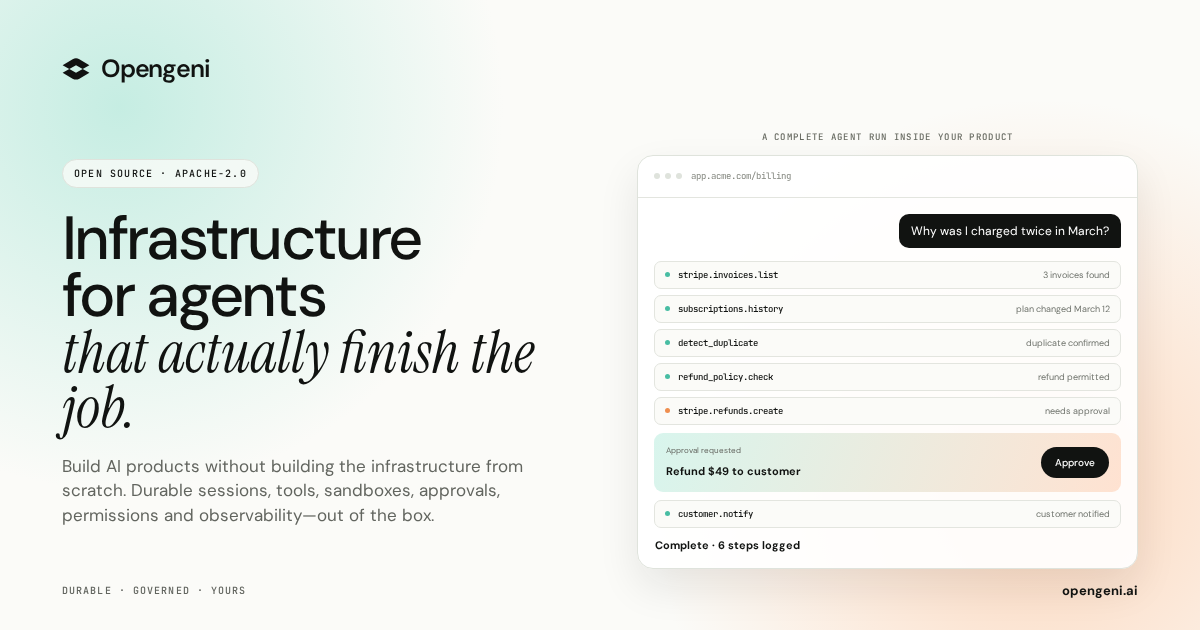
Opengeni is open-source AI infrastructure for putting agents directly inside your own product. It gives developers the pieces an agent needs to run reliably in production — durable sessions, isolated sandboxes, credentials, tools and MCP, memory, multi-tenancy and ready-made React components — and lets you either use the managed Opengeni cloud or run the same stack in your own environment. The purpose is stated plainly on the site: agents in your product, infrastructure out of the box. You focus on your agents, Opengeni handles the infrastructure, and the promise of the launch is shipping agents to production in hours rather than spending that time building plumbing. The project is released under Apache-2.0, its source lives on GitHub, and the site notes it is built from running agents in production, with Hydro, Havila and Posten shown as brands already working with it. Getting an agent demo running is easy; running agents for real customers is not. A single dropped connection can end a run. Agent code cannot safely execute next to your secrets. Every user needs their own OAuth tokens, and every API has to be wired before an agent can call it. Agents forget everything between sessions, and in a multi-tenant product every query has to know who is asking. Opengeni frames this as a list of things you do not have to build, and the site walks through each one in turn: durable sessions, sandboxes, credentials, tools and MCP, memory, multi-tenancy and model choice. Each of those is presented as a problem that would otherwise land on your team before the first real user ever touches the agent. Durable sessions are the first building block. Opengeni keeps a run alive when a worker restarts or a tab is closed: the run keeps going and resumes at the event where it left off, with the site's example showing a run resuming at event 128. Agent code then runs in an isolated sandbox, so it cannot run next to your secrets. In the example, the sandbox executes a Python script that detects a duplicate charge, and the credentials it uses are described as scoped and short-lived. That combination matters because agent work is often long-running and unpredictable: durable sessions turn a failure into a pause instead of a lost run, and sandboxes let you hand an agent real code execution without exposing production secrets to it. Credentials and tools cover the other half of the integration problem. Every user of your product needs their own OAuth tokens, and Opengeni handles that: the site shows Stripe, GitHub and Google Drive accounts connected per user, with tokens refreshed automatically over time. On top of credentials, Opengeni lets you plug tools in from an existing API definition — an OpenAPI file such as billing.openapi.yaml yields callable operations like invoices.list, refunds.create and customers.get, and the site presents adding three tools as a single step. Tools and MCP are both supported, which means an agent can act on the systems your customers already rely on rather than only talking about them. Memory, multi-tenancy and model choice complete the core. Memory is built in, so agents learn from past sessions instead of forgetting everything between them; the examples separate workspace-level memory (refunds go to the original card), user-level memory (sends invoices by email) and entries flagged to review first (bills in EUR from April). Multi-tenancy keeps customers apart, with distinct workspaces such as Acme, Globex and Initech and row-level security so that every query knows who is asking. Model choice stays open: OpenAI, Azure OpenAI, OpenRouter or your own OpenAI-compatible endpoint are all listed, and Opengeni states that you can swap models freely as better ones ship, without being locked in. Opengeni's overall approach is that the same session can appear on any surface, because every surface is a client of the same API. The site shows three of them. First, the Opengeni app at app.opengeni.ai, where a session can be started and tracked, including a completed example run that lists each step the agent took. Second, your product, shown as a billing assistant embedded in a customer's billing page, where the same session runs under your own brand. Third, the code, where a React component such as BillingAssistant.tsx is assembled from the @opengeni/sdk and @opengeni/react packages, using OpenGeniClient, OpenGeniProvider and SessionConversation. The client talks to your backend, and the documentation notes that your backend holds the API key and proxies the session routes so the key never reaches the browser. The React components are designed to be restyled quickly. The site lists a five-step customization flow: one variable recolors every surface through your accent, corners can be sharp, soft or round, you can use the font you already ship, and a single attribute flips between light and dark themes. The sample CSS shows custom properties for accent color, radius and font family, and an interactive control panel lets you try accent, corner, font and theme options directly. Because these are the same packages the Opengeni app is built on, the streaming responses, tool steps and composer come with the component rather than having to be rebuilt, which shortens the work between having a working agent and having it appear inside your product. The outcomes Opengeni emphasizes follow directly from those pieces. Sessions that recover from failures mean a run is not lost to a restart. Sandboxes mean agent code does not run beside your secrets. Handled credentials mean each user's own OAuth tokens are managed and refreshed. Tools and MCP mean APIs are wired from an existing definition instead of by hand. Memory means agents carry learning across sessions. Multi-tenancy and row-level security mean customer data stays separated. Model freedom means a better model can be adopted without a rewrite. The launch description also highlights 100+ integrations, human approvals and visibility into every step and dollar spent, so teams can see what an agent did and what it cost. The concrete workflows on the site are customer-support and billing shaped. A customer asks why they were charged twice in March; the agent lists invoices, runs a duplicate-detection step, confirms the duplicate and issues a refund, then explains that two $49 charges landed on March 12 and the duplicate is going back to the card. The same exchange is shown inside a branded billing assistant, with a confirmation that $49 was refunded to a card ending in 4242. Other listed session examples include a weekly churn summary, updating a refund policy document and triaging failed webhooks — all presented as work an agent can carry out inside the same environment, with the steps visible as they happen. Opengeni is aimed at developers and product teams who want agents inside their own product rather than in a separate tool. The integrations shown are Stripe, GitHub and Google Drive, alongside the broader mention of 100+ integrations and support for tools and MCP. The stack is open source under Apache-2.0 and can be self-hosted with a Helm chart on any Kubernetes, with Terraform for AWS, Azure and GCP; the repository is cloned from GitHub. Two deployment paths are offered: the managed Opengeni cloud, where you pay model cost plus 5%, or your own cloud running the same Opengeni API, workers and web app. Self-hosting is free, and a launch promotion gives the first 100 users $100 in cloud credit with the promo code PRODUCTHUNT100. The takeaway is straightforward: Opengeni is infrastructure for agents that actually finish the job. It packages the parts that are tedious and risky to build — durable sessions, sandboxes, credentials, tools, memory, multi-tenancy and model swapping — behind an open-source stack with React components you can restyle in seconds. You can start in the Opengeni cloud or keep everything in your own Kubernetes, and the same session can run in the Opengeni app, inside your product, or straight from your code, all on one API.
FastRouter.ai is a unified AI gateway and control plane for developers and enterprise teams building with large language models. It routes every request to the right model across more than 200 LLMs through a single OpenAI-compatible API, optimizing for cost, latency, quality, and reliability. The product gives organizations one consistent way to reach leading models including Claude Fable 5, Gemini 3.1 Pro, GPT-5.5, Grok 4.3, Veo 3.1, Nano Banana, and Claude 4.8 Opus, without integrating with each provider separately. Teams point their existing OpenAI SDK at FastRouter's base URL and immediately gain intelligent routing, automatic failover, built-in governance, and observability from a single high-performance gateway. It is positioned as the fastest gateway for every model, covering text, image, video, embeddings, and speech, and it lets teams add or swap models without code changes. Building with LLMs has become a multi-provider problem. New models arrive every few weeks, and benchmark results rarely tell the full story for a specific application, so the best model for a given task changes frequently. Teams that hard-code a single provider run into vendor lock-in, unpredictable spend, and outages they cannot control. One FastRouter user, Dr. Rishabh Bhandari of Medisha, explains that with new LLMs coming out every few weeks and benchmarks not giving the full picture, they rely on FastRouter.ai to optimize the cost-versus-quality balance. Another user, Sainath Gupta of Knit Finance, highlights that reliable access to models across providers removes the worry about outages or vendor lock-in. FastRouter addresses this by sitting between applications and model providers, giving teams a single point of access where they can compare models, control spend, and keep applications running when a provider degrades. The stated goal is to let teams scale AI apps without vendor lock-in or code changes. The foundation of the product is unified access. FastRouter provides an OpenAI-compatible API across different providers, so existing OpenAI SDK code keeps working while gaining access to many models. The gateway covers text, image, video, embeddings, and speech workloads, and it allows teams to add or swap models without code changes. Enterprises get access to top models such as Claude Fable 5, Gemini 3.1 Pro, GPT-5.5, Grok 4.3, Veo 3.1, Nano Banana, and Claude 4.8 Opus from a single API. This matters because it removes the need to maintain separate integrations, keys, and code paths for each provider, and it means a model change is a configuration change rather than an engineering project. Smart routing is the mechanism that keeps quality high while controlling spend. FastRouter routes every request to the best LLM based on cost, latency, and output quality with no manual tuning required. Its Auto Router chooses models that deliver the highest accuracy and relevance for the request under a cost-optimized policy. A low-latency policy selects the quickest model available to keep experiences smooth and responsive, while a high-throughput policy prioritizes models that handle high request volumes at scale. Intelligent cost optimization adds smart routing to cost-efficient models, prevention of unnecessary premium model usage, and batch processing for high-volume workloads. Together these capabilities help teams reduce AI spend while still matching each request to an appropriate model. Reliability and governance are built in. FastRouter provides automatic retries across providers, fallback models when failures occur, and virtual model lists for seamless failover. Instant failover automatically reroutes requests to other healthy providers for the chosen models, fallback lists let teams define prioritized fallback models so requests continue seamlessly, and aggregated capacity across providers supports higher rate limits. On the governance side, the platform offers project and API key limits, member roles and access controls, and protections designed to prevent spend shocks and bill spikes. Consolidated dashboards and alerts give complete visibility across every model, provider, and project, with powerful filters for cost, latency, and errors, plus alerts for usage and spikes. Observability and model comparison round out the platform. FastRouter tracks usage, latency, errors, and costs across all models with real-time metrics and detailed logs. Unified metrics monitor performance, latency, and error rates across models and providers; an activity log gives clear visibility into usage and performance for each request; and ongoing evaluations monitor model outputs to ensure consistent quality and performance. The Model Council and Playground let teams compare latency, output quality, and cost across models in interactive playgrounds, combine multiple models to cross-check outputs and reduce errors for stronger reasoning, and use the strengths of each model to deliver consistently better results. Insights adds a weekly read-only pass over the traffic you already route, producing a ranked list of changes, each with the sampled requests, the savings math, and the exact screen where you make the change. FastRouter's overall approach is one API for every model, production ready. Developers point the OpenAI SDK or a direct API call at the FastRouter base URL, https://api.fastrouter.ai/api/v1, supply a FastRouter API key, and select a model ID, so the integration looks like a standard OpenAI chat completions call in Python or TypeScript. Virtual model lists let teams mix providers and models into a unified model alias with policy-driven selection. Beyond routing, the platform covers evaluations, guardrails, alerts, and virtual model lists. For organizations with stricter requirements, FastRouter can be self-hosted in your own cloud so that prompts, responses, logs, and provider keys never leave your network, available on the Enterprise plan with the team helping on deployment and upgrades. The benefits follow directly from that architecture. Teams reduce AI spend through intelligent routing, batching, and model controls; they protect against spend shocks and bill spikes with limits and access controls; and they keep AI applications running with automatic failover, multi-provider redundancy, and intelligent traffic routing. Because the API is OpenAI-compatible, developers get drop-in integration with fast routing and built-in failover, while engineering leaders control costs without compromising reliability or scale. Product teams gain actionable insights to power faster, smarter AI product development. Crucially, users report that reliable access to models across providers removes the worry about outages or vendor lock-in, which is the central promise of the platform. Concrete use cases appear throughout the product. A team unsure which LLM suits its use case can play with models in the playground, compare them against each other, and then call normal OpenAI-compatible APIs to use the chosen model. A high-volume workload can be routed to cost-efficient models and batch processed to lower spend. An application that depends on a model which becomes slow or unavailable can rely on instant failover and fallback lists to keep serving requests. An engineering leader can set project and API key limits plus member roles and access controls to prevent spend shocks across teams. Teams can run evaluations and guardrails to validate and monitor inputs and outputs for safety, compliance, and consistency. Finally, an organization with strict data requirements can self-host the gateway so prompts, responses, logs, and provider keys never leave its network. FastRouter is aimed at developers, engineering leaders, and product teams inside organizations that build with LLMs. Developers get drop-in OpenAI-compatible APIs with fast routing and built-in failover; engineering leaders get cost control without compromising reliability or scale; product teams get actionable insights for faster, smarter AI product development. The site states that FastRouter is trusted by teams at Media.net, Amazon, Optum, GlobalFoundries, Verticurl, and Supaboard, and describes it as forged from the insights of high-performance engineering organizations. Getting started requires no set-up fees, no monthly minimums, and no credit card: new users receive millions of tokens in free credits to build, test, and explore the unified API, and a self-hosted deployment is available on the Enterprise plan. In summary, FastRouter.ai turns the messy reality of many model providers into one coherent gateway. It combines a single OpenAI-compatible API across 200+ models with smart routing for cost, latency, quality, and throughput; automatic failover and fallback lists for uptime; governance controls for spend; and dashboards, logs, evaluations, and weekly Insights for visibility. The primary value proposition is straightforward: route faster, scale smarter, and build better AI apps by sending every request to the right model without vendor lock-in or code changes.
LaunchReel is a Claude Code plugin that edits talking-head videos and makes launch and demo videos for real products. It is built for people who record themselves talking and want a finished video without hand-editing timelines or setting up a renderer themselves. Claude does the first edit — cutting fillers, pauses and retakes, listening back to check every cut, then adding captions and zooms and building visuals around what you say. For launch films, Claude writes every scene as code from your repository, original music and voiceover are added, and a Studio lets you pin a comment on any frame or change text on the frame yourself. Export is 16:9 or 9:16, up to 4K. The problem LaunchReel addresses is the friction that appears when Claude Code on its own is asked to edit video. As the site's comparison puts it, with Claude Code alone, fixing one thing means describing it, waiting and rendering again; with LaunchReel you pin a comment on the frame and Claude fixes just that spot. A small edit, such as changing text, costs another prompt on its own, but with LaunchReel you click the text and change it with no prompt. Claude Code alone produces no sound, while LaunchReel adds original music and voiceover. Getting the Reels version means starting again in portrait, whereas with LaunchReel you say "make the 9:16 version." And getting an MP4 means setting up a renderer yourself, while LaunchReel gives you an Export button. In short, Claude does the work; LaunchReel adds the Studio, the playbook, music, voice and export. The first core capability is talking-head editing. LaunchReel cuts the fillers, pauses and retakes from a recording, then listens back to check every cut before adding captions and zooms. This means the raw recording you make, complete with the filler words, dead air and false starts, is turned into something tighter and cleaner, and the tool verifies its own cuts rather than leaving every one for you to catch. Captions and zooms arrive as part of the same pass, so the video comes back with the elements that hold a viewer's attention rather than as a bare cut. Recordings can run up to 5 minutes on the Creator plan and up to 10 minutes on Pro, which covers a typical single-take recording of a product update, explanation or pitch. The second core capability is the Studio. LaunchReel Studio runs at localhost:4747 and opens while Claude works. In the Studio you can pin a comment on any frame so Claude fixes just that spot, or click text on the frame and change it directly. The whole point is that small fixes cost no prompt: instead of describing an adjustment and waiting for another render, you point at the exact frame and leave a comment, or edit in place. The Studio also lets you play the video with sound, and a preview shows the structure the edit is building toward — Hook, Problem, Demo, Proof, CTA — with examples such as "Make this bigger" appearing as an on-frame note. The third core capability is launch videos. LaunchReel writes launch films and demos for your real product, with Claude writing every scene as code from your repository. Because the scenes are written as code from the repo, the launch video is generated for the actual product rather than from a generic template, and the scenes exist as code rather than as an opaque rendered file. Music and voice are part of the package: original music and voiceover, described in the plans as an original score and studio voices, so the finished video carries a soundtrack and narration without you sourcing either separately. The finish is the fourth piece: export in 16:9 or 9:16, up to 4K. Free trial exports are 1080p with a small watermark in the corner. Creator exports 1080p with no watermark and no end screen. Pro adds 2K and 4K export. Alongside the export settings sits the playbook — a director's playbook, described on the Creator plan as "the full playbook, always current" — which shapes how the edit is put together, plus a "What to say to Claude" prompts page that helps you phrase the instructions you give. How it works is a three-step loop. First you say one sentence, for example "Cut this recording into a reel", and Claude does the first edit. Second, the Studio opens while Claude works, so you watch the video build. Third, you make it yours: pin comments or edit on the frame, and export when it is right. Installation is two commands, pasted and run one at a time — "/plugin marketplace add gajanansr/launchreel-plugin" and "/plugin install launchreel@launchreel". Claude Code and Node 20+ are required, Claude's work uses your own Claude plan, and edits you make in the Studio do not use your Claude usage. The outcome for users is an exported video rather than a project that still needs a round of instructions. A single spot can be fixed without a full render cycle, text can be changed without a prompt, sound comes included, the portrait version is one sentence away, and the MP4 comes from an Export button instead of a renderer you configured yourself. Revisions are treated generously: a video is one project, and fixing it, re-rendering it and re-voicing it in the same month do not use another video, with the count resetting on the 1st. The tool is also explicit about storage, telling you before it starts that talking-head projects keep working copies of your recording at roughly 0.07 GB per minute of 1080p. Real use cases follow directly from those workflows. You can record a single take and turn it into a reel with one sentence. You can produce a launch film or demo for the product you actually shipped, written from your repository. You can take an existing landscape video and say "make the 9:16 version" to get the Reels or Shorts cut. You can open the Studio and fix a caption or a piece of on-screen text on a frame without writing a prompt. And if you are not using Claude Code at all, you can make a video from a template using the site's "Generate from a template" option. The target users are named by the plans themselves. Creator is "for a product's launches". Pro is "for people who ship every week" and includes 20 videos a month, 2K and 4K export, recordings up to 10 minutes, use on up to 3 computers, and new looks and features first. Creator includes 5 videos a month, no watermark and no end screen, 1080p export, talking-head editing with recordings up to 5 minutes, original score and studio voices, the full playbook and use on up to 2 computers, at $19 per month. Team, at $149 per month, is "for a studio or a product team" and adds 80 videos a month, use on up to 10 computers and one invoice for the whole team. A founding offer gives the first 10 customers 50% off their first 3 months of Creator and Pro using the code FOUNDING50, at checkout, taking Creator to $9.5/month and Pro to $24.5/month. There is a free try — one full video with every feature, exported in 1080p with a small watermark in the corner — and you can buy a key when you want more. Prices are in USD, billed monthly by the reseller Dodo Payments, which handles tax and invoices, and you can cancel anytime, with your key working until the end of the period you paid for. A live demo of setup and your first edit can be booked from the site. LaunchReel's primary value proposition is that Claude does the editing work while LaunchReel supplies the parts Claude alone does not have: the Studio for frame-level fixes, the director's playbook, original music and studio voices, and a one-press export in 16:9 or 9:16 up to 4K. It turns a raw talking-head recording and a repository into finished launch videos, demos and reels.
Sente is teai.io's official coding agent CLI. It is a thin launcher over OpenCode (MIT, 203k GitHub stars), and one curl installs it so that every teai.io model becomes an agent in your terminal. The command is short — te, with a sente alias installed alongside it — and it starts an agent in the current directory so you can type a task and let it work. Sente is built for developers who live in the terminal and want an agent that reads and edits the files in their repository, runs commands, and reports back, instead of a chat app that can only discuss code. It is also available as a voice conversation on macOS, Linux and WSL, and as Sente Cloud in the browser. The aim is to remove friction between a model and a working repository. teai.io is natively OpenAI-compatible, and Sente (OpenCode-based) speaks OpenAI-compatible natively, so tool calls go through teai without a conversion layer — zero conversion, stable by design, and nothing to break when routing through teai. Sente is deliberately not a fork: on each launch it syncs the teai.io model catalog (380+) via /te/config, so you inherit every upstream OpenCode improvement. Coding discipline is injected mechanically as well: sente-rules.md is written automatically and loaded into every session, enforcing "read before you write" and "always ship a deliverable". Setup is designed to take about three minutes. Paste one line — curl -fsSL https://teai.io/te | sh — and the installer installs OpenCode if it is missing and points OPENCODE_CONFIG at the teai.io-generated config. Then te login with an API key (a free one comes with 100 credits on signup), and run te for interactive mode or te run "refactor this function" for one-shot work. Sente works on macOS, Linux and WSL; on Windows you use WSL. Optional GUI apps are installed only when you explicitly ask: te app install sente for a menu-bar Sente.app, te app install koe for an always-listening Koe.app, or te app install both. Those macOS apps are Developer ID signed and Apple notarized, and they are placed in /Applications only when you run the command — transparency first. Sente gives you 380+ models with one line to switch. glm-5.2 is the suggested daily driver at roughly ¥0.34 per task; te lux selects the Claude/OpenAI flagship (Fable 5) for quality-critical work; te max selects Kimi K3 (2.8T, 1M) for hard tasks; and DeepSeek V4 Pro runs at about ¥0.03 per task. One base_url decides routing, so you can keep costs low without breaking quality. For measurement, teai.io defines one task as approximately 1K input tokens plus 500 output tokens, and it publishes a bake-off with measured numbers. Product Hunt describes the same idea as models on one account — Claude, GPT, Gemini, DeepSeek and more — with OpenAI- and Anthropic-compatible endpoints. Three things stand out in daily use. First, you can ask by voice: te talk starts a voice conversation where you say what you want done and Sente reads its reply back to you, available on macOS, Linux and WSL. Product Hunt describes a consent-first voice enrollment where you read one sentence (about ten seconds) to enroll your voice, with the delete key yours and a stated commitment never to clone a voice that isn't yours. Second, work keeps going while your Mac sleeps: Sente Cloud at sente.teai.io runs in your browser on a cloud workspace, and you sign in with an emailed one-time code, so closing your laptop doesn't stop the work. Third, there is a three-tier safety model for sente: read operations are automatic, write operations are treated as reversible and proceed, while delete, send, publish and pay actions ask first. The te CLIs come in three stages — te (you type, it runs on request), sente (you speak, it moves first) and fuseki (nothing is triggered, because it is already watching). fuseki has an Alpha implementation available as fuseki or te watch: it keeps an eye on your board, human-gates and recent repos without being called, thinks and logs plus speaks a suggestion only when something actually changes, never executes on its own, and is stopped with te stop. It inherits the same safety tiers and defaults to proposing only. Privacy and enterprise readiness are explicit parts of the product. API-compatible endpoints never store request bodies — only metadata, kept for 90 days. Invoice billing and a DPA are available, and BYOK (bring your own key) is in preparation. The service runs in the Tokyo region with JPY billing and Japanese support. On top of that, local PII scrubbing is available as an opt-in: te privacy scrub on masks emails, phone numbers, addresses, API keys, private keys and high-entropy tokens, plus names via your Contacts dictionary (te privacy scrub harvest), Japanese honorific heuristics and Apple's on-device name recognition, on your Mac before the request reaches teai.io. It costs about 0.1 ms per request and needs no local LLM, and the reply is restored before it is shown. teai.io is candid that this is not a guarantee of complete detection — Japanese given names without an honorific or a dictionary entry are not caught — and notes that an optional Ollama layer (--llm) exists but is slow. Five beta skills, new in August 2026, add reference-corpus RAG to the CLI. 748 Q&A entries across law, security, freelance ops, cloud infra and OSS licensing are searched with lightweight retrieval — semantic embedding plus a relevance cutoff — before the agent answers, and full benchmark numbers, including where it failed, are published. te legal covers Japanese law with 259 entries across 21 topics: civil code, labor law, company law, inheritance, consumer contracts and commercial transactions, cross-checked against actual e-Gov statute text, with semantic search returning "no match" for unrelated questions instead of fabricating an answer. te security covers secure coding with 131 entries across 13 topics including SQLi/XSS/CSRF mitigation, auth/authz, secrets management, dependency vulnerabilities, crypto basics and API security — useful for sanity-checking "is this dangerous?" mid-implementation. te freelance covers freelance ops with 125 entries across 14 topics such as contract checkpoints, Japan's invoice system, tax filing and social insurance switching. te infra covers cloud ops with 117 entries across 14 topics including Fly.io, Docker, CI/CD, SQLite/libsql, DNS and TLS, with real gotchas teai.io itself hit running this exact stack. te license covers OSS licensing with 116 entries across 14 topics: MIT/Apache/GPL-family, AGPL's SaaS network clause and license compatibility, written after checking each license's official text. Beyond the CLI, the same RAG context can be requested directly from the API by passing a model identifier such as shitate/legal to /v1/chat/completions, using the same alias-resolution pattern as teai/auto, with billing reflecting whichever model actually served the response. All five are marked as beta: general reference information, not a substitute for professional advice. The terminal interface is bilingual. You choose Japanese or English for language settings and the skill list, and the choice is saved for the next launch, with the initial language following your terminal locale. You update with te update in your shell and restart Sente, then enter /language (or /lang) to pick a language. To find a skill by purpose, open /skills and search by display name, description or skill ID; you can read the selected skill's description below the list and press Ctrl+L or click the language label to switch languages in place. This setting covers the language dialog and skill list; available skills depend on your setup, missing translations are labeled, and skill IDs and execution instructions stay the same. The stated benefits are practical. Failed responses cost nothing: empty responses are not billed, and failed paid media jobs and failed MCP tool calls are refunded in full, so you pay for results rather than errors. Because Sente Cloud runs on a cloud workspace, long-running work continues while your laptop is closed. Because the tool works in the repository itself, tasks that used to be copy-pasted between a chat window and an editor — explaining a repo, refactoring a function — happen where the code lives. And because the launcher is thin, you keep inheriting upstream OpenCode improvements instead of waiting on a fork. Concrete workflows shown in the content include running te run "explain this repo" to have the agent walk a repository, or te run "refactor this function" for one-shot edits, and switching to te max run "..." when a task is hard enough to justify Kimi K3. Voice users hand a task over with te talk and hear the answer read back. Developers use the skills mid-task: asking te legal about a statutory reserve share (iryuubun), asking te security how to prevent SQL injection, asking te freelance how to register for the invoice system, asking te infra how to set a secret on Fly.io, or asking te license what to watch for when using AGPL in a SaaS. Teams that need the same retrieval from their own stack call shitate/legal through the API. Sente is aimed at developers and small teams working from the terminal, including Japanese-speaking users given the Tokyo region, JPY billing and Japanese support. It is free as a tool; teai.io runs on credits. The Free plan gives 100 credits on signup with no credit card required — enough for roughly 300,000 short chats on Qwen3.7 Flash or about 2,000 on glm-5.2, at 1K in plus 500 out each. Pro is ¥4,350/month (about $29 USD) with 30,000 credits, and Business is ¥14,800/month (about $99 USD) with 100,000 credits. Product Hunt describes the model as metered rather than unlimited, with monthly credits and the option to top up if you go over. Sente runs in the terminal on macOS, Linux and WSL, in the browser through Sente Cloud, and its skill models are callable from the API. Summary: Sente takes a one-line install and turns teai.io's model catalog into terminal agents you can type at, talk to, or leave running in the cloud — with mechanical coding discipline, opt-in local PII scrubbing, five RAG-backed reference skills, and a promise that failed responses cost nothing.
Octri.dev is a platform that takes an OpenAPI specification as its single input and generates four connected products: a documentation site, client SDKs in ten programming languages, an MCP server that exposes your API as tools for AI agents, and production monitoring that reports errors from wherever those SDKs run. It is built for developers and teams who publish APIs and want documentation, client libraries, agent integrations, and observability to stay in sync without manual effort. The problem Octri addresses is what happens after an SDK leaves your control. As the site puts it, "Everyone else stops at 'here's your SDK.' That's the moment your code leaves your visibility. It runs on someone else's machine, fails on someone else's machine, and you hear about it in a support ticket three days later." Without Octri, an API team may spend three days with something still broken in production, receiving angry support tickets. With Octri, the same team can ship a fix in nine minutes with zero support tickets because the SDKs themselves report errors back. This visibility gap is the core motivation behind the monitoring that is built into every generated SDK. The first product is API Studio, a documentation generator. Octri reads your OpenAPI spec and AI writes a first draft for every endpoint. You then edit the documentation like a document, so nobody on the team has to open the YAML. The generated docs include three-column endpoint pages with schema trees that open a level at a time, a live "try it" playground on every endpoint, MDX guides alongside the generated reference, and your own domain on every tier including the free plan. You can rename methods, exclude endpoints, and publish when it reads right. Docs changes are stored per page, so a new spec revision only disturbs the endpoints that actually changed. The second product is SDK Studio, which generates idiomatic client libraries in ten languages: TypeScript, Python, Go, Java, Dart, Ruby, PHP, Rust, Swift, and Kotlin. Each SDK is generated from the same OpenAPI document and published to the registry its users already install from: npm for TypeScript, PyPI for Python, Maven Central for Java and Kotlin, crates.io for Rust, RubyGems for Ruby, Packagist for PHP, pub.dev for Dart, and git tags for Go and Swift. SDK Studio provides per-language configuration for namespaces, pagination, idempotency, and code style. You can rename methods, exclude endpoints, pick your HTTP engine (fetch or axios for TypeScript, OkHttp or Ktor for Kotlin, standard library HTTP for Go), and choose folder structure. Custom hooks you write are compiled into the client. Auto-publish handles releases, and build history shows exactly what shipped and when. The SDKs are "configured, not forked," meaning you tune them to your house style without maintaining separate versions. The third product is Monitoring, which offers two ways to get visibility. You can flip it on and the telemetry compiles into your generated SDKs, so every client reports its own production errors back to you. Alternatively, you can drop the standalone package straight into your backend. Either way, there is no agent to deploy and nothing to instrument. Monitoring includes several capabilities: Logs, which let you query structured events directly by level, route, status code, or release; Issues, which group errors by fingerprint, each with the function and file that threw it; Traces, which show one request end to end across client, server, cache, database, and queue, with the slow span called out; a Service map that shows every service, the calls between them, and the error rate on each edge; N+1 query detection that finds the same query fired in a loop and counts it across traces; Uptime synthetic probes on a schedule with run history; and Alerts that fire on burn rate and regressions, so a single stray 500 never wakes anyone. Security is built in: credentials and identifiers are redacted client side before an event leaves your process, then again at ingest, and personal context waits on your app's consent under a pre-signed GDPR Article 28 DPA. Monitoring is off by default and switches on from the dashboard. The fourth product is the MCP server. MCP is described as "how an agent reaches something it was never trained on." Without it, Claude or Cursor might integrate your API from memory, hallucinating endpoints and parameters. With Octri's MCP server, one command turns your project into a server that these agents connect to. The agent can then list your real endpoints and call them. The MCP server includes seven documentation tools to search, read, and navigate your docs, and one callable tool per endpoint so the agent can hit your API for real. It is curated by SDK Studio, so your exclusion list becomes the agent's permission list. Installation is one line: npx @octri/mcp, with nothing to host. Octri also offers an OpenAPI audit tool. You paste your OpenAPI URL or upload a spec file in JSON or YAML, and you get a score out of ten on the same rules the SDK Studio runs. The audit checks fourteen rules, showing every missing schema, undeclared path parameter, and awkward method name before anyone generates a client from it. Example check results include operationIds being unique, every path placeholder having a parameter, a server URL being declared, authentication being described, shared models living in components and being referenced, request bodies being documented, and successful responses declaring a schema. The audit runs across operations and returns a readiness score, helping teams prepare their spec for code generation. How does Octri work overall? The platform is built on one source underneath all four products. According to the site, "Change one. All four follow." If you deprecate an endpoint in API Studio, the SDKs mark the method, the agent tools stop offering it, and monitoring shows you who still calls it. Add a language, cut a release, or push a new spec: the same synchronization happens. There is never a second place to go and update. The workflow from spec to shipped can be done in an afternoon: connect your spec by uploading a file or linking a GitHub repo (Postman and AsyncAPI are translated), review the AI-written draft for every endpoint and edit anything, pick your languages and configure the SDKs while flipping on monitoring, then push to repository. Every spec change reruns the whole pipeline, keeping docs, SDKs, agent tools, and monitoring in sync. GitHub sync regenerates everything on every merge. Benefits for users center on speed and visibility. The site contrasts a three-day cycle where something is still broken in production and support tickets pile up with a nine-minute cycle where a fix is shipped and nobody notices. Because every SDK reports its own production errors, integration failures reach the API team before users file tickets. The monitoring traces errors to a commit, so teams can see what broke and why. The MCP server stops agents from hallucinating your API and lets them call real endpoints. The docs site gives readers a polished reference they actually finish. SDKs ship in ten languages and publish themselves to registries, reducing maintenance burden. The migration importer reads existing config and brings it across, including navigation, custom pages, SDK settings, endpoint overrides, and theme, so teams do not start from a blank project. The platform aims to keep everything in sync from one spec, eliminating the need to update multiple places when the API changes. Use cases for Octri include: API-first teams who want to generate and maintain client SDKs across multiple languages from a single OpenAPI spec; developer documentation teams who need polished reference docs with editing, guides, and a playground; platform teams who want to give AI agents like Claude and Cursor reliable access to their API via MCP; backend teams who need production observability for SDKs and APIs, including error grouping, tracing, and alerts; teams preparing their OpenAPI spec for code generation who use the audit to find missing schemas and other issues; and teams migrating from another docs or SDK tool who want to bring their configuration with them. Target users range from indie developers shipping real APIs on the Starter plan, to growing teams shipping fast on Growth, to scaling products that need more on Business, and enterprises needing unlimited scale with SLA guarantees. Pricing is combined for docs, SDKs, and monitoring, with extra SDK languages as a flat add-on. The Free plan costs $0/mo and includes 1 SDK language, 50 API endpoints, 100 one-time AI credits, 100 MB monitoring ingress per month, GitHub sync, custom domain, and registry auto-publish. Starter is $49/mo plus tax with 2 SDK languages, 100 endpoints, 1,000 AI credits per month, and 1 GB monitoring ingress. Growth is $99/mo plus tax with 4 SDK languages, 300 endpoints, 2,500 AI credits, 5 GB ingress, versioning, and custom code and components. Business is $249/mo plus tax with all 10 SDK languages, 600 endpoints, 5,000 AI credits, 20 GB ingress, white-label, and SDK CDN hosting. Enterprise offers custom pricing with unlimited scale, SLA guarantees, SSO/SAML, dedicated support, and the option to run the generator and docs renderer in your own infrastructure. Additional SDK languages are $50/mo each on plans where they are not included, and annual billing saves 15%. In summary, Octri.dev turns one OpenAPI spec into a complete ecosystem: documentation, SDKs in ten languages, an MCP server for AI agents, and production monitoring that reports errors from the SDKs themselves. It is designed for any team that ships an API and wants to keep docs, clients, agent tools, and observability synchronized from a single source of truth, reducing the time from spec change to shipped update to an afternoon.
WikiFix for Confluence is a knowledge base maintenance tool built for Confluence admins and knowledge leads. It watches the spaces you care about and flags the pages that are wrong — from pages nobody owns any more to pages that contradict each other — and each finding resolves in a few clicks. You approve every change before it is written, and content fixes revert in one click, so nothing happens until you decide it should. Its purpose is to keep your Confluence true for people and for AI. The problem WikiFix addresses is documentation drift. Pages quietly go stale, and the page you needed to be right is often the one that quietly drifted. An incident hits and you pull up the payments outage runbook, only to find half the steps do not match reality: one tells you to SSH into a host that is not found, another to restart a service that no longer exists. A new hire works through the developer setup guide step by step on day one and nothing works — old screenshots, dead links and steps that no longer exist — so a day is burned before they ship a line. The same drift reaches AI: Rovo and every copilot answer from the same Confluence your team does, so whatever mistakes live in your docs get repeated back and acted on, confidently and at scale. The reason these problems persist is scale — as the site puts it, you cannot read 5,000 pages to find the ten that are wrong. The first capability is that WikiFix finds what is actually wrong, not just what is old. It is explicitly not a date filter. WikiFix reads the content and finds the pages that disagree with each other, then lays the claims side by side, quoted from each page, so you can settle which one is right. A finding might show that a leave policy page and an onboarding checklist both say five days of unused leave carry over, while the HR handbook says ten. Because each claim is quoted from its source page, you can decide the correct answer without opening page after page yourself. Second, each finding is reviewable without opening the page: see it, click, and it is fixed. You pick the answer that is right, WikiFix writes the fix, you check it and click — no busywork, no going through page after page. WikiFix only surfaces findings it is confident about. Today it catches pages that contradict each other, duplicate and near-duplicate content, and pages whose owner has left. For contradictions, you choose which claim is right and every page that disagrees is corrected. For duplicates, you pick the page and the unique facts that survive, and the rest fold and point to the source of truth. For an orphaned page, a scan spots it and you can reassign the owner in one click. Third, nothing happens without you. WikiFix writes nothing until you approve it, and a content fix reverts in one click — the page goes back as it was. Reassigning the owner of an abandoned page is the one action that does not undo, and the card tells you before you click. If the finding is not yours to settle, Ask owner posts an inline comment on the page that lays out what each page says and @mentions the owner and the space admins; the finding then moves to the Escalated tab. Findings that reference a page you cannot access are hidden. WikiFix works where your docs already live: there is no migration and no new tool to roll out, because it runs inside the Confluence you already have. It monitors the spaces you choose and scans them, keeping a running view of each space — Engineering, Product, Support, IT runbooks, People, Sales and others — with counts of conflicts, unowned pages and duplicates. It also sends a weekly scan summary that shows how many issues are open across which spaces and how that compares with the last scan, so review happens on signal rather than on a calendar. Credits are spent only on pages that are new or changed since the last scan. The outcome is that people trust what they find in Confluence again. WikiFix keeps your runbooks current, so the page is right when you reach for it. It turns a sprawling wiki into docs your team can actually follow. And it makes your wiki a source of truth your AI can rely on, since the copilots answering from Confluence are working from pages that have been checked and corrected. Instead of re-reading the same spaces every quarter hoping to catch something, you act on the concrete contradictions WikiFix surfaces — so nobody goes numb to the process. Concrete scenarios show where this matters. During an incident, an on-call engineer opens a payments outage runbook and finds steps that no longer match production; WikiFix flags the contradictions so the runbook can be corrected before it is needed again. On day one, a new hire follows a developer setup guide full of dead links and outdated screenshots; WikiFix surfaces the pages that are wrong so the guide can be fixed once and reused. HR and People teams can settle whether five or ten days of unused leave carry over across a leave policy, an onboarding checklist and an HR handbook. Teams can consolidate duplicate and near-duplicate content into a single source of truth, and reassign pages whose owners have left. Anywhere AI assistants answer from Confluence, cleaner docs mean fewer confident mistakes. WikiFix is aimed at Confluence and space admins, knowledge or documentation leads, IT and sysadmins, and engineering or platform teams. You install it in Confluence through the Atlassian Marketplace, and there is nothing to migrate. Pricing is billed through the Atlassian Marketplace on its per-user model, at roughly $0.10–$0.20 per new or changed page on average; whatever you pay converts into scan credits spent only on pages that are new or changed since the last scan. The Standard plan runs $1.68–$0.29 per user a month with everything WikiFix does and a monthly credit allowance sized for an average wiki. The Advanced plan runs $6.70–$1.15 per user a month with more credits for larger or busier wikis, plus the option to run scans on your own Anthropic key. A Custom option lets you adjust the volume to your needs, and every install starts with $50 of scan credits. In short, WikiFix keeps your Confluence true for people and AI by finding the pages that are actually wrong, letting you approve every fix, and letting you revert any content change in one click — so your team, your new hires and your AI assistants can all trust what they read.
Phare C1® is a smart smoke alarm built by Phare Labs to detect fire and carbon monoxide early and accurately. Rather than simply reacting once smoke reaches a threshold, it pairs research-grade sensors with advanced AI, described by the company as "AI-powered early fire and CO detection, backed by our peace and quiet guarantee." It installs in place of an existing smoke alarm, so the hardware swap is a familiar one even though the behaviour is not. The product is aimed at homeowners who want dependable protection without the constant interruption of nuisance alarms, and it keeps much-loved features from the discontinued Nest Protect — such as early warnings, a night light and in-app alerts — while adding new ones including air quality monitoring and intruder detection. Phare C1 is live in the UK, US pre-orders are open, and pricing starts from $149. The product is framed around three everyday failures of conventional alarms. First, false alarms: Phare states that up to 89% of the time, smoke alarms go off for something other than a fire. Second, missed fires: according to data from the NFPA cited on the site, smoke alarms miss 28% of fatal fires. Third, the beeps: the site asks whether you actually know what the different sounds mean, adding that "we don't speak morse code either." These problems matter because an alarm that cries wolf, misses real emergencies, or communicates in unclear signals is one people learn to ignore, silence or disconnect. Phare C1 is positioned as the answer to all three, with the blunt framing that "it's time to fire your smoke alarm." The core capability is detection. Phare's AI algorithm is designed to detect more fires, earlier, while reducing false alarms, so the device alarms for fires and nothing else. A multi-sensor array spots fire and carbon monoxide early and accurately, and the product description notes that detection algorithms learn and improve to make your home even safer over time. Carbon monoxide is handled with particular precision: Phare measures CO with 0.1 ppm precision and sends exposure alerts before other devices do, so occupants can catch carbon monoxide sooner. Because both fire and CO are covered by the same unit, the alarm replaces a narrow single-purpose sensor with a broader safety net that is meant to stay responsive to genuine events rather than to cooking, steam or dust. Beyond sounding an alarm, Phare C1 is designed to inform. The site promises that Phare tells you what's going on and what you can do about it, removing the mystery beeps that leave people guessing. This early-warning approach means you can respond before it gets loud — reacting before an alarm actually sounds in order to keep the home safe and quiet. Phare C1 and C1 Pro also sense motion in the dark and softly light your path, so you are not fumbling for switches on the way to the bathroom or down a hallway. That pathlight behaviour is one of the features Phare deliberately carried over from the Nest Protect, alongside early warnings and in-app alerts. The C1 line extends into areas a traditional smoke alarm never touches. Phare C1 and C1 Pro monitor air quality, which the company frames as helping protect your health and longevity. Phare C1 Pro adds a radar array that spots intruders and sounds the alarm to drive them away, turning the same ceiling device into a basic home security layer. Maintenance is intentionally minimal: Phare tests itself and never needs batteries, so once it is set up the system handles the rest. Alerts and information are delivered through the companion app — customers who came from Nest Predict describe the devices as producing lots of useful home data, and the app is where CO exposure alerts and other notifications surface. Overall the approach is to analyse a large volume of environmental data continuously rather than to wait for a single threshold to be crossed. Phare states that it analyses thousands of data points every minute to keep you safe, doing all of the worrying so that you don't have to. Combined with detection algorithms that learn and improve, that continuous analysis is what underpins both the earlier detection of real fires and the reduction of false alarms. Installation follows the familiar pattern of an existing alarm — Phare installs in place of your old smoke alarm, though as the site puts it, that's where the similarity ends — and setup is described as plug and play peace of mind, with a companion app for review and alerts. The promised outcome is quieter, better-informed safety. Users get early fire and carbon monoxide warnings rather than a device that only reacts at the last moment, fewer nuisance alarms interrupting cooking and daily life, and clear explanations instead of confusing tone patterns. The pathlight adds practical night-time usefulness, and the air quality monitoring adds a health dimension that a standard alarm does not provide. Customers quoted on the site describe the units as problem free in their basic alarm function, simple to install and use, and producing far more detail than their previous Nest alarms ever did. Phare backs the experience with a Peace & Quiet Guarantee: no false alarms in the first 30 nights, or a full refund. Concrete scenarios follow directly from those capabilities. Households replacing expired mains-powered Nest Protect devices use Phare C1 as a drop-in successor while gaining additional data and features. At night, the pathlight illuminates hallways and rooms when motion is sensed in the dark, and the unit continues to test itself and requires no battery swaps. In the kitchen, the AI-driven detection is intended to distinguish real events from everyday cooking so that dinner does not set off the alarm. Where carbon monoxide is a concern, the 0.1 ppm precision and exposure alerts aim to surface risk earlier than other alarms. Users who want a security element can add Phare C1 Pro's radar-based intruder detection, and anyone interested in indoor environment quality can follow air quality readings alongside their safety status. Phare C1 is sold to homeowners in the UK and the US, with UK availability live and US pre-orders open at the time of publication. Pricing starts from $149, with a promotional code offering $35 off any order of two Phares or more, and orders billed in USD or GBP. The company provides free returns from anywhere in the US and UK, an extended warranty of up to five years with Phare+ Pro, and the Peace & Quiet Guarantee covering the first 30 nights. US orders are noted as shipping once UL certification is complete, estimated for summer 2027, and pre-orders can be cancelled at any time for a full refund. A web login at app.pharelabs.com and published API documentation indicate app and API access alongside the physical device. Phare C1's value proposition is straightforward: a smoke alarm that treats false alarms, missed fires and unclear beeps as problems worth solving. By combining research-grade sensors, AI-based detection, carbon monoxide precision, night-time pathlighting, air quality monitoring and app alerts in one ceiling-mounted unit, it aims to make a home both safer and calmer — the smoke alarm, minus the drama.