Category Focus/categories/audio
Audio AI Tools
Discover and compare the best audio AI tools and software. Browse 80+ curated tools with reviews and rankings.
Projects tracked
80
Sort mode
RECENT
Page
2
Discover and compare the best audio AI tools and software. Browse 80+ curated tools with reviews and rankings.
Projects tracked
80
Sort mode
RECENT
Page
2
SOUND is a free macOS menu-bar application that gives every app playing audio its own 8-band equalizer, its own volume slider, and its own choice of output device. It is built for Mac users who want finer control over the sound coming out of their machine than macOS provides by default, whether they are listening to music, taking calls, editing video, or running a live stream. Instead of applying a single curve to everything the Mac plays, SOUND treats each running app as something that can be shaped and routed on its own, with a System master available for anything that has not been individually overridden. Everything is controlled from the menu bar, audio is processed locally in real time, and there is no account to create. macOS ships with one volume slider and no equalizer at all. Every app that plays sound shares the same output, so turning music down also turns down the voice call, and there is no built-in way to add bass to a thin-sounding track or tame a harsh podcast. Users who want per-app control have traditionally had to install a virtual audio driver, which adds an extra layer to the Mac's audio stack, may require a restart, and changes how the system reports audio devices. SOUND exists to solve that specific gap: it brings per-app equalization, volume, and routing to the menu bar without installing a driver and without altering the machine's audio setup. The headline capability is the 8-band equalizer. Every app that is playing sound gets its own EQ covering 63 Hz to 8 kHz with plus or minus 12 dB of adjustment, so low bass, low-mid warmth, midrange presence, and treble can all be moved independently. Alongside the per-app controls sits a System master, which shapes everything that the user has not individually overridden. That combination means SOUND can work as a straightforward system-wide equalizer for someone who wants one curve across the whole Mac, while still allowing per-app exceptions whenever a single app needs different treatment — quieter speech, more bass, or a flatter response for critical listening. Volume control is handled per app as well. Each playing app receives an independent slider, so one app can be pulled down without touching the others: muting a noisy browser tab without disturbing a playlist, or lowering a meeting while background music continues. Output routing is the third pillar: any app can be sent to the system output or pinned to a specific speaker. That makes it possible to keep music on a set of good speakers while calls stay in a headset, or to send a video to a display's speakers while a separate app keeps playing elsewhere. Together these three controls replace the single shared slider macOS gives users. Presets make the equalizer quick to use. SOUND ships with Flat, Bass Boost, Vocal, Podcast, and Bright, and users can save their own custom presets. Custom presets sync across a user's Macs through iCloud, so a curve dialled in on one machine is available on another. The interface also visualises what is happening: a live spectrum glow and a BPM readout show what is playing in real time, and they stay quiet when nothing musical is detected. Finally, a single master switch turns processing off entirely, so every app plays untouched and SOUND steps aside completely. Under the hood, SOUND is built on the modern per-app audio engine inside macOS. It uses real-time per-process audio taps with an 8-band peaking-filter cascade, processed with Apple's Accelerate framework. Crucially, there are no virtual audio drivers and no kernel extensions, nothing new appears in Audio MIDI Setup, and no restart is required — when SOUND quits, the Mac's audio is exactly as it was. Because shaping another app's sound requires system audio capture, macOS asks for a one-time permission, granted once through the standard system prompt and used only to process audio in real time. All processing happens locally on the Mac: SOUND does not record, store, or upload what the user listens to, and there is no account to create. The result is a level of audio control that a Mac does not normally offer, without the usual trade-offs. Users can fix a track that is missing bass, make dialogue easier to hear, stop one loud app from dominating the mix, and keep different kinds of audio on different speakers — all from the menu bar, in real time. Because nothing is installed into the audio stack and nothing leaves the machine, the change stays reversible and private: quit the app and the Mac's audio is exactly as it was. SOUND is free to download and use, from the App Store or as a direct DMG, with no account and no email required. The site describes three concrete scenarios. Movie night: send the film to your good speakers while a call stays in your headset, so both run at once without interference. Focus calls: turn one too-loud meeting down without touching the music that is playing. Everyday music: add the bass a track is missing and then save that adjustment as a preset for next time. Beyond those, the per-app controls apply to any situation where several apps are producing sound at once — media players and browsers such as Spotify, Apple Music, YouTube Music, SoundCloud, Tidal, VLC, Plex, Google Chrome, Safari, Firefox, Arc, and Brave, communication apps such as Discord and Zoom, and creative tools such as Pro Tools, Steinberg / Cubase, Audacity, BandLab, DaVinci Resolve, and OBS Studio. SOUND is aimed at Mac users who want more control over their audio than the system provides. It requires macOS 26 (Tahoe) or later, since it relies on modern system audio APIs and the current macOS design language; earlier versions are not supported. The interface is built with native SwiftUI using the macOS Liquid Glass design language, including accessibility fallbacks for Reduce Transparency and Increase Contrast. Builds are signed and notarized and update themselves in the background, so users download once and stay current. SOUND is free, is available in 10 languages, and there are no current plans for iOS or Windows versions — it is built specifically for macOS. In short, SOUND turns one shared Mac volume slider into a per-app equalizer, volume mixer, and output router that lives in the menu bar. It delivers that control without a virtual audio driver, without kernel extensions, without a restart, and without an account, while keeping every bit of audio processing local to the Mac.
Hemory — the name combines Hear and Memory — is an always-on listening app that turns everything you live through into a private, searchable memory your AI agents can actually use. It is explicitly not meeting transcription: rather than capturing scheduled calls, Hemory listens on the phone or Apple Watch you already own and keeps every conversation it hears as memory. Your day is automatically split into moments with speaker labels, and those moments settle into a private memory store. Hemory then connects to your agents over MCP, so your AI finally has real context to revisit what you heard and build on it. It is built for people who want their agents grounded in what actually happened. The problem Hemory addresses is that AI agents are powerful but blind to your actual life. They can reason, write, and generate, yet they have no source material about what was said in a Tuesday sync, what a customer described in an interview, or what was decided in a brainstorm — unless a human reconstructs it by hand. Meeting transcription, by definition, only covers meetings: a ninety-minute release review may be captured, but the lunch that followed, the voice note recorded on the walk back, and the small promises made in passing usually vanish. That gap matters because the details that move work forward — who committed to what, and by when — are exactly the details people forget. Hemory exists to close that gap by listening continuously and keeping what it hears as durable, searchable memory. Listening is designed to be controlled rather than intrusive, and Hemory gives you two ways to run it. Manual mode turns listening on only when you need it, so the privacy boundary stays yours. Schedule mode runs listening inside defined windows — for example, weekdays from 9:00 to 18:00 — with the app nudged right on time, which the product describes as what always-on actually feels like. Underneath both modes sits voice-activity detection, or VAD: always-on listening sounds expensive, but it is not, because VAD only counts the moments when someone is actually speaking, while silence, gaps, and background noise never touch your quota. The interface makes the state visible with a listening timer, so you can see at a glance that Hemory has been capturing, for example, 480 minutes. Once Hemory is listening, your day is automatically split into moments instead of being left as one long recording. Each moment carries a speaker label, so a session can appear as an entry such as "App 2.0 release review — scope, search latency and ship date" with its participants listed, a lunch with a colleague becomes its own moment, and a short voice note on the walk back is captured as a separate work block. The timeline arranges these moments across the day with their start and end times and durations, alongside home, timeline, outputs, and agent sections in the app. Everything then settles into a private, searchable memory — the memory palace you build over time — that your agents can query on your behalf instead of you. Connecting Hemory to an AI agent takes seconds, and it happens over MCP. Hemory is added to mainstream agents on the command line — commands such as "codex mcp add hemory" or "claude mcp add hemory" confirm "connected" and list the available tool, search_memory. The clients explicitly supported include Claude Code, Codex, Gemini, Cursor, VS Code, OpenClaw, Hermes, and more standard MCP clients. Because the memory is exposed as a tool rather than another dashboard, you do not have to learn a new workflow: you simply chat with your agent about the memories Hemory has heard, and the agent reaches for search_memory when it needs to check what was really said. Hemory's overall approach is a two-step loop: start listening in Hemory, then connect Hemory to your agent via MCP. Everything downstream is grounded in what actually happened, which is what makes the outputs usable — the memory is ready to answer questions or generate any document you need. In practice this shows up as generation, not just retrieval. A single prompt can ask an agent to build a monthly report deck as a web page for an upcoming management meeting, complete with progress, key takeaways, and next month's plan. Another can ask for a nightly journal entry, written every evening at 22:00, capturing the interesting things from your life that were heard that day. A third can turn recent customer interviews and internal brainstorm sessions into a complete PRD. The agent can also write files directly, as in a follow-up draft produced as a twelve-line follow-up.md that is ready to send. Privacy is a first-class part of that approach. Hemory states that your audio is never stored in the cloud: it is processed as a stream and destroyed the moment processing ends, which the product calls zero audio retention. Raw audio is stored only on the listening device and is never synced across devices, so the recording stays where it was made. A self-host option is coming soon, letting you optionally run Hemory entirely on your own infrastructure. Together these choices mean the benefit of an always-on assistant — an agent that remembers your day — without handing over a permanent archive of your voice, and VAD keeps the cost of continuous listening low by counting only actual speech. The moments Hemory captures are what make its use cases concrete. You can ask an agent what someone promised you in last Tuesday's sync and get an answer drawn from three matching sessions — for example, that a colleague committed to the final launch budget by Thursday and that his team owns the App Store screenshots. You can ask the agent to draft a follow-up for Thursday's check-in and receive a finished file ready to send. You can ask for a monthly work report deck assembled from the past month of work you heard, delivered as a web page for a management meeting. You can set up a nightly journal at 22:00 so small moments from your day become one entry every night. And you can ask for a complete PRD built from recent smart-ring customer interviews plus internal brainstorms. Hemory is aimed at people who live and work through conversation and who already use AI agents. That includes professionals who want their everyday work captured and searchable, users who want all-day listening under a fair-use cap, and developers and teams working with coding and general agents such as Claude Code, Codex, Gemini, Cursor, VS Code, OpenClaw, and Hermes. It is available for iOS and Android today, with macOS, Windows, Linux, Web, and self-host listed as coming soon. Pricing starts with a Free Trial at $0 — no payment, 10 hours one-time with no renewal — then Starter at $10 per month for 20 hours, Pro at $20 per month for 60 hours (marked most popular), and Max at $50 per month for unlimited listening under a 24-hour-per-day cap and fair use. All listening quotas are measured with VAD. In short, Hemory is a memory layer for your AI agents: always-on listening on hardware you already own, a private and searchable record of your day split into speaker-labeled moments, and an MCP connection that lets Claude, Codex, Cursor, or any compatible agent search that memory and generate from it. From today on, every real conversation becomes material you can generate from tomorrow.
FRCTL is a browser-based VJ studio built for DJs and visual artists who need live, audio-reactive visuals on screen. It describes itself as one engine for everything an artist ships and runs in the browser: you can import your own footage or create generative shader scenes, build a look, and then either pull deliverables such as cover art, a Spotify Canvas or a social clip, or run the loop live with direct full-screen output. FRCTL positions itself as a studio for building deep modulation, heavy textures and real-time audio reactivity, and its tagline invites you to fold it, flip it, glitch it and warp it. The problem FRCTL addresses is fragmentation. Making VJ-style visuals traditionally means switching between tools: one environment for generative or shader-based creation, another for exporting stills and clips, a separate rig for live performance, and yet another place to sell or share presets. Artists who want a signature look usually have to rebuild it at every stage. FRCTL condenses creation, performance and monetization into a single browser-based environment, so the same look can be exported as content or pushed live to a screen. Its free tier deliberately removes the usual barrier: the whole toolkit, no watermark, and full access to both Studio and Live, with limits applied only to file exports. Inside the Creative Studio, FRCTL provides every effect, shader and preset slot with no watermark, and the plan comparison states that the creative power is the same across tiers, with resolution and export length being what changes. The platform advertises 190+ effects with infinite modulation, meaning parameters can be driven and layered continuously rather than applied as static filters, and audio can be routed into any parameter so sound directly controls the image. Artists can start from generative shader scenes or import their own footage as source material, then stack effects and modulation to build heavy textures and deep movement. Unlimited saved presets let a creator maintain a personal library of looks, and the FAQ confirms that presets, saved projects and custom effects remain entirely yours and open normally even if a subscription is cancelled. Live mode delivers real-time performance and audio reactivity directly in the browser. Performers can run their loops with direct full-screen output, sending the visual to the screen without leaving the tool, and live mode also supports camera and canvas capture so a performance can mix captured camera input with the generative canvas. Real-time audio reactivity is the core of the live rig: audio is routed into any parameter, so reactive visuals respond to the music as it plays. The desktop build extends this with live output to Spout and NDI, the routing standards used to send visuals into other applications and into stage, venue or broadcast workflows. From a finished look, FRCTL produces concrete deliverables: cover art, a Spotify Canvas or a social clip. Export capability scales by plan. Free covers 1080p at 30fps with a two-minute timeline cap; Creator moves to 1080p at 60fps with a ten-minute cap; Pro reaches 4K at 60fps with hour-long exports, plus keyed exports with transparency. Pro also unlocks the desktop build for local 4K MP4 rendering. Alongside exports, the Collective is where users sell, share and collaborate: artists can sell presets or loops in the Collective or post and comment on the member feed. Creator and Pro include the commercial license required for paid client work and monetized deliverables, along with version history for projects. FRCTL's overall approach is to run everything from one engine in the browser, so the same creative work flows from studio to export to stage. The workflow described is: import footage or create generative shader scenes, build a look using effects and modulation, then either export cover art, a Spotify Canvas or a social clip, or run the loop live with direct full-screen output. Audio reactivity, camera capture and canvas capture all operate inside that same live environment, and on desktop the same visuals can be routed out through Spout or NDI or rendered locally as 4K MP4. The benefits follow directly from that structure. Artists work in a single tool instead of assembling a chain of separate applications, and they keep ownership of their presets, saved projects and custom effects regardless of subscription status. Because audio can be routed into any parameter, visuals move with the music rather than requiring manual triggering. Because the free tier has no watermark and includes the full toolkit, creators can evaluate the complete creative range before paying, while the commercial license on Creator and Pro gives clear legal clearance for paid client work. Export tiers then scale resolution, frame rate and length as a project grows from a social clip to a 4K, hour-long render. Concrete use cases include running live visuals for DJ sets and club or venue performances with real-time audio reactivity and full-screen output; producing social clips from a saved look; creating a Spotify Canvas for a release; pulling cover art from the same project; and delivering paid client or brand work under a commercial license. Creators can also sell presets and packs in the Collective, post and comment on the member feed, or take part in the partner program, where ambassadors run FRCTL in their sets, events such as festivals, venues, labels and agencies use it for stage visuals and workshops, and brands explore integrations, hardware and designs. Target users are described plan by plan: the Free tier is for anyone making visuals, Creator is aimed at flow artists, small DJs and content creators, and Pro is built for promoters, venues, active DJs and small event brands. A Lifetime tier that includes everything in Pro as a one-time purchase is listed as coming soon. FRCTL runs in the browser, with a desktop build that adds local 4K MP4 rendering and live output to Spout and NDI. Commercial use, selling in the Collective and version history are included from the Creator tier upward, and the first seven days of Pro are free as a trial. In short, FRCTL is one browser-based engine for building audio-reactive looks and then either shipping them as content or performing them live. Its promise is create, perform, monetize and collaborate in a single place, with the full creative toolkit available free and resolution, licensing and routing scaling up through the paid tiers.
PixVerse R2 is a real-time world model that generates continuously evolving audiovisual worlds instead of fixed video clips. Powered by PixVerse, it invites people to step into worlds they can shape, exploring live experiences where characters, scenes, and stories respond in real time. The product brings multimodal understanding, long-horizon context modeling, and responsive audiovisual generation into a unified world model. Its central purpose is to advance interactive world models, so that users are not merely watching a rendered result but interacting with a world that keeps generating what happens next — powering everything from interactive stories and characters to playable generative worlds. Most generative video produces clips: a prompt goes in, a fixed piece of footage comes out, and the sequence is over. That format works for passive viewing, but it does not support the feeling of being inside a world that keeps responding. PixVerse R2 is positioned as a different approach. Instead of delivering a fixed clip, it produces continuous visual streams that respond instantly to user input. The company describes the step forward as scaling to longer, more coherent, and more controllable experiences. The underlying problem is one of continuity and control: interactions should matter, earlier moments should still count later in the session, and the world should keep unfolding coherently rather than resetting with every new request. One of the core capabilities is multimodal input during generation. PixVerse R2 accepts text, images, audio, and actions while it is generating, which means the user is not limited to writing a single prompt before the experience begins. These different input types can shape what the world does as the session proceeds: text can describe what should happen or how the world should change, images can contribute visual reference, audio is part of the audiovisual stream being produced, and actions let the user interact with the world directly. This multimodal understanding is one of the three pillars the company names — alongside long-horizon context modeling and responsive audiovisual generation — combined into a single world model. The practical benefit is that control is continuous rather than front-loaded: the world can be steered while it is running, not only before it starts. A second pillar is long-horizon context modeling. PixVerse R2 remembers what happened earlier in the session and carries those changes forward in real time. That memory is what allows an experience to accumulate rather than restart: a change made earlier remains part of the world state as the session continues. The model interprets each interaction and maintains a coherent world state, so the world does not lose track of what came before as it generates what happens next. This is described as scaling to longer, more coherent, and more controllable experiences, which matters especially for anything story-driven, where continuity is the difference between a string of disconnected moments and an experience that holds together over time. The third pillar is responsive audiovisual generation. PixVerse R2 produces continuous visual streams, and the product is described as an audiovisual world model, meaning the output is generated in response to input rather than rendered once and fixed. Two feature groups are highlighted on the site. Evolving Worlds lets users shape worlds through real-time interaction, with coherent characters, scenes, and stories. Lifelike Characters focuses on creating memorable characters with expressive personalities and lifelike presence for story-driven experiences. Together, these describe the surface the user actually meets: a world that evolves as it is interacted with, populated by characters whose presence is intended to feel lifelike and to support narrative. The product's overall approach is described as a unified world model. PixVerse brings multimodal understanding, long-horizon context modeling, and responsive audiovisual generation into one system. In operation it interprets each interaction, maintains a coherent world state, and continuously generates what happens next. That three-step cycle — interpret, maintain, generate — is the methodology that distinguishes R2 from clip-based generation. Rather than treating each request as an isolated render, the system treats the session as a continuous stream of interactions against an evolving state, which is what allows earlier events to be carried forward and new input to be absorbed while generation is already underway. The stated benefits follow from that design. Experiences can be longer and more coherent, and users have more control over what happens as a session unfolds. Because the world remembers and responds in real time, it can support interactive stories in which the experience responds to the user, characters with expressive personalities and lifelike presence, and playable generative worlds. The company frames the result as powering everything from interactive stories and characters to playable generative worlds — a spectrum that ranges from story-driven experiences to worlds the user can actively play in. Concrete experiences are surfaced through a gallery of live worlds, and a number of them are named on the homepage. Chef of the Midnight Hearth, Your Mafia Husband, and NYC Bilingual Japanese Teacher illustrate character-driven scenarios: a midnight-hearth cooking setting, a story scenario built around a character, and a bilingual teaching character. ECHOES OF ABERRATION and ZERO MARK appear alongside them. Other gallery entries include Dragon Riding, Ocarina of Time, Winter Palace, Escape the Warzone, Prairie Overdrive, Wukong's Pilgrimage, The Airstrip, and Future Nexus, each presented with an Explore action. A visitor can press Play Now to open a preset experience directly, use autoExplore, or go to the gallery to browse more live experiences, characters, and story worlds, which the site frames as a way to find your next experience. PixVerse R2 is delivered as a web experience. Users reach it through the PixVerse R2 site, where they can play now, explore individual presets, and browse the gallery of live experiences. A blog post linked from the page covers the technical framing — scaling real-time omni world models — for readers who want the deeper perspective behind the product. The Product Hunt listing places it under Developer Tools and Artificial Intelligence alongside Games, and the site's own keywords reference AI, video generation, realtime, WebRTC, and streaming, indicating that real-time delivery is central to how the experience reaches users. No pricing or plan details are stated in the material reviewed here. In short, PixVerse R2 is a real-time world model rather than a clip generator. It accepts text, images, audio, and actions while generating, remembers what happened earlier in a session, and carries those changes forward, so that characters, scenes, and stories respond in real time. By unifying multimodal understanding, long-horizon context modeling, and responsive audiovisual generation, it aims at longer, more coherent, more controllable experiences — from interactive stories and lifelike characters to playable generative worlds you can step into and shape.
Gemini 3.8 Flash TTS and Gemini 3.8 Flash-Lite TTS are two new text-to-speech models added to the Gemini family, described by Google as its most expressive audio generation models yet. The models generate custom character voices and direct scene dialogue across Google AI Studio, the Gemini API, Gemini Enterprise, Gemini Notebook, and Google Vids. Gemini 3.8 Flash TTS is built for deep creative direction and character design, while Gemini 3.8 Flash-Lite TTS is built for high-volume, cost-efficient scale. Google frames the release as a shift that transforms voice generation from static presets into a dynamic creative studio, serving creators, developers, and enterprises who want to produce richer, more expressive audio experiences. The models complement the fast-growing Gemini Audio family, which already includes 3.5 Live Translate, 3.5 Transcribe, 3.8 Live, and 3.8 Live Extended Thinking. The problem the announcement frames is that voice generation has traditionally been locked to static presets, which limits how much a creator can shape a character, a narrator, or an agent's personality. Google states these models enable richer, more expressive audio experiences while also improving user experiences in products such as Gemini Notebook and Google Vids. The intended outcomes are high-quality audiobooks, podcasts, and real-time voice agents at scale, plus global dubbing and media localization with nuanced regional accents. Creating and customizing voices is the first pillar of the release. Google says the models let teams scale up from 30 original voices to an infinite library, so an entirely original character voice or a consistent brand ambassador can be produced as needed. Generative voice design in Gemini 3.8 Flash TTS lets users create bespoke voices from scratch by customizing role, accent, and voice characteristics across more than 100 languages and dialects using natural language prompting; Google's examples include bringing a dramatic, fire-breathing dragon to life or crafting a charismatic narrator with a distinct regional cadence. Beyond generated voices, an expansive voice library offers 2,000+ production-ready voices with broad language coverage, including regional varieties such as Mexican Spanish, Quebec French, and Scots English. Voice replication lets users recreate consistent vocal profiles from just a 30-second audio sample of their own voice or a voice they have the rights to use, backed by built-in consent verification, SynthID watermarking, and C2PA credentials intended to protect both developers and their vocal talent. A save-and-scale capability lets users save and manage the custom voices they designed, ensuring consistent performance and minimal drift across ongoing projects. Voice remixing is listed as coming soon: users will be able to pick a voice from the voice library and fine-tune timbre, pitch, pace, and accent, using prompts such as "add subtle Southern US accent" or "soften the delivery" to dial in specific characteristics. Once a voice is chosen, both models provide precise control over how each line is delivered. Users can direct performance line by line by writing their own stage directions or letting Gemini steer delivery with natural script cues, covering everything from a calm customer service agent to a whispered suspense scene. Long-form generation maintains high voice quality, natural pacing, and character timbre across hours of continuous audio with minimal speaker drift, which Google calls ideal for podcasts and audiobooks. Native two-speaker scene staging directs multi-turn conversations seamlessly from a single script, whether for a podcast or dramatic storytelling, while keeping both voices distinctly separated with natural conversational turn-taking. Scripted vocal bursts and backchanneling add realistic conversational texture through non-verbal cues such as , , and , plus active-listening interjections like |mhm| or |yeah|, enabling precise comedic timing and reaction beats. The overall approach is prompt-driven and script-driven: natural language prompts turn descriptions of role, accent, and character into vocal personas from scratch, and written scripts become fully performed dialogue scenes with directable delivery. Google positions these models as delivering expressive, high-quality speech generation built for global scale. Gemini 3.8 Flash TTS secured the number one overall spot on Hume AI's Voice Design Benchmark with a score of 71.4 and also led in accent modeling at 60.8. Gemini 3.8 Flash TTS and Gemini 3.8 Flash-Lite TTS took the number one and number two spots respectively on Hume AI's Overall Quality Index, and Google reports major improvements on use cases such as long-form content and dual-speaker screenplay control compared with Gemini 3.1 Flash TTS. In blind human preference evaluations on Voice Arena, the models secured top positions among competitors in key global languages including Japanese, Brazilian Portuguese, Vietnamese, Modern Standard Arabic, Mexican Spanish, and Hindi, with support for over 100 languages. For users, the stated benefits center on expressive, natural-sounding output that can be produced at scale without sacrificing reliability or consistency. Creators get granular creative control instead of preset-bound voices; developers get speech generation they can deploy into voice interfaces and voice agents; enterprises get multilingual reach and cost-efficient volume. Because the models maintain quality across hours of audio and keep two speakers clearly separated, teams can produce long-form and conversational content that holds together from beginning to end. Built-in safety tooling, including watermarking, is presented as a way to keep generated audio secure and to help prevent misinformation while still allowing ambitious creative work. Concrete scenarios described in the announcement include high-quality audiobooks, podcasts, games, immersive audiobooks, interactive media, and real-time voice agents at scale. Developers can experience the speech generation capabilities in the Google AI Studio audio playground, which is built like a voice design workspace where they can prompt entirely new vocal identities from scratch or replicate their own voice and then bring them into a dual-speaker screenplay editor to direct line-by-line delivery. Google's partners are integrating the models to accelerate global dubbing, localize media with nuanced regional accents, and power conversational voice agents at scale. Example voices demonstrated in the announcement include a high-energy DJ voice from Melbourne, a super-tinny monotone robot voice, and a Japanese dragon brought to life. Gemini 3.8 Flash TTS is rolling out for developers in the Gemini API and Google AI Studio, for enterprises coming soon via API in Gemini Enterprise, and for everyone in Gemini Notebook. Gemini 3.8 Flash-Lite TTS rolls out starting the same day for developers in the Gemini API and Google AI Studio, for enterprises coming soon via API in Gemini Enterprise, and for everyone in Google Vids. Through the Gemini API, developer platforms such as Agora, LiveKit, Pipecat, and Vercel enable developers to build and deploy high-performance speech generation experiences with ease. Google is also partnering with companies including Figma, HeyGen, Linguana, Wondercraft, 99.co, and Ollang. Voice replication through AI Studio is not available in Illinois, Texas, EEA, UK, Switzerland, and India. No pricing details are given in the announcement. Gemini 3.8 Flash TTS and Gemini 3.8 Flash-Lite TTS take text-to-speech beyond static presets by pairing natural-language voice design and voice replication with line-by-line performance direction, long-form stability, native two-speaker staging, and availability through Google AI Studio, the Gemini API, Gemini Notebook, and Google Vids. For anyone producing audio at any scale, the promise is expressive, natural-sounding speech with the control of a director and the safeguards of an enterprise platform.
Speechka is a real-time voice translation app that lets you speak naturally in one language while other people hear you in theirs. Instead of captions or transcripts, Speechka listens to what you say, translates it, and delivers the result as spoken words in your own voice, so your identity and speaking style carry across every language. The product is built for live conversations of all kinds — online meetings, calls, livestreams, conferences, keynotes, workshops, and classrooms — and it is available as a desktop app for macOS and Windows, as well as directly in the browser. Speechka supports translation both ways between 44 languages, and its stated purpose is to remove language as an obstacle in the middle of a conversation. Most multilingual communication today relies on subtitles, captions, or transcripts. Those tools force listeners to read instead of listen, shift attention away from the speaker, and break the natural rhythm of a conversation. Speechka was built specifically as an alternative to that approach: as the site puts it, it is built for conversations, not subtitles. By turning translated text back into natural speech that plays in real time, Speechka aims to keep multilingual conversations fluid rather than turning them into delayed, disjointed voice messages. The outcome the product is designed to deliver is simple: no subtitles to follow and no repeating yourself, just conversations that keep moving even when the people involved do not share a language. Speechka's core capability is real-time voice translation. You speak in your own language, and the people you are talking to hear you in theirs. The translation is described as low-latency and is designed for meetings, calls, conferences, and live conversations. Alongside raw speed, Speechka emphasizes flow: it listens, translates, and delivers every sentence in sequence, which is meant to keep conversations smooth, natural, and easy to follow. The second core capability is the Personal voice. Rather than substituting a generic AI narrator, Speechka preserves your own voice across languages, including your speaking style and your natural accent. To set this up, you record a short sample of your voice — the app records up to 10 seconds of your voice — and that sample is then used for your translations. You can listen to the recording, re-record it if needed, and replace or remove your recorded voice at any time. Speechka's translation engine is described as context-aware. Instead of processing isolated words, it works with complete ideas, recognizing context, sentence structure, tone, and intent so that translated speech sounds natural rather than robotic or fragmented. This matters most in live settings, where literal word-for-word output quickly becomes hard to follow. Speechka also handles something subtler: timing. It automatically manages pauses, sentence boundaries, and playback timing so that translated speech follows the rhythm of a real conversation instead of arriving in awkward chunks. Related to this is ordered playback, where every translated sentence is delivered in the correct order. That ordering keeps multilingual conversations clear even when more than one person is speaking, so listeners always hear statements in the sequence in which they were actually made. Speechka offers two distinct ways to use its translation, described in its FAQ. Listen Mode plays the translated speech only for you, through your headphones or speakers. Broadcast Mode sends the translated speech directly to the other participants through your microphone, so they hear the translation while you continue speaking naturally. There are also two quality modes to choose from. Faster is optimized for the lowest possible latency and is positioned as ideal for fast-paced conversations. High quality prioritizes the most natural voice generation and translation quality, and is recommended for presentations, meetings, podcasts, and professional communication. Language coverage spans 44 languages, including English, Spanish, French, German, Italian, Portuguese, Chinese, Japanese, Korean, Arabic, Hindi, Russian, Ukrainian, Bengali, Bulgarian, Croatian, Czech, Danish, Dutch, Finnish, Georgian, Greek, Gujarati, Hebrew, Hungarian, Indonesian, Kannada, Malay, Malayalam, Marathi, Norwegian, Punjabi, Polish, Romanian, Slovak, Swedish, Tagalog, Tamil, Telugu, Thai, and Turkish. The overall workflow is deliberately short. You choose the languages you want to translate between — the site notes that you can translate both ways between 44 languages — then create your personal voice by recording a short sample, and then start translating. From there, Speechka listens to your speech, translates it in real time, and plays the result back in your voice, either privately to you in Listen Mode or out to the call in Broadcast Mode. Speechka is designed to integrate with the communication tools people already use rather than asking them to switch platforms. Because it works with virtually any application that accepts microphone input, the same workflow carries across video conferencing software, chat and voice platforms, browser-based meetings, livestreaming software, and many other communication platforms. It ships as a desktop app for macOS and Windows, and the same core experience can be tried directly in the browser, where the demo provides your first 5 free minutes before prompting you to download the app and complete your account. The benefits Speechka describes all come back to removing friction from live multilingual conversation. People who speak different languages can participate in the same meeting or call without one side reading captions or waiting for a delayed voice message. Because translations arrive in your own voice, listeners hear the person they are talking to rather than a generic synthetic narrator, which preserves your identity and speaking style across languages. In online meetings, the promise is that daily stand-ups, client calls, and remote workshops keep moving without anyone slowing down to repeat themselves. For conferences, keynotes, and workshops, a single presentation can reach a multilingual audience without interrupting the flow of the presentation. For livestreamers, it means going live for a global audience in your own language without creating separate streams, subtitles, or dubbed recordings. The choice between Faster and High quality modes lets users trade a little latency for more natural voice output when a presentation or a professional conversation calls for it. Speechka's own materials name a set of concrete scenarios. Online meetings are the first and most obvious: daily stand-ups, client calls, and remote workshops where participants speak different languages. Conferences, keynotes, workshops, classrooms, and international events are called out for presenting in your own language while the translated voice is delivered to a multilingual audience in real time. Livestreaming is another: streaming on Twitch, YouTube, Kick, TikTok, or your own platform while Speechka translates your voice live for viewers, so every viewer hears the same content naturally translated into their language and spoken in your own voice. The product is also positioned for professional communication such as sales calls, podcasts, and customer calls — the contact form even invites people to describe how Speechka should fit into their meetings, streams, conferences, or customer calls. Finally, the browser experience is a way to test the entire flow — choosing languages, creating a voice, and starting translation — before committing to the desktop app. Speechka is aimed at anyone who communicates across languages regularly: people running meetings, presenting at conferences, hosting livestreams, working in sales, or taking customer calls with international participants. On the integration side, it is shown working alongside Zoom, Google Meet, Microsoft Teams, Slack, Discord, Webex, and OBS, and it is described as compatible with virtually any application that accepts microphone input, including browser-based meetings and livestreaming software. Platform support covers a desktop app for macOS and Windows, plus a browser experience for free trial translation. Pricing starts with a free trial: 7 days free with 10 credits, with no feature limitations, enough to explore Speechka with real meetings, calls, presentations, or livestreams. Beyond the trial, a Pro subscription costs $19.99 per month and includes 180 credits every month. Additional credits can be purchased at any time without changing the subscription: 60 credits for $9.99, 180 credits for $24.99, or 360 credits for $39.99. Speechka's value proposition is straightforward: speak naturally in your own language and be heard in someone else's — in your own voice, in real time, in the tools you already use. By replacing subtitles and delayed transcripts with natural translated speech, keeping your Personal voice, handling context and timing, and working across 44 languages and virtually any app that accepts a microphone, Speechka is designed to make language a detail of the conversation rather than a barrier to it.
Hola AI is an AI voicemail app and AI call assistant that answers your missed calls, talks to callers naturally, filters spam, and sends you a clear summary in seconds. It is designed for busy professionals and anyone who cannot pick up every call but still wants to stay reachable. The product records and transcribes conversations, helps you understand why someone called, and gives you the context you need before calling back. Hola AI works with your existing number, so you do not need a new number; your unanswered calls are simply forwarded to Hola AI, which takes over when you cannot pick up. It is available as a mobile app on the App Store and Google Play, and it can send summaries via app, SMS, or email. Traditional voicemail is passive and robotic. It records every cold pitch, robocall, and telemarketer, leaving you to guess who called until you listen through minutes of static audio. As the website puts it, old voicemail “records everything and filters nothing.” That means important calls can be buried under junk, and you waste time replaying unclear audio just to find out whether a message matters. Hola AI was built to change that experience by being proactive and human: it listens and talks like a human, filters the noise, understands intent, and sends you only what is worth your attention. Instead of treating every call the same, it separates real opportunities from spam and gives you an actionable summary you can skim instantly. One core feature group is human-like call answering and automatic spam filtering. Hola AI answers calls like a human, even when your phone is off or in flight mode. It talks to your callers, understands why they called, and makes them feel heard instead of ignored. At the same time, it filters spam automatically, so you no longer waste time on robocalls or cold pitches. Hola AI filters out junk before it reaches you. This combination means you can stay reachable without picking up every call, and you only receive messages that are worth your attention. The comparison table on the website highlights that Hola AI talks like a human while traditional voicemail just records sound, and Hola AI filters junk automatically while traditional voicemail records spam too. Another feature group is instant summaries and call context. You get a concise summary of who called, why, and how important it is. This is actionable text rather than long audio, so you can understand the purpose of a call in seconds. Hola AI can send the summary via app, SMS, or email. It also captures intent and next steps, and it records and transcribes conversations. That means you can read why someone called and what they need before you decide whether to call back. Instead of replaying and guessing, you can skim and act instantly. For professionals who are in meetings, with clients, or otherwise unavailable, this makes it possible to triage calls quickly and respond to the most important ones first. Hola AI also offers multiple personalities and strong privacy controls. You can personalise how it responds and choose how it sounds: sharp for work, warm for friends, or witty with spam. This lets you match the tone to the caller and the context, so callers get an appropriate experience. On the privacy side, all recordings and transcripts are encrypted and stored safely. The website states that recordings and transcripts stay encrypted end-to-end, and you have full control: you can delete any call or wipe everything anytime from the app. Hola AI also works with your existing number. You do not need a new number; your unanswered calls are simply forwarded to Hola AI, which takes over when you cannot pick up. The overall approach is to upgrade voicemail from a passive recording system into an active AI call assistant. When you cannot answer, Hola AI answers like a human, even when your phone is off or in flight mode. It talks to your callers, understands why they called, filters spam, and sends you a short summary via app, SMS, or email. The website’s comparison table contrasts this with traditional voicemail across several dimensions: how it responds, spam filtering, what you receive, tone and personality, your effort, availability, and call context. Hola AI responds by talking like a human; it filters junk automatically; it sends a short text summary; it offers customisable tone based on caller; it lets you skim and act instantly; it works in flight mode or when the phone is off; and it captures intent and next steps. This methodology is what allows Hola AI to be proactive instead of passive. The benefits for users are directly tied to staying reachable without picking up every call. You can skip spam and still catch every opportunity. You never miss an important call again, because Hola AI handles the greeting and sends you a summary instantly. You avoid replaying long, unclear audio and instead get a short summary you can read in seconds. You can filter out robocalls and cold pitches automatically, so your time is spent on real conversations. You can personalise the tone so work calls, friends, and spam are handled differently. You get privacy and security through end-to-end encryption and the ability to delete recordings or transcripts at any time. And because Hola AI works even when your phone is off or in flight mode, your availability is no longer limited by whether your phone is on. Real-world use cases appear throughout the website. A legal partner used to miss urgent calls when in court; now Hola AI handles the greeting and sends a text summary instantly, which the user calls a life-saver. A freelance creative uses the “Witty” personality for spam; it wastes telemarketers’ time while the user focuses on work. A real estate agent showing houses cannot talk, so Hola AI asks the right questions, and the agent can see exactly who is a serious lead by reading the summary. More broadly, Hola AI is for anyone who wants to skip spam and catch opportunities, for people whose phone is off or in flight mode, and for users who want to keep their existing number and simply forward unanswered calls. It also works as an AI call assistant that handles calls for you when you want more than voicemail. Hola AI is trusted by busy professionals, including legal partners, freelance creatives, and real estate agents, according to the testimonials on the website. It is available as an app on the App Store and Google Play, and summaries can arrive via app, SMS, or email. The product works with your existing number, so no new number is required. The website footer notes that it is powered by ElevenLabs Grants. Pricing is subscription-based: new customers get a limited-time 50% off offer at $4.99 per month for the first 6 months, then $9.99 per month. The site also mentions saving 17% more annually, and you can cancel anytime. The offer is described as limited-time, and the website encourages users to install the app, connect their number, and watch it in action. In summary, Hola AI replaces old, passive voicemail with a proactive AI voicemail assistant that answers calls, filters spam, and sends instant summaries. Its primary value proposition is that you never miss an important call again while avoiding the time waste of robocalls, cold pitches, and long audio messages. By talking to callers naturally, capturing context, and delivering actionable text summaries, Hola AI helps busy professionals stay reachable on their own terms, with privacy controls and an existing-number setup that make it easy to adopt.
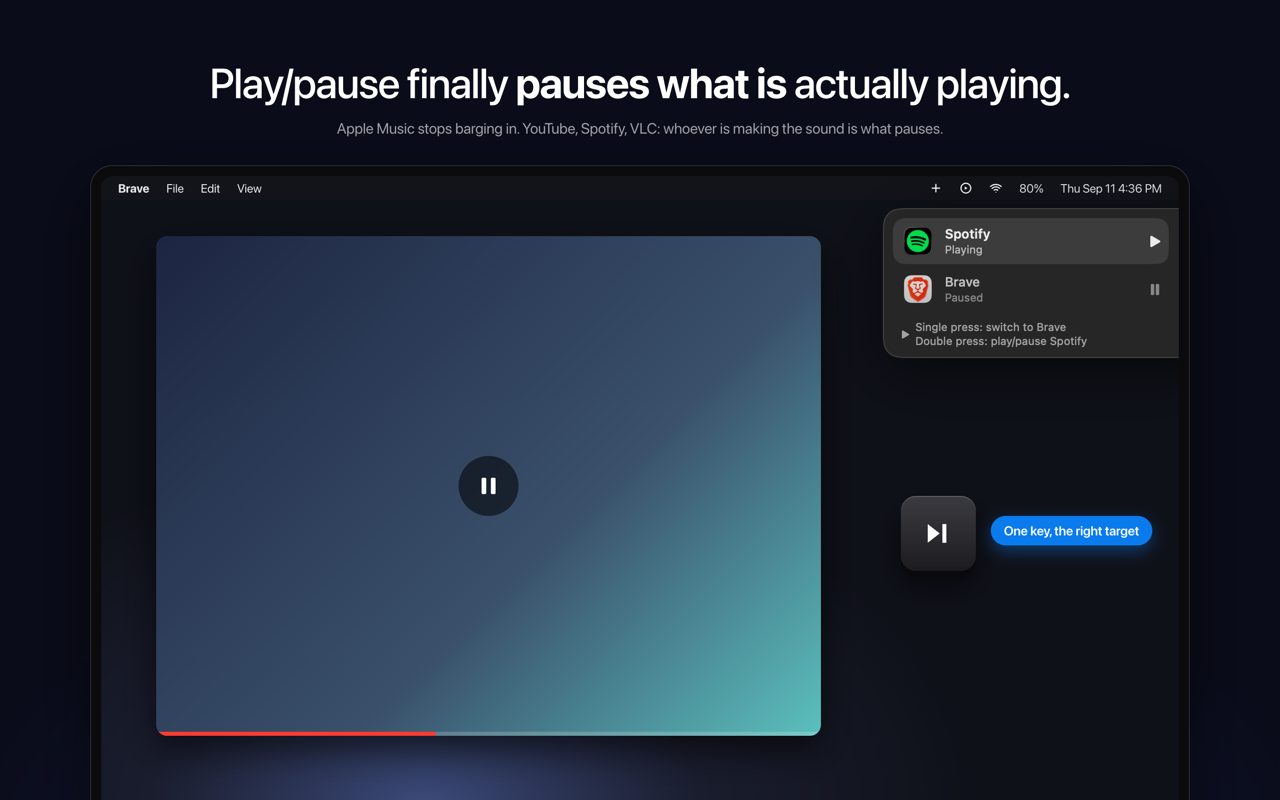
SmartPause is a free, open-source macOS menu bar app that makes the play/pause key do what you actually expect: it sends the media key command to the app that is genuinely making sound at that moment. Instead of trusting whatever macOS last remembered as "Now Playing", SmartPause looks at which process is outputting audio right now and delivers the key press there. It is built for macOS users who constantly hit the play/pause key on their keyboard and want it to control the audio they are actually listening to — a YouTube video in a browser, a track in Spotify, a file in VLC — without unexpected apps launching or a stale target receiving the command. macOS routes media keys to its own idea of a Now Playing app. That memory is frequently stale, and sometimes it points to nothing at all. The practical result is a familiar annoyance: you are watching a YouTube video in a browser, you press play/pause, the video keeps playing, and Apple Music opens by itself. The key press does not reach the thing you are listening to, and a media app you did not ask for takes over. SmartPause exists to correct exactly this routing behaviour. Rather than accepting whatever the system remembers, it checks what is actually producing sound and directs the command accordingly, so the key always lands on the audio that is live at that moment. The core capability of SmartPause is real-time audio detection. On every press it asks Core Audio which process is outputting sound right now, and then sends the play/pause command to that app. This is what separates it from the default macOS behaviour: the decision is based on live audio output rather than a remembered target. The consequence is immediate and visible — Apple Music stays closed when it is not the app playing, and the video, track, or file you are actually listening to responds to the key. If nothing is playing at all, SmartPause falls back to resuming the last thing you paused, so the key press is never wasted. SmartPause also handles the situation where two apps are playing at once. With two audio sources active, a single press switches between them: the currently playing app pauses, the other one starts, and it moves to the top. A double press then plays or pauses the selected app. To keep you oriented, a widget in the top right of the app shows what just happened and what the next press will do. That makes the behaviour predictable even in the busier case where more than one app could plausibly receive the command. The app is deliberately small and honest about what it needs. It requests one permission — Accessibility, so it can hear the media keys — and explicitly uses no microphone and no screen recording. Audio detection uses Core Audio's public process list and runs only when you press a key, meaning zero cost when the app is idle. Apps that do not have an adapter installed still work: SmartPause hands the key back to the system untouched, so the key is never dead. The project is open source under the MIT licence, written in Swift, with no analytics and no accounts, so every line can be read. It works with Spotify, Apple Music, VLC, Chrome, Brave and Safari, and is available in English and Turkish. SmartPause's approach can be summarised as replacing memory with measurement. macOS relies on an internal notion of the current Now Playing target, which goes stale. SmartPause instead interrogates Core Audio for the processes currently outputting audio at the moment of the key press, then delivers the media command to the matching app. Because the check happens only on a press, the app does not need to monitor audio continuously in the background. And because unadapted apps receive the original key press back from the system, SmartPause sits alongside macOS rather than fighting it — it only intervenes where it can make a better decision. The outcome for users is a media key that behaves the way it is expected to. YouTube keeps being controllable while it is playing, and Apple Music no longer opens by itself and interrupts what you were doing. Pressing the key with nothing playing still does something useful, because the last paused item resumes. With two apps playing, one key press swaps control between them instead of leaving you to hunt through windows. The widget removes guesswork about what the next press will do. And on the practical side, the app costs nothing when idle, asks for a single permission, and never leaves you with a key that does nothing at all. Typical scenarios revolve around the everyday confusion between what you are listening to and what macOS thinks you are listening to. Watching a YouTube video in Brave or Safari while the media key previously belonged to Apple Music is the headline case: with SmartPause, the press pauses the video and Apple Music stays closed. Listening to Spotify and then starting something in VLC creates two playing apps; a single press pauses one and starts the other, moving it to the top, and a double press plays or pauses the selected app. If you pause a track and then press the key later with nothing playing, the last thing you paused resumes. And for apps that have no adapter, the key is handed back to the system untouched, so behaviour there is unchanged. Installation is a one-liner via Homebrew or a zip download from GitHub releases. SmartPause is aimed at macOS users who press the play/pause key regularly and are tired of the wrong app responding — people who mix browser video, Spotify or Apple Music, and local media players like VLC through the day. It requires macOS 14.2 or newer on either Apple Silicon or Intel. Integration is by nature broad rather than API-based: it is explicitly listed as working with Spotify, Apple Music, VLC, Chrome, Brave and Safari. The app is written in Swift and relies on Core Audio's public process list for detection. It ships through Homebrew (brew install --cask yasinozmeen/smartpause/smartpause) or as a downloadable zip, and the only setup step is granting the Accessibility permission on first launch. It is free and stated to be staying free, with an optional buy me a coffee link that goes toward the Apple Developer ID so the app can be notarized. SmartPause takes one persistent macOS annoyance — a media key that fires at the wrong app — and fixes it with a focused, transparent tool. It is free, open source, menu bar only, requires a single permission, and does nothing when idle. For anyone whose play/pause key keeps waking up the wrong player, it turns the key back into a reliable control for whatever is actually playing.
The 101 Plays Itself is a browser-based musical instrument built on a live public Caltrans traffic camera pointed at the US-101 in Studio City, Los Angeles. The page streams that camera and plays it: every car that crosses the line becomes a note, and the music is being made in your browser as the traffic goes past. It is for anyone who wants to hear a real freeway composing in real time. There is nothing to install and nothing pre-recorded, and the timestamp burned into the top of the picture is the real one. The project was built by Jay Judah in Los Angeles in 2026, and detection and synthesis run entirely in the browser, with no server, no samples and no recordings. Public traffic cameras exist as infrastructure. Caltrans operates the video network on the 101, and the camera used here, CAM 618 at Moorpark St, is a public feed used under Caltrans' conditions of use. The 101 Plays Itself takes that monitoring footage and listens to it instead of watching it: the road surface itself becomes the score, the five lanes become a musical staff, and the traffic that happens to be there determines what is heard. That means the piece changes with the hour. Come back at three in the morning, the page notes, and you will hear an almost empty freeway. The Drive covered the project as a strangely beautiful bit of infrastructure music, and kottke.org featured it simply as "a musical instrument." NBC4 Los Angeles featured it on The News Zone, framing it as a local LA freeway, a public Caltrans camera, and real traffic composing the score in real time. Underneath the picture, ten sampling patches are laid onto the road surface, two in each of the five lanes. They are not rectangles: each one is a slice of its own lane, leaning and narrowing with distance exactly as the lane does, so the detection region follows the perspective of the tarmac rather than sitting in a fixed box over it. The browser reads those patches fifteen times a second and watches for the road to stop looking like the road. When a patch no longer resembles empty asphalt, that is a car, and that is a note. Because the patches are shaped to the lane they belong to, detection tracks the geometry of the road itself. The patches also measure the vehicles. A vehicle trips one patch and then the other, and the gap between them gives its speed; together the patches form a real speed trap 13.4 metres long. How long a vehicle covers a patch gives its length, which is how the page tells a truck from a car and hands it a different voice. The instrumentation is therefore not decorative: speed and size are read off the road and fed into the music. The page surfaces those readings as live figures, showing notes played, passing speed, notes per minute, a truck count and which of the five lanes are active. On top of the detection sits an instrument rack with sixteen voices, described on the page as: Theremin, gliding and breathing; Glass, inharmonic bells; Rhodes, a warm electric piano; Strings, bowed, slow and swelling; Choir, vowels and distant; Flute, breath and air; Vibraphone, metallic and trembling; Handpan, warm steel and hollow; Gamelan, beating bronze; Harp, plucked and ringing; Music Box, tiny, brittle and sweet; Marimba, woody and struck; Kalimba, a round thumb piano; Organ with cathedral drawbars; Sub Bass, felt more than heard; and Drum Kit, where the lanes become the kit. You tap any pad to start a voice, and the page invites you to stack as many as you like. The unusual part is where all of this happens. Detection and synthesis run entirely in the browser: there is no server, no samples and no recordings, so the notes you hear are generated from what the camera sees at that moment rather than triggered from a library of prepared sounds. Lane geometry was solved offline from an earlier recording of the same camera, which is why the sampling patches can sit correctly on the road surface in perspective. The page also exposes its own state, with a status line reading things like live, 5 lanes, speed trap 13.4 m, night, tail lights and sun -21°, alongside a note that the sound is synthesised live from what the camera sees. The result is a piece of music that cannot be played the same way twice, because the score is whatever traffic is on the 101 at that minute. Nothing is pre-recorded, so a listening session is genuinely live and tied to the real timestamp on the picture. That also makes the experience time-sensitive: the character of the sound follows the density of the freeway, the mix of cars and trucks, and the light. Because everything runs client-side, there is nothing to install and nothing to sign up for. You open the page, turn your sound up and start listening. There are several clear ways to use it. The most direct is simply to listen live: open the page, press Start listening, and hear the southbound 101 at Moorpark St play itself, with a prompt to turn your sound up. You can also treat it as an instrument and perform with it, stacking Theremin, Glass, Rhodes, Drum Kit or any of the other pads so passing traffic triggers a chosen palette instead of the default. An interactive map shows every camera the page can play, with the lit pin marking the one you are listening to and a tap switching to another; listed cameras include US-101 Southbound at Moorpark St in Studio City, US-101 Northbound at SR-170/Tujunga in North Hollywood, and US-101 Northbound at Balboa Blvd in Encino. When the feed is unavailable, a three-minute recording of the same freeway stands in. The audience is broad and largely self-selecting: music makers and synth enthusiasts who want an unusual instrument, listeners drawn to generative and ambient sound, and anyone curious about Los Angeles infrastructure or the 101 itself. Coverage from kottke.org, The Drive and NBC4 Los Angeles' The News Zone suggests interest from both music and local-news readers. On the technical side, the site uses Leaflet for its interactive map with OpenStreetMap tiles, the video comes from Caltrans CAM 618, and detection and synthesis happen in the browser. The page is a free, open browser experience with no account or download described anywhere on the site. In short, The 101 Plays Itself is a public traffic camera turned into a playable room: five lanes of the US-101, ten sampling patches reading speed and vehicle length off the tarmac, sixteen stackable voices, and a browser synthesising the whole thing as real cars cross the line, this minute.
VoiceCap is an AI notetaker for meetings, whether they happen in the room or on a call. It records or ingests a meeting, transcribes it with speaker identification, and turns it into summaries, decisions and action items that a team and its AI assistants can search. The product supports 100+ languages, detects the language automatically, and writes the summary and action items in the language you pick, so the output matches the language the meeting was actually held in. Every meeting becomes a searchable record of what was decided and who owns it. VoiceCap is an EU company, recordings and transcripts are stored in the EU, and the free plan includes 300 free minutes with no card required. The problem VoiceCap addresses is stated plainly by its makers: most AI notetakers are strong in English and mediocre in everything else. For teams that work in Lithuanian, German or any of the many languages spoken across Europe, an English-first transcription tool produces summaries that are subtly wrong and action items that nobody fully trusts. VoiceCap was built the other way around. Transcription covers 100+ languages, and the summary, decisions and action items are written in the same language as the conversation, so a meeting held in one language does not have to be understood in another. Beyond language, the second problem is memory: a decision agreed in a call is easy to lose, and the person who owned it is easy to forget. VoiceCap keeps every meeting as part of a shared, searchable archive so that what was agreed and who is responsible stays retrievable long after the call ends. There are three ways into VoiceCap. First, you can record in the room: open VoiceCap and press record, or use the iOS and Android apps to record an in-person meeting. Second, you can upload a file — audio or video from any recorder — in MP3, M4A, WAV, MP4 or MOV, with speakers separated in the output. Third, an AI note taker can join your online meeting on Zoom, Google Meet, Microsoft Teams or Webex. If you connect your calendar, those calls are recorded automatically, and scheduling shown in the product lists upcoming meetings as 'will record', whether it is a weekly client sync on Google Meet or a vendor review on Teams. Everything is stored in the EU. The point of offering all three routes is that teams do not standardise on one meeting tool: some conversations are around a table, some are on a video platform, and some arrive as a recording after the fact. Once a meeting is captured, VoiceCap's AI transcribes it with speaker identification in minutes rather than hours, using what the product describes as industry-leading accuracy across European languages. Language handling is automatic: the product covers 100+ languages and detects which one is being spoken. From the transcript, VoiceCap produces a set of structured outputs. The summary is written in the language you pick. Decisions are pulled out of the conversation, linked to the second they were said, and made searchable across all meetings. Action items carry an owner and a due date. A meeting page shows the transcript with speakers separated and timestamped, a summary, the decisions, the action items and the project the meeting belongs to, following the product's promise that 'one meeting in' yields 'everything below out'. Everything can be exported as Markdown or plain text and shared with your team. In a sample kick-off meeting of 47 minutes with three speakers, the summary captured that a two-phase plan was agreed, with phase one starting on 1 October and phase-two budget needing sign-off by the end of September. Meetings sort themselves into projects based on what was said, so the archive organises itself instead of waiting for someone to file it. Search runs across transcripts, summaries and decisions at once, and every hit links to the second in the recording where it was said — so a search result is not just a match, it is the moment itself. Sharing is controlled at the meeting level: keep a meeting private to yourself, share it with a group, open it to the whole workspace, or create a link that requires sign-in and expires in 30 days. Access is managed through roles. Owners and admins run the workspace, members record and share meetings, and viewers can only read. Viewers are free and unlimited on every plan, which means a team can give read access to stakeholders without paying for each of them. VoiceCap frames this as answering two questions for a team at once: who sees what, and what was decided. VoiceCap also exposes your meeting archive to AI assistants. You can add VoiceCap as an MCP server, after which Claude, ChatGPT or any MCP client can answer questions from your meetings, with links back to the moment in the recording. The connection is read-only and scoped: the assistant sees only what you can see. In the product's own example, asking Claude 'What did we promise Northwind in the last three calls?' returns the open commitments with the meeting and timestamp each came from. On the trust side, VoiceCap is an EU company and your data is stored in EU data centers. Where processing involves providers outside the EU, EU Standard Contractual Clauses and appropriate safeguards keep it GDPR compliant. Audio, transcripts and summaries are encrypted in transit and at rest, covering every copy from the moment you upload a recording to the moment you delete it. Your audio and transcripts are never used to train AI models — the AI providers used process a meeting only to return its transcript and summary. Deletion is permanent rather than a hidden archive, and configurable retention periods are on the way. The product describes its own method as four steps: Record, Upload, Transcribe, Act. Capture happens through the in-room recorder, a file upload or a meeting bot; transcription with speaker identification follows automatically; and then you act on the result — reviewing AI summaries and action items, searching the archive, exporting as Markdown or plain text, and sharing with your team. VoiceCap summarises the flow as 'One meeting in. Everything below out.' The distinguishing choices in that pipeline are the language-first approach, with transcription and output in the same language across 100+ languages, and the archive-first design, where search, projects, decisions and AI access all operate on the collected set of meetings rather than on one file at a time. For users, the stated outcomes follow from those choices. Note-taking stops being a manual job: summaries, decisions and action items are produced for you in minutes. Nothing agreed in a meeting depends on someone's memory, because every decision is linked to the second it was said and searchable across all meetings. Multilingual teams get output in the language of the meeting instead of an English approximation. Meeting history becomes shared company memory rather than a private folder of recordings, while permissions and roles decide who reads what. And the privacy posture — EU storage, encryption, no training on your data, permanent deletion — is presented as something teams can rely on rather than something they have to take on faith. Concrete scenarios appear throughout the product content. An in-person board meeting can be recorded with the iOS or Android app. A weekly client sync on Google Meet or a vendor review on Microsoft Teams can be joined automatically by the note taker once the calendar is connected. A recorded file can be uploaded after the fact and transcribed with speakers separated. A kick-off meeting, such as the sample website redesign proposal with three speakers over 47 minutes, produces a summary with the agreed phases and deadlines, individual decisions linking back to the exact second, and action items with owners. Later, someone can ask Claude or ChatGPT what the team promised a client across the last three calls and get the open commitments with sources. Sharing covers private meetings, group access, workspace-wide access and time-limited sign-in links, which suits situations where a client or executive needs read access to one meeting rather than the whole archive. VoiceCap is aimed at teams and at people who are in meetings most days of the week. Because viewers are free and unlimited, the model suits organisations where a small number of people record and a larger number read. Payment is per capture seat: the Free plan costs €0 forever and includes 300 minutes, one capture seat, unlimited free viewers, meeting bots for Meet, Zoom, Teams and Webex, auto-record from Google and Outlook calendars, AI summaries, decisions and action items, 100+ languages detected automatically, and MCP access from Claude and ChatGPT. Pro is €29 plus VAT per capture seat per month with 1,000 minutes per seat each month, plus the ability to add and drop seats and advanced permissions including groups, roles and share links. Business is €49 plus VAT per capture seat per month with unlimited recording and transcription, owner oversight of every meeting and priority support; SSO, SCIM, retention and audit logs are listed as coming soon. Integrations mentioned include Zoom, Google Meet, Microsoft Teams, Webex, Google and Outlook calendars, Claude, ChatGPT and any MCP client. Browser recording and upload, speaker separation, search across transcripts and decisions, sharing with people and groups, Markdown and text exports, original recording storage and EU/GDPR compliance apply on every plan. VoiceCap's core proposition is narrower and more specific than a general meeting assistant: it is the AI notetaker that works in your language, not just in English. It captures meetings in the room, on a call or from a file; transcribes them in 100+ languages with speaker identification; distils them into summaries, decisions and action items; stores everything in a searchable EU-hosted archive with granular sharing and roles; and lets Claude, ChatGPT or any MCP client query that archive read-only. For teams that meet in more than one language and want a durable record of what was decided and who owns it, that combination — language coverage, a searchable company memory, and EU data handling with no training on your data — is the product's primary value.