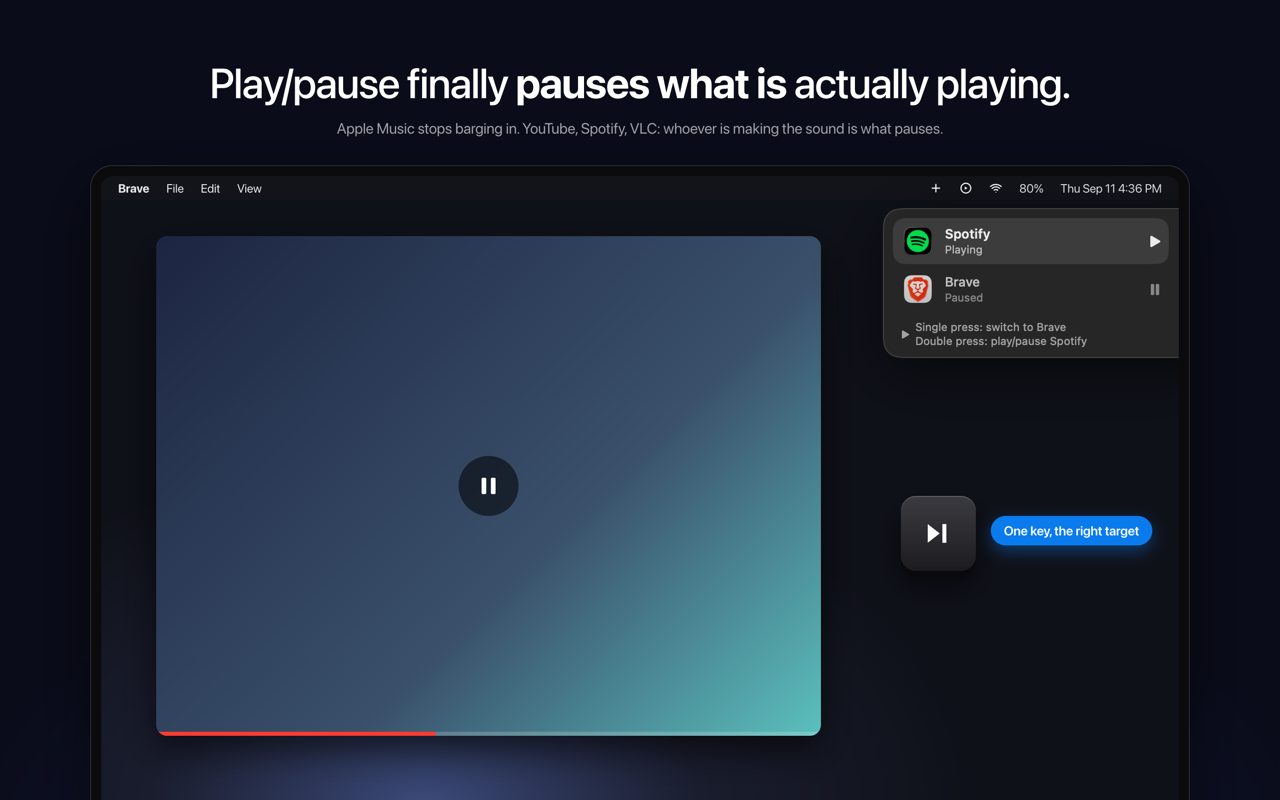
SmartPause is a free, open-source macOS menu bar app that makes the play/pause key do what you actually expect: it sends the media key command to the app that is genuinely making sound at that moment. Instead of trusting whatever macOS last remembered as "Now Playing", SmartPause looks at which process is outputting audio right now and delivers the key press there. It is built for macOS users who constantly hit the play/pause key on their keyboard and want it to control the audio they are actually listening to — a YouTube video in a browser, a track in Spotify, a file in VLC — without unexpected apps launching or a stale target receiving the command.
macOS routes media keys to its own idea of a Now Playing app. That memory is frequently stale, and sometimes it points to nothing at all. The practical result is a familiar annoyance: you are watching a YouTube video in a browser, you press play/pause, the video keeps playing, and Apple Music opens by itself. The key press does not reach the thing you are listening to, and a media app you did not ask for takes over. SmartPause exists to correct exactly this routing behaviour. Rather than accepting whatever the system remembers, it checks what is actually producing sound and directs the command accordingly, so the key always lands on the audio that is live at that moment.
The core capability of SmartPause is real-time audio detection. On every press it asks Core Audio which process is outputting sound right now, and then sends the play/pause command to that app. This is what separates it from the default macOS behaviour: the decision is based on live audio output rather than a remembered target. The consequence is immediate and visible — Apple Music stays closed when it is not the app playing, and the video, track, or file you are actually listening to responds to the key. If nothing is playing at all, SmartPause falls back to resuming the last thing you paused, so the key press is never wasted.
SmartPause also handles the situation where two apps are playing at once. With two audio sources active, a single press switches between them: the currently playing app pauses, the other one starts, and it moves to the top. A double press then plays or pauses the selected app. To keep you oriented, a widget in the top right of the app shows what just happened and what the next press will do. That makes the behaviour predictable even in the busier case where more than one app could plausibly receive the command.
The app is deliberately small and honest about what it needs. It requests one permission — Accessibility, so it can hear the media keys — and explicitly uses no microphone and no screen recording. Audio detection uses Core Audio's public process list and runs only when you press a key, meaning zero cost when the app is idle. Apps that do not have an adapter installed still work: SmartPause hands the key back to the system untouched, so the key is never dead. The project is open source under the MIT licence, written in Swift, with no analytics and no accounts, so every line can be read. It works with Spotify, Apple Music, VLC, Chrome, Brave and Safari, and is available in English and Turkish.
SmartPause's approach can be summarised as replacing memory with measurement. macOS relies on an internal notion of the current Now Playing target, which goes stale. SmartPause instead interrogates Core Audio for the processes currently outputting audio at the moment of the key press, then delivers the media command to the matching app. Because the check happens only on a press, the app does not need to monitor audio continuously in the background. And because unadapted apps receive the original key press back from the system, SmartPause sits alongside macOS rather than fighting it — it only intervenes where it can make a better decision.
The outcome for users is a media key that behaves the way it is expected to. YouTube keeps being controllable while it is playing, and Apple Music no longer opens by itself and interrupts what you were doing. Pressing the key with nothing playing still does something useful, because the last paused item resumes. With two apps playing, one key press swaps control between them instead of leaving you to hunt through windows. The widget removes guesswork about what the next press will do. And on the practical side, the app costs nothing when idle, asks for a single permission, and never leaves you with a key that does nothing at all.
Typical scenarios revolve around the everyday confusion between what you are listening to and what macOS thinks you are listening to. Watching a YouTube video in Brave or Safari while the media key previously belonged to Apple Music is the headline case: with SmartPause, the press pauses the video and Apple Music stays closed. Listening to Spotify and then starting something in VLC creates two playing apps; a single press pauses one and starts the other, moving it to the top, and a double press plays or pauses the selected app. If you pause a track and then press the key later with nothing playing, the last thing you paused resumes. And for apps that have no adapter, the key is handed back to the system untouched, so behaviour there is unchanged. Installation is a one-liner via Homebrew or a zip download from GitHub releases.
SmartPause is aimed at macOS users who press the play/pause key regularly and are tired of the wrong app responding — people who mix browser video, Spotify or Apple Music, and local media players like VLC through the day. It requires macOS 14.2 or newer on either Apple Silicon or Intel. Integration is by nature broad rather than API-based: it is explicitly listed as working with Spotify, Apple Music, VLC, Chrome, Brave and Safari. The app is written in Swift and relies on Core Audio's public process list for detection. It ships through Homebrew (brew install --cask yasinozmeen/smartpause/smartpause) or as a downloadable zip, and the only setup step is granting the Accessibility permission on first launch. It is free and stated to be staying free, with an optional buy me a coffee link that goes toward the Apple Developer ID so the app can be notarized.
SmartPause takes one persistent macOS annoyance — a media key that fires at the wrong app — and fixes it with a focused, transparent tool. It is free, open source, menu bar only, requires a single permission, and does nothing when idle. For anyone whose play/pause key keeps waking up the wrong player, it turns the key back into a reliable control for whatever is actually playing.
Publisher
A
admin
Launch Date2026-09-21
Platformdesktop
Pricingfree
Tech Stack
#Swift#Core Audio#macOS