Category Focus/categories/writing
Writing AI Tools
Discover and compare the best writing AI tools and software. Browse 128+ curated tools with reviews and rankings.
Projects tracked
128
Sort mode
RECENT
Page
3
Discover and compare the best writing AI tools and software. Browse 128+ curated tools with reviews and rankings.
Projects tracked
128
Sort mode
RECENT
Page
3
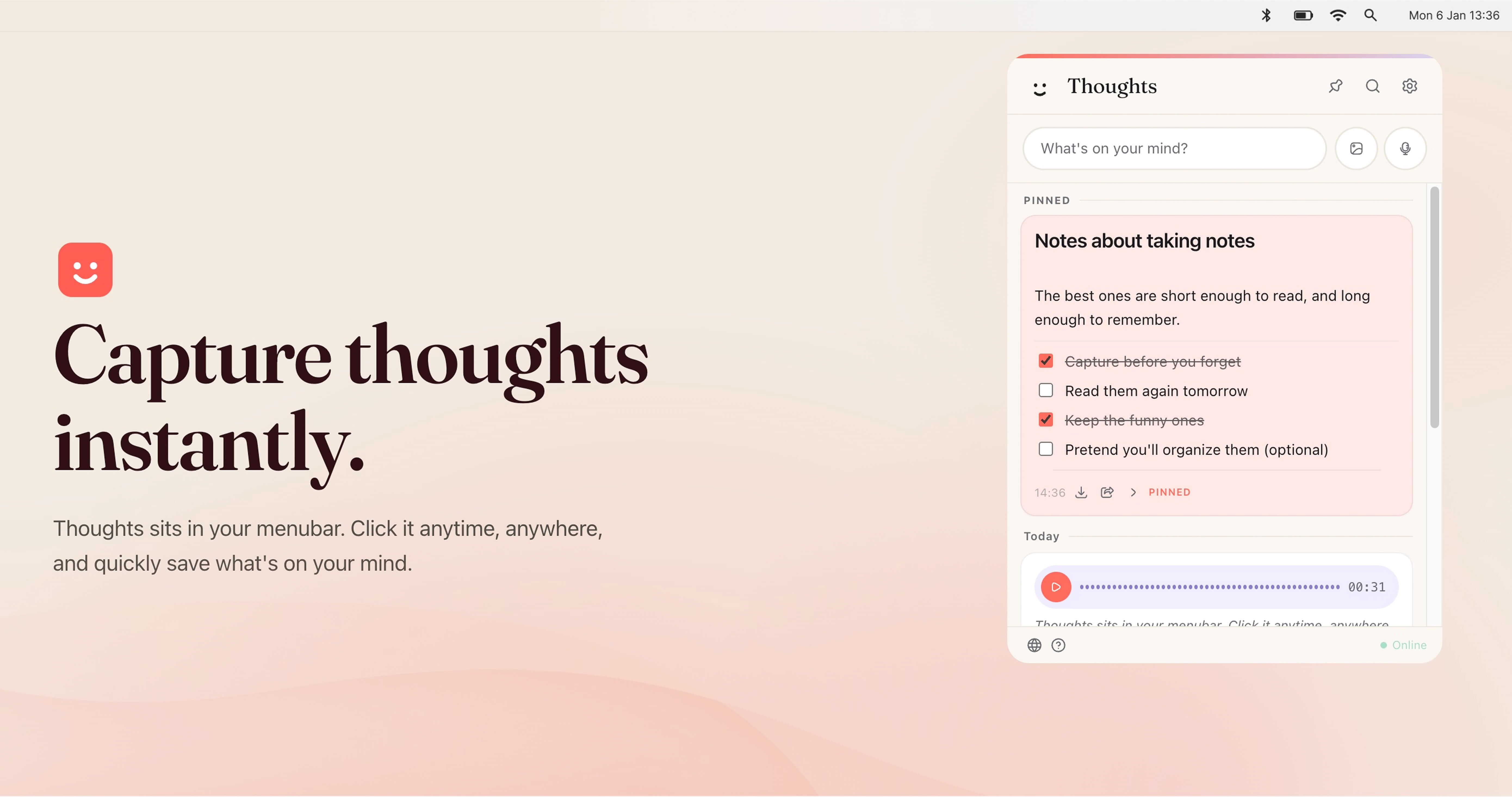
Thoughts for Mac is a menubar application that helps Mac users capture thoughts instantly. It sits in the macOS menubar, so you can click it anytime, anywhere, and quickly save what is on your mind without opening a separate full-screen app. The product is designed as a fun small multi-tool for your menubar, allowing you to keep notes quickly using text, images, and voice. It captures structured text notes, checklists, code blocks, standalone links with previews, voice recordings, images, and text-like files such as TXT and CSV. It is intended for Mac users who want a fast, low-friction way to record ideas, tasks, links, screenshots, and voice memos while staying in their current workflow. The app requires no account, saves notes and settings locally on your Mac, and can connect to your own OpenAI, Claude, or Gemini API key for AI-powered actions. Traditional note-taking often requires switching away from what you are doing, opening a separate application, and finding the right place to type. That context switch can cause fleeting ideas to be lost. Thoughts addresses this by living in the menubar, making capture available from anywhere on your Mac. A custom shortcut provides instant access, so you can open Thoughts without hunting through the Dock or Applications folder. Because notes and settings are saved locally on your Mac and media files are stored in the app's user data folder, you do not need an account to start capturing. Browser preview mode is session-only, meaning notes there are temporary, which reinforces that the desktop app is the primary place for persistent local notes. This local-first approach is useful for people who want quick capture without committing to a cloud account or subscription. The core of Thoughts is flexible capture. You can use the Write it feature to type structured text notes, checklists, code blocks, and standalone links that appear with previews. The Drag in an image feature lets you bring images into your notes, and the Talk to it feature lets you capture voice recordings. The app supports voice-to-text and image-to-text, along with screenshot capturing. On desktop builds, Thoughts can also receive shared text, images, and audio from URL schemes, open-with actions, macOS Services, and native imports. This range of input methods matters because thoughts do not always arrive as typed text; sometimes they are a screenshot, a voice memo, a link, or a quick checklist. By supporting multiple formats in one menubar app, Thoughts aims to reduce the friction of choosing a different tool for each type of content. AI-powered actions are optional and use your own API key. You can connect OpenAI, Claude, or Gemini in Settings. With a connected key, Thoughts can help transcribe audio, context images to text, and perform simple text transforms such as capitalization, translations, and spelling fixes. The app lists AI actions for shortening, lengthening, summarizing, fixing spelling, translating, converting case, transcribing voice notes, and extracting text from images. Claude is available for text actions, while transcription support depends on the provider. This bring-your-own-key model means the AI features are not tied to a separate Thoughts subscription; instead, you use the provider and key you already have. It is useful for turning a voice recording into searchable text, pulling text out of a screenshot, or quickly rewriting a note without leaving the menubar. Thoughts also helps you find and keep important content. You can search across notes, links, screenshots, and image names instantly. Pinned Thoughts let you keep important notes at the top of your list, which is useful for recurring tasks, key references, or ideas you return to often. Export and share options allow you to share notes as text or export audio recordings whenever you want them. From Settings you can export all notes as JSON. Individual notes can be exported in the best available format: text notes as TXT, image notes as image files, PDF attachments as PDF, and voice notes as MP3 in the desktop app. Light and dark mode let Thoughts adapt to whichever you prefer. These features make the app not just a capture tool but also a lightweight system for retrieving, prioritizing, and moving your notes out when needed. Overall, Thoughts works as a menubar-first, local-first note capture utility. You trigger it from the menubar or your own custom shortcut, then save content using text, voice, images, screenshots, links, or supported files. Notes and settings are stored locally on your Mac, and media files are saved in the app's user data folder. No account is required. The optional AI layer is separate: you bring your own OpenAI, Claude, or Gemini API key, and the app sends requests to those providers for actions such as transcription, OCR, summaries, translations, and rewrites. The desktop app can receive shared content through macOS mechanisms like URL schemes, open-with, and Services. This combination of native macOS integration, local storage, and optional third-party AI makes Thoughts a compact multi-tool rather than a full project management or collaboration suite. For users, the main benefit is speed and convenience. Thoughts sits where you already are, so capturing a thought takes a click or a custom shortcut instead of opening another app. Supporting text, images, and voice means you can choose the fastest input for the moment. Local storage and no account requirement give you control over where notes live. The bring-your-own-key approach avoids a mandatory AI subscription, letting you use the provider account you already have. Search, pinning, and export options help you manage accumulated notes and avoid lock-in, because you can export all notes as JSON or individual notes in formats like TXT, image, PDF, and MP3. Light and dark mode keep the app comfortable in different environments. Together these benefits support a low-friction capture habit without adding another cloud account or complex setup. Concrete use cases include capturing a quick thought while working in another application, recording a voice note and later transcribing it to text, dragging in an image or taking a screenshot and extracting text from it, and using text transforms to shorten, lengthen, summarize, fix spelling, translate, or change case. You can save standalone links with previews for later reference, create checklists for tasks, or store code blocks for development notes. Pinned Thoughts can keep important notes at the top for ongoing projects. When you need to share or archive, you can export notes as text or export audio recordings, and you can export all notes from Settings as JSON. Because desktop builds can receive shared text, images, and audio from URL schemes, open-with, macOS Services, and native imports, Thoughts can also fit into existing macOS sharing workflows. Thoughts is aimed at Mac users, particularly those focused on productivity and writing. It suits people who want to capture notes quickly from the menubar using text, images, or voice, and who may already have an OpenAI, Claude, or Gemini API key for AI-powered actions. The app is native macOS and integrates with those AI providers through your own key. It also supports macOS sharing mechanisms such as URL schemes, open-with, macOS Services, and native imports on desktop builds. Pricing is free: Thoughts is free to download and use, including future updates, with no subscription for the app itself. AI features require your own API key, so any costs from OpenAI, Gemini, or Claude are separate. Notes and settings are saved locally, and no account is required. In summary, Thoughts for Mac is a free, native macOS menubar app for instant note capture. It lets you save text, images, screenshots, links, voice recordings, and supported files without leaving your current workflow. Search, pinning, export, light and dark mode, and a custom shortcut make notes easy to retrieve and manage. Optional AI actions through your own OpenAI, Claude, or Gemini key add transcription, image-to-text, summaries, translations, and text fixes without a separate app subscription. The primary value proposition is fast, local-first capture with flexible input and optional AI, all from a small menubar multi-tool.
Voiskey is an AI voice typing tool that turns natural speech into polished, ready-to-send text. Rather than transcribing your words literally, Voiskey starts from what you meant, shaping a rough spoken thought into text that fits where it is going and who is reading it. The product is described simply as "AI voice typing that understands your meaning, not just your words" — you speak naturally and Voiskey returns polished, ready-to-send text for messages, emails, notes, documents, AI prompts and more. It is built for anyone who thinks faster than they type and wants their spoken thoughts to arrive already cleaned up and ready to use, while still sounding like them. Voiskey is available on macOS, Windows, iOS and Android. The problem Voiskey targets is the gap between thinking and typing. Speaking is fast, but the keyboard slows thoughts down: the site compares a keyboard at 45 wpm with Voiskey voice at 220+ wpm and describes the result as 5x faster than typing. Typing also forces you to compose while you capture, which is why so many everyday writing tasks stall at the start — the first draft is the hardest part, the first sentence is the hardest, ideas hit fast while drafting is slow, tickets pile up faster than you can type, meeting details are easy to forget, and prompting an AI can take longer than coding. Voiskey attacks that gap by letting you think out loud and handing back something finished, so the friction of getting words out of your head and into a usable form is removed from the process. The first capability Voiskey is built around is understanding rather than merely listening. You speak the way you naturally would, and Voiskey catches the fillers, stumbles, changes of mind and grammar slips that ordinary dictation tends to leave in. This matters because unedited speech is messy: people restart sentences, circle back, correct themselves mid-thought and rely on verbal filler while they think. A tool that only transcribes leaves you cleaning up the mess by hand. Voiskey handles that cleanup as part of the transcription, so the text you get back reflects what you were trying to say rather than a verbatim record of how you said it. The second capability is adaptation. Voiskey is described as knowing what you are going for and automatically tailoring the formatting, tone and word choice so every output fits your intent and is ready to send. In practice that means the same spoken thought can arrive shaped differently depending on its destination: casual with a friend, composed with a colleague, or technical with an AI. Instead of speaking stiffly in order to produce formal text, or writing longhand to hit the right register, you speak naturally and Voiskey adjusts the output so it lands correctly for the context. Because the output is already formatted and ready to send, the step between speaking and hitting send is where the time is saved. Voiskey also learns your style and works across languages and AI tools. It learns your names, jargon and spelling preferences so your words always land in your style — useful for people with specialist vocabulary, recurring names or particular spellings they do not want corrected. It converts voice to native-sounding text in 100+ languages: you can speak in your own language when you need to translate, and Voiskey turns your voice into fluent, native text across those languages. Voiskey also lets you tell your AI what to build just by speaking: you talk through what you want to build or change, and Voiskey turns it into a clean AI-ready prompt with files, paths, commands and key details captured. That last capability is aimed at workflows where the prompt itself has become the slow part. Overall, Voiskey's approach is to meet you wherever you already type. The site states that Voiskey works anywhere on your computer and in any language: wherever you type, however you speak, Voiskey is ready when you are. There is one voice experience across every device, so the same way of working carries across macOS, Windows, iOS and Android rather than being tied to a single machine or a single app. You speak naturally, Voiskey interprets the meaning and the intended destination, and it delivers text in the form that destination requires — the core methodology being that it works from intent rather than from literal audio. The benefits Voiskey claims are speed and readiness. It is 5x faster than typing by the site's own comparison, letting you get your thoughts out before the keyboard slows them down. Output arrives cleaned up and ready to send, so there is no separate editing pass to remove fillers or restructure sentences. And because Voiskey learns your names, jargon and spelling preferences, the result still sounds like you rather than like generic machine output. For people whose work is largely written — replies, updates, notes, drafts, prompts — the combination of speaking at speed and receiving finished text changes how much writing can be done in the same amount of time. Voiskey lists concrete scenarios for its use. Engineers can prompt their AI tools by speaking, turning talk into prompts, commits and design docs, addressing the observation that prompting now takes longer than coding. Sales teams use it for call notes, CRM updates and replies, since the faster the follow-up, the warmer the deal. Customer support uses it to keep language clear across tickets, live chats and help articles. Writers and creators turn spoken ideas into posts, scripts and book chapters. Students capture lecture notes, essays and emails, getting past the difficulty of the first draft. Founders produce updates, replies and job posts at startup speed. Legal and consulting professionals turn their insights into memos, client letters and contracts. By task type, Voiskey is used for messages such as texts, DMs and quick replies; emails, where you speak a rough draft and Voiskey shapes it into clear, structured writing; notes, capturing reminders, quick lists and random ideas the moment they show up; meetings, capturing decisions, action items and follow-ups; and team updates, handoffs and action items. Voiskey's primary audience, as described on the site, includes engineers, sales teams, customer support teams, writers and creators, students, founders, and legal and consulting professionals — essentially anyone whose day involves producing written text. It runs on macOS, Windows, iOS and Android, supports over 100 languages, and is free to start. During its launch, joining gives a free month of Pro. The site positions it as a general-purpose voice layer rather than a single-app feature: it works anywhere on your computer, in any language, and the same experience follows you across every device. Voiskey's core value proposition is straightforward: speak it rough, send it right. By understanding meaning rather than only words, adapting formatting, tone and word choice to the destination, learning each user's names, jargon and spelling, and operating across four platforms and 100+ languages, Voiskey removes the friction between thinking and finished writing — at a claimed 5x the speed of typing, with output that arrives ready to send and still sounds like the person who said it.
Ghostwriter by MyHandler is an AI writing assistant for Windows 10 and 11 that drafts text directly at your cursor inside any application. Rather than asking you to describe what you want written, it reads the screen in front of you — the thread above your cursor, the question beside it, or the half-finished sentence inside it — works out what you would write next, and types that draft in your voice. The site describes the entire interaction as a double-tap: put your cursor in any text field, double-tap the hotkey, and the text appears. It is designed for people who write replies all day and want the first draft to arrive already written instead of having to prompt an AI for it. The problem Ghostwriter targets is stated plainly on its own site: every other AI writes what you tell it, while Ghostwriter writes what you already know. The friction it removes is not the writing itself but the prompting — describing what you want written was the work you were trying to avoid, and describing a reply in a live conversation is often more effort than typing it would have been. Ghostwriter replaces the prompt with the context already on your screen, so the screen content becomes the entire input. Because automatic writing carries the risk of sending something you did not intend, Ghostwriter also stops short of the final step: it types into the box and never sends anything itself. You edit it, you send it. The core feature is screen-context drafting. When you double-tap the hotkey, your Handler captures the screen around your cursor — the thread above it, the question beside it, the half-finished sentence in it, the form, or whatever is in front of you. That capture is the input. Before writing a single word, Ghostwriter works out what kind of writing this is: a reply owed in a thread, a sentence to continue from exactly where it stops, a blank box under a question that wants a real answer, or a message the context obviously calls for. The site states that getting this right is most of the job, so it decides on the kind of writing before it drafts anything. This matters because a continuation that restates your own sentence, or a reply that summarises the thread back at you, would be worse than useless. Ghostwriter also handles the social detail of a conversation. It maps each message to its sender, works out which handle is yours, and tracks who asked whom for what, so it answers the other party rather than replying to your own words. It matches how you write to that person, down to the sign-off. The result is a draft that reads like something you would have written to that specific person in that specific thread, not a generic assistant response that you then have to rewrite from scratch. Two further capabilities shape the draft. First, scheduling safety: if the reply proposes a time, it is checked against the next two weeks of your calendar first, and the product states that it will not double-book you. A connected calendar is required only for this scheduling cross-check — the site notes that everything else works without one. Second, rewriting: if you select text before double-tapping, Ghostwriter rewrites the selection instead of composing a new reply, so the same single gesture covers replying, continuing, filling in, and rewriting existing text. Ghostwriter is part of the MyHandler desktop app for Windows. The workflow the site describes has three steps. First, you put your cursor where the words go — no prompt, no dictation — and double-tap the hotkey so the Handler captures the screen around that cursor. Second, the Handler decides what kind of writing this is and, if the reply proposes a time, checks it against your calendar. Third, the text appears at your cursor exactly as written, with nothing sent. On privacy and data handling, the capture around your cursor happens on your machine, against the encrypted vault on your PC. The assembled context is then sent to the company's cloud model, which the site says operates with zero data retention, to write the draft. The stated benefits follow from that design. There is no prompt to write, because the whole interaction is a double-tap and you never have to describe what you want. It reads the situation, not just the words, identifying whether the moment calls for a reply, a continuation, a fill-in, or a composition from scratch before it writes. It gets who's who right, so it answers the other party rather than your own messages. And the last step stays with you: Ghostwriter types the draft and stops, so nothing leaves your machine without your decision. These benefits combine into a simple outcome — the first draft of a reply appears at your cursor in your voice, and you spend your time editing rather than composing. The use cases are anchored in the places people actually write. The site names a mail client, Slack, a browser form, and a comment box as examples of any app where a cursor in a text field is enough. In practice, that covers an email reply owed in a thread, a chat message that needs answering, a sentence you want continued from exactly where it stops, a blank box under a question that wants a real answer, a message the context obviously calls for, and a scheduling reply that has to respect your next two weeks of calendar. Because the input is whatever is on screen, the same double-tap works across all of them without switching tools or re-describing the task. Selecting text first turns the same gesture into a rewrite rather than a continuation. Ghostwriter runs on Windows 10 and 11 today and is free for those platforms. The site states that macOS and Linux are coming, and offers to email you the download link so it is waiting when you are at a Windows PC, with a direct download for Windows also provided. A connected calendar is optional and used only for the scheduling cross-check. MyHandler offers related capabilities built on the same local-vault foundation: Dictation, which lets you hold a key, talk, and release so your words appear at the cursor and which keeps working with Cloud AI switched off; AI Gatekeeper, which watches every channel you connect and screens the noise on your own PC; Contact Intelligence, which builds living contact profiles automatically on your machine from the messages, meetings, and activity already in your vault; and Daily Briefing, a morning briefing written from the data on your own PC. Ghostwriter's value proposition is that the draft is already there. You do not type a prompt, you do not dictate, and you do not describe the reply you want. You put your cursor in the text field, double-tap, and a reply written in your voice, grounded in the thread on your screen, appears where you were about to type — calendar-checked if it proposes a time, addressed to the right person, and never sent without you. Stop rewriting the same reply: it drafts, you decide.
ColdLine.ai is an AI tool that turns cold prospects into hot leads with AI-powered personalized pitches. It is built for anyone who sends outreach to people they have not spoken to before and needs each message to feel relevant rather than generic. The product works from information you already have about a prospect: you simply add your prospect's details, and ColdLine.ai creates a relevant, human-sounding pitch in seconds. Its stated purpose is to save time, personalize your outreach, and get more replies — without writing every message from scratch. The people it is positioned for are founders, sales teams, marketers, recruiters, and agencies. Cold outreach is difficult precisely because it is cold. A message that reads like a template is easy to ignore, while a message that speaks to the recipient's specific situation is far more likely to be read and answered. Producing that kind of message at any volume, however, is slow work: each prospect has to be considered individually, and each pitch has to be written from a blank page. ColdLine.ai addresses that tension head-on. Instead of forcing a choice between personalization and speed, the product is designed to deliver both, generating a relevant pitch for each prospect quickly enough that outreach can continue at volume. The stated outcome is more replies from prospects who were previously cold. The first step in the ColdLine.ai workflow is providing the details of the prospect you want to reach. You add your prospect's details, and that information becomes the basis for the pitch the tool generates. This input is what makes personalization possible: rather than a single generic message reused across a list of contacts, the pitch is built around the specific prospect in front of you. Because the only thing you have to supply is the prospect's details, the barrier to producing a tailored message is low, and the process fits naturally into an existing prospecting routine rather than replacing it. ColdLine.ai generates the pitch in seconds. That speed is at the core of the value proposition, because personalized outreach normally costs time — and time is what limits how many prospects a person or a team can realistically approach. By compressing the writing step to seconds per prospect, ColdLine.ai makes it practical to personalize outreach consistently instead of reserving personalization for the handful of prospects who seem most important. The stated benefit is tied directly to this speed: save time, personalize your outreach, and get more replies. The pitches ColdLine.ai creates are described as relevant and human-sounding. Relevance means the message is connected to the prospect's details rather than being a generic template; human-sounding means the result is intended to read like something a person would actually write, not like an obviously automated message. Together, these qualities are what allow a pitch to be sent to a cold prospect without immediately marking it as bulk outreach. A relevant, human-sounding message is more likely to be engaged with, which is how the product aims to turn cold prospects into hot leads. ColdLine.ai follows a deliberately short methodology. You bring the prospect details; ColdLine.ai handles the writing. No elaborate setup is described, and no writing is required from you — the product exists so that you do not have to compose every message from scratch. The workflow is simple: add your prospect's details, receive a personalized pitch created by AI in seconds, and send it. The AI's role is to turn the raw facts you have about a prospect into a pitch that is relevant and sounds human, at a speed that manual writing cannot match. The benefits stated for ColdLine.ai are threefold: saving time, personalizing outreach, and getting more replies. Saving time matters because outreach volume is usually limited by writing capacity. Personalization matters because relevant messages perform better than generic ones. More replies matter because a reply is the point at which a cold prospect starts to become a lead. Because the product removes the need to write every message from scratch, the time that would have gone into drafting can instead go into reaching more prospects or following up with the people who respond. ColdLine.ai is described as suitable for founders, sales teams, marketers, recruiters, and agencies. For a founder, it means reaching out to prospective customers or partners without spending the day writing introductions. For a sales team, it means personalized first-touch outreach across a pipeline of prospects. For a marketer, it supports outreach campaigns that need to feel individually written. For a recruiter, it means approaching candidates with messages tailored to each person. For an agency, it means producing personalized outreach for multiple clients without the writing overhead that would normally be involved. The target users named in the product's own description are founders, sales teams, marketers, recruiters, and agencies — people and teams whose work depends on starting conversations with prospects they do not yet know. ColdLine.ai is presented squarely as a tool for that outreach step. Beyond the fact that it is an AI-powered product reached through its website at coldlineai.xyz, the available content does not state specific integrations, a technical stack, or pricing plans. ColdLine.ai's value proposition is straightforward: cold prospects become hot leads when the pitch they receive is relevant and human-sounding, and producing that kind of pitch at scale is normally too slow to do consistently. ColdLine.ai automates the writing step so that you add your prospect's details and get a personalized pitch in seconds. The result is outreach that is faster to produce, personalized by default, and designed to earn more replies — without writing every message from scratch.
Marked Share is a free service for publishing, reviewing, and sharing Markdown and TextBundle documents on the web. It is a subproduct of Marked 3, the Markdown preview app, but it does not require Marked to be used — anyone can sign up free and publish Markdown either from Marked or straight from the web. Documents can be shared with images and attachments through short links on markedb.in. Beyond simple sharing, Marked Share lets other people highlight and comment on a document, gives you a library to manage what you have published, and lets you keep private drafts until you are ready to share. It also publishes "blog" feeds with RSS/Atom and Micro.blog integration, and offers either a built-in editor or a full API for integrating with your favorite editor or tool. Markdown and TextBundle documents are written in plain text, but they frequently carry images and attachments that have to travel with them for the document to make sense. That makes everyday sharing harder than it should be: you want readers to see the formatted result, keep the assets intact, and have a way to respond to what they read. Marked Share addresses this by publishing documents to the web as shareable, linkable pages rather than as loose files. It also solves the timing problem that writers face — material is often not ready to be public, so the service supports private drafts that stay unshared until the author decides otherwise. For authors who think in Markdown and write regularly, the service turns individual documents into something closer to a public stream. The core of Marked Share is publishing and sharing. A document is published from Marked or from the web, and the result is served under a short link on markedb.in that is easy to paste into a message, an email, or a chat. Because images and attachments travel with the document, the published page presents the full piece rather than a bare text file. Published documents are collected in a library that the author manages from the service, so there is a persistent place to track what has been shared. Private drafts sit alongside published items within that library, letting an author build a body of work incrementally and release each document only when it is ready to be seen. Marked Share is not only a publishing endpoint; it is also a place for review. Readers can highlight passages in a shared document and leave comments on them. This turns a published Markdown file into a two-way artifact: an author can send out a draft, receive specific feedback anchored to particular sentences rather than to vague general impressions, and revise accordingly. Because feedback lands on the document itself, there is no need to reconcile separate files, comment threads, or copies of the text. The highlight-and-comment model is what makes the service useful to anyone who wants a second pair of eyes on a document before it goes further — a reviewer, an editor, a colleague, or a client. For authors who publish regularly, Marked Share can go beyond individual documents and publish "blog" feeds. Each feed is served with RSS/Atom, so it can be subscribed to in any feed reader, and it integrates with Micro.blog as well. This means a set of Markdown documents can behave less like loose files and more like a running publication that interested readers can follow. Writers who already keep their material in Markdown — notes, essays, updates — can expose a stream of it without standing up a separate blogging platform or converting everything into a content management system. The feed is generated from the documents themselves, so the Markdown remains the source. Marked Share gives authors two ways to work. The first is a built-in editor on the service itself, sufficient for writing or editing a document and publishing it from the browser. The second is a full API, which allows Marked Share to be integrated with whatever editor or tool the author already prefers, so publishing can happen from within an existing workflow instead of requiring a switch to a new application. Either route produces the same result: a shared document with a short link, attached images and attachments, and the option of highlights and comments from readers. The service is free to use, with no subscription required, and access begins with a sign-in or a free sign-up, after which the library, drafts, published documents, and feeds are managed from one place. Because Marked Share is free and requires no subscription, the cost of sharing a document or trying the service out is effectively zero, and there is no commitment involved in using it. Authors get the benefit of a short, clean link instead of an unwieldy file attachment, and recipients get a page they can read and annotate. Private drafts give authors control over timing, so work in progress never has to be visible before it is meant to be. The library keeps published material organized rather than scattered. And the RSS/Atom and Micro.blog feeds give a body of Markdown writing a way to reach readers who want to follow it, without the author building and maintaining a separate publishing stack. Concrete uses of Marked Share follow directly from how it works. A writer can draft an essay in Markdown, keep it private until it is polished, then publish it to a short markedb.in link and send that link to a friend or an editor who highlights passages and leaves comments. A team member can publish a document that includes images and attachments so a reviewer sees the complete piece rather than a stripped-down text file. Someone who writes regularly can maintain a feed of published documents and share the RSS/Atom or Micro.blog subscription with readers who want to follow along. And anyone who prefers to write in their own editor can integrate through the API and publish from there, keeping the tool they like while still using Marked Share as the place documents live. Marked itself can also publish straight to the service. Marked Share is for people who write in Markdown and TextBundle: writers, note takers, and users of text editors, which are the topics under which the product is listed. It also suits Marked users who want a publishing and review layer for their documents, though Marked is not required. The integrations named in the product are Marked itself, markedb.in for short links, RSS/Atom feeds, and Micro.blog, along with a full API for connecting an editor or tool of choice. Pricing is straightforward: Marked Share is free, described as a free service with no subscription required, and is reached by signing in or signing up for a free account. Marked Share packages Markdown publishing into a single free service: publish a document from Marked or the web, share it with a short markedb.in link that carries its images and attachments, collect highlights and comments from readers, keep drafts private until the time is right, and optionally turn published documents into RSS/Atom and Micro.blog feeds. With a built-in editor for quick work and a full API for integrating existing tools, it makes sharing and reviewing Markdown and TextBundle documents as simple as sending a link.
Moji is a desktop application that opens Markdown files the way you would open a PDF. The project describes itself simply: double-click a Markdown file and start reading. Moji displays your document with clear typography, tables and diagrams, and keeps editing and export ready for when you need them. It runs on Windows, macOS and Linux, is free and open source, and requires no account. The product positions itself as a fast, clean and distraction-free way to read Markdown, with the stated purpose of making a Markdown file open the way a PDF does: with a double-click, instantly readable and with no setup required. On the project's site, the creator explains the motivation directly under the heading "why I built Moji": the goal was for a Markdown file to open the way a PDF does, with a double-click, instantly readable, with clean typography and no setup. The site adds that usability came first from day one, that Moji is lightweight and comfortable for long-form reading, and that it is simple enough to disappear while you read. Editing and export were added without losing that focus. The entire design intent is captured in the line "Less interface. More document." The problem being addressed is the friction between raw Markdown text and a comfortable reading experience: instead of configuring a toolchain or an authoring environment simply to look at a document, the user opens the file and reads it, and the more advanced capabilities only appear when they are actually needed. Opening and reading a document in Moji is deliberately flexible. The site lists four ways to open a file: a standard file dialog, drag and drop, file associations, and a multi-tab workspace. File associations mean a Markdown file can be opened by double-clicking it in the operating system, which is the behaviour the product is built around. The multi-tab workspace lets several documents stay open at once, so readers can move between files without returning to a file picker each time. Once a document is open, Moji renders a rich, secure preview that includes tables, task lists, footnotes, LaTeX, code highlighting, emoji and outline navigation. A synced outline keeps the document structure visible alongside the content, and a dark theme is available for focused reading. The interface uses subtle chrome and compact controls so that the content itself stays in the foreground. Editing is available but stays secondary to reading. Moji's editor is built on CodeMirror 6 and adds Markdown shortcuts, line numbers, history, and search and replace. The site describes this as precise editing covering code, shortcuts and search. The intent is that a user who opened a file to read it can switch into editing without leaving the reader or losing the distraction-free layout, then return to reading. Markdown shortcuts speed up common formatting tasks, line numbers help when working with code-heavy documents, history provides a record of changes within the session, and search and replace supports navigating and updating longer documents. Moji renders Mermaid diagrams without leaving the document. Valid Mermaid blocks in a file become responsive diagrams inline, and the site states that flowcharts, sequence diagrams, Gantt charts, class diagrams, ER diagrams and more are supported. Diagrams can be zoomed from 10% to 1000%, panned freely, or fit to view, and a minimap plus a dedicated diagram viewer help navigate larger charts. Each image can be exported individually as PNG. The rendered diagrams are described as self-contained SVG in HTML, PDF and PNG output. The site summarises this as turning code into diagrams instantly, which means a document that describes a system in Mermaid syntax can be read and understood visually in the same window. Exports are described as predictable. Moji can export to PDF for precise layouts, to HTML for web-ready output, and to PNG, which the site presents as suited to long documents. Exports preserve typography, diagrams and very long documents. The export dialog is intentionally simple: the user chooses a format and a layout. Because Mermaid output is embedded as self-contained SVG, diagrams that appear in the reader also appear correctly in the exported PDF, HTML or PNG file. Moji is a desktop application rather than a web service. Official installers for Windows, macOS and Linux are published directly through GitHub Releases. For Windows, an NSIS installer is provided for Windows x64 with automatic updates. For macOS, a universal DMG supports both Apple Silicon and Intel, with manual updates. For Linux, users can choose an AppImage with automatic updates or a DEB package for manual installation. The version referenced on the site is 1.0.7. Moji is free, distributed under the MIT license, and requires no account, so no sign-in or subscription stands between the user and their document. The stated benefits follow from that design. Because Markdown files open with a double-click, the tool fits into the same habit as opening a PDF. Because the interface is lightweight and uses subtle chrome, it is described as comfortable for long-form reading and simple enough to disappear while you read. Because the preview supports tables, tasks, footnotes, LaTeX, code highlighting, emoji and diagrams, technical and structured documents render correctly rather than as raw text. Because editing and export are built in, a single application covers reading, light authoring and sharing. And because the interface is available in Portuguese, English, Spanish, Japanese, Chinese and Russian, readers can use the product in their own language. Several concrete scenarios follow from the features the site describes. A developer who receives a README or technical document can double-click the file and read it immediately with code highlighting and correctly rendered tables. A writer or note-taker can open a long Markdown document in the multi-tab workspace, follow the synced outline, and use the dark theme for extended reading sessions. Anyone working with technical documentation can embed Mermaid blocks and view flowcharts, sequence diagrams, Gantt charts, class diagrams or ER diagrams inline, zoom into a detail and export a single diagram as PNG. A user who needs to distribute a document can export it to PDF with precise layouts, to HTML for the web, or to PNG for long documents, with typography and diagrams preserved. Someone who needs to make a small correction can switch into the CodeMirror-based editor, use Markdown shortcuts and search and replace, then return to reading. And because Windows, macOS and Linux builds are all available, the same reader can be used across different machines. Moji is aimed at people who read Markdown on a desktop and want it to behave like a document rather than source code: developers reading repository documentation, writers and note-takers working in Markdown, and anyone who deals with technical documentation that contains diagrams. It is explicitly free, open source under the MIT license, and requires no account. The site states that the source can be explored, development followed, issues reported, and the project's next chapter shaped through the public repository. Technically, the site names CodeMirror 6 as the editor foundation and Mermaid for diagram rendering. Moji runs on Windows, macOS and Linux, with distribution handled through GitHub Releases, and the interface is localised into six languages. Moji's primary value proposition is stated on its own homepage: opening Markdown should be as simple as opening a PDF. It delivers that by pairing a focused, lightweight desktop reader with the editing, diagram rendering and export tools needed when reading is not enough, and it does so free of charge, as open source, across Windows, macOS and Linux.
Loqua is context-aware voice typing and dictation software built for Mac and Windows. It converts natural speech into polished, ready-to-use writing, understands what is on your screen, offers read-aloud when you would rather listen than read, and lets you trigger everyday actions by voice. Its stated purpose is to help people move from thoughts to being done — less typing, less context switching, and more time in flow. Loqua is aimed at anyone who would rather think than type: professionals who write all day, developers and engineers, product managers, designers, marketers, founders, writers, researchers and students. The keyboard has long been the bottleneck between having an idea and getting it written down. Traditional keyboard typing runs at roughly 45 words per minute, while Loqua's dictation runs at 220 words per minute — a difference the company presents as saving up to 3 hours per day. Raw speech, however, is rarely usable as written text: it is full of filler words, repetition and half-finished sentences. Loqua removes filler words, cuts repetition and refines phrasing in real time so that what lands on screen is ready to send. A second problem Loqua targets is context switching: stopping work to open another app, look something up, translate it or rewrite it breaks concentration. Loqua aims to keep people inside the app they are already working in. The core of Loqua is dictation with real-time cleanup. When you speak, Loqua strips out filler words, trims repetition and refines your phrasing, so the sentence that appears on screen reads as if it had been carefully written rather than spoken. This happens in real time, which means you do not have to go back and re-read everything you just said. Loqua also recognises structure in speech and builds it automatically: if you think in bullets but speak in blocks, Loqua derives lists, headings and hierarchy on its own, so you do not have to dictate formatting out loud. For anyone who writes long documents, meeting notes or structured updates, this removes the tedious formatting pass that normally follows dictation. Capture to Ask addresses the moments when the answer is on your screen but you cannot figure it out. Using a shortcut, you select any part of the screen — a table, a chart or anything else — then speak your question. Loqua returns an answer, an analysis, a translation or a summary without you having to switch apps. It is a three-step flow the company describes as Capture, Ask, Know. Related to this is Ask and Edit: highlight anything, whether it is a product description, a draft or a note, speak your instruction, and Loqua rewrites it on the spot. There is also a simpler ask-anything path — hit a shortcut, ask a question out loud, and get an instant answer without leaving your current app, which is useful when you are stuck mid-task. Translation lets you speak in your own language and deliver in someone else's, with native phrasing in nearly 100 languages, returned instantly. That makes it practical for international teams, multilingual correspondence and anyone writing in a second language. Command to Go turns your voice into a hands-free command hub: with a shortcut you can set reminders, open apps, search routes, place calls and send texts, so you can manage small tasks without jumping between applications. AI Podcast read-aloud works in the opposite direction — select text and Loqua reads it aloud, which the company suggests for morning news and multitasking, effectively giving you a hands-free text-to-speech assistant. Loqua's approach is to sit globally on top of your existing workflow rather than replace it. You invoke it with one shortcut in any text field, so it works in tools like Terminal, Slack, Notion, email, Google Docs, Microsoft Word, VS Code, Teams, Figma, Obsidian, GitHub and many more, with your voice landing right where your cursor is. The company describes the experience as no switching and no waiting, with a zero-latency feel that makes the tool easy to forget about. Loqua is built by a dedicated voice AI team with full model iteration capabilities, and the roadmap includes meeting transcription, multimodal capabilities and a Skill Market. Users report that Loqua adapts tone automatically — shifting register between, for example, a message to a CEO and a Slack message to a team — by understanding the context it is typing into. The benefits the company and its users describe are time and flow. Because dictation runs at 220 words per minute rather than 45, and because cleanup and formatting happen automatically, people report writing that used to take an hour finishing in minutes — one user summarises 30-minute writing sessions becoming 5-minute speaking sessions, and another says PRDs written by voice save at least an hour a day. Beyond speed, Loqua reduces the proofreading burden: users report they have stopped going back to check output, even when dictating framework names, library names and acronyms. For people with repetitive strain injury, Loqua is described as making work possible again rather than merely faster. Non-native English speakers say it makes their writing sound native, and international users say translation is instant and natural. Concrete use cases appear throughout the site. Product managers write PRDs, standup notes, sprint recaps and stakeholder updates by speaking. Engineers dictate coding notes, documentation and terminal input, and use it in Slack, Notion and their IDE. Designers keep their hands on Figma and narrate case studies and design processes. Content strategists and marketers draft LinkedIn posts, email campaigns, blog outlines and ad copy by voice and then polish from there. Founders and executives who context-switch all day speak thoughts into whatever app is open, and heavy email users cut correspondence time. Consultants talk through client debriefs to get clean summaries, UX researchers dictate research notes between interviews, and PhD candidates use the cleanup and formatting for academic writing. Sales teams use translation to send emails in a different language from the one they speak. Loqua runs on Mac and Windows as a desktop application you download from the site, with a 14-day free trial. It advertises support for a very broad set of applications — among them Google Docs, Word, Notion, Slack, Gmail, Figma, VS Code, Teams, Obsidian, Google Sheets, Zoom, Excel, GitHub, Terminal, Discord, Outlook, IntelliJ IDEA, PowerPoint, GitLab, WhatsApp, Telegram, Stack Overflow, OneNote, Canva, Photoshop, LinkedIn, Google Slides, X, Sketch, Reddit, Illustrator, Confluence, Evernote, Facebook, Adobe XD and Google Keep. There is also a developer programme: maintainers of public open-source projects can apply for a Developer Grant giving free access. The site states that thousands of professionals use Loqua every day. Loqua's core promise is that your thoughts should not have to slow down for a keyboard. By combining high-speed context-aware dictation, automatic cleanup and structure, screen understanding, translation, voice editing and voice-triggered actions in one shortcut-driven tool, it turns rough ideas into ready-to-use writing and keeps work moving inside the apps you already use.
Kraflio is a multi-platform AI content engine that learns your writing voice and generates publication-ready posts for LinkedIn, X, Instagram, Bluesky, YouTube and TikTok. AutoPost publishes to LinkedIn (personal profile and Company Page), X, Instagram and Bluesky via official APIs. It keeps a separate voice per platform, learns from your own writing samples, and nothing publishes without your approval. On-brand AI images, Instagram carousels, YouTube/TikTok link import, scheduling, analytics and a full Brand Kit are included on every plan — plans differ only in volume. Available on web, Telegram and Android.

Loova Ads Studio is an all-in-one AI creative workspace designed for marketers, creators, and brands. Its primary function is to generate a wide array of advertising assets, including UGC videos, product commercials, avatar videos, and static creatives. The platform aims to produce high-performing ads efficiently, enabling users to test more variations and angles to discover what resonates best with their target audience. The core problem Loova Ads Studio addresses is the time and cost associated with producing a sufficient volume of ad creatives for effective A/B testing. Traditionally, creating numerous ad variations requires significant manual effort and expense, often limiting brands to a few options. This bottleneck hinders the ability to optimize campaigns and find the most effective messaging and visuals, leading to missed opportunities and suboptimal marketing performance. One key feature is the generation of UGC videos and product commercials. Users can input product details, and the AI will create engaging video content that mimics user-generated styles or professional product showcases. This allows for rapid creation of diverse video assets without the need for extensive filming or editing. Another significant capability is the creation of avatar videos. Loova Ads Studio can generate videos featuring AI avatars, providing a way to create dynamic content with consistent presenters or characters, which can be particularly useful for explainer videos or brand messaging. The platform also excels at generating static creatives. This includes product images and other visual assets suitable for various advertising platforms. Users can generate unlimited product images within their workflow, ensuring a constant supply of fresh visuals for campaigns. A core functionality is the "Viral Ad Clone" feature. This allows users to replicate the structure and pacing of successful ad formats, adapting them to their own products and brand style. The system analyzes the grammar of viral ads—hook, pacing, scene structure, and product reveal—and rebuilds these elements around the user's specific product, brand assets, and audience, ensuring the cloned ad feels fresh and not a direct copy. Loova Ads Studio operates by analyzing product information, identifying strong selling angles, and suggesting video hooks. It pairs these with viral avatars and proven templates to create ready-to-test creatives. Users can build a reusable "Product Kit" containing product images, descriptions, selling points, and brand assets, which the AI uses to maintain consistency across generations. The platform leverages a combination of leading AI models, including Seedance, Kling, and Veo, along with proprietary creative context and shot-planning systems. The benefits for users include the ability to create high-performing ads at a low cost, often under $2 per ad. It significantly speeds up the creative process, allowing for more extensive A/B testing and quicker identification of winning campaigns. By automating much of the creative production, Loova Ads Studio frees up marketers to focus on strategy and analysis. Specific use cases include rapidly generating multiple ad variations for e-commerce products to test different hooks and visuals, creating avatar-led explainer videos for new features, producing diverse UGC-style ads to increase authenticity, and cloning successful ad formats to quickly adapt them for new product launches or seasonal campaigns. Loova Ads Studio is targeted at marketers, creators, and brands, particularly those in e-commerce. While specific pricing tiers are not detailed, the content suggests a focus on cost-effectiveness, with ads costing under $2. The platform is web-based, and direct integrations with ad platforms like Meta and TikTok are planned for the future, though currently users export their finished ads. In summary, Loova Ads Studio acts as an AI-powered creative engine, empowering marketers to produce a high volume of diverse, high-converting ad creatives efficiently and affordably, thereby accelerating testing and optimizing campaign performance.
An AI marketing optimization system based on Andrej Karpathy's autoresearch method. 12 fill-in-the-blank program.md templates cover cold email subject lines, landing page copy, pricing tiers, ad creative, and onboarding. Each template defines a change proposal, scoring rubric, and keep-or-revert decision rule with a hard cost-stop parameter. Compatible with Claude Code, Cursor, or any AI coding agent. Runs at $0 on local models via Ollama, ~$6/session hybrid, or ~$15/session at full API rates.