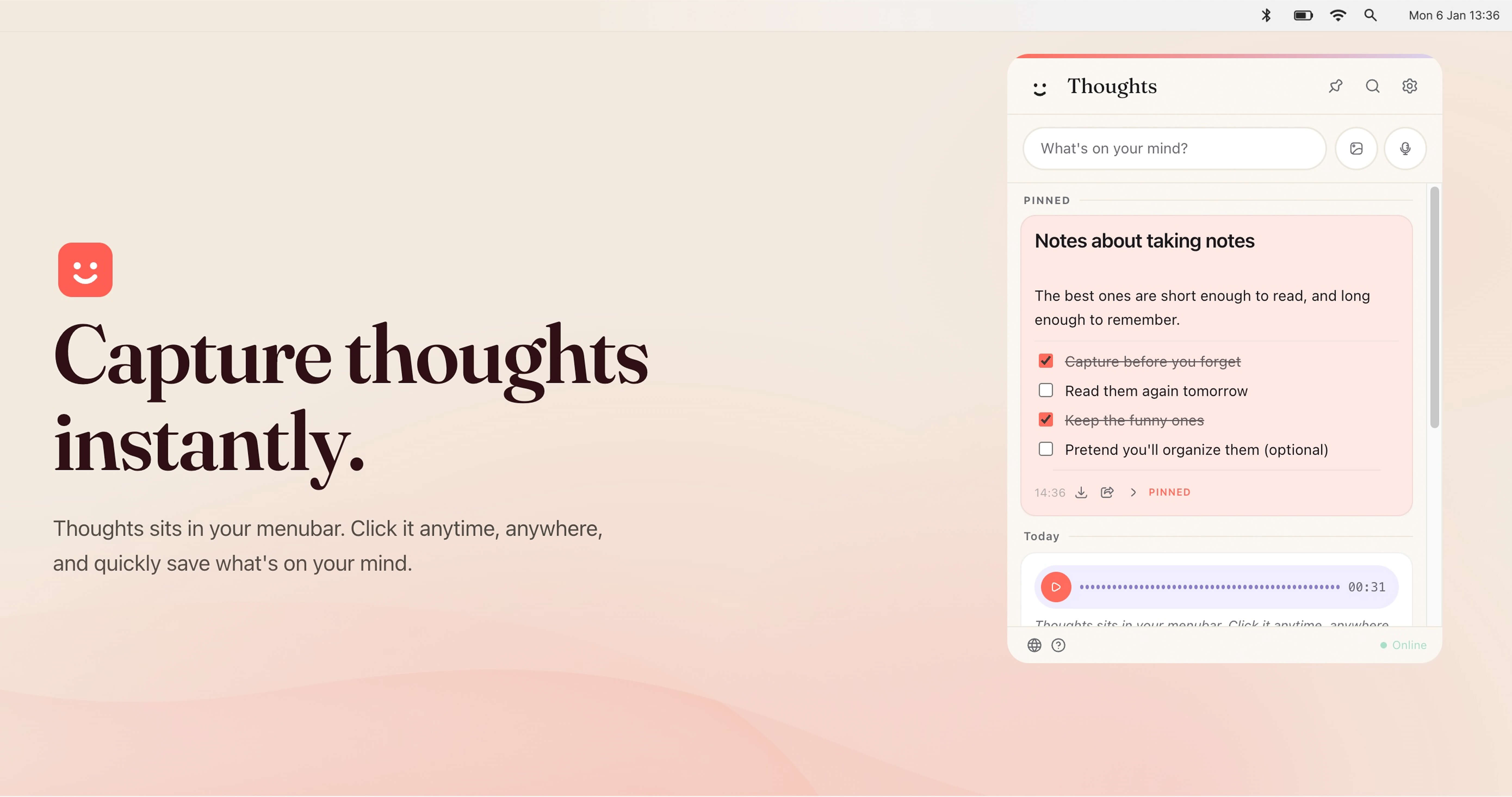
Thoughts for Mac is a menubar application that helps Mac users capture thoughts instantly. It sits in the macOS menubar, so you can click it anytime, anywhere, and quickly save what is on your mind without opening a separate full-screen app. The product is designed as a fun small multi-tool for your menubar, allowing you to keep notes quickly using text, images, and voice. It captures structured text notes, checklists, code blocks, standalone links with previews, voice recordings, images, and text-like files such as TXT and CSV. It is intended for Mac users who want a fast, low-friction way to record ideas, tasks, links, screenshots, and voice memos while staying in their current workflow. The app requires no account, saves notes and settings locally on your Mac, and can connect to your own OpenAI, Claude, or Gemini API key for AI-powered actions.
Traditional note-taking often requires switching away from what you are doing, opening a separate application, and finding the right place to type. That context switch can cause fleeting ideas to be lost. Thoughts addresses this by living in the menubar, making capture available from anywhere on your Mac. A custom shortcut provides instant access, so you can open Thoughts without hunting through the Dock or Applications folder. Because notes and settings are saved locally on your Mac and media files are stored in the app's user data folder, you do not need an account to start capturing. Browser preview mode is session-only, meaning notes there are temporary, which reinforces that the desktop app is the primary place for persistent local notes. This local-first approach is useful for people who want quick capture without committing to a cloud account or subscription.
The core of Thoughts is flexible capture. You can use the Write it feature to type structured text notes, checklists, code blocks, and standalone links that appear with previews. The Drag in an image feature lets you bring images into your notes, and the Talk to it feature lets you capture voice recordings. The app supports voice-to-text and image-to-text, along with screenshot capturing. On desktop builds, Thoughts can also receive shared text, images, and audio from URL schemes, open-with actions, macOS Services, and native imports. This range of input methods matters because thoughts do not always arrive as typed text; sometimes they are a screenshot, a voice memo, a link, or a quick checklist. By supporting multiple formats in one menubar app, Thoughts aims to reduce the friction of choosing a different tool for each type of content.
AI-powered actions are optional and use your own API key. You can connect OpenAI, Claude, or Gemini in Settings. With a connected key, Thoughts can help transcribe audio, context images to text, and perform simple text transforms such as capitalization, translations, and spelling fixes. The app lists AI actions for shortening, lengthening, summarizing, fixing spelling, translating, converting case, transcribing voice notes, and extracting text from images. Claude is available for text actions, while transcription support depends on the provider. This bring-your-own-key model means the AI features are not tied to a separate Thoughts subscription; instead, you use the provider and key you already have. It is useful for turning a voice recording into searchable text, pulling text out of a screenshot, or quickly rewriting a note without leaving the menubar.
Thoughts also helps you find and keep important content. You can search across notes, links, screenshots, and image names instantly. Pinned Thoughts let you keep important notes at the top of your list, which is useful for recurring tasks, key references, or ideas you return to often. Export and share options allow you to share notes as text or export audio recordings whenever you want them. From Settings you can export all notes as JSON. Individual notes can be exported in the best available format: text notes as TXT, image notes as image files, PDF attachments as PDF, and voice notes as MP3 in the desktop app. Light and dark mode let Thoughts adapt to whichever you prefer. These features make the app not just a capture tool but also a lightweight system for retrieving, prioritizing, and moving your notes out when needed.
Overall, Thoughts works as a menubar-first, local-first note capture utility. You trigger it from the menubar or your own custom shortcut, then save content using text, voice, images, screenshots, links, or supported files. Notes and settings are stored locally on your Mac, and media files are saved in the app's user data folder. No account is required. The optional AI layer is separate: you bring your own OpenAI, Claude, or Gemini API key, and the app sends requests to those providers for actions such as transcription, OCR, summaries, translations, and rewrites. The desktop app can receive shared content through macOS mechanisms like URL schemes, open-with, and Services. This combination of native macOS integration, local storage, and optional third-party AI makes Thoughts a compact multi-tool rather than a full project management or collaboration suite.
For users, the main benefit is speed and convenience. Thoughts sits where you already are, so capturing a thought takes a click or a custom shortcut instead of opening another app. Supporting text, images, and voice means you can choose the fastest input for the moment. Local storage and no account requirement give you control over where notes live. The bring-your-own-key approach avoids a mandatory AI subscription, letting you use the provider account you already have. Search, pinning, and export options help you manage accumulated notes and avoid lock-in, because you can export all notes as JSON or individual notes in formats like TXT, image, PDF, and MP3. Light and dark mode keep the app comfortable in different environments. Together these benefits support a low-friction capture habit without adding another cloud account or complex setup.
Concrete use cases include capturing a quick thought while working in another application, recording a voice note and later transcribing it to text, dragging in an image or taking a screenshot and extracting text from it, and using text transforms to shorten, lengthen, summarize, fix spelling, translate, or change case. You can save standalone links with previews for later reference, create checklists for tasks, or store code blocks for development notes. Pinned Thoughts can keep important notes at the top for ongoing projects. When you need to share or archive, you can export notes as text or export audio recordings, and you can export all notes from Settings as JSON. Because desktop builds can receive shared text, images, and audio from URL schemes, open-with, macOS Services, and native imports, Thoughts can also fit into existing macOS sharing workflows.
Thoughts is aimed at Mac users, particularly those focused on productivity and writing. It suits people who want to capture notes quickly from the menubar using text, images, or voice, and who may already have an OpenAI, Claude, or Gemini API key for AI-powered actions. The app is native macOS and integrates with those AI providers through your own key. It also supports macOS sharing mechanisms such as URL schemes, open-with, macOS Services, and native imports on desktop builds. Pricing is free: Thoughts is free to download and use, including future updates, with no subscription for the app itself. AI features require your own API key, so any costs from OpenAI, Gemini, or Claude are separate. Notes and settings are saved locally, and no account is required.
In summary, Thoughts for Mac is a free, native macOS menubar app for instant note capture. It lets you save text, images, screenshots, links, voice recordings, and supported files without leaving your current workflow. Search, pinning, export, light and dark mode, and a custom shortcut make notes easy to retrieve and manage. Optional AI actions through your own OpenAI, Claude, or Gemini key add transcription, image-to-text, summaries, translations, and text fixes without a separate app subscription. The primary value proposition is fast, local-first capture with flexible input and optional AI, all from a small menubar multi-tool.
Publisher
A
admin
Launch Date2026-09-16
Platformdesktop
Pricingfree