Category Focus/categories/developer-tools
Developer Tools AI Tools
Discover and compare the best developer tools AI tools and software. Browse 559+ curated tools with reviews and rankings.
Projects tracked
559
Sort mode
RECENT
Page
1
Discover and compare the best developer tools AI tools and software. Browse 559+ curated tools with reviews and rankings.
Projects tracked
559
Sort mode
RECENT
Page
1
DevAlly is an AI-powered accessibility compliance platform built for product teams who ship quickly. Its purpose is to make a digital product accessibility conformant fast, so that teams can build products for everyone rather than treating accessibility as a one-off audit. The platform covers the accessibility lifecycle end to end — scan, identify, remediate, prove and scale — and combines automated auditing with AI that generates exact code-level fixes. DevAlly AI Agent, the product's launch on Product Hunt, extends this by letting a user describe a user journey in plain English; the agent then navigates the application and records that journey, saving hours of engineering work. DevAlly then audits each stage of the recorded journey against the WCAG criterion and suggests fixes for every issue it finds. The company positions the product for teams that need accessibility compliance without slowing down their roadmap. The context behind DevAlly is a regulatory and legal landscape that is tightening. According to figures presented on the website, a large share of websites fail basic accessibility requirements, and thousands of ADA lawsuits are filed in the United States annually. The site notes that ADA Title III exposes private businesses to civil lawsuits, with demand letters, class actions and settlements rising every year, and that settlements often exceed $50,000. At the same time, the US, the EU and the UK have each set their own accessibility requirements, and the direction is described as mandatory, enforceable and increasingly expected by the enterprise customers teams are selling to. For US federal procurement, VPATs are required, and they are increasingly expected by enterprise buyers more broadly. Because products change constantly, accessibility requires consistent monitoring rather than a single audit — which is exactly the gap the DevAlly Agent is designed to close. DevAlly organises accessibility work into five stages. The first is Scan: you sign up and run your first automated audit in under ten minutes, with no configuration required. The website states that no credit card and no accessibility expertise are needed to begin, so a team can enter its product URL and get started straight away. The second stage is Identify, where issues found by an audit are prioritised by severity and by compliance standard. The point of that prioritisation is to surface the necessary fixes first rather than the nice-to-haves, so a team working through a long list of findings knows which items actually block conformance and which can wait. Together, Scan and Identify turn an open-ended question — is our product accessible? — into a ranked, standard-based list of things to fix. The third stage, Remediate, is where DevAlly's AI generates exact code-level fixes rather than generic advice. Those fixes are integrated directly into GitHub and into a CI/CD pipeline, which means accessibility issues can be caught before they ship instead of being discovered after release. This matters because it moves accessibility into the same workflow engineering already uses for other quality checks: remediation happens where the code lives, and the pipeline becomes a gate rather than a report. The website also notes that the DevAlly MCP brings accessibility compliance into your editor, so you can ask what is failing WCAG and get the fix without leaving your workflow. The company describes this combination as accessibility that stays built in, not bolted on. The fourth stage is Prove. When procurement, legal or a customer asks about accessibility, DevAlly is designed to have the documentation ready: VPATs, compliance dashboards and accessibility statements on demand. Because VPATs are required for US federal procurement and are increasingly expected by enterprise buyers, being able to produce them quickly is a commercial concern as well as a compliance one. The fifth stage is Scale: as a product grows, DevAlly grows with it, and continuous monitoring catches regressions before users do. Continuous monitoring is the direct answer to the problem of constant change — a product that passed an audit last quarter may fail today's WCAG criteria after a release, and DevAlly's approach is to keep checking rather than to re-audit from scratch. Taken together, the platform's methodology is an end-to-end, AI-driven loop rather than a point-in-time audit. A team enters its product URL or signs up, runs an automated audit, and receives findings prioritised by severity and compliance standard. For each issue, AI generates code-level fixes that flow into GitHub and the CI/CD pipeline. Documentation for compliance and procurement is produced from the same system, and monitoring continues so that regressions are caught as the product evolves. The DevAlly AI Agent adds a natural-language layer on top of this: instead of scripting a test path, you describe a user journey in plain English, the agent navigates the app and records the journey, and the platform audits each stage of that journey against the WCAG criterion and suggests fixes for every issue it finds. The website frames the overall promise simply — DevAlly handles the auditing, the prioritisation and the documentation, and the team handles the building. The intended outcomes are that teams become accessibility conformant quickly, without needing in-house accessibility expertise and without slowing down the roadmap. Practically, that means less engineering time spent recording and replaying user journeys by hand, a short path from sign-up to first audit, and a prioritised list of fixes instead of an undifferentiated backlog of violations. It also means documentation that is ready when it is requested by procurement, legal or customers, and monitoring that keeps a product conformant as it changes. The website summarises the goal as building products for everyone, not just running audits. Concrete scenarios described in the content include a product team that wants to run a first automated audit with no configuration simply by entering its product URL; engineering teams that need AI-generated, code-level fixes wired into GitHub and their CI/CD pipeline so issues are caught before they ship; teams asked for a VPAT or an accessibility statement by procurement or a customer, who need compliance dashboards and documentation on demand; and growing products that need continuous monitoring to catch regressions introduced by new releases. The DevAlly AI Agent supports the case where a team wants to verify a full user journey — described in plain English — and have each stage of it audited against WCAG automatically. DevAlly is aimed at product teams who ship fast, and specifically at teams selling into markets where accessibility is mandatory or expected — the US, the EU and the UK — as well as organisations for which federal procurement and enterprise buyers require VPATs. The site emphasises that no accessibility expertise is needed, which suggests it is intended to be usable by teams without a dedicated accessibility specialist. Mentioned integrations and touchpoints include GitHub, CI/CD pipelines, an MCP integration for the editor, and a Chrome extension called Wendy described in the company's blog. On pricing, the website offers a free way to get started, with no credit card required, alongside a Request a Demo path for teams that want a walkthrough. The product is described as being live on Product Hunt as DevAlly AI Agent. The core value proposition is straightforward: DevAlly makes accessibility compliance something a fast-moving product team can actually keep up with. By combining automated scanning, severity-based prioritisation, AI-generated code-level fixes, on-demand compliance documentation and continuous monitoring into one end-to-end platform — and by letting a user journey be captured in natural language — it turns accessibility from a periodic, expensive audit into an ongoing part of shipping software.
Rool is a full private cloud machine that brings your files, software and AI into a single workspace. Instead of being only a chat window, Rool gives you a complete machine in the cloud that holds your documents, runs software, and keeps the work and memory produced between tasks. The machine is hosted in the EU, and the AI models that run on it are self-hosted by Rool in the EU as well. Rool is built for privacy-conscious individuals, teams and creators who want to work with AI without giving up control of their content. Your workspace stays private to you and to the people you choose to invite, and you can start on a free machine without a credit card. Most mainstream AI tools ask you to trade your data for convenience. Content you upload may be used to train models, advertising may be part of the deal, and your data may sit in jurisdictions far from where you or your customers are. Rool takes a different position. The company states that it sells Rool, not your data: there are no ads, no data sales, and your files and conversations are never used to train AI models. Your data is stored in Finland, under EU law, and your Rool Machine is hosted in the EU. For individuals and teams who care about where their information lives and who can reach it, that difference is the whole point rather than a footnote. Chat is just the surface in Rool. Behind every conversation sits a full machine that holds your files, runs software and keeps your work and memory between tasks. That means a chat is not a dead end: you can start with a conversation and then build from there. The machine keeps the results of what you do and the context around them, so the next task does not begin from zero. Files, software and memory are the three pillars Rool highlights. Writing a document, working with your files, or running software all happen on the same machine, and the outputs stay there, ready for whatever you do next, rather than being scattered across separate tools that forget what happened before. Rool runs AI models on infrastructure it manages in the EU. Those self-hosted models are what you use to work on the documents, files and tasks inside your Rool Machine. Frontier AI models are included in every plan, so the free Standard tier is not limited to a cut-down model. Usage is measured in AI credits: Standard includes 240 AI credits per day, Plus includes 1,200 per day, and Pro includes 4,800 per day, with the balance refilling hourly up to a plan-specific ceiling of 1,000, 2,000 or 5,000. Keeping the models in the EU, on infrastructure Rool manages, means your workspace and the AI infrastructure that serves it sit closer together rather than across jurisdictions. Your existing tools can be connected to your Rool Machine. Rool provides built-in connectors and support for custom MCP servers, which bring external services into the workspace so you do not have to abandon the tools you already use. Connectors and MCP are listed as features of the Plus and Pro plans, and they appear alongside the custom subdomain option. Practically, this means the machine is not a sealed box: it can reach out to the services around your work and pull their capabilities into the same place where your files and memory already live. Rool describes this as bringing the tools you already use into your Rool workspace, keeping one environment instead of many disconnected ones. Privacy is not a setting in Rool; it is the shape of the product. Your machine is private to you and the people you invite, and you choose who gets access. Your files, conversations and memory stay in your own workspace. Rool states plainly that there are no ads and no data sales, and that your files and conversations are never used to train AI models. The European hosting story reinforces the same point: your Rool Machine is hosted in the EU, and the models are self-hosted in the EU too. For anyone whose work involves sensitive material, such as client documents, internal notes or personal writing, having a workspace that is not mined for advertising or model training removes a recurring source of hesitation. The overall approach is to give one person or a team a single persistent machine rather than a collection of disconnected chat sessions. You start with a chat, and the chat is how you get going, but everything it touches lands on the machine: the documents you write, the files you work with, the software you run, and the memory that carries context forward. Rool calls the memory system Object Memory, and full Object Memory is included in the free Standard plan. Because the machine keeps working state between tasks, you do not have to re-establish context every time you come back. Because the models run on Rool's own EU infrastructure, the AI is part of the same environment as your files instead of a separate service consuming them. The benefit is continuity with control. Work you do in Rool does not evaporate when a conversation ends; the results and the context stay on your machine, ready for the next task. You keep your files, conversations and memory in your own workspace and decide who else can see them. There are no ads and no data sales to work around, and your content is not used to train AI models, so you can bring real work into the tool rather than sanitised versions of it. EU hosting and EU self-hosted models give you a clearer answer when someone asks where the data lives. And because every machine starts free, with no credit card and no trial clock, the cost of trying that approach is zero. Rool fits workflows where a person or a small team needs to work across files and tasks with AI in the loop. Writing a document, working with existing files, or running software are the activities Rool names directly, with the machine keeping the results and context ready for what comes next. Teams can invite the people they work with and control who has access to the workspace. Creators get a place to keep ideas, files and AI work together instead of spread across unrelated apps. Anyone who needs to connect external services can do so through connectors or a custom MCP server and then work with those tools from inside the same machine. The pattern in every case is the same: start a chat, do the work, and let the machine hold onto it. Rool is available on the web and as mobile apps for iOS and Android, with download badges for the App Store and Google Play. Pricing is freemium. Standard is free forever: 240 AI credits per day, 2 Rool Machines, 1 GB of storage per Machine, a balance that refills hourly up to 1,000, full Object Memory and frontier AI models included. Plus costs €9 per month and multiplies the daily credits five times to 1,200, with 2 GB of storage per Machine, a refill ceiling of 2,000, faster hourly refills, a custom subdomain, and connectors/MCP. Pro costs €25 per month, twenty times the Standard credits at 4,800 per day, 5 Rool Machines, 10 GB of storage per Machine, a refill ceiling of 5,000, priority support from the Rool team, plus everything in Plus. Rool's proposition is simple to state: a full private AI machine with files, software and persistent memory, hosted in the EU, running models that Rool self-hosts in the EU, under a policy of no ads, no data sales and no training on your content. It takes the convenience of chatting with AI and attaches it to something that lasts, a machine that keeps your work and its context between tasks. For privacy-conscious individuals, teams and creators who want AI they can trust with real work, Rool offers a workspace you control, on your terms, and free to start.
Alkera is an agentic data platform that brings data engineering, analysis, and science into collaborative multiplayer workspaces for humans and agents. Its open-source offering, Databench by Alkera, is described as the multiplayer workspace for data science, analytics, and engineering, where teammates and agents collaborate live inside notebooks and chats. The platform is built so that users can run any cell or agent on their laptop, another computer, or a GPU node, and can launch many agents in parallel to explore ideas. Every result traces back to the data and code behind it, so the people working in a workspace can follow a number straight to its source. Alkera is aimed at data teams that want one agentic platform to cover their entire data stack, rather than moving between disconnected tools. The context Alkera addresses is a data stack where engineering, analysis, and science are the daily work of the same team, and where agents are increasingly part of that work. Alkera's positioning is to bring those disciplines together in one place: the site promises "One agentic platform. Your entire data stack." and describes data engineering, analysis, and science happening in collaborative multiplayer workspaces for humans and agents. The promotional copy for the platform frames the outcome as "bringing confidence and speed to your agentic data stack." That combination — confidence and speed — is reflected in two of the platform's stated properties: results that trace back to the data and code behind them, and the ability to run many agents in parallel rather than one at a time. Alkera also emphasizes that it works with the applications and tools teams already use, so the platform is intended to sit alongside an existing stack instead of replacing it. Collaboration is the core of the workspace. Alkera supports multiplayer notebooks and chats in which humans and agents work side by side in the same session. The company's demo shows this directly: a user named Priya asks a signals agent to chart monthly revenue by segment for the year; the agent uses notebook tools, runs the notebook file q3-revenue.alknb.py across three cells, reports that enterprise is growing fastest at roughly 5% a month and drives most of the year's growth, and the run is marked finished. Marcus then joins the same conversation and asks to split the chart by region as well. The dbt agent responds by adding a region facet to the trend chart and editing a single cell in the same q3-revenue.alknb.py notebook. Because everyone is in the same workspace, these exchanges happen live: questions, agent actions, notebook edits, and results all appear in the same thread. Notebooks and dashboards are documented as first-class features, with a feature page dedicated to them. Agents in Alkera are not limited to a single machine or a single thread of work. The Product Hunt description states that users can run any cell or agent on their laptop, on another computer, or on a GPU node, and can launch many agents in parallel to explore ideas. That flexibility matters because different pieces of data work need very different compute: a quick chart can run locally, while a large model training run needs accelerators. The website illustrates this with a pretraining example that shows an FSDP-wrapped Llama model on 8x NVIDIA B200 hardware, with a loss curve charting training progress against tokens. In the interface, agents are presented with a model and behavior configuration: the demo shows Claude Opus selected, alongside settings labeled "High" and "Ask first," with the agent's activity counted as it uses tools (for example, "Used 2 notebook tools"). Agents also work with a charting API: the demo code calls alkera.chart(revenue).line with parameters for the x axis, the summed y value, a color split by segment, a title, a tooltip, and a facet, producing a monthly revenue by segment chart with Enterprise, Mid-market, and SMB series. Traceability is a stated property of the platform: every result traces back to the data and code behind it. Alkera extends this idea in several documented ways. Column-level lineage is shown across warehouse, transformation, and analysis layers, so a field can be followed from where it is stored, through the transformation that shapes it, to the analysis that consumes it. The platform also includes a knowledge base in which each knowledge entry shows its sources and whether it is human-verified — a visible signal of provenance for the information agents and people rely on. For changes, Alkera provides sandbox environments so modifications can be tested safely before they touch production, illustrated by a self-healing pipeline demo with a page for reviewing occurrences. Together these features give the workspace a record of where numbers come from, what depends on what, and what has been checked by a person. Alkera is organized as one platform that connects to the rest of a data stack through plugins and connections. The site states that Alkera works with the applications and tools you already use, and lists connectors spanning orchestration (Airflow), transformation (dbt), analytics databases (ClickHouse, DuckDB), lakehouse (Databricks), data warehouses (Snowflake, BigQuery, Redshift), query engines (Trino), databases (PostgreSQL, MySQL, SQLite, and generic SQL), object storage (AWS S3), data ingestion (Fivetran), business intelligence (Tableau, Looker, Sigma), data analysis (Hex), observability (Datadog), code and CI/CD (GitHub), communication (Slack), issue tracking (Linear), and knowledge sources (Google Docs, Confluence, Notion). A dedicated documentation page covers available plugins. On top of those connections, the workspace supplies notebooks, dashboards, chats, agents, knowledge entries, lineage, and sandboxes. Databench, the open-source workspace, can also be hosted by the user rather than used as a hosted service. The benefits Alkera claims are confidence and speed in an agentic data stack. Confidence comes from traceability and verification: results link back to the data and code that produced them, lineage runs down to the column level, and knowledge entries indicate their sources and whether a human has verified them. Speed comes from working with agents inside the same workspace where people already collaborate: an agent can run notebook cells, produce a chart, or edit a single cell in response to a teammate's follow-up question, and a user can fan out many agents in parallel instead of waiting on one. Running cells and agents on a laptop, another computer, or a GPU node lets teams match compute to the job, and sandbox environments let them test changes safely before they go live. All of this happens in a single workspace shared by humans and agents, so the work itself stays in one place. Several concrete scenarios appear in the material. In an analytics workflow, a user asks an agent to chart monthly revenue by segment for the year; the agent runs a .alknb.py notebook, returns the chart and a short read on growth, and a second teammate asks for a regional breakdown, which the agent adds as a facet to the same chart. In a data engineering workflow, changes are tested safely in sandbox environments before being applied, and column-level lineage shows how a field moves through warehouse, transformation, and analysis, which supports understanding impact. In an engineering and research workflow, a pretraining run is executed on 8x NVIDIA B200 GPUs with a loss curve tracking progress against tokens, using code and a run display that appear alongside the rest of the workspace. In a knowledge workflow, entries capture information with their sources and human verification status. Across all of them, the same thread of notebooks, chats, and agent actions carries the work forward. Alkera is built for data teams: data scientists, analysts, and data engineers, plus the agents that work alongside them. Its connector list indicates the surrounding stack such teams already use, from Airflow and dbt to Snowflake, BigQuery, Databricks, Tableau, Looker, and Slack. The public materials mention a generous free tier and a "Start for free" call to action, along with the option to book a demo with the founders. Databench, the open-source workspace, is available on GitHub for self-hosting. Alkera also publishes documentation for its foundations and plugins, provides security, privacy policy, and terms of service pages, and can be contacted at contact@alkera.ai. Because the open-source workspace and the hosted platform are described together, teams can choose to adopt the hosted experience or run the workspace themselves. Alkera's primary value proposition is a single agentic platform for the whole data stack: data engineering, analysis, and science performed in collaborative multiplayer workspaces where humans and agents work together. It combines parallel agent execution, flexible compute from laptop to GPU node, full traceability from result back to data and code, column-level lineage, verified knowledge entries, and safe sandbox testing, while connecting to the tools teams already use. For data teams that want to move quickly with agents without losing confidence in what those agents produce, Alkera is designed to keep the work — and the evidence behind it — in one shared place.
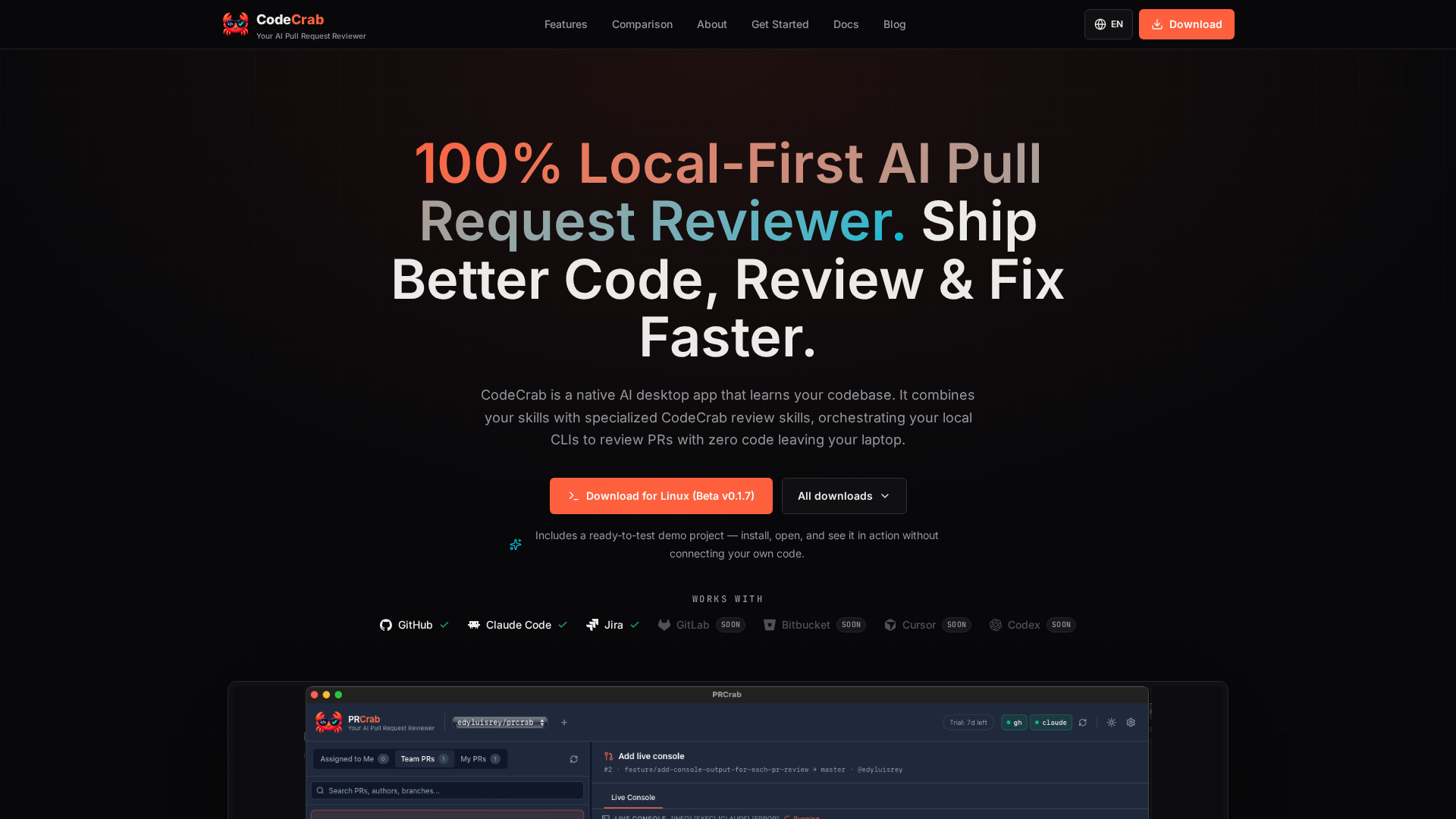
CodeCrab is a native desktop application that reviews pull requests in seconds by orchestrating the local command-line AI tools already installed on your machine. It is built for software engineers who want fast, deep reviews of both their teammates' pull requests and their own work, and it is designed around a simple promise: your code never leaves your laptop. CodeCrab learns your codebase, combines your existing skills with its own specialized CodeCrab review skills, and maps AI observations directly onto the changed lines so reviewers can catch bugs, risky patterns, and regressions before they approve. The product is currently available as a free public beta that runs 100% on your machine. Modern engineering teams are writing code faster than they can review it. As AI tooling generates code at unprecedented speeds, the primary bottleneck has shifted from writing code to reviewing pull requests efficiently. In practice, that means senior engineers spend hours walking through diffs, and reviewers often lack the full context of the repository behind a change. At the same time, many teams work on sensitive or regulated codebases where uploading source code to a third-party cloud review service is simply not an option. CodeCrab was built by Edy, a software engineer with more than 14 years of experience, including years building systems at Google and Pinterest, initially as a personal tool to perform deep, Staff-level code reviews quickly without uploading sensitive private code to third-party servers. The first core workflow is pull request code review. You open any pull request from your colleagues, and CodeCrab walks through the diff with you. It maps AI observations directly onto the changed lines, so you can spot bugs, risky patterns, and regressions fast, before you hit "Approve". Crucially, CodeCrab reviews against your entire local repository rather than only the diff: it uses full codebase context, including your types and your test suite. That means observations are grounded in how the change actually fits into the project, not just in the isolated lines that changed. The whole process is 100% local-first, so CodeCrab can catch logic bugs and regressions without uploading a single line to the cloud. The live review interface combines a file tree, a diff viewer, and inline AI observations in one native desktop window. The second workflow covers your own pull requests. When a teammate leaves an observation on your PR, CodeCrab runs a deep investigation for you. It digs through the code around every comment, connects that code with your project's context, and helps you understand as precisely as possible what the observation really means and what the correct solution looks like. The investigation of every reviewer observation on the diff is deep and read-only, so nothing is modified while CodeCrab is reasoning about the feedback. Once you understand the finding, CodeCrab supports an assisted fix on your local branch, verified against your own test suite. A third, closely related workflow happens before the pull request even exists: pre-push code review of local changes. While you are still working locally, CodeCrab reviews your in-progress changes in read-only mode before anyone sees the diff, detects errors early, investigates each finding as deeply as needed, and helps you apply the right fix while the context is still fresh. CodeCrab is built to plug into the workflow you already have rather than replace it. You connect any repository, and CodeCrab learns its rules and patterns, building a per-repository review profile that powers specialized review agents and custom skills. Those profiles make reviews tuned to your codebase instead of generic best practices. Your own skills and CodeCrab's agents work together: you can reuse your existing local skills, combine them with CodeCrab's, and extend as far as you need. The app integrates with your local skills, Claude Code, and Jira, and it works with GitHub and GitLab today, with Bitbucket, Cursor, and Codex listed as coming soon. Repositories, skills, models, and language are all configurable, so experienced engineers can enforce their own standards without abandoning their existing setup. Privacy is the foundation of the product. CodeCrab uses a 100% on-device architecture with zero code uploads: your source code never leaves your laptop or passes through external cloud databases, which makes it suitable for strict corporate environments where no code may be sent to third-party AI clouds. Control is equally deliberate. CodeCrab is read-only by default and never commits, pushes, or posts public GitHub comments without your explicit permission. When you do want to apply a change, CodeCrab generates verified code patches as 1-click local fixes, and it runs your native test suite (cargo test, pytest, npm test) before applying them, so the patch is checked against the project's own tests rather than trusted blindly. Instead of requiring org-wide OAuth admin permissions, CodeCrab uses your own CLI login (gh). The distinctive approach is tool orchestration on the client side. Rather than locking you into a vendor's fixed model wrapper, CodeCrab orchestrates your local command-line tools, so it can use your local Claude Code and Cursor setups. It connects directly to the AI subscriptions you already pay for, giving you full model and cost control: you choose which AI models to run and control exactly how much you spend on code reviews, with zero server markups or hidden fees. Execution is transparent through a live execution console that shows real-time stdout and stderr, in contrast to an opaque cloud pipeline. The difference from cloud review bots is not the model, it is where your source code ends up: with CodeCrab everything stays client-side and runs as an instant local native application, while cloud SaaS bots upload and process code on vendor servers and run queued background jobs. The headline benefit is speed without loss of depth. CodeCrab is described as instant and lightweight, with blazing-fast native desktop performance, minimal RAM consumption, and instant startup, so reviews happen in seconds instead of waiting on a queue. Engineers get early bug detection for logic flaws, security risks, and regressions directly on the diff, plus 1-click local fixes that produce verified code patches ready to apply to a local branch. Precision diff navigation with clear changed-file tracking, inline observation badges, and clean multi-file diff inspection keeps large changes manageable. Together these outcomes shorten the loop between noticing a problem and having a reviewed, verified fix, and they let teams ship cleaner, higher-quality code while keeping full control over cost and data. Concrete workflows include reviewing a teammate's pull request before approving it, where CodeCrab walks the diff and places observations on the changed lines so you can catch risky patterns and regressions with full repository context. Another is turning feedback on your own PR into a solution: CodeCrab investigates each reviewer observation deeply, explains what it means, and assists with a local fix verified against your test suite. A third is pre-push review, where you analyze in-progress local changes and apply fixes before the pull request is ever created, so the PR you open ships cleaner code. Teams working in regulated or security-sensitive environments use CodeCrab because reviews happen entirely on-device with no code uploads. Engineers who already pay for tools such as Claude Code or Cursor can reuse those subscriptions for reviews rather than paying for an additional cloud service. The bundled ready-to-test demo project lets anyone install, open, and see CodeCrab in action without connecting their own code. CodeCrab is aimed at software engineers and engineering teams who review code daily, particularly those who want deep, Staff-level reviews quickly and cannot or will not upload sensitive private code to third-party servers. It complements existing setups instead of replacing them: it integrates with GitHub, Claude Code, Jira, and GitLab, with Bitbucket, Cursor, and Codex listed as coming soon, and it plugs into local custom skills. Reviews run against your local repository and your own test suites, with example commands including cargo test, pytest, and npm test. GitHub access uses your own gh CLI login rather than org-wide OAuth permissions. The app ships as a native desktop application, currently downloadable for Linux as Beta v0.1.7, and CodeCrab is in free public beta with no code leaving your laptop. CodeCrab's promise is straightforward: faster, deeper pull request reviews with total privacy. By learning your codebase, orchestrating the local AI tools and subscriptions you already own, and keeping every line of code on your machine, it turns review from a bottleneck into a fast, controlled, read-only step in your engineering workflow.
Pheebs is an open-source AI telemetry tool created by Eversynced that measures how engineers and teams actually work with AI coding agents. It sits quietly inside Claude Code, Cursor, and Codex via hooks, capturing lightweight interaction signals: the shape of the session, not its contents. The people it is built for are the ones who need an honest proficiency read rather than a guess — engineering leaders, platform teams, and the developers themselves. Its purpose is measurement: turning the ordinary activity of agent sessions into signals about model choice, verification habits, context management, orchestration, and the dollars that model choices are costing. The problem Pheebs addresses is a visibility gap that opens up precisely when a team starts moving fast. AI coding agents arrive, adoption climbs, and nobody can say what changed. Six observations illustrate the questions the tool was built to answer: model spend that buys nothing, such as a bigger model than the work needed; where AI code ships unchallenged; whether AI output gets verified at all; rework hiding inside the speedup, where follow-up prompts are fixing something the AI broke; and whether the enablement investment landed — for example, a review skill used weekly by 78% of engineers while a migration skill never caught on. The final observation frames the stakes: nobody on the team runs tests inside the agent loop, which is a missing harness rather than a skills gap. Distinguishing a structural gap from a coaching gap is the core problem Pheebs exists to solve. Pheebs captures data by hooking into the agents themselves. It works with three coding agents — Claude Code, Cursor, and Codex — and records seventeen event types that run from session_started through to artifact_found. Hooks fire on session starts and ends, prompt submissions, skill and slash-command expansions, sub-agent spawns, tool calls and failures, compaction, and background tasks. Typical recorded fields are deliberately small: a session_started event carries a codebase such as acme/checkout and a model such as opus; a prompt_submitted event carries a character count and, when the prompt intent classifier is enabled, an intent label such as task or debug; a tool_use_completed event carries the tool name and its duration, with recognized commands summarized as a tool_intent such as test_run. Claude Code and Codex additionally export native OpenTelemetry metrics and logs through the Pheebs proxy, while Cursor is covered by hooks alone. The design constraint behind all of this is that Pheebs captures interaction patterns, not content. It never records source code or file contents. It never records file paths or directory structures — a repo is reduced to org/repo from the git remote. It never records prompt text; a prompt becomes a character count. It never records raw command strings, since a command like npm test is read in process and recorded as tool_intent: test_run. It never stores your name or your email: the developer is the id behind your Pheebs token, stamped by the backend, or a truncated hash of your git email when no token is set, and your GitHub handle is never looked up. The only route in the backend contract that receives raw text at all is POST /classify-prompt, which takes one prompt in and returns one label out. The backend contract also includes POST /ingest for one event envelope per request, POST /validate-token to resolve a token to an identity and its consent flags, POST /otel/v1/{signal} as an OTLP passthrough so no observability credential ever ships in the client, and an optional GET /insights for what one developer can see about their own work. On top of those signals sits a documented proficiency model. It assesses six competencies: Models, covering model choice, effort settings, plan mode, and autonomy modes; Artifacts, the reusable configuration that shapes the agent, such as skills, sub-agents, slash commands, and context files; MCP, live connections to external systems like tickets, databases, browsers, and documentation; Evals, verification wired into the agent loop through tests, typecheck, lint, build, and review passes; Context management, deliberate use of the context window including compaction and the save, resume, clear lifecycle; and Orchestration, running more than one agent at a time via sub-agents, parallel work, worktrees, hooks, and plugins. Each practice is classified as Unobserved, Adopted, or Recurring — Recurring meaning it showed up in at least 3 of the last 4 active weeks — and the coverage index summarizes, per engineer, the share of applicable practices at Recurring. Five judgement signals sit alongside the competency model. On the output side, verification coverage measures the share of AI edits followed by a verification action such as a test run, typecheck, lint, build, or a check against a spec; pushback rate measures how often the engineer challenges AI output instead of accepting it; the refinement-to-repair ratio separates follow-up prompts that refine intent from those that repair breakage; and wholesale-accept rate captures sessions with no pushback, no repair, and no verification, weighted by lines changed — described as the composite red flag of polished output with no questions asked. On the input side, model-fit rate measures the share of sessions whose model class matched the size of the work. Pheebs follows three stated principles here: tasks are sized, so every task prompt gets a scope from a one-file change to open-ended design and a session is judged on its hardest prompt; misses count both ways, because an over-provisioned session burns budget silently while an under-powered one shows up as repair prompts; and Pheebs is an audit, not a router — it never intercepts a prompt or switches a model on anyone's behalf, it reads the gap and prices it, and the decision stays yours. The overall pipeline has five steps. A hook fires. Lightweight fields are extracted — event type, durations, counts, models, trigger types — with prompt text reduced to a character count and an optional intent label. Identity and repo are resolved from the Pheebs token or a truncated git email hash, and from org/repo on the git remote. Every event is logged locally in a JSONL log, and with a token set it is also sent to the backend. OpenTelemetry rides along for Claude Code and Codex. Sending requires both settings to be present: pheebs config set base-url and pheebs config set token. Both need to be set or nothing is posted, and unsetting either one stops sending — the local JSONL stays the durable copy either way. Pheebs also states there are four routes to any backend: self-hosted, or managed by Eversynced. Two deployment shapes are described. In the self-hosted model you run the backend and hold the data: telemetry goes from developers' machines to your infrastructure and Eversynced never sees it. That option includes the full client for all three agents under Apache-2.0, a documented contract and a reference backend in the repo, raw JSONL you can query with whatever you already use, and no account, no key, and no requests. In the managed model, the same open-source client points at a backend Eversynced operates, with the proficiency model rendered as reports and dashboards — the AI Enablement Assessment, a 30-day telemetry sprint ending in an executive debrief and a plan for the gaps. The benefits the content states are visibility rather than surveillance: knowing which models are in play, whether AI output gets verified, whether enablement investments landed, and what the model-fit gap costs. The reporting built on top includes a practice adoption funnel, with one bar per competency split by how many engineers have not acted on it, acted on it once, or acted on it week after week; a practice heatmap putting every engineer against every competency, where a cold column means the team is missing the setup and practice for it and a cold row calls for coaching; a per-engineer view showing how much of each competency has become habit; and a signals table showing the five judgement signals per engineer against a team median. The dollar view prices the gap: in the illustrative example, a savings opportunity of $9,960 against $32,400 of list-price spend, described as 31% and an API list-price equivalent estimated upper bound, with models used and work as sized split across Frontier, Large, Medium, and Small classes. Decisions and figures come from complete sessions only, with coverage reported as complete, incomplete, no telemetry, and unpriced. The quickstart is three commands: npm install -g pheebs, pheebs init for interactive setup across all three agents, and pheebs doctor to check the wiring. Eversynced states that every Eversynced engineer is instrumented with Pheebs; it powers the measurement layer of their AI delivery framework, and the reporting built on top of it ships with the AI Enablement Assessment run for client teams. The product is therefore aimed at teams adopting AI coding agents who want evidence about how those agents are actually being used in their codebase. In short, Pheebs turns the day-to-day shape of AI coding sessions — model choices, prompts reduced to counts, tool calls, verification, compaction, and orchestration — into an honest, legible read on proficiency, adoption, and cost, while keeping the code, the prompts, and the identity of the developer out of the dataset.
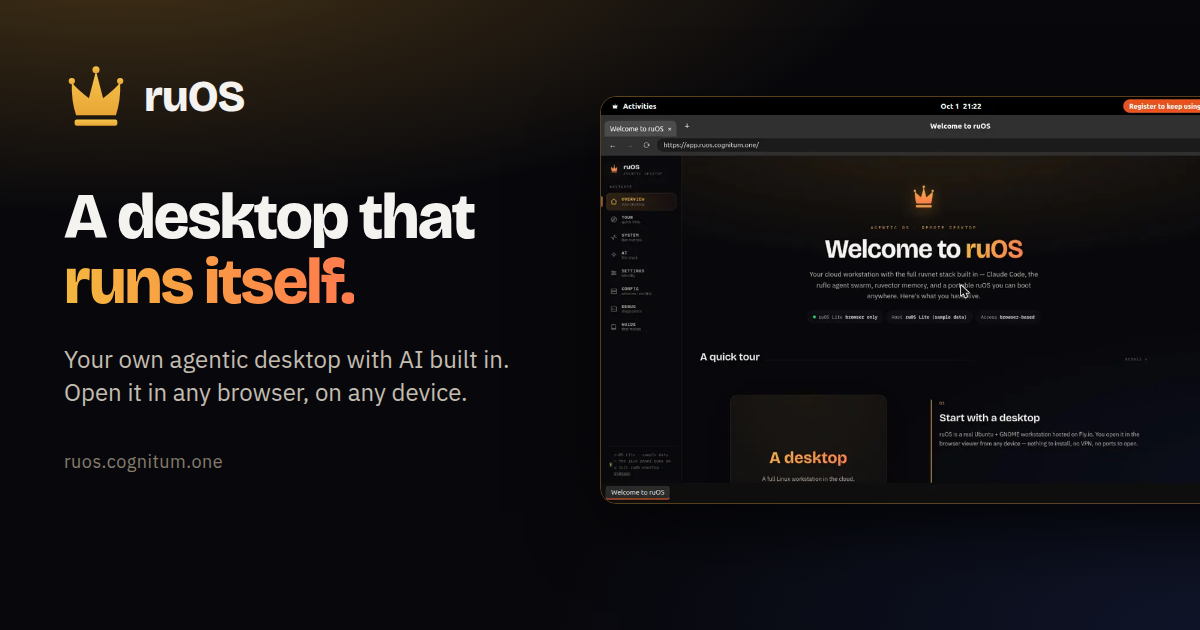
ruOS is a private cloud desktop with an AI team built in. It is designed for people who want an agentic workspace where AI does the work for them — research, writing, and code — without installing anything. You sign up, ruOS sets up your own private desktop, and you open it from any web browser on a Mac, iPad, Chromebook, or Linux laptop. A free option, ruOS Lite, runs a real Chrome browser drawn as your ruOS desktop right in your web page, and opens in about a second with no sign-up required. Most AI tools today live in a single chat window. You ask a question, you get an answer, and then you copy that answer somewhere else to actually finish the work. Your context, your files, and whatever the AI learned are scattered across tabs, apps, and devices. ruOS starts from a different premise: instead of a chat box you visit, you get a desktop that runs itself, with AI helpers already installed, signed in, and working side by side. Nothing has to be configured, and nothing has to be synced, because the desktop and everything on it live in one place that you reach from any browser. Everything is ready the moment you sign in. ruOS ships with smart AI helpers built in that write and run code, research on the web, remember your projects, and understand what is on your screen — all working together from day one. Claude Code is ready to write and run code for you. ruflo is a team of AI helpers. ruvector remembers your work, giving your agents long-term, self-learning memory. ruview understands your screen. Codex is available as extra coding help, and VS Code is the code editor. Because the helpers are preinstalled and signed in, the AI stack is ready as soon as your desktop starts — you do not have to wire up models or connections yourself. ruOS opens in any web browser, so there is nothing to install. The same session reshapes to any screen: sharp on a big monitor and comfortable on a tablet, with no fiddling with zoom. You can start on a laptop and keep going on an iPad, because your whole desktop goes with you. ruOS Lite goes further in simplicity — it draws a real Chrome browser as your ruOS desktop inside your web page, with tabs and windows, a dock of apps, and the ruOS app first. It opens in about a second, and it picks up where you left off: sign-ins, site data, and open tabs are saved and encrypted. Persistence is built in. Your files and everything the AI has learned are saved automatically, so you can come back tomorrow and pick up right where you left off — even from a different device. The desktop is yours and private: your files, your work, and your AI are kept separate and private from everyone else's. In ruOS Lite, VS Code and extensions are available too — vscode.dev sits in the dock, along with 1Password, Bitwarden, Claude, and uBlock Origin Lite when you turn them on. Your AI can drive it: ChatGPT and Claude see and click the desktop through the ruOS connector, never your extensions, and payments wait for you. The workflow is four simple steps. First you sign up: enter your email and ruOS sets up your own private agentic desktop, bound to your account, with no setup and nothing to configure — it is ready in minutes. Second, your desktop turns on: a private desktop starts up in seconds with the whole AI stack preinstalled and signed in, including Claude Code, a team of helpers, and self-learning memory. Third, the AI gets to work: ask for something and it is done, with a whole team of AI helpers researching, writing, and coding side by side while you watch — or step away and come back to finished work. Fourth, you open it anywhere: your desktop streams to any web browser and reshapes to the screen, the same session on your Mac, iPad, or laptop, with nothing to install and nothing to sync. Once you are in, the things you can ask for are simple. It writes and runs code: tell it what you want changed, and it edits the files, runs the tests, and tells you when it is done. It works as a team: it splits a big job across several AI helpers that work side by side. It remembers: it keeps track of what you are working on, so you never explain twice. It researches: ask a question and it browses the web, reads the sources, and brings back the answer. And it goes with you: your whole desktop travels with you, so you can start on your laptop and keep going on your iPad. Hand ruOS a task and it picks the right tool and gets to work. The outcome for users is fewer hand-offs and less copying between tools. Because the AI helpers run on the same desktop where your files live, research, writing, and code happen in one place rather than across scattered apps. Because memory persists, you do not repeat yourself or rebuild context each session. Because the desktop is private and per-account, your files, work, and AI stay separate from everyone else's. And because everything opens in a browser, switching devices does not mean setting anything up again. For developers and power users, ruOS is also a build platform. Under the hood it is a real Linux box with the full ruvnet stack and programmatic control, and everything is already installed on your desktop. ruOS runs an MCP server — ruos-computeruse-mcp — so an AI client like Claude can drive the desktop for real: see the screen, move the mouse and type, run shell commands, trigger system actions, and change the resolution on the fly. The exposed tools include screenshot, mouse_move / left_click, type_text / key (xdotool), run_shell, system_action, and desktop_resolution. You can point an MCP client at your desktop using stdio over SSH, and after launch you can resize with desktop_resolution presets of 720p, 1080p, 1440p, or qxga, or a custom width × height, applied server-side via xrandr. A hosted MCP endpoint is on the roadmap. The ruvnet stack is one command away, all preinstalled. Open a terminal on your desktop and use the same commands the AI helpers run for you: npx ruflo@latest init wizard to set up agent-swarm orchestration, npx ruflo@latest swarm init --topology hierarchical to spin up a team of AI agents, npx ruvector to give your agents long-term, self-learning memory, and npx ruflo to run the ruflo agent runtime. For quick start, ruOS provides an MCP address at https://ruos.cognitum.one/mcp. In ChatGPT you go to Settings → Apps & Connectors → Create, paste the address, and sign in. In Claude you go to Settings → Connectors → Add custom connector, paste the address, and sign in. In Claude Code you run claude mcp add --transport http ruos https://ruos.cognitum.one/mcp. ruOS in ChatGPT uses only the desktops and metered entitlements already assigned to your account. The ChatGPT app and its linked review surfaces do not present pricing, checkout, subscriptions, upgrades, or credit purchases. Getting started is straightforward: you can try ruOS Lite free in seconds with no sign-up, or get early access by signing up, after which your desktop is ready a few minutes later. ruOS takes the idea of an AI assistant and turns it into a place you work. It is a browser-reachable, private, agentic desktop where a team of AI helpers — Claude Code, ruflo, ruvector, ruview, and Codex — researches, writes, and codes alongside you, remembers your projects, and follows you from device to device. Nothing to install, nothing to sync, and nothing to configure: sign up once and the desktop does the rest.
Coddy is an interactive platform that teaches people how to code through short, gamified lessons available in more than 20 programming languages and technologies. According to the site, it covers Python, JavaScript, TypeScript, React, Next.js, HTML, CSS, Java, C++, SQL, C, C#, PHP, Dart, Golang, R, Rust, Lua, Luau, Ruby, Swift, SwiftUI, Verilog, Solidity, Kotlin, Assembly, AI Prompts, Terminal, Excel, Git, Docker and Kubernetes, among others. The product is aimed at anyone who wants to learn to code — from complete beginners writing their first line to learners building a finished project — and it is designed around the idea that learning to code should feel like a game you want to return to every day rather than a textbook you dread. Coddy runs on the web, iOS and Android, and the company states it is free to start with no setup required. Coddy's founders — Barak, Nati and Kevin — state that they built the product because learning to code should feel like a game you want to come back to every day, not a textbook you dread. That framing drives the whole product: lessons are deliberately short, interactive and designed to be finished, rather than long passive courses that learners abandon. Traditional coding education often requires environment setup, downloads and configuration before a single line runs, which is a common reason beginners stop early. Coddy removes that barrier by letting people write and run real code directly in the browser with no setup required, and by turning daily practice into a habit through streaks, leagues and rewards. The result, according to the site, is a platform where over 5.5 million codders have joined and where the mobile apps hold 4.9-star ratings on iOS and Android. Coddy's catalog spans more than 20 languages and technologies. The site lists Python, JavaScript, TypeScript, React, Next.js, HTML, CSS, Java, C++, SQL, C, C#, PHP, Dart, Golang, R, Rust, Lua, Luau, Ruby, Swift, SwiftUI, Verilog, Solidity, Kotlin, Assembly and AI Prompts, along with Terminal, Excel, Git, Docker and Kubernetes. Each language has its own landing page, and many include reference documentation and a browser playground where you can write and run code without installing anything. There are also Spaces beyond programming: a Coding space to write and run real code from your first line to a finished project, a Chess space to learn the rules, tactics and openings one interactive board at a time, and a Math space in Beta where you solve equations move by move and draw graphs by hand with every step checked on an interactive board. Tutorials, guides and stories are published on the Coddy blog. At the heart of Coddy is a real code editor that runs in the browser. Lessons let you write actual code, hit Run Code, and check your work against built-in test cases that report pass or fail along with the expected input and output. The interface shows a console alongside the editor, so you can see what your program returns and compare it with what the test expects. Bugsy, the AI tutor, sits right next to the editor with an Ask AI button: it reads your code and your error, explains what is happening and offers hints — but, as the site emphasises, never the answer. Separate Playground pages exist for individual languages such as Python and JavaScript, described as a place to write and run code in the browser with no setup required. Coddy also offers an Embed Editor that lets you add a free, runnable code editor to your own site with a single iframe. Coddy builds daily habit through a gamification layer. A streak counter tracks consecutive days of activity, with a calendar view and a reminder to return tomorrow to keep the streak alive; Streak Freeze items let you protect a streak on days you miss, and a Double or Nothing challenge runs over multiple days. Learners also carry a score and an energy meter, and their progress is mapped on a Journey board of hexagonal lesson nodes — completed, active and locked — connected by paths, where each node is a lesson such as a theory or challenge step. Beyond the journey, Coddy includes Goals and daily challenges, a Leaderboard, and a Profile. The leaderboard is organised into leagues: the Challenger League shown on the site advances the top 7, with a promotion zone and ranked positions displaying streak length and score. Social features encourage learners to invite friends and earn rewards. Coddy deliberately offers every way to learn within a single lesson. The site describes four complementary modes: Audio, which narrates the explanation (for example, an introduction to variables read aloud with playback controls and speed adjustment); Quiz, to test yourself; Ask AI, to question the tutor; and References, to look up anything you have already covered. Around the courses sit a set of free resources: Docs with reference documentation for every supported language, Cheat Sheets with quick-reference tables, a Glossary of plain programming definitions each with a runnable example, a page of Git Commands with syntax, flags and examples, Visualizations that show algorithms and data structures running step by step, and Tools offering free developer utilities such as formatters and converters. Courses are also paired with Certifications, so learners can earn shareable certificates by completing them. Coddy's approach is to make each lesson small enough to finish and interactive enough to require doing rather than watching. A learner follows the Journey, opens the next unlocked hexagonal node, reads or listens to the theory, then completes a challenge by writing real code in the editor, running it, and passing the test cases. If they get stuck, Bugsy reads their code and error and hints at the direction without handing over the solution, while Ask AI and References let them dig into concepts they have already covered. Daily play is reinforced by the streak system, energy, score and weekly leagues, and progress is visible on the profile. Because everything runs in the browser, the same account works across web, iOS and Android, so a session can continue on a phone during a commute. At the end of a course, the platform issues a certificate that can be added to LinkedIn. The stated benefits centre on consistency and completion. Because lessons are short and gamified, learners are encouraged to show up every day — the site notes that a streak can be protected with freeze days and that rewards are earned for showing up daily. Because the editor and test cases give immediate feedback, learners can tell whether their code works rather than guessing. Because the AI tutor hints instead of answering, learners are pushed to reason through problems instead of copying solutions. Certificates give a tangible outcome: every completed course produces a certificate that can be added to a LinkedIn profile or resume to showcase coding expertise to employers, and the certified example shown is Python Fundamentals. Ratings of 4.9 stars on iOS and Android, and a community of more than 5.5 million learners, are presented as evidence that the format works. Coddy supports several concrete scenarios. A complete beginner can start the Coding space and write their first line of code straight in the browser, using Python or JavaScript lessons and the built-in editor with test cases. Someone who wants exposure to many technologies can move between the 20+ language tracks, from Python and SQL to React, SwiftUI, Solidity or Verilog. Learners preparing for interviews or coursework can drill with quizzes, cheat sheets, a glossary and step-by-step visualizations of algorithms and data structures. Teachers have a dedicated offering: Coddy for teachers lets them assign lessons, track progress and grade automatically. Developers can add a free, runnable code editor to their own site with the one-iframe Embed Editor, and people who want to go further can use Coddy Build to build full-stack apps with AI by chatting, previewing and publishing. Outside programming, the Chess and Math spaces offer interactive practice. Coddy is built for anyone learning to code — beginners writing their first program, self-taught developers picking up new languages, students, and teachers who want to assign and track lessons. It is available on the web, plus iOS and Android apps, so learning is described as taking your coding journey on the go with no setup and no downloads. Pricing is freemium: the Product Hunt listing states that everything is free with a daily limit, and that paid plans are available — Product Hunt visitors get 50% off any plan for 72 hours, applied automatically, and the landing page shows the discount saved and applied at checkout. Coddy also runs an Affiliate programme through which supporters can promote Coddy and earn commissions on referrals. Coddy's core proposition is simple: make learning to code something you actually finish and want to return to. It combines a catalog of 20+ languages with a real browser editor and test cases, an AI tutor that hints rather than answers, and a gamified habit loop of streaks, energy, score and weekly leagues — all wrapped in short, interactive lessons available on web, iOS and Android. Free to start with a daily limit, with certificates for completed courses and a range of supporting resources from docs and cheat sheets to visualizations and a code playground, Coddy positions itself as a practical, playful path into programming for millions of learners.
AUDR (Agent Usage Detail Record) is an open standard for recording who initiated your agent runs and how much each cost, across every system a run passes through. It defines a common JSON schema that any harness, router, or billing system can emit and ingest. The goal is to help businesses make sense of the economics at the run level, giving every team building or monetizing agents a reliable record of what an agent run consumed and who or what it was associated with. It was drafted at Chargebee and is being improved with collaboration across the ecosystem, stewarded by Chargebee under the Apache 2.0 license. The problem AUDR addresses is that a run can be fully observable at every individual layer and still leave you without a single end-to-end record of who ran it and what it cost. A single agent run touches multiple systems: the application knows the customer and the feature, the router knows the tokens and the cost, and the tools know what they executed. Without a shared way to join these, usage data is orphaned from the business context that gives it meaning. The telecom industry solved a similar problem with the Call Detail Record, an open standard carriers converged on so a call's attributes could be captured and exchanged in a common format, independent of any single carrier's systems. AUDR is built on the same principle: a common record for agent runs that any harness, router, or billing system can emit and ingest. AUDR adds three core rules that let reports from different layers come together into one record. The first is a shared run ID, minted by the harness, passed to the router in request metadata, and echoed back, so every system that touches the run carries the same ID. The second is clear authority per field: the harness owns attribution such as customer, environment, and initiator, while the router owns usage such as tokens and provider. Each fact has exactly one source. This ensures that a record can carry raw counts that drive cost—tokens, tool calls, seconds of compute—alongside the business context that says whose cost it is. The record structure includes a run block with run ID and span ID, an attribution block sourced from the harness, a usage block sourced from the router, and an emitter block that identifies the component that produced the record. The third rule is strict merge rules. The sink assembles records sharing a run and span ID, and no component rewrites another's block. Conflicts are rejected, and a correction is a new record, never a mutation. This makes the record durable and reliable, and ensures that retries remain idempotent. The example in the spec shows a run with a run ID minted by the harness, attribution sourced from the harness, usage sourced from the router, and the emitter identified as the router. Because each field has exactly one authoritative source, the merged record is consistent and auditable, and any correction is preserved as a new record rather than silently overwriting history. AUDR provides adapters for runtimes you already use, so you can register an adapter and get a usage record for every model and tool call, including the customer it belongs to. Available adapters include NVIDIA NeMo Relay, LiteLLM, Merge Gateway, Vercel AI SDK, and Mastra. The core SDK builds, validates, and delivers records straight from your own code, with Python and TypeScript packages. Sinks deliver records to destinations you already use: Chargebee and Lago for usage-based billing. Adapters read identifiers, usage, and timings, never prompts or outputs. Every package is Apache 2.0 and published to PyPI or npm. The architecture is runtime → adapter → core client → sink → destination. Support for OpenRouter is in development. You can write records to a local file to start, with no account, hosted backend, or pricing configuration needed. AUDR is designed to sit on top of OpenTelemetry, not compete with it. OTel's GenAI semantic conventions provide the foundation for describing model calls and usage, and AUDR reuses them. An AUDR record can be emitted as an OTel span, and the OTel collector is a first-class sink. What OTel does not define is the set of rules needed when usage becomes a durable record: which attributes are required, how attribution is handled when it's missing, how retries remain idempotent, or how corrections are made. Observability can tolerate a dropped span, but a usage record cannot. AUDR adds those requirements and delivery semantics on top of OTel. It also complements standards like FOCUS, which standardizes billing data received from providers; AUDR standardizes the usage emitted when an agent run happens, before that usage is priced. The benefits are practical. With AUDR, you can answer questions like: How much does this agentic feature cost? What does this customer's agent usage look like, and how much does it cost? What are the unit economics and margins per customer for my agentic features? Which workflows or models are driving our costs? Which power users are driving our costs? Because records are emitted asynchronously and out of band, recording usage adds no synchronous work to inference in the normal request path. The only exception is optional pre-flight budget gating, which makes a single check before a run starts. You can store records locally, send them to a warehouse, feed them into an observability system, or use them for internal cost analysis or future projections. Use cases include usage-based billing, where records are delivered to a Chargebee site's usage-ingest batch endpoint or Lago's batch event endpoint. Teams can also use AUDR for internal cost analysis, to understand unit economics and margins, to identify which workflows or models drive costs, and to track power users. It supports cost governance by providing a common record that any system can emit and ingest. You can write records to a local file to start, with no account, hosted backend, or pricing configuration needed. For observability, the OTel collector acts as a first-class sink, and records can be used for future projections. AUDR is aimed at teams building or monetizing agents, developers, platform engineers, and billing teams. It does not assume what you do with the data after it is emitted; a billing system is just one possible consumer. It carries no prices or rating logic, and the SDK has no concept of plans, invoices, or how a customer should be charged. It records what happened and who it happened for. You can point the records at Chargebee, a competing rating engine, your own, or a warehouse for analytics. The spec is Apache 2.0, stewarded by Chargebee, and the goal is to move cost governance to an independent foundation as adoption grows. Contact is audr@chargebee.com. The three core rules are stable and will not change without a major version, while the field set will continue to grow as providers introduce new things to measure. In summary, AUDR is an open standard that provides a common language for recording agent run usage and cost across every system a run passes through. By combining a shared run ID, clear field ownership, and strict merge rules, it turns orphaned usage data into a durable, end-to-end record that supports cost analysis, usage-based billing, and agent unit economics. It is open, neutral, and community-owned, with packages published under Apache 2.0.
OpenBot is a free desktop application that runs AI agents as a team on your own computer. Instead of a single chat window, OpenBot gives you persistent AI teammates: each agent has its own name, its own instructions and its own workspace, and agents can message each other, hand off tasks and share files. OpenBot is built for people who already pay for an AI plan and want to turn it into a working team rather than a single assistant. It connects to Codex, Claude Code, Gemini, Grok, OpenCode, Cursor and Cline, to any OpenAI-compatible endpoint, or to local models running in Ollama or LM Studio. Most people who use AI every day are juggling several assistants at once. They may have a ChatGPT plan for one job, a Claude plan for another, and a Gemini or Grok subscription for something else, but each of those assistants works alone, in its own silo, and none of them can hand work to the others. OpenBot brings those providers into a single workspace where agents are given clear roles and can delegate to one another. Because the app runs on your own computer, workspaces, conversations, files and browser data stay on the machine that runs OpenBot rather than on a vendor's servers, and you keep paying only for the AI provider plan or API key you already have. It is also open source, so the code can be read, changed and run for noncommercial purposes. The core of OpenBot is the idea that agents work as a team. Each agent has its own name, its own instructions and its own workspace, so a Research agent and a Builder agent can hold different briefs and different context. Agents send each other messages, hand off tasks and share files. In the product's own walkthrough, a planner asks Research to verify the evidence and Builder to check the rollout path, then references @Research and @Builder by name to turn the work into a final launch brief with the source files attached. Because the handoffs are explicit, you can see who did what and keep every decision traceable. OpenBot does not ship its own model subscription. It runs on the AI plan you already pay for: Codex signs in with your ChatGPT plan, Claude Code with your Claude plan, and Gemini works with a Google AI Pro or Ultra plan. OpenCode offers free models that need no account at all. You can also connect any OpenAI-compatible endpoint, or run local models in Ollama or LM Studio. The providers listed on the site are Codex, Claude Code, Gemini, Grok, OpenCode, Cursor and Cline, and the same names appear in the app's agent picker. The result is that your existing spend on AI is turned into a team of agents instead of a single assistant. Three design choices define how OpenBot behaves in practice. First, everything is stored on your computer: workspaces, conversations, files and browser data stay on the machine that runs OpenBot, not on OpenBot's servers, although the AI provider you choose does receive the prompts your agents send to it, and pages an agent opens use the network. Second, you can change the provider and keep the agent: an agent keeps its workspace and conversation when you restart the app or move it to a different provider, so a long-running piece of work can continue under Claude Code after starting under Codex. Third, OpenBot includes a built-in browser, and agents can open, read and control pages in it, which is how an agent can load a local sign-in page such as localhost:3000/sign-in while doing QA work. OpenBot also lets you work at your own pace and with other people. You can queue the next task: send more work while an agent is busy, and messages wait in a queue that you can pause, resume or cancel. The app is multiplayer, too, so you can invite your team to collaborate live with the same agents, and colleagues can follow work in a shared channel and watch an agent hand a task from one teammate to another. Signing in is optional; the app works without an account, and you need one only to invite other people to your team. Getting started is deliberately short: download OpenBot, connect a provider, then describe the agent you want in one prompt, check its instructions and save it. The methodology behind OpenBot is straightforward. Instead of building one more chat interface, it gives agents roles, a workspace that persists, and the ability to talk to each other. A role is defined by the prompt you write when you create the agent: you describe the agent you want, check its instructions and save it. From then on that agent keeps its name, its instructions and its workspace, and it can be moved between providers without losing its place. Work is passed around by messages and attached files rather than by copy-pasting between tools, and a queue holds new requests until the agent is free. Everything runs on the computer that runs OpenBot, with a browser built in for the pages agents need to read or control. The practical benefit is that you pay nothing extra for the app itself. OpenBot costs $0, with no hidden fees and no locked features; the only cost is whatever you already pay your AI provider, through a plan or an API key. Because agents can hand work to each other, a single request can turn into a chain of checks, an evidence review, a rollout check, a test and a rollback step, without you shuffling between apps. Because the provider can be changed without losing the agent, you are not locked into one vendor's model for the life of a task. And because workspaces, conversations, files and browser data stay on your computer, the material you produce stays with you rather than living only in a hosted service. The scenarios described on the site are concrete. In a launch planning workflow, a planner agent prepares the launch plan, tags it Research and keeps every decision traceable, while a Research agent verifies the evidence and a Builder agent checks the rollout path, producing a launch brief and metrics files. In a coding workflow, an agent reads billing code, reports that six tables use it, moves the billing tables to their own schema, changes four files and writes the migration, then hands the test work to a provider that continues the migration. In a team channel, one teammate reports a failing sign-in test on Safari, passes it to another, who fixes it in session.ts and asks a third to review and merge it. Agents can also load a local sign-in page in the built-in browser, steer a request such as summarizing the support inbox or drafting the release notes, and queue extra work, like checking new sign-ups, while the agent is still busy. OpenBot is aimed at people and small teams who already use coding and chat agents and want those agents to work together: developers, technical teams, and anyone coordinating research, releases or QA with AI. It runs on macOS 13 or newer on Apple silicon or Intel, Windows 10 or newer on x64, and Linux on x64 or arm64 as an AppImage. The app is free at $0, with no account required unless you invite other people to your team. The source code is public on GitHub under the PolyForm Noncommercial License 1.0.0, so you can read, change and run it for any noncommercial purpose; commercial use needs a separate license. Users should note that OpenBot is a development preview: agents can read and change files, run commands, use the network and control the built-in browser without asking each time, so it should be given only tasks you trust, with backups kept. OpenBot's value proposition is simple: a free, local, open-source workspace that turns the AI plans you already pay for into a persistent team of agents that share work, files and conversations on your own computer, and lets your colleagues join them live.
Rill is a free browser for the Mac where your Claude Code and Codex agents work beside you. It runs on the Claude Code or Codex plan you already have, and its purpose is simple: let you ask for work from the exact page you are already looking at, instead of leaving the browser to describe it somewhere else. Rill is for people who browse the web and build things at the same time — developers, researchers, writers, designers and teachers — and it keeps your browsing and your agents in one window. You can search, enter an address, or send a task from the same field, then carry on reading while the work happens. Rill starts from a specific frustration: an idea used to mean switching to the terminal. You found something on a page, then had to leave the page, open a terminal, find the right project, and restate the context you were just looking at. Rill's answer is that you now say it where you found it. The same problem shows up in browsing itself. Tabs pile up with no structure, and history becomes a flat list of timestamps that tells you nothing about what you were doing or what got finished. Rill is built to close both gaps: it carries the page you are on into the project that should handle it, and it turns your browsing into something you can read back later — where you went, what you asked for, and what got done. The core gesture is ⌘E. Press it on any page and a note opens over the page, holding what you were looking at — the page itself, or a paragraph or row you pointed at with a click — plus whatever you type. You describe the task in plain words, and Rill decides which project it belongs to. It finds your projects in your Claude Code and Codex history, so there is nothing to set up: no configuration, no mapping of folders. In the product's own examples, a task to 'Try this method on my data' routes to a project called longitudinal-study; 'Try this on one lesson' routes to lessons; 'Chart this against last year' routes to newsroom-charts; and 'Make my project pages like this' routes to portfolio. The project field shows Choosing a project, then the choice, then Sent. Not every request is code. When a task isn't meant for a project — finding a nonstop flight from San Francisco to New York, for instance — the destination reads On the web, and your agent goes looking in a tab behind yours. You keep reading. Agents tell you when they need something instead of waiting for you to check on them: in one example, Claude Code raises a bubble over the essay you are reading with the question 'Nonstop from SF to NYC. Needs your answer. Morning or afternoon departure?', offers Morning and Afternoon buttons, and carries on in the same tab after you answer. When a result lands, it lands where you were: one demonstration shows a chart titled 'July surface water temperature: one step, not a slope' appearing while you browsed the page, from the longitudinal-study project, marked Done · 2 files changed. Rill also organises the browsing itself. Tabs are sorted by AI into groups by what you were doing, each group carrying a one-line summary — in the sample start page, Music videos, Land and climate, Art collection and Space imagery. Task tabs sit among them, and a task tab on the web shows a thin red-orange line at its edge to mark work in progress. History becomes a journal rather than a log: a day is broken into stretches, each summarised in a sentence — for example, 64 pages in six stretches on Sunday, September 27, with 'Morning news and weather', 'Changepoint methods paper' (a task sent to lake-temps, done) and 'CPI chart for the newsroom' (a task sent to newsroom-charts, done) — plus a ribbon of the day and the individual pages with timestamps. After a few weeks, every project your agents have touched appears on one map: 38 projects in 6 areas named by AI, including Research and data, Writing and publishing, Design, Teaching, Home and life, and Tools and code, with finished work lit as Done. How Rill works overall is deliberately light. The AI features run the Claude Code or Codex installation on your Mac, under your own account, so Rill adds no model of its own and no API keys. Setup is three steps: download Rill and drag it to Applications; sign in to Claude Code or Codex — use either, or both, and Rill walks you through it; then press ⌘E on any page, and Rill finds your projects for you. Agents read pages as untrusted text, new tasks are read-only until you allow edits, and in git repositories each edit can be undone. A task on the web is told to stop before the step that pays, places an order, sends, posts or deletes unless you plainly told it to go through with it, and it cannot type into password, card or one-time-code fields. In a project, an agent browses in tabs of its own, without your logins, and clicks or types only when you allow it. The outcome is that context switching largely disappears. You no longer stop what you are doing to explain it somewhere else: the page, the highlighted paragraph or the pointed-at table row travels with the request, and the agent starts with the context you already had. Because projects are found for you from history, the cost of starting a task is a keystroke and a sentence. Because agents ask their questions inline and report when they are done, you are not polling them in another window — you answer or keep scrolling. And because tab groups, day summaries and the project map are generated from what you actually did, the record of your work stays legible: you can see which stretches of the day produced something and which projects your agents have touched. Concrete scenarios appear throughout the product's own material. A row of a consumer-price table, pointed at with a click, becomes 'Chart this against last year' in a newsroom-charts project, and the chart is waiting when you look. A release note for Polars 2.0 becomes 'Try this on one lesson' in a lessons project. A type foundry's page, with a paragraph pointed at, becomes 'Make my project pages like this' in a portfolio project. A city article becomes 'Find a nonstop from SF to NYC, Nov 12 to 16' — a task on the web. Beyond agent tasks, Rill works as a browser on its own: ask about a page and the answer opens beside it from the agent you already use; compare up to six tabs and get a table that quotes each page; let agents in a project read the web in tabs of their own. And with the beta talking feature, hold Fn and say the task out loud. Rill is currently free and in beta, for Macs with Apple silicon running macOS 14 or later. There is no new subscription and no API keys; the AI features run on the Claude Code or Codex plan you already have, and browsing works without them. Privacy is local by design: your history and passwords live on your Mac. History is kept as files on your Mac, for as long as you choose; passwords are saved in the Mac Keychain and unlocked with Touch ID; AI features run under your own account; and tab sorting and day summaries can be turned off in Settings. The browser's basics are covered too — passwords in the Keychain, private windows, and sign-ins brought over from Chrome, Arc or Safari. Rill lets you know when a new version is out. Rill's proposition is compact: your browsing, your agents, one window. It is a browser first — search, tabs, private windows, imported sign-ins, a Keychain for passwords — with an agent layer that uses the Claude Code or Codex setup you already run. Press ⌘E on the page in front of you, Rill finds the right project and passes the context along, and the work happens while you keep reading. Tabs sort themselves, history reads like a journal, and every project your agents have touched gathers on one map. Free, in beta, on Apple silicon Macs, and built on the plan you already have.