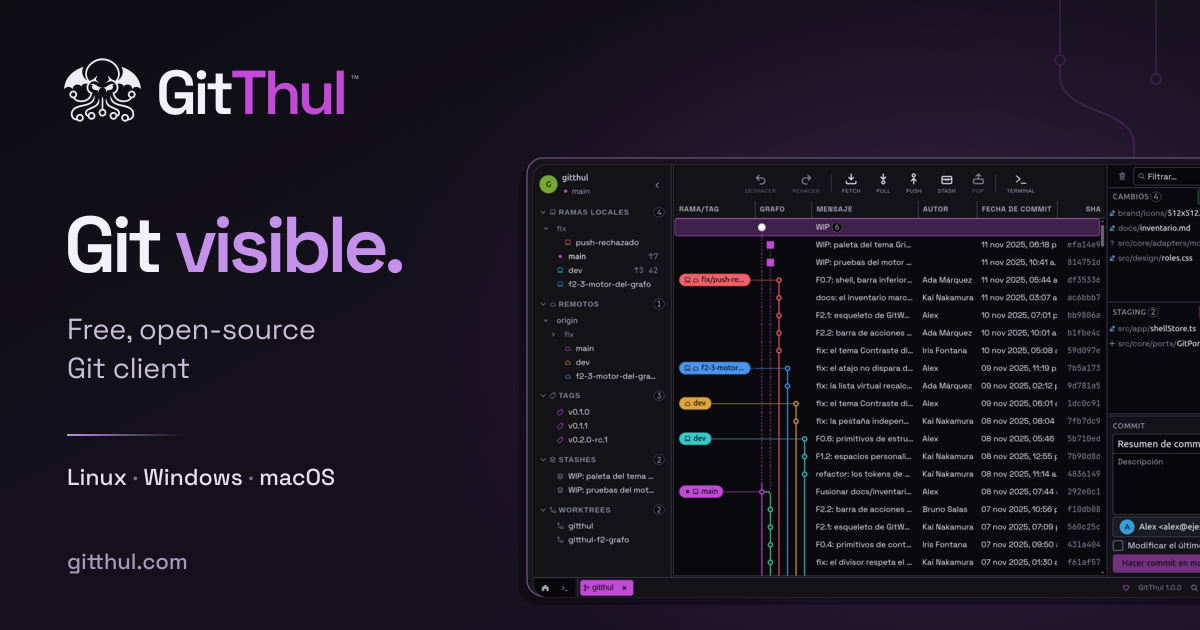
GitThul is a free, open-source graphical Git client for Linux, Windows and macOS that brings repositories, history, conflicts and a terminal into a single desktop application. The project describes itself as a comfortable way to work with Git: you can organize your repositories, follow their history, resolve conflicts and run commands in the same application. It is built for developers who want a visual interface over Git while still keeping a real terminal close at hand, and it is presented as free for everyone on Linux, Windows and macOS.
The application's own framing of the problem is straightforward: Git work spans several activities — organizing repositories, following history and branches, resolving conflicts and running commands — and GitThul's answer is to keep them in one application rather than spread across separate tools. Its feature summary reads simply as "Repositories, history, conflicts and a terminal." A commit graph sits alongside staging, a three-panel conflict view and an integrated terminal, so reviewing what changed and deciding what goes into a commit happen in the same place. The product also states that it does not send usage statistics, and that fetch, pull and push run only when you request them.
GitThul organizes work around what the project calls Spaces: you group your repositories in Spaces and open the project you want to work on. Instead of facing one flat list of folders, you decide which repositories belong together and move between them from a single place. From there the app presents the GitWorking graph, where you can explore the working graph and browse commits, local and remote branches, tags, stashes and worktrees. Having all of those references visible in one graph means you can see where a branch sits relative to others, where a tag was placed, or what a worktree represents before deciding what to do next. The graph is the visual anchor of the application, and the project's screenshots show commit history and staging presented together.
Conflicts get a dedicated view. GitThul resolves conflicts by letting you compare both versions and edit the result in a view with three panels — one for each version and one for the result you are producing. That layout keeps the incoming and current versions visible at the same time as the file you are writing, so working through a conflicted merge becomes a matter of reading and editing rather than reconstructing context. The integrated terminal sits alongside the graph: you can run commands next to it, with terminal tabs and split panels, so the command line does not have to live in a separate window while you review changes. Between the three-panel resolver, the terminal and the graph, reviewing, fixing and committing stay within one interface.
GitThul also addresses the mistakes that happen during everyday work. Undo and redo cover staging changes, commits and other supported local operations from the current session; undoing a normal commit leaves its changes staged, and redo restores the saved result. That detail matters because it lets you reshape a commit without losing work you had already prepared. Separately, repository safeguards check the repository state before writing: if GitThul detects incompatible changes made since an operation was prepared, it stops that operation to avoid overwriting newer work. On the privacy side, the application does not send usage statistics, and fetch, pull and push run when you request them rather than on their own.
Appearance and environment are configurable. The application offers seven themes, adjustable interface density and five languages, and you can save Git profiles. Interface density is meaningful in a tool that stacks a commit graph, a staging area, a three-panel resolver and terminal panels in one window — you can decide how much information fits on screen. Git profiles let you save and reuse distinct Git configurations. Savvy readers will notice that no repository layout assumptions are imposed: Spaces group whatever repositories you already have, and the graph reads the branches, tags, stashes and worktrees that exist in them.
Overall, the approach is to keep the visual Git workflow and the command line in the same window: the graph and staging area handle review and preparation, the three-panel view handles conflicts, and the terminal handles everything you would rather type. Undo, redo and the pre-write repository check sit underneath as a safety layer around the write operations, so the speed of a graphical client does not come at the cost of surprise overwrites.
The stated benefits follow directly from that arrangement. Because commit history, selective staging, conflict resolution and the terminal are in one application, you do not have to switch between a visual client and a shell to complete a single task. Because staging is part of the same view as the graph, you review changes and choose what goes into each commit in one pass. Because undoing a normal commit leaves its changes staged, recovering from a poorly shaped commit is a short step rather than a rebuild. And because the application sends no usage statistics and only fetches, pulls or pushes when asked, the network activity that touches your repositories stays under your control.
Concrete workflows map cleanly onto the features. Preparing a commit: open a repository from its Space, review the change in the graph and staging area, select what should go in, and commit. Undoing that commit: use Undo from the current session, find the changes still staged, adjust and commit again, or Redo to restore the saved result. Investigating history: browse commits, local and remote branches, tags, stashes and worktrees in the GitWorking graph before acting. Resolving a merge: open the three-panel view, compare both versions and edit the result. Running a quick command: open a terminal tab or split panel next to the graph instead of leaving the app. Managing several projects: group them into Spaces and switch between them as you move from one to another.
GitThul is aimed at developers working with Git on desktop. It ships for Linux, Windows and macOS and is described as free for everyone, which is reinforced by its open-source nature and a public GitHub repository. The project is maintained with voluntary support through Ko-fi, and the application remains free regardless. The Support Graph brings together GitThul releases and messages from people who support the project, and supporting on Ko-fi lets you add your own message as a Support Commit — a way to appear in the project's history rather than simply funding it.
In short, GitThul's value proposition is a comfortable, unified way to work with Git: repositories grouped into Spaces, history and branches in the GitWorking graph, staging and commits in the same view, conflicts resolved in three panels, and a terminal with tabs and split panels right beside it — free, open source, and without usage telemetry.
Publisher
A
admin
Launch Date2026-11-13
Platformdesktop
Pricingfree