Category Focus/categories/automation
Automation AI Tools
Discover and compare the best automation AI tools and software. Browse 637+ curated tools with reviews and rankings.
Projects tracked
637
Sort mode
RECENT
Page
12
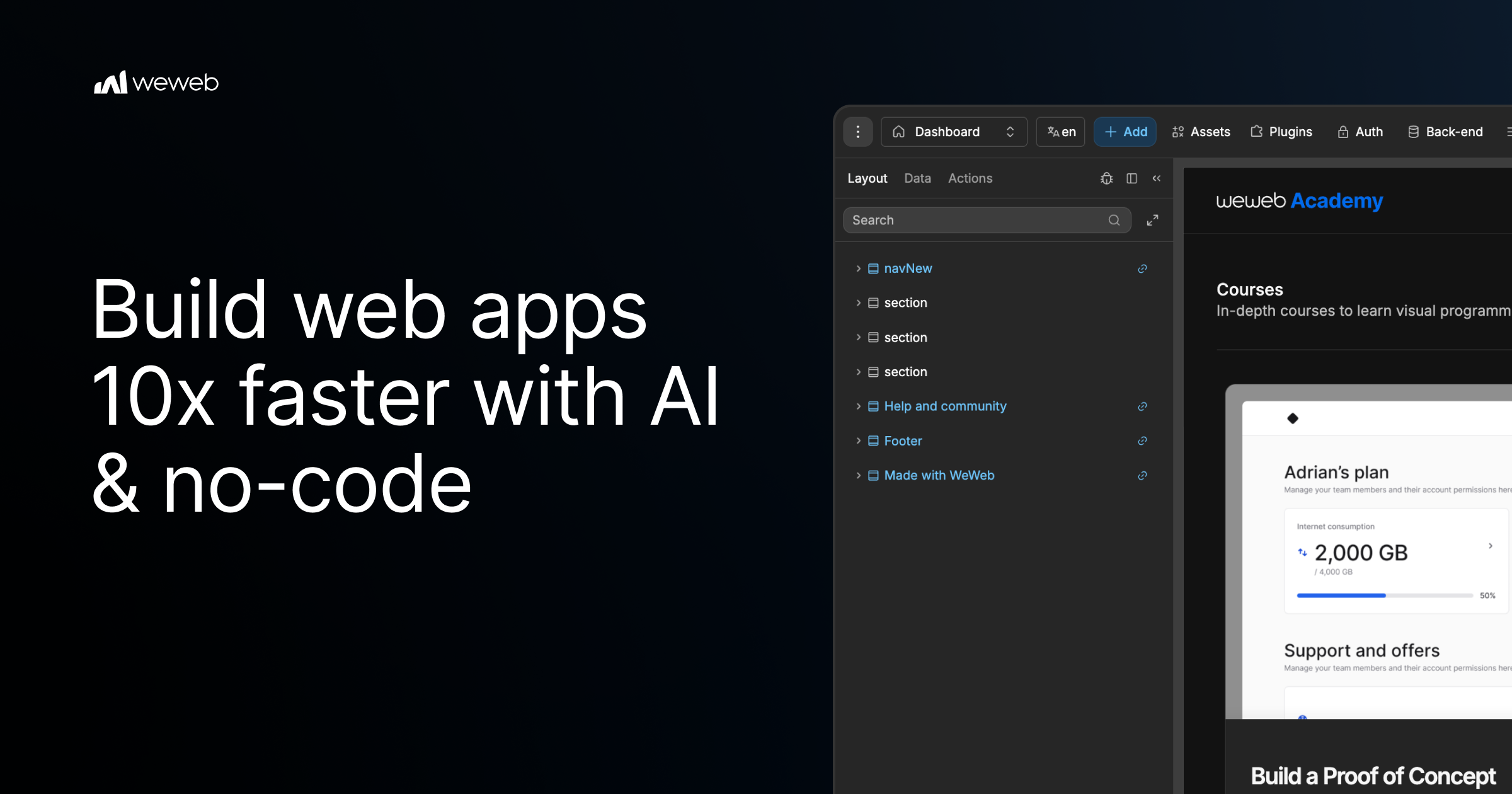
WeWeb MCP is a Model Context Protocol integration that connects the AI agent you already use to WeWeb, a visual no-code app builder. Point Claude Code, Cursor, Codex, Antigravity, ChatGPT, or any MCP-compatible agent at WeWeb and it builds the pages, workflows, data models, tables, auth, and integrations for a real WeWeb project. It is designed for teams and builders who want AI speed while staying in control: the agent runs on your account, your model, and your tokens, and every change it makes lands in a visual editor you can review and edit yourself. The tool turns briefs, designs, and app logic into a working project, and it uses no WeWeb credits. Agentic development, often described as vibe coding, can produce applications quickly, but it frequently leaves builders unsure about what actually changed inside their app. WeWeb MCP is positioned against that black-box experience. The product page promises the speed of vibe coding without the mystery of what changed, and it argues that moving fast should not create maintenance debt for a team or for your future self. Instead of generating an opaque codebase, the agent writes into a structured WeWeb project where every page, workflow, data model, and integration stays visible in a visual editor. That combination of AI generation and visual review is the core problem the product addresses. Any MCP-compatible agent can be connected, and the product page highlights several specific clients. Claude Code can plan and build in WeWeb using Claude's reasoning. Codex turns GPT-powered build plans into WeWeb apps. Antigravity builds with Gemini and Google models inside WeWeb, while Cursor lets you use Cursor's agent and your model of choice. ChatGPT is also listed as a supported agent. Because the integration runs on your account, your model, and your tokens, you are not locked into a vendor-supplied model, and the documentation link provided on the page covers installation of WeWeb MCP. The AI client section presents these agents side by side, emphasizing that you connect the agent you already use rather than adopting a new one. Getting started follows three documented steps. First, you add the server configuration to your MCP client settings, pasting a small JSON block that defines a weweb-ai server and runs it through npx with mcp-remote pointing at the WeWeb MCP endpoint. Second, you sign in to WeWeb and authorize access so the agent can call tools on your project. Third, you pick your project and build: you ask your agent to list workspaces and projects, switch to the right one, and then describe what you want. The page gives an example prompt asking the agent to list WeWeb workspaces, switch to a project, and help build a dashboard page. Control is a first-class part of the product. You decide how much of the app the AI can touch, letting the agent work across the full project or keeping it focused on one specific page, workflow, database, or design-system task. You also control what happens next: you review the agent's output inside WeWeb and then either keep prompting or edit the result yourself in the visual editor. This scoping means an agent can be granted broad access for large build-outs or narrow access when you only want a single change, and the review step keeps a human in the loop before changes are accepted. To avoid the generic AI look, including what the page calls purple gradients, WeWeb MCP lets you give the agent your visual rules before it builds. You can import the design rules that define your brand's design DNA from Figma, Google Stitch, Claude Design, or design.md into WeWeb. From there, you create a component system using shadcn, React references, or custom coded components to build reusable blocks with no-code properties. Starting from a brand design system means generated screens inherit your existing palette, components, and conventions rather than default styling, which reduces rework after generation and keeps output consistent with what your team already ships. The PRD to app workflow shows how product intent becomes a structured application. The agent reads a brief and moves from user journeys to screens, creating the pages, forms, states, and flows users need. It then moves from data to backend structure, mapping the database, fields, relationships, auth, storage, and backend workflows behind the app. Finally, it moves from business rules to integrations, where Slack alerts, email triggers, CRM updates, API calls, and approval flows become part of how the app works. Crucially, the first version is not the final word: you can keep working with your agent or open the visual editor to inspect, adjust, and shape the app yourself after generation. WeWeb MCP also works across a broader MCP stack. You can pair WeWeb with a backend MCP such as Xano, Supabase, or Airtable MCP, or with any APIs, to build the WeWeb frontend in context or bring data into the WeWeb backend. Product context can be turned into screens using docs, transcripts, websites, Figma files, or media assets to create onboarding, dashboards, and forms. A separate refactor workflow helps teams move fast without maintenance debt: the agent can find unused variables, outdated workflows, test components, and leftover build artifacts, and it can standardize naming across pages, components, workflows, API requests, tables, and fields. When the app is ready, WeWeb MCP supports going live on your terms. You can deploy in one click and launch on your custom domain while WeWeb handles hosting and infrastructure, or you can export the code and self-host it on your own infrastructure when you need full control. The product is free to start, and the page offers both a sign-up to start for free and a way to request a demo. It is marketed as agentic development for teams that want AI speed and visual control, and the page notes it is trusted by Fortune 500 companies such as PwC, La Poste, L'Oreal, JLL, Qonto, Decathlon, Carrefour, and Biwaki by BNP Paribas. Users report benefits that extend beyond speed. A digital project manager at PwC says adopting WeWeb revolutionized how the organization approaches application development, empowering teams to deliver more innovative, secure, and compliant solutions faster and more effectively. The CEO of Shunpo notes that no-code does not mean low-performance and that WeWeb makes it possible to build bigger things that were not possible with other tools. A CEO of ALOE Digital Solutions describes the platform as powerful, versatile, and intuitive after trying many no and low-code app builders. Together these outcomes point to AI-assisted building that remains maintainable, reviewable, and owned by the team that created it. The primary value proposition of WeWeb MCP is straightforward: your AI agent builds the app while you stay in control. You bring the agent, the model, and the tokens; WeWeb provides the project structure and the visual editor where every generated page, workflow, data model, and integration can be reviewed and changed. Design system import, PRD-to-app generation, backend MCP pairing, refactoring, and flexible deployment make the workflow useful from first prototype through launch. Because nothing is a black box, teams can adopt agentic development without giving up visibility, editability, or ownership of the applications they ship.
Plane Agents are AI teammates that join your Plane workspace as members. Instead of prompting a chatbot for a one-off answer, teams give an Agent a job: they assign it work items, mention it in conversations, trigger it when work changes, or run it on a schedule. Plane Agents take on repetitive, context-heavy workflows 24/7, responding to changes, coordinating next steps, and acting across Plane and the connected tools a team already uses. They triage requests, draft specs, run standups, flag delivery risks, and handle a lot more of the recurring work that keeps coming back across planning, delivery, reporting, and operations. Plane Agents are designed for the work that keeps coming back. Across planning, delivery, reporting, and operations, teams repeatedly collect progress, chase blockers, write specs, sort incoming requests, and watch for slipping timelines. That work is context-heavy: it depends on what changed, who is involved, and what the current state of a project is. Because it repeats, it is easy to let slide, and because it is context-heavy, it is expensive to do well by hand. Plane Agents take on that recurring load so the same coordination work does not have to be redone manually week after week. As Plane frames it, the work keeps coming, so put an Agent on it. Agents are built around four decisions. First, define what it owns: teams start from a template or create an Agent from scratch, giving it a name, a clear responsibility, and the outcome it should work toward. Second, give it a playbook: describe how the work should be done, what a good result looks like, and which boundaries it should follow, then add the right skills and choose the model behind it. Third, choose when it starts: an Agent can be brought into work through an assignment or a mention, or it can start automatically when work-item changes occur or on a schedule, with filters that decide exactly when it should run. Fourth, connect its working context: choose the Plane projects, trusted web sources, and connected tools the Agent can use, and decide which connected account it should work through. Plane also ships ready-made Agents for the work that keeps coming back across planning, delivery, reporting, and operations, which teams can then adapt to their own triggers and context. The Standup Agent collects progress, blockers, and next steps from the team and turns them into a concise update that highlights what matters most; it works on Slack, Gmail, and Projects, with skills in progress tracking and team summarization. The Delivery Risk Agent monitors work for stalls, blockers, dependencies, and slipping timelines so teams can identify and address delivery risks early; it works on Github, Slack, and Projects, with skills in risk detection and dependency tracking. The Spec Agent turns rough ideas and requests into structured requirements, identifies gaps, and asks the right questions to make the scope clear; it works on Figma, Wiki, and Pages, with skills in PRD writing and product clarity. The Request Triage Agent reviews incoming work, identifies duplicates, adds relevant context, and routes each request to the right team or workflow; it works on Slack, Projects, and Intake, with skills in request analysis and duplicate detection. The Customer Feedback Agent groups customer feedback into meaningful themes, surfaces recurring insights, and connects them to relevant issues, projects, or ongoing work; it works on Slack, Projects, and Wiki, with skills in feedback analysis and theme clustering. Agents show up when the work does. A team member can assign an Agent to a work item, and it receives the relevant context and starts working on the job. An Agent can be mentioned inside a work item conversation to ask for information, prepare, or take the next step. It can also be triggered from change: an Agent starts when work is created, updated, changes state, gets reassigned, or removed. Agents can connect work across tools, using selected connected tools and trusted work sources to get context. And recurring work can be put on a schedule, so reviews, reports, checks, and follow-ups run automatically on a fixed or custom schedule. In every case the Agent acts with context and returns the result in Plane. Control and visibility are part of the model rather than an afterthought. Teams set the boundaries: they choose each Agent's reach by selecting the Plane projects, trusted work sources, and connected tools available to it. They choose whose access it uses, giving connected tools access through a person's account or through a service account managed by the team. They can also see where credits go, tracking adoption, response and completion rate, average time to complete, and consumption by Agent. That means a team can see when an Agent starts, what it returns, and when it needs human input, which keeps automated work accountable and observable instead of opaque. The payoff is that recurring, context-heavy coordination stops consuming human attention. Standups become concise updates instead of a manual chase for status. Delivery risks surface early because stalls, blockers, dependencies, and slipping timelines are monitored continuously. Rough ideas turn into structured requirements with gaps identified before work begins. Incoming requests are deduplicated, enriched with context, and routed to the right team or workflow. Customer feedback is clustered into themes and connected to the issues and projects it relates to. Because Agents respond to changes and can run on schedules around the clock, they keep pace with work as it evolves rather than waiting for the next meeting to catch up. Concrete scenarios follow directly from the available Agents. A team can schedule a Standup Agent to collect progress, blockers, and next steps and publish a concise update highlighting what matters most. A Delivery Risk Agent can watch work for stalls, blockers, dependencies, and slipping timelines so a delivery lead sees risk early. A Spec Agent can take a rough request in Figma, a Wiki, or Pages and turn it into a structured spec, asking the right questions where scope is unclear. A Request Triage Agent can sit on intake and Slack, deduplicate incoming requests, add relevant context, and route each one. A Customer Feedback Agent can cluster feedback from Slack, Projects, and Wiki and connect recurring themes to existing issues and projects. More broadly, any review, report, check, or follow-up that repeats can be placed on a fixed or custom schedule. Plane Agents are aimed at teams that already run their work in Plane and want recurring coordination handled automatically. Plane states that more than 50,000 teams use the product, and the site names customers including Sony, Accenture, SSI, Texelis, Stark Bank, Aramco, Dolby, Mirador Therapeutics, Amazon, République Française, Government of Lithuania, and Power Integrations. Agents work with connected tools such as Slack, Gmail, Github, and Figma, alongside Plane Projects, Wiki, Pages, and Intake. Plane is available on the web, with downloads for Mac, Windows, iOS, and Android, and the site lists compliance with GDPR, HIPAA, ISO 27001, and SOC 2. Agents run on the AI credits included in every paid plan, and teams can get started free or book a demo. Plane Agents turn repetitive, context-heavy coordination into always-on teammate work. Rather than prompting for a one-off answer, you give an Agent a job: assign it work, mention it, trigger it when work changes, or put it on a schedule. It then acts with context across Plane and your connected tools, within boundaries and with visibility that the team controls.
Anomalo Analyst is a team of AI agents that monitor your data around the clock and give you insights on anything that is happening in the data and why it matters. According to Anomalo, you connect your data warehouse or data lake and start getting data insights without writing SQL queries or refreshing dashboards. The product is built for data teams and for the people who depend on them: instead of asking analysts to hunt for what changed, Anomalo Analyst proactively publishes a continuous feed of trends, anomalies, and shifts, then lets anyone dig deeper with plain-language follow-up questions. Its stated purpose is captured in the product's own framing — your data is always talking, and Anomalo Analyst makes sure you do not miss what it is saying. Data changes constantly, and the volume of that change is the problem Anomalo Analyst addresses. In most organizations the burden falls on people to notice what moved: someone has to write a query, wait on a dashboard to refresh, or file a ticket with a data team and wait for an answer. Anomalo's messaging is explicit that most AI tools ask you to find the insight, while Anomalo Analyst finds it for you. The traditional approach means meaningful business changes can go unnoticed until someone happens to ask the right question, and raw alerts from monitoring systems often add noise rather than clarity — an alert is not the same thing as an explanation of what happened and why it matters. Anomalo also says the product helps distinguish real business changes from broken data, because a genuine shift and a data problem can look identical until someone checks. Detection starts with statistical modeling rather than LLMs. Anomalo states that its statistical modeling, not LLMs, scans every table for meaningful changes such as new values that appeared, trends that reversed, or drift that occurred, and more, then ranks every change with a magnitude score. That ranking gives the AI agent a prioritized list of real changes rather than an undifferentiated pile of events. Because the scanning is statistical and automated, it runs across every table rather than only the handful of metrics someone remembered to instrument, and the magnitude score lets the system separate small fluctuations from changes large enough to be worth a person's attention. Once changes are ranked, a team of specialized AI agents takes over: they monitor the data, detect what has changed, decide what matters, and write up the finding in an analyst-grade report, so what reaches you is a polished insight rather than a raw alert. The AI agent investigates the ranked changes, digs into historical context, and writes a report revealing what happened, what the data shows, and why it matters. A dedicated verification agent then reads every report line by line and checks each claim against the data before it reaches you — hallucinations get caught and corrected, not published. That verification step matters because the report is meant to be trusted as a written finding: Anomalo says it helps you tell a real change apart from broken data, and it checks each claim against the data rather than publishing unverified model output. Insights are proactively published to you. Anomalo describes a news feed of everything meaningful that changed in your data, delivered to your homepage and your inbox, all without prompting, plus a personalized digest of what actually changed — the trends, anomalies, and shifts that matter to your work — so you can be the most insightful person on your team without logging in. When an insight catches your eye, you dive deeper with follow-up questions and analyses in natural language instead of filing a ticket. Anomalo states the product gets smarter the more you use it: giving feedback when an insight was useful, or noting that you look at your data differently, is saved to memory, making every insight and conversation sharper. Findings can also be shared — any insight or analyst conversation can be shared with a link, and recipients can view it immediately after signing in, with no warehouse access needed. The overall flow is deliberately short. You connect your data platform and select the tables you care about; Anomalo Analyst analyzes and profiles your tables automatically and asks a few quick questions to personalize your insights; the AI agents learn from your data's history and watch your tables every day for meaningful changes; and you can dive deeper into any change or insight at any time with natural-language follow-ups. Anomalo describes onboarding as telling it what you care about, having it find the right tables and start monitoring, and going from signup to your first insight in minutes. The distinguishing methodology, in the company's own words, is that most AI tools ask you to find the insight while Anomalo Analyst finds it for you — the system does the monitoring, the prioritization, the contextual explanation, and the verification, and delivers the finished insight rather than a raw alert. Anomalo frames the benefit around being informed without effort: you show up informed, you know before anyone asks, and you can be the one with the answer. A continuous feed of trends, anomalies, and shifts arrives without writing a query, waiting on a dashboard, or filing a ticket with your data team. Because every claim in a report is verified against the data before publication, the insights you act on have been checked. And because a dedicated verification agent exists specifically to catch and correct hallucinations, the workflow is designed so the reader does not have to independently re-check the numbers in a report before using it. Concrete scenarios follow from the described workflow. A data team connects its warehouse and lets Anomalo Analyst profile and monitor the tables they care about, then reviews a continuous feed of what shifted. A person preparing for a meeting checks their personalized digest and arrives already aware of the trend that reversed or the new value that appeared. Someone who sees an insight they do not fully understand asks a follow-up question in plain language rather than opening a ticket. When an insight is relevant to a manager or teammate, it is shared as a link the recipient can open immediately after signing in — even without warehouse access. Over time, feedback on which insights were useful, and how the user looks at their data, is saved to memory so subsequent insights and conversations are sharper. Anomalo Analyst is presented for data teams and for anyone who needs to know what is happening in the data. The site says it is trusted by data teams and shows organizations including Aritzia, Atlassian, Block, Buzz, Casey's, Discover, Equifax, Evidation, Faire, Fandom, HomeToGo, Lebara, and Notion. On the data side, Anomalo describes connecting a data warehouse or data lake, and the Product Hunt listing names Snowflake, Databricks, or BigQuery. Access is via the web, and the call to action throughout is Start for Free, alongside links to request a demo to see autonomous agents in action. That is the core value proposition Anomalo Analyst reinforces at every step: your data is always talking, and a team of AI agents monitoring it around the clock means you do not miss what it is saying. Detection runs on statistical modeling, explanations arrive as analyst-grade reports with each claim verified against the data, delivery happens proactively to your feed and inbox, and investigation happens in plain language rather than in tickets. For data teams and the people around them, the outcome Anomalo promises is simple and specific: you show up informed, and you are the one with the answer.
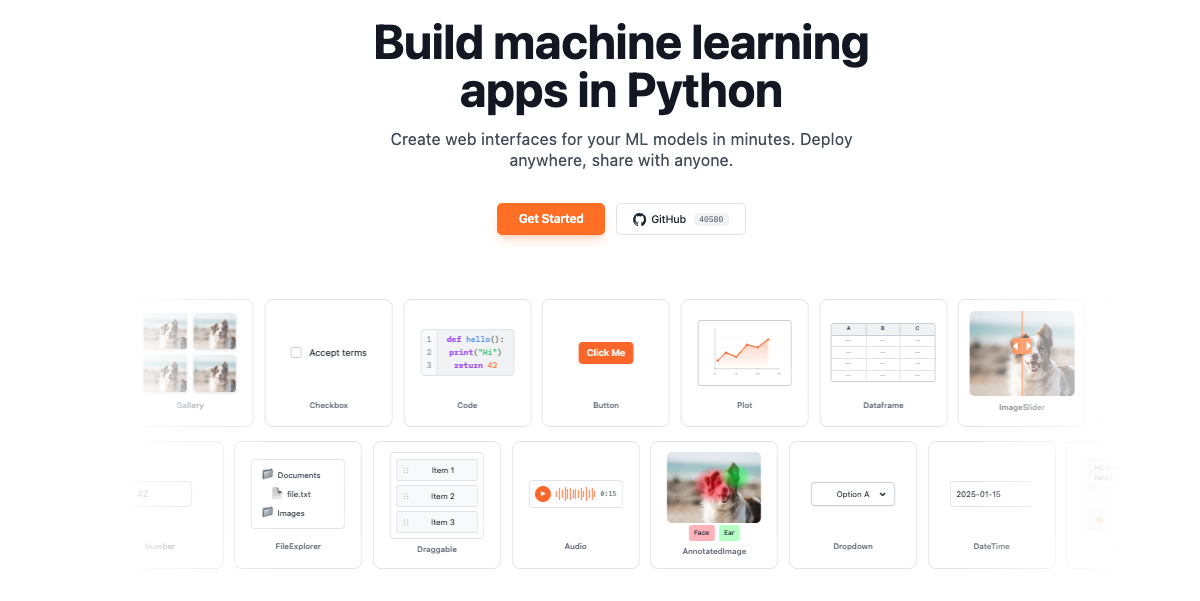
gr.Workflow is a visual, node-based AI pipeline builder built into Gradio. It lets you chain together Hugging Face Spaces, models, datasets, and your own Python functions on a drag-and-drop canvas. The simplest possible Workflow app is a single line of code: gr.Workflow().launch(). You then open the app, drag Spaces, models, and datasets from the sidebar onto the canvas, connect their ports, and hit Run. The guide describes gr.Workflow as already being a complete Gradio app that must be created at the top level and cannot be nested inside a gr.Blocks context. It is designed for people who want to assemble multi-step AI pipelines visually while keeping their own Python code available as callable nodes on the same canvas. Building an AI pipeline has traditionally meant writing glue code to move data between models and services, downloading weights, and rebuilding the entire pipeline whenever a better model appears. Gradio Workflow is presented as a way around that: pipelines are assembled from nodes on a visual canvas, intermediate inputs and outputs can be inspected, and better models can be swapped in without rebuilding the workflow. Because the nodes call hosted Spaces, models, and datasets, nothing has to be downloaded. The finished pipeline is not locked inside a private session either. It can be shared with a URL or run via a REST API, and its topology is stored in a portable workflow.json file that a coding agent can write or edit, which means workflows can also be created programmatically. On the canvas, a workflow is organized into three node collections, which the guide defines precisely. References are the inputs: uploaded files, editable text, and literal values. Operators are the processing steps: Spaces, models, datasets, and Python functions. Subjects are the outputs, the results being created. As you add, remove, or change nodes and edges, a workflow.json file is automatically created next to the Python script that created the Workflow; you can pass graph= if you want to save it somewhere else. That autosave behavior means the canvas and the file stay in sync without manual export. Node geometry is optional too: include x and y on every node to control how the graph is arranged the first time someone opens it, or leave them out and the canvas auto-arranges the layout instead. Your own Python code becomes part of the pipeline through bind=. Functions passed via bind= appear as callable nodes on the canvas, and Gradio inspects the function signature to auto-generate input and output ports. The guide gives the example of a summarize function that takes a string and returns a string; using a dictionary, for example bind={"My Summarizer": summarize}, gives the node an explicit name. Signature inference is intentionally simple. Parameters annotated as int or float become number ports, bool becomes boolean, and strings, unannotated parameters, and other annotations default to text. Gradio initially generates one output port for each bound function, and any media ports or multiple outputs must be defined explicitly in the workflow JSON. Bound functions can also be wired together in code with edges, a list of (from_fn, to_fn) tuples referring to functions in bind=, using fn_name.port_label to target a specific port when a node has multiple inputs or outputs. The guide notes that edges= only connects bound Python functions while generating a new workflow: it cannot create edges to Space, model, or dataset nodes, it is ignored when the workflow file already exists, and the file must be deleted to regenerate the initial topology. Workflows can also be loaded from disk. Passing a graph= path such as graph="workflow.json" loads a saved workflow topology; the canvas reads from that file on each page load and autosaves back to it whenever nodes or edges change, and if the file does not exist yet it is created on the first authorized edit. The guide is explicit that bind= does not automatically add or wire functions into an existing graph: to combine an existing graph with bound functions you either add the functions from the canvas Functions menu, or include an operator with "kind": "fn" whose "fn" value exactly matches a key passed through bind=. Layout remains flexible for viewers: the file's arrangement is only a starting point, each visitor is free to drag and resize cards, that arrangement is saved in the visitor's own browser rather than in the file, and workflow.json is never rewritten with it. Height is measured from the rendered card, and width is the default every viewer starts from, with a writer's resize becoming the new default the next time an edit is saved. Under the hood, the workflow JSON defines a schema_version, a name, the three node collections, and a list of edges that connect node IDs and port IDs with a stated type. Operators come in four kinds. A space node calls a Gradio Space on the Hub via gradio_client, configured with space_id and endpoint. A model node calls a Hugging Face model via InferenceClient, configured with model_id and a supported endpoint such as text_to_image, while pipeline_tag is also stored for discovery and compatibility with older graphs. A dataset node pulls one row from a Hub dataset per run, selected by the row_index input, configured with dataset_id, dataset_config, and dataset_split. An fn node calls a Python function whose fn value matches a key passed via bind=. Ports are typed so the canvas can validate connections, with support for image, audio, video, text, number, boolean, gallery, file, json, model3d, and any; any is a compatibility fallback that can connect to every port type, and file and any usually come from API schema inference rather than being offered as reference or subject templates in the canvas picker. Pipelines can also fan out: one reference can feed multiple operators simultaneously, and when you run the workflow in the interactive canvas, operators at the same dependency depth run in parallel. The guide adds that when the same workflow is invoked through its generated Gradio API, the server currently executes those branches sequentially. The benefits described in the guide follow directly from this design. Because nodes are wired on a canvas rather than buried in code, intermediate inputs and outputs can be inspected while a pipeline runs, which makes multi-step AI systems easier to debug and reason about. Because each operator is a separate node, a better model can be swapped in without rebuilding the workflow. Nothing needs to be downloaded, since the operators call hosted Spaces, models, and datasets. Shipping is flexible: share links and the ordinary local URL are run-only, while launch() also prints a private write-access URL for editing and saving the workflow, which the guide advises keeping private because edits affect the workflow seen by every visitor. Finally, the workflow.json file is both an autosave artifact and a programmable surface, so the same topology can be authored by hand, by a coding agent, or by bind= and edges= declarations in Python. The guide's fan-out example is a concrete, described workflow: a single product photo reference is fed into four FLUX Kontext branches, showing how one input can drive multiple image transforms at once. Text pipelines are demonstrated in the edges example, where a clean function that strips and lowercases text is wired into a tag function that prefixes the processed text. Model nodes such as black-forest-labs/FLUX.1-schnell with the text_to_image endpoint illustrate text-to-image generation inside a workflow, while dataset nodes make it possible to run a pipeline over a specific row of a Hub dataset, controlled by row_index. Because the same app can be shared with a URL or invoked through a generated Gradio API, the guide frames Workflows both as an interactive canvas for building and inspecting a pipeline and as a deployable app that others can run without editing it. The product is aimed at people building AI pipelines in Python: the guide's code samples are Python throughout, and the canvas is an extension of the Gradio app that the function nodes live in. Integrations called out in the content are the Hugging Face ecosystem, including Spaces on the Hub through gradio_client, models through InferenceClient, and Hub datasets, together with your own Python functions and the generated Gradio API. The relevant technology stack therefore includes Python, Gradio itself, gradio_client, InferenceClient, and REST access to the running app. The guide positions gr.Workflow as part of Gradio's Additional Features, sitting alongside the library's other tutorials and guides, and it must be created at the top level as its own app. No pricing or plan details are stated in the material reviewed here. In short, gr.Workflow brings a visual, node-based editing experience to AI pipelines without taking developers out of Python. You drag Spaces, models, datasets, and your own functions onto a canvas, connect typed ports, and run the result as a Gradio app that can be shared with a URL or called through a REST API. The topology is portable in workflow.json, editable by hand or by a coding agent, and free of downloads because the heavy lifting happens on hosted Hugging Face resources. The primary value proposition is straightforward: build, inspect, and iterate on multi-step AI pipelines visually, and swap in better models without rebuilding the workflow.
slop-grader is a rule-based command line tool that evaluates documents against custom rulesets and produces document scores and line-by-line flags to guide auto-fixing with an AI agent. It is built for anyone who writes, edits, or reviews text and wants that work checked against an explicit, repeatable standard rather than a vague impression. The tool is open source, runs locally in a terminal, and is designed around the idea that you curate a ruleset for your own use case and then reuse it as a powerful way to grade text consistently. Rather than rewriting a document for you, slop-grader grades it, tells you which lines failed which rules, and hands off instructions that an AI agent can act on to produce sharper copy. The context behind slop-grader is the flood of AI-generated writing. Text produced quickly by large language models tends to be padded with filler, stacked with buzzwords, and vague about what it actually promises. Reviewing that text by hand is slow, subjective, and inconsistent: two readers can disagree about whether the same paragraph is clear, and nobody notices a slow drift in tone across a long document until a reader finally complains. slop-grader takes a different position by making each check explicit. Instead of asking whether a document reads well, you express what you care about as a rule, and the tool answers that rule for every line it reviews. The result is a score plus a list of specific lines that need attention, which makes the standard applied to a document visible and repeatable. The heart of the product is the ruleset. Rules are written in plain language and can be anything you are able to phrase as a question. Some rules are evaluated line by line, such as "Does this line make a promise that requires a legal disclaimer?" Others are evaluated across the entire document, such as "Does the opening earn the reader's next 30 seconds?" That flexibility means the same tool can cover very different jobs: SEO checks on a page, legal clause review, tone of address, or keeping a formal or informal register consistent. A concrete example given by the maker is German address: keeping "Du" versus "Sie" consistent throughout a document. Because rules are yours to define, words that are buzzwords in one industry but completely normal in another are handled by simply writing the rule that fits your use case. slop-grader also ships with built-in rules, so you do not have to start from nothing. The included checks cover English grammar, German grammar, and AI filler detection. The maker notes that once you have built a curated ruleset for your use case, the tool becomes very powerful, and there is a built-in skill in the repository for creating custom rules, published as a SKILL markdown file on GitHub. That skill is intended to help you author the plain-language rules your workflow needs, whether they concern promises and disclaimers, openings that hold attention, SEO conditions, legal clauses, or tone of address. The output format is deliberately practical. slop-grader produces document scores and a list of flagged lines together with instructions that you can paste directly into an AI agent to fix the document. The tool flags its outputs as prompts so that agents can draft the fixes. This matters because a line-level flag makes it much easier to see exactly what needs fixing instead of rewriting an entire document from scratch. One product detail worth knowing is that when a rule fires on a line, the tool does not explain why it thinks the rule was violated. The maker's suggested workaround is to create separate rules for each check; the AI agent receiving the output is then very good at inferring the underlying problem from the flagged lines. Under the hood, slop-grader runs on Jev, available at typesafe.ai, which is described as a new AI model that is different from an LLM. Jev is a so-called System One model specialized in answering structured questions. That specialization is what makes the rule-by-rule approach practical: every rule is matched against every line separately, and because of the model's design that evaluation stays both cheap and fast. Checking a document takes seconds and costs less than a cent. Because evaluation happens on a remote model, the maker notes that text is evaluated on an external AI server, which is a relevant consideration when you decide what to run through the tool. The practical benefits follow directly from that design. Grading is consistent because the same rules are applied to every document and every line, so the standard does not drift between reviewers or between sessions. Feedback is precise because it arrives as flagged lines rather than a general verdict, which narrows the editing work to the specific places that broke a rule. The pipeline is fast and inexpensive enough that running a full check on a document takes seconds and costs less than a cent, so it can be part of a regular workflow rather than an occasional deep review. And because the output is written as instructions for an agent, the handoff from "this line is wrong" to "here is a sharper version" is automated rather than manual. Day-to-day, the maker describes using slop-grader to catch AI filler in launch copy, to strip buzzwords from landing pages, and to score narrative flow in launch emails. Those examples show the range: launch copy is checked for filler, landing pages are checked for buzzword density, and launch emails are graded on whether the narrative flows. Beyond those, the ruleset model supports SEO checks on content, review of legal clauses and disclaimers, and tone-of-address enforcement such as keeping German "Du" versus "Sie" consistent across a document. In each case the workflow is the same: run the document through your ruleset, read the score and the flagged lines, then paste the flagged output and instructions into an AI agent so it can draft the fixes. Getting started has a few stated requirements. You need Node.js installed on your machine, and you need an account with either TypeSafe or OpenRouter, since the evaluation runs on Jev. The tool is open source and is distributed as a CLI, and it is listed as free. The project lives on GitHub, and the maker has also published a skill for creating custom rules in the repository. It was launched on Product Hunt and is categorized as a command line tool, with topics covering writing, advertising, artificial intelligence, and GitHub. Text is evaluated on an external AI server, which users should factor into what documents they submit. The takeaway is that slop-grader reframes text review as a linting problem for prose. By turning what you care about into plain-language questions, evaluating them line by line and document-wide with a fast, low-cost structured-question model, and emitting flagged lines alongside agent-ready instructions, it replaces subjective rewriting with a score, a precise list of problem lines, and a clear path to an automated fix.
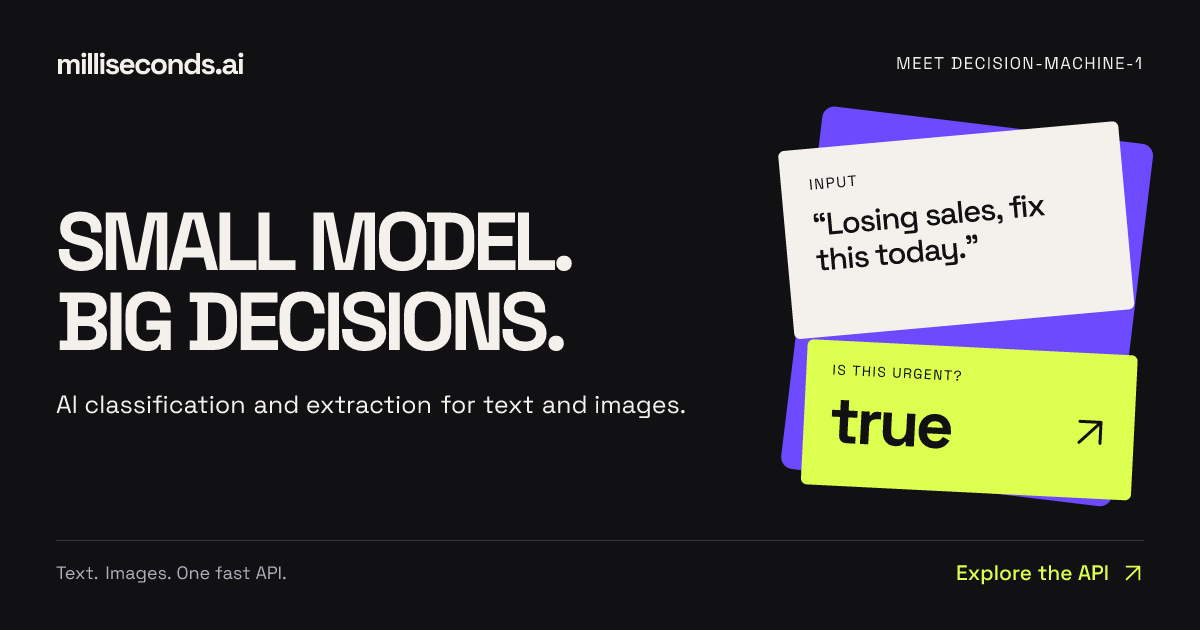
Milliseconds.ai is an API that turns text and images into decisions. You send text or an image, and the platform returns labels, fields, scores, or yes/no answers as structured data. The product is built around a small model the team calls decision-machine-1, and it is designed specifically for the parts of an application that need an answer rather than a conversation. The company describes the service as delivering "AI decisions, classification and extraction via a simple API." It is available through REST endpoints, SDKs, and a CLI, so developers can call it from TypeScript, Python, or the terminal and receive typed responses. Typical jobs described on the site include routing emails, reading invoice fields, and checking returns against a policy, as well as more playful applications such as building a hot-dog identification empire. The landing page frames the product with the line "Small model. Big decisions." and the supporting idea "Enough words. Try it, stat!" — the emphasis being on delivering the decision itself rather than a long piece of generated prose. The problem Milliseconds.ai addresses is the gap between general language models and the small, concrete decisions applications need to make on every request. The website contrasts a typical verbose model reply — "Certainly! Let's delve into a comprehensive overview of this invoice and its many fascinating details…" — with what a system actually needs: just the fields, invoice number, vendor, total, and currency, ready for the next step. The product exists for "the parts of your app that need an answer," where the goal is not open-ended conversation but a label, a score, a boolean, or a set of validated fields. The framing "Less blah. More done." captures this directly: instead of parsing free-form text after the fact, an application can receive structured data it can immediately act on. This matters because routing, prioritization, validation, and record writing all depend on machine-readable outputs rather than paragraphs of explanation. The site summarizes this as "Very small decisions. Very real work." The platform exposes a set of purpose-built decision endpoints. The yes/no endpoint answers a boolean question about a piece of text — for example, flagging messages that need a faster response — and returns both the boolean answer and a probability of urgency, so an application can raise a ticket's priority. The classify endpoint assigns a label from a set of choices: given support queues, it can return a label such as "billing" along with a probability (0.74 in the recorded example) and a confidence value, plus scores for the other candidate labels such as shipping, technical, and other. The rate endpoint turns subjective input like customer frustration into a sortable score on a defined scale; the example returns a reported score of 1.998 on a 0–3 scale, a level, a confidence figure, and per-level scores across calm, annoyed, angry, and furious. The answer endpoint locates a specific span of text in response to a question — for example, finding the shipment destination in a status update — and returns the answer text together with a probability and start and end source offsets, so an application can show where the answer came from. Extraction and entity recognition form a second group of capabilities. The extract endpoint maps unstructured text to the fields in your records. In the recorded invoice example, it returns a structured object with invoice_number, vendor, total, and currency — four fields described as ready for validation before writing a record. The entities endpoint identifies people, organizations, and references in a document; the claim-note example returns four typed entities (a person name, an organization, a claim id, and a date), each with a type, the matched text, and a probability score, described on the site as "typed values for search and record matching." Together these endpoints cover two of the most common document-intake needs: pulling out defined fields, and recognizing the named things inside free text. A third capability is verification. The verify endpoint checks a proposed value against source text. In the documented example it compares a proposed deductible against policy text and returns matches: false with a probability of 0.00, because the source says $500 while the proposed value is $1,000, and it returns the found value ["$500"]. This lets a workflow confirm that a value is actually supported by the source document before it is accepted — the kind of check required in insurance or finance processes where an extracted number must be traceable back to the text it came from. Overall, the product follows a simple INPUT → DECISION → ACTION model. Text or an image goes in; the model produces a decision in the form of a label, a score, a boolean, a text span, a set of fields, or a list of entities; the application then acts on that structured output. Every response is designed to be consumed by code: boolean answers with probabilities, labels with probability and confidence, scores with per-level breakdowns, answers with source offsets, extracted fields as key-value data, and entities with type, text, and probability. The site notes that uncertainty is surfaced rather than hidden — for instance, "nearly tied levels signal uncertainty," so a queue-ranking system can keep that ambiguity visible. Developers integrate through REST endpoints, TypeScript or Python SDKs, or the CLI and receive typed responses. There is also a path for coding agents: installing skills that teach an agent which API to call and how to evaluate results. The benefits described on the site centre on speed, structure, and cost. Because the model is small and purpose-built, responses arrive as data rather than prose, removing the parsing step between a model call and an application action. Because outputs are structured and include probabilities and confidence, applications can make ranking, routing, and validation decisions with a stated level of certainty. Cost is a headline benefit: production usage is priced at $0.04 per million input tokens, with no charge for output tokens, and free test keys include 125M free input tokens per month with no card required. The website frames the economics as "Big ideas. Small bill." and repeats the free allowance as "Free free free — yours to build with." The site presents several concrete scenarios. Support triage combines the pieces: "A label selects the queue. A score sets priority. A boolean flags urgency." Document intake works as a pipeline: "Extract fields, check values against the source, then validate before writing a record." In the Invoice Desk demo, invoice text is turned into a vendor, invoice number, and total, which are then compared with the purchase order so a team can see what needs attention — the example record matches PO-208. In the Sales Intake demo, an inbound message is separated from support tickets and vendor pitches, given a suggested destination of Sales because it is a demo request with budget stated and a near-term start, and the budget, timing, and need are surfaced for follow-up. In the Private Share demo, names and emails are found in a transcript so personal details can be redacted while the bug report stays useful — detected details are reviewed before sharing, with a toggle between the original and the redacted version. Other stated examples include checking returns against a policy, routing emails, and identifying hot dogs. Milliseconds.ai is aimed at developers and teams building applications that need classification, extraction, and decisions at the point of request — the people who would otherwise wire a general-purpose model into a workflow and then parse its output. The website addresses them directly: "You bring the idea. Build something fast." Integration options explicitly named are the REST API, the TypeScript SDK, the Python SDK, the CLI, and skills for coding agents. Pricing is split between a free tier of 125M free input tokens per month on test keys with no card required, and production at $0.04 per million input tokens with output tokens free. Demos let visitors try working apps and inspect their results, token usage, and inference cost, and visitors can try requests on the site without an API key. In summary, Milliseconds.ai takes the small, repetitive decisions that applications make — is this urgent, which queue does this belong to, how frustrated is this customer, where is the shipment going, what are the invoice fields, who and what are mentioned here, does this value match the source — and returns them as structured, probability-bearing data through one fast API. The combination of a small purpose-built model, typed structured outputs, built-in verification, coding-agent skills, and a free tier with inexpensive production pricing is what the product offers to teams that need answers rather than conversation.
PostSider is a social media publishing platform built for both humans and AI agents. It lets you schedule and publish content across more than 30 networks from a single calendar, or hand the keys to an AI agent that drafts, schedules and publishes on your behalf through MCP, a REST API or SDKs. The platform combines a drag-and-drop content calendar, a media library, analytics, team seats and approvals, agent access and automation in one place, so users do not have to juggle multiple tools to run their social presence. PostSider describes itself as being for agentic builders and their AI agents, solo founders and creators, and agencies running many brands and channels at once, plus everyone who wants to publish their content a different way. The problem PostSider addresses is that publishing to social media usually means opening each network separately, or stitching together per-platform integrations in code. PostSider's own positioning is that scheduling and publishing across more than 30 networks happens from one calendar, and that connecting an agent requires no per-platform glue code; the site uses the phrases "no glue code" and "no per-platform glue code, ever." It frames the choice as four ways to publish: the dashboard, the API, the SDK and MCP. For teams used to per-channel billing, the FAQ contrasts PostSider's flat tiers with per-channel pricing, noting that adding another network costs nothing until you cross a tier, which it says is usually cheaper than per-channel pricing beyond four channels. For people working by hand, PostSider centres on a drag-and-drop calendar that the site describes as "a calendar you actually enjoy." Users plan a whole month at a glance, drag posts across days and channels, duplicate a post to another network, and let the queue publish. The listed capabilities include drag and drop across days and channels, composing once and tailoring per platform, a media library with live previews, and queues with best-time scheduling. A "this week" view shows slots such as Monday on X at 9:00, Tuesday on Instagram at 12:00 and Facebook at 17:00, Wednesday and Thursday on LinkedIn at 8:30 and Friday on YouTube at 15:00. For agents, PostSider provides what it calls an agent bridge built on MCP. The bridge exposes publishing and analytics as tools that any MCP agent can call, so an agent can draft, schedule and publish. The site lists Claude, ChatGPT/Codex, Gemini, Cursor, OpenClaw, Hermes Agent and "+ any MCP agent" as compatible. Alongside this, typed REST API clients and SDKs let developers call the platform directly from their own pipelines. The same secure authentication is used for humans and agents, and one integration is meant to cover every network. The site documents 60 API requests per minute. PostSider says it supports more than 30 networks and that new networks are added all the time. Named on the page are X, Instagram, Facebook, LinkedIn, Bluesky, Mastodon, Lemmy, Farcaster, Nostr, YouTube, TikTok, Twitch, Discord, Telegram, Slack, WordPress, Medium, Dev.to, Hashnode, Ghost, Blogger, Write.as, Notion, Mataroa, Listmonk, Pinterest, Dribbble, Google Business, Whop and Moltbook. The stated approach is to publish the same content everywhere or fine-tune per channel, with one payload going to every network and tailoring per platform applied automatically. Analytics track reach and performance across every channel in one view, with advanced analytics and automated queues and sets on higher plans. On security, PostSider says it treats access like infrastructure. Every channel token is encrypted at rest with AES-256-GCM, requests are hardened and validated against SSRF and CSRF, rate limiting provides abuse and overage protection, and tokens are isolated per channel with least-privilege access. The same hardened core is said to protect humans and agents alike. Getting started is described as a three-step process. First, connect your channels: link 30+ networks in a click, with tokens encrypted and isolated per channel. Second, create it yourself or let your agent: compose in the editor, or let your MCP agent draft posts and fill the queue. Third, schedule and publish on autopilot: pick times or use best-time queues, and PostSider publishes everywhere for you. The site promises you can be "live in minutes," whether you publish yourself or hand the work to an agent. The benefits the site claims follow directly from that structure: one calendar instead of many tools, four ways to publish (dashboard, API, SDK, MCP), a single integration covering every network rather than per-platform glue code, and the ability to publish yourself or let an agent take the wheel. For teams, unlimited team members on the Team plan and above, approval workflows and multi-user roles mean publishing can be shared and reviewed without leaving the platform. Because the same authentication serves humans and agents, an agent can take on the same work a person would do in the calendar. Concrete workflows are shown on the site. In one example, Claude, connected via PostSider MCP, is given a photo and the instruction "Create me a post for Instagram with this photo"; the agent replies that it drafted the post with the photo and queued it for Tuesday at 12:00. Another workflow is a creator planning a whole month at a glance, dragging posts between days and channels and letting queues publish. Agencies use approvals, seats and shared queues across many brands and channels. Developers call the typed REST API and SDKs from their own pipelines at a documented 60 requests per minute. And teams switching tools connect their channels to PostSider in parallel, rebuild their posting slots, bring their queue over manually or via CSV import, run both tools for one overlap week, then cancel the old one. PostSider states plainly who it is for: agentic builders and their AI agents; creators, including solo founders; and agencies running many brands and channels at once with approvals, seats and shared queues, plus everyone who wants to publish their content a different way. Plans start with a 7-day full trial and no credit card. Standard is $20/month for 1 seat, 5 channels and 400 posts per month; Team is $35/month for unlimited team members, 10 channels and unlimited posts; Pro is $45/month for 30 channels with an AI post checker and rewrite, auto-plugs and first comments, CSV bulk import, snippets and templates, webhooks, priority publishing and an audit log; Ultimate is $90/month for 100 channels, custom OAuth apps and priority support. Every plan includes the calendar, the agent bridge and the API. The site also addresses switching: users coming from Buffer or Hootsuite can connect channels to PostSider in parallel, rebuild posting slots, bring their queue over manually or via CSV import, run both tools for one overlap week and then cancel the old one. Alongside the product, PostSider publishes free browser tools, including best time to post, a hashtag counter, a bio link preview, an image size cheat sheet, an engagement rate calculator and a fancy text generator, plus a blog published weekly. PostSider is built by one person, Lukasz Blania, a solo founder building from Poland under Lumi Zone, and support emails land with the person who wrote the code. In short, PostSider is a social media scheduling platform where the calendar serves humans and the MCP server, REST API and SDKs serve agents. It covers 30+ networks from one calendar, adds analytics, approvals and team seats, encrypts channel tokens with AES-256-GCM, and uses flat monthly pricing rather than per-channel billing. Whether you plan to publish yourself or let an agent draft and queue the work, the promise is the same: run your social media on autopilot from one place.
Cronhq is a distributed cron scheduler that fires webhooks on a schedule. You point Cronhq at a webhook URL, and it calls it at the times you define, retries it when it fails, and pages you when something breaks — and again the moment it recovers. It is designed for developers and engineering teams who need scheduled tasks to run exactly once, even when more than one server or worker is running the same schedule. Rather than maintaining crontab entries by hand across machines, you create a job through the API or the dashboard, and Cronhq takes care of execution, retries, logging, and alerting. The product's own promise is simple and direct: cron jobs that actually run. The problem Cronhq addresses is that cron jobs fail in silence. If two servers run the same crontab, the same billing job can fire twice, which means duplicate charges or duplicate records. If a job dies, nobody notices for weeks, because a missing run produces no error message, no alert, and no trace — there is simply nothing to see. Standard crontabs provide no coordination between workers that could prevent double execution, no retry logic, no durable execution history, and no alerting when a run stops happening. Teams are left to write their own locking, their own backoff, and their own monitoring, or to accept that some scheduled work will quietly stop running. Cronhq is built around one guarantee — exactly-once execution, enforced by Postgres locks rather than best-effort behavior — and then wraps the surrounding operational needs, such as retries, signed webhook delivery, heartbeat monitoring, and deduplicated alerts, into the same system. Cronhq's first capability area covers the integrity and observability of the calls it makes. Every request Cronhq sends carries an X-Cronhq-Signature header, computed as an HMAC-SHA256 over timestamp.body, along with an X-Cronhq-Timestamp header. Each job gets its own secret, and you can rotate that secret at any time with no downtime, so a leaked key does not force you to tear down and recreate the job. On the receiving end, this lets you verify that a scheduled call genuinely came from Cronhq before acting on it, which matters for anything that touches money, data, or infrastructure. Running alongside that is the heartbeat monitor: you ping a URL on every run, and if the expected window — the period plus a grace interval — is missed, Cronhq flips the monitor to DOWN and pages you once. Cronhq describes this as cron's inverse: proof of absence rather than proof of presence. The second capability group is about managing schedules as part of your codebase rather than as clicks in a UI. The Cronhq CLI installs with npm i -g cronhq, or runs directly with npx cronhq --help. Running npx cronhq sync reconciles a cronhq.yaml file in your repository — it creates, updates, and prunes jobs so your schedules live in version control and move through review like any other change. Running npx cronhq tail live-streams executions straight to your terminal, so you can watch a job's output without leaving your editor or shell. Inside the dashboard, a ⌘K command palette lets you type schedules in plain English: writing "every weekday at 9am" returns the valid cron expression 0 9 * * 1-5, with a plain-English preview so you can confirm the schedule is right before saving it. The third group covers what happens after a run fails. Retries are built in with backoff, configured as a max retry count and delay per job, so a transient failure gets a few more attempts at increasing intervals instead of being written off immediately. The terminal status and the last error always land in the job's history, which means the postmortem writes itself. Every execution is logged with its status, duration, HTTP code, and response body, newest first, searchable, and retained — the job's history belongs to you and stays available. Alerts are deduplicated to avoid noise: a failure alert fires on the third bad run in an hour, not on the first, and the recovery alert fires on the first success after a streak. That is a deliberate design choice illustrated in Cronhq's own diagrams, where repeated failures after an alert stay silent, and a recovery message such as "nightly-rollup recovered after 3 failures. Last 6 runs: all 2xx." closes the loop. Alerts can be wired to email or Slack. The mechanism behind Cronhq's central guarantee is a Postgres lock. Two workers can never fire the same scheduled execution: each run is claimed through a database lock before it proceeds, so a duplicate worker simply loses the race and does nothing. If a worker crashes mid-job, the lock expires and another worker picks the execution up. This is what makes the exactly-once claim structural rather than aspirational — the coordination lives in the database that both workers already trust, not in a best-effort in-memory flag. Around that core, Cronhq schedules, delivers, retries, records, and alerts, and the whole system is built in Rust on Postgres. It is MIT-licensed and self-hostable, running the same image Cronhq runs in production. For teams that rely on scheduled work, the outcome is that jobs stop disappearing without anyone noticing. Duplicate executions from racing workers are eliminated by the lock-based claim, so a nightly billing job fires once instead of twice. Transient failures are absorbed by retries with backoff, while permanent failures surface in a searchable execution history complete with HTTP codes and response bodies. Alerting is deliberately quiet: one page on the third failure in an hour and one on recovery, so the signal is that something is actually wrong rather than that a single run flaked. Heartbeat monitors extend the same coverage to jobs Cronhq does not run itself, turning a silent absence into a page. And because schedules can live in a cronhq.yaml file and reconcile through the CLI, they become reviewable artifacts in the repository rather than configuration that only exists in a dashboard. Scheduled webhooks are the core workflow: a nightly rollup job, a nightly digest, a metrics refresh, a queue drain, a cache warm, a cleanup job, or a health poll, each configured with a name, a cron schedule, a webhook URL, and a timezone such as America/New_York. Jobs that run elsewhere — on your own infrastructure or another provider — can still be covered by pointing a heartbeat monitor at an endpoint you ping on every run, so if the ping window is missed, you are paged. Teams that want their schedules under version control use npx cronhq sync against a cronhq.yaml file, and teams that prefer watching from a terminal use npx cronhq tail to live-stream executions. Anyone who needs to sanity-check a schedule quickly can type the schedule in English into the ⌘K command palette and get the cron expression back with a plain-English preview. Cronhq is aimed at developers, engineering teams, and anyone running scheduled work in a distributed system, and it is listed among Developer Tools, Open Source, SaaS, and GitHub topics. Delivery is by webhook, so it integrates with any HTTP endpoint, including your own API; alerts go to email or Slack. The stack is Rust on Postgres. Cronhq is MIT-licensed and self-hostable using the same image the hosted service runs, and it offers a free tier covering 5 jobs. Getting started takes four steps on one screen: sign up with an email to receive a one-time link that mints a 36-character API key starting with chq_, create a job with a schedule and URL, watch executions arrive in the log, and wire up email or Slack alerts. In short, Cronhq exists to make one promise true: cron jobs that actually run. It enforces exactly-once execution with Postgres locks, retries failures with backoff, signs every webhook with HMAC-SHA256, monitors jobs it does not run via heartbeat pings, and alerts once on failure and once on recovery. Built in Rust on Postgres, MIT-licensed and self-hostable, with a free tier of 5 jobs, it gives teams a scheduler that treats reliability as the starting point rather than an afterthought.
Sai is an AI robosecretary from Simular AI, described as the world's first robosecretary that works with a fleet of autonomous computers. Its purpose is to do your endless screen work, taking routine tasks off your plate so you can focus on other things. Each computer in the fleet navigates software the way you do: it reads the screen, clicks the button, and types in the form. Sai is built to get real work done across apps, websites, and desktop tools, and it is aimed at anyone who spends their day repeating the same clicks and keystrokes across the software they already use. Much of the software people depend on every day was never designed to be automated. Legacy desktop applications, internal portals, and tools that sit behind a login often have no API at all, which means conventional integration and automation platforms simply cannot reach them. The result is endless manual screen work: opening the same screens, copying the same values, filling in the same forms, and clicking through the same flows, hour after hour. That work is repetitive, it consumes attention, and it rarely stops. Sai's answer is to automate the computer interface itself, so the work gets done in the software as it already exists, without waiting for an API, a plugin, or a rebuild. The core of Sai is a fleet of autonomous computers that interact with software the way a human operator does. Each computer reads the screen to understand what is in front of it, clicks the button it needs, and types into the form it needs to fill. Sai has been trained to interact with the computer interface itself rather than with a fixed set of named integrations, which is why it can be put to work in software it has never seen before. This screen-level approach is what lets the system handle interfaces that were only ever meant for a person, turning ordinary clicking and typing into an automated, delegable workflow. Because Sai operates at the interface level, it automates software even when that software lacks an API. The examples given are legacy desktop apps, internal portals, and anything sitting behind a login — precisely the categories that are hardest to reach with traditional automation. Instead of asking for a connector or a developer-written script, Sai works with what is already on screen. For teams that have long been told their tools are not automatable, this removes the biggest blocker: if a person can log in and use the software, Sai can work in that software too. Sai supports Windows, macOS, and Linux, so the same robosecretary approach can be applied across the operating systems an organization already runs rather than forcing everything onto a single platform. It also reports a score of 73% on OSWorld, a benchmark for computer-use agents, giving a concrete, measurable signal of how well it performs on real desktop tasks. Combined with the fleet model, in which one commander can direct multiple autonomous computers, Sai is designed to scale routine screen work rather than handle only a single task at a time. The workflow Sai describes is deliberately simple: you sign in, and you start delegating. Sign-in is offered through Google, and from there you hand tasks to the fleet rather than performing them yourself. Sai commands the autonomous computers, each of which works inside real applications, websites, and desktop tools by reading the screen, clicking, and typing as needed. Because the fleet is made up of multiple computers, routine work can be taken off your plate in parallel rather than one task at a time. The result is an assistant whose unit of work is a computer session, not just a chat message. The benefit Sai promises is straightforward: routine work is taken off your plate. Instead of you reading the screen, clicking the button, and typing into the form, the fleet does it. That matters because the work being automated is the work that never appears on a priority list yet consumes the most hours. By operating software exactly as it is, Sai also avoids the long setup cycles that come with building bespoke integrations, and by supporting Windows, macOS, and Linux, it can fit into the environments people already use. The outcome is time returned, fewer repetitive screen tasks, and less dependence on whether a given tool happens to expose an API. Concrete scenarios follow directly from the capabilities described. Teams can use Sai to drive legacy desktop applications that have no modern interface or API. It can work inside internal portals, the behind-the-login systems that employees use daily but that no outside automation tool can reach. It can complete tasks in anything that sits behind a login where a human would normally sign in and click through screens. More broadly, it can handle work across apps, websites, and desktop tools, which means a single delegated task can span the mix of software a person actually uses during a working day. Sai is presented as a robosecretary for anyone with routine screen work to delegate, and its supported platforms are explicitly Windows, macOS, and Linux. Its maker is Simular AI, and the product is accessed by signing in, with Google sign-in supported, and by continuing through the product's Terms of Service and Privacy Policy. No pricing or plan details are stated in the available content, and aside from Google sign-in, no third-party integrations or technology stack details are disclosed. Sai's primary value proposition is simple to state: it is a robosecretary that runs an autonomous computer fleet so that routine screen work gets done without you doing it. By reading the screen, clicking, and typing the way a person would, Sai reaches legacy desktop apps, internal portals, and anything behind a login that APIs cannot touch, across Windows, macOS, and Linux. Sign in, start delegating, and let the fleet take the repetitive work off your plate.
Jev is a frontier model from TypeSafe AI's System One family that takes unstructured state as input and returns typed probabilistic decisions as output. Instead of generating text the way a conventional language model does, Jev answers with Choice, Score, and Noul results that carry calibrated probabilities your code can act on directly. That makes it a decision engine rather than a writing engine: the output is meant to be consumed by a program, not read by a person. The product is positioned for software automation, and it is described as being available to everyone at console.typesafe.ai with no waitlist. The problem Jev addresses is the mismatch between text generation and software decision-making. When an application needs an answer inside a code path, a generated paragraph of prose is not directly usable: something has to read it, interpret it, and convert it into something a program can branch on. That interpretation layer adds latency, cost, and ambiguity. Jev sidesteps it by returning typed answers and calibrated probabilities instead of text, so the result arrives in a shape that software can consume immediately. For teams already running comparable LLM workflows, the described gains are considerable: roughly 20-200x faster responses and 40-400x lower cost, with output tokens free. That combination matters most where decisions have to happen repeatedly, at volume, and inside automated systems where waiting on a text response is impractical. The core output formats named in the product description are Choice, Score, and Noul answers. These are the typed conclusions Jev returns in place of prose. A Choice answer is one of the explicitly named result types; a Score answer is another; and a Noul answer is the third. Because these results arrive as types rather than free-form sentences, the calling code does not have to guess at structure or parse language before it can use the result. This is the central design idea behind the product: the model's answer is already in a format that software automation can act on, so the integration between model and program is direct rather than mediated by an interpretation step. Alongside the typed answers, Jev returns calibrated probabilities. Calibration is what makes a probabilistic result useful in code: the probability attached to an answer is meant to reflect how likely that answer actually is, so a caller can use the probability rather than treating every model output as equally trustworthy. The description emphasises that these are probabilities your code can act on, which puts the decision about thresholds and behaviour in the application's hands. Instead of asking a language model a question and hoping the phrasing is stable enough to parse, a system can receive a typed answer with a probability attached and handle it programmatically as part of its normal logic. Performance comes from parallel sampling, the mechanism the description credits for Jev's response times of roughly 70-500ms. That latency band is the practical difference between a decision that can sit inside an interactive or high-throughput workflow and one that cannot. The same description quantifies the comparison against comparable LLM workflows: about 20-200x faster and 40-400x cheaper, with output tokens free. Those figures describe a different operating regime for the same class of decision task. Workloads that were previously constrained by per-call latency or per-token cost can be run more often, in more places, and closer to the moment the decision is actually needed. Overall, Jev's approach can be summarised as unstructured state in, typed probabilistic decisions out. It is a System One frontier model from TypeSafe AI, and the interface it offers is deliberately narrower than general text generation: it produces conclusions rather than commentary. That narrower contract is what allows the surrounding software to treat Jev as a component rather than a conversational partner. The model absorbs messy, unstructured input state and resolves it into one of the named answer forms, carrying a calibrated probability, delivered quickly enough and cheaply enough to be embedded in automated decision loops. The benefits described for users follow directly from those design choices. Speed means decisions can be made inside time-sensitive paths. Lower cost per decision means automation can be applied more broadly without the economics breaking down. Free output tokens remove a line item that scales with usage. Typed outputs with calibrated probabilities reduce the engineering work of interpreting model responses and make it practical to wire a decision directly into application logic. And availability without a waitlist means a team can evaluate the model by going to console.typesafe.ai and signing in rather than joining a queue. The use cases that follow from the description centre on software automation. Any workflow where a program needs to reach a decision from unstructured state and then act on that decision is a candidate: the caller supplies the state, Jev returns a typed Choice, Score, or Noul answer with a calibrated probability, and the surrounding code responds. The stated comparison class is comparable LLM workflows, which suggests the intended fit is where teams currently route decisions through a text-generating model and then interpret the output. Where a decision has to be made repeatedly at volume, the described latency and cost profile makes Jev a practical alternative to that pattern. Access is through the console at console.typesafe.ai, which is the official website for the product. The console supports signing in with Google, or alternatively requesting an email code instead of using a Google account, and continued use is governed by TypeSafe AI's terms of use and privacy policy. The target users are developers and engineering teams building software automation that depends on structured, probabilistic decisions rather than generated text. No pricing plan details, technology stack, or third-party integrations are stated in the available content. In summary, Jev is best understood as a decision model rather than a text model. It takes unstructured state and returns typed Choice, Score, and Noul answers with calibrated probabilities, uses parallel sampling to deliver responses in roughly 70-500ms, and is described as about 20-200x faster and 40-400x cheaper than comparable LLM workflows, with output tokens free. For software automation that needs decisions in a form code can act on, that combination of structure, calibration, speed, and cost is the primary value proposition.