Category Focus/categories/audio
Audio AI Tools
Discover and compare the best audio AI tools and software. Browse 83+ curated tools with reviews and rankings.
Projects tracked
83
Sort mode
RECENT
Page
1
Discover and compare the best audio AI tools and software. Browse 83+ curated tools with reviews and rankings.
Projects tracked
83
Sort mode
RECENT
Page
1
Vaani Voice is a voice AI harness for building, running, and improving AI phone agents. It is aimed at teams that want a voice agent which sounds and behaves human without writing a single line of code: you describe the call you want in plain language, and the platform assembles the prompt, voice, language mix, and tools. From there you connect your tools and knowledge base and go live on a real phone number. Vaani frames every call as something that should produce a useful outcome, and states that every call ends with clean, structured data. The platform describes itself as built on millions of calls and presents itself as one connected platform for building agents, running calls, and improving every conversation. Phone conversations are still how many businesses qualify leads, handle order questions, and onboard customers, but Vaani frames the hard part as the quality of the call itself. It lists what it says every other platform still cannot get right: metallic voices, dead air, and awkward pauses. Its answer is a set of call-experience capabilities, including agents that make small talk so there is no silence, agents that pause when turn taking is relevant, automatic switching to the caller's language and dialect, realistic voices with emotional tags, and low latency. The second stated problem is build friction: a nuanced agent is tough to build, agents break on questions nobody thought to ask, stitching voice, language, and tools together takes time, and a single prompt tweak can quietly break a live agent. Vaani's Teacher AI and prompt-diff review flow are presented as the response to those problems. The first capability group is the build experience driven by Teacher AI. Instead of prompt engineering or flowcharts, you tell Teacher AI who to call, what to say, and what counts as success, in plain language. Vaani states that one sentence is enough to start. Teacher AI then asks clarifying questions about what is missing, covering languages, objections, qualifying criteria, and handoffs, and each answer tightens the agent before it ever makes a call. The platform then builds live in seconds, assembling the prompt, voice, language mix, and tools together with a readiness score as it goes, so what you get is described as a deployment-ready agent rather than a draft to finish. The second capability group is change control and ongoing refinement. When a prompt change is proposed, Vaani shows the prompt diff before anything is saved, together with recommended settings for latency, voice, and turn-taking, and nothing is saved until you approve it. Refinement does not restart the build: you can ask Teacher AI by chat to change the tone, add a language, or handle a new objection on an existing agent, and it updates the same way with a diff to review. This is framed as protection against the common failure where one prompt tweak quietly breaks a live agent. The third capability group is the conversation quality layer. Zero dead air means agents make small talk, illustrated by a caller asking where their order is and the agent answering that it will check. Turn taking means agents pause when it is relevant, such as pausing to listen when a caller says "hmm" or asks to change a date. Effective communication means automatic switching to the caller's language and dialect, illustrated by a request to move a visit to tomorrow at 10 AM. Ultra realistic voice means realistic voices with emotional tags, illustrated by a warm response to a worried caller. Lowest latency is described as a best-in-class P-90 latency of roughly 450 milliseconds. The site also references a sub-500ms multilingual engine and response accuracy on noisy telephony audio. The fourth capability group covers memory and call handling. Memories keeps every past call with a caller retained and stored, and context can be shared by a different agent. A custom context filter lets you choose how many past calls to use and which ones, and the agent receives cumulated context containing only what that call needs, such as an order number, a refund approval, a language preference, and a channel preference. The stated outcome is that the agent picks up where the last call left off, so customers do not repeat themselves and are less frustrated. Call screening keeps screened calls connected: Vaani answers the screening prompt and stays on the line while the customer decides whether to pick up. When asked who is calling, Vaani shares the agent's name, your company, and the reason for reaching out, then introduces itself again and explains the purpose of the call once the customer answers. Vaani states that about 98% of screening calls are handled in under 15 seconds. Overall, Vaani organizes its platform around four verbs shown across the site: Build, Humanise, Connect, Run, and Improve, summarized on the page as build agents, run calls, and improve every conversation in one connected platform. An agent management view lists all AI agents with agent name, ID, deployment status, deployed-on status, and last edited time, alongside the ability to archive or create a new agent. The promise of the flow is: describe the call, hear the agent, then let it dial only inside the window, with a live call demo available to listen to before deploying. The stated benefits are concentrated on call quality and operational focus. Because agents avoid dead air and handle turn taking, and because they switch languages and carry emotional tone, Vaani positions the resulting conversations as realistic rather than metallic. Because memories carry context across calls and across agents, customers do not repeat themselves. Because qualifying and handling happens on the agent side, human teams continue from informed, qualified conversations with context instead of raw records. And because every call ends with clean, structured data, calls produce outcomes rather than transcripts. Concrete use cases are documented as case studies. IndiaFilings used Vaani for automated first contact, qualifying founders in need of compliance services and passing them to an expert callback, with founders hearing the offer in their language and choosing how to continue. Prateek Group used Vaani for automated broker outreach, introducing the partner program, checking broker interest, and earning permission for a callback before relationship managers follow up. Sat Kartar Life used Vaani for inbound sales, answering product questions and confirming buying intent before transferring ready-to-buy customers to closers, with a callback path for customers who need more time. Memories is illustrated with an order support scenario covering a delayed order, a UPI refund, Hindi preference, and WhatsApp updates. An example agent named KYC - Onboarding also appears in the agent list. The platform is accessed through the web, with a start-free signup, documentation, a contact page, and a live call demo. Vaani also offers enterprise-grade solutions for AI phone calls, where you work with a dedicated Vaani engineer to implement custom agents, analytics, and automation. Customers and companies shown on the site include Uber, Accenture, Randstad, SBI Life, Bajaj Finserv, Mphasis, Krafton, Hero FinCorp, InCred, IndiaFilings, Prateek Group, and Sat Kartar Life. Vaani states it is backed by Google AI Accelerator, VentureCatalysts, nasscom ai, INDIAai, and kotak BizLabs. In short, Vaani's value proposition is a single harness for voice AI: describe the agent you want, let Teacher AI build and refine it, ship it on a real phone number, and let calls end with clean, structured data and qualified next conversations.
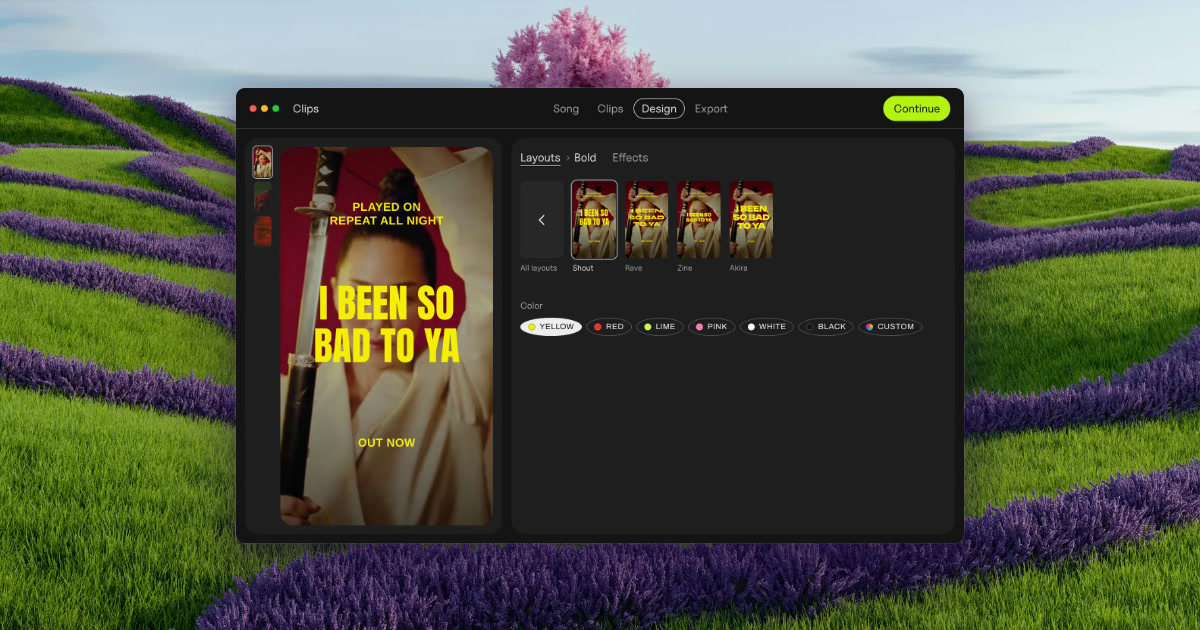
Clips by Plastic is a lyric and lip-sync video maker for Mac, built for music artists who want to promote a finished song with vertical video ads. You drop in a song and Clips finds its tempo and every part — verses, pre-chorus, chorus and bridge — then cuts each part and its catchiest snippets into its own vertical video, on the beat, with the lyrics synced word by word. From there you choose a layout, add a hook line on top, pick one of 54 effects, and export every part on every backdrop at once. The files come out named by song, part and backdrop, ready to upload to Ads Manager. Clips is aimed at artists promoting their own releases, and at labels and studios making videos for a roster or for clients. The problem Clips was built around is stated plainly on its own site: making fifteen videos takes all evening, so you cut two and pray. Rather than guessing which section of a track is the part that actually sells it, Clips lets an artist produce a video for every part of the song and then test them. The site describes the workflow as test first, then spend: run every part for a week with a few dollars a day each, let strangers pick the winner, and put your budget behind the part that wins. In the site's own worked example, the intro beat the chorus on cost per result, which is exactly the kind of finding a guess would have missed. The app was built by Kai Williams, a music artist with 30K monthly listeners on Spotify, who says he built Clips while promoting his album because cutting the same song fifteen ways was eating the time he wanted for music. The first step is dropping in a finished song. Clips finds the tempo — shown in the interface as BPM, for example 124 BPM on a three-minute-fifty-two-second track — and detects every part of the arrangement, listed as Verse 1, Pre, Chorus, Verse 2, Chorus and Bridge in the site's example. Each detected part then becomes one clip, cut on the beat; the product's own illustration shows a Chorus of 16 beats, cut on the beat. You then pick the parts you want to turn into videos, so a single song can yield a whole set of separate vertical clips instead of one long edit. There is no timeline to work on, which is the point of the design: the arrangement and cutting work that would normally consume an evening is done for you once the song is imported. The next step is the lyrics. Clips syncs the words to the music and can present them either word by word or line by line, both on the beat, and the interface exposes a simple Word / Line switch for that choice. You can also add a hook line on top — a short phrase that sits above the lyric treatment throughout the clip, shown in the site's mockups as a repeating line over the synced lyrics. Combined with a layout choice, this is what gives each clip its shape: a vertical frame, a lyric treatment that moves with the music rather than against it, and a hook that carries the catchiest fragment of the song. Because the sync is handled automatically, the artist does not have to hand-time individual words against a waveform. Clips ships 54 effects to give each batch a look that matches the release rather than a template. The site names a set of them — Paper, Glow, Vertigo, Riso, Xerox, Tape, Bitmap, Lines, Heatwave, Drift and Negative — and describes the concept as the same chorus rendered 54 different ways. A Strength control, set by dragging, determines how strong the effect is applied, with values like 3 shown in the interface. Effects are applied on the beat, tied to the detected BPM, so visual changes land with the music. On top of that, backdrops can come from your own footage or photos: Clips animates stills, and the site notes that one phone clip is enough for a batch, or you can download free high-quality vertical videos from Pexels that match the mood of the song. The fourth step is export, and it is where the batch approach shows. Clips exports every part of the song on every backdrop at once — the site's headline claim is 15 ads at once — with a progress indicator counting up from 0 of 15 videos cut. Output is vertical video at 1080 × 1920, or square at 1080 × 1080. Each file is named by song, part and backdrop so that the batch is identifiable and ready for Ads Manager without renaming by hand. The site frames the whole journey as ads in minutes, from a finished song to a full batch, with no timeline involved at any stage. The overall approach is a fixed four-step pipeline rather than a general-purpose editor: drop your song, pick the parts, add your hook, export. Everything runs locally — Clips works offline and your unreleased song never leaves your Mac, which the site answers directly when asked whether an unreleased song is uploaded anywhere. There is no cloud round-trip and no subscription machinery: the site promises no subscription, no credits and no caps. That combination of an offline Mac app and a batch pipeline is what separates Clips from a video editor, where the same job is done by hand, and from cloud-based ad makers, as set out in the product's comparison table. The stated outcome for users is speed and evidence. Instead of spending an evening cutting a couple of videos and hoping, an artist gets a full set of on-beat, lyric-synced vertical ads in one export and can then let performance data decide where the money goes. The site's example week shows cost per result for each part — intro, verse 1, pre, chorus, verse 2, bridge — with the intro winning at $0.21 and the chorus landing at $0.63, and the conclusion that you should put your budget behind the winner. Because every part and every backdrop is exported in one pass, testing more variants costs almost nothing in extra time, which is the core benefit the product is selling. Concrete use cases named on the site include launching a release by uploading the whole batch to Ads Manager on day one and letting it run through day six, then keeping the winner on day seven. Artists without footage are covered: photos work, Clips animates stills, and a single phone clip is enough for a batch. Artists between releases can use the free version, which does not expire, to try the app on an old song. Labels and studios can produce videos for the artists they manage, sign or work for under the Label / Studio license, which covers client and commercial work. Pricing is straightforward. The free version costs $0, includes every feature and unlimited exports, adds a small Clips tag on exports, and has no time limit. The Artist license is $99 paid once, removes the Clips tag, covers up to 3 of your own Macs and includes free updates. The Label / Studio license is $299 once, covers up to 10 Macs for your team, allows client and commercial work, and adds priority email support. A bundle with the DOT app is $125 once and unlocks both apps for up to 3 of your own Macs with free updates. A 30-day refund is offered with no questions, and the license key comes with the receipt. Requirements are macOS 13 or later on Apple silicon or Intel, with lyric sync best on macOS 26; Clips is Mac only today. In short, Clips turns one finished song into a batch of on-beat, lyric-synced vertical videos in minutes, so an artist can test every part of the release and spend behind the one that actually sells it — offline, paid once, with no subscription.
walkai-talkai is a macOS app that turns any handheld two-way radio into a push-to-talk voice bridge for AI coding agents. You key up on a walkie-talkie, speak a command, and the app transcribes your voice locally on the Mac, types that command into an agent such as Cursor, Claude Code or Antigravity, and then broadcasts the agent's answer back over the radio with a neural voice. It is built for developers, radio users and anyone who wants hands-free control of an AI agent while away from the keyboard. It works with Baofeng, Quansheng, Motorola, Kenwood or any radio that has VOX and an audio jack, running on Apple Silicon Macs with macOS 13 or later. Most work with an AI coding agent happens at a keyboard: you type a prompt, wait for the agent, read the answer on screen and then type again. walkai-talkai changes that loop by making the radio the microphone and the speaker, so the interaction becomes a transmission rather than a chat window. The website presents the product as "built for the field", and it emphasizes that the app types into the exact window you chose even while you are away from the keyboard. Because speech recognition and speech synthesis both run on the Mac, your radio audio never leaves the machine; the internet is used for the license check and, in API Mode, for the AI provider you choose. The app keeps working offline for up to 14 days between license checks, which matters when the station sits somewhere without a reliable connection. On the input side, walkai-talkai treats the radio as the microphone. Audio comes in through a simple cable — a 2-pin K-plug or 3.5 mm connection into the Mac or a USB audio adapter — and OpenAI Whisper running locally on Metal converts speech to text. The app supports Turkish and English, and it shows live waveform monitoring so you can confirm the station is hearing you before you commit to a command. Inside the Station dashboard the live spectrum displays incoming audio in green and your reply in orange, with each message appearing underneath for a few seconds. Because recognition happens on the Mac rather than in the cloud, the audio path stays on the machine from end to end. Once a command has been transcribed, walkai-talkai offers two ways to deliver it. In Target Window mode you pick a target window once — Cursor, Antigravity, Terminal or any app — and every transmission is typed into that window through macOS Accessibility automation, then submitted with Enter and tagged as a [radio command]. Because the app drives the window itself, it keeps working even while you are away from the keyboard. In API Mode the app skips the IDE entirely and calls a model provider directly: OpenAI, Anthropic, Gemini, DeepSeek or Ollama. That makes the radio either a remote control for an existing coding session or a standalone voice front end for a model, without changing hardware. The return path is what makes the loop feel like radio rather than a chat app. Any agent that can run curl can answer by POSTing a short summary to 127.0.0.1:1988/api/reply, and the endpoint is loopback-only, so nothing is exposed to your network. The app then speaks that text using CoreML neural TTS — Kokoro and EMA models running on CoreML and the Apple Neural Engine — for fast, high-quality radio announcements. To open a radio's VOX circuit before the first syllable is spoken, walkai-talkai sends a rising 880 → 1100 → 1400 Hz wake-tone preamble, and it closes the transmission with a roger beep. The result is an answer that arrives as a proper radio transmission rather than a truncated squawk. Seen end to end, the product is a five-step loop: key up, transcribe, dispatch, reply and broadcast. You press PTT and speak; your radio's audio-out feeds the Mac through a cable; Whisper converts your voice to text; the command is typed into the agent and sent; the agent POSTs a short summary back to the local endpoint; and CoreML neural TTS speaks it into the radio's VOX line with wake tones and a roger beep. The Station UI is deliberately calm and focused, with sections for the Station dashboard, Audio I/O, Automation, API settings, Command Logs and Diagnostics, a one-click start/stop for listening, and a switch between Target Window and API mode. Low latency is called out as a core quality of the app, which matters when a reply has to fit between transmissions. The benefits follow directly from that design. You can operate an AI coding agent without sitting at the keyboard, which suits anyone who is moving around a room, a lab or a workshop while a build or a task runs. Because Whisper and the neural voice run locally, the radio audio stays on your Mac, and the loopback-only agent API keeps the reply channel off your network. The app works with radios you may already own rather than requiring dedicated hardware, and it is agent-agnostic: anything you can type into is a valid target, and any agent that can run curl can talk back. Speech recognition and neural voice cover both English and Turkish, and a lifetime license can be moved to a new Mac whenever you want. Concrete setups show how the loop is used. A developer leaves one radio at the Mac and carries the second one, then keys up to ask an agent to look at a problem — the site's example transmission asks the agent to check why a buy button does nothing when clicked. Another developer uses Target Window mode to type a quick instruction into Cursor or Antigravity without returning to the desk, letting the agent work while they are away from the keyboard. In API Mode, the same radio can query OpenAI, Anthropic, Gemini, DeepSeek or Ollama models directly, with no IDE in the path, which is useful when you only want a spoken answer. Radio operators who already run VOX-capable handhelds can reuse their existing Baofeng, Quansheng, Motorola or Kenwood gear, and Turkish-speaking users can work entirely in their own language for both recognition and the spoken reply. Hardware requirements are deliberately modest: any handheld two-way radio with VOX and an external audio port, a standard 2-pin K-plug or 3.5 mm audio cable into the Mac or a USB audio adapter, a second radio so one stays at the Mac and one travels with you, and an Apple Silicon Mac (M1 and newer) on macOS 13 Ventura or later. Pricing is a single lifetime license priced at $19.99 as an early-bird rate against a $29.99 regular price, excluding tax, with any applicable sales tax or VAT added at checkout. Stripe acts as Merchant of Record for every order, issuing the receipt and handling tax, while walkai-talkai provides the software, the license and support. One license activates one Mac, and you can deactivate it and move it to a new Mac whenever you want; free updates are included. In short, walkai-talkai is a narrow, well-defined tool: it turns a walkie-talkie into the microphone and speaker of an AI coding agent on macOS, keeps the audio processing local, and closes the loop with neural voice, VOX wake tones and a roger beep. If you want hands-free, radio-style control of Cursor, Claude Code, Antigravity, a terminal agent or a direct model API, that is exactly the loop it builds.
Chathonk is a web-based chat platform built for connecting with friends in a fun and engaging way. The product describes itself as "a fun and engaging chat platform that lets you connect with friends, search for users by email or username, and spice up your conversations with emojis and GIFs," and its tagline extends the offer beyond text: "Instant chat, web games, and audio calls with friends." That combination means Chathonk is not only a place to send messages, but a place where conversation, casual browser games, and voice calls sit side by side behind a single login. It is aimed at people who want a lightweight, playful way to stay in touch with friends online, and it is delivered entirely through the web at chathonk.base44.app, so users reach it through a browser rather than through an installed desktop application. Entry is handled through a login screen that offers several ways in, including a guest option for people who just want to look around before committing to an account. The way Chathonk presents itself points to a common friction in online socializing. Its description leads with the words "fun and engaging," and its tagline lists three activities on one line: instant chat, web games, and audio calls. Read together, that grouping suggests the platform is designed to hold the whole of a casual hangout rather than just its text layer. In many setups, entertainment and voice live in separate places from the conversation, so a session with friends drifts between a chat window, a game tab, and a call link. Chathonk brings those three activities under one roof and one login. The description also singles out discovery, through searching for users by email or username, and expression, through emojis and GIFs, as core parts of the experience rather than afterthoughts, which indicates that finding the right person and keeping the conversation lively are treated as first-class concerns. The first capability Chathonk's description calls out is connecting with friends, with the specific mechanism being user search by email or username. Rather than depending solely on invitation links, a person on Chathonk can look up another user using an identifier they already know. Having both routes matters in practice: an email address is useful when you know someone's contact details but not the handle they picked, while a username is useful when you would rather share a handle than an email address. Together they give two paths to the same person, and they make the platform usable for reaching people you already know offline, since you bring the identifier and Chathonk resolves the match. The description presents this search capability as a central part of the platform's purpose, listed alongside chatting itself rather than buried as a secondary setting. The second capability the description highlights is expression: Chathonk lets users "spice up your conversations with emojis and GIFs." Emojis and GIFs are woven into the messaging experience rather than treated as an add-on, and the phrasing frames them as the way conversations are made more animated. This matters for the kind of casual, friend-to-friend communication the product is built around, where tone is often carried by reaction and humor rather than by long blocks of text. A quick emoji can replace a whole sentence of acknowledgment, and a GIF can land a joke that plain typing would flatten. By naming these two formats explicitly in its description, Chathonk signals that its messaging is meant to feel light and expressive, and that users do not need to leave the conversation to find something fun to send. The tagline adds two more capabilities to the chat layer: web games and audio calls, both with friends. Web games means the games run in the browser as part of the platform rather than requiring a separate download or a trip to another site, so play can happen inside the same place where the conversation is happening. Audio calls mean voice conversation is available alongside the text chat, giving friends a way to talk directly when typing is not enough. Because both are described as things you do "with friends," they are positioned as shared, social activities rather than solo features. The practical effect is that a group can move between messaging, playing something together, and speaking to one another without changing tools or re-establishing who is in the room. Access to Chathonk is handled through a dedicated login screen titled "Welcome back," which is built around getting people into their conversations quickly. The screen offers a "Continue with Google" button for signing in with a Google account, alongside a standard email-and-password form for those who prefer it. A "Forgot password?" link sits next to the password field so that a lost password can be recovered without abandoning the account, and a "Create one" link points people without an account toward registration. For anyone who is not ready to sign up, a "Continue as guest" option is offered under the phrasing "Just looking?", which lets a visitor step inside without committing to an account first. Supporting details on the site describe it as a mobile web app capable of running in a mobile browser with a full-screen, viewport-fit layout, and the footer notes that the site can be edited with Base44. Taken together, the benefits Chathonk promises follow directly from how it is described. Friends get one destination for messaging, emojis and GIFs, browser games, and voice calls, instead of stitching those activities together from separate services. The dual search by email or username lowers the effort of finding the people you want to talk to. Guest access lowers the effort of trying the platform at all, since a curious visitor can look around before creating an account, and Google sign-in removes the need to set up and remember another password for those who use it. The overall result is a chat experience oriented around fun and engagement, with the surrounding features present to keep a conversation going rather than to add complexity. Concrete scenarios follow the same lines. A person who wants to chat with a friend can search for them by email or username, connect, and start an instant conversation spiced with emojis and GIFs. A group of friends looking for something to do together can stay in the same platform and play web games rather than leaving for a separate gaming site. When typing becomes tedious, they can switch to an audio call and speak to each other directly. Someone who has been invited but is unsure about signing up can choose "Continue as guest" to look around first and register later. And a returning user who has forgotten their password can use the recovery link on the login screen to get back into their account and their conversations. Chathonk is intended for friends who want a casual, entertaining place to spend time together online, and for anyone who prefers a browser-based tool over installing software. Its login screen accommodates several kinds of visitors at once: Google account holders, people who prefer email and password, and guests who simply want to look. The site is built and can be edited with Base44, and its metadata marks it as a mobile web app, so it is designed to work in a mobile browser as well as on a desktop. No pricing or plan information is stated in the available content. The primary value proposition is simple and consistent throughout the product's own description: Chathonk is a fun and engaging chat platform where friends can message each other, find one another by email or username, express themselves with emojis and GIFs, play web games, and talk over audio calls, all reached through a single web login with the option to join as a guest.
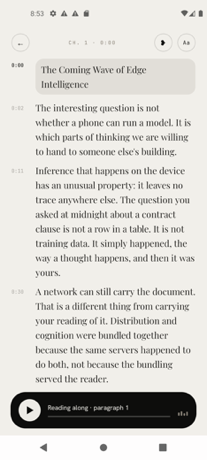
Fluence is an Android app that turns the PDFs, ebooks, reports and saved articles you already have into something you can listen to, follow along with, and ask questions about. It is built for people who want their reading to move with them, and for people who care about where their documents go. Everything Fluence does happens on the phone in your hand: reading the file, making the speech, and answering your questions. Whether you are working through a long report, listening to a novel, or catching up on articles you saved weeks ago, Fluence reads the document aloud while you follow the text, and it can answer questions using the document's own passages. Most people already have a reading pile they never get through: PDFs, ebooks, reports and saved web articles that sit unread because there is simply no time to sit down with them. Listening is one way to get through that pile, turning otherwise idle moments into reading time. The usual options for listening to text, however, involve sending your documents to a server, creating an account, and paying a recurring subscription. Fluence takes a different approach by keeping the entire job on the device: the reading, the speech, and the question answering all run on the phone, and there is nothing to upload before the app can start working. The reading experience is designed around following along. The sentence being spoken lights up as you listen, so your eye can track the text while your ears hear it, which helps you keep your place and stay oriented inside a long document. Beyond simply moving through the text, Fluence lets you bookmark a line or write a note beside it, so the passages and thoughts that matter to you stay attached to the document itself rather than living in a separate place. Because your library and your notes stay on your phone, the record of what you read and what you thought about it stays with you. The voice that reads to you arrives with the app. There is no voice pack to pick and nothing to download first, and the built-in voice reads 31 languages. That means you can start listening immediately after installing the app, without waiting for a download or choosing between different packs. If the built-in voice is not what you want, Fluence also lets you use your own voice, made from a short recording you speak yourself. The voices live on your phone along with everything else, which is consistent with the app's on-device approach to reading and speech. Fluence also lets you ask about what you read. You can put a question to the document and get an answer drawn from the document itself, with the app showing you the passages the answer came from. Because the answer is grounded in the source text and the source passages are shown, you can check the answer against the document rather than taking it on trust. This turns a long PDF or ebook into something you can interrogate, not just listen to. One of Fluence's more distinctive capabilities is turning any book or document into a single audio file. Fluence prepares the audio for the whole document ahead of time while you do something else, and tells you when it is ready. What you get is one file to keep, to play in the car, or to send to another app. Preparing the audio is free; saving it out is part of the full version of the app. This makes it possible to build your own audiobooks from material that was never available as an audiobook in the first place. Privacy is central to how Fluence works. The app does all the work on the device in your hand: reading the file, making the speech, answering your questions. There is no account, no server and no subscription, and the app works offline. Your library, your notes and your recorded voice stay with you. For anyone who has hesitated to send contracts, reports, medical documents or personal reading to a cloud service simply to hear them read aloud, this on-device design removes that step entirely. Fluence opens what you already read. It supports PDF, EPUB, Word, OpenDocument, Rich Text, Slides, Text, Markdown and web articles, and it presents books and documents side by side in one library. That format coverage means you do not have to convert files before using them, and you can keep the ebooks you bought alongside the reports you were sent without splitting them across different apps. Fluence is sold as a one-time purchase rather than a subscription. It costs €14.99, and buying once means it stays yours, on every phone you sign into with the same Google account. Ten documents are free, so you can see how it feels before paying. The app is available on Google Play for Android, and because nothing leaves your phone, it keeps working offline for good. The benefits follow directly from how Fluence is built. You get a reading app that works wherever you are, including without a connection, because the speech is generated on the device. You get through more of the material you have already collected by listening to it rather than only reading it. You keep control of sensitive documents, since they are never uploaded. You avoid a recurring bill, since the app is a single payment. And you end up with audio you can keep, because any document can be prepared as a single audio file you can save, play in the car, or send to another app. In practice, Fluence fits a range of everyday situations. A commuter can load a PDF report or an EPUB novel and listen with the text lighting up sentence by sentence, keeping their place even if they look away. A driver can prepare a document's audio ahead of time and play the resulting single file in the car. A student or researcher can bookmark lines, write notes beside them, and then ask the document questions, checking the answers against the passages the app shows. Someone who reads in more than one language can listen in any of the 31 languages the built-in voice supports, or record a short sample to hear the text in their own voice. And anyone handling confidential material can keep the whole workflow on the phone, with the library, notes and recorded voice never leaving the device. Fluence's core promise is simple and specific: your books and documents, read aloud by a voice you choose, with everything happening on your phone. It combines reading-along highlighting, bookmarks and notes, an on-device voice covering 31 languages, the option of your own recorded voice, document-grounded question answering, and single-file audiobook export, then wraps all of it in a one-time purchase with no account, no server and no subscription. Ten documents are free to try, and for anyone who wants to listen to their own documents without handing them over, that combination is the point.
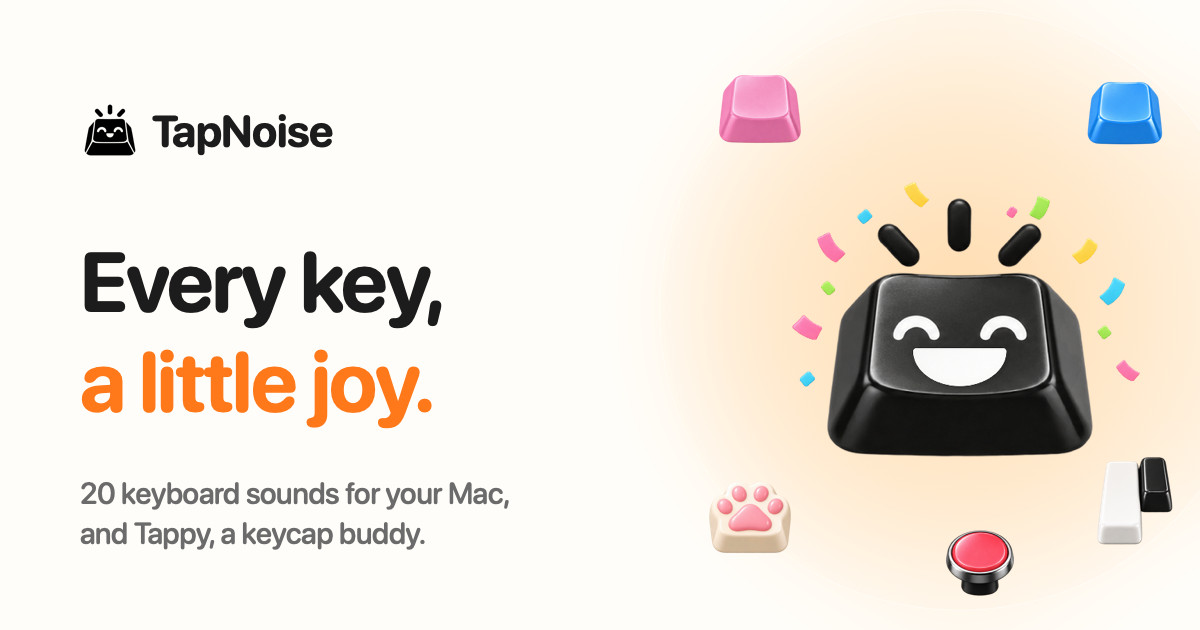
TapNoise is a Mac app that gives your keyboard the sound of a dream keyboard. It ships with 20 keyboard sounds, from a deep thock to tiny paws, and it adds Tappy, a little keycap character that lives on your desktop and reacts to everything you do. TapNoise plays its sounds under every key and in every app on your Mac, and it also tells you when your AI coding agent is done or needs you. It is built for Mac users who want typing to sound and feel better, and for developers who look away from the terminal while an agent works. You can try everything free for three days with no card, and then pay once for one Mac or two. Most keyboards on modern MacBooks are quiet, flat and identical, which is why so much of the appeal of a custom mechanical board comes down to how it sounds and feels under your fingers. TapNoise exists to bring that tactile pleasure back to the Mac you already own, without buying new hardware. It also addresses a very specific modern annoyance: while an AI coding agent runs, you either stare at the terminal waiting for it or you look away and lose time checking back. Rather than being only a novelty sound toy, TapNoise uses the same sensors that make the sounds to do practical work, so the app is fun first and surprisingly handy second. The heart of the app is its library of 20 keyboard sounds. Ten are grouped as Keyboards: Thock, Creamy, Clicky, Silky, Hushed, Bumpy, Pillowy, Clunky, Chunky and Retro. Ten more are grouped as Fun: Typewriter, 8-bit, Bubble, Piano, Rain, Paws, Kalimba, Woody, Marbles and Laser. Thock is described as deep and heavy, like a custom board, while Paws is a tiny-paw sound and Rain brings a soft patter. These are the app's own sounds and they play under every key, in every app. From the menu bar you can turn TapNoise on or off, set the volume and switch sounds with one click, and Tappy, Clean Mode and Guard Mode live there too, so you never have to dig through a settings window just to change what you hear. TapNoise takes keyboard realism further than playing one sample for every press. Most keyboard sound apps play every key the same; TapNoise feels how hard you press through the MacBook's motion sensor, so every key plays as loud as you hit it. Type softly and it whispers, hit hard and it clacks. Every key also gets a take of its own, so fast typing never sounds like a machine gun, and Space, Return and Delete sound like the bigger keys they are. The stereo image follows the key from left to right, which means the sound tracks your hands across the board. On top of raw typing, the app adds sound for the rest of the MacBook: slap it and it says ouch, the lid creaks like an old door and creaks faster the faster you move it, and the charger and USB plugs each get their own little sounds. Tappy is the companion that turns typing into something you can watch. Tappy sits in a corner of your screen, can be dragged anywhere, presses along with every key, and shows your words per minute underneath. Tappy has moods: Happy while typing along with you, Sweating when you are typing fast, On fire when you are really fast, Dizzy when someone slaps the Mac, Snacking when the charger goes in, Ears covered when Caps Lock is on, Sleepy when it is late, Asleep when you have been away, Party when you level up, and Bye when the lid is closing. Every tap is XP, so you type, level up, unlock hats for Tappy, keep a daily streak going, watch your typing speed, and get a card of your week to share. Hats unlock at levels: the party hat at level 2, sunglasses at level 4, headphones at level 6, a beanie at level 8, a chef's hat at level 10 and a crown at level 15. The tools section is where the app earns its keep beyond sound. Knock commands let you knock twice on your MacBook to pause the music, mute your mic in a call, or answer a waiting AI agent, while three knocks lock the screen. Guard Mode is designed for leaving your MacBook at a café table: if someone lifts it or pulls the charger, it sounds a loud alarm, and turning it off takes your Touch ID or password. Clean Mode holds the keyboard and trackpad still so you can wipe them without typing nonsense or clicking anything, shows a countdown so you know when it is done, and lets you hold Esc to stop early. A shortcut cheat sheet appears when you hold Command for a second, showing every shortcut in the app you are using, and disappears when you let go. Break buddy reminds you to stretch after a long stretch of work and nudges you when you start hammering the keys. Song Mode lets Piano, Kalimba or 8-bit play the next note of a song on every key, so you can type an email and hear Für Elise. Typing speed appears live under Tappy with your best today and your best ever, and Quiet in calls makes TapNoise go silent while any app is using your microphone, so nobody in the meeting hears your thock. For developers, TapNoise acts as an audio notification layer for AI coding agents. If you are coding with Claude Code, Codex or Cursor, you can look away while the agent works and TapNoise will chime when your agent is done or needs you, so you stop checking the terminal. A rising little chime plays and Tappy throws a party when the agent is done; two quick taps play and Tappy sweats until you answer when it needs you; a falling note plays and Tappy covers its ears on an error. When an agent is waiting, you can knock twice on your MacBook and its window jumps to the front, or you can simply click Tappy. Connection is done in one click from Settings, Agents, Connect: TapNoise backs up your settings first, adds one small hook, and Remove takes it out again. It works with Claude Code for done, needs you and errors, Cursor for done and errors, and the Codex CLI for done. The cues are made from the keyboard sound you picked, so they sound like part of your Mac rather than another alert, and they stay quiet in calls and follow your volume. TapNoise is private by design, and the app states this plainly: it hears keys, never words. Instead of reading characters, TapNoise learns which key position went down, like the third key on the second row, so it can play the right sound. It never sees what you type, keeps only counts such as taps today, and has no analytics. There is no account to sign up for and no tracking in the app, and your stats, levels and hats stay on your Mac. Network calls are kept to a minimum: TapNoise goes online to activate and check your license key with Dodo Payments, and once a day to look for an update. Nothing about your typing is sent. From AI agents it hears only done, needs you or error, never your code or prompts, and the hook it adds to each agent's settings file is backed up first so it can be removed cleanly. The app is also built to be light: on a MacBook Air, typing at full speed uses about 4% of one CPU core and around 30 MB of memory, and the motion sensor slows down when you are not typing and turns off with the features that use it. The outcomes TapNoise aims for are straightforward. Typing becomes more satisfying because every keypress has weight, texture and direction instead of a single flat click. Fast typing stays clean and natural rather than turning into a machine-gun rattle. Your MacBook itself becomes expressive, reacting to slaps, lid movement and plugs. Tappy turns ordinary typing into light progression with levels, hats, streaks and a weekly card. Developers regain attention: instead of watching a terminal, they get a chime and a knock-to-answer shortcut that brings the agent's window back to the front. And the practical tools quietly cover small daily problems such as wiping a keyboard, protecting a laptop at a café table, muting your keyboard during calls, and remembering shortcuts or taking a stretch break. Concrete scenarios show how this plays out. A developer runs Claude Code or Cursor in the background, looks away to read documentation, hears the chime when the agent finishes, and knocks twice on the MacBook to jump back to the terminal. A writer at a café enables Guard Mode so that anyone lifting the laptop or unplugging the charger triggers a loud alarm, and later uses Clean Mode to wipe the keys without triggering a flood of accidental typing. Someone on a Zoom or FaceTime call keeps the satisfying thock on their desk while TapNoise automatically goes quiet because the microphone is in use. A typist picks Song Mode with Piano, Kalimba or 8-bit and types an email note by note, then checks the live words-per-minute figure under Tappy and keeps a daily streak going. Someone learning an unfamiliar app holds Command for a second to see every shortcut, and Break buddy nudges them to stretch after a long session. TapNoise is aimed at Mac users generally, and most specifically at MacBook owners who care about how their keyboard feels and sounds, plus developers using AI coding agents. It requires macOS 14 or later. Any Mac with macOS 14 or later plays the key, click, charger and USB sounds, with the built-in keyboard or any keyboard you plug in, and Guard Mode sounds its charger alarm. The motion-based features, which include harder press meaning louder sound, slaps, knocks and Guard Mode's lift alarm, need a MacBook with a motion sensor: MacBook Pro with M1 Pro or M1 Max and later, and MacBook Air with M2 and later. Lid sounds need a lid angle sensor, which covers the same models plus the 2019 16-inch MacBook Pro. Sounds start within a few milliseconds of the key; with AirPods or other Bluetooth headphones, Bluetooth itself adds delay, so TapNoise can play its sounds through the MacBook speakers instead. Pricing is a one-time purchase: a three-day free trial with no key and no card, then Solo at US$9.99 for one Mac or Duo at US$14.99 for two Macs, plus tax, with launch prices of US$4.99 and US$7.99 while launch licenses last. Checkout is by Dodo Payments, every update is included, there is no subscription, and there is a 14-day money-back guarantee. TapNoise is made independently by Rudra Satani, who also makes NotchMind. In short, TapNoise gives your keys a voice: 20 keyboard sounds, a pressure-sensitive feel, a small desktop companion called Tappy, and a set of genuinely useful tools built on the same sensors. It turns an ordinary Mac keyboard into something satisfying to type on, and it keeps developers in the loop with their AI agents without staring at a terminal.
Onepin is an AI voice production agent that turns any script into voice that is ready to ship: model-matched, validated and auto-fixed. Rather than replacing the text-to-speech engines a team already relies on, Onepin works on top of them, connecting more than thirty providers — including ElevenLabs, OpenAI, Google, Microsoft, AWS, Rime, Inworld, Fish Audio, MiniMax, Deepgram, Naver Clova, Cartesia and Murf AI — behind a single account. It is built for teams shipping AI voiceover in several languages, such as product videos, dubbing and courses, and its stated promise is straightforward: human voice, right words, every language, so you do not have to listen to every line twice. The problem Onepin addresses is not voice quality. As the site puts it, AI voices sound human now, but they still guess names from the spelling, and nobody has time to listen to every line. Addresses, prices, dates and abbreviations make every TTS model stumble — "St." can mean Saint or Street, "NW" can mean NorthWest or North West — and mispronouncing a brand, a drug or a name makes the whole line unusable. That risk multiplies when a team ships in several languages at once, because the definition of correct has to stay the same in US English, Spanish, Japanese, Korean and German. Onepin exists to remove that listening burden and the manual re-rendering that follows it. The first step Onepin takes with a script is to clean the text. A normalizer expands and disambiguates the material that trips models up: addresses, prices, dates and abbreviations are fixed before synthesis, in every language. The site's own examples show "3042" rendered as "thirty forty-two", "St." resolved as either "Saint" or "Street", and "NW" expanded to "NorthWest". Onepin describes this as the most common cause of misreads, and states that because it happens before synthesis rather than after, roughly half of voice errors are gone. The value is easy to see in practice: the model never has to interpret raw, ambiguous text, so it reads the line the way it was meant to be read in the first place. The second step is pronunciation. Onepin checks names against a four-million-word pronunciation dictionary that teaches the system how to say the hard words right, in any language. The dictionary covers brand and product names — the site lists AbbVie, Versace, Sade, Siobhán, Måneskin, Hermès, Givenchy, Björk, Saoirse, Stromae, Balenciaga, Rammstein, Röyksopp, Moët, Ng, Xóchitl and Hoegaarden — as well as complex medical and scientific terms such as semaglutide, esomeprazole, hydroxychloroquine, esophagogastroduodenoscopy and electroencephalography. Onepin frames this as the first thing generic TTS gets wrong: one mispronounced brand, drug or name and the entire line is unusable, no matter how natural the surrounding audio sounds. Once voice is generated, every line comes back scored. Onepin validates four dimensions on every line — naturalness, word accuracy, clarity and pronunciation — and it scores against your bar, not its own, applying one bar across every language. The site illustrates the step with a single sentence, "Your order has shipped", rendered in US English, Spanish, Japanese, Korean and German, each version queued for scoring. The point of the validation stage is that quality becomes measurable rather than a matter of taste: a team decides what passes, and Onepin holds each line and each language to that same standard instead of asking someone to judge by ear. The fourth step is repair. When a line misses — the site's example is "Siobhan" misread in "Hold the gate, Siobhan" — Onepin either regenerates the line or fixes just the word that missed, using the same model with new settings. Fixes run themselves, and the stated outcome is that you always get the best take. This matters because re-rendering a whole take for one bad word is exactly the kind of manual work that makes multi-language voiceover expensive and slow; targeting the single missed word keeps the rest of the performance intact while still correcting the error. Behind those four steps sits a routing layer that puts every top TTS model in one place. A script flows into more than thirty models behind one account and is routed line by line. Onepin also benchmarks so customers do not have to: the company measures quality continuously and picks per run, on the stated premise that no model wins every language. Onepin presents this as the answer to shipping at scale, and it doubles as protection against vendor risk — if a provider hikes prices, deprecates a model or shuts down entirely, the pipeline does not move. A team keeps the same workflow while the engines underneath it change. Onepin also addresses the commercial side of voice production. Every output is assigned to you and cleared for commercial use, and the Enterprise tier adds a negotiated IP indemnity, which the site frames as what shipping at scale, and answering to legal, actually requires. Billing is pooled rather than fragmented: you buy one credit volume, allocate it across workspaces and reallocate it anytime, and seats are free. That structure means one organization can fund several teams' voice production from a single purchase instead of negotiating separate subscriptions for each group, with the flexibility to move budget between workspaces as priorities change. The use cases Onepin highlights are the workflows where a wrong word is most costly. Its examples span gaming ("Slough off the poison before it spreads"), audiobooks ("He read the minute inscription above Hawthorne's tomb, then wept quietly"), advertising ("Book your stay in Yosemite before the summer rush"), e-learning ("Today we'll cover the reign of Louis XIV") and film ("Subtlety was never his forte") — lines that hinge on words generic text-to-speech reads incorrectly. The product's entry point invites visitors to type a script of up to 100 characters and see results across categories including Product, L&D, Healthcare, Support, Travel and Sports, which are the verticals where brand names, medical terms, dates and prices appear routinely. Onepin is aimed at teams producing AI voiceover in several languages — product videos, dubbing and courses — and says it is trusted by teams shipping voice at scale, naming HeyGen, Hyundai Motor Group, Sierra, Bland and Johns Hopkins University. It is free to start with no credit card required, with a Pro plan for teams that are already shipping, and the site directs teams to start free or contact the company. The takeaway is that Onepin is not trying to be another voice model: it is the production agent that sits between your script and the many models that can read it, cleaning the text, fixing the pronunciations, scoring every line and repairing the misses automatically — so what ships is voice you do not have to listen to twice.
Phonable is a smarter voicemail app for iPhone that replaces your carrier's voicemail. When you cannot pick up a call, Phonable handles both sides of that missed call: your caller hears your greeting and then gets a short text back explaining why you could not answer, while you receive the voicemail as a recording, a full transcript and a one-line AI summary. It is designed for iPhone users who miss calls because they are in a meeting, on the road, at the gym or away for the weekend, and who want callers to know what happened without changing anything about their phone number. Phonable keeps your own number, your SIM and your phone, and only steps in for the calls you do not answer. Carrier voicemail has not changed in decades. You get a beep, a message you never quite get round to listening to, and a caller left wondering whether you received their call at all. As Phonable puts it, a missed call leaves both sides hanging. The caller does not know why you did not pick up or when you will get back to them, and you have to dial in, press 1 and sit through messages to find out what mattered. Phonable treats the missed call as a two-sided problem and fixes both ends of it: the person calling gets an immediate, polite explanation by text, and you get the substance of any voicemail delivered in seconds rather than minutes. The first half of the fix is the automatic text back. The moment you miss a call, Phonable sends a short text on your behalf, even if the caller hangs up without leaving a voicemail. That closes the loop for people who would otherwise never know their call landed. Phonable ships with templates for every moment — starting points such as "In a meeting", "Driving" or "Back on Monday" — and you can write your own wording if you prefer. Messages are considerate by default: each caller receives at most one text per hour, so someone who tries twice is not flooded with replies. Because each mode carries its own text, what callers read always matches where you are — driving, at the gym or away for the weekend. Texts use the SMS credits in your plan and are not sent to landlines or unsupported countries. The second half is visual voicemail with transcription and AI summarisation. Instead of dialling in and pressing 1, every voicemail appears in the app with the recording, a full transcript and a one-line AI summary, so you know what a message is about in seconds. The AI summary arrives as a notification, before you have even opened the app. From there you can read it or play it: skim the transcript quickly, or listen to the recording at whatever speed you like. If the message needs a response, you can reply in one tap, either calling back or sending a message straight from the voicemail screen. A voicemail stops being a chore you postpone and becomes something you can absorb at a glance. Greetings are the third piece. If you are not a fan of recording yourself, you can type what you would like to say, pick a voice and a tone, and Phonable speaks it naturally. The available voices are Sarah (soft and reassuring, American), George (warm and trustworthy, British), Laura (bright and upbeat, American), Lily (clear and polished, British), Brian (deep and composed, American) and Charlie (casual and friendly, Australian), and each can be delivered in a professional, friendly, calm or energetic tone. If you would rather sound like yourself, you can record your own greeting in seconds. Either way, callers hear something that fits the moment rather than a default carrier message. Modes, introduced in version 2.0, tie the greeting and the text reply together into a single switchable state. A mode pairs what callers hear with the text they get back, so you can move from Workday to Driving in one tap. Modes can be kept on for a while — an hour, three hours or until tomorrow morning — or set on a schedule by choosing the days and hours, after which Phonable switches automatically. The built-in examples show how specific they get. In Workday's "In a meeting" mode callers are told: "Sorry I missed your call. I'm in a meeting and will call you back within the hour." Driving's "On the road" mode says: "I'm driving right now and can't pick up. I'll get back to you as soon as I've parked." Gym's "Mid-workout" mode says: "Mid-workout, can't pick up! I'll call you back within the hour." And Weekend's "Away for the weekend" mode says: "Thanks for calling! I'm away until Monday. For anything urgent, send me an email." Phonable works through conditional call forwarding, a standard feature of mobile networks. After you sign up, the app shows you exactly what to dial and walks you through three quick steps to turn forwarding on with your carrier — a process that takes about a minute — and you can switch it back at any time, at which point missed calls return to your carrier's voicemail. Forwarding is conditional, so Phonable only takes over in the situations where you cannot answer: when a call rings out while you are busy, when you are already on a call or tap decline, or when you are unreachable because of flight mode, a flat battery or no signal. If you do pick up, nothing changes at all; the call connects as it always has and Phonable is not involved. Beyond the core loop, Phonable adds a set of thoughtful details. Every call and voicemail sits in one timeline organised by name, and if someone hung up without leaving a message you can still see that they received your text. Callers show up with the name from your contacts rather than a bare number. Privacy is handled deliberately: your contacts stay on your iPhone and are never uploaded, and the company states that it never sells your data. Pro subscribers can upgrade to a dedicated Phonable line that only handles their calls, rather than sharing a community line. The app also follows your iPhone's light and dark mode with a calm design. The overall benefit is simple: callers are never left guessing, and you never have to dial in and press 1 to find out what a voicemail said. The use cases follow the modes. If you are in a meeting, Workday mode tells callers you will call back within the hour instead of leaving them with silence. If you are driving, Driving mode explains that you cannot pick up and will respond once you have parked — without you touching the phone. If you are mid-workout, Gym mode does the same in a lighter tone. If you are away for the weekend, Weekend mode redirects urgent matters to email until Monday. Someone who simply misses a call while out of signal still benefits, because the caller gets a text and any message left is transcribed and summarised for later. Anyone who screens calls, works across time zones or is frequently in situations where answering is impossible can let a mode handle the explanation while they stay present. Phonable is an iPhone app available on the App Store, and it is aimed at anyone who misses calls regularly and wants callers treated well without switching numbers. Pricing starts free with Test Drive, which includes greetings, voicemail and text backs, a monthly allowance of voicemails and texts, up to two modes and a shared community line. Basic, billed monthly or yearly, adds more voicemails and texts every month, up to five modes and modes that switch on a schedule. Pro, also monthly or yearly, is described as everything Phonable does with room to spare: the most voicemails and texts, unlimited modes on a schedule, AI voice greetings and a dedicated line that is only yours. Prices are shown in the App Store in your local currency, yearly billing saves 20%, and you can cancel anytime in your App Store settings. Phonable's value proposition is that a missed call stops being a small failure on both sides. Callers get an immediate text explaining why you could not pick up and when to expect you back, and you get every voicemail transcribed and summarised by AI, delivered as a notification you can read in seconds. Nothing changes about your number, your SIM or your phone, forwarding takes about a minute to set up and can be turned off whenever you like, and you can start free before deciding whether Basic or Pro fits how many calls you miss. For iPhone users who cannot always answer, Phonable turns the calls you miss into handled, explained moments.
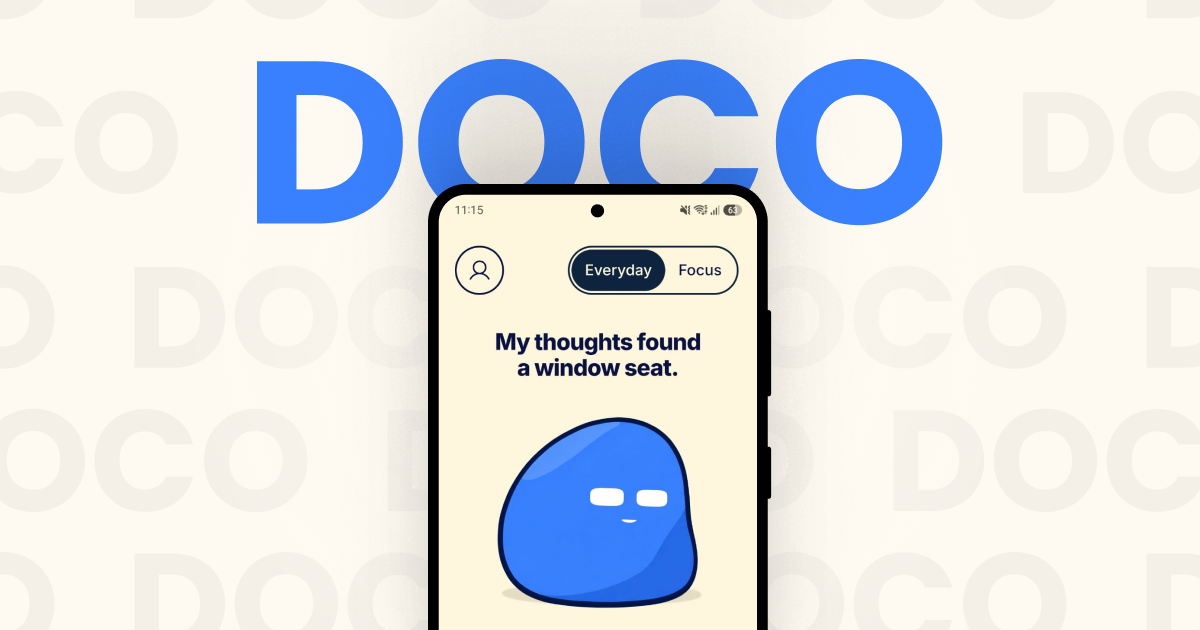
Doco is an expressive companion for focus, music and everyday moments, available as an Android app with an optional Windows desktop client that lets Doco visit your computer. Described by its makers as "a little company for your day", Doco is not a conventional productivity timer or a bare music player: it is a small animated character that keeps you company while you work, listen or step away. It arrives fully animated with zero setup, so there is nothing to configure before it starts sitting beside your day. Doco switches between a playful, warm Everyday mode and a calmer Focus mode, and its music plays through a Spotify connection so that the soundtrack fits the moment rather than fighting it. The context for Doco is the texture of ordinary days: endless scrolling, tasks that compete for attention, slow mornings that need an easier start, and long stretches where a little company goes a long way. The website presents these moments directly, pairing scenarios such as "One task. A little less scrolling." with "A little company goes a long way." Focus mode is framed as the setting that cuts the noise, bringing "a little less distraction—and a little more friendly sarcasm", while Everyday mode stays playful and warm. Instead of another dashboard of metrics to check, Doco responds with tone, expression and music, which is what makes it a companion rather than a tracker. It is built for people who want something friendly in the room while they get on with their day, not another system demanding input. The heart of the product is its two modes. Everyday mode is the lighter, warmer register: Doco is playful, animated and companionable, offering small prompts and expressions that feel like a friendly presence nearby. Focus mode is deliberately quieter — less distraction, fewer interruptions, and a slightly sharper, friendly sarcasm that acknowledges the seriousness of getting something done. The layout supports both portrait and landscape, and the interface is built around character animation, including a thought cloud and small interactive moments such as the "Make a leap" prompt and the line "My thoughts found a window seat." A rotating quote appears as part of the experience — the site shows one from Epicurus about friendship — reinforcing the idea that Doco is there for company as much as for utility. Music is the second pillar. You connect Spotify to play music inside Doco, and song selection "stays close to your listening history, with room for something new." That balance matters: the app leans on the taste it already knows you have, but deliberately leaves space for discovery rather than looping the same familiar tracks forever. The player is presented as part of the companion experience rather than a separate utility, showing cover art, track and artist (the site's example is "God's Plan" by Drake), a progress bar with elapsed and remaining time, and straightforward skip back, play and skip forward controls. The "Music time" scenario sums the intent up: "Familiar favourites. Something new." Doco describes itself as a BYOK — bring your own key — powered companion, and that is because its more advanced expressive behaviours are optional and opt-in. The FAQ is explicit: you do not need a Gemini key, because "Doco has expressions and prompts without one." Adding your own Gemini API key unlocks two additional capabilities: camera-based reactions and AI captions. Because the key is your own, the generative layer is something you choose to switch on rather than a mandatory part of the experience, and the base companion works fully without it. This keeps the core product simple for people who just want the animated companion, while giving people who want more expressive, generative behaviour a way to enable it on their own terms. Doco can also travel. An optional Windows desktop client lets the companion visit your computer. The setup described is simple and account-based: install the Windows client, sign in with the same Google account, and enable visits on both devices. Once that is done, the companion can appear on your desktop as well as your phone, so the same character and the same company follow you between the places you spend your day. The desktop client is framed as a "visitor" rather than a replacement for the mobile experience, which fits the product's overall tone of lightweight, voluntary presence. Taken together, Doco's approach is to keep everything in one small, animated presence. There is no lengthy onboarding — the app is "fully animated right out of the box with zero setup" — and no requirement to configure AI or music before using it. You pick a mode that matches your moment, optionally connect Spotify so the music matches your taste, optionally add a Gemini key if you want camera-based reactions and AI captions, and optionally let Doco visit your Windows machine. Doco is pre-launch; the site currently offers an email waitlist, and joining means agreeing to receive Doco launch updates. A short FAQ on the site answers the practical questions about what Doco is, whether a Gemini key is needed, what changes in Focus mode, how the music works and whether Doco can visit your computer. The promised benefits are deliberately modest and human. Focus mode gives you fewer distractions and a little more room to concentrate on one task. Everyday mode gives you warmth — something friendly sitting with you rather than another notification. The Spotify connection means your soundtrack adapts to the moment instead of being an unrelated background app, and the selection logic keeps familiar favourites close while leaving room for something new. The desktop visit extends that company to the computer where many people do their longest stretches of work. And the BYOK design keeps the AI layer optional, so nobody has to hand over a key to get the core experience. The site names five situations Doco is made for. Deep work is framed as "One task. A little less scrolling." Slow mornings are about easing in and finding your rhythm. Music time is for familiar favourites and something new. Long days are the moments where "a little company goes a long way." Screen breaks are the prompt to "Stretch. Sip. Come back." Together these describe a single companion used across the whole shape of a day rather than a tool you open for one narrow task. In terms of audience and setup, Doco is aimed at people who want a light, expressive presence during focus sessions, music listening and everyday moments, and who prefer something animated and friendly over a clinical productivity dashboard. The explicitly stated integrations are Spotify for music, an optional Gemini API key for camera-based reactions and AI captions, and Google account sign-in for connecting the Android app with the Windows desktop client. The product runs as an Android companion with an optional Windows desktop visitor. No pricing details are published; Doco is pre-launch and access is currently through the email waitlist on the website. Doco's takeaway is simple: it is a companion first. It blends two moods — playful Everyday and focused calm — with Spotify-powered music that fits, optional Gemini-powered reactions and captions, and cross-device visits, all delivered as a fully animated character with zero setup. For anyone who wants a little company during deep work, slow mornings, long days or screen breaks, Doco's promise is that good company and music that fits can make an ordinary day feel less solitary.
iLand is a macOS menu-bar app that turns the empty space around your Mac's notch into a living hub for everyday tools. Instead of leaving that strip of screen unused, iLand fills it with the things you check all day: music, AirPods battery, weather, calendar and a drag-and-drop file tray. It is built for Mac users who want quick, glanceable access to everyday information without opening separate apps or breaking their focus. The app comes from CodeM Labs, described as an independent group of developers crafting lightweight, privacy-first apps for Apple platforms. Most of the information people check constantly on a Mac is scattered across multiple apps and menu-bar icons. Album art, accessory battery levels, the next meeting, local weather, a file you need to send to a nearby device, a quick screenshot — each of these normally requires its own app, window or menu. iLand's premise is that these small, frequent tasks should live in one calm place. Its own framing is "one quiet hub for the things you check all day," positioned against the clutter of jumping between windows and menu items. The notch, an area of the screen that currently does nothing on many Macs, becomes the natural home for that hub, and the site's closing line sums the idea up simply: give your notch a job. Music control is handled directly inside the notch. Users can control playback, scrub and skip right from the notch area, and album art spills into view the moment a track starts, so the currently playing song is visible without switching to a music app. Weather shows local conditions, including highs and lows, and updates quietly in the corner of the screen rather than demanding attention. Live Translation is built for quick language checks: you type on one side, read the result on the other, and swap the direction with a tap — aimed at the everyday situation where you know a word, but only in the wrong language. The battery widget keeps track of every device at a glance, showing real-time battery levels for your AirPods and accessories, so you can see what needs charging before you head out. The file tray is a shelf built into the notch: you drop files in, AirDrop them to nearby devices, convert formats on the fly, and then drag them anywhere. A built-in media converter is listed as part of both paid plans, which means format conversion happens inside iLand rather than through a separate utility. The AirDrop integration makes the tray practical for moving a file to another Apple device without hunting through Finder windows. Calendar and events keep your next meeting one hover away, with a join button that appears when it is time to connect. Widgets can be switched between, covering your calendar, weather, timers and more, so the notch can be shaped around what you actually check. iLand also includes a built-in screenshot and recorder tool for capturing screenshots and recording your screen, and both the monthly and lifetime plans list these features explicitly. Together, these widgets replace a set of small utilities that would otherwise each need their own slot in the menu bar and their own set of interruptions. iLand's approach is deliberately unobtrusive. It is hover-aware: the app stays out of the way until your cursor approaches, at which point it unfolds and reveals its widgets. That means the hub is available the moment you reach for it and invisible when you do not need it. Under the hood it is described as a tiny, signed menu-bar app built natively — no Electron, no bloat and negligible battery impact. Users can shape it themselves by reordering widgets, picking what shows, and choosing a liquid glass or dark appearance. The layout is described as customizable so everything stays within reach, and widgets can be switched with gesture controls. The stated benefit is speed and calm: instead of opening apps and windows, you hover, glance, and get back to work — the site's own formula is "Hover to expand. Glance to know. Get back to work." Because the data shown is glanceable rather than buried inside a workflow, iLand is positioned as a low-friction way to stay informed during the day. The native, lightweight build also means the utility itself does not become another resource drain on the machine, which matters for a tool that is meant to be always available. Everything is one glance away, and that is the core promise of the product. Concrete scenarios follow from its widgets. While working in a full-screen app, you hover the notch to see what is playing and skip a track without breaking focus. You glance at the weather widget to check today's local conditions and highs and lows before heading out. You drop a file into the tray to AirDrop it to a nearby device, or convert its format on the fly before dragging it wherever it is needed. You check real-time battery levels for AirPods and accessories. When a meeting is about to start, the calendar widget shows the next event on hover with a join button ready to use. You use the built-in screenshot and recorder to capture your screen, and Live Translation to look up a word in another language by typing it into one side and reading the result on the other. iLand is aimed at Mac users — the Product Hunt topics list Mac, Productivity and Menu Bar Apps — and the site targets macOS 13 and later, on both Apple Silicon and Intel Macs, with a download of approximately 30 MB. Pricing is simple and has no surprises: a free 7-day trial, then either a monthly plan at $1.99 per month offering full access, all iLand features, all future updates, the built-in media converter and the built-in screenshot and recorder, with a 1 device license; or a one-time lifetime purchase at $14.99 once, which keeps the app yours forever and raises the license to up to 3 devices. A FAQ section covers questions including whether a MacBook with a notch is required, which macOS versions are supported, whether it will slow a Mac down, how the free trial works, and whether data is private. iLand's value proposition is straightforward: give the notch a job. It gathers the small, frequently checked pieces of daily Mac use — music, weather, batteries, calendar, files, screenshots, translation and timers — into a single hover-aware hub that stays hidden until you need it, built natively so it remains fast, light and out of the way.