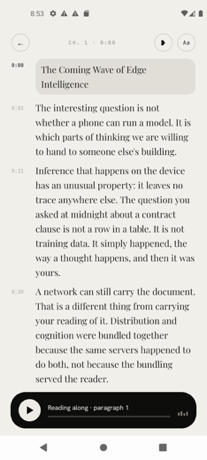
Fluence is an Android app that turns the PDFs, ebooks, reports and saved articles you already have into something you can listen to, follow along with, and ask questions about. It is built for people who want their reading to move with them, and for people who care about where their documents go. Everything Fluence does happens on the phone in your hand: reading the file, making the speech, and answering your questions. Whether you are working through a long report, listening to a novel, or catching up on articles you saved weeks ago, Fluence reads the document aloud while you follow the text, and it can answer questions using the document's own passages.
Most people already have a reading pile they never get through: PDFs, ebooks, reports and saved web articles that sit unread because there is simply no time to sit down with them. Listening is one way to get through that pile, turning otherwise idle moments into reading time. The usual options for listening to text, however, involve sending your documents to a server, creating an account, and paying a recurring subscription. Fluence takes a different approach by keeping the entire job on the device: the reading, the speech, and the question answering all run on the phone, and there is nothing to upload before the app can start working.
The reading experience is designed around following along. The sentence being spoken lights up as you listen, so your eye can track the text while your ears hear it, which helps you keep your place and stay oriented inside a long document. Beyond simply moving through the text, Fluence lets you bookmark a line or write a note beside it, so the passages and thoughts that matter to you stay attached to the document itself rather than living in a separate place. Because your library and your notes stay on your phone, the record of what you read and what you thought about it stays with you.
The voice that reads to you arrives with the app. There is no voice pack to pick and nothing to download first, and the built-in voice reads 31 languages. That means you can start listening immediately after installing the app, without waiting for a download or choosing between different packs. If the built-in voice is not what you want, Fluence also lets you use your own voice, made from a short recording you speak yourself. The voices live on your phone along with everything else, which is consistent with the app's on-device approach to reading and speech.
Fluence also lets you ask about what you read. You can put a question to the document and get an answer drawn from the document itself, with the app showing you the passages the answer came from. Because the answer is grounded in the source text and the source passages are shown, you can check the answer against the document rather than taking it on trust. This turns a long PDF or ebook into something you can interrogate, not just listen to.
One of Fluence's more distinctive capabilities is turning any book or document into a single audio file. Fluence prepares the audio for the whole document ahead of time while you do something else, and tells you when it is ready. What you get is one file to keep, to play in the car, or to send to another app. Preparing the audio is free; saving it out is part of the full version of the app. This makes it possible to build your own audiobooks from material that was never available as an audiobook in the first place.
Privacy is central to how Fluence works. The app does all the work on the device in your hand: reading the file, making the speech, answering your questions. There is no account, no server and no subscription, and the app works offline. Your library, your notes and your recorded voice stay with you. For anyone who has hesitated to send contracts, reports, medical documents or personal reading to a cloud service simply to hear them read aloud, this on-device design removes that step entirely.
Fluence opens what you already read. It supports PDF, EPUB, Word, OpenDocument, Rich Text, Slides, Text, Markdown and web articles, and it presents books and documents side by side in one library. That format coverage means you do not have to convert files before using them, and you can keep the ebooks you bought alongside the reports you were sent without splitting them across different apps.
Fluence is sold as a one-time purchase rather than a subscription. It costs €14.99, and buying once means it stays yours, on every phone you sign into with the same Google account. Ten documents are free, so you can see how it feels before paying. The app is available on Google Play for Android, and because nothing leaves your phone, it keeps working offline for good.
The benefits follow directly from how Fluence is built. You get a reading app that works wherever you are, including without a connection, because the speech is generated on the device. You get through more of the material you have already collected by listening to it rather than only reading it. You keep control of sensitive documents, since they are never uploaded. You avoid a recurring bill, since the app is a single payment. And you end up with audio you can keep, because any document can be prepared as a single audio file you can save, play in the car, or send to another app.
In practice, Fluence fits a range of everyday situations. A commuter can load a PDF report or an EPUB novel and listen with the text lighting up sentence by sentence, keeping their place even if they look away. A driver can prepare a document's audio ahead of time and play the resulting single file in the car. A student or researcher can bookmark lines, write notes beside them, and then ask the document questions, checking the answers against the passages the app shows. Someone who reads in more than one language can listen in any of the 31 languages the built-in voice supports, or record a short sample to hear the text in their own voice. And anyone handling confidential material can keep the whole workflow on the phone, with the library, notes and recorded voice never leaving the device.
Fluence's core promise is simple and specific: your books and documents, read aloud by a voice you choose, with everything happening on your phone. It combines reading-along highlighting, bookmarks and notes, an on-device voice covering 31 languages, the option of your own recorded voice, document-grounded question answering, and single-file audiobook export, then wraps all of it in a one-time purchase with no account, no server and no subscription. Ten documents are free to try, and for anyone who wants to listen to their own documents without handing them over, that combination is the point.
Publisher
A
admin
Launch Date2026-10-11
Platformmobile
Pricingfreemium