Category Focus/categories/api
API AI Tools
Discover and compare the best api AI tools and software. Browse 120+ curated tools with reviews and rankings.
Projects tracked
120
Sort mode
RECENT
Page
5
Discover and compare the best api AI tools and software. Browse 120+ curated tools with reviews and rankings.
Projects tracked
120
Sort mode
RECENT
Page
5
Desert Ant Labs builds small, specialized AI models for speech, text, and vision, and delivers them through one native SDK that developers can drop into any product in a few lines of code. Instead of relying on a single large model to handle every task, the library offers a family of focused models where each one does a single job very well — from speech recognition and speech enhancement to PII redaction, content moderation, and structured extraction. The models run on the user's phone or in the browser, with no internet connection required. Most AI-powered product features depend on a cloud service. Sending audio, text, or images to a remote endpoint means paying per use, requiring a network connection, and moving user data off the device. Desert Ant Labs positions itself against that model: its models run on-device, so there is no internet requirement, no token cost, and no need to meter a user. The company describes its work as building "the intelligence layer for every app" — a set of small models that each do one job very well, with one native SDK that drops them into any product. The stated aim is that builders can pursue their wildest ideas and best products and never meter a user. Speech and audio are the deepest part of the library. Voz handles speech recognition and can transcribe ten minutes of audio in about two seconds on an iPhone. Clear is a speech enhancement model that produces studio sound without a cloud bill. Align generates accurate word timestamps for any transcript, which is the groundwork for captioning, karaoke-style highlighting, and clips that start and end on the right words. Uhm detects filler words so they can be found and removed in seconds. Ear performs spoken language detection from just 30 seconds of audio, while Tongue identifies a language from as few as three words. Together these models cover a pipeline from raw audio to a cleaned, timestamped, language-tagged transcript. On the text side, Redact filters personally identifiable information on the device, so sensitive data can be caught before it leaves the app or is stored. Schemer, currently in beta, performs structured extraction and turns any text into typed JSON. Gist generates topics and tags for posts and articles, and Title suggests a title and description for any text. Emo suggests emoji faster than a person can type them. For safety, Moderator (beta) flags nudity before content is uploaded or displayed, and Toxic (beta) triages hate speech to catch it before it posts. Each of these is a narrow, task-specific model rather than an open-ended assistant, which is the core idea behind the library: small models that each nail one job. On the media and vision side, Clips handles clip selection and creates short videos and highlight clips from longer footage. Shapes is a shape recognition model that turns a rough sketch into a perfect shape, useful for drawing and diagramming interfaces where a user's hand-drawn input needs to be cleaned up. Alongside Moderator's role in flagging nudity before upload or display, these models extend the platform from language tasks into media and visual input. Every model is delivered through one native SDK. Developers add a model to their app in a few lines of code rather than integrating a separate service for each capability, and there is a try-it-for-free path with no tokens and no logins. Because inference happens on-device, the model runs against local input on the phone or in the browser. The catalogue spans speech, text, and vision, and the beta models for content moderation and structured extraction show the library continuing to expand. The models are also published on Hugging Face, so developers can evaluate them directly. The clearest benefit stated is cost: with no per-use charge and no token metering, a product can run AI features without a bill that scales with usage, and the free tier covers up to 100,000 monthly active devices per platform with no limit on how often each person runs a model. The second benefit is privacy and control, since inference happens on-device and input does not need to be sent to a cloud service. The third is speed and reliability: running locally means results do not wait on a network round trip, and the features keep working without a connection — Voz's ability to transcribe ten minutes of audio in roughly two seconds on an iPhone is presented as an example of that on-device performance. Concretely, the models map to common product workflows. A recording, meeting, or podcast app can use Voz for transcription, Align for word timestamps, Uhm to find and remove filler words, and Clear to enhance the audio to studio quality. A video tool can use Clips to create shorts and highlights from longer footage, with Align providing accurate word timestamps to choose cut points. A publishing or messaging app can use Gist to generate topics and tags for posts and articles, Title to suggest a title and description for any text, and Emo to suggest emoji faster than a user can type. A platform handling user-generated content can run Moderator to flag nudity before upload or display, Toxic to catch hate speech before it posts, and Redact to filter PII on the device. A sketching tool can use Shapes to turn a rough sketch into a perfect shape, and a data workflow can use Schemer to extract typed JSON from any text. Multilingual apps can detect the spoken language with Ear or identify a language from three words with Tongue. Desert Ant Labs targets developers and product teams adding AI capabilities to their own applications — mobile and web products that need speech, text, or vision features without a cloud dependency or per-use pricing. The models are free up to 100,000 monthly active devices per platform, with no limit on how often each person runs a model, and there is no login or token requirement to try them. Supporting resources include the SDK on GitHub, documentation on the Desert Ant Labs site, and the models published on Hugging Face, which gives developers several ways to review and integrate the technology before shipping. Desert Ant Labs is best understood as an intelligence layer for apps that want AI features without the usual cloud tax. By splitting capability into small, task-specific models for speech, text, and vision and shipping them through a single SDK that runs on-device, it lets builders add transcription, speech enhancement, redaction, moderation, tagging, clip selection, and structured extraction in a few lines of code — free up to 100,000 monthly active devices per platform.
The Frigade Assist API adds product expertise to an AI agent you have already built. In one tool call — importing frigade from '@frigade/ai' and running frigade.assist({ query }) — your existing agent can answer product questions and guide users through any workflow, right inside the agent you already built. It is made for product and engineering teams who own an in-app agent and want it to show users where to click instead of replying with a wall of text, and for support and CX teams who need those answers to be accurate and controllable without engineering work. The problem it addresses is simple: most in-app AI agents cannot see the screen. When a user asks 'how do I do this?', the agent answers with a wall of text. Your agent has read your docs, but it has never used your product. That matters because written documentation is accurate exactly once — the day it is written. Docs go stale the day you ship, and an agent that links a help article from two releases ago sends users down paths that no longer exist. Frigade instead gives your agent the same product your user is looking at, so it can walk them through the workflow rather than pointing at a document. At the center of the product is a living model of your product that Frigade builds by using it. Frigade deploys agents that take a seat like any user — you invite Frigade the way you would invite a person, with nothing to document or configure first. Those agents work through your real workflows, clicking the same paths your users click and mapping how your features actually connect. Frigade also takes in your existing knowledge base. Then, because your product changes, it re-learns on every release: you ship, the map updates itself, and your agent is never a version behind. Ship a new feature and it is picked up; move a button and the guidance follows. Answers are grounded in the product rather than the documentation. Every answer comes from how your product behaves right now, so it holds up even when the help center is two releases behind. Your team stays in control of that content: anyone can rate any answer and write the behavior they want instead — no code — and that guidance holds from the next conversation on. Every reply your agent gives through Frigade is logged, and you can see every conversation in the dashboard, in Slack, or over the API. This is deliberately not only work for engineers: support, CS, and CX own the answers, rating replies and stating what they wanted instead, with no ticket to engineering. Beyond answers, Frigade provides guidance: the real steps, rendered inside your own UI. When a user needs to manage SSO, for example, the agent can show a step-by-step card such as 'Step 1 / 3 — Open Security to manage SSO. Follow the highlight.' Insights then show where users get stuck, where the agent helps, and where it hands off. When Frigade cannot help, it knows its limits and hands off cleanly, saying so right away and passing the conversation to your team. Steering lets your team tune the system over time — the more your team puts in, the better it gets. And alongside answering and guiding in the moment, Frigade can proactively surface the right feature to a user right when they would benefit from it, using the same idea as Frigade's Suggestions product to help drive feature adoption and expansion revenue. Underneath the single tool call sits an entire engine that relearns your product, plus a platform for your team to manage with no code. Frigade is a lightweight SDK and two primitives: register it as a tool your agent can call, in a few lines, and your agent can now run a live product tour or return a grounded product answer. Your agent stays in control — it decides when to call Frigade and what to do with the result — and keeps its own reasoning and voice. Frigade adds product expertise to your agent; it never takes over the conversation. Every call returns fast with a clear answer, and when Frigade cannot help it says so immediately so your agent never stalls or burns latency waiting. The four layers are a product model built by using your product and rebuilt every release, grounded answers written from your actual product, guidance rendered inside your own UI, and steering that improves with your team's input. The outcome is an agent that answers about the version that shipped rather than the version someone last documented. Because Frigade relearns automatically, nobody on your team has to retrain the agent or rewrite prompts when you ship. Support and CX can fix a bad answer themselves instead of filing engineering work. Teams also see measurable deflection: one customer reported that Frigade solved over 400 queries a month that would otherwise have gone to support, equivalent to two hires they did not have to make, and said it paid for itself within the first two months. Retell AI, which builds agents for a living, gave Frigade access to its product and reported that it learned the product on its own, allowing the agent to take someone through a workflow without manual documentation. Concrete workflows include answering plan and permission questions — for example, whether the Growth plan includes SSO, where the agent can answer yes, note that it is turned on under Settings and Security, and mention that SAML is Enterprise-only. It guides setup tasks such as adding a webhook, showing the user where to paste an endpoint URL and confirming the test event. It resolves billing questions, walks users through connecting integrations like Slack, and handles access questions. When a request is beyond it — deleting a workspace and all data, for example — it hands the conversation to a human. It also proactively surfaces the right feature at the right time to drive adoption and expansion revenue. Frigade Assist API is built for product and engineering teams that already run an in-app agent, and for the support, CS, and CX teams that own the answers. It is framework-agnostic: it integrates cleanly with the Vercel AI SDK today, and any agent that can call a tool can call Frigade, regardless of how the agent was built or which models it runs. On security, Frigade is SOC 2 Type II certified and fully GDPR compliant, encrypts data in transit with TLS 1.2+ and at rest with AES-256, offers EU data residency, a zero-retention LLM policy, and automatic PII scrubbing, and runs guidance with the user's own permissions. Teams needing full data control can self-host Frigade with their own LLM keys. Pricing starts at $1,000 per month with usage-based scaling, and enterprise plans with custom pricing are available. If you have not built an agent yet, Frigade ships a full in-product assistant that learns your product and guides users in real time, no code required. Frigade Assist API's primary promise is that your agent stops pointing at documentation and starts showing users exactly where to click. By adding one tool call to the agent you already built, you give it a product model that learns by using your product, re-learns on every release, and is tuned by your own team — with grounded answers, in-app guidance, clean handoffs, and full visibility into every conversation.
Type is a shared workspace where your entire team can collaborate with Claude or Codex using the AI subscriptions you already pay for. Its stated purpose is to make a team's best AI work compound rather than scatter across individual accounts. The site describes sharing work from individual Claude or ChatGPT conversations into a central, collaborative space where people can collaborate on chats, docs, and apps together. Type is designed for the entire team, and the website specifically highlights marketing teams, along with operations and GTM teams, as the groups it helps get the most out of AI, with every ad, image, landing page, and analytics question grounded in the company's own context. The product addresses a set of problems that the website states directly. AI work currently lives inside individual Claude or ChatGPT conversations, which are not collaborative by default. Teams also risk being locked into a single model provider; Type states plainly, "Don't get locked into one model provider," and frames the goal as owning your data while renting the best intelligence. Rolling AI out across a group also raises trust and access questions, which Type answers with one integration gateway, enterprise grade security, and granular permissions by user, space, and role. Finally, teams need help getting good at using AI, something Type addresses through built-in best practices. Multiplayer AI is the first pillar described on the site. Type lets you share work from individual Claude or ChatGPT conversations into a central, collaborative space. From there, teams can collaborate on chats, docs, and apps, securely share access to integrations, and build a shared company brain made of context, memory, and skills that constantly self-improve. This turns isolated prompts and one-off answers into reusable, shared assets that the whole team can see, edit, and build on, which is the mechanism behind the claim that a team's best AI work compounds. The second pillar is "works where you do." Type can be used from Slack, email, or wherever your team already communicates. You can tag Type in any channel, email, or meeting, and everything syncs to Type's dedicated Desktop and Mobile apps. The site also states that Type works 24/7 in shared cloud computers. A worked example on the page shows a colleague asking in a Slack channel whether any creative assets exist for an upcoming photoshoot, a teammate tagging the Creative agent in that thread, and the agent responding with four brand images generated from recent creative and brand guidelines, followed by an "Open in Type" action. The third pillar is that Type is easy to use but powerful underneath, and it is designed for the entire team. The site says Type proactively finds, suggests, and does work. It is explicitly positioned as more than chat: teams can build custom dashboards, apps, and automations tailored to their business. A detailed example shows a user asking Type to combine the last 30 days of customer feedback from Zendesk, Slack, and Intercom into one dashboard so the success team can see the fastest-moving themes. Type reports connecting all three sources, deduplicating repeated conversations, and grouping 1,284 feedback items by theme and sentiment, then turning that analysis into an app with movement over time and source coverage. On request, it adds a daily refresh and ranks emerging themes by their change from the prior 30-day period, producing a live app called Feedback pulse that refreshes daily and highlights the three themes with the strongest movement, with a 68% positive sentiment split across the included channels. Model flexibility is another stated capability. Type makes it easy to switch between models, with prompts on the site to connect your Claude and connect your Codex. The framing is that you own your data and rent the best intelligence, so teams are not locked into one model provider. Connecting those models sits inside a single integration gateway for enterprise-grade security. That gateway lets teams connect integrations via OAuth, MCP, or API, and define granular permissions by user, space, and role. The page illustrates space-level permissions, asking "Who can use the Creative Space?" with options for specific people or all of a company, and shows API connection permissions that are either private to one user or usable by everyone in the organization. The site points to more than 900 integrations to explore. Alongside integrations, Type ships best practices built in, aimed at helping an entire team get great at using AI, and it surfaces a library of agent-style templates and their recent activity, including competitor research, generating ad creative for October's campaigns, brand voice content review, campaign artwork, social media campaign strategy for October, and launch video. The page also shows usage and cost views over time. The overall approach ties these pieces together. Type puts skills, files, and threads in one place that the whole team can see, connects tools once instead of per person, and lets a team use any model on top of that shared foundation. Work that happens in Slack, email, or meetings syncs back to Type's desktop and mobile apps, and shared cloud computers keep it running continuously. Because the workspace is grounded in the company's context, the resulting company brain gets smarter as the team works, and that shared context is what custom dashboards, apps, and automations are built on. The benefits stated on the site follow from that approach. Teams can collaborate on chats, docs, and apps instead of working alone, share access to integrations securely rather than passing around credentials, and let context, memory, and skills accumulate and self-improve over time. Type proactively finds, suggests, and does work, which reduces the need for every teammate to know exactly how to prompt. Because it works in Slack, email, and meetings, adoption does not require a new place for everyone to check. And because teams can build custom dashboards, apps, and automations, they can move beyond chat into purpose-built tools grounded in their own data. Concrete use cases appear throughout the page. A marketing lead asks Type to start a new product announcement email in Customer.io for September by duplicating the August email and updating the content based on the latest releases to Shopify. A brand team asks in Slack for creative assets to steer an upcoming photoshoot and receives four generated brand images built from recent creative and brand guidelines. A support or success team asks for the last 30 days of customer feedback from Zendesk, Slack, and Intercom to be combined into one dashboard, later asked to refresh daily and rank emerging themes by change versus the prior period. The template library shows additional workflows: competitor research, ad creative generation for a month's campaigns, brand voice content review, campaign artwork, social media campaign strategy, and launch video work. On audience and setup, the site says Type is designed for the entire team and specifically helps operations and GTM teams get the most out of AI, with marketing teams used as the headline example. Connections happen through one integration gateway via OAuth, MCP, or API, with permissions managed by user, space, and role, and more than 900 integrations available to explore. Type runs on the web, with dedicated Desktop and Mobile apps and shared cloud computers, and works from Slack, email, or wherever the team already communicates. The site offers a free way to get started through a "Get started for free" call to action. In short, Type is a shared AI workspace that compounds a team's best AI work. It connects tools once, lets teams use Claude, Codex, or other models, and keeps skills, files, and threads in one visible place, so custom apps and automations can be built on a company brain that gets smarter as the team works.
GoModel is an open-source AI gateway written in Go that puts a single OpenAI- and Anthropic-compatible endpoint in front of 31 AI model providers. Applications keep using the OpenAI or Anthropic SDK and simply change the base URL, while GoModel handles authentication, workflow resolution, guardrails, caching, budgets, rate limits, provider routing, and failover behind that endpoint. It ships as one self-contained binary with an embedded admin dashboard, released under the MIT license, and is positioned as a self-hosted alternative to OpenRouter and LiteLLM. Its stated purpose is to move provider switching, debugging, and usage tracking out of application code and into one gateway layer. The GoModel site frames the problems it solves around what happens when AI integrations mature. Teams become coupled to one provider, so switching vendors turns into a code project instead of a configuration change. A single runtime behavior rarely fits every team or application: one path needs caching, another needs audit logging, and another needs guardrails. Identical prompts burn budget twice because nothing intercepts duplicates. Provider dashboards show one aggregate total, so costs cannot be attributed to teams, tenants, or features. When a fallback fires during an incident, nobody can reconstruct why. And the gateway itself can become its own project if it needs a separate deployment, admin tooling, and database to operate. GoModel answers each of these by moving that logic into one gateway layer. In routing and provider coverage, GoModel places 31 providers behind one endpoint, including OpenAI, Anthropic, Google Gemini and Vertex AI, Azure OpenAI, Amazon Bedrock, OpenRouter, Cohere, Groq, xAI, DeepSeek, Fireworks AI, Alibaba Bailian, MiniMax, Kimi Code, Z.ai, Xiaomi MiMo, Meta Muse Spark, Kilo AI, OpenCode Go, Oracle GenAI, ElevenLabs, Ollama, and vLLM, each configured through environment variables such as OPENAI_API_KEY or OLLAMA_BASE_URL. Hundreds of models are read from live provider catalogs, and model counts are approximate. Multiple API keys per provider rotate round-robin, and suffixed environment variables register extra instances of the same provider type, so any OpenAI-compatible backend can join as its own provider instance. Aliases and virtual models let teams publish stable names such as smart-chat and remap the real provider and model behind them with a config change rather than an application change. Load balancing spreads a virtual model across targets with weighted round-robin, or lets cost-based routing pick the cheapest capable model for each request. Automatic failover sends availability errors to the next model or provider, with retries, backoff, and a circuit breaker to absorb flaky upstreams. Provider passthrough lets you call any provider's native API through /p/:provider/* while keeping GoModel's auth, usage tracking, and audit on the way through. Control and safety features decide how each request behaves. Scoped workflows toggle cache, audit, usage, budgets, guardrails, and failover per provider, model, or user path, with versioned definitions where the most specific scope wins, so one gateway runs different runtime policies for different workloads. Guardrails inject system prompts or rewrite messages with an LLM before dispatch, running in ordered steps that execute as parallel groups. Virtual API keys give teams managed keys bound to a user path and labels instead of raw provider credentials, and they can be revoked and rotated from the admin UI. Rate limits cap request rate and concurrency per user path, provider, or model; saturated routes are routed around when alternatives exist, and return 429 with Retry-After when they do not. Cost controls are built around tracked usage. Budgets set hard spend limits per user path or label, evaluated from tracked usage cost and enforced before a request is dispatched, so the run stops at the cap rather than at the invoice. Response caching works in two ways: exact-match caching returns identical non-streaming requests straight from the gateway with no provider call and no cost, while semantic caching matches similar prompts and is backed by Qdrant, pgvector, Pinecone, or Weaviate. Cache lookups run after alias and workflow resolution so policy decisions still apply, and cache hits are visible in the dashboard. Usage and cost tracking performs token and dollar accounting per request, user path, and label, with per-model pricing overrides when list prices do not match your contract. On the site's example, a repeated prompt that took 1.9 seconds and cost $0.42 on a cache miss returned in 38 milliseconds at no cost on the second call. Observability covers what happened on every request. Audit logs record each request with its resolved route, workflow, cache result, and provider attempts, with bodies and headers logged only when explicitly enabled. The admin dashboard is an embedded UI for live request logs, usage breakdowns, keys, budgets, workflows, and provider status, so there is no separate deployment to run. Request tagging flows labels from headers or key metadata into usage and audit so spend and incidents map to teams, tenants, and features. Prometheus metrics are exposed at /metrics with request, provider, and circuit-breaker gauges, alongside health endpoints and optional pprof profiling. OpenTelemetry traces and metrics cover every inbound request and provider call on the GenAI semantic conventions, and Jaeger, Tempo, Honeycomb, or Datadog read them as they are. Beyond chat completions, GoModel serves the fuller OpenAI surface including embeddings, the Responses API with gateway-managed conversations, files, and batches, plus the Anthropic Messages API at /v1/messages with token counting, so the Anthropic SDK can be pointed at GoModel and routed to any provider behind it. Audio and realtime coverage includes text-to-speech, transcription, and realtime speech over WebSocket and WebRTC through the same gateway pipeline. An MCP gateway aggregates MCP servers behind one endpoint with namespaced tools, and every tool call gets usage tracking and audit like any other request. A built-in playground sends a real request from the dashboard against any model or alias, streaming or not, and shows the exact JSON both ways while routing, logging, and metering it like any client call. Deployment is a single Go binary with Docker, Compose, and Helm recipes and an embedded admin UI. Storage starts on SQLite with zero setup and moves to PostgreSQL or MongoDB when traffic and retention demand it, using the same binary with a different config. Session keeping pins requests from one conversation or agent task to the target and key that served the first, warming provider prompt caches and keeping audit logs threaded. Streaming is first-class: SSE responses record usage and audit from the stream itself, with no buffering. GoModel authenticates each request, applies the matching workflow covering guardrails, cache, budgets, and rate limits, and routes it to the right provider with automatic failover, all behind OpenAI- and Anthropic-compatible APIs. Requests arrive from the OpenAI SDK, the Anthropic SDK, or plain HTTP and curl against endpoints such as POST /v1/chat/completions, POST /v1/responses, and POST /v1/messages. Cache hits are returned instantly without a provider call. Every response records usage and cost, an audit trail, a cache write, and a live dashboard entry. Provider attempts are protected by retries, backoff, and a circuit breaker. The stated benefits map directly to those mechanisms: provider choice is decoupled from the application so models can be swapped with a configuration change; caching and cost-based routing cut spend without code changes; budgets prevent end-of-month surprises; per-request tracking attributes spend to teams, tenants, and features; audit logs let compliance reviews replay any request including the resolved route, guardrail versions, and provider attempts; and failover turns a provider incident into a routing event rather than a customer-facing one. Local models served by Ollama or vLLM can sit behind the same endpoint the cloud providers use in production, so moving from a laptop to production is configuration, not code. The site lists six concrete jobs teams use the gateway for. A multi-tenant SaaS issues a virtual key per customer, tracks usage by user path, and enforces per-tenant budgets, so invoices come from the dashboard rather than guesswork. A platform team publishes aliases such as smart-chat with scoped workflows behind them, letting product teams ship features without ever holding provider keys. Production traffic rides failover chains with retries and circuit breakers to stay up through provider outages. Caching absorbs duplicate prompts, cost-based routing picks the cheapest capable model, and budgets stop end-of-month surprises. Compliance reviews replay any request with its resolved route, guardrail versions, provider attempts, and full bodies where logging is explicitly enabled. Developers run Ollama or vLLM locally behind the same endpoint the cloud providers serve in production. GoModel targets engineering and platform teams, multi-tenant SaaS operators, and developers who want a self-hosted layer between their applications and AI providers, since the content describes platform teams publishing internal endpoints, product teams shipping without provider keys, and compliance reviewers replaying requests. It integrates with the OpenAI SDK, the Anthropic SDK, plain HTTP clients, MCP servers, and monitoring stacks through Prometheus and OpenTelemetry, with storage on SQLite, PostgreSQL, or MongoDB and semantic cache backends including Qdrant, pgvector, Pinecone, and Weaviate. It runs on macOS, Linux, and Windows, in Docker, Docker Compose, or Kubernetes with a Helm chart. The core gateway is MIT licensed and free; GoModel Pro is the commercial distribution at $4,999 per year or $499 per month, flat per company, backed by a 30-day money-back guarantee and an offline signed license token. Pro adds prompt compression, OIDC single sign-on, per-child quota templates, and intelligent routing in beta. GoModel's value proposition is consolidation: one small, self-hosted Go binary that replaces per-provider integration code with a single OpenAI- and Anthropic-compatible endpoint, then adds the caching, budgets, guardrails, failover, audit, and usage tracking that teams would otherwise build themselves. The benchmark figures in the content, 2.35 ms median latency overhead versus 42.4 ms, 3,610 versus 250 requests per second, 42.7 MB versus 2,173 MB of RAM under load, and a 0.58 second cold start versus 31.25 seconds, illustrate why that consolidation is practical rather than theoretical.
Video to Prompt helps creators instantly convert any video into high-quality AI prompts. Simply upload a video or paste a YouTube URL, and the app automatically detects scenes, identifies subjects, camera angles, actions, lighting, and visual style, then generates structured prompts ready for Midjourney, FLUX, GPT Image, Stable Diffusion, and other AI image models. It's perfect for creators, designers, marketers, filmmakers, and anyone who wants to recreate or remix visual content with AI.

Wingbits AI is a platform that enables users to create AI agents for real-time monitoring of aircraft activity and receive alerts based on specific criteria. It is built on top of a proprietary global network of over 5,600 antennas across 120 countries, which generates terabytes of data daily from ADS-B signals. The main purpose is to allow users to extract insights from aviation data without needing a data science team or complex infrastructure. Key features include the ability to ask questions in plain English about current flights, such as "where is Air Force One right now?" or "Which private jets visited Davos last weekend?". Users can create agents that monitor for specific events like military aircraft in a region, private or government jets, GPS-jamming spikes, or tracking friends and family. These agents can send alerts to destinations like Slack, email, Telegram, or Teams the moment something relevant happens. The platform also provides scheduled reports or analysis on topics like competitor routes and can compare GPS jamming events across regions. The platform works by processing clean, deduplicated data from its real-time stream that ingests approximately 3TB of data daily with under 1-second latency. Agents query this cleaned data and can be configured with evaluation cadence and time windows. They have access to their own alert history to decide if enough has changed to warrant a new alert, helping to reduce alert fatigue. The system is designed to provide fewer, higher-confidence alerts by integrating context from other data sources like NOTAMs and weather alerts to interpret deviations. Benefits include gaining geopolitical or operational insights from aviation data without requiring coding, data processing, or managing infrastructure. Use cases are for reporters tracking unusual military activity, prediction markets, competitive analysts monitoring competitor routes, route planners, and aviation enthusiasts. It helps users monitor pattern shifts like unusual route behavior, repeated delays, or sudden volume changes that suggest a change from a normal baseline. The target users are reporters, prediction markets, competitive analysts, route planners, and aviation enthusiasts. The platform is built with technologies indicated by the "Built with" section including Framer, Linear, and Claude by Anthropic. It offers a no-code experience and is accessible via a web platform. The underlying data network is transparent about coverage quality, which is denser in regions like the US and Europe and growing in Latin America, Asia, and the Middle East.
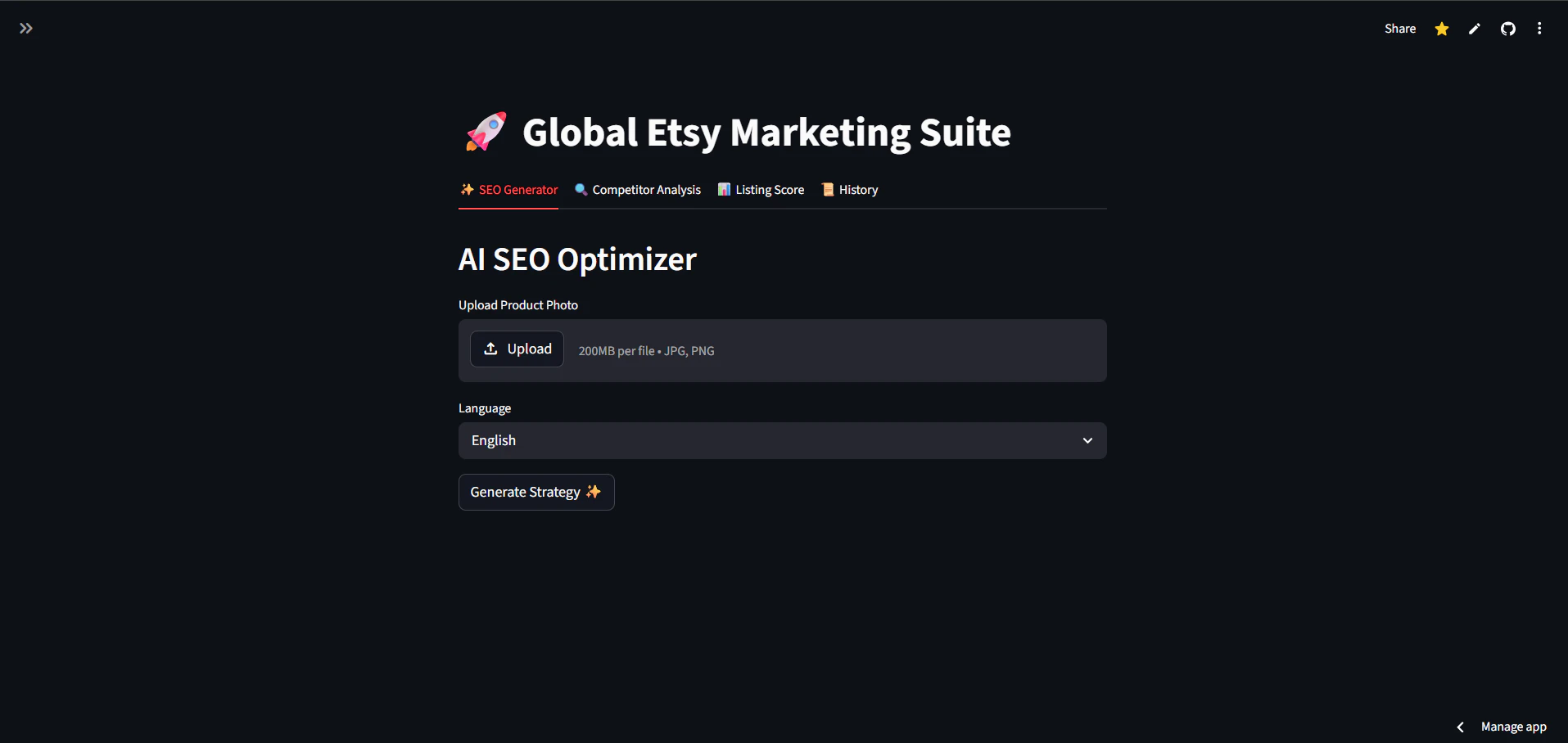
EtsyFocus PRO is an AI-powered toolkit designed specifically for professional Etsy sellers. The platform helps users optimize their Etsy listings by automatically generating high-converting SEO titles, tags, and descriptions directly from product photos. It also provides competitor analysis capabilities and real-time listing health scores to improve shop performance. The toolkit offers several key features including AI-generated SEO content creation from product images, competitor spying functionality to uncover competitor strategies, and comprehensive listing audits with real-time health scores. These features are designed to help sellers save time while improving their Etsy shop's visibility and sales performance. EtsyFocus PRO works by analyzing product photos using artificial intelligence to generate optimized SEO content. The competitor analysis feature allows sellers to spy on their competition and understand their strategies. The listing audit functionality provides health scores that help sellers identify areas for improvement in their current listings. The platform is designed to help Etsy sellers stop guessing about SEO and start ranking higher in search results. By automating the SEO optimization process and providing competitor insights, sellers can outsmart their competition and grow their Etsy shops more effectively. The tool aims to save sellers significant time while improving their listing quality and search visibility. EtsyFocus PRO is targeted at professional Etsy sellers who want to improve their shop's performance through better SEO optimization and competitive intelligence. The tool is particularly useful for sellers who struggle with creating effective SEO content or want to gain insights into their competitors' strategies.
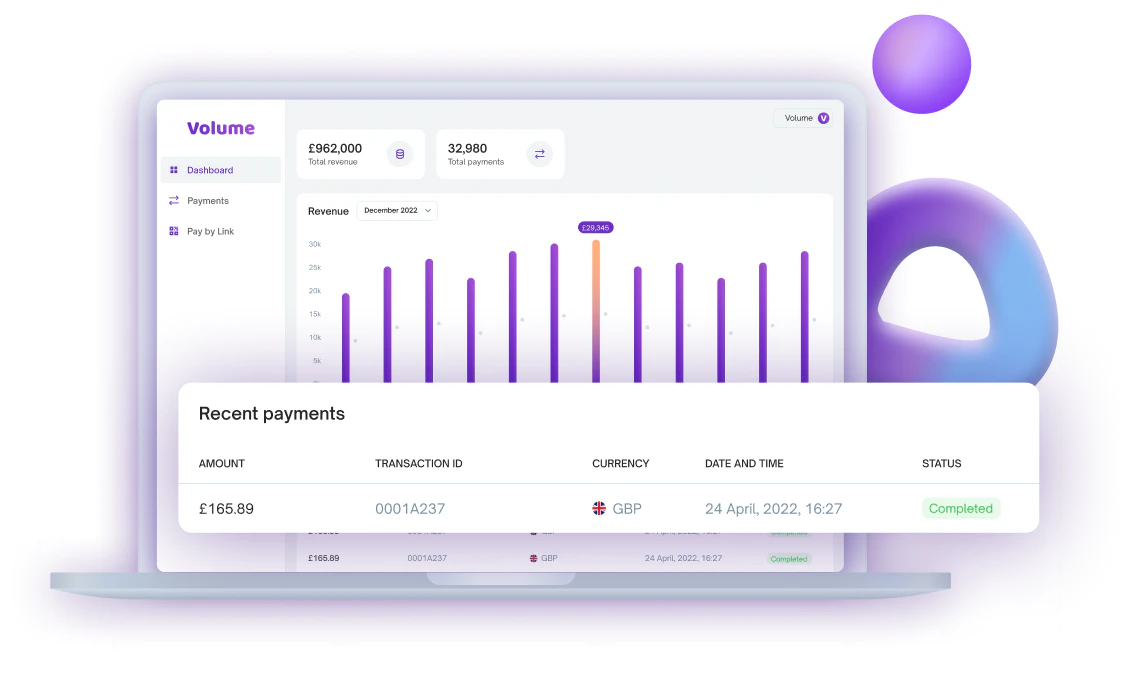
Volume provides an open banking checkout solution designed to streamline payment processes for merchants. The platform focuses on reducing payment friction and lowering transaction fees by leveraging bank-based payment methods. The checkout system supports one-click payments, enabling faster transactions for customers. It operates across multiple European markets, specifically mentioning the UK and Germany as supported regions. By utilizing open banking technology, Volume aims to provide an alternative to traditional card-based payment processors. The platform's approach centers on direct bank-to-bank transfers rather than relying on card networks. This method potentially reduces the fees typically associated with card processing while maintaining security and compliance standards required for financial transactions. Merchants using Volume can offer customers a payment experience that eliminates the need for card details entry, instead using bank authentication methods. The system is positioned as a solution for businesses looking to reduce payment processing costs while expanding their payment options to include bank-based methods popular in European markets. Volume targets merchants operating in European markets who want to offer alternative payment methods beyond traditional cards. The platform appears designed for e-commerce businesses and online merchants seeking to optimize their checkout process and reduce transaction fees through open banking infrastructure.
Pelepop X: Extreme Chaos is an arcade-style game that merges classic brick-breaking mechanics with modern chaotic gameplay. Players use a ball to smash bricks while actively fighting off waves of enemies, creating a unique blend of retro and contemporary gaming experiences. The game features chaotic gameplay that combines classic brick-breaking with active enemy combat. Players can collect in-game diamonds to unlock new worlds, unique balls, characters, weapons, and music tracks. The game includes classic power-ups like Mega Sabu and Multiball, along with nostalgic visuals that create a true arcade vibe. Global leaderboards allow players to compete for high scores by mastering combos and climbing ranks. The game offers extensive unlockables including multiple player skins such as Sabu Shaikh, Sabu Scorpion, Sabu Jackson variants, Sabu Sparrow, Sabu Singh, Sabu San, and Sabu Chaudhry. Regular content updates provide new skins, features, and gameplay elements to keep the experience fresh. The game is available on Microsoft Windows through the Microsoft Store. A progressive web app version is also available for Web (Linux, BSD, Mac, other Windows), Apple devices (iPhones and iPads), and Android devices. The Windows version is specifically built for the Microsoft Store platform. Pelepop X features four distinct worlds: Deep Space, Post Nuclear Earth, Alien Planet, and Infinite Chaos. Each world offers unique environments and challenges for players to explore and master. The game is designed for arcade enthusiasts, casual gamers, and anyone seeking fast-paced, action-packed entertainment. Its accessible nature makes it suitable for quick gaming sessions, competitive play, or nostalgic arcade experiences across multiple devices.

Answerz converts customer emails into support tickets using artificial intelligence. Designed for solo founders managing multiple projects, it consolidates scattered Gmail messages into a single organized inbox, eliminating the need to dig through dozens of emails to find urgent client requests. The platform offers AI-drafted reply suggestions, urgency scoring that surfaces high-priority tickets first, and automatic spam filtering. Setup requires only forwarding a support@ address, which takes about two minutes. The interface deliberately avoids enterprise features such as multi-seat licenses for large agent teams, focusing instead on lightweight workflows suitable for individual operators. Users connect their existing email addresses by forwarding messages to Answerz. Incoming mail is parsed and displayed as tickets in a unified dashboard. The built-in AI generates response drafts, reducing typing time. Each ticket receives an urgency score, allowing founders to address critical issues before less pressing ones. Spam is filtered out automatically, keeping the inbox clean. Benefits include faster response times, reduced risk of overlooked customer inquiries, and less time spent on repetitive support tasks. The tool aims to prevent scenarios where clients wait three days for a reply because urgent messages were buried under eighty other emails. Target users are solo founders, agency owners, and independent SaaS operators who handle customer support without a dedicated team. A fourteen-day free trial is available without requiring a credit card.