Category Focus/categories/design
Design AI Tools
Discover and compare the best design AI tools and software. Browse 183+ curated tools with reviews and rankings.
Projects tracked
183
Sort mode
RECENT
Page
6
Modeinspect is a production-grade AI design tool that runs in your codebase, offering a design canvas with your codebase and coding agents built in. It is where teams design high-fidelity features directly on the real product, using actual components, tokens, live data, states, and breakpoints. The canvas sits on top of your live product, allowing designers and engineers to work in one unified loop. Modeinspect is built for design engineers and product teams who want to skip the traditional handoff and design with production fidelity from the start. The platform integrates your codebase, the canvas, and coding agents out of the box, with no MCP servers, no localhost, and no devops glue required. Most software is designed twice: a picture first, then again in code. This two-step process causes intent to drift between design and implementation. Designers create mockups in tools like Figma, engineers later reinterpret them in code, and every change restarts the loop. The old handoff chain can take 45+ days from design to ship, involving specs, redlines, and repeated rebuilds. Modeinspect addresses this by letting teams design on the real thing. The canvas is not the destination; the product is. By designing directly in the codebase, teams avoid throwaway mockups and ensure that what they design is what ships. The platform offers a unified, collaborative design environment in code. Everything is in one place: your codebase, the canvas, and coding agents are integrated out of the box. There are no MCP servers, no localhost, and no devops glue to manage. This means teams can start designing immediately without complex setup. The canvas supports live product capture: you can grab any element of your live product onto the canvas, pixel-perfect and fully editable. This lets you start from the real state of the product rather than from scratch. Controls, not prompts, is another core principle: a padding change shouldn't take a paragraph. You can edit anything, on canvas or in code, with the visual controls you already know. Modeinspect is built for design engineers, providing components 1:1. You can drop in the actual components your product ships, with every variant and every state intact, so you never work with a redrawn look-alike that quietly drifts from the real thing. Tokens are enforced: every color, space, and text style comes straight from your library, so everything you place is automatically on-brand, and nothing off-system can sneak in. Breakpoints are native: you can lay out mobile, tablet, and desktop side by side and watch each one reflow live, never relying on a frozen frame that might not survive on a phone. Dynamic states are supported: hover, focus, error, empty, loading, and success can be shaped on the real component, so your design never falls apart when someone actually uses it. AI exploration is integrated: you can use the latest AI models to explore variants, restyle a section, adjust copy, or apply a design direction while you stay in control. You can build straight in code: every move you make on the canvas becomes the real product as you make it, with no redlines, no spec docs, and no waiting on a rebuild. Real data and real flows are central: you design on top of live data and real journeys, including long names, empty states, and the messy edge cases, so your work holds up in the wild, not just in a tidy mockup. Capture to canvas allows you to spot something in the real product you want to rework and pull it straight onto the canvas, pixel-exact and fully live, to start from where things actually are. The output is code your engineers want to merge. Mode reads your file layout, components, tokens, conventions, and existing logic, then writes within them. Pull requests land scoped, type-safe, and ready for engineering review. The system produces scoped, clean diffs so engineering reviews focused changes, not rewritten surface area or noisy AI churn. Your design system is enforced: Mode pulls from your component library and design tokens, with no hardcoded colors, no magic numbers, and no throwaway components. There is no generated UI debt: changes reuse your components, tokens, utilities, and styling system instead of creating a parallel design system. Changes are type-safe: props, state, events, and data shape are checked against the product instead of guessed from a mockup. The collaborative workflow is seamless. There is no localhost to share and no branches to wrangle. You can send a link, get comments, and open the PR in one click. This enables a production loop where prototyping, design QA, and shipping PRs happen in one place. For prototyping, you can create prototypes that feel like the product with real data, dynamic states, breakpoints, and interactions, so you pitch with the thing rather than mockups. For design QA, you can compare canvas to live build pixel-by-pixel, spot drift, fix it, and keep moving, with no round-trips through Figma. For shipping PRs, you can push minor visual changes or new components as merge-ready PRs with context, screenshots, and a clean diff. The benefits are measurable. According to a story from Prelude, a team that merged design and engineering in the same loop saved 22 days on their delivery cycle, reduced engineering handoffs to 0, and removed design QA as a separate step. This represents a 4.5× speed improvement, with design to ship in about 10 days instead of 45+ days. Testimonials highlight that designers explore on the actual codebase, with real data, and open the PR themselves, going from idea to a merged PR without a handoff. Teams like Kiwi.com, Moss, and NCCER report that Modeinspect integrates seamlessly with their codebase and design system, enables iteration on top of a complex product, respects their design system 1:1, and allows real-time changes pushed directly to code for senior developers to review and merge. Modeinspect is available as a web application optimized for larger screens. Pricing includes a free tier at $0/mo and paid plans at $24/mo and $48/mo. The Product Hunt listing also mentions "99 Days Free AI Credits." The platform is designed for design engineers, product designers, and cross-functional product teams who want to work in code. It is used by teams at Prelude, Kiwi.com, Moss, NCCER, and others listed as customers. In summary, Modeinspect is the production-grade AI design tool that runs in your codebase. It unifies design and engineering in one loop, letting teams design high-fidelity features with real components, tokens, live data, states, and breakpoints, then ship them as clean, scoped, type-safe code diffs. By eliminating handoffs and mockup drift, Modeinspect helps teams ship faster and with higher fidelity. The canvas is not the destination; the product is.
Take MySeasonColors' free 16-season color analysis quiz to find your natural palette in minutes. Upgrade to the full report for a complete color and makeup guide, wardrobe strategy, and AI-generated photos of your best look.
HubVanta AI offers advanced image and video AI tools for creating, editing, enhancing, and animating visual content in one workspace.
Create multiple thumbnail options from a YouTube URL, title, or prompt with an AI thumbnail maker. Preview generated thumbnails and download the one you want to use.
Free browser-based photo editor. Resize for Instagram, Twitter, Facebook and YouTube, adjust exposure and filters, add text watermarks, and export PNG or JPEG: no signup required.
Imagin8n is a UI prototyping platform designed specifically for sales teams, software agencies, and product managers. The platform leverages the latest Anthropic Model to transform ideas into live visual prototypes within minutes, eliminating the traditional back-and-forth cycles typically associated with early-phase digital projects. The platform's core capability is generating prototype websites using custom AI-generated assets. This addresses the common friction point where businesses are asked to imagine what they're paying for before they can actually see it. Instead of enduring endless calls, requirement documents, waiting periods, and revisions, users can quickly visualize their digital projects. Imagin8n helps streamline the approval process, feedback collection, and early decision-making by providing tangible visual prototypes. The platform is particularly focused on serving software agencies and product managers who need to demonstrate concepts to clients or stakeholders quickly and efficiently. The unique approach of Imagin8n centers on reducing the time from concept to visual representation. By using AI-generated assets, the platform can create prototypes that would traditionally require extensive design and development resources. This makes the early phases of digital projects more efficient and less reliant on imagination-based discussions. The primary benefit is dramatically faster turnaround times for prototype creation, which accelerates project approvals and reduces the typical friction in client-agency relationships. The platform transforms what would normally be a multi-day or multi-week process into a matter of minutes, enabling quicker decision-making and more efficient project kickoffs. Imagin8n is built for software agencies that need to pitch ideas to clients, product managers who need to visualize concepts for stakeholders, and sales teams who require quick prototypes to demonstrate potential solutions. The platform addresses the pain point of lengthy requirement gathering and revision cycles by providing immediate visual feedback.
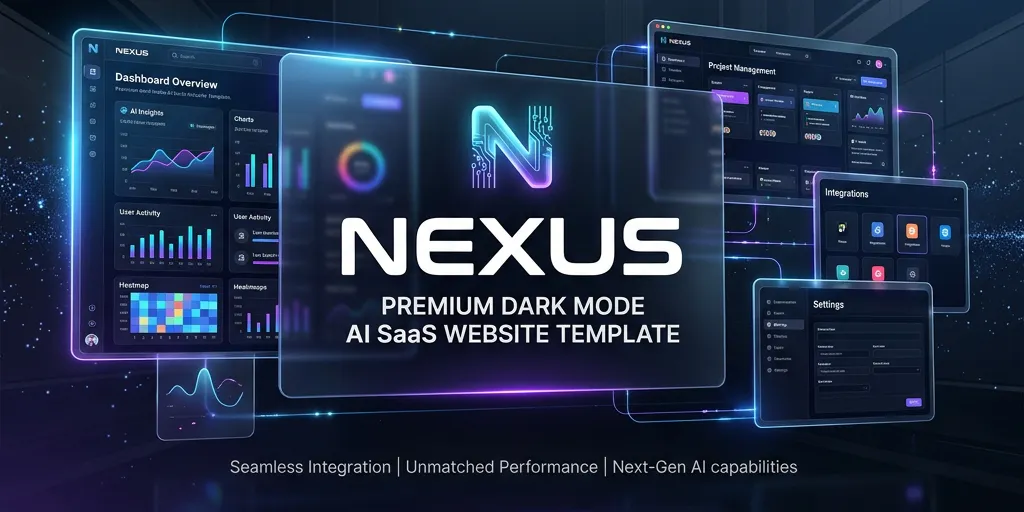
Nexus is an ultra-premium, multi-page HTML/CSS template kit designed specifically for AI and SaaS companies. It aims to provide startups with a high-end website appearance that rivals expensive custom agency builds, featuring modern design elements and interactive effects. The template kit includes 8 fully responsive pages covering essential sections like Home, About, Blog, and Auth. It incorporates custom glowing cursor that tracks interactions, magnetic CTAs that pull toward the user's mouse, mouse-tracking glow effects on feature cards, and infinite CSS marquee for social proof. The design emphasizes a dark mode aesthetic with glassmorphism elements. Built using pure, clean HTML/CSS/JS with zero heavy framework bloat, Nexus focuses on high-end micro-interactions typically reserved for expensive custom websites. The template avoids the flat, boring appearance common in overused frameworks, instead offering cutting-edge visual effects that create a "WOW" factor for modern AI startups and SaaS companies. The template works by implementing custom CSS and JavaScript interactions that respond to user mouse movements and interactions. The magnetic buttons physically appear to pull toward the cursor, while glow effects follow mouse position across feature cards. These micro-interactions are designed to create an engaging user experience without requiring complex framework dependencies. Nexus addresses the need for AI startups and SaaS companies to have websites that reflect their cutting-edge nature. By providing agency-level design quality in a template format, it allows startups to achieve a premium online presence without the cost of custom development. The glassmorphism aesthetic and dark mode design cater specifically to modern tech company preferences. The template is targeted at developers and founders building AI startups and SaaS companies who want their websites to stand out from typical template-based designs. It appeals to those seeking high-end visual effects and interactions without the complexity of heavy frameworks, offering a lightweight solution that maintains performance while delivering premium aesthetics.

Percio is an AI-powered usability testing platform designed to simulate real user behavior and identify areas for improvement within digital products. The tool creates AI personas that mirror actual users, enabling teams to conduct usability tests directly within their existing coding workflows. The platform's core capability lies in its ability to navigate applications like a real user would, automatically detecting usability issues and improvement opportunities. By creating AI personas that match target user profiles, Percio provides insights into how different user segments interact with products. This approach allows development teams to integrate usability testing seamlessly into their development process without disrupting their workflow. Percio operates by generating AI-driven user personas that replicate the behavior patterns of actual users. These AI agents navigate through applications, performing tasks and interactions that real users would typically execute. The system analyzes these interactions to identify usability problems, navigation difficulties, and areas where user experience can be enhanced. The testing process is designed to integrate directly into coding workflows, making it accessible for developers and design teams to implement usability testing as part of their regular development cycle. The platform offers free options for users looking to implement AI-powered usability testing in their projects. By automating the usability testing process with AI personas, Percio aims to help teams ship better products that effectively communicate with their intended user base. The tool is particularly focused on enabling anyone to improve their product's user experience through systematic, AI-driven testing methodologies.
AI App Store Screenshots is a specialized design tool created specifically for generating app store screenshots. Unlike general design platforms, this tool focuses exclusively on the app store screenshot use case, providing a streamlined solution for developers and designers who need to create compelling visual assets for app marketplaces. The platform offers several key features that distinguish it from traditional design tools. It provides AI-native capabilities that allow users to make changes through natural language requests. The tool is completely free and open source, making it accessible to developers and businesses of all sizes. It includes JSON editing and import/export functionality, catering to developer workflows and enabling programmatic control over screenshot generation. The tool operates on a developer-first approach, utilizing JSON configuration files for screenshot design parameters. Users can edit screenshots through the Fabric JS editor interface while maintaining the underlying data in JSON format. The AI integration allows users to request changes conversationally, simplifying the design process. The platform is self-hostable, giving users complete control over their data and deployment. Benefits include zero cost due to its free and open-source nature, developer-friendly workflows through JSON configuration, AI-powered design assistance for quick modifications, and the ability to self-host for complete control. The tool eliminates the need for expensive design software subscriptions while providing specialized functionality for app store screenshot creation. The platform is built with modern web technologies and is deployed on Vercel. It targets app developers, indie makers, and small teams who need to create professional app store screenshots without investing in complex design tools or hiring professional designers.
Article Banner Generator is a free online tool designed to automatically generate beautiful social banners from blog posts, articles, and content links. The tool aims to solve the problem of manually designing promo graphics by creating share-worthy visuals in seconds. The generator offers custom gradients, patterns, and typography options for creating article banners and blog cover images. Users can create OG images and social media banners without requiring any design skills, making the process accessible to non-designers. The tool works by taking blog posts, articles, or content links as input and automatically transforming them into visually appealing banners. This automated approach eliminates the need for manual graphic design work, allowing users to focus on content creation while the tool handles the visual promotion aspect. Article Banner Generator is particularly useful for increasing content reach and engagement by providing professional-looking visuals that people want to share. The tool helps content creators maximize their content's potential by ensuring it has compelling visual representation across social media platforms. The product targets indie hackers, content creators, SaaS founders, marketing teams, and newsletter writers who need to create promotional graphics for their content. The tool is being built in close collaboration with the community, with ongoing development based on user feedback and feature requests.