Category Focus/categories/automation
Automation AI Tools
Discover and compare the best automation AI tools and software. Browse 592+ curated tools with reviews and rankings.
Projects tracked
592
Sort mode
RECENT
Page
4
Discover and compare the best automation AI tools and software. Browse 592+ curated tools with reviews and rankings.
Projects tracked
592
Sort mode
RECENT
Page
4
Yedric.ai is an embeddable AI agent that turns a SaaS application into an AI-native product. Rather than adding a chatbot that only answers questions and points users at a help document, Yedric lets users describe what they want in plain language and then carries the request through to completion using the product's own documentation, APIs, and existing tools. It is aimed at SaaS and Shopify app developers who want their users to control the product conversationally, and at the end users themselves, who should not have to learn where every feature lives. According to the Product Hunt listing, developers can make an existing product AI-native in under 30 minutes instead of building and maintaining their own agent experience. The problem Yedric addresses is a familiar one in software: features exist, but users cannot find them or do not know how to combine them. Most AI chat widgets stop at answering a question, which leaves the user to read a guide and perform the steps themselves. Yedric is built on tool calling instead. The product's own team decides which actions the assistant is allowed to take, and the assistant takes them rather than describing them. The site frames this as turning intent into action: users ask for outcomes, and Yedric gets them there. That difference matters because support conversations and onboarding flows often fail not when the answer is missing, but when the user still has to act on it themselves after the answer arrives. The core capability is action, not conversation. Yedric connects to a product's APIs so it can execute real operations inside the application. A demonstration on the site shows a user asking Yedric to create a 20% discount for customers who bought a product in the last 30 days. Yedric reports that it is finding those customers and creating the code, then shows the results: 214 matching customers found and a discount code named SAVE20 created. From that result the user can continue the same conversation, for example by asking Yedric to notify those customers or to extend the offer to 60 days. This illustrates the pattern Yedric is designed around: a natural-language request is resolved into a sequence of concrete actions inside the app, and the user stays in control of what happens next. Yedric is supplied with the product knowledge it needs to understand the application. The site states that you can give Yedric documentation, PDFs, files, and URLs so it knows how the app works. On top of that knowledge, the assistant is context-aware page by page: it understands where users are and what they are doing. The examples given are a user on the new-order screen asking to create a draft order, a user on the products screen asking for a bulk price update, and a user on the billing settings screen asking why they were charged. Matching the assistant's understanding to the page the user is already on means the request does not have to be re-explained and the executed action is relevant to the screen in front of them. Because Yedric can take real actions in a production app, the platform includes several safeguards. The site describes secure-by-default authentication through JWT, API keys, signed sessions, and Shopify-specific flows, and states that secure mode binds sessions to users so no credentials leak to the client. Observability is built in as well: teams can see what users ask, what Yedric does, and where things go wrong. On the model side, Yedric supports bringing your own API keys for OpenAI, Anthropic, Gemini, and any compatible model, with providers paid directly and no platform markup. Together these pieces are intended to make it safe to allow an assistant to operate inside a live application while still giving the owning team visibility and control. The overall method is summarised by the site as intent in, action out. You connect Yedric to your APIs so it can act rather than only explain how. The illustrated flow shows a user asking Yedric to set up a birthday discount, which the assistant resolves into a chain of tool calls: create a discount code, tag the customer's birthday, and trigger a flow through MCP, in this case klaviyo.trigger_flow. This shows how a single sentence can be mapped onto several capabilities the product already has, including third-party tools exposed through MCP. The knowledge sources, the page context, and the permitted tools all feed into that resolution, so the assistant works with your docs, your APIs, and your app's own tools. The site presents two main outcome areas. The first is onboarding: teams using Yedric see users complete setup instead of abandoning it halfway, without support tickets or lost activations. A dashboard figure shown on the page reports 2,430 conversations in a month, up 66% versus the prior month. The second is support: Yedric answers the question and, if there is an action to take, performs it, giving users a 24/7 guru without having to read a guide and do it themselves. The page reports 281 hours 52 minutes saved for a team, with the figure trending from 3 hours in a prior month. Beneath both outcomes is the idea stated in the page headline: better UX for users, better products for you. Concrete use cases appear throughout the site as example user requests. Users have asked Yedric to put something into a spreadsheet, to fix a disconnected integration, to recommend the best billing plan for their usage, to turn off email notifications, to check whether all products are configured correctly, and to change a logo color to a specific hex value. In each case the request is an outcome rather than a navigation instruction. The page-context examples add more: creating a draft order from the new-order screen, performing bulk price updates from the products screen, and answering billing questions from the billing settings screen. The Shopify discount example shows a longer workflow that includes finding matching customers, generating a code, and optionally notifying those customers or extending the offer. Yedric targets SaaS and app developers, particularly those building on Shopify. The site displays logos of Shopify apps already using it: MESA, Infinite Options, Smile, Tracktor, and Uploadery. Integration points described in the content include your APIs and your app's own tools, MCP for third-party flows such as Klaviyo, documentation, PDFs, files and URLs as knowledge sources, and the model providers OpenAI, Anthropic, and Gemini through your own API keys. Security integrations include JWT, API keys, signed sessions, and Shopify-specific flows. Pricing is stated simply on the site: 100% free, with no credit card required to get started. Yedric.ai's value proposition is that it converts a product's existing capabilities into something a user can simply ask for. By combining tool calling against your APIs with your own documentation, page-level context, secure session handling, observability, and bring-your-own-model keys, it lets an app take real actions from a natural-language request instead of stopping at an explanation. For development teams, that means an AI-native experience can be added to an existing product quickly rather than built and maintained from scratch, while users get an assistant that understands what they want and helps them get it done.
Dots by OpenAI are always-on agents that live inside ChatGPT and are built to handle everything. Each dot is powered by GPT-6 Astra and has its own cloud computer and browser, so it can act on your behalf rather than simply reply to a question. A dot connects to over 4,000 apps through plugins and can work toward your goals 24/7 — around the clock, every day of the week. You reach a dot the way you would reach a colleague: message or call it in ChatGPT on desktop, web, and mobile, or message it in Slack and Teams. The dot then brings you finished work to review. The design goal behind Dots is continuous work rather than one-off answers. The tagline describes them as "always on agents built to handle everything," and the description stresses that each dot works toward your goals 24/7 instead of stopping after each exchange. Ongoing work rarely fits neatly into a single conversation, because it spans multiple applications, a browser, and long stretches of time. Instead of keeping yourself in the loop and moving information between tools by hand, you hand a goal to a dot that has its own environment and a set of connected apps, and it carries the task forward until there is finished output to look at. Because that work continues without you watching every step, the product also includes Custom Rules, Activity View, and auto review so the work stays visible and steerable. The foundation of every dot is the always-on agent model. Each dot has its own cloud computer and its own browser, which is what allows it to operate the way a person would when working in software — opening pages, using applications, and progressing a task rather than only describing how it might be done. Dots run on GPT-6 Astra, the model named in the product description, and that model is what drives each dot's behaviour as it pursues a goal. Because the agent is always on, the work does not have to wait for you to return to a chat window; a dot can keep moving toward the objective while you are doing something else entirely, and it can do so twenty-four hours a day. Connectivity is the second pillar. A dot connects to over 4,000 apps through plugins, which lets it reach into the tools where your work already lives instead of operating in isolation. You can interact with a dot across the surfaces you already use: message or call it inside ChatGPT on desktop, web, and mobile, or send it a message in Slack and Teams. That range of entry points means starting a dot's work does not require opening a special dashboard — a quick message in a team channel or a call from your phone is enough to set it going or check on progress. The result is an agent that fits into existing communication habits rather than demanding new ones. Dots are built to learn and to be controlled. A dot learns your preferences from feedback, so the way it approaches tasks can shift as you respond to its output. When a dot finishes work, it brings the finished result to you for review rather than leaving you to assemble the pieces yourself. Three named features keep you in control of that ongoing activity: Custom Rules, which let you define how a dot should behave; Activity View, which shows what the dot has been doing; and auto review, which supports the review step in the workflow. Together they are presented as the way continuous, always-on work remains accountable to the person who set it in motion. Putting it together, the workflow is straightforward. You give a dot a goal, and the dot — powered by GPT-6 Astra and equipped with its own cloud computer and browser — begins working toward that goal while connected to more than 4,000 apps through plugins. It runs continuously, 24/7, rather than only when you are present. You can check in, message, or call it from ChatGPT on desktop, web, or mobile, or from Slack and Teams. As it receives your feedback it learns your preferences. When the task reaches a point of completion, the dot delivers finished work for you to review, with Custom Rules, Activity View, and auto review providing the oversight layer around that delivery. The practical benefit is finished work rather than more open loops. Because a dot is always on, tasks can progress without being restarted every time you return to your computer. Because it has its own cloud computer and browser and connects to over 4,000 apps through plugins, it can pursue a goal across the tools involved instead of forcing you to relay information between them. Because it learns from feedback, its output can move closer to what you actually want over time. And because it hands over finished work to review, with Custom Rules, Activity View, and auto review, you keep a clear picture of what has been done and stay in control of it. Several concrete workflows follow directly from how Dots are described. You can give a dot a goal and let it work toward that goal 24/7, then review the finished work when it is ready. You can message your dot in Slack and Teams, which places the agent inside the channels where team conversations already happen. You can call or message your dot in ChatGPT from desktop, web, or mobile, making it reachable whether you are at a workstation or away from it. You can connect it to over 4,000 apps through plugins so that it works across the tools involved in a task. And you can use Custom Rules, Activity View, and auto review to set expectations, see what the dot has been doing, and manage the review of its output. Dots by OpenAI are rolling out now to ChatGPT Pro and Business Premium, which defines both the initial audience and the access model. The product is aimed at ChatGPT users on those plans — individuals on Pro and organizations on Business Premium. A dot can be messaged or called in ChatGPT on desktop, web, and mobile, and can be messaged in Slack and Teams. Its integrations come from plugins that connect it to over 4,000 apps. The product description names GPT-6 Astra as the model powering the dots. The website at chatgpt.com/dots is gated behind a login, with sign-in options that include continuing with Google, Apple, or phone, or entering an email address. Dots by OpenAI turn ChatGPT into a place where always-on agents work on your behalf. Powered by GPT-6 Astra, each dot has its own cloud computer and browser, connects to over 4,000 apps through plugins, and works toward your goals 24/7. You message or call it in ChatGPT on desktop, web, and mobile, or in Slack and Teams; it learns your preferences from feedback and brings you finished work to review, while Custom Rules, Activity View, and auto review keep you in control. Rolling out now to Pro and Business Premium, Dots are built to handle everything — continuously.
Openship is an open source, self-hostable deployment platform that runs on Openship Cloud or on servers you own. Push your code and Openship handles builds, deployments, domains, SSL, monitoring, backups, secrets, and the services your apps depend on. It is designed for developers and teams who want to ship web applications without giving up control of the runtime they run on. The platform detects the stack you already use — Next.js, Node, Python, Go, Rust, Docker, Postgres, Redis, Rails, Laravel, Django or Bun — so you can deploy anything and own everything. Most deployment platforms force a trade-off. Fully managed platforms are convenient but managed-only: there is no version you can host yourself, and migrating means redeploying from source. Self-hosting alternatives let you bring your own servers, but their cloud hosts only the control panel — you still run and pay for every server, and a control-plane box often has to stay up around the clock. Legacy self-host tools ask you to hand-write Docker or Compose files and cannot take on an application that is already running. Openship was built to remove that trade-off: no proprietary runtime, no vendor lock-in, no exit tax. Remove the platform from your own servers and your apps keep running. Deployment starts with a push. Every commit builds and ships, with branch environments included, and every pull request gets its own preview URL that is automatically torn down on merge. Builds run on your machine or in the cloud rather than on your production server, so production stays focused on serving traffic, and each build comes out as an immutable, versioned artifact. Openship auto-detects the framework, language, package manager and commands, and its smart fixes diagnose and patch common failures such as missing imports and version drift. Because every deploy is immutable, you can revert to any previous version in one click. Once running, services scale horizontally on traffic and back down when idle, with health checks, weighted routing, sticky sessions and load balancing built in. Live monitoring charts CPU, memory, network and disk with real-time alerts, while streaming logs tail across services and replicas with search, filter and persistence. Scheduled cron-like jobs support retries, per-run visibility and per-run logs, and deploys use rolling restarts, blue-green changes and connection draining for zero downtime. On the connectivity side, unlimited apex domains and subdomains are supported including wildcards, Let's Encrypt SSL is issued and auto-renewed by default, DNS records are managed visually, and traffic is routed through a global edge with anycast IPs. Private networking keeps services on an isolated network with no exposed ports, and WebSockets get first-class support with persistent connections and sticky routing. Openship also ships the services applications depend on: PostgreSQL versions 14 through 17 with daily backups, point-in-time recovery and scheduled upgrades; Redis in cache or persistent mode with cluster mode, pub/sub and streams; MongoDB and MySQL with replica sets, sharding and automated upgrades; S3-compatible object storage with signed URLs, lifecycle rules and replication; a mail server for transactional email from your domain; and a CDN that accelerates static assets and invalidates cache on deploy. You operate all of it from a single CLI binary covering deploy, logs, secrets, domains and rollbacks, a web dashboard for visual deploys, metrics, billing and team access, a native Mac and Windows desktop app, or an MCP server that lets AI agents such as Claude and Cursor drive deployments through authenticated standard tools. A secrets vault keeps values encrypted at rest, scoped per environment and rotatable without redeploying, and an audit log records every action for compliance. Security defaults include a default-deny firewall with per-service policies, per-route rate limiting, production security headers such as HSTS, CSP, COOP and COEP, edge-level DDoS mitigation, TLS everywhere and encrypted backups. For teams, workspaces isolate projects, servers and members across multiple organizations, roles run from owner to a restricted role that starts with zero access, permissions can be granted down to individual projects and resources, invitations use expiring links, and every join, role change and removal is recorded and exportable. The deploy path is deliberately explicit. A git push, a CLI command, the desktop app or an AI agent over MCP triggers a build; the image builds on your machine (or in the cloud), runs your tests and is tagged as an immutable, versioned artifact. That image then streams to the target over plain SSH and starts as a fresh container on an isolated private network — no agent, no daemon, nothing installed on your box. On the server, managed Postgres, Redis, mail and object storage join the app on that private network, reachable by your app but never by the internet. Your domains resolve to the edge, which terminates free auto-renewing SSL and hands each incoming request to the new container, swapping traffic with zero downtime. The version you were running stays warm, so one click puts it back with no rebuild, no waiting and no lost state. Connecting, building, shipping, routing and operating are the same steps whether you target Openship Cloud, your own VPS, or a homelab. The outcome is control without losing convenience. On your own servers, removing a project deletes Openship's record and nothing else — containers, data and configuration keep serving traffic, and Openship can pick them back up later. A running app can be moved with its volumes and certificates to another machine and traffic cut over once it checks out. If a server already runs containers, Openship picks them up without rebuilding or restarting anything, and if you already run Traefik, nginx or Caddy on ports 80 and 443, that proxy carries on and the switch is reversible in one step. Configuration lives in openship.json in your repository — build, environment, domains, services and resources — so it is reviewed in a pull request like the rest of your code. Email from your own domain is included rather than bolted on, traffic rules and request logs are built in, and access control and audit are available on every plan. Typical scenarios include deploying a Next.js, Node, Python, Go or Rust application straight from a repository to a VPS from Hetzner, DigitalOcean, AWS or bare metal; giving every pull request a disposable preview URL; and running a hybrid setup where the cloud absorbs bursts while sensitive data stays on machines you own, or production runs locally while previews are managed. Teams use the built-in mail server to send transactional email from their own domain with unlimited sending domains, and they move workloads between Openship Cloud and self-hosted boxes in one click when priorities change. Developers also drive deployments from the desktop app while their folder or repo goes straight to the machine that will run it, or from an AI agent over MCP. Openship targets developers, platform teams and organizations that want self-hosted or hybrid deployment without writing Docker and Compose by hand. It works with any Linux box, any provider and any region, adds nodes as you grow, and fans out across regions. Stacks it detects include Next.js, Node, Python, Go, Rust, Docker, Postgres, Redis, Rails, Laravel, Django and Bun, with databases, mail and storage provided as standard images. There are three plans: Openship Cloud, a fully managed option from $5 per month with managed builds and application runtimes, HTTPS domains, static site hosting and credit usage tracking; self-hosted, which is free and open source under Apache-2.0 with no billing; and hybrid, one Cloud subscription plus unlimited self-hosted boxes. The dashboard, CLI, agents and infrastructure adapters are open source and auditable. Openship packages a complete deployment platform — builds, edge routing, SSL, managed services, mail, security, teams and rollbacks — into something you can run on Openship Cloud or entirely on your own hardware. Deploy anything, own everything, and move between cloud and self-hosted without changing how you deploy.
Autonomyware is an AI-native platform that turns a described idea into an engineered physical product. According to its website, users can "start with a prompt and let autonomous AI handle the process end to end," moving from text to physical products. The Product Hunt description explains that the platform takes a single vision through product definition, architecture, risk assessment, CAD, bills of materials, code, verification and manufacturing preparation, keeping every decision and engineering artifact connected inside one workspace. The company's own framing is simple: "You bring the idea. Autonomyware does the engineering." The product is built for anyone who can describe what they want to create, and it presents itself under the banner "Any Idea. Any Product. Autonomously." The gap Autonomyware addresses is the distance between a description and something that can actually be built. Its research notes argue that "a product is not a collection of shapes. It is a network of relationships," and that what separates a render you cannot use from a model you can inspect, verify and build is the engineering underneath. Traditional paths from idea to physical object require CAD expertise, tolerance decisions, assembly checks, material choices and manufacturing preparation, and the platform describes these as the steps it handles autonomously. The company also points to the scattered CAD, drawings and specs that companies already hold, and states that it is researching how to read that existing engineering data so designs can evolve beyond a single product. The promise is grounded, manufactured output rather than decorative geometry. Creation in Autonomyware is conversational. The website summarises its first pillar as "Talk, don't click": you say what you want in plain words and then shape it by chatting. Step one is to "describe an idea, share a sketch, or bring an existing product," with plain words described as enough. Step two has the platform ask useful questions, help explore options and keep the work moving. A forge — the platform's name for a working session — can be refined by leaving a comment: "Comment here to refine this forge. Describe a change." A live forging narration shows the reasoning as it happens, and the site says you can open the narration to review how a model was built. The geometry Autonomyware produces is described as real rather than approximate. A forge walks a classified lane — in the shared example the lane is "SCULPT," described as one continuous organic body with no decoration and no assembly costing. The author "drives the tools with sight tags per department," and the site explicitly says there are "no templates, no recipes." The sculpting flow creates a reference image to seed the model (image to 3D), synthesises multi-view inference to complete the unseen geometry, and acquires a first-pass seed from four views through multi-view fusion. Delivery is described as Trellis native, with the mesh remeshed to 285,000 triangles, winding-oriented and with specks removed. A whole product is then assembled as "watertight, verified" with real materials. Outputs are meant to leave the screen intact. The site's "Grounded in reality" claim is that an engineering mind checks the product "Stands up," that "Parts fit" and that it "Can be made." Its "Made to be made" claim is real 3D that is "ready to print at home or send to a factory," with STEP, STL and 3MF named as the file formats. A Products view collects everything forged, showing entries such as a city bike, an EV solar charger, a camera drone and a panda sculpture, each labelled with statuses like forged, watertight, verified, coloured and export-ready, and each listing STEP and STL outputs. For each product, users receive "the right files, parts and guidance for your product, clear and ready to use." Under the surface, Autonomyware runs an orchestration layer across multiple AI providers. A provider list ships with "standard providers with sane defaults," naming OpenAI at default, Anthropic at default, Google at default, and a local or self-hosted option. Users can map any role to one of these providers or bring their own through BYOK with "no lock-in," supplying a provider family, a model, an optional custom base URL and an API key. Role mapping covers the main agent, a pre-read for planner, a reviewer and verifier, image analysis and a CAM advisor. A Save role mapping control persists those choices. An audit feature is described as "one brain": every role runs on one shared context, models can be mapped per role or a single model can take over all roles, and a full trace of every decision, cost and token is kept for review. Autonomyware describes a five-step path from idea to object. It starts with anything — an idea described in plain words, a sketch, or an existing product. Then it shapes the work together, asking useful questions, helping explore options and keeping the work moving. Next the product comes alive so the user can see it take shape, understand how it works and ask for changes. The platform then delivers the right files, parts and guidance, labelled FILES and GUIDE. Finally the user makes it real: "Print it, manufacture it, build it or keep improving it." The platform summarises its overall purpose in one line: "Autonomyware guides you from the first conversation to a product you can use, share, print or manufacture." The stated benefits follow directly from that workflow. People who cannot model in CAD can still reach a manufacturable result because the engineering is done for them: "If you can describe it, you can build it." The reality checks mean the geometry should stand, fit and be buildable rather than merely look right. Export-ready STEP, STL and 3MF files let a user print at home or send work to a factory without a translation step. Keeping decisions and artifacts connected in one workspace means the reasoning behind a design stays available for later review, and the live narration and per-role audit trail make it possible to see how a result was produced. The research hub suggests the work does not stop at one product, since the platform intends to read existing engineering data and evolve designs beyond a single item. Autonomyware is aimed at people with ideas rather than deep CAD credentials, as well as at "the engineers who want to look deeper" — the site notes that the simple surface sits over "real systems engineering" and publishes research on how it works. Businesses appear through the Autonomous Evolution research, which targets companies holding scattered CAD, drawings and specs. The platform is delivered as a web-based workspace with forges, surfaces, and a products library, and it connects to AI providers OpenAI, Anthropic, Google or local and self-hosted models, with BYOK support for custom endpoints. No pricing or plan details are published in the available content. A newsletter signup is offered so users can hear the latest news first, and an "Evolve Outside Products" capability is marked as coming soon. Autonomyware's value proposition is a single promise: describe a product and get an engineered one. By combining conversational specification with autonomous CAD generation, reality checks, bill-of-materials work and manufacturing preparation inside one AI-native workspace, it collapses the distance between an idea and something that can be printed, built or manufactured. The phrase the company keeps returning to is the one that best summarises it — "Any Idea. Any Product. Autonomously."
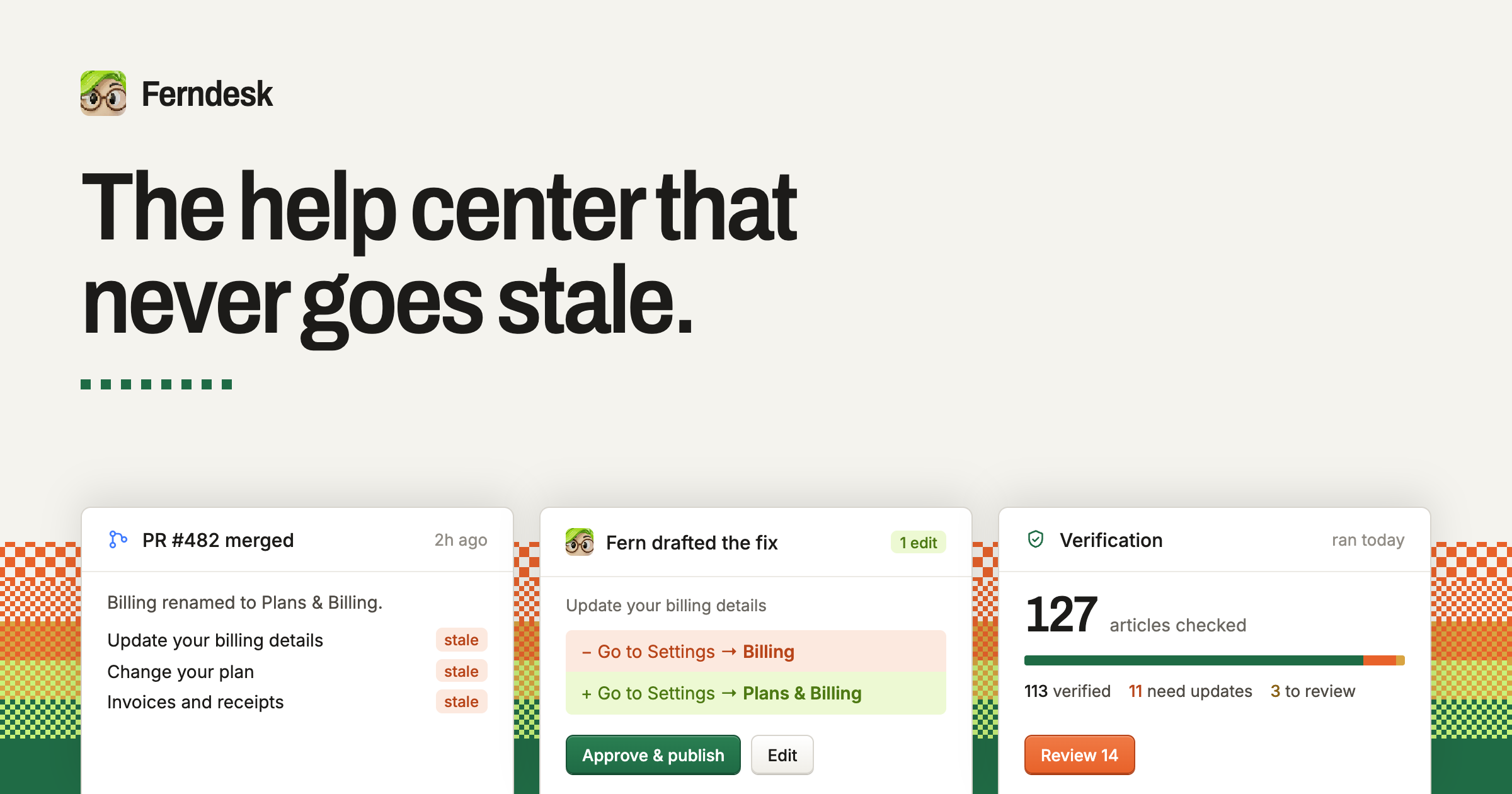
Ferndesk is a complete help center built around an agent named Fern that checks every article against your product, catches what changed, and drafts the fixes for you. It is a single place for a public help portal, AI answers, an in-app widget, API documentation, private docs, translations and analytics. The purpose stated on the site is to keep help content accurate while a team keeps shipping, and to give customers everything they need to help themselves so fewer of them need support. Docs can also be managed from Claude Code, Cursor or ChatGPT. Ferndesk exists because documentation goes stale the moment a team keeps shipping. The site describes the situation plainly: this month you changed a default, and yet your docs were last updated three months ago. It lists the everyday changes that quietly invalidate help content — renaming a plan, killing a feature, moving the export button, adding a plan, changing the pricing page, breaking a link, shipping a new flow, renaming a button, changing a setting — and points out that it is not the team's fault, because keeping docs true while shipping every week is tough. Customers echo the same pain: Brennan Dunn, Founder of RightMessage, says that before Ferndesk the process for updating documentation was basically hoping they would remember to do it, while Tristan Roth, Founder of ISMS Copilot, says his team ships features every week and that updating docs is hell. Fed, Founder of GummySearch, notes that he used to write articles once and they went stale right from day one, and Laura Elizabeth of Client Portal says writing documentation was something she never did and it showed in her help docs. Ferndesk's process is presented in three steps. The first is to connect your tools: your codebase, your live product and your support inbox. The site says this takes ten minutes, after which Fern can see what your customers see. Named integrations shown on the homepage include GitHub, Intercom, Linear, Zendesk, Slack, Help Scout and Discord, alongside an example live product such as app.acme.com. The second step is verification: Fern checks every article, and each claim is checked against the code and the product. Anything that is wrong comes back as a change you can approve, together with the reason it was flagged. The homepage illustrates this with a claim marked as no longer true — an article telling readers to update billing details at Settings → Billing when the product now uses Settings → Plans & Billing — presented as a proposed edit with Review and Approve & publish actions. The third step is that new releases document themselves. When a pull request merges, Fern writes the article before the release goes out. The example shown is PR #530, 'Add image editing to Fern', after which Fern drafted documentation for a new capability, 'Editing images in articles', marked NEW, plus an UPDATED article about automating screenshots in your docs. The four capabilities highlighted at the top of the site are verification, the help center itself, automatic updates and AI conversations. Beyond maintaining articles, Ferndesk is a full help center that a team can run, described as built to bring tickets down. The public help center can live on your own domain or at /help, is fast and searchable, and is indexed by Google and by AI search engines. AI conversations let customers ask in plain language and receive answers drawn from your verified docs rather than a guess. The in-app widget requires a single script tag and puts search, articles and AI chat inside your product, exactly where people get stuck. When the widget cannot answer a question, escalation hands the conversation off to Intercom, Zendesk or Help Scout, so customers still reach a human channel. The remaining help center capabilities cover technical and internal documentation. API documentation provides an OpenAPI reference with a try-it playground sitting next to your customer docs. Private docs can be protected with magic link, OIDC or JWT, and are intended for customers, partners or your own team — an internal knowledge base use case. Translations provide a multilingual help center with a glossary and language-prefixed routes; Metricool, for example, has seven languages live on Ferndesk. Analytics reports searches, missed searches, failed answers and feedback, so you can see what to write next. The site also describes a compounding benefit it calls smarter AI: the docs Fern keeps current are the same docs your support AI trains on, which is how Metricool uses Ferndesk to train its AI support agents. The unique approach is the combination of verification, drafting and human approval. Rather than asking a team to remember to update documentation, Ferndesk reads the codebase, the live product and the support inbox, checks every claim in every article, and returns a concrete change with the reason it is needed. Nothing publishes without you: you review and approve, and Ferndesk publishes from then on. The site frames the shift as moving from hoping your docs are right to knowing they are right, and describes the workflow as connecting your tools, letting Fern check every article against what your product actually does, fixing what is wrong, and writing the docs for what ships next. Migration is another explicit part of the product. The site argues that the migration teams keep putting off takes ten minutes, because moving help centers normally means broken links, lost rankings and a week of copy-paste. Ferndesk says it brings every article, image and URL over intact, with one click, every URL preserved and redirects created. Importantly, your support tool does not have to change: your inbox, chat and ticketing stay where they are, and Ferndesk keeps reading tickets from it. Imports are listed from Intercom, Zendesk, Crisp, Help Scout, HubSpot, GitBook, Document360 and every other help center. One customer, Juan, Founder of Duplika, describes migrating from Zendesk Guide as feeling like an upgrade — faster, with no paid add-ons, and the knowledge base living at a subfolder of their domain. The outcomes customers report are concrete. Founders say they save 20 hours a month on docs; Tristan Roth of ISMS Copilot says he does in five minutes what used to take an hour and that Ferndesk makes it easy to ship more and scale. Laura Elizabeth of Client Portal says her support requests have dropped significantly, and that simply being able to see what customers search for and cannot find answers to was huge on its own. SEO Gets reports a measurable drop in churn within three months of launch and even organic clicks to queries they did not expect to rank for. Metricool's Chief Customer Officer, Jose Julio, says they would be miles away from getting this into a working product, after having scoped a custom build on the Crisp API. The site summarises the impact for founders who used to dread updating docs: they now ship features every week while Fern keeps every help article accurate. Typical scenarios described on the site include a team shipping a weekly release and needing the help article to exist before the release goes out; a founder renaming a plan or changing a setting and needing every affected article corrected; a support team that wants customers to answer their own questions through search, articles and AI chat before opening a ticket; a company moving off an existing help center such as Zendesk Guide, Intercom or GitBook without losing URLs or rankings; a company serving customers in several languages from one knowledge base; and a product team publishing an OpenAPI reference and private or internal documentation alongside its public docs. In each case, the same verified article set serves the portal, the widget, the AI answers and the support AI. Ferndesk states that it is trusted by more than 100 software teams, and the customers named include Metricool, Zeffy, Andri, PixelFlow, SEO Gets, RightMessage, ISMS Copilot, GummySearch, Client Portal and Duplika — largely SaaS founders, customer success and support leaders, and documentation owners. The site also lists a set of pre-switch questions it answers, covering whether Fern can maintain docs where they already live (no — Ferndesk verifies and updates articles that live in Ferndesk, while your support tool stays where it is and Fern keeps reading tickets from it), what verified means, how often verification runs, what happens if Fern gets something wrong, whether URLs break on import, codebase safety, working without GitHub, custom domains, free trials and what happens if you leave. The signup flow offers a 7-day free trial with no card required. In short, Ferndesk pairs a complete, self-service help center with an agent that keeps it honest. Import your existing content, connect your codebase, product and support inbox, and from then on every article is checked, every fix is drafted, and nothing publishes without your approval — a help center that does not go stale, and support teams that answer fewer repetitive questions.
Clink is a custom keyboard app for iPhone and iPad that replaces the default iOS keyboard with one the user sets up and controls. It bundles themes, layouts, sound packs, swipe typing, on-device autocorrect and a set of tools directly into the keyboard, so the thing you type with all day also does jobs you would otherwise switch apps for. The app runs on iOS 17 or later, downloads from the App Store, and is set up through the standard iOS path: Settings → General → Keyboard → Keyboards → Add New Keyboard → Clink, after which you hold the globe key in any app and pick Clink. Clink is for anyone who wants a keyboard that looks and behaves how they want, from people who care about privacy to people who simply want a number row, a split layout or a click that sounds like a real mechanical board. Most keyboards are fixed products: you get the layout, look, sound and behaviour the vendor decided on, and the only lever you have is turning a few settings on or off. Clink's premise is ownership — the site states plainly that this is the iOS keyboard you actually own and that nothing you type ever leaves the phone. The project answers a set of recurring frustrations: missing keys and rows, no way to change how typing feels, and privacy policies that leave users unsure what is happening with their keystrokes. To help people choose, the site publishes honest comparison guides against Apple's default keyboard, Gboard, SwiftKey and Typewise, framing the trade-offs directly — themes and ownership versus Search, GIFs and Google; offline control versus multilingual prediction and Copilot; normal layouts and deep themes versus hex privacy branding. Customisation starts with appearance. Themes cover solid colour, brushed metal, sculpted 3D keycaps and Liquid Glass; you can start from a preset and change as much of it as you like, including photo backgrounds. Layout is equally adjustable. A number row, a split keyboard and a one-handed mode are switches in settings, and the Layout editor goes further by letting you build keys, rows and whole extra pages of your own. Sound is a first-class setting too: swap the sound pack, or make one from your own recordings. Clink's haptics are its own rather than the system's, so they still work even where the system click is turned off. Together these three areas — look, layout and feel — are what make the keyboard something you configured rather than a component that was handed to you. Automations take owning your keyboard further by handling settings you would otherwise keep changing by hand. They are rules that change your keyboard automatically — split the keys in landscape, quiet the clicks at night, then return to your usual setup. You can start from a preset or choose your own conditions, and no code is needed. Plugins add features you wish your keyboard had: they are add-ons that bring new tools, typing features and effects to Clink, such as putting your typing speed on the space bar or giving keys a new look. Plugins are short Python scripts that run in the keyboard, and they cannot reach the internet or read your files. Repositories are collections of themes, layouts and plugins you can browse and install in Clink; you can add an official or community repository to find your next setup, or publish your own creations for others to use. Clink Pro adds an AI-assisted build path: describe a plugin, panel, action or automation and Clink Pro can turn the idea into a draft to review and edit. The example given on the site is a request such as making an action that turns selected text into uppercase. The build can use Apple Intelligence on compatible devices, or you can choose a cloud provider and bring your own key for OpenAI, Anthropic, Gemini or an OpenAI-compatible endpoint, with cloud usage billed separately. You can close the editor without cancelling your build and use Build tasks to check progress, open a result or retry. Typing itself leans on gestures: slide through the letters and lift for one stroke per word, and slide the spacebar to move the cursor, while autocorrect and next-word suggestions run on the phone with no network on the typing path. Dictation lets you say it or rewrite it — dictate straight into the field you are in, and proofread, shorten or change the tone of what is already there without leaving the app. The tools come with the keyboard: clipboard history, a notepad, a calculator, a translator and more, opened and used without breaking your typing flow. The site lists Emoji, GIFs, Clipboard, Notepad, Dictation, Handwriting, Translate, Dictionary, AI Tools, Text FX, Calculator, Conversion, Cling, Replacements, Profiles and Layouts as the tools. Clink supports 78 languages, each with an on-device typing pack, and you can type in all of them at once or one at a time; the app's own screens are translated separately, so Clink can be in one language while the keyboard writes another. Structurally, Clink is built around a few clear ideas. The keyboard runs its typing intelligence on the device: suggestions and predictions stay on device, and there is no network on the typing path. Full Access is optional for typing — enabling it turns on clipboard features, custom feedback and the cloud AI requests you choose to run. Plugins are short Python scripts that run in the keyboard and cannot reach the internet or read your files, which is what makes installing one a contained decision. Community packs are read from public GitHub repositories: Clink browses official shelves in the app, lets you add community ones beside them, and verifies every file before it lands on your phone. You can install a pack without making an account, and publishing your own creation means releasing it so others can add your repository by name. The benefits follow from those choices. Typing stays on the phone, so what you write is not routed through a keyboard vendor's servers by default. You get a keyboard that matches your habits instead of the other way round — the keys where you want them, the sound you like, the theme you picked. Automations remove the small recurring chores of switching modes manually. Plugins and repositories mean the feature you are missing may already exist, or can be written. Clink Pro's AI build path lowers the barrier to making that plugin yourself. And because no account is required and Full Access is optional, adopting Clink does not demand handing over an identity or extra permissions. Concrete scenarios described in the content include quieting the clicks at night and returning to your usual setup afterwards; splitting the keys in landscape for two-thumb typing; and putting your typing speed on the space bar with the WPM Spacebar plugin. The plugin example on the site expands omw into on my way and brb into be right back when you type the word and a space. Clink Pro's example request turns selected text into uppercase. Dictation is used to speak into the field you are already in, and to proofread, shorten or change the tone of existing text without leaving the app. Multilingual users can type across 78 languages at once or one at a time. Community users browse official shelves, add community repositories, and publish their own themes, layouts or plugins as releases for others to install. Clink targets iPhone and iPad users on iOS 17 or later who want control over their keyboard, including privacy-conscious typers and people who type in several languages. On the integration side, it reads packs from public GitHub repositories, supports iCloud Sync on the free tier, uses Apple Intelligence on compatible devices for AI builds, works with bring-your-own-key access to OpenAI, Anthropic, Gemini or an OpenAI-compatible endpoint, and uses on-device SpeechTranscriber for dictation when available on iOS 26 with its language resources ready — noting that the compatibility speech recognizer can send audio to Apple's servers, including while those resources download, so dictation is not always offline. Pricing is freemium: the free tier covers typing, swipe, emoji, preset themes and layouts, the number row, split and one-handed modes, language switching and iCloud Sync. Membership adds AI Tools, Clipboard, Notepad, Translate, Calculator, Handwriting and Text FX, plus plugins, pets, stickers and sound packs, themes, layouts and profiles of your own, and the fine-tuning sliders. Membership is monthly, yearly or a one-time lifetime payment, with your local price on the App Store and a possible trial for eligible accounts. Clink is a keyboard you configure rather than accept: themes, layouts, sounds, automations, plugins and repositories let you reshape the thing you type with every day, while typing stays on the device and accounts stay optional. For iPhone and iPad users who want their keyboard to feel like their own, and for developers and communities who want to publish into it, that combination of deep customisation, an offline typing path and an open pack format is the whole proposition.
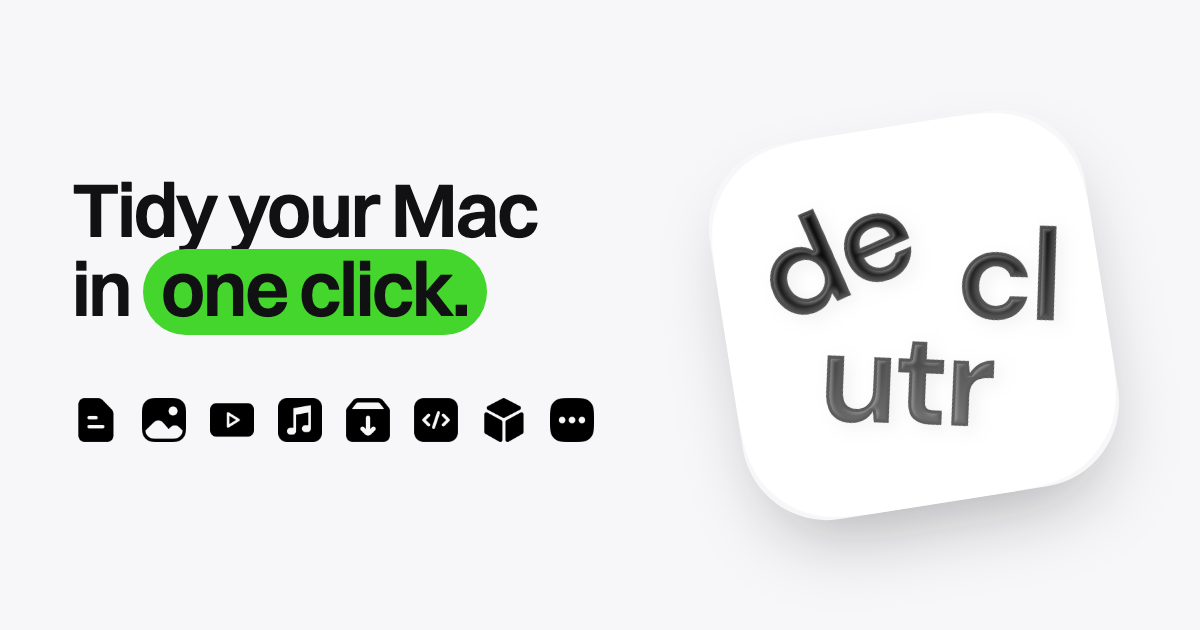
Declutr is a Mac app that organizes your Desktop, Downloads folder, or any folder you pick into folders by file type in one click. It sorts files into categories such as Images, Documents, Videos, Audio, Archives, Code & Scripts, 3D Models and Other, so a cluttered folder turns into a structured one without any manual dragging. The app is designed for Mac users who want a tidy Desktop or Downloads folder but do not want to build their own automation. It runs on any Mac with macOS 13 Ventura or later, on both Apple silicon and Intel, and it is distributed through the Mac App Store, where it holds a 5.0 rating. Download folders and Desktops fill up with things people did not mean to keep there: screenshots, invoices, installers, exported videos, spreadsheets and code files all land in the same place. Cleaning that up by hand means opening the folder, judging each file, creating folders, and dragging items one by one, which is work that is easy to postpone. Existing options each ask something first: Hazel requires you to write rules before anything happens, AI organizers take a description of what you want but often do not keep files on your Mac, and the tools built into macOS mean building Automator or Shortcuts workflows. Declutr's premise is that the first cleanup should take one click. At its core, Declutr moves files into category folders inside the folder you selected. The categories cover Documents, Images, Videos, Audio, Archives, Code & Scripts and 3D Models, plus an Other folder for anything that does not match. In the on-site demo, a Downloads folder containing Invoice_2026-09.pdf, IMG_7851.HEIC, design-files.zip, clip-export.mov, Resume_final_v4.docx, config.json, podcast-ep42.mp3, hero-banner@2x.jpg, Raycast.dmg, phone-stand.stl, tutorial-part1.mp4, calendar.ics, logo-final-FINAL.png, index.html, site-export.tar.gz and desk-lamp.usdz is sorted into Images, Documents, Audio, Archives and Code & Scripts. Each category folder gets its own icon, so you can spot it in Finder without reading the name. Every cleanup can be reversed. The final screen of the flow shows what happened, for example the number of items processed, with Undo available, and includes an Undo Changes button that puts every file back where it was. Declutr does not delete anything; it moves files into folders inside the folder you picked, so undo simply reverses those moves. There is also a safety behaviour: before a folder that looks sensitive, Declutr stops and asks first. That combination makes the one-click sort low risk, because a mistake costs one click to fix rather than a manual recovery effort. Pro adds automation on top of the manual cleanup. Watched folders sort new files the moment they land, which suits a Downloads folder that constantly receives new items, because nothing accumulates when each arrival is filed immediately. Alternatively, a schedule can run a cleanup every day while you work, so the folder is tidied on a routine rather than only when it becomes unbearable. Both options keep working after the first click: the initial sort is a one-off action, while watching and scheduling turn Declutr into an ongoing habit that maintains order in the background. Smart Rules exist for the files that do not fit the default categories. A rule matches a file by name, extension, age or size, and conditions can be combined with AND/OR logic. When a file matches, Declutr can send it to a folder you name, or skip it and leave it alone. Rules run before the default categories, so a rule always takes precedence over the built-in grouping. You can pin receipts or invoices to a named folder, push installers aside, or protect files you want to keep in place. The New Rule sheet in the app shows this pattern directly: a Name contains condition followed by a Move to folder or Skip action. Categories are editable rather than fixed. Declutr ships with ten categories out of the box, and you can add an extension to an existing category, move an extension from one category to another, or create an entirely new category with its own icon. That means the sorting logic can follow the way you actually work: a designer can give 3D model formats their own home, a developer can group scripting languages together, and anyone with an unusual file type can stop it falling into Other. The file-types settings screen lists the extensions inside a category and lets you remove any of them. Declutr's approach is deliberately rule-based rather than AI-based. It sorts by file type and by the rules you set, covering name, extension, age and size, and it never opens a file, never uploads one, and there is no account to create. Because the work happens on your Mac, nothing leaves the machine. The site contrasts this with alternatives: Declutr decides using file type and your rules, keeps files on your Mac, reaches a first cleanup in one click, and costs nothing or $8.99 once; Hazel decides by rules you write, also keeps files local, requires rules before the first cleanup, and costs $42 once; AI organizers rely on a model to guess and often do not keep files on your Mac; and macOS built-ins need workflows you build yourself. The stated benefit is time and mental overhead saved. Reviewers describe a desktop and documents folder that had been messy for years being sorted in seconds, and one review from a user with ADHD describes a chaotic sea of docs becoming organized, calling the app a total game-changer. Others highlight speed, ease of use, clear categories and the visual result of folders that feel neat and accessible, and note that finding pictures, music and dmg files in Downloads is much easier afterwards. Because files stay on the Mac and nothing is deleted, the payoff comes without a trade-off in privacy or risk. The clearest use case is the Downloads folder: it receives PDFs, images, audio, archives and installers constantly, and Declutr can either clear it on demand or keep it tidy automatically with a watched folder or a daily schedule. The Desktop is the other primary target, useful for anyone whose screen fills with screenshots and working documents. Any custom folder works too, so a project folder or an archive of mixed files can be organized with the same flow. Smart Rules cover edge cases such as receipts, invoices or installers that should go to a named folder instead of a category, or files that should be skipped entirely. Declutr is aimed at Mac users who want their files organized without configuring automation. It is available for free on the Mac App Store and requires macOS 13 Ventura or later on Apple silicon or Intel. Free covers organizing the Desktop, Downloads or any folder, sorting files by type into category folders, and undoing any cleanup in one click. Pro is a single in-app purchase of $8.99 in the US, with no subscription and no account, and it adds scheduled cleanups, Smart Rules that run on their own, watch folders, and your own categories and extensions. The App Store shows the price in your local currency. Declutr reduces Mac file organization to a single click on a folder, with an Undo button that makes the action safe and optional automation for people who want the tidy state maintained. It sorts by file type and user-defined rules, keeps everything on the Mac, and offers a one-time Pro upgrade: a simple, private answer to messy Desktops and Downloads folders.
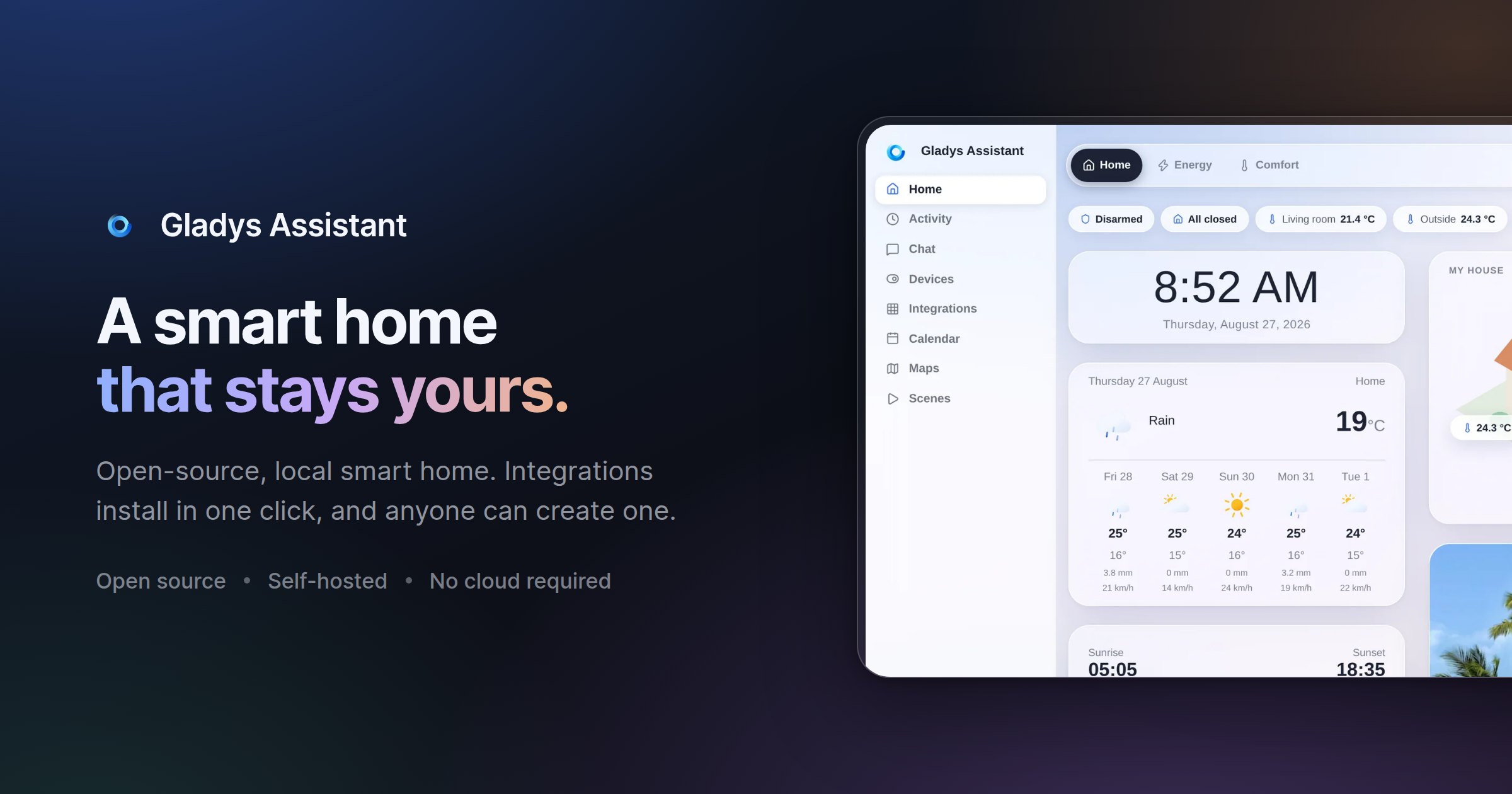
Gladys Assistant 5 is a free, open-source smart home platform that runs on your own hardware, including a mini-PC, a Synology NAS, a Raspberry Pi, a server, or even an old computer. Its purpose is to let you monitor and automate a home from a single interface: temperature, security cameras and presence all appear on one dashboard, scenes automate everyday routines such as coffee brewing, lights turning on and music playing, an energy view follows electricity, solar production and home battery usage, and a built-in voice assistant responds to spoken commands like asking Gladys to turn on the kitchen light, or to messages sent from your phone. It is designed for people who want local control of their smart home, with data staying on their own machine rather than in a mandatory cloud. Many smart home setups force a trade-off between convenience and control. Configuration can mean wrestling with YAML files, the hub may depend on a vendor cloud, and when the internet connection goes down the house can stop responding. Gladys Assistant 5 is presented as a simpler alternative: free, open-source smart home software that runs on your own hardware and keeps working even offline. Because it is self-hosted, smart home data such as sensors, scenes and history stays on your local network, with no mandatory cloud, no tracking and no data selling. The project also stresses ease of use, noting that no terminal is required for day-to-day operation and that scenes can be built without a single line of code, a key consideration for households that want automation without maintaining a technical stack. At the centre of the experience is the dashboard. The website describes it as a single place to see everything at a glance, covering temperature, security cameras and presence, with a layout the team says is phone-first and designed pixel by pixel. The interface supports light and dark appearance: Gladys can follow your system preference or stay on the theme you pick, and you can switch between the two in one click. The same glass and layout are used in both modes, so the product feels consistent whether you are on a large screen or a phone. Alongside the visual dashboard, a built-in voice assistant lets you control the home by speaking, for example asking it to turn on the kitchen light, and Gladys also responds to commands sent as a message from your phone, so control is not limited to voice or to a single device. Automation is handled through scenes. The scene editor is described as a way to automate the entire day: coffee brewing, lights turning on and music playing, all automatic and with no coding required. This is the no-code promise of Gladys Assistant 5, and the Product Hunt tagline summarizes it as a private, self-hosted smart home with no YAML required. Because scenes are built in a visual editor rather than in configuration files, a household member who is not a developer can still assemble multi-step routines and adjust them later. The FAQ reinforces this by stating that day-to-day use does not require a terminal, only a clear interface to control the home. Energy monitoring is built in as well. The energy dashboard follows electricity consumption, solar production and home battery in real time, with the stated goal of helping you cut the bill where it matters. On the compatibility side, Gladys works with what the site calls open protocols, native integrations and community external integrations for everything else. Listed protocols and integrations include Zigbee through Zigbee2MQTT, Matter, Z-Wave, MQTT, Tuya, Netatmo, Sonos, Zendure and RTSP cameras, plus brands such as Philips Hue, SmartThings, TP-Link Kasa and Tapo, Shelly, Sonos, Reolink cameras and LG ThinQ. The product describes support for thousands of devices. If a device is not listed, external integrations, which are community-built and installable in one click, extend coverage, and developers can build their own integration in the language of their choice or ask for help on the community forum. Underneath the interface, Gladys is self-hosted software. Installation is guided via Docker: the documentation describes starting Gladys with a single Docker command, and the FAQ notes that any Linux machine will do, since if Docker runs on it, Gladys runs on it. The project is transparent that installation takes some technical steps, but it walks users through them with screenshots and videos. Once running, the platform handles new features and bug fixes through automatic upgrades, described as zero hassle, so the installation stays current without manual maintenance. Data such as sensors, scenes and history remains on the local network, and optional services are kept separate from the core. The stated design principles explain the intended benefits: privacy through self-hosting, ease of use with no terminal in daily operation, a clean UI built by designing first and coding second, stability described as built to last decades, speed with an interface the team calls lightning-fast, and automatic upgrades. Community testimonials on the site describe the results in practice. One long-time user mentions alerts when a room is too hot, which saves on heating, an alert if the fridge stays open, a living room lamp triggered by movement in the morning only when waking up, water leak detection, and Gladys acting as a security box during vacations. Another writes that scenes make it possible to build scenarios that simplify daily life and secure the home. Others highlight easy setup, an active community, constant stability and scalability, and the fact that Gladys can do everything without a single line of code. Concrete use cases appear throughout the site and in user testimonials. Temperature management is a recurring theme: monitoring bedrooms and bathrooms, receiving alerts when a room gets too hot, and controlling openings. Vacation security is another, with users describing remote access to the whole installation and intrusion alerts while away. Scenes cover daily routines such as opening and closing a gate, controlling lights in the evening from the couch, and interacting with household appliances. The energy dashboard is used to follow electricity consumption, solar production and a home battery in real time. Garden automation is described too, including programming a pool pump according to water temperature and running drip irrigation. Water leak detection and fridge-door alerts show the platform being used for safety and prevention rather than only comfort. Gladys Assistant 5 targets technically comfortable households, people willing to run a Linux machine and install software via Docker, who want a smart home that stays private and local. The core remains free and open-source, with no subscription, no limitations and no credit card needed. Those who want access from outside the home can choose between an optional subscription called Gladys Plus and, for experts, their own VPN or reverse proxy. Gladys Plus adds encrypted remote access, Google Home and Alexa, backups and AI, works as an app on iOS and Android, starts at $7.99 per month in the US and Canada and €6.99 per month in Europe, includes a one-month free trial without a credit card, and can be cancelled anytime. A live demo is available for anyone who wants to explore the dashboard before installing. In summary, Gladys Assistant 5 combines a free, open-source, self-hosted smart home platform with a no-code scene editor, a unified dashboard, real-time energy monitoring, a built-in voice assistant and broad protocol support including Zigbee, Z-Wave, Matter and MQTT. It is built for people who want convenience without giving up privacy or depending on a mandatory cloud, and it keeps running even when the internet goes down.
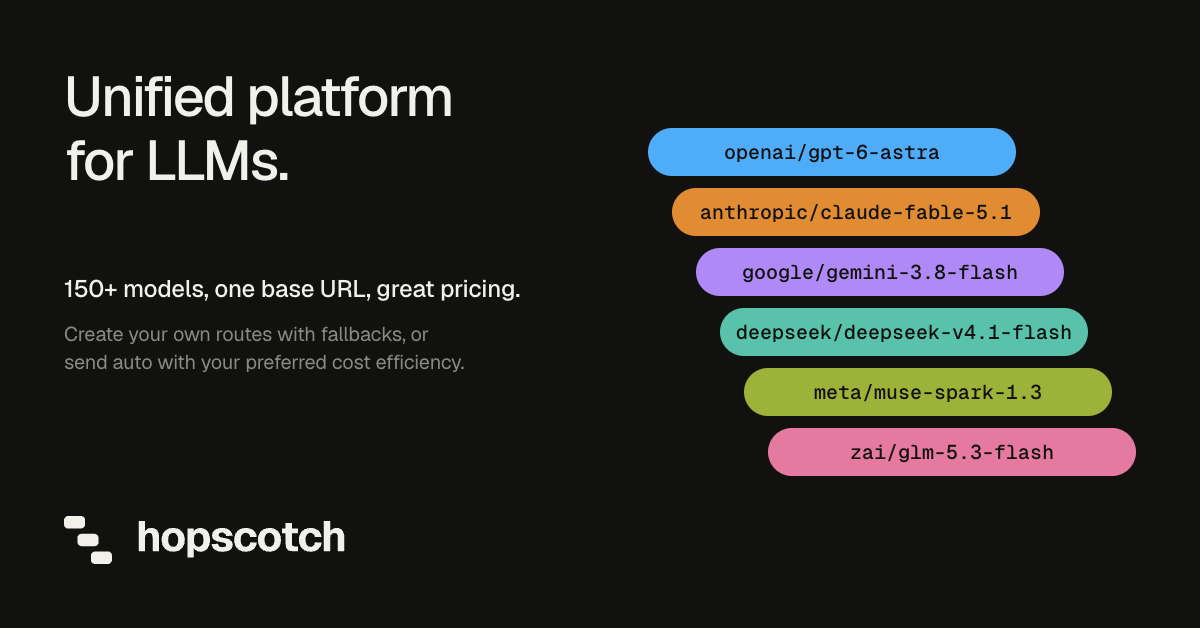
Hopscotch AI is a developer platform that provides access to more than 500 AI models from providers including Anthropic, OpenAI, Google, DeepSeek, Moonshot AI, Qwen, and Meta through a single API. Rather than maintaining a separate integration, account, and bill for every provider, developers send requests to one base URL with one key and one balance. The platform is aimed at developers and engineering teams building applications on top of large language models who also need to understand and control what those applications spend. Its stated purpose is simple: control AI costs and access top models through one API. The problem Hopscotch addresses is operational sprawl. A team that wants to use several model providers usually ends up managing a different SDK, a different set of credentials, a different dashboard, and a different invoice for each one. Model quality, speed, and price change constantly, so teams want to move between Claude, GPT, Gemini, and open-weight models as their needs shift, but every switch means more integration work. Hopscotch describes itself as the intelligence layer for AI and has raised $7.5m to build it. It consolidates provider access into one connection so that choosing a model becomes a configuration change instead of a project. The core of the product is a single API that aggregates provider access. You set a new base URL and key in the OpenAI SDK you already use, and after that switching models means changing the model name, with no new SDK to install. Model names are provider-prefixed, such as anthropic/claude-sonnet-5, and Hopscotch guarantees that the model you name is the model that runs; the Activity log shows which provider served it. Supported endpoints include chat completions and the Responses API, plus a models endpoint that lists every model you can call. A curl example and a Python quickstart are provided in the documentation. Routing profiles let you define backups. In the example shown on the site, Sonnet runs first, then GPT, then Gemini if the earlier attempts fail. Resilience works in layers: if a provider returns a 429 rate-limit response, Hopscotch moves the request to another of its keys for that provider, then to the next model in your routing profile. During an outage, Hopscotch retries your request first, then moves to the next model on your list if you use a routing profile, and for chat requests a final attempt runs your model through a backup provider. If every attempt fails, you receive an error. The Upstreams view shows how requests are distributed across providers, such as 40% Anthropic, 19% OpenAI, 15% Google, 13% DeepSeek, and 8% Moonshot AI in the example given. Spending controls are the other half of the product. You can give each key a credit limit that resets daily, weekly, or monthly, set monthly limits for individual teammates and for the whole workspace, and cap how fast the account can spend, $50 per minute by default. A request that would cross a limit is refused before it reaches the provider, which the Activity log records with a rejected outcome, zero attempts, and no upstream fetch. An owner can also pause all spending at once. This matters most for agents: if an automated loop runs unattended, the limits stop it from draining the balance. Visibility comes from three connected views. Keys show who may call, Requests show what happened, and Usage shows what it cost. The Activity log lists every request with the model, the provider that served it, the outcome, the number of attempts, total tokens, cost, and latency, and it exports to CSV. Usage breaks spend down by model, provider, key, and teammate, so costs can be attributed. Your code can also look up any request's tokens and cost through the API. Logged outcomes include successful calls, client aborts, truncated responses, and requests rejected before fetch. The playground lets you run one prompt on up to three models side by side, billed through your key like any other request, so you can compare answers and the cost of each before changing your code. The model catalog is the reference behind that comparison: each of the 500+ models lists its context window and its price per million tokens, and where several providers serve the same open-weight model, the catalog shows each provider and its price. Example entries include anthropic/claude-sonnet-5 at 2.00 in and 10.00 out per million tokens, openai/gpt-5.6 at 4.00 in and 20.00 out, and deepseek/deepseek-v4-flash at 0.44 in and 1.32 out with four upstreams. Hopscotch does not alter your requests. Prompts reach the model as written and answers come back unchanged, and by default the platform never stores your prompts or the model's responses. Some features that providers run on their own servers, such as web search, audio, and hosted tools, are not supported through Hopscotch's provider accounts, and the docs list them. You can also bring your own provider keys: add an OpenAI key, and Hopscotch sends that provider's requests on your key, with the provider billing you directly and Hopscotch charging nothing for those requests. If your key fails, Hopscotch does not silently switch to its own key. Taken together, the design keeps every part of multi-provider work, including access, routing, budgeting, and reporting, inside one connection. Your application speaks the OpenAI-compatible chat completions API it already uses; behind that endpoint Hopscotch holds the provider relationships, applies your routing profile, enforces your limits before a request is forwarded, and records the result. Because billing is pass-through, you pay each provider's list price per token with no markup and no added fees, and providers that bill you directly through your own keys cost nothing on the Hopscotch side. The result is that the model can change without the code, the budget, or the reporting changing with it. The practical benefit is less integration work and more predictability. Moving between any models in the catalog, from any provider, keeps your key, balance, and limits the same, so experimenting with a new model costs one line of code rather than a new integration. Spend limits refuse over-budget requests before they reach a provider, which protects prepaid balances from runaway agents and unexpected usage. Because the Activity log and Usage views record the model, provider, tokens, cost, and speed of every request, cost questions can be answered with data rather than estimates, and CSV export makes that data usable in spreadsheets and reports. Concrete workflows follow from those capabilities. A team evaluating a cheaper model can run a prompt on three candidates in the playground, compare answers and per-request cost, then change one line to move production traffic. A team worried about provider outages can define a routing profile, with Sonnet first and GPT then Gemini if it fails, and let Hopscotch handle retries, rate limits, and backup providers automatically. A platform owner can issue a key per environment or teammate with a monthly credit limit, set a workspace ceiling, and watch spend broken down by model and provider. A team with existing provider contracts can attach its own keys and keep paying those providers directly while still using one endpoint and one log. Hopscotch is built for developers and engineering teams, and its Product Hunt listing appears under Developer Tools and Artificial Intelligence. Integration is deliberately minimal: any client that can point at https://api.hopscotchlabs.ai/v1 and send a bearer token works, including the OpenAI SDK for Python and curl. There are no plans or subscriptions; you add prepaid credit by card starting at $5, and auto top-up can refill your balance when it drops below an amount you choose. As a Product Hunt launch offer, the first 250 Product Hunt users to sign up receive $50 in free model credits by redeeming code HOPSCOTCH50OFF in the Billing tab. The takeaway is a single connection that replaces many. Hopscotch AI turns 500+ models from Anthropic, OpenAI, Google, DeepSeek, Moonshot AI, and others into one OpenAI-compatible API, adds routing profiles and retries so a bad provider does not become a bad user experience, and enforces per-key, per-teammate, and workspace spend limits before requests are forwarded. You pay provider rates with no token markup, you can bring your own keys, and every request is logged with its model, provider, tokens, cost, and speed. For teams that want model choice without provider sprawl or surprise bills, that combination is the whole point.
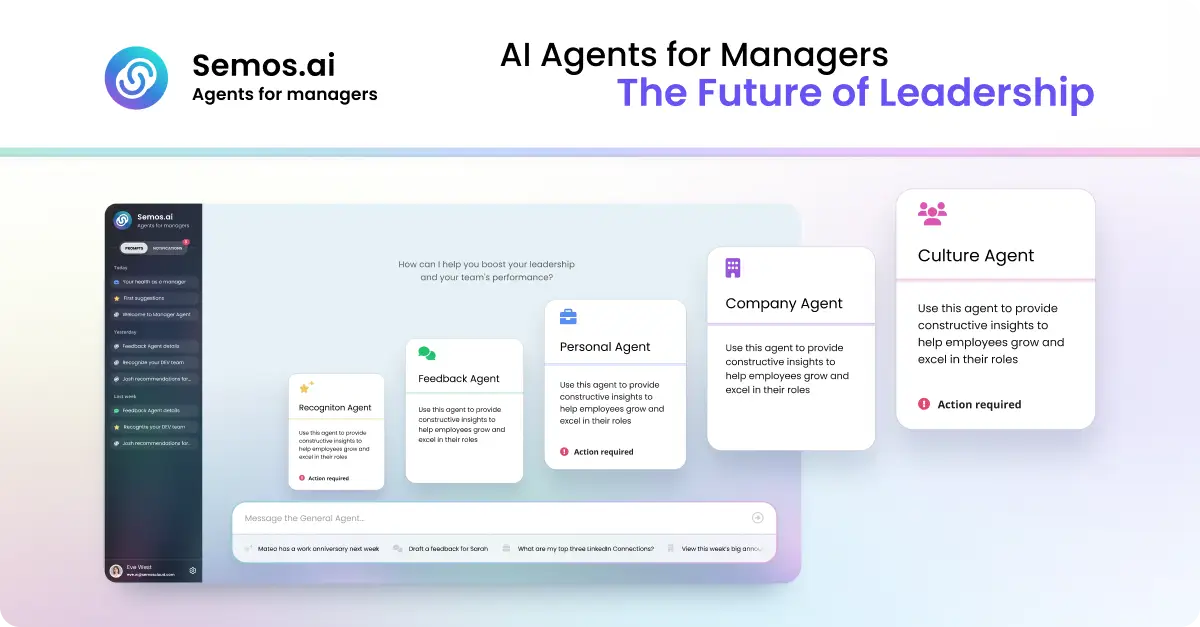
Semos.ai Manager Agents are AI agents purpose-built for managers. Described as your key to 10x leadership impact, the product builds context from your meetings and backs it with behavioral science, so you can handle difficult conversations, develop your people, and grow as a leader. It is aimed squarely at people managers rather than at HR departments or general users: the job it takes on is the daily work of leading a team. Instead of waiting passively for a question, the agents learn from the meetings you have and then point you to what needs your attention next — the feedback that is overdue, the recognition you missed, the conflict you are avoiding, and the growth talk that keeps slipping. You can ask questions in plain language or start from quick prompts such as Recognize someone, Give feedback, Help me prepare for 1-on-1s, Check team engagement, and Review PTO balance. The problem the product sets out to solve is described concretely on the site: notes from six different 1:1s scattered across three places, and a review due Friday you haven't opened. Managing people generates a continuous stream of context, and the moments that matter most — a difficult conversation, a piece of specific recognition, a career conversation — are the ones most easily postponed until it is too late to handle them well. Manager Agents are designed to surface those moments before you think to ask. The site frames the value in terms of access: the support that used to sit behind a budget line, such as an HR business partner, an executive coach, or management training, is now available directly to the manager, including at 10pm before a conversation you have been dreading. Manager Agents are organised as a set of named agents, each covering a different part of the manager's job. The Meeting Agent is described as the foundation: it builds context from every meeting you have and feeds that context to every other agent, which is what allows the rest of the system to know what has actually been happening with your team. The Feedback Agent covers difficult conversations, helping you say the hard thing clearly before it's too late to say it well. The Recognition Agent helps you give recognition that is specific, timely, and fair — the three qualities the site highlights as what makes recognition land rather than feel generic. The HRBP Agent addresses people challenges by structuring the conversation and the documentation before you have it, so that you walk into a sensitive discussion with a shape and a record rather than improvising. The Culture Agent focuses on team health, surfacing shifts in sentiment and participation before they show up in a survey — an early-warning view of how the team is doing. The Career Agent supports career conversations and growth plans for your team, helping managers hold the development conversations that otherwise slip quarter after quarter. The Company Agent provides sector awareness, keeping you current on what's happening in your market in minutes a week. The site notes that more agents are available in Enterprise mode. The product's workflow is described in four steps. The first is proactive: Manager Agents don't wait for you to ask. A missed recognition, a quiet direct report, or a hard conversation coming up is surfaced before you think to ask about it. The second is draft: instead of leaving you staring at a blank box, the agents give you a start — a message, a talking point, a structure for the conversation — grounded in what's actually been happening on your team. The third is send, or built for action: the output is concrete, whether that is a message, a plan, or a next step, designed to be acted on right away rather than filed away. The fourth is learn: every suggestion comes with the reason behind it, so that over time the judgment becomes yours and you start seeing the pattern yourself. Underpinning all of this is what the site calls the science behind the product — proven, precise, verified. Every output draws on real behavioral science: Stanford's 4Is feedback framework, Big Five personality traits, and Hofstede's cultural dimensions. The stated intent is to use frameworks built for how people actually change, not just what sounds right. The unique approach compared with generic AI is continuity of context. As the site puts it, generic AI starts from zero every time: no memory of your team, no sense of your history with them, so you have to explain the whole situation before you get an answer, and the answer is the same one anyone else would get. Manager Agents carry your context forward, drawing from the same pool of meetings, team, and patterns, so every conversation adds to what they know about how you lead and the guidance gets sharper over time. The benefits are stated with specific figures. According to the site, managers capture three times more recognition, feedback, and coaching moments each week. 85% of feedback recipients say guidance is clearer and more actionable. And there is an average improvement of 23% in engagement scores during the first week. Beyond the numbers, the positioning is that Manager Agents don't just help you lead — they make you great at it — and that the judgment behind each suggestion gradually transfers to the manager. Compared with alternatives listed on the page, an HRBP is bundled into overhead at roughly one per 200 people and available only in business hours across dozens of managers; an executive coach costs $300 to $500 per session and is scheduled weeks apart; management training costs $2,000 to $8,000 as a one-off week. Semos.ai is described as self-serve and monthly, available whenever you need it, and built for you rather than for HR — getting sharper over time. The examples on the site show how managers actually use the product. One manager asks for help preparing for their first underperformance conversation tomorrow. Another asks the system to turn notes from the last quarter into a review for a team member named Marcus. A third asks who on the team hasn't been recognized in the last month, while another asks for help planning a development conversation for someone ready for more. Other examples include drafting feedback for someone who's been missing deadlines, writing a message recognizing the work someone put in this sprint, structuring a conversation about a conflict between two people on the team, asking what's changed in the sector this week that the team should know, checking whether anyone has gone quiet in the last few 1:1s, figuring out how to bring up a promotion case with one's own manager, and asking, after someone hands in their notice, what was missed. There is also a prompt for working out what to do next when a 1:1 didn't go how you wanted. The target user is the people manager — the individual responsible for running 1:1s, giving feedback, recognizing work, and developing a team. The product is accessed on the web: the site directs visitors to Get started or Try it yourself at app.semos.ai/auth/login, and the marketing pages invite visitors to join the waitlist. On cost, the comparison table lists Semos.ai as self-serve and monthly, distinguishing it from the bundled overhead of an HRBP, the per-session pricing of an executive coach, and the one-off cost of management training. The Product Hunt listing categorises the product under Meetings, Artificial Intelligence, and Human Resources. Taken together, Manager Agents position themselves as a manager's own support system: a set of AI agents that carry your context forward, surface what needs your attention, draft something concrete to act on, and explain the reasoning so the judgment becomes yours. The promise is straightforward — lead smarter, handle the hard conversations well, and get measurably better at leading your people.