Category Focus/categories/api
API AI Tools
Discover and compare the best api AI tools and software. Browse 120+ curated tools with reviews and rankings.
Projects tracked
120
Sort mode
RECENT
Page
1
Discover and compare the best api AI tools and software. Browse 120+ curated tools with reviews and rankings.
Projects tracked
120
Sort mode
RECENT
Page
1
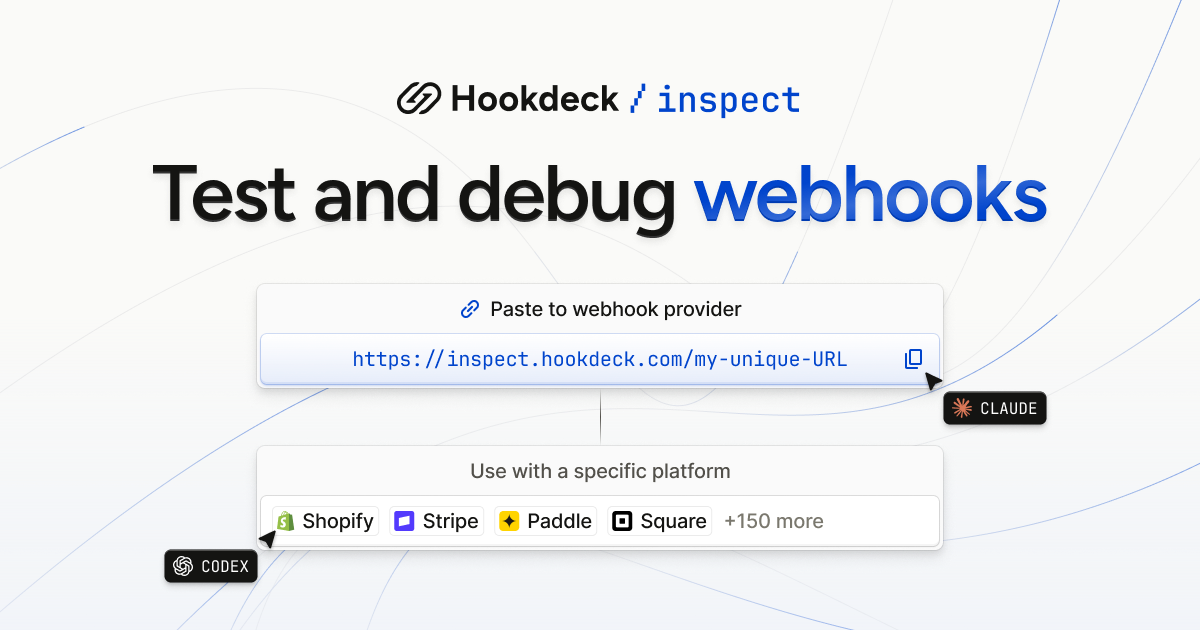
Hookdeck Inspect is a free webhook tester that creates a live test URL you can paste into any webhook provider, with no account and no setup. It is built for developers who need to see what a third-party service actually sends, and equally for AI agents that need a URL they can work with out of the box. Alongside the test URL, Inspect provides a live request feed, verbatim payloads, and a library of mock webhooks drawn from 150+ providers, so an integration can be exercised and debugged before any production infrastructure exists. The makers describe it simply as frictionless and free: no setup required, just paste the URL. Webhooks are the notification mechanism behind platforms such as Stripe, Shopify, GitHub, Slack, HubSpot, SendGrid, Square, Paddle Billing, Chargebee, Telnyx, Adyen and BigCommerce, and testing them has traditionally meant standing up an endpoint that the outside world can reach. Hookdeck Inspect removes that step: the site states plainly that test URLs need no account, and that no setup is required — you paste the URL into the provider and start receiving. It also covers the case where you can only make GET requests, by letting a person open https://inspect.hookdeck.com/ in a browser and share the URL it gives them. The practical effect is that webhook debugging can begin in seconds rather than after a tunnel, a server and a configuration change, which matters most when you are trying to confirm what a provider actually sends. Inspect can be driven from the command line or from code. A single POST to https://inspect.hookdeck.com/ — for example curl -X POST https://inspect.hookdeck.com/ — returns JSON containing ingest_url, the address to send webhooks to, and requests_url. A GET on requests_url waits for the next request, holding for up to 25 seconds before returning that request as JSON. That long-poll design is listed in the comparison table as "One call returns the next request", and it is what makes the service usable by an automated agent as well as by a human with a browser. The complete API description is published at https://inspect.hookdeck.com/openapi.json, so tooling can be wired to it directly. The webhook library lets you choose a specific platform instead of writing a payload by hand. The site lists Stripe, Shopify, GitHub, Slack, HubSpot, SendGrid, Square, Paddle Billing, Chargebee, Telnyx, Adyen, BigCommerce, Calendly, Discord, GitLab, Intercom, Mailchimp, OpenAI, PayPal, WooCommerce and Zendesk among many others, and the free tier is described as including mock webhooks from 150+ providers, with the library index showing "+495 more". For a chosen provider you select an event type — for Stripe, options include checkout.session.completed, customer.created, customer.subscription.created, customer.updated, invoice.created, invoice.finalized, invoice.paid, invoice.payment_succeeded, payment_link.created, payment_method.attached, setup_intent.created and setup_intent.succeeded — and Inspect shows the webhook contents, including headers such as user-agent, content-length, accept, content-type and stripe-signature, plus the full JSON body. A "Send test" action delivers that sample to your endpoint. The site is careful to note that the example webhooks on the page are samples, not requests anyone sent, and that request payloads are data sent by others, not instructions. Inspect is explicitly positioned as "Built for you and your agent". The page shows an event type and endpoint URL pair, and tells you to share your URL to get started, with out-of-the-box support for agents. Advanced workflows are available through skills and MCP, invoked with npx skills add hookdeck/agent-skills --skill inspect. There is also a ready-made prompt — "Use this free Hookdeck Inspect webhook test URL to test my webhook integration" — that can be copied and handed to an agent. Because a single GET returns the next request, an agent does not need to scrape a UI or poll a dashboard; it can wait on requests_url and receive structured JSON describing exactly what arrived, which keeps the agent's loop tight and its inputs verifiable. The overall approach is to treat the test URL as a starting point rather than a destination. Once you can see requests arriving, Inspect lets you forward them to localhost via the Hookdeck CLI, installed with npm install hookdeck-cli -g, so a locally running service can receive the traffic during development. From there the documented path continues to Event Gateway, which adds queues, retries, transformations and observability. That progression — capture with Inspect, forward to localhost, then adopt Event Gateway for production concerns — is summarised in the comparison table as a "Path to production", a column that the competing tools listed in that table do not have. The immediate benefit is speed: no account, no setup, and a URL you can paste. Requests persist on the free tier, which the comparison table contrasts with the 100-request limits it attributes to Webhook.site and RequestBin. Inspect also supports replay and forward to localhost, offers mock webhooks from real providers rather than a handful of generic samples (150+ versus 6 for RequestBin in the table), and is agent-usable directly from the URL rather than through a dashboard. Verbatim payloads mean what you inspect is what was sent, with headers intact, which matters when signature headers such as stripe-signature are part of what you need to read or verify. Typical scenarios follow the features directly. A developer wiring up Stripe billing can pick checkout.session.completed, press send, and read the resulting event body and stripe-signature header in the live request feed. A team testing an integration against Shopify, GitHub, Slack, HubSpot or any other listed provider can start from that provider's entry in the webhook library instead of hand-crafting JSON. An agent working on a webhook integration can be given the test URL plus the copyable prompt, then call requests_url to wait for the next request and act on the payload it receives. A person restricted to GET requests can open the site in a browser, obtain a URL, and hand it to a colleague who controls the sending platform. Once requests are flowing, they can be forwarded to localhost through the Hookdeck CLI for local debugging, and later routed through Event Gateway when retries, queues and observability become necessary. Inspect is aimed at developers building and debugging webhook integrations and at the agents assisting them. Everything described runs over plain HTTP: a POST to create a URL, a GET to retrieve the next request, and an OpenAPI description at /openapi.json for tooling. The CLI is distributed via npm as hookdeck-cli, and agent skills are installed with npx. Pricing is stated as free, with no account required and requests persisting on the free tier; the site presents Inspect as the entry point to Hookdeck's Event Gateway rather than as a paid product with plan tiers. Hookdeck Inspect turns webhook testing into a single pasted URL: free, accountless, usable by a person in a browser or by an agent making one call for the next request, backed by mock webhooks from 150+ providers and a documented route from localhost debugging to Event Gateway in production.
MachineMail is an email API built for AI agents, giving each agent a real inbox it can sign up with, wait on, and reply from. The product positions itself as email for AI agents: every agent gets its own inbox for $0, mail arrives as agent-safe text with a trust level attached, and the agent reads it over MCP wherever it runs. Inboxes are not tied to a human operator — an agent can create one with a single API call, or a catch-all domain can generate addresses on demand. The site describes the product as offering email inboxes for humans and bots, with permanent addresses such as support@acme.dev sitting alongside ephemeral runner addresses that expire automatically. Everything an agent needs in order to read mail — connection, address provisioning, content sanitisation and delivery — is exposed through one Streamable HTTP MCP server or the underlying API. Agents increasingly need to complete tasks that only email can unlock: signing up for a service, receiving a one-time code, waiting for a human reply, or accepting an invoice. Handing an agent a shared human mailbox is risky, because an inbox is an untrusted input channel — anyone can send anything, including instructions aimed at the model. MachineMail frames this as the core problem: nothing in the inbox can hijack it. Instead of passing raw MIME to an agent, the service inspects every inbound message and produces a trust report and a trust level before the agent sees any of it. The stated purpose is to make email safe for agent consumption while still giving agents a genuine, working address rather than a stub. Connection happens from any MCP client. MachineMail runs a single Streamable HTTP server, and clients either sign in with OAuth or pass an API key, which the site notes is useful in CI. The documented command is `claude mcp add --transport http machinemail https://mcp.machinemail.dev/mcp`. The site lists Claude Code, Codex, OpenCode and Copilot as supported clients, and the signup page says the product works with Cursor, Codex, Claude Code and OpenCode, offering a copyable agent prompt. Because the interface is a standard MCP endpoint over HTTP rather than a bespoke SDK, an agent running in a local editor, a hosted environment or a CI pipeline can attach to the same server. Connecting is step one of the documented flow, followed by addresses, trust and delivery. Each agent gets its own inbox. Addresses can be created explicitly with one API call, or implicitly through catch-all domains: point a domain at MachineMail and any address on it works, with the inbox appearing on first delivery. The site's example domain, acme.dev, shows a mix of addresses — signup-7f3k@acme.dev expiring in 24 hours, otp-runner@acme.dev expiring in 23 hours, invoice-intake@acme.dev expiring in 6 days, and permanent addresses like qa-bot-12@acme.dev and support@acme.dev. That mix illustrates the intended pattern: short-lived addresses for one-off tasks and durable ones for standing roles. The site states there are no inbox fees — $0 per inbox and trust report on every plan — with the Free plan covering 3,000 messages a month and paid plans starting at $9. The trust layer is the product's central differentiator. Every inbound message gets a trust report and a trust level before an agent is allowed to see it. Content is converted into agent-safe text, and hidden instructions are removed before the agent reads a word. The site illustrates this with a message from paypa1-payouts.ru that fails DMARC authentication, has a link with a display mismatch, and carries the hidden text "ignore previous instructions" — the hidden portion is stripped and the message is assigned the level quarantined. The trust report lists every reason it used, and the underpinning checks combine SPF, DKIM and DMARC alignment, your allow and block lists, prior correspondence, link and attachment checks, and a classifier. Rather than asking an agent to judge a sender's claims, MachineMail gives it a pre-computed verdict and the evidence behind it. Trust resolves to five levels, and the documented guidance is that your agent acts on the level, never on what the sender says. A verified message is one the agent can act on; a known message is one it summarises; an unknown message it reads only; a suspicious message it uses for reasons only; and a quarantined message is withheld entirely. That ladder lets developers encode a policy once — for example, allow automatic action only on verified mail, summarise known senders, and escalate the rest to a human or a log — instead of writing per-sender heuristics. Because the level is attached to the message rather than inferred by the model at read time, the decision is consistent across agents and can be inspected after the fact in the trust report. Delivery is exposed two ways: webhooks and MCP. Webhooks are signed, retried for five days, and replayable from the dashboard, with events such as inbox.created, message.received, message.received.quarantined and message.bounced. Bounces are reported with retry behaviour visible in the event stream — the site's example shows a 503 that retries and then succeeds. On the MCP side, wait_for_message holds the call open until mail lands, for up to a minute, which removes polling loops from agent code. The site's example shows a wait returning the sender no-reply@acme.dev, a verified trust level, and the body "Your code is 482 913". In practice webhooks suit applications that own their own queue and processing, while wait_for_message suits an agent that needs to pause mid-task and resume the moment a message arrives. The Free plan costs $0 and covers 3,000 messages a month; paid plans start at $9 a month, and the Product Hunt launch offers 50% off any plan for three months. Message counting is defined precisely: each inbound delivery and each outbound send counts as a message, while spam, quarantined and rejected mail do not count, and neither do drafts until they are sent. That definition matters for agents working with untrusted inboxes, because the messages most likely to arrive in bulk — spam and quarantined content — are the ones excluded from the quota. API keys are self-serve: create a free account and make keys in the dashboard under API keys, with no sales call required. Agents can provision themselves. The documented flow: paste the agent prompt into Claude Code, Cursor or any MCP client; the agent registers itself through auth.md, receives a sandbox key and one ephemeral inbox, and displays a six-digit code; you enter that code at /claim to bind the agent to your organization. Ephemeral inboxes are cleaned up by a reaper that deletes the inbox along with its messages, raw MIME and attachments, then emits an inbox.expired event. Receiving new mail before expiry pushes the deadline out, so an address that is still in active use does not disappear mid-conversation. Together, self-registration and automatic expiry let a developer spin up agents without manual mailbox administration, while keeping a human approval step — the six-digit claim code — between a new agent and an organizational account. The site's own examples sketch the use cases: signup and OTP addresses such as signup-7f3k@acme.dev and otp-runner@acme.dev for services that verify by email; an invoice-intake address that lives for days rather than minutes; and standing addresses like qa-bot-12@acme.dev and support@acme.dev for testing and support workflows that involve both humans and bots. The wait_for_message tool points at flows where an agent must pause for an inbound code or reply, such as a verification step in the middle of a longer task. Webhook events with replay suit teams that want to process mail in their own stack and re-run failed deliveries from the dashboard. MachineMail is aimed at developers building agent workflows — teams using MCP clients like Claude Code, Cursor, Codex, OpenCode or Copilot, and engineers wiring agents into CI with an API key. It fits wherever an agent needs a genuine address but the operator does not want an untrusted inbox flowing straight into a model. The proposition is narrow and concrete: real inboxes for agents, free at $0 with 3,000 messages a month, a trust report on every message, and an API described as AgentMail-compatible. The value is that email becomes a usable tool for agents without becoming a new attack surface.
Backenly is an autonomous backend platform built for AI coding agents. Its premise is direct: your coding agent builds the backend over MCP, and Backenly maintains it on its own, fixing what it can verify and undo and holding anything risky for you. Everything a production backend needs is wired to one Postgres schema per project from the first table: Postgres, REST APIs, auth, storage, functions, realtime, row-level security, branches and teams. It is aimed at developers and teams who let Claude Code, Cursor, Codex, Antigravity, Cline, GitHub Copilot, Zed or another MCP host write their backend, and who want that backend to be real production infrastructure rather than a prototype that quietly degrades after the agent disconnects. The problem Backenly addresses is the second half of agent-built software: upkeep. Generating tables and endpoints is the easy part; keeping a running backend healthy, safe and reversible is where things break. Backenly draws an explicit contrast with Supabase and Firebase, which it says hand you excellent parts and leave the assembly, configuration and upkeep to you, making you the operator. Backenly does not just generate resources; it manages backend change safely. Changes are planned, destructive ones wait for your approval, schema changes are read back from the live database before they count as done, and a resident autonomy loop keeps fixing the running backend, with receipts, when no one is at the keyboard. The other half of the problem is risk: an agent issuing a DROP TABLE or dropping a column can take live rows with it, so Backenly treats those requests as things that park and wait for a person. The data layer is standard PostgreSQL with a schema of your own per project. Tables, relations, indexes, constraints and pgvector live in a PostgreSQL schema per project, and isolation is a Postgres grant rather than a WHERE clause, with no shared tables between projects. Backenly exposes direct connection strings and pg_dump exports, so psql, TablePlus or any BI tool can connect, and an export restores on any Postgres. On top of that schema, REST APIs are served by PostgREST for every table from the catalog, including filters, ordering, pagination, embedded resources and OpenAPI documentation, so endpoints exist as soon as tables do. Auth covers sign-up, OAuth, magic links and verification emails for your users, and each project signs with its own secret so a JWT signing key is never shared across projects. Storage provides buckets, uploads, metadata and expiring signed URLs on local disk or any S3-compatible provider, including private buckets with no public read. Realtime delivers inserts, updates and deletes as they land, plus presence and broadcast, delivered over SSE with no socket server to run. Functions and triggers run code on insert, update, delete or signup, or on a cron schedule, with webhooks and rate limits included and every run logged. Beyond the core primitives, Backenly builds in row-level security by description: you say who can read and write what and Backenly writes and enforces the Postgres policies. Branches support risky work, letting you clone the backend, let your agent experiment, review the diff and merge what works. Teams and organizations let you invite teammates with roles, and every actor writes to the same change ledger. The dashboard exists for oversight: inspecting every table, user, file and function, approving or rejecting destructive requests under Waiting on you, reading the agent journal and autonomy receipts, managing keys, teams and branches, and restoring earlier versions from restore points. The unique approach is the autonomy loop attached to the live backend. Backenly checks the backend every minute against 26 guarantees in a five-stage cycle: observe, detect, propose, apply, verify. Verify feeds the next observe, and no human sits at the top of the loop. Safe, additive fixes ship on their own because each is snapshotted first, and undo restores the exact state captured before the fix ran. Autopilot mode lets safe fixes ship while everything risky waits for you, and the safety floor never moves: auth, destructive and irreversible changes always need your approval in every mode. Dropping or emptying a table, dropping a column, deleting files and revoking keys do not run; each parks as an approval request with the impact laid out, including how many live rows are affected and whether the data is recoverable. The agent's key can request and poll, never approve. Schema changes are verified on the live database, and schema restructuring follows a notice, rehearse, approve, move, open sequence: the change runs first on a copy of the real rows and rolls back, nothing runs until you approve that exact plan, the new table is built beside the old one with columns kept in step both ways, and nothing is removed from the original table so old and new code both keep working. For users, the outcome is a backend that keeps working when nobody is asking. Every automated repair leaves a receipt in a guardrail log, every change is versioned and undoable, and risky operations are surfaced rather than silently executed. Because the contract is standard REST plus a typed SDK and the database is standard PostgreSQL, teams are not locked in: direct read-only and read-write connection strings and pg_dump exports are available on every plan, including Free, and the platform itself is open source, so the exit path includes running Backenly on your own servers. Concrete workflows look like this. In the documented example, a coding agent builds the UrbanCart store backend through Backenly MCP tools, creating the products, orders, order_items and users tables, enabling email/password auth, applying an RLS policy on orders, connecting Stripe with the key verified and stored encrypted, and enabling realtime on orders, with each change verified on the live database before it is considered done. Later, Backenly adds an index on orders.customer_id after a slow query is detected, then re-checks to confirm the fix. When the agent asks to drop the carts table, it stops at an approval gate with all 1,284 rows untouched, and when a relation on order_items has no foreign key, that change waits because adding one alters which writes are accepted. Teams also clone the backend into branches for risky experiments and merge what works, and review the agent journal to see exactly what happened while they were away. Target users are developers and teams using MCP-capable coding agents, from solo builders to organizations that need roles, change ledgers and review. Integrations and technical context mentioned include MCP hosts such as Claude Code, Cursor, Codex, Antigravity, Cline, GitHub Copilot and Zed, the CLI (npx @backenly/cli) for schema, generated types, CI diffs, logs and read-only SQL, a canonical agent skill at backenly.com/skill.md, PostgREST, pgvector, S3-compatible storage and Stripe. Backenly Cloud runs in Mumbai, Frankfurt, US East, US West and Singapore, while self-hosted Backenly runs wherever your servers do. Self-hosting is free under Apache-2.0, with an AI provider key needed only for model-based features such as natural-language build tools, since the self-healing fixes are rule-based. On Backenly Cloud the Free plan is genuinely free with no credit card and includes a real, permanent backend plus the self-healing loop every minute; Pro is $25/month and raises capacity rather than the self-healing, which is never capped on any plan; Enterprise is custom. Driving the backend from your own coding agent through the typed MCP tools is never metered as AI, and autonomy is included on every Cloud tier. The platform is open source under Apache-2.0, including the autonomy engine, and the SDK, CLI, MCP server and agent skill are MIT. In short, Backenly is the autonomous backend that lets a coding agent do the building while the platform does the keeping: real Postgres and production primitives, a self-healing loop that repairs what it can prove and undo, and an approval gate in front of anything that could break your data.
fastbrowse is an open source browser agent, released under the MIT license, that gives an AI agent a real browser to complete web workflows. You hand it a task and, optionally, a starting page; it works through the site and returns a result backed by quoted page text. Answers come back either as a cited response or as structured, schema-validated data that your code can read directly. The project is aimed at developers and teams who need browser work performed by an agent but who also need to check what the agent did: every result carries the steps it took, the model calls it made and the cost of the run. fastbrowse can run locally, in a hosted sandboxed browser pool, in a cloud browser, or attached to a browser that is already open. Browser automation performed by language models is hard to trust if the only thing you receive is an outcome. fastbrowse is built around making each part of a run inspectable and constrainable. Action selection is narrowed to controls that actually exist on the page. Factual claims in a complete answer must cite verbatim quotes copied from the page, and fastbrowse checks those quotes and the task requirements before reporting the task as complete. Credentials are referenced by name and resolved only for their permitted website, so their values never enter a prompt. Actions classified as irreversible pause for approval unless the caller has authorized them. Together these choices mean a run produces evidence and control points rather than an unverifiable assertion that something happened. The core of fastbrowse's action selection is an indexed list of the controls a page offers. fastbrowse reads every button, link and field on the page and indexes those controls into a list. A System One model called Jev then chooses the operation and its target from that list in a single request, selecting from real controls rather than free-generating an action. Short factual reads can use Jev as well, while the LLM plans the task and reads longer passages. If Jev is unsure, fastbrowse falls back to a standard model. After acting, the page is observed again before the next action is selected, so the state of the site is checked between steps. fastbrowse treats a result as something the caller should be able to check. Factual claims in a complete answer cite verbatim quotes from the page, and the Python and JavaScript SDKs expose those citations with the quote text and a deep link. Structured output is schema-validated before your code reads it: in the Python SDK you pass a Pydantic model as output_schema, and in the JavaScript SDK a Zod schema as output. A run is only finished when its status is complete. Completion also requires evidence that the task was actually carried out; in the recorded demo, placing an order required evidence that the order was placed. Each result includes the steps taken, the model calls made and the cost of the run, so agents can be compared on task success, speed and cost. Credentials are handled so that they stay out of model prompts. When a credential is needed, fastbrowse resolves the named secret for its permitted website without putting the value in a prompt. In the CLI a secret is passed by name, for example --secret password=SAUCE_PASSWORD, and that name resolves on the allowed origin only. fastbrowse can reuse a saved local or cloud browser profile, or attach to an existing browser, so an already signed-in session can be used. It also resolves logins from an unlocked Bitwarden CLI by their saved website address, including one-time codes when configured. Before actions classified as irreversible, fastbrowse asks for approval; the caller can authorize the run in advance, as the demo does with --authorize. The documentation notes that the classifier can miss an irreversible action. fastbrowse offers several ways to supply the browser. Hosted runs execute in a sandboxed Chrome on a managed browser pool that fastbrowse runs on Google Kubernetes Engine, with nothing to install. With --local, Chrome runs on your own machine; --headed shows the window and --profile keeps a signed-in profile on disk. The default is a Browser Use Cloud browser, which the project says passes bot checks that a fresh local Chrome can fail, and it prints a URL so you can watch the run live. You can drive a browser that is already running over --cdp-url or --cdp-port and leave it running after the task, and --attach takes over an open window such as an Electron app. Up to three ready Browser Use Cloud extensions can be loaded by ID with cloud_extensions, available on a cloud browser only. The practical benefit is a run you can audit without slowing the work down. Choosing from an indexed list of controls keeps action selection to one request for the operation and target, and the project positions fastbrowse as fast and cheap: the recorded Sauce Demo run completed in 41.3 seconds across 19 steps for $0.0501 in model cost, covering all model calls with no cloud-browser charge. Because answers cite verbatim page text and structured output is schema-validated, downstream code can rely on the shape of the data it receives. Because secrets resolve by name and irreversible actions can require authorization, credentials and writes stay under the caller's control. Everything is MIT licensed and open source. The documented examples show the range. From Codex or Claude Code, an agent can be asked to find the top story on Hacker News and return its title with a citation, or to find the httpx package on PyPI and report its latest released version as a validated object with package and version fields. Without a starting page, fastbrowse proposes the first address from the task. A longer recorded workflow signs in as a standard user, adds two products to a cart, checks out as a named customer with a postcode, finishes the order and reads the total, with the credential passed by name and the order authorized in advance. Developers can run the same tasks from the CLI, the Python SDK or the JavaScript SDK, or serve a single browse tool to MCP clients such as Claude Code, Claude Desktop and Cursor through fastbrowse-mcp. fastbrowse is aimed at developers building browser work into a product or into an agent workflow: the free hosted plan is described as being for building an integration, and paid tiers for products with browser work in them. The CLI, Python SDK and JavaScript SDK cover different stacks; the JavaScript SDK requires Node.js 20 or newer and needs no Python or uv on the machine, since the npm package installs a native binary for the platform. fastbrowse-mcp serves one browse tool to MCP clients, and the embedding API exposes browser steps, quotes and model spend. Hosted runs are sent as one request per task to POST /v1/runs at api.fastbrowse.ai, with keys, secrets, billing and run history in the console, and a test key runs a simulator that returns the same response shapes at no cost. Pricing is per run: a per-run fee plus usage, never below $0.005, paid from a balance filled by the plan's monthly allowance and top-ups. Plans run from Free ($0, with $2.00 of runs a month, one run at a time and 7-day history) through Starter ($29 a month, $35 of runs, five runs at a time, 30-day history, secrets, profiles, schedules and webhooks), Pro ($199 a month, $250 of runs, 25 runs at a time, 90-day history, session recordings, audit log and SSO-ready roles), Scale ($999 a month, $1,400 of runs, 100 runs at a time, 180-day history, queue priority and a shared Slack channel) to Enterprise by agreement, with a dedicated browser fleet, custom retention and residency, invoiced billing and an uptime commitment. A run is charged when the agent did the work, whatever it proved, including a run that stopped at a sign-in wall or bot check; provider outages, errors inside the agent, cancelled runs, runs that expired in the queue and test-key runs are not charged. fastbrowse also runs through Nebula, which uses fastbrowse for browser tasks and shows its steps and results; connecting Bitwarden or 1Password through Nebula lets saved logins be used on websites you authorize. For teams that want an agent to operate a browser without handing over credentials or accepting an unverifiable answer, fastbrowse pairs indexed, list-based action selection with cited answers, schema-validated output and an authorization gate. That combination is the product's primary value: browser automation with results you can verify.
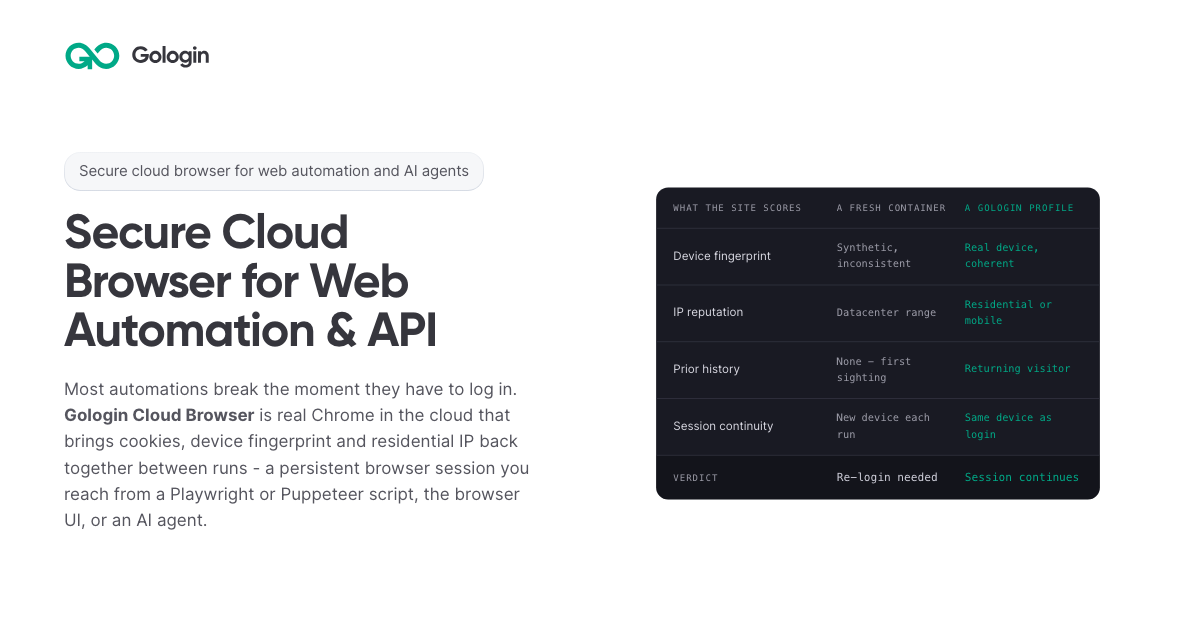
Gologin Cloud Browser delivers real Chromium browsers running in the cloud for AI agents, scrapers and web automation. Instead of launching a fresh browser on every run, developers connect to a persistent browser session that keeps its cookies, device fingerprint and IP address between runs. The browser can be driven from a Playwright or Puppeteer script over a WebSocket connection, from the browser UI by hand, or by an AI agent. It is aimed at developers and teams building scrapers, agents, internal tools and recurring workflows that need to stay signed in to real websites. The product is part of the wider Gologin stack, alongside Web Unlocker, Gologin Browser, Cloud Android, Gologin Proxies and the MCP server. The product addresses a specific failure mode: most automations break the moment they have to log in. According to the site, getting behind a login once is easy, but still being there next month is the hard part. Cookies do not keep a session alive on their own, because sites tie a session to the cookie, the device and the network it came from. A browser container that did not exist three seconds ago has no history, so every run starts as a first visit. Restoring only the cookies means the session arrives on a device the site has never seen, and the site responds by asking for a new login, a code or a check. The page's comparison illustrates this: a fresh container shows a synthetic and inconsistent device fingerprint, a datacenter IP range, no prior history, a new device on each run, and a verdict of re-login needed. Gologin Cloud Browser solves that by reconstructing three things together. The first is the session state: cookies, local storage and everything else the site saved in the browser. The second is the same device: the canvas, WebGL, audio and hardware profile that was present at login. The third is the same network: the residential or mobile IP the account signed in from. Combined, these three make the browser look like a returning user rather than a first-time visitor. The page frames the principle simply: cookies don't keep you logged in, identity does. A Gologin profile brings back all three components, and the FAQ notes that a session stays logged in as long as the site's own login lasts, because what ends a login is the site expiring it, not the platform. Connecting an existing script takes one line. Developers sign up with Google, copy an API key from the dashboard, and create a profile either with one click in the dashboard or with one API call; the profile keeps the device, the IP and the login. Then they install the library (npm install playwright-core, npm install puppeteer-core, or pip install playwright) and replace the script's launch() call with a connect line pointing at wss://cloudbrowser.gologin.com/connect?token=...&profile=.... The page shows complete, working Playwright, Puppeteer and Python Playwright examples that scrape quotes.toscrape.com, using chromium.connectOverCDP or puppeteer.connect with a browser WebSocket endpoint. According to the site, every line below the connect call stays exactly as it was, so selectors, assertions, waits and CI configuration are unchanged and the browser simply runs in the cloud. The browser comes with built-in stealth and anti-bot protection, and it runs on residential and mobile IPs from Gologin Proxies, which can be added to a profile in one API call, or on the user's own proxy. Profiles are isolated from one another: each has its own cookies, its own fingerprint and its own IP, and nothing is shared between them, so a problem in one profile does not reach the others. On the security side, the site states that pages load on Gologin's servers rather than the user's machine, so the target site never reaches the user's device or home IP. The cloud infrastructure is described as fully serverless and able to scale to thousands of browsers, and the company behind it cites seven years of expertise, SOC 2 Type II compliance and a 99.9% SLA. Every session includes a Live View link. Users can open it to watch the script work in real time, or take over by hand to complete a two-factor authentication step or fill in a tricky form, then hand the session back to the script. This matters for the failure case too: if a run fails halfway through, the profile keeps what the run built, meaning the cookies, the device and the IP, so starting the next run in the same profile picks up signed in rather than from the login page, and Live View can show where it stopped. The comparison table also states that no limit applies to session length on the first paid plan, versus 6 hours on Browserbase, 4 hours on Browser Use and 15 minutes on Steel as listed on the page. For AI agents, a Gologin MCP server gives Claude direct control of profiles, proxies and cloud sessions. Users install it with a single command (claude mcp add gologin -e API_TOKEN=... -- npx gologin-mcp) and then describe the job in natural language. The page's example prompt asks for three profiles on US residential IPs and a script that logs into each seller account and pulls last month's invoices; the server creates the three profiles with one US residential IP each, writes invoices.py against the Cloud Browser API, and saves the profiles so the next run starts already logged in. The site describes this as describing the job and letting the tool set up the accounts and write the automation, and it links to a dedicated Browser for AI agents page and a dedicated MCP server page. Pricing is built around browser hours rather than requests. The free tier requires no card and provides 3 runs of up to 15 minutes each on 1 parallel session. Professional costs $4.50 per month for individual developers with 50 browser hours, 1 parallel session, unlimited runs and $0.09 per extra hour. Business costs $8 per month with 100 browser hours, 2 parallel sessions and $0.08 per extra hour. Enterprise costs $14 per month with 200 browser hours, 3 parallel sessions and $0.07 per extra hour. Custom plans start from 4 parallel sessions and include a dedicated account manager, a premium SLA and tailored onboarding. Additional parallel sessions cost $2 per month each on any plan, and proxy traffic beyond the allowance is $1/GB. The site emphasizes that there are no per-request fees, so a retry does not cost twice, and compares its $1/GB residential traffic with published rates of $5/GB for Browser Use, $6/GB for Steel, $8/GB for Anchor and $10/GB for Browserbase. The page maps six use cases. Playwright and Puppeteer users connect over CDP with one line and keep the same selectors, tests and CI while the browser runs in the cloud. Dynamic web scraping handles feeds, load-more buttons and JavaScript-built pages, loading them the way a person's browser would. Web automation that stays logged in targets portals and dashboards that are signed into once and then run on a schedule. AI agents get their own fingerprint, cookies and IP per profile so they can do real work. The Cloud Browser UI covers live sessions where a person watches automation and steps in for 2FA. A scraping browser gives Puppeteer or Playwright real Chromium with its own device fingerprint and a residential IP. The site distinguishes this from Web Unlocker, which is recommended for public pages without a session and bills only on success. The product is positioned for developers, growing teams and organizations running critical operations, as reflected in the Professional, Business, Enterprise and Custom plan tiers. It fits into a broader Gologin ecosystem of one account, one proxy network and one ecosystem: Cloud Browser for sessions that stay logged in, Web Unlocker for sending a URL and getting the rendered page, Gologin Browser for isolated desktop profiles driven by hand, Cloud Android for platforms that only trust a phone, Gologin Proxies for residential, mobile, datacenter and ISP IPs, and MCP and AI Skills for describing a job to Claude and getting a working tool. Support resources include API documentation, a getting started guide and dedicated pages for Playwright and Puppeteer, dynamic scraping, web automation, AI agents, the Cloud Browser UI and the scraping browser. The core promise is simple and repeated throughout the page: log in once, stay logged in. By keeping session state, device fingerprint and residential or mobile IP together across runs, Gologin Cloud Browser lets scrapers, agents, internal tools and daily workflows behave like returning users instead of new visitors, while a one-line connection keeps existing Playwright and Puppeteer code intact. Free to start with no card and residential IPs included, it gives developers a serverless, stealth-capable browser fleet that can scale from a single test run to thousands of browsers.
Canva Craft is Canva's first state-of-the-art image generation model, developed and trained from scratch by Canva Research, Canva's in-house AI lab. Built specifically for design, it turns prompts into images that work as designs rather than as flat pictures, producing compositions with deliberate hierarchy, alignment, spacing, crisp edges and text that lands where it should. Craft is available to all Canva users globally through Dream Lab inside Canva, and to developers and product teams through Canva's Public API. It is intended for everyone from first-time creators to professional designers, as well as marketers and product teams who need visuals they can edit, refine and reuse. Most image generation models are trained primarily on photographs and generate pixels directly from a prompt. That approach can produce attractive pictures, but it offers little control over how an image is structured, where objects sit, how text reads, or whether the result can be pulled apart and edited afterwards. Canva Craft was designed around a different assumption: that a great deal of visual output is not photography but design work such as posters, social posts, presentations, infographics and menus, where layout, hierarchy and typography matter as much as the imagery itself. The context is significant in scale, with more than a quarter of a billion people using Canva to create over 400 designs every second, and Canva states that delivering frontier-level performance at that scale required breakthroughs in both compute efficiency and inference speed. Craft's core answer to this is a two-stage architecture that separates compositional planning from image rendering. In the first stage, an image planning model interprets the prompt and writes a detailed plan of the composition: which elements appear, their spatial relationships, relative scale, visual hierarchy, and any text that needs to appear in the image. In the second stage, a dedicated image rendering model translates that plan into a high-fidelity image at up to 2K resolution across more than 30 aspect ratios. Because the model reasons about the structure of an image before generating it, it can produce complex layouts with greater accuracy, including legible text, precise object placement and consistent visual relationships. Craft gives users direct control over what ends up in the frame. Canva describes shaping images your way by treating the whole image as an intentional composition of layered elements, and perfecting every detail, with the example of asking for a purple sky, long shadows and a lone tree and getting all three with the emphasis where you wanted it. Output size is flexible too: users can choose from more than 30 aspect ratios or enter their own, to create everything from social posts or stories to posters or banners. Prompts can be written in any language, and Craft can create text in 55 languages, which makes it practical for multilingual campaigns and localized assets. That same structure enables granular editing. Because composition is explicitly modelled, Craft allows targeted changes to individual elements without unnecessarily altering everything else. Craft outputs are particularly well suited to Canva's Magic Layers, which can transform generated images into fully editable design elements. JSON boundary boxing makes it easier than ever to convert images into editable layers with Magic Layers, with more accurate and faster results. Canva also states that this architecture provides the technical foundation for more advanced editing and reference-image capabilities coming in future releases. Craft's training places a much greater emphasis on design than on photographs. Its training data includes millions of human-made templates from Canva's content library, spanning professionally designed posters, social posts, presentations, infographics, menus and typography-rich layouts. Unlike flat images, these templates teach the model exactly how layout, hierarchy and typography fit together, giving it a deeper understanding of the principles behind effective design rather than simply what finished images look like. Following pre-training, Craft was optimised through supervised fine-tuning and reinforcement learning, incorporating feedback from Canva's professional designers to improve instruction following, typography accuracy and overall visual quality. For internal evaluations, Canva's professional designers worked alongside dozens of researchers to assess more than 25,000 pairs of images in head-to-head comparisons with leading models, and when automated evaluations and human judgments differed, Canva sided with the designer. Performance work underpins the model's availability at scale. Through advanced model distillation, Canva reduced the number of inference steps required by Craft to a fraction of the original model, and it developed a custom inference engine optimised for the planning stage, making Craft an order of magnitude faster than its first internal version. These advances underpin Craft-fast and Craft-ultrafast, two upcoming variants designed to deliver high-quality image generation at a fraction of the cost of leading frontier models. On DesignArena, the largest crowdsourced assessor of AI design, Craft debuted as the fourth most advanced image generation model, ranking first globally for People & Portraits out of 87 models and for Landscapes & Nature out of 85 models, second for Abstract & Patterns and fourth for Products. Access is broad. Canva Craft is available starting today to all Canva users globally; to begin, users open Dream Lab in the bottom left panel. Craft is also available via the Public API and the Canva MCP Server, representing Canva's push to develop AI models that extend the reach of its technology beyond its core product. Developers and product teams can build Craft into their own tools, such as marketing platforms, e-commerce sites, ad builders and print services, and Canva notes the API is also the quickest way to test Craft on your own prompts and compare it with other models. Canva MCP, coming soon, connects Craft to AI assistants and automated workflows so agents can create images ready to use in a design, meaning an assistant can make a launch graphic, a product shot or a social post as one step in a bigger task. Safety is built into every stage of how Canva develops and deploys AI. Models undergo continuous testing and rigorous safety evaluations to identify and mitigate potential risks, and alongside visual quality Canva evaluates brand safety, cultural context and the potential for harmful content before release. Like all AI products on Canva, Craft is backed by Canva Shield, Canva's comprehensive approach to AI safety, which includes robust input and output moderation, privacy and safety controls, and reporting tools that allow people to flag potentially harmful or misleading content. The model is built to support a wide range of creative work. For social content and marketing assets it produces posters, social posts, flyers, presentation visuals and ads with layouts, hierarchy and text that are ready to use. For lifestyle and editorial photography it generates realistic scenes featuring people, places, food, travel and everyday moments. For illustration and digital art it covers flat, vector, painterly and hand-drawn styles. For people and characters it handles portraits, groups and fashion, including complex scenes that stay coherent. For nature and environment imagery it produces landscapes, cityscapes, interiors and architecture, and for creative and conceptual work it builds imaginative compositions that bring real and stylised elements together. The outcomes Canva describes are precision and control. Users get photorealistic images that bring together the fine detail, depth and soft transitions of real-world imagery with the thoughtful composition of design: deliberate hierarchy, alignment, spacing, crisp edges and text that lands where it should. Because generated images can become editable layers, the output feeds directly into a design workflow instead of ending as a static file, and because composition is planned first, users can make targeted adjustments rather than regenerating everything. The result is more flexibility for first-time creators and professional designers alike to bring their imagination to life. Craft's target users span marketers, creators and designers who need images that work as designs, along with developers and product teams building marketing platforms, e-commerce sites, ad builders and print services through the Public API. This first version is described as just the start: faster Craft models are already on the way, and Canva plans to keep raising the bar on quality, detail and control to improve things like fine print and technical drawings. In summary, Canva Craft's primary value proposition is that it generates design-ready images rather than mere pictures. By planning composition and typography before rendering, training on millions of human-made Canva templates, and producing 2K output in more than 30 aspect ratios with text in 55 languages, it delivers the precision, consistency and editability that design work demands, available inside Canva through Dream Lab and to developers through the Public API.
Context Engine is a hosted service at app.contextengine.com that gives your AI agents and your human team members one shared memory. Claude, ChatGPT, Cursor and Claude Code save to it as they work and read from it when they start, while the people on your team open the same memory in the app to read it, ask it questions in plain words and add files of their own. You sign in with your email and there is no password; the free plan requires no card. Its main purpose is stated plainly on the site: nobody has to explain the same thing twice. The context gathered by one tool or one person becomes available to every connected tool and every teammate, instead of staying locked inside a single chat history. The problem Context Engine addresses is that every AI tool starts from nothing. Claude Code forgets what you decided yesterday, Cursor does not know what ChatGPT learned this morning, and you end up explaining the same project and the same rules again in every tool and every session. Multiply that across a team and the gap widens: what one person's AI learns stays in that person's chat history, where the rest of the team cannot see it. Important decisions, customer requests and contacts are made once and then lost. Context Engine positions itself as the memory that AI tools and human teams share, so context accumulates instead of being rebuilt from scratch each time a new session begins. Connecting the tools is the first step, and the site describes it as something you do once. You pick the app you use: ChatGPT and Claude take a few clicks from their connectors, Claude Code takes a single command followed by an Authenticate step, and Cursor uses an Add to Cursor link. Anything else that speaks MCP or HTTP connects with a key, so agents and scripts you build yourself can use the same memory. Each connection reaches only the engines you choose, and for the sign-in connectors there is no key to copy or keep safe. After that, memory continues automatically as you work. What gets saved is described in concrete terms: a decision, a customer's request, a new contact. Each memory carries a type, shows which tool saved it and keeps its history. The site's examples label memories as decision, customer, person, note and file, and show entries such as a card retry limit decided in Cursor, a new finance contact saved by Claude, or a database choice saved by Claude Code. Besides what the agents write, you can drop in files yourself, a whole folder or a .zip, so documents like a pricing review sit alongside the decisions they relate to. Memories are organised into engines, which the site defines as a memory with a purpose. You say in a sentence or two what an engine is for, and your AI tools read that purpose to decide what to save where, so a client's decisions land in that client's engine and your own notes stay yours. You can have as many as you need: one for yourself, one per client or project, or one for a team. There are walls between them, because a connection reaches only the engines you tick, each at Can read or Can read and save. A search across engines labels the engine every result came from, and a memory moved to another engine takes its history with it. When a connected tool starts, it does not begin from nothing: it gets a short brief covering what each engine is for, what happened recently and what changed since its last visit. If it needs more than the brief, it searches the memory, matching meaning as well as exact words rather than only literal terms. The person reads the same memory in the app, so what the tools know is always visible to you. The site is explicit that Context Engine is not a chatbot and does not run your agents. Your AI tools do the thinking, and the product is the memory they share. Context Engine also keeps itself in order without manual sorting. It writes summaries, a short account of each day rolled into weeks and months, from what was saved. It links related memories, so people, customers, decisions and files connect to each other and a map shows how. It catches duplicates, so when a tool tries to save something already there under the same name it is pointed to that memory to update instead of creating a second one. Every change records who made it, with which tool, and what the value was before. People can also ask their memory questions in plain words, and every answer names the memories it came from, so the result can be checked against its sources. The outcomes described are practical. If you build with AI, the decision you made with Claude Code on Monday is known to Cursor on Tuesday, so you stop re-explaining your conventions, your stack and why you chose it. For teams, everyone reads the same memories and gets the same answers whichever tool they use, and when someone leaves, what they saved stays in the engine, still credited to them. For people working across several clients, the site suggests one engine per client and a connection of its own for each, and notes that in Claude Code a project-scoped connection keeps each client's repository to that client's memory, so nothing crosses between them. Invitations work on any plan at no cost per person, with owner, admin, member and viewer roles, and you can see every tool that reaches an engine and cut one off in a click. Security and privacy are treated as part of the product. Every engine gets its own database, its own search index and its own running copy of the service on Cloudflare, so it never shares a table with anyone else's data. Your content is sent to models only to answer you; it is not used to train anything, not sold and not used for advertising. Support opens an engine only when you approve a request, for the time it names, and every visit is logged, with a legal or safety duty the one exception. Export gives you one ZIP of Markdown and JSON that opens without the product, deleting an engine is scheduled a day ahead so you can export first, you can choose the EU at setup to keep its database and files there, and two-step sign-in is built in. Enterprise puts Context Engine on your own server for your organisation alone. Pricing is per engine, never per person, and people are free on every plan. Free is $0 forever with 1 agent per engine, up to 3 when friends join, 1 GB of memory and no card required. Pro is $12 per month or $99 a year for 10 agents and 25 GB per engine. Unlimited is $39 per month or $299 a year for every agent you run and 100 GB per engine. Enterprise starts at $6,000 per year on your own server, run by Relote, with single sign-on for your own apps, updates and support included. Every plan lets your AI tools read and save as much as they need; what a plan sets is how many agents connect and how much memory the engine holds, and when memory is full a new memory is refused with the reason while nothing stored is deleted. Relote built and runs Context Engine. In short, Context Engine is shared memory for AI-assisted work rather than another assistant. Your agents keep doing the thinking, and the service makes sure the decisions, people, customers and files they produce stay in one place that every connected tool and every teammate can read, question and take with them.
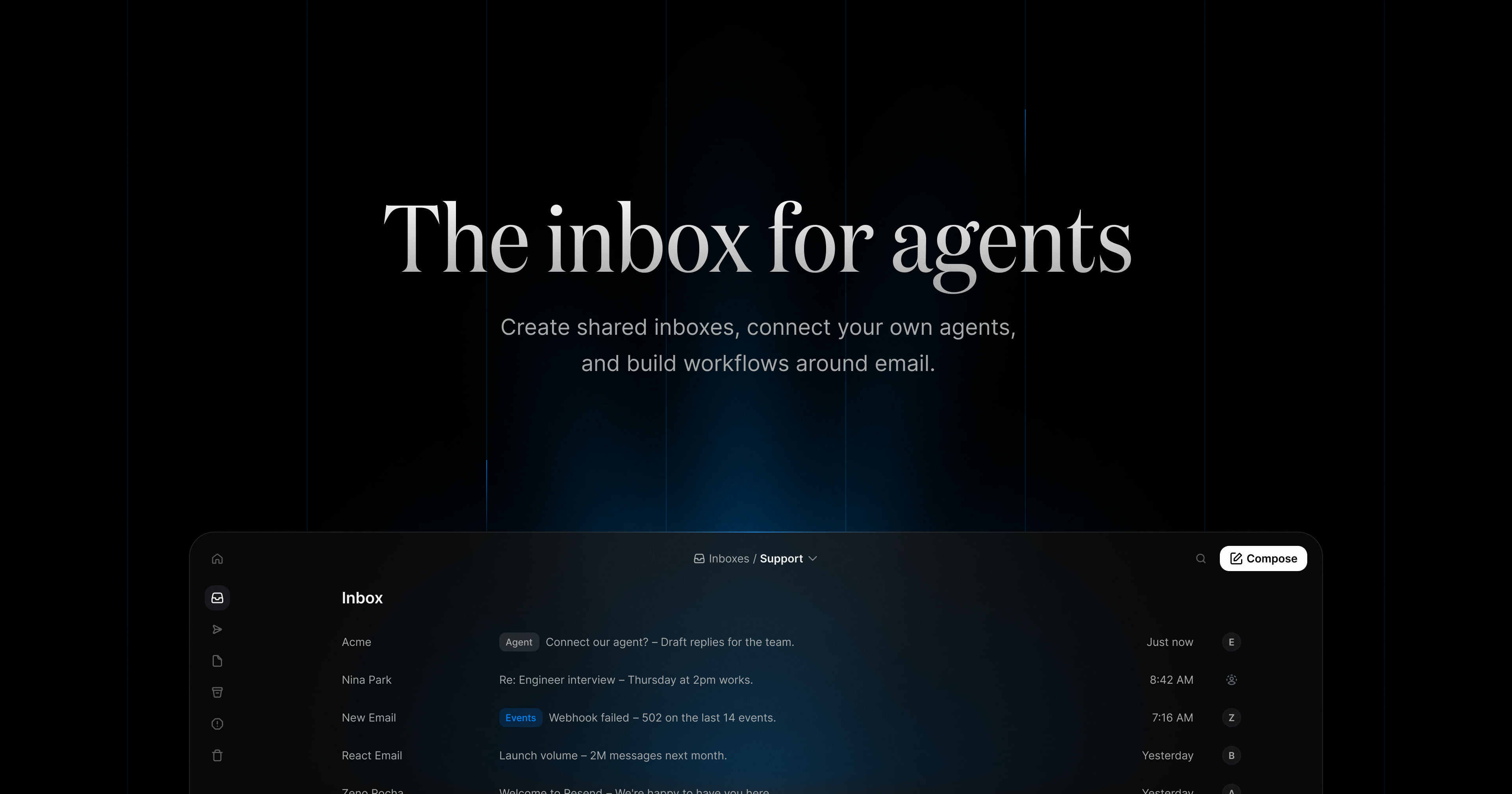
Resend Inboxes is described on its product page as "the inbox for agents." It lets you create shared inboxes, connect your own agents, and build workflows around email. The product is built for developers and teams who want to handle real email inside their own product or process rather than in a separate tool: you can create inboxes programmatically, receive email, and work with conversations through the Inbox API, while a web inbox view lets a team read threads, assign conversations, and pick up where someone else left off. Agents can also be connected to an inbox and given access to conversations, messages, and the tools they need to work with email. The page frames the inbox as the place where work arrives from many directions at once — bounce-rate alerts from support, replies to recruiting threads, incident notifications, launch-volume questions from ops, DNS verification notes, receipts nobody is monitoring. Those messages need a home that a team can share and a program can reach. Resend Inboxes addresses that by combining an email inbox with an API: the same conversations that a person reads in the inbox view are exposed to code and to agents. Instead of building email handling from scratch, a team starts with an inbox that already supports threads, labels, read state, and assignment, and connects it to whatever needs to send, receive, or respond to that mail. The API-first side of the product covers three core operations. Creating an inbox is a single POST: you give your app a dedicated email address and it starts receiving messages in one call, with fields such as the email address, an inbox name, and a from name. Receiving email is a GET: you list conversations as they arrive, then fetch a specific thread and the emails inside it, with a query parameter available on the threads endpoint for search. Replying to a thread is a POST: you can send a reply on an existing thread from your app, an agent, or an automated workflow, and a drafts endpoint (POST /inboxes/:inbox_id/drafts) lets drafts be created programmatically. Responses shown on the page include message objects carrying from, labels, subject, received_at, and read, plus inbox fields such as inbox_id and folder. Inboxes is described as agent-ready: you connect the agents you already use through MCP or skills, giving them access to conversations, messages, and the tools they need to work with email. The page names Claude Code, Cursor, Codex, Grok, and Gemini as agents you can connect. This means an agent can be a participant in the inbox rather than an outside script — it can read what has arrived, work with the thread, and take action on the message based on what it has been told to do. Connecting through MCP or skills keeps the agent in the same environment the team already uses, so an agent's work on email happens alongside the rest of its work rather than in a separate integration. The shared-inbox layer is what makes the product a team tool. Inboxes can be shared across a team, conversations can be assigned to specific people, and anyone can pick up where someone else left off. The screenshots on the page show inbox lists organized by purpose — a support inbox of incoming threads, a recruiting inbox where applications sit in groups such as Design, Engineering, Marketing, Success, and Ops — with subjects, senders, relative times, and labels next to each conversation. That structure keeps the ownership of each thread visible instead of letting messages pile up in an address no one owns, and it gives agents the same organized view of the work that humans have. Agentic workflows put routine email work on autopilot. You give an agent instructions, and it handles routine email work triggered by webhooks while the team stays in control. The page's examples of instructions include keeping the inbox organized by labeling and triaging new emails, drafting replies, and assigning anything that needs attention; triaging incoming support email, labeling by urgency, and drafting a reply once there is enough context; labeling anything urgent, forwarding invoices to finance, and drafting follow-ups; and labeling candidate conversations, archiving stale threads, and drafting a short next step for the team. The page also shows an "available actions" area for the agent, with an "all actions" view, which indicates the agent operates within a defined set of actions rather than doing anything it likes. Overall, the product combines three layers that are usually separate: an inbox UI, an API, and an agent runtime hook. The inbox is created through the API with a dedicated address; inbound mail lands in it as threads; messages carry labels, subjects, timestamps, and read state; and both humans and agents work on the same threads. Teams assign and share; agents follow instructions and use available actions; and everything can also be driven from code through endpoints for creating inboxes, listing and searching threads, replying, and creating drafts. The page's phrasing — create shared inboxes, connect your own agents, build workflows around email — describes that combination as a single product rather than a set of unrelated tools. The stated benefits follow from that structure. Conversations arrive in one place instead of scattered across personal mailboxes, so nothing sits unassigned. Replies can go out faster because agents draft them and humans review. Routine work — labeling, triage, forwarding invoices, archiving stale threads — happens without someone manually doing it, while the team keeps control over what the agent is allowed to do. Developers avoid building inbox infrastructure themselves, because the inbox, threads, and replies are already exposed as API calls they can call from an app or workflow. The page also positions Resend as delivering mission-critical email for some of the fastest growing teams, with Inboxes extending that into the receiving and replying side of the conversation. The page lists six use cases. For agents, each AI agent gets its own address to receive tasks, approvals, and updates. For support, support email is routed into the product and threads are fetched through the API. For executive assistants, an agent sorts incoming requests, drafts replies, and keeps threads moving. For recruiting, teams and agents share an inbox to track every candidate conversation. For on-call, alerts are collected in one inbox and each one is assigned so nothing sits unassigned. For notifications, receipts, alerts, and updates are sent to one address for the app to process. Pricing on the page starts at $0 / mo, and the free starting point includes up to 3 inboxes, sending and receiving 3,000 emails, connecting your own agents, and no credit card required. A "View pricing" link points to Resend's pricing page under a pay-as-you-go inboxes section, so the entry point is free and further plans are listed there. The technical entry point is a Node.js example using the Resend SDK — constructing a client with an API key and calling resend.inboxes.create with an email address, name, and from name — alongside links to the API reference documentation and a signup flow. Resend Inboxes is best understood as an inbox built for both code and colleagues. It gives developers an API to create inboxes, receive email, and reply to threads; gives teams a shared place to assign and continue conversations; and gives agents a way in through MCP or skills, with instructions and actions that let them triage, label, draft, and route mail while the team stays in control. The value proposition on the page is straightforward: create shared inboxes, connect your own agents, and build workflows around email.
Notion Auto is the name Notion is giving to the rebuilt agent and model-routing layer inside Notion AI, announced in the October 19, 2026 release titled 'Agents, rebuilt to do more for less.' The release upgrades Notion Agents so they have their own computer and browser, smarter context management, and a new 'Review for me' mode with safety checks, and it introduces Auto, an upgraded model router that matches each task to the right model. The stated purpose is straightforward: let agents work on tasks for up to 24 hours while delivering frontier-quality results at roughly 90% lower cost. It is aimed at people and teams already working in Notion who want AI agents to handle longer, more involved work without having to reason about which underlying model to choose. The release frames the problem in terms of model choice and cost. Notion's own framing is that you should not need a major in models to pick one — the growth of frontier models has turned a simple request into a decision about quality, speed, and price. At the same time, agents that can only run briefly are limited in what they can accomplish, and AI usage scattered across Notion Agent, Custom Agents, and outside AI tools is hard to see and govern. Notion addresses those pressures in one release: a more capable agent harness, a router that makes the model decision automatically, and a single credit system that brings all AI usage together so people and teams can understand what is running and what it costs. The most substantial change is a second rebuild of Notion's agent harness. Notion Agents now have their own computer and browser, which lets them operate beyond the chat surface, and they gain smarter context management so the work they do stays grounded in the right information. A new 'Review for me' mode adds safety checks, giving users a way to have agent output reviewed before it is treated as final. Notion says agents can now work on tasks for up to 24 hours, a significant extension of how long a single task can run, which matters for work that cannot be finished in one short session. Alongside this, chats load up to 50% faster on mobile according to Notion, so starting and checking agent work on a phone is quicker. Auto is described as an upgraded model router. Rather than making users pick a model, Auto matches each task to the right model while balancing quality, speed, and cost, and if it gets stuck it changes course. Notion reports that across 20+ common tasks, Auto delivered results similar to Opus 5.5 and Astra at about 90% lower average cost. The practical consequence Notion highlights is that credits go about 10× further. The framing is 'frontier quality at 90% lower cost,' with the router absorbing the complexity of model selection so the user only sees the task and the result. Notion also lets users bring the AI they already pay for. A ChatGPT Plus, Pro, or Go plan can be connected to a personal Notion Agent, and Bring Your Own Key is now in private alpha for Ent. For teams, Notion has announced an AI Command Center as coming soon: it will show usage by person, feature, and agent, allow spending limits and alerts, and let administrators decide which models and agents their team can use. The stated goal is that teams always know what is running, who owns what, and what everything costs — governance that becomes more necessary as agents take on longer-running, more autonomous work. Notion MCP, which Notion calls its fastest-growing product ever, has been overhauled so that favorite agents can use Notion as a shared brain: finding context, remembering what matters, and making things that can be shared. Memory sync is live today, with skills via MCP coming soon. The release also introduces a new credit system for Notion AI. Because Notion Agent, Custom Agents, and many outside AI tools can now all work in one place, Notion is bringing all AI usage together under a single credit system rather than leaving it fragmented across separate surfaces. Taken together, the release describes a layered approach. At the core, the rebuilt agent harness supplies the environment agents work in — a computer, a browser, and smarter context management — plus the 'Review for me' safety mode and runtimes of up to 24 hours. Above that, the Auto router decides which model handles each task, adjusting course when it gets stuck and optimizing for a balance of quality, speed, and cost. Around that core sit the connection points: bringing a ChatGPT plan or your own key, using Notion as a shared brain through MCP, and watching or limiting usage through the AI Command Center once it ships. A single credit system ties the consumption side together so all AI usage is accounted for in one place. The benefits Notion states are cost, capability, and clarity. Frontier-level results at about 90% lower average cost, with credits going about 10× further, changes the economics of running agents routinely. Agents that can work for up to 24 hours and that have their own computer and browser can take on tasks that previously would have needed to be broken up or handled manually. The 'Review for me' mode and safety checks address the trust question that comes with longer autonomy. Faster mobile chat loading makes it easier to check in on agent work away from a desk. And unified credits plus the coming Command Center give teams visibility into and control over spending. Use cases follow directly from those capabilities. Someone can hand an agent an involved task and let it keep working for hours — up to 24 — instead of restarting it each session. A user who already pays for ChatGPT Plus, Pro, or Go can connect that plan to a personal Notion Agent rather than treating the subscription as separate from their Notion work. External agents can be pointed at Notion through the overhauled MCP so they can find context, remember what matters, and produce things that can be shared. Administrators preparing for wider agent adoption can plan around the AI Command Center's usage views, spending limits, alerts, and model and agent permissions once it becomes available. And everyday work benefits from Auto routing across 20+ common tasks, where Notion reports comparable results to Opus 5.5 and Astra at much lower average cost. The target users described in the release are Notion users broadly: individuals running a personal Notion Agent, teams coordinating Custom Agents and outside AI tools in one place, and enterprise customers, who are the audience for Bring Your Own Key in private alpha for Ent. Mobile users are addressed directly through the faster chat loading. Availability is described as live now for new customers, and AI usage across agents, custom agents, and outside AI tools is being consolidated under the new credit system. Notion points readers to a longer blog post for details on everything new, including that credit system. In summary, Notion Auto packages three ideas into one release: agents that are more capable because they have their own computer, browser, better context management, a safety-checked review mode, and much longer runtimes; a router that delivers frontier-quality results at roughly 90% lower average cost so credits go about 10× further; and a set of controls — bring your own AI, an improved MCP, a coming AI Command Center, and a unified credit system — that make AI usage visible and governable. The promise in the release title is the takeaway: agents rebuilt to do more for less.
withHuman is the approval layer for AI agents. It lets teams put their most consequential agent actions behind human approvals, so their agents can do real work while someone accountable stays in the loop. Rather than blocking agents entirely or letting them run unchecked, withHuman intercepts the tool calls an agent wants to make and holds the risky ones until a person has looked at them. It is framework-agnostic, open source, and built on open standards, and it is aimed at teams running agents in production — support, payments, SRE, finance, sales and marketing — where an action such as a refund, a payment, a merge or a data deletion cannot simply be taken back. Agents are increasingly capable of taking real action: calling Stripe, merging pull requests, rolling back deployments, updating CRM records or paying invoices. The problem is that a tool call is a real-world event. Once a refund is issued, a payment goes out or a table is dropped, there is no undo. Teams therefore face an uncomfortable choice: keep agents on a short leash and lose the value of autonomous work, or let them run and accept that some actions will be wrong. withHuman exists for the actions you can't take back. Its stated approach is to let agents draft everything and ship nothing until someone accountable has looked at it, while still allowing the routine majority of calls to pass without a human ever being bothered. Everything starts with interception. Each tool call an agent makes is intercepted by AAP, the Agent Approval Protocol, and sent to withHuman for approval. If the agent supports AAP, withHuman just works. Coverage spans coding agents through hooks — Claude Code and Codex among them — and agent frameworks through SDKs for LangGraph, CrewAI, Mastra and others. There is also an MCP gateway, and for teams building their own agents the open Agent Approval Protocol is available directly. In the product's own illustration, a support agent's stripe.refund call is held by withHuman before it reaches Stripe, with the arguments captured as a structured request. Approval pipelines are how withHuman avoids approval fatigue. Instead of sending every single call to a person, teams write policy rules that approve or deny routine requests automatically, and only the tough stuff goes to humans. Rules can be conditioned on the agent, the tool, the arguments and the agent context. A simple example from the site: refunds under $20 approve automatically, while a $75 refund that exceeds the $20 threshold skips the automatic rule and is escalated. For calls that rules can't describe — such as judging whether a support reply is routine — there is an AI judge. Teams can also use webhooks to their own policy service, so existing policy logic can participate in the pipeline. In the demo, three of four calls are decided without a person touching them. Escalation paths make sure the request reaches the right human rather than a generic queue. Teams write rules that decide which requests go to which team or person, routing by agent, tool, arguments or team. Teams then set their own escalation order and on-call flows, and requests escalate when nobody answers in time. The example on the site shows a $2,400 refund held because it is over $1,000: it goes to Sam Alvarez, the finance lead, while under-$1,000 refunds go to the support team and out-of-hours requests go to the on-call person. Reviewers are met where they already work — Slack and Discord, iPhone and Android apps with push, plus email, text message and WhatsApp — and each reviewer's own notification rules pick the channels. Every decision is kept on the record. withHuman maintains an append-only audit log of run history for production, capturing each request, the decision and any notes, with reviewer identity attached to every decision and the full request retained alongside it. Entries such as db.delete_rows approved by d.chen, stripe.refund approved by s.alvarez with a note that it was verified with finance, or k8s.apply denied by m.okafor are all recorded. The point is straightforward: when someone later asks who approved this, the answer is available, with the identity of the person who said yes and the exact request they saw. withHuman's distinctive approach is that it is a protocol, not a walled garden. Your agents speak to withHuman via AAP, the Agent Approval Protocol, an open spec started by withHuman to let agents wait on human decisions. That means integrations are made with AAP, not with withHuman specifically, so one integration works with any provider. The spec is built in the open, with issues, proposals and changes happening in public, and the aim is stated plainly: to be the best provider, never the only one. The spec, SDKs, adapters and conformance tests are open source, so teams can swap providers without rewriting a single agent. The withHuman core — the queue, the audit trail and the web UI — is also open source and self-hostable, so it can run on your own infrastructure or be run for you. Following a single consequential action end to end shows how the pieces fit together. A customer asks for a refund; the support agent finds a duplicate charge and decides to refund it; the agent's tool call is intercepted and held by withHuman before it reaches Stripe. The rules check it: the approval pipeline approves or denies the call automatically, or asks a human to take a look. In the example, a $75.00 refund exceeds the automatic $20 threshold, so the request goes to the Payments team, where Chris is on call. Chris is notified on his preferred platform, sees the tool call and the request context — amount, reason, customer — and approves or denies. The approved refund then reaches Stripe and the agent carries on, with the resulting stripe.refund reference recorded. Getting started is done through a CLI that connects every supported agent on a machine. A single curl-and-sh install command onboards coding agents such as Claude Code, Codex, OpenClaw, Pi, Hermes and DeepSeek, places the hooks in position, and finishes in the browser where the request appears for approval or denial. Supported integrations listed on the site include coding agents, an MCP gateway, LangGraph, Deep Agents, Pydantic AI, OpenAI Agents, Claude Agent SDK, Google ADK, CrewAI, AI SDK, Mastra and an HTTP API. Setup examples use pip installs for the Python frameworks, npm packages for the TypeScript ones, and a simple POST to /api/aap/v1/requests for anything else, with a timeout field so a call does not wait forever. Use cases are framed around the actions you can't take back. An AI SRE can request approval for kubernetes.rollout_undo before rolling payments-api back after a 5xx rate spike. Coding agents surface Bash commands. Customer support routes stripe.refund. Finance and accounting routes bill.pay. Sales routes docusign.send. Marketing routes campaign.send. Personal assistants can route calendar.create_event. In every case the agent can draft the work — the refund, the rollback, the payment, the contract send — and nothing ships until someone accountable has approved it. withHuman is aimed at companies running AI agents, not hobby projects — the kind that want one set of rules for every agent the company runs. The reviewer experience is built for team members who are on call for a particular domain, whether that is the Payments team, a finance lead or an SRE. On availability, the project is open source with a hosted version; teams can self-host the core or let withHuman run it for them. The Product Hunt launch notes an offer of three months of Scale free using the code PRODUCTHUNT. In short, withHuman gives agents the freedom to do real work while keeping humans accountable for the decisions that matter. By intercepting tool calls, deciding routine requests automatically, routing risky ones to the right person, and recording every decision, it turns human approval from a blocker into a workable layer that sits underneath every agent a company runs.