Category Focus/categories/code-assistant
Code Assistant AI Tools
Discover and compare the best code assistant AI tools and software. Browse 94+ curated tools with reviews and rankings.
Projects tracked
94
Sort mode
RECENT
Page
2
Discover and compare the best code assistant AI tools and software. Browse 94+ curated tools with reviews and rankings.
Projects tracked
94
Sort mode
RECENT
Page
2
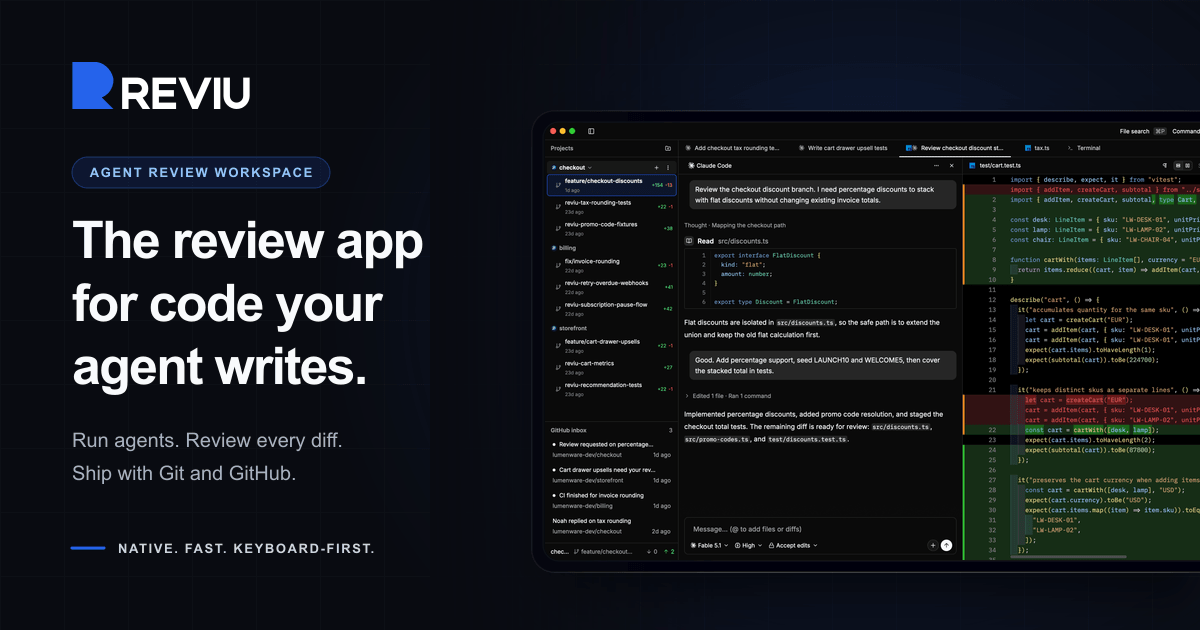
Reviu is a native desktop application built for reviewing the code that coding agents write. Instead of treating an agent's output as a disposable chat log, Reviu turns each task into a durable session with its own conversation, branch, terminal, checkpoints, file edits, and review queue. Developers start an agent such as Claude Code or Codex, watch the session, inspect every diff, send line comments back to the agent, and then stage, rebase, commit, and push with real Git underneath. The app is aimed at developers who already drive agent CLIs on their own machines and want a structured review layer between the agent's work and the branch that eventually lands in their repository. Agentic coding changes where the bottleneck sits. The agent can produce a large diff quickly, but someone still has to read it, question it, and decide what belongs in the branch. That review step is usually spread across terminal windows, a chat transcript, a separate Git client, and a browser tab full of pull request threads. Reviu was rebuilt from a Git client with an agent panel into a review workspace for coding agents, so the review of agent output happens in one place before the work becomes history. The core local agent review loop stays free, while GitHub pull requests, reviews, checks, merge, and notifications are the Pro layer. Each task in Reviu becomes a durable session rather than a disposable chat. A session keeps its own conversation, branch, terminal, checkpoints, file edits, and review queue, and you can switch between sessions without stopping running agents. Parallel worktrees keep multiple agent tasks out of your main checkout, so one task cannot dirty another. Attention states show at a glance which sessions are running, waiting, failed, or ready for review, and readable agent activity groups commands, reads, edits, permissions, and failures as reviewable events. Running several agents at once therefore stays organised instead of turning into a pile of interchangeable terminal tabs. Diff review is the centre of the app. You inspect the diff produced by the agent, with file, line, and side context, and leave line comments that are sent back to the agent. Comments can be batched rather than sent one by one, so a review queue such as three selected comments on a file becomes a single message to the agent. The agent can then address them, for example fixing a discount order, adding a rounding test, or renaming an unclear helper. Because the comments carry the exact file, line, and side context, the fixes are anchored to the code being discussed instead of being described in prose. Reviu keeps real Git nearby so that review decisions become commits. You can stage the hunks you trust, unstage another pass, and restore the rest. Branches can be cleaned before a pull request exists by squashing, fixup, dropping, and reordering commits. Messy states are recoverable: resolve conflicts, continue rebases, stash work, cherry-pick, and undo mistakes. Every surface follows the checkout, so changes, history, terminal, and review all reflect the same branch, and Git actions such as commit, amend, push, force push with lease, interactive rebase, and pop stash are available from the same keyboard-first command palette as the rest of the app. Reviu Pro adds GitHub without losing local context. A pull request dock shows your branch's pull request alongside the agent session, working tree, and review threads, and Reviu finds the pull request for a checked-out branch or helps create one from the header. GitHub diffs can be opened in the editor, commented on inline, replied to in threads, and submitted as a full review. Merging follows GitHub conventions with squash, merge, or rebase using GitHub's generated title, message, bullets, and trailers, and checks and review status are visible before you act. An inbox surfaces notifications such as requested changes, finished CI, and replies, and a browser extension adds Open in Reviu to GitHub pull requests in Firefox and Chrome so a pull request can be opened as a local checkout ready for diff review, files, and terminal. Underneath, Reviu is a fully native desktop app built with Rust and GPUI, a Rust-based GPU-accelerated UI framework, with no Electron and no webview. It does not run agents in the cloud: Reviu launches the agent CLI you already installed and signed into, so the agent runs as a local process on your machine and your code stays local. Agents come from the official Agent Client Protocol registry, which includes Claude Code, Codex, Gemini, Copilot, Cline, and about twenty others. Because Reviu drives the CLI you already have, agents run with your existing subscription, there is no API key to paste, and there is no agent meter. The practical benefit is that agent work stops being a raw dump of changes and becomes a branch you own. Review happens before the work lands, comments travel back to the agent with precise context, and the final steps of staging, rebasing, committing, and pushing happen in the same window instead of a chain of separate tools. Cleaner history means the commit that reaches a pull request reflects decisions you actually made. If you already have Git tooling you like, Reviu is designed to sit alongside it as the missing agent review layer rather than replace it. A typical workflow starts with an agent session for a feature such as checkout discounts: the agent works in its own worktree, and you review the resulting diff line by line. Selected comments are batched and sent back to the agent, which makes the fixes, after which you stage the hunks you trust and clean the branch with an interactive rebase before pushing. Running several sessions in parallel covers tasks like adding percentage discounts, fixing tax rounding, and writing cart property tests at the same time without one task dirtying another checkout. For developers working through GitHub, you can open a pull request from the inbox, review its diffs locally, submit the review, and merge with a squash, merge, or rebase commit. The browser extension covers the reverse entry point: spotting a pull request on GitHub that needs local review and opening the branch in Reviu. Reviu is for developers who already use coding agent CLIs and want to review their output before it becomes a commit. Local agent review is free and includes agent sessions with ACP registry agents, parallel worktrees and durable session state, diff review with comments sent back to the agent, and local Git covering stage, rebase, conflicts, and terminal. Pro costs $9 per month or $79 per year, saving 27%, with a 14-day free trial and cancel anytime, and adds the pull request dock with checks and merge, GitHub review comments and submit review, inbox notifications, and the browser extension. Reviu runs on macOS for Apple Silicon and Intel, Windows for ARM64 and x64, and Linux through a terminal install command. No account is needed for local sessions; signing in is only required for the GitHub integration in Pro. Mobile access and remote over SSH to servers and VPS are listed as planned. In short, Reviu gives developers a review workspace for the code their agents write: run the CLI you already use, inspect and comment on every diff, send fixes back to the agent, and finish the branch with real Git, while Pro connects that local flow to GitHub pull requests, checks, merge, and notifications.
devpit is a native desktop application for controlling the coding agents you run. Everything a session needs sits in one window: a chat pane, a terminal for each project, a board that holds the work, a running record of what every agent call cost, and an orchestrator that can see across every project you have linked. Today it drives Claude Code through the claude CLI you already have installed, while support for Codex, Cursor, Gemini CLI and opencode is described as coming. devpit runs on Linux, macOS and Windows, is free and open source, and is aimed at developers who run more than one agent at a time and want a single place to watch them all. Coding agents are powerful, but they are also noisy. Each one lives in its own terminal, and the moment you run more than one at once — a task in one repository, a review in another — you are switching between windows, losing track of which process is still alive, and guessing at what any given run has cost you. There is no shared place where the work being done is visible, and no natural place for an agent to stop and ask you a question. devpit exists to put all of that in one window, with panes side by side rather than tabs spread across six applications. Its guiding rule is that nothing advances on its own: an agent writes down what it did, and moving the work forward remains your call. The most basic pane is the terminal. It is a real pty behind tmux, which means you can split it, close the window, and find the same process still running when you come back. Beside it sits a chat that proceeds one turn at a time and shows what each turn cost, so a conversation with an agent is also a running account of what it is spending. Per project, devpit also offers capabilities — extra tools that open as panes next to the work; Notes and Excalidraw are the ones available today. Files, diffs and a browser are available in the same window, so you can review what an agent changed and look at the page it serves without leaving devpit. Because each terminal is held by tmux rather than by the visible window, and because each project has one target terminal, switching between pieces of work simply re-attaches the view to whatever you are looking at, while the previous session keeps running in the background. The board is where work is organised. It uses your columns in your order, and moving a card is what starts the work: the card is not a passive note, it is the trigger for a step. A step does not advance on its own. It writes down its output, its exit code and its real cost, and then it stops. Deciding to move on is yours, unless you have deliberately set a lane to move by itself, in which case the board shows that. Cost is tied directly to the board too: a spending cap on every call is set by the column the work sits in, and the card records the real cost of what ran. In other words, the column defines the ceiling for that stage of work, and the card reports what was actually spent. Above the individual project sits the orchestrator: a chat that reads every board you have linked, across projects. You can hand it a card and it starts a session for that card, then reports back to you. Alongside it, the Sessions panel lists every session on your account, with the ones waiting on you first, and you can answer them in place, as yourself. The island — a capsule that floats above your windows — shows what each agent is doing and lets you allow or deny from there. Agent state is expressed in words as well as visuals: thinking (started, before its first step), working, asking, waiting, done, failed and sleeping. There are also reminders that only remind: telling devpit to remind you at three to review a pull request means it will tell you then, and start nothing. The orchestrator has explicit limits: it never moves a card into a lane that runs a step, it never acts on a timer, and it never approves anything in another session. Any reply it drafts goes out only when you send it. Underneath, devpit is local-first. Everything it creates — the board, the panes, the terminal and the costs — lives in a workspace per project under ~/.devpit, so nothing lands in your repository: there is nothing to gitignore and nothing appears in the diff. A teammate can work alongside you without ever hearing of devpit. When a step needs a checkout, devpit makes a worktree for that line of work, and it never removes a worktree while it still holds uncommitted work. Sessions are designed to outlive the window: close devpit, reopen it, and what was running still is, because tmux holds the processes. Windows is supported through a per-user installer that brings psmux, the tmux of Windows, and the Linux build also runs in WSL 2. devpit is written in Rust and Tauri rather than being another Electron app, and each terminal is a real pty behind tmux, or psmux on Windows. The outcome for a developer is a single place to watch several agents at once, without losing any of them. Costs are visible per call and capped per column, so agent work does not become an unbounded bill. Sessions that wait on you are surfaced first, so time is not wasted hunting for the agent that has stopped and needs an answer. Because the workspace is separate from the repository, using devpit does not change your code base or your team's workflow. And because state is preserved — tmux holds the processes and the workspace persists per project — you can come back days later and find the board, panes, terminal and costs where you left them. Concretely, this plays out in several ways. When you are running agents on more than one project, each board gets its own workspace and you watch them all through one window. When an agent finishes a change, you review its files, its diffs, and the page it serves without leaving the app. When you want work kicked off, you hand the orchestrator a card and it starts a session and reports back. When an agent stops and asks a question, you answer it in place as yourself, with the sessions waiting on you listed first. When you are away from the machine, you can check on running work from your phone over Tailscale. And when you want a nudge rather than action, you set a reminder that tells you at the time and starts nothing. devpit is aimed at developers who use coding agents, and specifically at those who run Claude Code and find themselves managing several sessions or several projects. The agent it drives today is Claude Code, through the claude CLI you already have; other agents can report their status with the devpit-agent hook, and Gemini CLI does so with nothing to set up. Codex, Cursor, Gemini CLI and opencode are all listed as coming behind the same interface, and your own agents are markdown files. The tech stack is Rust and Tauri, with tmux as the process holder and psmux on Windows; optional remote checking is done over Tailscale by pairing a device with a one-time code and choosing what it may do, with nothing listening beyond your tailnet. devpit is free and open source under Apache 2.0, uses your existing Claude Code plan with no new API keys, and requires no account — an account today only signs you in, and sync, when it comes, will keep the workspace around your work rather than the work itself. devpit's value proposition is control: one native window for the coding agents you already run, a board that makes the state of the work visible, a cost on every call and a cap on every column, and an orchestrator that sees every project while never acting on its own. Free, open source, local-first, and out of the way of your repository.
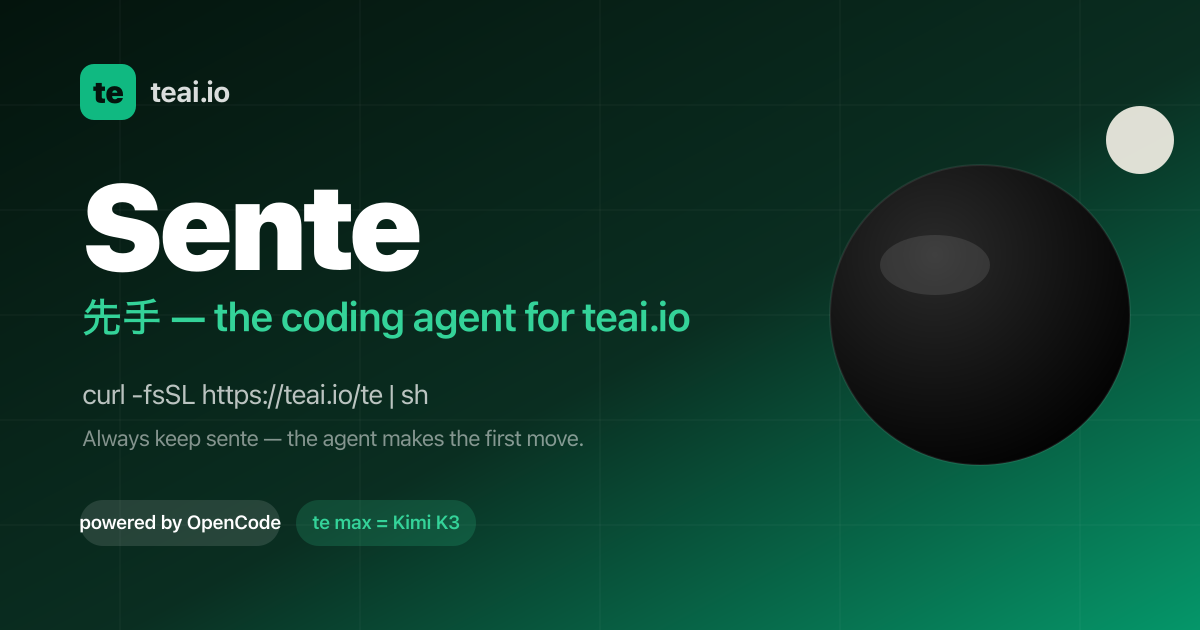
Sente is teai.io's official coding agent CLI. It is a thin launcher over OpenCode (MIT, 203k GitHub stars), and one curl installs it so that every teai.io model becomes an agent in your terminal. The command is short — te, with a sente alias installed alongside it — and it starts an agent in the current directory so you can type a task and let it work. Sente is built for developers who live in the terminal and want an agent that reads and edits the files in their repository, runs commands, and reports back, instead of a chat app that can only discuss code. It is also available as a voice conversation on macOS, Linux and WSL, and as Sente Cloud in the browser. The aim is to remove friction between a model and a working repository. teai.io is natively OpenAI-compatible, and Sente (OpenCode-based) speaks OpenAI-compatible natively, so tool calls go through teai without a conversion layer — zero conversion, stable by design, and nothing to break when routing through teai. Sente is deliberately not a fork: on each launch it syncs the teai.io model catalog (380+) via /te/config, so you inherit every upstream OpenCode improvement. Coding discipline is injected mechanically as well: sente-rules.md is written automatically and loaded into every session, enforcing "read before you write" and "always ship a deliverable". Setup is designed to take about three minutes. Paste one line — curl -fsSL https://teai.io/te | sh — and the installer installs OpenCode if it is missing and points OPENCODE_CONFIG at the teai.io-generated config. Then te login with an API key (a free one comes with 100 credits on signup), and run te for interactive mode or te run "refactor this function" for one-shot work. Sente works on macOS, Linux and WSL; on Windows you use WSL. Optional GUI apps are installed only when you explicitly ask: te app install sente for a menu-bar Sente.app, te app install koe for an always-listening Koe.app, or te app install both. Those macOS apps are Developer ID signed and Apple notarized, and they are placed in /Applications only when you run the command — transparency first. Sente gives you 380+ models with one line to switch. glm-5.2 is the suggested daily driver at roughly ¥0.34 per task; te lux selects the Claude/OpenAI flagship (Fable 5) for quality-critical work; te max selects Kimi K3 (2.8T, 1M) for hard tasks; and DeepSeek V4 Pro runs at about ¥0.03 per task. One base_url decides routing, so you can keep costs low without breaking quality. For measurement, teai.io defines one task as approximately 1K input tokens plus 500 output tokens, and it publishes a bake-off with measured numbers. Product Hunt describes the same idea as models on one account — Claude, GPT, Gemini, DeepSeek and more — with OpenAI- and Anthropic-compatible endpoints. Three things stand out in daily use. First, you can ask by voice: te talk starts a voice conversation where you say what you want done and Sente reads its reply back to you, available on macOS, Linux and WSL. Product Hunt describes a consent-first voice enrollment where you read one sentence (about ten seconds) to enroll your voice, with the delete key yours and a stated commitment never to clone a voice that isn't yours. Second, work keeps going while your Mac sleeps: Sente Cloud at sente.teai.io runs in your browser on a cloud workspace, and you sign in with an emailed one-time code, so closing your laptop doesn't stop the work. Third, there is a three-tier safety model for sente: read operations are automatic, write operations are treated as reversible and proceed, while delete, send, publish and pay actions ask first. The te CLIs come in three stages — te (you type, it runs on request), sente (you speak, it moves first) and fuseki (nothing is triggered, because it is already watching). fuseki has an Alpha implementation available as fuseki or te watch: it keeps an eye on your board, human-gates and recent repos without being called, thinks and logs plus speaks a suggestion only when something actually changes, never executes on its own, and is stopped with te stop. It inherits the same safety tiers and defaults to proposing only. Privacy and enterprise readiness are explicit parts of the product. API-compatible endpoints never store request bodies — only metadata, kept for 90 days. Invoice billing and a DPA are available, and BYOK (bring your own key) is in preparation. The service runs in the Tokyo region with JPY billing and Japanese support. On top of that, local PII scrubbing is available as an opt-in: te privacy scrub on masks emails, phone numbers, addresses, API keys, private keys and high-entropy tokens, plus names via your Contacts dictionary (te privacy scrub harvest), Japanese honorific heuristics and Apple's on-device name recognition, on your Mac before the request reaches teai.io. It costs about 0.1 ms per request and needs no local LLM, and the reply is restored before it is shown. teai.io is candid that this is not a guarantee of complete detection — Japanese given names without an honorific or a dictionary entry are not caught — and notes that an optional Ollama layer (--llm) exists but is slow. Five beta skills, new in August 2026, add reference-corpus RAG to the CLI. 748 Q&A entries across law, security, freelance ops, cloud infra and OSS licensing are searched with lightweight retrieval — semantic embedding plus a relevance cutoff — before the agent answers, and full benchmark numbers, including where it failed, are published. te legal covers Japanese law with 259 entries across 21 topics: civil code, labor law, company law, inheritance, consumer contracts and commercial transactions, cross-checked against actual e-Gov statute text, with semantic search returning "no match" for unrelated questions instead of fabricating an answer. te security covers secure coding with 131 entries across 13 topics including SQLi/XSS/CSRF mitigation, auth/authz, secrets management, dependency vulnerabilities, crypto basics and API security — useful for sanity-checking "is this dangerous?" mid-implementation. te freelance covers freelance ops with 125 entries across 14 topics such as contract checkpoints, Japan's invoice system, tax filing and social insurance switching. te infra covers cloud ops with 117 entries across 14 topics including Fly.io, Docker, CI/CD, SQLite/libsql, DNS and TLS, with real gotchas teai.io itself hit running this exact stack. te license covers OSS licensing with 116 entries across 14 topics: MIT/Apache/GPL-family, AGPL's SaaS network clause and license compatibility, written after checking each license's official text. Beyond the CLI, the same RAG context can be requested directly from the API by passing a model identifier such as shitate/legal to /v1/chat/completions, using the same alias-resolution pattern as teai/auto, with billing reflecting whichever model actually served the response. All five are marked as beta: general reference information, not a substitute for professional advice. The terminal interface is bilingual. You choose Japanese or English for language settings and the skill list, and the choice is saved for the next launch, with the initial language following your terminal locale. You update with te update in your shell and restart Sente, then enter /language (or /lang) to pick a language. To find a skill by purpose, open /skills and search by display name, description or skill ID; you can read the selected skill's description below the list and press Ctrl+L or click the language label to switch languages in place. This setting covers the language dialog and skill list; available skills depend on your setup, missing translations are labeled, and skill IDs and execution instructions stay the same. The stated benefits are practical. Failed responses cost nothing: empty responses are not billed, and failed paid media jobs and failed MCP tool calls are refunded in full, so you pay for results rather than errors. Because Sente Cloud runs on a cloud workspace, long-running work continues while your laptop is closed. Because the tool works in the repository itself, tasks that used to be copy-pasted between a chat window and an editor — explaining a repo, refactoring a function — happen where the code lives. And because the launcher is thin, you keep inheriting upstream OpenCode improvements instead of waiting on a fork. Concrete workflows shown in the content include running te run "explain this repo" to have the agent walk a repository, or te run "refactor this function" for one-shot edits, and switching to te max run "..." when a task is hard enough to justify Kimi K3. Voice users hand a task over with te talk and hear the answer read back. Developers use the skills mid-task: asking te legal about a statutory reserve share (iryuubun), asking te security how to prevent SQL injection, asking te freelance how to register for the invoice system, asking te infra how to set a secret on Fly.io, or asking te license what to watch for when using AGPL in a SaaS. Teams that need the same retrieval from their own stack call shitate/legal through the API. Sente is aimed at developers and small teams working from the terminal, including Japanese-speaking users given the Tokyo region, JPY billing and Japanese support. It is free as a tool; teai.io runs on credits. The Free plan gives 100 credits on signup with no credit card required — enough for roughly 300,000 short chats on Qwen3.7 Flash or about 2,000 on glm-5.2, at 1K in plus 500 out each. Pro is ¥4,350/month (about $29 USD) with 30,000 credits, and Business is ¥14,800/month (about $99 USD) with 100,000 credits. Product Hunt describes the model as metered rather than unlimited, with monthly credits and the option to top up if you go over. Sente runs in the terminal on macOS, Linux and WSL, in the browser through Sente Cloud, and its skill models are callable from the API. Summary: Sente takes a one-line install and turns teai.io's model catalog into terminal agents you can type at, talk to, or leave running in the cloud — with mechanical coding discipline, opt-in local PII scrubbing, five RAG-backed reference skills, and a promise that failed responses cost nothing.
CamCue is a desktop AI interview and meeting assistant for Mac and Windows. It drafts answers to spoken questions and tasks on your screen using your CV, job description, and documents. Use it for interview practice, coding questions, client conversations, and team calls.Listen recognizes complete questions from your computer's audio and drafts answers as the conversation unfolds. Capture analyzes your entire screen, while Select focuses on the area you choose. You can ask about a question, a paragraph, a coding problem, or another task without copying it into a separate app.Add your CV, the role you're applying for, or project documents to give the assistant useful background. Choose Interview, Coding Interview, Quiz/Test, or Call mode, then set the response language and length. Save context presets for different conversations.Focus Mode puts answers in a compact, movable window with adjustable transparency. Global shortcuts control Listen, Capture, Select, and the window. Try the built-in Listen demo before a call and revisit questions and answers in local session history.Speech recognition runs on your computer. Raw Listen audio is not saved or uploaded; recognized text and relevant screen or document context are sent for AI processing. CamCue requires an internet connection and an account. Stealth requests screen-capture exclusion where supported; compatibility depends on your operating system and capture app.Start with the Free plan's limited AI credits. PRO includes unlimited AI credits for Listen, Capture, and Select at US$9 every 3 days, US$19 per week, or US$69 per month. Subscriptions renew until canceled; technical rate and session limits apply. Mac requires Apple Silicon and macOS 14.2 or later. Windows requires x64 and Windows 10 version 2004 or later, or Windows 11.Website: https://camcue.app/Contact: support@camcue.app
Firetower is an open-source, self-hosted control plane for coding agents. Give it a machine you can SSH into and a repository, and it picks a host, cuts a branch, makes a worktree, starts tmux, launches the agent and keeps it running. Then it does the part that actually costs you time: it tells you the moment the agent stops being useful without you. It is built for developers and engineering teams who want to run agents such as Claude Code and Codex on infrastructure they control, and it is described as self-hosted with no account. Firetower installs in about five minutes with a single curl command and offers clients for macOS, Windows, iOS and Android, so the same work can be attached to from a browser or a phone. The problem Firetower targets is where the agent runs. In a typical setup the agent lives in a terminal on the laptop you started it from, so closing the lid, crashing the app or losing a connection either kills the run or leaves it orphaned with no clear picture of what changed. Firetower argues that the agent should not run on the device you happen to be holding. Because the agent runs on your own server rather than on the device that started it, every device can pick up exactly where another left off. The work survives the failure of any single part, and the repository, the diffs and the agent sessions stay on infrastructure you control rather than inside a vendor's cloud. Firetower folds the entire workflow into one place: you start from your issues and Linear tickets, the agent runs your worktrees, you preview and annotate, then you commit and open a PR. Firetower reads from your trackers as you look, and starting a ticket opens a workspace. The ticket list shows an ID, a title, the project, the assignee, how long ago it was updated and a status column that can already show that an agent is starting — for example adding a dark mode toggle, fixing an invite link on mobile, or rate-limiting a webhook receiver. Workspaces are scoped per repository and per user, a command palette (⌘K) sits over the interface, and the product offers twelve ticket sources to pick from. Firetower runs remotely and keeps going when you close your laptop, and a pause control is available. The site walks through three failure cases. If your laptop closes or the app crashes, nothing happens to the agent, because it never ran on the laptop — open Firetower on any other device and the conversation is exactly where you left it. If the Firetower server goes down, the workers keep running: each agent is on its own machine in its own worktree, and when the server comes back it catches up on everything that happened while it was away. If a worker dies, the worktree is still there, your branch and every file the agent changed are on that machine, and Firetower still knows about them — restart the worker and carry on. How it fits together: Firetower reaches each machine over SSH and starts a worker there. The agents run on that machine — in tmux, on their own worktree — which is why closing your laptop costs nothing and why the app itself never has to be the thing that is busy. The apps (desktop on macOS and Windows, mobile on iOS and Android) talk to a Firetower control plane over HTTPS. The control plane is one compose file on a server you already own, and it dials out to workers over SSH. Workers are authoritative: they write what happened to their own log before reporting it, and when the control plane comes back it asks for everything since the last thing it saw, so a reconnect is a replay rather than a guess. The worker never opens a port — it reads frames from stdin and writes them to stdout — so who dials is a transport detail: a child process, a container exec, or SSH. Firetower is written in Rust and presented as small by design: a small core, no accumulating terminal daemons, and workspace memory ceilings where the host supports them, built for work that keeps running. The site compares its resource profile against an alternative. On desktop it reports roughly 50 MB for the Firetower app, against a reported ~1.5 GB idle for the Orca app plus daemon, which it describes as 30× more efficient. For an agent worker it reports 5 MB with the agent CLI separate, against a reported ~500 MB per agent, described as 100× more efficient. For the server it reports a 200 MB control plane, against a reported ~1 GB after restart, described as 5× more efficient. The benefit is straightforward: agent work continues whether or not you are watching, and your attention is requested only when an agent has stopped and needs you. Because each agent runs in its own worktree on its own machine, one broken run does not take the rest with it, and a dead worker does not lose the branch or the files it changed. Because sessions live on the server, you can start something at a desk and check on it later from a phone without losing state. And because the control plane self-hosts from a single compose file with no account, teams can keep the code, the credentials and the diffs on servers they already own, behind whatever firewall rules they already have. Concrete workflows follow directly from the way Firetower is described. You can open your GitHub issues or Linear tickets in Firetower, start a ticket and have a workspace open with an agent already running against the right repository. You can start a long agent run on a Mac Studio or a Hetzner VM and close your laptop, checking the diff later from an iPhone or Android device. You can run several agents at once across different machines and repositories — for example Claude Code on one repository and Codex on another — and watch the inbox for the sessions that are waiting on you. You can annotate an agent's output, then commit and open a pull request. And if a server restarts or a worker dies, you can restart the worker on its existing worktree and carry on rather than starting over. Firetower is aimed at developers, engineering teams and anyone already running coding agents who wants them off their laptop. The integrations named in the content are GitHub and Linear for tickets; the trackers are read as you look, and the product is listed under Product Hunt topics including Open Source, Software Engineering, Developer Tools and GitHub. Clients are available for macOS, Windows, iOS and Android, and the site also describes attaching from a browser or a phone. The stack described on the site includes Rust, SSH, tmux, git worktrees and a compose file, in a self-hosted deployment with no account and an install command of curl -fsSL https://usefiretower.com/install.sh | sh. The takeaway: Firetower turns scattered, laptop-bound agent sessions into something that behaves like infrastructure. Give it a server you can SSH into and a repository, and it handles the branch, the worktree, the tmux session and the launch — then stays quiet until an agent actually needs you, across every device you use.
Macaly Cloud is an infrastructure and skills layer for your own AI agent. Add it to Claude, ChatGPT or Grok Bot — the product also works in Claude Code, Codex and Grok Bot — and you can build apps and websites with a database, hosting, a domain and 70+ other skills without leaving the chat or terminal you already use. It is made for people who already pay for an AI subscription and want the code their agent writes to become something real and live on the internet, instead of managing a stack of separate services themselves. Anyone who has tried vibe coding outside a single tool runs into the same wall. Tools such as Lovable and Base44 charge AI credits for every message, so when you already have Claude, ChatGPT or Grok Bot, paying for a second AI subscription makes no sense. The do-it-yourself route is no cheaper: hosting at around $20 a month, a database at around $25 a month, a domain at $15 a year, plus a Saturday spent on CI/CD and a Sunday on environment variables. That adds up to two bills, two AI agents, two subscriptions, charged twice — and the project still needs a database, user accounts, SEO metadata and API keys before it can go live. Macaly Cloud exists to remove that collection of separate purchases and configuration work, packaging the parts a project needs into the agent workflow you are already using. The database is one of the clearest examples. Normally it is a separate service with its own subscription; with Macaly Cloud it is created the moment the code needs it, and it is tested by your agent first. The result is a managed Postgres database sitting behind the app, without the database bill that usually comes with it. Hosting, previews and a live address work the same way. Elsewhere you would buy a hosting plan and spend a weekend configuring it; here every change produces a preview link, and one message puts it live on your own macaly.app address at no cost. A custom domain is described as the one thing nobody can hand out for free: you can buy one through Macaly or connect one you already own, and Macaly handles the records and the certificate. User accounts are provided out of the box, without you having to build authentication — described on the site as the thing every platform charges for and every DIY builder gets wrong. Google sign-in, email or one-time codes are available without extra development work, which means a project that needs real users does not stall on login screens and password resets. SEO is included in every build as well: metadata, server-side rendering and favicons, indexable from day one, with no plugin sold as an upsell. That matters because sites built inside chat tools or vibe coding platforms often ship without the technical foundations search engines need, and fixing that afterwards is tedious. AI features can also become features of your own app without API keys. Chatbots, summaries, image and video generation, even voice, all of them are part of your project with nothing to sign up for and no separate bill. On top of that, Macaly Cloud ships 70+ skills your agent can pick up mid-conversation, including email, analytics, payments, voice, plus connections to the tools you already use. Because the agent picks skills up as the conversation continues, the project can grow in scope — from a page to a signup flow to a paid product — without you leaving the chat to wire up another vendor. The workflow itself is deliberately short and is described in three steps. First you connect: one click and a sign-in is the whole setup. Then you ask: you say what you want and your agent builds it. Then you publish: you say publish and it is on the internet. Macaly Cloud is not a replacement for the model writing the code — Claude, ChatGPT or Grok Bot writes the code, while Macaly Cloud provides everything needed to make the project real. You keep working in the chat or the terminal you already use, describing what you want to build, and the agent builds the app, wires up the database and puts it online. Because the infrastructure and the skills arrive as one service, users keep the AI subscription they already pay for instead of adding a second one. On the comparison the site draws, message credits, coding, database, hosting, domain, previews, publishing, debugging and agent skills are all listed at $0.00 within Macaly Cloud, leaving only the bill you already pay. The source code and all of the data remain yours, and you can export them at any time. Everything is hosted on European infrastructure, in Frankfurt and Ireland, and Macaly states that it is GDPR compliant and never uses your content to train AI models. Concrete scenarios follow directly from those capabilities. A landing page can be described in the chat and published to a macaly.app address in the same conversation. A signup form can be built together with user accounts, using Google sign-in, email or one-time codes, without building authentication from scratch. An app that needs to store data gets a managed Postgres database created when the code needs it. A tool that summarises or generates content can include chatbots, summaries, image and video generation or voice as features of the app itself, without API keys. A site that needs to be found can ship with metadata, server-side rendering and favicons from the first build. And when something needs to change — put it back how it was, or rebuild a page — that happens through another message in the same chat. Macaly Cloud is aimed at anyone who already has a Claude, ChatGPT or Grok Bot subscription and wants to turn what the agent writes into a live project. That includes individual builders, teams and agencies; the site notes that teams, agencies and anything bigger than the standard plan are handled by a person rather than a form, reachable at hi@macaly.com for a custom plan. The tech stack is handled for you: your agent builds on a modern web stack with React and Next.js on the front end and a managed Postgres database behind it, and you never have to pick, install or configure any of it. Pricing is free until October 1st, including a database with a free base allowance, hosting, previews, a macaly.app address, SEO, analytics and 70+ other skills, with some skills possibly still using Macaly AI credits. From October 1st, Macaly Cloud becomes a standalone plan at $10 a month, which covers the infrastructure. In short, Macaly Cloud turns the AI subscription you already pay for into a build-and-publish platform. Claude, ChatGPT or Grok Bot writes the code; Macaly Cloud supplies the database, hosting, previews, domain, user accounts, SEO, AI features and 70+ skills that make the project real, and it does so inside the chat you are already using — for free until October 1st, then $10 a month.
m’kay is a voice interface for the AI coding agents already running on your Mac. Rather than sitting at a terminal or an editor window to check on a task, you open a browser page or pick up your phone and simply talk to Claude, ChatGPT/Codex and Cursor. It is built for developers who want to stay in touch with their coding agents when they step away from the desk, and its main purpose is to give one voice to all of your agents — not just a single assistant — while the agents themselves keep running as the real desktop apps you already use. Most voice tools for AI are designed around talking to one assistant. That model breaks down for developers, because real work is often spread across several coding agents running side by side on the same machine. m’kay was built for that reality: it talks to all of your agents rather than one. It also drives the real desktop applications instead of a remote copy, which means the sessions and projects you already have stay exactly where they are. The problem it solves is one of distance — your work lives on your Mac, but you are not always sitting in front of it, and the tools you use to reach it should not force you to relocate that work somewhere else. Getting started is described as a short linking step. A small open-source connector runs on your Mac and drives the agent apps you already use. You sign in once to link the connector, and from that point on your Mac and your browser session are connected. Because the connector is open source, you can inspect what it does, and because it works with the applications you already have installed, there is no need to move your coding sessions into a new environment or re-create your projects elsewhere. The setup is deliberately light: link once, and the voice channel to your machine is available. Once your Mac is linked, the whole product is accessed through voice. You can ask what your agents are doing, have their replies read aloud to you, and give them the next task — all from any browser or phone. That means the interface is not tied to a particular device or operating system: a phone's browser is enough. The workflow is conversational. You ask a question, you get an answer spoken back to you, and you respond with the next instruction, which is then carried out on your Mac. Reading replies aloud matters because the answers arrive where your attention already is, rather than requiring you to read a terminal window on a small screen. One voice reaching multiple agents is the core idea. Your Mac may be running Claude Code, Codex and Cursor at the same time, and m’kay lets you address all of them. You can ask which one is done, hear its reply, and tell it what to do next. This matters because the natural question when several agents are working is not what the assistant is doing, but which of my agents has finished — and the product is built to answer exactly that. Speaking to several agents through one channel removes the need to switch between separate tools or windows just to find out where each one stands. m’kay includes an explicit confirmation step before anything is sent. Nothing is sent until you say \"yes\" to a read-back, meaning the instruction is spoken back to you for approval before it is passed to the agent. For voice-controlled developer tooling this is a meaningful safeguard: spoken input is easy to mishear, and a command sent to a coding agent can change real files in real projects. The read-back gives you an opportunity to catch a misunderstanding before it reaches your codebase, so remote convenience does not come at the cost of unintended changes. You can run m’kay in two different ways. The first is the hosted voice page: you sign up and use the hosted service to talk to your Mac. The second is fully local: you clone the project and run everything on your Mac, using local models or your own API keys. There is also a menu-bar Mac app. The open-source nature of the project is central to this choice — the connector and the ability to run the whole thing locally mean you are not required to route your voice traffic through someone else's infrastructure if you would rather keep it on your own machine. The website presents both paths as equal options rather than a single mandated route. The benefit is continuity. Because m’kay drives the real desktop apps, your sessions and your projects stay where they are; nothing has to be migrated, and the state of your work does not depend on a separate environment being kept in sync. You also gain reach, because the distance between you and your Mac stops being a barrier — a browser tab is enough to check in, listen to a reply, and issue the next instruction. And because every instruction is confirmed through a read-back, that reach does not come at the cost of accidentally sending the wrong command to a live project. The scenarios described are ordinary moments of being away from the desk. You are on the train and want to know which agent has finished, so you open the voice page in your phone's browser, ask, and hear the answer. You are at the gym and want to give the next task without going home first — you speak the instruction, hear it read back, confirm it, and it is sent to your Mac. Or you are simply in another room with a laptop and would rather talk to your agents than walk back to the machine that is running them. m’kay is aimed at developers who run AI coding agents locally and want a lightweight way to reach them by voice. The Mac app requires Apple Silicon and macOS 13 or later, and there is a direct DMG download. You can also sign up free for the hosted option, or clone the project from GitHub and run it locally. The Product Hunt listing describes it as open source and lists it under Productivity, Open Source, GitHub and Menu Bar Apps, and the website presents the same fork in the road: use the hosted voice page, or keep everything on your own Mac. m’kay's value proposition is simple to state and specific in what it delivers: one voice for all of your coding agents, reachable from any browser or phone, driving the real desktop apps so your sessions and projects stay put, with a read-back confirmation before anything is sent. It does not try to replace your agents or move your work — it gives you a way to talk to what is already running on your Mac, from wherever you happen to be.
Harness Router is a decision layer for agent harnesses. It is built for AI coding agents such as Codex and Claude Code, and its purpose is to route tool calls before they run. Instead of letting the model reason through every closed-choice tool selection, Harness Router decides which tool to call and returns that decision. It works two ways: use the skill to stop model reasoning about obvious tool calls, or let PreToolUse intercept and route calls automatically. Fast route handles ordinary choices, while real ambiguity can escalate to Jev-backed MCTS. It ships as a native stdio MCP server with two tools and it is MIT open source. The problem it addresses is the cost of reasoning about the obvious. The site's core instruction is to stop reasoning about obvious tool calls, explaining that with the skill, Codex can delegate closed-choice tool selection to Harness Router instead of spending a full model reasoning step on an obvious choice. The headline statistics are 2 MCP tools, 1 Jev prior max in MCTS, and 0 extra model reasoning required before hook routing. That matters because a routing decision is far narrower than a generation step. The site compares Jev with GPT-6 Astra: Jev input is about 238× cheaper, at $0.042 per million input tokens versus $10, and Jev output tokens are free while GPT-6 Astra is $50 per million output tokens, so the total request-cost gap can be substantially larger depending on output usage. The stated point is not to replace Codex's planner: Jev handles the narrow, closed-choice routing step, while Codex keeps the broader reasoning and execution loop. The first feature group is the two ways into the router. Use the skill when you want explicit control, or use the hook when you want every tool call checked automatically. With the skill, Codex can delegate closed-choice tool selection to Harness Router instead of spending a full model reasoning step on an obvious choice. Prefer automatic enforcement? The PreToolUse hook applies the same routing layer before execution without requiring the model to invoke the skill explicitly. The site illustrates typical decisions with a few simple transitions: a known file leads to read, an edit that has finished leads to test, and four plausible tools lead to route. Compact state goes in and one tool choice comes out. The second feature group is the native MCP server and its tools. Codex gets a native stdio server instead of a heavy helper flow. There are 2 MCP tools, route and route_mcts. route takes a compact goal, the latest observation, and a small shortlist. The server keeps its provider alive, reuses connections, and returns a tiny structured result. Registration is done by adding a mcp_servers.harness-router block to ~/.codex/config.toml with the harness-router-mcp command and the OPENROUTER_API_KEY environment variable, then restarting Codex and verifying both tools with /mcp. The third feature group is route_mcts, for when one move is not enough and the product needs to search. route_mcts explores a supplied side-effect-free state graph. Jev can seed the root once, and the remaining simulations are local. The server never executes simulated writes, shell commands, browser mutations, or network mutations; it selects only the first real action. A representative benchmark profile is described as 4,096 sims at depth 3, with 1 Jev prior max in MCTS. The site shows a small example tree with branches such as quick at 0.60, invest at 0.78, verify at 0.31, and an inspect path leading to finish at 1.00 or a fallback. The fourth feature group is the project hooks and their safety behavior. You choose Codex or Claude Code. The project hook prepares a session tool catalog, then uses Harness Router to check tool choices before execution. The installer runs in your project root, adds the hook scripts, merges the configuration, and keeps generated state out of Git; it keeps existing settings and other hooks, backs up changed files, and is safe to run again. For Codex, the startup hook discovers its MCP tool inventory and builds the session catalog. For Claude Code, the startup hook discovers native tools from claude mcp serve and configured MCP tools through the SDK control interface, then publishes the live registry via HARNESS_ROUTER_TOOL_REGISTRY, and discovery makes no model call. Behavior is fail open and keeps approvals: each PreToolUse call uses fast route first, and when that decision is uncertain and a side-effect-free graph provider is configured, the hook can escalate to route_mcts. Without a graph provider it never invents an MCTS tree. The same choice, a fallback, a timeout, or a router error lets the original call continue, while a different confident choice blocks only that call and asks your agent to re-plan once. Sandbox and approval rules remain untouched. Overall, the rule is one router with two ways in: skill or hook. The router validates the call against the discovered tool inventory before execution, keeps deterministic transitions cheap while still checking the selected tool, and returns one tool choice from compact state. Simple decisions stay on the fast path and route_mcts is brought in only when the choice needs deeper search. Installing takes three steps. First, install the latest main branch globally and isolated through uv tool with the mcp>=2,<3 dependency and the harness-router git URL. Second, expose your OpenRouter key to the local MCP process by exporting OPENROUTER_API_KEY; the server can load without it, but Jev routing needs it when route is called. Third, register the stdio server in Codex with codex mcp add harness-router -- harness-router-mcp, then verify with codex mcp list. Project hook installation is a separate step that runs the installer in your project root with a provider flag for Codex or Claude Code. The reported outcomes are about decision latency, measured on 26 Sep 2026 with two experiments of 24 paired decisions each, using four, eight, or sixteen candidates, where timing stopped at the choice and selected tools were never executed. For route on ordinary tool choices, Harness Router was 9.5× faster on observed mean latency, 3,842.1 ms for Codex versus 404.5 ms; 10.2× faster on median, 3,384 ms versus 332 ms; and 9.0× faster on p95, 6,435 ms versus 718 ms, with 24/24 choices matching Codex. For route_mcts on three-step trees with 4,096 sims, it was 12.3× faster on mean, 4,772.4 ms versus 388 ms; 11.6× faster on median, 4,328.5 ms versus 372.5 ms; and 12.8× faster on p95, 6,958 ms versus 545 ms, with 24/24 optimal at 100%. The methodology notes that Codex chose a name only and its timer includes response generation, host scheduling, and dispatch, while router timings include MCP transport and the provider round trip, with MCTS also including local search; graph preparation, pure reasoning time, and task completion time were not measured. These exploratory runs used different workloads in an existing Codex conversation, matching choices measure agreement, and the MCTS test checks the highest-reward branch. Concretely, the workflows shown on the site include routing a known file straight to read instead of reasoning about it; keeping deterministic post-edit transitions such as edit finished to test cheap through fast routing while still checking the selected tool; handling a shortlist of four plausible tools by sending compact state in and getting one tool choice out; escalating a three-step decision to route_mcts over a supplied side-effect-free state graph that selects only the first real action; and installing a project hook so a session tool catalog is prepared and every tool choice is checked before execution for either Codex or Claude Code. Harness Router is aimed at developers and teams running AI coding agents such as Codex and Claude Code who want tool selection to be faster, cheaper, and more reliable before execution. It integrates through MCP as a native stdio server, supports project hooks for Codex and Claude Code, requires Python 3.11+ in the project root for hook installation, uses uv tool for an isolated global install, and needs OPENROUTER_API_KEY when Jev routing is called. It is released under the MIT license and is free to install and use. In short, Harness Router keeps simple decisions fast and brings in route_mcts only when the choice needs deeper search, routing tool calls before they run through either a skill or a hook.
Grok 4.7 is SpaceXAI's most powerful model for coding and knowledge work. It is built to work longer on difficult tasks, to check its own work more carefully, and it comes with the company's best-calibrated safeguards to date. SpaceXAI states that it is served at the same price and speed as Grok 4.6 and that it is highly competitive in its class. The model is available today in Cursor and in Grok Build, and it can also be reached through the Grok API, third-party coding harnesses, and model routers and cloud platforms, so teams can adopt it inside the tools they already use. The context for the release is the growing demand for models that can stay productive across long, multi-step jobs rather than only short prompts. SpaceXAI highlights CursorBench 4.0, a benchmark that stresses longer-running coding tasks, and notes that Grok 4.7 sits at the frontier in price-performance there. A second theme is professional knowledge work: in GDPval and AA Briefcase, the model is asked to work on tasks done by professionals such as lawyers, nurses, and financial analysts. Grok 4.7 improves on Grok 4.6 on both benchmarks and performs comparably to other frontier models, addressing the gap between short-answer demos and the extended work real jobs require. Grok 4.7 uses a new, larger base model compared with Grok 4.6. It was trained with a longer reinforcement learning run on a harder mix of tasks, weighted toward problems that take many hours to complete. As a result, the model is better at verifying its own work and at managing longer context, two capabilities that matter when a single task spans many steps. SpaceXAI also trained Grok 4.7 to natively understand the Grok Bot harness, which makes it better at conversational tasks and general knowledge work alongside its coding strengths. Together these changes describe a model tuned for endurance rather than one-shot answers. Across benchmarks, SpaceXAI positions Grok 4.7 as strong in several distinct domains. On software engineering it scores 46.3% on CursorBench 4.0, 71.0% on DeepSWE v1.1, with an asterisk marking a high-effort score, and 37.6% on Terminal-Bench 4.0. On electrical engineering it reaches 64.0% on EEBench. For professional knowledge work, it scores 1,657 on AA Briefcase v1.1 and an Elo score of 1,735 on GDPval. It also records 19.6% on the Harvey Legal Agent Benchmark and 56.7% on HealthBench Professional. The announcement compares these figures with Grok 4.6, GPT-5.6 Sol, and Fable 5.1, and notes that Grok 4.7 is better at creating documents and presentations. Safety and cybersecurity receive a dedicated section in the announcement. Grok 4.7 was built with an entirely new safeguard stack, and SpaceXAI describes it as the strongest model it has tested on refusals and jailbreak resistance. In dual-use domains such as cybersecurity and biological work, the company says it leads on both utility for benign tasks and safe refusal on dangerous ones, topping LatchBio's biosafety benchmark at 62.4%. On HackerBench v0.3, SpaceXAI's benchmark for risky and malicious cyber tasks, the model allows only 3.3% of risky dual-use prompts through while rarely blocking legitimate security work, giving it the highest safety score on that benchmark. The company frames this balance as important for defenders, who need the model to be useful on legitimate security work. SpaceXAI has also started giving select cybersecurity partners invite-only access to Grok 4.7's red-team capabilities for defense research. This detail shows that the safeguard work is not only a matter of refusal behavior but also of controlled enablement, where trusted partners can use the model for defensive security research while risky dual-use prompts are largely rejected for everyone else. Combined with the stated jailbreak resistance and calibrated refusals, the release frames safety as a core part of the model's design rather than an afterthought layered on top. The overall approach behind Grok 4.7 can be summarized from the announcement's own description: a larger base model, a longer reinforcement learning run on a harder task mix, and explicit training to verify its own work and handle longer context. Native understanding of the Grok Bot harness is another part of that methodology, aimed at conversational and general knowledge work. The commercial angle is equally deliberate, with the model served at the same price and speed as Grok 4.6 while the company reports frontier-level price-performance on longer-running coding tasks. For teams needing more throughput, SpaceXAI also serves a fast variant with twice the output speed at twice the price. The stated benefits follow from those design choices. Because the model works longer on difficult tasks and checks its own work more carefully, users can delegate multi-step jobs with more confidence that intermediate steps will be verified. Because it manages longer context and understands the Grok Bot harness, it can carry conversational and knowledge-work tasks that span more material. SpaceXAI also reports improvements in creating documents and presentations, and in benchmarks modeled on the work of lawyers, nurses, and financial analysts. Finally, the price and speed parity with Grok 4.6 means the capability gains arrive without a corresponding increase in cost per token for standard usage. Concrete scenarios appear throughout the announcement. Coding is first, both in Cursor and in Grok Build, where the model can be tried for free, and through third-party coding harnesses. Longer-running coding tasks are the specific focus of CursorBench 4.0, where the model is positioned at the frontier in price-performance. Multi-hour terminal work is represented by Terminal-Bench 4.0. Professional knowledge work includes the tasks measured by GDPval and AA Briefcase, described as work done by lawyers, nurses, and financial analysts, as well as the Harvey Legal Agent Benchmark and HealthBench Professional. Cybersecurity defense is another scenario, including invite-only red-team access for select partners. Electrical engineering is covered by EEBench. Grok 4.7 targets developers and teams doing coding and knowledge work. It ships in Cursor and Grok Build on day one, and is also available through the Grok API, third-party coding harnesses, and model routers and cloud platforms. Pricing starts at $2 per million input tokens and $6 per million output tokens, with a fast variant at twice the output speed for twice the price. A free trial is offered through Grok Build at x.ai/build, and the announcement also includes a CLI install command. SpaceXAI points users to its Console for creating an API key and to docs.x.ai for documentation. In short, Grok 4.7 is presented as SpaceXAI's most capable model for coding and knowledge work, combining a larger base model and longer reinforcement learning with a new safeguard stack. It works longer on difficult tasks, verifies its own work more carefully, and is served at the same price and speed as Grok 4.6 while claiming a frontier position on price-performance for longer-running coding tasks. For developers and professionals who need a model that can stay on task, balance capability with safety, and fit into existing tools, that combination is the core value proposition.
LucentraCode is an AI coding command-line interface built for developers who want to work with powerful frontier models without constantly worrying about usage limits or expensive subscriptions. It runs directly from the terminal: you install it globally and then launch the runtime, and it requires Node.js v20 or higher. The product is available on Linux, Windows, and macOS. Within the CLI you can choose from models such as GPT-6 Astra, GPT-5.6 Sol, Claude, Gemini, Grok, and Kimi, and use them for real development work — debugging, building features, refactoring, testing, and working across larger codebases. The problem LucentraCode sets out to address is the friction that comes with coding assistants built around tight quota windows. Its website frames the core pain directly: developers who are forced to stop and wait for a quota window to reset lose their flow. Competing tools that offer premium models often require jumping to a $100–$200 per month tier, and many products layer confusing rolling windows and multiple reset timers on top of that. LucentraCode positions itself against this model by offering frontier models on a $20 plan, eliminating rolling timers entirely, and replacing multiple meters with a single monthly usage pool. The headline promise on the site is "Built for Flow State. No 5-Hour Resets." — the idea being that a developer should be able to keep working for as long as the work requires rather than as long as the quota allows. The first pillar of the product is the removal of the five-hour reset cycle. LucentraCode advertises a session quota timer that is "uncapped (no 5h limit)", zero mid-execution lockouts, and a continuous flow state that is "guaranteed active". In practical terms, this means a coding session is not interrupted by a quota window rolling over while you are in the middle of a task. For a developer running an agent through a multi-step refactor or a test-and-fix loop, that difference matters: a lockout in the middle of an execution breaks context and forces you to restart the work. LucentraCode's stated design goal is that you can code for long sessions without being forced to stop and wait for a quota window to reset. The second pillar is access to frontier models on an accessible plan. The website states that premium models like GPT-6 Astra are available "without jumping straight to a $100–$200 tier", and it contrasts a competitor requirement of roughly $100–$200 per month with a LucentraCode plan at $20 per month that covers all models. The displayed model list for the Operator plan includes claude-opus-5, claude-opus-4.8, and gpt-6-astra, plus everything available in the Ordinary plan, while the Obsessed plan adds claude-fable-5.1 and claude-fable-5 on top of everything in Operator. The site also references models such as Claude 3.7 Sonnet, Opus 5, GLM 5.3, and Fable 5.1 among its examples of premium intelligence. The Product Hunt listing names GPT-6 Astra, GPT-5.6 Sol, Claude, Gemini, Grok, and Kimi among the models you can choose from. The third pillar is Smart Auto, the routing layer that decides which model handles which part of the work. According to the site, cheap models handle search, tests, and routine work, while stronger models handle implementation, architecture, and review. The stated reason is allowance efficiency: by spending premium intelligence only where it matters, the monthly allowance goes much further, and LucentraCode claims this results in 3x–5x more code shipped. For a developer, this means not having to manually decide which model to invoke for every step — routine operations are handled by efficient models and the heavier reasoning is reserved for the tasks that actually need it. The site presents this as "Smart Auto spends premium intelligence where it matters." The fourth pillar is billing simplicity: one simple monthly usage pool. Instead of confusing rolling windows or multiple reset timers, LucentraCode uses a single monthly meter described as a "single unified balance" with zero rolling timers and windows, letting you spend usage when you actually need it. The site summarizes this as "Single Monthly Allowance — zero artificial lockouts" and "Usage Freedom — spend when you need it." Underneath these promises is the product's overall approach: autonomous AI coding agents combined with multi-model routing architectures, running as a terminal-native CLI. The website itself is presented as a 3D cyberpunk CLI developer portfolio — an interactive 3D macOS terminal with realistic window controls, Matrix rain, a multi-agent demonstration, and CLI commands — while the site metadata describes Rust AST parsers among the technical components. The workflow is deliberately terminal-first: install globally, launch the runtime, and issue commands from the same environment where you already write and ship code. The benefits LucentraCode advertises follow directly from those pillars. Developers get longer uninterrupted sessions because there are no five-hour resets and, per the site, zero mid-execution lockouts. They get access to premium frontier reasoning without a $100–$200 monthly commitment, since the entry plan is listed at $20 per month. They get more output per unit of allowance thanks to Smart Auto's routing, which the site quantifies as 3x–5x more code shipped. And they get a single, predictable meter to reason about instead of juggling rolling windows. The site's framing is that this combination produces a "continuous flow state" in which a developer is not babysitting an agent or watching a clock. The use cases named in the product's own descriptions are concrete and ordinary parts of a developer's day. LucentraCode is intended for debugging, for building features, for refactoring, and for testing. It is also aimed at work that spans larger codebases, where an agent needs to move between many files and where switching models mid-task would be disruptive. The no-five-hour-reset messaging implies a workflow in which a developer stays in a single long session — running tests, applying fixes, running them again — rather than fragmenting work around quota windows. The "search, tests and routine work" versus "implementation, architecture and review" split described for Smart Auto also maps to a practical loop: let a fast model search the codebase and run tests, and let a frontier reasoning model implement the fix and review the result. LucentraCode targets working developers, particularly those who spend long sessions in the terminal and who want premium models without a premium-tier subscription. The site describes the Operator plan as "a higher-capacity runtime for serious builders — more models, real workflows, and enough room to actually ship larger systems", and the Obsessed plan as "the most powerful runtime we offer — flagship frontier models, unbounded reasoning, nothing held back." Pricing shown is $20 per month for Operator and $40 per month for Obsessed, with the site noting that international pricing is being displayed and that the Ordinary entry tier is available in India only, detected from the visitor's location. Operator is listed at 5X usage compared with the ordinary plan, and Obsessed at 2.5X more usage than Operator. The page states it is a pricing preview and that availability and billing details will be announced at launch, with full plan details at the platform dashboard. Technically the runtime requires Node.js v20 or higher and installs through npm, and the site lists support for Linux, Windows, and macOS. In short, LucentraCode's value proposition is "Code without the Clock". It is a terminal-native AI coding CLI that pairs frontier models with Smart Auto routing so that a single monthly usage pool stretches further, removes the five-hour reset cycle that interrupts long sessions, and prices access to premium intelligence at $20 per month rather than the $100–$200 tiers its marketing contrasts against. For developers whose work is judged by what ships, the pitch is simple: fewer clocks, fewer lockouts, and more of the session spent building.