Category Focus/categories/seo
SEO AI Tools
Discover and compare the best seo AI tools and software. Browse 50+ curated tools with reviews and rankings.
Projects tracked
50
Sort mode
RECENT
Page
2
Discover and compare the best seo AI tools and software. Browse 50+ curated tools with reviews and rankings.
Projects tracked
50
Sort mode
RECENT
Page
2
Simha Digital is an AI-powered SEO analytics workspace that brings all of a project's SEO together — Google Search Console, Google Analytics 4, PageSpeed Insights, Chrome UX Report and a site crawl — and turns it into a plan of what to fix first. It covers six or more data sources in one workspace, eight audit categories and more than sixty rules, and adds a check of how visible a site is in AI answers. Its stated purpose is clear insights, real strategy and sustainable growth, and its positioning is that it tells you what to fix, not just what is wrong. Most SEO tooling surfaces problems and leaves the prioritisation to the person reading the report. Simha Digital frames the problem differently: SEO data is scattered across Search Console, Analytics 4, PageSpeed, real-user Chrome UX data and crawls, and the real question is which of hundreds of issues actually matters for traffic. The site also points to a second shift: search is moving into ChatGPT, Perplexity and Google AI Overviews, so being found, read and quoted by AI engines is becoming part of SEO. Simha Digital's answer is to combine the classic data sources with AI-search checks, give the site one score, order the work by traffic at stake, and explain what changed and why — including whether ChatGPT-style answers cite your site, and who gets cited instead. The workspace starts with site health and priorities: one 0–100 score for the whole site and a task list ordered by impact, so the first item on the list is the thing that should grow traffic most. Technical audit by template then crawls the site and groups hundreds of issues into a handful of root causes — duplicate titles, missing H1s, broken links, canonicals — with the affected URLs listed for each and a fix attached. Instead of working through issue-by-issue lists, the audit is organised by template, so a root cause shared by many pages is handled once. The site states eight audit categories and sixty-plus rules behind this, and the interface preview shows an example SEO health score of 86/100 alongside site health and priorities, technical audit by template, and speed and Core Web Vitals panels. Speed and Core Web Vitals use PageSpeed plus real-user Chrome UX data for key pages, covering LCP, CLS and INP along with what slows them down — a way to see both lab and field performance rather than one number. Growth points and revenue add a commercial layer: queries that are one push away from page one, plus leads and revenue from organic search pulled from Analytics 4, so you can see whether SEO pays off rather than only whether rankings moved. A large part of the product is AI search — GEO and AEO. Readiness for AI engines (GEO) asks whether AI crawlers are allowed in, whether there is an llms.txt, and whether pages have structured data, clear headings and answers an engine can quote, producing a 0–100 readiness score with concrete fixes per page. The checks listed include crawler access for GPTBot, ClaudeBot, PerplexityBot, Google-Extended and more, llms.txt, schema.org markup, FAQ and author signals, and quotable content such as answer-first paragraphs, tables and definitions. Visibility in AI answers (AEO) goes further and tracks how often your site appears in AI Overviews and AI Mode, impressions and clicks from those surfaces, the queries where you appear and the ones where you do not, an AI-visibility trend per query, and where competitors are cited instead of you — updated as new data comes in. The output side of the workspace is a report and plan written by AI: a rebuildable snapshot for any period, including problems, solutions, growth points and a detailed AI summary of what changed and why. Alongside it runs an AI assistant, available 24/7 on your own data, which you can ask why traffic dropped or which queries are the easiest wins — it answers from your own audit, queries and traffic rather than from generic advice. The overall workflow is described in three steps: connect your website by adding your domain and connecting your data sources; see what matters by running an audit and discovering opportunities; then take the next step by setting priorities and working with the AI assistant. What the product presents as its distinctive approach is that GEO and AEO findings land in the same plan as everything else, prioritised by traffic at stake — no separate tool and no separate report for AI search. The stated outcomes are faster decisions and visible growth: a single health score to track, a prioritised list instead of an issue backlog, and an explanation of changes so you know why numbers moved. Because AI-search readiness and AI-answer visibility feed the same plan, the work needed to be read and cited by AI engines is ranked next to technical and content fixes rather than treated as a separate project. Concrete scenarios described or shown on the site include connecting Search Console and Analytics 4 for a site and running a crawl to get one health score; using the template-level audit to clear duplicate titles, missing H1s, broken links and canonical problems across many URLs at once; checking Core Web Vitals for key pages using PageSpeed and real-user data; auditing crawler access, llms.txt, schema and quotable content per page to improve GEO; monitoring AI Overviews and AI Mode for the queries where you appear and where competitors are cited instead; asking the assistant why traffic dropped; and reviewing a rebuildable AI-written report of problems, solutions and growth points for a chosen period. Plans are three: Starter at $19.90 per month for up to 5 projects with a 7-day free trial, Pro at $39.90 per month for up to 10 projects, and Turbo at $79.90 per month for 20 projects, then $3.59 per project. Every plan lists the same core capabilities — all data sources and audit, Core Web Vitals and priorities, the AI project assistant and unlimited checks — and you can cancel anytime. Project limits suggest the workspace is used by people running SEO across several sites, from validating an idea through to growing traffic. In short, Simha Digital packages SEO data collection, technical auditing, Core Web Vitals, AI-search readiness and AI-answer visibility into one workspace, then converts all of it into a single score, a plan ordered by impact, and an AI assistant that answers questions from your own data — so the question shifts from what is wrong to what to fix first.
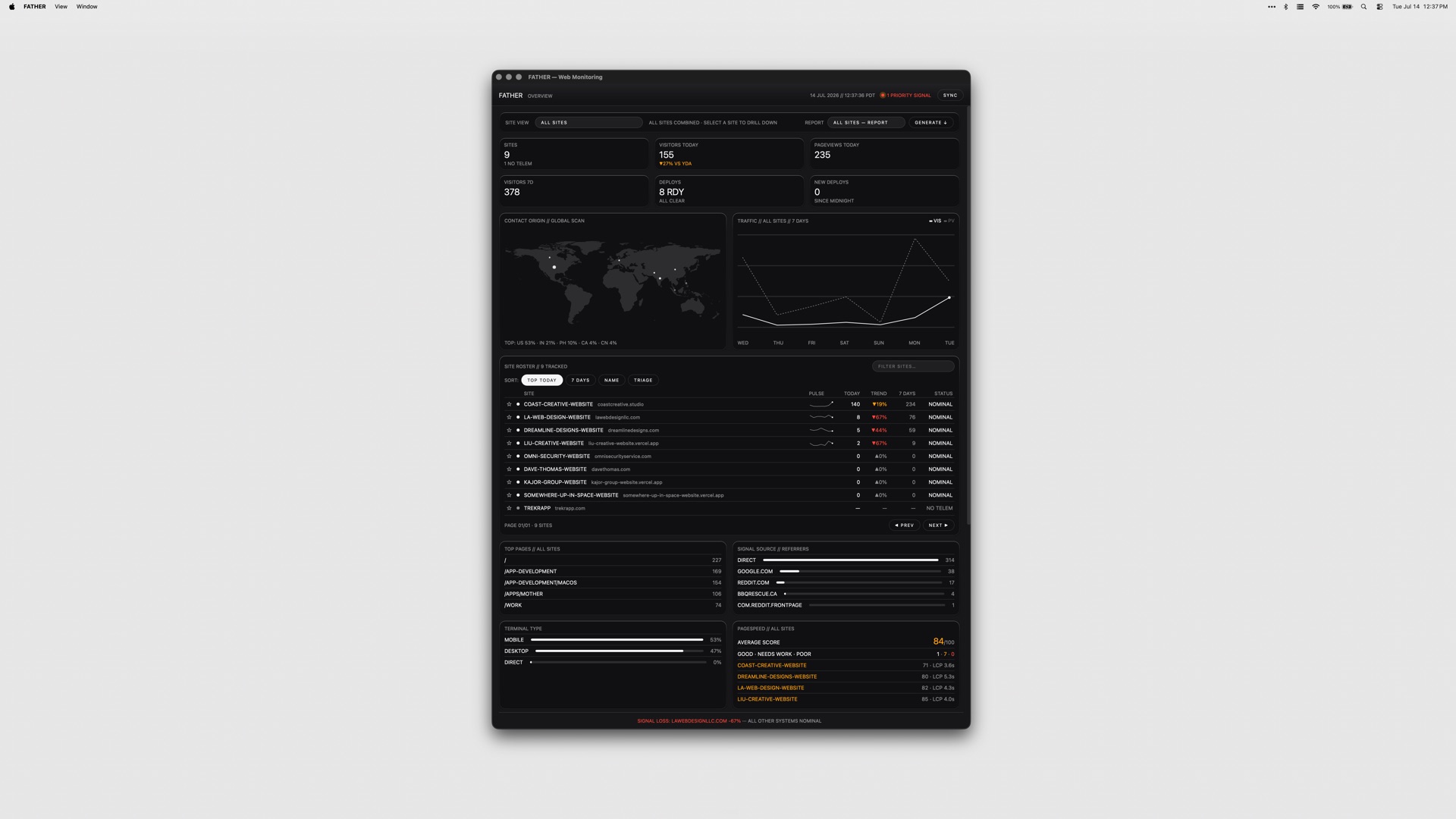
FATHER is a macOS web-monitoring app built as mission control for Vercel sites and deployments. It is designed for teams that ship on Vercel and need one place to watch the whole fleet instead of checking multiple dashboards by hand. Once you connect your Vercel account, the dashboard fills itself with deployments, uptime and speed metrics, live. Product Hunt describes it as a Mac dashboard for site traffic, deploys, uptime and SEO, while the developer's site frames it as a mission-control dashboard for your sites and deployments, built for teams shipping on Vercel. FATHER watches the fleet so you don't have to, and its stated goal is to make sure you know a site is down before your clients do. It runs as a universal app on Apple Silicon and Intel Macs. The underlying problem FATHER addresses is visibility. When a team ships on Vercel, the signals that matter — whether a build succeeded, whether traffic is arriving, whether a site is up, how fast it responds, how it ranks in search — are spread across the Vercel dashboard, Search Console, Bing, and other tools. Watching all of those manually means someone has to remember to look, and by the time a human notices a failed build or an outage, a client has usually already noticed it first. The product's framing is blunt about this: you should know a site is down before your clients do. Failing builds, expired SSL certificates, lapsing domain renewals and failing GitHub checks are all things that can take a site down or break it quietly, and each one lives in a different place. FATHER pulls those signals into a single Mac dashboard and pushes alerts to you when something needs your attention, rather than waiting for you to go looking. FATHER's data foundation is the Vercel API. Deploy tracking, speed metrics and uptime metrics all come from that API, which is why connecting your account token makes your projects appear automatically — there is no manual configuration of each project required to get started. Product Hunt's description notes that connecting your account makes every project fill in live with traffic, deploys, uptime and PageSpeed scores. Sites that are hosted somewhere other than Vercel can still be added manually, which gives them basic status checks alongside the Vercel projects. That combination means the app can act as one dashboard even for a mixed portfolio, while the deepest data — live deployments, speed and uptime from Vercel — applies to the projects actually running on Vercel. Because the connection is made with an account token, setup is a one-time linking step rather than an ongoing sync task. The dashboard's core view is the fleet at a glance: the status, uptime and response of every site on one screen. Instead of opening a hosting panel and reading project by project, you see the whole set at once and can spot the one that is off. Deploy tracking sits alongside that view and works live from Vercel, letting you watch builds progress as they run and catch failures the moment they land. The menu bar carries the same signal outside the window. The F shows a dot while builds are running and turns red when something needs you, so the state of the fleet is legible from the top of the screen without the dashboard being open. Together these three pieces cover the everyday loop of shipping: watch the build, confirm the site is up, and notice immediately when either stops being true. Alerts that find you are a deliberate part of the design: notifications fire even when the dashboard is closed. Product Hunt's description is specific about the failure case — when a build fails, the menu-bar F turns red and a notification fires, even with the window closed, so you know a site is down before your clients do. Beyond deploys and uptime, FATHER aggregates SEO signals: Search Console and Bing show clicks, rankings and indexing, which is the search-side view of how each site is performing. Operational housekeeping is covered too. SSL and domain renewals get a countdown, so a certificate or domain that is about to lapse shows up as something with a deadline rather than a surprise, and failing GitHub checks get flagged. Between them, these features put the search picture and the maintenance picture in the same place as the deploy and uptime picture. The overall approach is a single Mac app that acts as a reading layer over services you already use. You connect your Vercel account with a token; the app pulls deploy, speed and uptime data through the Vercel API and fills the dashboard automatically. Vercel-hosted projects appear on their own, and non-Vercel sites can be added manually for basic status checks. Search Console and Bing supply the SEO data, so ranking and indexing information lands next to hosting information. Alerts are delivered through system notifications and through the menu-bar item, which is what allows them to reach you when the dashboard window is not open. Tokens stay on your Mac, which the product presents as the security posture for the connection. FATHER is part of a suite of four apps that share the same set of themes, and it is sold as a one-time purchase rather than a subscription. The outcome FATHER aims for is fewer surprises. Because builds, uptime, response, traffic, PageSpeed scores, search clicks, rankings, indexing, SSL and domain deadlines and GitHub checks are all surfaced in one dashboard and through notifications, the things that normally get discovered late — a failed deploy, a site that has gone down, a certificate about to expire — get discovered as they happen. That is directly tied to the product's stated promise of knowing a site is down before clients do, which matters most for teams whose sites are the work they have delivered to someone else. Running in the menu bar means the status of the fleet is available at a glance throughout the day without opening anything, and the red F is a persistent, low-effort signal that something needs attention. The one-time purchase and the fact that tokens stay on your Mac keep the model straightforward: you buy the app, connect your account, and the data is read from services you already have. Concrete use cases follow from how the app is built. A studio or agency that ships client sites on Vercel can keep the whole portfolio on one screen and rely on notifications to learn about a failed build or an outage without polling hosting panels. A developer mid-deploy can watch the build progress live from Vercel and see the menu-bar F hold a dot while it runs, then turn red if it fails. A site owner tracking search performance can read Search Console and Bing clicks, rankings and indexing next to uptime and response, without switching tools. Anyone responsible for maintenance can use the SSL and domain countdown to act before a renewal lapses. Teams that also host sites outside Vercel can add those manually for basic status checks and keep them in the same fleet view. And because notifications fire with the dashboard closed, the app works as a background watch rather than a window you have to remember to open. FATHER is aimed at teams shipping on Vercel — the Product Hunt description describes it as being for teams, and the site repeats that framing. It is a macOS application and universal, running on both Apple Silicon and Intel Macs, with no other platforms listed. Its integrations are the services it reads: the Vercel API for deploy tracking and for speed and uptime metrics, Google Search Console and Bing for clicks, rankings and indexing, and GitHub, whose failing checks get flagged. Pricing is a one-time $7.99, or $22.99 for the full suite of all four apps from the same studio; no subscription is mentioned. The app ships with the same set of themes as the rest of the suite, and the tokens for the connection stay on your Mac. FATHER's value proposition is one screen and one alert channel for everything that can go wrong with a Vercel-hosted site. It does not ask you to change how you ship; it connects to the services you already run on and reads them back to you live — deployments, uptime, speed, traffic, search performance, renewals and checks — with a menu-bar indicator and notifications that reach you whether or not the dashboard is open. For teams whose clients depend on the sites they ship, that turns monitoring from something you remember to do into something that finds you first.
LLMagnet is a WordPress plugin that makes a website visible and understandable to AI assistants such as ChatGPT, Claude, Perplexity, and Gemini. Its website describes the product simply as a way to track how AI models see your website. The plugin combines real-time analytics of AI bot activity with automatic generation of the llms.txt files that large language models read, and it also manages schema.org structured data on your pages. According to the site, it is the official WordPress plugin that tracks visits from AI bots and gives you real insights into how language models interpret your content. LLMagnet is positioned for web creators, agents and marketers who want their brand to have a measurable presence in the AI ecosystem, and it also offers a Shopify app alongside the WordPress plugin. The problem LLMagnet addresses is that AI assistants have become a real discovery channel, yet site owners have had almost no visibility into whether these models can actually read, rank and connect with their content. The website frames llms.txt as an emerging standard, comparable to robots.txt for search engines, that helps AI models understand a site's structure and content focus. Without such guidance, AI crawlers may struggle to read pages accurately or cite them at all. LLMagnet takes the position that businesses should prepare for AI-driven discovery rather than react to it later. The company also publishes content on related shifts, such as articles about content having a short half-life in AI search, about Shopify making millions of stores agent-ready, and about Google rankings no longer predicting AI citations, which reinforces its focus on measuring and improving AI visibility rather than traditional ranking alone. The first group of capabilities is AI visibility measurement and analytics. LLM Analytics tracks real AI bot traffic and provides detailed insights into visits, impressions, and clicks from major models including ChatGPT, Gemini, Claude, Perplexity, Grok, Bing AI, Mistral, DeepSeek, and Llama. The AI Visibility Score condenses this into a single metric that reflects how well large language models can access and understand your content across the web. Trends and Insights then track that visibility over time so you can spot rising opportunities and content drops instantly. Because these numbers come from the actual bots crawling your site, they show which pages are being read and engaged with rather than relying on estimates. The second group covers the files and markup that make a site readable to machines. The LLMs.txt Generator automatically builds and maintains your llms.txt file so AI crawlers can better understand your site structure and content focus, and higher plans also generate a full-llms.txt and .md files. LLMagnet manages your schema.org structured data and, on WordPress 6.9 and later, connects to the WordPress Abilities API so assistants such as Claude, ChatGPT, and Cursor can query your site's data natively. The product is described as agent ready, and an MCP Connector is included in plans. Together these pieces move a site from simply existing on the web to being structured in a way that language models and AI agents can parse and act on. The third group is reporting, prompt tracking, and store-focused features. Automated Reports and Insights deliver weekly and monthly reports that summarize your visibility and growth, backed by visual traffic breakdowns and actionable visibility tips. Prompt Tracking and Optimization shows where your brand appears in AI answers, tracking the prompts that mention your site and how your ranking evolves over time, including which prompts include your brand, how visibility shifts by LLM, and what to improve next. For stores, LLMagnet connects to your product data so AI can display accurate information in generative search, with auto product and price sync, AI-search visibility boost, and product mention tracking. On WooCommerce specifically, the Plus and Enterprise plans add product visibility scores and AI revenue funnel tracking. In terms of how it works overall, LLMagnet installs directly into WordPress and is described as lightweight and privacy-safe, with no setup or code required. You enter your WordPress site address and are redirected to the plugin installer to add it in one click, or you install it from the WordPress plugin directory. Compatibility is broad: the site lists Elementor, Gutenberg, Divi, WooCommerce and more, and states that LLMagnet runs alongside RankMath and Yoast SEO without conflicts while integrating into the Elementor editor with per-page AI visibility scores and schema management. Importantly for performance, file generation and analytics run in the background so there is no impact on your site's front-end performance or page load speed. Bot visit analytics are stored locally in your WordPress database and never sent externally, optional integrations are off by default, and the plugin is fully GDPR-compliant with built-in data export and erasure tools. The stated benefits center on understand, control, and automate. Under Key Benefits the site lists AI Visibility Control, so you know exactly how large models see your content; Smart Automation, which keeps llms.txt and data always updated automatically; and Deep Insights, which analyzes which pages drive the most AI engagement. It also lists Enhanced Collaboration for streamlining workflows with team-friendly features, Data Security to safeguard data with top-tier encryption, and Continuous Improvement so AI adapts and improves with evolving data. The overall promise is to turn AI data into clear, growth-driven actions rather than leaving site owners guessing about a channel they cannot see. Customer reviews on the page echo practical outcomes: seeing AI-related traffic, saving time with the llms.txt generator, and gaining visibility into AI crawlers, product exposure, and content gaps without added complexity. Concrete use cases emerge from the content itself. A WooCommerce store owner can use LLMagnet to prepare for AI-driven discovery ahead of time instead of reacting later, watching AI crawlers, product exposure, and content gaps. A merchant can rely on auto product and price sync plus product mention tracking so generative search surfaces accurate product information. A publisher or content site can track AI bot visits and impressions page by page and monitor how visibility trends change week to week through automated reports. A marketer can use prompt tracking to see which prompts mention the brand and how that position shifts across different LLMs. A solopreneur store owner, as one reviewer describes themselves, can follow incoming traffic from LLM agents without technical effort. Teams and agencies working across sites can rely on agent-ready output, llms.txt generation, and the MCP Connector to keep client sites consistent, while developers on WordPress 6.9+ can let AI assistants query site data natively through the Abilities API. LLMagnet targets WordPress site owners, web creators, marketers, and store operators, including WooCommerce merchants and solopreneur store owners, as well as teams that need collaborative visibility workflows. It is also designed for AI agents themselves: the product is described as built for agents and marketers, and it is agent ready. Integrations and compatibility explicitly named in the content include WordPress, WooCommerce, Elementor, Gutenberg, Divi, RankMath, Yoast SEO, the WordPress Abilities API, and an MCP Connector, with a companion Shopify app. Pricing is tiered with a free plan available and no credit card required. The Free plan offers analytics from ChatGPT, tracking visits and clicks, LLMs.txt generation, .md files, an MCP connector, page tracking, agent readiness, and support. Pro adds analytics from ChatGPT, Claude, and Perplexity plus full-llms.txt. Plus adds analytics from all bots, WooCommerce integration, product tracking, and support, and Ultra adds ten prompts tracking and chat support, with monthly and yearly options and different prices per site or per user. Taken together, LLMagnet is best understood as an AI visibility layer for WordPress. It answers a question that traditional analytics cannot: are AI models reading my site, what are they reading, and how do I improve my position in AI answers? By combining bot traffic analytics, an AI Visibility Score, llms.txt and .md generation, schema management, prompt tracking, and automated reporting in a single lightweight plugin, it gives site owners a measurable, continuously updated view of their presence in the AI ecosystem and the practical steps to improve it.
FreeScan.app is a free website audit tool that runs 40 focused checks against any public URL and returns a prioritized report. You paste a page address, the audit runs without signup or private access, and the result covers SEO / AEO / GEO, website security, accessibility fundamentals, and conversion-focused design. Four category scores are shown side by side — SEO / AEO / GEO, security, accessibility, and design — so you can see at a glance where a page stands. The report is built for builders, marketers, and site owners who want to know what to improve first rather than guess. Every finding comes with supporting evidence, an explanation of why it matters, and the concrete fix to make. The problem FreeScan addresses is that checking a website usually means piecing together several separate tools. One tool looks at SEO, another at performance, another at accessibility, another at security headers, and each produces its own vocabulary of scores with little guidance on priority. FreeScan's own framing of its Pro plan is to stop piecing together separate tools and instead monitor SEO / AEO, AI visibility, security, accessibility, and design across a site's key pages in one private dashboard. A page that is not crawlable, not secure, not accessible, or not clearly designed costs visibility, trust, and conversions. Rather than stopping at a single number, FreeScan turns the evidence it collects into prioritized fixes, opportunities, and insights that can be shared with a team. The first category, technical SEO and answer-engine readiness, reviews the elements that determine whether a page can be found and understood. The audit inspects titles, meta descriptions, headings, canonical tags, robots.txt, sitemap.xml, structured data, Open Graph tags, and internal links. It also checks llms.txt and answer-ready page structure, which is the part of the scan aimed at AEO (answer engine optimization) and GEO (generative engine optimization). The stated purpose is to see whether a site is structured for search engines and AI answer systems to understand. For Pro users, site-wide AI visibility scanning also looks for crawler blocks, content gaps, and citation-readiness issues across scanned pages. Together these checks show whether the page is crawlable, indexable, meaningfully described, and formatted so that search engines and AI answer systems can extract answers from it. The security category looks at public website security signals visible from the outside: HTTPS, mixed-content indicators, common public security headers, insecure forms, sensitive file exposure, and cookie flags. These are the things a visitor's browser and a passing security reviewer can see, so they bear directly on user trust. FreeScan is explicit that this is a focused public-page audit and not a replacement for penetration testing or a full security audit. Accessibility checks find missing alt text, missing form labels, heading-order problems, landmark gaps, unclear controls, language issues, contrast risks, small tap targets, and rendered accessibility errors. FreeScan notes that this is not WCAG certification, yet the list closely mirrors the fundamentals that block real users, and the site's own testimonials describe running the audit, handing the results to a coding agent, and taking accessibility scores from 72 to 100. The design category evaluates conversion-focused page qualities: hero and CTA clarity, content density, trust signals, mobile viewport setup, readability, spacing, visual hierarchy, runtime health, performance, and layout stability. In practice this means the audit comments on whether a page says what it does, whether the main action is obvious, and whether the layout holds up on a mobile screen. The report itself is organized into three action-ready views. Fixes show what is costing points, why it matters, and what to change first, ordered by impact. Opportunities surface high-leverage ways to improve visibility, trust, usability, and conversion beyond failed checks. Insights explain what the page already does well, backed by rendered checks, schema, previews, and page signals. The result is a shareable audit report with scores, evidence, prioritized fixes, and insights rather than a bare total. FreeScan Pro is positioned as the layer above the free single-page scan, priced at $19 per month with cancel-anytime terms. Pro runs automated site-wide audits, groups findings across a site into one prioritized fix board that shows affected pages and lets you track each fix, and organizes results into SEO, AI Visibility, and Fixes workspaces. Pro also provides private scan history, automatically audits the site's key pages each week and emails reports so progress and regressions can be compared, and monitors uptime with downtime alerts and an optional shareable status page. Agent workspaces and MCP let you export the full SEO, AI Visibility, and Fixes workspaces as Markdown, connect through Pro MCP to read private findings and request rescans, and thereby give a coding agent the evidence it needs to act. The stated plan limits are 5 sites, 5 manual scans per week per site, and up to 60 baseline / 25 recurring pages. The stated outcome is knowing what to improve first. FreeScan offers prioritized fixes to improve search rankings, AI visibility, user trust, and conversions, and it frames the free scan as the starting point for improving the whole site. Because every failed check arrives with evidence, severity, and an actual fix, the output can be worked through like a sprint backlog rather than interpreted as a mystery score. Testimonials shown on the site describe exactly this pattern: EverList reported crawler visibility, accessibility, mobile layout, and metadata issues, fixed them, and reached 100 for SEO / AEO and 100 for security with clean real-browser accessibility. Another user took hackyard.tech from 40 to 86 by working through the list, and Wysera reported going from an initial 80 to 100 across SEO / AEO, security, accessibility, and design. The site recommends running a free website audit before a launch, campaign, or SEO push so you do not guess whether the page is crawlable, secure, accessible, clearly designed, or ready to convert. Because any public page can be scanned without an account, it also works as a quick pre-flight check for a landing page, a new marketing page, or a site that has just been redeployed. For teams using coding agents, the workflow described in testimonials is to scan the site, hand the agent the results URL or the generated prompts, review the pull request, then ship. One user reported accessibility going from 72 to 100 after typing a sentence and doing a PR review. Pro extends this into ongoing monitoring with weekly audits, email reports, comparison of progress, uptime monitoring, and downtime alerts. FreeScan is aimed at builders, founders, marketers, and site owners who need to know whether a public page is ready. The testimonials come from people shipping SaaS products, healthcare platforms, personal sites, and side projects. The free tier covers a single-URL audit with 40 checks and requires no signup or private access. Pro is a single $19/month plan with cancel-anytime terms, described on the site as one focused Pro plan rather than a tier matrix. FreeScan also states plainly what it is not: a focused public-page audit, not a replacement for expert SEO strategy, penetration testing, accessibility certification, or analytics. A public leaderboard ranks the highest scoring Pro homepages by each website's latest homepage audit, and the site's recent activity feed shows 2,447 audits. FreeScan.app's value proposition is simple: one URL, 40 checks, and a prioritized plan. Instead of assembling a stack of single-purpose scanners and reconciling their numbers, you get one report covering SEO / AEO / GEO, security, accessibility, and design, with the evidence and the fix attached to every finding. The free scan tells you where a page stands today; Pro turns that into an ongoing, private, site-wide practice with weekly audits, a prioritized fix board, agent-ready workspace exports and MCP access, private history, and uptime monitoring. For anyone about to launch, run a campaign, or push on SEO, it is a fast way to know what to improve first.
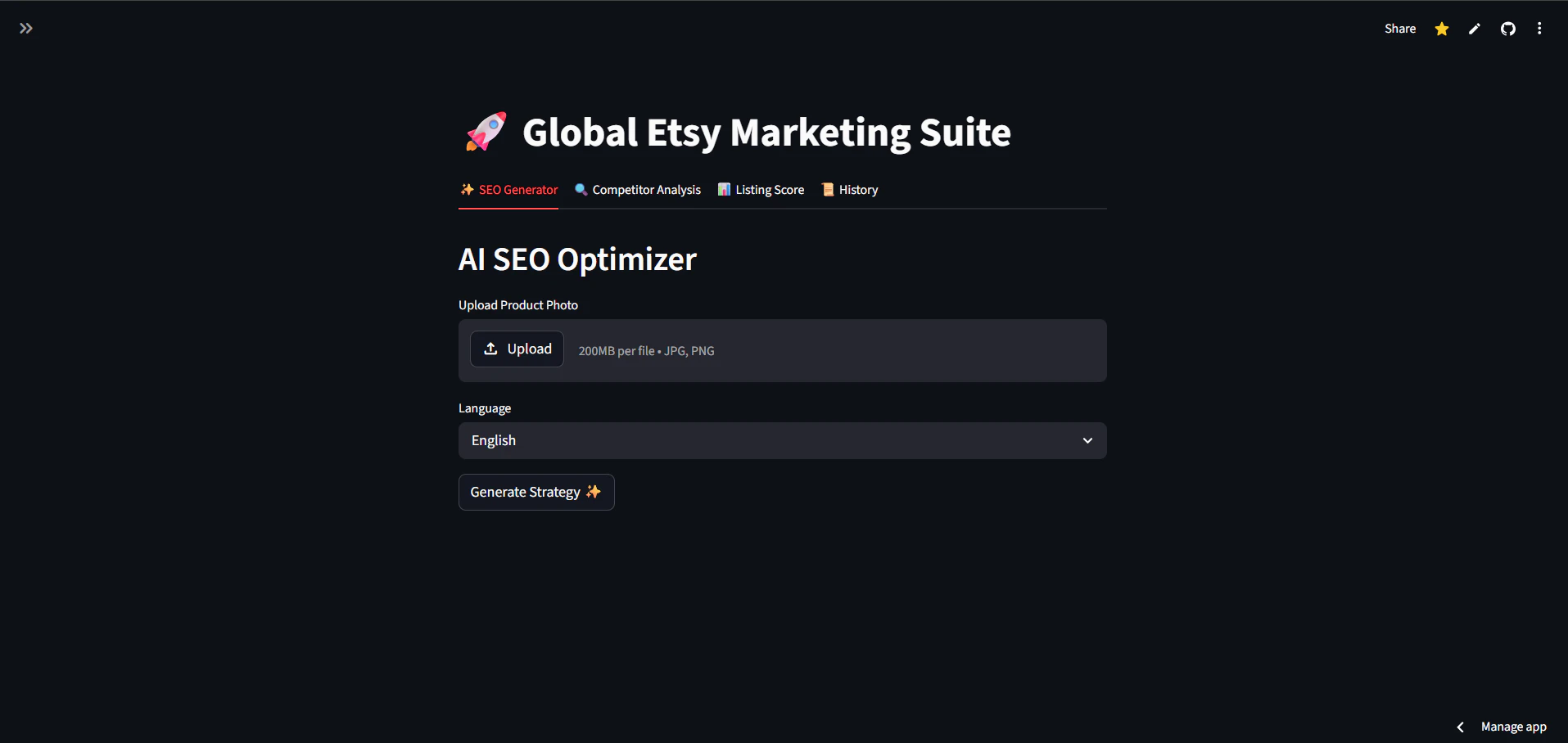
EtsyFocus PRO is an AI-powered toolkit designed specifically for professional Etsy sellers. The platform helps users optimize their Etsy listings by automatically generating high-converting SEO titles, tags, and descriptions directly from product photos. It also provides competitor analysis capabilities and real-time listing health scores to improve shop performance. The toolkit offers several key features including AI-generated SEO content creation from product images, competitor spying functionality to uncover competitor strategies, and comprehensive listing audits with real-time health scores. These features are designed to help sellers save time while improving their Etsy shop's visibility and sales performance. EtsyFocus PRO works by analyzing product photos using artificial intelligence to generate optimized SEO content. The competitor analysis feature allows sellers to spy on their competition and understand their strategies. The listing audit functionality provides health scores that help sellers identify areas for improvement in their current listings. The platform is designed to help Etsy sellers stop guessing about SEO and start ranking higher in search results. By automating the SEO optimization process and providing competitor insights, sellers can outsmart their competition and grow their Etsy shops more effectively. The tool aims to save sellers significant time while improving their listing quality and search visibility. EtsyFocus PRO is targeted at professional Etsy sellers who want to improve their shop's performance through better SEO optimization and competitive intelligence. The tool is particularly useful for sellers who struggle with creating effective SEO content or want to gain insights into their competitors' strategies.

Peakfai is an all-in-one SEO content platform designed to replace more than eight separate tools—such as SEMrush, Jasper, Ahrefs, and Buffer—at a fraction of their combined cost. It begins by scanning your website and your competitors to surface keyword gaps, then produces long-form blog posts written in your actual brand voice. Key capabilities include automated keyword gap analysis, long-form blog generation that mirrors your established tone, scheduled publishing directly to WordPress, and continuous tracking of Google rankings alongside AI citation visibility in engines like ChatGPT and Perplexity. Every published article is automatically converted into ready-to-post LinkedIn and X updates, eliminating the need for additional social scheduling software. The workflow is intentionally linear: site and competitor scanning feed keyword insights straight into content creation; finished posts flow into the WordPress queue on your chosen timetable; ranking and citation data loop back to inform future topics. By housing these functions in one dashboard, Peakfai removes the context loss that typically occurs when multiple point solutions are used in sequence. Users benefit from reduced subscription spend, faster content production cycles, and cohesive messaging across blog and social channels. The platform is positioned for teams that currently juggle separate research, writing, publishing, and analytics tools yet want a unified, data-driven content process. Peakfai is web-based and requires payment to access. It targets marketers, founders, and agencies who manage SEO and social distribution in-house and prefer an integrated toolkit over a fragmented stack.

GenerativeSEO is an SEO platform that provides AI-powered keyword tracking, recursive domain audits, and high-precision search intelligence. The product positions itself as India's best SEO tool, aiming to help businesses stop losing traffic to competitors. The platform offers three core capabilities: AI-powered keyword tracking to monitor search performance, recursive domain audits to analyze website health and optimization opportunities, and high-precision search intelligence to deliver actionable insights for improving organic visibility. GenerativeSEO emphasizes delivering raw intelligence, real growth, and radical visibility to its users. The tool combines artificial intelligence with SEO analytics to provide comprehensive domain analysis and keyword monitoring solutions. The product is designed for marketers and SEO professionals who need to track keyword performance, conduct domain audits, and gain competitive intelligence. By leveraging AI technology, GenerativeSEO aims to provide more accurate and actionable SEO insights compared to traditional tools. GenerativeSEO appears to target businesses and SEO professionals in India and globally who want to improve their search engine rankings and organic traffic. The platform focuses on helping users understand their competitive landscape and optimize their websites for better search performance.
Free Website Internal Link Visualizer is a tool that creates an interactive graph of your website's internal linking structure. It helps users understand how pages connect within their site by providing a visual map that displays link relationships, making it easier to identify structural issues and optimization opportunities. The tool offers several key capabilities for analyzing internal links. Users can discover orphan pages that have no incoming links from other pages on the site. It analyzes link depth to show how many clicks away pages are from the homepage. The visual graph format makes it simple to spot weak pages that are barely linked and losing SEO value, as well as strong pages that are well-connected and passing authority across the site. The visualizer works by crawling your website and mapping all internal links between pages. It then presents this data as an interactive graph where users can see connections between pages at a glance. This eliminates the need for manual spreadsheet tracking or guesswork about site structure. The tool is designed to be completely free with no hidden costs or limitations mentioned. Benefits include the ability to strengthen SEO by identifying and fixing linking issues. Users can optimize their site architecture by understanding which pages need more internal links. The visual approach saves time compared to traditional auditing methods and provides immediate insights into site structure problems that might otherwise go unnoticed. This tool appears to be targeted at website owners, SEO professionals, and digital marketers who need to audit and improve their site's internal linking structure. It's particularly useful for those managing larger websites where manual link auditing would be time-consuming and error-prone.

RankWay is an AI-powered platform designed to automate SEO, GEO (Generative Engine Optimization), and lead generation. It consolidates keyword research, content creation, local SEO, AI visibility tracking, and lead funnels into one tool, aiming to replace repetitive agency tasks with an all-in-one suite. The SEO Suite provides keyword research driven by AI and data, a daily ranking tracker, competitor analysis highlighting keyword gaps, and backlink monitoring. The Content Suite generates full SEO articles using live web research, adds images, internal links, and meta tags, then publishes with one click to WordPress, Webflow, and Shopify while auto-submitting URLs to Google Search Console for indexing. Local Suite features an interactive ranking heatmap showing city-level visibility and automates Google Business Profile management, including categories, product listings with images and prices, and weekly posts. The GEO Suite tracks mentions of your business across ChatGPT, Perplexity, Claude, and Google AI, and includes a Reddit feature that finds relevant threads and drafts AI-optimized replies to improve those mentions. RankWay also offers a Leads Suite that embeds AI-generated lead funnels inside every article, creates lead magnets such as PDFs and checklists, and auto-drafts personalized outreach emails for each lead. An embedded AI assistant named Ranky can perform tasks like adding keywords and planning articles rather than only answering questions. The platform supports 12 languages, is GDPR compliant, and uses European hosting. It is priced at €99 per month and includes a 3-day free trial. The maker reports growing his own projects from invisible to 13,000 monthly visitors, 1,700 ranked keywords, and 200+ page-one rankings within six months of using RankWay.