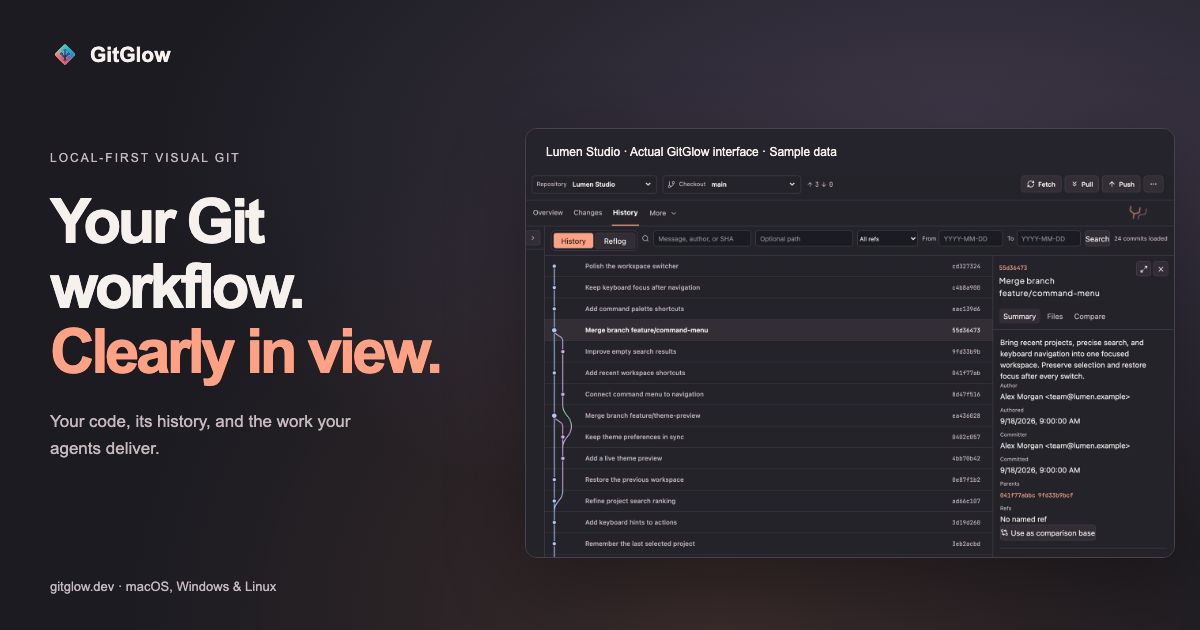
GitGlow is a local-first visual Git workbench for independent developers who want to understand exactly what will ship. It combines precise staging, clear commit history, conflict resolution, a checkout-aware terminal, coding-agent review, and release preparation into a single desktop application for macOS, Windows, and Linux. Instead of juggling a command line, a hosted Git client, and separate tools for watching AI coding agents, developers can open a clone and work through one calm workspace where their own changes and their agents' work sit side by side. The product's stated purpose is simple: review the diff, stage precisely, and ship with confidence. Its tagline, "Review your code and your agents' changes before you ship," captures that intent.
Modern development workflows have two sources of change that are hard to reconcile: your own edits and the edits produced by coding agents. Agents can touch many files quickly, which makes it difficult to know what was actually changed, which files were reviewed, and whether earlier verification still applies after a later edit. At the same time, Git tooling often splits the work across several applications — one for staging and history, another for resolving conflicts, another terminal, and yet another for observing agent runs. GitGlow addresses that fragmentation by tying every piece of work back to the checkout it belongs to. Review marks, check results, and agent activity are anchored to real Git state, so a developer can tell the difference between what was inspected, what was tested, and what is still current.
Staging is the heart of GitGlow's daily loop. The product lets you review files, hunks, or selected lines before composing a commit, so you can stage only what belongs in that change. This is described as a free capability for a local repository, meaning the precise staging workflow is available without a GitGlow account in a private local clone. From there, GitGlow shows how the work connects: you can explore real repository topology, compare revisions, and trace the history of a file or a line. Core history is free and history editing is a Pro capability. The same workspace covers blame and reflog, and it keeps branches and refs legible by supporting branches, remotes, stashes, tags, and trusted worktrees. Daily branch actions are free, while managed worktrees are part of Pro.
GitGlow also keeps your shell beside the diff. A checkout-aware terminal lets you run Git, tests, and installed agent CLIs in terminal tabs that understand which checkout is active, with terminal tabs in the active checkout included on the Free plan. Conflict handling is framed around resolving the real operation: GitGlow explains the roles involved in merge, rebase, cherry-pick, and revert conflicts, and continuation and recovery are free. Moving between repositories is designed to be safe — GitGlow keeps registrations, context, and workspaces without flattening local data. One active repository or checkout is free, while concurrency across checkouts and workspaces is a Pro feature. Pro also adds multi-repository fetch, which fetches selected repositories together and reports clear per-repository results.
Pro adds a layer that answers a question Git alone does not: did I actually review and verify this? Review confidence lets you mark files reviewed and run an explicit check with a timeout and cancellation. Results stay tied to the checkout that was tested, and later edits bring files back to your attention and make earlier results stale — so a passing check never silently applies to code that has since changed. The GitHub connection, also Pro, lets you review authorized GitHub repositories, pull requests, issues, workflows, and checks. Release Workspace brings checks, merged work, notes, and tags into one guarded sequence. Release publication is available only through Release Workspace, after a fresh guarded preview and explicit final confirmation.
Agent work becomes reviewable in Agent Observatory, which follows authentic provider and Git signals across live, observed, and managed runs. Basic observation is free; managed controls are Pro. Observed and managed runs can carry repository, checkout, event, and attributed-file context into the same Changes workflow, so you can open the exact files an agent changed. The Activity Tape lets you search or replay sanitized operational detail in context, with the latest Replay free and advanced retention on Pro. GitGlow never exposes or stores hidden reasoning; an encrypted local flight recorder can retain sanitized provider-visible plans and commentary, commands, bounded output and tests, approvals, collaboration, relative paths, statistics, and safe text diff hunks, while excluding raw prompts, full transcripts, final replies, credentials, absolute paths, binary or oversized bodies, and contents or hunks from secret-prone files. MCP support gives agents bounded Git context through a packaged MCP sidecar: reads are free, and Pro can preview an allow-listed Git or GitHub action, but every MCP-originated write waits for native approval in Agent Observatory while the desktop app is open. GitGlow excludes arbitrary shell or Git commands, destructive cleanup, history editing, force pushes, and PR merges. Insights round out the picture with activity, commits, graphs, trends, complexity, work types, rhythm, sessions, and exports, and Indie Log turns evidence into a work log — written manually, or as a managed analysis-only report pack built from selected sources.
The unifying idea behind GitGlow is that agent context is connected to the checkout. Rather than treating agent activity as a separate stream of logs, GitGlow attributes runs to the repository, checkout, events, and files they touched, then surfaces them inside the same review workflow used for human changes. Everything is local-first: local status, diffs, history, repository paths, previews, and audit records stay on your device. Optional GitHub, agent-provider, billing, and consented analytics connections have separate, explicit data boundaries — if you connect GitHub, GitGlow sends only the GitHub requests needed for installed repositories through the GitGlow API, and tokens never enter the desktop webview or MCP responses. Observed sessions started elsewhere remain owned by their originating desktop or CLI client; GitGlow monitors supported hook events and independent Git changes but hides message, approval, and interrupt controls unless the provider exposes a supported channel. Runs launched by GitGlow are Managed and can expose those controls.
For users, the outcome is a workflow where confidence is earned rather than assumed. Precise staging produces cleaner commits; checkout-aware checks mean verification results have a clear scope; review freshness prevents shipping on the strength of a stale test run; and agent observability means AI-generated changes arrive as reviewable diffs with attributed files rather than opaque output. The Activity Tape and Replay provide a way to return to the moment that matters when something needs to be explained or investigated. Because everyday local work — staging, commits, branches, conflicts, history, blame, and reflog — is free and requires no account, developers can adopt GitGlow without a subscription and add Pro capabilities only when they need concurrent workspaces, managed agents, GitHub integration, or release tooling.
Concrete scenarios include preparing a first reviewed commit after installing GitGlow and opening a clone; running the daily Git loop of reviewing changes, working with refs, resolving conflicts, and inspecting history; connecting supported agent clients, reviewing events, and opening the exact changed files an agent touched; and catching up across a workspace by fetching several selected repositories together and reading per-repository results. Developers working with coding agents can use Review confidence to mark files reviewed, run tests in a checkout-aware terminal, and let later edits pull those files back into view. When a release is due, Release Workspace gathers checks, merged work, notes, and tags into one guarded sequence that must be previewed and confirmed. GitGlow's own documentation suggests a four-step path: start with one repository, run the daily Git loop, understand agent work, and find every control through searchable reference documentation.
GitGlow is aimed at independent developers who work locally and want a calmer, more accountable Git workflow, including those who use coding agents such as Codex or Claude and need to review what those agents changed. Pricing is simple: the Free tier works with a private local clone with no account and includes one active repository or checkout, precise staging, commits, branches, sync, merge, conflict resolution, stashes, tags, topology history, compare, blame, reflog, basic observation, the latest Replay, manual Indie Log, analytics, export, read-only MCP, and terminal tabs in the active checkout. Pro is €2.99/month or €29/year and adds concurrent terminal sessions, review freshness, verification tied to checkout state, multi-repository fetch, guarded history editing, concurrent workspaces, managed agents, advanced Observatory review and Replays, GitHub integration, Release Workspace, managed Indie Log, and MCP writes. AI provider subscriptions and API usage are separate, and existing subscriptions retain their current terms. Desktop builds are published for macOS, Windows x64, and Linux x86_64/aarch64; version 2.0.5 has been manually checked on macOS while the Windows and Linux packages are build-validated for architecture, version, payloads, sidecars, and checksums without runtime claims. Agent tooling is exposed through a packaged MCP sidecar, and the product's own comparison notes that GitKraken covers a broader provider ecosystem and shared cloud workspaces while both products include an embedded terminal.
GitGlow's value proposition is straightforward: it turns Git and coding-agent activity into one reviewable, checkout-anchored workspace. By combining precise staging, legible history, conflict resolution, a checkout-aware terminal, review marks with freshness, GitHub checks, release preparation, and bounded agent observability in a local-first desktop app, it lets developers answer the question that matters before shipping — what exactly am I about to release, and have I actually verified it?
Publisher
A
admin
Launch Date2026-10-11
Platformdesktop
Pricingfreemium
Tech Stack
#MCP