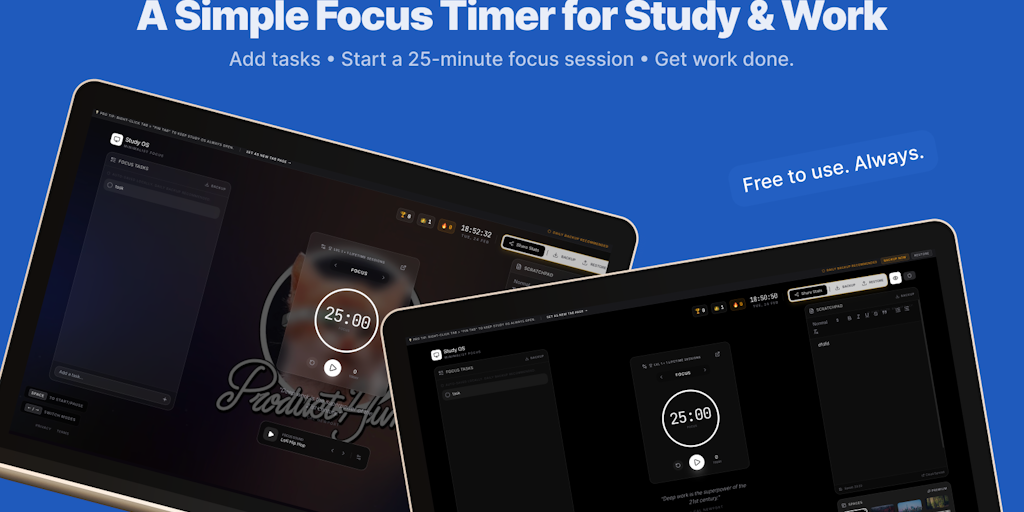
StudyOS is a distraction-free workspace built for students and deep workers. It combines a Pomodoro timer, lightweight task manager, scratchpad notes, study music, daily quotes, and custom backgrounds.
Study OS is a distraction-free workspace designed specifically for students and deep workers who need to maintain intense focus during study or work sessions. The product combines a Pomodoro timer, a lightweight task manager, a scratchpad for notes, ambient study music, daily motivational quotes, and customizable backgrounds into one unified browser-based environment. By serving as a new tab page or a standalone web app, it replaces the typical cluttered new tab with a minimalist focus hub. This core value proposition—reducing distraction while providing essential productivity tools—makes it a compelling alternative to switching between multiple apps and websites.
The primary pain point that Study OS addresses is the constant battle against digital distractions. Modern students and knowledge workers face notifications, social media, and endless tabs that fragment attention and reduce deep work quality. Without a structured environment, even short study sessions can devolve into multitasking. Study OS solves this by creating a dedicated digital space where only focus-related tools are visible. The Pomodoro timer enforces time-boxed work intervals, while the task manager and scratchpad keep planning and note-taking within the same view. The backdrop of study music and quotes further insulates the user from external noise, directly targeting the problem of maintaining sustained concentration.
The Pomodoro timer is the first major feature group. Users can start a default 25-minute focus session or adjust the interval. The timer is controlled by the spacebar, and sessions are tracked as part of a gamified system. After each session, users earn experience points, contributing to level-ups and a streak count. This feature works by breaking work into manageable chunks, reducing mental fatigue, and providing a clear end point. The benefit is improved time management and a sense of accomplishment as users accumulate sessions, levels, and streaks. The timer also switches between focus and break modes, with the next mode accessible via arrow keys, keeping the workflow seamless.
The second feature group combines the Focus Tasks list and the Scratchpad. The tasks section is a lightweight, auto-saved list where users can type items without extra frills. It is designed for quick capture rather than project management. The scratchpad serves a similar purpose for free-form notes—it auto-saves locally and shows the last save time. Both features are integrated into the same view as the timer, so there is no need to open separate tabs or apps. The benefit is reduced context switching: users can jot down a task or idea without leaving the focus environment. Daily backup is recommended to prevent data loss, and the local storage ensures privacy.
Publisher
A
admin
Launch Date2026-02-28
Platformweb
Pricingfreemium
Domain Authority
Ahrefs DR1/100
Traffic Insights
Month2026-01
Estimated Visits0
MoM Visits GrowthN/A(+0)
Avg Time on Site0s