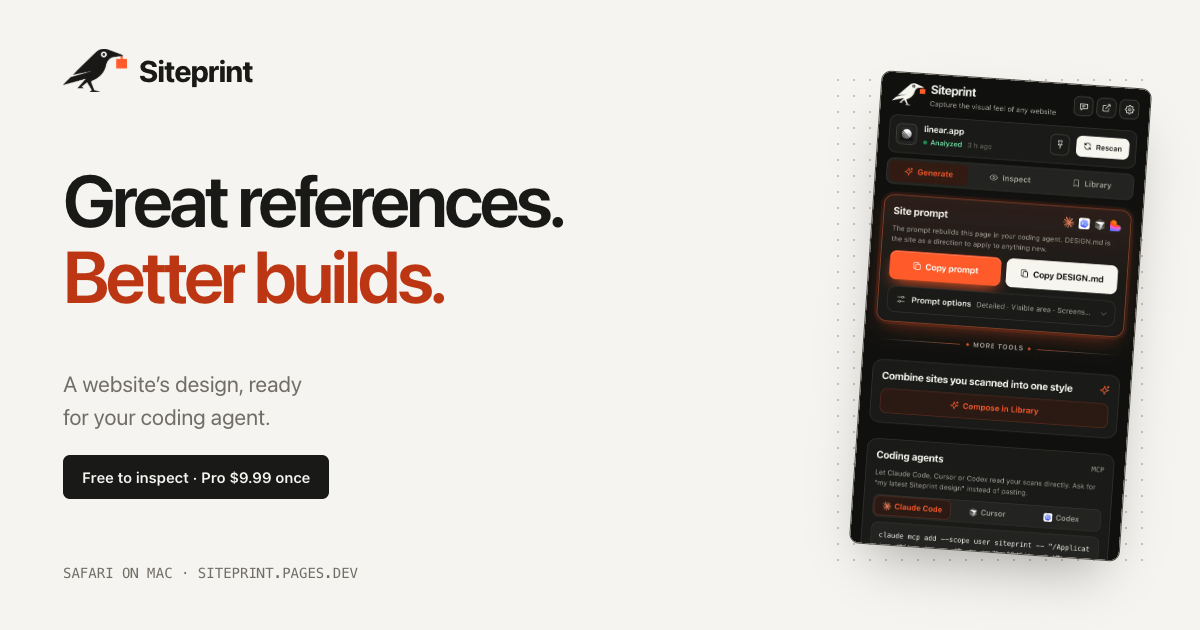
Siteprint is a Safari extension for Mac that measures the design of any website and turns those measurements into one exact prompt for a coding agent. Open a site in Safari, click Siteprint, and it measures the page's colours together with their roles, the type scale, the spacing, the corners and the layout. Inspect shows the palette, the typography and a blueprint of every section. Generate copies one prompt containing the exact values, so an AI coding agent can build a new page from it. The product is made for people who think in references — designers and developers who see a design they love and want to hand it to their AI rather than describing it from memory.
Design inspiration is easy to find and hard to use. You can look at a site and admire it, but the thing you actually need in order to rebuild it — the exact colours and their roles, the precise type scale, the spacing rhythm, the corner radii, the layout structure — is buried in a browser you cannot easily measure. That gap is what Siteprint fills, and its position is explicit: real values, not vibes. Rather than asking an AI to imitate a look from a vague description, you give the agent measured numbers. This matters because coding agents such as Claude Code, Cursor and Codex produce more usable output when the instructions are concrete, and design values are exactly the kind of detail that gets lost when a person tries to describe a page in prose.
The free tier is built around Inspect, which measures a page rather than guessing at it. Clicking the extension reads the page's colours and shows each one with its role, so you see not just a swatch but what that colour is for. It measures the type scale, the spacing and the corners, and produces a blueprint of every section on the page so the layout structure is visible at a glance. Alongside this, the free tier includes an eyedropper and a grid overlay for checking values on screen, token export so measurements leave the extension in a usable form, and Your Library, where scans are kept. The measured palette and typography can be reviewed inside the extension itself — the product's own screenshots show a palette with roles, font families and a page blueprint.
Pro unlocks Generate, the step that turns measurements into something an AI agent can act on. Generate copies one prompt containing the exact values measured from the page, so the agent receives the design in a form it can build from rather than a description it has to interpret. Pro also produces DESIGN.md and themes. A DESIGN.md is a plain-text design specification: the example export published by the product lays out a design direction under headings such as Colour — with named values like Canvas, Surface, Text and Muted — Type, with display and body sizes and weights, and Shape, listing radii. That structure turns a website's visual language into a written document an agent can read before it writes any code.
Compose is the other Pro capability, and it is where measurement becomes authorship. Compose mixes two saved sites into a new style. Siteprint's own illustration of this shows Stripe's colours being combined with Linear's type and layout, so the result is neither of the originals but a distinct combination built from measured ingredients. Because both source sites have been measured rather than eyeballed, the mixture still resolves to real values — you get a palette, a type scale and a layout that came from somewhere specific, not a mood. For anyone building a brand or a product surface, this offers a way to derive a new style from references you already trust.
Pro also lets your AI read your scans directly. In the extension you open Generate, then Coding agents, and follow the setup for Claude Code, Cursor or Codex, after which those tools can read a Siteprint scan instead of waiting for a pasted prompt. Siteprint states that it works with Claude Code, Codex, Cursor, Lovable and, more broadly, any AI. Separately, on Macs that have Apple Intelligence, the extension adds Ask the design anything: it reviews each scan and answers your questions about the design, for example how to match a particular look. Apple Intelligence is not required — the product states that everything works without it.
The workflow is deliberately short: three clicks. You open any site in Safari, click the crow — Siteprint's mascot, used as the extension's button — and paste into your AI. The paste step is shown as a prompt beginning "Build this in my style", which is the handoff point between measurement and construction. Getting to that point takes about a minute: install Siteprint from the Mac App Store, turn it on in Safari Settings, and click the crow on any site. Siteprint is clear about where its responsibility ends: it does not build the site for you. It measures the design, and your coding agent builds from the prompt.
The benefits follow from measurement. You get real values rather than approximations, which means the prompt you hand to an agent contains the same numbers the original site uses — the colours and their roles, the type scale, the spacing, the corners, the layout. Because Compose works on saved scans, you can produce a style that borrows deliberately rather than accidentally. And because the extension runs on your Mac, there is no account, no tracking and no uploads: your scans stay local. Pricing reinforces the same idea — a free tier for inspection and a single $9.99 Pro purchase, described by the product as pay once, keep it, rather than a subscription.
Concrete uses follow the workflow. A developer who admires a site's interface can inspect it, take the prompt and have an agent rebuild an equivalent page in their own product's style. A team that needs a pricing page can hand a Siteprint scan to an agent and let it build from measured values — one of the product's screenshots shows exactly that, a coding agent reading a Siteprint design and building a pricing page. Someone defining a new visual direction can use Compose to blend two references, for instance one site's colours with another's typography and layout. And a designer who wants to know how a look is achieved can ask the design directly on a Mac with Apple Intelligence.
Siteprint is a Safari extension for Mac, so its audience is Mac-based designers and developers — particularly those already working with AI coding agents. It requires macOS 14 or later. The product states plainly that there is no Chrome version and no iPhone version yet. Pricing has two parts: a free tier covering colours, type and layout, the eyedropper and grid overlay, token export and Your Library, and a Pro tier at $9.99 once that adds the one exact prompt, DESIGN.md and themes, the ability to mix two sites, and agent access so your AI can read your scans. Support is by email and a published setup guide.
Siteprint's value proposition is narrow and complete: it measures a design instead of describing it, then hands the numbers to your AI. Free to inspect, $9.99 once for the prompt, the DESIGN.md, Compose and agent access, running locally on your Mac with no account and no uploads.
Publisher
A
admin
Launch Date2026-10-06
Platformdesktop
Pricingfreemium
Tech Stack
#Safari extension#macOS#Apple Intelligence