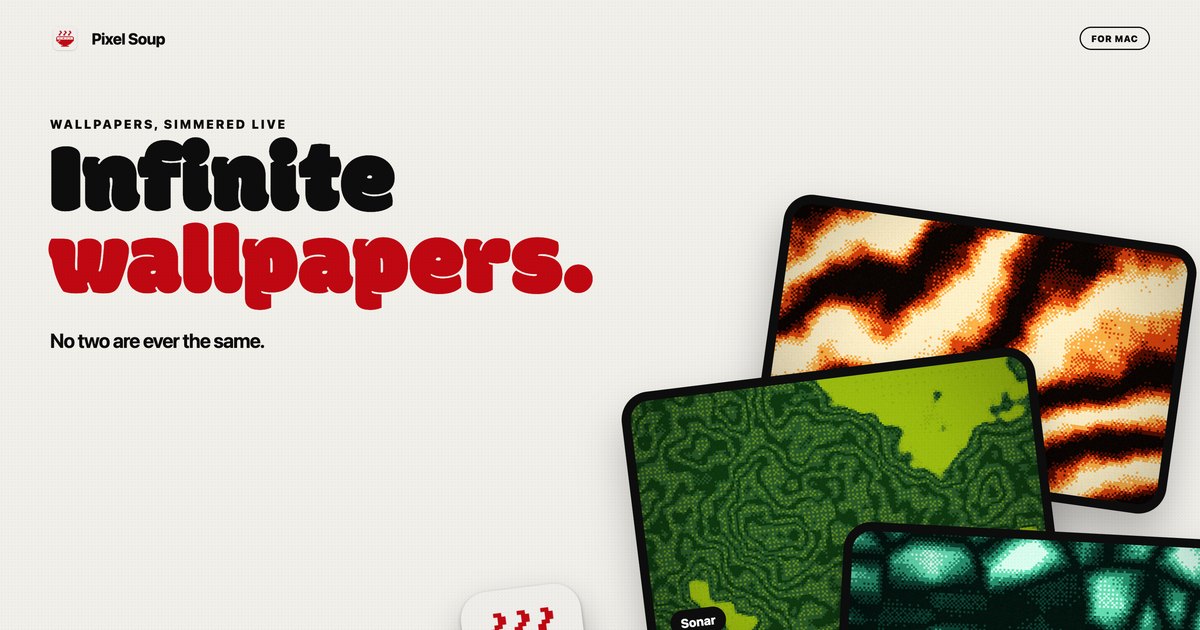
Pixel Soup is a Mac app that makes your desktop wallpaper for you. Instead of downloading a static image, you pick a shape, a palette and a dither style, and the app draws the wallpaper live on your own GPU. The result is a dithered, gently moving backdrop that sits behind your icons, or a single frozen frame that becomes your desktop picture. You can also drop in a photo and Pixel Soup dithers that instead, and it can pull a palette out of a photo for you. The editor opens from a small handle that sits on the edge of your screen, so there is no Dock icon and no window in the way. It is built for Mac users who want a wallpaper that no two people will ever have the same of.
Most wallpapers are files you download, resize and then live with. Pixel Soup starts from a different premise: the wallpaper is generated rather than supplied. Because each wallpaper is a combination of a shape, a palette, a dither and a seed, the source material is effectively endless, and every one of those permutations keeps moving. The problem it addresses is the flatness of a fixed image: a still photograph looks the same at every glance, and animated wallpapers often come with a cost in battery life. Pixel Soup keeps generation local and low-cost, drawing frames at a low frame rate on the GPU, pausing when windows cover the desktop, and slowing further in Low Power Mode, so an animated desktop does not have to mean a drained battery.
The first ingredient is the shape. Pixel Soup ships with a set of generative shapes named Flow, Mesh, Plasma, Ripple, Aurora, Cells, Topo, Whorl, Sonar, Mosh and Weave, and you can browse them all to see how each one looks. Alternatively, you can point the app at your own photo and use that as the source instead. The editor shows twelve shape tiles alongside a live preview and sliders, so you can see what a change does before you press Apply. Because the shapes are generative, the same shape with a different seed produces a different result, which is what allows the app to claim more than a hundred thousand combinations before you touch a single dial.
The second ingredient is the dither. Pixel Soup offers Smooth, Poster, Bayer 4 and 8, Noise, Halftone, Lines, Diamond, ASCII and Benday dots, each with its own visual character, and there is a page explaining what each one looks like. Beyond choosing a style, you set the pixel size and how many colours the wallpaper is allowed to use. Dithering is what gives these wallpapers their texture: the shapes are generated, then reduced to a limited palette through a pattern, which is why the results read as retro, printed or screen-like rather than photographic. Controlling pixel size and colour count means you can move from fine-grained subtlety to large, chunky dots and blocks, depending on the mood you want on your desktop.
Colour comes next. There are twelve palettes built in, or you can build your own from up to five colours; if you would rather not choose, pointing the app at a photo makes it pull a palette out for you. Pixel Soup can also keep the desktop surprising on its own: it can serve a fresh wallpaper every hour or every day, and if you preferred the last one, a Previous control brings it back. When you land on something you want to keep, Export saves it as a PNG at the resolution of this display, at 6K, as an iPhone size, or as a 2048 square, and exported wallpapers are yours to use anywhere, including commercially.
Pixel Soup's approach is to make the wallpaper on the machine that displays it. Everything is drawn by the GPU, sandboxed on your Mac, with no account, no analytics and nothing about you leaving the computer. The app lives behind a small handle on the edge of the screen rather than in the Dock, so opening the editor is a click and closing it leaves no window behind. Because generation is local and procedural, the same shape, palette, dither and seed can be frozen as a still frame, kept moving, or allowed to drift at a speed you choose. It is one app doing the drawing, the dithering, the palette work and the export, rather than a gallery of pre-made images to scroll through.
The practical benefits follow from that. You get wallpapers that are not shared with anyone else, because they are generated rather than downloaded. You can freeze any frame if you want a still, so an animated setup is optional rather than forced. Multiple displays are handled: every display gets the wallpaper at its own resolution, and plugging a display in or out sorts itself out. And an animated background does not have to be a battery decision, since Pixel Soup draws at a low frame rate, pauses when windows cover the desktop, slows in Low Power Mode, and costs nothing once a still wallpaper is set. A licence also covers up to three of your Macs.
In day-to-day use, Pixel Soup fits a few clear scenarios. Someone who wants a moving desktop can shuffle through combinations until something stops them and keep that one. Someone who works with photos can drop one in and get a dithered version of it, with a palette pulled from the image itself. Someone who likes variety can let the app serve a new wallpaper every hour or every day and step back with Previous if they liked the last one better. Designers and anyone who needs an asset can export a PNG at 6K, at an iPhone size or as a 2048 square, and use it anywhere, including commercially. And on a Mac with more than one display, each screen gets the wallpaper at its own resolution.
Pixel Soup runs on macOS 14 Sonoma or later, on both Apple silicon and Intel, and the build is universal and notarized. There is no account and no tracking. The download from the site is the full app, free for three days with no account and no card required. After that, a licence is a single payment of $9.99, currently discounted to $4.99 for launch week, and it is good for up to three of your Macs; updates are included. Licences are sold through Dodo Payments, which handles your receipt and any tax. The same app is coming to the Mac App Store at the same price, but without the trial, and the App Store version updates through the App Store. Refunds are available within 14 days, no questions asked.
Pixel Soup's core proposition is simple: a Mac that makes its own dithered wallpapers, still or moving, with no account, no tracking and no subscription. Pick a shape, a palette and a dither, press Apply, and the desktop is yours — and unlike a downloaded image, no two are ever the same.
Publisher
A
admin
Launch Date2026-10-05
Platformdesktop
Pricingpaid