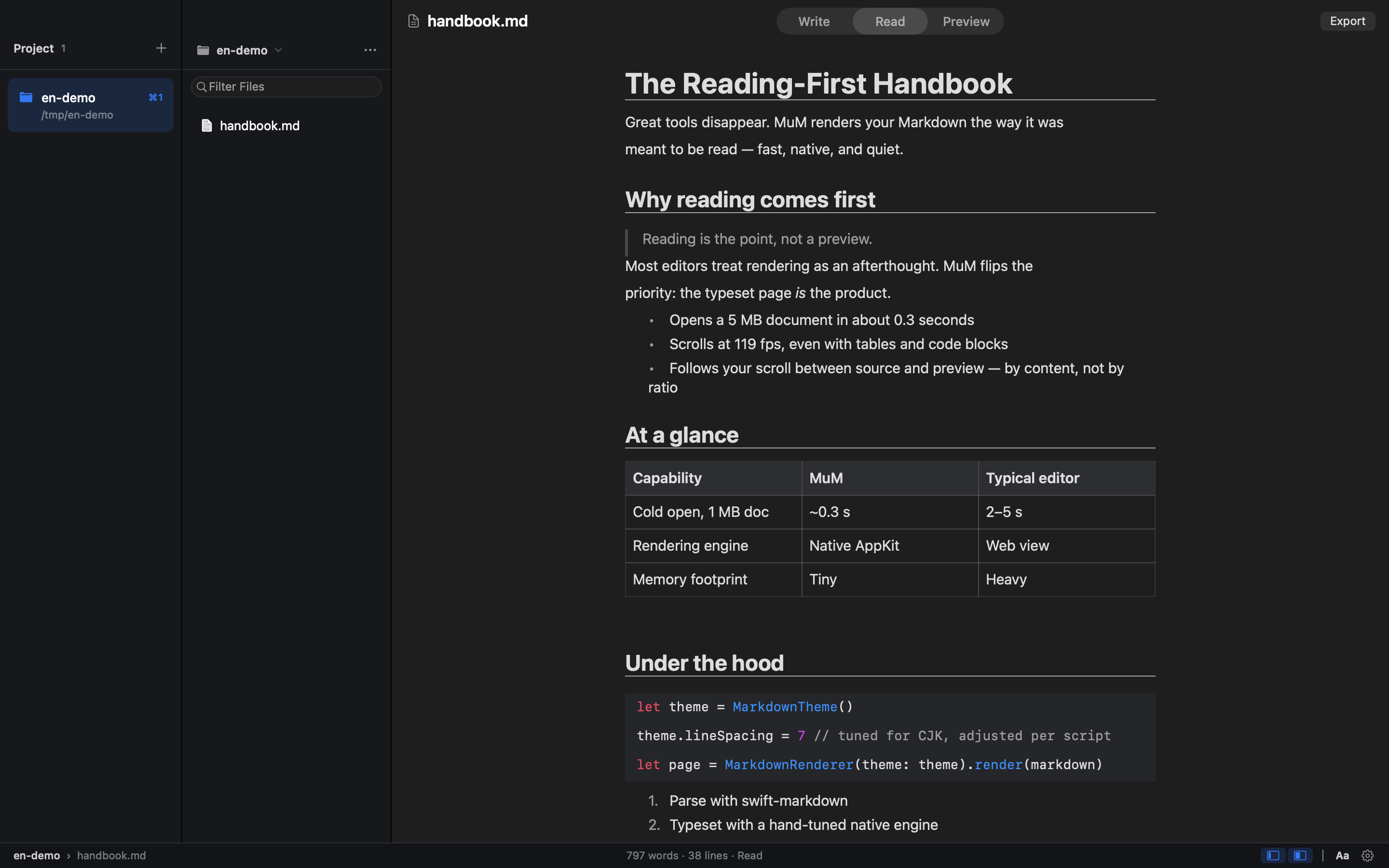
MuM is a reading-first Markdown engine for macOS. It is a native macOS reader built entirely with hand-built AppKit typesetting, with no web engine inside, and it is designed for people whose Markdown already lives in a dozen different folders. Most of the time you don't want to write — you just want to read one section. MuM takes the opposite approach from the typical Markdown editor: instead of being a writing app with a preview pane, it opens several projects at once, each remembering where you stopped, and lets you search across all of them. A companion CLI renders the same content for agents.
The starting point for MuM is a simple observation: every Markdown tool is a writing app with a preview pane, yet reading is a different job. Markdown documents accumulate across project folders, notes directories, repositories and documentation trees, and the moment you want to consult one of them you are forced through an editing interface that was never designed for that purpose. When you only want to read a single section, the writing-oriented workflow of windows, sidebars and live preview adds friction rather than removing it. MuM treats reading as the primary activity and builds the whole application around it, which is why it presents itself as the opposite of the conventional Markdown editor.
Multi-project support is the core of how MuM answers the question "where am I". You can keep several projects open at the same time and switch between them with ⌘1 through ⌘9, so the context of each folder stays separate instead of collapsing into one undifferentiated file list. Each project remembers where you stopped reading, so returning to a document resumes at the position you left rather than at the top. Reading history is available on ⌘[ and ⌘], letting you move backward and forward through what you have been reading. Together these behaviours make a set of scattered Markdown folders feel like a single, continuous reading environment rather than a series of separate files.
Finding things in MuM is handled by several distinct commands rather than one overloaded search box. ⌘P fuzzy-finds files by name, which is the quickest route when you know roughly what a file is called. ⌘⇧F searches names and contents across every project, streaming results as they are found, so a concept can be located even when you have no idea which folder holds it. For work inside a single document, ⌘F finds text and ⌘⇧O opens the outline, giving you a structural view of the headings in the current file. The combination means search works at three levels: file name, cross-project content, and document structure.
Typesetting in MuM is tuned for CJK as well as Latin scripts. Line height, punctuation compression and mixed-script spacing are measured rather than guessed, which matters when Chinese, Japanese or Korean text is mixed with Latin words and the default spacing of a Western layout approach would look wrong. The app also reads a lot of formats beyond plain Markdown: it highlights code, renders CSV and TSV as tables, and displays RTF, images, PDF and srt/vtt subtitles. Office files are not rendered; instead they get a page that points you to the default application. HTML embedded in Markdown is handled semantically — , and super/subscripts render as intended while the tags themselves stay out of sight.
Day-to-day use is shaped by a few deliberate behaviours. Single-file mode means that double-clicking a lone file folds both sidebars away so you can simply read; the folder is not turned into a project and your project list stays clean. Export with ⌘⇧E turns the current document into a tall PNG or a paged PDF, and page-break hints written into the document become real page breaks in the output. File management is available directly in the tree: ⌘N creates a new file, while new folder, rename and move to Trash live in the ··· and right-click menus. One click opens a shell at a deeply nested folder, auto-detecting Ghostty, then iTerm, then Terminal.app. Updates download in-app from a banner: the DMG mounts itself and you drag MuM into Applications. MuM is quiet — no accounts, no telemetry, no plugin store.
For agents, MuM offers windowless rendering from the command line. The same hand-built typesetting engine — with its CJK spacing, code highlighting and reading themes — is exposed through the CLI and writes straight to PNG or PDF, for example `mum render README.md --png cover.png`. Outline, search and check commands emit stable JSON with classified exit codes (0/1/2/3/4), so an agent never has to parse prose. A `mum outline README.md --json` call returns structured entries with level, location and title fields, as shown in the documented example output. This makes the reading engine usable in automated pipelines as well as by a human at the keyboard.
MuM's architecture is what makes its reading experience possible. There are zero web engines inside the application: all typesetting is hand-built AppKit, which is why it can measure CJK spacing and control rendering at a level a browser-based preview cannot. The published figures are a 0.3-second cold start to window, 100+ frames per second when scrolling a 5 MB document, and a 1.7 MB installer. Those numbers describe a native application that opens instantly and stays smooth on large files, in contrast to Markdown tools that load a browser engine and inherit its weight. The same engine is shared between the GUI and the windowless CLI renderer, so what an agent renders matches what a reader sees.
The outcome for users is a Markdown tool that behaves like a reading tool rather than a text editor. Because several projects stay open simultaneously and each remembers its own reading position, you spend less time re-locating documents and more time reading them. Cross-project search removes the need to remember which folder a note lives in, and CJK-aware typesetting means mixed-script documents render correctly. Export to PNG and PDF turns a reading session into something shareable or archivable. The whole application stays quiet: no accounts, no telemetry and no plugin store, so the tool is not louder than the content it displays.
Concrete uses follow from these behaviours. A developer with documentation and READMEs spread across many repositories keeps each as a project, switches with ⌘1–⌘9, and uses ⌘⇧F to find a term across all of them. Someone reviewing a long specification scrolls a 5 MB document at 100+ fps, uses ⌘⇧O to jump through the outline, and exports a paged PDF for review. A CJK reader opens a mixed Chinese and English document knowing the line height, punctuation compression and spacing were measured. A reader double-clicks a single file in Finder, reads it in single-file mode with both sidebars folded away, and never pollutes the project list. An agent calls `mum render` or `mum outline --json` in a pipeline and consumes structured output instead of prose.
MuM is aimed at macOS users who already have a body of Markdown and mostly read it: developers working across repositories, documentation writers and anyone maintaining notes in several folders, particularly those working in CJK languages. It ships as a native macOS application built with AppKit and no web engine, and it is open source under the MIT licence, so it is free to download and use. The installer is 1.7 MB, and updates are delivered through an in-app banner. A CLI companion shares the same rendering engine for automating PNG and PDF output and for emitting JSON that agents can consume.
MuM's proposition is narrow and deliberate: Markdown is something you read, not only something you write. By building a native macOS reader with hand-built AppKit typesetting, no web engine, multi-project memory, cross-project search and CJK-tuned rendering, it removes the editing overhead that surrounds most Markdown tools. The same engine is exposed to agents through a CLI that emits stable JSON with classified exit codes. The result is a fast, quiet, open-source reading environment for the Markdown you already have.
Publisher
A
admin
Launch Date2026-09-29
Platformdesktop
Pricingfree
Tech Stack
#AppKit