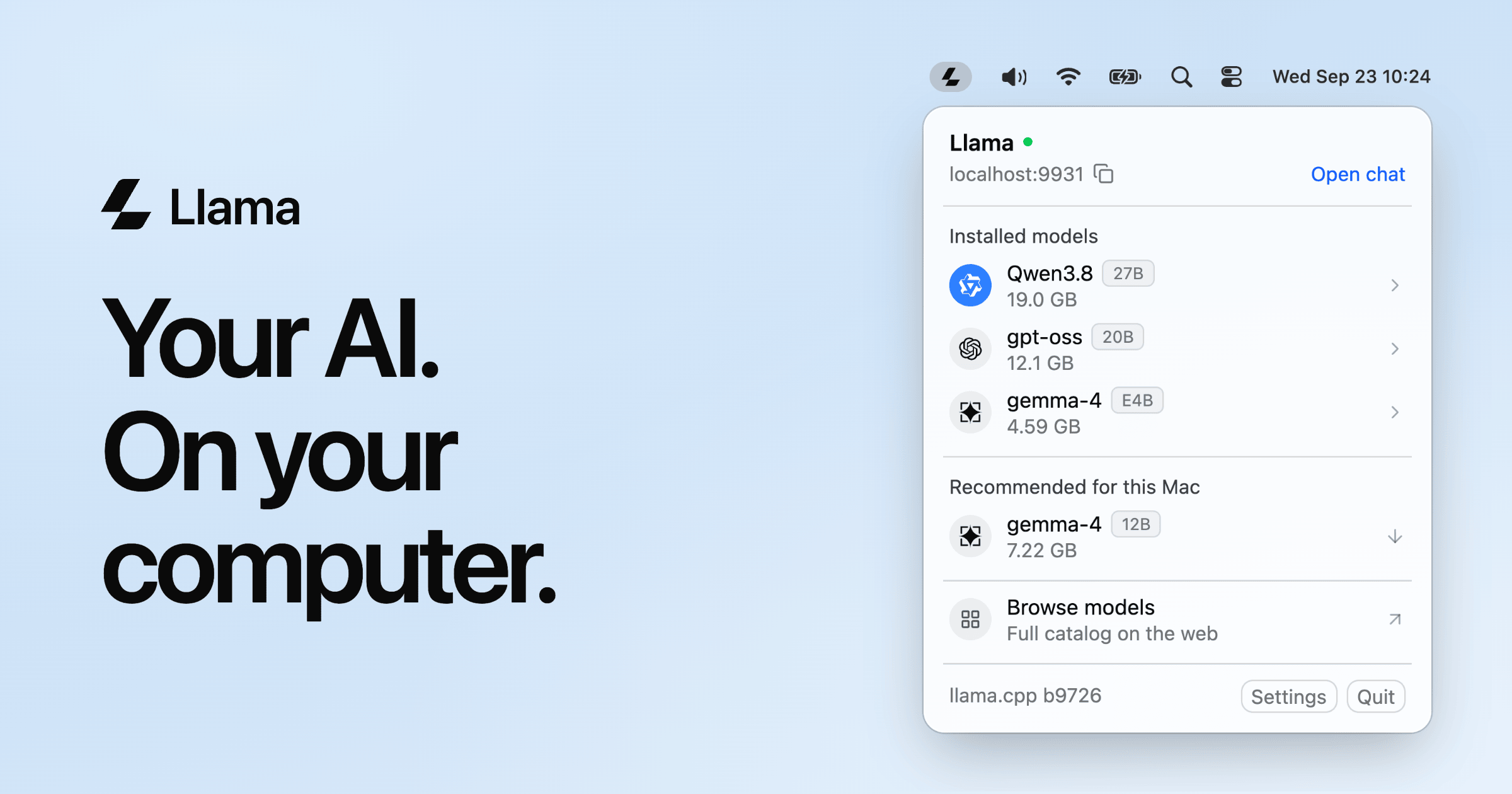
Llama is a small app for Mac and Windows that runs the latest open models directly on your computer, built by the llama.cpp team and Hugging Face. On a Mac it lives in the menu bar; on Windows 11 it sits in the system tray. From there you can open a chat in your browser, browse and install models, and let your other applications talk to a local server. It is free, open source, works offline, and the download is only about 1 MB. The product is aimed at anyone who wants to chat with AI and use AI inside their own apps without depending on a cloud service — from people who simply want a private assistant on their machine to developers who need an API their tools can call.
The problem Llama addresses is that running AI locally used to mean reading forum threads about settings, and local AI has a reputation for eating disk space and memory. At the same time, cloud assistants require accounts, API keys, and usage bills, and they send your work off your machine. Llama's stated approach is to give you both halves of what OpenAI offers — a chat surface to talk to and an API to build on — except everything runs on your own computer, with models you choose. The app is positioned as something you can set up in one click rather than configure, while still exposing the full set of llama.cpp settings for people who know what they are doing.
The first capability is chat. Clicking "Open chat" in the menu opens a chat with any installed model in your browser — described as like ChatGPT, but on your computer — with nothing to set up. The product shows a simple example of dropping in a lease-agreement.pdf and asking it to summarize the document and flag anything unusual. Because the model runs locally, the conversation happens on your own machine rather than on a remote service, which is the basis of the privacy claim that Llama is yours to keep and works offline.
The second capability is a local API. Your apps connect to the server running at localhost:9931, and it speaks the OpenAI API, so coding agents, editors, chat apps, and scripts just work. Llama documents that the endpoints are OpenAI- and Anthropic-compatible, with support for streaming, tool calling, structured output, and vision. If you already use llama.cpp, your models show up automatically. There is also a llama command line, with commands such as llama cli and llama serve, and the API can be reached from your other devices over Tailscale. Changing the base URL is all that is required for code that already works with OpenAI — no API keys and no usage bills.
The third area is model management. Models are downloaded once and used everywhere, and Llama recommends models that fit your specific Mac or PC, installing them with one click while picking the settings for you. The menu lists installed models with their sizes, offers a set of recommendations, and links to the full catalog on the web. Guidance is given by memory: Gemma 4 for a Mac with 16 GB of memory or more for everyday questions, writing, and images; GPT-OSS for 24 GB or more for step-by-step reasoning from OpenAI; and Qwen 3.8 for 32 GB or more, which is described as strong at code, reasoning, and long documents. Each model is stored once in the Hugging Face cache, shared with llama.cpp and other tools.
Under the hood, Llama checks your computer and sets up each model to run well on it, based on how llama.cpp actually works — you only pick which model to talk to. The automatic choices shown include quantization (the highest precision that fits in memory), context size (only sizes that fit in memory), image input (on for models that understand images), speculative decoding (on for models that support it), and batch size (larger on machines with 32 GB or more). Every llama.cpp setting is still present in one plain-text file for users who want control. Resource use is deliberately minimal: the app is a native Mac app with a 1 MB download and a 4 MB installed footprint, nothing is loaded when idle, models load when something asks for one, and they unload after five minutes idle.
The benefits follow directly from those design choices. Because the server is local, there are no API keys and no usage bills, and the app works offline. Because each model is stored once in a shared Hugging Face cache, disk usage is kept low; the product illustrates this with a comparison of 57 GB on disk for three separate apps each carrying their own engine and model versus 19 GB with Llama, where a chat app, a coding agent, and your own app all share one engine and one model copy. For developers shipping apps, there is nothing to bundle: the app talks to Llama over the API and a one-click link installs the model it needs, so there is no engine to ship and no gigabytes in the download, and users keep one copy of each model for all their apps.
Concrete use cases described in the content include chatting with a document such as a PDF lease agreement to summarize it and flag unusual clauses; connecting coding agents to the local OpenAI-compatible endpoint so they work without keys or bills; pointing editors and chat apps at localhost:9931/v1 because they are OpenAI-compatible; calling the API from your own code with any OpenAI SDK; using the llama command line for CLI and server workflows; reaching the server from other devices over Tailscale; and distributing an app that installs its required model with a one-click link instead of shipping an engine.
Llama is distributed as a download for Mac and for Windows 11, with a command-line version for Linux installed via a curl script. It is also available through package managers such as Brew (brew install --cask llama-app) and Winget, and it can be built from source by following the llama.cpp build instructions. The product is free and open source, hosted on GitHub, and the site notes that it is yours to keep. Model recommendations are framed around available memory on the machine rather than around paid tiers.
The takeaway is straightforward: Llama packages a llama.cpp-powered local AI server into a tiny menu bar or system tray app, so one install gives you a private chat interface and an OpenAI-compatible API that all your apps can share. Free, open source, offline-capable, and configured automatically, it is aimed at making local AI something you simply run rather than something you have to assemble.
Publisher
A
admin
Launch Date2026-10-26
Platformdesktop
Pricingfree
Tech Stack
#llama.cpp#Hugging Face