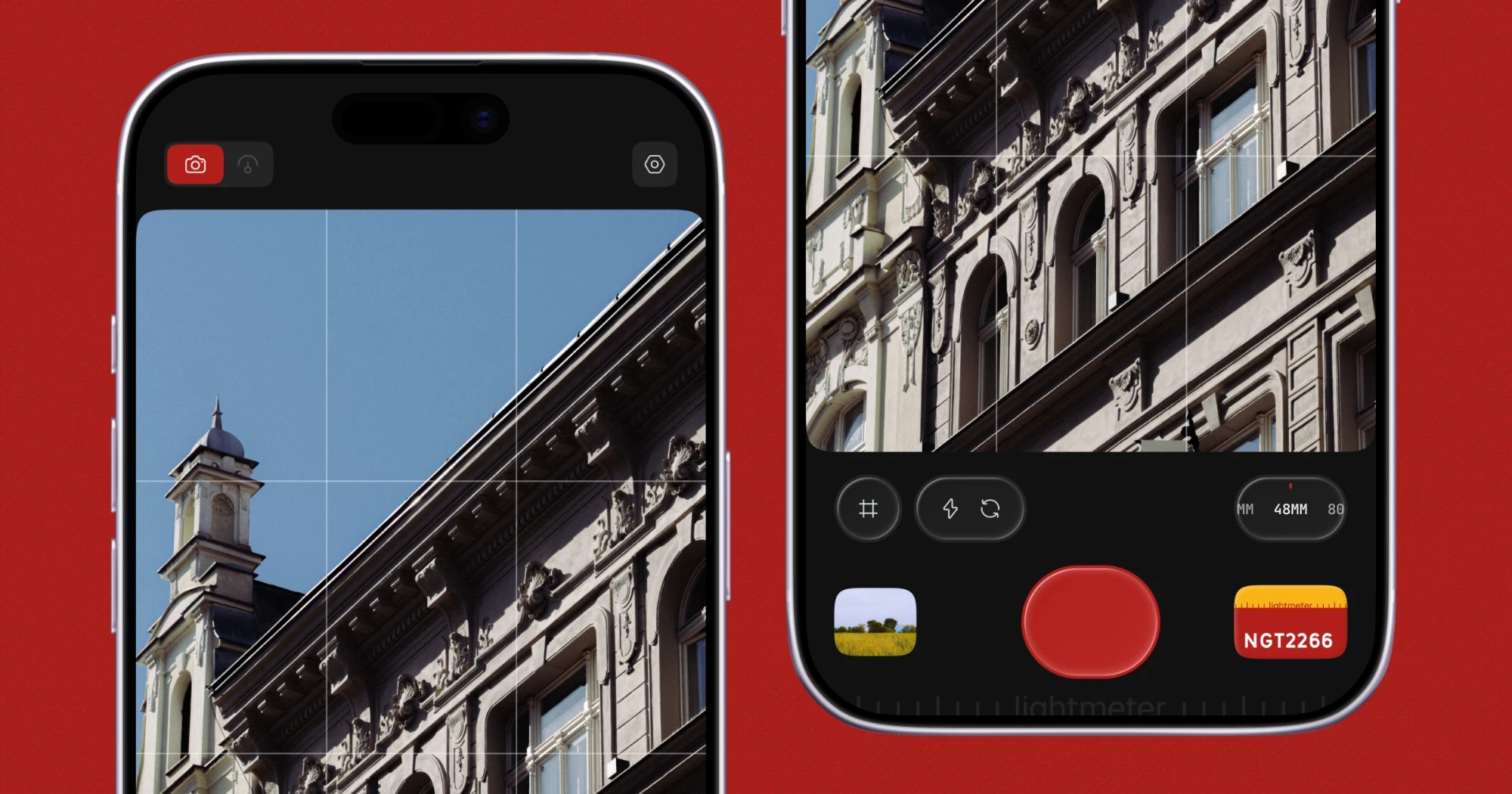
Lightmeter is a pocket film camera app for iPhone that captures natural, raw photos with authentic film looks. The site describes it in a single line: a real light meter when you carry film, and a film camera when you don't. That dual purpose sits at the centre of the product. It is made for everyday moments rather than specialist shoots, and it deliberately avoids the heavy processing that most modern phone cameras apply. The stated approach is zero-AI processing with no HDR, producing natural colors and authentic grains. Film looks are built on true RAW capture, so grain, halation and color behave like film rather than like a filter laid over a flat photo.
The problem Lightmeter addresses is visible in almost every photo taken on a modern phone. Before a file ever reaches the gallery it has typically passed through HDR merging, AI scene detection and multi-frame stacking, all of which smooth texture, lift shadows and flatten the contrast that analog photography depends on. In response, a large number of apps offer a film look as a colour grade applied on top of that already-processed image — a filter over a flat photo, in Lightmeter's own phrasing. That is an aesthetic layer rather than a photographic process, and it tends to look uniform across very different lighting conditions. Lightmeter's site makes the distinction concrete with a side-by-side comparison of the same scene: one frame labelled Shot on lightmeter, and the second showing the same scene straight off the sensor, ungraded. The implication being made is that the film character comes from the capture and the look working together, not from a preset applied at the end.
The film looks are the most visible part of the app, and the site lists twelve of them by name: NGT2266, Ink E6, Classic 64, Cine 50, Dusk, Daybreak, Bloom, Ember, Retro 400, Mono X400, Mono 3200 and Mono P400. They are presented as film looks inspired by real film stocks and artists, which places them in the tradition of emulating specific emulsions rather than inventing arbitrary colour treatments. The naming spans both colour and monochrome — the Mono looks sit clearly alongside the colour ones — so the library covers black-and-white and colour shooting alike. Crucially, the Product Hunt description states that these looks are built on true RAW capture, and that grain, halation and color behave like film rather than like a filter on a flat photo. Halation, the reddish bleed that appears around bright highlights on film, and grain that responds as film does, are the details that separate an emulation from a simple grade. The hero imagery on the site shows a film look already loaded in the shutter row, indicating that a look is chosen in the app before you shoot.
The dual role of the app is what its tagline turns on. When you are carrying film, Lightmeter works as a real light meter — a tool for reading light so you can set exposure on a film camera. When you are not carrying film, it becomes the camera itself, shooting with the film looks described above. The site's hero image shows this split directly: two iPhones side by side, one showing a building against a blue sky in the viewfinder, the other showing the shutter row with a film look loaded. The page's own metadata lists the related capabilities as a light meter app, an iPhone light meter, an exposure calculator, a reflected light meter and the sunny 16 rule — the vocabulary of traditional photographic metering. In other words, the app meets analog photographers in the workflow they already use rather than asking them to abandon it.
Privacy is stated as a design principle rather than an add-on. The site's copy reads: private by design, no signup — the app has no tracking, no ads, and collects no data. The Product Hunt description repeats the point and adds that nothing leaves your phone. There is no account to create, no analytics profile being built and no advertising identifier to manage. For a camera app this matters more than it might in other categories, because photographs are among the most personal files on a phone. The absence of a signup step also removes friction at the point of use: the app can be opened and used without an onboarding flow, an email address or a login. The promise is a closed loop — open, capture, save — that stays on the device.
The methodology Lightmeter describes is a chain rather than a single trick. Capture comes first and stays deliberately unprocessed: zero-AI processing and no HDR mean the app is not merging frames or making scene-based decisions for you. That leaves a true RAW capture as the foundation. The film look is then applied against that RAW data rather than against a finished image, which is why the site can claim that grain, halation and color behave like film. Because the grain and halation are properties of the look applied to raw capture, they respond to the image rather than sitting on top of it uniformly. The site reinforces the point with its comparison pair: one frame shot on Lightmeter and one raw frame with no Lightmeter. Nothing in the described workflow depends on the cloud, an AI model or a server, which is consistent with the no-signup, no-tracking position.
The practical benefit is a photograph that keeps the texture, contrast and colour behaviour associated with film rather than the smoothed, evenly lit look of computational photography. Colors stay natural because HDR and AI processing are not lifting and flattening them. Grain and halation appear where film would show them. The film look library gives a consistent result to choose from rather than a slider to tune, which suits people who want the character of a particular stock without a colour-grading session afterwards. The privacy posture is a benefit in its own right: no account, no ads, no tracking, no data collected, and nothing leaving the phone. And the dual light-meter and camera role means a single app covers both the film-shooting day and the digital one.
Concrete scenarios follow from what the site shows. The first is metering: a photographer loading a roll of film and using Lightmeter to read the light and calculate exposure before setting the camera. The second is the everyday moment — the pocket film camera half of the tagline — where a phone is what is at hand and the goal is a film-looking photograph rather than a processed one: a hill path at dawn, a barista working under warm pendant lights, a cyclist passing flowering trees, an iced coffee on a cafe table. The collage also includes black-and-white frames, such as a concrete facade with balconies cutting diagonally across the frame and glaciers winding between Himalayan ridges seen from the air, which map to the Mono looks. And for anyone comparing results, the graded-versus-raw pairing is itself a use case: seeing exactly what the film look contributes to an otherwise ungraded capture.
Lightmeter is aimed at photographers and photography-inclined casual shooters on iPhone. The Product Hunt topics list iOS, Photography and Photo & Video, and the only download route offered on the site is the App Store, with an Apple badge and a QR code linking to the listing for Lightmeter - Pocket Film Camera. The site is presented in English, and the publisher listing credits Aakash Goel. No pricing, subscription tiers or free-plan details are stated on the page, so nothing can be claimed about cost. No third-party integrations are mentioned either. The audience described by the copy is twofold: people who carry film and need a meter, and people who do not carry film but want film-looking photographs from the phone they already have.
Taken together, Lightmeter's proposition is narrow and clearly stated: a single iPhone app that meters light for film shooters and shoots film-look photographs for everyone else, using zero-AI processing, no HDR and true RAW capture as the foundation, with grain, halation and color that behave like film rather than a filter on a flat photo. Twelve named looks inspired by real film stocks and artists provide the visual range, while the no-signup, no-tracking, no-ads, no-data-collection design keeps the workflow entirely on the device. The primary value is film character for everyday moments, without AI and without an account.
Publisher
A
admin
Launch Date2026-09-24
Platformmobile
Pricingfree