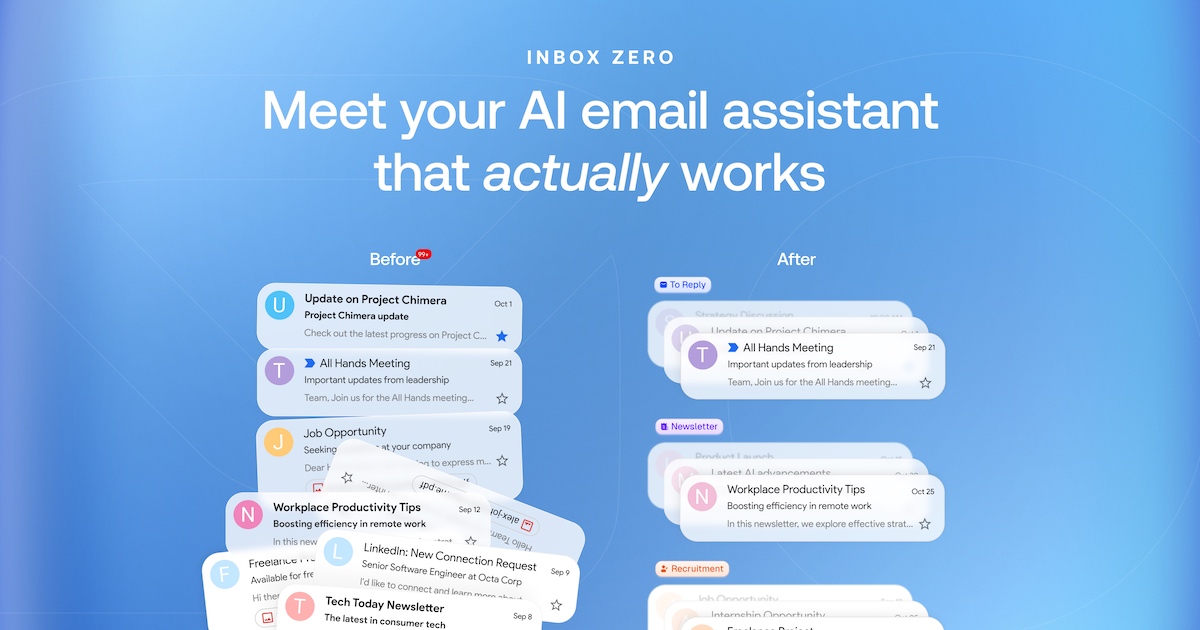
Inbox Zero is an open-source email client for Gmail and Outlook that runs in the browser, in desktop apps for Mac and Windows, and as a native iPhone app. It is built for professionals who want to move through email quickly and get back to real work, and it positions itself as a free, open-source alternative to Superhuman. The core app is keyboard-first: every action has a shortcut, the inbox is split into tabs based on what needs attention, and all of your work and personal accounts sit in one place. AI can be added on top to label every incoming email, draft replies in your voice, and keep the inbox sorted without manual triage.
Most inboxes are a single undifferentiated stream, where newsletters, calendar invites, receipts, and messages that genuinely need a reply all compete for the same attention. The result is that important emails get buried, and clearing the inbox becomes a manual, repetitive chore. Premium email clients have addressed part of this with speed, but at a price. Inbox Zero's stated pitch is to let you fly through your inbox while AI does the rest, for half the price of Superhuman, with the promise of getting back an hour a day. Because it connects to your existing Gmail, Google Workspace, or Outlook accounts, there is nothing to migrate and your email stays where it is.
The client is designed around the keyboard. Every action has a shortcut, so you can clear your inbox without reaching for the mouse: J moves to the next email, K to the previous one, E archives, H snoozes, R replies, and Z undoes. On top of the individual shortcuts, a ⌘K command box searches every command from a single place, and it works even while you are writing a reply, so you can type a command such as archive, snooze until tomorrow, or add label without leaving the composer. The inbox is also split into tabs, and pressing Tab jumps you from one split to the next, so you can move from To Reply to Newsletter to Calendar in a single keystroke.
AI is what turns that fast client into a self-organizing inbox. AI labels every email as it arrives and splits your inbox into tabs like To Reply, Newsletter, and Calendar. If you want a different arrangement, you can describe a new split in plain English rather than configuring rules. The sorting is deliberately selective: Inbox Zero drafts replies only for emails that need one, such as those in your To Reply tab, while newsletters, receipts, and notifications are labeled and left alone. That means the tabs stay meaningful and you are not asked to review AI output for messages that never required a response.
For the emails that do need an answer, a draft is already waiting before you open them. Those drafts are written in your style, using context from your past emails and your calendar, so the starting point sounds like you rather than a generic template. From there you can edit the draft, send it, or schedule it for later. The AI layer also covers adjacent work: pre-meeting briefings, an AI meeting notetaker, email digests, automatic filing of attachments, and a knowledge base that can be unlimited on higher plans, giving the assistant more context from your tools.
Inbox Zero is also built to replace forwarding when a thread involves other people. You can bring work and personal Gmail and Outlook accounts together into one inbox, reading them side by side or focusing on a single account at any time. Beside any email you can leave a comment and @mention a teammate; those comments are never sent as email, so internal discussion stays internal. Slack alerts tell you when an email needs you, and plans add Slack integration, app integrations, email analytics, team-wide analytics, cold email blocking, and bulk unsubscribe and archive.
The approach rests on two pillars: speed and openness. The web and desktop email client is open source under the AGPL license and is published on GitHub with more than 12,000 stars, having been #1 on GitHub Trending and Product of the Day on Product Hunt. Because the code is public, you can see exactly what it does, and you can self-host Inbox Zero if you want total control. The iPhone app is a separate app and is not open source. On privacy, the stated position is that your data stays private with no AI training, and the product is SOC 2 Type 2 certified for enterprise-grade security.
The practical benefit is less time in the inbox and more time for what actually matters. Instead of scanning every subject line to decide what is important, you open tabs that already separate what needs a reply from what does not. Instead of starting each response from a blank page, you edit a draft that already reflects your voice and your calendar. Instead of forwarding threads to colleagues, you comment privately beside the email. And instead of paying premium-client prices for the AI layer, you can use the email app free and add AI at what the company describes as half the price of Superhuman.
Typical workflows follow the shape of the product. A morning triage starts in the To Reply tab, where each message either has a draft waiting or can be archived, snoozed, or replied to with a single key. Newsletters accumulate in their own split and can be cleared in bulk with unsubscribe and archive, while cold emails are blocked. Someone juggling a work Gmail account and a personal Outlook account reads both in one inbox and switches focus when needed. A team handling a shared thread comments beside the email with an @mention rather than forwarding it, and receives a Slack alert when a message needs attention. Executives and entrepreneurs use pre-meeting briefings before a call, and teams review email analytics to understand how volume and response times are trending.
Inbox Zero is aimed at individuals, entrepreneurs, and executives looking to buy back their time, at power users who need integrations and deeper knowledge base support, and at teams and growing businesses handling high email volumes. The email app itself is free on web, desktop, and iPhone. The Starter plan is $18 per user per month on annual billing and includes sorting and labeling of every email, replies drafted in your voice, cold email blocking, bulk unsubscribe and archive, email analytics, and pre-meeting briefings. Plus, at $28 per user per month annually, adds two email accounts per user, an AI meeting notetaker, Slack integration, app integrations, email digests, auto-file attachments, and an unlimited knowledge base. Professional, at $42 per user per month annually, adds team-wide analytics, priority support, and a dedicated onboarding manager. Enterprise covers SSO, SCIM, on-premise deployment, and a dedicated account manager, and AI plans include a 7-day free trial with cancellation anytime.
In short, Inbox Zero combines a fast, keyboard-first email client with an AI layer that labels incoming mail, splits the inbox by what needs you, and drafts replies in your voice before you open them. It is free to use, open source on web and desktop, and priced to undercut the premium alternative it is built to replace.
Publisher
A
admin
Launch Date2026-10-19
Platformweb
Pricingfreemium
Tech Stack
#TypeScript