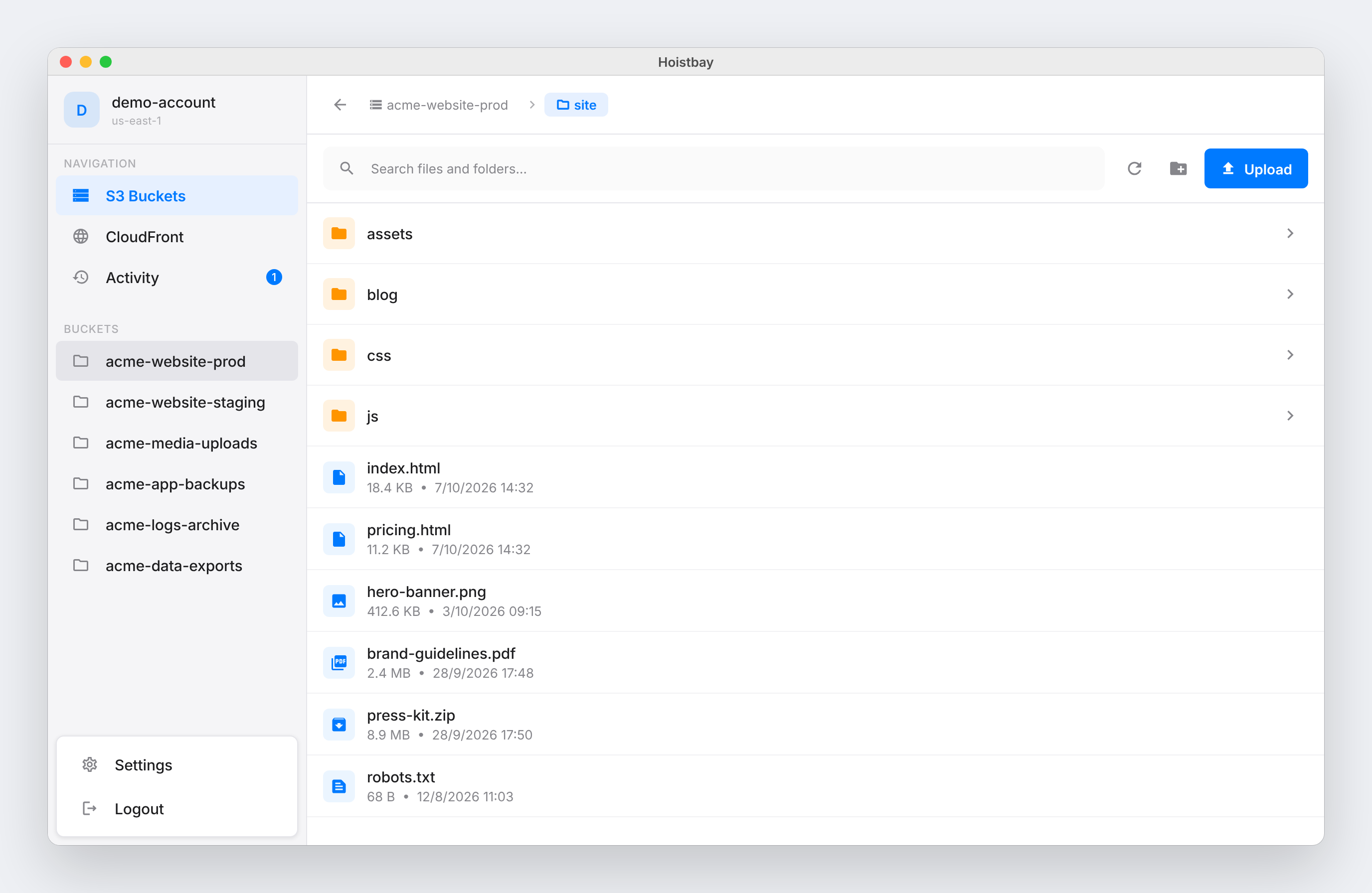
Hoistbay is a free, open-source desktop app for macOS and Windows that handles the repetitive S3 and CloudFront work that follows every release. Inside one window it lets you browse buckets, upload whole build folders with the correct headers applied, download single objects or entire folders, run bulk rename, move, copy and delete operations, and clear CloudFront caches. It is built for developers and teams who publish sites and assets to Amazon S3 and deliver them through CloudFront, and who would rather not click through the AWS console or remember CLI flags. Access keys live in the operating system keychain, there is no backend and no telemetry, and the app talks to nobody but AWS.
The jobs Hoistbay targets are the ones that repeat after every release: getting a build folder into a bucket with the right Cache-Control headers, invalidating the CDN so users see the new version, and moving between the AWS accounts that separate production, staging and development. Done by hand, these steps are error-prone. Headers get set incorrectly and a build has to be uploaded again; temporary session credentials or a mismatched bucket region produce a SignatureDoesNotMatch error that is hard to diagnose; long folder listings stop at the first page; and a network hiccup midway through a transfer can fail silently. Hoistbay also addresses a trust problem: any new app asking for AWS keys has to earn that trust, and the product is explicit that it has no servers of its own, so there is nowhere for keys to go except AWS.
Header Rules on Every Upload is the core of the deploy workflow. You set per-bucket rules once and Hoistbay applies them automatically to every upload afterwards. In the example shown on the site, `*.js` and `*.css` files get `Cache-Control: max-age=31536000`, while `*.html` gets `no-cache` — the familiar pattern for static assets that can be cached for a long time alongside HTML that must stay fresh. Rules are set by file pattern and cover Cache-Control, Content-Type and Content-Encoding. The practical benefit is that you no longer re-upload a build because the headers were wrong; the rule lives with the bucket and keeps working release after release without anyone having to remember the correct values or CLI flags.
Every AWS Account, One Click Away describes the multi-account handling. You save a profile per account and region and switch between them instantly, with the interface showing entries such as prod-infrastructure in us-west-2, dev-sandbox in us-east-1 and staging-testing in eu-central-1. Session tokens work for temporary credentials, and bucket regions are detected automatically, which removes a common cause of SignatureDoesNotMatch errors. For anyone juggling several environments, this means crossing from production to a sandbox no longer involves re-entering keys or editing a configuration file.
Uploads, Downloads and Bulk Changes covers moving data. You can drag in files or several folders at once with the folder structure kept intact, download single objects or whole folders, and multi-select objects to rename, move, copy across buckets and regions, or delete — folders included. Clear CloudFront Cache in Seconds sits alongside it: your distributions are listed next to your buckets, you can invalidate `/*` or specific paths after a deploy, and you can watch the invalidation until it reports “Cache cleared”. Both operations feed the same Activity panel, so transfers and invalidations are visible in one place rather than scattered across separate tools.
Inspect and Fix Metadata gives you a details pane for any object showing its properties, HTTP headers, tags and versions. Content-Type, Content-Encoding or `x-amz-meta-*` values can be corrected in place, without re-uploading the file. One Activity Panel for Everything collects uploads, downloads, deletes and cache clears with live progress, start and finish times, and a clear success or failure status. Resilient on Flaky Networks means network hiccups are retried automatically up to three times, and anything that still fails is reported per object instead of failing silently. Fixes the S3 Errors You Know addresses specific long-standing annoyances: keys containing spaces or special characters just work through custom Signature V4 signing, bulk deletes send the required Content-MD5, and folders with 1,000+ objects are fully paginated.
The overall approach is deliberately narrow and local. Hoistbay has no middleman backend and no analytics; it calls the official AWS regional endpoints over HTTPS using the aws_s3_api SDK and nothing else. Credentials are encrypted at rest using flutter_secure_storage, which leverages each platform's native keystore — the macOS Keychain and Windows Credential Manager — and keys are only read when the app calls AWS. The code is open source under the MIT license on GitHub so it can be audited, and the README lists the exact IAM permissions each feature needs for anyone who prefers least privilege. The app itself is built with Flutter and can be built from source, and the site hosts an interactive demo that is a working replica of the app running in the browser and never touching AWS.
The outcome for users is a shorter, more predictable path from build folder to CDN. Header correctness stops being a manual step, so builds do not need to be re-uploaded. Account and region switching stops producing signing errors. Cache invalidation becomes a single click followed by a visible confirmation instead of a console detour. Failed objects are surfaced by name rather than disappearing, and large folders and awkward key names are handled. Because credentials never leave the machine and there is no backend, adopting the tool does not add a third party to your AWS security review.
Concrete scenarios map directly to the described features. A developer finishes a static site build and drags the output folder into Hoistbay, knowing that the JavaScript and CSS files will receive the long-lived Cache-Control rule and the HTML files the no-cache rule. After the upload, they invalidate `/*` on the matching distribution and watch until the cache is cleared. A team member downloads an entire assets folder to inspect what is actually live. Someone reorganises objects with multi-select move and copy across buckets and regions. An engineer discovers an object served with the wrong Content-Type and corrects it in the details pane without re-uploading. A freelancer jumps between production and a client sandbox using saved profiles.
Hoistbay is aimed at developers and teams working with Amazon S3 and CloudFront, and at anyone who would otherwise operate those services through the AWS console or CLI flags. It runs on macOS (Apple Silicon and Intel, macOS 12+, version 1.1.1) and Windows (Windows 10/11 x64, version 1.1.1), with a Linux client listed as coming soon. It is free and open source, MIT licensed, built with Flutter and released through GitHub, which also hosts the changelog. First launches on macOS require a right-click Open because the app is not yet notarized by Apple, and Windows may show a SmartScreen prompt that can be bypassed through More info and Run anyway.
Hoistbay's value proposition is straightforward: it turns the recurring S3 and CloudFront chores after a release — correct headers, cleared caches and the right account — into a single fast desktop workflow, while keeping AWS credentials on your own machine, in your own keychain, with no backend and no telemetry.
Publisher
A
admin
Launch Date2026-10-21
Platformdesktop
Pricingfree
Tech Stack
#Flutter#flutter_secure_storage#aws_s3_api