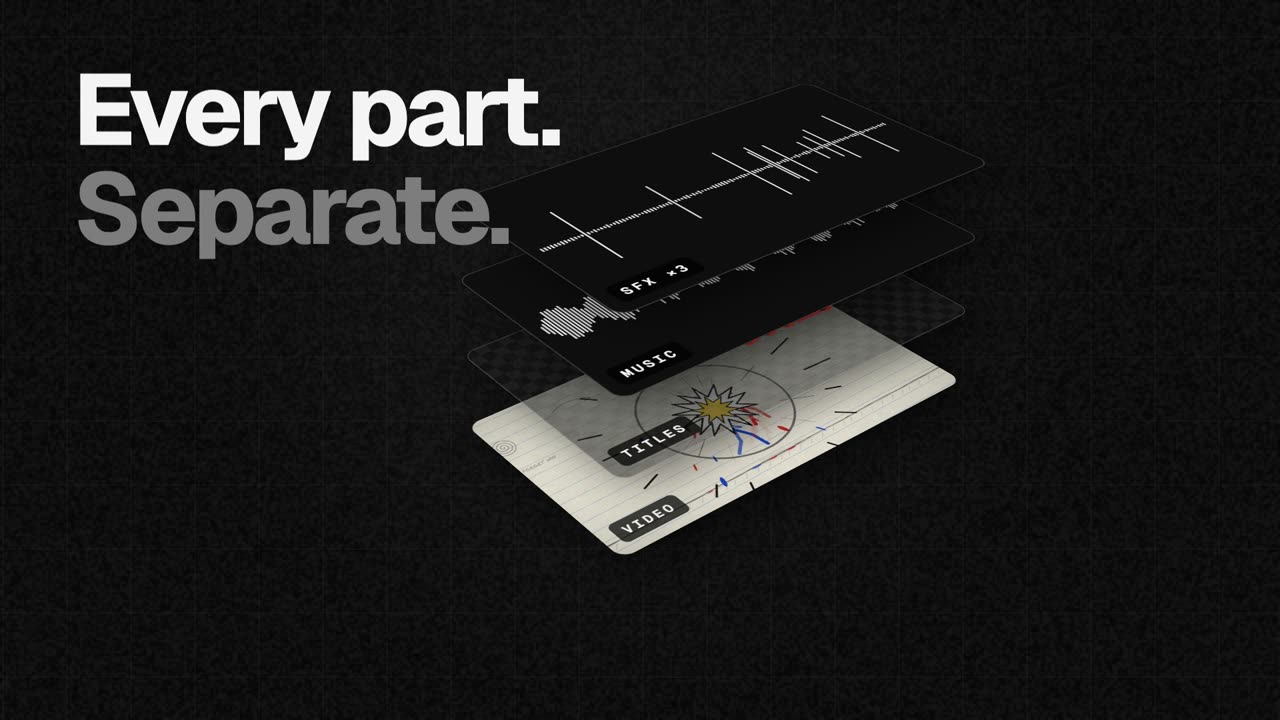
EasyCut is a free video editor that runs entirely in your browser and is built around a single, specific job: finishing motion videos that Claude has made. Claude designs the video, animates it and scores it — its own motion, music and sound effects — and EasyCut then opens every part of that video as its own track inside one project. Instead of ending up with a flat file, you get a timeline where the video, the titles, the music and each individual sound effect are lined up, labelled and ready to edit. That means you can trim a scene, mute a whoosh, drop in your own track or move the titles, and you can still select one clip and ask Claude to change just that part without rebuilding the whole video. It is free, requires no sign-up, adds no watermark and never uploads your files.
The problem EasyCut addresses is a familiar one for anyone making videos with AI: generation tools are good at producing something complete, but they hand back a finished artefact. Once a video has been rendered, the layers are gone. A title is baked into the frame, the music is welded to the picture, and a single sound effect that lands in the wrong place forces you to regenerate everything or start over in a conventional editor that was never designed around AI output. EasyCut's answer is to keep the structure of the AI-generated video intact. By opening each element on its own track, it preserves the ability to make targeted changes at the point where they matter, which is what finishing a video actually means in practice.
EasyCut's core editing toolset covers the essentials of assembling a timeline. You can cut, trim and split clips by dragging edges, splitting at the playhead and reordering by dragging, and transitions can be added with one click. The editor is described as a real editor, with a magnetic timeline, frame-exact cuts, J/K/L keyboard controls, markers and undo for everything, so the fundamental mechanics of cutting work the way an experienced editor expects. Two features attack the most tedious part of editing. Remove pauses takes the silences out of a recording in one go, and you can also cut words by crossing them out directly in the transcript — a far more direct way of tightening a talking-head section than hunting through waveforms.
Auto captions writes word-by-word captions on your computer and can save them as SRT or VTT files, which makes the output useful outside EasyCut as well. The music tools are built around fitting a track to the edit rather than the other way around: you can fit any song to the video's length and cut on the beat with its real ending, music ducks automatically under voices, and there are free music and effects libraries to draw on. EasyCut can also record directly onto the timeline — your screen, your camera, or both together with your voice — so you can capture a demo, an introduction or a reaction and drop it straight into the project without reaching for a separate app.
A visual toolkit covers colour looks, green screen, split screen, blur boxes, shapes and stickers. A set of AI features — voice clean-up, background removal and an AI voice — runs on your device without uploading a thing; the only downloads are the AI models themselves, fetched once the first time you use a feature. Speed ramps let you slow one moment down or speed it up, easing smoothly in and out of the change. Layers groups every clip of a Claude video into one list, so you can find all the whooshes and mute or delete them at once. Your brand keeps your logo, colours and fonts in one place for every video, and Claude can use them too.
The most distinctive part of EasyCut's approach is the hand-off from Claude to the timeline. To set it up you connect Claude once, which takes about a minute. On Claude Desktop you download the EasyCut extension — EasyCut.mcpb, 170 KB, for macOS and Windows — and open it, and Claude asks to install it: you press Install. Claude already has everything it needs to run it. On Claude Code you run a single terminal command, claude mcp add easycut -- npx -y easycut-connector@latest, which requires Node.js 18 or newer. From then on, Claude can open the videos it makes straight in EasyCut, every part on its own track. If you are using claude.ai in the browser instead, you ask for the parts as downloads and then open them from EasyCut's Claude panel.
The outcome for users is speed: a change to one title or one sound effect no longer means regenerating a whole video, because the structure is still there to edit. Because everything happens locally, footage stays private — your files never leave your computer. Projects save in your browser automatically as you work, and can be moved between machines as a single .easycut file, so the work travels with you. The editor is designed to be calm: big buttons, plain words and tips everywhere mean there is nothing to learn first.
Concrete uses follow directly from that workflow. A founder asks Claude for a dynamic launch video for an app, then opens it in EasyCut to trim a scene, swap in their own logo, fit a track to the edit and export wide, tall and square versions for different platforms. A creator cuts the pauses out of a screen-recorded walkthrough, adds word-by-word captions and exports the SRT alongside the MP4. A marketer takes a Claude-made promo, swaps the music for something on brand, and creates a smooth slow-motion speed ramp for a key moment. EasyCut is not limited to Claude output either: it is a full editor, so you can add your own videos, photos and music, or record your screen and camera, and cut, caption, colour and export them the same way.
EasyCut is aimed at people who make motion videos with Claude and want to finish them properly — AI-first creators, indie founders, marketers and anyone producing motion content without a professional editing suite. It runs in the browser on computers; on a phone the screen is too small for a timeline, so it is explicitly a computer tool. Google Chrome and Microsoft Edge do everything, including export, while Safari 16.4+ and Firefox 130+ can edit too. Export options include MP4 up to 4K and 60 fps in wide, tall and square formats in one go, a GIF, or just the sound. Pricing is straightforward: EasyCut is free, with no trial, no watermark and no account.
The through-line is a simple idea: Claude makes it, you finish it. EasyCut takes the completeness of an AI-generated motion video and restores the editability that normally disappears the moment it renders, keeping every title, scene, image, sound and element on its own track. Free, in your browser, with nothing uploaded and nothing to learn first, it is the finishing editor for AI video.
Publisher
A
admin
Launch Date2026-10-07
Platformweb
Pricingfree
Tech Stack
#MCP#Node.js