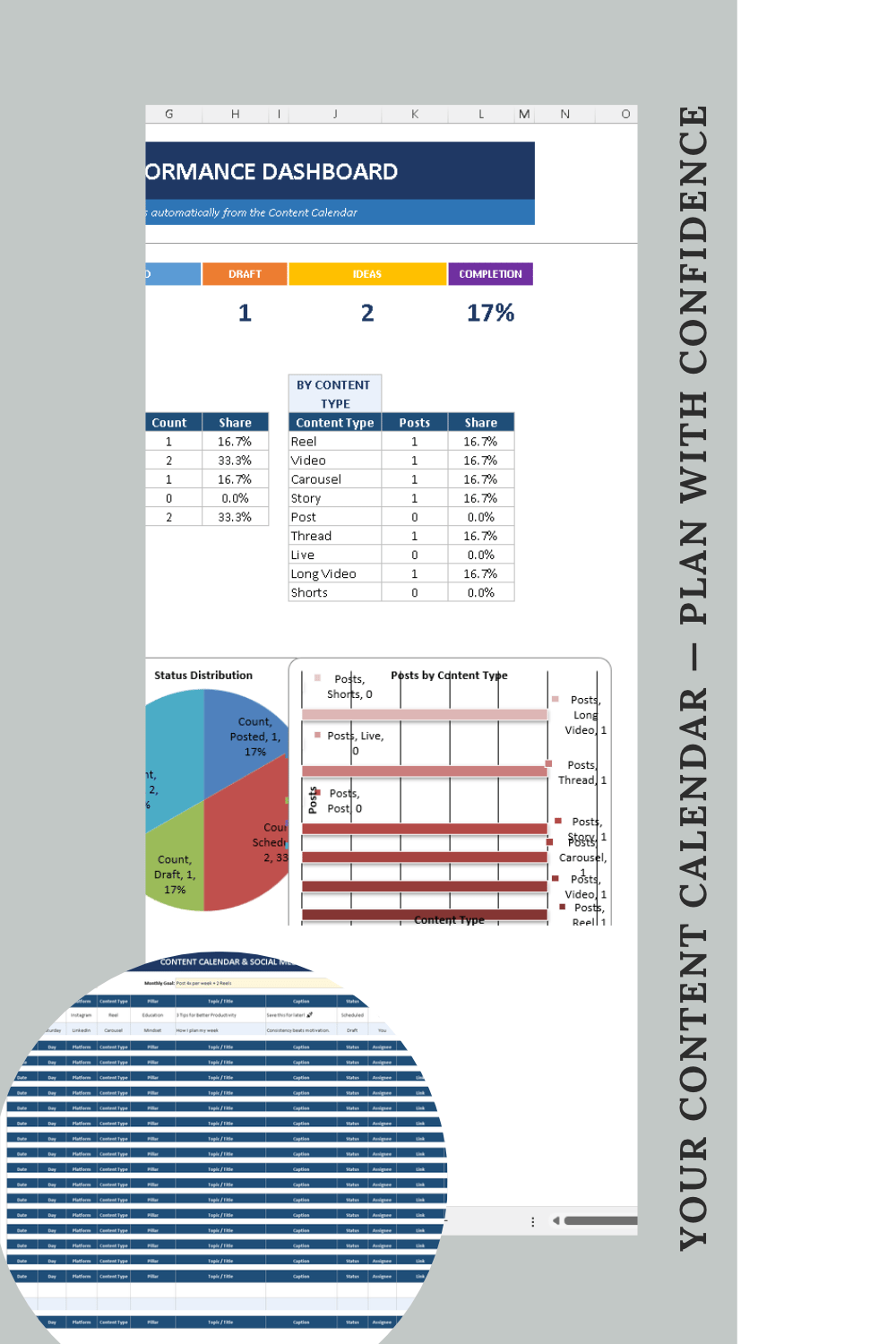
Content Calendar & Social Media Planner is a downloadable spreadsheet template, delivered as a 15KB XLSX file, that lets you plan your content and schedule it across platforms so you can finally see your posting rhythm at a glance. In its free edition you can plan up to 15 posts and capture up to 10 ideas, and the file includes a live dashboard that reports total posts, a status breakdown and your completion rate. The listing positions it as structure without the overwhelm — built for creators and small teams who want a single, organized place to move an idea from first capture through drafting and into a posted state.
The problem it addresses is familiar to anyone who publishes regularly: ideas scatter across notes, drafts and half-finished plans, and the calendar that is supposed to connect them is either missing or sits in a different tool. Without a shared view, it is hard to tell what is actually scheduled, what is still a draft and what has already gone live, and that makes a consistent posting rhythm difficult to see, let alone maintain. The planner's stated purpose is to close that gap — capture ideas, build a calendar, and track status from draft to posted — and its maker describes the goal as giving people enough structure to get organized without the overwhelm that comes with a heavier social media management tool.
The first capability is the content calendar itself. The free planner is designed to let you plan up to 15 posts, mapping out what you intend to publish and when, and the product is described as letting you plan your content and schedule across platforms. Those 15 slots are framed as enough to get organized and to start seeing your posting rhythm emerge, which matters because a rhythm only becomes visible once intentions are written down in one place rather than carried around in your head.
The second capability is idea capture. The free edition lets you capture up to 10 ideas, giving every thought that is not yet a post a holding place so it does not get lost before it is ready to be scheduled. Backed by that idea list, the calendar stops being a blank grid you have to fill from scratch and becomes a place where captured ideas are promoted into planned posts. Alongside capture sits status tracking, which lets you follow a post from draft to posted — a simple progression that makes the state of each piece of content explicit rather than something you have to remember.
The third capability is the live dashboard. It shows total posts, a status breakdown and your completion rate, which together turn the entries you make into an at-a-glance picture of your publishing. Rather than opening the calendar and counting rows, you can see how many posts exist in total, how they divide across statuses, and what share of the plan has been completed. The listing calls this seeing your posting rhythm at a glance, and that framing is the point: the dashboard is a feedback loop on consistency, not just a summary of rows.
In terms of how it works, the product is a spreadsheet template rather than a hosted social network scheduler. You receive a single XLSX file of about 15KB, and the planning, idea capture, status tracking and dashboard all live inside that workbook — the live dashboard reflects the posts and statuses you enter. Because it is a file, there is no separate account or platform to adopt in order to get started; the workflow is simply to capture ideas, place up to 15 of them on the calendar, and move each one along its status as you work. A paid tier, Content Calendar Planner Pro, extends the same approach with unlimited capacity, a Content Pillars strategy framework, a Monthly Review retrospective, and full breakdowns by platform, status and content type.
The benefits follow directly from those mechanics. Planning in one place means ideas have somewhere to go and posts have a visible state, so nothing depends on memory. The status path from draft to posted makes progress concrete and keeps unfinished work in view. The dashboard's total posts, status breakdown and completion rate give an honest read on whether you are actually publishing, replacing guesswork with a number. And the spreadsheet format keeps the whole system lightweight, which is exactly what the listing promises: structure without the overwhelm.
Concrete use cases match the shape of the template. A solo creator can lay out up to 15 planned posts, hold up to 10 raw ideas in reserve, and check the dashboard to see completion rate as posts move from draft to posted. A small team can use the same workbook as a shared plan of what is being published and what state each item is in. Someone overloaded by idea chaos can use the idea capture area first, then promote the strongest ideas into the calendar. A creator who is unsure whether a structured system fits can start with the free version, which covers up to 15 posts and 10 ideas, before deciding whether the Content Pillars framework, Monthly Review retrospective and platform, status and content type breakdowns in Pro are worth adding.
On audience, the listing is explicit: it is built for creators and small teams who want structure without the overwhelm. On pricing, the free version is listed at $0.00 with a free download, and the Pro edition of the same planner is listed separately at $9.99. The format is an XLSX file of approximately 15KB, and the product is distributed through Payhip.
In summary, Content Calendar & Social Media Planner is a free spreadsheet-based system for planning up to 15 posts, capturing up to 10 ideas, tracking each item from draft to posted, and watching total posts, status breakdown and completion rate on a live dashboard — a lightweight way for creators and small teams to get organized and keep their posting rhythm visible.
Publisher
A
admin
Launch Date2026-11-21
Platformdesktop
Pricingfree