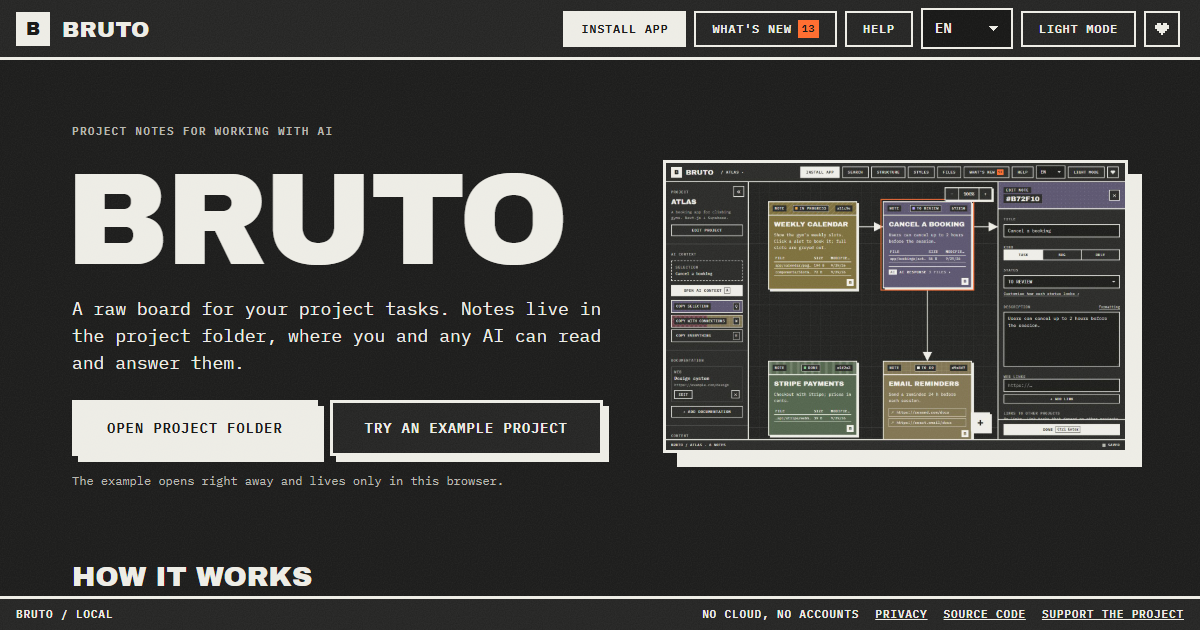
Bruto is a free, open-source task board for working on projects with AI. It describes itself as a raw, brutalist board for your project tasks, and its defining trait is where those tasks are stored: notes live in the project folder, inside a .bruto/workspace.json file, where both you and any AI can read and answer them. You begin by opening your project folder, and Bruto creates that workspace file — nothing leaves your computer. From there you write tasks, each note holding a description, files, links, screenshots and a status, connect them to show how they relate, and then hand them to an AI. It is built for people who code alongside assistants such as Claude Code, Cursor or ChatGPT and want a single board that the human and the model can both see.
The problem Bruto addresses is the gap between the place work is planned and the place an AI can actually see it. Tasks usually sit in a separate hosted tracker while the AI sits inside the repository, so context has to be retyped, pasted and reformatted every time a model is asked to help. Bruto removes that translation step by putting the board in the project folder itself. Because the notes are files next to the code, an AI with access to your files can read them directly, and you can copy exactly the context a model needs with a single key. Nothing is sent to a server, there are no accounts, and the notes never leave your folders, which matters for private or client code.
The core capability is the way context is handed to the AI. With the Q, W and E keys you copy the current selection, the selection together with everything it points to, or the whole project, and it comes out as clean Markdown with instructions for the model. A preview shows exactly what will be copied and how many tokens it amounts to, so you can inspect the payload before pasting it into Claude, ChatGPT, Gemini or DeepSeek. A global context carries your stack and decisions into every copy, which keeps the model aligned with the project's conventions instead of forcing you to restate them each time.
Bruto is still a real board. Notes carry a status, files, links and screenshots; you drag them, connect them with arrows to show relationships, and edit many at once. A note can also be a rule rather than a task — for example, "run the tests before finishing". Standing rules go into every copy you make, and the AI applies them on each task until you close the rule, which is a way to encode project policy once instead of repeating it inside every prompt.
The structure view shows where the work is: folders appear as blocks marked with the notes that point at them. When Bruto recognises the project, it draws it for what it actually is, showing screens with their components, API resources with their endpoints, and tables with their keys and policies. Recognised stacks include web frameworks such as React, Vue, Svelte, Next.js, Nuxt, SvelteKit, Astro and Angular; API frameworks such as .NET, NestJS, Express, Fastify, FastAPI, Flask and Spring; and databases and data tools such as Oracle PL/SQL, PostgreSQL, Supabase, SQL, Prisma and Drizzle. Notes can also reach across projects: a note can block, or wait on, a note in another project, so front-end, API and database boards all show the dependency and one click takes you to the other board.
Agents can work the board directly. With the MCP server, Claude Code and other agents list and read notes, mark the note they are working on and answer it, without touching the JSON by hand. If the AI can edit files, it answers inside the note and marks it for review; whatever the AI answers stays in the note, and if something is still wrong you write what and mark it "Changes requested", sending it back with all of its context. To coexist safely with other tools, every save reads the file first and merges what changed elsewhere, note by note. A broken file is never overwritten and there is always a backup.
Finding things is covered by Ctrl+F, which searches by text, path or id and filters by status and by what a note contains — files, an AI response, images or a link. The interface is keyboard first: every action has a shortcut, notes are reachable with Tab, and everything has a name for screen readers. Bruto ships in nine languages and two themes, can be installed as an app, works offline and tells you when a new version is out. It is local only — no server and no accounts, just anonymous usage stats and no cookies — so your notes never leave your folders. Setting up an agent is one line in AGENTS.md or CLAUDE.md, or a single command to add Bruto as an MCP server.
Concrete workflows look like this. You open your project folder in Bruto and write a note describing a task, attaching the relevant files, links and screenshots. You press one key to copy the task with everything it points to, paste it into Claude, ChatGPT, Gemini or DeepSeek, and paste the answer back — or, if the assistant can edit files, it answers inside the note and marks it for review. If the answer is not right, you write what is wrong, mark the note "Changes requested", and it goes back with all of its context intact. On a bigger effort, a note in the front-end board can wait on a note in the API or database board, and one click moves you between them. Anyone can try it first with an example project that opens right away and lives only in the browser.
Bruto is aimed at developers and small teams who build with AI assistants and want the task list, the code and the model to share one place. It suits people working in repositories that use React, Vue, Svelte, Next.js, Nuxt, SvelteKit, Astro, Angular, .NET, NestJS, Express, Fastify, FastAPI, Flask, Spring, Oracle PL/SQL, PostgreSQL, Supabase, SQL, Prisma or Drizzle, because Bruto recognises those stacks and draws them in the structure view. It works with Claude, ChatGPT, Gemini and DeepSeek through copy and paste, with Claude Code and other agents over MCP, and with any agent that can read files via one line in AGENTS.md or CLAUDE.md. Bruto is free and open source, and opening your folders needs Chrome, Edge, Brave or Opera on a computer.
The outcome for users is one shared source of truth for human and machine. Because the tasks live in the repo, the AI works from the same notes you do, so there is less re-explaining, less copy-pasting and less drift between the plan and the code. The context preview and its token count make each hand-off deliberate rather than guesswork, standing rules keep conventions enforced automatically, and cross-project links keep front-end, API and database work visibly connected. Merge-safe saving means Bruto can sit alongside other tools that touch the same file without one silently overwriting the other, and the local-only design keeps sensitive code out of third-party servers.
In short, Bruto is a task board that stops treating the AI as an outside party. By keeping tasks in the project folder, copying model-ready context with one key, letting agents answer inside the notes they were given, and enforcing standing rules on every pass, it turns planning and prompting into a single loop. It is free, open source, needs no account and runs locally, so the board you plan on is the same one your AI works from.
Publisher
A
admin
Launch Date2026-10-01
Platformweb
Pricingfree