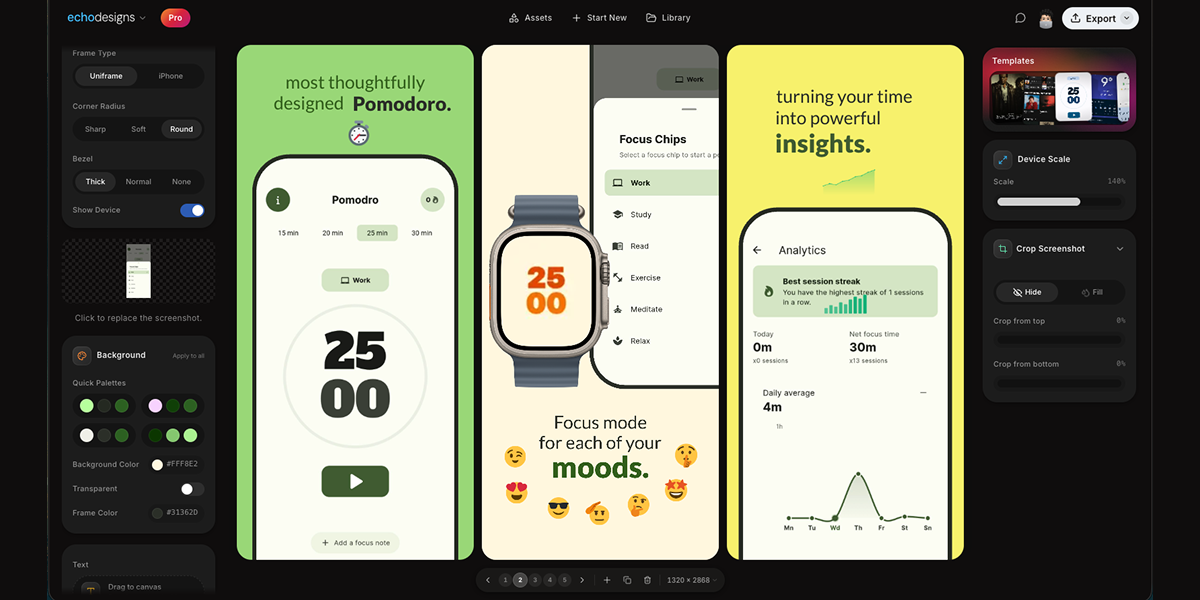
appdesigns is a free, browser-based editor for creating App Store and Google Play screenshots. As its homepage puts it, it makes 'Amazing app screenshots. Completely free.' You drop in your own app screens, frame them inside the latest iPhone, iPad, Mac or Watch devices, and add headlines, backgrounds and stickers before exporting at the exact sizes App Store Connect asks for. The tool is aimed at anyone who has to prepare a store listing - app developers, indie makers, designers and marketers - and its core purpose is to let them produce a polished, complete set of store screenshots directly in the browser, without an account and without installing design software.
Store screenshots matter because they are the visuals shoppers see before they read a word of the description, and both the App Store and Google Play expect images at specific sizes and formats. Getting that right usually means either learning a full design tool, paying for a screenshot service, or settling for a free plan that caps how much you can export. appdesigns is positioned against exactly that friction: the site describes it as 'Truly free, not free to start', with unlimited exports, no watermark and no account required to start. In other words, the steps that normally sit between an idea for a screenshot and the finished file - sign-ups, paywalls, watermarks and manual resizing - are removed, and only the design work remains.
The device framing system covers Mobile, iPad, Mac and Watch, so a single editor serves phone, tablet, desktop and watch listings. Within the mobile set you can pick from specific frames, including an iPhone Duo frame alongside iPhone 18 Pro, iPhone 18 Pro Max and iPhone 17 Pro Max models shown as the latest options, plus a further group of choices presented as '3 more'. Frame Type options such as Uniframe and iPhone appear next to the Device selector, there is an Orientation switch for Portrait and Landscape, and a Show Device toggle that lets you reveal or hide the frame itself. Framing screens in a recognisable device matters because store listings read more clearly when the mockup matches the hardware your app actually runs on, and the breadth of frames here means one workflow can cover a phone-only app or a product shipping on iPad, Mac and Watch at the same time.
Once a screenshot is uploaded through the 'Upload a screenshot' control, the canvas becomes the working surface for the rest of the design. Backgrounds are handled with a Background Color picker that shows a hex value such as #FF512F, a Transparent option for screens that should sit on nothing at all, and an 'Apply to all' action that pushes the chosen background across the entire set rather than one image at a time. Text is added from an 'Add text' button, with the on-canvas hint telling you to 'Click or drag to the canvas. Press T to place.' - so a headline can be typed, positioned by dragging, or dropped in quickly with the T key. The editor also displays the working canvas dimensions, shown on the site as 1242 x 2688, which keeps the export size visible while you compose. Together these controls cover the three things most store screenshots need beyond the app screen itself: a background, a short headline, and the correct pixel dimensions.
The editor goes beyond static framing with a Scale & Tilt panel, where values such as Scale 135% and Tilt 0 degrees can be dialled in to change how the device sits on the canvas - useful for angled, dynamic compositions rather than a straight-on shot. A Templates section presents a row of thumbnail previews to start from, matching the product description's note that you can 'start from a community template' instead of building every screen from scratch. And rather than treating each image as an isolated task, appdesigns is built for working across the whole set: the Product Hunt description states you can 'design the whole set side by side', which is how a coherent, consistent sequence of store screenshots gets produced.
The homepage reduces the entire process to three steps: 'Upload your app screenshots', 'Choose a device frame', and 'Customise and export'. Everything runs in the browser, and the page is explicit that the editor needs a laptop-sized window, offering a 'Copy the link for your laptop' option - so the intended environment is a desktop or laptop browser rather than a phone. First-time visitors are given a choice of onboarding: 'Show me around' for a guided tour, or 'I'll explore on my own' for people who would rather go straight to the canvas.
Because it is truly free rather than free to start, the practical benefits are straightforward: unlimited exports, no watermark on the finished images, and no account needed to begin. That means you can iterate on a headline, swap a device frame, or re-export a full set as many times as the listing needs, with nothing stamped across your artwork and no sign-up step in the way. Backgrounds can be standardised across every screen in one action, and community templates give a head start when you would rather not begin from an empty canvas. The site adds that 'Support is appreciated, never required', reinforcing that the core tool is not gated behind payment.
The most concrete use case shown on the site is a reference set of three App Store screenshots for a health or habit app, laid out on the canvas with the headlines 'Plan your week', 'Never miss a habit', 'Share progress' and 'Widgets too'. That is the classic pattern: upload several screens from the app, give each one a short benefit-led headline, place them in a phone frame, and export them as an ordered set. The same flow applies when producing Google Play screenshots, when building iPad, Mac or Watch visuals using the matching frames, when assembling a full set side by side with a shared background applied to all, and when using Scale & Tilt to create angled device shots instead of flat, straight-on images.
appdesigns runs on the web and is free to use. It is built for app developers, indie makers, designers and marketers who need store-ready screenshots, and it does not require an account to start. The device library covers Mobile, iPad, Mac and Watch frames, the canvas supports text, solid or transparent backgrounds and a working size displayed at dimensions such as 1242 x 2688, and exports are unlimited with no watermark. A guided tour is available for new users, and the editor is designed for a laptop-sized browser window.
In short, appdesigns turns a job that normally involves paid tools, accounts and resizing work into a three-step browser workflow: upload your screens, choose a device frame, customise with backgrounds and headlines, and export at the sizes the stores expect. It is free rather than free to start, it leaves no watermark, and it lets you design the whole set side by side - which is why it is a practical choice for anyone preparing an App Store or Google Play listing.
Publisher
A
admin
Launch Date2026-09-15
Platformweb
Pricingfree
Tech Stack
#Next.js#Supabase