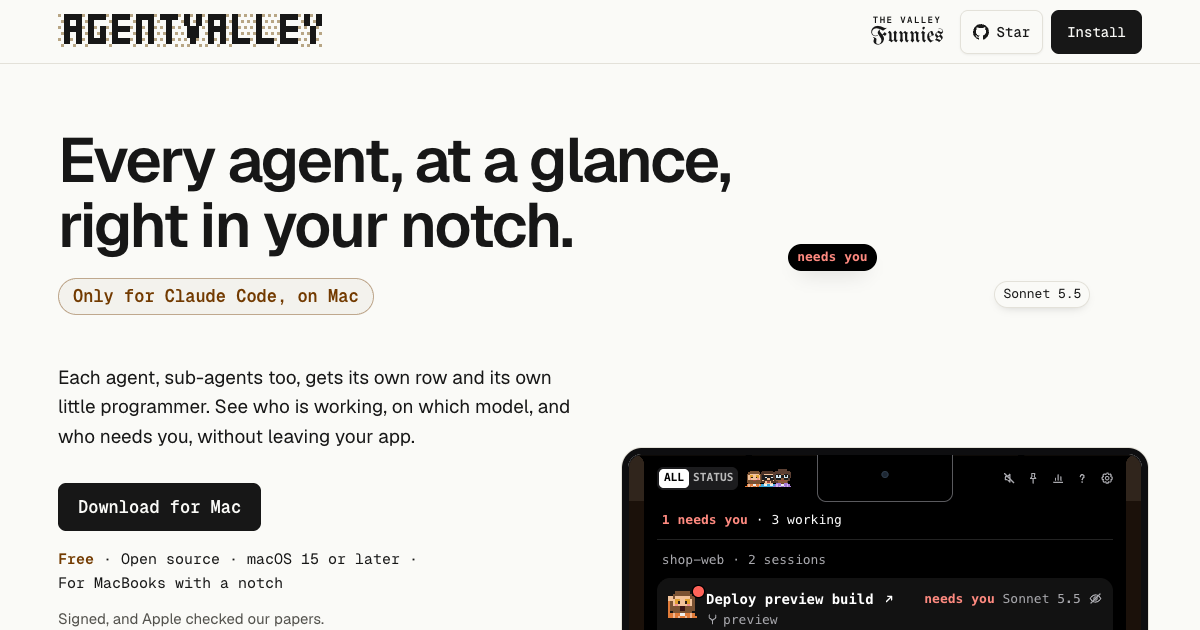
AgentValley is a free, open-source Mac app that lives in the black notch at the top of a MacBook screen and shows every Claude Code agent at a glance. It is built only for Claude Code and only for the Mac, and the makers state it plainly: every agent, sub-agents too, gets its own row and its own little programmer, so you can see who is working, on which model, and who needs you without leaving your app. The app presents each session as a card and each sub-agent as a row under it, grouping sessions by project whichever terminal they run in. It is aimed at Mac-based developers who run Claude Code and want a single, always-visible place to watch their agents work.
The problem it addresses is spelled out on the site: each agent reports in its own terminal, line by line, and running a few sessions at once means you end up switching windows just to check on them. Because Claude Code conversations live in separate terminal windows or tabs, a question or a permission prompt can sit unanswered for a long time. The site illustrates this with a comic about an agent that asks to run npm install a minute after a developer leaves for lunch and then waits the whole hour for an answer, and another strip about an Explore agent that needed 214 tool uses to find a file in the very folder that was already open. AgentValley exists to surface that state, who is working, which model they are on, and who is waiting for you, without hunting through windows.
Every agent gets a row. In the panel, a Claude Code session becomes a card, and the sub-agents a session starts get rows underneath it. Each row shows the task, the model doing the work and the latest step, for example Read index.tsx or Grep PaymentIntent, and sub-agent rows count their steps too. Sessions appear in one list grouped by project, whichever terminal they run in, and worktrees count as their project. The app deliberately avoids guessed progress bars: if an agent has written nothing for two minutes it is marked quiet, because it may be waiting for you in its terminal or stuck. Each agent is also given a pixel-art mascot drawn from the early days of computing; one of the crew runs your session and phones the others for help, and each project gets a regular, the same one of the crew, every session.
Know the moment one needs you. When an agent asks a question or waits for permission, a red count appears beside the notch, and opening the panel lets you read the question or the command. From there you can jump to its app in one click: with Go to the session's tab enabled, Terminal and iTerm2 open the exact tab, and Ghostty does too unless two sessions run in the same folder. With a plugin that you install yourself, you can answer Claude Code from the notch with Allow once or Deny, and the app never answers for you, because Allow happens only when you choose it. Sounds are on from the start: whoever runs the session plays a few notes on their own instrument and says what it needs, a command, an edit, a question or a plan, and a plain chime is available in Settings, along with a single switch that turns sound off.
See what each project cost. History opens from the chart button at the top of the panel; you pick a day, a week or a month and can go back to any earlier one, choosing a day for its hours or a project for its sessions. Costs are calculated at API prices, which the glossary defines as what Anthropic charges for each token used without a Claude plan, and the record is kept on your Mac even after Claude Code clears its own old files. The sample history shown on the site breaks a month down by model, Opus, Sonnet and Haiku, and by project, and separates a session's own main agent from its sub-agents so you can see where the spend went.
Hand the month over as a PDF. Export PDF writes a statement of work: every project for you, or one project for your team or a client. The report repeats the totals at API prices, draws a bar for each day, and records who did the work and what each model cost. Also in the panel are plan limits, your Claude 5-hour and weekly limits with the time left until reset, off until you turn it on, and token use for the last 5 hours and today with a 12-hour chart. A keyboard shortcut, Ctrl-Option-Command-A, opens the panel from any app; arrows pick and Return jumps.
The crew shows up in your terminal too. Claude Code's status line gets the face of whoever runs the session, along with the model, your plan and your limits, and each sub-agent row under the prompt gets its own face, its model and the step it is on. In the terminal the characters hold still: until your first prompt only a coffee waits on standby, and when a limit runs out they go fishing, or take the van for the weekly one. One command from the app's settings sets this up, and with the app closed your limits still show. The crew travels as a font and has been seen in Terminal, iTerm2, Ghostty and Cursor.
How it works: it reads, it doesn't touch. AgentValley reads ~/.claude/projects and ~/.claude/sessions, the files Claude Code writes as it works, and looks at Claude Code's processes and each project's .git to show which app and branch a session is in. It reads your Claude Code login from the Keychain only when you turn on Plan limits, and sends it only to api.anthropic.com. It asks GitHub once a day whether there is a new version, and that check can be turned off in Settings. Besides its own settings and updates, it writes only inside ~/Library/Application Support/AgentValley, and nothing in ~/.claude changes unless you put the crew in your terminal. You start that yourself with a command from the app's settings, which sets the status line in ~/.claude/settings.json and adds the font to ~/Library/Fonts, adding one line to Ghostty's config if you use Ghostty; the command that takes the crew out undoes all of it. The only hooks are the plugin's two, and you install the plugin yourself.
The outcome is fewer context switches and fewer stalled agents. Instead of cycling through terminal windows to see how things are going, you glance at the notch: working agents show their task, model and latest step, quiet agents are called out, and anything waiting on you raises a red count that you can act on from the panel. Because sub-agents get their own rows, long searches and plans stay visible while they run rather than appearing as silence. Because costs are recorded at API prices on your own machine, you keep a durable record of what each project consumed, even after Claude Code has cleared its own files.
Workflows described on the site include running several Claude Code sessions at once across projects such as a web shop, an API, a mobile app and docs, each with its own card; stepping away from the keyboard and being called back by a sound when an agent needs a command, an edit, a question or a plan; answering a permission prompt with Allow once or Deny straight from the notch and then jumping to the exact terminal tab; checking a month of spend by model and by project; and exporting a statement of work for a client or for a team.
AgentValley is free and open source, with the code public on GitHub. It needs macOS 15 or later and Claude Code, and it is made for MacBooks with a notch. The download is a DMG, and it can also be installed with Homebrew using the cask morsechimwai/tap/agent-valley. The app is signed and checked by Apple. The site also publishes The Valley Funnies, free comics about working with Claude Code, and asks for sponsorship of the crew.
In short, AgentValley turns the MacBook notch into a status board for Claude Code: every agent and sub-agent in one place, with the model, the current step and a clear signal when one of them needs you, plus a local history of what the work cost. It is free, open source and read-only by design, so the main thing it changes is how quickly you notice.
Publisher
A
admin
Launch Date2026-10-25
Platformdesktop
Pricingfree