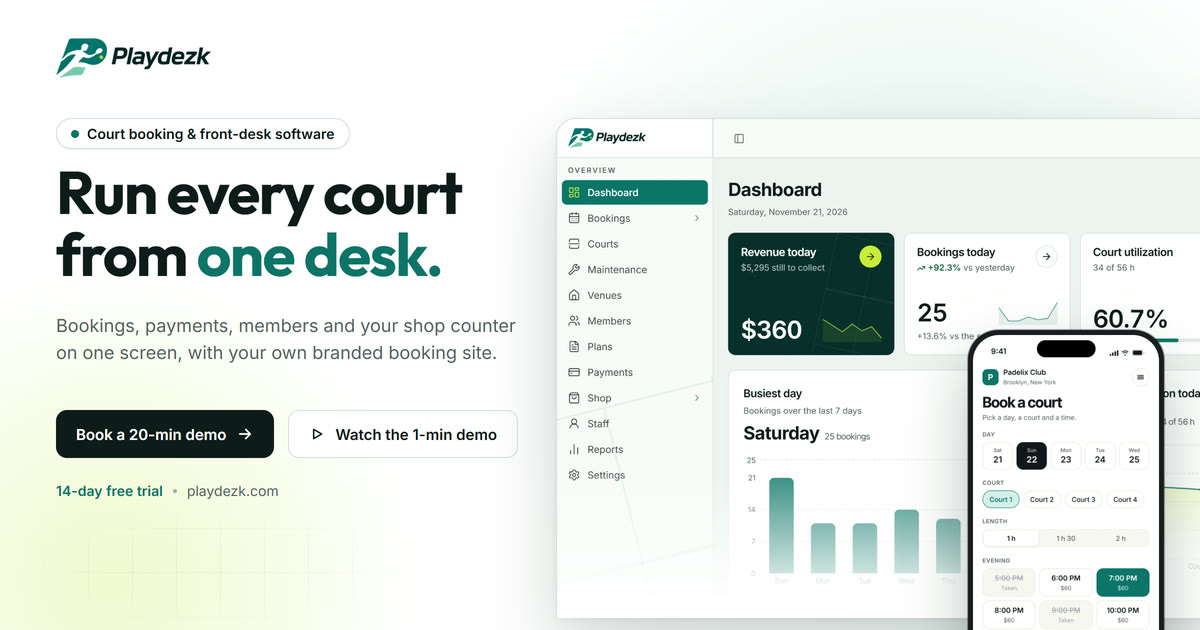
Playdezk is court booking and front-desk software built for sports clubs and court venues. It puts bookings, payments, members and the shop counter on one screen, and gives each venue its own branded booking site so players can reserve a court themselves instead of messaging the desk. The product is aimed at venues running padel, pickleball, tennis, futsal, cricket nets, badminton or squash courts, and its promise is to let a club run every court from one desk. Rather than spread the working day across WhatsApp, a paper register, a till, a bank app and a spreadsheet, staff work from one live board that shows every court, every hour, with walk-ins and online bookings in the same place.
The site describes the problem plainly: your desk is doing five jobs in five places. Bookings arrive by message, phone and walk-in, and when they are written down in more than one place, two people end up with the same court. Playdezk calls this double bookings from WhatsApp. The second problem is money. Payments land in a notebook, a till and a bank app, so at the end of the week nobody can say what was paid for which booking, and cash and card never reconcile. The third is visibility. Without one view of the week, quiet hours go unnoticed, and a venue cannot price or promote them. Playdezk's answer is to make a single screen the source of truth, so nothing has to be written down twice.
The centre of the product is one live board. Every court sits side by side with every hour, and each slot shows whether it is free, booked, pending or blocked, with paid and unpaid bookings visible at a glance. Staff can scroll through the evening rush, switch to the week view and back in one tap, and see the whole day without leaving the screen. Taking a booking at the desk is a short sequence: open New booking, choose the court, date and length, find the player by name or phone, then mark it paid by cash or card, or leave it unpaid and flagged. The court rate is filled in automatically, so the desk is not calculating prices by hand while a queue forms.
Players book themselves through the venue's own branded booking site, which the site says is there so your phone stops ringing. On a phone, a player picks a day, a court and a length, then chooses a priced time slot and continues. Players book from a link with their name and phone number, and no app is needed on their side. Because the booking system refuses a second booking on the same court and time, the double-booking problem that comes from messages and a paper register is removed. The comparison on the site draws a clear line against marketplace booking apps, where players book inside the app under the app's brand, rather than on a booking site that carries the venue's own branding.
Payments, members and the shop counter live in the same place as the bookings. Online, cash and card payments are recorded together, with members and plans included, and reports show payments taken online and at the desk, refunds, and what is still owed. Every booking can be marked as cash, card or unpaid, and unpaid ones are flagged so the desk can chase them. Counter sales such as balls or energy drinks are rung up at the desk and land in the same day's takings as court bookings, which is what allows the week's money to reconcile instead of being pieced together from a notebook, a till and a bank app.
Reports run themselves from the bookings already in the system. Utilisation, revenue and peak hours are worked out automatically, and owners can pull bookings, memberships and shop sales for any date range by picking a range and a venue. Revenue, bookings and what is still owed sit alongside utilisation and cancellations at a glance. The dashboard shows the busiest day and the bookings for each day of the last week, alongside revenue today, court utilisation and a week of bookings. The stated benefit is that an owner can know the numbers without calling the desk.
Access is controlled by roles. Owner, Manager and Staff logins see different things: the owner gets reports, prices and every venue; the manager gets courts, staff and the day board; staff get bookings, payments and the shop. Venues with more than one location switch between them from one login, and prices and reports are available for every venue from that same login. A manager can also block a court for coaching, and blocked time cannot be booked online or at the desk, which keeps internal use and maintenance from colliding with paying bookings.
Getting started is handled with the venue rather than left to it. Playdezk sets up courts, plans and staff logins around how the venue works: a short call covers courts, prices and opening hours, then the team configures courts and prices, membership plans and staff logins, then runs a go-live check with staff trained, a test booking made and the booking site checked. For venues already using another system or a spreadsheet, the team sets up courts, rates and members and agrees how to carry over upcoming bookings, although there is no automatic import yet. Setup time depends on how many courts a venue runs, how the admin should be set up and how the booking site should look, with a realistic timeline agreed on the demo call.
The outcomes described on the site follow directly from that consolidation. Double bookings stop because the system refuses a second booking on the same court and time. The venue gets its own branded booking site instead of relying on messages and replies. Cash, card, online and shop sales appear in the same takings, so the week reconciles. Staff see only what their role needs, limited to the venues they run. Reports on utilisation, revenue and peak hours come from the bookings themselves. And instead of hours lost each week to admin, the venue runs on a 14-day free trial followed by pricing set for that venue.
A Saturday at the venue shows how the pieces fit together. At 07:00, online slots open and courts fill while staff are still opening up, because players book on the venue's own site. At 09:15, walk-ins and shop sales are rung up at the desk, with a name, court and time or a drink at the counter, and both land on the same board and in the day's takings. At 18:00, the manager blocks Court 3 for coaching, and that time shows as closed online and at the desk. At 23:00, the owner opens the day's report and sees bookings, what was collected and how full each court was. Other described workflows include taking a desk booking in seconds during the evening rush and reviewing a date range across two branches from one login.
Playdezk is built for sports clubs and court venues rather than individual players, and covers padel, futsal, cricket nets, pickleball, tennis, badminton and squash. It runs in the browser on any phone, tablet or desk computer, so there is nothing for players to install. Pricing is not a one-size plan: every venue is different, so it is priced by setup and court count, with a one-time setup fee, a simple monthly plan and a 14-day free trial. A 20-minute demo is shown with the venue's own courts, and pricing requests are answered within 24 hours.
The takeaway is straightforward. Playdezk replaces the scattered set of tools a club uses to run its courts with one desk: a live board for every court and hour, a branded booking site for players, payments and shop sales in the same takings, role-based access across venues, and reports that build themselves from the bookings. For a venue that has been running on WhatsApp and a spreadsheet, that means fewer double bookings, money that reconciles, and a clear view of which hours sit empty and what they are worth.
Publisher
A
admin
Launch Date2026-11-26
Platformweb
Pricingpaid