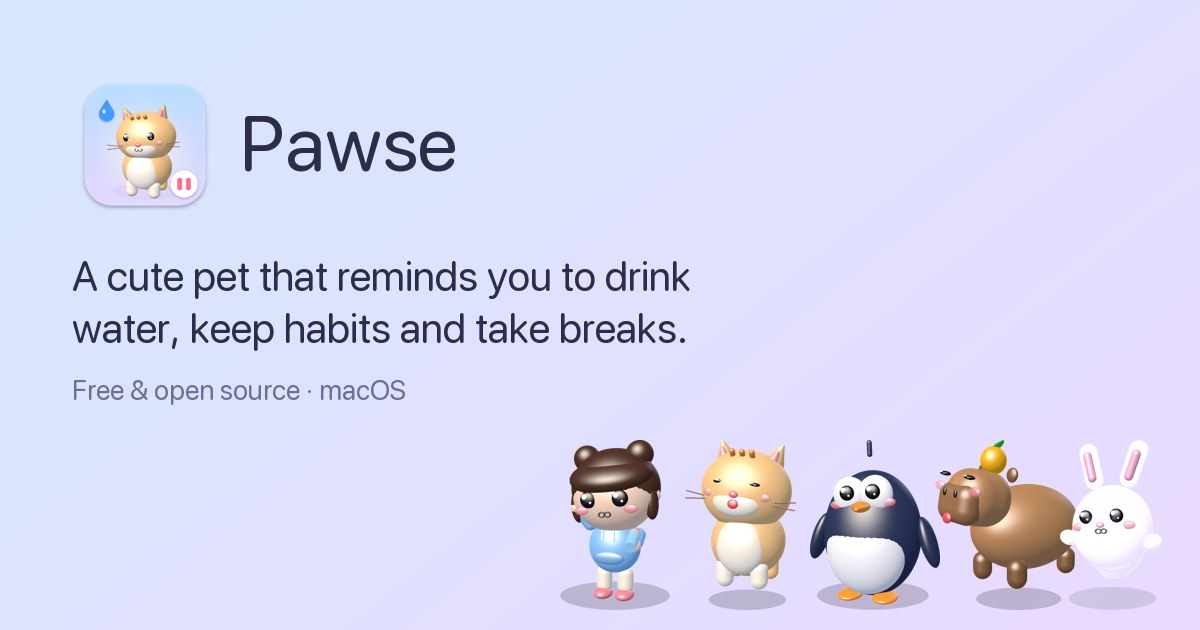
Pawse is a free, open-source macOS menu bar app that reminds you to drink water, keep your habits and take breaks from the screen. Instead of sending a notification, Pawse sends a cute 3D pet that walks onto your screen and asks you a simple question, such as "Did you drink water?". You answer yes or not yet. The app is built for Mac users who spend long stretches of the day in front of their screens and want gentle, hard-to-ignore nudges around hydration, movement, posture, eye rest and screen-time breaks, all collected in one small app that lives quietly in the menu bar until it is time to care.
Most reminder apps rely on notifications, and notifications are easy to dismiss. As Pawse's own page puts it, notifications get swiped away, banners get muted and reminders get ignored. The problem is not that people do not know they should drink water or stand up; it is that an impersonal banner is trivial to postpone. Pawse changes the delivery mechanism rather than the message. A small character walks across the screen, looks hopeful, and asks a direct question. It is much harder to say no to someone small and hopeful who walked all the way across your screen just to ask if you are okay. That single design decision is what the whole product is built around.
Water tracking is the first of the three main areas. You set a daily goal and a glass size, and your pet visits on your schedule, only during your active hours, and stops once you hit the goal. A one-click log lets you record a drink the moment you are asked, and the app keeps track of streaks and a month calendar so you can see continuity over time. The website shows an example of six of eight glasses logged today alongside an eleven-day streak. Because the pet only appears during active hours and stops after the goal is reached, the reminders stay relevant to your actual day rather than firing on a fixed timer regardless of whether you are at your desk.
Habits are the second area, and Pawse deliberately keeps them open-ended: any habit, any interval. You create a habit with an emoji and a goal, and the pet asks about it. The examples on the site include stretching every 30 minutes, walking every 45 minutes and resting your eyes every 20 minutes, but the habit itself can be anything. Each habit has its own interval, so a 30-minute stretch routine and a 45-minute walking reminder can run side by side without interfering with each other. The habit screens show progress such as three of four stretches done, along with streaks and a monthly calendar. The FAQ explains the setup directly: open Pawse, go to Habits, add a habit, turn on the pet reminder and set the interval you want.
Screen time is the third area, and it is where Pawse measures rather than assumes. The app tracks active screen use from keyboard and mouse activity and pauses the count when you step away; stepping away for three minutes counts as a break automatically. After 30 minutes of continuous screen time, adjustable to anything you like, Pawse shows a calm full-screen break with tips such as the 20-20-20 eye rule. The screen time view includes an hourly chart, auto-pause, a daily limit and 20-20-20 tips, and the site shows an example day with four hours and 28 minutes of screen time and four breaks taken. For habits you are serious about, there is an optional hard block. The pet covers the whole screen and it only unlocks when you confirm you did it. Hard block can be set per habit, it applies to water, any habit or breaks, locked breaks cannot be snoozed or ended early, and there is always an emergency exit: holding Esc for five seconds unlocks the screen.
The overall approach is to merge three kinds of self-care tracking — hydration, habit intervals and screen-time breaks — into a single app and deliver all of them through the same character. Rather than three separate utilities each with its own notification style, Pawse has one pet that handles every reminder type. The pet is not a static icon: it walks onto the screen, has moods, reacts to your answers and leaves. Saying yes makes it bounce with joy; saying not yet makes it droop and float back later. The dashboard itself is organised into Today, Habits and Screen time views, so the same app that interrupts you also shows you the record of what you have actually done.
The outcome Pawse aims at is breaks you will actually take and habits you will actually keep. Because reminders arrive as a character rather than a banner, they are harder to dismiss, and because the pet only appears during active hours and stops when a goal is reached, the interruptions stay tied to real activity. Recording a drink or a stretch takes one click, so logging stays low friction. Streaks and monthly calendars turn scattered good intentions into visible continuity. And because the app makes no network requests and has no analytics or accounts, your history stays on your Mac, which makes it reasonable to track personal health habits inside it.
The website walks through a concrete day. At 9:00, Momo walks in with a bottle before your first meeting and asks about water. At 10:30, Mochi arrives for the 30-minute stretch habit and waits for an answer. At 12:00, after 30 minutes of screen time, a calm countdown appears and you take your eyes off the screen. At 15:00, if you answer "not yet", Boo droops, sniffles and floats back a little later rather than disappearing. At 18:00, the goal is reached: eight of eight glasses and four stretches, and the streak grows to twelve days. Other described scenarios include setting a stretch reminder every 30 minutes on a Mac, using hard block so a break cannot be snoozed, and creating your own habits around anything you care about.
Pawse runs on macOS 13 Ventura, macOS 14 Sonoma, macOS 15 Sequoia and newer, on both Apple silicon (M1, M2, M3, M4) and Intel Macs, delivered as a universal download of about 5MB. It is a menu bar app, so it lives in the menu bar rather than the Dock. It is completely free and open source under the MIT licence, with no ads, subscriptions, in-app purchases or accounts, and the site describes it as $0 forever. Five hand-built 3D pets ship with it — Momo the Chibi, Mochi the Cat, Pip the Penguin, Yuzu the Capybara and Boo the Ghost Bunny — each with its own walk, voice and personality, and you can drop in any .usdz 3D model to use your own pet instead.
Pawse is a small, free Mac app with a simple thesis: the reminder is not the hard part, the delivery is. By turning water, habits and screen-time breaks into a question asked by a tiny animated pet with a voice, moods and an optional hard block, it makes the small daily decisions that protect your health difficult to swipe away. It stays quiet in the menu bar, asks only during your active hours, keeps your data on your Mac, and costs nothing.
Publisher
A
admin
Launch Date2026-10-11
Platformdesktop
Pricingfree
Tech Stack
#macOS#.usdz 3D models